Tag: devops

  • Using Trade Studies in Vetting Tool Stacks

    Using Trade Studies in Vetting Tool Stacks

    Adding to your tool stack should entail more thought than, “Start your free trial today!” It’s great when there is an application need and cloud-based tools are easily grabbed with a few clicks. However, surveying alternatives before making a tool stack change can prevent costly mistakes. Trade studies can help vet best-fit tools for evaluation.

    Short for trade-off, trade studies originated in the aerospace industry as a decision-making aid. Teams of engineers (or developers) usually generate multiple proposed technical solutions for any non-trivial problem. A little searching will find the term multiple criteria decision analysis, with three popular techniques: the analytic hierarchy process, the Kepner-Tregoe method and the Pugh method.

    For DevOps teams, I lean toward variants of the Pugh method because it avoids creating an overly complex weighting and scoring scheme. Pugh analysis has gained popularity among Six Sigma aficionados for the same reason. Multi-disciplinary teams find the process easy to understand and the results just as useful as more algebraic methods taking longer and needing more input.

    Let’s look at three steps in a practical approach: setting criteria, ranking best-fits and starting evaluation.

    Setting Trade Study Criteria

    Most tool stack disasters result from discovering a tool doesn’t meet all the requirements as the project unfolds. In my previous life, our IT team went all-in on a big-name ERP application partly because it featured web-based portals for suppliers. My e-business team discovered those portals required specific port numbers be opened at the firewall, which corporate security immediately rejected. We coded a way out, using Adobe ColdFusion querying the database directly and securing it with LDAP sign-on, but it took months.

    You could search for the “information I could have used YESTERDAY” gif or you can spend time setting the right criteria. Pugh analysis starts with a matrix of criteria rows versus candidate tool columns. What most sources won’t tell you about Pugh analysis is a trick in generating that criteria list:

    • Start with must-have features, with current requirements and anticipated future requirements.
    • Research tools (data sheets!) for near-fits against those must-have criteria and create the matrix.
    • Add all the features prominently listed for each of those near-fit tools to the criteria.
    • Search again for more near-fit tools matching features on the extended list, adding to the matrix.

    A common mistake is stopping after the first two bullets. Almost every trade study I’ve done discovers more tools fit the must-have list but didn’t emphasize all those features on their website. It’s a bit time-consuming, because every time you find a feature of interest you must go back and recheck all the other tools on your near-fit list for it.

    Adding non-requirements? You’ll miss innovation opportunities outside the Venn diagram intersection. My recent client study on marketing reporting tools found one touting support for a dream-list feature. Digging into that tool found it may not support two must-have requirements but does support the others.

    Ranking Best-Fits

    That’s why the trade study criteria list should visually differentiate must-haves from extended features. I usually shade the extended feature rows, then plot how near-fit tools stack up against all criteria. You can certainly add weighting to features for a more sophisticated analysis, but I find a simple must-have versus nice-to-have usually suffices.

    Now start scoring. A strict Pugh analysis uses a plus-same-minus scoring system. Plus means the tool has a clear advantage on that feature, same is same, and minus means that tool is at a disadvantage compared to the others. I sometimes simplify that to just X for a tool having the feature, blank for it doesn’t. This is mostly a data sheet comparison, and you may want to inject other information such as found reading reviews.

    What you’ll find is a best-fit list, and it probably won’t be perfect. You’d like to see a couple tools capturing most or all the must-haves, and a few more capturing some of them and extended features for contrast. As an example, here’s the trade study matrix for that marketing reporting tool assessment I mentioned with the vendor names omitted.
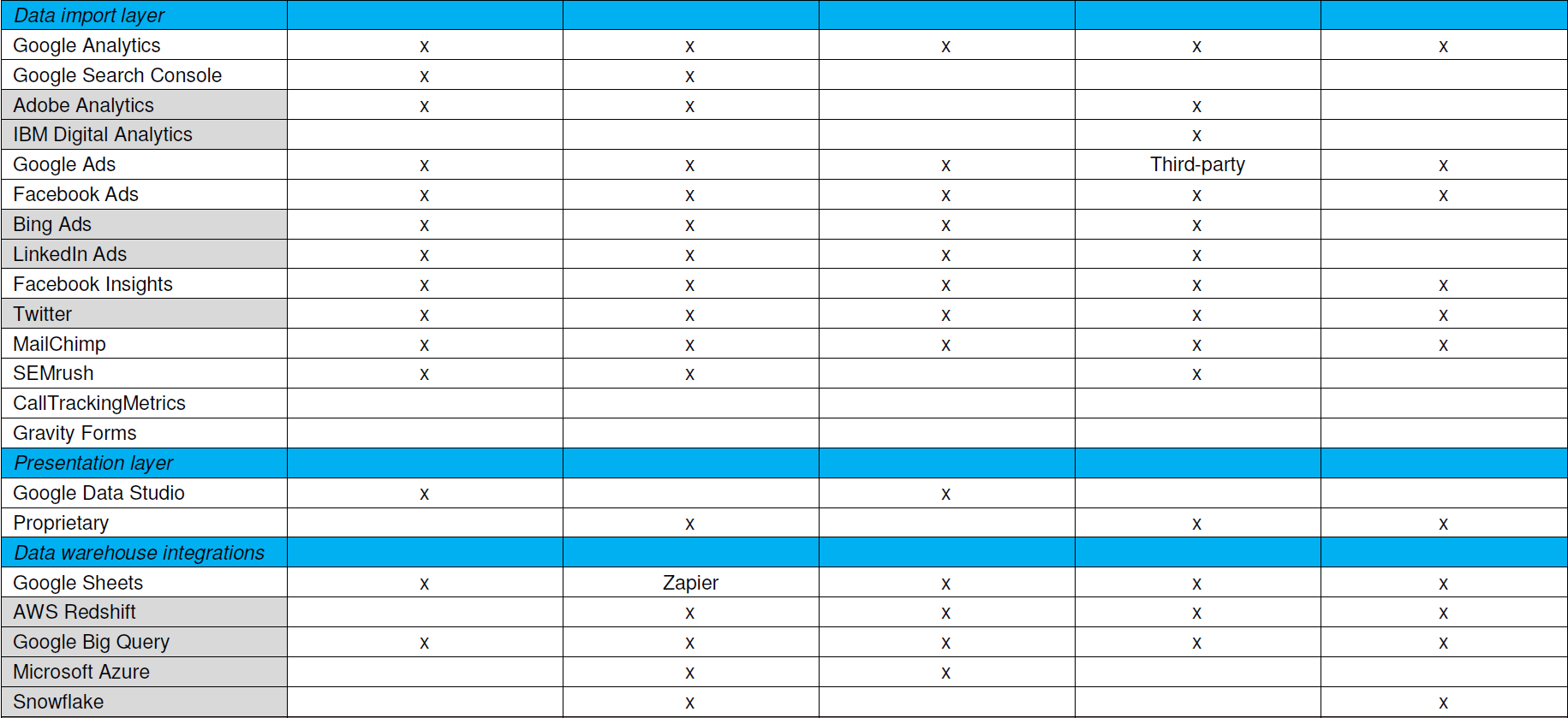
    Trade studies provide simpler, faster, actionable analysis

    Starting Evaluation

    Notice this doesn’t have cost information yet. Cost biases technical decisions if applied too early, and feature coverage doesn’t necessarily correlate with cost. Vendors also don’t price their stuff the same way. Some price by developer seats, some by data source integrations, some by monthly tracked users (MTUs) on the web.

    With a best-fit list in hand, it’s time to discuss the findings with your team and add information for evaluation. Confirm the scoring, check the vendor pricing models, ask the vendors about unclear feature support and download those free trials to see how they work. Consider how to cover those uncovered must-have features, or if those even are must-haves if few tools support them. Maybe swapping out another tool in the tool stack gets better coverage. Think about innovation those extended features may enable.

    Want simpler, faster, actionable analysis without a massive RFP? Trade studies do that. I think it’s valuable to have one person on your team be the keeper of trade studies, someone skilled at interviewing for requirements and refereeing debates during evaluation. You may want to bring in a consultant skilled at competitive research and analysis to help develop your process. In any case, adapt your approach until trade studies help you make better selections—there is no one right answer.


    — Don Dingee

  • Today: Predict 2019 Virtual Summit

    Today: Predict 2019 Virtual Summit

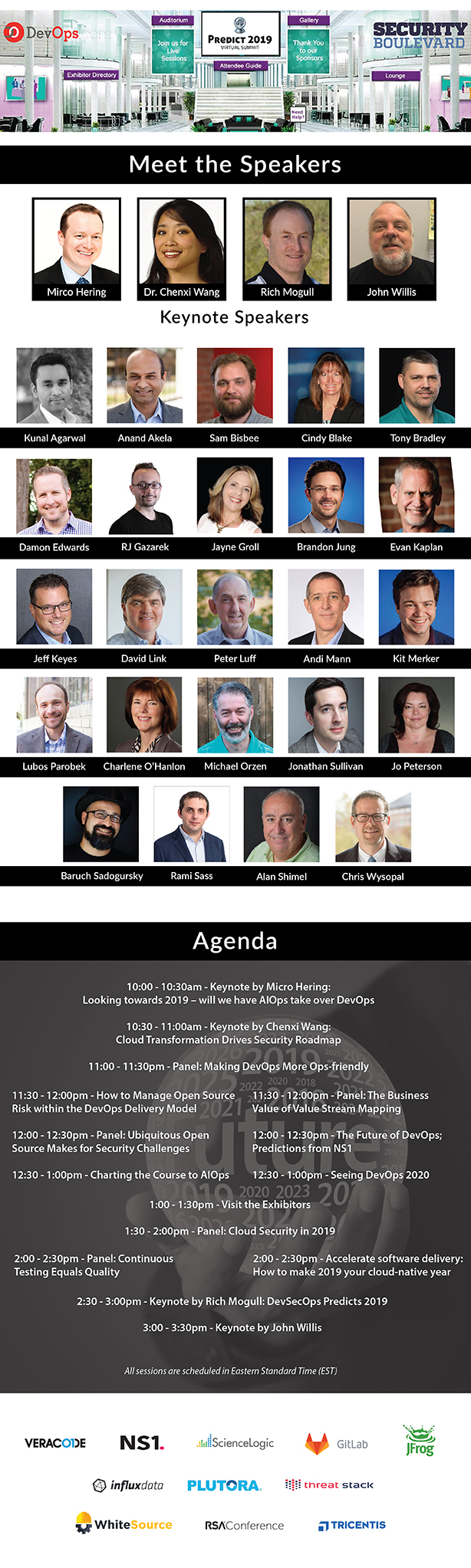
    Predict 2019 Virtual Summit is finally here! The summit is happening today, Tuesday, Dec. 18 at 10 a.m. Eastern. Don’t miss the opportunity to hear from Mirco Herring, Rich Mogull, John Willis, Chenxi Wang and other industry luminaries as they offer their DevOps and security predictions for 2019.

    If you have already registered, then go here to join livestream starting at 10 a.m. Can’t make the live event date? No worries! Register for the event, and we’ll send you the replay link after the event. Click here to download the program guide.

    Predict 2019 is a free virtual summit chock full of information and education for DevOps and security professionals presented in a virtual reality environment. It is a true virtual conference, replete with theaters to view the keynotes and presentations, a conference lobby to chat and socialize and a virtual trade show floor with virtual exhibitor stands equipped with video, downloads and even prizes for participation. And did I mention it’s free?

    This year’s event offers up presentations and sessions from the biggest names in DevOps and security, as well as speakers from well-known companies who’ll be sharing what they’ve gleaned from their DevOps and security initiatives.

    Here’s what the virtual format of Predict 2019 has to offer:

    • Complete control and access over every aspect of your digital experience.
    • Live and on-demand viewing from your home or office.
    • Attend and interact using the device of your choice (laptop, smartphone and tablet).
    • Digital downloads and presentations for all the sessions.

    And, perhaps most importantly, you will have unlimited playback post-event for six months! (This is for attendees who register by December 18 only!)

    Predict 2019 is here today, at a computer or mobile device near you. Visit the website for more information or to register for this daylong event. Registration—did we mention it’s free?—also includes access to the event on-demand. To register, click on the image below or this link.Predict 2019 will feature keynotes from a lineup of DevOps and Security IT executives and industry luminaries including:

    • Mirco Hering sharing his predictions for 2019—Will AIOps take over DevOps?
    • Dr. Chenxi Wang shares her predictions on future of cybersecurity in the cloud computing era.
    • Rich Mogull’s offers up DevSecOps Predictions for 2019.
    • John Willis speaks on the on Future of DevOps in 2019 and beyond.

    In addition, Predict 2019 will include a number of featured panels with topics designed to provide even greater value to attendees. Panels include:

    • Making DevOps More Ops-friendly – Charlene O’Hanlon (host), Damon Edwards, John Willis and Andi Mann
    • The Business Value of Value Stream Mapping – Jayne Groll (host), Michael Orzen and Jeff Keyes
    • Ubiquitous Open Source Makes for Security Challenges – Alan Shimel (host), Cindy Blake, Rami Sass and Baruch Sadogursky
    • Cloud Security in 2019 – Tony Bradley (host), Chris Wysopal, Sam Bisbee and Jo Peterson
    • Continuous Testing Equals Quality – Alan Shimel (host), Anand Akela and Lubos Parobek

    Register Today at https://predict2019.com/#join-us

    — saleem

  • Should Your Company Hire Remote Full-Stack Developers?

    Should Your Company Hire Remote Full-Stack Developers?

     Is your company seeking to hire a qualified full-stack developer? It seems like an easy enough task—create a job listing, read resumes, conduct technical interviews and make the hire. Finding engineers who understand every layer of the stack is difficult, however. Companies compete for the best and brightest full-stack developers and, unfortunately, they are in shockingly low supply.

    What’s the solution? One way to circumvent the full-stack developer talent shortage is to leverage telework. By seeking to hire remote full-stack developers, you can gain to a global pool of talent.

    There are many other benefits to hiring remote full-stack developers. However, hiring remote developers isn’t always the right fit. Read on to see if your company is ready to hire remote full-stack developers.

    Is Your Company Looking to Save Money on Office Space?

    Hiring remote full-stack developers is a major decision. When companies think about utilizing remote talent, they usually think of the headache of adopting a new form of work and of managing employees who work out of the office. However, it is also important to note one of the major benefits of leveraging remote developers: the cost savings.

    Other benefits to consider: boosted productivity, higher workplace satisfaction and lower incidences of interpersonal issues between coworkers. If you believe your company might be able to benefit from hiring and managing full-stack developers remotely, then you may want to consider beginning your hiring journey seriously.

    Does Your Company Prioritize Quality or Community?

    Finding the top full-stack developers can be extremely difficult. By opening up your search and tapping into global talent by seeking developers looking for remote work opportunities, you can put a greater emphasis on quality and technical excellence.

    If your company is more focused on creating a cohesive community or company culture, you may want to focus on hiring full-stack developers that can come into the office, interact with coworkers and build a rapport with managers, clients and fellow developers.

    However, this isn’t to say that it’s impossible to foster caring and authentic professional relationships with remote developers. It may simply prove more challenging.

    Are You a Brick-and-Mortar or a Click-and-Mortar Company?

    If you run a traditional brick-and-mortar organization that’s been around for a while, it may be more difficult to adjust to change. If you run an online business or if you’re a burgeoning small business or startup that is heavily reliant on tech, then it may be significantly easier for you to adopt telework.

    If you do run a traditional business with a traditional office and traditional approach to project management, it may take a bit of adjusting to accommodate for remote workers.

    You may want to try out remote work in a trial capacity by bringing on remote freelancers or allowing current full-time developers to work from home for a few days out of the week. If you find your company easily adjust to the changes, then you may want to consider hiring fully remote full-stack developers as well.

    Do You Want to Access Global or Local Full-Stack Development Talent?

    As mentioned earlier, full-stack developers are in incredibly high demand. Unless your business is headquartered in a major city, it’s going to be next to impossible to find the top full-stack developers. If your company is just starting or simply short on cash, then it can be difficult to bring on such an expensive full-time employee as well.

    If you want access to global talent, you’ll need to open up to remote work. Through telework, even companies in small cities and towns can gain access to top talent. If you’re more interested in fostering local talent, however, you might not be interested in leveraging telework.

    Conclusion

    Hiring remote full-stack developers isn’t always a simple process. It requires your company to remain open, adaptive and innovative. Without these traits, managing remote full-stack developers will prove challenging to say the least.

    How can you ascertain if your company is ready to bring on remote talent? First, it’s important to assess how much cost savings, boosted productivity and higher workplace satisfaction rank for you. In addition, it’s important to gauge whether  community outweighs the desire for the production of quality code.

    Finally, you’ll want to access your technological readiness and ability to adapt. Are you willing to search for global talent and leverage technologies, platforms and software programs that will assist you in this endeavor? If so, you may want to consider hiring remote full-stack developers.

    — Tania Brooks

  • Using Continuous Backup to Keep Pace in an Increasingly DevOps World

    Using Continuous Backup to Keep Pace in an Increasingly DevOps World

    How continuous backup can help DevOps teams keep working with the right data

    The world of software engineering has changed; in fact it’s constantly changing. We’re moving on from the days of waterfall when big-budget releases with multiple features per version were the norm. Now, to compete, organizations have to implement agile development, with shorter release cycles and fewer improved or new features at a time. Modern software development has evolved to a practice of continuous development to the point that each new release feels like a simple patch rather than a dramatic overhaul.

    This has completely upended the testing process. Release cycles are a fraction of the time they used to be and the previous QA methods don’t stand a chance to keep pace. The latest model combines developers, operations, testing and security into close-knit teams. Development cycles are shortened and testing and deployment are automated from the source. All of this blending of teams and processes has been dubbed DevOps.

    This new paradigm for operations and development has been made possible by the flexibility ushered in by virtualization and the snapshots that can be made for a point-in-time failback. Yet, limitations remain that can keep technology from supporting the advanced needs of DevOps teams. More is still needed to keep environments up to date because once a snapshot is deleted, the data that it represented is gone.

    New tools have emerged including Docker, Kubernetes and Puppet to help on the operations side, but development teams can still be expensive if they aren’t used efficiently and effectively. Any amount of downtime or idle waiting for a database to be refreshed from production or for any sort of regression testing environments to be instantiated is burning money. DevOps processes can do this, but they aren’t effective if they don’t have a continuous stream of recovery points.

    The Quality of Code

    Development can only be as good as the copies of production data that a developer has to work with. The challenge is to get a current copy of production data in a reasonable amount of time. If it uses simulated test data designed to mimic production, results can be shoddy and defects can occur more frequently.

    A continuous backup solution with search and recovery across data, files or VMs from any point in time can make development and testing easy. Spinning up a clone of production environments is simple if you have multiple copies of data in different locations in a one-to-many configuration. Production data can then be replicated to DR facilities for protection, but also to development, test and QA environments to assure that developers and testers are working on the same, latest version of production data.

    Production replicas along with the simultaneous use of a proper API can allow the orchestration of test builds and deployments without manual intervention. This is essential because being able to perform tests on good, reliable data can significantly reduce the amount of code defects deployed into production.

    Confidence in Changes

    Because you can spin up real-time replicas of production workloads with ease, developers don’t have to guess what might happen when they push a new code update into production. Instead, the can reproduce an exact replica of production that has the latest data to an isolated area where it can’t affect production users. In this environment, they can observe the results without any risk.

    — Gijsbert Janssen van Doorn

  • How to Become a DevSecOps Engineer

    How to Become a DevSecOps Engineer

    The popularity and success of DevOps means it’s now an increasingly common feature in IT job descriptions.

    One of the most important roles within DevOps, however, is the Security Engineer or DevSecOps Engineer. This deeply rewarding career requires a specific technical skill set, current knowledge of cybersecurity trends and a decent amount of experience.

    Perhaps the best thing about this role is that demand is rising. You’ll find the need for such engineers is sky-high right now and will continue to rise as cyberattacks grow in frequency and sophistication.

    What Does Being a DevSecOps Engineer Involve?

    The work of a DevSecOps Engineer is like many other IT security professional roles. Both use a variety of best practice tools and methods such as cybersecurity software, threat modelling and risk assessments to detect and analyze threats.

    However, in keeping with DevOps practices, there are some key differences when compared to a typical IT security role.

    On DevOps projects, security isn’t an afterthought but is built into the software while it is being created, by using secure coding. During development, the software is attacked to find vulnerabilities, as opposed to running scans once it has been created.

    Collaboration is a core practice of DevOps, and therefore DevSecOps roles work alongside DevOps Engineers to ensure that security vulnerabilities are assessed and fixed during development. Automation tools to detect vulnerabilities play a key role, so DevSecOps need a good understanding of such toolsets.

    Knowledge of threats is shared with the whole team, instead of keeping it within the Ops silo team. Therefore, DevSecOps Engineers require great communication skills.

    What Skills Are Required?

    DevSecOps Engineers require a broad set of skills. They need the technical skill set of an IT security professional, as well as knowledge of the DevOps approach. They’ll also need a passion for cybersecurity, with sound awareness of the latest threats and trends. These are the main skills required:

    • Knowledge of the DevOps culture and principles.
    • An understanding of programming languages such as Ruby, Perl, Java, Python and PHP.
    • Strong teamwork and communication skills.
    • Knowledge of threat modelling and risk assessment techniques.
    • Up-to-date knowledge of cybersecurity threats, current best practices and latest software.
    • An understanding of programs such as Puppet, Chef, ThreatModeler, Checkmarx, Immunio and Aqua. They may also need to know Kubernetes, Docker or AWS.

    Such skills can be acquired on the job, either in formal employment or through an internship or work placement. You can also take courses to learn DevOps principles, programming languages or automation tools. Of course, you can also teach yourself such languages and tools, as many IT engineers tend to do.

    What About Experience and Qualifications?

    Many DevSecOps Engineers have experience in a non-DevOps IT security role. If you have no experience as an IT security professional, it is recommended you start there first before getting into DevSecOps.

    Starting a career in IT security generally requires a degree in computer science, cybersecurity, math, engineering or science. It is then recommended you gain experience on an internship or graduate placement. You can also enter the field without a degree by gaining practical industry standard certification, such as that offered by Microsoft, CompTIA, Cisco or Certified Ethical Hacker (CEH).

    Making the move into DevOps requires IT security experience, and you’ll need to gain knowledge of the languages and automation software commonly used on DevOps projects. It is also advised that you gain accredited DevOps qualifications from the DevOps Institute, specifically the DevOps Foundation and DevSecOps Engineering (DSOE) qualifications. These will equip you with a solid understanding of DevOps principles and DevSecOps methods.

    Summary

    You might think DevOps or DevSecOps are just trendy words for developers, operations and security teams who work closely together. But this is wrong. There is so much more to DevOps than that. Ask Netflix, Amazon or Sony—all hugely successful companies that use DevOps culture to get things done.

    DevSecOps is a crucial part of DevOps, especially given the current cyberattack climate. As the need for such individuals grows, so will the job openings. If you have security experience and want to boost your career or are thinking about which degree and career path to take, keep DevSecOps in mind.

    — Stephanie Rowe

  • Datadog and Aqua Security Partner to Provide Seamless Visibility into Container-Based Application Security

    Aqua integrates with Datadog to give DevOps teams real-time security metrics and events

    Seattle, WA –December 11, 2018 – KubeCon/CloudNativeCon – Aqua Security, the leading platform provider for securing container-based and cloud native applications, today announced
    the integration of its platform with Datadog’s cloud monitoring and analytics platform. With this integration, Aqua provides real-time visibility into the security posture of cloud native applications to Datadog users, including information on vulnerable images, untrusted running containers, and security anomalies found by Aqua in the runtime environment.

    For DevOps teams that continuously monitor applications for operational parameters such as performance, bug tracking, and errors, security events are often a blind spot that is handled
    elsewhere although they may directly affect application uptime and resiliency. The integration of Aqua’s granular security information into Datadog’s comprehensive monitoring makes it possible to identify issues quickly and analyze their impact on application availability.
    As organizations shift to more dynamic infrastructure through cloud and container technologies, communication between application and security teams is more important than ever,” said Ilan Rabinovitch, VP Product and Community at Datadog. “By combining Datadog’s deep insights into containerized application performance with Aqua Security’s enforcement of
    security best practices, we are helping organizations bridge the gap between these traditionally siloed teams.

    The integration between Datadog and Aqua CSP features pre-built Datadog dashboards that display:
    – Container images currently in Aqua’s scan queue
    – Known vulnerabilities and security issues found in existing images
    – Containers running from unauthorized images
    – Aqua runtime policy violations and audit events

    Additionally, Datadog users can use the data provided in the Aqua dashboards to set up theirown alerts, aggregate data streams from different applications, and customize how data is
    displayed.
    “We are excited to be partnering with Datadog to deliver a more complete security view to DevOps teams,” said Amir Jerbi, CTO and co-founder of Aqua Security. “In the cloud native era, ensuring security can no longer the exclusive burden of security teams, and instead should be part of the overall operational soundness of applications throughout their lifecycle. Our integration with Datadog creates a valuable shortcut that allows security issues to be detected early and fixed quickly, preventing escalated security incidents in production.”

    About Aqua Security
    Aqua Security enables enterprises to secure their container and cloud-native applications from development to production, accelerating application deployment and bridging the gap between DevOps and IT security. Aqua’s Container Security Platform provides full visibility into container activity, allowing organizations to detect and prevent suspicious activity and attacks in real
    time. Integrated with container lifecycle and orchestration tools, the Aqua platform provides transparent, automated security while helping to enforce policy and simplify regulatory
    compliance. Aqua was founded in 2015 and is backed by Lightspeed Venture Partners, Microsoft Ventures, TLV Partners, and IT security leaders, and is based in Israel and Boston, MA.

    For more information, visit www.aquasec.com or follow us on twitter.com/AquaSecTeam

    About Datadog
    Datadog is a monitoring service for hybrid cloud applications, assisting organizations in improving agility, increasing efficiency, and providing end-to-end visibility across the application and organization. These capabilities are provided on a SaaS-based data analytics platform that enables Dev, Ops and other teams to accelerate go-to-market efforts, ensure application uptime, and successfully complete digital transformation initiatives. Since launching in 2010, Datadog has been adopted by more than 9,000 enterprises including companies like Activision,
    AT&T, Deloitte, Peloton, Samsung, Seamless, The Washington Post, T-Mobile, Turner Broadcasting, and Whole Foods.

  • Instana Extends Leading Kubernetes Monitoring Solution to Better Serve Developer Community

    Company’s Latest Release Provides Quickest and Easiest Developer Visibility of Kubernetes Application and System Performance

    Seattle at KubeCon – December 11, 2018 – Instana, the first APM solution provider to monitor kubernetes at the application layer, today announced further enhancements to the company’s automatic application monitoring solution for containerized applications. The new capabilities center around Instana’s Application Perspectives, a unique way to group and analyze all performance metrics and traces from specific application components.

    “While Kubernetes-based orchestration allows DevOps to keep applications operating properly most of the time, it’s quite challenging to understand what is happening,” said Pete Abrams, Instana co-founder and COO. “To help developers quickly and easily understand how their application code is behaving within a Kubernetes environment, Instana has connected Kubernetes and Kubernetes Service monitoring directly to application performance metrics and traces. This happens completely automatically.”

    Instana continues to make headlines at KubeCon conferences. Last December, in conjunction with KubeCon in Austin, Instana announced the expansion of their automatic application monitoring solution to include any applications running in Kubernetes or on Kubernetes services such as Oracle OKE and Google GKE. In May, at KubeCon in Copenhagen, the company announced the ability to correlate application performance metrics and traces with Kubernetes system metrics – becoming the first solution to monitoring Kubernetes, itself, from an application perspective.

    Instana’s Application Perspectives changes the way in which IT organizations, especially development teams, use APM solutions for monitoring and troubleshooting their distributed microservice applications. Using operational tags or allowing real-time ad hoc definitions, Instana’s Application Perspectives gather all the metrics and traces that are related to specific applications, filtering out the noise from other distributed systems.

    “DevOps and Site Reliability Engineers are important, but they aren’t the only application performance stakeholders,” Abrams continued. “Developers are also involved in performance tuning and troubleshooting containerized microservice applications. That’s why Instana has created an entire User Experience specifically for the developer community.”

    Instana’s automatic APM solution for dynamic applications is unique in its ability to automate every step of the application monitoring lifecycle, from monitoring deployment to application discovery and monitoring. The company continues to shake up the monitoring industry by automatically consuming any source of performance and tracing information, including popular open source solutions like Jaeger and Zipkin. Like other Instana APM capabilities, the new Kubernetes monitoring occurs automatically, making it the quickest and easiest way to monitor Kubernetes applications and assure their performance.

  • Culture, Not Changing Much in DevOps

    Culture, Not Changing Much in DevOps

    One of the things that has bemused me from day one of the DevOps movement is how culture is viewed with an odd dichotomy. It is simultaneously DevOps’ greatest strength and its greatest weakness.

    Of course, there is a simple and reasonable explanation for this phenomenon. DevOps wants to change culture. Cultures that are resistant to change are typified as “bad” and those that are not are typified as “good.” It is never that simple, but that’s how the portrayal goes.

    After a decade, you would think we’d have massive IT culture change supporting DevOps initiatives at one level or another (somewhere on a scale from pilot project to corporate standard) pretty much everywhere.

    But data seems to indicate that this is not the case. Disclaimer here: I fall more on the “automation” side of the “What is DevOps, really?” question. I don’t think that matters here, since I’m pointing at data from the DORA “State of DevOps Research Report,” which is 1,900 of you all speaking, not me.

    Image Credit: DORA State of DevOps Report

    Most of the coverage on this report is by people who have bet their entire career on DevOps—a solid bet, but one that can lead to stilted coverage, which takes all the positives and hoists them high. And there is a lot of positive to be found. But I’ve noticed a trend of not looking at the data with a critical eye. The bit that I’d like to focus on today is what DORA labels “Firmographics”—a breakdown of respondents by title.

    Only 27 percent of those who responded were on a DevOps team. Presumably because Google is a sponsor of DORA, it included Site Reliability Engineering with DevOps teams, and that’s a fair inclusion, since SREs by definition are doing DevOps.

    Consider that data point representing “culture change” in a world where the respondents are, by self-identification, doing DevOps. Some will argue this is the wrong way to look at it, but one of the issues that culture people bring up constantly is breaking down silos and organizing around product or product portfolio instead of development and operations. But it seems more as though organizations are knocking holes in silos and communicating through them—which means we should pay more attention to that style of DevOps and quit harping on organizational change. Again, this fits well with my world view, which has always been “That specialist in a shared bit of hardware is not moving to a DevOps team.” The EMC specialist (for example) adds value to the entire org because of their domain-specific knowledge, not because of their deep understanding of the entire DevOps toolset. Once you’ve carved out exceptions for storage, networking and platform specialists, moving everyone to a DevOps team is pretty moot.

    I won’t conjecture why only 27 percent are moved into dedicated teams, nor why that number did not go up from 2017. I have a predilection toward “because it’s not necessary,” but likely there will be two camps when this discussion gains steam because more reports show a low rate of change—Group A will be, “Because those people are resisting change,” while Group B will be, “Because those people don’t feel they need change.” Guess what? That will be the same group of people, and that angle of discussion will be irrelevant. The important bit will be, “Are you completing everything you need to get done, and what is your structure?” That’s where the meat of the discussion will need to occur. Because by deduction, 73 percent of people participating in the DORA survey are doing DevOps while not being on a dedicated (eg: reorged) team.

    And that’s perfectly okay, as long as they’re achieving the goals, that’s what matters. The how is useful when deciding to move in a certain direction, but delivering is the thing IT should—and generally is these days—be gauged on.

    — Don Macvittie

  • 5 Ways KPI Analysis Helps DevOps

    5 Ways KPI Analysis Helps DevOps

    Four Vs drive big data solutions: volume, velocity, variety and veracity. Volume and velocity are technical considerations usually receiving a healthy dose of attention among architects and coders. However, variety and veracity often determine success or failure, and they tend to sneak up on teams who haven’t fully considered them. Key performance indicator, or KPI, analysis can head off variety and veracity problems before they escalate.

    When some folks say “KPI analysis,” they mean KPI monitoring and evaluation—the business intelligence perspective. I’m talking about a DevOps analysis discovering which KPIs should be monitored and what data is needed. One step in this analysis traces each desired KPI back through necessary transforms to its required data sources, often termed as facts. Such an analysis clarifies variety and quickly establishes a path to veracity.

    From a strategy perspective, KPI analysis can also mitigate the symptoms of “big bad data” that devour an organization, consuming people and resources rapidly. Here are five ways KPI analysis helps DevOps teams get a handle on big data.

    1. It prevents over-measuring. If you don’t know what you’re looking for, more data probably won’t help you find it. Teams experiencing FOMO (fear of missing out) expand their data gathering, hoping more variety uncovers something interesting. Once your KPIs have been discovered and fully analyzed, stop exploring and start exploiting. Stick to monitoring KPIs directly driving the most impact for your business.
    2. It minimizes bloating. In any computational system, the most expensive operation is moving data. Simply moving stuff around eats processor, network and storage bandwidth. Even with cost-effective storage available, unnecessary data means a bloated infrastructure and less efficiency. KPI analysis identifies a minimum spanning set of data sources. A workload-optimized solution then concentrates on efficient algorithm implementations, yielding results aligned with your KPIs.
    3. It stops wallowing. Allowing people too close to raw big data is extremely dangerous. Off-the-shelf analytics tools often carry a lot of non-KPI variables with them. Cloud-based martech tools are some of the biggest offenders; they are essentially showing off how many ways they can expose their underlying data. Avoiding the temptation to wallow through intriguing but ultimately irrelevant data saves precious brain cells. Customize reports and optimize dashboards around your KPIs.
    4. It de-obfuscates conversations. Nope, not talking about JavaScript here. We want everyone in the organization talking about the same KPIs and only those KPIs. You’ve seen those presentations where someone tries to dazzle an audience with mostly meaningless charts and graphs. Obfuscating your KPIs underneath a pile of other observations wastes time and risks defeating the purpose. Trust your KPIs and focus all organizational conversation on those.
    5. It thwarts non-causality. This is one place where data scientists and analysts really earn their money. Part of a solid KPI analysis determines causality—if your data sources change by some amount, the KPI needle responds by a quantified amount. Understanding those relationships is critical in avoiding false conclusions from data. If your KPI isn’t moving despite changes at the data sources, or your KPI is changing and the obvious data sources aren’t, step back and look at causality and transforms again.

    If you’re seeing these symptoms developing in your organization, it might be a sign automation was rushed in before KPIs were completely analyzed. At that point the toughest symptom to deal with is bloating. You may be stuck with a sized and funded infrastructure, and you really shouldn’t throw out good data already captured. Ongoing KPI analysis can lead your team to optimizations moving forward.

    Ideally, KPI analysis is performed upfront and these symptoms never develop. Realistically, complex systems have cycles of learning before their behavior is fully understood. Even a good upfront analysis may benefit from a revisit as trends start becoming apparent. When KPIs are rolled up periodically, you’ll need a minimum of six periods of results before expected causality is confirmed, maybe more. If that period is monthly, you’ll need ample patience.

    You’re spending too much on a big data solution to afford a big bad data outcome. KPI analysis is an important step, one DevOps teams with both technical and business expertise can excel at with some practice.

    — Don Dingee

  • Bots: ‘Like a CLI on Steroids’

    Bots: ‘Like a CLI on Steroids’

    Overheard in a Palo Alto coffee shop:

    “… so, we tokenize the utterances, lemmatize the tokens, vectorize with StarSpace embedding, and run the featurized input through the neural net. The softmax activation layer tells us what the user intent was.”

    “Sorry, you what the what and then what?”

    “Or, you can say the user types commands, the bot interprets those and takes the appropriate action.”

    “Oh, now I get it; it’s like a CLI on steroids!” 

    Calling a chatbot “a CLI” is like referring to a mobile phone as “a portable wireless teletype”:  not even close to a complete representation, yet not entirely wrong. Like a smartphone, a well-trained bot will do as much or as little as the user requires of it.

    Historical Perspective

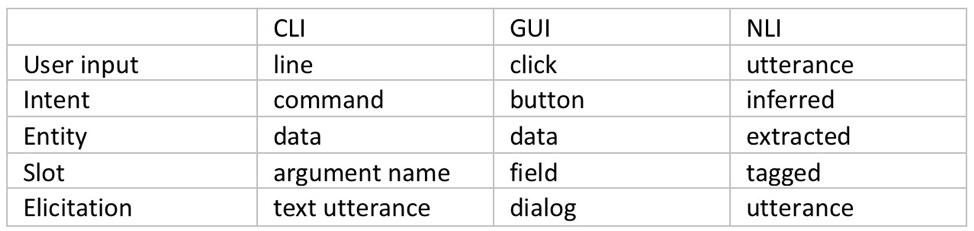
    The command-line interface (CLI) dominated human-computer interaction for a few decades, until the growing number of options software offered made GUI the new favorite way of talking to computers. Both of these interaction models are based on human to human communication: the operator communicates “an intent” complete with some input “entities,” each inserted in its “slot.”  This is exactly how bots operate, so how is a bot not just another UI?

    Fig. 1: User Interface Elements

    Bots as UI

    While a user interface is merely a human-readable catalog of machine’s capabilities and a set of input slots tightly coupled to a specific application, an NLI-enabled bot acts as our agent: it infers the intent (even multiple intents) from a natural language utterance, identifies any entities in that utterance, such as food: pizza, toppings: (olives, pepperoni) and fulfills that intent, be it by talking to Pizza Hut’s API or by calling the local pizza shop on the phone. Or even by making the pizza itself.

    NLI bots have already made quite an impact on the sales and support side, but how suitable are bot agents for more technical work? How would a chatbot perform in the DevOps world, replete with esoteric terms and complicated interfaces?

    Although there is a lot less training material available (after all, more people eat pizza than reconfigure Kubernetes clusters), there are also a lot fewer ways to express a technical intent, so in the end the technical bots are easier to train and make fewer mistakes than their sales brethren. But is a bot’s ability to classify an intent to deploy a new EC2 instance of specific flavor enough to make hardcore DevOps techies give up their favorite CLI?

    Beyond Interface: Advantages of Bot-assisted System Interaction

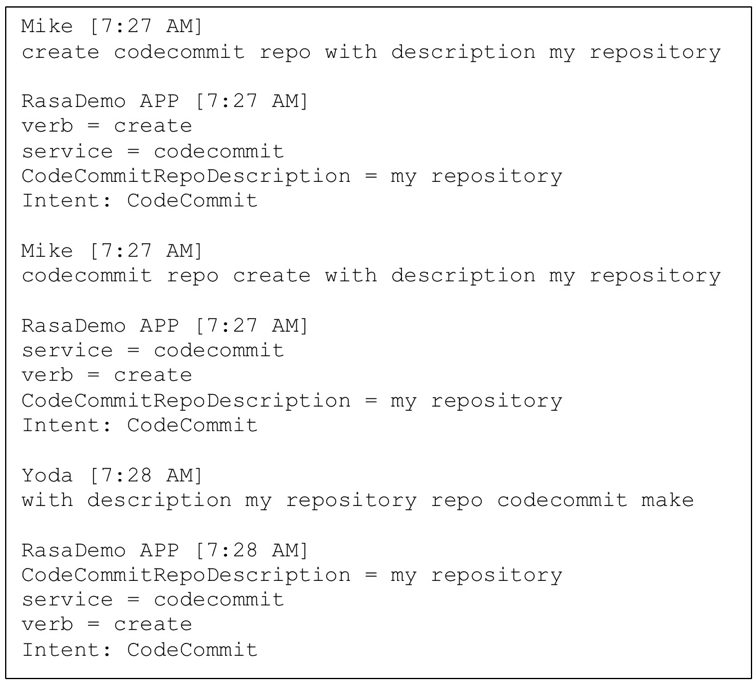
    Context memory: Whether a bot remembers your favorite pizza toppings, or you have to say “pepperoni and mushrooms” a couple of times a week is of little consequence. However, if your input looks like this:

    I’m sure you’d rather not have to type that ever again. The machine learning models of the leading bot platforms not only remember your slot values, they also remember the context in which those values were entered, so a well-trained bot is always able to suggest an appropriate value when looking to fill a slot.

    Natural language understanding: Just like a human would not be fooled by variations in the word order or use of synonyms, neither would a well-designed bot. Not having to remember the exact syntax or even spelling translates into higher efficiency.

    Fig. 2: Intent classification and slot tagging

    Continuous training and improvement: The more time a bot spends with a team, the better it gets at its task of helping members of that team, not only due to filling its context memory with details about team members and tasks, but also because of reinforcement learning. In addition to the initial training corpus of data, most contemporary bot platforms feature interactive training mode, wherein a human user can provide a real-time feedback on the bot’s performance.

    Seamless automation: Since it’s an agent rather than a mere translation layer, the bot remembers successfully fulfilled intents and chaining those into a sequence, with or without slot elicitation, with or without branching and decision making is significantly simpler and easier than even the simplest of scripts.

    Collaboration platform integration: Teams typically meet in a collaboration platform such as Slack, WebEx or MS Teams, decide what needs to be done, then go and do it. With a bot on their team, they can get right to the “doing” part without leaving the collab platform; avoiding context-switching improves productivity.

    Built-in analytics: A bot’s main job is to classify intents, fill slots and invoke fulfillment. However, in its spare time it could listen in and take notes. At the end of an event (release, incident, outage, etc.) it could use its NLP savviness to provide a linguistic breakdown of the event: How many questions were asked? How many answers? How many statements? Or, even, What was the level of profanity use as compared to the average? This kind of summary provides benefits for parts of the company beyond bot’s original team.

    Conclusion

    Bots can and do increase productivity in a software development or operations environment. Automation is important, but when done through traditional means such as scripting, its high cost often causes it to be prioritized behind other tasks. The use of an NLI-enabled bot as an agent for interfacing with various back-end systems not only ensures the very best in user interface (“CLI on steroids”), but also minimizes the need to switch contexts and significantly lowers the cost of automation.

    More importantly, the emerging agent-facilitated process control prepares us for the next phase in the human-machine interaction: the post-app world.

    Bots will help us navigate the new world of commoditized services that will replace the familiar apps. They will track our experience and base future selections on our satisfaction with their past choices. What more can we ask for? Aren’t most of humanity’s dreams centered on intent (wish) fulfillment? What are the wish-fulfilling creatures from the fairy tales if not expressions of human desire for the perfect bot?

    — Mike Dimitroff