Tag: devops

  • 9 Pillars of Continuous Security Best Practices

    9 Pillars of Continuous Security Best Practices

    Without proper consideration given to security best practices, the continuous delivery of software changes facilitated by DevOps is risky. On the other hand, DevOps provides an opportunity to reduce security risks if security is integrated into the continuous delivery pipeline according to best practices.

    This blog enumerates best practices for security across nine pillars of DevOps: Leadership, Collaborative Culture, Design for DevOps, Continuous Integration, Continuous Testing, Continuous Monitoring, Elastic Infrastructure, Continuous Delivery/Deployment and Continuous Security. Examples of best practices for each pillar are listed. These practices can be used to assess an organization’s maturity within the journey to Continuous Security, often referred to as DevSecOps.

    Leadership

    Leaders need to understand and sponsor a clear vision for security.

    • Leadership demonstrates a vision for organizational direction, team direction and three-year horizon including security practices.
    • Leaders intellectually stimulate the team status quo by encouraging asking new questions and question the basic assumptions about the work including security practices.
    • Leaders promote personal recognition by commending teams for better-than-average work, acknowledging improvements in the quality of work and personally compliment individuals’ outstanding work including security practices.

    Collaborative Culture

    Culture in organizations that work well with DevOps have a collaborative continuous security mindset.

    • The culture encourages cross-functional collaboration, shared responsibilities and avoids silos between developers, operations, project management, quality assurance and security.
    • The DevOps system (toolchain) is created by an expert team and reviewed by a coalition of stakeholders including security.
    • Changes to end-to-end DevOps workflows are led by an expert team and reviewed by a coalition of stakeholders including security.
    • DevOps culture empowers and trains team members to take personal responsibility for security, compliance and privacy obligations.
    • Security engineers/architects are involved in the design for modular components, and also consulted when security patterns change within modules.

    Design for DevOps

    Designing software for DevOps at speed requires application designers to master the best practices for continuous security.

    • Software source code changes are pre-checked with static analysis tools, prior to commit to the integration branch. This assures that the modified source code does not introduce critical software faults and security vulnerabilities such as memory leaks, uninitialized variables, array-boundary problems and SQL injection.
    • Software component analysis scans third-party components for known security vulnerabilities and identifies risk during the build process.
    • Security frameworks for technology stacks that are used (such as Apache Shiro or Spring Security) are documented and shared with developers for their respective technology stacks.
    • Software code changes peer code reviews include checks for defensive coding and security vulnerabilities prior to committing code to the integration/trunk branch.
    • Common security components such as identity, authorization, key management, audit/log, cryptography, protocols, etc. are maintained, published, readily available and used within module development.

    Continuous Integration

    Continuous integration (CI) within organizations that have multiple teams working concurrently on a project and different code bases is challenging. During the integration stage it is critical to assess the application and understand the impact of code changes from a security point of view.

    • A software version management system is used to manage versions of all changes to source code, executable images and tools used to create and test the software.
    • Incremental static analysis pre-commit and commit checks are wired into CI to catch common mistakes and anti-patterns quickly by only scanning the code that was changed. These checks identify security vulnerabilities through control flow and data flow analysis, pattern analysis and other techniques. These techniques find security-related issues such as mistakes in using crypto functions, configuration errors and potential injection vulnerabilities.
    • Binary artifacts are digitally signed and stored in secure repositories.
    • Changes to security patterns used within software source such as session management, authentication, authorization and encryption code trigger a notification or pull request to security engineers.

    Continuous Testing

    Continuous testing (CT) with DevOps has significant advantages for continuous security when best practices are followed.

    • New security tests that are necessary to test a software change are created together with the code and integrated into the trunk branch at the same time the code is. The new tests are then used to test the code after integration.
    • Security tests for each DevOps pipeline stage are automated and may be selected automatically according predefined criteria.
    • Release regression tests include security tests. At least 85 percent of the security regression tests are fully automated and the remaining are auto-assisted if portions must be performed manually.
    • Test results that indicate possible security concerns are tagged for security analysis.
    • Dynamic or interactive application security tests exercise the application for security vulnerabilities. Results of these tests are delivered to developers through tools and feedback loops native to their organization.
    • If containers are used, image repositories are scanned for images with known vulnerabilities, hash checks for image drifts and run-time checks for vulnerabilities during image deploys.
    • Attack patterns, abuse cases and tests are built for application module profiles.
    • Unit, functional and integration tests around—and especially outside—boundary conditions are run during CT. Tests include error handling, exception handling logic and negative tests.
    • Automated security attack testing to include the OWASP Top 10 in integrated into automated testing.

    Continuous Monitoring

    Continuous monitoring (CM) of security considers the dynamic nature of artifacts and infrastructure and a proliferation of objects and services to secure.

    • Metrics and thresholds are automatically gathered, calculated and made visible to anyone on the team that subscribes to them. Example security metrics include:
      • Number of security defects identified pre-production
      • Percent of code coverage from security testing
      • Number of failed builds due to security checks
      • Mean time to detection
      • Mean time to resolution
    • Vulnerability information in consolidated to provide a comprehensive view into vulnerability risks and remediation across tools, pipelines and apps—and over time.
    • Metrics and events from production security controls such as WAF, RASP, etc., are used to improve security testing.
    • Insight into security threats and events are shared and visible across DevOps teams to enable “attack-driven defense” methodologies.

    Continuous Security

    Continuous security (CS) is itself a distinct pillar with standalone best practices that cross all of the other pillars.

    • All information security platforms that are in use expose full functionality via APIs.
    • Immutable infrastructure mindsets are adopted to ensure production systems are locked down.
    • Security controls are automated so as not to impede DevOps agility.
    • Security tools are integrated into the CI/CD pipeline.
    • Source code for key intellectual property on build or test machines are only accessible by trusted users with credentials. Build and test scripts do not contain credentials to any system that has intellectual property.
    • External penetration tests (done out of band) are scheduled either periodically or on a regular cadence are used to perform deep-dive analysis.
    • Telemetry from production security controls such as WAF and RASP are delivered back to development teams to inform application updates.
    • Accurate inventory of all software packages and version information is documented via infrastructure as code. Automated detection is used to identify whether any of the packages have known CVEs associated and define specific remediation actions.

    Elastic Infrastructure

    Elastic infrastructure environments offer advantages compared to legacy or traditional static infrastructure. However, elastic infrastructures need to follow best practices for continuous security because flexible infrastructures offer a broader range of attack surfaces.

    • Configuration code includes automated checks including:
      • Ensuring unnecessary services are disabled and only ports that need to be open are.
      • Permissions on files, audit and logging policies are enforced.
      • Development tools are not installed on production.
    • Security-approved OS, software versions and frameworks are used to compose required infrastructure. Security-related controls such as ACLs and FIM are defined as a part of infrastructure where applicable.
    • A least-privilege model is enforced for processes running on shared infrastructure.
    • Smaller clusters are used to reduce complexity between teams.
    • Service provider partners security controls are validated to ensure they meet business requirements in their domains of the shared security model.
    • IaaS or PaaS service provider security controls are validated to ensure that they meet business requirements in their domains of the shared security model.

    Continuous Delivery/Deployment

    While DevOps enables new feature deliveries to users quickly, to minimize risk during deployment the following best practices are important:

    • Release-to-production decisions are determined according to predetermined metrics, which include security metrics.
    • A whitelist policy for application segmentation is enforced during deployment for each environment, especially production.
    • Continuous deployment processes trigger run-time security and compliance checks including:
      • Ensuring unnecessary services are disabled and only ports that need to be open are.
      • Permissions on files, audit and logging policies are enforced.
      • Verify development tools are not installed on production.
    • All secrets used for deployment are vaulted and retrieved programmatically during run-time or initialization of the continuous delivery process.

    In this article we detailed best practices for nine pillars of continuous security, otherwise known as DevSecOps. While is it clear that DevOps offers immense value for software deployment, the adherence to best practices is essential to reduce risk and assure security. Each organization is different and has different security postures. The specific practices, security tools and metrics that are appropriate may vary according to a risk assessment for each organization.

    Aggregation of end-to-end security metrics, from planning through to operations, is important but beyond the scope of this blog. End-to-end security monitoring tools, such as value stream management applied to DevSecOps and enterprise security dashboards, is a topic that we intend to cover in a subsequent blog.

    This article was co-authored by Imran Chaudhari. Imran is a principal security consultant at Trace3, where he assists clients in assessing and designing cybersecurity initiatives from a strategic, organizational, and technical perspective. His experience covers expertise in secure software development, application and cloud security, as well as identity and access management and DevSecOps assessments.

    — Marc Hornbeek

  • DevOps and Agile: Your New Year’s Resolution

    DevOps and Agile: Your New Year’s Resolution

    Don’t apply Agile principles to DevOps. That’s not how it works.

    We in the west often celebrate the new year with a promise to do more or less of something in the coming year. While these promises are often broken, they can occasionally be transformational.

    And it’s time your organization had a transformational one: More DevOps, less Agile++.

    It is still a pervasive issue that people look at the successes of Agile development and attempt to apply them to the operations side. That’s not how it works. Really. There is a fundamental difference between DEVops and devOPS that means what is perfect for one is terribly imperfect for the other.

    While having a developer who specializes in the language du jour is important for a DevOps project—just like having a systems administrator that is proficient in given platform X—that really is where the similarity ends.

    Operations is a daily thing. It takes specialized knowledge and uses it to keep systems purring along on the chosen platform with vendor X, Y and Z. For a lot of organizations, storage has moved to the cloud. For a lot more it has not, and there is a difference there. But in the end, management of that massive blob of storage falls on your storage specialists. If your environment is internal, they’re worried about hardware and software both, but even if you’ve taken a massive leap to the cloud they have access and backup and hierarchy concerns.

    And given our worry about virtualization sprawl, a large number of organizations seem to have pitched that out the window when cloud and DevOps came along. Those instances still need monitoring and management, even if some of it is automated. In fact, the growth in numbers pretty much negates the automation goodness.

    So take a close look at the devOPS side of your operation. Think about it. Include it in DevOps from the start, rather than applying Agile principles to a group that it just doesn’t fit well. We’ve (mostly) gotten past the “Developer is Kingmaker” mentality, and have started to reintroduce standards so that we don’t have 50 different database products to support. But far too many have yet to truly approach DevOps as an integrated whole that relies on the wisdom of operations—even though operations is going to be involved with this project far longer and more intimately than development.

    And they are disparate functions. DevOps makes getting to market and maintaining the application far more streamlined, but when it comes down to it, 90-plus percent of you aren’t keeping a java developer watching an application for life. They’re moving on to the next project, and operations is left with more of development’s input and advice than previously, but all of the responsibility.

    So step up, apply DevOps in the manner it makes sense for a given bit. If you are running DevOps on VMware, operations input will be different than if it is on physical servers or public cloud or private cloud. Take that input and develop around it. Personally, I’m a fan of application release automation (ARA) for achieving the melding, but however you do it, don’t say, “We’re DevOps,” and mean, “We’re going to wedge Agile into the entire org,” anymore.

    And have a great year! Here’s to more apps, more responsiveness and more security!

    — Don Macvittie

  • DevOps and Retail: Transforming Brick-and-Mortar to Brick-and-Click

    DevOps and Retail: Transforming Brick-and-Mortar to Brick-and-Click

    Brick-and mortar-retail is rapidly transforming with the digital age. As physical storefronts turn digital, it’s safe to say that traditional retail is quickly becoming a mesh of “brick-and-click.”

    So, how are retail giants surviving in this new landscape? Interestingly enough, the remaining brick-and-mortar retail are reinventing themselves by applying helpful DevOps principles.

    In this post, we’ll peek into cases of innovation and horror stories from historically brick-and-mortar retail chains and brands. From Target, to Balian Group, Sears and other companies, we’ll discover the importance of DevOps in this new brick-and-click multi-channel retail environment.

    Target

    In an effort to increase agility, Target engineering teams embrace something they call “the Dojo”—immersive, six-week training sessions with hands-on DevOps and Agile coaches. As Target CIO Mike McNamara recently told the Enterpriser’s project: “The Dojo has been fantastic in getting teams engaged with agile and DevOps, removing the natural resistance and fear of change, and then supporting the team through the changes while maintaining productivity. It’s been a huge success for Target.”

    The result of these sessions is increased comfort with methods including containerization and tools that enable continuous integration and continuous deployment. McNamara also noted their grassroots approach; they encourage open source activity and listen to their engineers when they petition the use of new tech.

    “Our engineers have fully embraced DevOps,” he said.

    Bailian Group

    For another case study, take Bailian Group, a large Shanghai retailer that operates 6,000 grocery and department stores. By the time Bailian entered the online marketplace, it suffered from a severe lack of agility, non-native web apps and underutilized server assets.

    “Our transition from traditional brick and mortar to omnichannel business presented a great opportunity but an equally large challenge,” noted Lu Qichuan, director of IaaS and Cloud Integration Architecture at the Bailian Group.

    Qichuan and Bailian realized that to stay relevant, they had to cut long development cycles and embrace “new cloud application development tools and processes that foster a CI/CD and DevOps culture and increase innovation and time-to-market,” he said.

    They ended up implementing a private cloud using OpenStack. Now, midway through their cloud transition, they estimate to have 10 million virtual machines by the end of 2020.

    Sears

    While the previous two examples had positive outcomes, digital transformation has not gone over well for other retailers. Sears declared bankruptcy in October 2018.

    In its final years, Sears was in a sticky situation. To the chagrin of former CEO Eddie Lambert, surveys found their customers preferred to shop in stores as opposed to online. Disregarding customer desires, however, Sears attempted a big data play with its “Shop Your Way” program, under which Sears gathered user data to then sell. The program floundered, resulting in consumer irritation and loss of sales as reported by Business Insider.

    Writing for InformationWeek, Emily Johnson reminded us that evaluating DevOps using the wrong metrics will ultimately lead to failure, citing customer satisfaction as the No. 1 goal.

    In its final years, an abrasive Sears leadership halted any sense of DevOps to flourish. A disengaged Sears CEO Lambert created “a climate of fear,” according to Busines Insider reports. It appears the retailers that stay afloat encourage agility and intrapreneurship—this means encouraging innovation, not fear.

    DevOps Aids the New Omnichannel Retail Benchmark

    Brick-and-mortar are evolving into omnichannel retailers that bridge physical and virtual spaces. Take IKEA’s augmented reality app, which visualizes items in a house. From Disney, to Startbucks, Nordstroms and elsewhere, physical storefronts embrace digital offshoots of their core model to augment the traditional retail experience.

    Surprisingly, physical storefronts aren’t completely dead. They still offer conveniences for urban environments with high walking scores. See the emergence of Amazon physical locations for ironic evidence of their benefit. Other storefronts and pop-up shops have taken on a museum-like quality. The flagship Funko store, for example, creates impressive displays and interactive exhibits, pulling in flocks of weekend shoppers that want more than a dull e-commerce shopping cart.

    DevOpsGroup similarly describes a “reverse showrooming” movement; consumers research products online to then purchase in person. This enables brands such as ASOS, which is emphasizing social media and free worldwide deliveries, to stay competitive.

    “Retailers have been forced to re-evaluate their business strategies and understand how new technologies will affect their offering,” according to the DevOpsGroup website.

    DevOps Turns Bricks to Clicks

    Online shopping has sufficiently disrupted retail, and brick-and-mortar must reinvent themselves to stay relevant. An open-minded leadership and a commitment to fast development, dynamic scaling, uncompromised availability and open source technology underpin a successful evolution.

    Of course, this increased reliance on technology necessitates a hardened look at how development and operations communicate, and brick-and-mortar retailers must adopt the behaviors of tech companies to retain agility.

    This may come in many forms: new user-facing digital experiences, microservices for composability in niche omnichannel environments, containerization to package code that scales well, distributed data stores, heightened user data security or smart incident management techniques, to name a few.

    Traditional retailers, then, should dissuade their doubts against agile. DevOps can aid retail by reducing redundancy, cutting costs and streamlining production and distribution.

    — Bill Doerrfeld

  • Feature Flagging Poised for Wider Adoption

    Feature Flagging Poised for Wider Adoption

    Feature flags, also known as feature toggles, provide a means for DevOps teams to test and add new capabilities to their applications without having to take the entire application offline. The downside is they generally result in more branches of applications that need to be carefully managed within the context of a DevOps process.

    A recent survey of 550 software developers and decision-makers conducted by the market research firm Vanson Bourne on behalf of Atlassian and Rollout.io, a provider of a platform for managing feature flags, suggests that IT organizations are getting more comfortable with managing feature flags.

    The survey finds 95 percent of survey respondents said their organizations have implemented, have begun implementing or plan to implement features flags. Those that have implemented feature flags said they add 30 new features on average to each application per year, compared to those that have only begun implementing (21) or plan to implement (18) them. A full 81 percent said use of feature flags will increase over the next 12 months, and 88 percent said modern software development should assume to include feature flagging.

    The primary driver for implementing feature flags are a need to reduce risk (46 percent), increase speed of development (46 percent) and increase speed of deployment (45 percent). Eighty-seven percent of respondents said enabling an on/off or “kill” switch for features also reduces the risk of application downtime for customers.

    A total of 97 percent of respondents said they are under pressure implement new application features faster, and yet 65 percent said it is difficult to accomplish that goal safely. More than 61 percent of respondents said their organization releases new versions or updates for applications once a week or more. However, 72 percent admitted they have lost customers or users due to application development errors.

    Rollout COO Ronit Belson said building out the functions required to manage feature flags doesn’t make much sense when platforms such as Rollout.io are now emerging. The survey finds nearly 90 percent of respondents who have implemented feature flags in-house would consider moving to a third-party supplier for feature flagging management software. A total of 37 percent of respondents said the cost of in-house development is higher and 32 percent said they encountered more complexity than anticipated.

    Belson added most organizations not only fail to appreciate the cost of implementing feature flagging on their own, but also the impact feature flagging has on the culture of the IT department.

    Thanks to the rise of microservices, feature flagging should become more prevalent as monolithic applications give way to a more granular approach to application development that makes it easier to isolate functionality. In fact, the ability to apply feature flagging might be considered one of the primary benefits of the agility inherent to any microservices architecture, especially it if relies on containers that can be easily ripped and replaced. The challenge organizations will face is implementing the DevOps processes required to embrace feature flagging at scale.

    — Mike Vizard

  • The 4 Keys to Effective Continuous Testing

    The 4 Keys to Effective Continuous Testing

    In the digital era, products no longer can win on capabilities alone. Speed to market and buyer experience now matter just as much to customers as the extent to which a product meets a pressing need or outperforms competitive offerings. Against this backdrop, software developers find themselves under increasing pressure, left with no choice but to develop apps that provide everything customers want, are delivered on time and are continuously updated, all while ensuring a user experience that’s never short of flawless. There’s simply no margin for error, and that’s why more developers than ever are turning to continuous testing.

    Unlike the traditional approach of testing performed at the end of the development cycle, where it can potentially cause production delays should issues or bugs be uncovered, continuous testing involves running tests throughout the entire software development process. That enables developers to identify and resolve existing issues immediately—and, more importantly, deliver continuously updated and always flawless applications to their customers.

    Fundamentally changing something you’ve always done a certain way is never easy, however, and continuous testing is no exception. There’s no single lever to pull, but rather a series of steps and best practices necessary to effectively implement it within your development team. Let’s walk through the four most critical of those best practices.

    Make a Cultural Commitment to Collaboration and Quality

    As with any transformational change, people come before processes and developing the right mindset comes before developing the right tactics. Effective continuous testing requires a teamwide, cultural commitment to collaboration and quality. The notion that developers own development and QA owns testing inevitably leads to the types of problems—namely, delayed releases and flawed user experiences—that businesses simply can’t afford in the digital era. Instead, developers and test engineers must have a mutual understanding of the baseline level of quality and efficiency they collectively intend to maintain throughout the development process and a shared understanding that testing is everyone’s responsibility.

    Apply a Broad Range of Tests, Anchored by Automation

    As mentioned earlier, continuous testing isn’t about pulling any single lever, but rather about applying a broad range of tests throughout the testing process, including unit testing, integration testing, automated end-to-end and regression testing and production testing. By continuously administering tests at various points throughout the delivery pipeline, you can identify and fix issues spanning functionality, performance and security, and do so before they morph into the kind of roadblocks that delay your release and cost your business money.

    Though you should strive for variety when it comes to the types of tests you implement, you should strive for consistency when it comes to the concept of automation. If you’re serious about succeeding with continuous testing, automation is a necessity. Automated testing, which involves writing a test script (typically in Selenium or Appium) that interacts with the functional elements on a web page without requiring human intervention, not only helps you deliver better scalability and reliability than manual testing, but it also frees your manual testers to focus on more value-add activities such as exploratory testing.

    Leverage Cloud for Breadth and Scalability

    Just setting up and maintaining the infrastructure, physical or virtual, necessary to test across the ever-expanding universe of browsers, operating systems and mobile platforms is both costly and complex. And that’s before you consider the need to scale your test environment to run tests in parallel. It’s a daunting challenge for even the most mature enterprise development team.

    Enter cloud. In many ways, continuous testing and the cloud were made for each other. By leveraging a cloud-based, cross-browser testing platform, development teams can offload all the infrastructure-related headaches they’d otherwise be forced to grapple with on a daily basis, test across virtually any browser/OS combination (leveraging both real devices and cloud-based simulators and emulators) and ensure they have the scale necessary to keep their test times to a minimum.

    Develop a Strategic Approach to Analytics

    Continuous testing, applied optimally, requires a strategic approach to analytics. Developers should actively look to integrate a layer of analytics within the testing process, such that insights can be applied across the product team. Smartly layered analytics can shed light on a number of functional issues, including which browsers and mobile platforms are most often experiencing failure and whether an application’s test results are consistent.

    Beyond just functional testing, teams also can leverage analytics to assess user experience and performance, examining, for example, how the user experience is impacted by heavier traffic loads and how overall application performance is impacted by new updates to the code. Having this added layer of analytic insight enables developers to better understand the entire quality picture and deliver improvements that can be applied both in real-time and to future tests.

    The Digital Age Demands Continuous Testing

    In the digital age, your ability to attract and retain customers is directly tied to your ability to build the best products, deliver them faster than your competitors and keep them continuously updated with all the latest features and function—and do it all within the context of an impeccable digital experience. It’s a tall order, but it’s one made considerably less daunting by the effective application of continuous testing.

    — Lubos Parobek

  • AWS re:Invent 2018 Product Launches: An Overview

    AWS re:Invent 2018 Product Launches: An Overview

    AWS re:Invent is always rich in product launches. Some products are entirely new, while others are updates or enhancements to existing tools. The 2018 event was no exception. In case you missed it, here’s a drive-thru on some of the best products—and one important statement—from this year’s show.

    AWS Marketplace for Containers

    Announced at the Global Partner Summit keynote, the AWS Marketplace for Containers is the next logical step in the Marketplace ecosystem. Vendors will now be able to offer container solutions for their products, just as they do with AWS EC2 AMIs. The big takeaway here is just how important containerization is and how much of a growth we see in the implementation of containerized products and serverless architectures in general. Along with the big announcements around AWS Lambda, this solidifies the push in the industry to adopt serverless models for applications.

    AWS Marketplace – Private Marketplace

    The AWS Marketplace has added the Private Marketplace to its feature set. You can now have your own marketplace that’s shared across your AWS organizations. This is neat and all, but I think what’s even more interesting is what it hints at in the background. It seems to me that to have a well-established marketplace at all, your organization needs to begin its journey on the DevOps trail. This news shows that a good deployment pipeline is really the best way to handle a project, for both external and internal customers.

    Firecracker

    This looks really cool. Firecracker is a virtualization tool that is built specifically for micro VMs and function-based services such as Lambda or Fargate. It runs on bare metal … wait, what? I thought we’re trying to move away from our own hosted servers? That’s true. However, consider all the new IoT products and features that were announced at the conference and you’ll see there’s still a lot of bare metal, both in use and in development. I don’t think Firecracker is meant solely for large server farm-type setups, but quite possibly for items in the IoT space. The serverless/microservice architecture is a strong one, and this allows that to happen in the IoT space. In fact, I’m currently working on installing it onto my kids’ Minecraft microcomputer.

    Andy Jassy Says What?

    In the fireside chat with AWS CEO Andy Jassy in the partner keynote, there were several things I found interesting. But one comment stood out from the rest:

    I hear enterprises, all the time, wanting help thinking about how they can innovate at a faster clip. And, you know, it’s funny, a lot of the enterprise EBCs I get to be involved in … I’d say roughly half the content of those are enterprises asking me about our offering and how we think about our business and what we have planned in the future, but a good chunk of every one of those conversations are enterprises trying to learn how we move quickly and how we invent quickly, and I think that enterprises realize that in this day and age if you are not reinventing fast and iterating quickly on behalf of your customers, it’s really difficult to be competitive. And so I think they want help from you in how to invent faster. Now, part of that is being able to operate on top of the cloud and operate on top of a platform like AWS that has so many services that you can stitch together however you see fit. Some of it also is, how do people think about DevOps? How do people think about organizing their teams? You know … what are the right constraints that you have but that still allow people to move quickly.

    He said DevOps! Apparently, larger companies that are looking to change don’t just want fancy tools and new technology. They also need help getting better at effecting change. That’s absolutely outside the wheelhouse of AWS, and clearly a call-to-action for the partner community.

    — Lars Cromley

  • What It Really Takes to Build Compliant Apps

    What It Really Takes to Build Compliant Apps

    If you search online for “software compliance,” you’ll be met with a seemingly endless lineup of blog posts, how-tos and explainer articles promising to tell you everything you need to know about writing and deploying software in a compliance-friendly manner.

    Some of those are good resources, especially the ones that delve into meeting specific compliance requirements associated with specific regulatory frameworks. (Articles that make generic recommendations such as “secure your data!” are less helpful, but I digress.)

    In this article, I aim to contribute something new to the conversation about software and compliance, especially as it relates to modern, containerized, microservices-based environments. I’m not going to rehash all of the existing content about compliance best practices. Instead, I’d like to offer a new way of thinking about how you actually build compliant applications—by taking a DevOps approach to compliance.

    What does that mean, exactly? Let me explain.

    Why DevOps Compliance?

    I know, when you hear a term like DevOps compliance, your first thought is likely, “Well, there’s another meaningless buzzword.”

    But when I use that term, I’m thinking about much more than marketing hype. I’m referring to the actual practice of using DevOps processes as the basis for building compliance into your applications.

    I’ll explain what that looks like in a moment. For now, let me explain why the concept of DevOps compliance matters.

    For one, this concept drives home the truth that to create compliant applications, you need to make deliberate design decisions and follow specific processes for implementing them. This is what makes the concept of DevOps compliance, as I’m presenting it here, different from typical recommendations for achieving software compliance. Instead of treating compliance as something that you worry about once your application is written (or as a process that lives in its own silo, if you want to describe it in DevOps-y terms), the innovation behind DevOps compliance is to bake the compliance process into the rest of the software delivery pipeline, ensuring that the software that’s created is secure from the beginning of the development process.

    Implementing DevOps Compliance

    What does DevOps compliance look like in practice? How do you actually bake compliance into a CI/CD pipeline?

    Involving Everyone in Compliance

    For starters, you ensure that everyone who plays a role in software delivery understands what compliance means and which specific compliance requirements affect the software they are building. This is not often the case by default. Typically, compliance is something that your lawyers and security team know about, but not something your developers, software testers or IT Ops team members spend much time studying.

    To do DevOps compliance, that has to change. Your engineers need not become compliance experts, but they need visibility into the specific compliance challenges that they must meet. They must also understand how those challenges change—as they frequently do, because compliance frameworks have a tendency to be updated regularly.

    Tracking Compliance Across the CI/CD Pipeline

    Second, achieving DevOps compliance requires implementing processes that allow you to verify and vet the state of compliance at all stages of the software delivery process. When developers are designing new code, they should be thinking about how that code can be compliant. When the QA team is testing the code, they should verify that it meets compliance goals. And when IT Ops deploys the code, it should monitor it to ensure that it is actually fulfilling compliance needs in production.

    A third key process to implement is auditing across the software delivery life cycle. While the precise reporting and auditing requirements of software vary from one compliance framework to another, it’s a best practice to make sure that you are logging and able to report compliance-related data.

    Auditing

    The problem many organizations run into is that they think about the auditing challenge only when software is in production. To do DevOps compliance, you should be baking auditing into all stages of the CI/CD process by collecting data that demonstrates how you are working to meet compliance goals, and that measures your success in achieving them. This practice ensures that if something goes wrong with compliance, you have full visibility into where the issue originated and how to fix it, which are important considerations for meeting compliance challenges successfully.

    Ideally, you’d never make a compliance mistake, but in reality, you probably will sometimes experience oversights. When they happen, it’s much better if you know exactly what went wrong and can quickly develop a plan for fixing it. That not only helps you avoid repeating the same mistake, but it can also help keep regulatory authorities happy. They tend to be more forgiving of compliance errors if you can show proactively (using your own auditing data) that you know what went wrong, and how you are going to fix it.

    Conclusion

    Compliance is not something that most developers or Ops engineers enjoy thinking about. In fact, it’s something that many of them don’t think about at all, and that’s a problem. But as software-related compliance challenges grow increasingly more complex, and as the consequences of non-compliance grow ever greater (both in terms of regulatory fines and a loss of reputation in the eyes of customers), compliance is something that all participants in the CI/CD pipeline should be supporting. They should be doing so at all stages of the software delivery process, and in a way that maximizes visibility into compliance efforts via a clear auditing trail. That’s what DevOps compliance looks like.

    — Sonya Koptyev

  • Logging: Turning Good DevOps Teams into Great Ones

    Logging: Turning Good DevOps Teams into Great Ones

    The competition is on for DevOps teams that are expected to rev up production on a multitude of projects, with teams and companies aiming to stay atop the global software product marketplace. The complexity of code creation and the pace of deployment has picked up in recent years, and DevOps managers are starting to face serious challenges of scale and efficiency.

    Constant code generation is the first obstacle. Imagine a team producing millions of lines of code, working for weeks and hoping for a smooth release. But testing time arrives, and there is a total data meltdown.

    Wasting valuable programming hours is not an option, but what if managers had the tool to turn back the time to a version before the mistake happened? Managers or developers may view logging as an incredibly boring activity, but it is vital. It serves like a black box of what went wrong—but also a way to roll back the bad code, and return to a more manageable situation.

    Logging and tracking habits ensure that a DevOps team will not see their code fail in production, and cause expensive breakdowns in service. Logging becomes more than a wishful addition, but a pivotal tool that may save a project.

    Data is proliferating, code is constantly being written to offer innovative products or support existing ones. There is a massive amount of data projected to be generated in 2025, only a few short years away, if the global IT production sector keeps increasing its activity. This amount of data to be kept and logged would be roughly 10 times higher compared to the data generated in 2016. This issue has plagued Silicon Valley, but also worldwide tech centers: how to keep track of what is going on. How do companies such as Instacart, Lime and OpenAI track their changes and ensure viability and awareness of errors?

    There is the new role for DevOps managers: ensure fast, modern and stringent log management. Dedication to logging means generating tight order out of the chaos of code creation. The right tool will be economical, intuitive and fast, ensuring the possibility for control in what could become a runaway data meltdown.

    Logging is one of the pillars in the modern DevOps department, and while now it is important, it will become indispensable, along with metrics and analytics.

    DevOps are already aware of the possibilities of logging, to keep track of multiple avenues in product creation, from databases to server side events, and even the effects and behavior of users.

    Stringent log management means making use of a valuable resource of knowledge and decision making, but also operating with a complex system of data. DevOps managers will need the tools to span the demands of stringent log management, for a multi-step process involving log generation, transmission, analytics, storage, archives and disposal.

    The right logging system can streamline those steps. Inexpensive logging tools and systems can unify log management across teams and simplify the process of logging. More services are appearing each day, either cloud-based or self-hosted, and with varying levels of security. With increasing complexity and the drive to create ahead of the competition, it would be the task of DevOps managers to make the team aware of the tools, and to provide tools intuitive and fast enough for the good habit of logging and log management.

    — Chris Nguyen

  • Anaxi Delivers Project Management App for DevOps

    Anaxi Delivers Project Management App for DevOps

    Anaxi, a provider of project management software designed specifically for DevOps teams, has made its web application generally available. The web application complements an existing iPhone application, while an Android version of the company’s project management application is still under development.

    Company CEO says Marc Verstaen said that as DevOps has evolved around multiple repositories, IT organizations are finding it challenging to keep track of code from projects they are using within what applications. Anaxi is designed to not only make it simpler to navigate repositories, but also apply analytics to track individual developer productivity and team performance. Project managers now can, for example, analyze efforts in terms of code added and removed, refactoring and code churn on a weekly basis.

    Armed with that intelligence, IT operations teams will be better able to prioritize development plans based on the dependencies that exist between the various components that make up an application, said Verstaen. The number of those dependencies is only expected to increase as organizations increasingly shift away from building monolithic applications in favor of more complex microservices architectures that promise to make the overall business more agile.

    The fundamental project management issue with repositories such as GitHub is that there is no way to categorize all the project labels that get entered as text. That makes it difficult to monitor and track all the tasks associated with a specific label or even simply browse from one task to the next, Verstaen said. Via Anaxi, project managers can edit their issues and pull requests, which are then synchronized back to their GitHub and Jira projects.

    It’s not clear to what degree the lack of sophisticated project management tools has hindered adoption of DevOps in the enterprise. Legacy approaches to application development provide project managers with a rich portfolio of applications that may serve to bias them toward one style of application development over another. But given the pressure organizations are now under to become more agile, project managers need to evolve alongside the rest of IT organization.

    Before too long many organizations may also find themselves trying to manage projects spanning multiple repositories. It’s not uncommon for development teams to favor one repository over another. Standardizing on one repository would be preferred, but not every project manager has the political capital inside their organization required to force such a decision. Many projects also now span multiple companies, each with their own repositories, that project managers may find themselves forced to navigate.

    At the same time, business leaders are making it clear they want more visibility into the pace at which applications are being developed whenever those applications are expected to generate revenue or improve the overall customer experience. In fact, project managers who can ensure projects are delivered consistently on time and within scope are invariably considered among the most valued of employees.

    — Mike Vizard

  • Atlassian Brings Postmortem Analysis to DevOps

    Atlassian Brings Postmortem Analysis to DevOps

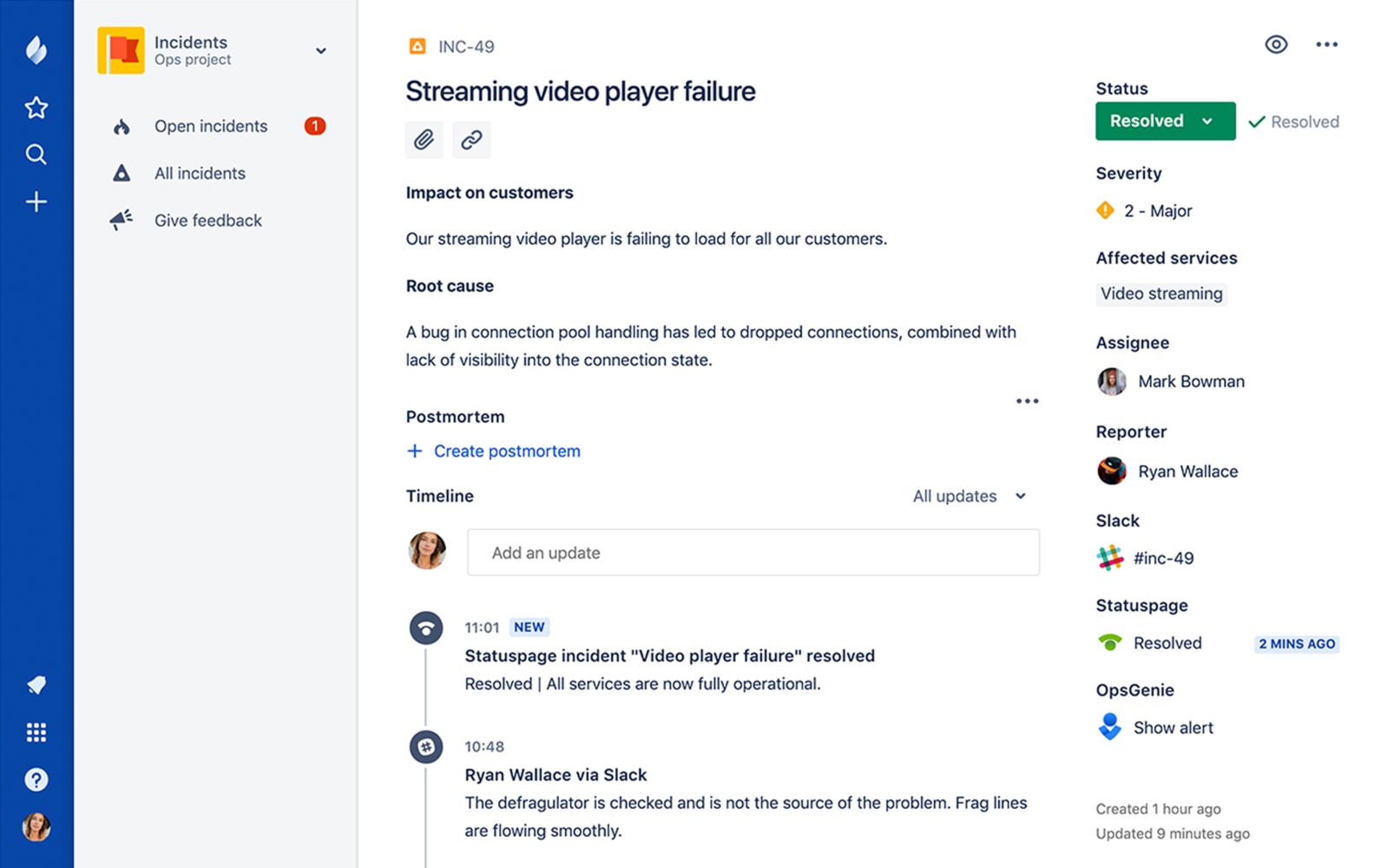
    Atlassian has added a postmortem capability to JiraOps, which gathers a list of all the key events from any IT incident in chronological order to make it easier to analyze what happened, identify root causes and raise issues directly within the JiraOps platform to ensure subsequent actions are taken.

    At the same time, Atlassian is extending the Automation Actions, a set of automated scripts and playbooks made available in Opsgenie to include support for Amazon Web Services (AWS) Systems Manager and Generic REST Endpoint. Those capabilities extend the ability of DevOps teams to launch automated tasks from within an Opsgenie console or mobile applications. Opsgenie is a notification application that Atlassian gained via an acquisition announced the same day the company launched JiraOps.

    Atlassian is also sharing incident management data it has collected throughout the year. Collectively, its customers have recorded more than 190,000 incidents and scheduled maintenance events. Updates to those events were made more than 564,000 times, which in turn fueled the delivery of more than 130 million email and text messages to end users.

    Unfortunately, the Atlassian report also finds only 3 percent of incident reports include any kind of postmortem analysis—an issue the company is trying to address via the latest update to JiraOps.

    Danny Olinsky, head of product marketing for incident management at Atlassian, said that as organizations make the shift from primarily deploying application on-premises to the cloud, many of them are starting to more fully embrace best DevOps practices. One of the central tenets of DevOps is ruthlessly automating as many processes as possible, including incident management. By integrating incident management and DevOps processes, the amount of downtime experienced by any application over the course of its life cycle can be reduced substantially, he said.

    The biggest challenge many IT organizations now face is melding DevOps practices and incident management process, which frequently evolve in isolation from one another. Those processes, however, are being unified as more organizations digitally transform business processes that need to always available. Any incident that might lead to application downtime now has potential revenue implications that go well beyond adversely impacting employee productivity. In fact, clear, precise communications involving any IT incident is now an expectation in the DevOps era, said Olinsky.

    The degree to which organizations will be automating incident management naturally will differ. But at a time when mean time to resolution is being more aggressively measured than ever, many IT professionals have an incentive to automate as many processes as possible. Murphy’s Law also dictates that incidents will manifest themselves at the most inconvenient time, so being able to automate a process from a mobile device can eliminate the need to make a trip to the office in the dead of night.

    It may be a while before IT organizations are able to fully automate every response to an IT incident. But as process that can be automated are identified, the lower the probability a truly catastrophic event capable of paralyzing the entire organization becomes.

    — Mike Vizard