

To download, please fill out the form below:

In today’s fast-paced digital landscape, keeping your services up and performant, especially for cloud-based and online services, is crucial for staying competitive. Downtime or latency issues can drive customers away, especially when all it takes is a click to switch over to a competing SaaS solution. DevOps and site reliability engineering (SRE) teams face the constant challenge of minimizing mean-time-to-remediation (MTTR) when dealing with errors and issues. As valuable as search engines like Google are, the sheer amount of information available can make finding the right solutions a time-consuming task. What if there was a way to automate and streamline this process, making error investigation more intelligent, focused and efficient?
This article will walk you through the journey of error resolution from the first obscure log line to identifying the problem hidden within it. We’ll resolve the issue using several tactics, ultimately leading to the use of generative AI to cut MTTR and provide precise IT recommendations. This journey includes useful measures and principles that can be applied by DevOps teams and explores the potential for applying generative AI.
Picture this: A log line pops up with an obscure error message, and the first instinct is to search for this message on Google for potential solutions. After all, someone else must have encountered a similar problem, right? However, the abundance of resources and search results can be overwhelming. The search results are often displayed based on website relevance, not necessarily the relevance of the error itself. Consequently, precious time is wasted sifting through countless search results, leading to a longer time to understand and remediate the error. For DevOps and SRE teams responsible for maintaining system stability, reducing MTTR is a crucial key performance indicator (KPI). This begs the question: How can we leverage automation and artificial intelligence to improve the search process and accelerate error resolution?
In our organization’s initial attempt to tackle this challenge, we focused on leveraging crowdsourcing techniques to get more relevant results than the brute-force Google search. Moreover, we wanted to automate the process and run it offline so that when an incident occurs, we can offer useful insights rather than starting the search as the system is down or malfunctioning.
The approach involves an offline phase and an online phase. The offline phase involved analyzing all our ingested logs and identifying common log patterns. This also allowed us to count how often this pattern occurred in our system and how prevalent it is. Then we crawled relevant technology forums like StackOverflow, Google Groups and Bing Groups for relevant discourse around these log patterns that could offer relevant solutions. The next step was to rank the search results by relevance and take the top five most relevant links.
The offline phase resulted in a library of known log patterns and, for each one, a cognitive insight containing these links, as well as additional information such as the severity level, how many times this pattern occurred in the logs, the date of first occurrence and additional tags of involved technologies, tools and domains.
The online phase occurs in real-time as new logs come in. Upon ingesting the log, it is automatically matched against all known patterns; if it matches one, it gets the cognitive insight for that pattern. This means that as soon as the problematic log comes in, the DevOps engineer already has focused and ranked search results and context to start from, which accelerates the investigation process.
After reflecting on our initial approach, we had an epiphany. Large language models (LLMs) like ChatGPT had already crawled the web and absorbed a vast amount of information. So, why not leverage their capabilities and ask them directly for insights? The idea was simple: Let the AI “read the posts” for us and provide us with recommendations. We started by formulating specific questions such as “What could the possible errors be?” and even went a step further by asking for further investigation steps. However, implementing this seemingly straightforward approach came with its own set of challenges. We needed to run preprocessing before asking the generative AI, as well as running post-processing on the answers it returned, to get what we expected. Let’s see what that process entails.
Before asking ChatGPT (or any other generative AI tool) for assistance, several preparatory steps were necessary. First, we had to analyze incoming logs, identify patterns and score them based on severity. This allowed us to prioritize the most critical issues.
Secondly, we had to carefully design our prompts for the generative AI using prompt engineering, ensuring that we framed our questions in a way that yielded precise and relevant responses. Prompt engineering is the practice of strategically designing effective prompts or instructions for language models to achieve more accurate responses. It involves carefully specifying the input format, context or constraints to guide the model’s generation process and obtain more accurate and desired results. This is true for any use of generative AI, and for our case in particular. Beyond accuracy, prompt engineering helped us tune the requested format and length of the answer to fit the “executive summary” paragraph we popped up for the user. This ensured it wasn’t too lengthy nor too short to provide meaningful insights.
Additionally, we took great care in sanitizing the queries and removing any sensitive data to maintain privacy and security. This step was especially crucial for those working with public services, highlighting the importance of protecting users’ personally identifiable information (PII), such as names, emails, phone numbers, IP addresses or GPS coordinates.
With all this preprocessing done, we sent the prompt to the generative AI. It is important to note that public services may not always be available (as some returned a “service is busy” message when working with ChatGPT and other services), so automation should take care of delays and employ retries as needed.
Finally, as responses were received from the AI, it was essential to validate those. We ran an analysis and filtered out non-relevant answers from different domains (after all, a log is also a product of a tree, and Kafka is also a novelist), ensuring there was no offensive content or misleading information. The semantic integrity of the responses was also carefully evaluated.
These AI insights have proven to be a powerful troubleshooting tool, and we’ve made it an integral part of our service.
This journey is not unique. In fact, DevOps teams can employ similar measures for their own telemetry data to serve their own operational workflows. These principles, such as data sanitization and validation, even apply to other types of data and use cases.

To download, please fill out the form below:

AWS Savings Plans are a flexible and cost-effective way to save on your Amazon Web Services (AWS) usage. These plans allow you to commit to a specific amount of compute capacity over a one- or three-year term in exchange for a significant discount on your AWS usage. Savings plans can help you reduce your AWS bill by up to 72%, depending on the type of plan and your level of commitment.
With the growing reliance on cloud infrastructure in modern IT, it is crucial for organizations to optimize cloud computing costs without compromising on performance or scalability. AWS Savings Plans address this need by providing a flexible and cost-effective solution that allows you to commit to a certain level of usage at a discounted rate.
With AWS Savings Plans, by committing to a specific amount of compute capacity over a set time period, you can save up to 72% on your AWS usage. This can result in significant cost savings for your organization, freeing up resources to invest in other business-critical initiatives.
Another benefit of AWS Savings Plans is the flexibility they offer. Unlike Reserved Instances, which require you to specify instance type, operating system and region, Savings Plans are more flexible and can be applied across different instance types, regions and operating systems. This flexibility makes it easier for you to optimize your cloud computing costs while still meeting your business needs.
AWS Savings Plans and Reserved Instances are both designed to help you save on your AWS usage, but they offer different levels of flexibility and cost savings.
Reserved Instances require you to commit to a specific instance type, operating system and region for a one- or three-year term in exchange for a discount on your AWS usage. While this can result in significant cost savings, it also limits your ability to optimize your cloud computing costs based on changing business needs.
AWS Savings Plans offer a more flexible solution that allows you to commit to a certain level of usage across different instance types, regions and operating systems. Additionally, in most scenarios, Savings Plans can provide a higher level of cost savings compared to Reserved Instances.
There are two types of AWS Savings Plans: Compute Savings Plans and EC2 Instance Savings Plans.
Compute Savings Plans are the most flexible type of Savings Plans, providing a significant discount on your AWS usage across any instance type, region or operating system. This flexibility makes it easy for you to optimize your cloud computing costs based on your changing business needs.
Compute Savings Plans offer a discount of up to 66% compared to on-demand pricing, depending on the level of commitment you make. They can be used across all AWS services that are powered by Amazon EC2 instances, including Amazon EMR, AWS Lambda and Amazon ECS.
EC2 Instance Savings Plans are a more specific type of Savings Plan, offering a discount on your AWS usage for a specific instance type within a region. These plans provide a higher level of cost savings compared to Compute Savings Plans, with discounts of up to 72%.
EC2 Instance Savings Plans are ideal for organizations that have a predictable workload and require specific instance types within a region. However, they offer less flexibility than Compute Savings Plans, as they cannot be applied across different instance types, regions or operating systems.
AWS Savings Plans offer three different payment options to suit your organization’s budget and commitment level: All Upfront, Partial Upfront and No Upfront.
With the All Upfront payment option, you pay for the entire term of your Savings Plan upfront, resulting in the highest discount compared to on-demand pricing. This option is ideal for organizations that have the budget available to make a significant upfront payment in exchange for maximum cost savings.
The Partial Upfront payment option allows you to pay a portion of your Savings Plan upfront and the remaining balance on a monthly basis. This option provides a balance between upfront commitment and ongoing flexibility, with a lower discount compared to the All Upfront option.
With the No Upfront payment option, you pay for your Savings Plan on a monthly basis, with no upfront payment required. This option provides the lowest discount compared to on-demand pricing but offers the greatest flexibility for organizations with limited budgets or uncertain future usage requirements.
Monitoring and managing your AWS Savings Plans, as part of your overall cloud operations strategy, is critical to ensuring that you are optimizing your cloud computing costs and maximizing your savings. AWS provides several tools and services to help you monitor and manage your Savings Plans effectively:
AWS Savings Plans are an excellent solution for organizations looking to optimize their cloud computing costs and save on their AWS usage. With their flexibility, cost savings and easy monitoring and management options, AWS Savings Plans are a valuable tool for any organization using AWS services.
To unlock the full potential of AWS Savings Plans, it’s crucial to understand the different types of plans, their pricing models and how to effectively monitor and manage your usage. By doing so, you can maximize your savings and ensure that your organization is getting the most out of its investment in AWS.

Postman today announced it has acquired Akita Software to gain access to a platform for monitoring and observing application programming interfaces (APIs).
The first integration of the respective products offered by both companies will arrive in beta this fall.
Postman CEO Abhinav Asthana said the acquisition of Akita Software will make it much simpler for organizations to discover what APIs are being employed across an enterprise. A recent Postman survey found that 28% of developers are now deploying APIs at least once per week.
The Akita Software platform will make it simpler for organizations to discover both rogue APIs that have been created by a shadow IT project and zombie APIs that have been inadvertently left exposed long after they are needed.
Akita Software’s CEO Jean Yang said the integration with Postman’s API management platform will provide a rich source of data that can be used to add artificial intelligence (AI) capabilities to Akita’s API observability platform. For example, generative AI capabilities should make it simpler to create summaries in natural language that explain the calls an API is making to specific data sources.
In addition, the combined company will be in a better position to enable organizations to better secure their APIs after deployment by surfacing anomalous behavior indicative of an API that is being used to exfiltrate data, she added.
The merger with Postman will, in effect, enable the combined entity to provide a complete ecosystem for managing APIs, noted Yang.

Most APIs are used primarily to interconnect internal-facing applications and systems, with a subset used to integrate partners. Only a relatively small percentage of APIs are externally facing in the sense that they expose data to the internet. Many organizations, however, fail to appreciate how quickly an internally facing API can become externally facing over the course of its life cycle. As such, IT teams need tools and platforms that can manage and secure APIs as they evolve.
As APIs continue to play a crucial role in advancing business goals, there is a clear need for increased visibility as the types of APIs employed also continue to expand. Most APIs in use today are based on the REST format, but there are also APIs based on GraphQL, event-driven architecture and various messaging platforms. None of these newer APIs will supplant REST APIs any time soon. Rather, they are being applied to drive additional processes alongside REST APIs.
In the longer term, it’s not clear how many APIs will be managed by the developers that created them versus a centralized DevOps team. However, the more APIs that are deployed in a production environment, the less feasible it becomes for developers to manage their life cycle. The challenge is making sure there is some type of structured workflow in place that, at the very least, makes everyone involved in the process aware that a new API has been created and deployed.

Ballooning lead and process time, with an opaque corollary relationship to fixed and marginal cost, is a significant and complex burden for any enterprise. And multi-cloud complexity and inefficient organizational and technical processes are some of the most wasteful areas companies face–so much so that Synergy Research reports organizations are cutting back on their cloud spend as tech budgets continue to fall under intense scrutiny, resulting in a Q1 2023 cloud spending growth rate of 19% compared to 32% just last year. With cloud cost containment a top priority, Forrester advised tech leaders to demonstrate to CFOs how they will stay on budget and demonstrate ROI at the board level. A key area where companies can eliminate expensive waste and increase time to value is the relationship and workflow between IT and developers, which, while being the DevOps charter for nearly 15 years, has gotten less attention among the viable cost-containment strategies for enterprises in 2023. Revisiting the latest iteration of this DevOps charter through the implementation of platform engineering strategies can help enterprises create a faster, leaner and more scalable dynamic. Let us examine why it’s now time for enterprises to consider platform engineering as a potent way to not only increase efficiency but also to bridge the divide between DevOps and IT.
In traditional enterprise organizations, IT typically dictates a top-down ITSM practice that limits the tools an organization can use for development and deployment; in many cases, it inhibits CI/CD and other core capabilities and practices of DevOps. This awkward attempt to accommodate modern DevOps practice through an aging ITSM paradigm has led to a suboptimal software delivery performance and poor developer experience (DX).
McKinsey, highlighting the criticality of DX, found developers at a leading SaaS provider spent 20% to 30% of their time integrating different services such as firewall changes, DNS and security access to deliver code through its CI/CD pipeline. That’s a lot of time spent on low-value, repetitive tasks, ensuring a painful journey for a disappointing result. If the DX pain is high enough, developers often go around IT and create resources on their own, leading to shadow IT, adding new cost burdens and growing security exposures. Every minute and engineer count: Five minutes saved per day among 500 developers saves a week’s development time.
Surely, there is a better way.
Platforming engineering and “platform as a product” have been key to the PaaS ecosystem for years but are now gaining fresh traction in the industry. In Puppet’s State of DevOps Report, 51% of respondents said they had already adopted platform engineering and 93% said it was a step in the right direction. Gartner predicted 80% of software engineering organizations will have platform teams by 2026.
The concept can be defined in several ways. Gartner reported platform engineering is “an emerging trend intended to modernize enterprise software delivery… designed to support the needs of software developers and others by providing common, reusable tools and capabilities, and interfacing to complex infrastructure.” PlatformEngineering.org’s recent blog post defines it as the discipline of designing and building toolchains and workflows for self-service capabilities in software engineering organizations during the cloud-native era.
Regardless of definition, platform engineering is the latest iteration of IT centralization, though now attempting to retain all the benefits of distributed team empowerment through “composition” rather than converged control. As modernization continues, we experience the ebb and flow of composition and decomposition, both organizationally and technically. Microservices, Kubernetes, and GitOps patterns pushed the rational limits of decomposition and significantly raised the level of technical complexity in the enterprise. The natural counter pressure is a new cycle of composition that aims to simplify that complexity through platform engineering practices. Teams now look for these toolchains and workflows to be centralized in internal developer platforms (aka IDPs), exposing the development, deployment and maintenance of the entire life cycle of modern, cloud-native applications.
IDPs can facilitate the flow, speed and innovation DevOps teams are demanding without sacrificing stability, security and control. They enable developers to configure their toolchain while meeting all controls through approved blueprints or “golden paths,” reducing lead and process time. Developers can focus on delivering business value instead of infrastructure tasks.
Platform engineering creates a collaborative framework that connects IT and DevOps teams, so they can focus on outcomes rather than methods. Developers can use an IDP to follow conventions that speed up development and prevent anti-pattern creep. Guardrailing choices through golden paths reduce cognitive load and simplify execution context for security teams. The result? Developers can focus on what they were hired for and want to do–creating innovative, transformative applications and differentiated value. Security can sleep well knowing bespoke behavior isn’t opening new attack surface areas.
On the Day 2 operations side, IDPs enable SRE and support teams to have a fleet-wide view and work effectively with developers to streamline the management of production needs across all applications, clouds and tech stacks.
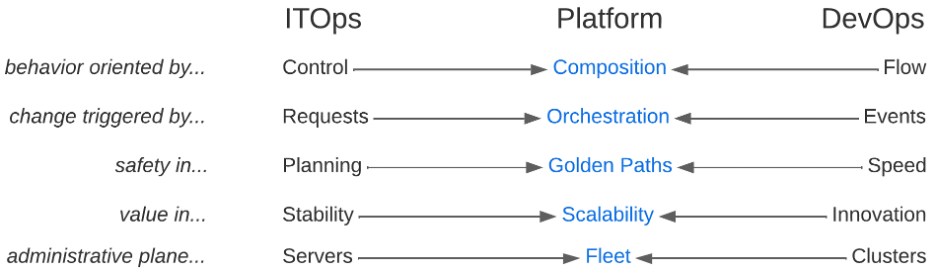
The reframing of composition breaks the false dichotomies between IT and DevOps practices. You don’t have to choose between control and flow, change isn’t triggered by serial requests or async events, safety isn’t found in planning or speed, value isn’t found in stability or innovation and administrative plane primitives aren’t servers or clusters. Platform engineering practices allow you to prioritize composition, orchestration, golden paths, holistic scalability and fleet management to get teams out of entrenched myopia and embrace systems thinking that gets your business delivering strategic gain instead of tactical win/loss tallies.
Finally, platform engineering positively impacts software delivery and operational performance metrics by streamlining development processes and reducing manual efforts. The bottom line is faster time to market while ensuring more consistency, less human error and improved software quality. This maximizes productivity, minimizes downtime and optimizes resource utilization, leading to cost advantages and increased efficiency for enterprises.


