Tag: devops tools

  • The Great Market Convergence is Coming

    The Great Market Convergence is Coming

    When you look around tech markets—almost any tech market—you can see an obvious overlap. Tons of markets that are complementary and that take different approaches to solving the same problem, or markets that have grown into each other over time.

    This happens in highly active marketplaces. People have great ideas and implement them but someone else thinks a different approach is warranted, and the two don’t directly compete until they have to. There is competition within a market, and then there is competition of markets. I think we are about to see a massive increase in competition of IT and, specifically, DevOps markets. I admit to trying to write this without veering into topics I’m currently covering, so bear with me.

    Let’s take dynamic app protection as a topic. You can do that through your DevSecOps vendor, you can do that through your WAF vendor, you can ask around about AAP vendors if your WAF vendor isn’t one, you can do that through a variety of plug-ins and tools offered for web hosting software like Apache or NGINX … Indeed, IDP is actually just attempting to protect your apps dynamically. I’m sure I’ve missed several other markets that have rushed to fill the gap where live applications were getting nailed by hackers. I chose one market, but pick one in DevOps and start digging. You’ll find the same crazy amount of overlap.

    The thing is, we don’t need fifteen solutions to one problem; we need one or two—a handful at most. And combining the fact that most of these markets are way overdue for consolidation (considering the stresses the global economy is placing on trade) and I suspect we’re going to see a fair amount of that consolidation happen in a relatively short period of time.

    This matters to you for a couple reasons. First, if you think one approach to solving a problem is significantly better than the others currently available, your organization should be investing money there by paying for products and services. “More of us should have bought Betamax” is not a great look. Second, someone needs to keep an eye on how these changes impact the IT environment. If one of your DevOps tool’s vendors is in a merger, inevitably one of the merged organizations takes over and everyone does things their way. That’s not necessarily bad, but can be a scary time if, suddenly, you get an email about a change to a system that’s core to your department. Be aware of what’s going on out there and at least have thought about how you would respond if apps—or an entire market—disappear or are significantly changed.

    And, honestly, because it is the apps we are always talking about—DevOps, mostly—that are most likely to converge with a nearby market, it can seem huge. But remember that the core systems went through this long ago, and while they may go through another iteration of “merge this with that” in the future, it won’t be a huge volume like what the currently very active and young markets appear to be about to suffer.

    So don’t worry too much about which make/gradle/whatever variants you are using or what languages, which overlap incredibly, but tend toward niches. Focus on market spaces still growing and expanding. Know what might be at risk, and have awareness of whether you need to care today or you still have time before the market in question implodes or merges with nearby ones.

    And own it. We both know that when the time comes, whether you were prepared or not, you’ll rock a solution out—because that’s what you do, and there is no one behind IT to hand off to. So keep making your organization look great and just stay aware of the wider IT market trends so you’re not caught completely off-guard.

  • Credit Karma Looks to Open Source Distributed App Platform

    Credit Karma Looks to Open Source Distributed App Platform

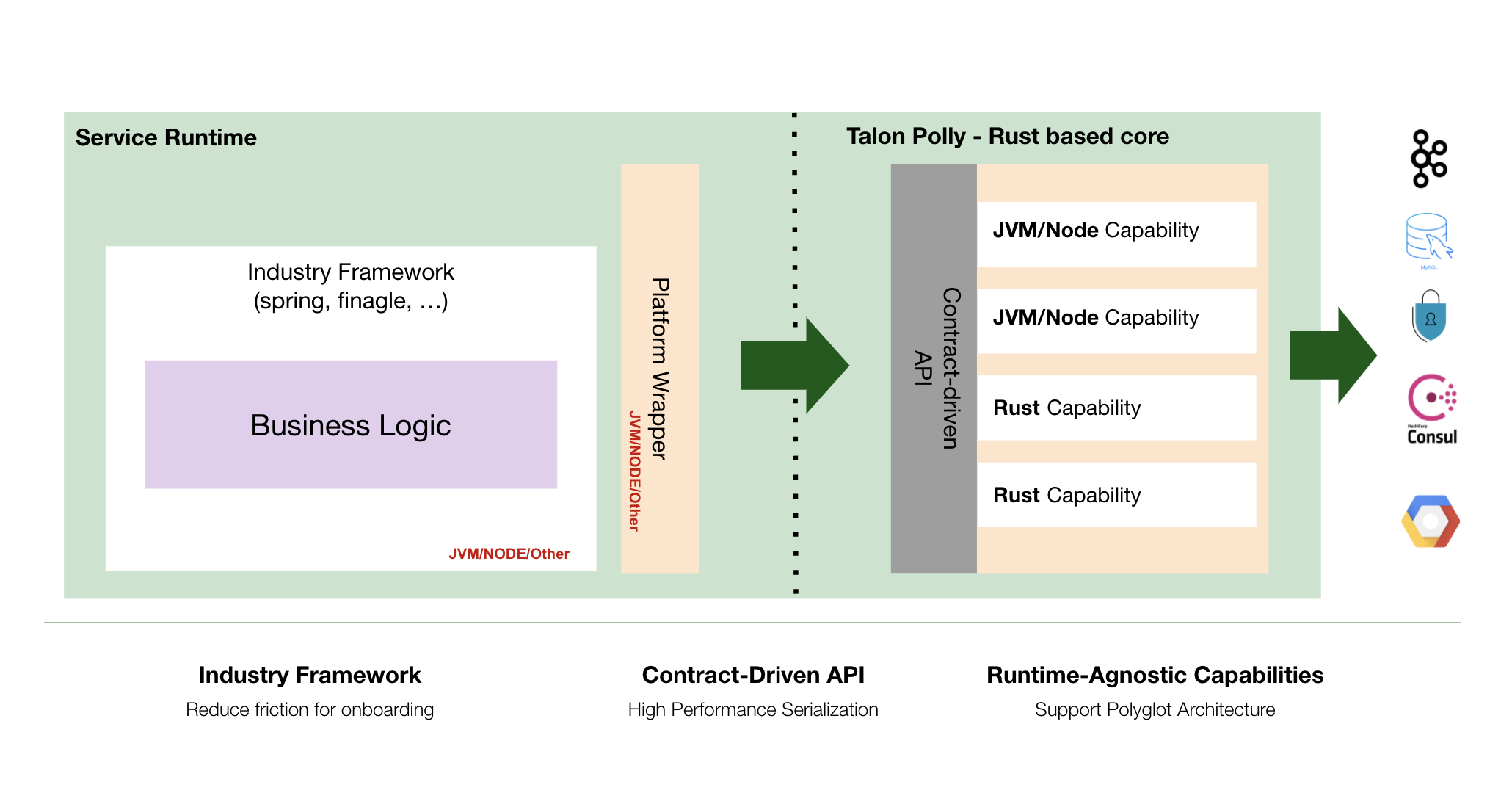
    Credit Karma has launched an application platform, dubbed Talon Polly, that makes it simpler to deploy microservices across multiple runtime environments.

    Richard Pounder, principal software engineer at Credit Karma, said the consumer financial services provider expects to make Talon Polly available as an open source project next year.

    Written in the Rust programming language, Pounder said Credit Karma created Talon Polly to provide its developers with a language-agnostic platform for building and deploying applications. Talon Polly can be deployed as a sidecar using containers or as a process running within a software environment.

    While there is no shortage of frameworks for building and deploying software, Pounder said Talon Polly is designed to make it easier for development teams to reuse code and components across multiple applications using, for example, a contract-based library included in the framework. That approach also enables Credit Karma to ensure a common set of security policies are enforced across those application environments, he noted.

    Ultimately, the goal is to enable developers to spend more time writing business logic rather than mastering the nuances of multiple application development frameworks created for specific application environments, said Pounder.

    It’s not clear to what degree other frameworks may emerge to address the same issues at Talon Polly. Odds are good that other organizations that need to deploy distributed applications built using multiple programming languages have faced similar challenges. The Cloud Native Computing Foundation (CNCF) has also adopted Dapr, a set of application programming interfaces (APIs) created by Microsoft that are deployed as container sidecars to make it simpler to build distributed applications, as an incubating project.

    Regardless of approach, the rise of distributed microservices-based applications is creating a significant management challenge for DevOps teams. Each microservice is built by different development teams that prefer one programming language over another for any number of reasons. Deploying and updating those microservices across a distributed computing environment requires more sophisticated orchestration of workflows, given all the dependencies that exist between microservices.

    Of course, it’s not quite clear yet the degree to which microservices-based applications will supplant legacy monolithic applications. Most new applications are being constructed using microservices to make applications more resilient. However, the number of legacy monolithic applications running in existing IT environments means it could be years before microservices-based applications will ever outpace them. As such, DevOps teams will be managing a mix of monolithic and microservices well into the second half of this decade.

    The paradox is that while microservices-based applications are more resilient because calls to services can be rerouted in the event of a disruption, the overall application environment becomes more complex as the dependencies between distributed microservices increases. As such, many organizations are opting to use microservices to build applications only when a certain level of resiliency is required or it’s been determined that a function likely to be used by multiple applications is more easily accessed via a microservice that has its own API.

    One way or another, going forward, it’s not so much a question of whether microservices will be employed but rather to what degree and across how many applications.

  • Best of 2021 – 11 Open Source DevOps Tools We Love For 2021

    Best of 2021 – 11 Open Source DevOps Tools We Love For 2021

    As we close out 2021, we at devopsy.kinsta.cloud wanted to highlight the most popular articles of the year. Following is the eighth in our series of the Best of 2021.

    DevOps isn’t just a cultural shift — it requires great tools to come to fruition. Below, we’ve pulled together a list of some of the most well-loved DevOps tools available today. But, throwing loads of money into fancy SaaS solutions can quickly gobble up the cloud budget. These DevOps tools all are open source, and enable everything from container builds and orchestration to microservices networking, configuration management, CI/CD automation, full-stack monitoring and more. Here are some of our favorite open source DevOps tools for 2021.

    1. Kubernetes

    With the ubiquity of microservices and container-based software, it’s no surprise that Kubernetes tops this year’s list of open source DevOps tools. Kubernetes, adoption of which rose by 48% in 2020, is used to orchestrate containers. Instead of releasing microservices manually, Kubernetes can automate deployment, maintenance and scaling of groups of containers in production. Kubernetes, sometimes written as K8s, is hosted by the Cloud-Native Computing Foundation (CNCF).

    2. Docker

    Docker, the software, is a free and open source platform used to build, ship and run an application as a lightweight container. Containers package up the binaries, libraries, configuration files and dependencies required for a program to run. Over the past decade, containers have played a key role in agile development, and Docker containers led the revolution. At its core is the Docker Engine. Docker Hub is also an excellent resource for finding and sharing prepackaged functions as containers. Also, to plug container vulnerabilities, it may be helpful to use open source container auditing tools like Docker Bench or Anchore.

    3. Istio

    Microservices are a handy development style, yet they bring new development and architecture concerns. Namely, how do we apply networking policies like security, encryption, observability and telemetry elements consistently across all our services? Well, service mesh is one answer. Service mesh places a sidecar proxy next to each container and abstracts these networking capabilities to a control plane. Istio is one such open source service mesh that has seen widespread adoption. Istio is built on Envoy, opening it up to plugins and extensibility options. We should also mention Linkerd and Kuma as viable open source service mesh alternatives.

    4. GitHub Actions

    GitHub is arguably the most popular source control and software collaboration platform on the planet. The GitHub platform itself, based on Git, has seen some significant updates in the past few years. Most notable is the GitHub Actions capability. GitHub Actions enable software packages hosted on GitHub to accept inputs and trigger other processes. This could help automate some cool DevOps workflows within GitHub, such as code reviews, branch management or CI/CD processes — the combinations of possibilities here are endless. GitHub Actions are, essentially, YAML files hosted in GitHub repositories that leverage GitHub webhooks. Though this is more of a feature than an open-source tool, we feel it’s important to include here. Actions is free for public repositories with a limit of 100 actions.

    5. Jenkins

    A big part of the DevOps philosophy is finding ways to automate and deploy new iterations more efficiently. Part of this goal is creating a streamlined continuous integration and continuous delivery (CI/CD) pipeline. Jenkins is an open source automation server with hundreds of plugins to automate the building, deployment and testing of software projects. Although GitHub Actions could theoretically replace a CI server in the future, CI tools like Jenkins, CircleCI, TravisCI and GitLab Community Edition still are preferred by many DevOps teams.

    6. Prometheus

    Metrics and alerting systems are crucial for site reliability engineers to visualize applications and react to issues. Prometheus, a graduated CNCF project, is a well-loved open source monitoring solution. A Prometheus server collects time-series metrics by scraping HTTP endpoints and generates a system to interact with this data, offering deep querying, visualization, storage and other capabilities. Check out this Awesome Prometheus list for Prometheus introductions and additional resources.

    7. Ansible

    Ansible is all about automation. Ansible, an open source project sponsored by Red Hat, can be used to automate things like cloud provisioning, networking, deployment, configuration management and other tasks. Ansible has a simple yet effective architecture that is relatively easy to assemble — all you need is a text editor and command line. You describe your infrastructure in a text document and organize your desired states in a playbook. For an example in practice, see how OpenIO uses Ansible. “Ansible is our standard tool not only to deploy the OpenIO core, but also our WebUI, OIO-FS and all upcoming options,” writes Cédric Delgehier, Ops at OpenIO.

    8. Chef

    Chef is another infrastructure-as-code (IaC) solution for automating your configuration management. Chef uses Ruby to automate server configurations and works well with all major cloud service providers (CSPs). This can be very useful when creating and provisioning large quantities of machines. Like other automation tools on this list, the user describes their components and their states in a declarative format. In Chef, these are known as “recipes,” which can be grouped together into “cookbooks.” You can’t diss Chef for not being on-theme!

    9. Terraform

    Terraform is another IaC tool that can be used for initiation of building, versioning and further automation using configuration files. “Terraform is a tool for building, changing and versioning infrastructure safely and efficiently,” as it is described on GitHub. Terraform follows an “execution plan” that a user creates with high-level syntax. One unique aspect of Terraform is its emphasis on versioning — this allows you to version the blueprint of your service just as you would your software.

    10. JAMStack

    As I’ve covered before, JAMStack combines JavaScript, APIs and markdown for constructing web-based applications. While more of a “headless development” methodology than a single open source tool, JAMStack projects are often built using open source components. For example, JAMStack often leverages open source headless content management systems such as Ghost, Strapi and/or Netlify CMS.

    11. ELK Stack

    ELK Stack is the union of three open source projects maintained by Elastic: Elasticsearch, Logstash and Kibana. With these three components, developers can take in and log data from any source and create helpful visualizations. This centralized logging is enabled with a NoSQL database for storage with Elasticsearch, processing and data collection with Logstash and visualization with Kibana. Increased visibility is vital for data analysis and helps identify errors to reduce mean time to recovery (MTTR).

    Rounding Out The DevOps Toolchain for 2021

    Programming isn’t only about shipping quality code, it’s about efficient execution. This drive to improve operations across the board is truly putting Ops into everything. With awesome open source DevOps tooling, it means more and more architects can adopt a DevOps approach within their deployment models.

    DevOps as a practice, as well as its underlying technology, is always evolving. In 2021, a lot of effort is being placed on wrangling the effects of introducing a microservices development style. We’ve noticed the maturation of container orchestrators and service mesh, as a result. Blueprinting infrastructure-as-code and creating automated, repeatable configurations is another must-have for implementing automated build and release pipelines. Not to mention, many no-code and low-code platforms are opening up DevOps capabilities to non-programmers, albeit from a proprietary perspective.

    It’s also helpful to note that some popular open source DevOps tools have been acquired — like Docker and Chef — blurring the lines between their business and their open source roots. When it comes to open source tools, it’s a good practice to adopt vendor-neutral tools with solid community support representing diverse stakeholders. This will help future-proof your project. Even though open source is “free,” users must ensure the benefits outweigh the time-to-onboard as well as the operational overhead of self-hosting.

    DevOps tools are beneficial to automate software deployment. Here, we’ve attempted to list some of the most exciting tools to help automate that process. Of course, many new tools are emerging in the DevOps space, and we have hardly scratched the surface. Do you have a favorite DevOps tool that’s not mentioned above? Let us know in the comments below!


  • DevOps Dozen² Awards 2021 Nominations Now Open

    DevOps Dozen² Awards 2021 Nominations Now Open

    The DevOps Dozen² Awards are back and open for nominations. This past year has been quite a journey and we are very proud of the DevOps community in their ability to pivot, innovate, adapt and think ahead in these challenging times. Some outstanding leaders and vendors have worked nonstop to reach their goals and achieve the highest level of success. We are thrilled to celebrate their hard work and achievements.

    The DevOps Dozen² Awards honor the most dedicated and inspiring thought leaders and innovators who have made significant contributions to the community. For the second year, we have expanded our awards program to include two different DevOps Dozen sections: DevOps Dozen Tools and Services Awards and the DevOps Dozen Community Awards.

    There are 12 awards for each section:

    • DevOps Dozen Tools and Services Awards — Recognizing the companies that develop and deliver outstanding solutions to empower developers, DevOps and IT operations teams.
    • DevOps Dozen Community Awards — Honoring the leaders who have made a positive impact in the DevOps community.

    Nominations are made by the audience. Anyone can nominate a tool or service, although there is a $250 entry fee for the Tools and Services Awards nominations. We implemented this fee last year to cut down on spam and superfluous nominations. However, there is no fee for Community Awards nominations. Please note that commercial tools and services are not eligible for the Community Awards and will not make it through to the finals.

    Finalists will be selected and winners will be chosen from among the finalists. The finalists will be determined by general public voting (weighted for 40% of the final total) and our judges’ selections (weighted for 60% of the final total).

    The last day to submit your nominations is October 22. To vote, follow the steps outlined on the DevOps Dozen² website.

    Who Are the DevOps Dozen² Judges?

    The following DevOps experts make up the DevOps Dozen² Awards 2021 panel of judges, and will review the submissions made by the public and choose the winners:

    • Alan Shimel, founder, CEO and editor-in-chief at MediaOps
    • Jayne Groll, co-founder and CEO at the DevOps Institute
    • Mitch Ashley, founder and CEO at Accelerated Strategies Group
    • John Willis, senior director of the Global Transformation Office at Red Hat
    • Helen Beal, chief ambassador at DevOps Institute and ambassador at Continuous Delivery Foundation

    The 2021 DevOps Dozen² Categories

    DevOps Dozen Tools and Services Awards

    • Best End-to-End DevOps Tool/Service
      Consolidation in the DevOps space has led to a greater selection of platforms offering end-to-end solutions. This award honors the platform with the most diverse and robust solution for DevOps teams.
    • Best DevOps Repo/GitOps Tool/Service
      Git has led to GitOps and it has become an integral part of the DevOps toolbox. This award is presented to the most outstanding Repo/Git/GitOps tool.
    • Best CI/CD Tool
      This award recognizes the best CI/CD tool that helps teams to deliver quality code better.
    • Best Value Stream Management Tool
      Value stream management has come into its own as an important tool for measuring the business value of DevOps and application development. This award recognizes the value stream management tool that most effectively helps visualize the value stream, track metrics and measure improvement.
    • Best Observability Solution
      This award recognizes the best observability solution for observing and monitoring to understand the performance of individual components and systems and entire applications.
    • Best DevSecOps Solution
      This award honors the best DevSecOps solution, which enables security to be included earlier and continuously throughout the SDLC.
    • Best Testing Service/Tool
      Testing is a mainstay in the DevOps toolchain. This award recognizes the best testing tool for ensuring the quality of code.
    • Best Kubernetes Platform/Service
      The adoption of containers has paved the way for an entire solutions ecosystem supporting and enhancing the container technology. Kubernetes is perhaps the most widely recognized and utilized tool in the space. There are many platforms and services that offer Kubernetes-based solutions. This award honors the best Kubernetes platform/service available.
    • Best Cloud-Native Security Solution/Service
      The cloud-native movement has taken the IT world by storm due to the depth and breadth of the solutions available and the benefits of building applications and services specifically for cloud-native environments. This award recognizes the best tools, solutions and services considered cloud-native.
    • Best DevOps for Mainframe Solution
      Mainframes are far from being the dinosaur of the IT world, and a variety of solutions are available for enabling DevOps practices in mainframe environments and hybrid environments. This award recognizes the best of them.
    • Best DevOps for DataOps/Database Solution
      Databases often have been left out of the DevOps conversation, but that is changing. The whole concept of DataOps is gaining greater traction. This award recognizes the best solution in the database for DevOps and DataOps categories. 
    • Best New DevOps Tool/Service Provider
      This award recognizes the best new service provider or tool that has brought innovation to the DevOps space in the past year (must be less than 24 months old).

    DevOps Dozen Community Awards

    • Best DevOps Industry Implementation
      This award honors organizations that have successfully adopted and implemented DevOps principles and practices.
    • Best DevOps Survey/Analysis/Research
      This award recognizes research that has significantly and positively impacted the DevOps community.
    • Best DevOps-Related Video Series (video)
      This category highlights the most entertaining, educational and inspirational DevOps video series—those with the most engaging and highest-quality content.
    • Best DevOps-Related Audio Podcast Series
      Which is your favorite DevOps podcast from this year? This category celebrates the many great DevOps podcasts sparking some interesting discussions on a multitude of topics from CI/CD and testing to DevSecOps, Kubernetes, containers and more.
    • Best DevOps Book/eBook of the Year
      Each year sees a plethora of well-crafted DevOps-related books and ebooks. This category highlights the most popular and best read of the year.
    • Top DevOps Evangelist
      This category is one of our favorites. There are so many great evangelists who spread the DevOps gospel and we want to know who does it best. Nominees can work within the DevOps space or outside of it.
    • Best DevOps Transformation (non-vendor)
      In a year in which digital transformation became a must-have for survival, we want to know which organizations stood out in their efforts to transform their business through DevOps.
    • Best DevOps Virtual Event of the Year
      COVID-19 has changed the game when it comes to hosting events. In 2021, virtual events remain the norm, reaching a global audience while everyone stays safe at home. Which DevOps virtual event stands out from the others?
    • Most Innovative DevOps Open Source Project
      Open source projects are meant to promote innovation and increase efficiency, velocity and quality. While there are many great open source projects out there, the best ones are those that create a community of people who work on and with the technology and support each other.
    • DevOps Executive of the Year (non-vendor)
      This category celebrates excellence among DevOps leaders at the C-suite (or equivalent) levels.
    • Best DevOps Presentation of the Year
      This category recognizes the best DevOps-themed presentation from the many (virtual) conferences during the year. 
    • Best devopsy.kinsta.cloud Article of the Year
      devopsy.kinsta.cloud publishes multiple new articles every day. Which was the best article from 2021? Let us know so we can recognize the author.

    All the solutions nominated to the Tools and Services Awards will automatically be registered into the DevOps Tools Guide authored by Techstrong Group. This initiative is our effort to create a comprehensive listing of tools and tools vendors to help end users better understand the DevOps market landscape.

    Choosing a winner is difficult when there are so many talented and inspiring leaders doing an incredible job to empower and support our community. Although not everyone can win an award, being nominated says a lot about each and every one of you. We greatly appreciate your dedication and service to the DevOps community.

    For more information, please visit the DevOps Dozen² website. If you have any questions regarding entry process, awards, timing or any technical issues regarding the website, please contact us at DD@devops.com.

  • Harness Updates Cloud Cost Control Tool for DevOps Teams

    Harness Updates Cloud Cost Control Tool for DevOps Teams

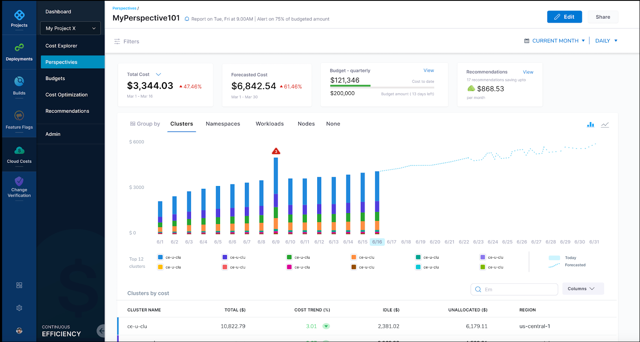
    Harness today announced that it has updated its cloud cost management (CCM) module for its namesake continuous integration/continuous delivery (CI/CD) platform to add support for Kubernetes at the node level in addition to providing business intelligence tools to analyze overall cloud costs.

    Harish Doddala, senior director of product management for Harness, said the update surfaces more granular insights into cloud costs that DevOps teams are incurring because cloud resources are being wasted. The latest version of CCM enables DevOps teams to create their own customized views of those resources.

    As the overall economy continues to recover from the COVID-19 pandemic, more organizations are looking to exercise greater control over IT costs. In the immediate aftermath of the pandemic, many DevOps teams consumed cloud resources without much regard to cost to enable organizations to advance various digital business transformation initiatives. Now, finance teams are requiring DevOps teams to account for those cloud costs.

    The goal is not only to reduce costs whenever possible—by, for example, quickly identifying a sudden spike in cloud resources consumption—but to accurately forecast budget costs on a monthly basis so that both IT and finance teams can collaboratively track spending. The typical finance team is just as concerned about accurately predicting costs as they are the total amount spent.

    Harness Cloud Cost

    Ultimately, Doddala says Harness’ CCM enables organizations to better assess which software development projects to prioritize based on the cloud resources allocated. It’s not uncommon for organizations to suddenly have to shift software development priorities as business conditions change and evolve. A project that may be a top priority today can easily be downgraded because, for example, a rival has been able to launch some new capability that an organization now needs to quickly match.

    DevOps teams, unfortunately, don’t always pay as much attention to infrastructure costs. Harness’ CCM helps reduce those costs by automatically stopping idle resources running on Amazon Web Services (AWS), Microsoft Azure, Google Cloud Platform (GCP) or any Kubernetes cluster, said Doddala.

    There are, of course, any number of existing tools that cloud service providers make available to enable IT teams to reduce costs. CCM, however, provides that capability within the context of a DevOps platform that can span multiple cloud computing environments, noted Doddala. DevOps teams, for example, can create and enforce cost policies for cloud infrastructure into a CI/CD pipeline and prevent an organization from being surprised by a bill from their cloud service provider at the end of the month.

    It’s not clear the degree to which cost control modules will influence the selection of one CI/CD platform over another. However, it’s apparent the days when organizations consumed cloud resources with little regard to cost are ending. In fact, there may soon be more cost controls imposed on software development projects than there were prior to the pandemic. The challenge, of course, is finding a way to automate the implementation of those controls and minimize the impact on software development velocity.

  • The Move Away from Monolithic Application Development

    The Move Away from Monolithic Application Development

    Shifting from monolithic application development

    Businesses need agility to deliver better services, meet changing requirements, and seize new opportunities as they arise. At the heart of many efforts are applications based on modern development strategies and techniques. Specifically, many businesses are moving away from monolithic applications of the past that are hard to modify and take a long time to bring to market.

    Why the shift and why now? Over 80% of organizations expect to compete mainly based on customer experience (CX). As a result, businesses in the most competitive markets like retail, banking, insurance, financial services, and travel/hospitality cannot afford to wait months or years to release new services, applications, or features.

    The bottom line is that software development teams are under pressure to deliver more of everything (new applications, enhanced features, more access options) in shorter time frames. A widely cited past industry study put the issues into perspective. Leading companies routinely perform multiple deployments daily. By comparison, low performers reported deploying only once a month at best. (At the extreme end of the spectrum, companies like Amazon and Google do deployments thousands of times a day.)

    Monolithic application development does not work in this fast-paced environment. A simple change in an existing application, such as incorporating a new dataset, adding new features in a front-end app, or using a different analytics method, requires that the entire application be revised, retested, and redeployed. That all takes time. Lots of time.

    A better approach is to use modern applications development methodologies. In particular, there is a shift underway to using cloud-native architectures based on loosely connected microservices and elements.

    A cloud-native approach is particularly well-suited for modern applications for several reasons. For example, a cloud-native approach helps organizations address the customer experience drivers that require constant updates and new services. Each component of a cloud-native application can be deployed and maintained as a self-contained microservice. If any element of a broad application needs to be updated or changed, only that element needs to be touched. The rest of the conglomerate application remains the same.

    z/OS plays well with cloud-native

    Many industries under the greatest pressure to speed development and deliver ever-more customized, personalized customer experiences use z/OS systems. As noted, these are retail, banking, insurance, financial services, and travel/hospitality. Government also can be added to the list. It is a large user of z/OS systems and is constantly trying to improve access to its services via new or improved web, mobile, chat, social, and phone applications.

    There are two ways to enhance and develop applications for these systems that use modern development methods. One is to make data, applications, and services that run on z/OS systems available as APIs and as microservices to be used by larger cloud-native applications.

    The other method that is gaining more favor is to provide the modern development tools for the z/OS systems themselves. Specifically, modern application development approaches that move away from monolithic architectures need certain essential elements. Many rely on open-source development techniques, workflow automation, and continuous integration and continuous delivery (CI/CD) tools.

    Bringing such commonly used tools to the z/OS environment helps businesses speed the development of new applications to meet changing demands of their customers. It allows a business to leverage the data and applications on its z/OS systems and create innovative new applications.

    In an age when it is getting harder to find developers with expertise in native z/OS programming, bringing familiar DevOps tools to the z/OS environment offers several benefits. Those who have the native z/OS skills can focus on core applications and leave the tasks like supporting a new front end or enhancing a web interface to others. After all, there are many more developers available with modern development skills.

    Bringing the DevOps tools into the z/OS environment also lets businesses retain all the pluses of those systems. Namely, businesses are assured that the same reliability, superior performance, tightly controlled security, and massive scalability are retained and can be leveraged with integrated with a broader cloud-native application.


  • Rethinking Your Tool Chain in the Cloud

    Rethinking Your Tool Chain in the Cloud

    Every IT shop has a “tool chain” – all of the software other than the OS and the application that fills in the gaps and keeps everything running. This includes solutions for monitoring the application, data protection, software development, release management, provisioning and de-provisioning resources and more. These tools build up over time, often evolving from homemade solutions to commercially available software as the company grows.

    The cloud presents another inflection point: a new way to manage systems and applications. When a company is considering moving applications to the cloud, IT and application development teams should take the opportunity to reevaluate their tool chain. Are their existing solutions still the right fit in this new cloud-based world, or are there better alternatives available? Here is a process for making that decision, and some important questions to consider when assessing whether a change is in an organization’s best interests.

    Step One: Take Inventory of the Current Tool Chain

    First, IT teams should perform a full inventory of their current stack to ensure they don’t overlook anything. This audit should include the following areas:

    • Provisioning tools (like Ansible or Terraform).
    • Identity and access management (IAM) solutions that allow IT to restrict access to servers, resources and software to only relevant users.
    • Development tools including IDEs, continuous integration/continuous delivery (CI/CD), source control and more.
    • Data protection, high availability, disaster recovery and backup software.
    • Monitoring and auditing software (like Datadog).

    Step Two: Assess How Well Each Tool is Meeting IT’s Needs

    Next, consider how well each product is meeting IT’s needs now, and how those needs will change as workloads move to the cloud. The first and most important question: is the tool and/or version you’re on still supported by the vendor? Changes like this migration to the cloud are rare, so the likelihood that one or more products are no longer supported is higher than one might think. Second, consider the licensing terms of the software and whether they allow for its use in the cloud. For instance, some tools are licensed to a specific physical server and some vendors require their hardware to be owned by the same entity which holds the license. Neither of these scenarios work well in the cloud. Third, will the application be managed in the same way after the migration? The cloud typically removes constraints; it offers nearly unlimited compute and storage, dynamic workloads, new APIs and multiple regions around the world. IT teams may want to take advantage of these capabilities by moving to a cloud-based tool (replacing an on-premises application log reporting solution, for example), or they may want to keep management as consistent as possible to minimize the amount of retraining required for employees.

    Don’t forget to consider non-technical arguments. Is the team happy and productive with the current solution, or do they feel forced to use it? Is it meeting the business needs of the organization? Will the change create more work in the short term? These reasons aren’t enough to keep a tool on their own, but they should be part of the discussion.

    Step Three: Create a Map of Alternatives

    Next, look at the potential alternatives to the tools that may need to be replaced. This can be a good opportunity to consolidate, so start by looking at what other teams in the organization are already using in the destination cloud. The most common decision IT must make here is whether to switch to a cloud-based tool (either one offered by their cloud vendor or a separate SaaS product). These typically offer pay-as-you-go licensing and are usually easier to scale up or down, move workloads around and to expand to other regions. Licensing for legacy vendors varies widely; some now offer consumption-based options to compete with the cloud, while some are sticking with perpetual licenses. These factors may make a cloud-based tool more or less attractive for specific companies based on their needs. Last, consider if making a change would allow the IT team to expand their skill set. For engineers that like learning new things, adding new products could actually increase satisfaction and retention because it gives them a chance to learn something new.

    Step Four: Talk to Existing Tool Vendors

    Even if a different option seems like the better choice, it always pays to check in with the current vendor and give them a chance to keep your business. It’s possible they may offer more flexible terms to keep you as a customer. The opposite is also possible; some vendors won’t budge on their licensing because they see the cloud as a threat. Even if a vendor conversation doesn’t change what they are willing to offer, it will usually reveal useful insight about how they approach their customers.

    Step Five: Create a Plan for Each Tool

    Based on the information gathered in the last four steps, it is time to decide what to do with each tool and make a plan for each transition. Where necessary, note products that will need to be replaced soon, ones where more research is required, and compile any other useful information learned during the process so that the larger IT team can access it. Also consider if teams will need training, if internal documentation or playbooks need to be updated, and how new tools will plug into existing authorization/authentication solutions. Each change will also need a migration plan of some kind that details how and when the organization will move from the old product to the new one, what scripts will need to be rewritten and what to do with historical data like log files from the old product.

    Cloud-based tools won’t be a fit for everyone, but their flexibility, potential cost savings and ease of scalability shouldn’t be underestimated. While no one is eager to add more work to a cloud migration project, taking the time to go through this process could uncover useful new options that better fit the new cloud model that the business is moving toward.

  • Solving Cloud-Native Challenges in the Rush to the Cloud

    Solving Cloud-Native Challenges in the Rush to the Cloud

    The shift to cloud-native environments away from traditional data center infrastructures continues unabated, but security and complexity challenges remain a struggle for DevOps teams.

    These were two of the main takeaways in a survey and analyst report published by the IT consultancy firm Flexera. 

    The survey, based on the responses of 750 IT professionals, revealed that 92% of the organizations represented in the survey have a multi-cloud strategy, 80% have a hybrid cloud strategy and only a minority (45%) have integrated data between cloud environments.

    The top challenges, according to the survey results, are:

    • security (81%)
    • managing cloud spending (79%)
    • governance, lack of resources/expertise and compliance (75%)
    • comprehending cost implications of software licenses (55%).

    The solution for these challenges largely involves — in addition to implementing the right DevOps culture and practices — adoption of the right tools and platforms, especially for security. However, first-generation cloud-cost management tools “simply are not cutting it” for modern architectures, said Asim Razzaq, CEO of Yotascale, which offers a cloud resource optimization platform.

    “Today’s modern architectures are dynamic, and ownership is transient and not always well-defined. The greatest strength of containers and Kubernetes is the ability to scale on-demand and share cloud resources among multiple applications,” said Razzaq. “Tracking cloud costs in modern architecture requires a strong ability to automate cost attribution — or tag management — for those dynamic resources, and the ability to understand usage at the application level, even for containers that are sharing resource instances.”

    First-generation cloud management tools are, in this way, unable to provide the information DevOps teams require to understand how to automate cost attribution for modern architectures, said Razzaq.

    “[DevOps teams] can’t break down costs into any level of meaningful detail for engineering and finance teams to digest and act upon,” said Razzaq. “Conversely, newer approaches that are focused on Kubernetes cost management lack the ability to understand and break down the costs of non-cloud-native workloads.”

    Indeed, tools are often frustrating to engineering teams because of their static custom reporting, broad and generalized recommendations and no effective workflow for effective collaboration between finance and engineering, Razzaq said.

    “The biggest source of frustration is the inability to drill down and manage costs in a way that matches the way that these teams do business. There may be 10 teams, each with five production applications running in the cloud, for a particular account,” Razzaq said. “Engineers need to see, at the application level, what their resource utilization, costs and cost anomalies are in order to make the best cost/performance decisions for their applications. Without that, they’re flying blind; having to defend their cloud usage without any supporting data.”

    As an example, a misconfigured Kubernetes cluster can “cause a massive spike in costs,” Razzaq explained. “Without detailed cost and utilization reporting at the team and application level, an engineer can spend weeks digging through spreadsheets and logs trying to track down the source of the anomaly. That’s weeks of their time that they aren’t [using to] be productive on new features.”

    cloud-native

    Razzaq said there are a number of solutions DevOps teams can adopt to address these issues, including automated cost attribution and tag management, actionable recommendations and comprehensive observability capabilities.

    Automated cost attribution and tag management “is the foundation of accurate and detailed cloud cost management,” said Razzaq. “Engineers need tools to help them set tag management policies, identify untagged instances and update tags quickly and easily in their cloud environment,” he said. “With this in place, cloud-native workloads can be automatically tagged as they are dynamically created, ensuring that cloud costs are always clearly attributed to the right teams and applications.”

    Actionable recommendations at the cloud-instance level with closed-loop feedback also are an important process “so that engineers can see exactly why the recommendation is being made, and what the cost impact will be of taking that action,” Razzaq said. “The ability to provide feedback on the recommendation and dismiss recommendations that don’t align with business needs ensures that new recommendations are relevant,” Razzaq added.

    Finally, tools that provide a unified view of both cloud-native and traditional workloads that have been shifted to the cloud help to ensure “that engineering and finance have a single source of truth for their cloud costs that enables them to make smarter decisions for their business,” Razzaq said. 


  • BMC Tightens Integration Across DevOps Tools for Mainframes

    BMC Tightens Integration Across DevOps Tools for Mainframes

    BMC has extended its BMC Automated Mainframe Intelligence (AMI) and BMC Compuware portfolios as part of an ongoing effort to make mainframes just another platform for DevOps teams to build and deploy applications on.

    John McKenny, senior vice president and general manager for Intelligent Z optimization and transformation at BMC, said the DevOps technologies that the company gained last year with the acquisition of Compuware have now been fully integrated with the rest of the BMC mainframe portfolio.

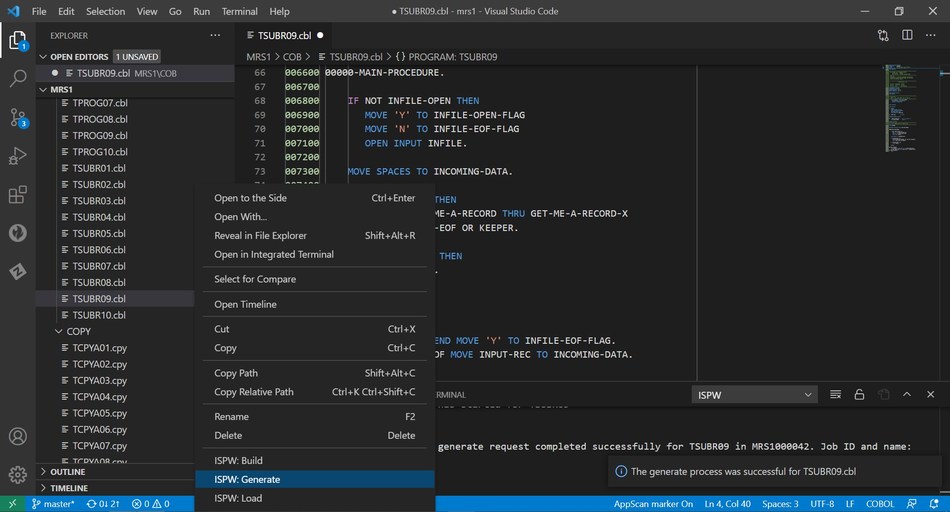
    The BMC Compuware continuous integration/continuous delivery (CI/CD) platform has been integrated with Visual Studio Code, a free tool from Microsoft that is employed widely by developers, he added.

    The BMC Compuware ISPW solution integrates with Visual Studio Code to enable developers to compile changed code on the mainframe with a right-click.

    In addition, the BMC Compuware Topaz platform for applying DevOps practices to the development of mainframe applications has a new command-line interface (CLI) along with support for multiple application programming interfaces.

    A BMC Compuware File-AID 21 tool now makes it possible to reduce the time required to search billions of transactions and log files on a mainframe, while the BMC AMI Security tool has been integrated with the BMC Helix IT service management (ITSM) platform.

    Finally, the BMC AMI Ops Insight tool has been updated to provide diagnostic capabilities to more easily identify the probable cause of an issue, while the BMC AMI SQL Performance for DB2 tool now includes a plug-in for the open source Jenkins continuous integration/continuous delivery (CI/CD) platform.

    McKenny said the goal is to integrate mainframes with any DevOps workflow as part of an effort to either deploy new applications or modernize legacy applications already running on the platform. Modernization of mainframe applications is being driven by the need to add application programming interfaces (APIs) to mainframe applications that need to be integrated with a much broader array of distributed applications, he noted.

    Much of the demand for those APIs is being driven by digital business transformation initiatives that require applications to be able to access backend transaction processing and analytics applications running on mainframes, added McKenny.

    It’s not clear at what rate IT teams that build and deploy applications on mainframes are moving away from waterfall-based processes to embrace best DevOps practices. However, McKenny noted, the rate of changes being made to mainframe applications has accelerated significantly over the last few years.

    While large numbers of applications have been migrated off mainframes over the last decade, the number of enterprise IT organizations that continue to rely on the venerable platform to process transactions remains considerable. Many organizations aren’t convinced that it’s worth rewriting the applications they have relied on for decades when it’s easier to make them more accessible to other applications by adding an API. In effect, McKenny noted, mainframe applications are becoming just another microservice that can be invoked by a developer.

    Regardless of the motivation, it’s clear mainframe applications will continue to run well into the next decade. The challenge IT teams now face is finding a way to make those mainframes just another platform on which to deploy applications at the end of a DevOps toolchain.

  • LinearB Looks to Automate DevOps Project Management

    LinearB Looks to Automate DevOps Project Management

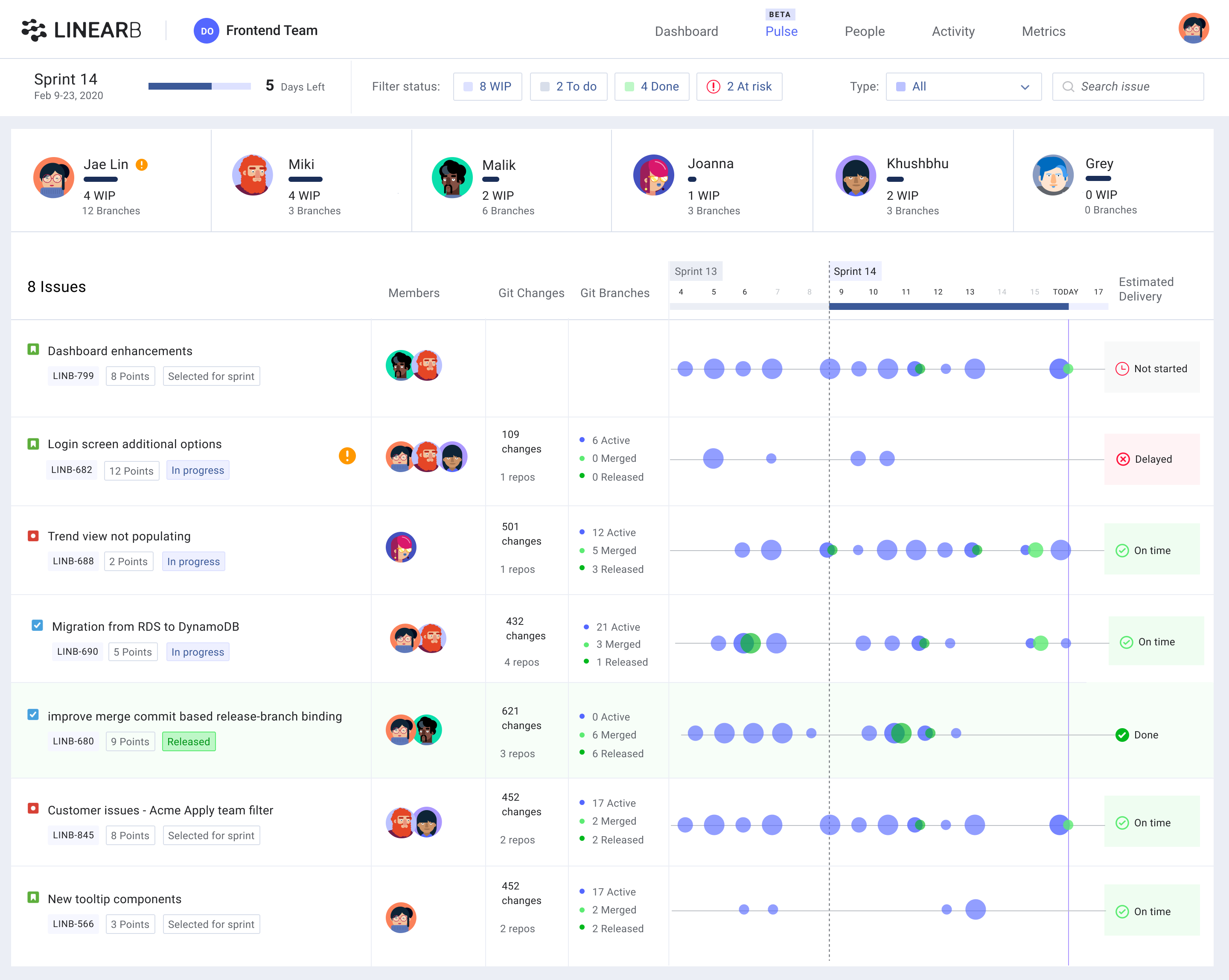
    LinearB today unveiled a namesake tool that automatically constructs and visualizes detailed progress timelines without requiring DevOps teams to rekey data into a separate project management application.

    Company CEO Ori Keren said the issue DevOps teams find most frustrating when it comes to managing software development projects is collecting the data that’s required to track the progress of any given project when much of that data already resides in the DevOps tools being employed. LinearB automates the collection and display of that data that DevOps teams previously spent hours collecting, he said.

    That approach makes it easier to then identify which teams and projects need additional help in near real-time using metrics surfaced in dashboards provided by LinearB, Keren noted, adding metrics such as the tracking of cycle times also make it easier for DevOps leaders to justify those investments to business executives.

    Keren said DevOps leaders also gain better insights in how DevOps teams are actually functioning in a way that makes it easier to predict and eliminate project delays, remediate high-risk code before it is included in a production environment, eliminate bottlenecks and make certain the focus of the DevOps team remains on tasks of the highest priority.

    LinearB is making use of the application programming interfaces (APIs) that DevOps tools expose to gather the metadata that exists about the status of any given project. LinearB then employs machine learning algorithms to construct and correlate that data to give DevOps leaders more accurate insights into the status a project when compared to a project management application that requires data to be entered manually. Given the rate at which application development projects are now updated, much of the data in a project management application is outdated shortly after its entered.

    Project managers also often spend a significant amount of time trying to encourage various members of a DevOps teams to update the data that resides in those project management applications.

    At a time when many members of those DevOps teams are now working from home to combat the spread of the COVID-19 pandemic, Keren noted that manually collecting that data has never been more problematic.

    While many DevOps teams are embracing value stream management tools to optimize DevOps workflow, Keren added most of those tools do not collect data at a granular enough level to provide DevOps leaders with enough software deliver intelligence to meaningfully impact DevOps workflows in near real-time.

    In general, Keren said most DevOps teams are too focused on metrics such as the number of lines of code or the number of commits being made. Metrics such as cycle times are more indicative of the productivity of a DevOps team.

    It’s not clear how the ability to automatically pull metrics from DevOps tools might impact the role of project managers. In theory at least, they should be able to spend more time helping DevOps leaders identify issues proactively versus badgering DevOps teams to fill out reports.

    Regardless of how the role of the project manager evolves, the one thing that is for certain is most members of a DevOps team would happily prefer to see as much of that process become automated as possible.