Tag: devops toolchain

  • How to Achieve a Converged Toolchain

    How to Achieve a Converged Toolchain

    In recent years, there’s been an explosion of tools for developing and delivering software. In a single pipeline, a company will have separate tools to ideate, plan, code, verify, configure, release and monitor new software, and every pipeline can have different tools for each individual stage (i.e. ideation). That’s a lot of tools, and providing visibility into the process of application development and delivery is difficult and can create many challenges.

    The key to eliminating these challenges is to develop a converged toolchain.

    What Is a Toolchain?

    A toolchain–in the context of software delivery–is a collection of tools managing the planning, execution, quality and delivery of the software being developed, starting from idea generation all the way to production. Each phase of development can have numerous tools, and it’s not uncommon for an organization to use multiple test tools, multiple tools for backlog/user story planning or multiple defect tracker tools.

    By default, each tool operates in a silo–not really interacting with other tools and not visible to other groups. Without a converged toolchain, companies are left with fragmented visibility along the application development and delivery pipeline. This means the development team has no idea what the planning team is doing, the operations team can’t see what’s happening with the development team, and so on. Of course, someone from the development team could walk over to the planning team and ask, “what’s going on?” But that halts momentum and slows down the entire process.

    The Kanban framework is a great example of a siloed tool commonly used in planning. It presents a list of all the features that need to be built, but it can’t track features in production unless someone manually changes a status. Thus, it’s only as reliable as each person making the updates, and it results in the status of many projects being out of date and stale.

    The service desk is another good example. Here you’ll find which projects are in or about to be in production, but it leaves you with very limited visibility into what’s coming down the pipeline. It also doesn’t provide you with context. For example, the operations team may know what app they’ll be working on, but they don’t have an idea of the risk profile of what’s coming.

    Benefits of a Converged Toolchain

    With a converged toolchain, disparate and siloed tools can work in one connected ecosystem. Help desk tickets can match a bug to the specific developer who worked on the feature, and initiatives can be matched to applications, environments and/or production change requests. The convergence of tooling data enables visibility between groups–allowing each group to use their own tools but at the same time work with data that is augmented from the rest of the toolchain–and this visibility enables collaboration between the groups. Connected toolchains also enable each team to continue to work on their part of the process using their own tools, and teams can evaluate the entire process of software delivery and monitor for hand-offs, waste and inefficiencies. This holistic visibility enables efficiencies not previously possible. 

    Without a converged toolchain, teams are likely to run into problems around timing and planning. For example, when the testing team is ready to tackle their part of a project, their first questions are typically, “what environment is it on?” and “what features does it include?” Unfortunately, these can be some of the hardest questions to answer. But a converged toolchain allows the testing team to easily see where exactly the unverified feature is, ­­and quickly move it along the pipeline.

    Achieving Convergence

    By converging the toolchain, you’re integrating and interconnecting the tools in the toolchain. To achieve this, you’ll need to complete three steps. First, you need to correlate and integrate data from the tools into a common data model. This will help create a standard way of looking at features, tests, environments, release processes and phases of delivery. All of these tools need to feed into their part of application delivery so you can correlate all the data together.

    Once you have that, the second step is to synchronize data between the tools and bring all the data into your common data model. This will give you the visibility your teams need so you can connect particular features to the environments they are on or know what features still need to be built.

    The third step is to create workflows. This allows you to not only bring data in but also take action on the data and react to things based upon events. For example, when the operations team is transitioning a new feature to production, they can mark it as ready for production, and it will be labeled that way across all tools and all teams. This ensures every team is on the same page and no piece of work can become stale.

    This workflow can also help when it comes to issues that are reported to an organization’s help desk or technical support of internal applications. Without a converged toolchain, that help desk worker has to create a ticket, call up to the developer team and try to track down the person who can fix the issue. However, with a converged toolchain, that help desk worker can automatically create an alert for the developer of that system. Then the developer is able to quickly see the bug, begin working on a hot fix and send a note back to the end user with an estimated time of completion. All of this is completed within the workflow of the converged toolchain and without anyone having to physically chase down another person for answers.

    By restricting themselves to only living in silos, most organizations have created a problem when it comes to communication and workflow across teams. Instead of working on items that deliver value to their customers, teams are spending a considerable amount of time on hand-offs. While it is important to know where a project stands, teams should be focused on delivering value to the customer, not gathering status updates.

    The days of living with this kind of fragmented visibility into the application development and delivery process is not acceptable anymore. Every organization’s toolchain should be focused on removing execution barriers and automating the development and continuous delivery process. In order to achieve this kind of success, teams need to be able to work with full transparency in their tool of choice while also being able to see the broader context of how their work fits in to the rest of the toolchain. With a well-designed, integrated and automated DevOps toolchain, development and operations team members are able to work together with common objectives and metrics to ensure quality, on-time application delivery to the customer.
    — Jeffrey Keyes

  • Survey Surfaces Uneven Approaches to DevSecOps

    Survey Surfaces Uneven Approaches to DevSecOps

    A ZeroNorth survey shows implementing DevSecOps is rife with questions for many organizations, with no clear answers

    There’s general agreement that digital business transformation initiatives are driving an overall acceleration in the rate at which applications are developed. At the same time, however, given the critical nature of those applications, cybersecurity has never been more of an imperative for DevOps teams. The challenge they are encountering is not so much a lack of tools to address that requirement, but rather a lack of clarity in terms of what tool to use when.

    A survey of 57 cybersecurity professionals conducted by ZeroNorth, a provider of a platform for orchestrating vulnerability scanning tools, highlights the extent of the DevSecOps challenge. The survey finds 63% of respondents said their organization currently employs six or more scanning tools. The most widely employed are network scanning (53%) and vulnerability scanning (51%). However, a quarter (25%) don’t know if their organization is using interactive application security testing (IAST), while 19% don’t know if they are using software composition analysis (SCA) tools.

    As far as DevSecOps is concerned, there’s little to no clarity in terms of where to primarily focus scanning efforts. Build/CI environments (68%) receive the most focus, but 46% are focused on scanning within integrated development environments (IDEs). Container/artifact management (67%), source code repositories (58%) and deployment (56%) all fall somewhere in between, the survey finds.

    There’s also no clear consensus on the merits of open source versus commercial testing tools Open source software (OSS) tools were identified as a priority for less than half of respondents (47%). However, 27% of respondents said they expect to begin using open source tools in 2020. Of the respondents currently employing OSS tools, 14% said believe these tools are more effective than commercial test and scan tools. Well over a third (39%) said they believe they are more effective when combined or customized. Just under a third (32%) said OSS tools are equally as effective as commercial options, while only 9% said they are less effective.

    The survey also shows disparity when it comes to the various areas that make up a digital business transformation, with the most mature being cloud migration (80%), followed by DevOps (67%), continuous integration/continuous delivery (CI/CD) (62%) and microservices (62%). Overall, 79% of respondents said they have a digital business initiative underway.

    ZeroNorth CTO John Steven said it’s clear that in many cases, the need for faster iterations of application development is outpacing the operational capabilities of IT organizations, especially when it comes to DevSecOps. Given the chronic shortage of cybersecurity professionals, there may be an average of only one cybersecurity professional for every 100 developers. Having cybersecurity professionals participate in every scrum session isn’t feasible, so there needs to be a way for cybersecurity professionals to provide guidance to developers specifically when it comes to what scanning tool should be applied and when, said Steven.

    The survey finds network (53%) and vulnerability (51%) scanning are the most broadly employed. However, that also suggests that many IT teams involved in digital business transformation initiatives are not making use of scanning at all.

    The good news is that survey respondents said identifying bugs, flaws and vulnerabilities throughout the software development life cycle (SDLC) is either “extremely” (58%) or “very” (42%) important to all participants involved. A total of 47% said it was either “extremely important” or “very important (35%) to improve visibility around operations by integrating security earlier into the software development life cycle (SDLC). However, while the DevSecOps spirit may be willing, the ability to implement best DevSecOps practices is still clearly weak.

    — Mike Vizard

  • DevOps Introduces Complexity. Really

    DevOps Introduces Complexity. Really

    The larger the project, the more resources are generally dedicated to it. That is true of the vast majority of fields of human endeavor. Consider building the San Francisco Bridge versus building a crossing over a stream. Or World War II versus the Spanish Civil War. The resources dedicated scale with the size and complexity they need to support.

    This is true of IT projects also. A four-line script does not require the attention that a highly available web app with dynamic data does. It is a pretty simple concept, we all are aware of it, and methodology doesn’t much change it.

    The problem is that we are often terrible about acknowledging this concept when it comes to internal support projects. We don’t see a compiler as a tool in need of regular maintenance and locking down, and largely it isn’t. There definitely are cases where the newest compiler/interpreter should be implemented, but except for massive change such as Python 2.x to 3.x, there isn’t a driving need to have the newest and shiniest.

    It’s Complex—and Growing More So

    What happens when we apply this relaxed attitude to DevOps? A mess. The reason is simple: The automation side of DevOps is generally implemented with tools. Lots of tools. Tools that require maintenance, troubleshooting, interfacing to other tools … It gets complex fast.

    And where on the calendar is time for these things set aside? Almost always the answer to that question is “nowhere.” But these aren’t compilers and interpreters. If your Bugzilla DB goes bad, you have a major problem. Since compilers and interpreters are generally read-only—changes aren’t made to them except to upgrade—it generally requires a disk-level error or serious human failures for them to stop working as planned. That’s not true for things with constantly changing datasets. And many DevOps tools have constantly changing datasets.

    In an increasing number of organizations, the DevOps infrastructure should be listed as the largest application portfolio the organization manages. And that is where you need to be.

    Make DevOps Tools a Project

    It is that simple. Tooling is a massive bit of overhead that seems to be not so big because it streamlines the development/deployment process. In short, the tools save enough time that their cost seems smaller than it is. But that cost will not go away, and once the pipeline is fully automated with a stable toolchain, keeping it running is a cost IT will have to continue to bear. Don’t just treat it like something you can check into when it fails; give it the same treatment that you use it for. Make certain you have backups—if possible, make your DevOps environment totally dynamic—so a failed instance of X can just be replaced by a new copy. You can’t “just spin up” complete and accurate datasets, but the backups fill that void.

    It’s More Than Just DevOps

    Stay on top of tool updates and improvements, just as you would for any mission-critical software. Because once your software factory is dependent upon the DevOps toolchain, it is mission-critical software. Learn how changes will impact the environment you are using the tools in.

    And it’s more than just the tools themselves. The DevOps environment is highly complex with a lot of variables that can have a negative impact. The move from RHEL/CentOS 6.X to 7.X is a good one. Sure, it’s better by objective standards, but there is enough change that it breaks a lot of things. Mostly the change in networking, but libraries and tools also. In fact, I helped someone work through inter-process communications (IPC) issues caused by the upgrade. This is a stumbling block for the DevOps team in a RHEL/CentOS environment, even though the DevOps team may not be the one choosing to upgrade.

    It’s All Good, Though

    So there is a cost. The cost is not small. But the benefits still far outweigh the costs, and I’m not arguing otherwise. What I am arguing is that it needs to be a cost that is accounted and planned for. “When it breaks, we’ll fix it” is too relaxed for the toolchain that will run your software factory. Once it’s right, take the time each week to keep it right. Set up the policies, processes, and time to keep it clipping along smoothly.

    And keep kicking rear. This is just a cost of doing business, much the same as database maintenance. Make sure you’ve got the time set aside, so your other projects can keep moving the org forward, and all is good.

    — Don Macvittie

  • Total DevOps is Needed, Plugins are Not Enough

    Total DevOps is Needed, Plugins are Not Enough

    Trace3 was proud to be a Gold Sponsor, exhibitor, trainer of the DevOps Institute leadership certification course and newest partner of CloudBees at the CloudBees Jenkins World 2017 event in San Francisco last month. Jenkins World 2017 attracted 54 sponsors/exhibitors, an 80 percent increase over 2016.

    The growth of interest and sponsors for this event demonstrates that the number of available tool choices for creating the continuous tool chains to realize continuous delivery and DevOps is growing. One of our top takeaways from Jenkins World 2017 is: Plugins are not enough!

    Indeed XebiaLabs’ “Periodic Table of Tools” is a valiant attempt to illustrate categories of DevOps tools and attributes of specific tools. Version 2 of the Periodic Table is now released, and I heard that version 3 is already on the way. While the table shows an impressive 15 categories of tools, I estimate there are actually 29 categories, if you consider tools for cloud management, test management, test creation, code analysis, code collaboration, ALM systems, dashboards, security and others.

    XebiaLabs’ table shows five attributes for each tool: open source, free, freemium, paid and enterprise. In my opinion, there are at least two additional categories: ecosystem and cloud readiness. While the table indicates 120 tools, my own estimate counts 300+ DevOps tools, including CloudBees, Electric Cloud, Perforce, Scalyr, Service Now, Tricentis. SmartBear, SonarQube, Parasoft, Coverity, Fugue, QA Symphony and many others.

    While the exact number of tool categories, tools and attributes is arguable, there are many tools to choose for a continuous delivery toolchain. The state of practice for integrating tools into a seamless toolchain is the plugin or do-it-yourself scripting. Anyone who has implemented a toolchain knows that the existence of tool plugins, while useful, is not enough. The quality and completeness of each plugin varies significantly. Some off-the-shelf plugins are so basic they are little more than marketecture. Even the best plugins are limited to a pairwise matchup between tools of specific version pairs, and not a universal tool or version. For example, a tool with a plugin for Jenkins version X may not function with Jenkins version Y or CloudBees Enterprise of other tools at any version.

    The DevOps Express collaborative initiative announced by 14 participating vendors at Jenkins World 2016 was an attempt to resolve the plugin problem. One year later, the DevOps Express website has shown a growth to 123 tools across 18 categories. However, just like the XebiaLabs Periodic Table of Tools, it is remarkable that the number of tool categories and tools that are not comprehensive (and lacking plugin compatibility) are not guaranteed for any combination of tools that may be needed for a toolchain for a specific enterprise.

    Each enterprise has unique toolchain requirements and preferences. Selecting and an integrating DevOps tools is not like buying a box of “standard” Lego bricks that are guaranteed by the manufacturer to fit together. Each tool and plugin is different.

    The choice of tools, the combination of tools and the integration of the chosen tools all must be carefully chosen to fit the specific customer requirement. More importantly, the integration must be architected to ensure the chosen combination works well together in a seamless toolchain.

    Until there is an absolute standard plugin architecture that all tool plugins are guaranteed to be compliant with, expert consulting services will be essential to make tools choices and make sure the tool chain works.

    With such a rapidly growing list of tools and vendors, only the most capable consulting teams with deep insight and partnerships with the widest array of tool vendors will be able to address enterprise DevOps solutions properly.

    — Marc Hornbeek

  • Industry Alignment: Supporting Real-World DevOps Workflows

    Industry Alignment: Supporting Real-World DevOps Workflows

    In our ongoing work to advance the interests of customers around adoption of Agile, DevOps and continuous delivery, the theme of evolving workflows to better suit human-scale work cycles often comes to the fore.

    While  it’s easy to say that build, test, release and monitoring capacities should feed into each other to promote continuous collaboration, realizing this vision in the form of integrated tooling is still no trivial feat. And it is further exacerbated by the reality that DevOps teams typically utilize a wide range of products built by a diverse set of providers, from larger players such as CA Technologies to open-source projects.

    If the goal is to drive  application lifecycle processes and supporting technology to better support human work cycles—along with accelerating organizational velocity and improving quality—somewhere in this domain of tooling integration there’s a need for relevant vendors to participate.

    That work officially begins today.

    At the Jenkins World 2016 conference this week, CA, along with a dozen other leading DevOps solutions providers and the DevOps Institute, announced the DevOps Express consortium. Joining us, along with CloudBees and Sonatype, which spearheaded this effort, are Atlassian, BlazeMeter, Chef, GitHub, Infostretch, JFrog, Puppet, Sauce Labs, SOASTA and SonarSource.

    So what’s the big deal? The direction of this initiative—which will focus first on supplying reference architectures that describe field-tested integrations of best-in-breed solutions—strikes directly at the heart of the central DevOps tenet: collaboration.

    The immediate result is that these providers are moving to boost interoperability across a typical production DevOps toolchain. It is truly noteworthy that these solutions providers, some of whom maintain palpable competitive interests, are putting aside those considerations to advance the interests of end users; that is a very DevOps phenomenon.

    In many other areas of IT, this type of cross-pollination either never commences or doesn’t emerge until the sector is so well-established that industry collaboration seems more of an effort to fend off perceptions of commoditization. To anyone familiar with the incredible pace of innovation ongoing in the automation sector, and the potential for competition between many of the companies involved in DevOps Express, it should be immediately obvious that this is a partnership that truly puts customers first.

    Yet, if we’re serious about empowering the kind of wholesale software factory reinvention that we espouse around DevOps, this is something that had to take place. How can an industry talk endlessly about eliminating stovepipes and marrying long disparate processes, and then defer to a walled garden worldview as it relates to the enabling products? That certainly wouldn’t really add up.

    It’s amazing to see what’s going on in the world of technology these days, and ever more exciting to be a part of it. We’re proud to be a member of DevOps Express.

    It’s a great time to be involved in this space.

    — Jeff Scheaffer

  • Orchestration: How To Get Everyone in Tune

    Orchestration: How To Get Everyone in Tune

    Automation is key to success in the cloud. When your entire infrastructure is accessible via an API, it doesn’t make sense to configure and install your applications by hand. This is where orchestration tools come into play.

    Simply put: You will not have long-term success in the cloud unless an orchestration tool is a core part of your strategy.

    Orchestration Tool Uses

    Each orchestration tool works in roughly the same manner, taking a set of instructions (Chef uses recipes, Puppet uses manifests and Ansible uses plays) and applying them to one or more systems. The syntax of the instructions and how they are applied changes with each tool, but the principles are consistent.

    This leads to the most common use case: configuring a new server.

    Instead of manually installing all of the required libraries, applications, config files and other tools, you simply run the matching set of instructions. Need a new web server? One command and you’re set. Need a database server? Another command has it up and running quickly.

    That’s the basic idea, but with each of these tools you easily can build out a more complex configuration by nesting sets of instructions. Taking the two examples above, you could have a baseline server configuration with all of the common tools and configurations, then customize each server with a smaller set of configurations specific to web servers and database servers.

    Does a new utility need to be on all of your systems? Do you have a new version of your app? Do you need to push out a new configuration file for your data stores? Send one set of instructions through your orchestration tool and you’re done.

    It doesn’t take long to see the value of these tools and to mandate their use for all of your cloud deployments.

    Not So Fast

    Like most challenges in the DevOps space, orchestration isn’t that simple. You can’t just wave your magic wand and get all of your teams using a centralized orchestration tool. This is not a new challenge, we’ve been trying to get this right since the early ’90s (remember Novell ZenWorks or the first version of Microsoft Systems Manager?) and are just now starting to see wide(r)spread success.

    Culture is the No. 1 blocker when it comes to this category of tool.

    You’ll hear some common objections from teams:

    • The choice of technology (is Chef versus Puppet versus Ansible versus the Emacs versus Vi?)
    • It wasn’t built here.
    • The manual process works just fine.

    These objections rarely hold up to scrutiny, but that doesn’t matter. Any objection raised needs to be addressed in some manner until you’ve got enough people on the target team to sway the rest over to the direction you’re trying to head.

    When you’re facing a cultural challenge, you have to address the people side of the equation in your strategy!

    3 Steps to Take

    No solution is going to work in all cases, as every organization is unique. You know the culture of your organization best, so go with your gut. With that in mind, here are the three approaches that tend to work best for most organizations.

    1. Empathy

    No one likes to be told what to do from up on high. While mandating that a team switch over to this shiny new orchestration tool might get the work done initially, it also will build resentment. That’s the opposite of what you want. You want buy-in.

    Odds are, each team in your organization already has a to-do list a mile long. Regardless of the benefits, your orchestration project probably isn’t very high on the list. Accepting that your priority isn’t their priority is a key step toward understanding and empathy.

    2. Pitch In

    One way to help move up the priority list is to offer to help out and pitch in.

    Learning a new tool and new way of conducting ops doesn’t just happen overnight. Have a strong, step-by-step plan to help bring other teams up to speed. A core part of that plan has to be one of your team working with the new team for as long as it takes to get them comfortable with the new tool.

    Take a patient, hands-on approach. Let other teams learn by doing … and by making mistakes. Your role is to guide them along the path of adopting the new tool. Time and time again, this type of approach has proven to be far more successful than other options.

    3. Duct Tape

    As your efforts progress, you may reach the point where the other teams are comfortable with the tooling, understand the workflow and are ready to adopt the new tool.

    The problem is now either:

    1. Developing new sets of instructions or
    2. Converting old scripts or hacks to the new tool.

    To tackle the first challenge, make sure you’ve set up an easy way for teams to share sets of instructions. A centralized set of git repos work great for this. This will reduce the overall workload and encourage collaboration. It’s better to borrow than to rewrite.

    You’ll also want to make sure there is a regular communication highlighting successes with the new tooling. This will help remind teams of the value of the new way of working.

    To tackle conversion (problem No. 2), plug your nose and use this messy hack. All three major orchestration tools allow you to execute another script or program. If you already have working sets of instructions, keep using them. Just wrap them in the new tool to gain the workflow benefits.

    Eventually you will replace them with native instruction sets, but if it’s working “as is,” that’s one less set that you need to build.

    Smoother Operations

    A lot of operational issues happen because of a manual error. Asking someone to make the same configuration change on six systems is bound to lead to a mistake. By moving to the cloud, you’ve already accepted the ability to program your infrastructure. Manually configuring the assets in that infrastructure doesn’t make any sense.

    Orchestration tools allow you to reduce the number of mistake made, ensure consistent results and amplify the productivity of your teams.

    What’s not to love?

    What have your experiences moving a number of teams to a common tool been like? What tips and tricks did you learn along the way? Share in the comments below or on Twitter, where I’m @marknca.

  • 31 Reference Architectures for DevOps and Continuous Delivery

    31 Reference Architectures for DevOps and Continuous Delivery

    At QCon London, David Farley (@davefarley77) told the audience that “continuous delivery changes the economics of software delivery”.  I could not agree more.

    If you have been drawn to the evangelists like David Farley, Jez Humble, and Gene Kim, you’ll know that high performance IT organizations are seeing a massive payoff in their continuous delivery investments.  Industry leaders big and small are sharing noticeable results:

    • 8x more frequent production deployments
    • 50% lower change failure rates
    • 12x faster service restoration times when something went wrong

    5 Principles

    How are they achieving these results?  They are following a few key principles that David and Jez outlined in their seminal book, Continuous Delivery (highly recommended).  The principles outlined in their book and in David’s QCon presentation are as follows:

    • Deliver fast
    • Automate almost everything
    • Keep everything in version control
    • Build quality In
    • Empower the team 

    Reference Architectures for DevOps and Continuous Delivery

    In their book, they also provide insight to continuous delivery tool chains and processes which highlight build tools, CI platforms, testing suites, artifact repositories, and many other components. There are numerous examples of reference architectures available, and each of them vary in levels of detail, tools highlighted, and processes followed.  Yet, there is a constant theme among the tool sets: Jenkins, Maven, Nexus, Subversion, Git, Docker, Puppet/Chef, Rundeck, and Sonar seem to show up time and again.

    To help you along your continuous delivery and DevOps journey, I have compiled a set of 31 reference architectures created by users across the continuous delivery and DevOps communities.

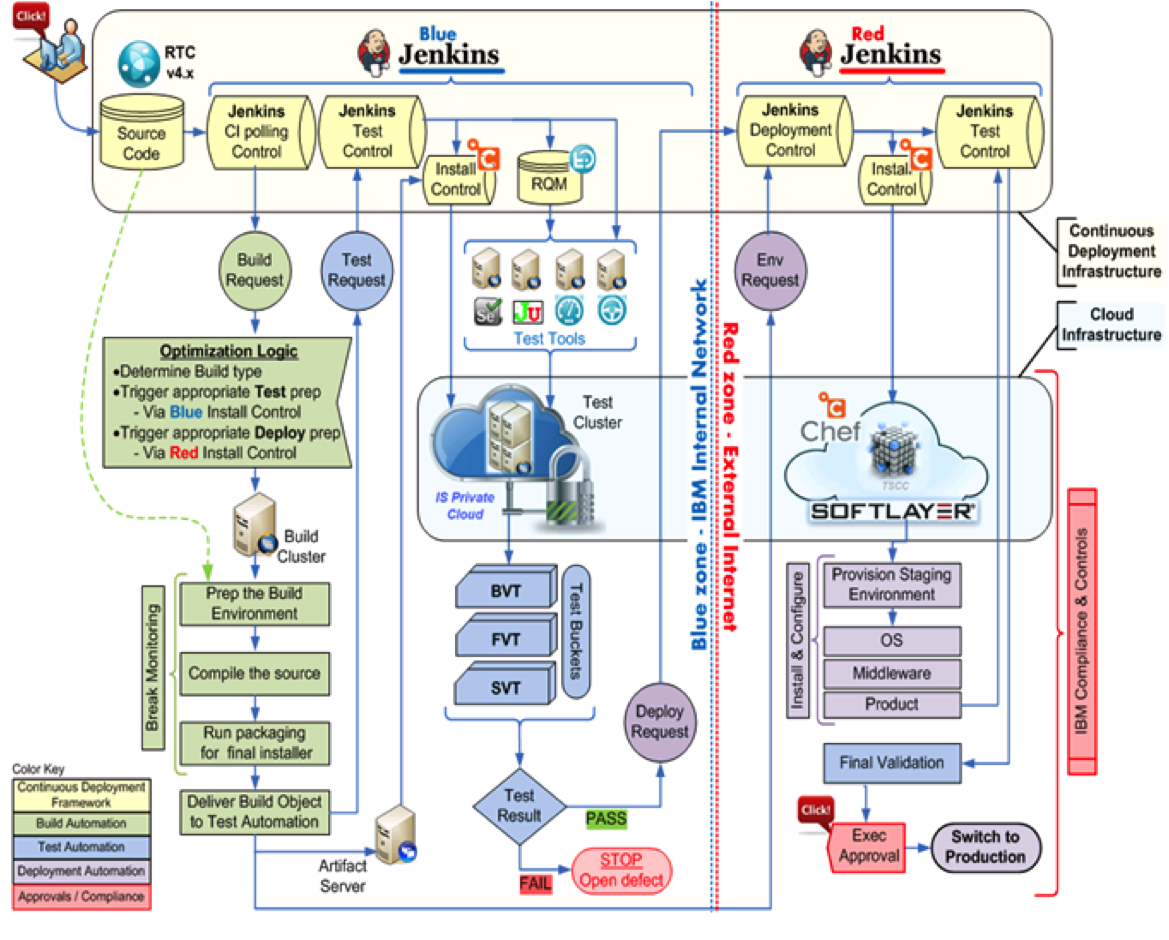
     CD and DevOps tool chain

    Each architecture is accompanied by a link to the original presentation or blog where the architecture was referenced to ensure you have access to the full context of the discussion. You can also freely download the presentation from SlideShare where we now have over 7,000 views.

    Offer to help others: If you have a reference architecture to share, please consider posting a link to it in the comments section below.  I am sure others would love to see it and learn from it.

  • Why you can’t buy DevOps in a box

    Why you can’t buy DevOps in a box

    Companies will often believe they can buy their way out of technical debt without making any substantial changes. They often think they can buy DevOps in a box. Well, unfortunately, devops isn’t for sale. For an organization to embrace DevOps it will need to adopt cultural change, adopt tools which enable automation, and change processes to include both dev and ops. I like to think DevOps can be explained simply as operations working together with engineers to get things done faster in an automated and repeatable way.

    Culture

    Organizations large and small have experienced these changes, the challenges encountered along the way, and the light at the end of the tunnel. Each organization requires their own set of tools and processes to embrace DevOps. Cultural change largely depends on the existing dynamic of an organization. In small companies, I have found it needs to come from the ground up and usually starts with adding the DevOps toolchain. In large organizations the value of DevOps needs to be sold to the executive team and then enforced from the top down. This is a daunting challenge for most large companies because it’s hard to quantify the value of DevOps.

    Most organizations only quantify failure when it comes to IT outages. How many outages? For how long and how severe? They often don’t quantify the success from 100% uptime or the resilience of failing over with zero down time. The ability to instrument and prove to an organization the value of applying DevOps is a crucial step to making it happen. DevOps teams efficiently deploy features faster with far less bugs. Also, when outages happen they respond faster minimizing the business impact.

    From developer to operations – one and the same?

    As a developer I have always dabbled lightly in operations. I always wanted to focus on making my code great and let an operations team worry about setting up the production infrastructure. It used to be easy! I could just ftp my files to production, and voila! My app was live and it was time for a beer. Real applications are much more complex. As I evolved my skillset I started to do more and expand my operations knowledge.

    Tools

    During the development phase, the operations staff normally makes sure the development environment is managed and they actively work to set up the test, QA, and Prod environments. This can take a lot of time if automation tools aren’t used. Here are some tools you can use to automate server build and configuration. In another post I will dive through the pros and cons of each tool, but as long as you apply some form of configuration management and treat your infrastructure as code you will be on the right track.

    Process

    From an operational perspective, my first instinct is to understand the application architecture so I can start thinking about the proper deployment model for the infrastructure components. Here are some of my operational questions and considerations for this stage:

    • Are we using a public or private cloud?

    • What is the lead time for spinning up each component and ensuring they comply with my company’s regulations?

    • When do I need to provide a development environment to my dev team, or will they handle it themselves?

    • Does this application perform functions other applications or services can already handle?

    Operations should have high-level visibility into the application and service portfolio. From a development perspective, my first milestone is to make sure the ops team fully understands the application and what it takes to deploy it to a pre-production environment. This is where we the developers sync with the product and ops team and make sure we are aligned.

    Planning for the ops team:

    • What tools will we use for deployment and configuration management?

    • How will we automate the deployment process and does the ops team understand the manual steps?

    • How will we integrate our builds with our continuous integration server?

    • How will we automate the provisioning of new environments?

    • Capacity Planning – Do we know the expected production load?

    Once developers have built unit and functional tests we need to ensure the tests are running after every commit and don’t allow regressions in our promoted environments. In theory, developers should do this before they commit any code, but often times problems don’t show up until you have production traffic running under production infrastructure. The goal of this step is really to simulate everything that can go wrong and find out what happens and how to remediate.

    Combining the power of developers and operations

    The focus on the developer/operations collaboration enables a new approach to managing the complexity of real world operations. I believe the operations complexity breaks down into a few main categories: infrastructure automation, configuration management, deployment automation, log management, performance management, and monitoring.

    In my next post I will walk through each one of these complexities and address how you can get your organization inline.