Tag: devops toolchain

  • Best of 2022: CI/CD is the New Lock-In

    Best of 2022: CI/CD is the New Lock-In

    As we close out 2022, we at devopsy.kinsta.cloud wanted to highlight the most popular articles of the year. Following is the latest in our series of the Best of 2022.

    Welcome to 2022! Let’s start this year’s blogging off with a bang, and point out that we are in the process of creating the biggest lock-in that we have ever had. And I do mean ever. Maybe the hardware lock-in of the old days where vendor A was incompatible with vendor B was worse, but at least that one we acknowledged when we signed the contract. This one is growing on us as I type.

    Our DevOps environments in 2022 cannot run without what I like to call the “toolchain controller”: GitLab, Github CI/CD, Atlassian, CircleCI, Jenkins—whatever you are using. Like you need some form of faucet or flow control to make running water work, you need the CI/CD environment to make DevOps work.

    You. Can’t. Live. Without. It. And just like any other vendor solution, CI/CD vendors are not going to be in a rush to help you move to a competitor. It won’t be easy or cheap to switch, largely because we are moving everything that might have been on a computer that once had developed code running on it into the toolchain.

    Sooner or later, we’ll back off the kitchen sink definition of “What is DevOps?”, but I predict even then we will have to answer “…A lot of what we do,” because DevOps is, by definition, end-to-end. It is about the process and all the steps from design to production.

    No matter how long or complex the process through which an organization’s CI/CD tool runs, a plan must be in place to replace it. A workable plan, not a check box plan. When Atlassian decided they preferred cloud-based customers, their customer base was shocked. Atlassian was wise enough to leave an option for customers who really had to have an on-site solution, but it is not difficult to imagine them phasing that option out, or to imagine another vendor dropping on-site support altogether. Some of the more competitive offerings in the space—GitLab springs to mind—are online-only already, making that option more appealing to other vendors as it’s now proven viable.

    So, have a plan. This is more important, IMO, than cloud vendor lock-in. Cloud vendors are a small community, and each understands the others, so if push came to shove you could find help moving between the big three cloud vendors. There are dozens of DevOps master controller-type solutions in regular use, and some of them are not at all CI/CD solutions (application release orchestration tools and software infrastructure management tools are two areas doing CI/CD duty at some orgs, for example), so there is not going to be much help moving between them unless you manage to find a very specialized skill set that matches your desired move.

    So, have a plan. Yes, I am indeed repeating myself. Know what you’re going to have to do before you have to do it. Include what to do if the master DevOps controller goes down. Because it will, sooner or later.

    And keep rocking it. Protect your masterworks by protecting what builds them. And keep rolling out the tools your users need. It’s a new year—learn a new skill and use that to turn out even more cool stuff. I haven’t picked a new skill yet, but I’m taking that last bit of advice myself. And again, in the new year, thank you, for all those who don’t know to say it.

  • Who Controls Your Build Process?

    Who Controls Your Build Process?

    We have come a long way in a short time in IT, and are currently in a ‘digestive’ state, where we take a bit of a break and prepare for the next wave of changes. Okay, not really a break, just a change in what we’re looking at.

    In the old days, CPU, memory speed, network throughput and disk access times would be in constant flux; one would be the server performance bottleneck and, when that was resolved, another would be the bottleneck. We’re in that kind of relationship right now. The majority of organizations are now using DevOps and our focus is currently on DevSecOps along with multi-cloud. Along the way, by unwritten consent, vendors have started calling Kubernetes “cloud.” This is totally amusing to me as a pundit, because Kubernetes is really a “cloud killer.”

    All public clouds are based upon the premise that they will have massive lock-in. And Kubernetes breaks that premise—unless an organization uses a cloud vendor’s customized version of Kubernetes; then they have other issues. No, I’m not blind, I am well aware that there are other reasons that cloud lock-in occurs, but there is a difference between “We chose this bit of custom functionality, well aware it locked us into our chosen vendor,” and “The act of using this vendor locks us in.” Multi-cloud and repatriation are things that would not be popular enough to talk about if not for tools like Kubernetes.

    So the next bit, IMO, is that once cloud portability is an established fact at most organizations, we’ll circle back to another iteration of build management. Many organizations are still on CI/CD iteration 1.0 and using Jenkins to manage their build process. While companies like GitLab and Atlassian have taken a bite out of the Jenkins-as-build-management phenomenon, they are also solid lock-ins through value add, and both of these vendors (plus most others in wave 2.0 of DevOps-centric build management) are heavily invested in the cloud. While the ability to build in the cloud is a very good thing, the requirement that a tool which is central to your toolchain be run from the cloud is not.

    That means we’ll be circling back to visit this issue again. And probably sooner rather than later. There is no denying that budgets are going to decrease for the bulk of us in the coming months, and I have no idea when they’ll rebound. That means that recurring expenses—like mandatory monthly subscription fees—will take a hit in B2B the same as they are in B2C. Don’t shy away from those assessments. Actually look objectively at your monthly payment plans and determine the ROI of each subscription your organization uses. Years ago, organizations centralized and reduced the number of development tool subscriptions they managed; this is just a continuation of that process in modern times. Spend your organization’s money where it will reap the most rewards instead of “where we always have.”

    You also want to make sure that you trust the company in charge of your builds, and that you believe they are stable. Over the years, we’ve seen several examples of companies that appeared stable when they were not; actually making the assessment is important.

    You’re building and maintaining the systems that keep the organization online and productive. Don’t hesitate to cut the fat. And don’t hesitate to maintain control. If the tool and its lock-in are forcing the org to work in ways that don’t fit the culture, look at alternatives.

    In short: Keep your options open. We know that money will be tighter in the near future, so let’s be sure we’re set up for that and retaining control of our build process. And keep rocking it.

  • Some Change is Bad

    Some Change is Bad

    Some time toward the end of the year, I start considering the volume of change we, as practitioners, have been under for … literally years, even decades. And I start to try and think of ways to keep you all from drowning in change. And then I write something that I hope helps you all focus on good change, and keeps moving your environment forward.

    This year I’m going to say “consider the reasons for the change.” I will attempt to find examples that do not require mentioning a specific product or vendor, so apologies if these read a bit convoluted as I attempt to illustrate this point without castigating.

    There are three basic reasons that a market or marketers want you to consider a change. There are, of course, variants and cases where it is a bit of this reason and a bit of that, but most demands that we change what/how we are doing things can be lumped into “mostly one of these”. They are:

    1. A great idea that is really a game-changer for some subset of the market.
    2. A shifting of who is in control.
    3. Locking customers in or expanding revenue.

    All of these happen at the vendor/project level, and all of them happen at the market level.

    Number one is best illustrated by any of the waves of server virtualization that have come through. From virtual machines to containers, each has solved problems and changed the way we do business. Notably, I’m only talking about server virtualization efforts here. Most of the other virtualization attempts have really not fit the “great idea that is a game-changer” category, though some have limited usefulness. Personally, I think the new version of storage virtualization will be in the game-changer category but am waiting to see it in use.

    Number two is one to watch out for and is most obvious when big-name OSS projects are forked. It is rarely about the technology being implemented (after all, a fork is a copy of the original; at first it is not at all about the technology), but rather about who is calling the shots. There is a bit of this in every public cloud vendor implementing their own version of container management (though this example is more about lock-in, in my opinion).

    Number three is multi-pronged. If your vendor went from selling you hardware or software to selling you a service, they want that recurring revenue and they want you to be linked into that service so deep that you can’t walk away. The much-reviled 1990s mantra of “embrace and extend” is the poster child for this kind of change. There might be a value-add in there somewhere and sometimes the added functionality makes the move a no-brainer. Often, though, the change is simply to the vendor’s advantage, not their customers. As most major Linux distros have shown, open source is not immune to this one, as most of them are making OSS users the de facto beta testers for their paid offerings.

    None of this is to say that the change in front of you is bad—even if the reason it was originally spawned is bad. It is reminding you that, after a constant stream of change, we’re more open to it than maybe we should be and you should remember the only important thing about new changes—do they make our environment more secure, faster, more agile? Everything else is just noise. Yes, all the cool kids are switching to coding in [insert flavor du jour], but does it offer your organization anything new? Yes, it seems everyone is using [insert current CI/CD flavor], but does it address the weaknesses of your current toolchain?

    You all are nailing it. Keep doing it. And don’t be afraid of change, but make sure you know if that new OSS database system is really new, or just a lot of installing the same code under a slightly different name. Because someone didn’t like the new owners.

  • …And all Those Other DevOps Tools

    …And all Those Other DevOps Tools

    When we started going through the DevOps toolchain for our new project, we found a ton of bits that normally we (and most likely you) wouldn’t pay too much attention to, because they don’t matter—until they do. Then we all pay attention. That’s why we added them to the toolchain list of options before they became a problem.

    It is time to stop, take a look around, make sure you have an inventory of what tools are going into the process of making your secret sauce. The easy one is IDE. For the last little while—say, a decade—we’ve let this largely be a team or an individual decision, but the steps required to do things and the add-ons/libraries used make this less and less about individual choice and more of at least a team, often an organizational decision. We’re doing it at the project level, so functionally equivalent to team. Our Java/Spring app is done in Eclipse because most of you are doing the same for that architecture. But our new Godot project will be in the built-in Godot editor (for Godot Script) and VS Code for C#. Again, because that’s all the rage in several languages, including C#.

    Here is the thing though – if you are using VS Code, you should keep a detailed and current list of plug-ins. I’m not a fan of their whole extension installing methodology through the command palette and want to make sure everyone has the tools needed at hand. In an enterprise setting, the ROI is there to just set it up and distribute to developers what they need in a package. But this is only a real possibility if most developers are on the same platform.

    What Git Desktop client is in use? While all of them support Git command line in the same format, helping each other use the UI for different operations kind of begs for standardization. Our team doesn’t change much, so I’m not terribly worried about this particular issue. We’re officially using GitHub Desktop, but as long as I’m not doing tech support (because you have a tool that you can’t use well), I don’t care if people stick to it. You might care more about that than we do—in this regard, we’re more like a startup than an enterprise. Since they share a command line, we can afford not to care. If you, as an enterprise, are providing ready-to-code environments, that is a different story.

    A couple of years ago we would have had to worry about containers, but these days we’re okay saying Docker locally and Kubernetes for production. While the Godot app doesn’t have a server component (hence the reason we’re keeping the Java/Spring app around), the build environment will be containers because we want to be able to build wherever we need to.

    Keep rocking it. I just thought I’d drop a list of what we’re going over—there is more, of course; this bit was focused on the developer tools side of things. I’ll eventually update with the final full stack, but for now, this bit is being put on the back burner while I look at some other areas. ::waves at security peeps::

  • Languages and DevOps: Can’t be Contained

    Languages and DevOps: Can’t be Contained

    The evolution of platform is an interesting study. From physical to virtual to cloud to containers, the progression has been steady, and each successive platform has benefits for both Dev and Ops that make them appealing. In the case of containers, portability is the word.

    As easy to fold into your DevOps toolchain as cloud, yet able to be deployed wherever you need, containers have absolutely taken the industry by storm. While all cloud vendors offer container options these days, their “value add” capabilities are thinly veiled attempts at vendor lock-in, so most organizations have avoided them.

    Development languages are as diverse as they are for physical or cloud; you can pretty much find containers hosting every language imaginable. That makes perfect sense, since one use of containers is to keep an otherwise-obsolete environment alive. That’s certainly not the primary use of containers, but it is an important one. The catch with containers is that the primary languages depend greatly on usage. A container that is persistent and intended to last months or even years will tend toward a different set of languages than one that is ephemeral and intended to last only minutes.

    The big weaknesses of containers – security, persistent storage, and management – have been addressed more and more as container usage has grown. Complexity of environments is now the big issue, but that is not inherent to containers; merely enabled by the ease with which new machines can be spun up.

    For longer-term containers, Java and C# are still the languages of choice, though others are certainly making headway. A combination of how new container technology is, and the extra layer between applications and hardware in the current popular container solutions make C/C++ less popular than on physical machines. They are still used because like other targets, containers still have operating systems that are linked to more easily in these languages.

    Shorter-lived containers tend to use languages that grew up in the Agile environment – from Python to JavaScript to Go. The ability to quickly crank out the code and get to test is useful for Agile and DevOps environments.

    Hooking into DevOps toolchains is at least as easy as it is in a cloud environment. There are even a fairly large number of companies that have moved to spinning up a container to build, then destroying it, only to do it all again on the next build. This is not mainstream yet, but the ability to completely configure the container and its loaded toolset makes it an appealing option.

    The kicker – one that cannot be overstated – is that it is simple and easy to get developers running with a copy of a complex system that once would have required several physical boxes. I, personally, have worked on a seven-plus server client system that I had a complete copy of on my (admittedly beefy) development laptop. It wasn’t the most performant, but it was enough to do unit testing.

    The security weaknesses of cloud come along with containers too – there is a lot more than just configuring an IP to directing traffic, for example – but mitigating tools and processes are available.

    This pundit truly believes that containers are the future of DevOps. They have the best of previous iterations, while offering mobility that just didn’t exist in other solutions. The ability to move an entire infrastructure from one deployment target to another (data center to cloud, for example), or from one cloud vendor to another makes this option the king for organizations that require (for business objectives, compliance or finance reasons) the ability to move their applications quickly.

    Meanwhile, rock on.

    Containers are the cutting edge of wherever it is we are headed. They are more agile than any other solution, they do not limit programming or networking options, can be run wherever the organization needs them and can be modified or redeployed easily. There is more complexity, but most of it has been obfuscated; only when things go terribly wrong is the complexity really an issue. Development for containers, with a few exceptions, is development for the target OS. That makes it easy to keep the organization’s systems preferences while enabling developers. All good. And many (I daresay most) of you are already taking advantage of them. Keep rocking it. Use what the org needs, and don’t forget to check every once in a while to make certain what is in use is what needs to be in use.

  • Accelerate Your Digital Transformation with IBM

    Accelerate Your Digital Transformation with IBM

    DevOps practices, processes and solutions help businesses accelerate their digital transformation by improving the speed and quality of software development. DevOps tools enable teams to do their job more efficiently by embracing automation, increasing agility and building speed, versatility and security into the framework.

    At the IBM DevOps Virtual Summit, attendees will learn how to keep their applications running smoothly with automation and data-driven solutions that can reduce mean time to resolution and explore IBM solutions to help innovate hybrid environments, disrupt cloud native development and transform existing mainframe infrastructures. The free virtual event will take place on Oct. 29 from 10 a.m. to 2 p.m. ET.

    IBM leaders will discuss the benefits of DevSecOps, how to increase business value, SRE best practices and how IBM Cloud software and services can help organizations succeed on their DevOps journey.

    The virtual event will feature four educational sessions from leading DevOps technologists:

    • “Application Modernization Enabling Hybrid Cloud with IBM Z,” by Rosalind Radcliffe, distinguished engineer and chief architect for DevOps at IBM.
    • “The Modern DevOps Manifesto,” by Andrea Crawford, distinguished engineer at IBM.
    • “DevSecOps in a Hybrid Multicloud World,” by Sunil Joshi, executive architect at IBM.
    • “Common Tooling Approaches from Kubernetes to the Mainframe,” by Eric Minick, program director at IBM.

    For more information about the virtual summit or to register, please visit the IBM DevOps Virtual Summit website.

  • Fastly Sets DevSecOps Strategy After Signal Sciences Buy

    Fastly Sets DevSecOps Strategy After Signal Sciences Buy

    In the wake of acquiring Signal Sciences for $770 million, Fastly is gearing up to expand the range of security services it offers as part of an effort to advance adoption of best DevSecOps practices.

    Artur Bergman, chief architect for Fastly, said a forthcoming wave of edge computing applications will require web applications firewalls (WAF) that can be deployed and managed remotely to protect them. As a provider of a content delivery network (CDN), Fastly will leverage the WAF platform developed by Signal Sciences to secure edge computing platforms within a forthcoming Secure@Edge service that promises to unified web application and application programming interface (API) security.

    Fastly has been gaining ground as a provider of CDN services that are programmatically designed from the ground up to shift control over networking and security services further left toward DevOps teams, said Bergman. In many cases, the only way to secure workloads running on an edge computing platform is for DevOps teams to be able to programmatically deploy a WAF to protect the workloads on that platform, he noted.

    Edge computing platforms are especially vulnerable to distributed denial of service (DDoS) attacks that are increasing in both size and sophistication as cybercriminals become more adept at targeting specific servers and platform, added Bergman. No one can prevent a DDoS attack from being launched, but a CDN can play a critical role in mitigating its impact.

    The acquisition of Signal Sciences comes on the heels of Fastly’s move to expand its the ability to collect metrics from edge computing platforms that will be employed to extend the reach of monitoring tools employed by DevOps teams to edge computing platforms.

    Zane Lackey, chief security officer for Signal Sciences, said the two companies share a similar history and commitment to best DevOps practices. The WAF from Signal Sciences is based on a runtime application self-protection (RASP) architecture that only runs when an application fires up, which Lackey said makes it a natural extension of any DevOps toolchain.

    The Signal Sciences WAF is unique in that it can support multiple classes of monolithic and microservices-based applications and that 95% of organizations that employ it do so in full blocking mode because the number of false positives the WAF generates is limited, added Lackey.

    Naturally, Fastly is not the only provider of a CDN services looking to woo DevOps teams. Organizations have been deploying web-based applications on CDNs for years. However, CDNs that simplify the deployment of applications within the context of a DevOps workflow are gaining traction.

    It’s too early to say how this battle will play out. In addition to providers who have built their own global networks, cloud services providers also now offer CDNs that promise to optimize cloud application performance while enhancing security and simplifying deployment. Regardless of the path forward, it’s clear that as more latency-sensitive applications are deployed across distributed computing environments, the more inclined DevOps teams will be to rely on external network services that can adapt quickly to changing application requirements.

  • GitLab Extends Scope, Reach of CI/CD Platform

    GitLab Extends Scope, Reach of CI/CD Platform

    The latest update to the GitLab continuous integration/continuous delivery (CI/CD) platform adds a bevy of additional capabilities spanning multiple capabilities, from being able to manage application development and deployment projects in smaller chunks to allowing remote teams to work more efficiently.

    Brendan O’Leary, senior developer evangelist for GitLab, said a Minimal Viable Change (MVC) capability in version 13.2 enables DevOps teams to break down work into smaller, more manageable chunks that are less disruptive. At the same time, GitLab is further reducing disruption by enabling deeper integration with Jira project management software from Atlassian. DevOps teams can provide bulk updates to projects using Jira in addition to creating confidential “epics” that only a limited number of users can access, said O’Leary.

    GitLab Geo has also been updated to improve replication performance to ensure local content is fresh. That capability has become especially crucial for DevOps teams that now routinely have large numbers of members who are working from home to help combat the spread of COVID-19. Many DevOps teams were already often working remotely prior to the pandemic; now large organizations are moving to extend those efforts at scale because it’s not clear when, if ever, DevOps teams might be heading back into an office, noted O’Leary.

    Other new capabilities include CI test results within a Release Evidence module for tacking compliance data; a global search tool for GitLab.com; tools for tracking designs stored in GitLab; and the ability to run custom load tests as part of a CI/CD pipeline more easily.

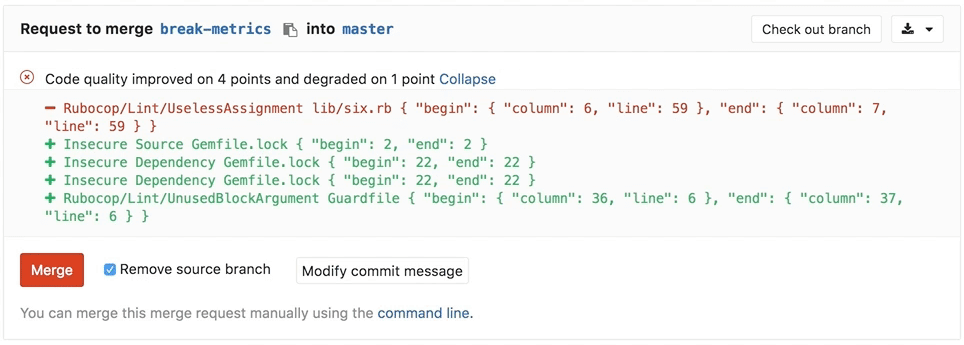
    DevOps teams can now associate Feature Flags with related issues; invoke container host monitoring and blocking; track changes to wiki pages; drive feedback into web-based integrated development environments (IDEs) in real-time; enable PHP developers to access a Composer Repository to discover dependencies; and employ a Code Quality Merge Request widget.

    Finally, DevOps teams can run the GitLab Runner tool to launch jobs on instances of z/OS running on IBM mainframes. O’Leary said that capability is especially critical as more organizations that have mainframes embrace best DevOps practices to drive digital transformation initiatives.

    In general, digital business transformation initiatives are fueling adoption for DevOps as organizations look to accelerate these initiatives to reduce overall costs and potentially increase revenue. As part of those efforts, O’Leary said organizations are looking for a highly integrated DevOps platform that minimizes the amount of time and effort DevOps teams need to spend integrating components and managing the platform. That urgency is also driving more organizations to embrace the software-as-a-service (SaaS) edition of GitLab, he added.

    In the meantime, competition among CI/CD platform providers continues to intensify in the wake of an ongoing wave of consolidation. The paradox is that consolidation is not being driven by declining demand; rather, many IT organizations are looking to streamline DevOps processes by standardizing on a single platform. As such, the race to add as many capabilities to a CI/CD platform as possible has never been more heated.

  • We All Have to Have Standards

    We All Have to Have Standards

    I was working on an e-book recently about the state of the market for certain DevOps toolsets, and got really interested in how standardized organizations are becoming. We have been on this roller coaster of changing technology and different teams making different choices in language, libraries, platforms and toolchains. We all knew that couldn’t go on forever, but I started to really get into the idea of “How much standardization is being introduced?” While talking with vendors about their experience, it seems that enterprises are finally attempting to standardize, at least in the platform and toolchain areas.

    Not the type of “technology by edict” standardization we used to see, but a checklist of “If your project fits these criteria, use this platform. If it fits those criteria, use this toolset for your build chain.” Which is a good compromise between the days of “We’re a Cisco shop” or “We’re an Oracle shop,” and the days of “Yeah, first developer on a project chooses the language, database, etc.” You limit the amount of technical debt and vendor/OSS project dependency, while offering teams options for how best to get the job done.

    I’m excited about the change, and it is one of the things driving much-needed consolidation in core DevOps markets. I won’t go beyond that, as you’re supposed to read the e-book when it gets released, but it’s an exciting time to be in DevOps. We’re getting more and more tools, better integrations and even some full lifecycle toolsets starting to become clear.

    Our shop is small, and we’ve exercised standards all along, just because we don’t have the time for everyone to train on five different CI products, so we use one. But for larger organizations with more diverse needs, standardization will offer savings in both maintenance and cross-training.

    Consider that at one point there was no standardization on vehicles–everything from tires to engine oil was custom to the brand you owned. Now, it is quite often the case that the engine in your vehicle is the same engine as in a competitors’ vehicle (VW using Saab engines for years is a good example), and that means maintenance is streamlined. Tooling with onboard computers makes maintenance even faster, much like tooling monitoring/reporting is doing for the DevOps iteration. It’s a good time to be in the field, watching as things unfold.

    Stay aware of what your vendors are doing, and what their competitors are doing. One of the reasons DevOps exploded is because tools and processes became static and weren’t as productive as they could have been. Don’t repeat that mistake, keep an eye on rapidly changing developments and adopt what suits your organization. You’re rocking it now, take a bit of time to make sure it stays that way.

    And consider standardizing some of your toolset. The fewer tools to maintain, the more time to work on productive issues. And the fewer toolchains a DevOps team member has to know to be productive on multiple projects, the more productive they can be. Agility applies here also.

    — Don Macvittie

  • The Right Toolchain Is the One You Build

    The Right Toolchain Is the One You Build

    One of several iterations that IT likes to go through is corporate standards for technology versus best tool for the job. We like to have standardization because it allows staffing portability between projects, but we like right tool for the job because from the moment you choose a standard, competitive factors and changes in needs make the standard less of a big win.

    DevOps is still struggling through this process, particularly in enterprises where standardization bears a bit more weight on important projects.

    The fact is that DevOps is well suited to the idea of iterating standards–somewhere between a wild west of everyone using their “right tool” and an organization dictating the tool of choice.

    Most of us use Jenkins, because it does what we need it to do. What needs doing is different from organization to organization–some use it for continuous testing, while others go all the way through application release automation. But the fact is we could iterate and replace some, or all, of the functionality we’ve decided to use Jenkins for tomorrow. Kind of like a “We have a standard that is evaluated regularly” approach.

    For those new to DevOps, the array of choices is downright bewildering. Xebia Labs has a toolchain diagram page to help those already doing DevOps, and several sources have spreadsheets/PowerPoint templates to help you work through your existing environment. While all of the options these tools try to organize for you are great for the industry to find better solutions, it makes for a confusing mess. Your toolchain could be all AWS with some scripting, all Jenkins with plug-ins or 15 different apps working independently. A surprising number of organizations are even using Git for the bulk of their toolchain.

    What matters is that you know what you have, and know what your options are. Build the best toolchain for your environment today, and keep half an eye on it to be aware when something more suited to your environment comes along. We still maintain python scripts that do a fair amount of our automation, but several toolsets in place also.

    There are objectively better tools out there, but for our purposes they are almost universally overkill. So we go with what’s best for our environment. As time has gone on, we’ve integrated more and scripted less, but it will be a while before out toolchain is actually just tools–if ever.

    If your toolset is doing the build/test/deliver/deploy cycle well enough, you’re covered. If it’s not, you need to look for alternate solutions. Even if it is, make sure you’re aware of what’s on the market and not just what’s “hot” right now. Be aware of those companies that are up and coming, maybe in spaces that are already flooded. What differentiates them, and in our environment would that differentiation matter? That’s all you need to know–there is no need for a super deep technical evaluation, unless you’re actually considering them. Just enough to know if their differences add value.

    Keep cranking out the apps that make business run. Perhaps with an updated toolchain, perhaps not. In the end, what works for your environment is all that matters.

    — Don Macvittie