Tag: devops culture

  • DevOps: The Ultimate Way to Break Down Silos

    DevOps: The Ultimate Way to Break Down Silos

     Let’s imagine Jim works on the development team for a food company and his colleague, Julie, works on the operations team. On a daily basis, Jim focuses on analyzing users’ needs, testing and developing software, while Judy manages IT infrastructure and policies.

    Although they share the responsibility of software deployments and application support, Judy and Jim rarely interact with each other. In other words, they operate in siloed functions that do not encourage teamwork.

    Many organizations recognize these silos. So, to enhance cross-team collaboration and reduce repetitive work, they are implementing the DevOps mindset. This methodology facilitates constant feedback and creates an environment where the building and testing of software occur simultaneously. But to successfully implement DevOps, business leaders first need to understand what a silo is, how it’s created and its impacts on employee morale.

    What is a Silo?

    Take development and operations teams as an example. Development and operations work with two distinct mindsets. Operations values stability, which can slow down software updates. On the other hand, development values speed and is encouraged to create, innovate and generate as much as possible.

    Silos develop when these departments are structured to work as separate entities with their own visions, goals and responsibilities. If development employees aren’t passing information about software bugs to the operations team, then workflow quickly becomes bottlenecked and productivity suffers.

    How Silos Impact Employee Morale

    The lack of information-sharing across teams takes a toll on employee morale and transparency, preventing development and operations teams from forming trust and mutual respect. Within silos, the development team might not report a software bug to operations out of fear of being reprimanded. Without an honest and open information sharing system, workflow is not only delayed, but the potential for misinformation increases.

    Silos create a structure in which departments focus on their own goals instead of working toward organizational objectives. Eventually, this mentality can lead to hostile relationships between departments, which negatively impacts efficiency and harms the bottom line.

    How DevOps Can Eliminate Silos

    Implementing DevOps is the natural first step when shifting employee attitudes from departmental focus to organizational goals. This way, employees don’t have to face the daunting task of completely eliminating all silos at once.

    By breaking down silos with DevOps, companies can avoid overspending on departments that may be resistant to change. Employers can create momentum for upcoming changes in other teams with the end goal of cultivating a collaborative mindset within every department of their organization.

    To facilitate this transition, organizations should assign a DevOps administrator to act as a mediator between departments. This administrator works to communicate and apply the DevOps methodology across teams while navigating cultural differences to facilitate cross-team collaboration. To successfully implement a DevOps mindset, the administrator should keep the following strategies in mind:

    • Direct teams toward common organizational goals. Team leaders should set specific goals that align with overall business needs. It’s crucial for leaders to point out how departmental goals directly support common objectives.
    • Design shared metrics. A consistent measurement tool holds everyone accountable and encourages stronger teamwork by enabling leaders to track progress and assign workloads accordingly. For instance, organizations can set up delivery cycle metrics for both development and operations teams to measure how much workflow speed increases for both teams while maintaining continuous delivery.
    • Organize regular meetings. Inviting team representatives to participate in recurring meetings creates an opportunity for everyone to give updates on project statuses.

    How DevOps Impacts Organizations 

    Today, IT is no longer an isolated function but an essential department within organizations. It’s important that future leaders invest in technology that drives business success while keeping its employees in mind. For example, enterprise, or employee, service management is popular among businesses for its ability to deliver automated insights and support. Many organizations are turning to a modern IT service management platform to bring their employees fast and quality service—two central qualities of the DevOps mindset.

    DevOps’ culture of continuous delivery helps shorten resolution time and encourages collaboration among development and operations teams. At first, businesses can struggle with continuous delivery due to siloed IT functions because these established support structures often come with lengthy and outdated processes that slow down delivery speed. However, a DevOps-focused culture supported by an IT service desk empowers developers and operators to deliver configuration changes and resolve issues at a faster pace.

    In today’s competitive environment, a silo mentality is a detriment to the innovation required for companies to stay ahead of the curve. Through effective management strategies, the integration of the DevOps mindset will eventually break down silos, increasing collaboration and productivity.

    — Michael Mazyar

  • Should Your Company Hire Remote Full-Stack Developers?

    Should Your Company Hire Remote Full-Stack Developers?

     Is your company seeking to hire a qualified full-stack developer? It seems like an easy enough task—create a job listing, read resumes, conduct technical interviews and make the hire. Finding engineers who understand every layer of the stack is difficult, however. Companies compete for the best and brightest full-stack developers and, unfortunately, they are in shockingly low supply.

    What’s the solution? One way to circumvent the full-stack developer talent shortage is to leverage telework. By seeking to hire remote full-stack developers, you can gain to a global pool of talent.

    There are many other benefits to hiring remote full-stack developers. However, hiring remote developers isn’t always the right fit. Read on to see if your company is ready to hire remote full-stack developers.

    Is Your Company Looking to Save Money on Office Space?

    Hiring remote full-stack developers is a major decision. When companies think about utilizing remote talent, they usually think of the headache of adopting a new form of work and of managing employees who work out of the office. However, it is also important to note one of the major benefits of leveraging remote developers: the cost savings.

    Other benefits to consider: boosted productivity, higher workplace satisfaction and lower incidences of interpersonal issues between coworkers. If you believe your company might be able to benefit from hiring and managing full-stack developers remotely, then you may want to consider beginning your hiring journey seriously.

    Does Your Company Prioritize Quality or Community?

    Finding the top full-stack developers can be extremely difficult. By opening up your search and tapping into global talent by seeking developers looking for remote work opportunities, you can put a greater emphasis on quality and technical excellence.

    If your company is more focused on creating a cohesive community or company culture, you may want to focus on hiring full-stack developers that can come into the office, interact with coworkers and build a rapport with managers, clients and fellow developers.

    However, this isn’t to say that it’s impossible to foster caring and authentic professional relationships with remote developers. It may simply prove more challenging.

    Are You a Brick-and-Mortar or a Click-and-Mortar Company?

    If you run a traditional brick-and-mortar organization that’s been around for a while, it may be more difficult to adjust to change. If you run an online business or if you’re a burgeoning small business or startup that is heavily reliant on tech, then it may be significantly easier for you to adopt telework.

    If you do run a traditional business with a traditional office and traditional approach to project management, it may take a bit of adjusting to accommodate for remote workers.

    You may want to try out remote work in a trial capacity by bringing on remote freelancers or allowing current full-time developers to work from home for a few days out of the week. If you find your company easily adjust to the changes, then you may want to consider hiring fully remote full-stack developers as well.

    Do You Want to Access Global or Local Full-Stack Development Talent?

    As mentioned earlier, full-stack developers are in incredibly high demand. Unless your business is headquartered in a major city, it’s going to be next to impossible to find the top full-stack developers. If your company is just starting or simply short on cash, then it can be difficult to bring on such an expensive full-time employee as well.

    If you want access to global talent, you’ll need to open up to remote work. Through telework, even companies in small cities and towns can gain access to top talent. If you’re more interested in fostering local talent, however, you might not be interested in leveraging telework.

    Conclusion

    Hiring remote full-stack developers isn’t always a simple process. It requires your company to remain open, adaptive and innovative. Without these traits, managing remote full-stack developers will prove challenging to say the least.

    How can you ascertain if your company is ready to bring on remote talent? First, it’s important to assess how much cost savings, boosted productivity and higher workplace satisfaction rank for you. In addition, it’s important to gauge whether  community outweighs the desire for the production of quality code.

    Finally, you’ll want to access your technological readiness and ability to adapt. Are you willing to search for global talent and leverage technologies, platforms and software programs that will assist you in this endeavor? If so, you may want to consider hiring remote full-stack developers.

    — Tania Brooks

  • What DevOps Can Learn from High Reliability Organizations

    What DevOps Can Learn from High Reliability Organizations

    High reliability organizations are organizations that work in areas that are very hazardous or complex, and yet manage to have a lower accident rate than what would be normal for that environment. So what can DevOps and DevOps practitioners learn from the research of high reliability organizations?

    David Woods and Sidney Dekker both have done great research on resilience engineering and high reliability organizations. They continually emphasize, “Safety is not something an organization is. Safety is something an organization does.”

    The first thing that DevOps practitioners can learn from high reliability organizations is that safety is not a sterile environment with no dangers or no hazards. Research into these organizations shows that safety is actually the presence of things that help manage or mitigate risk, such as systems, people and thought processes. For DevOps organizations, these could be a trusted CI/CD system, automated testing or a code review process that involves a larger portion of the organization early (such as infosec).

    Research shows that complex systems can’t be said to be safe merely by their component-level reliability. For instance, if you take one part in the system, such as a fan in a car, and this fan is performing exactly as you expected, that doesn’t mean the overall system is safe.

    Complex technological systems have developed to a degree where what used to be possible in looking at these components and putting them together in a safe system now creates an environment where the interactions between these components and their effects still potentially can be unsafe. Of course in our context, unlike nuclear power or aviation, our accidents are typically with software systems. From a financial perspective or a job or livelihood perspective, these accidents are potentially no less significant.

    Another lesson that DevOps can learn from HRO is not taking past success as a guarantee of future safety. Research has shown that even if you feel very confident in your training or in the tooling that you’re using, the people at the controls still need to look for signs that you could be overconfident or your confidence is misplaced.

    This might happen when you find yourself saying, “Well, we’ve done a deploy like this a million times. It will be fine.” That’s probably a good attitude from a morale perspective, but it would be a mistake: Although it looks like a task or project you’ve done before, there could still be risks involved. There’s a difference between assuming there’s no or very little risk and confidence that you could manage it and have practiced managing it and are still aware of those risks.

    The next lesson that can be learned is to not create differences where they don’t apply. Research has shown that people tend to see incidents in other organizations or other departments of the company as not applicable to their area. They’re far away. They’re different and have different restrictions. They have a different operational environment with different people operating them. It’s tempting to dismiss the potential learnings that are raised there, but organizations that want to increase their resilience and reliability purposely look deeper into the underlying patterns in those incidents and try to learn from the parts that do apply to them, as opposed to focusing on how different that other is.

    When investigating issues or problem-solving, people must have ways to communicate and share information freely as well as update their mental model of how the system works to avoid fragmented problem-solving. If instead, silos are enforced across an organization (regardless of how or where these artificial boundaries are drawn), then there is a high risk that with no one person or group will be able able to notice if the system design slowly trends away from safety.

    Fresh perspectives and diversity on teams matter. Research into high reliability organizations proves that people from different backgrounds who have different viewpoints actually generate more theories regarding why something might or might not work. They end up mitigating more risk situations, reveal more things that might be previously a hidden assumption and allow for minority viewpoints. These points of view also can provide new information or reveal pre-existing hazards that no one was looking at.

    We need to narrow the gap between how practitioners operate the system and how management imagines the system to be. The more accurate the non-practitioner view, the easier it is for those people—whether management or other stakeholders—to make decisions that help create safety.

    Most organizations typically don’t change until there’s some huge amount of evidence that says they should. This is usually something such as an incident, a disaster or an accident of some sort. If we continue that pattern, these organizations are always learning too late. By applying some of these resilience and high reliability organization principles to our practice, we’re able to move this learning forward and change earlier—and not have to incur the high costs for that learning.

    — Thai Wood

  • Demystifying Crucial Phases of Project Management

    Demystifying Crucial Phases of Project Management

    With competition becoming more intense for development companies, project management is becoming a more integral part of every project. It’s no longer limited to the actual creation of a new project. Now, it’s about planning, communicating, collaborating and analyzing. With so many moving parts, it’s difficult to understand all of the important phases of project management.

    This guide will cover all the phases of project management so you can understand how they apply to your projects in DevOps. Even if you don’t have a background in project management, you’ll be a pro in no time.

    Defining Project Management

    First, we need to articulate exactly what project management is. It’s the discipline of initiating, planning and executing the work of a team to achieve specific goals within a time frame. It involves a lot of interteam collaboration, and it isn’t any single activity.

    Project management experts draw knowledge from areas including human resources, communications, risk management and even accounting. That being said, there are a lot of moving parts that can make project management tricky, particularly with large projects or growing teams. Knowing all of the phases of a project process makes it possible to navigate these areas effectively.

    A project process is any unique action that represents the entire project internal process within DevOps. This is usually decided by the project manager. It might include instructions, procedures, plans or organizational software.

    Understanding the Phases of Project Management

    When you’re talking about the project life cycle, you need to understand the project management phases. Throughout the project life cycle, you should be able to define clear goals. These will include a combination of the following:

    • What will be accomplished?
    • How will you measure what has been accomplished?
    • Who will work on the project?
    • How will you monitor progress?

    Having these questions above in mind will direct the project along its life cycle. Without any clear initiative or direction, you can’t expect team members to know where to go with their tasks. That’s why clear goals are key in the world of DevOps, where every task matters.

    Now that you know the importance of clear goal setting, it’s time to finally define the phases of project management. There are five in total, and they are:

    1. Initiation
    2. Planning
    3. Execution
    4. Performance monitoring
    5. Closure

    Phase 1: Initiation

    This is the beginning of the project. In this phase, you’ll want to define your goals, what the project is exactly, and how it fits into your company goals. One of the biggest pitfalls in the world of development is choosing to start a new project for technology’s sake. While there’s always something to be gained in innovation, avoid falling for shiny-object syndrome. Just because you have new technology doesn’t mean it makes sense as part of your bigger business strategy.

    To make sure you’re choosing the right project for your team, ask the following questions in this phase:

    • Why are you choosing this project now?
    • Is this project realistic?
    • What does the end result look like?

    From there, you’ll need to get approval for the project from higher-ups. This might take some time, so be sure to articulate your goals clearly at this stage so you don’t waste energy. Finally, you or your project manager will create a project initiation document (PID), which is a formal outline of the purpose and requirements of a new project.

    It’s smart to include developers across teams in these initial meetings to ensure they can give guidance about the technical challenges of a new project. Remember, collaboration is key at every stage.

    Phase 2: Planning

    Now that you’ve gotten the green light, it’s time to create a plan of action. This will involve goal setting and job responsibilities for all team members of all levels. Don’t forget about the S.M.A.R.T. goal-setting process to make sure you’re creating goals that are realistic. Remember, smart goals are specific, measurable, attainable, realistic and time-bound by a deadline.

    This is the most vital stage of project management. It’s when you’ll put pen to paper and work out any kinks. Poor planning will reflect itself in every stage after, so take the time to work with teams to decide the best plan of action. Limit your deadlines for every task to 10 days or les to ensure you don’t let obstacles take away from your final product.

    Phase 3: Execution

    The time for planning is over and now it’s time to get down to business. This is exciting because you’ll see your project start to shape itself. Your programmers are busy coding, designers are building graphics and managers are creating progress reports.

    Don’t forget to update your higher-ups during this process, even with small changes. Regular updates are necessary to make sure everything is progressing according to schedule. Conduct weekly meetings to make sure everyone knows how the entire team is progressing as well as their own next steps. A project management software is valuable at this stage.

    Phase 4: Project Performance

    Now that the project is completed, it’s time to reflect on your success. Did everything align with your original goals? Did you meet your deadlines? Think about your objectives, your deliverables, your cost,and the performance of the project. How did all of these things measure up?

    You’ll base your future project plans on the success of your analysis at this stage. Even though the project is officially done, that doesn’t mean there isn’t still more to learn. Also, don’t forget about preparing maintenance for your software going forward. You might need a program like Amazon CloudWatch – monitoring and logging service to continue to learn about the success of your project into the future.

    Phase 5: Closure

    Your project is completed and your analysis is coming to a close. It’s time to follow-up on any final pieces and close the door on your project for good. This is also known as the post-mortem phase because it’s when you’ll decide your key takeaways and stop progressing.


    Project managers will meet together to decide key players, project performance, and deadline analysis. How can you learn from the events of the past few days or weeks to grow during your next project? Don’t overlook this stage. It’s important to reflect on what worked and what didn’t. If something didn’t work out the way it was planning, talk about it.


    Finally, host a team meeting to talk about how the project went as a group. You might have a different perspective than those under you, and it’s important that everyone feels heard. Take team member feedback seriously so you can learn from it for next time.

    Manage Projects Successfully

    In the world of DevOps, project management plays a lead role. Don’t overlook any stage in the process as not being necessary. It’s important to have a well-rounded, thoughtful approach to leadership. There is no perfect way to lead a group in big projects, but you can use every phrase to carefully tackle new challenges and grow your team strengths.


    When you practice these stages above, they’ll come naturally. You’ll notice each stage leading gently into the next, and that’s how you make a business that’s ready for anything. Every project manager will experience some level of failure, but learn how to roll with the punches and keep moving forward.

    — Wendy Dessler

  • InfluxData Video Series: ‘Time to Awesome’ with Mark Herring

    InfluxData Video Series: ‘Time to Awesome’ with Mark Herring

    InfluxData firmly believes an awesome experience is fundamental in developing and curating its developer community. After all, the company’s platform is designed for developers, said CMO Mark Herring, and so delivering a great experience is in the company’s DNA. “We want them to have an awesome experience from the first download to the first interaction with the company to the first install, to first getting started, to first production database.”

    Part of that great experience includes an open source platform that takes only about five minutes to get up and running. “It comes down to one piece—the whole platform is there—and you can ingest the data, you can visualize you can query the data in literally about five minutes,” Herring said.

    In this video—the second in a series of four—Herring talks about the importance of “time to awesome” in every consideration InfluxData makes regarding its platform, its overwhelming acceptance by the developer community and how the company will continue to strive for an even better “time to awesome.”


    To learn more, watch the video and download the “Time to Awesome” infographic here. Also, check out the first video in the series here.

    — Charlene O’Hanlon

  • DevOps and Collaboration: Fraternizing with the Enemy?

    DevOps and Collaboration: Fraternizing with the Enemy?

    DevOps is all about collaboration, we hear.
    “You must collaborate,” say managers initiating DevOps adoption programs.
    HR make new posters declaring the corporate values “We value Collaboration & Teamwork.”
    Can’t fail!
    Then when it appears not to be as effective as we had hoped we tell teams they are “Empowered” to collaborate.
    Blank stares!
    When things still don’t appear to be working we tell teams they are “self-steering,” “self-organizing, collaborative teams”….
    Still, we don’t get what we were hoping for.
    Luckily the tool vendors come to the rescue and tell us why it is failing. We need “collaboration tools and software” – Throw some “Slack” at it.
    Can’t fail!

    This is when we usually get frustrated managers knocking on our door asking about the Phoenix Project DevOps simulation. They are moaning about communication and collaboration! When we talk to the teams they are frustrated and moaning about “empowerment” and managers not “walking the talk.”

    In my mind these lack of collaboration skills is not really surprising. Why?

    Impression: Well, it doesn’t help when the word has also historically been connected to global conflict situations. “He faces charges of collaboration,” “fraternizing with the enemy.” Dev & Ops. Traditional adversaries?

    Interpretation: The interpretation of the word itself is also part of the problem. I googled an English Language Help Desk:

    Collaboration: “To work together with somebody in order to achieve a single shared goal.”
    Cooperation: “Work with other people by achieving one”s own goals as part of a common goal.”

    In an HBR article titled, “There’s a difference between cooperation and collaboration,” it was argued  “… Managers mistake cooperativeness for being collaborative,” adding, “… most managers are cooperative, friendly, willing to share information – but lack the ability and flexibility to align their goals and resources with others in real time.” If managers don’t get it then what chance do the teams have when told – “You must collaborate”!

    Induction: Part of our failure to be able to effectively collaborate could come from our schooling. We are chastised at school for asking others for help, for looking to see how somebody else is doing it—”That is cheating”—things are changing with more “collaborative assignments.” Yet, my children (now in their early 20s) were not taught what effective collaboration is, other than discovering for themselves. As my daughter explained about her school assignment, “You have to do it yourself if you want it done because others will slink off and not do it, then my individual grade may suffer.” They are told they need to collaborate but individual performance grades are scored. My daughter once came home stressed and almost in tears, declaring “Oh no! I have been given another collaborative assignment for my most important subject!” Children leave schools distrustful of collaborating.

    Indoctrination and Imperative: There is also the historical perspective. When we, the current workforce entered our chosen profession we had decades of functional silos that created a “them” and “us” attitude. This stimulates a sort of “territorial imperative” or “tribalism,” not helped by our own “technology” languages and tribal cultures. We have learned over time that other teams “dump things on us” or other teams “stop us from getting stuff done.” In other words, Other teams frustrate work.  (Territorial imperative—”the drive in animals and man to take, hold and defend a particular area, zone, turf,” —e.g. defending their best practice framework! And attacking others that come near!).

    Inconsistency: We then built walls between these teams and if they wanted something from each other they needed to escalate it to their manager. Managers would collaborate or not, especially when they were given conflicting, inconsistent goals and KPIs. Development teams are given goals to release as fast and as often as possible. Operations are given goals to make sure everything is as reliable as possible and available at all times.

    I had an example of this “them and us attitude,” once with a board of directors. I split them into two teams and gave each team a pack of ABC cards (Attitude, Behavior and Culture) and within 10 seconds heard, “Oh good, our team will win this!” automatically creating an atmosphere of competition and winning and losing, I hadn’t even explained the task yet! Teams compete.

    ‘It’ factor: A study by Google (2012) called Project Aristotle, named in tribute to Aristotle’s quote, “The whole is greater than the sum of its parts,” looked into why some teams work and others don’t. One of the key conclusions was that “psychological safety” was the “it” factor, “… a sense of confidence that the team will not embarrass, reject or punish someone for speaking up.” Because we have not learned to collaborate and because we have a “them and us” history often accompanied by blame, there is fear, uncertainty and doubt (FUD) about speaking up, sharing ideas or giving feedback.

    In the dark: However, there is another significant reason for poor collaboration, as I have discovered from running hundreds of Phoenix Project simulations with teams globally. It is the fact that nobody has defined the “behaviors” that demonstrate effective collaboration. We assume everybody knows what we mean when we say, “You must collaborate.” Fact: We don’t!

    Below are the results of a series of recent Phoenix Project simulations. One of the goals was to learn DevOps practices such as CALMS and the Three Ways, while another goal was to learn effective team-working and collaboration.

    I asked the teams at the start of the sessions, “What is effective collaboration? What behaviors will I see today that demonstrate this”?  The teams came up with a list of behaviors (each team came up with a top five or six behaviors; this is the consolidated list from seven teams).

    • Transparent communication – “open and honest” and “frequent.”
    • Calm and constructive dialogue (no blame, accusations and shouting).
    • Feedback “asking for and giving feedback.” Constructive feedback.
    • Shared team goals (and cross team). What are we aiming for? Impact on others and their goals. Maybe conflicts that need managing.
    • Listen – is it clear and understood? Show that you listen.
    • Being open for dialogue, being approachable –not closing the door or hiding behind.
    • Giving and taking responsibility.
    • Sticking to agreements.
    • Central moment to get together (e-2-e).
    • Knowing the roles and responsibilities, sticking to responsibilities.
    • Mistakes are OK.
    • Be proactive to get information needed.
    • Equal treatment: “Respect” ideas from ALL
    • Don’t HOPE, confirm.
    • “Willingness.” Confirm and agree.
    • Ownership of responsibilities.
    • Clear agenda and purpose of meetings.
    • Pleasure – celebrating success.

    “Are these behaviors you want to see more of in your daily work?” I asked.

    Yes! Was the answer.

    “Do we now all commit to sticking to these behaviors today, in this simulation?

    Yes! Was the answer. Easy! See there’s nothing to this collaboration stuff.

    However …

    During the simulation it soon became evident that roles and responsibilities were not clear or not being carried out; it was not agreed which information was needed by the business nor when; goals were unclear, meaning that priorities were arbitrary; people did not understand procedures and did not ask for help; assumptions were made (“I told you …,” “I thought you meant …”); people taking responsibility were not respected (“Let’s stop and try and sort this out …”)— everybody just carried on running around! “Headless chickens,” said one delegate; people were not listening to each other; there was a lot of “assumicide”; mistakes were made and people blamed—there was no exploration as to why and what can be done to stop these  mistakes. Mistakes were often corrected by somebody else but without giving any feedback to correct future mistakes; agreements were unclear across the team; there was no end-to-end flow—work and information was ping-ponging back and forward.

    “All in all, just like reality!” declared the teams.

    See how easy collaboration is. Within one hour of making a list of desirable behaviors, they were totally, utterly and universally ignored. Nobody appeared to own these behaviors or to confront each other on them.

    After the Experiences in Simulation

    At the end of the simulation round we looked at the team scores (number of releases, number of successful releases, business value realized). It wasn’t a pretty sight. The CEO wasn’t happy. The team felt stressed, unhappy, frustrated and powerless.

    We explored what this had to do with “effective collaboration.” Had anybody used the list of behaviors? No.
    Had anybody consciously practiced these behaviors?
    No.
    Did anybody give feedback on these behaviors when they were clearly not done?
    No.
    “Giving feedback feels strange, it feels like we are criticizing and blaming,” said one delegate. Another assumption!

    “It’s hard,” said one delegate. “The manager needs to manage this,” said another.
    “It was YOUR list and YOU all agreed this, why is this a manager’s job to get you to do what you said you wanted to do?”
    There was silence. “It’s not easy, we fall back into old ways of doing things, we need help!”

    Is it a Bird, Is it a Plane, Is it a Bus? No, it’s a coach!

    As the simulation progressed, the team refined their list of desirable behaviors based upon their experiences. They were coached for two rounds and consciously practiced and experimented with the behaviors. The coach role became a critical catalyst.

    In the final round the team owned, and were executing on these behaviors without coaching.
    Why were they suddenly executing?
    They felt less stressed; they were trusting each other; they felt the positive impact on their work; they saw, felt and shared the value gained by these behaviors. They felt immediate positive consequences from these behaviors.
    Why no more coaching?
    The team were taking it in turns to lead their own stand-ups; they were giving feedback and correcting their own behaviors. These were the additions the teams made to the behaviors as they practiced them.

    • Transparent communication – “open and honest” and “frequent” (Relevant, and timely as agreed with the various stakeholders).
    • Feedback “asking for and giving feedback.” Constructive feedback. (Related to agreed behaviors and responsibilities, calling stop, then swarming to solve an impediment, constraint, or remove waste; immediate fact based feedback).
    • Shared team goals (and cross team). What are we aiming for? Impact on others and their goals. Maybe conflicts that need managing. Understanding strategic portfolio and how we contribute to strategy, show you understand and agree common goals and prioritize accordingly. Goals for both value creation (features and benefits) and value leakage (risks, debt).
    • Leadership within team – team members took turns in facilitating the stand-up and retrospective. This role was respected.
    • Listen – is it clear and understood? Show that you listen, sender: Ask for clarification, ask to confirm understanding, listener: summarize what was understood and agreed. Avoid assumptions.
    • Being open for dialogue, being approachable—not closing the door or hiding behind. All were engaged and equal in the stand-up and retrospective. All were asked for feedback, ideas, suggestions.
    • Giving and taking responsibility. Respecting team behaviors; e.g if somebody calls “stop,” or “respect somebody taking responsibility for an improvement stand-up.”
    • Sticking to agreements. Confront people to understand why agreement not met and what can be done about it in the future (e.g conflicting priorities, lack of understanding).
    • Central moment to get together (e-2-e). Scheduled stand-ups, retrospectives, and improvement prioritization.
    • Knowing the roles and responsibilities, sticking to responsibilities, confirming your responsibilities, confronting people on responsibilities (feedback). Showing that you take ownership.
    • Mistakes are OK – no blame, so long as it is used as an opportunity to learn and improve.
    • Be proactive to get information needed (or ensure information is available, e.g. visible management board, avoid unnecessary “disruptions).
    • Equal treatment: “Respect” ideas from ALL. Ask people for input, engage ALL in ideas generation and decision-making.
    • Don’t HOPE, confirm.
    • “Willingness.” Confirm and agree – “Willingness” and “ability,” empower to be able. Share knowledge, cross train, coach, help.
    • Ownership of responsibilities. Confronting people on responsibilities.
    • Clear agenda and purpose of meetings. My role, what is expected from me? What is in it for me? avoid “wasting” time in meetings.
    • Team coaching to give feedback on behaviors.
    • Create trust by demonstrating team behaviors.
    • Check understanding and commitment to “agreements” and confront people (feedback) on agreements.
    • Improving own work as a team.
    • Asking for and offering help.
    • Having insight, overview, visibility.
    • Limit WIP (reserve WIP for learning, improving, technical debt).
    • Pleasure – celebrating success. Product owner shared results including customer feedback. Team complemented each other.

    The teams were then asked to make a list of behaviors and actions they wanted to take away and apply. Their line managers and assigned team coaches were there when the list was made and gave commitment to help guide, coach and empower teams to experiment and practice these new behaviors in their daily work.

    The team would prioritize one or two behaviors to start with and consistently practice in the coming weeks. When the new behavior becomes the accepted norm and a “habit” they would focus on more behaviors.  This fits in with the Third Way of DevOps: Continuous experimentation and learning. “Understanding that repetition and practice is the prerequisite to mastery.” And to tie this back to Aristotle the philosopher (not the Google project): “Excellence is an art won by training and habituation … We are what we repeatedly do. Excellence, then, is not an act but a habit.”

    Meetings, Including Training Sessions!

    And finally, one of our industry’s most popular, and wasteful, examples of collaboration are poorly run meetings, which are the biggest time-sink in organizations and a source of frustration. I include some training classes as forms of meetings.

    In more than 100 training sessions in the last year, less than 10 percent have started on time.
    Nine minutes late is the average. Delegates say this is normal in their organizations. When I ask people what their own personal learning goals are for sitting eight hours in this “training meeting,” more than 25 percent had not defined this and more than 70 percent had not agreed this with the “sponsor” of the training.

    We need to manage our overload of wasted meeting effort. How? One way is the ask for goal and agenda in advance, asking what value you need to bring in and what value you need to get from the meeting; also to limit your time to the agenda items relevant for you or your team.

    Efficient collaborators decide when they do, or don’t, have unique value to add—“maintaining focus on what matters.”

    The same applies to training, asking, “Why am I going on the training?” “What am I expected to learn?” “What problem is this training expected to help solve?”  “What will I be expected to do differently after the training?” “How will the learning be transferred back to the workplace?” “Will I be mentored and coached?” “Will I be given opportunities to experiment?” “Will I get constructive feedback?” “How can we demonstrate that the new knowledge delivers expected benefits?” This is better than the most common answer, “I don’t know I was told to come to this training!”

    A training is also a form of collaboration between you, the trainer and the person sponsoring the training.

    There is an “I” in Team, after all. “I” am responsible for my effective contribution to team performance.

    — Paul Wilkinson

  • The Third Way of DevOps: From Knowing to Being

    The Third Way of DevOps: From Knowing to Being

    Why is the Third Way of DevOps so difficult to master?

    We all know the feeling. You’ve seen an opportunity to improve things and genuinely want to do something about is. But you soon feel the clarity and anticipation draining out of you. First there’s the pressure of the day job. Then there’s the inertia of your co-workers who are oblivious of, or indifferent or hostile to, your ideas. And finally, as if these concerns weren’t enough, you’re faced with the difficulty of unlearning old habits and developing new ones. You wonder why you bother. In a way, it’s a bit like a lottery: You buy a ticket fully knowing that the odds are stacked against you, but it’s the worth it for the uplifting short and illusory dream that it might just happen.

    This is, of course, all about the Third Way of DevOps—creating a culture that fosters two things: continual experimentation, which requires taking risks and learning from success and failure, and the understanding that repetition and practice are the prerequisites of mastery. It all sounds great in theory, but why is it so difficult to put into practice?

    Information Abundance  

    It’s not due to lack of knowledge and skills. We have more information available to us and more easily accessible than ever in the history of our planet. We can thank technology for that. But has it really made us more effective at what we do? If I know something and don’t apply it, how is that so different than not knowing it at all? If I know how to read but choose not to, how is that so different that not knowing how to read? If I don’t use what I know, how long will I retain it and how will I integrate it with the other things I know? Most importantly, can and will I apply what I have learned to make things better?

    Lifelong Learning 

    We have been learning and studying all our lives in an attempt to make things better: our ability to understand IT, frameworks, methodologies, capabilities, practices, work processes and, of course, tools. Consider how many thousands of hours you invested in school, self-study, read out of curiosity, listen to podcasts and do work-related training and certification. Most of my friends proudly describe themselves as “lifelong learners” and one claims the day they stop learning shall be the day they die!

    Training in Skills

    We’ve also invested considerable time and effort into improving ourselves so that we may work more effectively with others: communication skills, teamwork, shared rituals, structured problem-solving, leadership and coaching all fit into this category. Who (in IT) has not been a part of some Service Management, Lean, Agile, Scrum, Kanban or DevOps training? After all of our training, you’d think we’d be further along than where we find ourselves.

    Knowing and Understanding 

    Knowing and understanding are not the same thing—I can know the Four P’s of IT Service Management (People, Process, Products and Partners), yet not view it as a lifecycle model and understand that to obtain the benefits of this knowledge, my team must determine the roles of people and objective of work of processes and then implement tools to automate the processes enabling people’s roles and tasks.

    Understanding and Doing

    Nor are understanding and doing the same thing—I can know that structured problem solving is based on the scientific method and can be broken down into four stages (Plan, Do, Check, Adjust). I may also understand that structured problem-solving is preferable to the reactive educated guesswork my team engages in whenever it encounters a problem. But if we do not change our behavior when it comes to problem-solving, our understanding will not manifest as action.

    Doing and Being 

    Neither are doing and being the same thing—I can be doing something and still not have internalized it so that it becomes who I am. I can know the core principles DevOps (engage in systems thinking, amplify feedback loops, foster a culture of experimentation and learning). I may understand that all three principles must be applied to foster a sustaining DevOps environment. I may be even be holding initial planning sessions with my team during which we map out the DevOps value stream, identify bottlenecks, create feedback loops and introduce changes to create a create a culture of experimentation and learning.

    Moment of Truth 

    But what happens when we meet with our next P1 incident? Does the knowing, new understanding and behaviors get tossed aside while we fix the problem, or do we hold fast to the new way of doing things as we grapple to not only remediate the incident but to view it within the context of DevOps?

    So, What’s a Person To Do?

    The velocity and degree to which we can move from knowing to being determines how effectively we can apply what we know. Here are a few things you can do to smooth the transition from knowing to being and help put the Three Ways of DevOps into practice:

    1. See and feel the potential impact from moving beyond knowing to being
    2. Use the uplift to get motivated
    3. Take action by changing something within you and your team’s circle of control
    4. Reflect on the fact that you have realized potential (this is very powerful when you share it with your team)
    5. Check and adjust based on the outcomes of step #3
    6. Allow the feedback from the previous step to motivate you to carry on!

    Curiosity and Humility

    This approach requires a certain attitude. One of curiosity and humility. You need to be inquisitive so you keep striving to understand. And you also need to be unassuming and you see yourself as having plenty of room to learn and grow; being deeply (almost obsessively) interested in what’s going on and how things could be improved; trying to be aware of and to set aside any preconceived ideas—adopting a beginner’s mind.

    To Be Continued …

    In our next post, we’ll explore specific steps you can take to leverage The Third Way of DevOps and make tangible progress based on what you know and don’t know, understand and don’t understand, and do and don’t do.

    This article was co-authored by Mark Smalley.

    — Mike Orzen

  • The DevOps Role: Not a One-Person Job

    The DevOps Role: Not a One-Person Job

    This is actually a follow up of the article I wrote a little while ago on LinkedIn titled “DevOps is NOT Jenkins.” In that article, I ranted about how many people and companies confuse automation tools with DevOps. Now I want to address another misconception that I come across quite often: “DevOps is a role.”

    When managers tell me they have all bases covered because their team consists of developers, designers and a DevOps engineer, many questions come to my mind. Having the awareness to at least assign that role in a team is already something. Quite a few engineering managers think that by giving an engineer a DevOps title is enough, but nothing could be farther from the truth. As I mentioned in the LinkedIn article, DevOps is a culture, a process and a philosophy. Adding a DevOps engineer to the team is like declaring someone on the team to be the scrum master and assuming agile is in place. These days, Agile is widely adopted and usually it is not seen as a role, but as a proper methodology. (Although it never surprises me when I encounter a team that is micromanaged while a scrum master is on duty …)

    Like Agile, DevOps should be practiced by the team or organization as a whole. At the core of all engineering we should not only address features but also how those things will run in production. And let’s not forget quality assurance, security and compliance when designing a feature or fix. Fixing an issue at the beginning is between 10 and 50 times cheaper than leaving it until all the testing phase is done already, according to a NASA study. “The study revealed that costs escalate in an exponential fashion.”

    I suspect that concentrating on just the feature or fix is so much more convenient because it is the immediate business value that is addressed by completing it. Thinking about how a new configuration variable will be injected in production or how this new function is going to be load tested probably takes away from focusing on a adequate and speedy completion. There is even a possibility that taking every possible aspect into account simply is too much to fit in one’s brain. I know I’ve had to force myself to not forget anything with checklists and tools.

    In Practice

    Every change, feature or bug fix should have a checklist to make sure all the bases are covered. Naturally, the requirements for the change have to be captured with user stories. But also make sure there is a user story for each of the non-functional requirements. Here are some examples of user stories addressing the various concerns:

    • As a security officer I want to be aware of any changes in potential security risks so I can adapt my (automated) security checks accordingly.
    • As a quality assurance engineer I want to be able to verify the functionality of this feature/fix in isolation and integrated in the product.
    • As an operations engineer I want the to be aware of any changes in the runtime contract so I can update deployment systems accordingly.
    • As a compliance officer I want to reduce to scope for which compliance regulations are in effect.

    There are plenty of tools out there that allow these user stories to be part of a template so it’s easy to embed into the team’s workflow.

    Runtime Contract

    Defining a “contract” for how the application is configured and run in the target environment when the application or microservices are developed removes many uncertainties at the design phase. The mere fact that such a contract exists forces you to either comply with it or negotiate an amendment, like with any contract. A runtime contract has to define how the runtime is configured and which elements are considered secrets. It also needs to describe how and in which format the service outputs runtime feedback around errors and informational messages. Metrics, startup and shutdown and health checks also must be considered. This is an example of what such a contract could look like.

    Broaden the Role

    After checklists and contracts have been established, a large part of the process is codified. I typically write these things down in a version controlled document structure so amendments can be easily tracked. However, this still doesn’t relieve us from the misconception that DevOps is just a role in the team. In fact, the DevOps culture within a team or organization probably should be guarded and or facilitated by a person or persons, much like the Scrum master is tasked with facilitating that process and methodology. Probably, the actual automation will be built in large part by the person tasked with the DevOps responsibility, but on top of that it is also their responsibility to raise and maintain awareness of all the aforementioned aspects of testing, deploying and running an application.

    As such, I believe that people practicing DevOps are required to be more than average communicators and well-versed in every step of the software delivery life cycle (SDLC). Almost all of the DevOps job descriptions that pass my eyes take great care to mention all kinds of technology and familiarity with clouds and programming languages, but don’t emphasize the communicative requirements. It’s time to take DevOps seriously and start reaping real benefits by embracing it as a methodology.

    I’d love to hear your opinions and feedback. Let’s start a discussion below in the comments or on LinkedIn/elexy.

    — Alex Knol

  • Roadblocks to Successful DevOps Often Human, Not Technical

    Roadblocks to Successful DevOps Often Human, Not Technical

    Usually, when people talk about DevOps, they focus on the technical aspects. However, in my experience we need to highlight what lies behind technology: the people. To effectively implement DevOps, we have to understand that many obstacles are not technical, but human.

    In working with various organizations in their DevOps journeys, I have seen six main roadblocks to a successful DevOps implementation:

    1. We mistakenly blame technical obsolescence: Tech teams should avoid justifying slow processes and lengthy deployments just because of the existence of old systems. To do the best with current systems, analyze your workflow and decide whether the problem is less a matter of technical tools, but one of attitude and organization.
    2. We don´t cooperate: DevOps doesn’t work unless teams can work together. There are three steps to building collaborative teams. First, work hard. Your good work speaks for you; it gains you the respect and cooperation of your colleagues. Second, highlight the contributions of others. Offering recognition shows that each member of these diversified teams is important. Finally, learn how other teams are being evaluated so that you better understand their behavior and can work with them in achieving real cooperation.
    3. Our egos get in the way: Ego leads us to believe that our approach and knowledge apply to every problem and that we can simply solve these issues. It prevents empathy and the ability to properly help to those who come from a different context or background. In DevOps teams where people come together from different perspectives and backgrounds, this is particularly important. So please check your ego at the door.
    4. We are unwilling to leave our comfort zone or the status quo: DevOps is about speeding up processes and providing new ways to work. As a result, DevOps teams should question traditional methods and understand that some rules no longer apply in the digital world.
    5. There is a lack of leadership: DevOps teams succeed under real leadership. Real leaders give visibility to everyone and understand that anyone can offer critical contributions, even when least expected.
    6. We suffer from cognitive bias: Cognitive bias comes from our background, our personal experiences and our careers. However, we shouldn’t let this condition us. It is essential to move forward and understand that our experiences and knowledge do not apply to every context. DevOps teams must be aware of cognitive biases to build a proper solution for problems that may arise.

    These six human aspects can often form obstacles to DevOps implementation. To help overcome these challenges, I typically recommend three broad strategies to organizations:

    • Technology is a means but not an end. It is important to understand that technology is what helps us solve problems, but it’s not the solution in and of itself.
    • Understand the problem and find balance. Avoid over-engineering; you do not need to prove how much you know about technology in general, you need to find the proper solution.
    • Be humble and curious. Technology is never static. There is always something new to learn. In the field of DevOps, it’s critical to constantly investigate and renew ideas.

    A successful implementation of DevOps is not only about automation. It is also about people who make decisions and use tools. However, for many enterprises, transitioning to DevOps represents a fundamental shift in how individuals and teams will have typically worked in the past. This is why I encourage DevOps teams to evaluate their workflow and be aware of aspects such as ego or biases, as they do affect performance. Handling these situations might require professional assistance. I suggest working closely with human resource professionals or turning to business psychologists to understand these human aspects. In turn, this will enable your DevOps teams to walk toward success.

    — Ernesto Cardenas

  • Too Many Projects: Breaking Initiative Overload

    Too Many Projects: Breaking Initiative Overload

    Initiative overload. Those words send a chill down the spine of IT leaders everywhere. Not only are overloaded teams juggling too many projects, morale is usually low, with long hours every week and no end in sight. Yet, leaders can’t arbitrarily kill or stall projects without suffering blowback from somewhere. If you’ve been tapped to lead a DevOps team and you see too many projects in play, breaking initiative overload is a top priority. Here’s where to start.

    It’s very common that highly productive DevOps teams suddenly end up with a list of 20 or 30 “priorities” and rapidly developing gridlock. As the team’s newly anointed coach, you get one shot to fix it. What’s your strategy? Addressing these objectives is critical in breaking initiative overload:

    • Prioritize the right initiatives.
    • Shorten the priority list, ideally to five or fewer projects.
    • Allocate resources so priority projects start and finish promptly.
    • Communicate and defend prioritization with a transparent metric.
    • Identify and plan the “next project up” as priority projects finish.
    • Empower the team with “not a priority right now” if approached.
    • Get buy-in and hold all team members accountable.

    Gather the List

    Sounds complicated, right? Keeping it simple is usually good advice. When you’ve got a long list of projects, first recognize they are not all created equal. Some are truly initiatives, such as that mandate from the CEO for tracking widget sales in real-time. Functional departments have their important projects, providing needed cost reduction or efficiency improvement. You’ll probably see a few wish list projects from various sponsors with weaker justification.

    Next, understand that every project carries a couple of hidden costs. One is the opportunity cost of assigning precious resources to it and not to something else. Another is the switching cost teams incur when they are multitasking too heavily. Neither of these costs can be eliminated; however, they can be optimized within the context of what resources are needed.

    So, make a list of every development project on your radar. List the untouchable initiatives with C-level sponsors. Add the functional projects and those pet project requests. Don’t filter the list at all—anything consuming resources or awaiting start needs visibility. Now, you should see what all the initiative overload chatter in the hallways is about. Take a deep breath, call your team leads together and order your preferred brainstorming chow for a meeting.

    Create the Plot

    Seated around you should be a mix of your best technologists and line-of-business experts. Look at the list together. Sponsors may have justified a project request without a real assessment of merit. If you need someone to speak to a project that team leads haven’t seen, bring in a departmental expert. If they can’t explain it or it’s an outdated request they want to revise, put it in a parking lot. When you’re sure your team leads all understand every project on the list, assign a letter designation for each project.

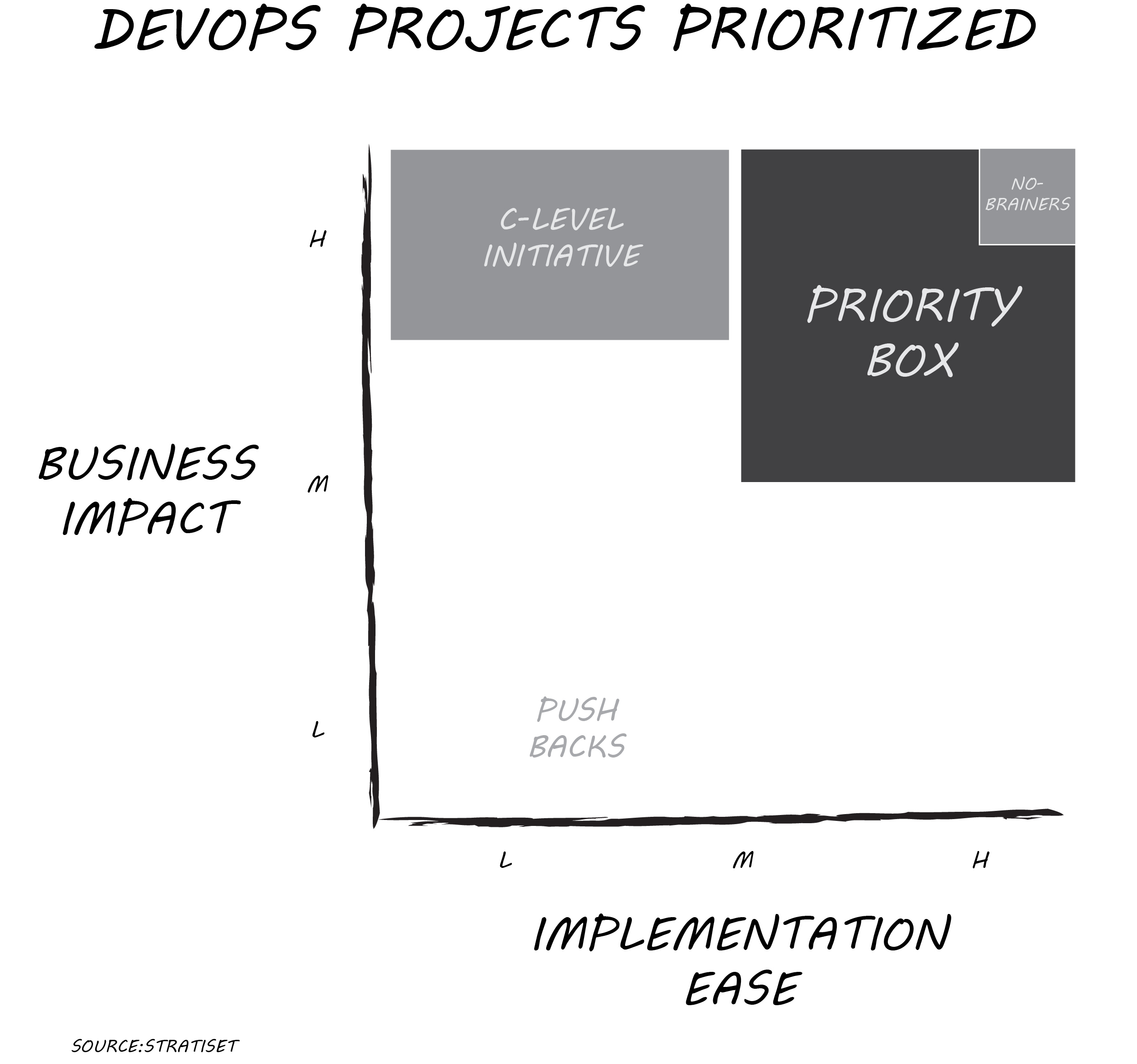
    On your whiteboard or shared screen, plot each project against two dimensions: implementation ease and business impact. Use a relative scale of low, medium or high for each axis. Implementation ease can incorporate many variables including cost of tools, technical difficulty, in-house expertise and more. Business impact can address revenue increase, cost reduction, competitive advantage or regulatory compliance. Don’t worry about absolutes; you’re looking to see how a project compares to all other opportunities. Adjust the pins if necessary after the first few projects are plotted. You’ll get the hang of it in just an hour or two, even if it’s a long list.

    Line Up Priorities

    Few projects are priority no-brainers with high business impact and high implementation ease. More likely, you have several projects in the “priority box,” scoring better than medium/medium. If you have more than five projects there, take another look and jostle pins a bit to get a manageable list. Make sure your available resources match projects identified in the priority box. Allow one exception: That C-level initiative may score as high business impact and low/medium implementation ease. Killing it just because it’s difficult isn’t a good move, but prioritization within context can help address resourcing.

    That’s the priority list you take back to your team. If it’s on that list, work it and finish it. If something isn’t on that list, your team kicks any inquiries on those projects back to you. Push projects with low business impact and low/medium implementation ease back to their sponsors for justification or removal. When one of the priority projects finishes, then and only then start the next best ranking project. Rescore the entire project list after the first group of projects is complete.

    Too easy? Here’s a recent HBR article, “Too Many Projects,” describing a more elaborate approach for bigger initiatives. You may need such in-depth analysis for a C-level initiative requiring more resources. For most projects on your list, more analysis takes substantially more time and likely produces the exact same prioritization as this faster method.

    The key to breaking initiative overload is starting and finishing the right projects. Creating a vetted priority list quickly and getting the team rolling again is well worth the price of an afternoon and some food. Morale will improve rapidly as your team sees progress and the business sees value faster.

    I’d enjoy your feedback on how this process works for you.

    — Don Dingee