Tag: developers

  • Node.js Foundation Embraces HTTP/2

    Node.js Foundation Embraces HTTP/2

    The latest version of Node.js will significantly increase the DevOps challenges surrounding the most widely used version of JavaScript in the enterprise. Node.js 8 adds the ability to support HTTP/2, a major revision of the core internet protocol that, in addition to being significantly faster, enables developers to make multiple requests over a single connection as well as set up pipelines for making a series of requests.

    Myles Borins, director of the Node.js Project and member of the technical steering committee at The Node.js Foundation, notes that while HTTP/2 eventually will be supported by multiple programming languages, DevOps teams most likely will encounter it first in web and mobile applications built using Node.js.

    Borins says HTTP/2 also should go a long way to accelerating the adoption of microservices applications—the majority of which are being built using Node.js.

    Node.js 8, available under a Long-Term Support (LTS) license, is 20 percent faster than its predecessors, Borins says. It is based on the JavaScript V8 engine that makes use of Turbofan and the Ignition compilers and interpreters, which equates to lower memory consumption and faster startup time across Node.js applications.

    Other new features include an Async/Await capability that allows developers to write more linear code versus relying on callbacks and a series of Experimental ES Modules that provide a standard pattern for writing modular JavaScript code that can run on both the web and in Node.js.

    Node.js 4 is now scheduled to be designated for end-of-life status in April, and Node.js 6 will face a similar fate soon after. The Node.js Foundation is encouraging organizations that have deployed Node.js applications to refresh them because security patches and updates soon no longer will be available for the core engines used in Node.js 4 and 6 applications. Node.js API (N-API), a project that enables modules to run against new versions of Node.js, is still considered experimental. That project is being lead jointly by Google, IBM, Intel, Microsoft, nearForm, NodeSource and individual contributors.

    The Node.js Foundation also announced that work has begun on Node,js 9, which is focused on modernizing legacy application programming interfaces (APIs) and implementing a new error system that associates a unique code with all errors in place of relying on traditional error messages.

    The Node.js Foundation estimates there more than 9 million instances of Node.js deployed across the web today, so managing Node.js applications across their life cycle has become a significant DevOps challenge. While Node.js is not the only programming language gaining momentum across the enterprise, the Node.js community is highly focused on increasing the robustness and manageability of Node.js applications in a way that should eventually please even some of the most hardcore fans on rival languages such as Java or even COBOL.

    — Mike Vizard

  • Tips for Creating Unit Tests for Mobile Apps

    Tips for Creating Unit Tests for Mobile Apps

    Mobile app testing ensures your application is working perfectly without any freezes, bugs or crashes. There are unit, auto, system and acceptance tests, and in this article we will talk about unit testing for mobile apps.

    First, let’s discuss what unit tests are in general. Unit testing checks whether certain parts of the code work correctly. In other words, it helps us produce more robust and maintainable code. Each one small test is dedicated to a small feature. All of them are connected, however, so you get a kind of chain. If any part of this chain fail, the whole chain will fail as well.

    As a part of mobile application testing unit tests may be written at any phase of development or even before development (test-driven development, or TDD, is one of the iOS unit testing best practices). With this kind of development, you let your tests drive the development process. They indicate what you do, what you should do next and what the result should be. Testing controls the design.

    Thus, unit testing is the first step to perfectly working code. But it also is the primary means for your software quality assurance. In this article we’ll explain how to do mobile apps unit testing on an iOS example and give you a small iOS unit testing tutorial.

    Do I Need to Conduct Unit Testing?

    Does everyone need to do unit testing? The short answer is no. The long answer is that it  is a very good tool, though it isn’t necessary in all situations.

    You don’t need unit testing if:

    1. your app is very small and simple. If your app is small, it will be faster to check everything manually because there’s not that much logic to be checked.
    2. you don’t plan your app to work in the long term and you need it only for a demonstration.
    3. you’re a super-human who writes perfect code without any mistakes.

    If you don’t fall into any of these categories, then unit testing is what you need. At first, this kind of testing may seem too time-consuming. Lack of time is mentioned as one of the most serious problems related to testing, but actually performing unit testing can save a lot of time and improve development speed. In addition, it can serve as a kind of documentation for your library. We at Mobindustry spend up to 30 percent of our development time on testing.

    Unit tests have two main purposes:

    1. Reduce the number of bugs by making sure that our class/module/component is working as expected with all possible inputs.
    2. Reduce the number of regressions by making sure that our new functionality, bug fixes or refactoring hasn’t broken any existing functionality.

    How Do Unit Tests Work?

    How to create iOS unit testing? Xcode has built-in support for unit tests and works as an iOS unit test framework. You can use Xcode by pressing cmd+U or via the menu by selecting Product -> Test. xCode will run all active tests and generate a report with results (passed/failed). All failed assertions are indicated. Code coverage data is also generated in this framework, which allows you to get to any class and check which lines of code were called and how many times they were called.

    Types of Unit Tests

    Unit test for iOS can either check the UI or the logic of the application. Logic ones have a few subtypes:

    • Regular ones are used to check straightforward functionality.

    func testExample() {

    let account = Account()

    account.amount = 100.0


    account.withdraw(20.0)


    XCTAssert(account.amount == 80.0, "Account should have current amount of 80.0 but has

    (account.amount)")

    }

    This is used to simply check if the withdraw() method is working correctly.

    • Asynchronous tests use XCTestExpectation to check for expected outcomes.

    func testExample() {

    let url = URL(string: "http://www.google.com")

    let expectation = XCTestExpectation(description: "expectation_description")


    let task = URLSession.shared.dataTask(with: url) { (data, response, error) in

    if let error = error {

    XCTFail("Error: (error.localizedDescription)")

    return

    } else if let statusCode = (response as? HTTPURLResponse)?.statusCode {

    if statusCode == 200 {

    expectation.fulfill()

    } else {


    XCTFail("Request failed with status code (statusCode)")

    expectation.fulfill()

    }

    }

    }

    task.resume()


    waitForExpectations(timeout: 10) { (error) in

    XCTFail("Expectation (expectation.description) has failed")

    }

    }


    This one will check if Google’s website is available (i.e. if it returns status code 200).

    XCTestExpactation is used to wait for the async task to finish. An Expectation will either finish successfully by calling the fulfill() method or will fail if the timeout time has passed but fulfill() hasn’t been called.

    • Measure ones check heavy logic:


    func testExample() {

    self.measure {

    let lotOfObjects = []

    for obj in lotOfObjects {

    obj.makeCalculations()

    }

    }

    }


    You can create this test to measure how much time and how many resources are spent on particular calculations inside the measure() block.

    Tips on Unit Testing for Mobile Apps

    • Remember the structure

    The common AAA approach to structuring is the most common and convenient way to write tests. AAA stands for:

    1. Arrange – the part that allocates all necessary objects and sets up initial parameters
    2. Act – the part that executes the logic
    3. Assert – the part that checks if the obtained results match the expected results

    Сode written this way is easy to read and use, which means it’s easier to maintain.

    • Cover only necessary things with tests

    Some people think it’s necessary to cover every single part of your code with a unit test. This approach is actually time-consuming, complex and completely useless.

    There are four types of code you may have in your project. Let’s look at them starting with the most extreme options:

    1. Simple code without any dependencies: Probably everything is already clear with this kind of code and there’s no point in assessing it.
    2. Complex code with lots of dependencies: If you have this kind of code, it’s a good idea to refactor. There’s no need to cover this code because we’ll rewrite it, which means new classes will appear and method signatures will change. Why write something that won’t be used? Of course, such code also needs quality assessment, only on a higher level.
    3. Complex code without dependencies: This code contains algorithms or business logic. This is the perfect kind of code for testing because these are very important parts of the system.
    4. Moderately complex code with dependencies: Such code links different components together. Tests are very important here; they tell how exactly components must interact.

    Usually, they cover the following areas of code:

    • Common functionality, core models, classes and their interaction
    • Main UI workflows
    • Crucial logic
    • Bug fixes

    Unit tests may be applied not only for these areas. They can actually be used for testing almost any functionality.

    Don’t cover trivial functions and system functions.

    • Test only one thing at a time

    The idea is to divide your application into different independent modules that are able to work by themselves without interacting with other parts of the application. This allows you to work on each module separately and simplify the code. If you check several things at the same time, sooner or later your code will become overloaded and too complex. It will become difficult to support it and use.

    • Name your tests logically

    It’s very important to name your tests properly and assign them to the correct parts of your project. Many projects have tests that no one is running because of inconvenient placement and naming. Here are some tips for logical structure:

    1. Choose a logical location in your version control system: They have to be part of your version control. Depending on your needs they can be organized differently, but here’s a common recommendation—if your app is monolithic, put all of them in a Tests folder; if it has many components, store relevant tests in each component’s folder.
    1. Choose a convention for naming: One of the best ways to do this is to add a test project to each project you build.
    1. Use the same convention for naming test classes that you use for naming project classes: If you have a class ProblemResolver, it’s a good idea to add a class called ProblemResolverTests. Each class should work only on one thing; otherwise, your tests will be very hard to manage.
    • Work with mocking objects

    You can use different fake objects to make the testing process easier. There’s no need to allocate and manage a huge class or component just to use a single method from it. Such fake objects can be divided into two groups:

    • Stubs
    • Mocks

    Stubs are fake methods for returning a predetermined response. The main use for stubs is when interacting with an API. The idea is not to wait for the actual connection to finish but to return predefined data or a predefined error instantly.

    Let’s assume we have an app where you can add a friend connection. There’s a FriendListViewController that displays a list of all your friends. This friend list can be downloaded from the backend, so there’s an ApiManager class with a method like this:

    ApiManager.shared.getListOfFriends(withCompletion: { (friends) in

    let friendsListVC = FriendListViewController.init(friends: friends)


    //Present friendsListVC

    }) { (error) in

    //Display error


    }

    This method has a completion handler, and we need to wait till it finishes.

    But we actually don’t need to wait because we don’t need any APIs or even an internet connection. We need to make sure FriendListViewController is working correctly, and all we need for that is some list of friends; it doesn’t matter where they come from. So we’ll introduce an ApiManagerStubs class that will duplicate methods from the actual ApiManager but will not perform any actual API requests.

    For this particular test, we’ll write a method for getting a list of friends:

    func getListOfFriends() -> [Friend] {

    let friend1 = Friend.init(name: "Bob", surname: "Barker", age:34);

    let friend2 = Friend.init(name: "John", surname: "Doe", age:30);


    return [friend1, friend2];

    }

    After that we can easily allocate and test FriendListViewController.

    func testExample() {

    let friends = ApiManagerStubs.shared..getListOfFriends()


    let friendsListVC = FriendListViewController.init(friends: friends)


    //Testing friendsListVC.tableView

    }

    Mocks are fake objects that partially duplicate real objects, allowing you to check if a method was called or a property was set after certain events.

    In the example above, when a friend is deleted we need to clear the chat history for this friend. We have some class like ChatManager for this functionality. But again, for this, we don’t need to actually delete any data or call any APIs; we just need to check if the corresponding callbacks are triggered. So we’ll introduce the mock object ChatManagerMock, which behaves like ChatManager, only instead of deleting data it just remembers which callbacks were triggered.

    class ChatsManagerMock {

    var deleteFriendWasCalled = false


    func clearChatHistoryForFriend(_ friend: Friend) {

    deleteFriendWasCalled = true

    }

    }

    Now we can implement our test as follows:

    func testExample() {

    let friends = ApiManagerStubs.shared.getListOfFriends()


    let friendsListVC = FriendListViewController.init(friends: friends)


    let mock = ChatsManagerMock()

    friendsListVC.chatsManager = mock


    //Trigger Delete action for first friend in the list

    friendsListVC.deleteFriendButtonAction(nil, index: 0)


    XCTAssert(mock.deleteFriendWasCalled, "deleteFriendWasCalled should have been called")

    }

    Conclusion

    Unit tests are a very powerful tool to help developers avoid bugs and spot them quickly when they do appear. They help you maintain your code, but at the same time they need maintenance as well. The big problem of many projects is tests that no one uses, and to avoid it you need to stick to some rules. Your tests must:

    • be reliable;
    • not depend on the environment they’re run in;
    • be easy to maintain;
    • be easy to read and understand (even a beginner QA has to be able to understand what’s going on);
    • have a standard naming convention; and
    • be launched regularly and be automated.

    Following these basic rules will help you get a working system. Each test will check only one thing. Your tests will be specifications for class method; it will tell all about what input they expect and what other system components expect as the output. There are very few systems like this. Such systems have an actual specification, and there’s usually not very much text in it—only basic features, server schemes and a “getting started” guideline. The life of such projects no longer depends on people; developers may come and go while the system is reliably tested and tells all about itself with the help of its own tests.

    About the Author / Svetlana Cherednichenko

    Svetlana Cherednichenko is a content writer. Currently she is a part of Mobindustry marketing team. She is an active member of the debate movement and she is a winner of two regional tournaments. Now she is in the process of improving her skills in graphic design and learning new frameworks. She graduated from the Dnipropetrovsk National University. Svetlana likes to travel, read about tech news and play video games. Connect with her on LinkedIn.


  • Akamai Gives DevOps Teams More Control

    Akamai Gives DevOps Teams More Control

    When most DevOps teams think about platforms, it’s usually a conversation about some form of software sitting on a server in a data center. But many web and mobile applications employ a content delivery network (CDN) as the platform on which they depend most to run. Akamai Technologies is moving to provide DevOps teams with much greater visibility into and control over what’s occurring across its namesake CDN.

    Ari Weil, senior director of industry marketing at Akamai, says CDNs now play a pivotal role in enabling IT organizations to deploy web and mobile applications in the cloud. To provide DevOps teams with more control over those deployments, Akamai is committing to treat the core CDN as code that can be programmatically invoked in addition to providing real-time visibility into applications running on Akamai and simplyfing the modification of applications in production, says Weil.

    As part of that effort, Weil says, Akamai is expending the range of application programming interfaces (APIs) that it exposes via toolsets spanning frameworks such as Terraform, Varnish and WordPress. The goal is to expand significantly the level of scripting and automation enabled by the Akamai CDN. Akamai is also making available a testing suite that DevOps teams can employ to test and fix applications in real time.

    Akamai is making it possible to deploy custom configurations and code across Akamai’s CDN in minutes, including the ability to remove content in seconds and revert to past configurations whenever necessary.

    Akamai has also released mPulse Lite, a free version of a digital performance management tool that identifies ways to improve application performance and the end user experience, and its IoS mobile application and companion IoS watch app to specifically optimize the performance of iOS applications accessing the Akamai CDN.

    Most DevOps teams are hyperfocused on what occurs inside the data center. But in the age of extended enterprise the level of dependency on caching and security services provided enabled by a CDN has never been greater. The fact that Akamai has also begun a more DevOps initiative is also testament to how far the DevOps movement has been able to extend its influence. Historically, providers of external services have been reluctant to provide any visibility into how their network services operate.

    Weil notes that it’s apparent the developers are also exercising more influence and control over IT. As such, providers of external services are now under more pressure to programmatically expose their services in much the same way as any other cloud service. In fact, many cloud service providers are leveraging their global footprint to make available CDN services that rival Akamai.

    Regardless of the CDN chosen, developers are under more pressure than ever from the business to optimize the end user application experience. Mobile and web applications are core to any digital business transformation initiative. In the face of that pressure, DevOps teams are finding that having more control over the CDN used to deliver those applications is now an absolute necessity.

    — Mike Vizard

  • Standardizing a Process that Drives Secure-By-Design

    Standardizing a Process that Drives Secure-By-Design

    In “Building Security into Code + Culture,” I described how our culture of coding is predicated on chaos, and the critical challenge for organizations is to establish the right mix of processes and tools that support a smarter, risk-based approach to development. A key aspect of this strategy is, of course, to implement a sense of order within the chaos that enhances security without hindering the speed of innovation.

    I overviewed a number of different recommendations to approach secure by design, such as making code more mature and baking in security measures and privacy/contractual compliance from the start. I also emphasized that organizations should tackle the rules, tools and fears pillars that help shape the culture, as each of these can be transformative in helping people use the right approach or method. Making the rules and defining fears is relatively straightforward, and with the right degree or training and awareness your organization can adapt.

    But what about tools? The right tools can do wonders to “force” people to use better, smarter, more secure methods—that is, if such tools exist. Though I have not done a deep dive into whether there are any robust development tools integrated with security software, I’m a realist and will go out on a limb to say none of them have reached maturity just yet. In light of this, it’s essential that organizations focus on standardizing the overarching process that will enforce privacy and security by design, development and deployment.

    The first thing to do is set the business drivers behind the process from a legal standpoint. Gather and research the privacy regulations and compliance requirements that affect your organization. Analyze and then translate these using a risk-based approach to security controls requirements, and then publish these as an awareness catalogue available to all developers across your organization. You should also ensure that training is available, on-demand and on a just-in-time basis, for any developer on any desired control.

    Next, set the technology drivers by prescribing to secure coding practices defined by the industry, such as the Web Application Security Consortium (WASC) – Threat Classification system (based on Open Web Application Security Project [OWASP] Top 10) and SysAdmin, Audit, Network and Security (SANS) Top 25 (which are based on the Mitre – Common Weakness Enumeration [CWE]).

    At this point, you must ensure that all your applications and systems comply with the security controls requirements catalogue you created. These can be batched into smaller parts that are handled by developers or teams of developers, all of which use your security controls requirements catalogue and industry-standard secure coding practices. Again, you’ll want to make sure that training sessions are available on a just-in-time basis for any developers who need them!

    Upon completion of each section or unit, code must be validated and verified for trust. Peer code review is the first step—have your developers present their work and provide the logic to a different team of developers. You can always employ static code analysis to scan code for any weaknesses, defects or violations of best practices, and subsequently enter the bug fix stage if any are detected.

    Then, you can merge the code branches into the main and compile for run time, so you can conduct live vulnerability scanning and penetration testing. Again, these should be based on the industry-standard secure coding practices adopted across your organization. At this point, you should be able to establish reasonable assurance for the release version of your application or system by having published artifacts for review by entities such as auditors or clients.

    Continuous improvement will require adding new features and subsequent emphasis on the validation and verification process. I would also recommend repeating the entire process from start to finish on a regular basis to reinforce the process, perhaps annually or semi-annually. And of course, if there are any major changes or shifts (as there are likely to be) in your privacy regulations, compliance requirements or secure coding practices, this will absolutely need to be addressed at the organizational level so your process addresses these head-on.

    Privacy and security are such important topics today because they are an artifact of the youth of the computer software industry. If this industry was more mature, then the outcome would be quality code. For some reason, it’s okay to create buggy, weak and inadequate software in a world in which we wouldn’t tolerate buggy, weak or inadequate cars, airplanes, bridges, buildings … and the list goes on. And the reason for this is pretty obvious: People are acutely aware that cars, airplanes, bridges and buildings put their very lives on the line, whereas software “just” makes them susceptible to things such as identity theft and ransomware.

    This is the message we’re sending: It’s not OK to kill people, but it’s perfectly acceptable to ruin their lives. This is not OK! It’s time for organizations to standardize the processes that drive secure-by-design, and embrace necessary and fundamental changes to how we approach development. As developers and IT professionals, the onus is on us to shape a better world driven by quality software.

    About the Author / Robert Hawk

    Robert Hawk is Resident Security Expert at xMatters. He has extensive experience in Information Systems Security, Computer Security, Cyber Security, Information Assurance, as well as Governance, Risk, and Compliance (GRC) Management. He specializes in frameworks and standards from: ISO/IEC, NIST, IEEE, IETF, ITU-T, Common Criteria, AMI-SEC, NERC, CIS, DoD, ANSI, PCI, and ISECOM. Robert is a lifelong researcher, innovator and instructor. Connect with him on LinkedIn.

  • Building a Services and IoT Platform with DevOps, Part 2

    Building a Services and IoT Platform with DevOps, Part 2

    BCG’s latest IoT market research finds that predictive maintenance, automated inventory and self-optimizing production are some of the top use cases driving the need to build internet of things (IoT) platforms by 2020.

    As we think of building IoT solutions, it’s important to have a deep understanding of the business-level considerations and architectural design-level considerations before selecting the right IoT platform. This article talks about some of the important factors to consider in selecting an IoT platform.

    Considerations for Selecting the Right IoT Platform

    Following are some of the considerations in selecting a right IoT platform or IoT solution provider.

    Business Need and Requirements: Identify the business needs, estimate the ROI, identify what specific business and architectural use cases needs to be addressed.

    Examine the core differences in different IoT solution providers and analyze their evaluate out-of-the-box features against the defined business/technical limitations for the use cases you have identified before deciding to build custom or off-the shelf solution.

    Global Presence and Business Stability: Identify whether the existing IoT solution providers have a global footprint with datacenters across the geos, which will enable you to scale in that business region as your business grows.

    Device Management: Check if the platform and the hardware is supported by the IoT provider and supports remote monitoring of the devices and maintain over-the-air updates to the devices.

    Data Analytics: Look for options on how data will be stored, the data storage options to store large volumes of data, with segregation and storage of device and telemetry data, in addition to the extraction and reporting tools and dashboards.

    IoT Data Collection: Identify how data can be collected from the devices and how your devices can communicate to the respective platform (cloud or local). Each vendor has different means of collecting the data from the remote devices, For example, Azure IoT uses Azure IoT Hub while AWS uses Rules Engin, to connect and communicate to the devices and collect the data.

    Edge Computing: Identify the network latency, how to filter the data selectively from different devices and relay it to the cloud, the connectivity of devices that are not exposed to internet through a field gateway, the customization of the gateway and protocols and how to achieve quicker response times with different IoT platforms.

    IoT Protocols and Standards: Examine whether the device list supported by the vendor is developed as per the standards defined by IoT consortiums and whether the vendor supports standard protocols or uses any proprietary technologies.

    Compatibility and Extensibility: Examine for the compatibility of the devices to the vendor platforms, support for additional new devices to the platform and support for customization/extensibility of WRT gateway protocols and device rules.

    Storage: Identify platforms/IoT vendors that provide big data storage, data security, compliance and data recovery options.

    Security:  Think security at all levels from ground up—device-level security, device-to-cloud security, cloud security, data security and privacy, user-level security, application security and end-to-end security.

    Pricing and Hosting Models: Finally, compare hosting models and pricing models offered and any hidden costs. Pricing varies from per device to per million message-basis, per message volumes/day, cloud usage and other factors.

    IoT Architectural Considerations

    Hardware and Software Heterogeneity: The platform should support for various hardware and software devices from a wide range of device manufacturers, multiple devices, device operating systems and support multiple protocols including MQTT, web sockets and AMQP. It also should support device management and monitoring of connected/non-connected devices and seamlessly connect with multiple network providers.

    Enhance Security: The system should have security and privacy for device, users, device and user identity, authentication and authorization with policies, data protection (encryption/decryption) for data at rest and in motion, data attestation, SAS-based token per unique publisher, certificates, TLS authentication support and adhering security standards to enable developers to follow security standards during device development and security testing.

    Hot/Cold Data Path Analysis: Determine the network latency, support for high-scale data ingestion, support for high-scale data processing and high data retention options, support for segregating device metadata from telemetry data storage and the ability to perform analytics on the data with customizable dashboards.

    Scale Efficiently: The system should support for hyperscale deployments of individual data processing units such as event hubs, stream analytics and AWS Kinesis and also support millions of device and scale between small to hyperscaled dimensions of devices and telemetry.

    Flexibility: The platform should be extensible to use third-party solutions for individual conceptual components in IoT solutions and should support integration with business applications/workflows and REST APIs/CLIs for communicating to the systems from external systems.

    DevOps Automation: There should be support for the adoption of build, test and deployment automation for device and other solution components in an IoT solution with the right set of tools for DevOps. Testing and monitoring are key in DevOps automation with user-centric end-to-testing and automated releases of firmware updates to the remote devices. The platform you choose or building should be driven with DevOps capability.

    QoS, Cost: Other key factors to consider include maintaining data and devices, monitoring devices, scalability, reliability of systems, backup and disaster recovery of data and devices, performance of the devices, the network and pricing models (based on messages sent/received, per devices, cloud transactions, message size, throttling limitations of cloud based components, cost of ingress/egress/compute/storage/services/business apps/devices/security, etc.).

    Lower Barrier to Entry: The platform should support the ability to evaluate, prototype, deploy and scale quickly; lower the barriers to trying IoT out-of-the-box/preconfigured solutions; and support new development and experimentation with the data to refine and derive useful business metrics from telemetry.

    Building an IoT platform may be challenging, but making critical decisions on business factors and design considerations such as device management, security, storage, analytics and pricing before selecting a platform can help achieve ROI and lead to building a mature IoT platform.

    About the Author / Lavanya Subbarayalu

    Lavanya Subbarayalu is Senior Architect working with Technology Office in HCL Technologies. She has expertise in IOT, Azure, DevOps consulting & Microsoft technologies. She is associated with DevOps COE, working on design and Development of DevOps solutions and consulting tools. Connect with her on LinkedIn.

  • Keep Developers Happy and Velocity High

    Keep Developers Happy and Velocity High

    In today’s economy, the companies that prevail are those that can accelerate software delivery and increase developer productivity. Yet, as applications become more complex and codebases grow, companies are forced to implement more comprehensive quality safeguards, which slow the rate at which they can deliver new software. Delivering more incremental builds in shorter intervals can address this conundrum: Customer needs are serviced quicker, overhead for engineers is reduced, and risk is mitigated because changes released into production are smaller.

    That’s why high-velocity engineering teams are applying not only continuous delivery processes but also lessons in experimentation from established leaders including Amazon, Netflix and Facebook. These companies have made experimentation a foundation for their release processes, trying out major feature releases and redesigns within smaller groups before making them broadly available. By using new techniques such as feature flagging, rollouts and traffic splitting, experimentation is no longer just the future for marketing teams; it’s quickly becoming an essential practice for high-performing development teams as well.

    Today, discussions around velocity focus on key practices that developers can use to maximize the effectiveness of continuous delivery, software development and experimentation programs. Here are some key ideas to consider.

    Reducing Your Dependency on a QA Team Actually Makes You Faster (Shifting Left)

    Many organizations eschew the conventional wisdom and deprioritize the heavy lifting of writing comprehensive test suites, opting instead to throw them over the fence to a Quality Assurance team. This approach is almost always less effective and causes organizations to lose momentum instead of conserving it.

    Higher-performing teams actually “shift left” and empower developers to own many parts of the QA process. A solid foundation of tests creates less overhead later on and empowers engineers to release quality code into production faster. Companies can address customer and product needs efficiently, quickly and with more confidence than if they wait for full QA cycles to finish.

    But what if you don’t have the ability (or luxury) to rewrite tens of thousands of tests? The good news is that even without expansive test coverage, you can still take advantage of this approach using code coverage tools. These work by evaluating how much of your codebase gets executed during test runs. If the overall coverage decreases, it means a feature was potentially rushed and is untested and should not be merged into the codebase until the ratio is balanced out. This code-to-test measurement can even “block” code merges unless it meets or exceed the previous threshold.

    Prioritize the Build and Test Frameworks Themselves

    Teams that that prioritize the development of build-and-test frameworks—as opposed to individual tests—are rewarded with faster, more reliable builds. But it’s a struggle to build out reliable processes that can handle tens of thousands of tests in a performant way for each developer.

    Particularly with more complicated test suites, there’s a tendency for these tests to become brittle or prone to occasional failure because of all the moving pieces. Optimizely built a “test gatekeeper” that automatically disables tests that fail in this way, without the need for human intervention, and assigns them to an owner to be fixed. Remember: unreliable tests are sometimes worse than no test at all.

    Achieve Faster Release Cycles Through Experimentation

    Companies that want additional, real-time insights and fine-tuning for their application stack are shifting to feature flagging and feature rollouts to expand their capabilities.

    Feature flags are simple control-flow boolean values that allow developers to use a new, experimental process on their application by gating it behind a virtual on/off switch, and have the option to disable it if a problem is found, all without another code deployment cycle. An example could be a “down for maintenance” notice, or something more advanced like a new product homepage that doesn’t require a code rollout to update the content.

    Feature rollouts take this concept a step closer to real experimentation by placing users into two or more experimentation groups, allowing every new feature to be beta-tested before a full general release. Each new feature becomes an opportunity to run an experiment and collect immediate feedback on your development hypothesis.

    Finally, there’s traffic splitting, a concept similar to feature rollouts that transparently routes a small number of users to a new experimental version to identify any bugs before they reach a broader audience. The primary difference between feature rollouts and traffic splitting is the “all-in” nature of traffic splitting an entire application vs. a single feature.

    Worried that the automated and manual testing of your large product release didn’t catch everything? Send a small percentage of your traffic to the new application as a “canary build” and see what happens. Optimizely experiments with traffic splitting between different production environments (stable versus release candidate, for example) to a small number of users. Facebook, and others have utilized this process for years.

    Shift Left, and Enter a High-Velocity Future

    Thorough testing helps companies catch many issues before they reach customers, but it’s extraordinarily difficult to anticipate every possible usage or scenario for your product. Investing in these release strategies will help companies mitigate the risks of unintended bugs creeping into code or, worse, unwittingly turning their customers into the QA team.

    Our advice? Don’t let feature development take priority over the necessary steps to keep your organization from working lean.  Empower your developers to participate in the process early by shifting left, and watch developer productivity and velocity soar.

    About the Author / Brian Lucas

    Brian Lucas is Senior Software Engineer at Optimizely, responsible for the Build, Test and Release Engineering. Previously, he was CTO at Credible and Hoopla, and lead architect at Sling (Slingbox). He holds four patents. Connect with him on LinkedIn and Twitter.


  • The 7C Holistic Approach to DevOps

    The 7C Holistic Approach to DevOps

    The DevOps methodology was first adopted in 2007 with a bigger purpose of improving organizational efficiency by bridging the gap between software release and IT operations teams. This started as the core practice of continuous integration (CI) and continuous delivery (CD) with a prime focus on better quality of releases and more frequent releases. Now, DevOps is becoming the norm of the industry and is being embraced by multiple organizations as a digital transformation with a shared goal, involving all stakeholders, to serve the customers better with higher quality product release and more frequent releases.

    DevOps has evolved beyond release and deploy and now involves product owners, project managers and all aspects of software development life cycle. This is the key reason it has evolved as a holistic approach starting from the service team interacting with the customers to product release and production monitoring. In this blog, we will explain how the 7C approach of DevOps is a natural evolution of DevOps and how it helps different organizations to perform better.

    DevOps now spans across the entire organization involving customer service, marketing, product owners, project managers, program managers, and different levels of developers, QA, release or build teams and infrastructure team. As the main focus of DevOps is to serve the customer better and faster, it is important that all the stakeholders have better end-to-end visibility of operations, planning, integration, testing, monitoring, delivery and feedback. This is the 7C approach of DevOps, as illustrated in Fig 1. This requires an efficient integration of processes and tools to automate the seamless information exchange and execution. This approach also empowers all the stakeholders to better contribute in product’s success and efficient execution.

    Fig. 1: 7Cs of DevOps

    The 7C holistic approach to DevOps also requires efficient collaboration between all stakeholders, empowering them to contribute more. The 7C approach removes all silos of information and execution.

    Startups were fast to adopt DevOps as many of them were setting up things from scratch. But the latest industry trends show large enterprises embracing DevOps primarily with the focus on efficiency and better, more frequent releases.

    The DevOps domain includes lots of tools and many of them are open source. This has provided a toolset for engineers to tinker with or experiment. This tends to have problem of its own, as too many toolsets in the flow create silos of information and execution, which creates confusion and inefficiency. This is becoming a problem and that’s why solutions are required which provide better integration and execution across multiple tools. The right solution for this will be a platform with deep integration capabilities.

    A deep integration platform for DevOps will enable seamless integration and execution across different tools, even home-grown proprietary tools, to provide a holistic solution starting from customer initiation to production deployment and feedback. This approach is significantly important for large enterprises, as this enables them to have the flexibility of preserving their existing investments on tools and processes while also allowing them to selectively introduce new tools. Rather than trying everything new, large enterprises can manage changes while primarily focusing on efficiency, automation, collaboration, better quality of releases and more frequent releases.

    This 7C approach gives same visibility to all stakeholders and everyone knows what feature is being released when. This approach also helps to move information/execution in both left and right direction with powerful traceability features, analytics and dashboards. Deep integration of information and execution also reduces dependency on other teams and promotes self-service.

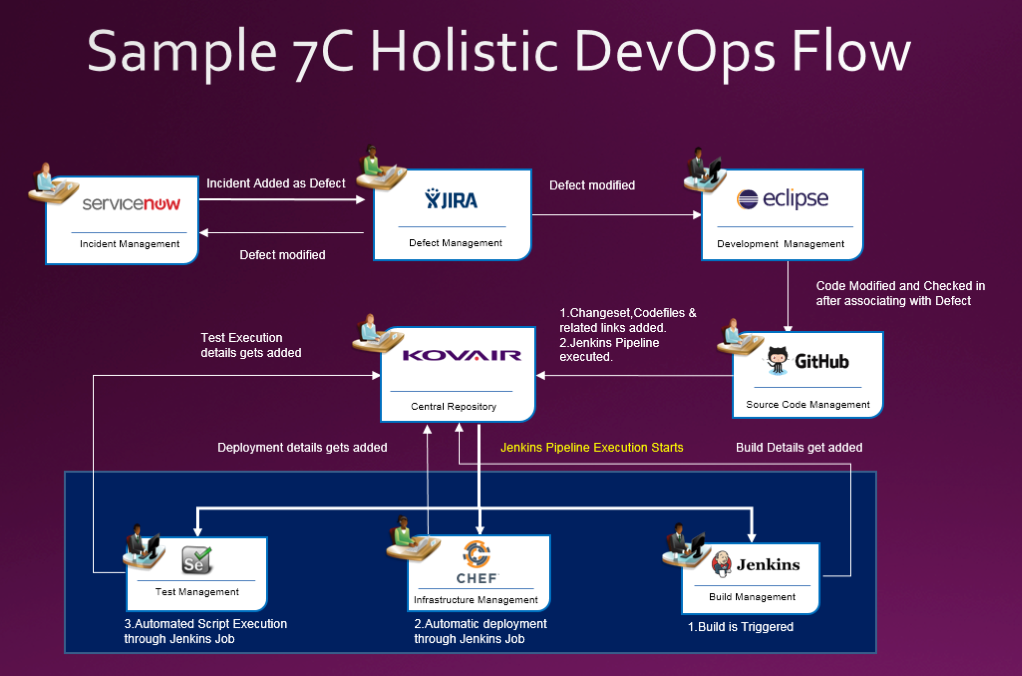
    Fig. 2 illustrates a sample DevOps flow where service team uses ServiceNow; software, product and project managers are using Jira for Agile management, developers are using Eclipse as their integrated development environment, GitHub is used for source code repository, QA team uses a test management tool for test and defect management, and finally the release team uses Chef and Jenkins to orchestrate build, release and deployment. In real-world examples, teams add more tools for code analysis, security and production monitoring. All such complex flows are supported within DevOps 7C holistic approach by utilizing the deep integration platform. The 7C approach is more productive as it allows faster detection, analysis and resolution of problems.

    Fig 2. Sample DevOps Flow with Deep Integration

    The 7C approach works well with both traditional waterfall software management as well as Agile software management—mainly because of better end-to-end visibility, efficiency and collaboration.

    To conclude, 7C approach of DevOps is the natural evolution of DevOps, empowering the team to achieve better efficiency and execute better. This empowers all the stakeholders in the organization by providing better end-to-end visibility and powerful means of collaboration. Involving all stakeholders also creates a better environment of trust and collaboration. With this 7C approach, DevOps is not limited to build and release but it has spanned across the entire spectrum of software development lifecycle. This is especially highly beneficial for large enterprises as it enables them to preserve their prior investments and enhance their existing flows. This gives them leverage to selectively try new tools and technology while preserving what is working well. This is a great approach to expedite the enterprise level digital transformation.

    About the Author / Devendra Joshi

    Devendra Joshi is Sr. Director, Customer Solutions and Products at Kovair. He is a software professional with over 20 years of experience in enterprise software, social media, healthcare, SaaS companies, and EDA. He has worked with startups and large enterprises in engineering management, and product and solutions management roles.

  • QA/Testing and DevOps: Partners, Not Adversaries

    QA/Testing and DevOps: Partners, Not Adversaries

    Software testing and QA is sometimes given low priority during development. The idea of treating software testers as adversaries by the developers seems old-fashioned and is short-sighted. It’s hard to believe that such an attitude can still exist, and yet it still persists, even in a modern DevOps team. But a DevOps-focused software team benefits when it considers QA/testing as an integral part of developing high-quality applications.

    In a business setting, the hidden costs of buggy or unsecure software are lost productivity, revenue and extra work by the development team (and even extra work by users, if the software isn’t running right). QA/testing helps test for system flaws, vulnerabilities and security issues, so why wouldn’t a DevOps team be supportive?

    QA/testing can help an enterprise avoid big mistakes. In fact, the DevOps Institute notes, “With the advent of DevOps and the movement to break down silos between developers and operations, it becomes critically important that all members of an IT team—regardless of what tools they use, or role they play—understand the essentials of testing.” And, according to Puppet, a standard for automating the delivery and operation of software, high-performing enterprises build quality testing into each stage of their software development process.

    Make QA/Testing a Priority

    Whether your DevOps-focused developers are handling the QA/testing themselves or passing it along to QA/testing specialists, it’s something that must be done. Ideally, developers themselves would handle QA/testing in an integrated DevOps environment, and that’s why some developers see it as an unwelcome chore. It’s not something they’re usually trained in, and they might struggle with it or see it as a burden. That could be the reason why some DevOps teams hit a “software testing bottleneck.” As data from a Vanson Bourne survey commissioned by Appvance shows, 73 percent of 200 enterprise IT decision makers in the United States have adopted DevOps processes, but 57 percent of those adoptees experienced a bottleneck during software testing that impacts how quickly new and updated software can be released.

    On the flip side, the developer’s company may have QA/testing professionals in-house, so the developers are hands-off in that area. Needless to say, the relationship between developer and the QA/testing pro could get a little rocky. Just think about it: The role of the QA/testing specialist is to find problems and point out issues with the developer’s code. Or, perhaps the developer or engineering staff is lagging behind schedule, so the team inevitably needs QA/testing to rush its processes, further creating a tense or adversarial relationship between the two groups.

    At one of my startups a while back, we worked for months on our first software release of a web application for an online marketplace. Late on a Wednesday night, we let the CEO of our company try it out—and the app immediately crashed. “Gee,” I said, “It was working on my computer.” Of course, it really wasn’t. We had synchronization problems, which are common in multi-threaded applications that access the same information for multiple users. And we made the mistake of letting the CEO be the first simultaneous user to try it out (creating a bad impression), instead of making organized QA/testing a priority at our company.

    QA/testing in a DevOps environment can help your team avoid mistakes, so passion for app functionality doesn’t supersede quality and robust bug-free software. In the end, what you need from your team is passion for both functionality and quality/testing. Otherwise, you’ll deliver a faulty product and lose customers or users—unnecessarily—because of a bad first impression by your software.

    Two Approaches for Integrating QA/Testing with DevOps

    When you’re integrating QA/testing into your DevOps environment, there are two different approaches or procedures to ponder. First is the more traditional test of the full system, sometimes called integration testing. The second is test driven development (TDD), which is popular in Agile and Scrum methodologies. The main difference between the two is in how software code is tested. During integration testing, developers review and test the code. Then, for critical facets of the software, a peer review of code is completed. Afterward, testers create scripts and deploy an array of integration and system tests. These could include scalability testing, load testing, stress testing and very importantly, security testing. Code vulnerability, SQL injections and malicious code would be things to think about.

    Under TDD, the order in which testing appears in the cycle is reversed. Each developer first writes “unit tests” and then writes the code. This is done iteratively in such a way that every discrete section of code is automatically tested. When new code is sent to the integration server, the tests go with it. The server itself runs unit tests for all the code that developers deposit in the server. On top of this, testers design system and integration tests to run automatically by the integration server. Finally, testers perform any manual tests that are impossible to automate. In this way, the integrity and quality of the code is constantly guaranteed.

    Academic studies and field experience suggest that TDD increases development time by approximately 15 percent … but hold on. Experience also shows that total cost of ownership of TDD-developed software is lower than software using integration testing only. It’s worth noting that by using TDD and integration testing, a company can deploy software of world-class quality that exhibits less than 0.3 errors per 1,000 lines of code during 18 months of use.

    QA/Testing: A Partner in Your Software’s Success

    If you’re hesitant about integrating QA/testing into your DevOps team and instead tempted to outsource it, you may want to push pause. It’s actually quite challenging if you do development in-house and expect to simply outsource what you think is independent QA with cheap testers. Outsourcing QA/testing and assuming that piece is done is not really outsourcing—it’s staff augmentation at a distance and it usually doesn’t work. You don’t want a “siloed team” to handle a critical component such as QA/testing. Instead, outsource QA/testing and bring your in-house and outsourced teams together around a common DevOps culture and mindset.

    DevOps experts Bob Aiello and Leslie Sachs, in an IBM report, say quality software “… requires not only a shift in behavior, but a dramatic shift in the organizational culture as well.” So whether you outsource or have an in-house squad, your developers and the entire team should take ownership of QA/testing, and remain open to new ways to test code efficiently.

    Ultimately, QA/testing should not be viewed as a time-consuming, disruptive chore by anyone on your team or in your enterprise. Think of it as a partner in your software’s success—not an adversary.

    About the Author / Steve Mezak

    Steve Mezak is founder and CEO of Accelerance, a leader in global software development outsourcing, as well as the author of “Software Without Borders,” co-author of, “Outsource or Else: How a VP of Software Saved His Company,” and a CIO columnist.


  • With a Multicloud Infrastructure, Control is Key

    With a Multicloud Infrastructure, Control is Key

    Ask any developer or DevOps manager about their first experiences with the public cloud and it’s likely they’ll happily share some memories of quickly provisioning some compute instances for a small project or new app. For (seemingly) a few pennies, you could take full advantage of the full suite of public cloud services—as well as the scalability, elasticity, security and pay-as-you-go pricing model. All of this made it easy for teams to get started with the cloud, saving on both the IT budgets and infrastructure setup time. Public cloud providers AWS, Azure, Google Cloud, Rackspace and others made it easy to innovate.

    Fast forward several years and the early promise of the cloud is still relevant: Services have expanded, costs have (in some cases) been reduced and DevOps teams have adapted to the needs of their team by spinning up compute instances whenever they’re needed. But for many companies, the realities of their hybrid-IT infrastructure necessitates support for more than one public cloud provider. To make this work, IT Ops needs a control layer that sits on top of their infrastructure, and can deliver applications to customers over any architecture, including multicloud. This is true, no matter what the reason teams need to support multi-cloud environments.

    Prepare for the Worst

    As any IT Ops manager, or anyone who has lost access to their web app knows, outages and cloud service degradation happen. Modern Ops teams need a plan in place for when they do. Many companies choose to utilize multiple public cloud providers to ensure their application is always available to worldwide customers, even during an outage. The process of manually re-routing traffic to a second public cloud in the event of an outage is cumbersome, to say the least. Adding an app delivery control plan on top of your infrastructure allows companies to seamlessly and automatically deliver applications over multiple clouds, factoring in real-time availability and performance.

    Support Cloud-driven Innovation

    Ops teams often support many different agile development teams, often in multiple countries or from new acquisitions. When this is the case, it’s likely that the various teams are using many architectures on more than one public cloud. Asking some dev teams to switch cloud vendors is not very DevOps-y. A better option is to control app delivery automation with a cloud-agnostic control plane that sits on top of any cloud, data center or CDN architectures. This allows dev teams to work in their preferred cloud environment, without worrying about delivery.

    Avoid Cloud Vendor Lock-in

    Public cloud vendors such as Amazon Web Services or Microsoft Azure aren’t just infrastructure-as-a-service (IaaS) vendors, they sell (or resell) products and services that could very well compete with your company’s offering. In the beginning, using a few cloud instances didn’t seem like such a big deal. But now that you’re in full production and depend on one of these cloud providers for your mission-critical app, this no longer feels like a great strategy. Adding a second public cloud to your infrastructure lessens your dependence on a single cloud vendor who you may be in “coopetition” with.

    Multiple-vendor sourcing is a proven business strategy in many other areas of IT, giving you more options during price and SLA negotiations. The same is true for IaaS. Cloud services change often, as new services are added or removed, and price structures change. Taking control over these changes in public cloud service offerings, pricing models and SLAs is another powerful motivator for Ops teams to move to a multi-cloud architecture. An application delivery automation platform that can ingest and act on cloud service pricing data is essential.

    Apps (and How They’re Delivered) Have Changed

    Monolithic apps are out. Modern, distributed apps that are powered by microservices are in. Similarly, older application delivery controllers (ADCs) were built for a static infrastructure world, before the cloud (and SaaS) were commonly used by businesses. Using an ADC for application delivery requires a significant upfront capital expense, limits your ability to rapidly scale and hinders the flexibility to support dynamic (i.e. cloud) infrastructure. Using ADCs for multiple cloud environments compounds these issues exponentially. A software-defined application delivery control layer eliminates the need for older ADC technology and scales directly with your business and infrastructure.

    Regain Control

    Full support for multicloud in product may sound daunting. After all, Ops teams already have plenty to worry about daily. Adding a second cloud vendor requires a significant ramp-up period to get ready for production-level delivery, and the new protocols, alerts, competencies and other things you need to think about. You can’t be knee-deep in the details of each cloud and still manage infrastructure. Adding in the complexity of application delivery over multiple clouds can be a challenge, but much less so if you use a SaaS-based application delivery platform. With multicloud infrastructure, control is key.

    About the Author / Andrew Marshall

    Andrew Marshall is the Director of Product Marketing for Cedexis, and has driven product marketing efforts at New Relic, Amazon Web Services and Microsoft. Connect with him on LinkedIn.


  • Quest Software Aims to Mend DevOps Fences for DBAs

    Quest Software Aims to Mend DevOps Fences for DBAs

    It’s no secret there’s been a lot of contention between application developers, who are under pressure to build applications faster, and database administrators (DBAs), who are charged with providing those developers with access to data. Historically, developers have been dependent on DBAs to create schemas that would allow them to access data. But it takes time to build schemas, which is why many developers as of late have opted to employ a NoSQL database that don’t require a schema to access data. While that provides developers with some much-needed flexibility, most of the data stored in an enterprise today is still inside a relational database.

    To make it possible for DBAs to respond faster to developer demands, Quest Software has unveiled the Toad for DevOps toolkit, which makes it easier to include relational databases such as Oracle within a larger continuous integration/continuous development (CI/CD) process managed by frameworks such as Jenkins, Bamboo and Maven.

    Greg Davoll, executive director for product management and marketing for Quest database management solutions, notes the DBA traditionally has been the last holdout in embracing DevOps—DBAs didn’t really have access to tools that would enable them to participate in an agile development environment. The Toad for DevOps Toolkit address that issue by enabling them to test PL and SQL code during the application build process and ensure schema, data and database integrity with the context of a DevOps pipeline process, Davoll says, adding DBAs participating in a DevOps process can now also perform static code reviews and promote artifacts into a target environment to see how they perform in a production environment.

    The arrival of Toad for DevOps Toolkit is scheduled to coincide with the release of Toad for Oracle 2017 R2, which will add pass/fail status notifications within the Code Analysis code review process, a redesigned multi-schema compare and sync function, and an enhanced REST API as part of the Benchmark Factory testing tool to help automate performance testing within a CI/CD workflow. Over time, Quest Software will add similar capabilities across the full range of databases it supports, Davoll says. Quest Software just announced a Toad for MySQL offering to complement its existing support for Oracle and Postgres databases.

    Many of the decisions over the years concerning what database to employ have come down to which platform incurs the least amount of friction for developers to deploy. That hasn’t always resulted in the right database decision being made. In fact, it’s usually not too long before a developer wants to offload the management of the database back to the IT organization. Invariably, that results in DBAs having to manage multiple database platforms. While there may be a perfectly rational reason to employ something other than a relational database, that decision should be based on the attributes of the database rather than internal IT politics and purchasing processes. The challenge facing DBAs now is how to re-engage developers who have developed a bias against specific classes of databases, no matter how much critical data they may hold.

    — Mike Vizard