Tag: custom software development

  • Reducing Friction in Developer Collaboration

    Reducing Friction in Developer Collaboration

    Given how the individual unit of deployment has gotten increasingly smaller, such that the unit of deployment is usually a microservice, it would be tempting to think that individual developers are more able to control how well the code they write (the service they deploy) will work in production. In fact, though, almost the opposite is true. Instead, as the number of services in an environment increases, whether or not one service will work correctly in a production environment has more to do with how well it works with other services rather than the quality of the code.

    This makes collaboration between developers even more critical than ever before, but the packaging of code in microservices actually makes collaboration more challenging. Developers don’t collaborate by working together on a shared codebase — instead they work completely independently on services that could easily be written in different languages, providing the illusion of complete independence.

    In most organizations, ensuring that services work together is a largely informal process. It’s managed by walking over to a colleague’s work station and asking what updates they’re working on or what version libraries they’re using. In a remote work environment, teams rely on Slack messages or Zoom calls to solve issues relating to services interaction. This creates a lot of friction for something that is a critical part of the software development workflow. Failures in service integration can and do cause problems in production.

    Pay Attention to Service Communications

    A perfectly crafted microservice is not going to run in isolation in the production environment. Compatibility issues between each service and upstream and downstream dependencies are just as likely to cause bugs, downtime and poor performance as problems with the code deployed in a container.

    The only way to catch compatibility issues before production is for developers to work together and communicate about the updates they’re working on and how those might impact interdependent services. In the current system, however, this level of collaboration introduces a lot of friction in the development workflow, reducing the individual’s and the team’s velocity. Since developers are generally evaluated based on velocity and code quality — but not necessarily on how well their services work with other services — if the friction remains, developers will be tempted to deploy without fully understanding how dependencies will be impacted.

    Since CI/CD pipelines are generally not set up to test how well services communicate with each other, problems with service fit that aren’t addressed at the development stage generally aren’t found until either a canary deployment goes wrong or there are problems in production.

    Replacing Tribal Knowledge

    One of the other reasons companies need to focus on developer collaboration is that remote work has made it even harder to communicate tribal knowledge. In my experience, no development team has been able to completely wean themselves off of tribal knowledge. Even teams with extensive technical documentation often had or have experienced team members who maintain a unique understanding of the application’s business logic and can share that knowledge when needed.

    Tribal knowledge also relates to service integration and communication — often, insights about how services work together isn’t well-documented, even if each individual service is well-documented. Often, the easiest way to see how they would work together is not to have the two developers responsible for each service work together, but rather to have a senior developer take a look. Especially as development teams work remotely, that type of review isn’t feasible.

    How to Help Developers Collaborate

    Most teams have ways for teams to communicate — they have a Slack setup, they have internal forums and video conferencing solutions. But they often don’t realize that these communication platforms aren’t really collaboration platforms — they are not providing a way for developers to actually work together on interdependent services the way they might if working on a shared codebase. Communication isn’t enough for true collaboration to happen — developers need a way to work together and see how colleagues’ changes impact their own services.

    Facilitating true collaboration, the kind you would get from two people looking at the same screen and coming up with solutions together, is more challenging than making it easier for developers to talk to each other. Without true collaboration, teams will continue to have trouble with communication between services — and there’s no Slack for that.

  • Key Success Factors for Your Nearshore Initiative

    Key Success Factors for Your Nearshore Initiative

    The IT talent shortage is becoming a growing problem. The U.S Bureau of Labor Statistics projects the industry demand for software developers will grow 22% between 2019–2029. This is significantly higher than the average demand growth rate of 4% for all other occupations. As the IT talent gap grows, companies across industries are looking to nearshore partners to help fill the void. Unlike offshoring, nearshoring relies on partners geographically located in the Americas, as opposed to Europe or Asia, for example. It is a growing segment of the market. Case in point, Brazil’s software development services exports have grown 1000% in the last 10 years, gaining an increasing foothold from in the United States for innovative software development and digital transformation initiatives.

    There are several advantages to outsourcing your software development needs to a nearshore partner, including access to high quality IT talent, lower costs, faster time-to-market and, most importantly, the productivity increase that comes with full-time collaboration. With a growing list of global providers in the market, how do you go about selecting the right partner? Here are three important factors to consider.

    Time Zone Proximity

    There are many benefits to being in close geographic proximity and in a similar time zone to your development partner. Being able to have regular iteration reviews during your regular business hours can make or break any project. Everyone is already taxed with a full day of video meetings during the pandemic – why make it more difficult? I’ve heard horror stories from corporate leaders trying to manage partners on the other side of the world with a 12-hour time difference. Time and distance challenges can be disruptive, lower productivity and hurt team building. The importance of real-time communication, feedback and collaboration cannot be underestimated during the software development process. We are all looking forward to getting back to face-to-face meetings, and being in closer geographic proximity will make travel easier once we can gather together again.

    Cultural Alignment

    Teams built on collaborative partnerships are the most successful. The first step to ensuring your teams can successfully tackle your software projects is to make certain the team knows what problems you are trying to solve. That can be more difficult than it seems when working with global partners. My own experience has taught me that different cultures have different work styles and can approach projects in different ways. The culture similarities between North and South America for example, make it easy to stay culturally aligned and approach projects in a more collaborative way. Creativity, innovation and collaboration need to be guiding principles, and your partners should be recognized for their technological capabilities, results and business acumen. Strong teams offer professional support and recommendations during the co-creation process, adding value across all deployment cycles. When projects require collaboration and coordination, cultural alignment becomes more important than ever.

    Ability to Scale

    Most companies start out outsourcing small projects to their partners to gain confidence and trust in the relationship. As that initial project comes to a close, companies often turn to their partners for larger, more complex projects only to find out their partner does not have the right resources to handle that next project.

    As a result, they are forced to restart their search and onboard a new partner. You can avoid this all together by ensuring your nearshore partner can successfully scale their teams and capabilities based on both your current and future needs. Doing your due diligence and verifying a partner’s track record and their ability to rapidly build teams can head off any growing pains. Can they double or triple the team’s size and hire a specific type of developer or engineer? If yes, where are these professionals coming from – in-house or via an outside agency? Does the team have exceptional qualifications and the right skills? How are your partner’s retention rates? It is important to understand how and where the resources will come from when you are ready to expand your relationship. You want companies that are built as nearshoring partners and who are able to scale as you scale.

    Nearshore partnerships are not a one-size-fits-all relationship. To be successful, organizations need to ensure their teams can work cohesively together. The benefits of proximity and time zone overlap, as well as cultural alignment, can ensure the partnership adds value. Collaboration and teamwork will be easier with a team whose culture is similar to yours. Partners who can meet that criteria, and who can demonstrate a similar set of work values, can help you reach your software development and digital transformation goals.

  • Is Open Source More Secure Than Closed Source?

    Is Open Source More Secure Than Closed Source?

    There’s no getting around the fact that security is one of the most essential factors in day-to-day operations for most software developers. From proprietary code to sensitive customer data and everything in between, there are hundreds – if not thousands – of crisis scenarios that can result from gaps in security.

    Data security is an issue that every company faces, no matter how large or small. Developers look for security solutions that follow today’s data and application security best practices in order to reduce risk and provide the most secure experience possible to the end user.

    A common debate among both users and developers is whether open source software is more or less secure than closed source alternatives. While there are a variety of different schools of thought as to what makes for a truly secure environment, there is good reason to believe that open source software is the superior option for those looking to prioritize security.

    While open source code may not be inherently more secure than its closed source brethren, here are a few reasons why it almost certainly can be — so long as you take the right approach.

    Open Source Offers True Transparency

    Both well-established tech giants and up-and-coming startups work with some of the brightest minds in the development community to bring valuable proprietary software products and services to market. At the end of the day, however, users have no choice but to trust what a vendor says about how a particular piece of software actually “works.” Since you can’t see the code itself, there’s no way to really verify whether or not what you’re being told – about features, functionality and security – is accurate.

    This can be problematic for a host of reasons—not least of which being the threat of potential security flaws. A company might boast about its commitment to user security and privacy through savvy public relations and product marketing efforts. But, by no means does this provide the user with anything more than lip service if the code doesn’t measure up; even if it’s rock-solid, the question of “How truly secure is this?” can never be answered with confidence.

    Open source software offers greater transparency to the teams that use it; visibility into both the code itself and how it is maintained. Giving organizations access to the source code allows them the opportunity to evaluate the security of the code for themselves. Additionally, users have more visibility into how and what changes are made to the code base, including the pre-release review process, how often dependencies are updated and how developers and organizations respond to security vulnerabilities.  As a result, open source software users have a more complete picture of the overall security of the software they’re using.

    Open Source Encourages Community Input

    Another major benefit is found in the communities which drive the growth and development of open source software. The vast majority of open source software is backed by communities of forward-thinking developers, many of whom use the same software they build and maintain as a primary means of communicating with team members. Open source developers and the communities around the software value users’ input to a significant degree, and many user suggestions end up getting incorporated into new versions. The community involvement and investment ultimately leads to many more responsible vulnerability disclosures than would likely occur if the software was closed source.

    When vulnerability reports do occur, they tend to be more detailed because the code is open source; often, they even come with code suggestions for how to remedy a given issue. This is incredibly helpful and can dramatically speed up patching the vulnerability, as it allows developers to move faster without spinning wheels and getting stuck in the diagnostic process.

    Faster Security Updates

    Within the framework of closed source software, users are at the mercy of the companies behind those products or services when it comes to receiving software updates―open source tends to be a different story. Fully open source projects even allow users and developers to take things into their own hands and contribute feedback and fixes, should they choose to do so.

    More often than not, updates and fixes for high-profile closed source applications involve a great deal of complex planning. If it’s not in the budget, for example, users may not see a new update for weeks, months, or even longer—security flaws or not.

    In most circumstances, open source tends to move faster than closed source when it comes to iterating and releasing new versions. This is true for a handful of reasons, including the fact that open source software tends to have more eyes on the source code at any given time, as well as a community-driven interest in bettering the product whenever possible. If a significant security flaw is uncovered, users may even choose to fix the code themselves, resulting in a level of control that can never be achieved in a closed source environment.

    Open Source Offers Flexibility, Collaboration and Enhanced Security

    An open source methodology, in and of itself, is no guarantee of security, but it does offer teams greater insight and control over the software they rely on. And as open core and source-available software are more broadly adopted, they offer a wealth of opportunities to build incredibly secure environments without sacrificing usability for end users or support from official maintainers.

  • Apollo GraphQL Makes Federated Server More Accessible

    Apollo GraphQL Makes Federated Server More Accessible

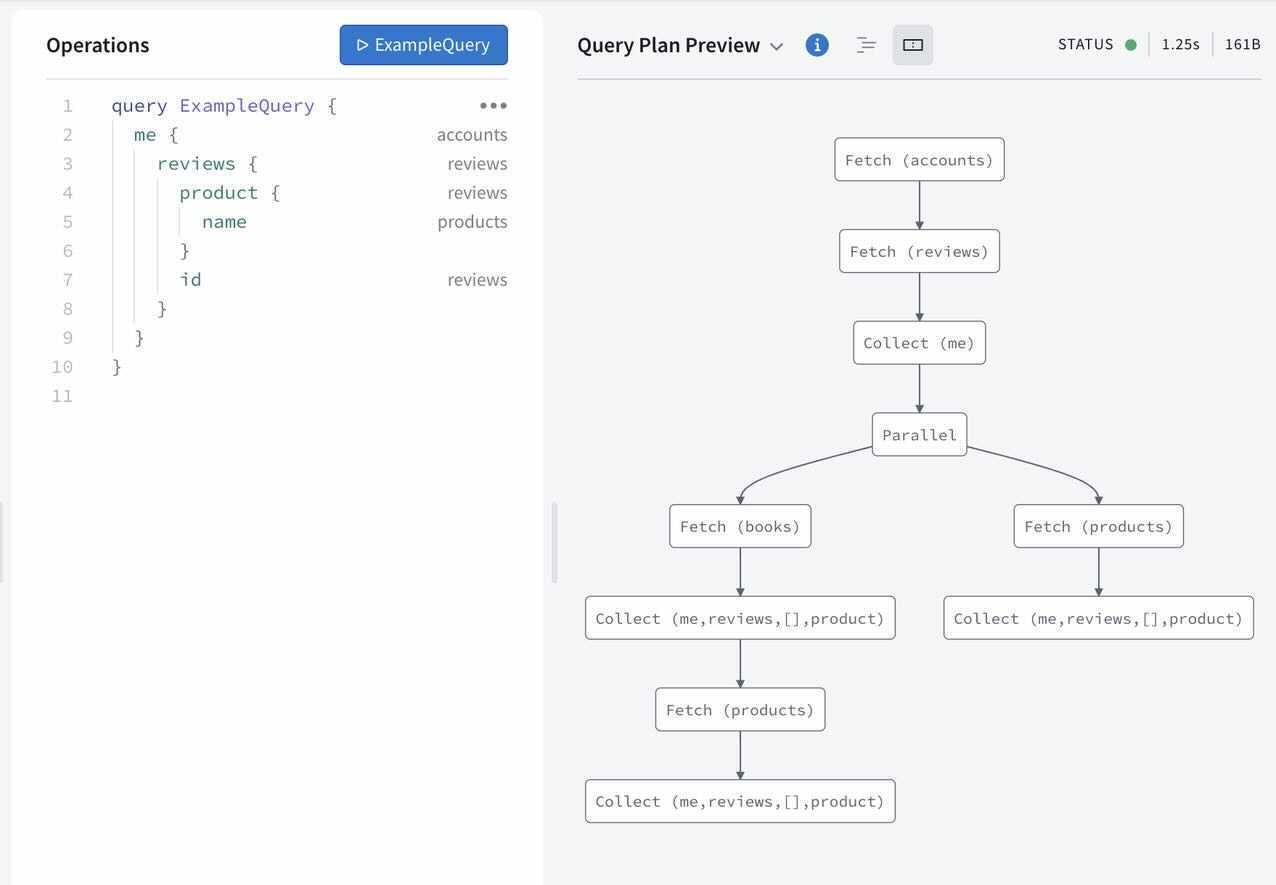
    In advance of its online GraphQL Summit this week, Apollo GraphQL announced today it has updated its Apollo Federation offering that enables a GraphQL Server to span multiple platforms, making it more accessible to a wider range of developers using different tools.

    Apollo Federation is now integrated with both Apollo Studio, a web-based tool for navigating GraphQL application programming interfaces (APIs), and Apollo Workbench, a plugin for Microsoft Visual Studio.

    At the same time, Apollo GraphQL is making available a command line interface (CLI), dubbed Rover, that makes it simpler to integrate Apollo Federation within a DevOps workflow.

    Matt DeBergalis, CTO, Apollo GraphQL, said GraphQL is continuing to gain traction as an alternative to more rigid REST APIs as more organizations begin to appreciate how dependent they have become on software. REST APIs may be simpler for developers to create, but APIs based on GraphQL are easier to update and manage, DeBergalis noted.

    Apollo GraphQL

    The challenge organizations encounter is that a GraphQL Server can become too large to easily navigate. Apollo Federation provides a mechanism that enables of subset of those APIs to be managed on multiple platforms that make up a federated instance of a GraphQL server, DeBergalis explained.

    DeBergalis also noted that IT vendors that have embraced GraphQL are also starting to add support for Apollo Federation. DataStax, a provider of a curated instance of the open source Cassandra database, has added Apollo Federation to the open source data gateway Stargate it provides to access data stored in a Cassandra database.

    At its core, QraphQL provides an open source data query and manipulation language for APIs along with a runtime for fulfilling queries. Originally developed by Facebook, the GraphQL Foundation is now an arm of the Linux Foundation. As more organizations embrace APIs to construct applications based on microservices, GraphQL adoption has steadily increased. It’s not likely GraphQL will completely replace REST APIs any time soon, however, given how pervasively deployed REST APIs already are.

    However, DeBergalis said that organizations that require a more agile approach to building and deploying software are voting with their feet for GraphQL APIs that are easier to update. As the rate of change in software environments continues to increase, the need for a more flexible approach to deploying and updating APIs becomes that much more apparent, added DeBergalis.

    GraphQL is also more efficient than REST APIs in terms how much data is shipped back and forth between a client and a server. At a time when the amount of data that is being consumed is steadily increasing, the need to give clients more control over how data is returned from a server has become more pressing. Apollo GraphQL claims more than two billion queries per day are now being launched against instances of its GraphQL Server.

    Regardless of what types of APIs are employed there are more of them with each passing day. As the number of digital business transformation initiatives increased in the wake of the COVID-19 pandemic, so too did the number of internal and external facing APIs. Developers may have their own individual preference for the type of API they want to use, but as developers are increasingly being tasked with both building and managing APIs after they are deployed, the appeal of GraphQL becomes harder to ignore.

  • On-Premises Software Delivery Tool: Build or Buy?

    On-Premises Software Delivery Tool: Build or Buy?

    The on-premises software market is four times larger than the SaaS market, but harder to reach. Every software vendor who wants to pursue it has to decide how they are going to package and deliver applications inside customers’ firewalls, automating away the complexity of keeping applications deployed and running. Should they build or buy a deployment tool (and how should they think about the features they’ll need beyond just deployment)? Both have their pros and cons, but as demand to reach the larger enterprise market grows, more software vendors are choosing to buy.

    Deploying apps on-premises used to be very different. Fifteen years ago, sysadmins and database administrators (DBAs) would manually configure servers and the applications that ran on them. When something broke in production, admins would often troubleshoot and fix by SSHing in to tweak a config file or setting. But now, particularly within agile development organizations, everything is done via automation (i.e., the evolution of DevOps and SRE). As a result, customers have lost patience with 150-page installation manuals and bespoke, hand-written scripts.

    Today, any ISV looking to modernize an existing on-premises app (or SaaS-only company considering creating their first on-premises offering) is, most likely, going to default to using Kubernetes because it abstracts away the technical overhead of keeping production-grade applications operating.

    With that in mind, software vendors should consider seven areas when deciding whether to build or buy a delivery and management solution. These include:

    Maintenance

    There are free or low cost resources if a software vendor wants to go it alone. Kubernetes and cloud-native technologies let capable engineers stand up a solution in months. But software vendors often overlook the long-term cost of keeping the tool up and running. There is a lot of tooling “around Kubernetes” the vendor has to build to successfully operationalize this. Sure, if you’re going to deploy to up to five customers, you don’t need formal tooling and processes that make it easy to engage whole teams of people (favoring a small build and manual effort), but when you want to go from five to 50, or 50 to 500 customers, you need advanced tooling (favoring buy).

    Cost

    Purchasing a ready-made solution comes with up-front costs, but building and maintaining a bespoke solution can be much more expensive. The obvious costs of building a deployment tool are design, engineering, support and operational costs. There are larger, long-term costs to consider, most notably pulling away one of your greatest assets, software engineers, to spend months (or years) on ongoing support needs. Redeploying your engineers results in opportunity and productivity costs, such as neglecting your core application(s) and stalling your business growth.

    Internal Resources

    You also need to evaluate your internal resources. Building a bespoke deployment tool is a commitment because the tool becomes a product in and of itself. Do you have a team with the available time and the technical skills? If your team isn’t large enough, you may incur costs for expanded headcount or contractors. If you don’t have added FTE costs, you may have a skills gap. When developing a custom deployment tool, most teams focus on the features that enable software distribution and installation, but they don’t consider management and troubleshooting features. In these situations, the FTE and skillset costs may be higher than paying for a comprehensive solution.

    Business Continuity

    Most homegrown solutions are created by an engineer or two who become experts in the systems they’re developing. This makes tons of sense for core business logic, apps that are constantly going to be improved and onto which new members will be onboarded. However, for ancillary systems that support the core business, these applications end up becoming a silo of knowledge. The question isn’t, “How much time will this take me to maintain after I build it?” but rather, “Who will maintain this after me, and who after them?” followed by, “How will they learn the intricacies of this system?” If the answer(s) to this question isn’t clear, this approach should be reconsidered.

    Beyond The First Team

    If you expect that your team will be the first, or one of the first, teams within your company to face the problem you are solving for (but you are certain others are sure to follow), then this decision is even more complex. A common customer delivery and management platform can increase cross-sell by simplifying the marginal effort for your customers to deploy a second, third, fourth, etc. application from your company. Buying will likely require a long-term relationship with a vendor dedicated to solving the problem. Similarly, building a solution will require extra investments. Beyond the initial technical/product requirements of abstracting a home grown solution to meet the needs of additional teams/architectures/products, there are also the other implications. The winning solution will win because it will evolve to meet the needs of multiple teams and have strong internal advocacy. Depending on the size and complexity of the company, this internal advocacy can be quite time consuming and require more than just engineering talents (generally, this is what customer success and account managers do 100% of the time).

    Target Environments

    Your application may need to be deployed in varied on-premises environments and may not have the time to adequately address all of them. If your team has not previously built an installer, they may not have the skillset to build out richer features in AWS, Azure, VMware and others, to solidify the customer experience and day 2 operations, beyond just bringing the application up. An AWS Cloud Formation template might get you out the door, but when the next customer says, “I need GCP,” you’d have to start over.

    It’s rinse-and-repeat for each of the target environments, which slows your time-to-market, potentially losing high-value sales. Conversely, if you look at ready-made solutions, you can select the best out-of-the-box experience for your customers.

    Control and Compatibility

    There are situations where your team must build the on-premises deployment tool themselves. For example, when the app requires so much last-mile configuration for each customer deployment that there just isn’t a way to standardize it. Or if you don’t have enough customers to justify paying for a commercial product, it might make more sense to do a quick sprint and hack something out.

    An off-the-shelf solution can significantly accelerate your time to market, but you have to order off the menu. Also, if you have access to your customer’s infrastructure, then building your own tool may make more sense. On the other hand, requirements such as faster time-to-market, an off-the-shelf comprehensive solution and lower costs over time may outweigh customization. If speed, lower costs and quality are important, a solution from a focused vendor who has thought through all of the technical and operational challenges, with no surprises or last-minute fixes, is the way to go.

    Competitive Advantage

    Your software engineering team may be your company’s greatest resource. But it’s far better to keep your engineers focused on innovation, adding value to your application and winning more customers through improved software. Coding a deployment tool is undifferentiated overhead. It does not make your business more successful. Installers and support tooling are table stakes to deliver a good customer experience, but the reality is that no customer is going to pay you more money for that capability.

    The Bottom Line

    Simplified access to the on-premises software market is one of the greatest opportunities for software vendors today. Kubernetes and cloud-native technologies make it easier to develop tools to package, deploy, manage and troubleshoot apps. But the job isn’t for everyone. The costs, both up-front and long-term, favor ready-made commercial applications for most software vendors. Consider your resources and customer needs to decide if it makes more sense to build or buy your solution.

  • Oracle Updates Java Development Platform

    Oracle Updates Java Development Platform

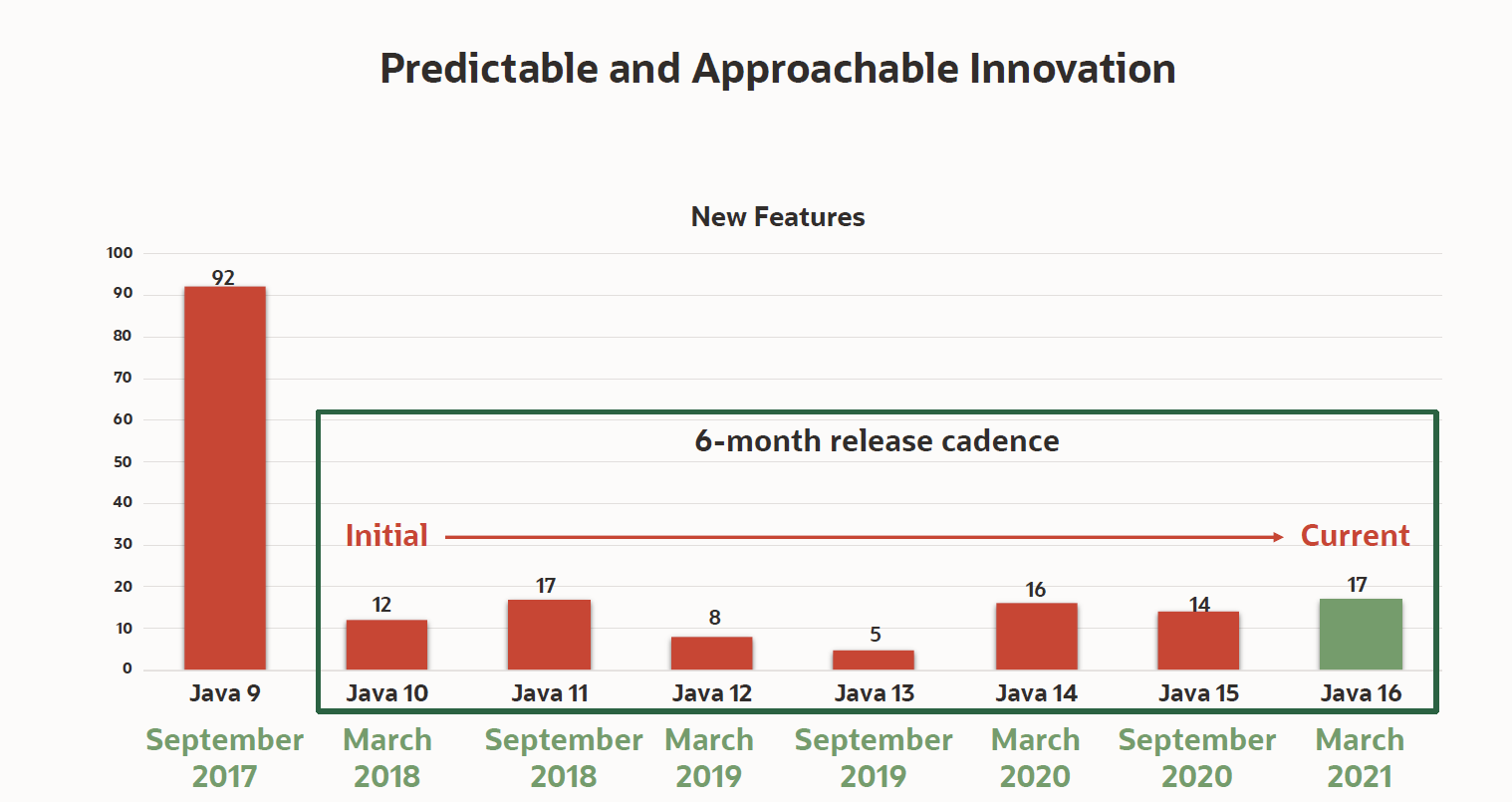
    Oracle announced today the availability of Java 16, which adds 17 enhancements to a software development kit that is now being updated every six months.

    Georges Saab, vice president of development for the Java Platform Group at Oracle, said while most Java development teams are still using Java 8 or earlier editions of the platform, the expectation is that many of them will soon move forward, as updates are made available in smaller increments that are easier to test and vet.

    At the same time, Oracle is committing to make available long term release editions of Java that won’t be updated as frequently. While there are many organizations anxious to take advantage of new capabilities as quickly as possible, Saab noted there are just as many that value stability more than innovation.

    The latest edition adds support for finalized pattern matching for instances and records, as well as other language enhancements that were previewed in Java 14. Developers can also employ a packaging tool to ship self-contained Java applications that will make it easier to deploy in modern IT environments, said Saab.

    Additional capabilities now available include the Vector application programming interface (API), the Foreign Linker API (JEP 389), and the Foreign-Memory Access API that are all available in incubations as well as a sealed classes capability that is being made available as a preview.

    In general, Saab said, one of the primary reasons many organizations don’t tend to update Java more frequently is the frameworks they rely on to employ it at a higher level of abstraction are still optimized for older versions. However, as Java updates are delivered in a more modular fashion, it will become easier for the providers of those frameworks to keep pace.

    It’s not precisely clear to what degree IT teams are employing Java to build next-generation applications based on microservices. However, a recent survey published by VMware, found 95% of respondents have either already used the open source Spring framework, based on Java, to either containerize an application (65%) or plan to do so (30%).

    A quarter of a century after its initial development, Java is still the dominant programming language relied on to build enterprise applications. In many instances, the lack of tools for building Java applications for Kubernetes platforms was a significant inhibitor of adoption for the cloud-native platform. In the last six months, however, the number of tools for building and deploying Java applications on Kubernetes clusters has increased.

    Despite the proliferation of alternative platforms for building and deploying applications on Kubernetes platforms, the appetite for retraining legions of Java developers is low. Most developers will rely on the programming tool they already know, especially when it comes to building mission-critical applications for the enterprise. That may mean some of those applications might not be as fast as they could be, but, given the level of risk, there’s always going to be a natural tendency toward being safe rather than sorry.

  • Survey: Fixing Bugs Stealing Time from Development

    Survey: Fixing Bugs Stealing Time from Development

    A global survey of 950 developers published today finds more than a third (38%) of developers spend up to a quarter of their time fixing software bugs, with slightly more than a quarter (26%) spending up to half their time fixing bugs.

    Conducted by the market research firm Propeller Insights on behalf of Rollbar, a provider of artificial intelligence (AI) tools to detect software errors, the report also notes that 88% of developers find traditional error monitoring tools are not meeting expectations.

    Daniel Day, vice president of marketing at Rollbar, said the survey makes it apparent that continuing to rely on manual processes to surface errors in code is having a major downstream impact on both DevOps teams, in particular, and the business as a whole.

    For example, nearly nine in 10 developers (89%) also noted that undetected errors take a big toll on the business. More than one-fourth (26%) of developers also said that their employers have lost a significant number of users due to errors in software. The same share (26%) said software errors damage their company’s reputation and its ability to attract investments, and nearly a fifth (18%) said that undetected software problems anger their company’s investors.

    Nearly a third (32%) of developers said they spend up to 10 hours a week fixing bugs instead of writing code, while 16% said they spend up to 15 hours a week. Another 6% said they have to dedicate up to 20 hours a week fixing bugs instead of writing code.

    More than half of developers (55%) said that if they didn’t have to spend so much time fixing bugs, they would have the time to build new features and functionality. Many of these errors are not addressed because current tools require them to manually respond to errors (39%); it takes too long to find all of the details they need to fix bugs and errors (36%); focus on system stability and not enough on code health (31%); make it difficult to detect errors (29%); and have an approach to error aggregation that is either too broad or too narrow (23%).

    Nearly two-thirds of developers (62%) said they have found out about errors from users reporting through the application, while a quarter (25%) said that they have heard about errors from users sharing these issues on social media. Another 17% said media coverage clued them in about errors in their software, while more than a fifth (21%) said they heard about them from their CEO.

    Nearly a third of the survey group (31%) said that manually responding to errors makes them feel frustrated, while more than a fifth (22%) said they feel overwhelmed when using manual processes to address errors in software. Nearly as many (17%) said it leads to burnout. More than a tenth (12%) said it elicits feelings of resentment, and 7% said it makes them want to quit their jobs.

    Nearly two-thirds of all developers said they would rather do an unpleasant activity than fix errors, including pay bills (26%), go to the dentist (21%) and spend time with in-laws (20%).

    Rollbar clearly has a vested interest in convincing developers to increase reliance on AI to surface errors in code. The productivity paradox holds that, the more application code developers write, the more time they spend fixing existing code than writing new code. Most developers have a lot better things to do with their time than manually combing through lines of code looking for those errors. In fact, the problem is, many of them simply don’t have the time required to catch all the issues before an application makes it into a production environment.

  • Open Source Advocates Want Share of Wealth

    Open Source Advocates Want Share of Wealth

    The egalitarian spirit of the open source community might be starting to fray as individual developers begin to question who is really benefiting most from their efforts.

    A survey of 4,440 developers who actively participated in open source projects in 2020 finds more than half (54%) of respondents said they feel that individuals should be paid for their contributions to open source projects. The report, conducted by DigitalOcean, a cloud service provider, finds only 14% of respondents are currently paid for their contributions.

    Developer opinions vary, depending on age group, about whether individuals should be paid for their contributions to open source, with those between the ages of 18-25 being more likely to be in favor (60%), while only 34% of those aged 55 or above agreed.

    “A lot more people want to be compensated,” said Raman Sharma, vice president of product marketing for DigitalOcean. “That may mean there will be a need for more sponsorships by vendors.”

    The DigitalOcean report arrives just after Elastic announced it is changing the licensing terms under which it makes Elasticsearch available. Elastic is shifting away from an Apache license to a dual license strategy that includes a server-side public license, or SSPL, along with a proprietary Elastic license. That shift was made to help ensure more of the revenue generated by Elasticsearch winds up in the hands of Elastic rather than cloud service providers, such as Amazon Web Services (AWS), that routinely launch paid services based on open source code. AWS responded to the Elastic move by announcing plans to fork Elasticsearch code that it will now curate.

    Nearly half of respondents (47%) to the DigitalOcean survey said they think technology companies should fund the payment of open source contributions, while a quarter (25%) believe project owners or individuals should pay.

    Discontent among startup vendors has been building for months. Startups typically are backed by venture capitalists, and make their software available as open source code in an effort to build a customer base on the strength of their support services. Cloud service providers have discovered they can take the code these vendors create to launch their own service. Those cloud service providers may contribute code to the project, but the startup vendor doesn’t typically enjoy any of the economic benefits.

    In most cases, the open source code used by the cloud service provider comes from a small cadre of developers that work for the startup company. Most of those startup companies are hoping to build a community around their code that includes individual contributors, external to the company, to help defray those costs. In fact, that business model has contributed to open source projects’ role as one of the primary drivers of IT innovation in recent years. If more independent developers demand to be paid for those efforts, the innovation rate of open source projects is likely to slow. The labor required to support those projects simply won’t be as freely available.

    In contrast, massive open source projects, such as Linux, have already reached a level of sustainability that other projects can only dream of. The Linux community is still ruled by Linus Torvalds, who some say is something of a benevolent dictator. Many of the contributors to Linux, however, are full-time employees working for vendors like IBM and SAP, which have a vested interest in the underlying open source platform.

    In contrast to the Linux community’s approach, the Eclipse Foundation, The Open Infrastructure Foundation (formerly the OpenStack Foundation), the Apache Software Foundation and the various arms of the Linux Foundation have stepped in to provide some level of independent governance for a wide range of open source initiatives, with mixed success. The Cloud Native Computing Foundation (CNCF), for example, as an arm of the Linux Foundation, has played a major role in spurring Kubernetes adoption. However, Google recently spurned the CNCF when it decided to create its own steering committee to oversee development of the Istio service mesh.

    Despite all the internecine rivalries and the potential for more forking of open source projects, overall, these projects are still viewed favorably. A survey of 3,400 developers, conducted by O’Reilly Media on behalf of IBM, finds 94% of respondents said they rate open source software (OSS) as equal to or better than proprietary software. Nearly two-thirds of respondents (65%) also agreed that contributions to open source projects impress potential employers and result in better professional opportunities.

    Of course, one of the primary reasons so many developers prefer open source is that there is no purchasing process for them to navigate.

    “Developers can move faster,” said Todd Moore, vice president for open source at IBM. “Programmers can move at the speed of light.”

    Regardless of motivation, it’s clear open source software isn’t going away. However, how it is built and exactly what is permissible under an open source license may soon vary much more widely from one project to the next.

  • The Role of DevOps in Custom Software Development

    The Role of DevOps in Custom Software Development

    Hundreds of tech giants and big retail companies such as Etsy, Netflix, Amazon and Target have adopted an ecosystem called DevOps. It establishes a good collaboration between cross-functional teams such as development and operations which simplifies the processes. DevOps has calibrated a new standard for building custom applications.

    Do you know any predefined technique to check whether developers have adhered to all coding principles? A quality check is not the right answer. What if you want to check and optimize their entire system of writing code, understanding the project and following coding guidelines?

    You must have dug into the details of not being able to accomplish the projects before the deadline. Well, there is not a single reason for this failure. There is a need for restructuring the entire ecosystem of project development, which will include polishing of coding rules, eliminating duplicates of code, unit tests, bug removal and understanding and improving the project architecture. DevOps aims for such a practice that includes neat coding, bug-free testing and the fastest deliverables.

    This blog explains everything about how DevOps plays a significant role in custom software development and makes a super-productive project development environment.

    The term “DevOps” is the combination of two different terms: development and operations. Thanks to Patrick Debois and Andrew Clay Shafer for originating the idea of DevOps in 2008. They have altered the traditional techniques of software development. Gone are the days when the software was written once and used for years. For the era of rapid software development and extreme personalization, you need smart software that updates in seconds.

    Custom Software and DevOps

    Now is the time where generic needs seem limited and are absolute off-the-shelf in the software industry.

    DevOps is the process of creating custom software that fulfills everyone’s demands in no time. It chooses to streamline the project development phases by automating the process, making faster deliveries and upscaling the software quality in the world of high-end customizations.

    How Does Automation of Software Development Plays a Predominant Role?

    Software development life cycle comprises of various components such as time, manpower, expenses, knowledge resources and problem-solving capabilities. It continuously evolves around bringing a unique solution that stays reliable over time.

    The optimization of the expenses, time and manual efforts is possible using the automation of SDLC. Especially when customizing the features, manual efforts make the tasks tedious and slow. Automation overcomes these drawbacks and makes customizations super easy to fulfill.

    Automation testing has carried out the responsibility of making project development glitch-free, as it detects the errors at a much faster pace. For instance, a custom software/application, such as the social media platform Instagram, carries a lot of features and functionalities to add. To make this a glitch-free development, automated test runs stand as the rock-solid solution.

    DevOps not only improves the programming practice of the coders but also scrutinizes the testing. It streamlines communication among the coders, front-end engineers, clients and project managers. Thanks to its immediate nature of validation and rectification.

    The automated workflow of SDLC saves a lot of business expenses as it requires less time for rebuilding the applications. Also, it optimizes the time required for running the manual tests. It brings in the high quality of work that decreases the glitch fixing need and hence, reducing the overall project costs of custom software.

     How Is Continuous Delivery or Faster Delivery Important?

    Continuous delivery means delivering the small chunks of code a developer has built, in short cycles. It lowers the project development costs significantly of custom software as the hidden fixed costs with the primary release of projects will not exist.

    Smaller release, smaller risks. Yes, there will be nothing like once the project delivery has been done, you can not opt for a small change request as a part of the suggestion. Because the deliveries won’t stop when you opt for custom software development. This sort of development is required to adopt changes very fast and hence, needs deliverables to be delivered at a faster pace for the rapid feedback implementation and live changes.

    So, hypothetically, you will not need to be afraid of how it will turn out. For instance:

    1. Amazon deploys code at every 11.7 seconds.
    2. Popular social media platform Instagram follows the same practice 30-50 times a day.
    3. Netflix pushes its code thousands of times a day.

    What led them to this?

    • To avoid bad commits.
    • Freedom to deploy the code whenever possible.
    • Avoiding the mess for going through the thousands of deploys for one error.
    • To speed up the work and make changes in seconds.
    • To respond to users unpredictable queries and turn it into a feature.

    This can be easily achieved through DevOps in custom software.

    There are many reasons for more occurrences of deployments. All the reasons lead one focus (i.e., faster delivery for custom software and small but speedy updates for the custom software that is used by millions of people online).

    Faster bug fixes and updates are the new demand for sure. All thanks to DevOps methodology. The most valued part is, developers and delivery managers will come to know users’ preferences at the very early stage of development. As the project goes on, there will be zero chances of bug generation and a smooth operation will be established. 

    Thus, the successful glitch-free customized software development is possible with a DevOps strategy. The teams will get to learn from peers and end-users about the project at an earlier stage using DevOps.

    Responsiveness Is the Best Software Quality 

    The main advantage of the DevOps technique is its quick responsiveness to clients’ feedback and rapid execution.

    If you can quickly look into the client’s feedback in the small chunk of code you’ve submitted, you can respond to them faster. Thus, can lead the fastest execution possible.

    The integration of a quality assurance team will add a lot of potential in improving product quality.

    Responsiveness plays a crucial role in decreasing the frequency of a module collapsing (i.e., maintains the module dependency because of the continuous delivery and quick implementation of feedback).

    Purpose and Role of DevOps in Custom Software Development

    You need a super key to stay ahead of competitions and it always comes by streamlining the process. Be it a business revenue, cross-selling of products, increasing the target market and anything that comes up with competitors.

    DevOps is that key here. Yes, you read it right. Bring in this methodology at your information technology firm to witness the enormous growth.

    Custom software development has become pivotal in the IT industry. To create the best-customized experience, consistency is required. That is the reason why DevOps is gaining popularity so fast. DevOps is the master key to connecting resources with the same thread. 

    You might have wondered how Netflix updates and personalizes the experience for everyone so rapidly. Netflix does thousands of deployments per day. That’s the reason it can give its users a top-quality personalized experience. 

    “The rate at which this entertainment game-changer has adopted new technologies and implemented them into its DevOps approach is setting new standards in IT,” said Coman Hamilton, editor at JAXenter.

    Netflix had started nailing this modern approach from 2015 itself. Now you can understand how technology has come so far approaching 2020. So, what next doable thing is up for today’s need for deployments using DevOps?

    DevOps is an exemplary technique that enables IT to showcase its power. It empowers the dynamic nature of custom software and stabilizes the work environment by keeping everyone on the same page at all instances of time.

    For a company to be responsive and relaxing throughout the year without overloading the work, adopting DevOps is a must. The purpose of enabling development and IT operations together serves as time-saving and an in-budget procedure of building applications with the utmost quality.

    Where to Start?

    DevOps is not a new software to learn or a new framework to set in. It is the way of working and adopting it—everyone must be involved. Educating resources is important when you are planning to adopt a big change. Conduct a conference, state the pain areas and showcase the possibilities with DevOps. You can start with teams that have great adoption skills, the ones who can take challenges and are ready to learn.

    Essentials to Consider for the Best Practices of DevOps Implementation

    Breaking the Silos

    If you want to make DevOps an organizational practice, you will have to first break down the functional silos. As DevOps will make everyone come closer, the communication gap among the teams will not be questioned. In an information technology organization, the more communication engineers keep, the more successful they will be in project development.

    Make this a daily practice, “exchange of ideas is an exchange of solutions.”

    Using the Right Tools

    There are several tools to help your team automate the process and track down the work done. You will need a tool such as Jira when entering a DevOps environment. Also, choosing the right tools for the right needs is necessary. For example, Jira is a very good tool for tracking the issues and for managing the projects, while Querysurge is used to perform continuous testing and data analysis purposes.

    As per the project and company needs, one can go for the right set of tools to use. Make your organization resourceful with the automation and project tracking tools that are already overcoming manual efforts.

    User-Centric

    Adopting DevOps is a cultural change and it listens to its end-users. The end-user of any particular industry will want the best features and robust functionality. Firms will have to step in with the altering demands and stay committed to user satisfaction. Start making customer-centric applications.

    Automation at Its Best

    As we know, DevOps detects diseases at an earlier stage. It has the lowest percentage of risks involved as it uses automated testing of a small snippet of code. Keep it in a practice to code and test. It will automatically follow the test-driven development practice used in agile teams. Use the most of automation practices that eliminate the slow process of software development. This way the teams get faster development completions without any hampering of deadlines.

    Conclusion

    You may end up thinking DevOps works for IT firms and is not going to help non-IT industries or businesses. It’s not like that.

    Think about the software you have used for years in your non-IT firm. Are you using a software that drives your business but it’s not up to date? Think about customizing it to improve the way it works. These customizations come from experienced custom software development companies. Prominent companies are nailing DevOps nowadays.

    — Hardik Shah