Tag: custom software development

  • Real-Life BDD: Getting the Best Out of Dev Teams

    Real-Life BDD: Getting the Best Out of Dev Teams

    If we want our software to have value, we need to improve it every day, rather than wait three months for the next release. If someone finds a bug and we know how to fix it, we want to deliver the fix that day. The challenge is deploying to production many times a day.

    If the developer is coding right now, we want to see their work in production today. However, when you increase the speed of delivery, you need to be sure that the code you deploy works. To increase speed and quality at the same time, you need a safety net and a lot of automation.

    Sometimes we need to change the mindset of developers. This affects interactions between the developers and product management. It also changes the way developers code and how they approach their work.

    Break It Down

    Behavior-driven development (BDD) helps all of my teams. My mature teams use the three stages of BDD: discovery, formulation and automation. To increase speed and quality in a team that isn’t as mature (not much test automation, a lot of manual testing), one of our challenges is to develop small pieces of code they can deliver.

    When we groom an item in the backlog, the product owner (PO) explains what’s needed, but sometimes when the developers start working, they find other stories that may take two weeks each. With BDD discovery, the PO and developers can reach a shared understanding of what’s needed before coding starts. If the story is too large, example mapping helps them split it. They need to obtain stories that will take less than three days.

    More Ideas, More Examples, More Agile

    To simplify collaboration between the engineering and business units, the product team needs to understand the size of the ask for the developer. You can improve communication by showing all the different cases that exist for this feature and by using example mapping.

    Here’s an example of how this works in practice: the product team asks for a feature and explains it in about 10 minutes. The developers say this will take two to three weeks. However, after the developers completed user story mapping and example mapping and began to split the big features into smaller stories with examples, they realized it would take much longer. There were simply too many things the product team hadn’t known about.

    The product team had lots of ideas, but ideas take time to implement. Now that they had more examples, they could make better decisions about what was mandatory and what would be great but was not essential. Working in this way allows us to be more agile.

    The particular aspect of BDD that helps here is discovery with example mapping. I like to use user story mapping to see different versions of the same feature to understand the value brought by the feature’s different potential iterations.

    Whenever Possible, Push Live Code

    I’ve transformed the way my team works to help them to release more often. The key is to add a continuous integration server with the first automated test and a staging environment where the code is deployed many times per day. This allows us to automate the process from the code, so when a developer pushes the code, we have the beginning of a safety net. When the safety net says everything is okay, deployment is triggered to a staging production environment. The production can be a staging production, but it’s better when it’s live. When it’s not possible to deploy directly in production, then you should at least deploy in a staging environment.

    From the developer’s point of view, when they push the code, there’s an impact on production, even if it’s just within a staging production environment. For the next step, they need to create the first unit test each time they have to add code. In other words, every time you write code, you need to have an automated test at the same time. These tests should be run by the continuous integration server.

    Once you have that, the next question is about the size of the code you push. If you wait a few days to push or use another branch, you won’t have the value to see the increment of the code you’ll push.

    Developers Should Own Quality

    Quality has traditionally been the responsibility of the QA team, but it should be owned by the developers. As a developer, you can’t wait for someone else to read your code and tell you it’s okay and then talk to the QA team to make sure you didn’t introduce a bug. If more unit tests are needed, you should write them and you should be using test-driven development (TDD) and BDD. You also need a lot of feedback. You need to be the owner of quality, and help your team achieve it.

    To summarize, here are my top three tips:

    • Automate the process of deployment with continuous integration/continuous delivery
    • Create examples with all the stakeholders of the project together—product, development and testers
    • Create small stories that you can deliver in less than three days
  • Engineering Applications for DevOps (Part 3)

    Engineering Applications for DevOps (Part 3)

    This blog series explains how to engineer applications for DevOps.

    Topics covered in this blog series:

    • Factors used to decide whether an application is a good candidate for DevOps.
    • Practices to engineer designs for DevOps.
    • DevOps applied to enterprise apps and software services.
    • DevOps applied to COTS systems.
    • DevOps applied to manufactured (embedded) systems software.
    • DevOps applied to software services.
    • Five levels of application maturity.

    This blog covers the topic of DevOps applied to enterprise apps and software services; part three in the series. You can read part one here and part two here.

    DevOps Applied to Enterprise Apps

    An enterprise application assists an organization in solving business problems. Enterprise applications are typically designed to interface or integrate with other enterprise applications used within the organization and to be deployed across a variety of networks (internet, intranet and corporate networks) while meeting strict requirements for security and administration management.

    Proprietary enterprise applications are usually designed and deployed in-house by specialized IT development teams within the organization. However, an enterprise may outsource some or all the development of the application and bring it back in-house for deployment.

    The size and complexity of large enterprise applications, especially older monolithic-architected applications that are not designed in modules, are a challenge when it comes to implementing DevOps. Given the large scale and distributed nature of the people, process and technology components of enterprise applications, it is recommended that enterprises engage very experienced DevOps consultants to determine strategic requirements, roadmaps and plans for DevOps that fully consider all three dimensions (people, processes and technologies) and nine pillars of DevOps before embarking on a major DevOps transformation journey.

    Despite the complexity, with the right strategy and plan, DevOps can deliver enormous ROI for enterprise applications. Amazon and Adobe are just two of many examples of large corporations that have benefited enormously from applying DevOps across the enterprise.

    DevOps Applied to Software Services

    I often hear people ask, “Does DevOps apply to software services as well as it does products?” These are usually people who have only worked in product-oriented organizations, such as companies that manufacture things that have embedded software.

    Ironically, I often hear people ask the opposite question, “Does DevOps apply to products with embedded software as well as it does to services?” These are usually people who have only worked organizations in which software is consumed as a service over an intranet or internet for a price or for free. Examples of these organizations are IT departments (even the IT departments of manufacturers!), government agencies and enterprises such as banks, insurance companies, hospitals and financial trading companies.

    You already know the answer to these two questions if you read the earlier parts of this blog series. The answer to both is clearly ‘Yes!’ Cloud services are doubly interesting to DevOps because not only are cloud services used by DevOps as a preferred infrastructure, as described in the next chapter, but cloud services also use DevOps in the process of creating and deploying software for the implementation of cloud components.

    While we are on the topic of DevOps and services, I want to help clarify some confusion regarding whether “newer” DevOps renders “older” IT service management (ITSM) obsolete or less important. This confusion exists because ITSM has often been regarded as a gatekeeper run by Ops to prevent Dev from getting out of control. While some organizations may have, in fact, implemented ITSM that way, this is not the purpose of ITSM.

    “DevOps tends to focus on the software delivery life cycle and on building and delivering software,” said Jayne Groll, president of the ITSM Academy. For its part, ITSM tends to have a broader focus; it is really looking at all aspects of customer engagement, from fulfilling standard services to ongoing support and operations activities. So, ITSM is “almost like the left and right ends of DevOps.”

    Using ITSM With DevOps

    Here are some recommended engineering practices for using ITSM with DevOps:

    • Training to help DevOps professionals gain an understanding of ITSM, and vice versa, will help both teams find points of integration—not just in technology, but in process, as well.
    • Find ways to automate service change approvals implementation of known, good changes to allow for agility, iteration and innovation. At the same time, hold back high-risk, high-impact changes that might need more than just an individual contributor to sign off on before they make it in front of a customer.
    • Self-service requests, automation flows and IT orchestration are now the front door to IT service management actions. These can and should be happening in the background, automagically created, maintained and measured by our DevOps tools.
    • Embrace Agile service management to take Agile values and apply Scrum-like development practices to process design and improvement. Aim to make more frequent incremental changes rather than design and implement a total end-to-end process in the traditional way.

    What This Means

    This blog is part three of a series to explain how to engineer applications to be most suitable for DevOps. This blog series explains how to engineer applications for DevOps including:

    • Factors to decide whether an application is a good candidate for DevOps.
    • Practices to engineer designs for DevOps.
    • DevOps applied to enterprise apps and software services.
    • DevOps applied to COTS systems.
    • DevOps applied to manufactured (embedded) systems software.
    • Five levels of application maturity.

    This blog covered how DevOps can be applied to enterprise apps and software services. You can read part one here and part two here.

    For more information regarding how to engineer applications for DevOps refer to my book Engineering DevOps.

  • Engineering Applications for DevOps (Part 1)

    Engineering Applications for DevOps (Part 1)

    This blog series explains how to engineer applications for DevOps.

    Topics covered in this blog series:
    • Factors to consider when deciding whether an application is a good candidate for DevOps.
    • Best practices for engineering designs for DevOps
    • DevOps applied to enterprise apps and software services
    • DevOps applied to COTS systems.
    • DevOps applied to manufactured (embedded) systems software.
    • Five levels of application maturity

    This blog covers factors to consider when deciding whether an application is a good candidate for DevOps.

    Factors to Consider for Engineering Applications

    The extreme worldwide hype around DevOps products and services seems to suggest that DevOps is good for everybody and applies equally well to every software-based product or service in every organization. Here is my experience with that assumption: It is not true!

    On the other hand, I have heard people say that DevOps does not apply to applications for which it absolutely does! Before you go a step further in your DevOps journey—or decide that your application does not qualify for DevOps—you should consider carefully how well your application is engineered to become a model for DevOps implementations.

    Best Practices for DevOps Determination

    The following are important factors you can use to decide whether an application is a good candidate for DevOps:
    • The application will benefit from faster lead times.
    • Leaders with responsibility for this application are open to collaboration and will be sponsors of change.
    • Team players that are associated with the application team (product owners, Dev, QA, Ops, infrastructure, security, PM) are open to collaboration and change.
    • The application is currently using or planning to use service-oriented, modular architectures or microservices.
    • There are at least ten people associated with the application including product owners, Dev, QA, Ops, infrastructure, security, PM. Smaller projects with smaller teams may not show sufficient impact or justify substantive DevOps investment.
    • The application is expected to undergo changes for more than a year. Less time would not likely yield return on the investment required for DevOps.
    • The application represents a good level of business impact and visibility but does not involve an extreme amount of risk for the business.
    • The application experiences frequent demands for changes from the business.
    • Not all tools used with the application need to be replaced to implement a DevOps toolchain. The costs of changing out all tools can negatively affect the ROI and business case for DevOps transformations.
    • Efforts to build, test or deploy releases of the application are substantial and could be reduced significantly by automation.

    It is not necessary for an application to perfectly fit all the factors, but the more closely it fits the more likely your application will benefit from using DevOps and will, therefore, be worth the cost to implement a well-engineered DevOps practice.

    DevOps can be used with all types of software applications and services. However, not all applications and services should be engineered to use DevOps. The factors that determine whether to engineer DevOps for an application have more to do with business factors than technology differences between different types of applications. Applications must be engineered in specific ways for DevOps to operate effectively.

    What This Means

    This blog is part one of a series explaining how to engineer applications to be most suitable for DevOps. This blog series explains how to engineer applications for DevOps including:

    • Factors to consider when deciding whether an application is a good candidate for DevOps.
    • Best practices to engineer designs for DevOps.
    • DevOps applied to enterprise apps and software services
    • DevOps applied to COTS systems.
    • DevOps applied to manufactured (embedded) systems software.
    • Five levels of application maturity

    This blog covers the first two topics: factors to decide whether an application is a good candidate for DevOps and best practices to use when engineering designs for DevOps.

    For more information on engineering applications for DevOps, refer to my book Engineering DevOps.

  • The State of Continuous Delivery in 2021

    The State of Continuous Delivery in 2021

    One of the hallmarks of DevOps is to improve the delivery of software. Therefore, mature DevOps systems employ continuous delivery (CD), the process of releasing bite-sized software changes on a regular basis. Amid high demand for digital innovation, streamlining this release pipeline is becoming more and more crucial for enabling overall software fluidity.

    So, what is the state of CD among today’s development teams? The Continuous Delivery Foundation (CDF) recently released its 2021 State of Continuous Delivery Report, a study that helps establish baseline continuous delivery metrics. Below, we’ll review some key takeaways from the report and discover mean rates for things like deployment frequencies, recovery times and average lead time for code changes.

    Benefits of Continuous Delivery (CD)

    Before we look at the broad metrics surrounding CD adoption, let’s consider: what are the benefits of CD? A big net benefit of CD, the report noted, is that it helps realize feedback earlier in the software development cycle. A lean, CD-driven development approach could help quickly discover features that won’t succeed, which avoids wasting precious development resources.

    CD also increases overall delivery speed for small software chunks. In an era where microservices architecture is all the rage, this process is a necessity for continually initiating many disparate updates. For example, Netflix utilizes Spinnaker to deliver hundreds of microservices and thousands of daily deployments.

    With these results, organizations can reap increased responsiveness and agility. CD can enable fast feedback to changes, which can help businesses adapt to unforeseen conditions, such as zero-day exploits. An investment in CD can also bring net positives to developer team dynamics, according to the report.

    Continuous Delivery Statistics

    Software performance can be indicative of overall organizational performance. So, how should an organization measure its software delivery success? Well, the book Accelerate outlines four crucial metrics to watch: lead time for changes, deployment frequency, time to restore service and change failure rate. The CDF report establishes current industry averages for three of them.

    In terms of deployment frequency, the study found that the highest percentage of developers (31.3%) release once per week to once per month. A large percentage of developers, 27.3%, release every month to six months. Only 10.8% of developers are elite performers, releasing multiple times per day. This indicates that rapid release cycles are still maturing across organizations.

    The average lead time for changes is more variable than you might think. It takes 28.3% of developers one week to one month to go from committed code to running code successfully in production. For 27.3% of developers, this lead time is increased, from one month to six months. Only 5.74% of developers say it takes less than an hour, indicating that a truly on-demand delivery mechanism remains out of reach at most organizations.

    On the other hand, developers are much quicker to act when it comes to restoring services. The survey showed 34.4% of respondents said it takes them one hour to one day to respond to an unplanned outage. A significant number, 15%, respond to incidents in less than one hour. Still, about 50% of outliers are responding somewhere between one day and more than six months.

    Decreasing the mean time to recovery (MTTR) is imperative to respond to broken applications, quickly address security vulnerabilities, and meet evolving customer expectations. As a result, MTTR has become a de facto metric for Site Reliability Engineers (SREs) to watch closely.

    Factors That Affect Software Delivery

    Other factors may influence software delivery agility, such as industry type and programming language preferences. Out of the many industries attempting to refine their delivery models, the report highlighted retail as an industry that ranks high in both speed and stability metrics. Other sectors, such as financial services, government and energy ranked high on stability yet received only average scores for speed. Industries like telecommunications received poorer overall scores.

    Programming language choices may also dictate overall software delivery performance. The study found that shell scripting languages, Go, JavaScript, PHP and Scala were among the top five programming languages, based on the combined software delivery performance data for organizations using each language.

    DevOps Aims to Improve CD

    Continuous delivery is vital to responding quickly to changes and enabling iterative, progressive delivery of new features.

    Another facet of modern CD that can’t be understated is the widespread prevalence and reliance on open source tools. CDF open source packages like Jenkins, Jenkins X, Spinnaker and Ortelius remain vital to enabling CD processes for numerous developer teams.

    The 2021 State of Continuous Delivery Report provides a baseline of standard continuous delivery practices across companies and sectors. The findings are based on SlashData’s Developer Nation survey, which reached 19,000+ respondents from 155 countries from late 2020 to early 2021. One area where reporting is lacking is change failure rates, which we hope future studies will benchmark. For more insights, you can download the report here.

  • Linux Foundation Makes Available Software Manifest Tool

    Linux Foundation Makes Available Software Manifest Tool

    The Linux Foundation is making available a set of free tools for building software bills of material (SBOMs) based on the software data package exchange (SPDX) file format it curates.

    Backed by more than 20 organizations, SPDX is an effort to standardize the way metadata describing the contents of a software package is described.

    The SPDX specification was submitted last fall to the International Organization for Standardization (ISO) by the Joint Development Foundation, an arm of the Linux Foundation.

    The Linux Foundation, as part of its efforts, is also making available a free, online training course to provide IT teams with the foundational knowledge required to create and maintain SBOMs.

    Kate Stewart, vice president of dependable embedded systems for the Linux Foundation, said SBOMs play a critical, often overlooked role in maintaining the security of a software supply chain. One of the major challenges organizations have today is that an SBOM isn’t often created, which makes it harder to discover what software components have been included in a package. That makes it difficult for organizations to determine if they are employing a version of a software component that now has a critical vulnerability that was just recently reported, noted Stewart.

    Even when there is a SBOM, its construction can vary from one team or organization to the next. The tools provided by the Linux Foundation are intended to standardize how the fields used to describe a SBOM are defined, added Stewart.

    The SBOM tools being advanced by the Linux Foundation are, in part, a response to President Biden’s executive order pertaining to the security of software supply chains, added Stewart. The National Telecommunications and Information Administration (NTIA), as a result, is now asking for wide-ranging feedback to define the minimum requirements for a SBOM.

    It may take time before there is an agreed upon SBOM standard, but as microservices based on containers become more prevalent, it’s also apparent the issue will become more pressing. More, smaller packages of software being deployed in the enterprise without manifests will only further exacerbate an application security crisis that has deepened in the wake of recent high-profile software supply chain breaches.

    Ultimately, a SBOM should automatically be self-generated as part of any DevOps workflow. The challenge is there is still a massive amount of software being created outside of any formal DevOps workflow. On top of that, the massive amount of poorly documented legacy application software already deployed in an enterprise IT environment makes it clear how big an issue the lack of a simple SBOM really is.

    It’s not precisely clear who inside an organization should be responsible for standardizing SBOMs. The challenge is that within many organizations it’s not the kind of issue for which developers are rewarded, much less motivated, to solve. Nevertheless, everything from application security issues to the massive amount of technical debt that stems from duplication of software development projects can all be traced back to the lack of a simple manifest.

    Of course, now that many organizations are starting to appreciate just how dependent they are on software, more questions are being asked about how it’s constructed. The thing that many of the business executives asking those questions are about to discover (with some incredulity) is how much of the software the organizations depend on is still being built using methods that have more to do with a medieval craft than they do a manufacturing line.

  • Code Ownership Is Key to Accelerate Debugging

    Code Ownership Is Key to Accelerate Debugging

    App stability is a fundamental part of every app experience. Broadly speaking, app stability is a measurement of the number of total app sessions that are crash-free or the percentage of daily active users who do not experience an error. End users have little patience for apps that crash or fail. Every application, whether it’s B2B- or B2C-oriented, suffers some level of instability and fails occasionally. Ideally, organizations should aim for app stability scores close to 99.999%. To achieve that quality of performance, software engineers must be fast and efficient in fixing coding errors that are frequently the cause of app crashes.

    But that’s a major challenge using the traditional approach to debugging. Most major applications have a wide variety of engineers, including completely separate engineering teams, all working from a single code base. Each team typically uses their own unique issue tracker to monitor errors, such as Jira or Asana. In addition, teams typically use their own channel in a collaboration platform to communicate internally, like Slack or Microsoft Teams. This causes silos between the various engineering teams, limiting communication and visibility between each team.

    When an error occurs, all the engineering teams are alerted about the bug through their own issue trackers. From there, they figure out where the error occurred in the code and who is specifically responsible for fixing it. This requires each team to manually review code as they try to locate the bug, which wastes precious time as engineers duplicate one another’s efforts. Because teams are using different communication channels, there’s little to no collaboration or alignment between the various engineering teams during this process. Overall, this approach to debugging is a cumbersome and inefficient undertaking that slows the process of repairing apps, ultimately hurting the end user experience.

    Consider a real-world example. Suppose your team is one of a dozen engineering teams, all working together on an application that creates a mobile game. Perhaps your team works on maintaining the in-app purchases feature set, while another works on the account setup flow and yet another team works on character customization features. If a bug suddenly crashes the app for a significant portion of users (resulting in a clear drop in the app stability score), every team will receive an error alert through their issue tracker notifying them that a coding issue has caused the application to fail. No one will know if their team’s code was responsible. As a result, each team is forced to go through the laborious process outlined above. If it turns out that the bug was in the character customization code, then the teams responsible for in-app purchases and account setup have wasted valuable time and resources searching for the error.

    The only team that should be notified of a bug is the one responsible for the part of the code a bug originates from. The emerging concept of code ownership makes this possible, providing a faster and easier approach to debugging. With this method, organizations create code owner files to determine which engineers or teams are responsible for each section of code, feature flags or experiments. If section X within the code fails, then team X will be responsible for addressing it. In the example above, only the team responsible for the code associated with character customization would need to find and fix the bug.

    This makes it much easier to respond to application issues and allocate the correct resources to remedy those issues. For end users, code ownership means that malfunctioning apps will be fixed faster, improving the customer experience and boosting business metrics. From an internal POV, engineering teams become far more cost- and time-efficient, freeing developers to take on new projects they actually enjoy working on.

    A culture of code ownership also helps engineering teams adopt other best practices for debugging. One major example is error prioritization. Not all bugs cause significant app instability and need to be fixed right away. When a team can ignore errors unrelated to their code, they have more time to fully hone in on and evaluate the errors they are responsible for. With this focused approach, they can establish metrics determining if they need to fix a bug immediately or if it can wait.

    Simply put, code ownership eliminates the confusion and guesswork associated with the process of debugging, allowing engineering teams to easily identify, own, prioritize and remedy bugs. Embracing code ownership is critical for companies to improve app stability, which is the most fundamental measure of an app’s health. This ties directly into business outcomes, because app stability is closely associated with customer retention, customer growth, sales and revenue. By speeding up debugging efforts, code ownership has a pronounced, positive impact on stability, boosting each of those metrics.

  • Netlify Acquires FeaturePeek to Streamline App Feedback Process

    Netlify Acquires FeaturePeek to Streamline App Feedback Process

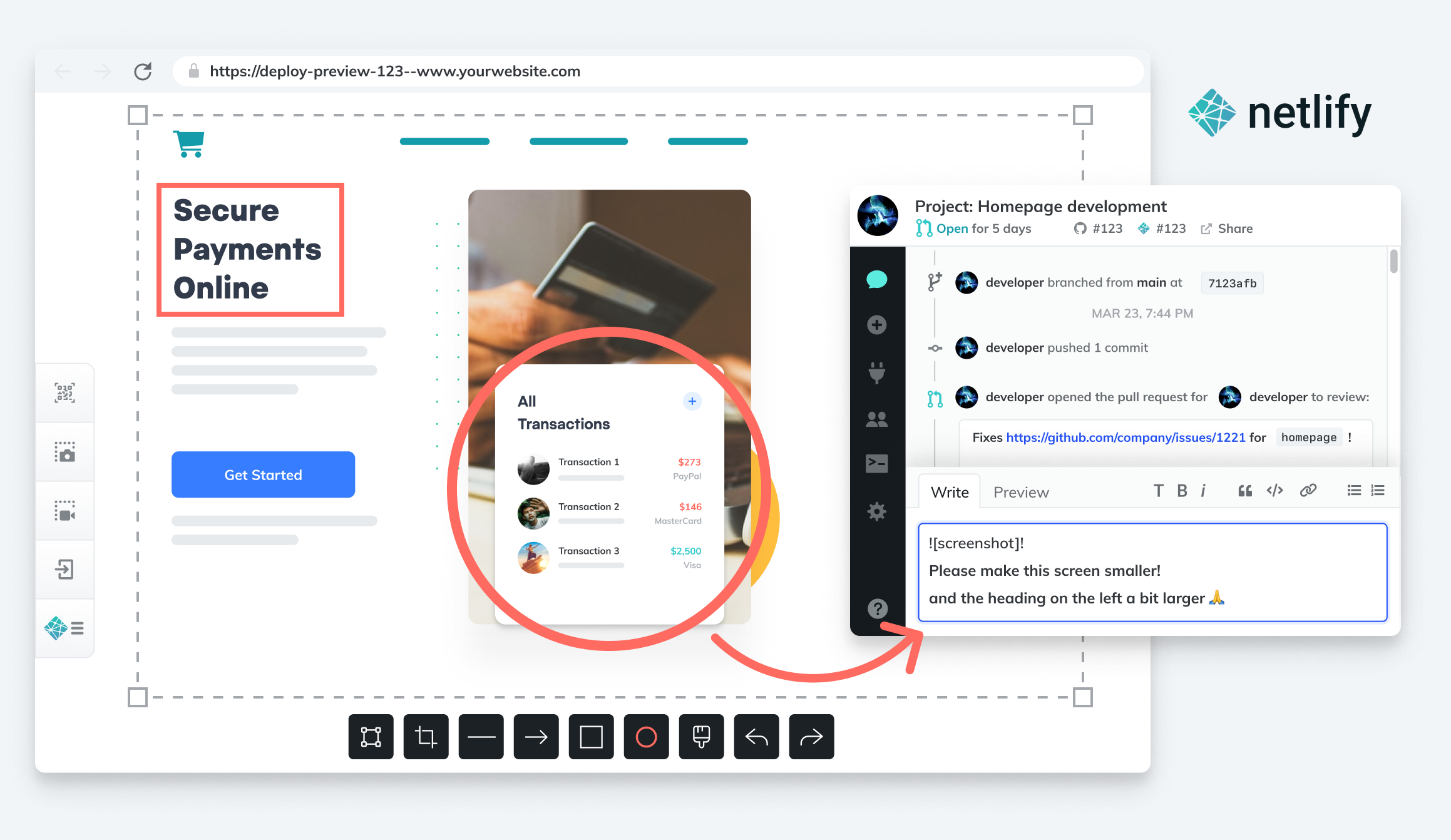
    Netlify announced today it has acquired FeaturePeek as part of an effort to make it simpler for DevOps teams to create a portal through which application stakeholders can both inspect a web application developed using JavaScript and leave comments for developers.

    Matt Biilmann, CEO of Netlify, said Netlify will embed that collaboration capability in the next iteration of its Netlify Deploy Previews. That tool makes it currently possible for a front end pull request from a Git repository to automatically generate a live preview of the site with a unique shareable URL.

    The current version simply shares URLs with application stakeholders, versus enabling DevOps teams to create a portal through which the review process can be centrally managed to make feedback more consistent, said Biilmann. Each piece of feedback from an application owner or stakeholder made via the portal will become a comment on the Git pull request, or can be shared via any collaboration tool a development team employs alongside a Netlify workflow, noted Biilmann.

    In the meantime, Netlify is also making available a free user role license for reviewers that want to make use of Netlify Deploy Previews to view recent updates to applications.

    Netlify has been driving adoption of a serverless computing framework based on a JAMstack architecture for building JavaScript applications faster. An application based on a JAMstack architecture isolates the front end and back end end of an application to make it possible to prebuild front ends that are highly optimized around static pages to make web applications faster. The name JAMstack is a mashup of JavaScript, application programming interface (API) and markup language.

    The need for more collaboration between developers and stakeholders has become more pronounced, in part, because organizations have significantly accelerated the rate at which they are investing in digital business transformation initiatives, noted Biilmann. With organization more dependent on software than ever, it’s critical for them to streamline the feedback cycle as the number of application stakeholders within organizations steadily increases, added Biilmann.

    As the relationship between DevOps teams and the rest of organization continues to evolve, the amount of feedback any team is likely to receive will continue to increase. Everyone from sales teams to the board of directors now realizes how dependent the business is on software. DevOps teams will need to way to organize and prioritize that feedback. They should also expect application owners and stakeholders to follow the progress of software development projects more closely than ever because, in many cases, financial projections are now based on assumptions being made about software delivery timetables.

    Many DevOps teams have been making the case to have a more central role in business planning for years. Now that many of them are getting a seat at the proverbial business planning table, however, they may soon realize they don’t really have the processes in place to absorb the overabundance of enthusiasm and anxiety that application stakeholders are likely to generate in equal measure.

  • Empowering Developers Through Lean Code

    Empowering Developers Through Lean Code

    Digital transformation is widely understood as a critical component for increasing user adoption, fueling workplace productivity and innovation, and driving business growth. Software has become increasingly important across countless industries, teams, and functionalities, and as a result, companies are beginning to understand that being an industry leader and gaining competitive advantages starts with software development.

    Easier said than done. Modern software apps are a complex orchestration of infrastructure, deployment pipelines, notifications, user experience, data filtering and processing, and error handling. A good engineering team will be able to account for each of these items and integrate them into a larger, comprehensive infrastructure.

    So what happens when you don’t have a solid, in-house team guiding your software maintenance and development? Consider a lean code development platform; a developer service that pares down the explicit requirements of standard functions, interactions, errors and software infrastructure into implicit scripts, templates, configurations and API requests. Using a lean code solution will give your team the power to build higher-quality features more quickly than they otherwise would on their own.

    There are several ways that lean code platforms can simplify processes for developers. Primarily, these platforms turn explicit requirements into implicit interactions, eliminating the need for developers to pull elaborate infrastructure to solve complex problems. Lean code also gives developers the freedom to customize everything to fit where it is needed, while limiting the amount of code necessary to do so. Lastly, lean code platforms provide tools that assist developers at all levels of the software stack, significantly increasing productivity while cutting down on time and workload.

    How Does it Differ from Low-Code?

    While many people might be unfamiliar with the term “low-code,” they’d probably be surprised to learn that they use it all the time. Low-code describes platforms that require minimal code in order to build applications and processes.

    Essentially, these programs enable users with little to no coding or software development experience to create and use applications. The idea of low-code is to introduce audiences to intermediate level software development concepts such as object-oriented programming, interface design, conditional logic and code syntax.

    However, no matter how helpful these low-code approaches might be, many users still run into the problem of wanting more customization than the low-code system is designed to give. In fact, many users become frustrated with the term “customization” because it’s viewed as the enemy, indicating a need for more advanced software development services than the consumer is able to provide.

    Lean code platforms, on the other hand, are designed to specifically meet developers’ needs at all stages of the software development life cycle. In essence, lean-code prioritizes simplicity, efficiency, flexibility and accessibility with the goal of making software development accessible on a larger scale.

    Instead of encouraging you to reduce your development team, lean code platforms allow users to expand development through exploring new avenues and abstracting away the explicit requirements of traditional software development.

    What Does Lean Code Have to do With Productivity Infrastructure?

    Many forward-thinking companies have gone beyond simply building technical solutions to specific development problems. Instead, they’ve taken the advancement of lean code platforms to a new level by providing fixes that meet developers at the central stages of the integration process.

    Because lean code offers such integrated solutions to developer challenges, the approach is increasingly becoming the norm across the bulk of the productivity infrastructure category — an emerging market category that combines elements of cloud communications services, API platforms, low-code development tools, business process automation and AI software development kits.

    If you’re looking to implement a lean-code platform, consider the following features:

    • Intelligence: By making it easy to pull information from unstructured data sources and flip it into more meaningful material, machine learning (ML) replaces the manual effort to build, implement and maintain models.
    • Automation: Workflows, triggers, templates and notifications can be abstracted away for common use cases.
    • Security: When handling user data, security is a top priority. From protecting health records to pet names, data security is crucial.
    • Connectivity: The ability to connect to a relevant data source can make or break an infrastructure.
    • User experience: User interfaces should follow expected conventions for whichever task the user is trying to accomplish. Maintaining a successful user experience requires constant evaluation.

    How will Lean Code Become Market-Leading Software?

    Lean code development platforms have emerged as market-leading software development solutions in three major areas:

    • Productivity Infrastructure: More companies have pivoted to providing full-stack development services that assist developers in building out native communications, search and indexing, scheduling and financial experiences.
    • Software development and deployment workflows: Continuous integration/ continuous deployment (CI/CD) pair down complex build and deployment pipelines to basic configuration files.
    • Infrastructure deployment: Infrastructure as a service (IaaS) products assist in deploying scalable web services via API requests and simple configurations.

    Where are lean code development platforms headed?

    It’s safe to assume that, given their ability to provide efficient and effective infrastructure to development teams, lean code has a bright future ahead. The number of developers in the space is only growing. A Slash Data survey from 2019 estimated there to be just under 19 million active developers across the globe and expected the number to grow to 45 million by 2030.

    As the market for software development rapidly expands, it would make sense to assume that the need for a platform that solves problems across the entire software ecosystem would, too. Lean code development platforms are emerging as a top choice for companies that want to build out a leading software platform into the future.

  • Debugging is Broken – Here’s How To Fix It

    Debugging is Broken – Here’s How To Fix It

    Let’s face it, debugging is broken.

    Whether you wholeheartedly agree or vehemently disagree with that statement, I think we can all agree that debugging, at the very least, has room for improvement. In fact, the way software developers debug their code hasn’t changed much. Of course, there are now a wide array of observability and monitoring tools available to make a developer’s life easier, but when we look at the process developers typically follow when debugging code, it’s stayed relatively unchanged over the years.

    Having the right tools available definitely improved the overall debugging experience, but they’re not the only factor. Internal organizational processes are equally as important, and should be adapted to make developers’ lives as smooth and stress-free as possible while still maintaining the proper levels of organizational security and compliance. Inefficient or highly restrictive processes, while great for the compliance team, can adversely affect the velocity of getting to the bottom of issues quickly. The right solution is typically a combination of adapting those processes to fit the company culture, along with a combination of tools that allow for compliance with industry standards and best practices.

    How Developers Debug Code

    When you talk to developers today about how they debug their applications, the process is typically not all that different than it was many years ago. The standard approach to debugging is still through the use of logging frameworks. Of course, teams are taking advantage of things like application performance management (APM) tools and other tools in the monitoring and observability space, but when you look at the primary method of debugging issues that require developers to dive into the code, logging is typically the main approach.

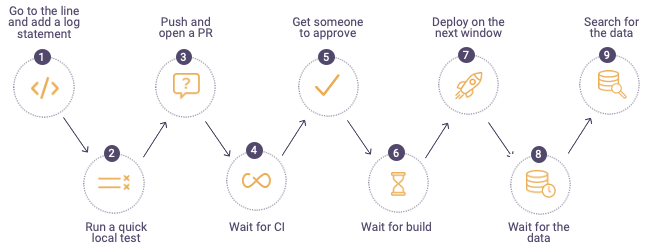
    The process typically looks something like this:


    debugging process

    When a defect is found, developers will first go to the log files on the production or pre-production servers in the environment where they are debugging. If they can’t find information in the logs to help them get to the root cause of the issue, they go back to their code and add additional log lines, finally sending their code through the process shown above. For highly advanced organizations, the process can take minutes or hours, but more often than not, this process drags on for days – or even weeks. It becomes especially time-consuming when the defect developers are trying to find and remediate is in production. In these cases, the cost to the business can be staggering; there’s got to be a better and more efficient approach to debugging.

    Where Tools Can Help

    While new and shiny tools don’t always solve all debugging problems, they can often ease some of the pain developers face and, in the process, make their lives a little bit easier. Debugging, observability and monitoring tools can get developers the data they need to solve problems faster than the more traditional method of digging through logs and using trial and error.

    The place many organizations start when considering diagnostic tools is with APM. These types of tools focus specifically on monitoring and management of the application availability, and can help to collect metrics and other relevant application information that can aid in pinpointing infrastructure issues. Most often, these tools are not actually used by developers themselves, but rather operations or production support teams to ensure availability and performance thresholds of applications.

    Another critical category of telemetry are tracing tools, which can help developers better understand how requests flow through multiple tiers of applications and even help identify error rates and latency. There are many vendors selling this category of tools, but there are also open source options which allow developers to integrate tracing into their applications via a vendor-neutral approach.

    After diagnosing an issue with an APM solution, there is often a handoff to development to remediate the issue. When developers need to debug, they often use their local IDEs or, even better, a remote debugging solution. Remote debuggers are used directly by developers to simplify debugging of applications in remote environments. These tools helps developers get to the bottom of customer issues faster by giving them direct access to the underlying application data in a safe and secure way while the application is running without stopping it or having to redeploy it. A major benefit of remote debuggers is that they can give developers the data they need from production environments without compromising security or requiring developers to have direct access to sensitive environments. While remote debuggers and other debugging tools are not a silver bullet, they can be a critical component that empowers developers to better address critical issues.

    Fixing Organizational Problems

    If solving customer issues is taking longer than expected or is potentially hurting your brand, it’s critical to sit down with your development team and use a data-driven approach to identify where the problems lie. Do a deep dive into your issue tracking or ITSM system to identify trends or recurring issues within particular application components. Development teams can often become so overwhelmed tackling issues and building out new features that valuable information in these internal systems can go untapped. Customer issues and defects should be reviewed periodically to assess things like business impact, cost to fix and alignment with the product roadmap. There is valuable information that can help focus the team’s effort on time-saving activities as well as improving the product, making for happier customers.

    Another area to look at is your software delivery process. Are there bottlenecks in your delivery pipeline that could be made easier or more efficient but have been overlooked? The speed and efficiency of your software delivery pipeline has a direct impact on developers’ ability to debug effectively and can contribute to a broken or slow debugging process. Developers should have the ability to push code into new environments as quickly as possible to remove slowdowns from too much context switching. This means automating as much of the delivery pipeline as possible, removing unnecessary manual deployment approvals and shifting left as many activities as possible.

    When it comes to empowering developers and fixing broken debugging processes, organizations should focus on fixing organizational bottlenecks as well as equipping developers with tools that can save them time and improve their daily workflows. Focusing on these areas can increase development team velocity and eliminate costly day-to-day slowdowns which add up over time and negatively impact productivity. With a few key changes, debugging can be a much more manageable and predictable process.