Tag: custom software development

  • Empathy for the API Developer

    Empathy for the API Developer

    Security teams have always been perceived as an impediment to delivery by software teams who feel that security imposes arbitrary and unreasonable policies and use poorly-integrated tools that are beset with high false-positive rates. With the advent of DevOps, security has been seen as an increasing obstacle to rapid deployment cycles. 

    Security teams believe developers do not care about security and will try their best to avoid security controls or policies. Security teams are often frustrated by developer pushback when remediating vulnerabilities, particularly when they fail to appreciate the cascading effects of making code and dependency changes late in the life cycle.

    From my perspective, with a foot in both camps and a decade of experience helping developers produce more secure code, I believe the key to addressing the disconnect between teams is to develop greater empathy for the developer.

    Why Insecure Software Exists

    Software development is a complex endeavor with many (often conflicting) requirements. Blaming software developers for insecure software is an overly simplistic and counterproductive approach, best summarized by a former colleague:

    “I can tell you that virtually all developers I talk to care about application security. They care about the quality of the products they create, the integrity of the data their software handles, and the reputation of the organizations they work for.” —  Jim Jastrzebski, Veracode

    From my experience, developers don’t deliberately set out to create insecure software; instead, there are a number of reasons it happens.

    Devs are overly optimistic: Developers are creative folks and natural problem-solvers. They can often visualize the perfect end result of their labor without necessarily considering the technical and security debt they may encounter along the way. Remember—things do go wrong.

    Overconfidence: I often refer to this as the Dunning-Kruger effect for developers. Faced with complex platforms, languages and frameworks, developers tend to overestimate their ability to comprehend and master them. Complex systems take time to fully understand and being overly confident can lead to unintended consequences and compromise security. Beware of insecure defaults and configurations.

    Bad things only happen to other developers: Think of this as a kind of schadenfreude for developers. During code reviews with developers, I have been surprised to hear comments like, “ … But that won’t happen to my code!” Despite vast evidence to the contrary, some developers think that bad things only happen to others and to others’ code. Assume a defensive mindset; expect the worst and hope for the best.

    Taking shortcuts: Developers are goal-oriented and want to produce working code on schedule. And schedules are tight. The inevitable consequence is that sometimes shortcuts are taken (missing error handler or input validation, for instance) leading to security vulnerabilities. Track and tackle your technical debt.

    Technical debt or legacy code: Speaking of technical debt, it’s probably one of the biggest issues facing developers: The burndown of technical debt and maintenance of legacy code. Software systems are complex and minor changes may wreak havoc, especially in microservices-based applications and architectures. Remember that developers may have legitimate concerns about making changes that are not absolutely necessary.

    This stuff is difficult: The biggest thing to remember to develop the empathy muscle is to appreciate the difficulty of the software development process. Developers are facing multiple conflicting requirements against tight deadlines and are required to master a variety of technologies. Mistakes will happen; the important thing is to learn lessons and improve the process.

    The last point is perfectly captured by this quote:

    “90% of security problems are just complexity problems. It’s technical complexity, it’s network complexity, it’s organizational complexity.” — Adrian Ludwig, Atlassian

    Care and Feeding of Developers

    Once security engineers have a better understanding of the challenges facing developers, they can focus on their messaging when communicating about security issues. Remember that the developer is unlikely to be personally responsible for every issue and should not be blamed or scolded. This will produce defensive behavior and is unlikely to achieve a positive outcome. Focus on the shared security challenge at hand and how a joint approach can solve the problem.

    A frequently-cited problem for developers is the relatively high false-positive rates security tools produce, particularly with code scanning tools. Security engineers should make sure that the tools are suited to your technical stacks and fine-tune the tool as much as possible. Ideally, the security team should triage the initial report and remove obvious false positives. 

    Additionally, certain legacy security tools do not integrate well into CI/CD pipelines and cannot be easily automated within the build process. If a developer has to use a manual or asynchronous process to perform a security scan, they will become frustrated and possibly ignore this requirement. Make sure security tools work well with the developer’s environments and workflows.

    Do not assume every developer has a deep understanding of the security issues identified—take the time to explain them thoroughly and/or document them internally. A great approach is to conduct shared learning sessions where developers and security teams work through a vulnerable application together to learn the concepts.

    Another frustration developers cite is a lack of clear understanding of the security requirements or requirements that are constantly changing. Ensure security policies are clearly stated and available to developers, and explain the reasons why the policies exist in the first place—for example, to meet PCI DSS accreditation. 

    Finally, make sure the combined teams are given time not just to learn but to absorb lessons and that success is recognized and rewarded. 

    “The sky is always falling—we never celebrate success.” – Chris Romeo, Security Journey

    Empowering Developers

    So, what does developer empathy look like for API developers?

    First, API developers and security engineers can both benefit from the positive security model that uses the OpenAPI definition as the contract for API behavior. Anything not specified by that contract is considered invalid—in other words, the contract specifies the allow list. This is in stark contrast to the traditional approach for web security which is reliant on blocking according to a block list—obviously, not all bad input can be known leading to false negatives with this approach. Overly aggressive blocking may block valid input and typically result in false positives; familiar to users operating web application firewalls (WAFs).

    The OpenAPI definition offers another advantage: The applicable policies can be expressed as code in the definition as opposed to via some verbose, abstract policy documentation. The benefit of policy-as-code is to uniformly enforce policy across the life cycle starting when the developer first starts coding the API. 

    Finally, developers need security tools that work in their preferred environments (for example, first-class IDE and CI/CD plugins) and provide value in the form of remediation guidance or actionable findings that help developers reduce technical debt. 

    Security and development don’t have to be at odds; help developers to help themselves by building empathy and working with them rather than against them.


  • 5 Best Practices for Software Development in the Hybrid Workplace 

    5 Best Practices for Software Development in the Hybrid Workplace 

    Over the years, software teams have gradually become more dispersed as technology advancements facilitated hybrid work and allowed teams to collaborate, create and innovate remotely. However, this trend accelerated and became more of a mainstream norm over the last two years during the COVID-19 pandemic, requiring newly dispersed teams to develop a more streamlined hybrid approach to the development process. 

    When seeking to implement a hybrid environment, it’s important for development leaders to consider how best to coordinate a distributed workforce across time zones, how to track projects effectively and ensure accountability. At Lenovo, these are considerations the Cloud & Software team has had to navigate since its inception due to the global nature of our business. To be effective in a hybrid environment, we adopted certain processes and tools that facilitated open communication and cross-collaboration no matter the location. After evaluating various hybrid methods, here are five best practices that stand out. 

    1. Adapt the development process to suit a hybrid setting

    In a hybrid work environment, it can be challenging to consistently bring the entire team together at a specific point in time to estimate work, refine issues or plan sprints. Coordinating between busy calendars and multiple time zones is an inefficient use of time, especially when many software projects are deadline-driven. Moreover, many developers are highly creative and want fewer coordinated meetings and more time to contribute when they want, at their own pace.

    To navigate these challenges, program managers can adapt the development process to be less regimented and more flexible. Facilitating such events as estimation, sprint planning and backlog refinement in an asynchronous manner within a virtual team workspace can allow all team members, no matter where they are located, to contribute, feel heard and seen and receive feedback from their teammates. Such programs can also enable an automatic way to log decisions and house required software documentation.

    2. Establish a single source (or tool) of truth

    Many organizations relate to the challenge of having project data spread across multiple tools. While the development team tracks day-to-day work in one tool, other stakeholders are tracking goals and team KPIs in an entirely different set of tools which can lead to misalignment, something that can be exacerbated in a hybrid environment.

    To overcome this challenge, development teams can establish one central location using a work management tool where past, current and future projects live and that all team members can access, reference and share. By leveraging this tool as a single source of truth, team managers can bring visibility and transparency to the development and program management processes while creating stronger alignment.

    3. Enable full transparency in decision making

    Our team at Lenovo follows a strict process of documenting the decisions taken throughout the development process and we make that documentation available for all team members to access within the team workspace. 

    This can be a beneficial practice for project managers that want to strengthen accountability. Encouraging such transparency enables team members and stakeholders to reference the reasoning behind a specific decision, especially if concerns arise later in the project life cycle process. The result is better alignment across the organization.

    4. Establish a facilitator for each ritual

    To maintain a healthy hybrid environment, assigning an owner to each Agile event can make all the difference. By serving as a facilitator, that owner would then be responsible for aligning everyone to a pre-meeting agenda and goal, allowing teams to prepare and review issues and tickets ahead of time. This added organizational step can result in a more streamlined meeting cadence and more productive discussions.

    5. Automate and leverage efficient tools

    Finding the right combination of tools to support a team’s specific collaboration needs is imperative to a successful hybrid development environment. Seamless and automated collaboration is the key, but there is no one-size-fits-all solution mix. Development leaders should consider tailoring their portfolio of tools around specific needs and look for programs that can help keep a dispersed team on track and synchronized (via direct messaging, ongoing team conversation chats or face-to-face virtual meetings, for example), as well as those that can ensure visibility and improve efficiencies. Whatever external programs are selected, however, should be hosted internally behind the company firewall and VPN for added security. 

    The modern workplace has changed dramatically in the last two years—in many ways permanently—with flexible, remote and hybrid work driving the greatest transformation of collaboration for software development teams across all sectors. By adapting to new hybrid development strategies, enabling transparency in decision-making and leveraging automation for greater efficiency, the development teams of today and tomorrow will be well equipped to more easily adapt to future disruptions in the workplace. 

  • The Two Types of Code Vulnerabilities

    The Two Types of Code Vulnerabilities

    Spell checkers, grammar checkers and predictive keyboards all help reduce errors in written communication, but in a creative medium where writers need to innovate new expressions, nothing can eliminate all errors. The same is true in the code we write.

    Of course, your code is probably perfect but, on average, all code has bugs. Some of those bugs are benign. Some will cause unexpected early termination. A few will cause runaway resource consumption. And some bugs lead to security vulnerabilities that let users do things that are unexpected and sometimes undesirable.

    Those security bugs are behavioral vulnerabilities because they depend on how the code behaves when executed. Another type is an intelligence vulnerability, something that’s part of the correct behavior of the code, but which gives away details about how to exploit a system. These are the two main types of code vulnerabilities; both come with risks.

    Behavioral Vulnerabilities at Runtime

    Tl;dr: How the code works and how attackers can leverage what it does to their advantage.

    This covers a broad range of problems, but all of them are a result of the behavior of the code leading to undesirable outcomes in specific circumstances. Most of these are unintentional. An unescaped user input sent to a database can lead to a SQL injection vulnerability or an unsanitized string sent to a browser could create a cross-site scripting (XSS) vulnerability. Some behaviors are intended, but have unexpected consequences; the Log4j string substitution behavior that allowed it to output environment variables or read data from external resources was intentional, but the malicious usage we now call Log4Shell was not. In another recent example, a combination of behaviors could be exploited to gain root privileges on Linux desktop computers.

    Intelligence Vulnerabilities in the Content

    Tl;dr: What the content of the code tells an attacker about the system and how to access it. 

    In the 1950s, the phone company—there was pretty much just one at the time—began implementing completely automated dialing that didn’t require a human operator at the switching station to connect the call. The details were first published in a technical journal in November 1954 (see pages 1209 and 1309 here), and the information gleaned from that led to the creation of “blue boxes” that used insider knowledge to allow outsiders to control telephone equipment and make free long-distance calls.

    That’s hardly the first example of insider knowledge being leveraged for outside advantage, but its role at the heart of computer hacking and the origins of the PC (the ‘hack’ inspired Wozniak and Jobs) is so legendary that it demands recognition here.

    The phone system’s intelligence vulnerabilities were published in the company’s technical manuals—manuals that many thought were only for internal use, and nobody realized were available to untrusted readers. Today, though, intelligence vulnerabilities are in our code.

    Secrets abound in code, along with the details about which systems those secrets connect to. These secrets were once difficult to manage and putting them in code was the only practical choice. Now we have tools like Hashicorp Vault, as one example, and secure keystores in almost every cloud, but the legacy and security debt of all those secrets in legacy code are a goldmine for attackers like Lapsus$ and others who specifically target code.

    Security Is a Process, not a Product

    There’s a lot hidden under the surface in the two categories outlined here. Each of us can name many types of behavioral vulnerabilities—many more than the different types of intelligence vulnerabilities—but the two classes of vulnerabilities represent relatively equal risk. Recent events have demonstrated how an attacker with inside knowledge gleaned from code—and with passwords and keys taken from it—can move quickly despite firewalls and other access controls.

    Identifying secrets and other intelligence risks in code is relatively easy, but few teams do it because detection is the easy part. Integrating detection in developer workflows so they can take action in-context while working on and reviewing code is the most effective way to eliminate creating new security debt. And tools that give developers the information they need to understand the overall picture of intelligence risks in their code, the areas of highest risk—and that point them to actionable issues they can fix immediately to improve their code health—are necessary to help teams mitigate historical risks, ideally by rotating any secrets found.

    Tools exist that can automate that process and help teams to eliminate more than half the risk in their code—but the first step is recognizing where that half resides.

  • CodeSee Unveils Open Source Hub

    CodeSee Unveils Open Source Hub

    CodeSee today launched a free Open Source Hub (OSH) community through which developers can more easily analyze the codebase that makes up an open source software project.

    Shanea Leven, CodeSee CEO, said that capability is crucial because making it easier to explore open source codebases reduces the level of effort required for developers to understand where to make contributions.

    OSH is based on a namesake visualization tool that CodeSee created. The CodeSee tool makes it possible for developers to see how a codebase has been constructed using graph technologies that scan software repositories and identify components and their relationship to one another. Developers can also use CodeSee to better understand what impact changes to that codebase will have.

    In addition to making it easier for developers to discover open source software projects, OSH also enables maintainers and contributors to create personal profiles through which other members of the open source community can see how their efforts have impacted various projects.

    CodeSee, as part of OSH, is also providing integration with Discord, an online voice, video and text collaboration service, to make it simpler for maintainers and contributors of open source software projects to collaborate.

    Leven said it simply takes too long today for most developers to pore over a codebase to understand where they might contribute. The larger a codebase becomes, the less likely it is a developer will want to take the time required to begin making a meaningful contribution, she noted.

    OSH is arriving at a time when maintainers of open source projects are especially looking for help securing open source software. The core issue is that many of those projects are maintained by a small number of programmers that voluntarily contribute their time and effort to build components that others are free to use. Like any other developer, the amount of security expertise those individuals have is limited. Many of them simply don’t have the time to immediately provide a patch to an application when a zero-day vulnerability is discovered.

    Unfortunately, many IT vendors and large enterprise IT organizations benefit from open source code without contributing anything meaningful back to the project—whether in terms of financing or helping open source maintainers find and remediate vulnerabilities. Not every contribution has to be in the form of code, either. Many open source projects simply need help with documentation which, once provided, should free up other contributors to focus more of their time and effort on application security.

    It’s not clear to what degree business and IT leaders realize how dependent their organizations actually are on open source software. Even when they do, it’s not easy to onboard a developer to any software development project. It can take months before a developer is actually making meaningful contributions to a project.

    Application development, by definition, is now a group effort. The days when a lone developer cared for an entire application are long over. The issue is finding a way for teams of developers to more easily collaborate when most of them have never actually met in person.

  • Internal Developer Portal: What it Is and Why You Need One

    Internal Developer Portal: What it Is and Why You Need One

    One main advantage of the cloud is that it offers developers flexibility and a self-service solution. Instead of having to contact the central infrastructure team whenever a dev team needs a new server or a cluster, the dev team can do it themselves through a simple web UI. This change drastically improves productivity. But there’s a caveat: Most companies don’t actually want to use the default portals provided by cloud providers. There are a few reasons for this: Security, simplicity or the need for custom, company-specific options, to name a few. That’s why we now see a move toward internal developer portals. In this post, you’ll learn what internal developer portals are and how they can make your developers’ lives easier. 

    What is an Internal Developer Portal?

    An internal developer portal is a self-service application and data store that lets developers and managers track and organize everything their engineering teams build and operate.

    Imagine that you need to create a new microservice. Your developers will first need to provision infrastructure for it; for that, they’ll use a cloud provider portal. Next, they’ll need to create new CI/CD pipelines or modify existing ones. Then, they’ll probably need to implement some changes to existing components like the API gateway and database. Lastly, they’ll probably need to add some documentation or make their new microservice visible to the rest of the company.

    Overall, they’ll need to touch a few different UIs or portals. Now, imagine they can do all of that from one place. That’s what we call an internal developer portal. It’s a self-service portal that lets developers catalog and understand relationships, ownership, resources, external service data and anything else they need to understand and operate their software.

     Why Does an Internal Developer Portal Matter?

    Now that we know what an internal developer portal is, let’s take a step back and discuss why internal developer platforms (IDPs) are on the rise. The main reason is because of the increased complexity of both software and infrastructure. Especially when we’re talking about cloud-based microservices environments, it’s challenging even for senior engineers to keep track of all dependencies and things that must happen every time changes are needed. Microservices architectures are heavily decentralized. Although you’ll still see the typical three-tier software architecture, in most cases, it’s no longer easy to tell by looking at a random component where it fits in the bigger picture just by its name or server location.

    Natural Evolution

    The second reason is that it’s simply a natural next step in the evolutionary process for self-service portals. Old-school, on-premises-based environments barely had any self-service capabilities. Do you remember how difficult that was? To request a new server, you had to email the central infrastructure team. If you were lucky, you’d get what you needed in a matter of hours or days. But more often than not, it took a week or two. And if you made some mistake in the initial request, that would cost you an extra week (or more) of waiting. More advanced companies? Even when they created some custom self-service solutions, these were limited. Often, it wasn’t much more than an online form to be processed by the infrastructure team which often became a bottleneck for all dev teams.

    When most companies started moving to the cloud, they began to see the benefits of self-service platforms. The ability to create servers ad hoc within a matter of minutes led to increased developer productivity, faster time-to-market and better quality software. But again, cloud-provider platforms are suitable for managing cloud infrastructure; you need more than that for a complete solution. Your developers can be more effective at creating and changing cloud infrastructure, but everything else was still done separately. And that’s how we naturally evolved into the demand for internal developer portals. To bring even more flexibility and clarity while increasing your dev teams’ productivity, you need to take the next step in the self-service platform evolution and combine all the things developers need into one internal developer portal.

    Clarity 

    Also, from a business perspective, internal developer portals bring clarity and offer a good overview of all your infrastructure and software development efforts. Even if you’re in the cloud and your dev teams can manage the infrastructure as they choose, you still need some control and oversight—for example, to avoid wasting money on test servers that developers forgot to delete. Sure, you can get simple reporting from your standard cloud-provider portal, but what if you’re using multiple cloud providers or have a hybrid-cloud environment? An internal developer portal can benefit both developers and their managers. Long story short: IDP portals are the future of software development.

    What Can an IDP Actually Do?

    How do you create an IDP for your company? You can build your own from scratch, use some OSS offerings or go for ready-to-use products.

    Build Your Own

    The first option would give you the most flexibility and ability to perfectly tailor the solution to your needs and the needs of your developers. However, building your own IDP from scratch is almost like building your own operating system from scratch. It requires a lot of work which could negate the main benefits that IDP is supposed to bring. You want to implement IDP to increase developer productivity and decrease time-to-market, but it would take you months to build it and years to maintain it to keep it working properly with constantly changing cloud APIs.

    Open Source IDP

    The next option is open source IDPs. Since IDPs are, in general, quite complicated pieces of software, there aren’t many options to choose from. The two most popular are Backstage and Gimlet. Backstage is more of a DIY platform for building developer portals, which means you’ll still need to spend quite a lot of time creating something that actually benefits your company. Gimlet is quite popular, too, but it focuses on Kubernetes-based environments. Both are great tools—don’t get me wrong—but if you’re looking for something ready to use and feature-rich, consider the third option.

    Ready-to-Use Solutions

    The last option is to use a ready-to-use product. Ready-to-use solutions combine the IDP functionality with incident response capabilities as well as metrics, dependencies visualization and filtering across multiple clouds.

    Internal developer portals are gaining popularity for good reason. In fact, many companies have been trying to build IDPs for years without even knowing the solution had a name. This is because an IDP-like solution will naturally evolve in any company that cares about developer experience and moving faster. The problem is that it usually takes years to come up with a single solution that fulfills all their needs. Another problem is that most of these organically created internal developer portals focus only on the tech side and skip the business needs. That’s why a purpose-built tool can be much easier and faster to implement while also doing its job much better.

  • Applause Report Surfaces Functional Testing Issues

    Applause Report Surfaces Functional Testing Issues

    An analysis of more than 340,000 bugs collected by Applause, a provider of a testing platform designed to integrate with a range of DevOps platforms, found functional bugs accounted for 68% of issues. The research gathered data from 13,000 mobile devices and 1,000 unique desktops running 500 versions of operating systems and found that the majority of issues could be traced to functional bugs compared to visual (17%), content (9%), crashes (4%) and lags and latency (2%) issues that, collectively, only add up to 32%, the report found.

    The report also found screen readers comprised 66% of all accessibility bugs compared to keyboard navigation issues and insufficient color contrast which accounted for only 12%. In terms of localization, poor and missing translations account for more than two-thirds (67%) of bugs, the report found. Based on ongoing feedback data that Applause also continuously collects from customers, nearly half of organizations (47%) identified currency and number formatting as the most valuable bugs to identify when it came to localization.

    Overall, organizations ranked the discovery of crashes (75%), functional bugs (61%) and lag and latency issues (53%) as exceptionally valuable, according to Applause.

    Luke Damien, chief growth officer for Applause, said when it comes to testing, in general, there is still not enough focus on user and customer journeys. That lack of focus is becoming a larger issue as more organizations invest in digital business transformation initiatives that are driven largely by mobile applications, he noted. Payments are especially problematic because they often rely on application programming interfaces (APIs) exposed by a third party in a way that results in suboptimal application experiences that have a direct impact on revenues, he added.

    The challenge is that it’s not entirely clear how far left responsibility for application testing is shifting. In some cases, developers are assuming responsibility. In other cases, a dedicated testing team is still responsible. Developers, of course, will test applications as they build them but application experiences on a local machine may not always be replicated in a production environment. The issue is that most end users today are not especially forgiving when a mobile application fails to meet expectations. Months of development effort can be wasted simply because a function was not tested in a production environment.

    Less clear is to what degree testing will be automated in the future. Machine learning algorithms are making it possible to automate testing of both functions and user interfaces. It’s not likely the need for humans to be involved in testing will be eliminated any time soon, but many of the routine tedious tasks that conspire to limit the rate at which applications can be tested should be sharply reduced in the months and years ahead.

    In the meantime, an organization’s entire brand reputation is now tied to the quality of the application experience it enables on a mobile device. Revenue targets can now be easily missed if users of a mobile device choose one application over another simply because a function was broken—even for a short amount of time. As such, testing has never been more critical given organizations’ dependency on software.

  • Game Developers Shouldn’t Overlook Python’s Potential 

    Game Developers Shouldn’t Overlook Python’s Potential 

    Python is an object-oriented, general-purpose and high-level programming language developed in 1991 by Guido van Rossum. Since its development, Python has become one of the most popular programming languages in the world. It often ranks high in popularity surveys—for instance, it claimed the top spot in the Popularity of Programming Language index and came in second in the TIOBE index.

    Python earned its acclaim as a widely used tool because of its suitability for multiple purposes and for various projects—from data analytics and visualization to artificial intelligence, language development, design and web development.

    That said, Python isn’t exactly renowned for its use in video game development. But should this mean game developers should just disregard Python completely? Not at all.

    Familiarity Breeds Productivity

    Thanks to the language’s simplicity and coding speed, Python is an excellent choice for prototyping. The work product is visible immediately and it’s possible to quickly deliver a playable project to potential investors.

    Therefore, Python is also an ideal language to begin a developer’s adventure with creating games, regardless of whether the user is already fluent in it or just starting out.

    Due to the newcomer-friendly syntax of Python, developers can focus on the basics of game programming, not the complexity of the language itself.

    The effects, which are quickly visible, allow beginners to get actively involved in the process of creating a project. Advanced developers, on the other hand, will appreciate the fact that they can create something playable using their familiar, everyday work tool and that the process of coding will be, as always, very enjoyable and satisfying.

    Preexisting Python Tools and Libraries

    Python programmers can also take advantage of tools that were written specifically for them.

    The most popular library that supports Python game development is PyGame. This engine, available under the LGPL, allows users to build fully commercial projects. Additionally, the library is designed in a way that lets users easily use multiple processor cores. The main functions were written in C and Assembler, thanks to which the user’s project will be 10 to 20 times faster than if it were written in Python alone. This tool is incredibly easy to learn. Its creators also have prepared extensive documentation to help guide users through the process. 

    There are also available tools for 3D rendering, such as Ursina or Panda3D. Of course, these aren’t the only technologies designed for Python users. In fact, there’s a really large selection of available tools and engines such as PyOgre, PyKyra and Ren’Py that are worth checking out.

    Lastly, the Kiva library should also be mentioned. It may not have been created with gaming in mind, but it’s perfectly suited for it. Kiva is a multi-platform tool for creating window applications quickly.

    Python for Game Development 

    If you Google, “Which language should I use for game development?” the first results you see will likely be recommendations to avoid Python. However, that shouldn’t be a deterrent; it can be done! 

    Python has received criticism in the past regarding its use in game development, mostly centering around the fact that Python is not designed for computational performance but, rather, coding performance. This is justified. 

    But if a user, programmer or game developer is already familiar with the programming tools and takes advantage of the preexisting tools and libraries at their disposal, then Python for game development has clear promise, both now and also in the future. 

    If you want proof that a game written in Python can be an international success, I recommend EVE Online—a title that attracts over 20,000 players each day!

  • GitLab Adds Fourth DORA Metric API to CI/CD Platform

    GitLab Adds Fourth DORA Metric API to CI/CD Platform

    The latest update to GitLab’s namesake continuous integration/continuous delivery (CI/CD) platform has added support for the application programming interface (API) for measuring change failure rates. This addition supports the fourth metric as defined in the DevOps Research and Assessment (DORA) framework.

    Version 14.10 of GitLab also expands the GitLab Runner Operator for Kubernetes to any distribution of the open source platform in addition to making it possible to manually trigger incident responses when needed.

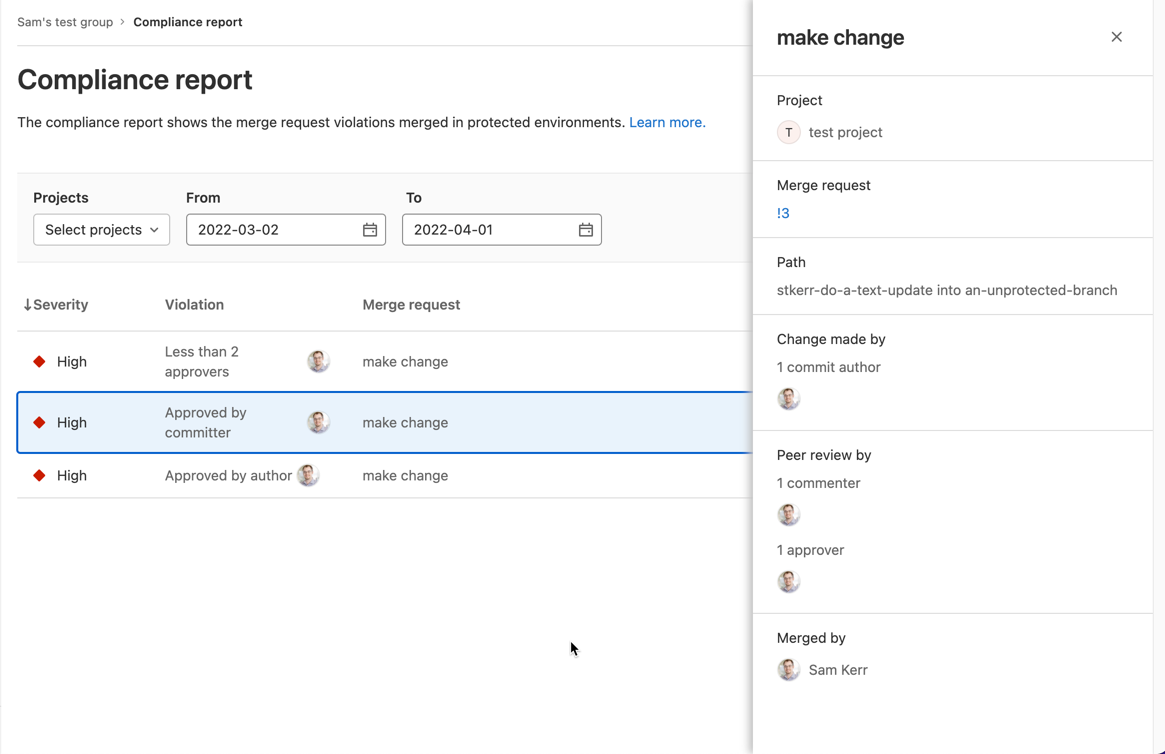
    Finally, a compliance report that surfaces every individual merge request violation has been added along with a tool for setting up streaming audit events.

    Brendan O’Leary, staff developer evangelist for GitLab, said that as DevOps processes continue to mature, DORA metrics make it simple for IT leaders to measure overall progress. While it’s not likely that any single set of DevOps practices will be universally implemented across an entire enterprise, O’Leary noted it’s important for DevOps teams to keep track of key performance indicators (KPIs) that enable teams to identify areas for ongoing improvement. For example, it’s not uncommon for technical debt to accumulate in the absence of metrics that track the progress of builds, he added.

    In general, a transition to microservices-based applications is increasing the need for CI/CD platforms that make it simpler to build them. Each of these applications is constructed using microservices that are typically built independently of one another. The challenge is that each microservice has dependencies on other microservices, so the need for DevOps workflows to optimally manage that development process is becoming more widespread, noted O’Leary.

    In some cases, organizations are deploying a CI/CD platform for the first time to build these applications. In other cases, they are looking to replace a CI/CD platform that was adopted to build legacy monolithic applications. Regardless of the type of application, there is a need to continuously refine and improve software engineering practices to increase developer productivity.

    It’s not clear to what degree developers are voting with their feet to work for one organization versus another based on the overall quality of developer experience. Organizations that do have a consistent approach to software engineering, however, make it easier for developers to spend more time writing code rather than managing the build process. The challenge is to make sure the DevOps platform itself does not become a bottleneck that hinders the rate at which developers can build code. It’s also not clear whether organizations are building applications faster than they can secure it and ensure overall quality. The only way to know for sure is, of course, to track metrics.

    Naturally, not every developer is a fan of metrics. Application development is still as much art as it is science. There is, however, a general appreciation that the amount of code that needs to be written far exceeds the available talent to write it; any effort to make software engineering more efficient benefits everyone involved. As such, given all the code that needs to be written, a software engineer is often today the best friend a developer can have.

  • FusionAuth Adds Support for ARM-Based Architecture

    FusionAuth Adds Support for ARM-Based Architecture

    Most developers need three things in life: Control, interesting projects and the ability to build on the technology of their choice. Now a new development promises to put all three in developers’ hands—FusionAuth’s announcement of its support for ARM-based architecture.

    FusionAuth solutions offer multi-factor authentication, passwordless authentication and single sign-on, among other features. ARM-based architectures offer simplicity with a lower and cooler energy footprint. Translated into DevSecOps benefits, this means that FusionAuth just made it significantly easier for developers to meet identity and authorization requirements and strengthen their security when building on ARM architecture.

    We talked to Daniel DeGroff, co-CTO at FusionAuth, to find out the details on how this support can benefit DevSecOps.

    The Movement to ARM-based Architecture

    You’ve probably noticed many forward-thinking developers are turning toward ARM-based technologies. Developers can count on interoperability across different implementations and different devices—and ARM processors offer a lower operating temperature and reduced power consumption. They’re also inexpensive to produce, making their price point attractive. This has earned them a place in everything from servers to smartphones to the world’s fastest supercomputer.

    With many developers spotting the potential for higher performance and cost savings, it’s no surprise that vendors like FusionAuth would move to support ARM-based infrastructure, as well. By working with ARM processors, the company can support additional use cases such as IoT and high-performance cloud platforms that are built on ARM-based architectures. DeGroff described it as a pragmatic—and inevitable—move, and said, “If you want to use these new machines, you have to support this architecture in some fashion.”

    “We develop on the Apple MacBook, and all new workstations will use Apple’s custom silicon which is based on the ARM architecture,” he pointed out. “ARM is generally faster and less expensive than an equivalent x86 server platform, and many of the low-power IoT devices will utilize the ARM architecture as well.”

    DevSecOps Benefits: Greater Flexibility, Easier Security

    FusionAuth’s ARM support can make the average security-minded dev’s life easier in several ways. FusionAuth runs on any platform, anywhere; by supporting ARM-based technologies, the company is extending developers’ ability to deploy its authentication and authorization platform how and where they want. “We have to ensure FusionAuth runs where our users want to develop,” DeGroff said.

    In helping developers build on ARM-based architecture, FusionAuth also makes it easier for them to use an API to bring in FusionAuth at the early stages of app or software development. One of the platform’s selling points is that it makes it simpler for developers to solve typical authentication obstacles, like weak password policies or difficulty with privileged access rules, DeGroff said. By supporting ARM-based technologies, FusionAuth aims to help developers successfully meet even tough security requirements through flexible, sophisticated identity authentication and access tools—and do so earlier in their development cycles.

    A Seamless Transition to Smarter Authentication

    If you’re a developer interested in exploring the combination of FusionAuth and ARM technologies, DeGroff said any transition will feel seamless. “There is a great business case for moving workloads to this architecture,” he points out. Developers who want to take advantage of the improved performance and lower costs can begin to migrate workloads to ARM-based platforms now.”


  • GitLab Updates CI/CD Platform to Improve Dev Productivity

    GitLab Updates CI/CD Platform to Improve Dev Productivity

    GitLab has made available a 14.9 update to its namesake continuous integration/continuous delivery (CI/CD) platform that adds epic-linking, integrated security training, rule mode for scanning result policies and a revamped design, among other capabilities. The updated environment makes it easier to discover the state of the application development projects, GitLab said.

    Cindy Blake, director of product marketing at GitLab, said these updates are part of an ongoing effort to embed technologies within the CI/CD platform that will make applications both more secure and compliant with various mandates before they are deployed in a production environment.

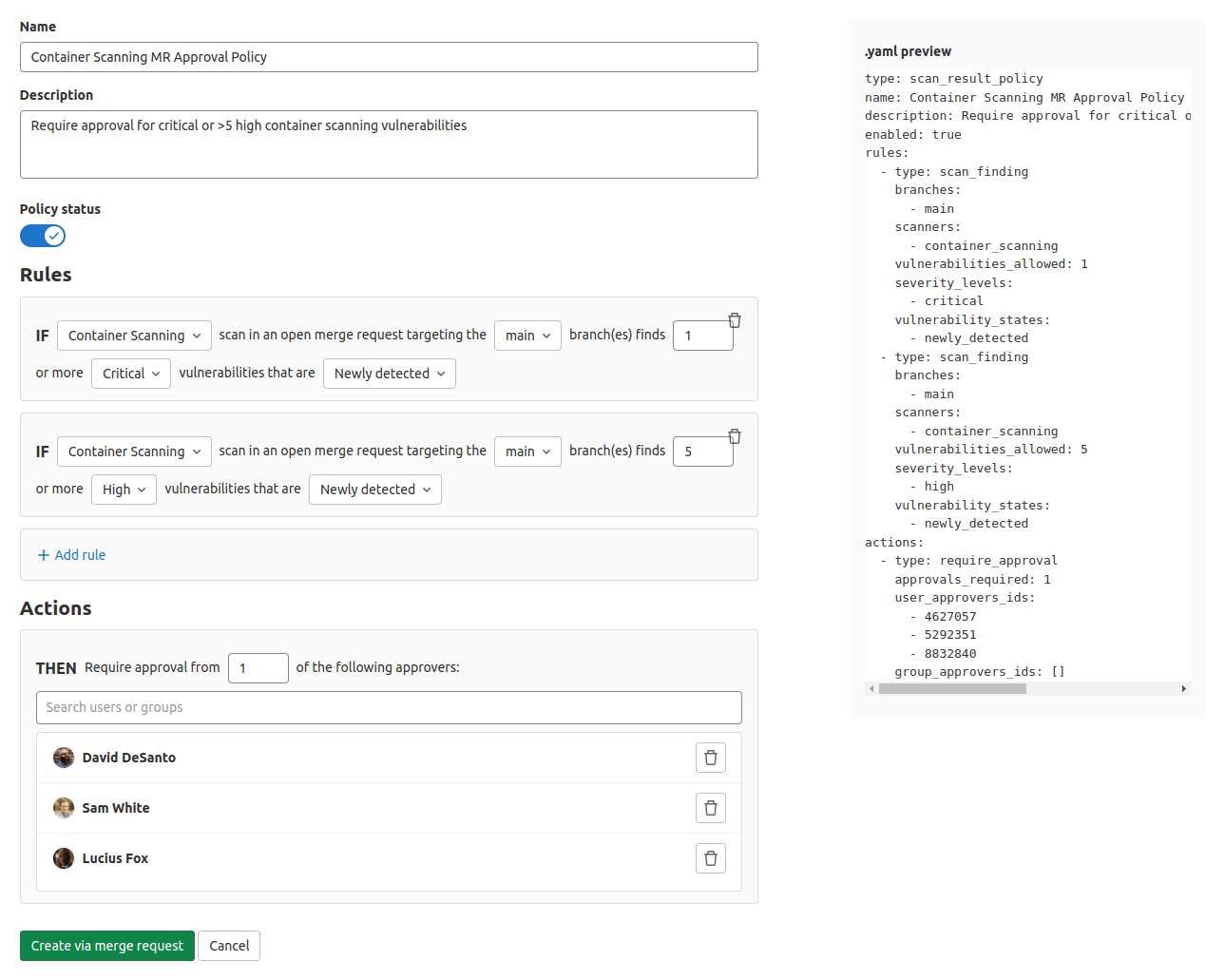
    For example, DevOps teams can now take advantage of a user interface through which they can use a rule mode to design and edit policies without the need to access YAML files directly.

    GitLab has also partnered with Kontra and Secure Code Warrior to provide content that will drive security training functionality. This content can be accessed via the GitLab platform whenever a vulnerability is discovered.

    The overall goal is to make it simpler for organizations to shift left because expecting every developer to become a security expert is not especially realistic, noted Blake. The ability to automate many of the security tasks that developers face is a way of showing empathy for the daunting challenges they face.

    In general, as application development becomes more complex, GitLab is moving toward making its CI/CD platform more accessible to a wider range of organizations, including those that might only be starting to embrace DevOps best practices. The epic-linking capability, for example, makes it easier to identify “related”, “blocking,” or “blocked” relationships to better track and manage epic dependencies across GitLab groups.

    The two biggest challenges organizations face today are securing their software supply chains and improving the overall productivity of the developers. In most cases, those two goals are tightly coupled; every minute a developer spends on security is one less minute they spend writing code. In fact, many organizations are finding that, in addition to salary and benefits, many developers are using the level of friction they will encounter when building and deploying applications as a guide to decide which organizations they want to work for. As a result, many organizations are now looking to modernize their application development and deployment environments with an eye toward attracting the best developer talent.

    At the same time, of course, organizations are looking to improve the productivity of the developers they do have. In the age of digital business transformation, there are many more application development initiatives being launched. The challenge organizations face is that hiring and retaining developers remains a major challenge.

    It’s not clear how eager organizations are to replace their existing CI/CD platforms. However, the pressure to improve the overall developer experience is mounting at a time when organizations are increasingly dependent on software. Arguably, going forward, the ability of any organization to compete will be dependent on the productivity of application development teams. Platforms and tools that get in the way of enabling organizations to build and deploy more secure software faster will be discarded.