Tag: continuous delivery

  • Getting Webhooks Behind that Firewall of Yours

    Getting Webhooks Behind that Firewall of Yours

    In this post I’ll show you how to receive webhooks in real time from GitHub.com, even if your CloudBees Core stuff is behind a firewall. You can generalize this to other services too – such as BitBucket or DockerHub, or anything really that emits webhooks, but the instructions will be for GitHub projects hosted on github.com. The benefit, of course, is that you can use these public hosted services if you like, but your Core instances do not necessarily have to be directly open to the internet.

    What are webhooks

    Just a very quick refresher on what webhooks are: Messages (often JSON, but not always) typically posted by HTTP(S) from a server to a client that is listening for events.
    webhooks explainer

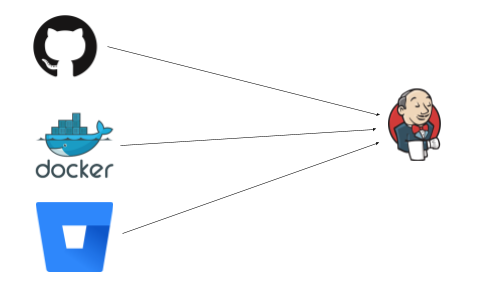
    The events flow left to right, Jenkins sits there happily listing on paths like /github-webhook/ or /dockerhub-webhook/ etc for some HTTP request to tell it to wake up and do some work.

    GitHub/BitBucket may be reporting a new commit or PR, or DockerHub reporting an upstream image has changed. What all these things have in common is that they push to Jenkins, and expect to be able to push to it (ie that Jenkins is visible to them). This works great when the network is open – say GitHub Enterprise, or Jenkins is listening on the web.

    Not on the web

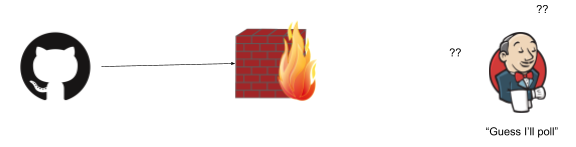
    The trick is when something gets in the middle, say a firewall:
    firewall 1

    (As is industry standard, all firewalls have to be a wall on fire. Please don’t somehow set bricks on fire in your organization).

    This is just the same when you fire up Jenkins on your laptop, and want to receive webhooks from github.com (a legitimate thing, perhaps to test out your setup, perhaps to run builds for iOS on a mac, or some corner of a network that is not exposed to the web). Unless your laptop is addressable to the whole web that is (not likely), or your network is configured just right, the webhooks won’t be able to flow.

    This is fine – we can fall back to polling for changes. Except this is terrible. You burn through API quotas, and you don’t get changes in real time, and really no one is happy.

    Some problems are opportunities

    We can both solve this problem, but also, view this is an opportunity. Having things not addressable on the web, or locked down in some default way is a feature, not a bug. You massively reduce your attack surface, and can have defense in depth:
    exposed on the web

    A webhook forwarding service

    Enter the memorably named Smee. This is an OSS project provided by GitHub and also helpfully hosted as a service by GitHub. This can capture and forward webhooks for you. I’ll try to explain it with a diagram:

    firewall 2

    GitHub pushes an event (via HTTPS/json in this case) to Smee.io (the funny thing with circles, which is on the public web and accessible from GitHub.com) – and Jenkins in turn subscribes to Smee with an outgoing connection from a client. Note the direction of the arrows: Jenkins only makes an outbound connection.

    This is an important point: this will work as long as the firewall is one way (like a NAT typically is, and many networks). If the Jenkins side can’t connect to anything on the outside world – well, this won’t help with that of course (but that is not often the case).

    Setting it up

    Step 1: Firstly – go to https://smee.io/ and click “Start a new channel”:

    smeeio

    This will give you a unique URL (which you should copy for later use):
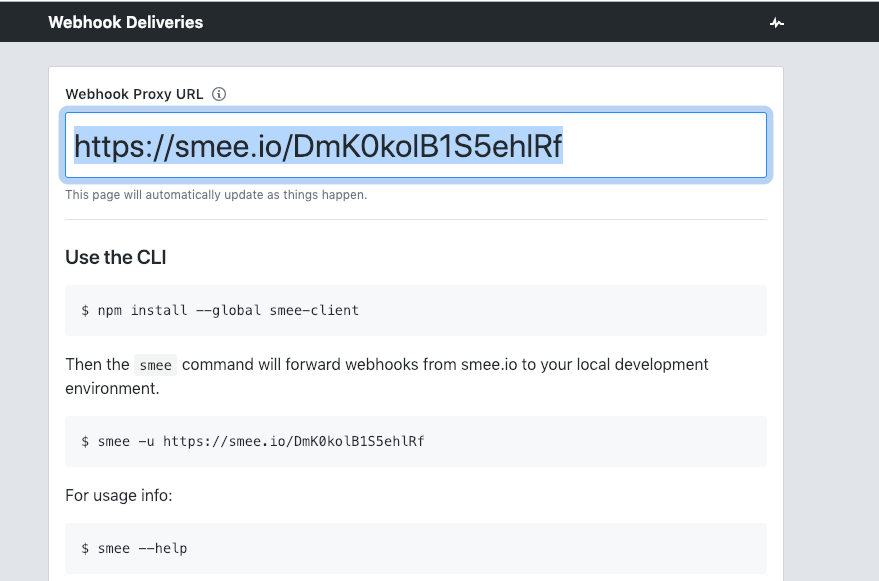
    smeeio url

    Next you should install the smee client next to where you have the Jenkins server running:

    npm install —global smee-client

    (This will make the smee client/command available to receive and forward webhooks).

    Now start the smee client and point it to your Jenkins server. In this case I have it running on port 8080 (the default if you fire it up on your laptop, change both the port and the smee URL as needed):

    smee —url https://smee.io/GSm1B40sRfBvSjYS —path /github-webhook/ —port 8080

    This says to connect to the smee service, and forward webhooks to /github-webhook/ (that trailing slash is important, don’t miss it). Once this is running, you will see it log that it is connected and forwarding webhooks. Leave this command running for as long as you want to receive webhooks.

    Next, you need to configure a pipeline that makes use of GitHub. In this case I set up one from scratch. You can skip this if you already have a pipeline setup:
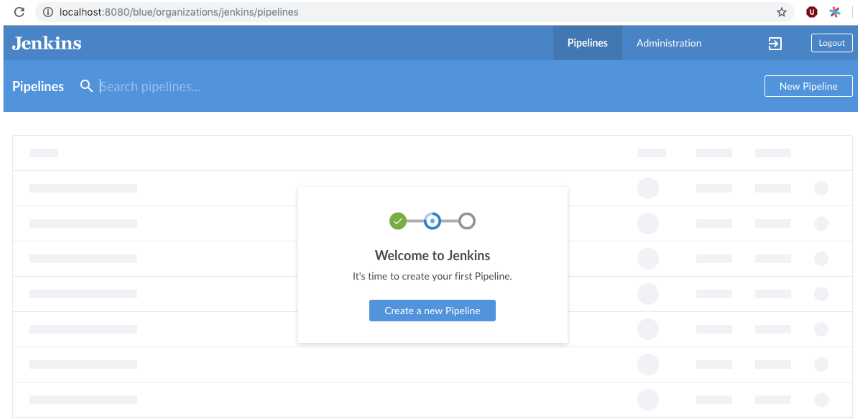
    Jenkins pipeline setup

    I then chose “GitHub” as the where the code is:

    Github code store

    Then choose your repository. This will set things up ready to receive webhooks from GitHub. (If you have an existing pipeline setup, and it is using GitHub as the SCM source, that is also fine).

    The final step is to tell GitHub to post webhook events for that repository (or organization, you can do that too) to Smee (which ultimately means Jenkins will receive them).

    Go to the settings tab for your GitHub repository, and then click “add webhook”:
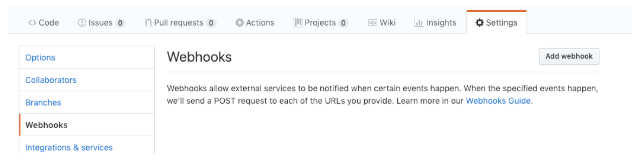
    GitHub to post webhook

    Next, configure the webhook:

    • Paste in the “smee” URL you copied from the step above.
    • Choose application/json as the content type.
    • Tell it to send everything (you can pick and choose what events, but I just did that as simpler).
    • Press Add Webhook (or update).

    It should look something like this:

    multibranch demo

    Webhooks should be flowing now. You can make a change to your repository, and check that a build starts soon after:

    app store demo webhooks

    Good luck!

    You can also get support from CloudBees for Jenkins if you need it.

    Additional resources

  • Top 10 Best Practices for Jenkins Pipeline Plugin

    Top 10 Best Practices for Jenkins Pipeline Plugin

    The Jenkins Pipeline plugin is a game changer for Jenkins users. Based on a Domain Specific Language (DSL) in Groovy, the Pipeline plugin makes pipelines scriptable and it is an incredibly powerful way to develop complex, multi-step DevOps pipelines. This document captures some definite Do’s and Don’ts of writing Jenkins Pipelines – with code examples and explanations.

    1. Do: Use the real Jenkins Pipeline

    Don’t use older plugins like Build Pipeline plugin or Buildflow plugin. Instead, use the real Jenkins Pipeline suite of plugins.

    • Why? The Pipeline plugin is a step change improvement in the underlying job itself. Unlike freestyle jobs, Pipeline is resilient to Jenkins master restarts and also has` built-in features that supersede many older plugins previously used to build multi-step, complex delivery pipelines.

    More information on getting started is available at https://jenkins.io/solutions/pipeline/.

    2. Do: Develop your pipeline as code

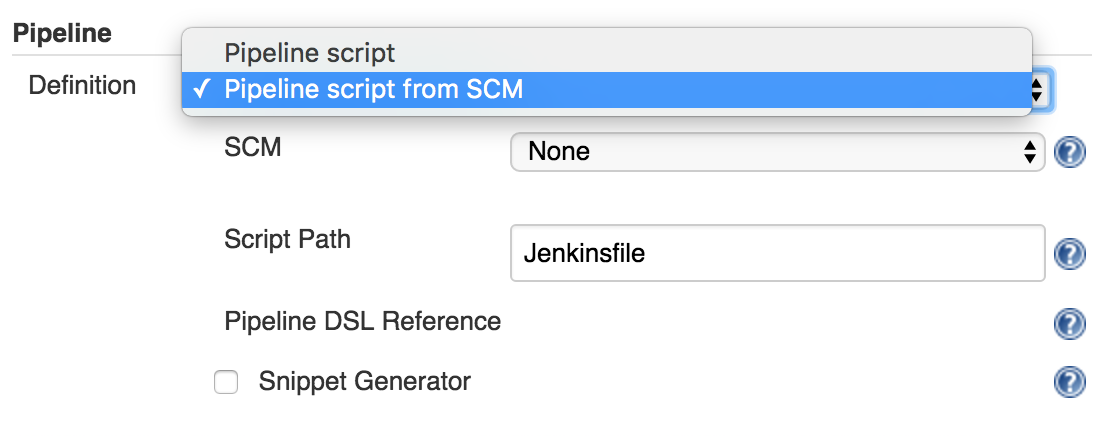
    Use the feature to store your Jenkinsfile in SCM then version and test it like you do other software.

    • Why? Treating your pipeline as code enforces good discipline and also opens up a new world of features and capabilities like multi-branch, pull request detection and organization scanning for GitHub and BitBucket.

    You should also call your Pipeline script the default name: Jenkinsfile and start the following script header, so your IDE, GitHub and other tooling recognize it as Groovy and enable code highlighting:

    #!groovy​

    ​3. Do: All work within a stage

    Any non-setup work within your pipeline should occur within a stage block.

    • Why? Stages are the logical segmentation of a pipeline. Separating work into stages allows separating your pipeline into distinct segments of work.

    Example:

    stage 'build'
    //build
    stage 'test'
    //test

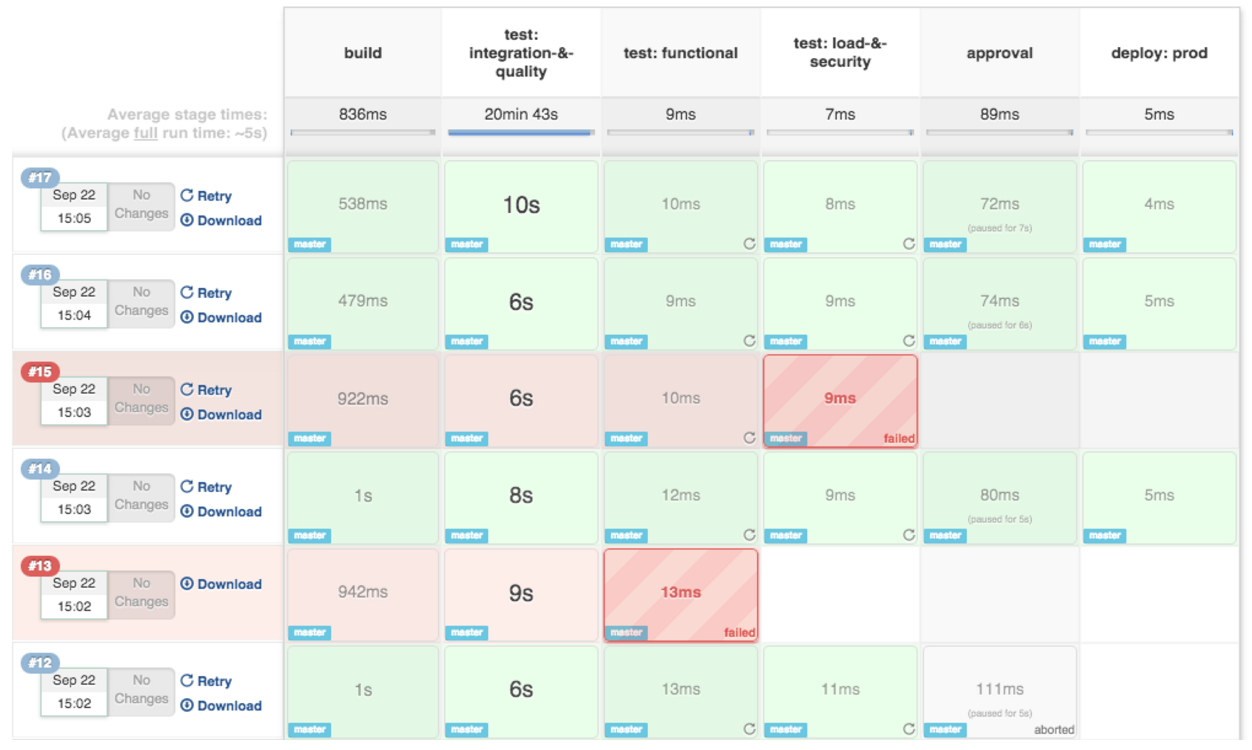
    And better still: the Pipeline Stage View plugin visualizes stages as unique segments of the pipeline:

    Jenkins pipeline example

    4. Do: All material work within a node

    Any material work within a pipeline should occur within a node block.

    • Why? By default, the Jenkinsfile script itself runs on the Jenkins master, using a lightweight executor expected to use very few resources. Any material work, like cloning code from a Git server or compiling a Java application, should leverage Jenkins distributed builds capability and run an agent node.

    Example:

    stage 'build'
    node{
        checkout scm
        sh 'mvn clean install'
    }

    5. Do: Work you can within a parallel step

    Pipeline offers a straight-forward syntax for branching your pipeline into parallel steps. Use it!

    • Why? Branching work in parallel will allow your pipeline to run faster, shifting your pipeline steps to the left, and getting feedback to developers and the rest of your team faster.

    Example:

    parallel 'shifting':{
        //everything
    }, 'left':{
        //I can
    }

    Bonus tip: use the Parallel Test Executor plugin to have Jenkins automatically determine how to run your xUnit compatible tests in optimally parallel buckets! Read more information on Parallel Test Execution on the CloudBees Blog.

    6. Do: Acquire nodes within parallel steps

    Why? One of the main benefits of parallelism in a pipeline is: to do more material work (see Best Practice #4)! You should generally aim to acquire a node within the parallel branches of your pipeline.

    Example:

    parallel 'integration-tests':{
        node('mvn-3.3'){ ... }
    }, 'functional-tests':{
        node('selenium'){ ... }
    }

    7. Don’t: Use input within a node block

    While you can put an input statement within a node block, you definitely shouldn’t.

    • Why? The input element pauses pipeline execution to wait for an approval – either automated or manual. Naturally these approvals could take some time. The node element, on the other hand, acquires and holds a lock on a workspace and heavy weight Jenkins executor – an expensive resource to hold onto while pausing for input.

    So, create your inputs outside your nodes.

    Example:

    stage 'deployment'
    input 'Do you approve deployment?'
    node{
        //deploy the things
    }

    8. Do: Wrap your inputs in a timeout

    Pipeline has an easy mechanism for timing out any given step of your pipeline. As a best practice, you should always plan for timeouts around your inputs.

    • Why? For healthy cleanup of the pipeline, that’s why. Wrapping your inputs in a timeout will allow them to be cleaned-up (i.e., aborted) if approvals don’t occur within a given window.

    Example:

    timeout(time:5, unit:'DAYS') {
        input message:'Approve deployment?', submitter: 'it-ops'
    }

    9. Don’t: Set environment variables with env global variable

    While you can edit some settings in the env global variable, you should use the withEnv syntax instead.

    • Why? because the env variable is global, changing it directly is discouraged as it changes the environment globally, so the withEnv syntax is recommended.

    Example:

    withEnv(["PATH+MAVEN=${tool 'm3'}/bin"]) {
        sh "mvn clean verify"
    }

    10. Do: Prefer stashing files to archiving

    Before the stash capability was added to Pipeline DSL, archives were the best way to share files between nodes or stages in a pipeline. If you just need to share files between stages and nodes of your pipeline, you should use stash/unstash instead of archive.

    • Why? Stash and unstash are designed for sharing files, for example your application’s source code, between stages and nodes. Archives, on the other hand, are designed for longer term file storage (e.g., intermediate binaries from your builds).

    Example:

    stash excludes: 'target/', name: 'source'
    unstash 'source'

    Summary

    Thanks for reading! The new Jenkins Pipeline plugin is gaining more and more traction, especially with the launch of Jenkins 2.0. I’m sure there will be more and more best practices to come as developers across the world develop their DevOps pipelines with Jenkins. We will post follow-up blogs and more examples soon!


    Learn More

    Jenkins is one of the preeminent automation tools. Jenkins is extensible by design, using plugins. Plugins are what give Jenkins its great flexibility for automating a wide range of processes on diverse platforms. Jenkins Pipeline builds on that flexibility and rich plugin ecosystem while enabling Jenkins users to write their Jenkins automation as code. This technical guide will show a number of common use cases for plugins with Jenkins Pipeline.

    These use cases include:

    • Publishing HTML reports
    • Sending notifications
    • Continuous delivery using Docker
    • Test result interpretation and reporting

    Download this technical guide to learn more about and get started with Jenkins Pipeline!


  • GitLab Updates Advance Its CI/CD Platform

    GitLab Updates Advance Its CI/CD Platform

    GitLab has expanded the capabilities of its continuous integration/continuous development (CI/CD) platform to include tighter integration with collaboration platforms from Slack and Mattermost along with the ability to support Docker containers running on Windows.

    Version 11.11 of GitLab adds a caching dependency proxy for Docker images to the Premium edition of GitLab along with the ability to provision an instance-level Kubernetes cluster using instances of GitLab that are managed by an internal DevOps team. Those capabilities are arriving on the heels of GitLab last month announcing its initial support for Kubernetes as a platform on which its CI/CD environment now can be deployed.

    The latest edition of GitLab also adds support for multiple assignees for a merge request capability, which allows multiple members of a DevOps team to manage merge requests within a DevOps pipeline.

    Finally, GitLab 11.11 also provides guest access to releases, extends the add-on CI runner minutes to the GitLab Free edition, supports the OpenID Connect authentication protocol, includes serialized commit graphs and simplifies reviews by auto-resolving a discussion whenever a suggestion is applied.

    Priyanka Sharma, technical evangelist for GitLab, said GitLab is starting to see increased interest in using Docker containers to build applications on Windows. A Windows Container Executor for GitLab Runners capability makes it easier to orchestrate pipelines that include Docker containers destined to be deployed on Windows. Previously, DevOps teams needed to rely on a shell executor to orchestrate Docker commands. This update makes it possible to employ Docker containers on Windows in the same way they are deployed on Linux platforms. GitLab also has improved support for PowerShell, in addition to making available helper images for various versions of Windows containers.

    Sharma said GitLab is starting to see IT organizations that have embraced Windows starting to catch up in terms of enthusiasm for Docker containers. Also, DevOps teams that have embraced both Linux and Windows platforms are looking to apply best DevOps practices to both platforms.

    Microsoft has signaled its intention to continue investing in making Docker containers a core element of its overall strategy. As the work progresses in collaboration with Docker Inc., the need for a CI/CD platform that can support Windows environments will become more acute.

    In the meantime, GitLab continues to focus on making it easier to implement best DevOps practices at scale, Sharma said. As enterprise IT organizations continue to embrace DevOps, many of them soon discover the need for a CI/CD platform designed from the ground up to support pipelines that are being accessed by many concurrent users.

    The decision many of those enterprise IT organizations will have to make is how much they will want to rely on an open source versus closed source platform. The enterprise edition of GitLab is a closed source platform, but the company does make available an open source community edition. While the open source Jenkins platform currently dominates among CI/CD platforms, enterprise IT organizations that have adopted DevOps have shown a willingness to embrace proprietary DevOps platforms that address challenges ranging from the scale of deployments to security and compliance.

    It’s too early to say how the next major CI/CD battle involving the shift to microservices will play out. However, if history is any guide, there should be plenty of room for both open source and proprietary CI/CD platforms.

    — Mike Vizard

  • Get Testing Bottlenecks Out of Your Pipelines

    Get Testing Bottlenecks Out of Your Pipelines

    I first learned the term “deployment pipeline” when I read “Continuous Delivery: Reliable Software Releases through Build, Test and Deployment Automation,” by Jez Humble and David Farley back in 2009. End-to-end automation of the build, deploy, test and release processes kick in each time a team member commits a change to the source code repository.

    Chapter 5 of the book notes that the forms of testing common to all projects include manual test stages which “… assert that the system is usable and fulfills its requirements, detect any defects not caught by automated tests, and verify that it provides value to its users. These stages might typically include exploratory testing environments, integration environments, and UAT (user acceptance testing).”

    Humble and Farley include these manual stages in the deployment pipeline, also known as a continuous integration (CI) pipeline, build pipeline or delivery pipeline. However, from what I observe, I think a lot of times people forget about these important manual stages.

    Though we can do more and more with test automation, thanks to improving technology, manual testing activities are here to stay in most business domains. My own previous team realized this as we started to move toward continuous delivery (CD) a couple of years back, with twice-weekly deploys to production. Smaller changes and more frequent deploys means lower risk of regression failures. Yet, we still struggled with how to fit in important manual testing activities.

    Whenever my cross-functional delivery team has a problem, I look for a way to make it visible, to help us talk about it and brainstorm ideas to solve it. My “aha” moment around manual stages came when I learned techniques to visualize our pipeline from Abby Bangser and Ashley Hunsberger. My team knew we had these manual testing activities and that we wouldn’t feel confident about releasing changes without them, but we weren’t really thinking about them as stages in the pipeline.

    Visualizing Your Pipeline – Including the Manual Stages

    Continuous Delivery Pipeline
    Figure 1: A Continuous Delivery Pipeline (my diagrams are inspired by Katrina Clokie’s pipeline diagrams in “A Practical Guide to Testing in DevOps”)

    Getting your team together to visualize your pipeline is a great method to find ways to improve it. Gather around a table with cards or sticky notes, or draw on a whiteboard—what are all the steps in your pipeline, including the manual ones? In Figure 1, the manual stages in a team’s CD pipeline are shown in yellow. All the automated and manual things need to happen before the business decides to push the button and deploy to production. It’s easy to see that these manual stages can become a bottleneck. Manual exploratory testing is likely to take longer than the automated test suites. If user acceptance testing needs to be done by certain business stakeholders and they aren’t available at the right time, that holds up the release. If the team is looking to move to continuous deployment, where every change to the product goes out to production as soon as all stages complete successfully, these manual stages will be in the way.

    When you get your whole team including developers, database experts, operations specialists and product owners involved in solving these problems, you may discover innovative ways to approach them. In my team’s case, we decided everyone on the team needed to help with exploratory testing so we could do it in a timely manner. Testers helped the developers learn exploratory testing skills with hands-on workshops and by pairing with them. Then, each developer pair working on a story was tasked with doing the exploratory testing at the story level before declaring the story finished. We wrote exploratory testing charters at the epic or feature level as stories in our backlog. When enough stories were complete, anyone on the team, including testers and product owners, could pick up those charters.

    If we couldn’t complete all the necessary exploratory testing before the next production deploy, we used feature flags to hide the changes from customers until we could complete the testing. We could go ahead and deploy the changes and wait to release them once we felt confident they would not cause any customer pain.

    Asynchronous Testing Stages

    Using feature flags or toggles is a good way to allow the team to approach some manual testing activities asynchronously, so they don’t hold up the deployment pipeline. If some required manual accessibility, testing takes an extra day to complete or the UAT has to be postponed for a week, the deploy still happens. A change could be toggled on for a small percentage of users and observed in production to see if any unexpected behavior occurs. Whatever activities are needed to safely release a particular change don’t have to hold up other changes that are ready for customer use.

    Asynchronous stages in a deployment pipeline
    Figure 2: Asynchronous stages in a deployment pipeline

    Figure 2 is an example of a continuous deployment pipeline, but this asynchronous approach to the manual stages works for continuous delivery as well. Each time a team member commits a change, if all the automated stages in the pipeline pass, the release candidate build will be deployed to production. The manual testing activities are not inline with the other steps and don’t hold back the deployment.

    If we’re ready to deploy a feature but need to finish those manual testing stages before we release it, developers can put in a feature flag set to “off” to prevent it from being exposed to customers. When the asynchronous manual stages are all complete and successful, the feature flag can be flipped on in production. This is the actual release, customers can now use the feature. The feature flag should be removed as soon as possible, as too many feature flags at once has serious risks.

    Using feature flags or toggles to permit deploying changes to production before all testing stages are finished is one way to avoid bottlenecks and succeed with continuous delivery or deployment. Continuous delivery and deployment success depend on doing frequent small changes, not big-bang releases. A lean approach to feature flags, keeping the inventory low, is advisable.

    Visualize It With Your Team

    We’ve looked at one way to keep manual pipeline stages from holding up deploys, but there may be other solutions for your team. And there are lots of other key success factors for CD, such as keeping changes small and frequent. There’s lots to discuss and brainstorm about as your team, or a representational cross-section of it, gets together and experiments with a visual model of your pipeline. Talk about what you need to learn from each pipeline stage, who needs to know it and whether the pipeline is providing actionable feedback.

    As a tester, I’ve sometimes questioned aspects of the pipeline that nobody else had thought about. Having team members with development, operations, database and other skills present means more potential for creative solutions. Our pipeline provides a major feedback loop and we want that feedback as fast as we can get it. Writing each stage on a card and arranging them on a table or wall often triggers ideas for parallelizing more stages or realizing a particular stage isn’t necessary or can be done locally by developers.

    Automate all the things where it’s feasible. Use the time you save to optimize the way you accomplish manual testing activities and possibly automate more of them. Master techniques such as feature flagging so that you can take the time needed to feel confident about every new feature you release.

    References

    “Continuous Delivery: Reliable Software Releases through Build, Test and Deployment Automation,” Jez Humble and David Farley, https://continuousdelivery.com

    “A Practical Guide to Testing in DevOps,” Katrina Clokie, https://leanpub.com/testingindevops

    “Feature Toggles, AKA Feature Flags,” Pete Hodsgon, https://martinfowler.com/articles/feature-toggles.html

    — Lisa Crispin

  • Open Source Versioning: The Race to Stay Up-to-Date

    Open Source Versioning: The Race to Stay Up-to-Date

    Open source libraries, once shunned as risky and not ready for prime time, are now used extensively across major corporations, including insurers. The reason is simple: In time- and resource-constrained companies trying to stay technologically competitive, it doesn’t make sense anymore to try to reinvent a wheel that’s already been battle-tested. However, having made the commitment to open source code and solution sets, it’s imperative to keep up-to-date with open source library maintenance and updates.

    The Risk of Open Source

    Some active open source libraries are updated multiple times a year. Getting out of date means missing out on newer features. Also, if the gap between upgrades bridges several iterations, some future upgrades may not be backward-compatible, causing functional problems at best and risk exposure problems at worst. On occasion, an out-of-date open source library version can expose a system and a company to attack. In 2017, a major U.S. financial company was hit by a hack that exposed the information of millions of customers. The hackers had exploited a software vulnerability that had been public for a month, but the company had not patched its system in time. There are several other well-known examples of a similar vein.

    Keeping current is not easy. Upgrading may be costly, but falling behind can make it costlier to catch up. The question is, How frequently should one upgrade to the newer versions?

    The Effort and Cost

    One of the reasons companies choose not to upgrade every time there’s a new release is the cost involved. While the open source code itself is free, the effort required in time and resources can be substantial and can take valuable resources away from higher priority business-technology initiatives. An additional concern is that, even though the upgrade is supposed to be backward-compatible, there is no way to verify that without actually performing the upgrade. If there are compatibility problems, then a larger effort ensues involving upgrading, restoring or rebuilding a system. Any large system has to be tested thoroughly after upgrading, and without the help of automated tools, testing can be costly and time-consuming.

    One approach for mitigating these costs and risks is the process of continuous integration (CI) for open source libraries. A good suite of automated testing tools provides a high degree of confidence that nothing has been broken by the most recent upgrade, before it is implemented into any production environment. However, without automated tests that flush out potential issues from upgrading, the risks and costs are high enough that companies have a hard time keeping up and managers become more motivated to delay upgrades than to perform them. That’s why it’s important that companies employ CI and continuous delivery (CD) processes that include robust automated testing.

    Additionally, the use of microservices—an increasingly effective and popular way to construct systems—puts another twist into the efforts and costs of keeping open source libraries up to date. Individually, each microservice might be quick to test. However, if an application has been broken into 50, 100 or even more microservice components, even a small amount of manual work testing each component will add up quickly. Additionally, in an environment that has deployed microservices broadly, there may not be a business need to change some services for months—that is one of the benefits of using microservices.

    The Right Approach to Open Source

    There is a right way to deal with open source library updates that has the benefit of taking advantage of new functionality and code stability in a low-risk, low-effort and low-resource manner as follows:

    Planning: Enterprise and application architects should be vigilant regarding the road maps of any large frameworks that employ open source libraries as a key component to any project or initiative. Proactive identification of open source libraries that may need to be upgraded is key. Likewise, application project managers should make open source library upgrade part of a regular and ongoing project plan. For example, when microservices are involved, they should be classified proactively as services by the libraries they use, as a way to identify the few services that would normally be upgraded first. This has the benefit of providing a few sprints’ worth of feedback before rolling out the upgrades to other libraries.

    Monitoring: Open source version monitoring is essential. There are products that can help to identify and report library versions that have vulnerabilities. Such monitoring can and should be used as part of the CI/CD pipeline and also to monitor artifacts that already are deployed in production. Monitoring processes also can report when newer open source library versions are available, even if the incumbent library has no reported vulnerabilities.

    Automated compatibility triage: It is often too risky to set up production builds to always use the latest version of an open source library. However, separate automated processes can identify new versions, run them through a build and test process and report back the results. If a test fails, the development team gets an early warning that their code is not compatible with the upgrade version. This helps to plan and schedule fixes, and if a vulnerability is discovered in the current version, this kind of proactive planning enables a quicker resolution and turnaround.

    Processes: Strong processes, preferably automated ones, are the foundation of open source versioning. For critical security upgrades, a process must be in place to triage and prioritize identified changes. For other version updates, good processes can help make upgrades easier. For example, a standard and repeatable process may incorporate minor version upgrades into the regular flow of sprint work, thus saving time while mitigating risk.

    Open source versioning can be difficult, but it doesn’t have to be. With automated testing, good monitoring tools and some proactive planning, the costs and risks of staying up to date can be kept to a minimum, allowing companies to reap the benefits of new features and functions.

    — Darius Cooper

  • 5 Guaranteed Ways to Kill DevOps Developer Productivity

    5 Guaranteed Ways to Kill DevOps Developer Productivity

    “A developer is an organism that turns coffee into code.” I still laugh when I see that quote as it reminds me of my hardcore developer days, when my cube always seemed to be directly next to the coffee machine and caffeine was management’s way of ensuring we had the energy to develop well into the wee hours of the evening.

    What is developer happiness? I like to believe it hasn’t changed dramatically over the years. It’s about giving developers the right tools and the freedom to do what they do best—produce meaningful code. That means reducing distractions so they can meet or beat expectations and timelines, ultimately driving revenue for the organization.

    I trust your company is not in the practice of molding reusable human coffee filters. But are you doing everything you can to help your developers be as satisfied and productive as possible, or are you taking the “necessary” steps to ensure they are buried in context-switching hell?

    If the latter is your aim, read on to learn about five guaranteed ways you can totally kill developer productivity.

    Saddling Developers With ‘Plumbing’ Work

    Companies frequently look at developers primarily as technical resources instead of true innovators, so they get saddled with plumbing work. In DevOps and continuous delivery (CD), that’s writing a lot of ad-hoc scripts to string together pipelines, define infrastructure and manually create deployment plans. If your company is on the road to cloud adoption, it’s imperative to get unnecessary scripting under control because things only get more complicated as you start to incorporate the many different cloud platforms and services that are available.

    Making Developers Deal With Security After the Fact

    A fail-safe way to kill developer productivity is to make them deal with security after a release has left development. Too often, they first build code, QA then tests it and finally someone from security checks it to make sure there are no holes well after the code has been written. If security problems are found after coding is done, the release is halted and must go back to the developer to fix. This often occurs either just before the production release or, worst case, just after. In either case, not only does it take longer to resolve the problem, it also prevents the developer from moving on to the next big thing.

    Expecting Them to Chase Down Features and Status Requests

    Because development pipelines are often not integrated with the higher-level CD pipeline, those outside of development have no way of seeing the status of features, deployments and releases. Understandably, their only option is to ask developers to provide status information or call a status meeting which, of course, are additional interruptions that divert them from feature development. Developers don’t like it, and it doesn’t exactly help anyone else in the pipeline be more productive, either.

    Bogging Developers Down With GUIs

    GUIs are a great democratizer in large organizations. They offer a user-friendly way for people across the company, regardless of technical know-how, to access the information they need to be productive. But many developers see them as a waste of time. And while even the most GUI-resistant developer needs them every so often, they are not their preferred way to work.

    Taking Away Their Favorite Tools

    Standardizing your software delivery process is a must to increase efficiency, but standardizing on tools is not. Taking away their favorite tools is highly recommended only if you’re keen on decreasing developer satisfaction.

    What are the Alternatives?

    Managers and leaders can help developers by taking as much of these mind-numbing tasks off their plates as possible. They can do that by automating the release process and integrating CI pipelines into the CD pipeline. Doing so allows everyone to plug in to what’s happening in development without having to interrupt developers, and they can continue to use their beloved tools and simply connect them into the release pipelines.

    It’s also important to standardize most of your operations work upfront—infrastructure, provisioning, compliance, security. All this advance work will allow developers to consume environments on-demand and just deploy without extensive scripting or re-scripting for changes and maintenance.

    Keep in mind, if you shift security left, closer to the development process, you need to automate it. Otherwise, it becomes someone’s manual task—a developer, DevOps engineer or security person—and that will slow down the delivery process. For example, SAST test and SCA scans can be automatically run on every check-in. DAST tests can be automated to run after each build. This way, any security holes are caught as early as possible, while the code is still fresh in the developer’s head.

    Finally, reduce the amount of work developers need to do through GUIs. Give them a way to kick off releases from their respective CI pipelines and the ability to define release pipelines—infrastructure, configuration, security and so on—in code.

    Coffee Machine or Barista?

    Doing these five things—relieving developers of unnecessary scripting, standardizing compliance requirements and security checks upfront, reducing the need for developer-provided status updates, enabling them to work in code and allowing them to continue to use their favorite tools—will make the difference in whether your developers feel like the office coffee machine or a master barista.

    — Dan Beauregard

  • Best Practices for DevOps in the Cloud

    Best Practices for DevOps in the Cloud

    DevOps is commonly defined as a methodology that combines software development with IT operations. The goal is to shorten a system’s development life cycle while delivering features, fixes and updates frequently in close alignment with business objectives. Putting DevOps into practice is an ongoing experiment for many organizations.

    Developers often struggle with continuous integration (CI) or continuous delivery (CD) performance, testing delays and other bottlenecks. In fact, one survey reported that only 34% of projects finish on time and only 42% come in on budget. Security and development teams must collaborate to keep up with the rapid development life cycle without sacrificing security with every update.

    Enterprise SaaS apps are not distributed like traditional software—they are continuously running services. So, CD is all about updating the service with a set of changes. In public clouds such as AWS and Heroku, this is done through pipeline stages (e.g. dev, test, staging and production). In platforms such as Salesforce, stages become sandbox environments, ephemeral scratch orgs and production instances.

    How can development teams shorten the development life cycle without sacrificing the integrity of the features and updates? In this article you will learn key DevOps practices to achieve predictable, reliable release management.

    Advanced Planning Ensures All Boxes Are Checked

    Agile planning is now de rigueur for enterprise development. It is best used if:

    • The product itself will most benefit from flexibility.
    • Regular face-to-face interactions and collaborations are needed between team members.
    • The end product requires regular updating, monitoring and continuous delivery to the client throughout the life cycle.

    For CD, ensure your user stories are sized correctly and that each story rolls up to an Epic that represents a standalone feature. This enables your team to release bite-sized pieces of functionality that are consumable by users and traceable back to your release plan. Also, define acceptance criteria for use in the verify stage so you know when something is done-done.

    Manage the Source Code, Especially When Working in a Shared Environment

    There are a few practices of app creation that impact CD. First, source code is not the only element of an enterprise solution. Schema, user interface, access control rights and static resources such as icons and images are all part of the creation process and should be managed just as diligently as source code. They should all be checked in to a version control system (VCS) as a single source of truth.

    Second, ensure that developers are making changes in a segregated environment. In some low code platforms, such as Salesforce.com, this becomes a challenge, but even in a database, multiple database administrations (DBAs) can step on each other’s changes when working in a shared environment.

    Functional Testing

    Automated quality processes are difficult to implement, but essential Selenium is a great tool for testing functionality and should be part of your DevOps practice. But there are several verifications that should be made before you get to functional testing. Static code analysis tools, such as PMD, are essential to ensure your development team is coding against a single style.

    Define a team style and enforce its use. Unit test coverage is also essential—incorporate them with a coverage of at least 75%. Finally, after these automated tests pass, implement a manual peer review. Old hands are able to spot opportunities for performance improvement where automated tools may not.

    Changes Should be Released in a Defined Pipeline with Strict Quality Gates

    Packaging for CD is about capturing changes that can be incrementally released into the next stage or environment. Development teams should dedicate a branch for each stage and bundle incremental changes into a promotional branch to leverage the merge conflict detection in your VCS.

    Changes should be released in a defined pipeline with strict quality gates that ensure the verification steps and enforce the order of release stages. Developers should not be able to bypass key stages throughout the development cycle—for example, moving from development to production.

    Focus on making smaller changes, which result in reliable, predictable releases. Finally, be sure to automate promotions. This enables your team to validate the promotion scripts in integration, test and staging before releasing to production, which decreases the likelihood of an unhappy surprise.

    Automate Configuration, Especially for End User Access Rights

    Make testing for proper configuration part of your verification process. Platforms such as Salesforce have powerful profiles and permission sets that enable user access to only the right information. Improper configuration can expose personally identifiable information (PII), credit card numbers or medical health data.

    Monitor for More Than Just Service Availability and Performance

    Most SaaS companies monitor service availability and performance. But excellent companies also monitor data access to detect improper configuration changes and monitor end user feature usage, which gives product managers visibility to their usage.

    — David Brooks

  • Harness Invests in Automating Continuous Delivery

    Harness Invests in Automating Continuous Delivery

    Fresh off raising an additional $60 million in funding, Harness plans to make more investments in machine learning algorithms to advance continuous delivery through automation.

    Harness CEO Jyoti Bansal said the startup, which he co-founded with Rishi Singh, a former DevOps platform architect at Apple, is now in a position to invest more aggressively in additional engineering and sales resources needed to expand adoption of the cloud-based service, which provides a level of abstraction through which much of the continuous delivery process can be automated using drag-and-drop graphical tools. Bansal and Singh co-founded Harness after AppDynamics, provider of an application performance management (APM) platform Bansal also co-founded and served as chairman of the board, was sold to Cisco Systems.

    Bansal said Harness takes advantage of YAML files and machine leaning algorithms to present DevOps teams a set of visual tools accessed via a cloud service that enables them to build sophisticated pipelines as quickly as 10 minutes. That approach promises to significantly advance DevOps adoption by making it easier for IT operations teams to set up those pipelines as part of continuous delivery process without needing deep programming expertise.

    While there’s been a lot of progress made in terms of driving adoption of best continuous integration practices among developers, the continuous delivery side of the DevOps equation has proved much more difficult to achieve. Most IT organizations rely on multiple platforms that have their own unique attributes. As such, IT operations teams typically have created their own scripts or rolled out automation frameworks such as Ansible to allow them to automate some aspects of the application deployment process.

    However, Bansal noted, custom scripts typically don’t scale very well and usually have not been well-documented. What’s more, frameworks such as Ansible are still too low-level to enable DevOps teams to build pipelines in minutes. The approach Harness has designed enables DevOps teams to describe their intent using a set of visual tools, which then employs machine learning algorithms to automate the deployment process regardless of the underlying platform, he said.

    That approach is further augmented by a set of rules that can be added to make sure security and compliance requirements are met, he noted, adding Harness also provides views into how processes are being automated to provide DevOps teams with the confidence required to trust a highly automated platform.

    Bansal said the goal is to not just make it simpler to build and deploy pipelines, but also maintain them in what have become highly dynamic IT environments where there is simply too much data that needs to be tracked for human administrators to effective manage relying on low-level tools and frameworks. Rather than having to build and deploy the framework needed to achieve that goal, he said, Harness is making it possible to automate the continuous delivery process using a cloud service on demand.

    It may take a while for IT organizations get comfortable with the level of automation being enabled by machine learning algorithms. But like it or not, it’s already becoming apparent the ability to dynamically manage IT at scale is clearly on the cusp of making another significant leap forward.

    — Mike Vizard