Tag: Configuration Management

  • Automation, Provisioning and Configuration Management with PUPPET

    Automation, Provisioning and Configuration Management with PUPPET

    This is 3rd part of the multi-part series covering Automation, provisioning and Configuration Management. In this follow up article best practices for Puppet shall be covered.

    Why Puppet?

    While every system administrator comes up with more progressive systems to be managed, the automation of every mundane task is increasingly significant.

    Instead of achieving in-house developed scripts, it is necessary to share a system that can be used by everyone, irrespective of one’s employer. But undoubtedly, this is not possible manually.

    So, Puppet has been developed to benefit the sysadmin community in building up and sharing of all mature tools, which prevent the replication of a problem which is being resolved by many.

    Following are the key methods followed by Puppet:

    1). It supports a powerful framework, and is responsible for simplifying most of the technical tasks required to be done by the sysadmin.

    2). The sysadmin’s work is written in form of code, easily sharable as the other pieces of code, in the puppet’s custom language.

    The Puppet usage accelerates your work as a sysadmin, as it supervises and handles all the details. You can download the code from other sysadmins to help you get your work done even faster. Most of the Puppet implementations make use of one or more modules already developed by others. One can find hundreds of modules developed and shared by the community.

    What is Puppet?

    Puppet is an open-source IT automation tool developed by Puppet Labs. Its written in Ruby; composed of a declarative language for expressing system configuration; a client and a server for distributing it; and a library for realizing the configuration. Puppet helps in automation, deployment and scaling of applications in the cloud or on site.

    The basic design objective of Puppet is to come up with a powerful and expressive language backed by an influential library that makes you write your own server automation applications in just a few lines of code. Its intense adaptability and open source license lets you add up the required functionality. And, you can also share your innovations with others.

    System Components:

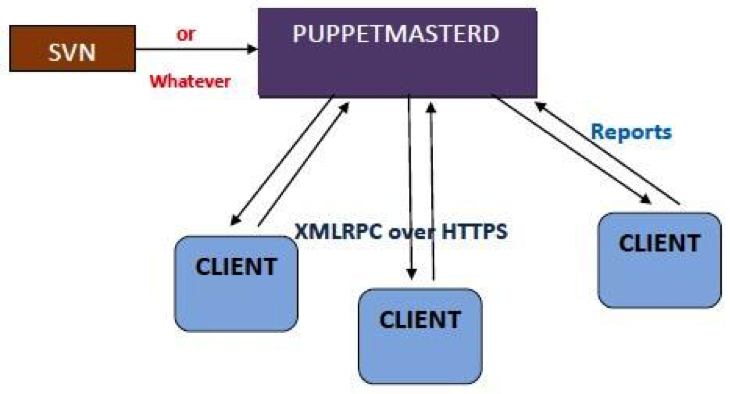
    Puppet in general is used in a client/server formation, with all your clients talking to one or more central servers. Every single client contacts the server at regular intervals i.e. every half hour, by default. It even downloads the latest configuration and makes it sure that it is in sync with the configuration. The moment it’s complete, the client is able to send a report back to the server and can also refer to the changes required.

    Following diagram displays the data flow in a usual puppet operation:
    Puppet1

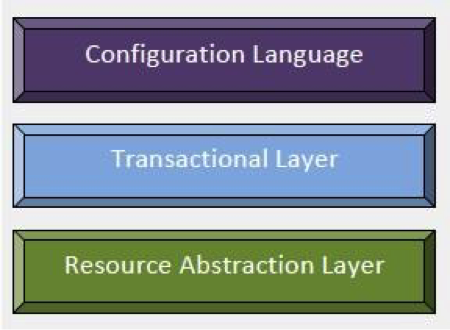
    Puppet’s functionality is framed as a heap of individual layers. Each layer is duty-bound to a fixed aspect of the system with a tight control on how information transfers between these layers.
    puppet2


    Fig2

    How Does Puppet Work?

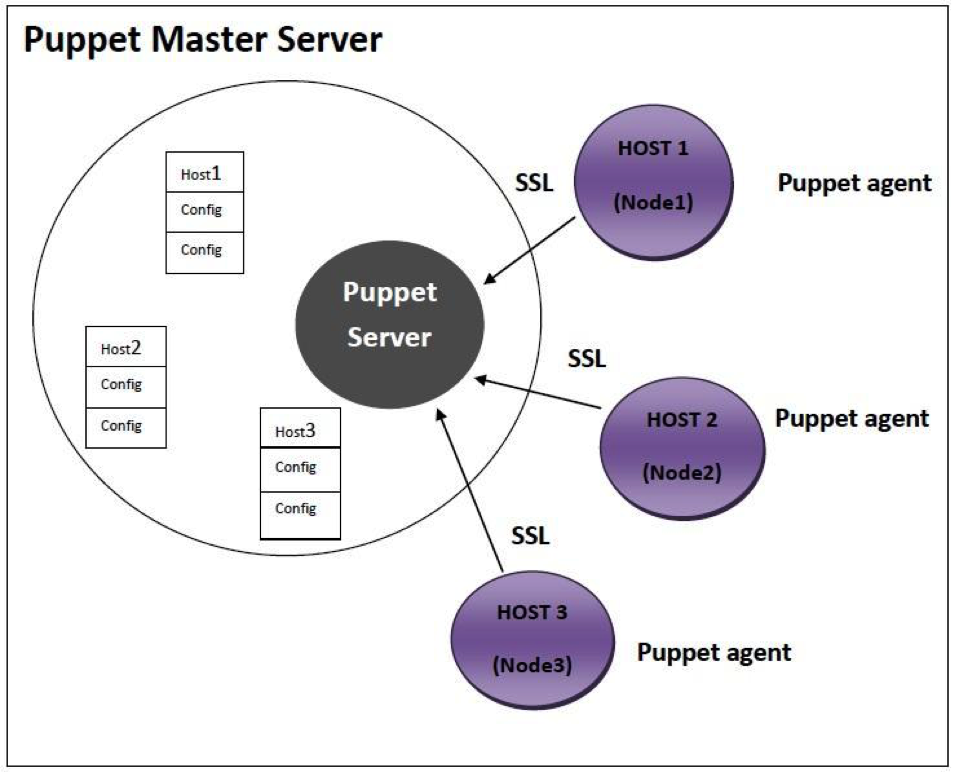
    The Puppet agent acts as a daemon that runs on all the client servers where configurations are required, and the servers to be managed by Puppet in the future. Now all the clients to be controlled will have puppet agent installed in their systems. This puppet agent also known as a node in Puppet will have a server designated as the Puppet master.

    Puppet Master: This machine restrains the entire configuration for different hosts, and runs as a daemon on this master server.

    Puppet Agent: This is the daemon that will run on the entire server that is to be managed with the help of Puppet. At a specific time interval, the Puppet agent will go and inquire the configuration from the puppet master server.

    Now the connection network between the puppet agent and master is built in a secure encrypted channel with the support of SSL. For example, if the Puppet agent has already applied for a necessary configuration and there are no new changes, it will do nothing. By default, the puppet agent will go and fetch the required config data from the puppet master in every 30 minutes.

    From the above diagram it is clear that puppet master server has all the configuration options available for Host 1 or Node1, Host 2 or Node 2 and Host 3 or Node 3.
     puppet3

    Following are the steps that are always followed whenever a puppet agent of any node makes up a connection between a node and a puppet master server to fetch the data.

    Step 1: Every time a client node makes a connection to the master, the master server examines the configuration to be applied to the node.

    Step 2: The Puppet master server takes and assembles all resources and configurations be applied on the node, and brings it together to make a catalog. Now, this puppet is given to the puppet agent of the node.

    Step 3: According to the catalog, the Puppet agent will apply configuration on the node and then reply. It will also submit the report of the configuration applied to the puppet master server.

    Who would find Puppet useful?

    An organization that would like to decrease the cost of maintaining its computers could benefits from using Puppet. Since the return on investment is related to several factors such as the current administrative overhead, diversity among existing computers, and cost of downtime. It might be complex for an organization to determine if it should invest in any configuration management tools, much less Puppet.

    In general, any organization should make use of server automation if any of the following are true:

    1. It comes up with a higher server administration costs
    2. Either because of contracts or opportunity cost, it pays a high price for downtime.
    3. It contains loads of servers that are fundamentally identical or nearly identical.
    4. Flexibility as well as agility is required in server configuration.

    Conclusion:

    Puppet refers to the two different things

    • The language in which code is written
    • The platform that manages infrastructure.

    Puppet is both a simple and a complex system. It is composed of several moving sections wired all together quite loosely. It is a structure that can be used for all configuration problems. Our future success rests on the structure becoming more powerful and simple, for it should be   approachable while gaining capability.

  • PEBKAC Avoidance

    PEBKAC Avoidance

    We’ve all said it. We’ve all done it. We’ve all shook our heads at it. PEBKAC. Problem exists between keyboard and chair.

    User error.

    While generally applied to the end-user community – those folks who are considered technical neophytes by IT professionals – it can and should also be applied to those of us who have, at least once (admit it, come on, I know you’ve done it) fat fingered a configuration on a web server, a switch, a router, or some other network or application service.

    It’s okay. We’ve all been there – head down on the keyboard, a litany of words we wouldn’t use in front of our mothers streaming from our lips between enumerations of how long we’ve sat at our desk looking for the problem. Mine was a misconfiguration of route metrics in the now long gone Network Computing lab that sent traffic from one side of the lab over a simulated T1 and back over the 100 Mbps link. When you’re trying to simulate a WAN environment and put WAN optimization solutions on either end, this is highly problematic and tends to, well, not work. Not work at all. If it wasn’t for the astute observation of my lab partner,  I’d probably still be at my desk hunting for the problem.

    The point is, we’ve all had our PEBKAC moments. We know they happen, and avoiding them is a very real goal of devops in general. We want consistent, repeatable and successful deployment processes in part to avoid the time and effort it takes to troubleshoot some minute configuration error in the lengthy and often complicated data path over which application traffic must traverse in our domain.

    And it’s no longer just about downtime, which is costly and frustrating for everyone involved. It’s also about security; security of the network, the applications, and data.

    Tufin Technologies, in a 2010 survey of 100 registered DEF CON 18 attendees, found that “73 percent of hackers came across a misconfigured network more than three quarters of the time – which, according to 76 percent of the sample, was the easiest IT resource to exploit.” [1]

    With more and more layers of complexity added to the network in an attempt to simplify the network (yes, how’s THAT for irony?), there are more and more opportunities to experience the unique pain of PEBKAC every time a new service is provisioned. Consider the math:

    A typical data center has over 500 servers, each running a hypervisor. Each hypervisor carries an average of 20 virtual workloads. Each workload requires at least 5 separate network attributes to be configured. That’s a total of 250,000 opportunities to make a mistake. At even an error rate of less than 1 percent, that’s still 250 problems you’ll need to track down.

    This is, in part, why Devops exists. To enable the development and use of reliable processes and methods for provisioning services. That means configuration is happening under the covers, unless you’re already living in rainbow unicorn land where services configure themselves automatically. I didn’t think so.

    There’s a reason why typists are measured based not just on speed but on the number of errors made while typing. It’s not just about the speed, it’s about the accuracy because eventually, you’re going to miss the mistake you made and it’s going to be sent out in a corporate wide e-mail and … well, you can peruse the Internet at your leisure to see how well those turn out. The same is true for deployments and provisioning. It’s not just about how fast you can get a service up and running, it’s about how fast you can get that service up and running correctly.

    Devops should focus as much on accuracy as it does speed. You’ll save more time avoiding misconfiguration and the associated long hours of troubleshooting by simply slowing down a few MPH (or WPM) and ensuring that you’ve got it right the first time.


    [1] http://www.continuitycentral.com/news05331.html, http://www.darkreading.com/perimeter/misconfigured-networks-are-easiest-prey/227200159

  • DevOps and Security Are Compatible

    DevOps and Security Are Compatible

    When I speak with information security organizations faced with the prospect of moving to DevOps, one of the most common fears I hear is that this transition will degrade security of infrastructure and applications.  If you’re one of these folks, I understand this fear but you can rest assured:  when you do things correctly security will actually improve.

    One big reason security benefits in this model is due to improved alignment and tighter feedback loops.  You see, DevOps is about creating a unified, engaged team and doesn’t make it easy to fall into the “silo thinking” that traditionally leads to security as an afterthought.

    DevOps embraces automation and consistency, which benefits security by allowing you to add automated checks during coding to look for obvious security issues and flag things for human review (such as the linking of new libraries or the introduction of new third-party components that could add risk).  This means you will be able to identify “areas of concern” earlier in the development process where they will be much cheaper and more timely to address.  Twitter is a well-known advocate of this kind of automation, in which security checks are executed each time code is checked in and obvious security issues are presented to the developer immediately, giving them a chance to correct the problem right away and reducing the likelihood they will repeat the errors.  That is a much more effective process than the delayed feedback typically associated with manual code reviews.

    Security isn’t just better in the “Dev” portion of DevOps – you can also add automated configuration validation and scope checking into the environment build process to minimize the chance that a fat-fingered error or an out-of-policy change will introduce problems into production.

    This sort of automated approach also improves as you learn from retrospectives and post-incident reviews.  As you encounter preventable issues, you can often improve your automated checks to increase the odds of catching these issues before they impact production.

    Remember that security is an important stakeholder in the DevOps process, and the onus is on you to become a part of the conversation and find ways to add value to the goal of the organization.  Also, don’t forget to tap into the community of DevOps practitioners – others have walked this path before you and can help you in your journey.

    Finally, if there are specific security challenges related to DevOps that are vexing you (myths you would like to see busted) I’d love to hear from you.  Leave a comment below and become part of the conversation.

  • Approaches to Application Release Automation

    Approaches to Application Release Automation

    This is a guest post by Phil Cherry from Nolio

    A discussion of process-based, package-based, declarative, imperative and generic approaches to application release automation.

    Application Release Automation is a relatively new, but rapidly maturing area of IT. As with all new areas there is plenty of confusion around what Application Release Automation really is and the best way to go about it. There are those who come at it with a very developer-centric mind-set, there are those who embrace the modern DevOps concept and even those who attempt to apply server based automation tools to the application space.

    Having worked with many companies of various sizes, technologies, cultures and mind-sets; both as they select an ARA (Application Release Automation) tool and as they move on to implement their chosen tool, I have had many opportunities to assess the various approaches. In this short blog I will discuss the pro’s and con’s of each approach.

    Package-Based

    Package-based automation is a technique that was originally designed for automating the server layer. Due to its success at this, some have attempted to adapt it to automate the application layer as well. Packages encapsulate all the changes that need to be performed on a single server, and can include the pre-requisite checks that need to take place, as well as the post-deployment verifications. When patching a server this makes complete sense, there are no dependencies between the patched server and all the others in the same data centre, and so applying all the required changes for that patch (or patches) in a bundle in one go is possible. The package can then be applied to all appropriate servers without modification. At this layer there is little difference between one Windows Server 2008 and the next, even though the applications on top may be completely different.
    The benefit of this packaging approach is the easy rollback capability. If required the package can be easily rolled back to the original server state, but on the other hand it treats each server as an island with no dependency to another server. It assumes that all changes on that server can be done in one go. This type of automation is offered by companies like BMC Bladelogic and IBM Tivoli Provisioning Manager (TPM).

    Declarative-Based

    Declarative-based automation comes from a similar mindset to package-based but takes a different route to the solution. It also originally came out of the need to automate the server layer and a subsequent attempt to apply it to the application layer. With declarative-based automation, the desired state of the server is defined down to every individual configuration item (registry key, dll, config file entry) etc. Most declarative-based tools require you to describe the desired state by writing what is effectively a piece of ‘code’. Some solutions, for example Puppet, offer a simplified proprietary DSL (Domain Specific Language) but this does not allow you to do everything, and so keeps Ruby as a backup. The downside of this is that the user has to learn at least one programming language (or you have to employ people with that knowledge already) and so does not readily open the automation to non-developers. This approach also has the same downside as package-based automation in that it assumes each server can be configured independently and all in one go. But it also has the same benefits, in that automatic rollback is conceptually a lot easier.

    Imperative-Based

    Imperative-based automation is more familiar as the structure of the language is closer to traditional programming languages (such as Java, C++, Perl etc). In this approach a programming language is used to describe what needs to be done to the target servers in a series of steps executed in a specific sequence. Chef is an example of an imperative automation tool (the programming language which is based on Ruby). As with declarative-based, the code created (or recipe as it is called in Chef) is still very much focused on making changes to a single isolated server, and the assumption is that those same changes will be applied to multiple servers of the same type. There is limited understanding of making dependant changes across multiple servers, because that was not required at the server layer. It is only important when you move up to the application layer. And of course, the current offerings available still require you to be familiar with, or learn, a programming language to use them.

    Generic and Custom-Built Approaches

    Often, people try to apply generic approaches (such as Powershell, DOS batch scripts, Perl etc) to the task of automation, or even to write their own automation tool using a compiled language such as Java, C++ etc. As any developer will tell you, they can go and write something that will deploy your application. They can use their preferred language rather than having to use the language supported by the automation platform being employed. And they are right, a development team can indeed write a fully capable deployment tool but the question is: does it really benefit the company to take up development time building and maintaining a deployment tool rather than focusing on the development of their own applications? Even then they will have many issues to face in enabling parallel execution, reporting and auditing, access and permissions control, and importantly synchronising activity across multiple servers. The original intention of these approaches was once again focused on a specific server and not on the cross-server nature of application deployment.

    Process-Based

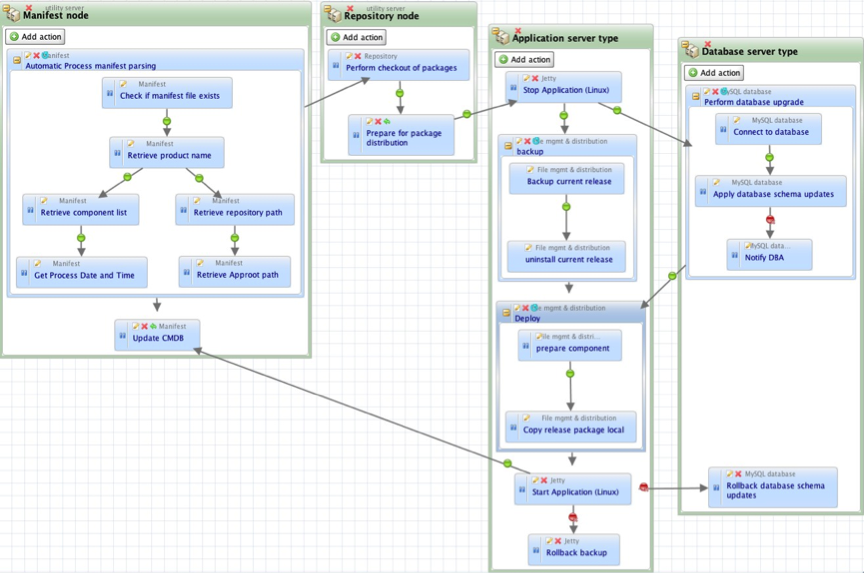
    Process-based automation is a different approach, which was created more recently, to address the needs of application release automation. ARA platforms such as DeployIt and UrbanDeploy and, of course, our own tool Nolio all take this approach. These tools seek to support currently existing application deployment processes, the ones that operators could/would normally step through manually. The focus is on processes, and the tools allow an operator to define them in a visual way, with an understanding of the cross-server nature of application deployments. Let’s say that you need to do something on an application’s web server, then the application server, then update tables in the database, then a second change to the application server and finally another change to the web server. With a server-centric approach (such as those discussed above) it is very hard to orchestrate activities across multiple different servers, to synchronise the changes so they happen at the right time in relation to each other, and even to pass information between those servers. With a process-based system this is straightforward – you define the different server types, drop the relevant steps onto each one and draw links to define the synchronisation points (i.e. only do the db steps once the application server steps have been completed).

    process-based-automation

    Diagram 1 – Screenshot of a Nolio deployment process, including activity on 4 different server types.

    The issues mentioned above such as parallel execution, cross-server synchronisation etc. should already have been dealt with by the ARA platform, rather than having to be created on top of a more generic platform. As you see from the diagram above, with an ARA platform cross-server synchronisation is simply a case of drawing a dependency link between an action on one server type to an action on another server type. Now “Stop Application” action on the “Application Server Type” will not run until “Prepare for package distribution” on “Repository node” has been completed.

    In addition to this, process-based automation brings the following benefits: there is no need to modify the deployment process to fit the automation tools’ inability to synchronise activity across multiple servers, thus ensuring the consistency between manual and automated approaches is maintained; the defined process can be used as documentation for how the deployment should be done as it is inherently very readable; there is a detailed and relevant audit trail because the process is inline with how the deployment would be done manually, and it is much easier to diagnose issues because the process follows the expected steps.

    You can read more articles on Application Release Automation on Nolio’s Blog Site.