
Tag: compliance at velocity

  • 4 Top Tips for Developing a New Feature

    4 Top Tips for Developing a New Feature

    As a backend developer at CA BlazeMeter, I recently had the chance to work on a big feature for our web app. The feature required a massive change on our backend code, a big change on our frontend and multiple migrations. You know what I’m talking about—it was one of those projects that developers fear.

    But, I gained a lot of valuable experience from the project. Not only did we deliver a kick-ass feature, I also learned the importance of teamwork and patience when developing something new. Armed with those two values, and the right tools and technologies, you can deliver a new feature quickly and efficiently.

    Here are a few more things that I learned that should prove helpful whether you’re developing a major feature or one that only requires a minor code change.

    Tip 1: Plan to understand the development requirements

    The process of development starts way before you start coding, with planning. After the product manager decides what needs to be developed, R&D needs to understand the cost: how many days (or weeks) of development the feature will take, how many people will be needed and which APIs are required.

    To do that, the product manager needs to conduct at least three “grooming” sessions with backend, frontend and QA leaders. The grooming sessions start with the product manager presenting the product flow and requirements.

    Since no one wants to read a lot of text (except perhaps the awesome readers of this article), the product manager should prepare mockups. They don’t have to be designed or colorful, but they do need to show the team what the feature looks like in his or her vision. During our grooming sessions, we used Balsamiq, which lets you create screen sketches for how the product is supposed to look, feel and work.
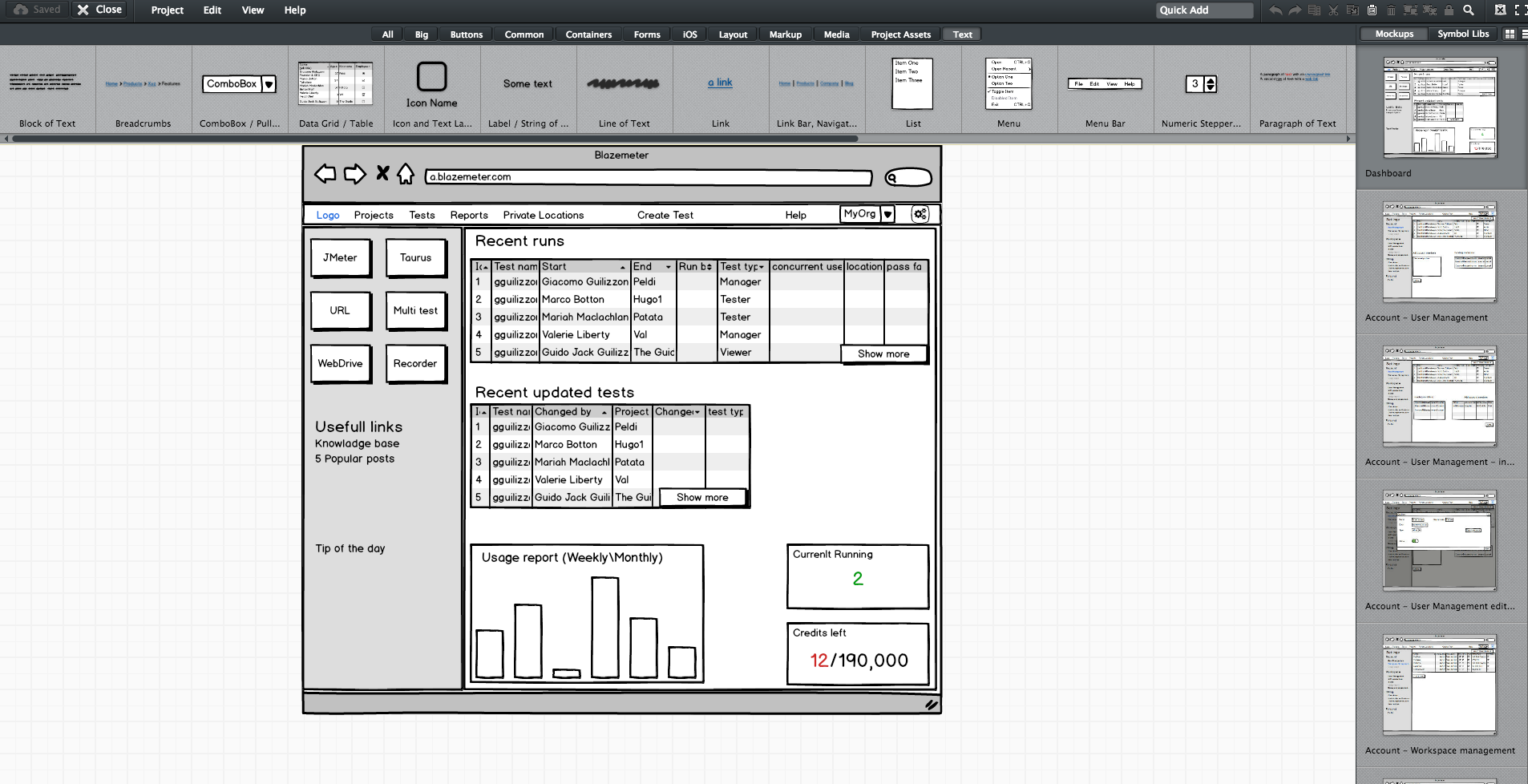
    Editing screen sketches using Balsamiq

    After the initial presentation, the sessions should include a lot of open discussion—asking questions, checking for answers and examining compliance, etc. —until everyone is satisfied and understands what the feature requires from them and from others.

    This is the time and place for frontend, backend and QA to give their opinion about the schedule and to alert and flag any potential problems in development or extreme use cases. It’s the role of the product team to answer questions and change the flow and requirements until there are no R&D rejections.

    Afterward, the frontend and backend leaders need to create a feature development plan, sitting down to determine what data they need to transform the product vision into a real thing. Or in other words, which APIs are required for each flow or button, how long each step is supposed to take, including buffers, and the order of development. APIs are the agreed “contract” between the development teams. After determining the contract terms, each team can proceed individually.

    I recommend you write your APIs in Swagger, which turns YAML files into detailed HTML pages with all the APIs.
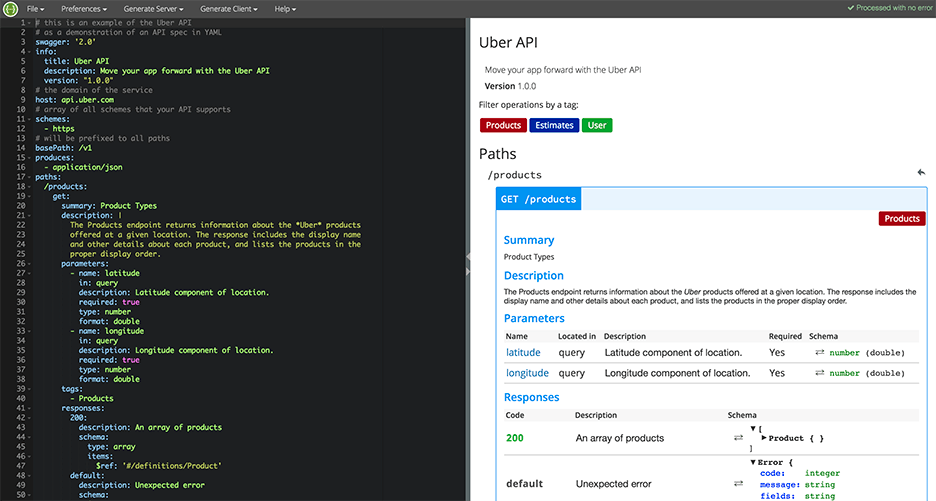
    Swagger Editor

    This plan needs to be transparent to everyone working on the project. In fact, it’s even better if each project participant can add and describe scenarios. Tools such as TestLink and Atlassian do just that. Then, when the code is ready, developers can go over the list and see everything is covered.

    We will need to stick to this schedule later on, especially when new demands unrelated to the feature come in, such as fixing bugs. Sticking to this plan is the best way to distinguish the wheat from the chaff of the development process.

    Start writing automation ASAP

    After planning, we want everyone to start working, and not only the backend. To do that, the backend can prepare mocks, either through outsourcing services such as JSON servers, which show inputs and outputs, or by writing dummy code.

    I mentioned earlier that we used Swagger to write APIs. We also used it to generate a server in NodeJS/Python, like this:

    Generating a JSON Server through Swagger

    From this moment on, frontend can begin writing and building screens and QA can start writing API automated testing, by using tools suh as JMeter. At this point, frontend and QA have the response codes and response bodies; they know which features to put where; and which APIs they need and how to use them.

    QA also know which data they’re missing, such as field names and field data. Sure, the backend code isn’t ready yet and all of the automated exams will return “red” instead of “green,” but the main issue is making sure everyone is as prepared as possible.

    This includes load and performance testing. You can use open-source tools such as JMeter, which is enhanced by CA BlazeMeter. By uploading our test script into, configuring the number of virtual users and ramp-up time, determining geo-locations to test from and analyzing KPIs to determine trends and the health of our system, we can ensure our product is delivered to our customers without crashing.

    This is also true about sending code to QA: Developers should test their code themselves and ensure that when they commit their code, it works 99.9 percent of the time.

    By starting automation as soon as possible, you can minimize future bottlenecks in the development process.

    Ensure the team communicates and works together

    Like I said before, teamwork is the most basic requirement when creating a new feature. This is because new questions arise during development and because requirements change. Therefore, everyone in the team needs to be in sync all the time, from the product manager and the designer to the developers and QA.

    Open communication lines are crucial because everyone is working on the same product at the same time, but each developer or QA should be working on a different part of the product and on different functionalities. Communication ensures each person’s work is compatible with the rest of the team’s work. This saves time, prevents frustration and redundancy and ensures maximum professionalism.

    To make sure everyone knew what was happening, we used Slack and opened a dedicated channel for the creation of this feature. We also had daily (short!) standups where we discussed what we have and what is missing.
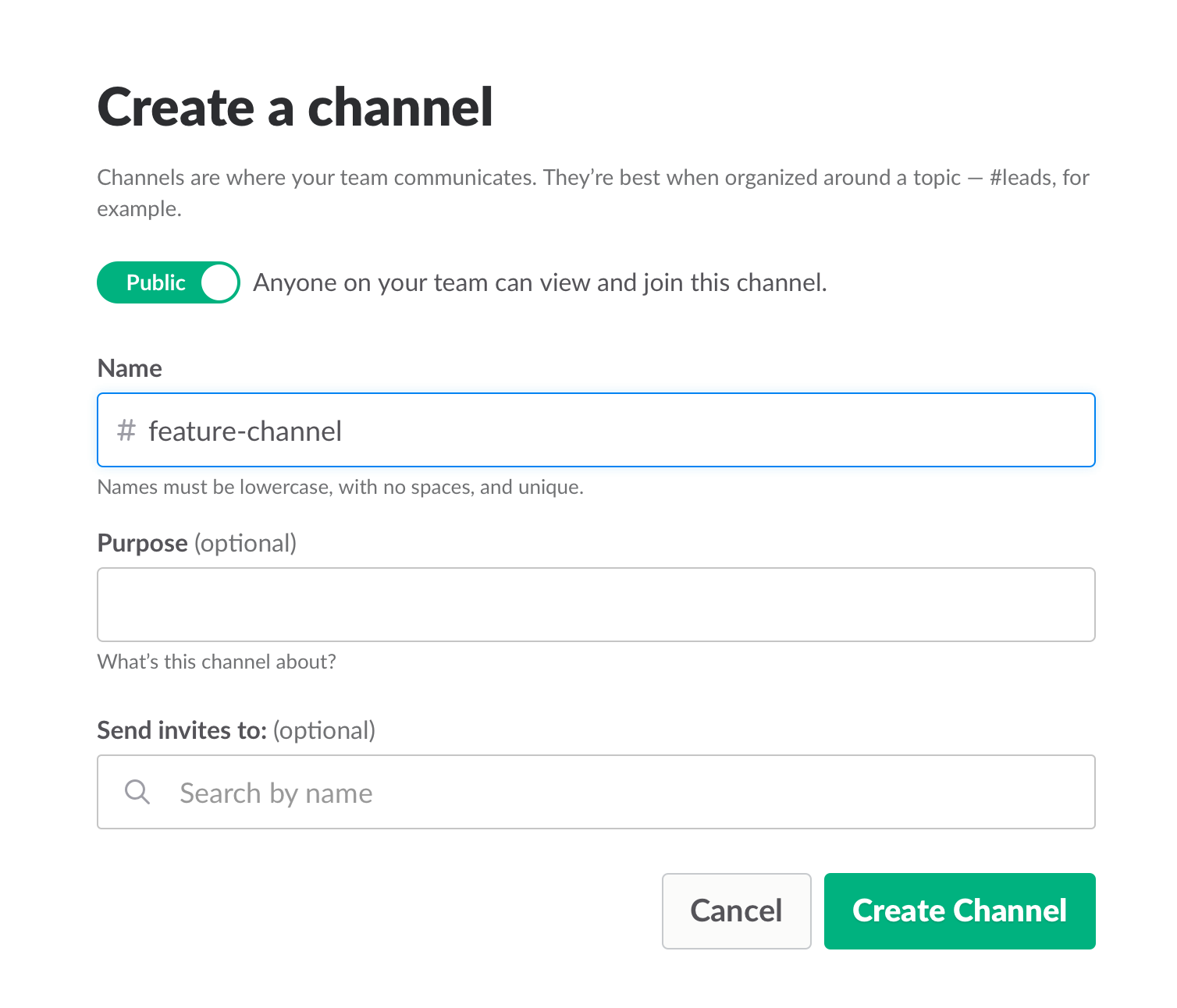
    Opening a Slack channel

    Communication also includes team and assignment management. JIRA, our primary issue tracking tool, offers Kanban-style, Scrum and fully customizable boards, which show the progress of each development task, including the developer assigned to it, and his or her exact status or phase.

    This helps you understand what other people are working on, and just as importantly, where people are stuck. If you can, get everyone to work in an open space and put a large screen in the middle of it. This lets you stay in sync at all times.

    We used JIRA to open and manage bugs as well. This was helpful when multiple QAs found the same bug. It’s important to carefully choose which tickets are opened and put them under one epic, so everyone stays focused.
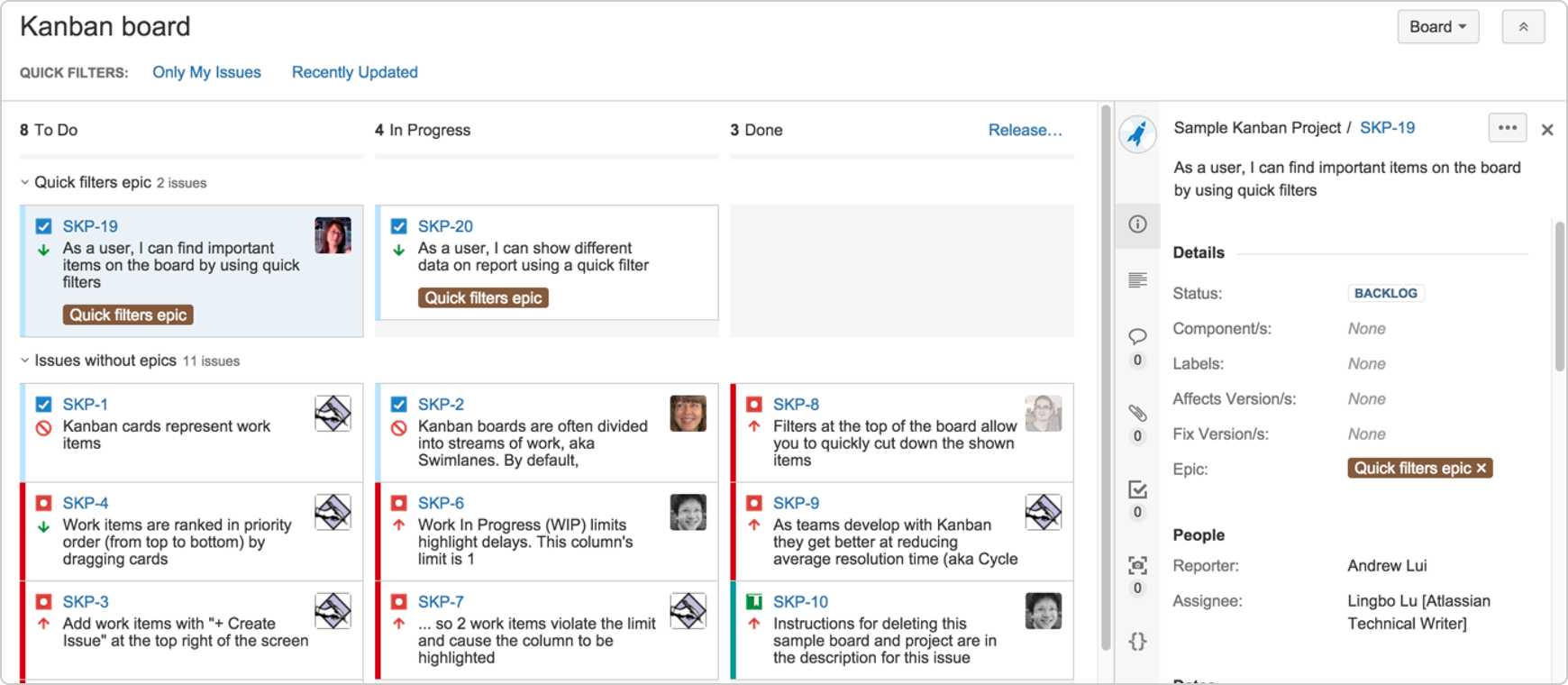
     

    JIRA Dashboard

    Another important aspect of communication is ensuring everyone uses the same terminology, as sometimes people might use the same term to describe different things or different terms to describe the same things. To prevent mixups that could waste your time, make sure everyone is on the same page. For example, do you say “system admin” or “<name (ex. BlazeMeter)> admin”?

    Work on the same development environments

    It’s important that everyone works on identical development environments and even on the same version of the tools and libraries. Otherwise, it could cause an (in)compatibility mess, including a lot of unnecessary back and forth and even might cause bugs to pop up. This environment needs to be as similar as possible to production, but only on a smaller scale.

    Conclusion

    Now look at the feature that came out of all that work here. I’m so grateful that I had the opportunity to work on it with an awesome team.

    I hope these best practices help you the next time you develop a new feature. Don’t forget to keep going agile after development and delivery by running tests in a continuous environment such as Jenkins for every commit.

    CA BlazeMeter works with Jenkins, ensuring you can load test in the cloud and analyze your data while shifting left. You can also use different APM tools, such as New Relic, AppDynamics and CA APM to alert you about errors before QA, which saves time.

    — Dor Atias

  • DevOps Chat: Nathen Harvey, Chef

    DevOps Chat: Nathen Harvey, Chef

    I recently had the pleasure of catching up with Nathen Harvey of Chef. And I do mean catch up. As VP of community development, Nathen keeps up an amazing pace of visiting Chef communities around the world. In this role who better to understand what DevOps practitioners are seeing? Nathen and I spoke about several things including Chef’s security and compliance capabilities.  Below is the streaming audio of our conversation and below that is a transcript of our discussion to follow along.

    Enjoy!

    Alan Shimel:                Hi. This is Alan Shimel for another DevOps Chat here on devopsy.kinsta.cloud. Today’s guest is Nathen Harvey, VP of Community Development at Chef. Hi, Nathen. How are you?

    Nathen Harvey:           Great, Alan. How are you doing today?

    Alan Shimel:                Good. Nathen, I’m going to bet that most of our audience already knows who Nathen Harvey is and what your role is at Chef, but maybe for the few who are unfamiliar, why don’t you give our audience a little bit about what it is you do as a VP of Community Development at Chef?

    Nathen Harvey:           Yeah. I get asked that question a lot, Alan, and I’ll tell you that the real definition is this. There are two parts to it. The first being VP of Community Development means that none of my code runs in production and that makes the world a much safer place, if we’re being honest.

    Alan Shimel:                Okay.

    Nathen Harvey:           The second thing is before I joined Chef I did actually have code that ran in production. I actually managed a bunch of production infrastructure. So when I moved from an operations role into a community management role, the thing I like to say about that is I put down the pager and I picked up the bar tab. Oddly though, I’m up at 3:00 AM either way.

    Alan Shimel:                Yeah. Well, I think that’s just part of today’s work environment, where everyone is up it seems at 3:00 AM, depending where you are in the world.

    Nathen Harvey:           But joking aside, it’s really about going out and meeting with our community and helping fuel the love of Chef, helping folks in companies large and small get better at automation, get better at dev-ops, get better at great software development and infrastructure practices.

    Alan Shimel:                Yeah. And, Nathen, you’re not kidding about seeing people the world over, too, as part of your role, because I follow you on Twitter, I follow where Nathen is speaking, and whether it be a local meet-up group or a Chef users’ group or a conference or customers, you literally are traveling the world constantly.

    Nathen Harvey:           Yes indeed.

    Alan Shimel:                Yes, preaching the Chef message. Nathen, I wanted to focus our talk a little bit today around one of my favorite subjects, security, infosec, whatever you want to call it. Chef has become one of the leaders and has been for some time – one of the leaders in security within the dev-ops movement, if you will.

    I had the pleasure of becoming friends with Justin Arbuckle a year, year and a half ago. Justin was out preaching – what was it – compliance at Velocity or something? I may be mistaken.

    Nathen Harvey:           That’s right, compliance at Velocity. You bet.

    Alan Shimel:                You know, for a long time and it resonated with me. Then of course I think Chef made an acquisition, a European company who sort of had a compliance vulnerability scanning for code.

    Nathen Harvey:           Yes.

    Alan Shimel:                And now you guys have really kind of laid down the gauntlet on this and really put the pedal to the metal in talking about why it’s important to do this and why it’s important to do it earlier. I don’t want to steal your thunder. Can you give our audience a little bit of your opinion on why it’s important and what should be done?

    Nathen Harvey:           Yeah, sure. Look, Alan, in a traditional way of developing our software we all fall under some sort of regulatory burdens. We all have auditors or other security controls that we need to make sure are implemented within our production systems, and the traditional way of doing that, at one point in your development workflow you might introduce a security scan into the development workflow itself before you go to production, but usually that ends up just being a blocker for moving flow, moving change across your organization.

    So you’ll oftentimes pull that security scan out and then just start scanning your production systems. But for me, scanning the production system is kind of like the oil light on your dashboard. When it comes on, it’s too late. You have to have solved that before you get into the production environment.

    So at Chef, really we look at our roots with automation and our ability to fully customize and fully automate the buildup and the maintenance, configuration management of your infrastructure over time, your infrastructure and your applications. We say that we need to make sure that we’re always in compliance, but it’s also very important for us that we start to adopt more of the development workflow, more of the software engineering principles.

    One of those principles of course is that we should do test-driven development. Well, why not take those controls and those audit controls that you have to enforce and move those directly into the development workflow? You certainly see many cases where you’re doing, say, static code analysis during your continuous delivery pipeline or during your continuous integration. But what about moving that even further back and doing not only static analysis of your code, but also actually testing what does the running application actually look like? Is it exposing ports that it shouldn’t? Is your infrastructure configured properly? And can you do that on the developers’ workstations, move that -? We like to say you’re moving compliance to the left. If you think about your change flows from left to right, from your developer’s workstation all the way out to production, how do we get and start thinking not about how to scan the production environment better, but instead how to start making those controls into your developer’s workflow?

    Alan Shimel:                Yep. Nathen, as a security person that’s almost radical to me. I will tell you, having spoken to many security people about this, we actually put on a DevSecOps day, a Rugged DevOps day at the RSA conference last year in San Francisco and Justin spoke there. A lot of security people, this makes them very nervous, believe it or not, Nathen, because it’s not them doing the scan. We’re going to ask developers to scan their code on their workstation, while I’m not there to see it, right, or not there to make sure that the code is right?

    Nathen Harvey:           Right, right.

    Alan Shimel:                Go ahead. I’m sorry.

    Nathen Harvey:           Let’s look at that. In the past, and I understand where these security folks are coming from, but if we look at today’s enterprise and the way that software is built today, security folks want to be the ones that are doing all of the scans, that want to be the ones that are making all of those assessments. On the one hand that’s fine. They should absolutely be involved in those assessments. But, frankly, if it’s the security team only that’s responsible for that, it’s simply not going to get done. The security teams aren’t big enough; don’t have enough capacity to keep up with the rate of change. They’re going to become a blocker in the enterprise and that’s going to become a real problem.

    So it’s really that security professional’s goal or the way that they need to look at this is, first, automation makes their job much, much easier. Not only can we remediate things that are found much, much faster, but we also gain consistency and things like that.

    But if we can then partner with the development team, with the engineers that are building out those systems and get them to think of security as a first level concern and compliance as a first level concern and start being partners with us, like we’re partnering with them, we’re not abdicating our responsibility to them. Frankly, some of the scans that the security team is going to run in the production environment, they’re still going to run those, but what we’re going to find by giving developers better tools to run those scans sooner, to ensure compliance earlier in the process, that those scans are going to find fewer and fewer vulnerabilities, and those vulnerabilities that are found we’re going to be able to address and remediate much, much faster.

    Alan Shimel:                And I might add, Nathen, not only much, much faster, but much, much cheaper. I mean I’ve seen studies where it’s something like 10x to 100x cheaper to take care of a vulnerability or a compliance issue at that shifted left stage, where it’s still on the developer’s workstation rather than on some cloud instance. Right?

    Nathen Harvey:           Absolutely. That may feel radical, but it’s really just we’re going back to our roots. I mean we’ve known for decades that fixing a bug in the development process is much less expensive than fixing it after that bug has been released into your production environment. The same is true for a security control or a compliance control.

    Alan Shimel:                I agree. I agree with you. Nathen, I have another issue I wanted to touch on with you, and that is some people get hung up on the compliance, the C word, so compliance versus security. They’re not synonymous, right?

    Nathen Harvey:           They are not. They are not at all synonymous, no. I think that compliance – Alan, let’s think about this. You have a CEO at a company who has to sign off and agree to – have auditors come in and assess whether or not they are compliant. Frankly, when an auditor walks in the building, there are many, many organizations who say, “Our number one objective when the compliance person walks in, when the auditor walks in is to get them to sign off on our audit and leave as quickly as possible. I don’t want them meddling in my business. I want to get them out of here.”

    Alan Shimel:                Yep.

    Nathen Harvey:           So with that approach, what we really do is try to make sure that we can run compliant systems, and compliance is there so that we can assess whether or not we are secure, but security really needs to – it’s a different mindset than compliance. Compliance sometimes is the easier place to start. I want to make sure that my audits are passing. When I have audits that are passing, I can sleep at night knowing that my audits are going to pass. Then I can start to look broader at the system in terms of: am I actually building a secure system? But, frankly, security is the foundation and compliance is what sits on top of that.

    Alan Shimel:                Yes, absolutely. Nathen, the other thing I think that really has enabled – and maybe it’s a little bit of a chicken or an egg kind of issue – does this enable them or they have enabled the compliance issue? Developers are taking to heart the fact that security is everyone’s responsibility, and the fact of the matter is it starts with them. Right?

    Nathen Harvey:           Absolutely. Alan, we’ve seen similar things in the past. Look at QA teams, where developers have said, “You know what? We’re going to start doing test-driven development. We’re going to adopt some of those practices.” And the QA teams get nervous, “That’s my job.” The problem with having it be someone else’s job is you’re not going to do it. You’re not going to be concerned with it.

    So, really, just like our QA professionals are now partnering with the devs, the security professionals and compliance officers are now partnering with the development teams. Frankly, that’s what dev-ops is all about. It’s about this working together towards those common goals and getting there as quickly as we can.

    Alan Shimel:                Yeah, absolutely. And it’s good. It’s good on so many levels to have the security team integrated with the devs, to be working closely with both dev and ops, dev-ops, and making it happen because, frankly, that’s what attracted me to dev-ops to begin with, was the promise of being able to do that instead of being the appendage at the end of the Rube Goldberg kind of –

    Nathen Harvey:           Absolutely. Alan, what you’re really looking at there is we’re talking about a partnership. So there are some cultural or some workflow changes, some partnering that we have to do across the organization. The thing that helps enable that also is the tooling. The tooling definitely matters and the two, culture and tooling, are there to reinforce one another.

    So with Chef, we have a new open source language called InSpec and that’s the tooling that allows the developers to actually write these compliance controls, execute them locally. Frankly, it allows them to write them in a way that’s delightful, in a way that a developer understands, that a business analyst can look at those tasks and understand exactly what’s happening.

    Then with Chef compliance we also introduce those same compliance controls into our own scanner capability, where you can scan against your production environment, find vulnerabilities, go back into your automation code, remediate those, and watch that remediation happen across the entirety of your pipeline.

    Alan Shimel:                Fantastic. Nathen, as I had told you earlier, before we started recording, our time is limited, but for folks who maybe want to find out more about compliance scanning, more about Chef’s capabilities in this area, where can they go to get more?

    Nathen Harvey:           For sure the place that they can go is www.chef.io/compliance. Again, I just want to stress that the scanning capabilities are absolutely important, but really what we need to do is shift our mindset and think about: how do we start writing tests for those controls and do those early on in the process? Not that scanning should be an afterthought, but we really do need to focus on that beginning stages of our development process.

    Alan Shimel:                And automation, automating that is key. Nathen, we’re almost out of time here. Unfortunately, it always goes too quickly. But I wanted to ask you one last question, which we usually ask our guests here on DevOps Chat. That is one book, if you had to recommend one book to our listeners that they should read maybe over the summer or in the near future, what book would that be?

    Nathen Harvey:           I would recommend Lean Enterprise: How High Performance Organizations Innovate at Scale. It’s a book by Jez Humble, Joanne Molesky, and Barry O’Reilly.

    Alan Shimel:                It’s actually on my bookshelf. Cool. I love it when someone suggests a book I’ve read actually. Very cool, Nathen, and it is a great book. Jez’ Lean Enterprise book is great as of course is the Continuous Delivery book.

    Anyway, Nathen, we’re about out of time here. So I wanted to thank you for being our guest on DevOps Chat. Continued success with your globetrotting VP of Community Development role at Chef, and continued success to Chef in general there. It’s one of our favorite companies in dev-ops and we love what they’re doing.

    Nathen Harvey:           All right.

    Alan Shimel:                And maybe we’ll get you back on again soon.

    Nathen Harvey:           Yeah, that sounds great. Thanks so much, Alan.

    Alan Shimel:    Okay. This is Alan Shimel with Nathen Harvey, VP Community Development of Chef for DevOps Chat. Thanks and we’ll see you next time.