Tag: cloud costs

  • FinOps 101: Demystifying Cloud Financial Operations for DevOps

    FinOps 101: Demystifying Cloud Financial Operations for DevOps

    In an ideal world, all organizations would have a dedicated FinOps team—or at least a single specialist who could work to ensure that the cloud was operating in a financially savvy way. Of course, in reality, most organizations are strapped for skills and are operating lean teams where responsibilities are spread thickly across employees. In that case, DevOps professionals are likely to get left holding the FinOps bag and tasked with implementing FinOps best practices into their everyday cloud operations. If that sounds familiar—here’s your guide to getting started.

    The Cultural Shift of Considering FinOps

    In many ways, it’s not that great a leap for DevOps to start thinking about FinOps. After all, the underlying goals of both strategies are to optimize, improve and streamline operations. The difference is that DevOps is focused on software development and technical skills, while FinOps looks at the financial costs of operating on the cloud.

    The biggest challenge is that sometimes these goals may be at odds with each other. If DevOps teams are tasked with getting new software releases and fixes out of the gate as quickly as possible, that can often come at the expense of the most cost-effective solution. Think, for example, about AWS on-demand instances in the cloud. It’s arguably more FinOps-friendly to look for reserved instances, savings plans and committed use discounts and to put into place right-sizing opportunities where possible. However, with the pressure on DevOps teams to keep up an agile release cycle and offer quick fixes, anything that stands in the way of their flexibility and freedom can feel worth the price tag.

    As a result, it can be a true paradigm shift for engineers and DevOps teams to start thinking about FinOps first, especially if they already feel that their plate is full. Here are some best practices that can help to smooth over any bumps in the road.

    Make Engineers Accountable

    Don’t simply add new stakeholders who are responsible for cost management and FinOps, as they will quickly become adversaries of your engineers. Instead, ensure that your technical teams and developers realize that they are responsible for their cloud costs. They need to know what they are using and they need to codify and document how they are looking to use their budget more effectively.

    Of course, the business has a role in this too, showing engineers best practices for FinOps, such as shutting down idle resources, right-sizing instances or making smart architecture decisions. 

    Explain That FinOps Isn’t a Cost-Cutting Initiative

    If DevOps teams have been given the equivalent of a blank check thus far, it can be a tough sell to start tightening the purse strings. Explain to DevOps teams that you aren’t looking to cut their budget. In fact, you might even be increasing it!

    FinOps is all about smarter financial operations, so if engineers can show that they can save money in one direction, they can channel that to new features, technologies and tools that make them happy. Giving DevOps teams control over FinOps decisions offers more autonomy and control—and that’s a great thing.

    Ease the Mental Load With Low-Hanging Fruit

    Once DevOps teams get much-needed visibility over their cloud usage and realize that they are gaining responsibility and autonomy over their behavior, you want to guide them to recognize where they can make changes. Challenge all your DevOps stakeholders with the same KPIs, and see who can come up with innovative ways to incorporate cost savings into business-as-usual. Some KPIs that could be a great start include:

    • Coverage: Use of reserved instances, savings plans, spot instances or committed use discounts.
    • Right-sizing: The opportunity value of downsizing or terminating instances that are idle or underutilized.
    • Orphan/idle status: Tracking the percentage of orphaned EBS volumes or snapshots; you can drill down into a specific time period, such as over one month.
    • Forecast metrics: Consider using the variance between a forecasted bill and the actual costs and aim to reduce this as much as possible.
    • Incorrect assignation: This would highlight oversized or incorrect instance types, S3 or EBS storage on the wrong tier, unattached elastic IPs or poorly tagged/ untagged resources.
    • Peak hours: What percentage of development resources are running during peak hours or running when they could be shut down; for example, on weekends?

    Automation Incorporates FinOps Best Practices in a Hands-Off Way

    If this all sounds like a full-time job in and of itself—you’re not wrong. You’d be forgiven for wondering when DevOps teams are meant to actually develop and build! To keep engineers and technical teams productive, make sure that you’re offering the right tools and technology to lighten the load where possible, especially where automation and AI can do a better job than a room full of DevOps or FinOps experts.

    One example is automating the purchasing and selling of reserved instances in real-time, so that you’re never left buying on demand. Another is automating the removal or rightsizing of idle or underutilized resources, respectively. When your DevOps teams see that you’re offering the technology to make FinOps simple, they are much more likely to do their part elsewhere.

    DevOps and FinOps

    In recent years, security teams have championed the idea of DevOps ‘shifting left’ on security best practices to get security included in the process of agile software development during the build stages.

    Well, you heard it here first: It’s time for a similar shift for finance and cost optimization.

    Just as engineers can no longer get away with ignoring security in the way that they work, financial optimization needs to be front and center of DevOps teams’ day jobs. For this to work and for DevOps to incorporate FinOps goals seamlessly, businesses need to champion visibility for cloud usage, a culture of cost-optimization and a strong foundation of automation that bakes best practices into everyday work.

  • How to Avoid the Most Common Online Service Costs 

    How to Avoid the Most Common Online Service Costs 

    Throughout the last year and a half, most organizations were forced to either create or develop their online service offerings at a rapid pace. Companies had to find alternate solutions to continue day-to-day operations in the transition to remote-first. Low development costs and the wide range of use cases have been primary factors in the continued rise of online services even as enterprises look to move back to the office. 

    Although the initial development costs are affordable to most global organizations, maintaining those workloads—such as internal self-service or software-as-a-service (SaaS) platforms—is a different story. Many enterprises fall victim to paying unnecessary expenses to keep their online services operating. When calculating the costs of these services, organizations often leave the costs of managing hardware out. In the event they are included, the cost breakdown is not typically accurate. 

    When transitioning to or enhancing online services, calculating the correct costs can be overwhelming. To avoid overpaying, companies need to properly assess the operational costs of their online services. Here’s how.

    Evaluate the Infrastructure

    First, determine what type of infrastructure fits best for the online offering or service. A popular trend is the “always-on” model, and with good reason. The success of online streaming services and high-availability digital workspaces encouraged enterprises to adopt this method. 

    However, it is important to note that these companies are successful with this type of business model because it fits best with their overall product and services offerings. Many organizations cannot thrive in an always-on style because they simply do not need to be always-on. After all, not every service needs to be available 24 hours a day. 

    If the online service is only needed during typical ‘office hours’ but can remain on standby after closing, the organization still needs to pay for those idle hours. These costs add up and can make for an unpleasant surprise when they show up on the monthly bill. Determine what the cost of using an always-on service will be for the organization before committing to it and weigh if it is necessary. Many times, an always-on service is not needed, and an alternate approach will do just fine. 

    Pay for What you Need

    The more users on a particular platform, the more data is used. Estimating the accurate amount of data use is a vital step in being cost-efficient. In many cases, organizations pay more than the necessary amount because of inaccurate calculations about how much data will be used. It is vital to assess data use regularly to make sure that customers have what they need without the business breaking the bank. 

    Saving money does not have to equal a poor quality of service. When paying for online services with an infrastructure-as-a-service (IaaS) provider, a business is paying for more than just a place to host its platform. IaaS providers also provide varying levels of support, allowing for organizations to take advantage of additional services at no extra cost. By partnering with an IaaS provider, an organization can experience speed, reliability and security without blowing the budget. 

    Assess if the Cloud is the Best Fit

    A common misconception is that online services are fully maintained in the cloud; however, that is not always the case. Building and testing services may require some operations take place in an on-premises location. An organization needs to evaluate whether on-premises is more cost-effective than developing its service in the cloud. Along with the potential for cost-effectiveness, on-premises solutions can sometimes prove to be more secure. Choosing on-premises or even a hybrid model for highly sensitive data may provide tighter security control. 

    Maintaining a service in the cloud can potentially transform an online business by offering flexible, scalable and cost-effective solutions. A scalable infrastructure becomes an imperative for a growing business, and with the cloud, services and consumption can grow as the business does. However, organizations need to consider their business requirements and see if their deployment decisions match the requirements for cloud or on-premises. 

    Evaluate your Total Cost

    Providers often give a basic estimate of total expenses, but it is always helpful to ask for your total cost of ownership. Looking at the total cost of ownership ensures clarity between the organization and the service provider. Overall, the most crucial best practice for avoiding unnecessary costs is to be aware of how your organization is spending money. 

    By assessing the above factors, organizations can cut unnecessary online service costs by only paying for what they need. An organization that is well-informed about its needs and use of resources is in a better position to succeed and scale their offerings—without breaking the bank. 

  • Avoiding Budget Overruns During Cloud Migration

    Avoiding Budget Overruns During Cloud Migration

    Many organizations have already started their migrations to the cloud, or soon plan to. It makes sense: The cloud is an attractive option for multiple reasons, including its potential for cost savings, scalability and support of continuous application development.

    However, benefits aside, it can be very easy for enterprises to lose financial control of a cloud migration. The potential for costly mistakes when shifting to the cloud is significant, and organizations often end up getting hit with surprising bills that ultimately stop them in their tracks. In fact, in a 2020 survey, 94% of participants claim that it is a challenge for them to take full advantage of public cloud resources, with 40% citing the need to control cloud costs as their biggest obstacle.

    These financial mistakes are typically made due to the pay-per-use model of cloud services and the growing cloud skills gap. Too often, IT team members are forced to work in cloud environments they are not proficient in, and as new features are released every week, it’s almost impossible for these individuals to keep up. One recent study claimed that 90% of enterprises found that their cloud skills gap doubled over a three-year period.

    The Two Different Types of Cloud Migrations

    There are two types of cloud migrations that typically occur, a lift and shift, or a replatform/rearchitecture migration. The lift and shift method is fast and relatively easy, but it doesn’t enable organizations to truly optimize their cloud usage. The rearchitecture method is the most popular as it gives an organization the opportunity to fix any outstanding issues by harnessing the benefits of cloud-native technologies and services.

    However, once a rearchitecting migration begins, organizations often find it takes significantly more time, effort and resources to complete than they originally thought. This can become a real challenge, especially when facing critical deadlines or experiencing major events like the COVID-19 pandemic or the wild weather events experienced around the globe.

    Understanding and Assessing Performance

    For both types of cloud migrations, understanding and assessing performance and underlying architecture is an ongoing task, as cloud providers are always releasing new or improved services or lowering prices. To make sure they’re achieving the best performance and building a resilient architecture, application developers and IT teams must always be looking for ways to improve their applications. Within the cloud, this is typically focused on four key areas: Networking, computing, storage and application architecture.

    From a network perspective, understanding where data is being used and where data is being accessed is critical and can help organizations cut costs exponentially. For example, cloud providers often have costly data ingress and egress charges, so assessing how best to access and use data when necessary can help a company navigate those charges.

    Regarding computing, there are multiple resources that can help manage system load, make tweaks to computing infrastructure and find performance and cost benefits. For instance, leveraging the data and metrics from native cloud reporting tools can help organizations understand and predict demand, and taking advantage of services like auto-scaling enables them to scale up or down appropriately depending on the changes in application use and demand.

    On the storage front, cloud providers offer a number of ways to save money and boost performance. From the release of GP3 volumes to tiered long-term storage options based on the frequency of access, storage is an easy way to find cloud savings opportunities. Additionally, cloud providers will usually make recommendations and set up tiering policies to help move data automatically into colder and deeper storage.

    As cloud providers continue adding new services, looking at your application architecture is essential to innovation and cost savings—especially when including labor and effort—and truly achieving the promise of the cloud.

    Solving Common Costly Mistakes

    While there are numerous examples of common financial mistakes companies make when managing cloud instances, lack of visibility and understanding are the leading pain points for the developers who stand up and maintain their organization’s architecture. With the demand for cloud so high and with their attention directed elsewhere, developers and engineers often take the mentality of “If it isn’t broke, don’t fix it.” This hampers the company’s ability to assess and optimize their cloud operations. They don’t have time to consistently review their applications for ways to save money or even know how much their decisions cost.

    This ubiquitous issue can be solved by bringing greater visibility into the cloud migration and management process and aligning real-time finances directly with established corporate budgets. In addition, organizations struggling with the cloud services’ pay-per-use model should take the necessary steps—whether internally or with a third-party vendor—to ensure cloud resource and service use is being effectively monitored. This makes it easier for developers to understand where and how their actions affect the financial posture of the organization before their boss comes knocking on the door.

    If enterprises provide the resources necessary for IT teams to become more knowledgeable about how their applications are being used within the cloud and address the cloud skills gap in their workforce, they will be able to prevent cost overruns, experience cost savings and take back control of their budgets. This can take a variety of forms, but enterprises need to establish continual training programs to ensure team members are up-to-date on the latest cloud features and services, as well as leverage tools and automation to reduce manual intervention. Providing this critical visibility throughout a cloud migration can often mean the difference between a successful, on-budget migration and one that is stalled and costly.

  • Harness Updates Cloud Cost Control Tool for DevOps Teams

    Harness Updates Cloud Cost Control Tool for DevOps Teams

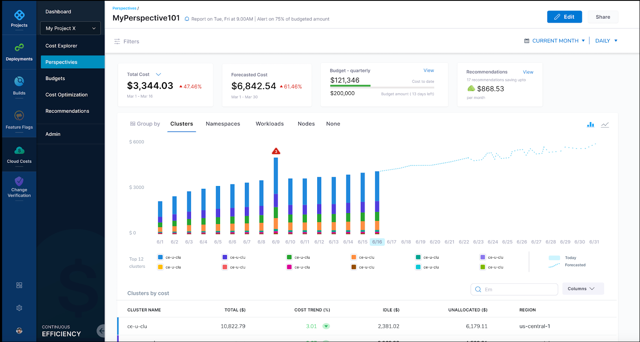
    Harness today announced that it has updated its cloud cost management (CCM) module for its namesake continuous integration/continuous delivery (CI/CD) platform to add support for Kubernetes at the node level in addition to providing business intelligence tools to analyze overall cloud costs.

    Harish Doddala, senior director of product management for Harness, said the update surfaces more granular insights into cloud costs that DevOps teams are incurring because cloud resources are being wasted. The latest version of CCM enables DevOps teams to create their own customized views of those resources.

    As the overall economy continues to recover from the COVID-19 pandemic, more organizations are looking to exercise greater control over IT costs. In the immediate aftermath of the pandemic, many DevOps teams consumed cloud resources without much regard to cost to enable organizations to advance various digital business transformation initiatives. Now, finance teams are requiring DevOps teams to account for those cloud costs.

    The goal is not only to reduce costs whenever possible—by, for example, quickly identifying a sudden spike in cloud resources consumption—but to accurately forecast budget costs on a monthly basis so that both IT and finance teams can collaboratively track spending. The typical finance team is just as concerned about accurately predicting costs as they are the total amount spent.

    Harness Cloud Cost

    Ultimately, Doddala says Harness’ CCM enables organizations to better assess which software development projects to prioritize based on the cloud resources allocated. It’s not uncommon for organizations to suddenly have to shift software development priorities as business conditions change and evolve. A project that may be a top priority today can easily be downgraded because, for example, a rival has been able to launch some new capability that an organization now needs to quickly match.

    DevOps teams, unfortunately, don’t always pay as much attention to infrastructure costs. Harness’ CCM helps reduce those costs by automatically stopping idle resources running on Amazon Web Services (AWS), Microsoft Azure, Google Cloud Platform (GCP) or any Kubernetes cluster, said Doddala.

    There are, of course, any number of existing tools that cloud service providers make available to enable IT teams to reduce costs. CCM, however, provides that capability within the context of a DevOps platform that can span multiple cloud computing environments, noted Doddala. DevOps teams, for example, can create and enforce cost policies for cloud infrastructure into a CI/CD pipeline and prevent an organization from being surprised by a bill from their cloud service provider at the end of the month.

    It’s not clear the degree to which cost control modules will influence the selection of one CI/CD platform over another. However, it’s apparent the days when organizations consumed cloud resources with little regard to cost are ending. In fact, there may soon be more cost controls imposed on software development projects than there were prior to the pandemic. The challenge, of course, is finding a way to automate the implementation of those controls and minimize the impact on software development velocity.

  • Are You Wasting Money in the Cloud?

    Are You Wasting Money in the Cloud?

    I’m not the first person to point out the issues with Andreessen Horowitz’s blog post outlining why Dropbox is repatriating from the public cloud to data centers and saving an enormous amount of money. But while others have brought up valid points about how Dropbox is not representative of most companies and that the value in public cloud is in speed, not cost savings, I wanted to address a different angle: How do you, as an IT leader, know if or when you should move your cloud workloads back to the data center? How do you evaluate the ROI on the cloud in general?

    I want to talk through some of the factors that companies should be aware of when they’re thinking about whether or not it would be appropriate to repatriate a workload—and perhaps give some IT leaders peace of mind that staying in the cloud is OK.

    How Mature is your App?

    The earlier you are in the application’s life cycle, the more critical access to cloud infrastructure is. Early in the application’s life cycle, you need to get things out the door and test them with real people. You don’t, at this point, actually know how users will interact with your application or how the application will perform under the stresses of actual use. You also don’t know how much it will cost to run.

    At the beginning, quick iteration is also very important. There will undoubtedly be things in the initial release that go wrong—you need a way to quickly adjust course and improve.

    As the application matures, everything slows down. Your information about the application accumulates, but quick iteration becomes increasingly less important. It’s not until the workload is fairly mature that you can begin to understand how much it costs to run in the cloud and can compare that with how much it would cost to run on-premises.

    At the early life cycle stages, using a public cloud provider is extremely valuable because it allows you to get the application into users’ hands quickly and to iterate fast. As the application matures and changes are made less frequently, moving it back to a data center could make sense—at least in some cases.

    Internal Skill Sets

    Running an application in the cloud involves a different skill set than managing a data center. If you don’t have the internal skills needed to staff your data center, that can add not just cost, but will also increase the risk that something goes wrong.

    If you’re considering moving from cloud to a data center, taking a critical look at your internal skill sets is essential. Without a skilled team to manage the data center, you’re better off staying in the cloud even if it’s expensive. And yes, you can hire the skill sets you need, but that requires both time and money.

    Criticality

    If you have a workload that you never want to go down—because it is mission-critical, because it’s revenue-producing—you should probably keep it in the cloud. The cloud is generally more reliable than individual data centers, and the repatriation itself could easily cause disruptions.

    In addition, the cost of running mission-critical applications is less important simply because they are so essential to the business. If the application is burning money but is also your only source of revenue—unless it’s burning more money than it earns, it probably makes sense to keep things as-is.

    Looking at the Exit

    Of course, depending on your application’s architecture, repatriating it from the cloud to a data center could be either impossible or prohibitively expensive. If the application relies on the cloud provider’s proprietary services—databases, for example, or Lambda functions—moving it off of the cloud is going to be extremely hard. Even if it turns out that moving from the cloud to the data center is possible, it could easily cost so much that it wipes out any potential savings from repatriation.

    This isn’t to say that you should never think about leaving the cloud—in fact, if you think moving cloud workloads back on-premises is something you’d like to do at some point, you should consider it during the architecture phase. The decisions you make at that point will determine how challenging it would be to move off the cloud in the future—or even to change clouds if you want to. Using Lambda is going to make moving off the cloud very difficult, for example, whereas using containers will make it comparatively easier.

    When we talk about the costs of public clouds versus data centers, we’re trying to compare things that are fundamentally different. First of all, public cloud costs are notoriously difficult to understand, whereas understanding the costs for on-premises is relatively easy. Sure, there is overhead—building, staff members, etc — but it’s not that different from calculating any other cost in a business and an accountant could make sense of it in 10 minutes with Excel. Good luck doing that with AWS.

    That’s the core problem with cloud costs—humans have a hard time trusting what they don’t understand. But cloud has never been about reducing costs. And regardless, the cheapest option is not always the best option.

  • Stop Hiding the Cloud From Your Developers

    Stop Hiding the Cloud From Your Developers

    If you say a person or organization “goes to great lengths” to achieve something, it means they try very hard and perhaps do extreme things to accomplish their goal. One example I’ve seen is that of more traditional companies “going to great lengths” to “hide” the cloud from their pool of potential technical consumers doing work like development. Instead of saying, “Here it is,” they block or restrict users from direct consumption. Under this model, developers don’t directly login to Azure or AWS, they go to the “internal corporate portal” and fill out a request form for the resources they want and submit it. Then, someone eventually processes the request and creates what is needed.

    In extreme cases, organizations create “cloud teams” and staff those groups with people who build cloud resources on behalf of downstream technical consumers, like developers. Potential consumers must submit a request with a detailed design document specifying everything they want. Then, the cloud team schedules the project and delivers it at a future point. The whole process mimics the historical waterfall approach to software development or systems implementation.

    Why do things this way? It always seems to come down to four distinct drivers:

    Costs: “If we give open access, we will end up with a huge bill!”
    Compliance: “Everything built must meet our security standards.”
    Complexity: “Most users will waste time trying to figure it out.”
    Control: “Our group has always coordinated access to resources.”

    In traditional companies, the reasons for this restricted access always seem to be some variation of those on the list. And when you rebut with something like “Do you think Facebook, Twilio, Netflix, etc. restrict their developers’ cloud access?” the answer is usually something like, “Well, those are elite tech companies; we’ve always done it the way we do it now …”

    In most cases, there is no singular argument you can make to change someone’s mind, or expand the range of possibilities. But you can offer facts. So, let’s take on their arguments one at a time and see if we can rebut them.

    Costs

    Argument: “If we open up the cloud to everyone, then all the developers will endlessly create virtual machines (VMs) and associated resources and services, and we will end up with a huge bill.”

    Rebuttal: There are certainly examples of this; do a search for some variation of “unexpected cloud costs,” and they’ll pop up, especially from a few years ago when cloud adoption was just taking off. But what about today? What can be done to control costs? Even though there are lots of tips and ideas on how to control cloud costs, I’ll offer one simple possibility that directly applies to developers and development groups that is not often mentioned in many articles: implement a cloud resource quota per developer or dev group.

    In AWS, for example, you can allocate via IAM; with Azure, you can use resource groups. The upshot is that there is a way to restrict the number and amount of resources that a single user can consume. So, whether you have 10 or 1,000 developers, you can use these built-in mechanisms to limit and then estimate what your consumption will be. If I have 100 developers and I put a limit on the number of VMs, the number of GB of RAM they can allocate and the amount of storage each developer can consume, then haven’t I just created a “cap” on consumption? The quota concept gives you a path to a “predictable” bill every month.

    Compliance

    Argument: “If we open up access to everyone, they’ll create VMs that don’t adhere to all our internal security standards.”

    Rebuttal: Aren’t developers just looking for a VM (or VMs) to do dev work? We aren’t talking about building production-hardened VMs to host applications. We are talking about giving developers the proper sandbox in which to do their work. So, from this perspective, requiring that developers only create VMs that adhere to strict compliance standards reserved for production servers doesn’t make sense.

    For example, maybe one of your compliance standards is that all production servers have a monitoring agent installed on them. Fine, that makes sense; what about dev/test? In dev/test, I might be spinning up a VM or a container that only exists for a short time, maybe even less than an hour while some tests are running. Does it make sense to require that a monitoring agent be installed on a VM that will only have a one-hour shelf life? Just throwing out the term “compliance” as a catch-all is not a real solid objection. Perhaps for dev/test, there are minimum standards you would want to follow regarding OS levels, patches, etc., but the VM(s) you use in dev/test do(es)n’t necessarily need to have all the additional security requirements reserved for production servers.

    The other part of this objection we hinted at earlier is that you have to transition to “cloud thinking.” Resources that exist for the next 10 minutes in the cloud could intentionally be gone shortly after that. In the cloud, you can quickly create and destroy VMs, or entire environments of VMs. That is what makes the cloud a game-changer versus traditional on-premises methods. You can’t apply the same on-premises considerations to the cloud one-to-one. You need to come up with a new thinking model that takes into account what it means to use the cloud versus how you did it before on-premises.

    Complexity

    Argument: “It’s too hard to figure out some of these cloud architectures, and developers will waste time trying to do so versus having a central team do all the work correctly the first time.”

    Rebuttal: Without the commitment to being a “learning organization,” there can be no DevOps, no transition/migration to the cloud, no digital transformation. Check out item number six on this list of 7 Ways to Make Developers Happy. (Spoiler alert: it’s ‘promote continuous learning.’)

    If “complexity of learning” is one reason why you restrict your teams’ access to the cloud, then you are missing the point of what it means to be a technical expert. Developers partially define themselves by the depth and the range of knowledge that they have accumulated, so continuous learning is a significant component of keeping developers “happy.” Not to mention that happy developers are more engaged and tend to stick around longer at companies that keep them that way; you’re risking losing the technical talent you do have, which has a host of detriments to your organization.

    Control

    Argument: “If developers are creating their own servers, what does our team do?”

    Rebuttal: This one is the toughest of all to rebut. Many organizations have one or more infrastructure teams who are responsible for creating servers and resources and giving access to downstream consumers. These groups control the resources. Now, along comes the cloud where everything can be self-service. And the natural reaction is, “If developers are creating on their own, what do we do?”

    For many traditional companies making the transition to the cloud, there will still be many opportunities for participation. Instead of “architect,” now we need “cloud architect.” Instead of “engineer,” now we need “cloud engineer.” Also, what other higher-value work could you be doing for the company if you weren’t spending all your time provisioning and maintaining on-premises servers? Do you think all of the existing on-premises applications are going to go away overnight? Will your company become “cloud-native” in the next six months? What about all of the AIX, IBMi, Solaris and other legacy components that are in the data center? There will always be plenty of work for everyone to do. And it’s always an opportunity to learn some new skills.

    The reality is that giving developers direct access to the cloud (with controls) frees up many other corporate resources to work on things that are, strategically, more important. If your company is not cloud-native right now, then guess what? It won’t be for a long time. Maybe in the short term, you’ll be hybrid-cloud and then in the long term, cloud-native. Along the way, there will be opportunities for everyone to rethink how things get done and maybe learn something new along the way.

    If you are hiding the cloud from your internal customers, ask yourself, “Why?” Are the original reasons still relevant, or are they holdovers from a time long past? Maybe it is time to re-examine your original rationale for why developers don’t have direct access to the cloud. If the goal of your organization is to “service the customer,” “do more,” “move faster,” etc., then removing internal barriers to accessing the cloud is one way to make progress.

  • No-Nonsense Guide to Distributed Databases

    No-Nonsense Guide to Distributed Databases

    I got my first DBA job 15 years ago, and quite a few things have changed since then. The amount of data exploded, we saw the rise of NoSQL, and business logic moved away from being stored in relational databases to applications.

    To this day, the three pillars of reliability, scalability, and maintainability are the banes of a DBA’s existence. To spice things up, your monthly cloud bill for managed databases just made your CTO lose the will to live.

    So, now you have two extra things to worry about in addition to these three pillars: cost efficiency and vendor-agnosticism.

    In this article, I’ll (try to) run an open source, new-generation database, benchmark it and touch on some of the challenges of being cloud-neutral.

    TL;DR

    • Solving the SQL vs. NoSQL dilemma in the Kubernetes world
    • How to leverage a distributed SQL database in a multi-cloud world
    • Taming performance – single cloud versus multi-cloud
    • Running TPC-C as a transactional benchmark
    • Taming the costs – the question of egress costs

    New Packaging For a New Age

    Just five years ago, people were like, “Containerizing stateless microservices? Sure! No problem.”

    But when you actually containerize a database, your persistence layer is asking for trouble.

    Over time, containers grew on us. Now, it’s the default way of packaging and shipping software. Heck, even AWS Lambda caved and started running container images. Databases just couldn’t resist.

    Once a database is containerized – say, a PostgreSQL database – Kubernetes takes over dealing with some of the more painful aspects of reliability and maintainability (with the help of middleware-specific operators).

    Containers decouple data from the runtime, so upgrades and configuration are easier through infrastructure-as-code (YAML). Hardware failure and maintenance windows are covered by Kubernetes’ built-in capability to reschedule pending pods on surviving nodes. Full scheduled backups or point-in-time recovery are in the hands of the operator’s automation.

    But what about scalability?

    Kubernetes’ vertical pod autoscaler can adjust container resources, deleting and recreating pods with new resource settings. As a traditional relational database, PostgreSQL can have only one primary replica that writes data. This means that you’ll be facing a  short downtime while the new pod comes online. The majority of workloads are about five times oversized, so while sizing is painful, it’s better than no sizing at all (please, have mercy on your CTO’s budget).

    NoSQL has none of these limitations. Databases like Cassandra were built for scaling horizontally without downtime.

    Enter Distributed SQL

    What if we could blend Google Spanner’s ability to operate at distances with strong ACID consistency, Cassandra’s scaling and PostgreSQL compatibility?

    This is where YugabyteDB helps.

    YugabyteDB is an open source, relational, distributed SQL database management system. It was designed to handle large amounts of data across multiple availability zones and geographic regions, all the while delivering single-digit latency, high availability and no single point of failure.

    I hate when the new kid on the block brings their own syntax language because, you know, their case is so very special – just like everybody else’s.

    Yugabyte doesn’t do that. They have a wicked-smart storage layer (inspired by Google Spanner) that reuses the PostgreSQL query engine. This means no mental strain on the development team – you get to use the time-tested, marketable and incredibly powerful PostgreSQL language-level features that many are already comfortable with.

    If Google Spanner is so inspiring, why is it not taking over the world of distributed SQL? Well, it’s available only as SaaS, and heavily depends on the specifics of Google Cloud hardware like atomic clocks (trueTime) and Google’s backbone network. If your private data center or favorite cloud provider is not GCP – well, no Spanner for you, my friend. Personally, I’d be hesitant to marry into the ultimate vendor lock-in. Yugabyte doesn’t have any dependencies and would happily run on any cloud, private data center, VM or bare metal – and if your coffee machine runs Docker containers, you can run Yugabyte there, as well.

    If Yugabyte is robust, scalable and easily maintainable, you have the top three pillars covered. But what about the other two pillars your CTO is nagging you about (cost efficiency and a vendor-agnostic approach)?

    How to Make Your Database Vendor-Agnostic

    Being vendor-agnostic means being able to switch between major cloud providers at any point without depending on prohibitively expensive services like DynamoDB. This approach also allows you to leverage inefficiencies in cloud pricing so you can look for new opportunities to reduce cost and dynamically shift resources between cloud providers online.

    This is something CAST AI can do.

    The CAST AI platform acts as a cloud abstraction and makes the whole multi-cloud, vendor-agnostic requirement quite trivial.

    Developers just interact with standard Kubernetes (no CRDs), and the complexity of several clouds is abstracted. A Kubernetes cluster in CAST AI can span across several cloud providers at the same time, bringing some unique cost optimization opportunities.

    What if spot/preemptible instance interruption wasn’t totally random anymore, but something you could actually predict? You could be proactive and—by operating in several compute bidding markets at the same time—reduce the risk of running out of capacity.

    Why not slash your monthly cloud bill radically by running some of the database containers on spot/preemptible nodes?

    Highly Available Stateful Application on Multi-Cloud

    Yugabyte on a multi-cloud CAST AI Kubernetes cluster is a robust design without a single point of failure.

    Active/Passive solutions are so ’90s—failovers cause brief downtime, and DBAs tend to leave the failover to be manually initiated due to occasional short-lived network blips. Active/Passive solutions constantly require testing and validation. Will your disaster recovery work on darker days? Because these tests cause downtime, nobody does them regularly.

    The best highly available solutions are active-active, don’t require user failover, and don’t rot if not tested regularly.

    CAST AI has a tutorial in place that takes you through every step of building the above solution in about 10 minutes, from scratch.

    Go ahead, open your cloud provider’s console and release your inner chaos monkey by killing Yugabyte, business app pods or whole Kubernetes nodes.

    CAST AI, Yugabyte, and Kubernetes were built with a core tenet that nothing is guaranteed; nothing should be shared. But keep in mind, consensus algorithms work when there’s still a majority left to vote N/2 + 1.

    You may be asking, what’s the performance impact of increasing resiliency when going multi-cloud with a distributed database?

    Let’s find out.

    Let’s benchmark a distributed Yugabyte database on top of CAST AI Kubernetes spanning AWS and GCP. These cloud providers are arbitrary choices here; Azure or DigitalOcean can be used in the mix, as well. We picked GCP and AWS because their VMs boot up a bit faster.

    Mono-Cloud Vs. Dual-Cloud Network Benchmark Results

    Let’s compare a Yugabyte containerized database on Kubernetes in a single-cloud scenario versus a distributed database working in two different clouds.

    Setup

    We took the OSS Yugabyte HELM chart with the image version “2.5.1.0” with the replication factor of 3.

    Role

    YB-Master

    YB-Tserver

    Description

    Control plane, consensus

    Serves data

    CPU

    3 CPUs

    7 CPUs

    RAM

    3 GiB

    14 GiB

    Storage

    50 GiB

    300 GiB

    Remote Network Block storage:

    • EBS gp2 (300 IOPs)
    • Standard persistent disk (R225/W450 IOps)

    Nine pods, each on a separate VM to ensure plenty of resources:

    Mono Cloud

    Regional GKE k8s cluster with 9x GCE N2d-standard-8 distributed in three availability zones. Casual VPC network in Google’s US-East4 region.

    Dual Cloud

    AWS EC2 3x c5a.2xlarge

    GCP GCE 6x n2d-standard-8

    A network between cloud providers set up with a Wireguard-based full mesh VPN that encrypts traffic end-to-end (also inside the same VPC).

    To minimize noise from compute and local storage efficiency, we didn’t optimize for cost but wanted to isolate and better understand how distributed databases would work in situations where database nodes are distributed single-digit milliseconds away (in this example, less than 9 ms).

    Nine milliseconds of network round trip latency means a lot of flexibility in choosing between data center providers distributed within a few hundred miles.

    The majority of cloud provider regions lack imagination and are clustered in the geographic vicinity of a densely populated metropolis. California, northern Virginia, Montreal, São Paulo, London, Frankfurt, Amsterdam, Mumbai, Tokyo, Singapore, Sydney, etc.

    So, what are your options in, say, Frankfurt? AWS, Azure, GCP, DigitalOcean, Oracle, Alibaba, IBM Cloud, Hetzner, Linode—not to mention the white-label providers.

    We carried out tests on U.S. East (Ashburn) and Europe Central (Frankfurt) with similar results.

    How We Measured It

    If we want to test relational database performance – the gold standard ruler to date is a synthetic TPC-C benchmark.

    Why did we choose that? Because it’s the most mature OLTP benchmarking test suite that has stood the test of time. As stated here:

    “While the benchmark portrays the activity of a wholesale supplier, TPC-C is not limited to the activity of any particular business segment, but, rather represents any industry that must manage, sell, or distribute a product or service.”

    We loaded an identical Yugabyte configuration in both scenarios with 300 warehouses worth of data and then ran benchmarks several times.

    Each test took half an hour, and the output was the single most important metric: transactions per minute. The test also provided different outputs per type of transaction, average and 99th percentile duration in milliseconds.

    Results

    This table shows a comparison of TPC-C results with the average duration for a single cloud on Google and AWS + Google in the same region, US-East.

    300 warehouses

    Mono Cloud

    Dual Cloud

    Num New Order transactions per 1800 s

    113,071

    113,247

    TPM-C

    3,769

    3,774

    Efficiency

    97.6%

    97.8%

    NewOrder Latency avg msec

    580.2

    498.8

    Payment Latency avg msec

    30.8

    46.7

    OrderStatus Latency avg msec

    33.8

    32.4

    Delivery Latency avg msec

    123.1

    174.9

    StockLevel Latency avg msec

    239.4

    465

    And comparing the 99th percentile:

    300 warehouses

    Mono Cloud

    Dual Cloud

    NewOrder Latency  p99 msec

    6985.6

    5498.7

    Payment Latency p99 msec

    110.5

    157.5

    OrderStatus Latency p99 msec

    146.3

    185.1

    Delivery Latency p99 msec

    331.5

    696.8

    StockLevel Latency p99 msec

    712.3

    1083.3

    As you can see, the difference between the mono cloud and dual cloud scenarios is quite small.

    Some operations, like OrderStatus, are plain read operations. The nearest server can quickly respond with data to the client—usually, a microservice running on the same K8s cluster.

    Yugabyte’s lowest isolation level is a snapshot. This means that those reads are protected from the undesirable effect of the “dirty read.”

    What about writes?

    Writes are a bit more expensive. Raft consensus, hybrid logical clocks and lockless multi-version concurrency control (MVCC) algorithm magic—all of this means a lot more chatter and replication between nodes to get write committed.

    We see that, in payment and delivery operations duration (30ms vs. 46ms and 123ms vs. 174ms, respectively) the geographic distances start to be noticeable.

    The actual network latency between nodes in different availability zones in the mono cloud scenario without network overlay and encryption is, on average, about 0.6ms. Network latency between two clouds with overlay (VXLAN) and encryption (Wireguard) is about 5ms.

    The laws of physics aren’t going away anytime soon. But as we can see, the results are much better than expected.

    YMMV, but industry accepted norm is that the majority of IO operations will be reads, at 70%; only remaining 30% writes, reducing the impact of speed of light even further.

    Having said that, the gold standard for measuring OLTP database performance for the last two decades says that performance results are identical (TPM-C 3’769 vs. 3’774).

    Data Gravity and Egress Costs

    Data gravity refers to a scenario where compute gravitates closer to data.

    For example, if you have a hybrid cloud or multi-cloud strategy but your data stays in a single location like an on-premises data center. Most of the compute with stateless services will tend to stay in the same data center, closer to data.

    The whole point of multi-cloud and a high-performing distributed database was to get rid of data gravity. If we have the same data on two or more clouds, then the data gravity effect disappears.

    If all your data is replicated to several locations, what about network traffic costs?

    All cloud providers allow unlimited incoming (ingress) data. It doesn’t matter where data is coming from—if it’s your on-premises data center, a different cloud provider, the dark web or most cloud-native services. All the incoming data is free.

    “You can bring as much data as you want to us. But if you want to take your data back – sorry, you need to pay.” This is universal between all cloud providers. All the outgoing (egress) traffic from your availability zone is paid! Some cloud providers, like Oracle Cloud, are very generous with egress costs, and companies like Zoom saved a ton of money when they moved some of Zoom’s infrastructure to Oracle Cloud.

    DigitalOcean gives a generous egress monthly allowance per Droplet (VM), depending on size and how long you run it. But, at a minimum, it starts at Terabyte per smallest Droplet. The monthly egress allowance is aggregated in your account, and you pay only for the combined extra.

    All clouds have some minimal free tier—but in general, egress costs start at around 10 cents per GB of data sent outside VPC, and, on average, 2 cents for data between availability zones in the same VPC (I bet you didn’t know that you pay 1cnt/GB in AWS and Azure for incoming traffic coming from same VPC/Vnet from another AZ).

    If you send more traffic, your cost per GB falls. The first drop is at 10TB and generally flattens at around 5 cents at ~150TB.

    How does it make you feel when cloud providers charge an eye-watering 97% margin on that egress traffic? It’s like we’re back in 1995 with dial-up modems, right?

    There is a more cost-effective alternative. But first, let’s answer the ‘Will it Blend?’ question. Let’s add Direct Connect, Express Route, Cloud Interconnect and Layer 2 or Layer 3 providers like Equinix or Megaport. Yes, you get a Dedicated Fiber Link smoothie out of the blender.

    Dedicated fiber link slashes costs to a mere 2 cents per GB. And if you have more egress traffic than 7TB, it’s more cost-effective than relying on the weird discount models from cloud providers.

    You might be thinking, “2 cents for every GB?! That’s way too much! I’m using RDS—yes, I have vendor lock-in and data gravity—but at least I have none of the problems with egress cost, resilience, scalability and overall affordability of the service, right?”

    That’s just the result of an opaque billing design.

    https://twitter.com/QuinnyPig/status/1372598432095891458

    All the traffic between Availability Zones in all clouds is paid at 2 cents per GB of egress+ingress. The only place where you pay for ingress is between Availability Zones in the same region (AWS/Azure). Some managed services offer free replication, but they charge double on compute costs, etc.

    Through the ServiceTopology feature, Kubernetes can keep your application pod’s traffic inside the same cloud service provider Availability Zone and cloud, to avoid round robin, random calls between clouds. This means that you get the best latency and pay no traffic premium.

    Most of the database activity is reads (70/30, YMMV) and are effectively free, egress-wise (coming from the local AZ due to the Kubernetes topology awareness). So, the only thing you replicate and subject to egress costs is your database change delta rate per month.

    Now you can see that the issue of egress costs is an incredibly overstated problem.

    The overwhelming push to the public cloud over the last decade brought on new challenges like vendor lock-in, data gravity and eye-watering monthly infrastructure bills.

    During that time, innovation in non-traditional RDBMS, containerization and workload scheduling removed some of the old barriers.

    Running a hands-free, strongly consistent, highly available and scalable database in heterogeneous data centers on a budget was a monumental task a decade ago. Today, it has become an affordable best practice for running our business applications.


  • How to Respond to Rising Cloud Costs

    How to Respond to Rising Cloud Costs

    As organizations ascend to the cloud, their cloud expenses are floating to the same lofty heights. But are all cloud costs necessary? The answer is a resounding no — there’s a lot of waste.

    In 2020, organizations wasted $17.6 billion on idle cloud resources and cloud overspending, according to ParkMyCloud. Data egress, upgrades and subscriptions to SaaS tools also crowded the cloud invoice inbox. With digital innovation a pressing concern, cloud spend is forecasted to rise significantly in the coming years. Without the right fiscal discipline in place, companies face escalating fees.

    I recently met with Eugene Khvostov, VP of product management at Apptio, to discover how organizations can rein in cloud and SaaS spending. According to Khvostov, IT departments require increased visibility, optimization and responsibility if they are to curb the cloud checkbook. Below, we’ll see what he means and discover useful tips for reducing unnecessary expenditures. Following these general guidelines could help right-size your cloud offerings across AWS, GCP, Azure and other cloud-based tools.

    Where We Are With Cloud Costs

    The pandemic has ushered in significant growth in the cloud computing and SaaS space. We’re also seeing a multi-cloud fracturing effect, as cloud service providers like GCP and Azure reach parity with AWS offerings.

    Cloud tooling grants extraordinary flexibility, elasticity and scalability. Being able to spin up or wind down an instance on a whim has permanently altered how software architecture is built. Yet, with great cloud power, comes great responsibility. “How do I make sure I’m not wasting money in the cloud?” Khvostov asked.

    According to Khvostov, as more organizations move to hybrid and decentralized multi-cloud models, more and more questions arise: What is the total cost per service? Who is spending what? Is cloud spend actually driving growth, and, if so, how much? How are new tools being procured?

    Three Cloud Financial Management Strategies

    To address these concerns and plan for cloud spending increases, Khvostov recommended three general strategies. These three phases can be thought of as research, remediation and prevention.

    1. Access and Visibility

    “You’ve got to have access and visibility,” said Khvostov.

    First, companies require access to their spending data. In this case, large, general invoices are not granular enough. You need breakdowns by service, said Khvostov, to access more fine-grained spending habits.

    Second, you need to equate those spending habits to team usage. This requires improved visibility into your organizational structure and service usage tracking at a team-by-team level.

    2. Optimize

    Next comes optimization. Ensure cloud footprints are appropriately sized for each application, and ensure you don’t have any idle resources, Khvostov said.

    Where do you have the opportunity to optimize? Well, it could be as simple as shuttering an orphaned volume, such as an Amazon Elastic Block Store (EBS), which could persist even after an EC2 instance is terminated.

    “BS volumes tend to persist unless you select the Delete on Termination,” AWS explained. So, check your configurations. Amazon provides a way to detect this using OpsCenter.

    3. Responsibility

    Once things are optimized, you need to maintain standards. “You must ensure teams drive responsibility for spend management and optimization,” said Khvostov.

    But how do you instill an optimization mindset and empower engineers to take action? Khvostov said it’s all about demonstrating a measurable return on investment (ROI) and continuing discussions between stakeholders.

    A recent report from A Cloud Guru found that 90% of organizations plan to expand their cloud services over the next one to three years, but 44% lack a plan to upskill their workforce. Most groups have their work cut out for them if they are to assign accountability for cloud costs ownership.

    Specific Cloud Costs That Bite

    So, what are some other particular areas we should be watching? Well, arguably, the most common cost is hidden data transfer fees. Surprise ingress and egress fees can be costly — take the story of Chris Short, whose personal site was charged $2700 for an unexpected 30.6 TB data transfer.

    Watch out for other cloud costs around:

    • Services automatically launching or autoscaling.
    • Idle resources due to “orphan” instances or overprovisioning.
    • Price lock on granular commitments. You could be stuck in a savings plan on an Amazon EC2 R5 instance, which would be lost upon upgrade to R6. (Khvostov acknowledged that AWS has remedied this situation, to an extent).
    • Legacy, less-efficient code can rack up cloud costs, The Information reports.

    The Cloud Economist Role Is Trending

    To unearth these costs, some believe a brand new role is required. A cloud economist is a cloud financial manager that helps spot fees, directs further cloud optimizations and calculates overall ROI from cloud investments.

    The rise of cloud financial offers is an accelerating trend, Khvostov said, one that requires the right tools and practices within an organization to become a trusted ally. “It’s definitely a legitimate role in the sense that it’s critical to organizations,” said Khvostov. “It’s specialized enough that it requires technical and financial skills.”

    Hiring a cloud economist, or building a cloud financial center of excellence, could provide a lot of value. Yet, gauging the ROI of this role isn’t immediately obvious. Some optimizations could take time to visualize, Khvostov said. A certain change could instantly invoke 20% cost savings, but you may not register that impact for 30 days or more.

    “It’s not just about cloud infrastructure — it’s about your SaaS spend, as well,” Khvostov added. He believes companies desperately need a window into what infrastructure-as-a-service (IaaS) and automation, like Chef or Jenkins, cost, along with the time savings and dollar ROI their usage equates to — because, he said, “You can only right-size what you know.”

    Trimming Cloud Spend and Cloud Costs

    Some IT folks simply fail to understand the implications of their cloud resources. Surprisingly, a recent survey by SoftwareONE revealed that 30% don’t realize that everything in the cloud is metered. To rectify this knowledge gap, organizations could use better awareness into their cloud holdings.

    The cloud is the future, and we must prepare responsibly. Yet, having fiscal discipline in a world where every software function is commodified “as-a-service” is tricky — teams require financial visibility into their cloud holdings. To rein in costs, Khvostov recommended treating it as a continuous process: access and visualize spending data, optimize your existing cloud footprint and disseminate responsibility among teams.

    Once you have a better frame of reference, you can begin to right-size cloud, right-size SaaS and appropriately right-size the team. Eventually, with the right multi-cloud and SaaS financial management strategies, perhaps that cloud bill will start to feel a little lighter.

  • From ‘Cloud Zombies’ to Multi-Cloud Experts

    From ‘Cloud Zombies’ to Multi-Cloud Experts

    A significant risk associated with cloud migration is overspending. For years, zombie-like obedience to AWS has resulted in price lock and escalating fees at many organizations – this is a tale for fighting the cloud zombies.

    Cloud costs around data egress or application bandwidth are often not transparent and thus highly unpredictable. Complicating this problem is the need to rapidly develop and scale large application ecosystems, leading to snap judgments by project engineers to buy tools. Or, cloud purchasing decisions fall to the CFO, who may not be qualified to understand technical nuances. Without cloud spending forethought, it’s easy to enter unsavory pricing commitments.

    However, all of this is changing. As cloud service providers (CSPs) mature their offerings, competitors have risen to take on AWS, unlocking more consumer choice throughout the cloud landscape. In a multi-cloud world, cloud economists are leveraging lift and shift capabilities to optimize performances. Ironically, companies are also seeing cost benefits in retaining some on-premises servers.

    I recently spoke with Scott Leatherman, chief transformation officer at Virtana, to get his take on preventing cloud cost escalation and how IT should streamline multi-cloud environments to stem the cloud budget.

    Zombies in the Cloud

    When the cloud arrived, it promised high performance at a low cost. Companies were happy to offload on-premises servers for the ease of cloud arrangements. For years, there was a “zombie-like loyalty” to cloud platforms, said Leatherman.

    Not much was thought about costs rising in parallel with the astronomical growth of the web, mobile and IoT. Executives penned long-term pricing contracts without a second thought. Then eventually, reality hit. And it came with a hefty price tag.

    Spooky Cloud Expenses

    As cloud-enabled businesses took off, they encountered many hidden fees. To name a few:

    • Egress: Fees for moving data in and out of the cloud.
    • Application: Fees for moving applications to new instances.
    • Workloads: Mounting costs for increasing bandwidth and workloads.

    These and other add-ons could quickly raise a cloud bill from $200 to $200,0000 a month. Complicating this was the fact that many large organizations purchased multi-year cloud subscriptions locked at a specific price.

    Counterintuitively, such cost-savings guarantees are “completely backward,” Leatherman said. As computing power increases exponentially per Moore’s Law, servers become cheaper to maintain.

    “You’ve literally committed yourself to something that is depreciating in cost,” he said. Yet, those savings don’t trickle down to consumers and SLAs have remained pretty flat. “What’s the most frustrating thing for me is that the best way to run this business is to lock people in.”

    The Zombies Become Aware

    In the wake of COVID-spurred digital transformation, cloud zombies are waking up to slash the budget, finding cost-effectiveness in multi-cloud strategies. Some companies are even reaffirming ties with on-premises servers.

    If performance isn’t worth the cost, it defeats the benefits of moving to the cloud entirely. So, how can we smartly optimize our environments for quality performance with leaner financial margins? Leatherman shared some steps to become cloud-smart:

    1. Baseline Your Footprint

    The first step toward reducing cloud costs is maintaining a baseline of all cloud dependencies and private data centers. This should cover a deep cost and performance analysis.

    “You need a baseline in your data center—what can I move? what should I move?” said Leatherman. Unless you have a baseline of what your data center is doing (both private and public), you can never understand what resources should move to the cloud. Powerful apps for monitoring the public cloud could help audit architecture.

    2. Optimize, Optimize, Optimize

    Only after mapping topologies can you can begin to optimize performance. Since usage differs depending on the season, cloud optimization should respond to yearlong application usage trends. For example, ERP software may pull significantly more requests at the end of the quarter and e-commerce spikes during the holidays.

    Organizations should ensure the elastic cloud truly scales to application needs, but only when needed. Ensure systems of orchestration and routing function properly, and diligently search for hidden fees. “The cost that sneaks up on you in the elastic cloud always comes up,” said Leatherman.

    Heavy computation processes, such as machine learning over big data, will require enormous server consumption. For resource-intensive scenarios, Leatherman recommended keeping code lean. Whereas CPU relies on the laws of physics, “application developers are only limited by creativity,” he said.

    Application developers should whenever possible optimize code to avoid redundancies. Doing so yields a positive environmental impact, too—eliminating operational inefficiencies can decrease cloud server usage, which reduces carbon footprint.

    3. Lift and Shift

    GCP, Azure, Oracle and other CSPs mature, the zombie-like loyalty to AWS is fading. “Now that there is parity across cloud vendors, things are changing,” he noted. “The flexibility in the marketplace is really dynamic.”

    In a multi-cloud world, organizations can leverage a hybrid cloud and “lift and shift” toward the best cost optimizations for their specific needs. This is where maintaining a strong baseline will help continually test cost efficiencies among cloud competitors.

    4. Refine Your Tool Procurement Process

    Another solution involves scrutinizing your cloud procurement process and the personnel involved. As mentioned above, new cloud tooling purchasing may occur at the DevOps level or large contracts may be escalated to the CFO office.

    Unfortunately, neither side is in an ideal situation to make smart financial decisions—one faces an urgency to deliver and the other can’t see the trees from the forest (and especially not the termites eating the valuable wood). Many believe a new role is required—The Other CFO—to help optimize the cloud stack.

    5. Retain and Optimize Private Data Centers

    By now, most enterprises are accustomed to having both a data center and a cloud center team. Leatherman argued that ultimately these two teams must work together to avoid outages and reduce the exponential costs of moving to the cloud.

    From a security perspective, there are still significant advantages to maintaining on-premises private clouds and data centers. By leveraging private assets, you aid data protection efforts and have increased control. “Datacenters have value,” he said. “Unless you started there, no one will be 100% cloud.”

    Although cloud migration seems inevitable, through software automation and Moore’s law there is value in on-premises. As a result, Leatherman predicts a rise in private cloud data center optimization and management services by third parties.

    6. AI for Cloud Cost Awareness: DevFinOps

    Finally, AI soon may be available to automatically scan for cloud cost impacts before applications are even deployed.

    Most DevOps teams use container security scanning or automated compliance validation as part of their DevSecOps process. Leatherman suggests future DevOps tooling will similarly evolve to display automated notices that estimate cloud costs for your actions in real-time.

    For example, as engineers are pushing code, a popup could display server utilizations and a cost impact breakdown. Or, inline code validation suggestions could find redundancy to decrease waste. Perhaps we’ll need a new abbreviation for this Developer + Finance + Operation focus—DevFinOps, anyone?

    Such an AI would likely not negate the need for a cloud economist to help manage multi-cloud complexity. “We’ll still need them,” said Leatherman.

    Surprises in a Multi-Cloud World

    COVID–19 is accelerating deployments tagged for much shorter timeframes, forcing many more instances to public clouds. Businesses need to get performance up and meet their SLAs. To reduce expenditures, they must quickly lift and shift to the most performant and cost-efficient environments.

    The gravity is apparent, yet hasty moves now could be disastrous for security and data privacy in the future. Besides rising cloud costs, there are other risks associated with the cloud that increase exponentially with multi-cloud environments. “It’s not just the financial spend, but the security and risk that goes along with it,” Leatherman said. “It becomes really scary how many people have access.”

    Not only must cloud spending decisions shift left, but security must arise earlier in the development cycle as well. Compliance with regulations such as GDPR or HIPPA should also influence how teams manage data between clouds.

    The Cloud is Relatively New

    An IBM-endorsed study found enterprises are only 20% of the way through their cloud journey. Many enterprises are still just at the beginning of their cloud transformations, and 90% plan to expand their cloud footprint in the next year.

    The cloud journey is quite long, and many have quite a way to go. Knowing this, cloud economics will only rise in importance. As I recently covered, cloud expertise is now superior to a university degree.

    Current forces, like the COVID–19 crisis, will no doubt continue to “drive people to the cloud,” said Leatherman. While responding to the imperative to deliver more and higher speeds, it’s essential to be smart, leverage existing assets, and optimize cloud usage at every level possible. “It shouldn’t just be cloud-first,” he said. “It should be cloud-smart.”

  • IT Modernization Yields Business Benefits Even in Early Stages

    IT Modernization Yields Business Benefits Even in Early Stages

    In recent years, with the emergence of newer technologies ranging from the cloud to machine learning, IT modernization has evolved from a replacement of end-of-life infrastructure to an enabler of innovation and business value. It is a complex process that can take months or even years, but a recent survey shows that the effort begins to deliver measurable results almost as soon as an organization executes the first steps on its roadmap.

    In The State of IT Modernization 2020, an IDG Research Services survey of 200 IT executives commissioned last December by Insight Enterprises’ Cloud + Data Center Transformation team, respondents that had completed 25% or less of their initial modernization objectives reported achieving business improvements in each of the eight categories measured. Sixty-five percent had already achieved better quality of service. Significant progress had also been made in improving customer experience/satisfaction (52%), cost savings (50%), uptime (44%) and the ability to create new revenue-generating products and services (42%). 

    Organizations that had completed their initial modernization objectives reported even better outcomes on all eight measures, notably including the ability to extract business value from data (56%) and faster time to market for new products and services (50%). 

    The findings clearly demonstrate that a modernized IT ecosystem is a core building block of business transformation. Whether it’s spinning up a new service or application quickly, doing a deep data dive to identify new market opportunities or using artificial intelligence to improve sales forecasts or warehouse operations, it’s essential to have the horsepower, agility and advanced data analysis capabilities to do the job.

    The survey of CIOs, CTOs, CSOs and IT directors working at organizations with an average of 29,294 employees also revealed a wide range of details about the status of IT modernization efforts. Let’s look at some examples.

    Progress Made

    Fifty-six percent of the enterprises surveyed have either achieved initial IT modernization objectives or have made significant progress toward doing so, while 19% have made moderate progress and 26% are in the beginning stages. Interestingly, even those in the earliest stages are pursuing emerging technologies such as AI, machine and/or deep learning (43%), automation to support scale-out and other cloud strategies (37%), cloud native application development (35%) and public cloud container services (35%). 

    Projects Derailed 

    Despite this progress, the road to IT modernization can be bumpy. Forty-one percent of survey respondents reported having delayed or abandoned some of their 2019 IT modernization initiatives. The top reasons cited were competing priorities (46%) and lack of a clear roadmap or strategy (45%). Other causes included data security concerns (39%), inadequate in-house expertise (38%), poor preparation (29%) and outdated processes or tools (27%). 

    Shifting Cloud Strategy

    Whether they have just embarked on their IT modernization journey or have made significant progress on their roadmap, organizations continue to grapple with optimizing their cloud strategy. The survey showed that:

    • Ninety-two percent of survey respondents increased workloads deployed in the public cloud and 91% in the private cloud in 2019, reflecting the ongoing increase in cloud adoption as well as migration from one platform to another.  
    • Eighty-nine percent switched or planned to switch from an all-private or all-public cloud strategy to a hybrid cloud approach – and 87% adopted a multicloud approach using more than one public cloud provider – as they attempted to find the right path for their cloud needs.
    • Eighty-four percent moved select workloads from a public cloud to an alternative cloud or non-cloud location, suggesting a failure to perform appropriate cost modeling, workload/platform alignment and other due diligence before the initial move.

    Poor Public Cloud Cost Controls

    More than two-thirds of survey respondents reported that public cloud costs exceeded their expectations, with cost overruns for roughly half that group ranging from 51% to 100%. Most of the causes can be traced to inadequate due diligence, governance or cloud optimization efforts, often due to a lack of in-house expertise in these areas. Examples include: unexpected data egress charges, subscribing to more cloud resources than required, failure to take advantage of vendor volume discounts, lack of knowledge to analyze monthly cloud costs and failure to optimize cloud workloads to extract maximum value from cloud platforms.

    Managed Services

    Adoption of managed services is widespread at every stage of the IT modernization journey, with an average of 95% of respondents outsourcing one or more IT operating environment functions to a managed services provider and 84% outsourcing cloud management. 

    Top Challenges Faced

    Governance is the number one modernization challenge in 2020, according to survey respondents, with new strategies and processes required to ensure control over areas ranging from cloud deployments to continuous integration and continuous delivery (CI/CD), automation and orchestration, and infrastructure as code. Optimizing and managing the centers of data that are replacing the traditional data center ranks as number two, with workloads located on-premises and in multiple clouds as well as on the edge.

    At the same time, most IT organizations have long-standing cultural and technological norms that need to change in order to move modernization initiatives forward. Hurdles cited elsewhere in the survey range from IT silos to outdated processes and tools, understaffed or underskilled DevOps teams and lack of enabling technology for containerization and automation.

    These challenges also need to be overcome in order to take full advantage of today’s technology to drive innovation, business transformation and the competitive edge that can help businesses both survive and thrive in today’s economy.