Tag: cloud applications

  • Dylibso Releases Tool for Tracking and Validating Wasm Modules

    Dylibso Releases Tool for Tracking and Validating Wasm Modules

    Dylibso today made generally available a system of record for tracking, investigating, searching and validating modules built using the WebAssembly (Wasm) binary instruction format.

    Fresh from raising $6.6 million in additional funding, Dylibso CEO Steve Manuel said Modsurfer exposes the internal contents to enable developers to debug Wasm modules and ensure compatibility with runtime environments.

    Modsurfer provides development teams with a console for accessing a fully auditable database of modules indexed for search and debugging. In addition, development teams have the ability to extract critical information from binary formats in a way that can be integrated with DevOps pipelines. In effect, Modsurfer provides application development teams with X-ray vision into previously opaque Wasm modules, said Manuel.

    Dylibso previously developed Extism, an open source universal plug-in system that supports multiple programming languages used to build Wasm modules. That reduces the level of effort required to integrate Wasm modules and provided the foundation upon which Modsurfer was created, noted Manuel.

    Wasm, at its core, is a portable binary instruction format for building software that describes a memory-safe, sandboxed execution environment. The World Wide Web Consortium (W3C) drove the development of Wasm as part of an effort to create a common format for browsers executing JavaScript code. Wasm is now being extended beyond browsers and JavaScript to enable developers to create a set of universal binaries that could work on any platform without modification.

    That approach replaces the current predominant method for building software that relies on the aggregation of software components that tend to lack distinct boundaries between them. One of the issues of that approach is that it becomes relatively simple for malware to infect all the components of an application.

    It may be some time before WASM becomes the preferred artifact for building applications, but it’s clear the walls that have separated one IT platform from another are finally starting to crumble. Once applications become much more portable, the longstanding goal of writing an application once and then deploying it anywhere may finally be achieved. That’s not only critical in terms of overall application developer productivity; it also has major implications in terms of streamlining the management of DevOps workflows as it becomes easier to both initially deploy applications and continuously update them.

    As organizations continue to review their application development practices to better secure software supply chains, it’s also become apparent that legacy approaches to building applications are fundamentally flawed. Rather than attempting to reengineer processes to encourage developers to better secure applications, it may be more effective to change the way applications are built. After all, considering all the processes required to secure legacy development approaches, it may be cheaper and easier to adopt a new method for building applications that lowers overall risk, said Manuel.

    Of course, the amount of Wasm expertise that exists in the developer community is still limited. However, DevOps teams should expect to see more Wasm modules moving through DevOps pipelines as Wasm tooling continues to improve.

  • Atlassian’s Shift to the Cloud Gets Underway

    Atlassian’s Shift to the Cloud Gets Underway

    Atlassian today announced the general availability of Cloud Enterprise, a cloud-based service through which organizations can mix and match the company’s various offerings under a single subscription.

    The company has signaled its intention to shift toward cloud services for months; now, the initial Cloud Enterprise subscription will cover the company’s Jira Software, Confluence and Jira Service Management offerings.

    Bala Venkatrao, head of product for Enterprise Cloud at Atlassian, said the goal is to make it more cost efficient for organizations to consume the company’s software versus merely acquiring a license to deploy software in an on-premises IT environment.

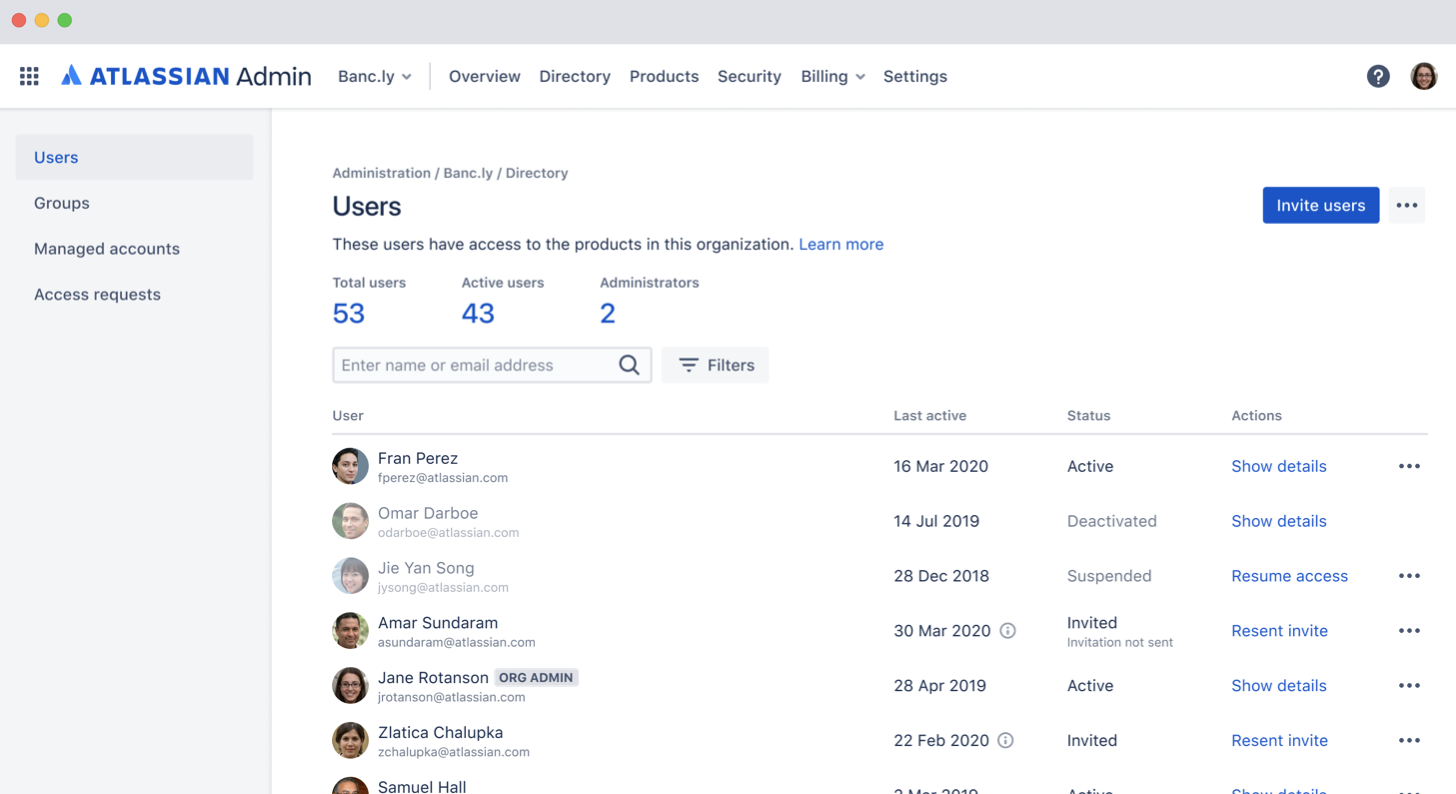
    The company is also making controls available that enable governance of user and change management via a centralized admin hub. Administrators can assign users to instances, configure security policies and monitor usage trends through the hub. There are also built-in integrations with third-party identity-as-a-service providers, to enable administrators to automate provisioning and de-provisioning.

    Administrators can also set up and customize multiple application instances; they can keep data pinned to different regions to customize those instances with specific marketplace applications or configurations for compliance purposes.

    Finally, a marketplace will allow IT organizations to expand the number of applications they consume from Atlassian and its partners. A smart links and app switcher capability for Jira and Confluence Cloud enable easy collaboration across different instances of Atlassian applications.

    Atlassian currently has more than 194,000 customers, so it may take some time to transition the existing installed base to this model. In the meantime, Atlassian is pushing as many new customers as possible toward a cloud platform that makes it easier for Atlassian to keep customers current on the latest release of its software. Atlassian plans to support up to 20,000 users per application instance by later this year.

    Venkatrao said while the Atlassian portfolio is frequently consumed by individual end users, the Cloud Enterprise offering is designed to appeal to CIOs, and other senior level executives, that want to centralize billing for application services now accessed via the cloud. That approach will make it easier for large organizations to take advantage of discounts they may qualify for as overall usage increases, Venkatrao said.

    While Atlassian may be a little late to the software-as-a-service (SaaS) application game, Venkatrao noted that the Cloud Enterprise platform will make it simpler for Atlassian to apply AI to the metadata it will collect. Atlassian has already leveraged AI to improve document search within Confluence and Jira, in addition to employing predictive analytics to surface recommendations for including personnel on a project.

    It may be a slow transition to the cloud for Atlassian, but that transition is clearly underway.

  • How to Optimize Your Cloud Operations

    How to Optimize Your Cloud Operations

    Taking a holistic approach to cloud optimization and application modernization can help keep cloud spend in check

    There’s a fine line between cloud spend and cloud sprawl. Most companies today are using cloud technologies to power their most important products and services, communications and collaboration, but it’s easy to cross the line from spending smartly on cloud services to spending unnecessarily.

    Gaining control of cloud operations and cloud spend should be a goal for every organization, big or small. The good news is, it’s not as tough as you think. With a few smart moves, every company can become a cloud operations optimizer. Below are a few tips.

    3 Tips for Cloud Optimization

    Gain Complete Visibility Into Your Data

    It’s all about gaining a comprehensive view of all your data, pulling correct metrics, ensuring tagging best practices are followed and analyzing/interpreting what is going on. Many of the cloud optimization tools out there don’t pull the necessary information (actual RAM usage, for example) to accurately make meaningful recommendations.

    Compute resource data is only part of it; having a deep financial understanding around when to make RI/Savings Plans purchases and EDP/EA negotiation are just as important. You don’t want to pay for too much coverage or too little, and ideally you don’t want to make those decisions before you know your environment has been optimized.

    Know your Applications

    Cloud providers offer multiple financial methods of procuring resources such as savings plans, reserved instances, spot resources, EDP/EA plans, etc. Knowing how your users are interacting with your applications is key to understanding which financial option will make the most sense and achieving maximum savings.

    For example, a client has an application that is very spikey in utilization and is only accessed at certain hours during the workweek. Purchasing a Compute or EC2 savings plan or reserved instances may not be as cost-effective as applying auto-parking policies or utilizing spot resources (or a combination of both), since the application doesn’t need to be on all of the time.

    Non-Traditional Cloud Services

    Frequently, clients migrating to the cloud will simply perform a 1-for-1 migration and carry with it the traditional three-tier architecture (web/app/database). Getting out of that mentality can be a struggle for many clients, but having awareness of what is going on in the cloud environment at the application layer can help formulate a strategy for that over time. It can also help transition that mentality away from traditional architecture into more cloud-native services (containers/serverless, for example), which can provide cost savings and improved performance and open the door to more advanced services that can be taken advantage of in the future, such as machine learning and AI.

    Mistakes to Avoid

    Too often, companies believe that their cloud environment is already optimized. A typical cloud provider rolls out approximately 20 to 30 new features and updates per week. Multiply that by three for the top cloud platform providers (AWS, Azure and Google Cloud), and you have a daunting challenge of keeping up with everything. This takes the client away from doing their most important job: running their business.

    Companies also have a tendency to not think about optimization or application modernization when deciding to move to the cloud. A lot of clients will simply look at their compute requirements that are being utilized in their data center and build the exact same thing in the public cloud. While this will get them to the cloud more quickly in most cases, there tends to be a lot of waste when performing this method. The sooner you can start thinking about optimizing, the better.

    And, finally, too many companies take a traditional data center operations mentality to the cloud. The cloud continues to offer more and more advanced services that can greatly benefit a business.

    Conclusion

    Taking a holistic approach to optimization and application modernization leaves no stone unturned, typically generates enough savings to pay for itself, and, once implemented on a regular basis, will ensure that application performance meets demand. This is especially effective for clients with large cloud spend and dynamic environments.

    The best way to optimize cloud operations and spend is by engaging a managed services provider (MSP) and realizing that there is no single tool that can provide the type of analysis most companies need. Optimization requires both in-depth technical and cloud financial knowledge. It also requires collaboration between the MSP and all of a company’s business units to gain an understanding of their needs and application usage. Once all the data has been collected and interviews performed, recommendations can be delivered. It’s then up to the client, in collaboration with the MSP, to implement those recommendations to achieve true optimization and ultimately realize cost savings.

  • Oracle Extends Managed Cloud to On-Premises

    Oracle Extends Managed Cloud to On-Premises

    Oracle today announced it will make available as a managed service in on-premises IT environments all of the software it currently provides access to on Oracle Cloud.

    In addition, Oracle is making available Oracle Autonomous Database on Exadata Cloud@Customer, which brings a managed database service to the Exadata servers optimized to run Oracle databases. Oracle also announced it has certified Siebel, PeopleSoft and JD Edwards applications for Oracle Autonomous Database along with the availability of Oracle Autonomous Data Guard, a managed high-availability and disaster recovery service that ensures near-zero data loss (RPO) and instant recovery times.

    Vinay Kumar, senior vice president for cloud engineering in North America at Oracle, said while cloud service provider rivals have made some services available in on-premises IT environments, Oracle will be the first to deploy a full range of software-as-a-service (SaaS) applications via an Oracle Dedicated Region Cloud@Customer service.

    Priced starting at $500,000 per month, Kumar said the Oracle Dedicated Region Cloud@Customer service is intended to appeal to organizations that because of compliance requirements need to deploy applications in an on-premises IT environment but still want to be able to treat IT as an operational expense.

    Kumar also noted in the wake of the COVID-19 pandemic there are more organizations that would prefer to rely on a service to remotely manage Oracle applications rather than having to set up and manage the networking infrastructure necessary to let IT staffs manage those applications from home.

    Like existing Oracle Cloud services, Kumar said Oracle applications can be deployed on virtual machines, bare-metal servers or Kubernetes clusters. In some cases, Oracle expects IT teams will opt to deploy some applications on-premises while also taking advantage of the existing Oracle cloud services.

    It’s not clear to what degree organizations will shift to relying on vendors to provide managed services versus ether deploying and managing applications themselves or relying on managed services provided by third-party IT services firms. Historically, less than 20% of all IT is consumed as a managed service. However, in the wake of the economic downturn brought on by the pandemic, it’s expected more organizations will prefer to treat IT as an operational expense. Oracle is now making it possible to make that decision regardless of where its applications are physically deployed.

    As applications become consumable as a service anywhere the distinction between what constitutes a cloud service running locally versus in data center owned by some other entity will start to dissipate. Many workloads that make the same application are likely to be running in different locations based on the sensitivity of the data being processed. Regardless of the path forward, the days when “the cloud” applied to only some external service are finally coming to an end.

  • Report Finds Most Cloud Security Issues Left Unaddressed

    Report Finds Most Cloud Security Issues Left Unaddressed

    Accurics, a provider of a platform for assessing the security of cloud computing environments, has published a report that finds that even once discovered, only 4% of issues reported in cloud production environments are addressed.

    Based on research conducted using its platform and other public sources of data, the report also finds 90% of organizations allow privileged users to make configuration changes directly to a cloud infrastructure after it is deployed.

    Issues such as open security groups, overly permissive identity access management (IAM) and exposed cloud storage services make up 67% of the most common cloud security issues being uncovered, according to the report.

    The Accurics report echoes similar findings published by Unit 42, the cybersecurity arm of Palo Alto Networks, which found more than 199,000 templates have medium-to-high vulnerabilities in use on public clouds.

    Accurics CEO Sachin Aggarwal said that as more organizations embrace infrastructure as code using tools such as Terraform, policy guardrails aren’t being put in place. More troubling still, security assessments seem to be few and far between. That’s especially problematic because cybercriminals now routinely probe every layer of the application stack looking vulnerabilities, he noted. In effect, cybercriminals are assessing cloud applications and infrastructure more frequently than IT teams.

    Aggarwal said beyond making sure the appropriate guardrails are in place in terms of overall security posture, organizations need to have confidence in the DevOps processes being adopted. That doesn’t mean cybersecurity teams should put rules in place that slow that application development process down. Rather, tools that surface cybersecurity issues and then provide a method to automate the remediation of any vulnerabilities discovered need to be put in in the hands of IT professionals, he said.

    The challenge organizations face is the processes that are employed to secure on-premises IT environments largely don’t translate well to highly dynamic cloud computing environments that assume a shared responsibility approach to IT. Public clouds are obviously popular with DevOps teams that can programmatically invoke resources on demand. However, those teams generally don’t have much cybersecurity expertise. Too often, DevOps teams assume cybersecurity tasks are being handled by a cloud service provider. Of course, the cloud service provider is only securing the services they provide. Any configuration issue is not their responsibility.

    The result is as more changes are made to the IT environment, the more likely that mistakes will be made. Catching all those issues without the aid of tools is an unreasonable expectation for any IT organization, much less a DevOps team that may be working beyond the purview of the rest of the IT organization.

    No one sets out to create a cybersecurity issue. But in the rush to deploy or update an application it’s easy to overlook a cybersecurity issue. The goal should be to eliminate as many of those mistakes as possible before they are ever made. However, as long as humans are involved, there will be errors. So the next most important thing is to be able to correct those mistakes as quickly as possible without having to disrupt the entire IT environment.

  • Palo Alto Networks Advances DevSecOps in the Cloud

    Palo Alto Networks Advances DevSecOps in the Cloud

    Palo Alto Networks has updated its Prisma Cloud to make it easier to embrace best DevSecOps processes while deploying workloads in the cloud.

    New capabilities include the ability to define and apply cybersecurity policies to continuous integration (CI) and continuous delivery (CD) workflows and scanning tools for discovering misconfigurations in cloud infrastructure templates, which is the most common source of cloud security issues.

    Palo Alto Networks has also added the ability to scan virtual machines native to the Amazon Web Services (AWS) before they are deployed as well as an ability to apply policies to workloads running on the AWS Lambda serverless computing framework via a single click. That capability eliminates the need to manually install wrappers in application code running on the AWS Lambda framework.

    John Morello, vice president of Product Management, Container and Serverless Security at Palo Alto Networks, said in the wake of the COVID-19 pandemic, the rate at which workloads will move to the cloud will accelerate. Deploying applications allows organizations to retain a higher level of flexibility, which, given the current uncertainty over how long the COVID-19 pandemic may last or even return once this latest outbreak is contained, means organizations need to be able to manage workloads centrally from any location where their IT staffs are located.

    Of course, cybercriminals that have become especially adept at scanning for cloud misconfigurations realize this as well. As such, many of them will be focusing their future efforts on scanning for vulnerable workloads residing on public clouds, Morello noted.

    A recent analysis of public cloud configurations published by the Unit 42 research arm of Palo Alto Networks found more than 199,000 templates that had medium-to-high vulnerabilities. The most vulnerabilities were discovered in templates created using CloudFormation (42%), Terraform (22%) and YAML for Kubernetes (9%).

    As cloud computing environments become more complex the opportunity only increases for misconfigurations involving, for example, ports left open. IT organizations are increasingly trying to secure a wide range of application workloads running on a mix of public cloud services based on virtual machines, Kubernetes clusters and serverless computing frameworks. Public cloud computing environments assume that responsibility for cybersecurity is shared between the cloud service provider and the IT teams who employ those services. Unfortunately, developers often assume the cloud service provider is assuming more responsibility than they actually do. Most cloud service providers are really only promising to secure the infrastructure they manage. Responsibility for application security remains firmly in the hands of the IT teams deploying cloud applications.

    To rise to that challenge, many organizations have been embracing best DevSecOps processes that shift cybersecurity responsibility further left toward developers. However, to achieve that goal, developers need access to tools that are well-integrated with the CI/CD platforms that DevOps teams rely on to push code out to cloud platforms. Obviously, that shift represents a substantial cultural change that will take time to fully manifest within most organizations. However, no such change is ever likely to be attained without being armed with the tools needed to enhance application security within the context of their existing CI/CD workflows.

    — Mike Vizard

  • Using Trade Studies in Vetting Tool Stacks

    Using Trade Studies in Vetting Tool Stacks

    Adding to your tool stack should entail more thought than, “Start your free trial today!” It’s great when there is an application need and cloud-based tools are easily grabbed with a few clicks. However, surveying alternatives before making a tool stack change can prevent costly mistakes. Trade studies can help vet best-fit tools for evaluation.

    Short for trade-off, trade studies originated in the aerospace industry as a decision-making aid. Teams of engineers (or developers) usually generate multiple proposed technical solutions for any non-trivial problem. A little searching will find the term multiple criteria decision analysis, with three popular techniques: the analytic hierarchy process, the Kepner-Tregoe method and the Pugh method.

    For DevOps teams, I lean toward variants of the Pugh method because it avoids creating an overly complex weighting and scoring scheme. Pugh analysis has gained popularity among Six Sigma aficionados for the same reason. Multi-disciplinary teams find the process easy to understand and the results just as useful as more algebraic methods taking longer and needing more input.

    Let’s look at three steps in a practical approach: setting criteria, ranking best-fits and starting evaluation.

    Setting Trade Study Criteria

    Most tool stack disasters result from discovering a tool doesn’t meet all the requirements as the project unfolds. In my previous life, our IT team went all-in on a big-name ERP application partly because it featured web-based portals for suppliers. My e-business team discovered those portals required specific port numbers be opened at the firewall, which corporate security immediately rejected. We coded a way out, using Adobe ColdFusion querying the database directly and securing it with LDAP sign-on, but it took months.

    You could search for the “information I could have used YESTERDAY” gif or you can spend time setting the right criteria. Pugh analysis starts with a matrix of criteria rows versus candidate tool columns. What most sources won’t tell you about Pugh analysis is a trick in generating that criteria list:

    • Start with must-have features, with current requirements and anticipated future requirements.
    • Research tools (data sheets!) for near-fits against those must-have criteria and create the matrix.
    • Add all the features prominently listed for each of those near-fit tools to the criteria.
    • Search again for more near-fit tools matching features on the extended list, adding to the matrix.

    A common mistake is stopping after the first two bullets. Almost every trade study I’ve done discovers more tools fit the must-have list but didn’t emphasize all those features on their website. It’s a bit time-consuming, because every time you find a feature of interest you must go back and recheck all the other tools on your near-fit list for it.

    Adding non-requirements? You’ll miss innovation opportunities outside the Venn diagram intersection. My recent client study on marketing reporting tools found one touting support for a dream-list feature. Digging into that tool found it may not support two must-have requirements but does support the others.

    Ranking Best-Fits

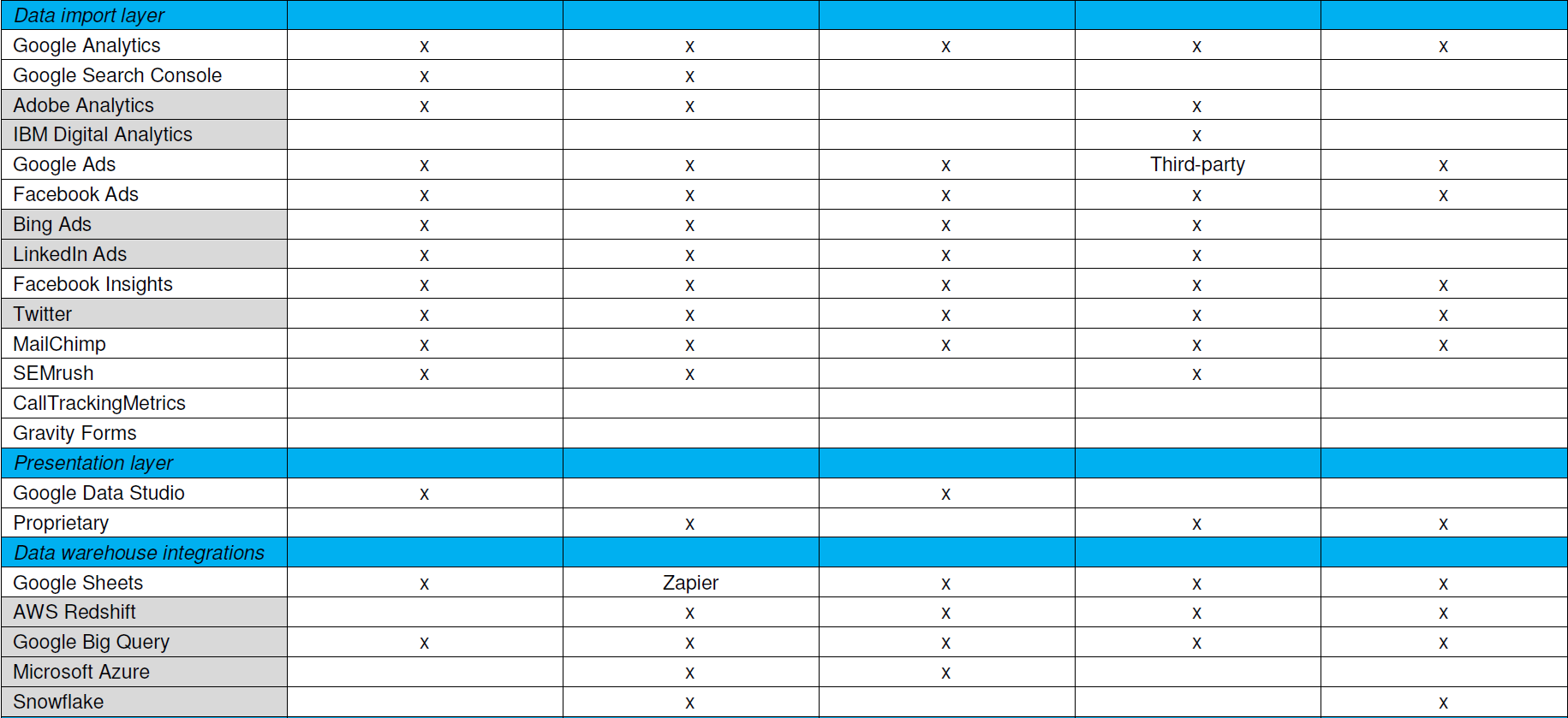
    That’s why the trade study criteria list should visually differentiate must-haves from extended features. I usually shade the extended feature rows, then plot how near-fit tools stack up against all criteria. You can certainly add weighting to features for a more sophisticated analysis, but I find a simple must-have versus nice-to-have usually suffices.

    Now start scoring. A strict Pugh analysis uses a plus-same-minus scoring system. Plus means the tool has a clear advantage on that feature, same is same, and minus means that tool is at a disadvantage compared to the others. I sometimes simplify that to just X for a tool having the feature, blank for it doesn’t. This is mostly a data sheet comparison, and you may want to inject other information such as found reading reviews.

    What you’ll find is a best-fit list, and it probably won’t be perfect. You’d like to see a couple tools capturing most or all the must-haves, and a few more capturing some of them and extended features for contrast. As an example, here’s the trade study matrix for that marketing reporting tool assessment I mentioned with the vendor names omitted.

    Trade studies provide simpler, faster, actionable analysis

    Starting Evaluation

    Notice this doesn’t have cost information yet. Cost biases technical decisions if applied too early, and feature coverage doesn’t necessarily correlate with cost. Vendors also don’t price their stuff the same way. Some price by developer seats, some by data source integrations, some by monthly tracked users (MTUs) on the web.

    With a best-fit list in hand, it’s time to discuss the findings with your team and add information for evaluation. Confirm the scoring, check the vendor pricing models, ask the vendors about unclear feature support and download those free trials to see how they work. Consider how to cover those uncovered must-have features, or if those even are must-haves if few tools support them. Maybe swapping out another tool in the tool stack gets better coverage. Think about innovation those extended features may enable.

    Want simpler, faster, actionable analysis without a massive RFP? Trade studies do that. I think it’s valuable to have one person on your team be the keeper of trade studies, someone skilled at interviewing for requirements and refereeing debates during evaluation. You may want to bring in a consultant skilled at competitive research and analysis to help develop your process. In any case, adapt your approach until trade studies help you make better selections—there is no one right answer.

    — Don Dingee

  • Portability Shmortability: Most Applications are Going Nowhere

    Portability Shmortability: Most Applications are Going Nowhere

    I’m a huge fan of the idea of taking our super-duper applications and deploying them where it makes most sense. I always have been. Those of us in application development spent forever bemoaning the fact that our applications weren’t all that portable between operating systems. In fact, looking back through the history of computers, you find there has always been one roadblock or another to stop portability.

    First there was byte order and instruction set, and we’ve largely overcome those. Internationalization wreaked havoc on us all for a while, and we overcame that. We’re still pretty mightily struggling with OS-dependent things such as windowing systems, but browser-based apps have largely overcome those also. Java takes a lot of heat for a lot of reasons, but it did improve portability of apps written in it. Maybe not “Write once, run anywhere,” as was often claimed—things such as file locations were still OS-specific—but still a lot closer than compilers that were deeply tied to the operating system they ran on. Virtualization and containers have enhanced portability in another dimension, letting the developer take the OS with the app.

    We have overcome a ton of issues, and advancing technology has introduced a ton more. Now we have to either choose mobile targets or find a tool we like that can generate code for wildly different mobile systems from a single source. DevOps really isn’t helping with this process—though it will, eventually. By automating the build process, the target will be switchable at the targeting end, meaning our app—given a tool that can multi-target—can be built for whatever mobile platform the cool kids are playing with today, and the ones that are considered “cost of entry” can be generated in the same run.

    So far, so good, right? We find problems, we overcome problems, DevOps helps us overcome them faster with a wider selection of outputs …

    And then we hit the data.

    Vendors in a variety of spaces would love to paint you a picture where it doesn’t matter. It does. The mass of your data, wherever it resides, is a pull like gravity to new application development. And it should be.

    Some will try to explain to you that in the age of APIs, it doesn’t matter where the data actually resides: You can get it.

    But it really does matter, and this is not Utopia. Even if you ignore the performance implications of data being latency-infested miles away from applications that need to use it non-stop, those APIs are only a viable option if the data can be secured and protected. By definition, an API is an advertisement that whatever data/service it fronts can be found right here. For applications that traditionally are data center apps, it might be possible to expose your customer file or other critical data via API and then lock down access to the API by IP …

    But then we quit ignoring the latency problem. If every bit of data an app needs has to flow from San Francisco (or Tokyo, or Bejing, or London, or wherever) to Seattle before the calling app can do what it needs to and then has to be sent off again to Albuquerque (or Rostov, or Madrid, or wherever) the delays will, by definition, be more than they would be if the app sat with the data and had to transfer over a 1GB (or 10GB) connection between servers before sending it to users.

    This means most data-heavy apps, no matter the level of agile or DevOps, aren’t likely to move. Vendors with a stake in the process will trot out the one or two customers they convinced to make such a move to tell you how great it is, but performance math and security sense tell you it is only great until things get busy or that exposed API is used by bad actors to vacuum user data.

    Some applications have smaller datasets and can move the data with the app. Other applications can be architected not to care where the data is. A few don’t need a database at all. Move these applications to whatever platform makes sense. Make the CD for them retargetable.  Most serious business applications rely too much on core data to fall into these categories. And thus, they aren’t moving, unless someone comes up with a viable way to move a ton of data between platforms that is safe and fast and effectively translates where necessary.

    So, that’s what we need to see next in the march of portability. We currently have containers that can be run pretty much anywhere and languages that will work on pretty much any platform. We need data tools that can alleviate the current set of non-portability/latency constraints and get data where it is needed, when it is needed, securely.

    Unfortunately, I don’t see that happening soon. So addressing the issue, “Where do we target our new application?” will have to start with the question, “Where is the bulk of the data it needs?” At least for now.

    Most of you knew that, because you’re living it. I just thought you might have a use for a third-party article about it. Because someday, you will have this conversation with someone who isn’t living it. Enjoy.

    — Don Macvittie

  • DevOps Needs a New Cloud Solution for Best Practices

    DevOps Needs a New Cloud Solution for Best Practices

    Imagine this scenario: You are a company building modern software which is a key driver of your business. To support this, you have grown your infrastructure organically over time by adding servers, storage, networks, security, virtualization software, monitoring, alerting and analytics tools. You have also added a plethora of other middleware, databases, messaging and operating systems that your developers need to build, test and deliver their applications.

    Because of this unplanned organic growth, there is no consistency in the environment. You manage, maintain and operate much of this environment manually. Your various specialist teams (storage, networking, security) begin to form fiefdoms around their respective functional areas. Change becomes extremely difficult and automating across silos turns into a maintenance nightmare. You over-purchase to meet the demand and risk under-utilizing resources. Your costs spiral out of control. You are now finding it a hopeless challenge to meet the needs of your developers—which was the primary purpose of doing all of this in the first place.

    Moving to a Modern Platform

    A modern DevOps platform should address the requirements of both your development and IT/operations teams. It should give software development teams an easy way to consume on-demand compute, storage and networking as well as provide easy access to continuous integration and continuous deployment (CI/CD) tooling and software services that help increase their development throughput and shorten product delivery. In addition, the platform should also empower operation teams to manage, maintain and operate the entire infrastructure environment with very few people using smart software that drives automation and intelligence into the entire stack.

    In short, it should have the ability to break the silos within your IT environment and between development, QA and operations teams. By doing this, you can increase the velocity of software development, improve infrastructure utilization, increase overall operational efficiency and reduce costs.

    Requirements for a Cloud Infrastructure That Streamlines DevOps

    There are several requirements for a modern, cloud-based DevOps platform. Let’s look at the key essentials of such a solution.

    Self-service API-driven infrastructure is a fundamental requirement to enable infrastructure as code, a key attribute to enable DevOps best practice. It allows developers to write code (which can be done using their favorite programming language) and make RESTful API calls to the underlying programmable infrastructure to manage initial deployments and configurations. It also enables them to manage ongoing automated dynamic provisioning of infrastructure, auto-scaling, monitoring and alerting.

    All this automation removes the confusion and error-prone manual steps for the entire application delivery process, including development, testing, staging and production deployments. This, in turn, accelerates software delivery and increases quality.

    However, building such a self-service API-driven infrastructure by yourself is not easy. The key component that drives up the cost is the operational complexity and the cost of experts needed to build and operate it.

    Smart software that drives intelligence into the stack. Very few solutions in the market automatically handle the full life cycle (deployment, upgrades, monitoring, alerting and ongoing resource management) of infrastructure and also allow seamless migration of workloads between private environments and public clouds. Additionally, if self-service is available as a SaaS-based delivery model, it is easy to add more features and workflows very quickly without having IT perform a major upgrade. If your solution comes with an on-premises install, ask how much work IT has to do to maintain this environment and how often new features will get added.

    Hyper-converged Infrastructure (HCI): Eliminating silos in the infrastructure. As mentioned earlier, silos impede velocity because they lead to complexity of operations, lack of consistency in the environment and lack of automation. A hyper-converged cloud design with a software-centric architecture tightly integrates compute, storage, networking and virtualization resources and other technologies from scratch in a commodity hardware box supported by a single vendor. This approach eliminates silos and lowers costs and complexity. It also makes it easy to start small and grow on demand while staying tightly right-sized on capacity and cost.

    A built-in browse-able categorized application store. DevOps engineers need readily accessible CI/CD tools such as Jenkins, Git, Maven or JUnit to automate the development and test pipelines. Additionally, tools such as Ansible, Puppet and Chef help with automated configuration and lifecycle management of workloads. Application developers need to quickly integrate and deploy middleware services such as RabbitMQ, Redis or storage back-ends including MySQL, Postgres, Cassandra or MongoDB. Single-click deployment of such services and other complex multitier network tools and applications greatly automates, accelerates and simplifies the development process.

    Seamless migration between private and public clouds. Developers and testers often need much greater capacity than is available on-premises for scale testing, and they should be able to move their application to a public cloud for such purposes. Alternatively, they may already have some applications running on a public cloud and they may want to bring them back to their private cloud for cost savings or better performance. For these use cases, a private cloud solution should offer seamless bi-directional migration between the public cloud and the private cloud.

    Dashboards and visibility for troubleshooting. One of the key advantages for a private cloud is that you can get complete visibility across the infrastructure and applications. In a public cloud, you can only get VM-level stats but have no control or visibility below that. Make sure that your private cloud solution can provide visibility to developers directly. Many vendors only provide access to IT, thereby controlling what developers can do and making IT a bottleneck in the application development and deployment process.

    Better insights to improve efficiency and capacity management. A cloud requires capacity planning, utilization monitoring, right-sizing of workloads and detecting zombie VMs and unused resources. Look for a solution that comes with built-in analytics, management tools and insights. An even better approach would be having a solution where you don’t have to install the management tool on-premises so that it can deliver its value as a service.

    To meet the needs of application developers and development frameworks and to create an efficient DevOps platform, companies should look at consistent converged architectures managed via smart software. This empowers application developers and operations teams to leverage a consumption model they want, while providing control to IT and making them relevant to your business success.

    Integrated intelligence and insights delivered as a service ensure that you never have to use spreadsheets to decide what to purchase and when. Cloud solutions with smart software ensure that you never have to make a Level 1 support call again; your management software can do that for you.

    About the Author / Kamesh Pemmaraju

    Kamesh Pemmaraju leads product management, product marketing, and technology partnerships at ZeroStack. Kamesh is a seasoned product management/marketing leader with a strong engineering and consulting background. In his most recent product roles at Mirantis and Dell, he focused on delivering private and hybrid cloud solutions to enterprises. He holds a Master of Science in Computer Science from Indian Institute of Science. Connect with him on LinkedIn and Twitter.