Tag: cloud adoption

  • 6 Considerations for Secure Cloud Migration

    6 Considerations for Secure Cloud Migration

    Planning a secure cloud migration? Here are some tips to help make the process smooth.

    Three out of every four organizations on the planet have some sort of cloud presence. According to a 2018 IDG survey, 77% of enterprises now have at least one application or some portion of their enterprise computing infrastructure in the cloud. In addition, enterprises plan to invest an average of $3.5 million on cloud apps, platforms and services, the report found.

    Looking forward, executive management at technology-dependent industries—including manufacturing, high-tech and telecom—are increasingly driving toward becoming 100% cloud-enabled. Which also means that, except for those new startups starting with a full cloud-based infrastructure, most organizations are currently either actively migrating their infrastructure and/or applications to the cloud; trying to bridge their business processes, applications and workflows between a local physical network and one or more networks residing in the public cloud; or are planning to do so.

    One of the challenges these organizations face is creating a consistent security posture across their local and cloud-based resources. The reality is, not all security policies can be successfully and seamlessly implemented across a multi-cloud environment, especially when using a variety of tools. That’s because most vendor solutions either do not support all of the major cloud platforms. And for those that do, many do not support native cloud integration leveraging cloud resource description. This can create challenges in enforcement consistency and policy definition as workflows and applications move between different cloud environments, resulting in security gaps and blind spots that can be exploited.

    Successfully Migrating Security to the Cloud

    Migrating infrastructures, applications or services to the cloud without expanding the attack surface or increasing security overhead requires careful preparation. This starts by understanding that any cloud-based deployment, whether building out a new infrastructure or building a new application, requires clear communication between lines of business, IT and security teams. Without clear communications about business needs and objectives and a candid discussion of related threats, organizations open themselves to a whole array of new risks, including denial-of-service attacks targeting cloud resources, cloud malware injection, web application exploitation, cloud-API attacks and account or service hijacking.

    Successful cloud migration also requires successfully migrating security to the cloud, enabling organizations to deploy and manage a single, consistent security framework that spans the entire multi-cloud infrastructure.

    Here are six steps every organization should consider when planning a cloud adoption or cloud migration strategy:

    Baseline Your Security Before Cloud Migration

    Far too many organizations own security architecture built around isolated security devices, decentralized management and an inconsistent application of security policies.

    If this is the case for your organization, you will need to start by getting control of your security sprawl and imposing a central security strategy. Once that is in place, you then need to ask the following questions:

    • Do you know your current security posture and its implications for your future business goals?
    • Do you have the proper policies and procedures in place for your current and future environments?
    • Have you performed a gap analysis for how cloud will change your security paradigm?
    • What are the impacts of a distributed, cloud-based network on risk management?

    Plan for Bandwidth Requirements

    You will need to model and understand data flows and bandwidth requirements to ensure that your security solutions can meet performance requirements, especially for latency-sensitive services that will need to go over VPN tunnels.

    Understand Compliance Issues

    What requirements do you have to meet for data processed and stored on the cloud, as well as for data that moves between different cloud and physical network environments? It is crucial that your legal team be consulted before you begin to build or adopt any sort of cloud program.

    Provide for High Availability and Disaster Recovery

    The biggest fear for most organizations looking at a cloud solution, after addressing security concerns, is the availability of cloud-based resources. You also need to recognize whether dynamic scaling is required and whether your security solution can meet new performance requirements. Finally, you need to consider things such as flow symmetry and load balancing, especially for legacy applications, to maintain availability, performance and protection even when utilizing dynamic cloud-based services.

    Apply the Right Security at the Right Place

    Cloud security requires much more than simply placing a firewall at the perimeter of the cloud infrastructure. A wide range of security solutions will need to be applied depending on the applications running and services being used. A next-generation firewall (NGFW) solution is the most common security tool to be applied, but other solutions are often also required, including web application firewall (WAF), intrusion protection or detection service (IPS/IDS) and a cloud access security broker (CASB).

    Establish a Lifecycle Management Framework

    Ensuring consistency between security solutions and policy enforcement, especially when they span multiple environments, is crucial. Security tools need to be chosen not only for their ability to operate natively in a specific cloud platform, but also for their ability to interoperate seamlessly through the entire security policy life cycle with sister solutions deployed in other environments. This includes consistent security change policy, dynamic provisioning and scaling, single point of management—including integration with a central ITSM solution and central log collection—and correlation.

    Don’t Let the Ease of the Cloud Trick You into Shortcutting Security

    Adopting a cloud service can be as simple as clicking a link. And adding a new cloud-based infrastructure, while much more complex, is far easier than building its physical counterpart. But that can be deceptively simplistic. Far too many organizations have had to pay the price for rushing into a new cloud solution without carefully considering challenges related to security. These have ranged from opening new attack vectors into their network, to being unprepared for new cloud-based threats or being blindsided by fines and penalties for failing to adequately prepare for new compliance considerations.

    Careful preparation before you begin to build out your new cloud infrastructures, platforms or services can save you time, money, reputation and enable you to compete effectively in today’s new digital marketplace.

    — Lior Cohen

  • Why You Need DevOps and the Cloud

    Why You Need DevOps and the Cloud

    DevOps and the cloud are not only two of today’s biggest tech trends, but are inextricably linked. Research from DORA’s 2018 Accelerate State of DevOps Report and Redgate’s 2019 State of Database DevOps Report outline a clear correlation between cloud and DevOps adoption, with the two working together to contribute to greater business success.

    For example, in the DORA report, those companies that met all essential cloud characteristics were 23 times more likely to be in the elite group when it came to DevOps performance. Similarly, Redgate found that 43 percent of organizations that have adopted DevOps have server estates that are all or mostly cloud-based. This compares to just 12 percent of organizations that have not yet adopted DevOps or have no plans to.

    Looking into the link in more detail, research shows that there are four common factors that underpin DevOps and the cloud:

    Cultural Openness to Transformation

    Adopting DevOps is not just a technical or process change, but one that requires a certain type of culture to be in place. The renowned sociologist Ron Westrum famously categorized business cultures into three groups in his seminal paper A Typology of Organizational Cultures:

    • Pathological: Power-oriented, with low co-operation, a culture of shooting messengers bearing bad news and the crushing of novelty.
    • Bureaucratic: Rule-oriented, with limited co-operation, a neglect of messengers and a suspicion of novelty.
    • Generative: Performance-oriented, with high cooperation, messengers encouraged and a focus on learning from mistakes and embracing novelty.

    It’s no coincidence that DevOps and cloud adoption both thrive best in a generative culture that is open to innovation and is focused on collaboration and continual learning and improvement. In fact, the DORA research found that a generative culture correlates with elite performance when it comes to software delivery, and that this group is 1.8 times more likely to recommend their team as a great place to work.

    Building this open culture requires team members to feel safe about taking risks, rather than continually covering their backs, as well as good communication from leaders. This psychological safety underpins the continuous improvement mantra of DevOps and the innovation that the cloud delivers.

    The Importance of the Cloud to Enabling Faster Software Delivery

    As the DORA report found, cloud users are more likely to be elite performers when it comes to DevOps. But the research also highlights that there is a lot of confusion about what “moving to the cloud” actually entails. The National Institute of Standards and Technology (NIST) defines cloud computing as having five essential characteristics:

    • On-demand self-service
    • Broad network access
    • Resource pooling
    • Rapid elasticity
    • Measured service

    Just 22 percent of DORA respondents agreed or strongly agreed that they met all of these criteria. Those that did were 23 times more likely to be elite performers when it came to software delivery. This shows that simply moving to the cloud alone doesn’t lead to DevOps success—the switch needs to be implemented professionally, in a planned way. This goes back to culture—the same openness to innovation has to underpin both, DevOps and the cloud, to realize their full benefits.

    Breaking Down Barriers

    One of the key points of a generative culture is openness to collaboration, which is clearly essential to DevOps and, in particular, incorporating the database into DevOps flows. In the past silos, rivalries and even animosity built up between application developers and database administrators (DBAs). In many ways this isn’t surprising—developers are focused on getting new code out of the door, while DBAs are seen as protecting data and databases and ensuring uptime.

    However, for DevOps and the cloud to succeed, teams need to take a holistic view that breaks down team barriers. Redgate’s research shows that this is now happening, starting with the working relationship. Sixty two percent of respondents characterized the relationship between DBAs and developers as either good or great, up from 58 percent in previous years. This is heartening—only 13 percent said the relationship was poor with DBAs completely siloed, unaware of what’s happening in development, and deploying database changes to production in isolation.

    In teams that have adopted DevOps across all projects, the great and good collaboration rises to 76 percent, with 41 percent stating great collaboration—almost double the overall average.

    This collaboration is also reflected in daily activities. For example, over three-quarters (77 percent) of application developers are also responsible for database development and building database deployment scripts. In 47 percent of companies, developers are also responsible for the deployment of database changes to production.

    Putting in Place the Right Tools

    The collaboration behind successful DevOps and cloud adoption requires companies to introduce common practices and common tools across the entire process. This is reflected in figures from the Redgate research, with a growing adoption of the same tools within application and database development. Version control is now used by 83 percent of respondents for application development, and 55 percent for database development, rising steadily from 81 percent and 53 percent respectively in 2018. Particularly encouraging is the significant uptake in continuous integration—a cornerstone of DevOps—which is now used by 53 percent of respondents for application development and 27 percent for database development, up from 40 percent and 21 percent in 2018.

    All of this is leading to increased usage of third-party tools across DevOps processes. The most substantial year-on-year change is the use of third-party provisioning tools—which has doubled from 12 percent for the application and 8 percent for the database in 2018 to 25 percent and 15 percent respectively this year.

    In increasingly competitive markets, companies rely on software and data to differentiate themselves and drive success. And this, in turn, is underpinned by DevOps and the cloud, which provide the agility, speed, quality and flexibility to develop and deploy software more quickly and safely than before. Businesses therefore need to adopt both if they are to achieve elite performance across their software operations.

    — Matt Hilbert

  • Applying DevSecOps to Address Cloud Security Challenges

    Applying DevSecOps to Address Cloud Security Challenges

    Driven by the encouragement from 2018 progress, cloud technology is poised to be even bigger in 2019. However, one major hurdle continues to haunt the cloud trend: security.

    An overwhelming number of firms in the IT industry are preparing for cloud adoption, yet security continues to be a big question for many of them. Early DevOps adopters faced a similar challenge in their early stages of DevOps implementation. They relied on a wide variety of DevOps tools to address their issue completely.

    Today, however, DevSecOps is making a big difference in the IT industry, including security and ensuring a seamless software development life cycle (SDLC).

    Breaking the regular trend of having security as a separate process, DevSecOps calls for security integration across all stages of the software process chain, addressing security concerns at the very first instance of every stage.

    The same DevSecOps now comes as a savior for cloud, too.

    Applying DevSecOps to Cloud

    Last year saw the cloud market taking a new position in the IT industry, driven by the wide penetration of leading cloud computing service providers: Amazon Web Services (AWS), Microsoft Azure, Google Cloud Platform (GCP), Oracle Cloud and IBM Cloud, among others.

    To stay relevant in today’s market, many IT firms have begun their efforts to achieve high and highly scalable performance with all-round digital transformation.

    Yet, security limitations associated with cloud continues to be a concern many of these organizations. DevSecOps principles can help. Many research reports show that the majority of firms working on the cloud have high reliability on DevSecOps tools and principles for improved agility and high reliability.

    DevSecOps approach to cloud security requires detailed planning that might even demand cultural change in an IT environment, especially for security automation and configuration of cloud assets.

    The planning requires security teams to:

    • Collaborate with development teams as they move code to cloud alongside close monitoring of quality in the production cycle.
    • Work with the quality analysis and development teams in deciding qualifier and parameter aspects required for code promotion.

    Overall, DevSecOps principles offer security advantage along with software agility and high reliability across the life cycle.

    Implementing DevSecOps in Cloud

    Following six factors decide the success of DevSecOps implementation in a cloud environment:

    DevSecOps implementation in Cloud environment

    1. Code Analysis – Continuous improvements to software mean revisiting code, which also reflects in code analysis, quality assurance and delivery cycles.
    2. Automated Testing – Automated testing minimizes efforts and also saves time. As a key aspect of DevSecOps process, automated testing makes the testing process easier through easy execution of repeatable cases.
    3. Change Management – Linking teams and making them aware of each other’s operations, wherever required, is an important aspect of change management. Keeping developers informed about security-related activities helps in timely address of existing and possible vulnerabilities.
    4. Compliance Monitoring – Compliance continues to play a key role in an organization’s growth path as part of corporate governance. Regulations help in the creation of code and also in modifying the source code. This helps in real time at times of audit.
    5. Threat Investigation –  Threat investigation is important to defining the security readiness of any organization. It’s important for organizations to have a close and continuous watch on discovering possible threats, regular security scans and code reviews to address security challenges.
    6. Personnel Training – Holding hands-on training sessions and certification courses build the company’s strength, equipping teams with appropriate domain knowledge.

    The above-mentioned six steps act as building blocks for implementing DevSecOps strategy in cloud. What’s next? The implementation part: Get DevSecOps to cloud.

    — Veritis

  • Survey Says: Digital Transformation is Hard

    Survey Says: Digital Transformation is Hard

    IDG and Insight Datalink recently conducted a survey into how companies were doing on their digital transformation journey. Like so much in technology these days, it is easy to feel as though you’ll be left behind if you aren’t well on your way with digital transformation.

    You’re not.

    Who Are You People, Anyway?

    The survey had decent industry distribution and was focused on director level and above in larger organizations, with more than a third of respondents in financial services or high tech. So in short, a third of respondents are the very organizations most motivated to implement a digital transformation project.

    Nearly Half of Respondents Haven’t Even Started

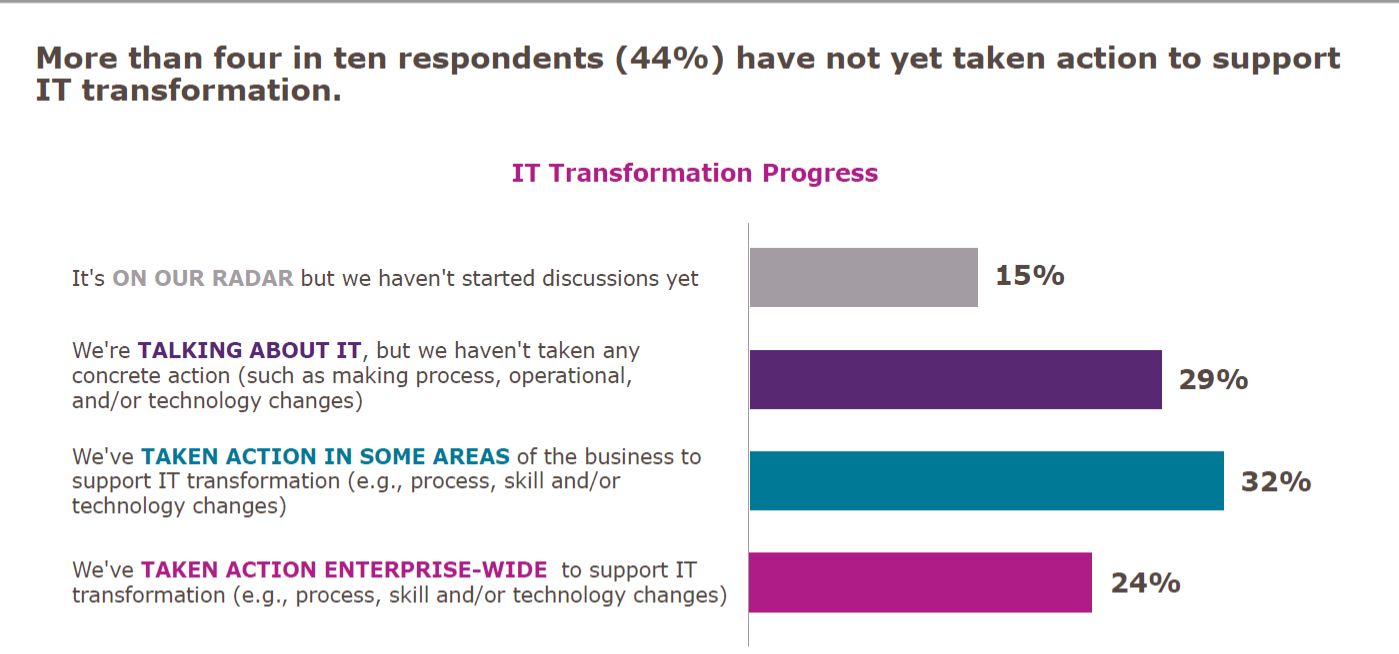
    Let’s get the easy one out of the way first: The survey showed that a significant proportion of companies had done nothing more than talk about digital transformation.

    Adding up “It’s on our radar” and “We’re talking about it,” we get to 44 percent of respondents who haven’t even started. In fact, due to the nature of digital transformation, I would argue that less than 1 in 4 are actually doing it. Then there is the 24 percent who are undertaking enterprise-wide transformation: You can convert projects, but that isn’t transforming the way you do business. It is a start, so I admit this is well and truly a debatable statement, but true transformation is cross-app, cross-team, agile and locale-mobile.

    Why So Small?

    Since we frequently hear about digital transformation and how important it is, “Why are the numbers so low?” is a valid question. The truth is that transformation of complex infrastructures is difficult. There just isn’t any way to get around that fact. When there is a mainframe with heaps of data and a midtier that often has replication of mainframe functionality on it, then separate apps that are doing web-based transactions in (insert language here, but normally Java in the above environment), there are many parts that are complex, and something as simple as moving and/or rationalizing data stores can be majorly complex.

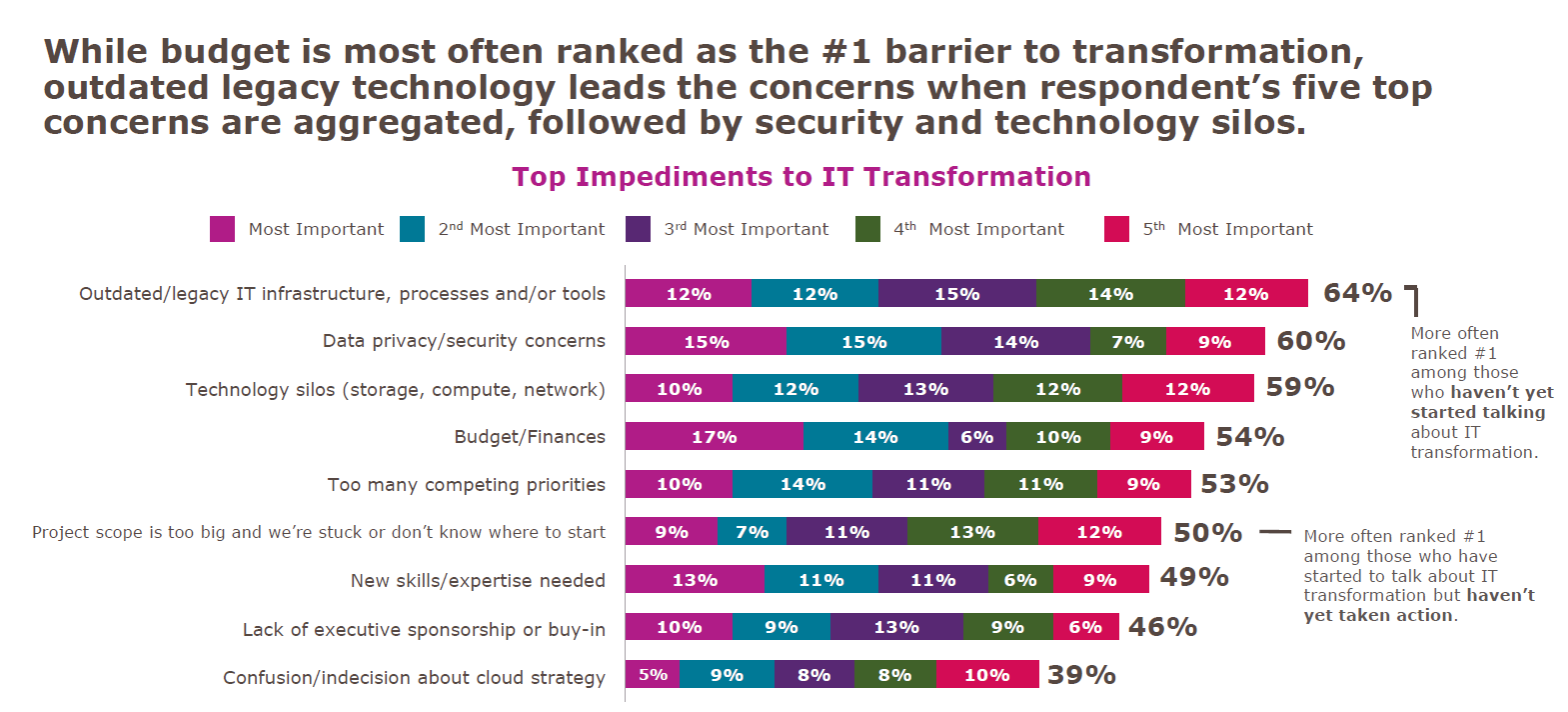
    But I won’t go on and on here, I’ll simply show you what IDG found.

    Looking at mainframe toolsets in particular, there have been massive steps forward over the last several years to make them more compatible with modern development and deployment practices. But making use of those changes often requires updating systems that are not otherwise broken. And there is always the risk that such updates will break something. The more research an organization does into modernization tools, the more comfortable they are that there is a valid path—but that doesn’t make it easy when it is added work.

    Data privacy also ranks high, and that is because IT has been dealing with locking down data in a data center for ages. Additionally, some spectacular configuration mistakes in public cloud datastores have made us all gun-shy. There are solutions to data security in public cloud from a variety of companies, but that doesn’t change that we’ve all followed “due to bucket misconfiguration” stories while cringing.

    Technology silos are a fact of IT. There can be some breaking down of those silos, but they are unlikely to disappear completely. The EMC specialist or Cisco specialist are unlikely candidates for elimination in the quest for reduced silos. (I just picked two roles whose knowledge sometimes astounds me—both for the depth these people can have, and for the requirement that they need that depth.) Working your network and storage teams into the digital transformation without undermining the thing that makes them valuable—their silo-specific knowledge and insight—is a challenge that can be achieved, but not by “breaking silos”; more like, “increasing communications between silos while reducing silo behavior.”

    If You Dive Like That, You’ll Stall!

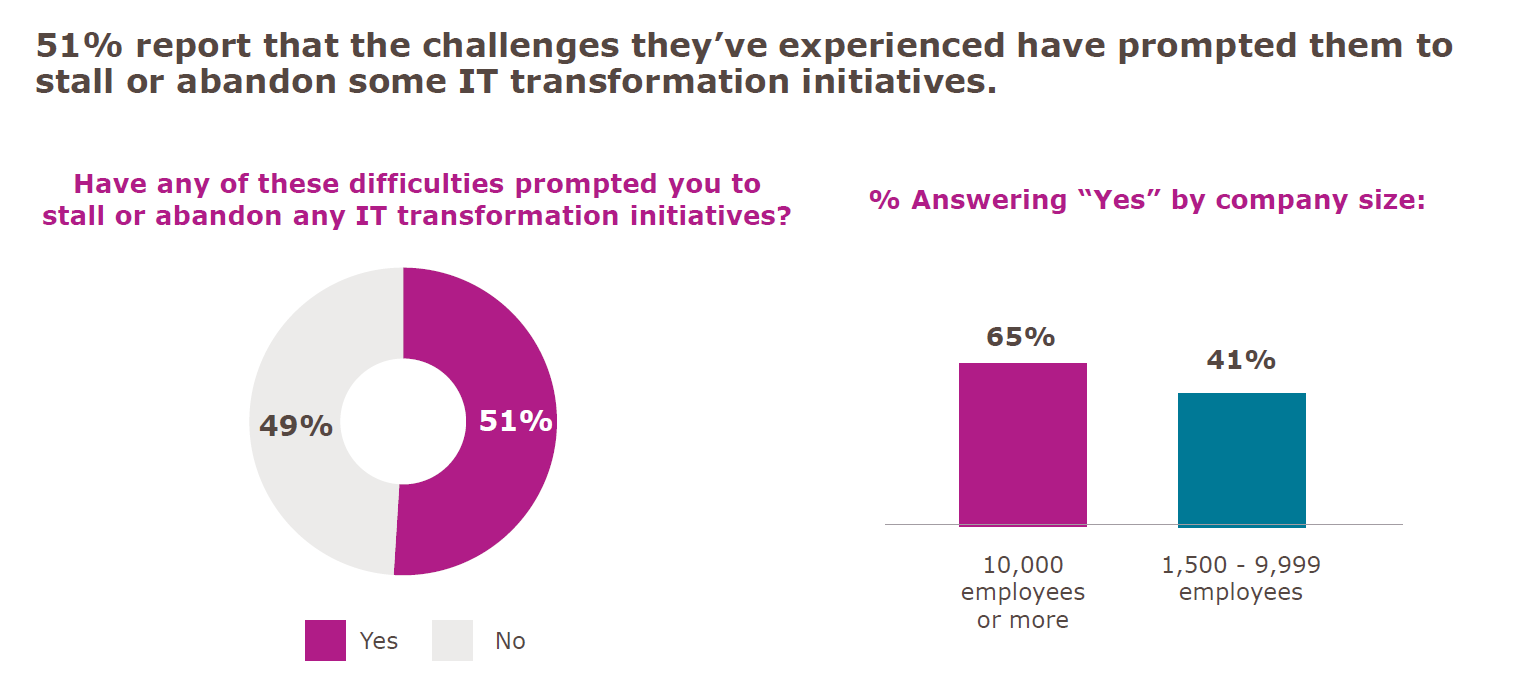
    The last point in this survey that I’d like to address is the “Stalled Digital Transformation Initiatives” slide. (There is a ton of good data in this survey, but these three fit together really well, so I pulled them out.) The fact is that if you are attempting to transform a complex system, you will have wins and losses. Some things will work out better than you planned, while others will not work out as you had hoped at all. I believe that, due to the question’s wording, that is what we are seeing here:

    Yes, 51 percent would be appalling in any other context, but the question was, “Have any of these difficulties prompted you to stall or abandon any IT transformation initiatives?”

    Any is a big word. In fact, any is the largest word in that question. If it were worded with “your” instead of “any,” I will guess the positive answers would be a limit approaching zero.

    If you pronounce a large reorganization and implementation of a slew of new processes, statements such as “that doesn’t fit our infrastructure” are going to shake out. That doesn’t spell doom and gloom for digital transformation; it is simply another obstacle to overcome. Dropping it for now, while focusing on the more viable portions of the plan is common sense, unless whatever isn’t working is core to the transformation. Then it still causes you to stall while figuring it out.

    Honorable Mention

    On average, respondents said they expected more than one-third of their digital transformation activities to be conducted by third parties. That’s a big chunk. Not “off-shoring” big, but still a large portion of work they expect to outsource to get the job done.

    So. Much. Typing.

    Okay, I’m about to shut up now. The takeaway is pretty straightforward. Contrary to hype, you’re not behind on your digital transformation. It’s a tough job, and knowing what you hope to get out of it before starting will help you to continue when things get rough. And they will get rough. The word “transformation” should tell you that. But keep going: There is better/faster/smarter/more mobile out there if you can stay on track, and because they are complex systems getting complex modifications, slow and steady does indeed win the race.

    And just remember, you’re responsible for those horribly complex, hard-to-transform systems doing what they do. Every day. Making them better and easier to manage is a no-brainer, but so is taking a moment to bask in the idea that you’re keeping things running in an environment that is complex.

    — Don Macvittie

  • Transforming with the Cloud: If Not Now, When?

    Transforming with the Cloud: If Not Now, When?

    The question of whether to move to the cloud is no longer relevant for most organizations. Migrating workloads to the cloud has already become an inevitable requirement for a vast majority of companies regardless of their sizes, and if your organization isn’t doing that already, then it is simply the question of when and how you’ll consider doing so.

    The agility, redundancy and elasticity with regards to scaling compute resources present a compelling need to move to the cloud sooner than later, let alone other factors such as reduced overall capital expenses associated with managing a robust on-premises infrastructure. The finance sector is usually a little behind in embracing major changes in IT operations because of their strict regulatory compliance requirements and the complexity in their application portfolio as a result of several mergers and acquisitions. These restrictions are quite common, especially with insurance companies, but surprisingly there are several major insurance companies that have made significant investments to modernize their traditional applications and migrate them to the cloud for efficiency, agility and cost reasons.

    To effectively support the business that constantly strives to be highly competitive and to reduce the time-to-market, most applications development efforts are planned in an Agile fashion with short sprints that produce usable deliverables within a few weeks. When development teams go Agile, it is important that all other associated services operate in a similar manner.  Without agility in infrastructure provisioning and other support services, it is simply impossible for the development teams to be successful in producing deliverables at high velocity. A commonly heard complaint from most of the application development teams is about the delays from infrastructure teams on provisioning servers. Provisioning a virtual machine (VM) takes more than three weeks in many companies, even today. This is due to a variety of factors such as work backlog, complexity in approval processes, compliance requirements, lack of automation and several others that are organization-specific. IaaS and PaaS offerings from cloud leaders such as Microsoft Azure and AWS address these issues to a great extent. Even if companies are not ready to migrate their existing applications to the cloud, they should seriously consider IaaS and PaaS from well-established cloud providers for new applications being developed.

    There are several factors that could influence IT leaders’ decisions on their strategy regarding cloud and some of the areas that certainly cannot be overlooked are discussed here. The purpose of this article is to provide a general high-level overview, especially for companies that have been hesitating to migrate their workloads to the cloud. It should be noted that we are barely scratching the tip of the iceberg in this discussion.

    Complexities in the Application Stack and Infrastructure

    It is not uncommon for organizations to be overwhelmed by complexities and issues with their current infrastructure setup and get bogged down dealing with their day-to-day operational challenges. Due to these ongoing issues, one might develop a false notion on the actual effort involved in migrating to the cloud and may even wonder whether it is an achievable target state. It is important to map out the current infrastructure that supports the business applications and have a clear view of the complexities, dependencies and licenses that are in play. The application servers, database servers, storage arrays, enterprise messaging bus, document management systems and several other key components that work together to power your key business applications need to be taken into consideration. This will not only help decide the right applications that are suitable for the cloud, but will also help pick the right cloud provider to suit your needs. You can notice the convergence of IaaS and PaaS as it is becoming difficult to separate one from the other. Most leading providers are offering these services as a package.

    It is better to categorize your applications based on their level of complexity and shape up your cloud strategy accordingly. Standalone applications that simply require a web server, application server and database server are ideal candidates for your first phase of migration efforts. You can ensure that with the right architecture on the cloud, there will be better availability, load balancing and performance and less maintenance overhead for your standalone applications.

    Amazon Elastic Compute Cloud (EC2) provides availability of 99.99 percent and its auto-scaling feature allows automatic scaling of the fleet up or down depending on the needs to maximize performance and minimize cost. Similarly, Microsoft Azure offers VM Scale Sets that can be configured for your applications to scale automatically. If the requirement is to develop brand new applications for the cloud, the options are endless. As an example, .net based web applications to be hosted on Azure can be developed to be run as Docker containers.

    Containers and the management of a cluster of container nodes have come a long way since their inception. Docker Swarm and Kubernetes have drastically simplified the management, load balancing and scaling of containerized applications. Containers are not only for your new applications; they also come in as a great solution for modernizing your legacy/traditional applications and migrating them to the cloud.

    Storage

    Identity and access control used to be prevalent challenges in the past, but cloud providers have greatly simplified identity management services such as application authentication, user management and single sign-on by providing rich features to support the information security and compliance requirements of organizations. Microsoft Azure offers Azure Active Directory and provides a few different protocols such as WS-Federation, SAML-P and OpenID Connect to authenticate the user. It also supports multi-factor authentication. For brand new applications that are developed using Visual Studio 2017, it is extremely simple to integrate the application for authentication and authorization workflows on Azure AD using the above protocols.

    Databases play a vital role in the decision-making process when it comes to migrating to the cloud. Senior IT managers are usually highly concerned about the security of data while technical personnel are worried about ensuring storage, performance, recoverability and availability. Application developers and DBAs end up spending a great deal of time fixing code or other application configuration parameters even when databases are simply migrated from one server to another within the same data center. Cloud solutions address such concerns. Microsoft Azure, for instance lets you migrate your native on-premises SQL databases to Azure SQL Database Managed Instance by providing the native virtual network (VNET) support. You don’t have to change your applications as a result of this migration. The Managed Instance offered by Azure is quite promising and it is certainly a great solution for migrating large numbers of on-premises SQL Server databases to Azure. Similarly, managed database services are offered by AWS for both relational (RDS) and NoSQL (DynamoDB) databases. Amazon EC2 service is integrated with Amazon RDS and Amazon VPC to provide a complete, secure solution for computing, query processing and cloud storage including, but not limited to, a wide range high-performance web applications, DB servers and batch processing needs.

    Disaster Recovery

    Cloud providers offer data centers in several regions around the world. It requires a major investment for any organization, both financially and operationally, to match the redundancy and recoverability provided by major cloud providers. Even organizations that have a highly virtualized infrastructure setup have physical infrastructure for some of their mission-critical applications. The reasons for having such a setup could be argued, but the costs associated with setting up a disaster recovery environment for such infrastructure would be significant. To ensure comparable performance and capacity, the disaster recovery environment is typically a replica of the production environment that is underutilized most of the time, consuming significant investment.

    Planning for setting up a disaster recovery site involves considering several factors such as, ensuring compute capacity and scalability (servers and storage), networking (bandwidth, load balancers, switches, routers), identity management (directory services, authentication, authorization), facility to host the DR site (location, floor space, power, air conditioning) and operational aspects (personnel, monitoring, alerting, break-fixing, hot-hands support). Cloud providers give you the option to choose the location of your DR site anywhere in the world. Depending on the contract you have with your cloud provider, you could either quickly deploy compute resources on your DR site on the cloud or utilize the necessary automated processes to switch over to an already running replica of your application environment on the cloud DR site.

    There are numerous features that AWS offers to address each of the above-mentioned aspects that need to be considered for setting up a disaster recovery site. Amazon Machine Images (AMIs), for example, lets you preconfigure images with the operating system and your application stacks. It is also possible to configure your own AMIs to allow the recovery process to launch these images automatically in the event of a disaster, saving a significant amount of time.

    Microsoft also provides highly dependable DR alternatives on Azure. You can use Azure as your secondary site for DR purposes or completely eliminate the need for data centers by picking different Azure regions as primary and secondary sites. Azure offers the Active-Passive and Active-Active topologies. In case of the active-passive topology, all user traffic flows to the primary region while preparing the secondary region to take over at any point since the database runs in both regions with a synchronization mechanism implemented between the regions. Active-active topology ensures running of cloud services and databases on both the primary and secondary regions and user traffic goes to both the regions. In the event of a failure at primary, all the user traffic will be directed to the secondary by simply disabling the DNS at the primary region. Auto-scaling features of Azure will allow the scaling up of compute resources in the secondary region as needed.

    DevOps Maturity

    Any discussion on migrating to the cloud would be incomplete without highlighting the significance of a solid DevOps practice to complement the cloud strategy. From a technical standpoint, companies that settled on Linux environments used to have a slight edge over those that went the Microsoft route, especially with regards to implementing open source solutions and technologies that support DevOps and cloud initiatives. This is highly arguable now as Microsoft has not only opened its gates wide for several major open source tools but also allowed for better integration of several leading open source products such as Docker, Jenkins and Puppet with ALM tools such as Microsoft TFS 2017.

    Depending on the goals of an organization with regards to its cloud strategy, the level of maturity required from a DevOps perspective needs to be analyzed. DevOps can be looked at from infrastructure as well as applications development perspectives. If your goal is to use cloud services only for IaaS, it will be extremely valuable to develop strong, infrastructure-focused DevOps capability, practices, processes, tools and automation. Through proper scripting and integration with IT services management (ITSM) tools such as Service Now, the entire process—from requesting infrastructure through having them provisioned with all the patches, hardening, etc.—can be fully automated by leveraging tools such as Chef or scripting via PowerShell. Features such as metered billing and quotas that are already offered by cloud providers can be leveraged and integrated with organization units’ budgets, approvals and other processes to establish a well-managed, fully automated infrastructure provisioning process.

    Organizations considering leveraging the cloud for applications development are definitely at an advantage compared to those considering development on-premise. Microsoft, for example, offers IaaS at a highly competitive price and provides Visual Studio Team Services (VSTS), a cloud version of Team Foundation Services (TFS), on Azure. The PaaS services offered by Azure are also quite extensive, along with integration with a variety of open source tools. With this combination, developers have a complete, end-to-end solution to address all their requirements without losing time in waiting for environments to be set up. DevOps can play a significant role here. With a fully integrated continuous integration (CI) framework, the developers could commit code to a managed Git repository on the cloud, and automated continuous integration can be kicked off via VSTS, which handles the build, automated testing, code quality control, building container images, automated spinning up of infrastructure needed for an environment and deploying code or containers on the environment following a fully integrated change control process and quality gates. Developers can focus fully on developing code and enjoy the freedom of being able to deploy code on a transient environment on the fly to test their code before it goes through other phases of testing. In highly competitive business environments, this provides the ability to perform multiple production deployments in a single day if need be.

    Organizations with a high level of maturity in DevOps are the ones most likely to leverage cloud to its fullest potential. Similarly, those that are striving to attain this level of maturity are likely to get there sooner by moving to the cloud. Developing the expertise, building the process framework, and implementing the right DevOps tools will make it easier to solidify your cloud strategy.

    Compliance & Security

    Several organizations have refrained from migrating to the cloud mainly due to the strict compliance and security requirements that are mandated by the industry. Companies that are still hesitating to embrace the cloud are those that are skeptical about the security of their data on the cloud. Irrespective of the cloud provider or the strict SLAs and contractual terms that you may have with them, you are still accountable for the data that you own. So, it is extremely important to understand more about the security setup and the features offered by your cloud provider to secure your valuable data on the cloud.

    As the owner of your organization’s data, you have to know where your data is going to physically reside, what kind of encryption will be applied to your data at rest and in transit, who will physically have access to your data, how your data will be segregated from other tenants’ in a multi-tenanted environment, what recovery processes exist, what the regulatory compliance certifications that the provider has obtained are and answers to many more questions. Security experts highly recommend classifying your data based on risk levels and devising a strategy accordingly. You may decide to host your most critical data on-premises and use the cloud for other types of data.

    Microsoft offers a very comprehensive checklist and reports to help you assess the risk to your organization in moving to the cloud. Both AWS and Microsoft are certified by almost all major regulatory bodies with regards to data security and compliance. However, as outlined earlier, while your provider can take the responsibility to host your data in the most secure manner, you as the owner of the data will still be accountable for its integrity and security. So, this is an area that requires thorough analysis before you decide on your workloads that need to migrate to the cloud.

    To Make the Long Story Short …

    While savings on capital expenses is a given, this is not the prime motivator for most organizations to migrate to the cloud. As stated in the Gartner report, “Cloud Computing Primer for 2018,” the role played by cloud in this decade is way beyond simply setting expectations and providing a platform for better economic models. Digital initiatives such as artificial intelligence (AI), internet of things (IoT) and several other technological innovations and disruptions are fueled by digital platforms that cloud offers. Agility, scalability and flexibility, on the other hand, are certainly some of the key drivers that would encourage companies to migrate to the cloud. Furthermore, reducing your time to market can be better accomplished by moving your development workloads to the cloud. The combination of IaaS, PaaS and a solid DevOps practice to automate deployment of infrastructure and application stack makes cloud far more superior to running applications development on-premises. Companies that haven’t invested much in DevOps should seriously consider doing so before it is too late.

    Containers, the tools and practices to orchestrate, load balance and scale microservices add a completely different dimension to how cloud services could be further leveraged. They help ensure seamless, defect-free, repeatable deployments, and with the necessary automation to spin up transient environments, it is difficult to match the benefits of using containers on a fully automated IaaS in an on-premises setup.

    The auto-scaling features offered by cloud providers make cloud a far more superior alternative compared to hosting internally. The elasticity provided by cloud helps with scaling compute power, storage, load balancing and several other infrastructure services as needed, without having to make massive hardware investments.

    Cloud providers offer solid disaster recovery options and support. Implementing an active-passive or active-active primary and secondary sites is a lot more straightforward and easier to set up on AWS or Azure than doing it on-premises.

    Compliance and security are also important factors that could drive the cloud strategy. It is important for decision makers to evaluate the risk factors and then decide on the type of data that could reside on the cloud as opposed to staying internally.

    NetworkComputing provides interesting statistics on public, private, and hybrid IaaS adoption in their article, “IaaS Cloud Adoption Trends.” The article further refers to research from Interop ITX and InformationWeek on how organizations are moving and managing workloads to the cloud. Per their findings, several companies are expected to deliver over half (67 percent) of their IT and business services through the cloud in the next year. Of all the companies they surveyed, 31 percent plan to allocate over 50 percent of their budget to cloud initiatives.

    With a clear strategy, budgets, categorization of applications, prioritization and staff with the right expertise, you can be sure that your journey in moving your workloads to the cloud will be a pleasant one.

    — Sridhar Asvathanarayanan