Tag: CI/CD

  • OverOps Integrates AI Code Analyzer With CI/CD Platforms

    OverOps Integrates AI Code Analyzer With CI/CD Platforms

    At the DevOps World | Jenkins World 2019 conference, OverOps announced it has integrated its namesake tools for analyzing Java and Microsoft .NET code at runtime with a variety of continuous integration/continuous deployment (CI/CD) platforms, including Jenkins, JetBrains TeamCity, Atlassian Bamboo and Pivotal Concourse.

    Eric Mizell, vice president of solution engineering for OverOps, noted that the more errors that are discovered by DevOps teams early in the development cycle, the less technical debt organizations must address after an application is deployed in a production environment. By pushing testing to further to the left of the application development process, the less troubleshooting will be required later on, he said.

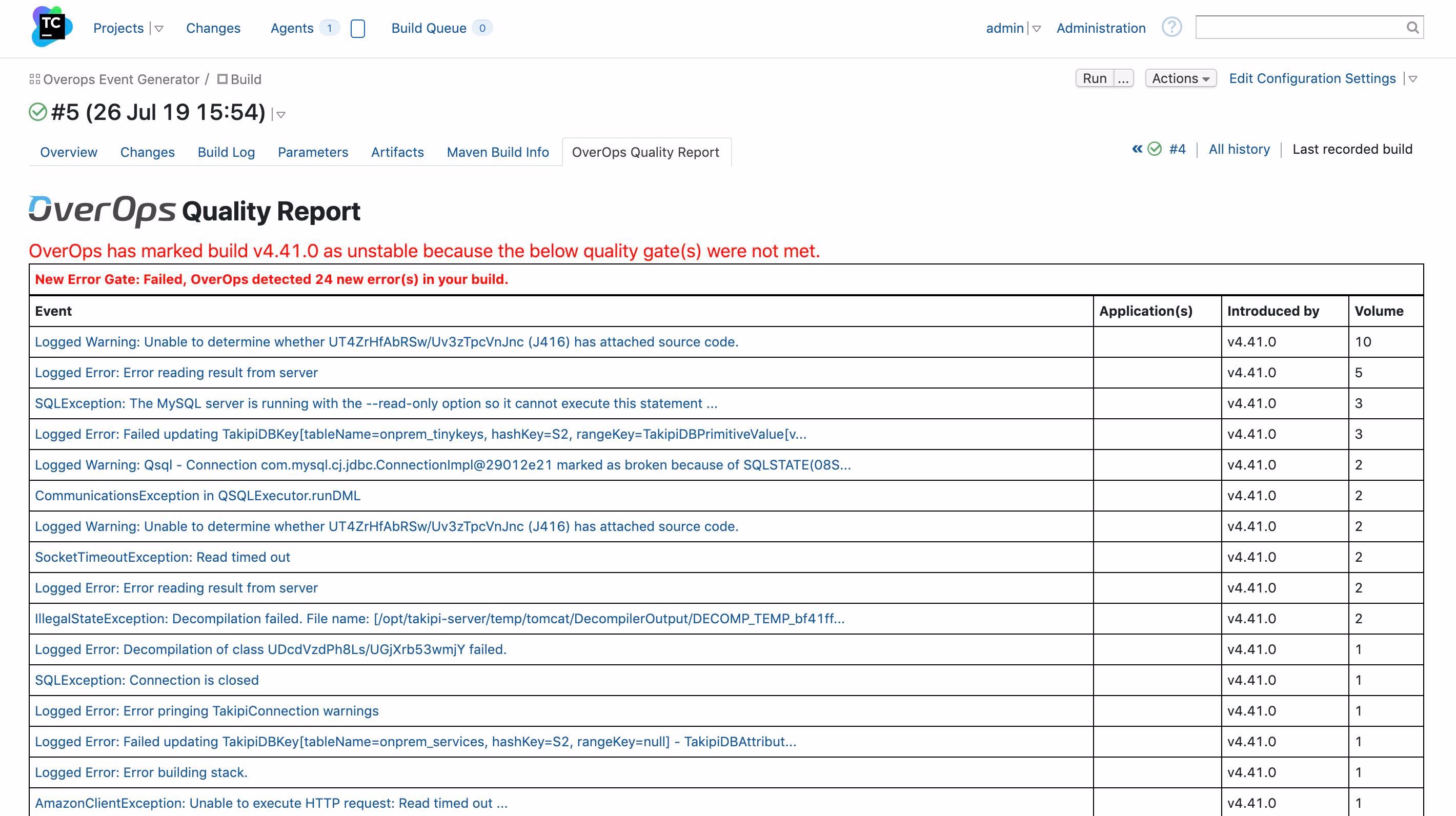
    OverOps employs predictive analytics and machine learning algorithms to identify new, increasing, resurfaced and critical errors in a release. It then generates a code quality report that ranks all severe issues likely to impact end users and application functions. By integrating OverOps within the CI/CD pipeline, DevOps teams can use those reports to determine whether code is safe to promote or automatically block unstable releases from moving forward.

    In addition, because the machine learning algorithms surface the true root cause of an issue, DevOps teams can more efficiently remediate issues by routing code back to the development team responsible for all the issues that are being created downstream.

    Making testing an integral part of the CI/CD process not only tightens the relationship between developers and testers, but also in many cases enables developers to test their own code before submitting it for review.

    Mizell said the need to shift testing to the left has become more critical as customer tolerance for application errors is low, especially in use cases involving mobile applications—consumers are especially unlikely to give a mobile application a second chance after they’ve encountered an issue.

    In an ideal world, of course, testing tools that make use of machine learning algorithms would be employed to coach developers in a way that enables them to develop reliable code more consistently and faster. However, some organizations will use tools that leverage machine learning algorithms to identify developers who are not meeting expectations. That weeding out process is likely to begin much earlier in the application development life cycle as more advanced testing tools are embedded within CI/CD environments. Those tools won’t eliminate the need for developers and testers, but they do promise to increase dramatically the rate at which quality applications can be built and deployed at an industrial scale. Technical debt may never be completely eliminated, but at the very least the rate at which that technical debt is being accumulated should substantially decline.

    It may be a while longer before machine learning algorithms and other forms of artificial intelligence (AI) are employed pervasively across DevOps processes. In most cases, those algorithms will help developers write better code faster. However, it’s also apparent there will be other algorithms at work that one way or another ensure developers will have fewer opportunities to make mistakes in the first place.

    — Mike Vizard

  • CircleCI Extends CI/CD Reach to Windows Platforms

    CircleCI Extends CI/CD Reach to Windows Platforms

    CircleCI today announced it will make available its continuous integration and continuous deployment (CI/CD) platform available on a variety of Windows platforms.

    Matt Wyman, vice president of product for CircleCI, said the decision to support Windows stems from recent Microsoft DevOps initiatives, most notably its move to acquire GitHub. As Microsoft invests more time and energy promoting best DevOps practices, demand for CI/CD platforms running on-premises or in the Microsoft Azure public cloud will escalate sharply, said Wyman.

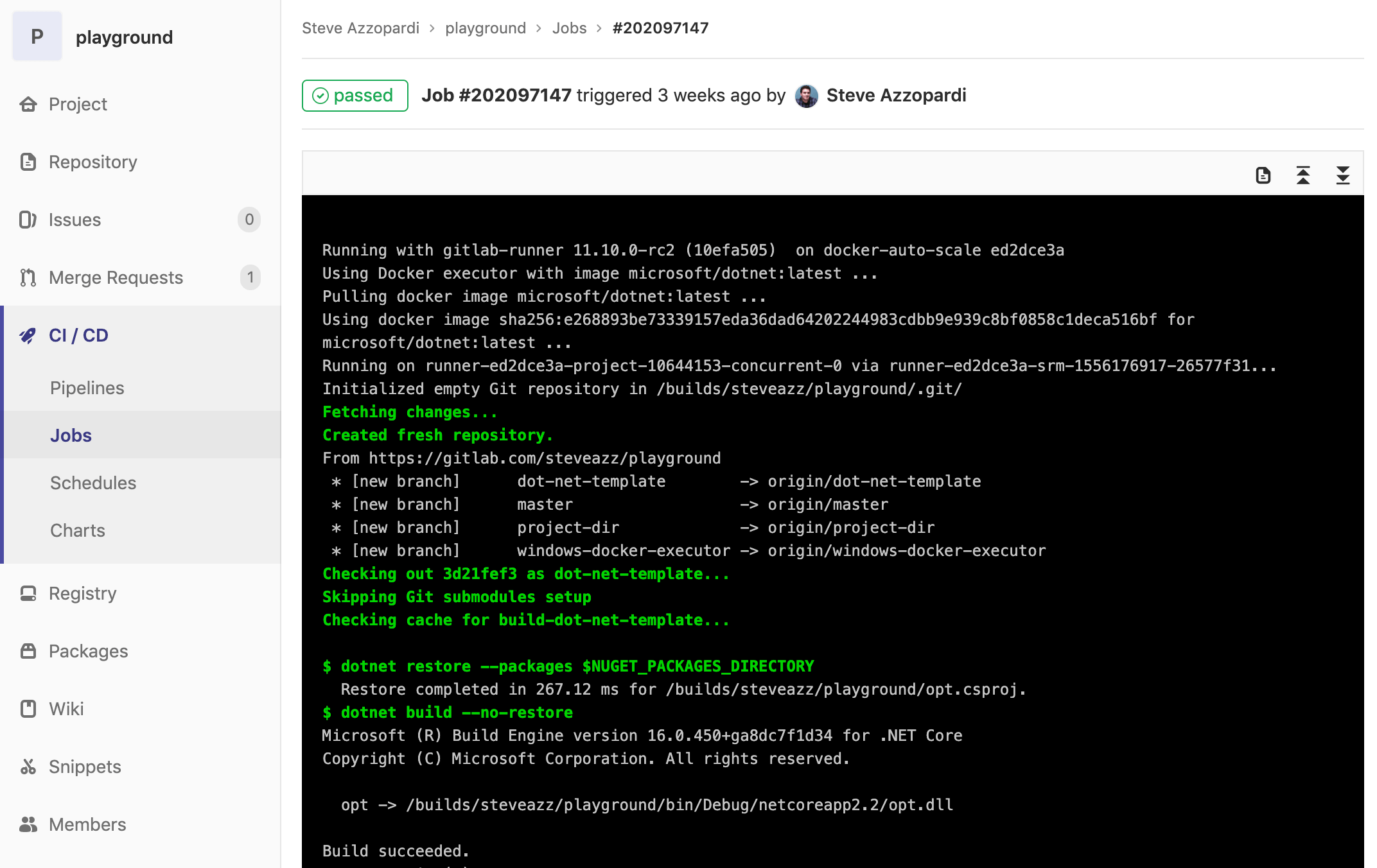
    The Windows environment on CircleCI also includes support for Docker Engine – Enterprise for Windows workflows and all Windows jobs run isolated on a virtual machine. Each new job uses an environment that gets created just in time and gets destroyed once the job finishes running. That approach is intended to ensure both build reproducibility and the security of the code, data and secrets stored in a CI environment. All CircleCI features such as caches, Workspaces, approval jobs and Contexts are now being made available for Windows jobs.

    Wyman said CircleCI now expects organizations to extend the same software development lifecycle processes for building and deploying both Windows and Linux-based applications. The ability to leverage the same pipelines within the context of a common CI/CD platform spanning both environments will help narrow the time and effort required today to build Windows applications, he added.

    Currently, it’s unclear whether a common set of processes for building and deploying applications in Windows and Linux environments might foster greater collaboration within IT organizations. Linux and Windows teams don’t tend to interact much. However, as more organizations look to apply repeatable processes that enable them to build more reliable software faster, the need to standardize DevOps processes has become apparent. Of course, Circle CI isn’t the only provider of a CI/CD platform looking to take advantage of that emerging hybrid cloud computing opportunity.

    It’s also worth noting that providers of platforms such as Microsoft and Red Hat are also promoting their own approaches to software development lifecycle management. Organizations need to decide how much they want to rely on the tools and processes made available by platform vendors instead of a CI/CD platform that integrates DevOps processes across multiple platforms. To fight that battle, CircleCI last month revealed it has raised another $53 million in funding. At that time, the company noted that the total monthly job count on its platform stood at 30 million, up from 7 million in January 2018.

    Regardless of the path chosen forward, organizations increasingly need to build and deploy software on multiple platforms. The challenges associated with managing those processes are nothing less than considerable. The issue IT leaders will need to determine first is how much they want to drive unification of software development from the top down versus simply providing a common set of tools and platforms that their teams will (hopefully) gravitate toward.

    — Mike Vizard

  • How Continuous Testing Advances Your Business Goals

    How Continuous Testing Advances Your Business Goals

    The goals of any successful business fit into two broad categories: driving higher revenue and greater operational efficiency. Finding solutions to achieve both of these is an organization’s goldmine.

    Considering the ease of access to new, alternate products from developers across the globe, competition continues to grow. In the software industry, customer expectations magnify cut-throat competition. Users expect newer features, faster releases and ever-improving optimal performance.

    To achieve these core business goals, DevOps teams now develop software with a mindset of continuous delivery. This practice helps organizations achieve faster release cycles while delivering newer features to meet customer demand.

    For most teams, there remains a major ongoing challenge: effective testing within this high-speed delivery cycle. Traditional (non-automated) testing methods became a bottleneck in the CI/CD pipeline mindset, forcing organizations to choose between quality and speed to market.

    Continuous testing helps overcome this problem by weaving testing throughout the delivery cycle by leveraging automation. But what tests should be automated?

    In late 2018, KMS surveyed 135 professionals who successfully implemented continuous testing, for their insights on the process. Of the organizations surveyed, the following tests were always automated:

    • Unit tests (47.4%)
    • Component tests (46.7%)
    • Integration tests (45.9%)
    • UI tests (38.5%)
    • Performance and load tests (57%)
    • Security tests (52.6%)
    • User acceptance tests (34.1%)

    We also found the top three focus areas of test coverage for continuous testing were:

    • Integration tests (55.6%)
    • Security tests (48.1%)
    • UI tests (43.7%)

    As a bottom line, businesses must successfully adopt continuous testing to keep their delivery pipelines in sync with development.

    Despite several benefits arising from continuous testing, KMS found a few challenges for organizations that have adopted this methodology. Seventy-eight percent reported that continuous testing would have been easier to adopt with a directive from their executive leadership.

    What’s more, 78% indicated they would have liked more team ownership of the initiative and 86% would have liked better team collaboration.

    So, how do organizations get executive buy-in and rally the team to adopt the practice? By understanding and communicating how continuous testing directly contributes to achieving the two key business goals of increased revenue and operational efficiency.

    Let’s drill down into increased revenue generation. After all, money is what keeps any business in motion. Businesses drive revenue by:

    1. Solving a pain point for customers.
    2. Encouraging users to adopt their solution.
    3. Having the agility to shift and meet changing consumer needs, with speed.

    To achieve operational efficiencies, businesses focus on:

    1. Achieving shorter release cycles.
    2. Receiving feedback and ability to respond with agility.
    3. A more effective team, without increasing headcount.

    With these goals in mind, there are three core business cases for adopting continuous testing:

    Increased Agility and Confidence in Quality

    Agile is the ideal delivery model for all software companies. True agility means organizations can shift focus quickly and respond rapidly to customer feedback or changes in the market. It also gives teams the freedom to explore new opportunities/solutions. Continuous testing enables this agility by supporting a shift-left philosophy that uses test automation in the earlier stages of the development cycle. Shifting left enables a continuous feedback loop that allows teams to respond to defects and establish better team communication.

    By adopting continuous testing, 80% of professionals found fewer defects escaping to production. Reacting to feedback quickly allows companies to give customers the products they want. An organization can increase revenue by delivering market-disrupting features.

    Automation tools also encourage a testing mindset in developers—80.7% of companies adopting continuous testing have found their developers doing more testing. This mindset shift is critical to achieving agility with better collaboration. It makes the quality of the software the responsibility of the entire team, truly aligning with the Agile Manifesto. As a result, product quality and user experience benefit, and happy customers increase revenue.

    Faster Overall Speed

    Keeping up in today’s market requires shorter release cycles. As I mentioned earlier, adopting continuous testing enables faster sprints by eliminating the testing bottleneck at the end of the delivery life cycle. In fact, 83.7% of companies have achieved shorter release cycles by adopting continuous testing.

    Speeding up the software development life cycle pushes products to market faster. Getting features in the hands of customers before your competition gives your company a huge competitive edge. By adopting continuous testing, companies are not slowed down by antiquated testing initiatives. Speed enables them to compete on a global scale and disrupt the market.

    Lower Operational Expenses

    How do you balance speed and cost? Automation. Continuous testing automates routine tests. By using open source tools such as Katalon, teams can automate with minimal extra expense. This not only helps you test faster, but your team can be more productive—84.4% of companies have achieved better test coverage with the same team size and 67.4% were able to test with smaller teams. Either way, you get more done without investing in additional overhead.

    However, automation is not here to replace testers. Automation in pre-production environments gives your resources the bandwidth to work more strategically: 53.3% of companies that have implemented continuous testing don’t test manually in pre-production environments. Seventy-four percent now have the bandwidth for exploratory testing in production. Use your team and resources where they are most effective, doing the work automation can’t. Ultimately, smart use of resources achieves a sought-after balance of speed and cost.

    By exploring the business cases for continuous testing, companies achieve true agility. The methodology seamlessly aligns with fundamental business goals. Enabling continuous delivery, continuous testing will support revenue growth and operational success for your organization.

    — Mush Honda

  • Self-Service Workload Protection for DevOps Teams

    Self-Service Workload Protection for DevOps Teams

    Everyone (or almost everyone) in the DevOps world likes to talk about the importance of security. But too often, these DevOps security conversations end with generic recommendations such as, “Follow the OWASP Top 10.”

    Don’t get me wrong—reference frameworks such as OWASP are great resources for helping to guide DevOps security. But it’s usually far from obvious to many DevOps teams how to bridge the gap between the abstract theory of these frameworks and actual practice. That’s especially true given that many DevOps teams spend their days putting out fires in fast-moving CI/CD environments and have little time to step back and operationalize security best practices, even if they know they should.

    In this article, I’d like to present one real-world strategy for implementing the DevOps security best practices outlined by organizations such as OWASP. That strategy is what I call self-service workload protection. The term refers to making security not just something that DevOps teams recognize as important in the abstract but an easy-to-use service that anyone on the DevOps team can operationalize just like any other process within the CI/CD pipeline.

    In other words, we need a self-service approach for offering workload protection through an accessible library of policies and tooling that DevOps teams can leverage on demand. Let’s take a look at how we can achieve that in practice.

    Understanding Self-Service Workloads

    To understand how self-service workloads work, we need to know the common parameters that define a secure and properly configured application deployment. With that information, security teams can automate the process and offer a complete set of reusable and adaptable tools for DevOps service teams to run.

    The common parameters usually boil down to the following factors:

    • Making sure that all required compliance and security scans run at least once for every deployment. Those scans need to use preventive actions and block insecure deployments.
    • Making sure that for any new vulnerabilities found, we add them to the list of checks. (For example, we should be able to see updated reports for new issues as they’re discovered.)
    • Performing audit reports and continuous security monitors over the development and production sites to capture security issues.
    • Establishing sane and pragmatic secure default policies and authorization profiles.

    The above parameters should be captured and packaged as a self-service solution and used during the normal flow of operations—for example, CI/CD pipelines, validation and compliance checks, creating and uploading a new image to a container registry, etc. This means the security team will have to spend some time to make sure the application of workload protection policies is a team effort.

    For more tips on automating security, check out Symantec’s recent webinar on security and compliance for DevOps.

    How to Make Security Better Via Self-Service Workload Protection

    From the perspective of the security team, the main goal is to make security accessible to everyone in the organization. Not only that, but the tooling and resources they offer need to be documented and easy to use. The DevOps team should be able to plug in security controls without knowing their ins and outs, though they need to have the means to let the security team know if something goes wrong. Let’s explore how we can make this process better.

    Shift-Left Security Through CI/CD Pipelines

    Shift-left security is the main focus point of the security team, and it’s also the most tricky to get right. By adding more security checks and audits earlier in the development process, there’s a risk of stepping into other people’s ponds (which may degrade their workflow experience).

    A better approach is to give more responsibility to the DevOps team and let them determine the best possible integration point. Mistakes will be made, but important lessons will be learned. Gather feedback from the process and, if required, iterate over the agreeables. That way, everyone will benefit. If the appropriate steps are taken, the security team will have a way to apply its security checks during the development process, and the DevOps team will have its infrastructure protected (at least from known risks).

    Test automation and continuous integration points are the most obvious solutions, as they are the most automated parts of the system. The security team can go the extra mile and offer reusable policies and deployment steps that can be added on each deployment type. For example, they could offer a container image that is bundled with security checks and frameworks that test common security issues. The DevOps team can simply enable the checks via the CI/CD dashboard and during the build stage the check would act as a gateway if a security check fails.

    In addition, the security team can share infrastructure policies and secure default configuration via infrastructure-as-code tools such as Terraform using remote state. This could be enabled during infrastructure provisioning by the DevOps team, without configuring anything. Sharing state this way often improves collaboration between departments.

    Pre-Baked Secure Images

    Developers use VMs and containers to package their apps for the DevOps team to deploy them to production. Usually, those images host crucial configuration and services that are specific to that application. What’s more ideal than to have the security team prepare a list of safe-to-use images that are preconfigured with secure defaults and scanned against vulnerabilities? Developers just have to specify the required image by ID so that the DevOps team can use it for all deployments.

    Tip: Symantec’s CWP product is integrates with Jenkins to enable simple, automated vulnerability scanning during the CI/CD process.

    For example, tools such as Packer are used to create identical images for AWS compute instances, and features such as seccomp profiles are enforced to Docker images. With Packer, you can deploy consistent images to the cloud and integrate vulnerability scanning into the process to ensure the deployed images meet GSO guidelines. There is a small caveat here, though: If developers decide to add an external library that needs more capabilities and they don’t inform the security team, then the application might misbehave in production and the DevOps team would be caught unaware. So, it’s important to have a good communication channel and do a security assessment for each new dependency or change introduced to the system. This keeps the self-service agreement working without interruptions or misunderstandings.

    Conclusion

    Letting the DevOps team manage its own self-service affairs when it comes to security controls and compliance requirements is the next major step toward a more productive business model. There are additional costs, but the end results have long-term advantages.

    By having a preset repository of tooling, configuration policies and pre-baked images accessed from secure portals, teams can integrate security from the start while maintaining the benefits of accelerated development. And by doing that, security and DevOps teams can improve their collaboration.

    That’s great news. What’s even better is that we can use a tool that is suited for all the above tasks—Workload Security Protection from Symantec. If you want to learn more about the platform, see how it can help secure your cloud with a free trial.

    This sponsored article was written on behalf of Symantec.

    — Theo Despoudis
  • Clubhouse Aims to Simplify Software Project Management

    Clubhouse Aims to Simplify Software Project Management

    Clubhouse Software today announced it is adding a Clubhouse Iterations module to its project management application to make it easier to plan sprints involving product and software engineering teams.

    Mitch Wainer, chief marketing officer for Clubhouse Software, said Iterations will be included as part of its project management application service, which aims to bridge the divide that often exists between software development teams and the lines of business for which they are building applications.

    Wainer said the company’s namesake project management software makes it easier for non-technical professionals to participate in the same project management workflow as a development team, rather than requiring them to become conversant in a project management application designed for software engineers, such as Jira. Clubhouse’s approach eliminates silos that get created when two teams within the same organization rely on different project management applications, he said.

    Clubhouse Iterations goes a step further by surfacing what teams need to focus on as priorities and timetables change within a specific project, added Wainer.

    Clubhouse Iterations allows users to define sprints using start and end dates, and the tool then sends reminders so the team can reserve time to focus on specific projects, he added.

    Organizations that have successfully embraced DevOps almost invariably seek to extend those processes beyond the software development team. In theory, at least, the entire business should aspire to become more agile. However, the project management software many DevOps teams employ today is too complex and intimidating for the average business executive. Rather than forcing business users to learn how to master these applications, a case can be made for a more intuitive set of project management tools for both software development teams and the product managers they ultimately serve. Wainer said Clubhouse is already being used within 2,000 organizations to address that issue.

    Wainer also noted the Clubhouse Software also has no bias as far as continuous integration/continuous delivery (CI/CD) platforms are concerned. Clubhouse is designed to integrate with multiple CI/CD platforms via application programming interfaces (APIs) to enable the development of custom workflows that include, for example, integration with real-time conversations occurring via the Slack service.

    Next up, Wainer said Clubhouse intends to improve the search capabilities it provides on the platform and offer more sophisticated reporting tools.

    In the meantime, the rise of DevOps would not be possible without the capabilities enabled by project management applications. But the agile nature of DevOps processes is forcing providers of project management software to make their applications both more dynamic and accessible. Those advances, in turn, make it easier to bring new members on board to the DevOps team.

    Project management software may not always be viewed as the linchpin around which most software development processes are constructed. Without some form of project management application, however, most DevOps processes would have devolved into utter chaos a long time ago.

    — Mike Vizard

  • CloudBees Acquires Rollout for Feature Flagging

    CloudBees Acquires Rollout for Feature Flagging

    CloudBees today announced it would extend the reach of the Jenkins continuous integration/continuous development (CI/CD) platform by acquiring Rollout, a provider of feature flag tool that gets employed to simplify testing of new modules within an application.

    Company CEO Sacha Labourey said the acquisition of Rollout would result in a feature flag capability that is more seamlessly integrated with the gates that make up a CI/CD pipeline process. The goal is to make it easier for DevOps teams to apply A/B testing of new application features against a subset of users before deciding to update an entire application environment, he said.

    Feature flagging, also known as feature toggling, enables DevOps teams to hide features from certain users at runtime. In effect, this creates multiple branches from the same source code that DevOps teams need to manage. Rather than having to employ a separate tool based on an entirely different user interface, CloudBees is moving to make feature flagging a core capability of its extended toolchain.

    In theory, feature flagging should be more widely employed than it is today. Many organizations, however, have found it challenging to incorporate separate feature flagging tools within their DevOps processes. CloudBees is now using some of the money it has raised of late to address that issue.

    Feature flagging today is largely confined to testing. However, there may come a day when more organizations will employ feature flagging to make different classes of user experience available to different end users. That approach, in theory, would make it possible to charge different fees for disparate application experiences using the same core application.

    In the meantime, the goal is to garner more feedback concerning new capabilities that might be added to an application before the features are made generally available. Developers often spend months developing new features only to discover end users are not employing those capabilities because of some trivial glitch that could have been discovered easily using A/B testing.

    There currently is no shortage of options when it comes to tools for implementing feature flagging. Labourey said CloudBees elected to acquire Rollout because the team behind it was deemed to have the best cultural fit with CloudBees. It’s too early to say whether other providers of feature flagging tools will be rolled up into other CI/CD platforms—providers of those platforms can either develop their own feature flagging toolsets or move to absorb a third-party provider either by acquiring them or forming a technology alliance. The depth of the toolchain being provided these days often has as much to do with what CI/CD platform ultimately gets adopted as the core integration and delivery capabilities.

    Regardless of the path chosen, it’s apparent that thanks to feature flagging, continuous testing processes will become more sophisticated. That may require some adjustments to existing best DevOps practices, but the days when development teams blindly experiment on end users in the hopes they are building the next killer feature mercifully are coming to an end.

    — Mike Vizard

  • Shift Left Without Fear: The Role of Security in Enabling DevOps

    Shift Left Without Fear: The Role of Security in Enabling DevOps

    It’s the age of DevOps, and we all want to shift left, which refers to the idea of performing processes earlier in the CI/CD cycle. That includes security checks and audits. By starting security operations earlier in the delivery pipeline, it becomes easier to find problems, and teams have more time to address them before pushing code into production.

    The challenge, of course, is building a shift-left security operation that allows you to perform security operations early without slowing down delivery speed. Let’s take a look at how to square that circle.

    Defining Shift-Left Security

    A popular term in DevOps culture is “shift left.” But what does shift left mean? Shifting left refers to the effort by a DevOps team to implement measures to ensure application quality at an early point in the software development life cycle. In the case of application security, this means implementing measures to ensure security concerns are taken into consideration while the application is being developed, rather than at the end of the process.

    The overall goal of shift-left security is to identify and resolve potential vulnerabilities earlier in the development life cycle, when these issues are less expensive to fix. Doing so will help to mitigate the risk potential security concerns pose to both the delivery schedule and your end -users.

    DevSecOps: Integrating Security Into the Development Process

    Let’s be honest: Faster and more frequent development cycles aren’t going away. Slowing delivery speed to analyze and bulletproof the application at the end of the development process is no longer a viable format for implementing security. DevOps and CI/CD need to be embraced and enabled by the security staff.

    For security teams to enable the DevOps process, collaboration is key. Through this collaboration, the process of DevOps transforms into something known as DevSecOps. In DevSecOps, security personnel work closely with the rest of the DevOps organization to help those who create and deliver the application to gain a better understanding of what is needed to address security concerns as early in the development life cycle as possible.

    The following tips serve as a jumping-off point for implementing this collaboration:

    • Make security the responsibility of the entire DevOps team: Impress upon the development and operations staff that security is now the responsibility of the entire organization. Simply addressing potential vulnerabilities post-development will eat up too much time and increase the risk that something will be missed. Buying into this process is an essential part of implementing successful collaboration between the security team and the rest of the organization. An example of this would be impressing upon developers to code with security in mind.
    • Facilitate regular discussions about application security throughout the development process: It is the responsibility of the security folks to keep security considerations at the forefront of a developer’s mind while they develop new features. Use the agile process to your advantage. Backlog meetings can involve security folks to ensure the creation of user stories includes consideration for security concerns. Your daily standup meetings are another place to include security personnel. This will provide security staff with an opportunity to speak up when the work described by the developer requires—or might require—considerations related to security that have yet to be addressed. Doing so will help to ensure the ball is not dropped, allowing for potential issues to be rectified before they even exist.
    • Use test automation and continuous integration to your advantage: When it comes to addressing security concerns throughout the development process, continuous testing is your best friend. And, in cases where it makes sense, the DevOps team should integrate automated test scripts for the detection of security and into their continuous integration process. Such tests can include developer-written scripts to test for vulnerabilities in the code base and tools for static code analysis. Another part of your continuous testing strategy could involve the use of tools for infrastructure monitoring.

    The data produced by these strategies can then be analyzed by security folks. And from this analysis, recommendations can be made to the DevOps team regarding the path forward to close potential gaps in security before they ever reach production and can be exploited.

    Understanding the Role of Security Personnel in the Development Process

    Security folks are often not coders, and development personnel are often not security experts. And while it may be frustrating at times, the solution to managing this disconnect is in the collaboration described above. Situations will arise where developers need to develop with various technologies to build a quality product. It’s possible that these technologies will lend themselves to security concerns that require security expertise. The job of security personnel shouldn’t always be to fight back against the use of these technologies. The security team should act as facilitators—take what development and operations staff intend to do and foresee the potential impacts that innovation will have on security—then take these potential impacts and provide insight into what needs to be done to reduce the risks.

    Conclusion

    In the past, security often was considered as an afterthought in the development of an application and its infrastructure. The movement toward faster development cycles and more frequent application releases has forced development organizations to think about security differently. Nowadays, so much can change in an application in a short time. This has forced DevOps organizations to integrate security into the development pipeline to make security a continuous consideration in the development life cycle. With this integration, the responsibilities of security personnel have shifted. Security teams now need to be enablers of the DevOps culture, empowering DevOps processes with security in mind.

    To see how Symantec CWA can help you shift left without fear, sign up for a free trial to see how it can help secure your cloud.

    — Scott Fitzpatrick

  • Continuous Reliability: How QA and SREs Can Improve Their CI/CD Workflow

    Continuous Reliability: How QA and SREs Can Improve Their CI/CD Workflow

    A key challenge in maintaining and accelerating the speed of software delivery is balancing the rate of change with the reliability of your software. With the move toward an increasingly automated workflow, as well as teams of dozens to hundreds of engineers introducing changes at a high frequency, the ability to identify the issues that will have a severe impact early on becomes critical.

    This challenge poses many questions: With so many errors, will spending my precious time to resolve a particular issue be really worth it? How do I detect severe issues in code or infrastructure that could be impactful ahead of time? Once a release has been moved forward, how can I know how well it’s doing–should it be fully deployed, hotfixed or even rolled back?

    That’s why we need our CI/CD workflow to work both ways, helping us upgrade and improve our application as well as allowing us to learn and adapt according to how it performs with our users. Enter continuous reliability.

    A Feedback Loop Between Everyone

    Code quality gates and contextual feedback loops are the CI/CD building blocks that define the emerging practice of continuous reliability. The current and most common feedback loop is between dev and QA teams, and it’s usually the backbone of every good development cycle. However, feedback loops are relevant to the whole development cycle, and they don’t end with QA/dev deploying and testing elements in staging environments.

    As we all know, production tends to display unexpected and surprise-oriented behavior, some might even say that issues and bugs appear out of thin air. That’s why QA and SRE teams need accurate answers as to the actual quality of releases. They need to identify when critical anomalies move from staging and production, and ideally have the ability to gate them before they harm the application, workflow or customers.

    Defining the Anomalies That Matter

    Anomaly detection is critical to continuous reliability. In most applications, error and performance anomalies can be mapped into three core types:

    1. New defects: the introduction of new errors into a system, usually a result of code changes.
    2. Increasing Errors: an increase in the relative volume (i.e. as compared to throughput) of certain errors, usually as a result of a code or infrastructure change.
    3. Slowdowns: a decrease in the response time of critical parts of the application due to inefficient code or improper provisioning or configuration of infrastructure.

    The introduction of any of these can lead to CPU, GC and IO increases. As such, it is not only imperative that QA and SRE teams gate them from moving into production, but also to prioritize and assign severities that help tackle the most important issues.

    However, detecting anomalies in large-scale systems can be nearly impossible due to a high noise-to-signal ratio, and we’re often left to rely on our users and customers to alert us when something goes wrong. That’s why there’s a need for an objective measure to quantify the quality of a release—one that lies in being able to converge machine learning and critical code-level data to automatically gate bad releases from moving up the chain.

    Continuous Reliability Through Quality Gates

    Once we have an understanding as to what should count as an anomaly within our application, the next step is setting a quality gate to help us identify, understand and hopefully stop bad code from being promoted to production.

    Taking the three core type of anomalies—new issues, regressions and slowdowns—we can evaluate four core quality gates that our code should pass before being promoted:

    1. Error Volume: The normalized error rate of an application, based on calls into the code, should never increase between releases.
    2. Unique Error Count: The number of unique error counts, especially in key applications, should not increase between releases.
    3. New Errors: New errors of a critical type or occurring at a high rate should block a release.
    4. Increasing Errors and Slowdowns: Severe regressions and slowdowns should block a release.

    These four gates can help you define a benchmark that is powerful and broadly applicable to complex environments, but also isn’t complex to the point that it remains an academic exercise. They will help you understand whether your code is ready to be deployed to your pre-production or production environment, and help reduce or even eliminate errors, issues, slowdowns and anomalies within your application.

    — Tal Weiss

  • GitLab Updates Advance Its CI/CD Platform

    GitLab Updates Advance Its CI/CD Platform

    GitLab has expanded the capabilities of its continuous integration/continuous development (CI/CD) platform to include tighter integration with collaboration platforms from Slack and Mattermost along with the ability to support Docker containers running on Windows.

    Version 11.11 of GitLab adds a caching dependency proxy for Docker images to the Premium edition of GitLab along with the ability to provision an instance-level Kubernetes cluster using instances of GitLab that are managed by an internal DevOps team. Those capabilities are arriving on the heels of GitLab last month announcing its initial support for Kubernetes as a platform on which its CI/CD environment now can be deployed.

    The latest edition of GitLab also adds support for multiple assignees for a merge request capability, which allows multiple members of a DevOps team to manage merge requests within a DevOps pipeline.

    Finally, GitLab 11.11 also provides guest access to releases, extends the add-on CI runner minutes to the GitLab Free edition, supports the OpenID Connect authentication protocol, includes serialized commit graphs and simplifies reviews by auto-resolving a discussion whenever a suggestion is applied.

    Priyanka Sharma, technical evangelist for GitLab, said GitLab is starting to see increased interest in using Docker containers to build applications on Windows. A Windows Container Executor for GitLab Runners capability makes it easier to orchestrate pipelines that include Docker containers destined to be deployed on Windows. Previously, DevOps teams needed to rely on a shell executor to orchestrate Docker commands. This update makes it possible to employ Docker containers on Windows in the same way they are deployed on Linux platforms. GitLab also has improved support for PowerShell, in addition to making available helper images for various versions of Windows containers.

    Sharma said GitLab is starting to see IT organizations that have embraced Windows starting to catch up in terms of enthusiasm for Docker containers. Also, DevOps teams that have embraced both Linux and Windows platforms are looking to apply best DevOps practices to both platforms.

    Microsoft has signaled its intention to continue investing in making Docker containers a core element of its overall strategy. As the work progresses in collaboration with Docker Inc., the need for a CI/CD platform that can support Windows environments will become more acute.

    In the meantime, GitLab continues to focus on making it easier to implement best DevOps practices at scale, Sharma said. As enterprise IT organizations continue to embrace DevOps, many of them soon discover the need for a CI/CD platform designed from the ground up to support pipelines that are being accessed by many concurrent users.

    The decision many of those enterprise IT organizations will have to make is how much they will want to rely on an open source versus closed source platform. The enterprise edition of GitLab is a closed source platform, but the company does make available an open source community edition. While the open source Jenkins platform currently dominates among CI/CD platforms, enterprise IT organizations that have adopted DevOps have shown a willingness to embrace proprietary DevOps platforms that address challenges ranging from the scale of deployments to security and compliance.

    It’s too early to say how the next major CI/CD battle involving the shift to microservices will play out. However, if history is any guide, there should be plenty of room for both open source and proprietary CI/CD platforms.

    — Mike Vizard

  • CircleCI Adds Integration With Atlassian Jira

    CircleCI Adds Integration With Atlassian Jira

    One of the trickier issues IT vendors in the age of DevOps are dealing with is that very few organizations have standardized on a platform from a single vendor. Not only do organizations mix and match tools as they see fit, but different departments within the same organization also embrace different tools to automate the same tasks. That DevOps reality requires collaboration between IT vendors that normally would prefer to not work together, whether they like it or not.

    Case in point is a move by CircleCI, a provider of a continuous integration/continuous delivery (CI/CD) platform, to provide integration with the Jira project management software developed by Atlassian. While Atlassian makes its own CI/CD platform, customers and business partners alike have made it clear they needed CircleCI to support Jira, says Tom Trahan, head of business development for CircleCI. In some cases, those organizations have adopted Jira without having Atlassian’s CI/CD platform in their environment, while in other cases, a department within one part of an organization has opted for CircleCI while others are employing a CI/CD platform from Atlassian.

    At the same time, Trahan notes that many DevOps projects now span multiple organizations that have standardized on different DevOps platforms. Jira provides a way for teams in differentorganizations to manage those projects collaboratively, he says.

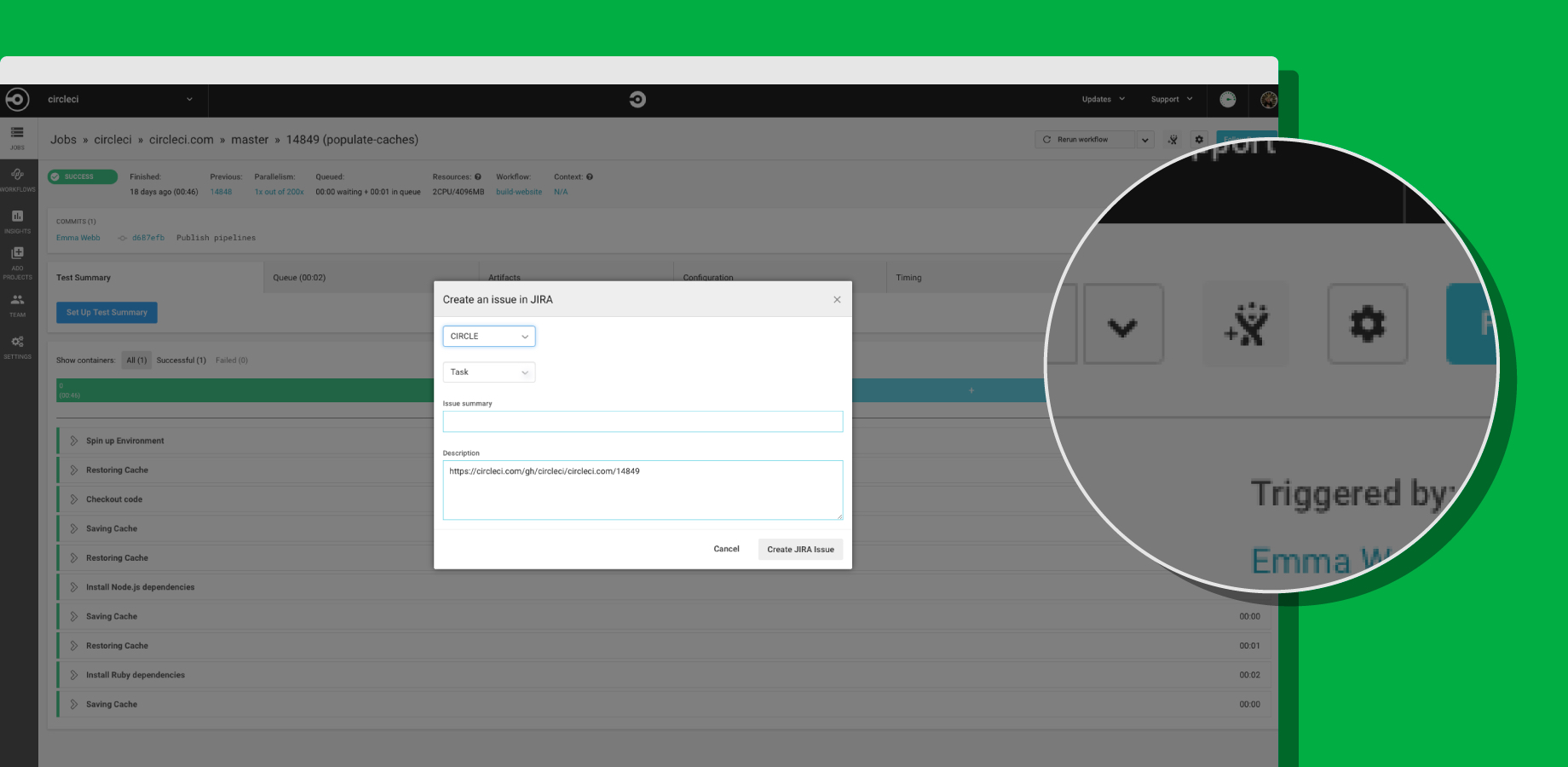
    To achieve integration with Jira, CircleCI now offers its CircleCI for Jira module, through which teams can assign new tasks and fixes based on job status with CircleCI orbs, a set of reusable configuration packages that allow CircleCI customers to integrate external tools into their workflow. That capability also makes it possible to launch new Jira issues directly from the job page within the CircleCI user interface.

    CircleCI Integrates with Jira

    Trahan says that in the polyglot world of DevOps, it is apparent vendors are being required to expose open application programming interfaces (APIs) that enable organizations to build and integrate various DevOps platforms anyway they want. Organizations won’t consider IT vendors that are too rigid in terms of what level of integration they enable, he says.

    As DevOps continues to evolve, it’s clear that a wave of merger and acquisition activity is makeing the IT vendor landscape somewhat volatile. Providers of DevOps tools that organizations have standardized on are being acquired at a rapid rate. IT organizations can’t be certain that any given tool or platform they are using won’t be scooped up by a vendor they might not want to engage. In that kind of environment, it’s critical for IT organizations to leverage open APIs that not only make it easier to collaborate, but also replace elements of their DevOps stack whenever they deem necessary.

    The challenge, of course, is that IT vendors are always trying to lock customers in as much as they can. Those efforts are not as heavy-handed as they once might have been. But almost inevitably, the extension being offered to access functionality will disappear if the underlying platform that enables it suddenly disappears. IT organizations, therefore, need to determine whether those extensions are worth any potential trouble they might cause somewhere down the DevOps road.

    — Mike Vizard