Tag: CI/CD pipeline

  • Cloud and DevOps: CI/CD and Market Analysis

    Cloud and DevOps: CI/CD and Market Analysis

    Companies today are under heavy pressure to deliver software faster and with more quality than their competitors. A set of good features and their reach to customers can increase only when the company releases software updates frequently. As a result, organizations are embracing DevOps and CI/CD approaches to improve their ability to plan, build, test and release applications and features to market quickly with quality and at scale. IDC predicts the worldwide DevOps software market will reach $8 billion by 2022, up from $3.9 billion in 2017. 

    The buzz around continuous integration, continuous deployment and continuous delivery is more than ever today, but in practice, the actual usage of CI/CD seems to be less. It can be because of the shortage of skill set required in DevOps or companies still practicing traditional software development methodologies. Enterprises are not understanding the amount of money they are leaving on the table by missing CI/CD and DevOps automation practices. 

    For many companies, DevOps is something they have to try because their competition is doing so or because it is a trend. This is a desperate attempt without understanding the consequences and basic understanding of DevOps principles. 

    For the most part, it is a disparate set of tools that customers have to connect together for their software delivery that creates chaos around. On the other hand, it is difficult to choose the right tools and understand what are the best practices. That’s why we are starting to see a trend of DevOps companies delivering a unified toolset so that customers have a complete solution out of the box ⁠—without having to worry about finding many different solutions from different vendors.  

    What Is CI/CD?

    Whenever a developer commits and pushes changes to the repository, the CI system will rebuild the branch and run all related test cases to verify that new changes won’t break the existing application and functionalities. 

    Continuous delivery is an extension of continuous integration that helps you deploy your application with a click of a button. It means deploying changes every time they pass CI tests. With this, you can easily automate your build and testing phase and most of your release process as well.

    With continuous deployment, developers will be able to release or deploy software automatically into the production environment. In this stage, no manual code check-ins happen into the app. Code is automatically tested through the CI process for issues, and if none are found, then the code is deployed.

    Why CI/CD?

    CI/CD serves as the best practice for testing and deployment of applications. For the purpose of quality assurance, making CI/CD the single channel to deploy code is the best practice. DevOps teams should ensure that everything is going through the CI/CD pipeline so that the code in testing and production are the same. This will also reduce human error and avoid deploying other versions not being tested by mistake.

    One of the biggest reasons for companies to practice CI/CD today is faster software delivery, which leads to more frequent updates to customers. It makes them feel happy and a constant improvement with frequent releases will ensure enhanced customer satisfaction. This is a competitive advantage because it allows companies to deliver new features more often. It can help companies stay ahead of competitors.

    Passing code through the CI/CD pipeline ensures that any changes made adhere to the established standards before moving to the next stage in the delivery pipeline. Any failure or discrepancy prevents the advancement of such changes to the next step until it is rectified. This simply means this approach of CI/CD ensures that bad code does not get into the production. CI/CD promotes the fail fast, learn fast and deliver fast approach. When you have automated CI/CD in place, the code is run through the CI/CD process constantly with each commit by developers which allows bugs to be caught quickly ⁠— it is easier to isolate the bug since each small change is tested separately. 

    What Is the CI/CD Pipeline?

    A CI/CD pipeline is a deployment pipeline workflow that is integrated with automation. When conducted well, it will minimize manual handoffs and errors to enhance the feedback loops throughout the software delivery life cycle, allowing development teams to deliver smaller chunks of releases within a shorter time.

    The CI/CD pipeline is now mainstream among software companies, and it has become the backbone of the modern DevOps environment. While DevOps lays principles and standards related to the culture aspect, CI/CD focuses on the automation, flow, process and tools. CI/CD scenario has changed with the introduction of containerization and microservices. Now, every cloud vendor has support and integration with tools such as Docker and Kubernetes that help the CI/CD pipeline to scale. 

    Stages of the Continuous Delivery Pipeline

    • Test Automation and CI: This is the important stage where the new features and prototypes are prepared, coding is done and then the code is integrated with the base. With the use of a CI server, the unit tests and packaging is done.
    • Build Automation: This is the stage where the artifacts are pushed by developers (i.e., Dependencies, Docker image) to the registry (i.e., Amazon ECR or Docker hub or any container registry).
    • Alpha Deployments: In this stage, developer checks-in changes. It is the place for developers to carefully see the changes they’ve made and how they interact with each other and affect other systems. Also, here developers can be able to see if they broke anything in the master branch.
    • Beta Deployments: This is the stage where testers carry out manual testing. Manual testing is still required to see the perfection of CI tools. This gives the DevOps team the guarantee that the condition of the application is good and will work definitely as desired when deployed.
    • Production Deployments: Here comes the final stage, where the app goes live.

    What Is the Market Saying About CI/CD? 

    • The search volume has gradually increased in the world for the keyword “CI CD Pipeline” on Google.
    • When Mabl, a test automation company surveyed 500 software testers, 53% of the people said their team uses continuous integration, while 38% embrace continuous delivery and only 29% have adopted continuous deployment. 
    • A DevOps related survey from Codefresh showed that a third of companies had automated more than half of their workloads, but only 1% were all the way there. Almost no one has automated the entire CI/CD process. A plurality of engineering teams have automated less than 10% of the process.
    • The iOS Developer Community Survey is the largest survey of Apple platform developers ever undertaken, where 2,290 people filled in the questionnaire in which CI/CD questions were also a part of the survey. 

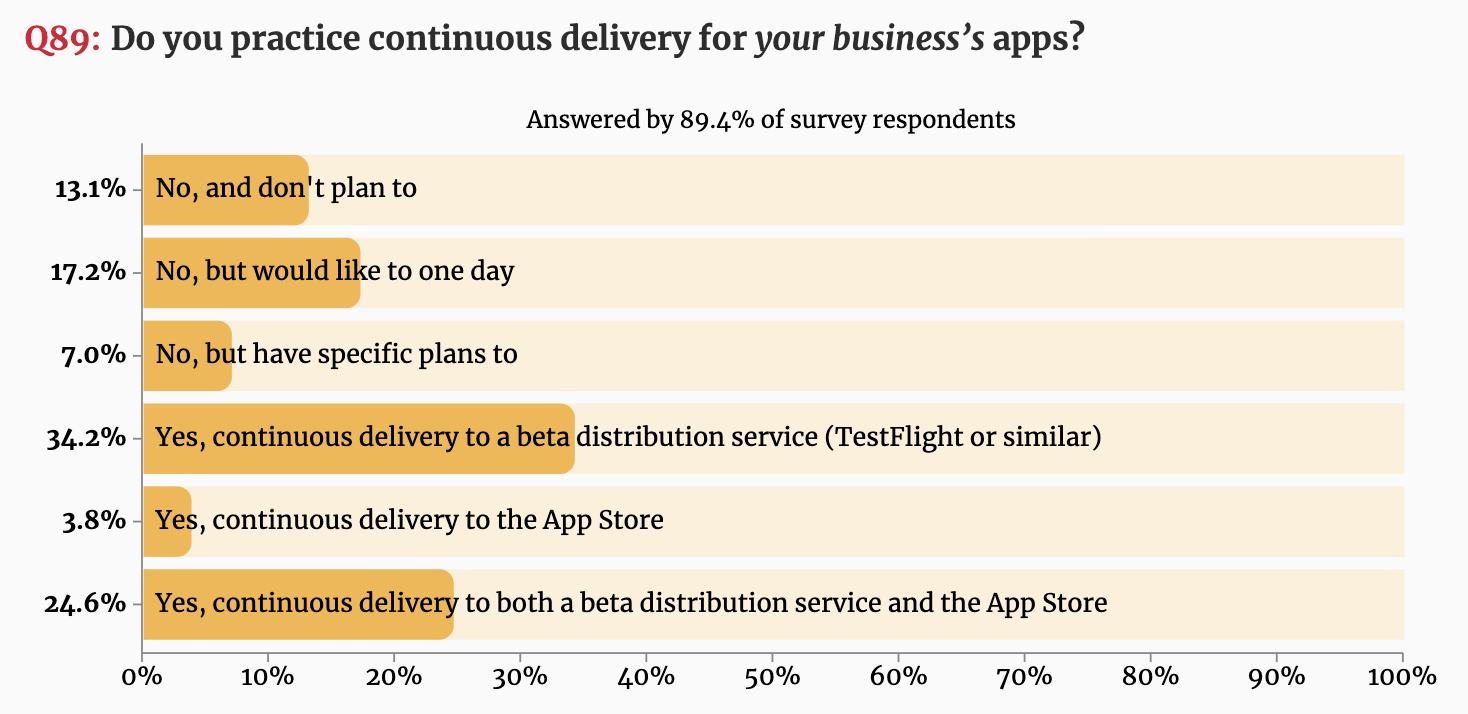
    Below are the results that showed a majority of developers are practicing CI/CD when it comes to business apps. 
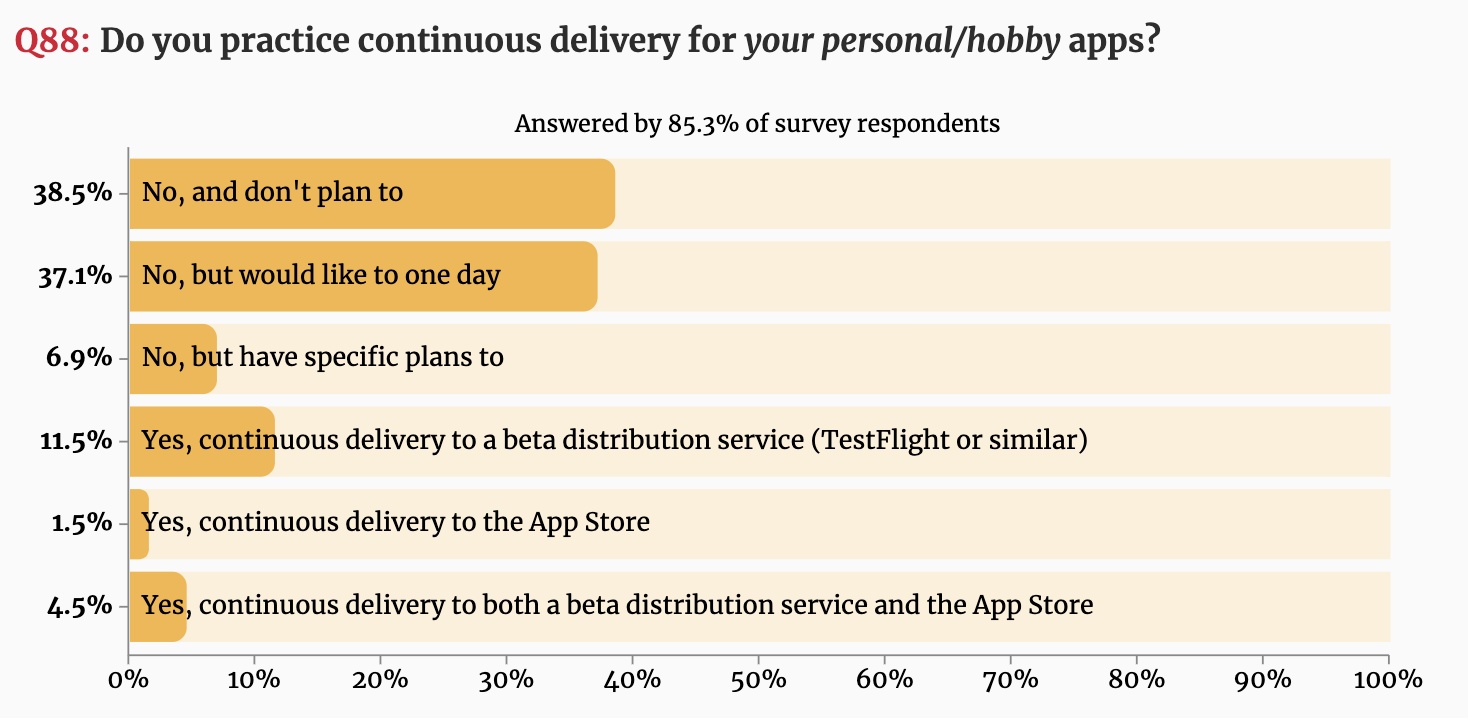
    Figure 1: Do you practice continuous delivery for your personal/hobby apps?
    Figure 2: Do you practice continuous delivery for your business’s apps?
    • The way forward: Companies will not be able to fully take advantage of containers and DevOps unless they embrace the use of a proper deployment pipeline. Companies will start offering pre-built pipelines to customers, something like JFrog pipelines. There is a need for a unified platform that has all the tools needed to support a CI/CD system ⁠— automation (Pipelines), binary repository management (Artifactory), security (Xray), release/deployment (Distribution), etc. JFrog provides a unified platform.
    • Codefresh conducted a survey and published the results of the survey of 130 developers at the KubeCon + CloudNativeCon Europe 2019 conference ⁠— and the results were a bit shocking. It showed that nearly a third (32%) don’t use any continuous integration or continuous delivery (CI/CD) platform at all. Sixty percent of the survey respondents said their organization has yet to take full advantage of automation to accelerate software development and deployment.
    • The Market Radar Report by GigaOm is a recent research on the enterprise CI/CD solutions where the author compares the leading CI/CD solutions in the industry and rates them depending on different valuation criteria. According to the results, JFrog, Codefresh and GitLab are outperformers as shown below.
    Figure 3: GigaOm Radar for CI/CD. Source: GigaOm.

    The CI/CD solutions considered were AWS, CircleCI, CloudBees, CodeFresh, GitLab, IBM, JFrog, Micro Focus, Microsoft, Red Hat and Xebia Labs. You can download the free analyst comparison report here: GigaOm Radar For Enterprise CI/CD.

    CI/CD is one of the DevOps best practices because it ensures proper alignment between developers and operations. While it enhances automation, developers can push code changes more reliably and frequently. At the same time, the operations team can see greater stability because environments have standard configurations, and rollback procedures are automated. To win the CI/CD game, both dev and ops teams need to develop consensus on the right tools and approaches that are beneficial for the business growth in the long run. 

    Cloud and DevOps Go Hand in Hand

    You can’t do DevOps without the cloud. DevOps won’t have much value without it, and the cloud won’t do much without DevOps. 

    Cloud computing has many definitions, the fundamental explanation of the cloud can be defined as a system that enables and supports the provisioning of infrastructure. Thus, it allows it to be described as code or templates, facilitating the creation of repeatable processes. That is also the basic principle of DevOps, automating the processes/tasks in the software development life cycle to the fullest extent.

    One of the biggest benefits of cloud for CI/CD is the dynamic nature of cloud infrastructure. This is perfect for the ephemeral and bursty nature of CI/CD workloads. Cloud resources can automatically scale up and down based on CI/CD workloads. This allows huge management and cost benefits for enterprises. Enterprise companies don’t need to have their own servers to maintain, they need to increase these servers as CI/CD workloads increase or waste server resources when they are idle.

    Regardless of how your organization defines the cloud technologies and, despite which DevOps routes you travel to achieve digital transformation with the cloud integration, the aesthetics of cloud technologies and services can be easily amalgamated in the DevOps dictionary because they radically complement DevOps principles and processes. 

    For DevOps implementation, Agile principles serve as a driver, as there are shorter release cycles and automation to deliver fast and achieve the deadlines. To implement continuous practices, cloud computing is a great facilitator, since resources are available quickly for all the activities involved in development and application lifecycle management. Agile principles, along with cloud computing and DevOps practices, enable high developer productivity and faster growth in organizations.

    With secured cloud gateways, users get the ability to access enterprise resources easily from anywhere and with any device, without compromising on the security of the network. Letting users access your network from their devices might sometimes seem scary, but the modern cloud platforms have much more to offer, they come with built-in security stacks to help provide administrators with the tools they need to manage and support security.

    DevOps coupled with cloud tech has enormous benefits for businesses employing them:

    1. Increased developer productivity and collaboration.
    2. Faster time to market through quick and easy access to development environments.
    3. Help to automate different repetitive tasks so that developers can focus on the tasks that matter.
    4. Cloud complexity and system maintenance can be incredibly reduced by automation and infrastructure as code approaches.
    5. Increase security with modern cloud platforms and principles that serve to eliminate the manual error.
    6. Help to eliminate downtime through cloud-based continuous business operations. Developers can build stateless applications with automation, which will increase the availability and failover ability, along with increasing business reliability and improved customer satisfaction.
    7. Scale to new heights — one of the main reasons businesses employ cloud and DevOps is to scale their infrastructure and applications as and when needed. 

    Cloud Deployment Models

    When the cloud provider entirely hosts organization’s applications and data, it is a public cloud. With just having an internet connection, the employees of the company employing public cloud can access the applications. 

    A private cloud is when the resources of an organization such as storage, compute and networking resources exist in a provider’s data center. Companies prefer private cloud mainly because of security and for storing highly sensitive data when it comes to running applications. 

    One more modern approach is the hybrid cloud; it is a combination of private and public cloud services. According to the traffic and demand considerations, organizations can make the change. Some customers may have on-prem CI/CD systems. Some of these CI/CD systems can expand their workloads to the cloud in a hybrid setup. This can allow them to realize the benefits of cloud now and not have to do a complete migration.

    Mainly, when there is high demand, workloads can be run in the public cloud, and then when things get back to normal, return to the private cloud. This approach reduces the overhead cost spent on cloud resources. Additionally, the key point is, sensitive information, data and critical applications can be kept in the private cloud. In contrast, less-sensitive data and applications can be stored and run in the public cloud.

    Choosing DevOps Cloud Solutions

    If cloud is like an instrument, then DevOps is the musician who plays it.

    Cloud computing and DevOps play a vital role and are interlocking parts of the IT strategy. Together, cloud and DevOps help IT shift its emphasis from “How far and long can we go without an outage?” to “How often we can deliver new and stable functionality/feature?” or “How fast/quickly can we deploy a new service?”

    Businesses today are looking for ways to digital transformation with the help of the cloud, DevOps and automation practices. Considering the competition in the cloud space, it is overwhelming to see so many vendors and get confused on what to choose. 

    Here, in the State of DevOps Cloud Solutions 2020, you can see a high-level overview of the cloud DevOps platform solutions available today, and what you should expect from vendors in your cloud DevOps journey.

  • Five Attributes of a Great DevOps Platform

    Five Attributes of a Great DevOps Platform

    As we move toward 2020, the expectations are high, the software industry is moving faster and the demand for rapid and continually improving digital experiences have raised the standard. To match the needs and demands of the market, firms around the world are embracing the DevOps culture to ensure and streamline the development, packaging, testing, deployment and maintenance of software at scale. 

    Every DevOps organization is defined by its own leadership, culture, practices, policies, leadership style, structure, talents, skills, technical capabilities, processes and tools. However, there are certain common characteristics that are important to consider before deciding a better DevOps platform to use in your organization. Today, we will discuss such important features that can help you while selecting your DevOps platform. 

    What is DevOps?

    DevOps is a mindset in an organization that enforces a set of collective practices to ensure easy collaboration between dev and ops so the business can run smoothly without any hassle. DevOps aims to fasten the time to market through frequent and incremental improvements to deliver quality software updates to customers. 

    The meaning and definitions of DevOps can vary from company to company. Automation being the focal point, firms want to focus on achieving zero-touch automation, with utmost security and governance as a priority in the delivery pipeline.

    Even though the meaning of DevOps varies, several inherent DevOps principles cannot be replaced, and they repeatedly insist on collaborative relationships, developing early, failing early, shared learning and continuous feedback. These DevOps principles enhance quality with improved deployment rates while simultaneously improving predictability, scalability and security of the production environment. Tech leaders in the company need to view DevOps as a holistic approach rather than a small set of guidelines for the teams, and DevOps guidelines should be aligned with the company’s long term technology vision and objectives. 

    Here are some facts to consider while deciding a better DevOps platform for your organization.

    A Mindset of a Unified Culture

    Culture plays a significant role in establishing the guidelines while embracing DevOps in any organization. Through DevOps culture, companies seek to bring dev and ops teams into harmony to promote collaboration, automation, process improvements, continuous iterative development and deployment methodologies. But above everything else, a sound DevOps culture fundamentally solves one of IT’s biggest people problems: bridging the gap between dev and ops teams to get them to stop working in silos and have common goals. 

    According to Gartner estimation, DevOps efforts fail 90% of the time when infrastructure and operations teams try to drive a DevOps initiative without nurturing a cultural shift in the first place. It is not just about the efficient tools or experts working; it is about the behavioral modifications and mentality necessary to effect cultural change.

    Hence, it is important for the firms to consider the culture of the company before selecting its tool as a potential DevOps tool for their development. 

    Automation Inside and Outside

    Automation is one of the key principles of a strong DevOps team because it has such a high return on investment. 

    Automation makes up as a large part of DevOps culture to standardize production platforms, and even firms believe it as true because standardization and automation help make deployments more predictable, easy and less prone to human errors. 

    Automate everything as part of the workflow process, including infrastructures, compliance and continuous delivery pipeline. For example, tools such as Artifactory can manage and control all your binary repositories to help your developers and ops collaborate and automate build and deploy tasks easily. Similarly, Docker allows development teams to containerize applications and automate application deployments with speed.

    By reducing manual, non-important and repetitive tasks, you will increase your development and testing speed while cutting down on human and unnecessary errors. Additionally, by automating tedious and repetitive tasks, firms free up team members to work on higher-level and more important tasks.

    Important to note here, JFrog Pipelines is an innovative DevOps automation solution that well integrates and connects all critical processes in the software delivery lifecycle in the company, from development to testing to production. Using minimum code, it allows you to create smart and event-driven workflows across tools and teams easily, to speed up the release of software applications. This helps you achieve continuous integration, continuous delivery, continuous deployment and continuous monitoring in DevOps.

    Support Both Hybrid and Multi-Cloud

    What is Multi-cloud?

    Multi-cloud is the use of cloud computing from two or more public cloud providers in single network architecture to meet their business objectives. A multi-cloud strategy has many advantages. It avoids vendor lock-in, decreases latency, enhances business continuity, overhead cost reduction and maximizes flexibility for development teams. However, multi-cloud management comes with some challenges that require careful orchestration, and needs to pay close attention to security and governance issues.

    What is Hybrid-cloud?

    A hybrid cloud is a mixture of on-premises and off-premises IT resources. Based on business and compliance requirements, the hybrid cloud allows firms to move data and applications between private and public environments. 

    Hybrid cloud computing allows instant transfer of information between public and private environments, allowing enterprises to experience the benefits of both environments efficiently. 

    Flexibility, scalability and cost savings are some of the top benefits of hybrid-cloud. 

    Considering a platform that supports both multi-cloud and hybrid-cloud is the best solution for the enterprises moving toward the digital transformation ladder.

    Continuous Updates 

    Frequently rolling out updates, in a continuous sequence, to bring service improvements to consumer devices more rapidly and efficiently is what every firm is trying to do these days. The customer wants new features as early as possible and continuously. That is one reason why companies embrace automation and follow practices like continuous integration, continuous deployment and continuous delivery through tools such as GitHub, Artifactory, Circle CI, Docker, Kubernetes, etc. 

    The DevOps platform should be able to manage your DevOps pipeline from a single pane of glass. A platform that can provide a universal end-to-end solution that integrates with your ecosystem to orchestrate and optimize all critical processes in your CI/CD pipeline. Boosting fearless updates continuously from code to the edge in self-managed, on-prem, hybrid and multi-cloud environments.

    A Robust Community 

    All successful companies have built their own communities through their products and services. DevOps is all about the culture shift. Changing existing culture and moving forward is one of the hardest things to do—despite the benefits that DevOps offers, such as speed and agility. No matter what changes a team implements, embracing DevOps often comes to a halt once the companies realize it requires a change in culture and mentality of all the teams involved. This is where the value of community comes in, by fostering the development of a more open communication, easy and supportive feedback, and collaborative culture within teams, companies can be able to drive this DevOps culture. This mindset should come from within and outside of the organization by tapping into this sense of community-based collaboration. Communities are required because they ensure the well being of many of the technologies we use daily.

    Your favorite DevOps platforms—Jenkins, Docker, Kubernetes, Artifactory—and their popularity is because of the communities they have created around the tools. 

    A well-focused DevOps platform gives power to people who listen carefully to what the market is saying, gets the feedback and utilizes it effectively. Hence, community is a very important feature of a DevOps organization. 

    Conclusion

    Companies around the world are embracing DevOps, and the demand for DevOps skills soars as organizations spend their time and money on digital transformation. DevOps has become a modern approach to IT that helps companies to think and execute broader business strategies. DevOps can drive significant brand value by accelerating speed to market, better collaboration, ensuring better testing and automation. A DevOps platform should have all the qualities mentioned above to succeed in this highly competitive market.

  • DevOps Chat: CI/CD Velocity for Large Monolithic Services with Pinterest

    DevOps Chat: CI/CD Velocity for Large Monolithic Services with Pinterest

    Spinnaker Summit 2019 Preview: Software Engineer Rainie Li played an essential role in implementing Spinnaker as part of Pinterest’s CI/CD pipeline. The results moved Pinterest from two scheduled deployments per day to continuous deployments, greater than 15 during business hours.

    This episode of DevOps Chats features a preview of Rainie’s talk, “How we introduced CI/CD for Pinterest’s largest monolith services (API and Web) to improve developer velocity, quality & reliability (Pinterest).” Topics including how Spinnaker was selected, important metrics, Pinterest’s future CI/CD platform Hermez, Canary analysis and lessons learned from the journey are shared.

    Rainie’s talk is on Sunday, November 17th, 1:30 pm PT, at Spinnaker Summit 2019 in San Diego. Joining Rainie on the talk is Jasmine Qin, software engineer with Pinterest.

    As usual, the streaming audio is immediately below, followed by the transcript of our conversation.

    Transcript

    Mitch Ashley: Hi, everyone. This is Mitch Ashley with devopsy.kinsta.cloud and you’re listening to another DevOps Chat podcast. Today, I’m joined by Rainie Li, who’s a Software Engineer at Pinterest.

    Now, Rainie’s gonna be talking at the Spinnaker Summit 2019 coming up in San Diego, November 15th through the 19th, and her topic she’s presenting on is how Pinterest implemented CI/CD pipeline for large, monolithic, or monolith services, APIs and web, focused around helping them improve developer velocity, quality, or liability, et cetera. So, some real hands on experience that she’s planning on sharing. And she’ll also have a co-presenter, Jasmine Qin, and she’s gonna be joining her, too, at that presentation.

    Well, Rainie, welcome to DevOps Chat.

    Rainie Li: Thank you, Mitch.

    Ashley: Awesome to have you on. Thanks for joining us. Would you just introduce yourself, tell folks a little bit about you, the kind of development work that you do at Pinterest and also maybe a little bit of what you’ve done in your past to become a software engineer?

    Li: Yeah, sure. So, hi, everyone, I’m Rainie Li, I’m working at Pinterest infraorganization and our team is focused on doing continuous delivery platform for all the internal engineers. Before I joined Pinterest, I worked at both Microsoft and Amazon, also as a software engineer, and I found I have a very strong interest in infrasite, and it turns out, continuous delivery is a very important feature for software engineers. So, that’s why I ended up here.

    Ashley: Very interesting. Well, you’ve worked at some very large online services. I know that Pinterest has, what, about 250 million users, and of course, Microsoft and AWS are very large organizations, so you’re kinda used to working on some pretty big infrastructure projects, it sounds like.

    Li: Yeah, I am. [Laughter]

    Ashley: Good, good! Well, great experience. So, tell us a little bit about your talk. I guess maybe start with, you know, you came to Pinterest, maybe about where they were in this process of implementing continuous delivery and where you kinda picked up in the process. Were you at the beginning or they already started?

    Li: Yeah. I kinda joined the one that already started, but I still drive the whole production readiness for Spinnaker at Pinterest. I also drive the design review for Spinnaker as well. So, I kinda joined the one that already picked Spinnaker for Pinterest, but I’m the main person to continue to deliver this project.

    Ashley: Oh, so you kind of picked the project already in progress and then take it forward from there as one of the leads on it?

    Li: Yeah.

    Ashley: Very nice. So, when you said—so, you do a review of Spinnaker. Is that your internal usage and changes in implementation to it, or do you also contribute things back to the open source? Any of that kind of thing?

    Li: Currently, we only reveal how we use it internally and we do some customization for Pinterest only. We haven’t contributed to the upstream yet, but I think long term plan, we would like to contribute to upstream.

    Ashley: Yeah. Well, you know, just using it at the volume that you do, I’m sure, is a way of, a form of contributing back, too. It’s gotta certainly exercise Spinnaker and a lot of other tools about that, too.

    So, tell us about—so, you picked up when they had already gone through the implementation and you’re kinda furthering it, or were they still in the process of implementing CI/CD continuous delivery?

    Li: I picked up when they were still in the process of implementing a CI/CD platform.

    Ashley: Mm-hmm.

    Li: But they kind of already decided to use Spinnaker, but we still have to do Pinterest specific customization and how to make it production ready at Pinterest, that kind of work.

    Ashley: Ah, excellent. So, sounds like you had quite a bit to do with Spinnaker even when  you joined of getting it ready for production. Why don’t you talk about some of the things—I know you’re gonna talk about this in your Spinnaker Summit talk. What are some of the things that you need to do to Spinnaker to get it production ready for that kind of an environment that you’re in?

    Li: So, I think there are several key pieces. The first one is, we have to make sure authentication and authorization are working as expected for Spinnaker, because that’s the most important thing—like, we have to make sure users can go over our OS process before they can—

    Ashley: Your OS, mm-hmm.

    Li: Yeah. The second key piece is monitoring, which includes metrics and alerts. So, basically, we exposed all the Spinnaker service metrics and created a dashboard for those alerts, which we can get paged when there’s some issue that happened if Spinnaker is down or something like that. These are the two most important things for production readiness, I think, for us.

    Ashley: That’s extremely important when you’re automating something like a continuous delivery, continuous integration. It’s automated, but you have to know is it working right?

    Li: Yeah.

    Ashley: Are things happening and are there problems or are you meeting the kind of metrics that you were expecting?

    Li: Yeah.

    Ashley: I know something you mentioned in the description of your talk is what kind of metrics are important to measure. Can you say a little bit about what are some of the metrics that you’ve learned, both while you’re implementing it and now that you’ve had it in production that are really important to watch?

    Li: Yeah, definitely, those metrics can—like, latency and ____ P90 and also, like, those SLA related metrics from all Spinnaker components are very important. I think especially the gate service, which is Spinnaker API Gateway, it’s like the entry point for the rest of Spinnaker components, the metrics for Gateway is extremely important.

    Ashley: That’s kinda the integration component of Spinnaker, right?

    Li: Yeah.

    Ashley: Everything talks to it. It’s sort of that—I don’t know if it’s a central hub, but it’s certainly where all the APIs tie in together.

    Li: Mm-hmm.

    Ashley: I’m sure if you’re having a problem with that, then you’re gonna know [Laughter] there are probably lots of failures happening in the system.

    Li: Yeah.

    Ashley: Do you look at, do you also measure how many builds you’re doing per hour, per day, or how many deliveries into production you’re doing? Is that metrics that you capture through Spinnaker or you do that elsewhere?

    Li: That’s not the metrics that we are capturing in Spinnaker, but we do measure from the pipeline execution history.

    Ashley: Mm-hmm.

    Li: So, currently, we are using Spinnaker to do the continuous delivery for two major services in Pinterest. We finished around 15 deploys per day for these two major systems and each deploy contains roughly 10 commits, and we think this pipeline, it increased our productivity a lot, because previously, we have to do manual deploy.

    Ashley: Mm-hmm.

    Li: Yeah.

    Ashley: Do you also have, then—I know this is outside of Spinnaker, probably, but do you have most or all of your testing automated as well, or are there still some manual steps for testing before it goes into a final deployment?

    Li: You mean testing for the service itself, or testing for Spinnaker service?

    Ashley: Testing more of the software application part of it.

    Li: I see. Yeah, so, currently, we are using a separate stage to run integration test jobs in Jenkins. That’s how we do the testing step. It’s kind of automated already, like, we don’t have to interact with humans to trigger the build or humans to run the test. We don’t need that. It’s just a stage in the Spinnaker pipeline. We run the interpretation test job in Jenkins, yeah.

    Ashley: Mm-hmm, excellent. Okay, good. We have kind of a feel for your workflow, your tool pipelines. It sounds like it’s very automated.

    Li: Mm-hmm.

    Ashley: So, going back to the topic of implementing something at that kind of a scale, both, you’re a very large organization and you’re doing a number of deployments per day. I know there’s some things in Spinnaker—well, you have a platform called Hermes. And is that your own central workflow engine, or is that part of Spinnaker?

    Li: Oh, so, Hermes is our future CI/CD platform. So, we are in the, like, developing stage. Spinnaker will integrate with Hermes and now we will use Spinnaker as a back end workflow engine.

    Ashley: Hmm, okay.

    Li: Yeah.

    Ashley: So, that’s really your—that’s Pinterest’s own central workflow engine and you’re integrating Spinnaker into it as part of that feature?

    Li: Yeah, yeah.

    Ashley: Pipeline—tool pipeline, if you will. Okay.

    Li: Yeah, it’s like a CI/CD platform for Pinterest, and we are going to open source Hermes as well in the future.

    Ashley: Oh! Well, that’s good news. I’ll look forward to that.

    Li: Yeah. [Laughter]

    Ashley: Do you know kinda time frame when that’s gonna be happening, or is that a little farther in the future, don’t know yet?

    Li: I’m not sure the exact timeline, but somewhere early next year or at the end of this year.

    Ashley: Okay. Well, that’s not too far away. That’s great. We’ll look forward and thank you for contributing that as open source. So, talk some more about what are some of the lessons that you learned about going from where you joined Pinterest and where things were with Spinnaker’s implementation, maybe some things you had to do, some of the things that you learned? Here’s a good way to do it, here’s a mistake I made and I fixed it by taking a different approach—what are some of those lessons learned?

    Li: Hmm, I think the lessons for me is, because we deploy Spinnaker services to Kubernetes platform and I never used a Kubernetes platform before I joined Pinterest, so that’s the biggest lesson I learned here, like, how to set up all the Spinnaker components in Kubernetes platform, yeah.

    Ashley: Uh huh, good. Are there—so, learning how to do that was important. Were there any specific lessons that you learned about doing that, or is it just really just kinda learning the how of doing it?

    Li: A specific lesson I think is some special situations where the Kubernetes platform decides to rotate cluster and do some platform testing. On the Spinnaker service side, we have to handle this kind of scenario well instead of bringing down the sides or have some happy customer user experience. That’s a lesson I learned from there.

    Ashley: Okay. I think you also mentioned in your show notes or your description in your talk that you did some canary analysis as part of that as well?

    Li: Mm-hmm.

    Ashley: I assume that was a new thing for you, or have you done that before?

    Li: Yeah, that’s also a new thing, but we have a separate team which is the configuration team which, they are mainly implementing this feature. So, for Pinterest, we support OpenTSDB as a metric, but I think Spinnaker canary analysis can only support Prometheus or Datadog, those metrics. So, I think the ____ team integrated this OpenTSDB into Spinnaker canary analysis component so that we can provide Pinterest ____ on Spinnaker UI.

    Ashley: Ah, interesting.

    Li: Yeah.

    Ashley: Okay, great. What are some other things that you’re planning on talking about at your talk during Spinnaker Summit?

    Li: I think how we use Spinnaker and how we customize Spinnaker at Pinterest and the lessons we have learned when we adopted Spinnaker here. I think these are the main topics I’m going to talk about, yeah.

    Ashley: Mm-hmm. Great. Well, I know you weren’t at Pinterest when they decided to use Spinnaker for this project or for part of the toolset. But based on what you’ve seen and what you’ve learned, do you think Spinnaker accomplished the goals that they had for why they chose it?

    Li: Definitely. Yeah, we like Spinnaker a lot. [Laughter]

    Ashley: What were some of those goals, do you recall? Were there certain, we wanted to get to a certain number of deployments per day, or were there other things that they were trying to achieve that were looking to see how you’re doing?

    Li: I see. So, we don’t have a specific number for the goals, but Spinnaker definitely helped us to use pipeline for deployment. Without Spinnaker, we have to go to each stage, do manual collect deployment one by one, which is not very efficient. And currently, we can use Spinnaker to manage deployments in a consistent and a repeatable way. We really like pipeline, which can provide a sequence of deployment stages. We don’t need too much manual interaction, and—yeah, that’s, I think, the goal we adopted Spinnaker is, we need the pipeline feature and I think it works well for us. Also, the canary analysis report is very useful for us as well.

    Ashley: Yeah, I know a lot of people are very excited about using that.

    Li: Yeah.

    Ashley: And you mentioned that you integrated OpenTSDB as part of your observ—I can’t say it [Laughter]—observability stack, there we go, got that out. Now, I think you also have a deployment system there that Pinterest uses to deploy into AWS, correct?

    Li: Yeah. We have a deployment system which is also open source called Teletron, which we used for four years to deploy to AWS VM. But this deployment system does not provide a good pipeline, so that’s why we integrated with Spinnaker to have the nice pipeline feature, yeah.

    Ashley: Excellent. Well, you’ve sure done a lot of work. What’s kinda next? What’s the next set of projects that you’re thinking about or you’re currently working on now that you’re at this point with deploying Spinnaker into your CI/CD pipeline?

    Li: I think the next project is, our team will implement Hermes at the Pinterest main CI/CD platform. Spinnaker was working at the back end workflow engine, and we were also working on migration, like most of the services from AWS and VM to Kubernetes. Yeah, that’s two major projects that we are going to be working on.

    Ashley: Ah. Well, certainly, the move to Kubernetes, I’m sure that’s a pretty substantial project, a pretty big one.

    Li: Yeah, yeah. [Laughter]

    Ashley: Well, good. Well, thank you so much for joining us on the podcast today. This is very interesting and I think you’ve got a really compelling and interesting talk. I’m looking forward to hearing more about it and have others to get a chance to attend.

    Li: Yeah, thanks for inviting me, Mitch. I’m glad to introduce Pinterest using Spinnaker at the Summit and I’m very happy to talk about more there.

    Ashley: Absolutely. Well, thanks for contributing with your talk. So, you’ve listened to another DevOps Chat podcast. I’d like to thank my guest today, Rainie Li, who is a Software Engineer at Pinterest. Again, her talk during Spinnaker Summit is on Sunday, November 16th at 1:30 p.m. This is according to the agenda currently on the website, you can look there for updates for the Spinnaker Summit site, and her talk, again, is on how we introduced CI/CD for Pinterest’s large monolith services, API and web, to improve developer velocity, quality, and reliability. And as you’ve just heard, there’s a lot of information that Rainie’s gonna be sharing with you.

    So, thanks for joining us, Rainie, and thank you, of course, listeners, for joining us here today. This is Mitch Ashley with devopsy.kinsta.cloud, and you’ve listened to another DevOps Chat podcast. Be careful out there.

    — Mitchell Ashley

  • The Bug in Production: What You Don’t Know Can – and Will – Harm You

    The Bug in Production: What You Don’t Know Can – and Will – Harm You

    Despite the risk of unplanned downtime, many organizations that develop software and services push them live without adequately testing for bugs that will manifest against production traffic. This is a huge gamble: Those bugs could lead to errors that bring down the service altogether. Pushing live without sufficient testing can be detrimental to your business.

    The Problem of Going Live With Bugs in the Code

    Software downtime leads to loss of revenue and of reputation. In fact, Gartner analysts have estimated that the average cost of downtime is $5,600 a minute—that’s well over $300,000 an hour. To provide a real-life example of what this looks like, Microsoft Azure suffered a major outage in November 2018 caused by issues introduced as part of a code update, lasting for 14 hours and affecting customers throughout Europe and beyond. With migration from legacy systems to micro-environments in the cloud, outages and downtime pose a growing and serious problem.

    As companies switch to DevOps and CI/CD models to move faster and provide application updates sooner, software developers continually release new features and often push code updates as fast as they’re written. The classic six-month development timelines of dev, quality assurance (QA) and beta testing have been compressed to days and sometimes hours. Gone is the time when teams could beta test with customers for extended periods to flag real-time bugs.

    With current quality testing tools, developers don’t know how a new software version will perform in production—or whether it will even work in production. The Cloudbleed bug is an example of this problem—in February 2017, a simple coding error in a software upgrade from security vendor Cloudflare led to a serious vulnerability discovered by a Google researcher several months later.

    Flaws can lead to serious security issues later, in addition to having the immediate impacts mentioned above. Heartbleed, a vulnerability that arose in 2014 and stemmed from a programming mistake in the OpenSSL library, left large numbers of private keys and sensitive information exposed to the internet, enabling theft which otherwise would have been protected by SSL/TLS encryption.

    Standard QA Testing Isn’t Enough: Test With Production Traffic

    The way QA testing is typically done is no longer sufficient for today’s increasingly frequent and fast development cycles. Traditionally, DevOps teams haven’t been able to do side-by-side testing of the production version and an upgrade candidate.  The QA testing used by many organizations is a set of simulated test suites, which may not give comprehensive insight into the myriad ways in which customers may actually make use of the software. Just because upgraded code works under one set of testing parameters, doesn’t mean it will work in the unpredictable world of production usage.

    As in the case of the Cloudflare incident, the error went entirely unnoticed by end users for an extended period of time and there were no system errors logged as a result of the flaw. Just as QA testing isn’t sufficient, relying on system logs and users also has a limited scope for what can be detected.

    It is estimated that fixing flaws after a software release can be five times as expensive as fixing them during design—and it can lead to even costlier development delays. Enabling software teams to identify potential bugs and security concerns prior to release can alleviate those delays. Clearly, testing with production traffic earlier in the code development process can save time, money and pain. Software and DevOps teams need a way to test quickly and accurately how new releases will perform with real (not simulated) customer traffic and while maintaining the highest standards.

    By evaluating release versions side by side, teams can quickly locate any differences or defects. In addition, they can gain real insight on network performance while also verifying the stability of upgrades and patches in a working environment. Doing this efficiently will significantly reduce the likelihood of releasing software that later needs to be rolled back. Rollbacks are expensive, as we saw in the case of the Microsoft Azure incident.

    Some organizations stage rollouts, which requires running multiple software versions in production. The software teams put a small percentage of users on the new version, while most users run the status quo. Unfortunately, this approach to testing with production traffic is cumbersome to manage and costly, and still vulnerable to rollbacks. The other problem with these kinds of rolling deployments is that while failures can be caught early in the process, they are—by design—only caught after they’ve affected end users.

    This brings more questions, including: How do you know whether the new software is causing the failures? and, How many failures does the business allow before recalling or rolling back the software, since the business does not observe side-by-side results from the same customer? This disrupts the end user experience, which ultimately affects business operations and company reputation. And staging may not provide a sufficient sample to gauge the efficacy of the new release versus the entire population of customers.

    Cost is still an issue as well. If you stage with 10% of customers on the new version and a failure costs more than $300,000 an hour, then a failure affecting 10% of users could potentially still cost more than $30,000 per hour. The impact is reduced, of course, but it’s still significant—not counting the uncertainty of when to rollback.

    Looking Ahead

    Standard QA testing is no longer enough. To reduce the risk injected into the software development life cycle by today’s rapid iterations, DevOps teams can test in production and evaluate release versions side-by-side. This will help prevent costly rollbacks or staging while still releasing a quality, secure product. The old way of doing things is not sufficient, but fortunately, there is a better way.

    — Frank Huerta

  • Open Source Versioning: The Race to Stay Up-to-Date

    Open Source Versioning: The Race to Stay Up-to-Date

    Open source libraries, once shunned as risky and not ready for prime time, are now used extensively across major corporations, including insurers. The reason is simple: In time- and resource-constrained companies trying to stay technologically competitive, it doesn’t make sense anymore to try to reinvent a wheel that’s already been battle-tested. However, having made the commitment to open source code and solution sets, it’s imperative to keep up-to-date with open source library maintenance and updates.

    The Risk of Open Source

    Some active open source libraries are updated multiple times a year. Getting out of date means missing out on newer features. Also, if the gap between upgrades bridges several iterations, some future upgrades may not be backward-compatible, causing functional problems at best and risk exposure problems at worst. On occasion, an out-of-date open source library version can expose a system and a company to attack. In 2017, a major U.S. financial company was hit by a hack that exposed the information of millions of customers. The hackers had exploited a software vulnerability that had been public for a month, but the company had not patched its system in time. There are several other well-known examples of a similar vein.

    Keeping current is not easy. Upgrading may be costly, but falling behind can make it costlier to catch up. The question is, How frequently should one upgrade to the newer versions?

    The Effort and Cost

    One of the reasons companies choose not to upgrade every time there’s a new release is the cost involved. While the open source code itself is free, the effort required in time and resources can be substantial and can take valuable resources away from higher priority business-technology initiatives. An additional concern is that, even though the upgrade is supposed to be backward-compatible, there is no way to verify that without actually performing the upgrade. If there are compatibility problems, then a larger effort ensues involving upgrading, restoring or rebuilding a system. Any large system has to be tested thoroughly after upgrading, and without the help of automated tools, testing can be costly and time-consuming.

    One approach for mitigating these costs and risks is the process of continuous integration (CI) for open source libraries. A good suite of automated testing tools provides a high degree of confidence that nothing has been broken by the most recent upgrade, before it is implemented into any production environment. However, without automated tests that flush out potential issues from upgrading, the risks and costs are high enough that companies have a hard time keeping up and managers become more motivated to delay upgrades than to perform them. That’s why it’s important that companies employ CI and continuous delivery (CD) processes that include robust automated testing.

    Additionally, the use of microservices—an increasingly effective and popular way to construct systems—puts another twist into the efforts and costs of keeping open source libraries up to date. Individually, each microservice might be quick to test. However, if an application has been broken into 50, 100 or even more microservice components, even a small amount of manual work testing each component will add up quickly. Additionally, in an environment that has deployed microservices broadly, there may not be a business need to change some services for months—that is one of the benefits of using microservices.

    The Right Approach to Open Source

    There is a right way to deal with open source library updates that has the benefit of taking advantage of new functionality and code stability in a low-risk, low-effort and low-resource manner as follows:

    Planning: Enterprise and application architects should be vigilant regarding the road maps of any large frameworks that employ open source libraries as a key component to any project or initiative. Proactive identification of open source libraries that may need to be upgraded is key. Likewise, application project managers should make open source library upgrade part of a regular and ongoing project plan. For example, when microservices are involved, they should be classified proactively as services by the libraries they use, as a way to identify the few services that would normally be upgraded first. This has the benefit of providing a few sprints’ worth of feedback before rolling out the upgrades to other libraries.

    Monitoring: Open source version monitoring is essential. There are products that can help to identify and report library versions that have vulnerabilities. Such monitoring can and should be used as part of the CI/CD pipeline and also to monitor artifacts that already are deployed in production. Monitoring processes also can report when newer open source library versions are available, even if the incumbent library has no reported vulnerabilities.

    Automated compatibility triage: It is often too risky to set up production builds to always use the latest version of an open source library. However, separate automated processes can identify new versions, run them through a build and test process and report back the results. If a test fails, the development team gets an early warning that their code is not compatible with the upgrade version. This helps to plan and schedule fixes, and if a vulnerability is discovered in the current version, this kind of proactive planning enables a quicker resolution and turnaround.

    Processes: Strong processes, preferably automated ones, are the foundation of open source versioning. For critical security upgrades, a process must be in place to triage and prioritize identified changes. For other version updates, good processes can help make upgrades easier. For example, a standard and repeatable process may incorporate minor version upgrades into the regular flow of sprint work, thus saving time while mitigating risk.

    Open source versioning can be difficult, but it doesn’t have to be. With automated testing, good monitoring tools and some proactive planning, the costs and risks of staying up to date can be kept to a minimum, allowing companies to reap the benefits of new features and functions.

    — Darius Cooper

  • Actifio Looks to Meld DataOps with DevOps

    Actifio Looks to Meld DataOps with DevOps

    Actifio and IBM have formed an alliance under which IBM will make available data management software developed by Actifio under its own name as part of an effort to close the gap between DevOps and DataOps.

    At the same time, Actifio will make available a software-as-a-service (SaaS) offering for the first time, dubbed Actifio Go, which promises to make it easier to manage and move data across multiple clouds.

    Actifio CEO Ash Ashutosh said with the rise of both DevOps and DataOps there is now a unique opportunity to unify the management of pipelines across the enterprise. While storage administrators have been creating data pipelines for databases and applications for decades, the pipelines developers create to consume that data have been developed and managed separately. Now there is a nascent DataOps effort based on a set of best practices for automating the management of data that borrows many of the same principles being advanced by DevOps proponents for the building and deploying of applications.

    Actifio’s core Virtual Data Pipeline technology advances DataOps, Ashutosh said, by making it easier to copy a virtual instance of a data set running in a production environment and update it with the most recent copy of that data at any point in time. That capability is not only being employed to, for example, copy data into the cloud, but also to make data readily accessible to DevOps teams as needed on a self-service basis, he said, adding the goal is to make it easier for developers to dynamically consume the latest version of any data set as needed, with a minimal amount of intervention required on the part of a storage administrator.

    IBM plans to make an instance of Virtual Data Pipeline available as part of the IBM InfoSphere portfolio of data management software it provides. That agreement extends Actfio’s existing reseller relationship with IBM.

    Ashutosh conceded there is much work to be done before DataOps becomes a natural extension of DevOps. Most storage administrators today are not all that familiar with how the data pipelines they create are consumed by applications. Most storage administrators continue to think in terms of volumes and files rather than in terms of managing data pipelines, he said.

    But as those application environments become more dynamic thanks to the rise of microservices, pressure to modernize data management will only increase, Ashutosh noted. For example, more DevOps teams will be integrating the ability to copy data directly into their continuous integration/continuous delivery (CI/CD) platforms. Achieving that goal will be easier if the software employed to manage data within the context of a DevOps processes is invoked as a SaaS application, he said.

    Most IT organizations are a very long way from melding DevOps and DataOps. Most are still struggling with mastering the fundamentals of DevOps. But the convergence of DevOps and DataOps is all but inevitable. The only thing that remains to be seen is the degree to which IT organizations will proactively seek to achieve that goal versus waiting for developers to force the issue.

    — Mike Vizard

  • Implementing DevOps? Start with a Strategy

    Implementing DevOps? Start with a Strategy

    Organizations today are focused on improving the IT delivery process and taking it to the next level. DevOps plays a key role in achieving this goal, if it’s done right. But while the concept of DevOps is not new—it’s more than a decade old—a significant percentage of organizations have not yet implemented or are facing challenges in leveraging DevOps to achieve the intended benefits. Why do some companies achieve success with their DevOps implementation and others struggle? Simple: Those making DevOps work for them started their journey with a clear and implementable strategy. In fact, a number of organizations have formed their business strategy around DevOps.

    The relationship between DevOps and agile is complementary; however, DevOps implementation must be looked at differently than agile. It needs to be treated as a separate initiative other than the regular IT delivery scope until it’s established. It requires strategic thinking, significant focus and commitment make it successful.

    Key Pillars of DevOps Strategy

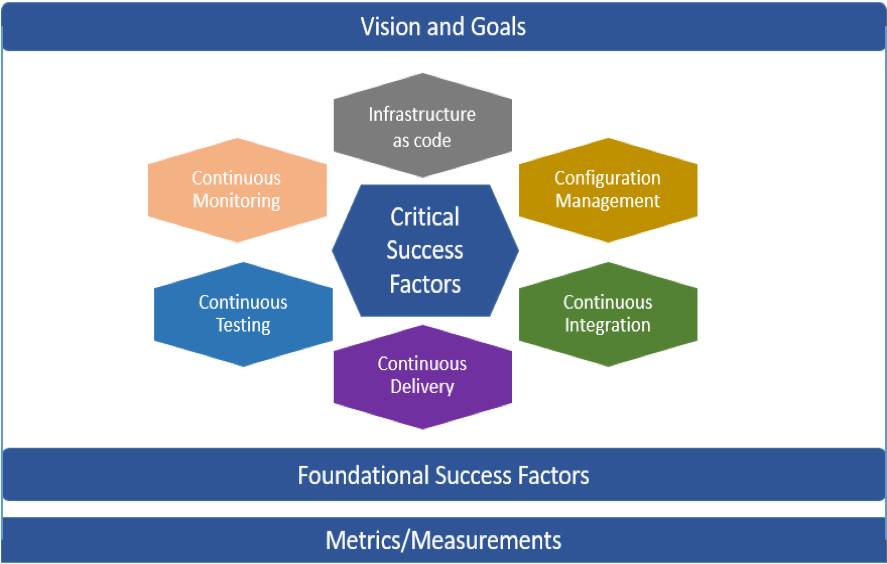
    The four key pillars for DevOps strategy are:

    • Identifying the vision and goals.
    • Identifying foundational factors.
    • Critical success factors.
    • Basing the strategy on measurements to track the progress and realization of benefits.

    Vision and Goals

    Drivers and challenges form the basis for vision and goals. Before embarking on the path to DevOps, it is crucial to analyze the “as-is” situation and understand the current challenges and drivers for doing DevOps. Current challenges could include:

    • Too many production defects.
    • Business stakeholders demanding features that the team is unable to deliver.
    • Painful deployments.
    • Team burnout and frustration.
    • Deployments done as ceremonies with multiple teams on call.

    If any of these sound familiar, that’s a sure sign your project needs DevOps.

    Drivers for creating the vision and goals may be external or internal. External drivers may be improving customer satisfaction by meeting expectations around availability, reliability, usability, performance, features, value and time to market. Internal drivers may be improving operational efficiency (speed, throughput, quality) or improving employee loyalty, improving technical capabilities or simply making deployments less painful.

    Critical Success Factors

    Below are the key factors in implementing the DevOps pipeline which includes continuous integration, continuous delivery and deployment. The continuous integration aspects cover configuration management, code packaging, branch/trunk implementation, static code quality analysis, code reviews and static security scans. The objective of continuous delivery and deployment is to move the code from the lower environment to the production environment in an automated way. The key aspects as part of the continuous delivery are embedding continuous testing within the pipeline and automating the applicable tests—unit testing, system testing, API testing and/or browser testing, along with the non-functional testing (performance and security). Another key aspect is integrating continuous monitoring into the pipeline—infrastructure monitoring (application and database servers) and application end user monitoring, which provides key input and metrics on how users are using the application and can be leveraged to improve customer experience.

    Key pillars of DevOps strategy

    Foundational Success Factors

    Foundational factors are critical for DevOps to be successful in an organization. Before embarking on the journey, ensure foundational factors are in place, such as management buy-in and support, maturity of the current agile process, conducive culture, collaboration among teams, CI/CD tools and availability of technical skill sets.

    It can be difficult for agile project teams to focus on working on the DevOps items along with the sprint-specific “functional” requirements. One way to increase the priority is to include the DevOps-related items in the sprint. That said, it can be challenging to focus and achieve DevOps objectives, as they may take a back seat to functional requirements during the sprint. Another option is to form a DevOps-focused group from within the projects (based on technical skills and inclination for innovation) that is assigned with the task of building and implementing a CI/CD pipeline. If necessary, this group can get help or expertise through suppliers. Forming a DevOps-focused group has been shown to be helpful in terms of achieving DevOps objectives.

    Metrics: Identify, Measure and Continuous Improvement

    Tom DeMarco famously said, “You can’t control what you can’t measure.” In DevOps, metrics and measurement are critical for success, as implementations take time. Metrics, therefore, should be aligned with goals and vision to track progress. Also critical are identifying the effectiveness of the identified metrics and making any revisions to existing metrics, as well as identifying and adopting additional elements for success.

    It is helpful to quantify the “as is” situation at the start of the implementation by measuring the metrics. That allows you to see the kind of progress being made on each of the aspects as you go along.

    The metrics can be categorized as per the balanced score card perspectives:

    • Financial (e.g. cost savings).
    • Customer perspective (e.g. time to market, number of defects per deployments).
    • Internal perspective (e.g. average deployments per sprint, number of successful deployments, average time per deployment, mean time to repair).
    • Innovation perspective (e.g. number of enhancements to pipeline).

    Though there are multiple DevOps aspects that can be measured, it is better to start small to avoid being bogged down by measurements. For example, you can start by capturing the average time per deployment or time to market and add other metrics as you go along.

    Conclusion

    DevOps is a critical initiative and focus area for organizations today. To be successful, a DevOps strategy—a top-down approach which provides clarity and transparency within the organization—is necessary. The key pillars of DevOps strategy can help lay the foundation and prepare—and keep—organizations on track during their DevOps journey. The strategy can be part of the project plan for a single project or can be leveraged for scaling out a DevOps initiative throughout the enterprise.

    — Girish Kulkarni