Tag: CD

  • Manual Intervention or Release Automation? That is the Question

    Manual Intervention or Release Automation? That is the Question

    When it comes to launching nuclear weapons, there are a variety of steps and a variety of fail-safe mechanisms, all designed to ensure that those pushing the button really want to do what the nuclear launch system is designed to do.

    I fear it is some sort of mini-Godwin argument to equate nuclear warfare with releasing code, but bear with me, since we do say, “That nuked the system!” when things go horribly wrong, so I am willing to make the argument.

    There are those in the DevOps community—and more in the ARA community specifically—who want you to automate every step between development and release. While I fully understand the mentality, there are definitely applications for which you don’t want to go live without someone saying, “Yes, this is truly ready,” just as you don’t want to launch nukes without the president (in the United States) saying, “Yes, we really intend to do this.”

    It’s a Tiny Bit

    An associate of mine pointed out the obvious fallacy of “eliminate manual intervention”: both infrastructure as code and the code itself is manual. The biggest bottleneck to release is still actually creating something. So telling people not to insert the occasional sanity check at a critical juncture in the process is kind of … silly.

    Manual Intervention is Warranted at Times

    Take the easy example. Do you want nuclear plants to release new code to their controls without final review and approval? No? Well, if your application is your breadbasket, or even has a significant impact on the business, why would you want code released without a manual approval step? You shouldn’t. The belief in DevOps circles that anything is recoverable, and speed is everything has a built-in self-destruct. Pendulums swing on the type of chaos that can be created if you release and your customers lose the ability to use your app.

    Just prioritize the approval process, and make the process push-button—a “Yes, we are ready to do this,” that authorized individuals can push and finish the deploy. We’re talking about minutes in the most well-run environments, and days (pessimistic estimate, weeks) in more complex, less-thorough environments. It’s not a huge investment, and it’s a step outside of CI/CD that really only impacts release automation. Most enterprise grade companies aren’t deploying a zillion times a day, so it won’t have to be a bottleneck.

    In short, relaxing what we tolerated, reducing short-term goals and automating large portions of the develop/test/deploy environment are all great steps forward. But take a look at your business and determine what possible impacts a given app can have on your business, and the state of the automation, before deciding whether releasing to the wild without approvals is a good idea. Quite often it is not, no matter what the pundits say. But also quite often it is. I don’t want to leave the impression I’m against full process automation; I’m just in favor of getting approvals when the organization’s livelihood is on the line and the solution is a complex one.

    Seek Balance

    As always, you have to ask yourself, Who knows your business and your business’ systems better, the pundit or you? There is a balance here; the pundits have some great ideas, but the business has balancing needs.

    As automation continues to grow, the number of apps requiring approvals before release no doubt will continue to decrease, but don’t let the fad impact your bottom line. DevOps is not about itself, but rather the business and its needs.


    — Don Macvittie

  • NetOps: Thorn in the Side of Continuous Deployment?

    NetOps: Thorn in the Side of Continuous Deployment?

    Over the last few years, we have definitely gotten continuous integration and continuous deployment (CI/CD) down. We now can maintain a relatively constant flow of deployable code sitting and waiting for the actual deployment step to take them to production.

    Moving to production has been the point at which caution is introduced into the system, though, and that’s certainly not always a bad thing. Deployment to production seems to be following the motto our parents taught us: “Just because you can, doesn’t mean you should.” In many environments, multiple deployments a day would be a ridiculous goal; in some, even multiple deployments a month are unreasonable.

    Let’s face it, in an enterprise that had 18-month waterfalls for even mid-level projects, the ability to deploy at any time (and, thus, near-continuous test) is an improvement of nearly unimaginable proportions. And deploying three times in a day makes little sense if you need user input to adjust the project.

    Other Reasons Exist

    But there are other reasons that continuous deployment is not as pervasive as the other portions of a continuous pipeline. We’ve talked a bit about security, but let’s cover another bit today: the network.

    There are several reasons why networking slows deployment efforts, and all of them are real reasons that an organization that  aims to increase deployments over time should consider.

    First, the network is the corporate lifeblood. Operations is naturally very careful about changing settings and loads rapidly, which can result in problems for the corporate network. This concern is lighter for products deployed to the cloud, because things such as virtual private clouds (VPCs) can isolate the impact network changes have on the overall production architecture. But there are still security concerns around making rapid, automated changes to the network environment, even in the cloud. The network (and the apps it exposes) is the point of entry for a large number of security compromises, and we’ve seen some whoppers in the cloud of late.

    Second, and only barely behind standard ops network concerns is integration of networking into standard CI/CD tools. It’s coming, but we’re not there yet. On the Ops side, things have moved along better: Puppet, for example, can plug commands in to networking devices from stalwarts including Cisco Systems and F5 Networks. But the support is still somewhat limited, partially by the level of APIs the vendors offer, partially by the maturity of those APIs and partially by the implementation on the DevOps tool side.

    And That’s a Good Thing

    Even if automation came along full-bore, it is likely that networking concerns would still slow the CD pipeline, as admins want to make certain changes are not going to leave them spending the night trying to put things right.

    And I think that’s a good check on DevOps. I love DevOps and the increased delivery timelines it enables. In the end, the entire business becomes more agile because IT is able to deliver at a faster rate. But sometimes it—the pace at which things go out—feels reckless. In certain areas—security and networking primarily, but also load distribution on servers—there should be sanity-checking before rolling out. Anything that can impact the entire application, or even the entire infrastructure, is worthy of a last double-check.

    I know I’m not in the majority on this one. DevOps fever can have people saying nothing should slow the pipeline, but I know from experience. Long weekends fixing what could have been caught on the way to production have taught me to be cautious. Save rush deployments for a time when there’s a reason to rush. Sometimes it’s necessary to get it out the door today, but talking about slower deployment in a continuous environment as if it’s a fault ignores the strengths it offers as the last stop to public-land.

    Do What’s Best for Your Org

    Networking vendors will continue to improve the programmability of their devices, and what software-defined networking (SDN) has grown/is growing into will offer a different place to flip the levers for continuous deployment. So if you need to deploy many times a day, and make changes to networking, focus on security and let networking support grow on its own. If you don’t need multiple deployments per day, then relax and don’t get all pressured about how long deployment might take. You’re faster than you were, and if you need more speed, take advantage of the growing support of automation tools.

    — Don Macvittie

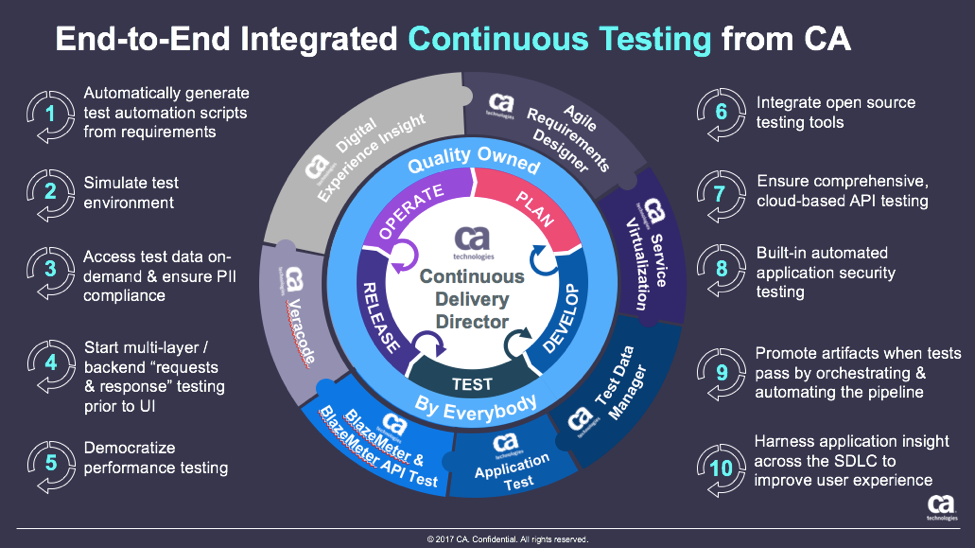
  • Continuous Testing: Solving the Biggest DevOps Bottleneck

    Continuous Testing: Solving the Biggest DevOps Bottleneck

    It’s time to start implementing the practices of Continuous Testing

    Earlier this year, Computing Magazine conducted a fascinating study around the adoption and benefits of DevOps in its DevOps Review 2017 publication. The findings that stood out most fascinating to me where around quality assurance and testing.

    In this survey, the question was asked, “Where are the main holdups in the software production process?” Of all the self-proclaimed DevOps practitioners, a whopping 63 percent said the biggest delays occurring in the QA/Test phase. In fact, this cited bottleneck was more than 2 times greater than the next proclaimed bottleneck, which they felt was in planning (29 percent).  In this same survey, another question asked, “What tends to lose out more in DevOps environments?” While 43 percent said, “Nothing,” nearly 30 percent of these DevOps practitioners said that quality was being sacrificed. When asked which area they wanted to focus on improving in the next year, over 40 percent opted for quality.

    Why is it that quality has taken such a hit?  The study cited two issues: 1) Testing and QA is often siloed from the other parts of the organization, and 2) Testing tools haven’t matured much in the past five years.

    Testing must become a cross-functional operation across the software development lifecycle (SDLC) spectrum, one that involves all teams. Agile developers and testing teams don’t have weeks to test, but hours. Testing hasn’t kept up because it hasn’t applied the methods and concepts of agile development have not been applied to testing and QA processes. By removing the constraints that force testing to the end of a development cycle, developers and QA teams can achieve accurate, automated testing from day one. They can create an integrated pipeline, capable of taking an idea from design to deployment, at speed, without compromising quality.

    Open-source, cloud-based solutions can be the catalyst that brings the speed of agile to testing.  Here are a few examples.

    Better In-Sprint API Testing: Since APIs have become the major component of applications, organizations are shifting their approach from starting testing when the user interface is complete to shifting the focus of testing at the API level.  But the hard thing is finding enough time in a development sprint to test them sufficiently.

    Today’s applications are a collection of microservices and API calls. UI testing alone just won’t cut it. UI testing is very brittle, and whenever it changes, testing breaks. Testing needs to shift left into the development cycle—into sprints. But if you shift testing left to be a focus of the sprints, what kind of API testing can you really do? How comprehensive can they really be?  Creating those API tests has to be quick, and simple.

    Dev and Test teams must utilize automated tools that not only generate API tests, but create an exhaustive set of test cases from the API, then execute those tests. These tools also need to support the most popular open-source testing frameworks allowing developers to run functional API tests as performance tests without any proprietary conversion issues. And, vice versa, developers must be able to take open-source performance tests and be able to run them as functional API tests.

    Orchestrating Testing: A Continuous Delivery Pipeline Manager: “Faster” is becoming table stakes with automation.  The facts show that companies who have widespread agile adoption and are deploying more frequently with significantly reduced lead times. But, this too often leads to release failures, quality issues and disorder with multiple—if not hundreds—of applications rolling through the SDLC. Plus, things slow down significantly with time-consuming handoffs and rework in the release process. DevOps teams, who release features and fixes frequently while significantly reducing errors and manual processes, need toolchain-agnostic pipeline planning, orchestration and optimization solutions that enable them to eliminate spreadsheets, automate test processes and feedback, and continually improve the delivery of revenue-generating features to end-customers. New CD SaaS tools help make this orchestration process easy.

    Performance and Functional Testing Using Open Source Frameworks: More and more organizations are trying to move from legacy testing tools. It’s not so much that these don’t adequately test, but they were never designed to meet the needs of agile development approaches. Rather, they were designed for releases that occurred two to three times per year. But that won’t cut it anymore.

    And as developers begin to incorporate testing activities in the coding process, they need simple-to-use, open-source tools. Luckily, there are such tools like JMeter, Selenium, Gatling, Locust and others. There are even tools that help you convert from legacy platforms to open source technology with ease, and guides to transform existing functional tests created with other tools over to load tests.

    These are just a few examples of how continuous testing eliminates the testing hurdle. With continuous testing, organizations can:

    • Automatically convert user stories from requirements management tools like CA Agile Central or Atlassian JIRA into the minimum number of test cases required for complete code coverage, and being able to adapt automatically to changing business requirements.
    • Reduce test cycle prep time by requesting test data from within requirements.
    • Request, reserve, and create test data at any time, even from requirements phase.
    • Virtualize APIs for better testing, while managing API access to developers.
    • Institute easy API testing that can generate comprehensive test cases (positive, negative, edge case, and SQL injection) and execute those tests automatically.
    • Democratize testing with SaaS-based testing tools so that developers can test early and test often.
    • Speed testing by feeding test data directly and securely to virtual services.
    • Use open-source testing tools such as JMeter, Selenium, Jenkins, Jenkins, Appium, Taurus, Gatling, Locust and more.
    • Orchestrate the application delivery pipeline to promote releases from one environment to the next as soon as all the tests pass and enable faster feedback loops.

    This is testing unleashed, going hand in hand with agile development to accelerate quality into production.

    By adopting next-generation testing practices, DevOps teams have the ability to test early, often, automatically and continuously. To learn more about continuous testing and why it is critical to DevOps and Continuous Delivery initiatives, visit this Continuous Testing informational page.

    — Aruna Ravichandran

  • Avoid Crashes: 5 Best Practices for Load Testing

    Avoid Crashes: 5 Best Practices for Load Testing

    Demanding customer expectations and the rapid distribution of information across social media have made website and applications crashes an off-limits path for today’s companies and organizations.

    Crashes resulting from traffic spikes cause immediate and long-term loss of sales, as well as tarnishing the brand name. When servers or websites go down during highly anticipated events such as Black Friday, the Big Game or before a major concert, the repercussions can be permanent.

    Yet, avoiding the “website temporarily unavailable” screen is also easier than ever before. By performance testing your website continuously and proactively you can easily detect errors, bottlenecks and bugs, and then fix them to ensure your website handles any amount of traffic.

    Here are five best practices for load testing your website or app:

    Define Your Load Goals

    Before starting your tests, you need to figure out what it is that you need to test.

    This includes the number of concurrent users, traffic patterns and areas that users can visit on your site. For example, if your site has 10,000 users concurrent at its peak, but  3,000 arrive in the morning and that total slowly climbs up to 10,000 in the afternoon—and these visitors mostly just browse your homepage—you’ll need to run a different test than if you have 10,000 concurrent users on your website all day long, constantly browsing multiple pages.

    To determine your load goals, you need to engage directly with your business colleagues. For instance, get your product manager to set the system’s expected abilities, ask the marketing team to inform you about any special campaigns that might increase website traffic, and then look at server logs and tools such as Google Analytics to determine previous customer patterns.

    Choose Your Load Testing Tools

    There are multiple open-source load-testing tools that you can use to run your tests.

    JMeter is the most popular tool, but you can also use Gatling, Locust, Tsung, The Grinder or Selenium. See here to learn more about the differences between these toolsets.

    Does this seem complicated? Taurus is an open-source automation test framework that simplifies running these tools, by using a simple YAML script. If you need to run your tests from the cloud, utilizing rich analytics or requiring user collaboration, you might consider using BlazeMeter.

    Take Your System to the Limit

    To make sure you stand up to your load goals, you need a buffer; specifically, you need to make sure that your system can handle heavier loads.

    This ensures that the CPU stays low and you don’t experience memory leaks. However, we also recommend you take your system to the limit and see when and how it fails. This ensures that you know exactly what your system’s weaknesses are, giving you a better ability to fix any errors that might occur.

    This is especially important if you come across an unexpected traffic spike—say, if your competitor’s website crashes and all their customers come running to you. Wouldn’t you rather be prepared for that?

    Monitor Test Results

    Set aside resources for looking at test results.

    Examine KPIs including Response Time and Hits/s, as well as the correlations between them, to learn what your system’s abilities and bottlenecks are. This information will help you see what needs fixing.

    As you continue testing over time, you will be able to identify KPI trends, which will help you monitor system health. We also recommend you monitor backend KPIs like DB Queries, with APM tools.

    Test Again

    So, you’ve tested, you’ve analyzed, and you’ve fixed.

    Now you have one last thing to do: Run your tests again to make sure everything is working smoothly after the committed changes. That ensures nothing gets overlooked. It would be a shame if all your hard work went down the drain due to a minor oversight.

    Now, let’s get testing!

    To get more load testing tips, check out this free whitepaper, “How to Ensure Your Website or App Won’t Fail at Peak Times.” To learn more about BlazeMeter, request a demo.

    — Noga Cohen

  • Get Ready to Become a Full-Spectrum Engineer

    Get Ready to Become a Full-Spectrum Engineer

    The more things change, the more they stay the same. In software development, change has been a constant. I’ve been a software engineer for more than 25 years and have had to morph, pivot and learn new things to remain current and in demand. Plus, the industry swings like a pendulum between the need for specialists and generalists and that cannot be ignored: The advent of new architectures, methodologies and disciplines drives the need for specialists. Once assimilated, the market drifts back toward generalists.

    Back in the day, it was not uncommon to have 50+-person teams building applications using the Waterfall methodology. From a technology perspective, development was kept in silos for each specialty. It was uncommon for a developer to straddle specialties such as GUI, business logic, database and quality assurance.

    The swing back to generalists was driven by the shift to Agile. When the Agile methodology became prevalent, we saw the teams of 50 reduced to teams of six to 12. The reduced team size also reduced the number of specialist you could have on a team. Developers needed to know more and do more. Today, most companies are looking for generalists who can do it all—otherwise known as the full-stack engineer. These developers work on web applications and can operate in any vertical tier of the application. They write HTML, CSS and JavaScript for high-performing and functional UI for the front end. They can also work from the server side to develop the business logic to support the UI. Behind that are the database schema and queries they write to move data in and out of the application.

    Enter the Full-Spectrum Engineer

    DevOps has ushered in a new trend. Teams are moving from batched releases of functionality to single-piece flow. In other words, we no longer think about collecting the work of multiple engineers over multiple sprints into a release. Our ability to bring value to the customer as soon as possible and out-innovate the competition will be driven by releasing the work of a single engineer as soon as it is ready. This typically is accomplished through a continuous integration/continuous delivery (CI/CD) pipeline directly from the source repository through automated testing and finally deployment into production, preferably without any human intervention.

    What does this mean for developers? Plenty. Here’s a look at the major capabilities needed by software engineers who want to thrive as full-spectrum engineers (FSEs.)

    1. Be a good software engineer. That means keeping up with the latest trends in design and implementation. You need to assimilate new frameworks and open-source libraries into your first party code to build software quickly. Furthermore, you must understand scale and performance of the system under load. Creating services that scale out and back based on demand will enhance the user experience.
    2. Have an eye toward quality. This means testing both the functional and non-functional aspects of the application. Well-written unit tests are just the beginning. An FSE must think about how to create automated regression tests that can run in a staging environment to assure that the entire system will not be negatively impacted by their deployment. Testing for non-functional aspects such as performance are a must as well.
    3. Understand the complexities of deployment. Whether that be containers, cloud or infrastructure as code, you need to know where and how the software runs and be able to create those environments from scratch. Using stable, version controlled configurations for the running environment will ensure that Dev, QA, Staging and Production all look and behave the same. That makes testing repeatable and operations more straightforward.
    4. Don’t forget about operating the software. As part of a DevOps team, you will be expected to take part in pager duty. When writing new functionality, consider how to debug it remotely and whether your teammates will be able to do the same. That means logging and other telemetry are critical but insufficient. Turn that data into information that can be consumed by both people and machines. Can the software detect that it is not running properly? Can it heal itself? Can it call for help?
    5. Make security a priority. The fast pace of software development means that there is no longer time to wait for a security analysis or pen test when your release candidate is ready to deploy. Security standards should be part of the acceptance criteria and security scanning must be added to your definition of done. Use tools that can provide quick feedback and diagnosis of security vulnerabilities while writing code as well as identify vulnerabilities in your open-source components. This preventative scanning will not only train you to write secure code, but it will also allow the software to run successfully through the assurance scans that are part of any good CI/CD pipeline.

    DevOps is turning the concept of a full-stack engineer on its side. Now the vertical tiers of technology and architecture are secondary to the horizontal disciplines that must be mastered to create software at the speed of DevOps. While I am eager to tell you that the future of software development is generalist, it does not mean that we should get rid of our specialists. What it does mean is that we will need fewer of them—the skills and capabilities of a full-spectrum engineer are the future of software development. DevOps has smashed the velocity barrier but to reach the full potential will require a new breed of multi-disciplined generalists—Full-Spectrum Engineers.

    About the Author / Peter Chestna

    As Director of Developer Engagement at Veracode, Pete provides customers with practical advice on how to successfully roll out developer-centric application security programs. Relying on more than 10 years of direct AppSec experience as both a developer and development leader, Pete provides information on best practices amassed from working with Veracode’s 1,000+ customers. Pete joined Veracode in 2006 as a platform developer and was instrumental in delivering the first version of Veracode’s service to customers. Later, as Director of Platform Engineering, Pete managed the Agile teams responsible for delivering Veracode’s SaaS platform and built the first DevOps team. Follow him on Twitter @PeteChestna.

  • CD 101 Podcast: The What, How and Future of Continuous Delivery

    CD 101 Podcast: The What, How and Future of Continuous Delivery

    Now that we’ve arrived at Episode 4 of our CD 101 Podcast, let’s address some basic concepts—like the what and how of it all and the future.

    Wait … perhaps we could—or should—have touched on these key topics earlier. Or not. At least not the future part? Anyway …

    While this (mostly) backwards-looking orientation may seem a bit odd, I’d argue that we’re actually navigating the conversation on precisely the correct path. Let’s rewind for a moment to look at where we’ve come from.

    Episode 1: We highlighted many of the fundamentals of this thing called CD, yet we did so from more of a conceptual and best-practices standpoint. While the ideas and processes involved do resonate in the real world, the topics we cover in this episode are bit closer to the water-cooler conversations we’re hearing about CD as it grows in practical adoption.

    In Episode 2: We covered the whole how do you “realize agility” piece of the conversation. This is important and a precursor to some of these other basic questions. The entire process of digital transformation begins with getting agile and you can’t truly adopt continuous delivery without doing so; therefore, this was another good place to feed today’s discussion.

    In Episode 3: We looked at the prospect of re-inventing the “Modern Software Factory” with agile development and continuous delivery. OK, so, perhaps we were getting a bit ahead of the basics here, but I’d maintain that this is an important piece to consider upfront that builds on these other building blocks. As with the topics covered in Episode 2, it is critical to understand the big picture challenges and benefits before you begin to get your hands dirty.

    And now for some nitty gritty.

    In Episode 4, we hear from Shamim Ahmed, CTO of Continuous Delivery Solutions at CA Technologies, as he answers the nine burning questions he most often hears in speaking to enterprise practitioners as they look to employ DevOps and Continuous Delivery practices in the real world.

    So, while these previous conversations were material, this is a crucial set of topics to consider as you invoke your own strategy, including:

    1. What is the difference between DevOps and continuous delivery?
    2. What are the key impediments/obstacles to achieving speed/quality in CD?
    3. How do we overcome these obstacles?
    4. How do we get started on the CD journey?
    5. What are the key top-level metrics you want to track in a CD program?
    6. What org changes do we need to make to implement CD?
    7. What the key capabilities we need to implement?
    8. How do we integrate all the different tools we have in our environment?
    9. How will the future of continuous delivery evolve?

    OK, that last part is a bit more postulation on our part—though we like to think on the practical side, based on the answers to all these other important real-world adoption dynamics.

    Tune in and hopefully learn a good deal about where your approach stacks up, and needs to evolve.

    As always, you can find said Episode 4 of the Continuous Delivery 101 Podcast by:

    • Listening to it on your computer on YouTube
    • Downloading it from iTunes store
    • Downloading it via the Podcast App by searching for “Continuous Delivery 101 podcast”

    Enjoy!

    — Scott Edwards

  • Using Load Balancing in Blue/Green Deployment

    Using Load Balancing in Blue/Green Deployment

    One of the biggest pains of automating the deployment process is that final step, when everyone agrees it is time to take the accumulated changes and expose them to the public. This process is the point at which systems go down and users find themselves suddenly cut off. Scheduling such changes for off periods may be useful, but “off period” is rarely “no users impacted” period. One of the goals of DevOps should be to minimize impact to users, as the point is to make things more repeatable and consistent. Blue/Green deployment is one of the processes introduced to make the final rollout step of continuous delivery (CD) smoother.

    This process, first (to my knowledge)  proposed by Jez Humble and David Farley in the book, “Continuous Delivery,” proposes that you have two environments—one testing and one production—that mirror each other. Then, when it is time to release, the router is changed to send users to the “test” environment, and it becomes, for all intents and purposes, production. The problem with this simplistic description is that everyone on the system at the time of “cutover” is “cut off,” since the new system doesn’t know what they were doing. That’s not the best solution for users; in fact, it’s downright disruptive.

    Like Load Balancing Quiesce

    This is not that far off from the type of thing I’ve talked about using load balancing for, and F5 Networks (where I got the idea) has talked about it for a while. You can tell a good load balancer to stop offering connections to server X in the pool to let it settle and then be taken out of service for maintenance. The same technology could be used to say, “Let existing users finish off on their existing connections, but do not allow new connections to these servers,” directing all new connections/users to the new deployment while not dropping the connections of the existing users that presumably are in the middle of doing something.

    Now in load balancing, you have to consider how long to allow users to stay connected before arbitrarily ending their session, but in the world of REST APIs this is not as important as it is in longer-lived, client-server style connections. In the end, though, there must be a defined point where everyone is forced to the new systems. At that time, merely making the switch on the load balancer and taking the old production systems out of the pool will force users to connect to the new systems.

    It Works for A/B Testing, Too

    A similar process can be used to try out new features on a subset. Once there is a load balancer in place, and you know what you want to measure to determine if a new feature is enjoyed by users, an instance or two behind the load balancer can be spun up and start accepting connections. The load balancer will naturally start putting those servers to use, and soon you’ll have a subset of users seeing the new features, while most blithely continue on with the old. When testing is done, the decision of whether to withdraw the servers/instances with the new code or move all servers in the pool to the new code can be made.

    Overall, offering less deployment disruption will be required as your organization moves into more frequent releases under CD. Look for solutions like blue/green deployment to make those releases as non-disruptive as possible.

    — Don Macvittie

  • Challenges in DevOps Standardization

    Challenges in DevOps Standardization

    Many organizations still face challenges in their Devops adoption journey enterprise-wide, especially when there is no standardization in tools, non-repeatable processes and adhoc practices and culture barriers. Here are some of the challenges in standardization and possible solutions to achieve standardization in DevOps as part of DevOps transformation journey.

    Business Case

    A survey conducted within multiple customer teams revealed they face challenges in standardization of tools and streamlining the process gaps due to lack of end-to-end orchestration, manual intervention, legacy practices, inconsistent environments, longer provisioning time and several other factors. Taken together, they necessitate standardization in DevOps across the enterprise to make it repeatable, predictable and consistent.

    Challenges in Standardization of DevOps

    Tools Challenges

    1. Multiple tools to evaluate with one or more overlapping features in the tools, learning curve involved to evaluate/do proof of concept and choosing the tools with short-term goals instead of long-term perspective.
    2. Limited knowledge of tools, used from the perspective of automation in their specific area, resulting in siloed automation and using manual, ad hoc process.
    3. Lack of out-of-box integration with most tools used in the CD pipeline and teams investing time to build custom integrations.

    Process Challenges

    1. There is no central DevOps team who can evaluate and recommend the right set of tools to be used, with individual project teams/groups try to set up their desired tools and serve their teams (Dev/QA/Ops), with no clarity on availability of infrastructure that can be shared across groups.
    2. There is no defined process framework detailing the different tenets in DevOps, including what activities and approach are needed to move to desired state, leaving teams to achieve their desired state of automation without a structured approach.
    3. There is a lack of knowledge on defining right KPI for each DevOps capability and how to measure the metrics to determine efficiency of the DevOps automation process and identify scope of optimization.
    4. There is a lack of SME knowledge on the application, application stack and environment management flowing between Dev and Ops teams to arrive at a standardized process.
    5. Multiple vendors are managing the different stages of an application and each following their own defined process for development life cycle.

    Cultural Challenges

    1. Standardization on metrics, process, practices, governance and organization-level control over DevOps implementation is challenging without a central authority (a central DevOps team) driving these practices across the enterprise.
    2. Teams operate in silos and follow their own DevOps practices and think in silos without having a holistic view, resulting in broken processes that are inconsistent.
    3. Teams still lack training in DevOps on the tools, practices to be followed in CI, continuous testing, continuous deployment and operations. Lack of DevOps skilled resources/expertise brings challenges in implementing end-to-end automation.
    4. DevOps is considered a concept, with every DevOps implementation unique for every organization and no standard approach for adoption of DevOps, causing confusion where to start and how to start. In addition, there is a conflict of interest and power of influence from multiple stakeholders while standardizing on tools.

    Proposed Solution(s)

    DevOps Adoption Framework (DAF)

    DevOps adoption framework (DAF) is a comprehensive framework for due-diligence, tools support and solution accelerators to create systematic and well planned-out transition road map and implement a continuous delivery toolchain and overcome the common challenges in DevOps implementation.

    Choosing the Right Set of Tools and Stack

    Tools selection should be based on the requirements and what best suits the need, decided based on various factors discussed in the attached whitepaper, and using one of the methodologies such as points given for out of box features and different factors/constraints.

    DevOps Automation Platform with Template-Based Infrastructure and Toolchain Orchestration

    DAAS (DevOps as a service) is an automation platform, which serves as a central platform to drive standardization across tool use, provisioning infrastructure, toolchain, managing the life cycle of VMs, bringing in central authority and governance, defining the KPI, monitoring and measuring the metrics, monitoring end-to-end pipeline giving real time analytics, providing self-service capabilities across multiple teams, bringing in audit and compliance, continuous improvement and drive consolidation and standardization.

    Future Direction

    • Increased focus on standardization of DevOps metrics with analytics and monitoring to identify the bottlenecks early and big data used for predictive analytics through the delivery pipeline.
    • Rapid DevOps adoption across the enterprise, with standardization and consolidation critical factors for scale, compliance and utilization with self-service DevOps automation platform enabling end-to-end pipelines.

    Conclusion

    The critical success factors for enabling DevOps adoption across enterprise needs focus on central DevOps team driving DevOps adoption with governance enabled with DevOps adoption framework and consolidation of the processes, standardization on metrics and tools, enabled with a DevOps automation platform.

    For a deeper look at the survey, download the white paper here.

    About the Author / Lavanya Subbarayalu

    Lavanya Subbarayalu is Senior Architect working with Technology Office in HCL Technologies. She has expertise in Azure, DevOps consulting & Microsoft technologies. She is associated with DevOps COE, working on design and Development of DevOps solutions and consulting tools. Connect with her on LinkedIn.

  • In the Application Economy, Every Company is a Software Company

    In the Application Economy, Every Company is a Software Company

    Recently, I was in New York to attend the Third Annual DevOps Virtual Summit. (Yes, I had to be at a “virtual” summit in person—while it’s virtual for the attendees, it occurs in real life for the speakers, panelists and support staff.)

    The broadcast took place in a small recording studio that featured a lobby adorned with autographed photos from celebrities who had used the facilities previously. Sylvester Stallone, Al Pacino and even John Stamos—complete with a full mane from the “Full House” days—were all looking down on us from the walls.

    Anyway, as the speakers were introducing themselves in this lobby prior to the event it occurred to me that the sampling of speakers was illustrative of the importance of DevOps across industries. The companies participating in the event were not what you’d traditionally consider a “software business,” but yet they’d made an investment in their software development practice—recognizing the importance of competing in the application economy. It underscored the point that in the application economy every company is a software company, regardless of what industry they are in. Which is why the concept of DevOps and Continuous Delivery should be top of mind, even if your company may not see itself as being “in” the software business. Regardless of what end product your company sells, you rely on your software and applications to do so.

    Take a look at the panelists and the companies they represent to illustrate this: Silvia Prickel from United Airlines. Matt McComas from GM Financial. John Hashimoto from CNN. And Kelly McCartney from Jeweler’s Mutual Insurance Company.

    An airline, an automobile financing company, a news organization and an insurance company that’s been around for 100 years (literally). These are not companies that were born digital, like many of the web-based entrants you might typically associate with DevOps. Instead, these are traditional organizations that recognized the need to make a digital transformation.

    And the results were pretty impressive. We often focus on speed when we talk about continuous delivery, but it’s important to remember you also can see improvements in quality. The below image was taken from the United presentation and shows the dramatic decline in production outages.

    This is not to say that improvements in speed were not seen as well. Matt McComas from GM Financial spoke about how his company is now averaging 1,800 deployments per month, with each one taking just 3 to 5 minutes.

    I won’t give away any more important details here. If you’re interested to find out more, I encourage you to watch the replay of the webcast: http://bit.ly/DOVSreplay

    — Brendan Hayes

  • Beware False DevOps Metrics

    Beware False DevOps Metrics

    Metrics are important for any manager seeking to continuously improve critical work processes and the resulting work-product.

    That’s why DevOps leaders need DevOps metrics. With the right ones, those leaders can guide their organization’s adoption of DevOps best practices—progressively optimizing staff productivity, business agility and customer experience.

    But, what are the right metrics for DevOps success? And, what are the wrong ones?

    These next few blogs will offer field-proven guidance on DevOps metrics. Much of the material in these upcoming blogs can be found in the book, “DevOps for Digital Leaders,” which I co-wrote with Kieran Taylor and Peter Waterhouse. And I’d love for you to comment below so we can all share lessons learned about how to effectively measure DevOps maturity—and, just as important, how not to measure it.

    Change Your Metrics, Change Your Culture

    DevOps leaders tend to struggle with metrics because DevOps entails changes that are both operational and cultural—and span different teams or functional areas, including development, test and operations. So inexperience may cause leaders to adopt new ones that are counterproductive—or, as is often the case, continue using traditional ones that don’t align well with the cross-functional nature of DevOps objectives.

    Three pitfalls have proven to be especially common in the transition to DevOps:

    • Vanity metrics. These appeal to the “hero” mentality of individual coders, rather than the collaborative process goals of cross-disciplinary DevOps and continuous delivery teams. They include total lines of code produced and total function points created. If incentives are linked to these metrics, developers can focus too much on volume at the expense of other essential activities such as refactoring and design simplification.
    • Those that promote interteam conflicts. Metrics that pit teams against each other undermine critical DevOps behaviors—such as code-sharing, mentoring and constructive peer reviews. So, while gamification may be useful in other areas of the business, Agile leaderboards that rank teams based on the prevention of extraneous deployments and changes can actually work against DevOps culture.
    • Traditional metrics. Many DevOps leaders persist in utilizing traditional/incumbent ones such as mean time between failures (MTBF) and the ratio of full-time equivalents (FTEs) to servers. But while these may have been useful in the past, they can work at cross-purposes with DevOps transformation. After all, with faster delivery of services, some failure is to be expected. And as IT improves its responsiveness to the business, it must look past costs alone to total economic impact.

    What Makes a DevOps Metric Useful?

    While future blogs will propose some specific metrics that DevOps leaders should find useful in their efforts to bring about cultural transformation, here are a few general guidelines to consider:

    They must be obtainable.

    A metric won’t do you any good if you can’t actually capture it. So you need DevOps tools that help you capture the metrics you need. You may also have to measure some attributes indirectly. For example, rather than measuring employee morale directly, it may make sense to use staff retention rates—which you can readily capture—as your performance indicator.

    They must be reviewable.

    Any metric you choose to employ as part of your DevOps leadership effort must be able to stand up to rigorous scrutiny in a business context. Your credibility as a leader depends on your ability to communicate its relevance to the stated values and mission of the team.

    They must be incorruptible.

    It’s never a good idea to promote metrics that can be influenced by individual team members or any group as a whole. You should also be on guard against metrics remaining entrenched—despite the fact that they may inhibit change—because bonuses are linked to SLAs associated with them.

    Metrics must be actionable.

    Useful metrics must enable DevOps leaders to make better decisions about workflows, incentives, policies, training, tools or some other “lever” of transformation. Not every such decision will be a game-changing one—but incremental gains in knowledge lead to incremental improvements in process, which collectively do change the game.

    In my next blog, I’ll discuss the metrics that DevOps leaders are using today to successfully drive the digital transformation of their businesses. In the meantime, if this is a topic that interests you, be sure to request a free copy of my book, “DevOps for Digital Leaders.”

    — Aruna Ravichandran