Tag: azure

  • Cloud Migration Monitoring: A Practical Guide

    Cloud Migration Monitoring: A Practical Guide

    Almost every organization has transitioned some operational systems to the cloud. DevOps professionals are an essential part of migration projects, facilitating the migration itself, and making sure applications work as expected and provide satisfactory performance after the migration.

    To make your next cloud migration a success, you must get monitoring right. Applications must be monitored at every stage of the migration—when the application is still running on-premises, during migration and once the new workload is running in the cloud.

    In this article, we will explain key metrics to track during your migration, monitoring considerations at every stage of the migration cycle, and free tools offered by the major cloud providers that can help you monitor your migration.

    What to Monitor During a Cloud Migration

    There are many components involved in a cloud migration process. There are several approaches to cloud migration—each migration is unique, and might necessitate setting up different metrics. However, there are several aspects that can be considered mandatory when monitoring your cloud migration process:

    • Tracking application traffic. Tracking application traffic can help you validate that application configurations are properly defined and validate the availability of the entire application. You should ensure that all requests arrive to the new server, and keep an eye on the error rate. Additionally, watch for response times to ensure your application is not exceeding the planned thresholds.
    • Tracking your costs. Tracking costs can help you ensure that you are not incurring unexpected losses. The majority of organizations migrate to the cloud to reduce their costs. However, incorrect implementation of cloud resources may lead to losses. You can gain visibility into your costs by leveraging first-party cloud tools, like AWS Billing, which natively integrate into the pipeline, monitor costs, and show visualized data in customized dashboards. You can also use these tools to set up alerts.
    • Monitoring application security. Application security monitoring can help you identify security vulnerabilities and incidents during and after the migration process. You should monitor infrastructure configurations, such as internal traffic, host open ports and instance processes that are actively accessing different services. Additionally, keep watch for API hits per second, which might indicate a distributed denial of service (DDoS) attack.

    Monitoring Aspects of the Migration Life Cycle

    Cloud service providers typically identify three main phases of the migration process, which are referred to as the plan, migrate and run phases.

    Plan Phase

    The plan phase helps you assess the performance levels of your applications before migrating. The goal is to achieve an in-depth understanding of how workloads are functioning pre-migration, as well as the current state of user experience. This data can then be used to establish performance benchmarks and baselines.

    Performance baselines, like error rates, page load times and slow transactions, can help you set up configuration alerts that keep track of outages across the cloud migration process. You can then quickly diagnose the situation and apply fixes that ensure application health during and after the migration.

    Here are several questions that can help you during the plan phase:

    1. What is the application baseline?
    2. How will the migration process affect user experience?
    3. What are the potential technical challenges expected during the migration process?
    4. Can the corporate network support additional bandwidth needs?
    5. What are the steps needed to start the migration process?

    Migrate Phase

    The migrate phase involves all processes required to securely move components from one location to another. During this process, you should continuously monitor performance to ensure user experience remains within the pre-established baseline. However, migrating to the cloud means you no longer have control over all configurations.

    To ensure application performance and stability during the migration process, you need to identify potential roadblocks and issues, and continuously monitor and validate the process. You should test critical aspects like application response time and call counts, and troubleshoot issues quickly.

    Run Phase

    The run phase starts right after the migration process is complete. During the post-migration phase, you need to establish proactive monitoring processes. The goal is to ensure your application performs well in the cloud; using the expected resources and without incurring overhead.

    When monitoring your application, keep track of service level agreements (SLAs) to ensure the cloud vendor meets the requirements agreed upon. You should also monitor for changes and review individual variables that might cause issues.

    Additionally, you should make sure all connections between applications are maintained after the migration.

    Free Cloud Migration Monitoring Tools

    The three major cloud providers—Amazon, Microsoft Azure and Google Cloud—provide tools that help automate migration to their clouds, and also assist with the crucial aspects of monitoring. These tools are offered free, because it is in the best interest of the cloud providers to allow easy, frictionless migration.

    The following table summarizes migration monitoring capabilities available from each cloud provider.

    Cloud Provider Tool

    What it Helps Monitor

    AWS Migration Services

    Helps automate migration of applications that rely on databases.

    • Continually monitors source and target databases
    • Able to restart failed migrations
    • Oversees continuous data replication
    • Integrates with first-party AWS monitoring tools

    Azure Migration Tools

    Provides a migration hub that lets organizations manage large migration projects.

    • Tracks migration process and current status for server and database migrations
    • Allows external tools to integrate and track migrations
    • Reports on compliance aspects of migrations

    Migrate for Google Compute Engine

    Formerly known as Velostrata, this tool automates migration of on-premises systems, with automated roll back in case of errors.

    • Validation of workloads for migration compatibility
    • Ongoing oversight of streaming data transfers
    • Ability to roll back migration to on-premises systems in case of error

    Monitoring is critical for a successful cloud migration, and it’s important to use monitoring at every stage of a cloud migration:

    • During the plan phase, establish a baseline of application performance before it is migrated to the cloud.
    • During the migration phase, carefully monitor application behavior and troubleshoot issues.
    • During the run phase, validate that the application performs as expected and is meeting SLAs.

    I hope this will be useful as you plan and execute your next cloud migration project.

  • IaC Frameworks: Vendor-Specific or Multi-Cloud?

    IaC Frameworks: Vendor-Specific or Multi-Cloud?

    Over the past few years, I have been watching the shift to infrastructure as code (IaC) frameworks closely. With the shift from monolithic to microservices, and with the shift from mostly virtual machines (VMs) to cloud-native architecture, applications are much more complicated, making it much more important to automate infrastructure to respond with speed.

    In that sense, I refer to IaC as “The third cloud revolution.” Looking at the history of cloud transformation, the shift from physical servers to virtual machines (led by VMware about 20 years ago) would be the first cloud revolution. The move from virtualized data centers to the public cloud (led by AWS about 10 years ago) would be the second cloud revolution. With the shift to public clouds, people were suddenly able to click buttons to provision new resources, including “hardware.”

    In the last few years however, we see fewer clicks and more code. Engineers write and maintain that IaC, and something executes that code. Engineers influence the infrastructure much more than they used to – that is the third cloud revolution. We mainly see four IaC frameworks that drove this revolution – Terraform and Pulumi (both multi-cloud), CloudFormation and ARM (vendor specific).

    I recently talked with Joe Duffy, CEO, Pulumi, Mark Russinovich, CTO, Azure and Anton Babenko, AWS community hero and Hashicorp ambassador, the head of Terraform at Microsoft, the head of Terraform at IBM Cloud and one of the founders at Gruntwork. After our brainstorming session, it’s clear we all agree that IaC will have a huge effect on cloud operations. In this blog, I’ll share my point of view regarding multi-vendor IaC versus single-vendor IaC frameworks; discuss how they compare to the differences between iOS and Android and which direction I believe will win the day.

    The big cloud vendors seem to go “all-in” and create full ecosystem, iOS-style, and they have everything working nicely with the relevant services and tools. AWS just released AWS Proton, which works with CloudFormation. They say that Terraform is on their roadmap, but time will tell. Microsoft seems to offer more solutions that are ARM-based, like Bicep. When I talk with executives at those companies, they strongly believe in the great value of this vendor lock-in/closed approach. They truly believe that this will help their customers in the best way possible. Perhaps they are right.

    On the other hand, when I talk with the community, I hear different opinions. DevOps engineers at Azure customers do not debate whether to choose Terraform or ARM. DevOps engineers at AWS customers do not debate whether to choose Cloudformation or Terraform. While this was the case three years ago, it is not, anymore. Now, the real debate is whether to choose Terraform or Pulumi. Engineers prefer a language that is multi-vendor, open-source, no vendor lock-in and that is compatible with other open source solutions built on top, like Open Policy Agent and Terragrunt, to help Terraform users. This is the Android-style approach – open platform.

    Moreover, I hear new phrases from the community that make me think the future is going in this direction. Erik Osterman at Cloud Posse started using the acronym  TACOS – Terraform Automation and Collaboration Software (see the video here). It takes time, but, going forward, developers and the community will hold the key to the future of IaC, not executives and large vendors.

    You can, of course, challenge this by replying that, “iOS is a great OS.” This is obviously true, but I think there is one big difference here as to why the Android approach is winning the IaC market. The answer lies with the end user; the Apple ecosystem is a solution for the end user and consumer, and IaC is about larger-scale infrastructure decisions. Like the shift from monolith to microservices, developers prefer small and isolated parts, not one big system. With Terraform and Pulumi, developers get more freedom. Maybe the company will move from AWS to GCP or Azure or vice versa. Maybe IT will need an Auth0 provider, as well, and will want to manage it the same way. Maybe the use of Open Policy Agent to govern deployments becomes the status quo. Developers need freedom, whereas consumers just need a great product.

    But the question has still not been answered: Terraform or Pulumi? It is still too early to tell, and, frankly, there is more than enough room in the IaC space for both. Maybe more open-source and multi-vendor frameworks will emerge and one that’s yet unknown will rule the day. Terraform provides a great ecosystem of providers, support and maintainers. Pulumi has started to provide all of those, together with its imperative approach, which seems to be a bit more appealing to developers.

  • How To Build Out a Successful Multi-Cloud Strategy

    How To Build Out a Successful Multi-Cloud Strategy

    Navigating even just a single cloud environment can be complicated enough for any startup. Between understanding the range of features on offer, planning for expenditure and ensuring you have the right expertise to leverage the tool to its full potential, the thought of managing multiple clouds can seem daunting.

    However, whether your company is just starting out or has been around for years, the rewards to be reaped from a multi-cloud approach make it a worthy investment. Adopting a multi-cloud strategy offers a whole host of benefits and can allow you to optimize costs when implemented correctly. In fact, a recent Gartner survey of public cloud users found that 81% of respondents are working with two or more providers. In addition, the amount of business applications, services and workloads is set to double over the next two years.

    Here’s what companies of all sizes can gain from going multi-cloud, and how they can do so.

    Why Opt for Multicloud?

    For startups, adopting a multi-cloud strategy can be rewarding from day one. If you’re building your proof-of-concept or are in the design stage of building your infrastructure, leveraging multiple environments at once can help you develop faster and with more advanced tools.

    With access to multiple clouds, you can play around with the strengths of each provider and combine them to get the “best of all worlds,” increasing agility and eliminating vendor lock-in. Having immediate access to more than one cloud also means being able to take advantage of these features as and when you need them, without having to fully migrate to another cloud, which can be a costly and lengthy process. In fact, Gartner analyst Michael Warrilow stated that “most organizations adopt a multi-cloud strategy out of a desire to avoid vendor lock-in or to take advantage of best-of-breed solutions.”

    Opting for a multi-cloud environment also boosts security and disaster recovery and ensures easier migration for some data and applications. Cybersecurity is heightened as spreading applications across different providers means an attack is less likely to bring your entire infrastructure down at once. Furthermore, sticking with one provider inevitably runs the risk of losing control of a mission-critical application during an outage. All of this adds to the overall resiliency of your system’s infrastructure.

    So, how exactly can you get started with your multi-cloud journey?

    Making the Right Cloud Choices

    While a multi-cloud approach can deliver serious value in terms of resiliency, flexibility and cost savings, making sure you’re choosing the right providers requires a comprehensive assessment.

    Luckily, all main cloud vendors offer free trial services so you can establish which ones best fit your needs and see how they work with each other. It will pay to conduct proofs-of-concept using the free trials and run your data and code on each provider. You also need to make sure that you’re able to move your data and code around easily during the trials.

    It’s also important to remember that each cloud provider has different strengths—one company’s best option is not necessarily the best choice for you. For example, if your startup is heavily reliant on running artificial intelligence (AI) and machine learning (ML) applications, you might opt for Google Cloud’s AI open source platform.

    Or perhaps you require an international network of data centers, minimal latency and data privacy compliance for certain geographies for your globally used app. Here’s where AWS could step in. On the other hand, you might need your cloud applications to seamlessly integrate with the various Microsoft tools that you already use. This would make the case for Microsoft Azure.

    There are multiple factors at play that you have to carefully consider to ensure ROI of your multi-cloud investment. According to a 2019 Spiceworks study, AWS comes out top for maximum uptime, Azure wins on compatibility and Google Cloud proves to be the best for manageability.

    However, it’s also crucial to remember that there are far more cloud providers than the “big three.” For example, Aliyun is Chinese conglomerate Alibaba’s cloud computing offering, while Oracle and IBM also have their own services. Many startups turn to more niche vendors that can better suit their individual needs, so it could pay to explore alternative options, too.

    Ultimately, you need to understand not only what your current needs are but also how your business goals align with the capabilities of your cloud strategy. Consider what you might need in the future that your current cloud provider doesn’t provide.

    Avoiding vendor lock-in—being able to dip into different features as and when you please—is one of the key benefits of multi-cloud adoption. However, it requires careful planning and assessment of your short- and long-term business goals and how these relate to your cloud infrastructure needs.

    Managing Multiple Cloud Environments Requires Expertise

    There’s no doubt that leveraging a single cloud environment requires team members with experience and know-how of that particular cloud vendor. So, moving to a multi-cloud approach means there’s an even higher demand with regards to the expertise you need at your disposal.

    If your team only has engineers who are experienced with working with Azure, it wouldn’t be a wise move to immediately adopt AWS without recruiting more talent. This is especially true as AWS is the most complex and mature of all of the main cloud providers and requires the relevant knowledge to be able to take full advantage of the tools and applications available. Hence, you need to consult your team at every step of the way on what kind of cloud environment is within their capabilities when crafting your multi-cloud strategy.

    Another vital aspect of multi-cloud adoption is managing the integration of the databases from each cloud provider. This means aligning your data management strategy across each cloud environment, otherwise you risk creating data silos and databases that don’t communicate with each other. Fortunately, many cloud providers include features that let you create clusters and manage and deploy databases. A team that understands the need for this is essential.

    Finally, a DevOps culture is crucial for any successful multicloud strategy. The purpose of multicloud adoption is not only to build out your infrastructure, but also to power continuous delivery and integration when it comes to product development. To ensure you select the best features and determine the right capacity according to your needs and expertise, you need to get the input of your entire DevOps team, including cloud experts, software developers and QA engineers, too. In fact, going one step further, many companies are even building out Cloud Centers of Excellence (CCoE), aa team of cloud experts who drive cloud-based digital transformation across an organization.

    The Balance of Controlling Multi-Cloud Costs

    Controlling and managing your expenditure while adopting a multi-cloud environment is no easy task, especially as your personalized use of the tool, which scales up and down, will result in fluctuating costs. In fact, controlling these expenses can be so difficult that cloud cost management vendor ParkMyCloud predicted that companies spent more than $14 billion on unnecessary cloud infrastructure costs in 2019.

    From a cost-saving perspective, Google Cloud is the best option as it offers more flexible contracts, lower starting costs and clearer visibility into expenditures compared to the other big providers. However, the decision should be taken against the potential ROI of the multicloud strategy you adopt, so calculating the financial optimization that will come from accessing multiple cloud environments can help guide you.

    If possible, it’s a good idea to consult with an expert partner on the ways in which you can best manage costs and maximize ROI. If this isn’t an option, you can use different tools that allow you to create estimates around expenditures.

    As the growing numbers around multi-cloud adoption suggest, it’s a trend that’s delivering value and is here to stay. With a multi-cloud environment, startups and enterprises alike can have flexibility around the features they need, optimize costs, increase security and protect themselves against outages. However, embarking on a multi-cloud strategy is no straightforward task: It requires research, planning and consultation with your technical team. By aligning your business goals with your cloud requirements and democratizing your decision process, you can ensure you get the most out of your multi-cloud investment.

  • Microsoft Advances DevOps Agenda

    Microsoft Advances DevOps Agenda

    Microsoft, at its online Ignite 2020 conference, has launched a bevy of updates that collectively further adoption of best DevOps practices on the Microsoft cloud platform, including for the first time a preview of an ability to store artifacts created using low-code Power Apps tools on GitHub.

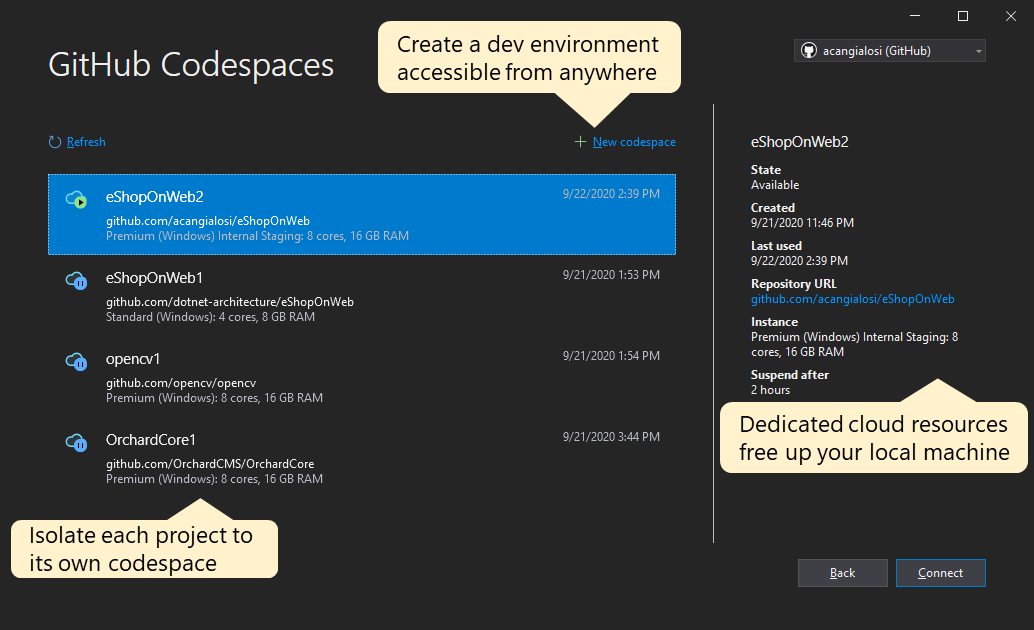
    In addition, Microsoft announced a preview of an update to Visual Studio 2019 16.8 that will add support for GitHub Codespaces, a previously announced capability that automatically creates repositories on GitHub. GitHub Codespaces is currently available in beta and soon will be accessible directly from within Visual Studio.

    Microsoft also revealed it has enhanced the Git tooling experience in Visual Studio to enable more asynchronous collaborations. A GitHub extension for Visual Studio Code enables developers to work with GitHub Issues and Pull Requests directly in the editor. Development teams that need to work in real-time alternatively can employ Visual Studio Live Share.

    A publish experience in Visual Studio also now has the option to generate a GitHub Actions workflow for continuous integration/continuous delivery (CI/CD) environments in Azure resources using the deployment secrets configured in a GitHub repository. GitHub Actions for Azure can now also scan Azure resources for policy violations and vulnerabilities in container images and issues involving Azure Resource Management (ARM) templates.

    Microsoft CEO Satya Nadella told conference attendees the velocity at which applications are developed and deployed has become even more critical as organizations embrace digital business transformation in the wake of the economic downturn brought on by the COVID-19 pandemic.

    GitHub support for Power Apps is especially significant because it will make it easier for so-called citizen developers to collaborate with professionals developers as they jointly develop applications, he said.

    Other notable updates to the Microsoft tools portfolio include a preview of an instance of the Azure Logic Apps workflow platform that can be deployed as a containerized runtime.

    A .NET 5 Release Candidate is also now available, with general availability expected next month. This update adds support to smaller, faster single-file applications that use less memory when employed within microservices and containerized applications. It also includes significant performance improvements, support for Windows ARM64 and new releases of C# 9.0 and F# 5.0 languages.

    Microsoft also announced several updates to App Service to make it easier and more cost-effective to migrate and modernize .NET web apps on the Azure cloud. A new Premium v3 (Pv3) App Service Plan can handle large-scale web apps, supporting more apps per instance and larger, memory-intensive apps with up to 32GB per instance. Microsoft is also making Windows Containers support in App Service generally available and will soon make Reserved Instance (RI) Pricing for App Service available to reduce costs.

    Finally, Microsoft made several Kubernetes enhancements, including a preview of a start/stop cluster feature that will be added to Azure Kubernetes Service (AKS), and announced general availability of an Azure Policy add-on for AKS, which makes it possible to audit and enforce policies across Kubernetes clusters. Microsoft also made generally available Bridge to Kubernetes extensions for Visual Studio and Visual Studio Code that allow teams to develop against microservices within a running AKS cluster to enable debugging existing services without having to reconfigure or deploy a new cluster.

    Nadella said keeping track of developer velocity and overall “tech intensity” within an organization is critical to success. It’s not yet clear how many organizations have put the metrics in place to measure either. However, it is clear that organizations that have yet to fully embrace best DevOps practices are already being left behind.

  • Commvault Extends Data Protection Alliance with Microsoft

    Commvault Extends Data Protection Alliance with Microsoft

    Commvault and Microsoft are extending their existing relationship to integrate Commvault’s data protection software with Azure Blob Storage.

    Azure Blob Storage is a service based on object-based storage optimized for unstructured data. Commvault last year launched the Metallic software-as-a-service (SaaS) platform, which provides a cloud-based approach to managing data protection, that runs on Azure.

    The two companies have pledged to extend that relationship to not only align engineering efforts but also enable their partners to more easily resell both Metallic and Azure cloud services under the same user contract.

    Manoj Nair, general manager for the Metallic service, said the Commvault offering presents IT administrators with a simple graphical user interface (GUI) and exposes application programming interfaces (API). That latter capability enables DevOps teams to automate the backup and recovery process via a cloud service, said Nair.

    Rather than having to rely on an IT administrator, the API enables DevOps teams to remove friction from the data protection process, he noted.

    The bulk of data protection processes are still managed by IT administrators. However, as DevOps processes continue to mature, data protection processes are becoming more automated. Developers not only want to be able to instantly recover data in the event of system failure but they also often use data protection tools to move data into and out of cloud computing environments.

    Nair said Commvault opted to extend its relationship with Microsoft in part because the amount of data being stored in the Azure cloud continues to expand exponentially as more organizations adopt Microsoft Office 365, Microsoft Teams and low-code applications built using Microsoft PowerBuilder tools. Collectively, those applications increase the amount of data gravity the Microsoft Azure cloud exerts. As the amount of data increases in the Azure cloud, the number of applications looking to access that pool of data increases steadily. As that data continues to grow, Nair said there will be a greater need for tools to protect that data.

    In general, Nair said many organizations underappreciate the need to back up and recover data stored by cloud service providers. The assumption is the cloud service provider will make it possible to recover data in the event of failure. In reality, cloud computing is based on a shared responsibility model between the end customer and the cloud service provider, under which responsibility for data protection—along with all other data management functions—belongs to the end customer.

    Of course, there is no shortage of data protection tools available. Many of those relied on today reside in an on-premises IT environment. In the wake of the COVID-19 pandemic, interest has grown regarding shifting data management tools to SaaS platforms that are more accessible. The issue many IT organizations will need to decide next is whether they want to rely on dedicated IT administrators to manage those processes versus reducing costs by employing APIs to automate a set of routine tasks that no one in IT especially enjoys managing.

  • The EU’s Plans to Build a Wall Around GDPR-Protected Data

    The EU’s Plans to Build a Wall Around GDPR-Protected Data

    An ambitious German- and French-lead European Union (EU) initiative could wrestle tighter management, and eventually, control of data from commercial cloud providers.

    The project, dubbed as “Gaia-X,” is also intended to offer firewall-like protection for data sources from the EU. The initiative could have repercussions on how DevOps teams from outside of the EU manage data from European users, as well as from operations they might have that are physically based in EU member states.

    Without specifically citing U.S. cloud giants such as Amazon Web Services (AWS), Google Cloud Platform (GCP) or Microsoft Azure, German and French government officials said the initiative will allow organizations’ cloud data to benefit from EU sovereignty and security. Bruno Le Maire, France’s minister of the economy and finance (Ministre de l’Économie et des Finances), said during a televised Franco-German conference last week, for example, that Gaia-X would offer significantly more data protection for data stored on cloud services from EU organizations and users.

    Despite how General Data Protection Regulation (GDPR) mandates rules EU and international firms with user data from EU member state sources must follow—to avoid the risk of heavy fines and other penalties—the EU still lacks sovereignty in the application of GDPR, Le Maire said. Data stored on a U.S. cloud service provider’s server in the U.S. or overseas, for example, is still accessible by U.S. law enforcement officials in some cases under the Clarifying Lawful Overseas Use of Data (CLOUD) Act.

    Without disclosing technical details about the kinds of cloud services Gaia-X might offer, the initiative will adhere to four principles: “openness, interoperability, transparency and trust,” Le Maire said.

    “We are not China. We are not the United States—we are European countries with our own values,” Le Maire said. “We have our own economic interests that we want to defend.”

    EU data 1

    Over 20 organizations will form Gaia-X, including AtosBosch, Deutsche Telekom, SAP and Siemens. A prototype of the service should be available by end of year. While specific cloud services the organization will offer remains undisclosed, government officials announcing Gaia-X said it will offer artificial intelligence (AI)-aided meta analysis of data in such sectors as healthcare and smart city management. The use of AI services for data needs would also meet stringent privacy and ethical programming mandates, the officials said.

    In a statement, the German Federal Ministry for Economic Affairs and Energy (Bundesministeriums für Wirtschaft und Energie) said:

    “Predominant data silos, a lack of standards and the limited transparency of data infrastructure offers are today major obstacles to the application of artificial intelligence. To overcome these obstacles would be very costly and for this reason, the diverse know-how available in Europe is not pooled and used efficiently.”

    Build That Wall

    While created to ostensibly protect user data from the European member states and to enforce non-compliance with major penalties, accessibility by governmental authorities outside of the EU, for example, can remain outside of EU control. As mentioned above, for example, data storage that is ostensibly GDPR-compliant yet is on a physical AWS or another cloud provider’s server remains subject to access by U.S. law enforcement in certain circumstances.

    GDPR compliance is thus often considered a starting point for EU data sovereignty. In many ways, the EU’s initiative, pending the final details about Gaia-X’s infrastructure and the services it will offer, will serve as a firewall built to protect EU.

    Clive Longbottom, an analyst for Quocirca, agreed.

    “By creating a total data platform that is GDPR compliant, uses have the choice: build directly on that platform and not have to jump through hoops to prove compliance,” Longbottom said. “Those who choose not to, or due to geographical position, cannot use the platform directly can export data into Gaia-X and only have to prove compliance for that part of the platform outside of the environment. So, yes, EU data can be completely airlocked into Gaia-X – or can just make life a lot easier for users.”

    Instead of serving as an alternative to AWS, Gaia-X, based on the information the EU officials have communicated so far, is more of a data handling environment that may just have its own cloud components, Longbottom said.

    The idea, based on the available information “is to present an environment where data can be handled firmly within the needs of GDPR,” Longbottom said. “Now, there are fundamental difficulties around this, such as with data caching in the network, but we won’t let inconvenient realities get in the way of political perceptions.”

    The Gaia-X is thus “really meant to be a platform for data exchange that meets stringent requirements within the EU,” Longbottom said. “I would hazard that it will include those working outside of the EU that want to deal with countries, companies and entities within the EU, accepting data feeds from pretty much any cloud platform. It will probably be that once the data is accepted into the Gaia-X environment, it will then be deemed to be secure under GDPR—and that will not make it necessarily secure under GDPR end-to-end.”

    EU data 2

    Cloud Alternative

    A main selling point of the project is that once data adheres to Gaia-X compliance, DevOps could, in theory, benefit from more seamless data transfers between parties within the environment, as well as transparency about how and where it is stored.

    “Gaia-X is a good idea that will make life easier for EU members to share data across a trusted environment and allow externals to feed data into a known, highly standardized environment where they then do not have to prove GDPR compliance across Gaia-X itself,” Longbottom said.

    However, whether or not Gaia-X might one day compete against AWS, GCP or Azure remains to be seen. “If the EU can get more cloud platform vendors to join in and show how their platforms are GDPR compliant from the ground up, more EU companies will want to use such platforms where GDPR compliance is a given,” Longbottom said. “Meanwhile, most will stick with the big public platforms and use Gaia-X as a downstream GDPR data handling environment.”

  • 2nd Watch Allies With GitLab for Managed DevOps Service

    2nd Watch Allies With GitLab for Managed DevOps Service

    2nd Watch today launched a managed DevOps service based on the continuous integration/continuous deployment (CI/CD) platform from GitLab that it will operate on behalf of customers in addition to coaching them on how to adopt best DevOps practices.

    Stefana Muller, a senior product manager, said the 2nd Watch Managed DevOps service combines the managed and professional services capabilities of 2nd Watch into a single offering. That approach is required because when it comes to DevOps most organizations need as much help transitioning their culture as they will operating their CI/CD environment, she said.

    One of the major challenges organizations face when trying to embrace DevOps is they typically spend a lot of money upfront only to see those efforts flounder when changing the internal culture of the organization becomes too difficult, Muller said. As part of an effort to smooth that transition, 2nd Watch DevOps experts will assess an organization’s readiness to adopt DevOps tools and processes and then train internal teams on DevOps fundamentals such as managing infrastructure as code and Git principles. The assessment is based on a Culture, Automation, Lean Practices, Measurement and Sharing (CALMS) methodology.

    The 2nd Watch service is built around an on-premises edition of the GitLab CI/CD platform that it will host and upgrade on behalf of a customer on either an Amazon Web Services (AWS) or Microsoft public cloud platform. The DevOps service will focus on enabling organizations to build both monolithic and microservices-based applications faster because no organization today has fully transitioned to microservices. The company already provides a managed Kubernetes service for building and deploying applications based on a microservices architecture.

    2nd Watch chose to partner with GitLab because of the completeness of that CI/CD platform, which among other things includes integrated security modules that can be employed to advance DevSecOps practices as well, Muller said, noting that longer-term, 2nd Watch is planning to layer a more robust set of managed DevSecOps services on top of the GitLab platform.

    Managed DevOps offerings are starting to proliferate as the number of services providers that have attained certifications from multiple IT vendors has increased. It’s not clear to what degree organizations will prefer to rely on these services just yet. However, it’s is apparent many organizations are trying to shift as much of their limited resources to building application code versus managing IT infrastructure. It’s also possible that as the COVID-19 coronavirus pandemic becomes more widespread many organizations will need to rely on external service providers to manage their DevOps environments.

    Regardless of the motivation, organizations that are at the beginning of their DevOps journey clearly will need more help than those that are further along the DevOps maturity curve. The decision most organizations will need to make is to what degree will they rely on a managed DevOps service to accelerate their transition versus opting to rely permanently on an external IT service provider to manage one of their most critical IT environments.

    — Mike Vizard

  • Microsoft Extends Azure Reach to On-Premises IT Environs

    Microsoft Extends Azure Reach to On-Premises IT Environs

    Microsoft today at its Ignite 2019 conference previewed an Azure Arc management service that extends the reach of the Microsoft cloud to on-premises IT deployments.

    Azure Arc will be made available on both local Windows and Linux servers as well as Kubernetes clusters or an instance of Kubernetes that Microsoft is making available on Azure Stack for on-premises IT environments. With these announcements, Microsoft is, for the first time, extending its hybrid cloud computing strategy beyond systems running a version of the Azure operating environment on an on-premises IT environment.

    Jason Zander, executive vice president for Microsoft Azure, told conference attendees Azure Arc creates an opportunity for IT organizations to extend the best DevOps and cloud management practices employed on Azure to on-premises IT environments. Rival cloud service providers, he noted, are only paying lip service to hybrid cloud computing.

    In addition to extending the Azure management plane to on-premises IT environments, Microsoft today extended its portfolio of edge computing platforms capable of running instances of Azure Stack to include previews of commercial series and rugged series for Azure Stack Edge. Configurable with graphical processor units and field-programmable gate arrays (FPGAs) capable of running machine learning algorithms in harsh environments, the ruggedized instance of Azure Stack Edge even includes a portable server designed to be carried in a backpack.

    To complement those systems, Microsoft is also previewing a range of additional services for Azure Stack, including a fully managed, real-time data ingestion service designed to stream millions of events per second from any source to build data pipelines the same way the company does on the Azure cloud; a cloud database management service for Microsoft SQL Server and Postgres; and an Arc-enabled application programming interface (API) management platform.

    While Microsoft generally would prefer organizations to adopt Azure Stack as an on-premises extension to Azure cloud, not many organizations have the robust modern server infrastructure in place required to run Azure Stack. Azure Arc is an effort to extend the reach of Azure to multiple types of edge computing platforms without requiring organizations to deploy yet another operating system. Alternatively, organizations can employ a diverse range of Kubernetes distributions, of which there are now more than 70 that have been certified by the Cloud Native Computing Foundation (CNCF). Most organizations at this stage have yet to standardize on a single distribution of Kubernetes.

    It’s unclear what the appetite is for extending the management plane Microsoft created for its Azure cloud to on-premises environments. However, as the scope of the hybrid cloud management challenge facing organizations grows as various new forms of edge computing manifest, Microsoft clearly sees an opportunity to increase the scope and reach of its cloud platform strategy. Each edge computing instance is essentially a smaller instance of a cloud platform for which most IT organizations will not have the tools required to manage at scale. In fact, many IT organizations might not even attempt to deploy workloads at all on those platforms without something equivalent to Azure Arc to manage and secure those environment first being in place.

    — Mike Vizard

  • Bitnami Offers Popular Application with Managed Database Configuration in Azure Marketplace

    Multi-tier Packages of WordPress and Drupal with Azure Database Services Remove Complexity of Deploying Enterprise Configurations

    SAN FRANCISCO, CA – January 15, 2018 —Bitnami, the leading provider of application packaging, is excited to announce the availability of WordPress and Drupal pre-configured with support for Azure Database for MariaDB in the Azure Marketplace. Bitnami has collaborated with the Azure Database Services team to deliver packages that make it much easier for companies to deploy enterprise configurations of these popular and widely used applications to Microsoft Azure.

    Deploying one of these new ‘Bitnami Certified’ application packages enables companies to realize the benefits of stability, security, and simplicity, while harnessing the power of a fully managed Azure database. The result is the ability to scale quickly and reach global distribution without worrying about costly downtime.

    “The new Bitnami packages significantly improves enterprise productivity by reducing the effort involved in packaging and deploying complex multi-tier architectures, while offering guaranteed high-availability, security, and dynamic scale with Azure OSS Database services” said Sudhakar Sannakkayala, General Manager, Azure Data engineering. “Our customers can now simply scroll through the Azure Marketplace, select an offering, and click ‘launch’ to deploy one of these applications.”

    “Bitnami has worked with the Azure Database team to create packages that deliver the reliability, security and ease of use of Bitnami Certified applications and the flexibility and power of Azure,” said Bitnami Vice President of Business Development and Sales Pete Catalanello. “Because Bitnami optimizes packaging for Azure, it is easy to utilize platform services such as databases, auto-scaling, and load-balancing. The combination of Bitnami and Azure delivers what customers say they care about most.”

    A long-term Microsoft partner, Bitnami provides a wide range of pre-packaged, easy to deploy open-source applications and development stacks to the Azure Marketplace. It supports Microsoft enterprise customers in multi-tier environments in numerous ways, and actively works with the Azure Database team to provide enterprise solutions and promote best practices. Other multi-tier Bitnami solutions for Azure include:

    • Stacksmith, which enables enterprises to package their own multi-tier applications for Azure and AKS. Users can define best practices once and enforce them when packaging and updating. This includes configuration requirements for the use of Azure Databases for MySQL, PostgreSQL, and MariaDB.
    • Kubeapps, an open-source web-based interface for discovering and provisioning applications on a Kubernetes cluster. Microsoft has partnered with Bitnami to integrate Kubeapps with Open Service Broker for Azure. With Kubeapps, users can create and present Helm charts that leverage Azure-native PaaS services as part of the architecture.

    With this combination, a user could deploy an application tier on AKS and an Azure Database backend to achieve a highly-scalable application with a highly available database. They could then use Stacksmith to maintain and update these applications with their PaaS service integrations going forward.

    Bitnami continues to expand the scope and number of enterprise solutions to make it ever easier for users to set up and deploy complex environments that leverage first party Azure services. For a closer look at these multi-tier enterprise solutions, register for the Create an Application-Centric DevOps Experience with Stacksmith and Azure OSS Database Services webinar. To access the new WordPress or Drupal packages, visit the Azure Marketplace.

    About Bitnami

    Bitnami provides packaged applications for any platform. The Bitnami application automation platform delivers and maintains a catalog of 130+ ready-to-run server applications and development environments in partnership with the world’s leading cloud providers including Amazon, Google, Microsoft and Oracle, driving over 1.3 million deployments per month. Bitnami is helping to shape the future of software deployment via its leadership role in the evolution of the Kubernetes ecosystem, including being the authors and maintainers of Kubeless and Kubeapps projects and major contributors to helm. Based in San Francisco and with offices around the world, Bitnami is a privately held, rapidly growing company. For more information, visit https://www.bitnami.com, or follow us on Twitter (@Bitnami) and Facebook.

    Kris Kraves

    Cogenta Communications, Inc.

    Let us amplify your message

    www.cogentacom.com

    @kriskraves

  • Microsoft Revamps Approach to DevOps on Azure

    Microsoft Revamps Approach to DevOps on Azure

    Microsoft this week unfurled a broad range of DevOps services for the Azure cloud that are intended to make it easier for organizations to embrace modern application development and deployment processes.

    Jaimie Cool, director of product management for Azure DevOps, said it’s fundamentally simpler for organizations to embrace DevOps processes using tooling hosted in the cloud because they don’t have to spend time setting up the underlying infrastructure themselves. Once they master those processes in the cloud, organizations can take the tooling provided by Microsoft and extend it out to either instances of Azure running in a local data center or Windows Server platforms.

    The Azure DevOps portfolio spans Azure Pipelines, a continuous integration/continuous development (CI/CD) platform that supports any language; Azure Repos, a private repository based on Git; and Azure Test Plans, a wide range of testing tools. Azure DevOps also includes Azure Artifacts, which provides Maven, npm and NuGet package feeds from public and private sources, and Azure Boards, a suite of collaboration dashboards and reporting tools.

    Microsoft is positioning Azure DevOps as an evolution of Visual Studio Team Services (VSTS). VSTS users will be upgraded into Azure DevOps projects automatically. Organizations that are using the on-premises Team Foundation Server (TFS) component of VSTS will continue to receive updates based on features made available in Azure DevOps. TFS will be rebranded Azure DevOps Server starting with next release.

    As part of this launch Microsoft is also making Azure Pipelines available for free with unlimited minutes for 10 parallel jobs for every open source project. Major open source projects already using Azure Pipelines for CI/CD include Atom, CPython, Pipenv, Tox, Visual Studio Code and TypeScript.

    Cool said that when it comes to application development, too many organizations overlook the critical role of DevOps processes in making a project a success. There’s a tendency to focus too much on features rather than the tools that enable an organization to deliver those features consistently. DevOps processes are crucial when it comes to improving the quality of software and the velocity at which upgrades are delivered, he said.

    But the ultimate DevOps goal is to not to increase the number of releases put into production over a specific amount of time such as a week, month or quarter, he added. Rather, organizations should be able to updates to applications whenever they are ready or required.

    Cool noted there’s a high correlation between adoption of Docker containers and an appreciation of the value of DevOps. As organizations embrace microservices-based architectures based on containers, the complexity of the IT environment overall increases. That issue soon may be coming to a head for more organizations, as Microsoft is now seeing containers all over the place, he said.

    Longer term, Microsoft expects to see machine learning incorporated into DevOps processes as well, Coole said, noting that it’s still early days as far as machine learning and DevOps are concerned.

    Clearly, Microsoft is trying to provide a more sophisticated DevOps experience as part of an ongoing battle with Amazon Web Services (AWS) and other cloud service providers to attract developers to its platform. As those efforts continue to expand, the number of organizations Microsoft schools on the DevOps processes should increase correspondingly.

    — Mike Vizard