Tag: azure

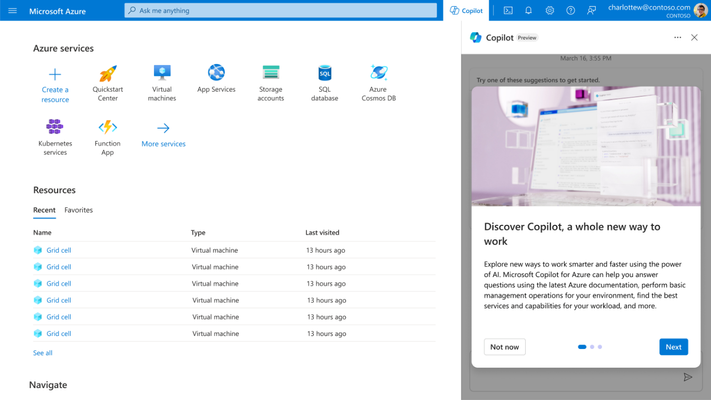
  • Microsoft Previews Additional Copilot Tools for Azure

    Microsoft Previews Additional Copilot Tools for Azure

    At its Ignite 2023 conference, Microsoft this week previewed Copilot tools to simplify the management of the Azure cloud service along with a tool that streamlines the building and deploying of artificial intelligence (AI) applications on the Azure platform.

    In addition, Microsoft launched Microsoft Copilot Studio, a low-code tool that automates the process of creating data integration plugins and adding custom copilots within the Microsoft Copilot for Microsoft 365 tool that Microsoft previously launched.

    Microsoft Copilot for Azure leverages large language models (LLMs) to enable IT teams to use natural language to create, configure, discover and troubleshoot Azure services. It also enables IT teams to create complex commands, ask questions and optimize costs.

    Erin Chapple, corporate vice president for Azure Core at Microsoft, told Ignite attendees that Microsoft, along with a handful of customers, is already using Microsoft Copilot Azure to manage Azure infrastructure.

    In the long term, it’s clear that Microsoft is moving toward streamlining the building and deployment of AI applications using Azure AI Studio, a framework for invoking the AI models that Microsoft makes available on the Azure platform. The goal is to make it possible for organizations to create their own copilots based on AI models they have trained.

    It’s still early days in terms of organizations leveraging AI models to build applications, but it’s already apparent that DevOps and machine learning operations (MLOps), along with data engineering and cybersecurity best practices, will need to converge. Microsoft is making a case for Azure AI Studio as the framework that will enable IT organizations to achieve that goal.

    Of course, Microsoft is not the only provider of IT infrastructure resources with similar ambitions, but thanks to its investments in OpenAI and the acquisition of GitHub, it is furthest along in terms of defining a framework for building AI applications at scale. Last week, GitHub previewed an extension of the Copilot tools it already provides to help developers write code that leverages generative AI to automatically propose an editable plan for building an application based on natural language descriptions typed into the GitHub Issues project management software. Copilot Workspace will generate editable documents via a single click that can be used to create code that developers can then visually inspect. Any errors discovered by application developers or the Copilot Workspace platform can also be automatically fixed.

    At the same time, GitHub has extended the scope and reach of Copilot Chat to make it simpler for developers to use natural language to discover issues in their code base.

    Generative AI is already having a massive impact on the rate at which applications are developed, but that code still needs to be reviewed. Chat GPT is based on a general-purpose large language model (LLM) that is trained by pulling in code of varying quality from all across the web. As a result, code generated by the platform might contain vulnerabilities or be inefficient. In many cases, professional developers still prefer to write their own code.

    Of course, not every programming task requires the same level of coding expertise. In many instances, ChatGPT will generate, for example, a script that can be reused with confidence across a DevOps workflow. There is no shortage of mediocre developers who are now writing better code thanks to tools such as GitHub Copilot, and soon, domain-specific LLMs will make it possible to consistently write better code based on validated examples of code.

    The next challenge is going to be finding a way to manage increased volumes of code. There is no doubt that AI will be applied to the management of DevOps pipelines, but for the moment, at least, the pace at which AI is being applied to writing code is already exceeding the ability of DevOps teams to manage it.

  • Dell Taps Microsoft to Simplify Hybrid Cloud Computing

    Dell Taps Microsoft to Simplify Hybrid Cloud Computing

    Dell Technologies, in collaboration with Microsoft, today unveiled a platform that tightly integrates an on-premises IT environment with the Azure cloud.

    Caitlin Gordon, vice president of multi-cloud product management for Dell Technologies, said the Dell APEX Cloud Platform for Microsoft Azure is the first instance of a hybrid cloud computing platform designed specifically to address that requirement using a Premier Solution of the Microsoft Azure Stack hyperconverged infrastructure (HCI) platform that Microsoft added to its portfolio today.

    The Premier Edition of Microsoft Azure Stack HCI makes available an instance of that platform that provides a more turnkey management experience than the existing editions, said Gordon.

    In the face of increased economic headwinds, more organizations are looking to lower the total cost of managing IT by reducing the number of control planes that need to be managed. Each platform that an IT team typically supports today has its own control plane that requires IT staff to manage it. Reducing the number of control planes creates an opportunity to reduce the total headcount currently required to manage multiple IT platforms.

    It also serves to streamline workflows in a way that enables DevOps teams to reduce the current level of friction encountered when managing multiple IT platforms, noted Gordon.

    At the core of Microsoft’s approach to hybrid cloud computing that Dell is embracing is Arc, a management framework that makes it possible to manage Azure cloud instances alongside on-premises IT environments. In terms of the ability to manage hybrid cloud computing environments, Microsoft is significantly more advanced than any other cloud service provider, said Gordon.

    It’s not clear whether IT organizations are embracing HCI platforms running an instance of the same core stack of software that Microsoft relies on to provide Azure services. If IT organizations expect to lower the cost of managing IT, there is no doubt they will need to modernize on-premises IT infrastructure. The older the platform, the more expensive it becomes to automate using various third-party frameworks.

    Regardless of the approach, IT teams need to reconcile the need to invest in automating workflows that span multiple IT platforms. Over time, those investments will reduce the total cost of IT, but getting the required funding to start that process will require IT teams to make a strong case for increasing the return on investment (ROI).

    In the meantime, the number of workloads running both in the cloud and at the network edge is only going to increase. At the same time, the bulk of existing workloads continue to run in local data center environments. Most IT teams will be required to find additional ways to automate the management of all those environments simply because the cost of adding additional IT staff to manage highly distributed computing environments as scale will otherwise be prohibitive.

    As such, the issues that IT teams are facing today may be a matter of not if the management of IT will become more automated but how soon.

  • Splunk Goes Azure With Microsoft Partnership

    Splunk Goes Azure With Microsoft Partnership

    It’s not every day that a well-established technology provider announces they are building their solutions on a new cloud technology stack, but that’s what Splunk announced at its .conf23.

    “…[O]ne of the most exciting [announcements] is Splunk’s new strategic partnership with Microsoft to build Splunk’s cloud solutions natively on Microsoft Azure. Together, our approach will enable our joint customers to migrate, modernize and grow their environments with end-to-end cloud and hybrid visibility at scale,” Splunk President and CEO Gary Steele said in a Splunk blog post this morning.

    Why such a bold move, might you ask? “Splunk’s strategic partnership with Microsoft to build Splunk natively on Azure demonstrates our commitment to advancing digital resilience and meeting our customers where they are…” Well, indeed, a big, big draw is the vast landscape of customers building and operating applications in Azure. While Gary didn’t share too many details about specific new capabilities or offerings yet, customers will get to use their Azure credits for Splunk offerings. I suspect two other important underlying factors made such a tech marriage happen: Open source and AI.

    First, Microsoft is far removed from the days of being viewed as a pariah by the open source community and is now a leader and contributor to well-known open source projects (OpenTelemetry, to name one); it abandoned its proprietary service mesh tech and got behind Istio (a recently-graduated CNCF project) and now owns the largest open source repository ecosystem with GitHub.

    While Splunk is by no means a noob when it comes to incorporating AI into products, the company continues to announce new AI capabilities, including a generative AI chat interface with a preview of Splunk AI Assistant, an improved version of the former SPL Copilot. Other AI-related announcements include Splunk App for Data Science and Deep Learning (DSDL) 5.1, which allows customers to leverage LLMs to build and train models with their domain-specific data for text summarization and text classification use cases. Stay tuned for more from .conf 2023!

  • Google Calls Microsoft Azure Anti-Competitive ¦ Gen-Z Can’t Email

    Google Calls Microsoft Azure Anti-Competitive ¦ Gen-Z Can’t Email

    Welcome to The Long View—where we peruse the news of the week and strip it to the essentials. Let’s work out what really matters.

    This week: Google complains to the FTC about Microsoft market abuses, and new graduates don’t know how to office. (more…)

  • Five Great DevOps Job Opportunities

    Five Great DevOps Job Opportunities

    devopsy.kinsta.cloud is now providing a weekly DevOps jobs report through which opportunities for DevOps professionals will be highlighted to better serve our audience.

    Our goal in these challenging economic times is to make it easier for DevOps professionals to advance their careers.

    Of course, the pool of available DevOps talent is still relatively constrained, so when one DevOps professional takes on a new role it tends to create an opportunity for others.

    The five job postings shared this week are selected based on the company looking to hire, the vertical industry segment and, naturally, the pay scale being offered.

    We’re also committed to providing additional insights into the state of the DevOps job market. In the meantime, for your consideration:

    Indeed.com

    AT&T
    Dallas, Texas
    Software Engineer
    $158,766 to $210,100

    LinkedIn

    Northwestern Mutual
    Syracuse, New York
    Senior Systems Software Engineer – DevOps
    $97,300 to $139,900

    CareerBuilder.com

    United Healthcare
    Remote
    Senior DevOps Engineer
    $85,000 to $167,300

    SimplyHired

    GEICO
    Remote
    Azure DevOps Engineer
    $82,000 to $185,000

    Dice.com

    Integrated Practice Solutions
    San Diego, California
    DevOps Engineer
    $80,000 to $140,000

  • Microsoft Adds Slew of Developer Tools to Azure

    Microsoft Adds Slew of Developer Tools to Azure

    At its Build 2023 conference this week, Microsoft announced general availability of an Azure Deployment Environment service that provides developers with a portal through which they can employ infrastructure-as-a-code (IaC) templates based on Terraform or Azure Resource Management files.

    In addition, Microsoft has enhanced Microsoft Dev Box, a workstation environment for developers that run Azure, to include a portal through which they can manage multiple environments.

    Scheduled to be generally available in July, Microsoft Dev Box is also previewing a capability that makes it possible to customize environments using configuration-as-code files stored in a Git repository. Microsoft is also previewing tighter integration between Dev Box and its Visual Studio integrated development environment (IDE) and Windows to further customize developers’ environments.

    Scott Guthrie, executive vice president of the cloud and artificial intelligence (AI) group at Microsoft, told conference attendees these and other tools for building cloud-native applications, along with GitHub Actions, make it simpler than ever to build applications in an Azure cloud service that includes an integrated continuous integration/continuous delivery (CI/CD) platform.

    Microsoft is also previewing GitHub Advanced Security for Azure DevOps that natively embeds automated security checks using scanning tools into the Azure DevOps platform.

    Other additions to the Azure environment include tools for centralizing the management of application programming interfaces (APIs) using an Azure API Center service that is available in preview.

    The Azure Event Grid has also been updated to enable it to use HTTP to pull delivery of discrete events in addition to pushing them.

    Finally, Microsoft is also previewing generative artificial intelligence (AI) capabilities to make it simpler to manage cloud costs by, for example, using prompts to summarize invoices or breakdown costs.

    Microsoft, along with its GitHub subsidiary, is at the forefront of applying generative AI to application development using tools like GitHub Copilot that developers can use to write better code faster. That copilot capability is now being disseminated across the portfolio of applications and services that Microsoft provides.

    It’s not yet clear what the downstream impact of such tools are just yet, but the overall quality of the applications being built should improve as, for example, fewer mistakes are made that can lead to vulnerabilities.

    Obviously, the way application software is built, constructed and secured is about to change in the generative AI era. Thanks to its alliance with OpenAI, Microsoft has a significant head start on rivals building generative AI platforms that can similarly be applied to improve developer productivity.

    In the meantime, DevOps teams should assume the volume of code simultaneously moving through pipelines is about to dramatically increase as developers become more productive. There will inevitably be more opportunities to apply multiple forms of AI to reduce any DevOps bottlenecks that might arise, but it’s clear most of the immediate benefits are being provided to developers.

    One way or another, however, the overall rate at which applications are built and deployed is about to change drastically. The issue is understanding how those advances will impact downstream DevOps workflows that were constructed for a different era of application development.

  • Quick Guide to Azure Storage Pricing

    Quick Guide to Azure Storage Pricing

    Azure Storage is a cloud-based storage service from Microsoft Azure. It provides a scalable, secure and highly available data storage solution for businesses of any size.

    The platform includes various services such as Azure Blob, which is a service for storing large amounts of unstructured data such as documents, images, videos and backups. Azure Files is a fully managed file share service for cloud-based applications. Azure Tables is a NoSQL key-value store used to store semi-structured data. Azure Queues is a messaging service used to store and process messages between applications or services.

    Finally, Azure Disks is a service that allows you to store and manage data in virtual hard disks used in virtual machines. With Azure Storage, businesses can easily manage their data, control access and scale their storage as per their needs without worrying about hardware or infrastructure management.

    How does Azure charge for storage space (bandwidth, capacity, number of transactions and quantity of transferred data)? What are the usage factors impacting Azure Storage fees: Region, account, access tier, replicas, egress?

    How Azure Storage Pricing Works

    Azure pricing for its storage services is based on several factors including storage capacity, data transfers and transaction counts. The cost of storage varies depending on the region and access tier selected, as well as the type of storage being used.

    For Azure Blob Storage, customers are charged for storage capacity, data egress (outbound data transfers) and the number of transactions (read, write and list operations).

    Azure Table Storage charges are based on the number of table entities stored and the amount of data transferred. Azure Queues are charged per transaction and data transfer, while Azure Disks are billed based on the provisioned capacity and the number of transactions.

    Several usage factors can impact Azure Storage fees, including the region where the data is stored, the storage account type, the access tier selected, the number of replicas and the amount of data transferred out of the storage account. 

    Overview of Azure Storage Pricing

    Blob Storage

    Azure Blob Storage pricing varies depending on the storage tier, data volume and whether customers opt for pay-as-you-go or reserved capacity.

    For pay-as-you-go pricing, Premium storage is charged at a flat rate of $0.015 per GB/month, while Cool and Archive storage are billed at $0.01 and $0.0099 per GB/month, respectively, regardless of data volume. Hot storage costs $0.018 per GB /month for the first 50 TB with the rate gradually decreasing with higher usage. For instance, customers who consume more than 500 TB/month pay $0.0166 per GB.

    Customers can also reserve blob storage in 100-TB or 1-PB blocks for one or three years. The prices for reserved storage vary by tier. A three-year Archive storage reservation costs $84 per 100 TB or $810 per PB/month, while Hot storage costs $1,244 per 100 TB/month for three years. For one-year reservations, Archive storage costs $91 per 100 TB or $883 per PB/month, and Hot storage costs $1,545 per 100 TB/month. For a one-year reservation, the cost of Hot storage is $15,050 per PB/month, and $11,963 per month for three years.

    Files

    Microsoft charges customers for Azure Files depending on the storage tier and whether they reserve storage capacity. Pay-as-you-go pricing ranges from $0.015 per GB/month for Cool storage to $0.016 per provisioned GiB/month for Premium file storage.

    Customers can commit to reserved storage capacity in increments of 10 TiB or 100 TiB for one or three years. A three-year reservation of 10 TiB Cool storage costs $101.39 per month, while one year costs $125.92 per month. However, the price increases significantly for the Premium offerings, with a three-year reservation of 10 TiB costing $1,081.34 per month and a one-year reservation costing $1,343.50 per month. 100 TiB reservations range from $983/month in the Cool tier for three years to $12,779.50/month in the Premium tier for one year.

    Nevertheless, there are other fees that add to the total cost such as read and write transactions, snapshots, metadata storage and early file deletion fees. These ancillary fees can impact the overall cost of using Azure Files and customers should account for them when estimating their expenses.

    Tables

    Azure Tables pricing is available in various tiers, including locally redundant storage (LRS), geo-redundant storage (GRS), read-access geo-redundant storage (RA-GRS), zone-redundant storage and geo-zone-redundant storage. 

    Customers are charged between $0.045 per GB/month for LRS and $0.01265 per GB/month for geozone-redundant read-only storage. Additionally, Microsoft charges a $0.0036 fee for each set of 10,000 transactions made on Azure Tables.

    Queues

    Compared to Blob and File Storage, the pricing model for Azure Queues is more straightforward. Customers are charged 4.5 cents to $0.075 cents per GB/month, depending on whether they choose local redundant storage (LRS) or read-access geozone-redundant storage (RA-GRS). Additionally, there is a $0.004 fee for every set of 10,000 operations in Class 1 and 2.

    Managed Disks

    Azure Managed Disks have numerous pricing options that can be overwhelming. The cost of using Managed Disks depends on several factors, including the disk size, performance, reservation period, capacity and disk type.

    The cheapest option for Managed Disks is the P1 disk, which costs $0.6 per month for 4 GiB of capacity in addition to $0.03 per mount/month. On the other hand, the P80 disk is the most expensive option, as it has a 32 TiB capacity costing $3,276.80 per month, in addition to $219/mount. However, the cost of a P80 disk can be reduced to $3,113/month (plus the $219/mount fee) with a reservation of one year.

    Azure Storage Vs. AWS Storage Pricing

    Here is a comparison of the pricing for similar storage services offered by Azure and AWS. As part of an Azure or AWS cost optimization strategy, you might consider combining services from both providers.

    Block Storage

    Amazon EBS is Amazon EC2’s basic storage device, with a price of $0.045 per GB for HDD and $0.10 per GB for SDD, with higher IOPS resulting in higher prices. The free tier includes 30 GB of SDD.

    For comparable regions in the U.S., Azure charges $0.05 per GB for HDD and $19.71 for 128 GB of SSD per month.

    Azure Managed Disks offer greater flexibility and easier backup than Azure Virtual Disks or Amazon EBS, with adjustable volume sizes and available IOPS. Managed Disks pricing starts at $19/month for a 128 GB disk, providing 500 IOPS.

    Object Storage

    Amazon S3 and Azure Blob Storage are both scalable services for storing objects (unstructured data) where data is stored together and cannot be changed in parts. Prices vary depending on the region, but for a comparable region in the U.S., Amazon S3 storage costs $0.023 per GB/month for the first 50 TB in addition to network usage fees. The free tier offers 5 GB of storage, while archive storage (Glacier) is $0.004 per GB/month.

    Azure Blob Storage starts at $0.0184 per GB/month for hot storage, although prices decrease to $0.01 per GB per month for cool storage and $0.002 for archive storage. Prices for both services increase for greater redundancy. 

    File Storage

    Amazon Elastic File System (EFS) is an equivalent service to Azure File storage and allows users to mount files to Amazon EC2 servers. It uses NFS V4.0/4.2 to mount files and is not available in all AWS regions (currently, four are supported), requiring a Direct Connect line or VPN for on-premises mounting.

    For a comparable U.S. region, Amazon EFS costs $0.30 per GB/month and the free tier offers 5GB on sign-up. Azure File Storage prices start at $0.06 per GB/month for local redundant storage, with prices increasing for more distributed redundancy setups. It is worth noting that both Azure and AWS charge additional fees for data access.

    Conclusion

    In conclusion, Azure Storage offers a range of services for storing and managing data in the cloud, each with its own pricing structure. While the pricing varies based on several factors including storage capacity, data transfers and transaction counts, it is essential to consider other usage factors, such as region, account, access tier, replicas and egress. 

    Customers should review these factors carefully and estimate their expenses to select the right storage service that meets their needs and budget. By doing so, they can leverage Azure Storage’s flexibility and scalability to store and manage their data efficiently in the cloud.

  • Using Microsoft Azure as a Backup Repository

    Using Microsoft Azure as a Backup Repository

    Every year, the amount of data that needs to be backed up increases. There are two ways to store backups – using on-premises facilities or trusting cloud-based solutions. Having an on-premises storage infrastructure can be costly for a company. This is because of the high prices for storage equipment and the expenses to maintain this equipment, e.g., hiring a storage engineer. Depending on a company’s rules, Microsoft Azure could be an alternative to traditional ways of keeping data. If the amount of data is relatively small (less than 4 TB), there is no problem with making use of this solution; you can either use Azure Blob as a CIFS or NFS storage, or you can create your own virtual machine by adding a disk to store your data and then configuring it as a file server. However, this blog post focuses on cases where space limits are more than 4 TB.

    Microsoft Azure allows you to create VMs and add disks with a maximum capacity of 4 TB for each disk. It is suitable for application servers but very often doesn’t work if you require a big file or backup server.

    However, we can exceed this limit by using Windows software RAID array. The idea is to use RAID5 as the software RAID which contains arrays starting from three disks.

    Why RAID5? Because it has a good read speed limit. It is also economical to use X disks, where X starts at three and you only lose one disk space for the total RAID result space. Furthermore, this should give you redundancy if one of your disks were to fail. However, if we build a RAID array in Azure, we already have the virtual disks as blocks of our array and they are protected by Microsoft Azure Cloud. Thus, the chance of failure in our RAID array (which is based on disks that are already in the RAID array) falls significantly.

    Here’s how to create an Azure-based backup and replication repository server.

    1. Log in to your Microsoft Azure account or register a new account at https://azure.microsoft.com/en-us/

    2. Create a new Windows Virtual Machine:

    In this example, we choose Windows 2008 R2 SP1, since we don’t require any advanced services, just software RAID5.

    3. Type in your VM name, username and the password according to MS Azure rules of complexity.

    4. Choose your VM size. Please note that the VM type depends on the number of attached disks. Thus, if you require more than 8 disks (over 24 GB in RAID 5), the only option is to choose DS2_V2 Standard:

    5. The settings for available storage are some of the main options for our future repository:

    At this point, you have created a new VM; now it is time to add disks. On the Disks page, you can add as many disks as you need for your future disk array. In our case, we will build software RAID5, which will require seven disks in total.

    We need to have our SMB share available from the internet, so we have to configure the Azure Firewall settings.

    In the Networking section, click the Add inbound port rule button and create a new rule allowing you to make port 445 (SMB) accessible to everyone (for testing). Alternatively, you can only make the port accessible to the backup software instance’s external IP as in the Source field (for production).

    The next step is to connect to the VM via RDP using the IP and credentials you created during the VM creation process.

    Next, you need to create a RAID5 volume. In Storage Manager, you`ll see all 4 TB disks you attached. Right click Disk Management > All Tasks > New Raid 5 Volume:

    Select all available 4 TB disks to add them to your array and move them to the right column:

    Follow the standard wizard; choose a letter for the disk and perform a quick format by NTFS.

    Next, create an SMB share on a new logical disk and add write permissions to the future repository.

    At this stage, you can use your entire 24 TB volume as a remote repository in your backup system.

    If you use the NAKIVO backup to Azure solution, just add a new repository using the server’s IP path to your share as well as the credentials you set for the SMB share:

    Then, create a new job using the new repository as the backup target and run it.

    Conclusion

    The amount of data organizations need to back up is growing exponentially. Therefore, it is important to store that data in the most economical way. Using a data backup system like NAKIVO and RAID5, you can make sure your VMs are reliably protected and that there is enough space to store them in Azure.

  • Five Great DevOps Job Opportunities

    Five Great DevOps Job Opportunities

    devopsy.kinsta.cloud is now providing a weekly DevOps jobs report through which opportunities for DevOps professionals will be highlighted to better serve our audience.

    Our goal in these challenging economic times is to make it easier for DevOps professionals to advance their careers.

    Of course, the pool of available DevOps talent is still relatively constrained, so when one DevOps professional takes on a new role it tends to create an opportunity for others.

    The five job postings shared this week are selected based on the company looking to hire, the vertical industry segment and, naturally, the pay scale being offered.

    We’re also committed to providing additional insights into the state of the DevOps job market. In the meantime, for your consideration:

    Monster.com

    Ace American Insurance Company (Chubb)
    Philadelphia, Pennsylvania
    DevOps Engineer
    $157,477 to $172,000

    LinkedIn

    DRISHTICON
    Mountain View, California
    Senior DevOps Engineer
    $120,000 to $150,000

    Dice.com

    Srivango Technologies
    Cary, North Carolina
    Java Developer with Azure and DevOps Expertise
    $120,000 to $140,000

    Indeed

    The Coca-Cola Company
    Atlanta, Georgia
    Cloud DevOps Engineer
    $102,00o to $109,000

    SimplyHired

    Moody’s
    Remote
    DevOps Engineer
    $90,000 to $159,300