Tag: AWS

  • How to Overcome Challenges With AWS Lambda Logging

    How to Overcome Challenges With AWS Lambda Logging

    Monitoring AWS Lambda can be a complex and potentially costly endeavor. Here’s what you need to know to stay on track and on budget

    Organizations are already experiencing a shift toward serverless cloud computing. According to the O’Reilly “Serverless Survey 2019,” around 40% of respondents said they had implemented serverless architecture. Forrester “Global Business Technographics” Developer 2019 found that 49% of companies are using it or planning to use it in the next 12 months.

    AWS leads the way in this space. According to Serverless.com, 96% of respondents choose AWS Lambda over Azure Functions and Google Cloud Functions. AWS Lambda helps us to design a lightweight and robust application architecture that can be built and deployed without any hassle. However, nothing comes for free. There are several, potentially costly, complexities when monitoring AWS Lambda. Fortunately, there is an array of solutions.

    Logging

    By default, AWS Lambda’s stdout and stderr messages are sent to CloudWatch Logs, where every function has its log group. A log group is a collection of log streams (sequence of log events) that can be stored as long as you want. Storage of logs costs USD 0.03/GB and data ingestion costs around USD 0.50/GB.

    It is common practice to break up your Lambdas into single responsibility functions. This means, for example, if you need one Lambda to read a certain object and another to write it, you’re setting up two separate functions. However, this also means two log groups.

    This creates a challenge when you want to analyze your application’s output log. There is no direct way to log queries across multiple log groups. In response to this, AWS enabled CloudWatch Log Insights to conduct cross-log querying. While this brought many of the improvements users wanted and needed, analyzing multiple log groups together meant a higher cost for queries. This prohibitive cost model encouraged many to look to external services.

    Tracing

    AWS X-Ray enables you to trace the underlying components of your application and helps you to dig out the fundamental reason behind distributed issues. It has quickly become an essential troubleshooting and optimization tool for engineers.

    For example, cold start latency can be problematic for AWS Lambda functions with slow startup times. Although you can counter this by enabling Provisioned Concurrency, you will need to pay extra.

    If you have budget constraints and still want to resolve the issue, X-Ray might help you eliminate or at least optimize your application by removing the bottleneck. It lets you know, among other things, if your application is consuming more time during initialization or invocation. You can find X-Ray SDK on AWS Lambda for Go, Java, Node.js, Python and .NET.

    Debugging

    Traditional architecture and serverless architectures are as different as day and night. Serverless requires changes across the software engineering spectrum, including debugging.

    A serverless application is a combination of various services or resources within infrastructure, which can include tools such as AWS API Gateway, CloudWatch and SNS. Such distribution of web services helps avoid a single point of failure (SPOF), but this design creates a problem. Debugging or replicating an issue on a local machine is not always feasible, and debugging a production application is always a dangerous proposition.

    Moreover, the abstraction of AWS Lambda makes debugging complicated, as you don’t have direct access to the underlying OS. Hunting down dispersed logs adds to this overhead. As your serverless infrastructure scales, it becomes difficult to identify the root cause.

    To combat this, developers can use AWS native tools such as CloudWatch, X-Ray or Serverless Application Model (also known as SAM). Any of these tools on their own can be difficult to use; together, however, they form a powerful debugging suite.

    Outside of the AWS-native toolset, some tools provide further assistance with debugging. For example, the Serverless framework, which is an open source tool to develop and deploy serverless applications over AWS, lets you see your live application’s function log, for example:

    Monitoring

    Robust monitoring ensures the smooth operation of an application and helps to detect issues quickly. In traditional infrastructure, metrics only appear from a handful of sources, so collecting them together is less of a challenge. In a serverless architecture, this problem is much more complex.

    AWS gives you the freedom of converting CloudWatch Logs to metrics. These metrics can be filtered, measured and, when a threshold is crossed, alerted on. You can define a metric filter by choosing a log group created by your serverless function and target the log stream. This enables you to create a visual reference for your log events. Every custom metric you create will cost $0.30/10000 metrics per month.

    Metric filters can be a powerful tool, but it can also be a bit overwhelming to set up everything, and there are certain bottlenecks as well. For instance, you can’t parameterize metric names, which forces you to create a filter for every custom metric you want to track. There is also a hard limit of 100 metric filters per log group, which restricts you as your application evolves.

    Other than this, AWS resources are tightly coupled with each other, which makes AWS-native monitoring tools a fine choice when you need to monitor individual AWS resources or Lambda functions. To get an infrastructure-wide view and to monitor other third-party tools, a centralized logging approach is necessary to take full advantage of the log data.

    Conclusion

    There is no denying that serverless tooling quickly unlocks high availability, scalability and cost optimization. To make the most of this new paradigm, engineers need to build a robust and reliable monitoring system. The ability to manage log data streaming from many components, detect and trace issues on the fly, and deliver accurate insights to keep on improving the application is crucial to remain online and competitive.

    While serverless solutions give access to many of the technical features we need, the dangers of vendor lock-in and the power of third-party providers must be considered if you want to scale your organization and its infrastructure smoothly.

  • The EU’s Plans to Build a Wall Around GDPR-Protected Data

    The EU’s Plans to Build a Wall Around GDPR-Protected Data

    An ambitious German- and French-lead European Union (EU) initiative could wrestle tighter management, and eventually, control of data from commercial cloud providers.

    The project, dubbed as “Gaia-X,” is also intended to offer firewall-like protection for data sources from the EU. The initiative could have repercussions on how DevOps teams from outside of the EU manage data from European users, as well as from operations they might have that are physically based in EU member states.

    Without specifically citing U.S. cloud giants such as Amazon Web Services (AWS), Google Cloud Platform (GCP) or Microsoft Azure, German and French government officials said the initiative will allow organizations’ cloud data to benefit from EU sovereignty and security. Bruno Le Maire, France’s minister of the economy and finance (Ministre de l’Économie et des Finances), said during a televised Franco-German conference last week, for example, that Gaia-X would offer significantly more data protection for data stored on cloud services from EU organizations and users.

    Despite how General Data Protection Regulation (GDPR) mandates rules EU and international firms with user data from EU member state sources must follow—to avoid the risk of heavy fines and other penalties—the EU still lacks sovereignty in the application of GDPR, Le Maire said. Data stored on a U.S. cloud service provider’s server in the U.S. or overseas, for example, is still accessible by U.S. law enforcement officials in some cases under the Clarifying Lawful Overseas Use of Data (CLOUD) Act.

    Without disclosing technical details about the kinds of cloud services Gaia-X might offer, the initiative will adhere to four principles: “openness, interoperability, transparency and trust,” Le Maire said.

    “We are not China. We are not the United States—we are European countries with our own values,” Le Maire said. “We have our own economic interests that we want to defend.”

    EU data 1

    Over 20 organizations will form Gaia-X, including AtosBosch, Deutsche Telekom, SAP and Siemens. A prototype of the service should be available by end of year. While specific cloud services the organization will offer remains undisclosed, government officials announcing Gaia-X said it will offer artificial intelligence (AI)-aided meta analysis of data in such sectors as healthcare and smart city management. The use of AI services for data needs would also meet stringent privacy and ethical programming mandates, the officials said.

    In a statement, the German Federal Ministry for Economic Affairs and Energy (Bundesministeriums für Wirtschaft und Energie) said:

    “Predominant data silos, a lack of standards and the limited transparency of data infrastructure offers are today major obstacles to the application of artificial intelligence. To overcome these obstacles would be very costly and for this reason, the diverse know-how available in Europe is not pooled and used efficiently.”

    Build That Wall

    While created to ostensibly protect user data from the European member states and to enforce non-compliance with major penalties, accessibility by governmental authorities outside of the EU, for example, can remain outside of EU control. As mentioned above, for example, data storage that is ostensibly GDPR-compliant yet is on a physical AWS or another cloud provider’s server remains subject to access by U.S. law enforcement in certain circumstances.

    GDPR compliance is thus often considered a starting point for EU data sovereignty. In many ways, the EU’s initiative, pending the final details about Gaia-X’s infrastructure and the services it will offer, will serve as a firewall built to protect EU.

    Clive Longbottom, an analyst for Quocirca, agreed.

    “By creating a total data platform that is GDPR compliant, uses have the choice: build directly on that platform and not have to jump through hoops to prove compliance,” Longbottom said. “Those who choose not to, or due to geographical position, cannot use the platform directly can export data into Gaia-X and only have to prove compliance for that part of the platform outside of the environment. So, yes, EU data can be completely airlocked into Gaia-X – or can just make life a lot easier for users.”

    Instead of serving as an alternative to AWS, Gaia-X, based on the information the EU officials have communicated so far, is more of a data handling environment that may just have its own cloud components, Longbottom said.

    The idea, based on the available information “is to present an environment where data can be handled firmly within the needs of GDPR,” Longbottom said. “Now, there are fundamental difficulties around this, such as with data caching in the network, but we won’t let inconvenient realities get in the way of political perceptions.”

    The Gaia-X is thus “really meant to be a platform for data exchange that meets stringent requirements within the EU,” Longbottom said. “I would hazard that it will include those working outside of the EU that want to deal with countries, companies and entities within the EU, accepting data feeds from pretty much any cloud platform. It will probably be that once the data is accepted into the Gaia-X environment, it will then be deemed to be secure under GDPR—and that will not make it necessarily secure under GDPR end-to-end.”

    EU data 2

    Cloud Alternative

    A main selling point of the project is that once data adheres to Gaia-X compliance, DevOps could, in theory, benefit from more seamless data transfers between parties within the environment, as well as transparency about how and where it is stored.

    “Gaia-X is a good idea that will make life easier for EU members to share data across a trusted environment and allow externals to feed data into a known, highly standardized environment where they then do not have to prove GDPR compliance across Gaia-X itself,” Longbottom said.

    However, whether or not Gaia-X might one day compete against AWS, GCP or Azure remains to be seen. “If the EU can get more cloud platform vendors to join in and show how their platforms are GDPR compliant from the ground up, more EU companies will want to use such platforms where GDPR compliance is a given,” Longbottom said. “Meanwhile, most will stick with the big public platforms and use Gaia-X as a downstream GDPR data handling environment.”

  • AWS Aligns With Slack to Foster Dev Team Collaboration

    AWS Aligns With Slack to Foster Dev Team Collaboration

    Amazon Web Services (AWS) and Slack Technologies have formed an alliance through which they are moving to transform the way development teams collaborate.

    Under the terms of the multi-year agreement, Slack will migrate voice and video calls to the Amazon Chime real-time communications service.

    In addition, AWS and Slack are integrating Amazon AppFlow integration with Slack, which enables data to be transferred securely between Slack and AWS services such as Amazon Simple Storage Service (Amazon S3) and Amazon Redshift. The two companies are also promising to make it possible to transfer data bi-directionally between multiple Slack channels and AWS services in a single flow.

    AWS and Slack have also integrated the AWS Key Management Service with Slack Enterprise Key Management (EKM) to distribute and control cryptographic keys. That capability builds on an instance of EKM for Slack’s Workflow Builder automation tool that was released last month.

    Finally, the two companies are committing to make the AWS Chatbot service accessible from directly within Slack.

    Slack, which already makes extensive use of the AWS cloud, has emerged as a de facto collaboration tool within many organizations that have embraced best DevOps practices. Eron Kelly, head of product marketing for AWS, said this alliance will make it easier for development teams to employ a wide range of communications tools at scale.

    Many DevOps teams already rely on Slack Calls to launch video and voice calls whenever a subject being discussed using text messages requires a deeper level of interaction. As reliance on Slack Calls increases, the software development kit (SDK) for the AWS Chime service that Slack will invoke will ensure the quality of the video and voice calls, said Kelly.

    In many ways, DevOps processes revolve around a mix of asynchronous and synchronous communications. The challenge has been to find a way to enable DevOps teams to use those tools in a way that enhances rather than detracts from productivity. Managing multiple Slack communications channels can easily become overwhelming, especially if developers are working on multiple projects at the same time.

    Ideally, DevOps teams will eventually become more adept at determining, for example, what messages, such as status updates, are best delivered asynchronously versus urgent requests that need to be made via a communications medium such as Slack.

    In the meantime, the COVID-19 pandemic has clearly increased reliance on communications services delivered via the cloud. With most members of DevOps teams working from home, tools such as Slack have become a virtual substitute for walking over to the next cube in an office to resolve an issue. Once development teams return to the office, it will be interesting to see to what degree tools such as Slack have become the default means of communication, even with fellow employees who may be only a few feet away. In fact, such tools may play a critical role in helping organizations adhere to social distancing policies even after employees return to the office.

    As philosopher Marshall McLuhan once observed, the medium is the message. Today, however, those messages increasingly are being delivered within a stream of real-time communications that is becoming more challenging to manage.

  • AWS Looks to Accelerate Windows Migrations to the Cloud

    AWS Looks to Accelerate Windows Migrations to the Cloud

    Amazon Web Services (AWS) is ratcheting up pressure on Microsoft by devoting more resources to enable IT organizations to migrate Windows workloads to the cloud.

    Fred Wurden, general manager for enterprise engineering at AWS, said a Migration Acceleration Program (MAP) for Windows, now generally available, provides IT teams with prescriptive guidance, consulting support, tools, training and service credits to help reduce the risk and cost of migrating to the cloud.

    The service is being delivered in collaboration with partners including Rackspace, 2nd Watch, Accenture, Cloudreach, Enimbos Global Services, Onica and Slalom. Wurden said AWS has been migrating Windows workloads to the cloud for more than a decade now and claims to have more than half of all Windows workloads deployed in the cloud.

    Microsoft has clearly been making strides in recent years to close the gap between it and AWS by running both Windows and Linux workloads on its cloud alongside instances of Microsoft Office 365. Microsoft most recently reported a 39% year-over-year growth in commercial cloud revenue, reaching $13.3 billion for its fiscal third quarter. However, Microsoft does not break out Azure revenue from Microsoft Office 365 revenue or disclose what percentage of the workloads running on Azure is based on Windows versus Linux.

    At the same time, Microsoft now charges more for instances of SQL Server that run on other clouds. AWS contends that decision will only accelerate the rate at which organizations are transitioning to open source databases deployed on Windows or Linux.

    Competition for Windows workloads is growing in ferocity in the wake of the COVID-19 pandemic because more workloads are being lifted and shifted into the cloud as organizations realize that on-premises IT environments can be rendered inaccessible. IT staffs in many geographies will be working from home at least through the end of the year. Many organizations are also moving workloads to the cloud in anticipation of a second potential outbreak of the pandemic.

    At the same time, the rate at which new workloads are being deployed in the cloud is also accelerating. Many of those cloud-native workloads are based on containers running on Kubernetes. Support for containers on Windows platforms is still relatively nascent when compared to Linux platforms.

    AWS and Microsoft, along with a host of rival cloud service providers, are focusing on legacy workloads because the expectation is that monolithic workloads running on Windows will be re-engineered to run as a set of microservices that can be updated more flexibly within the context of a larger digital business transformation initiative. It may be a while before that transformation fully manifests; however, it’s clear the battle for control over millions of workloads in anticipation of that transition is reaching a higher level of intensity.

    There’s no doubt many of those workloads will run on the Microsoft Azure cloud. However, the degree to which Microsoft might be winning in the cloud era may not be as great when everything that is being lost to AWS and other cloud service providers is taken into consideration.

  • Dell Technologies Advances Hybrid Cloud Strategy

    Dell Technologies, in collaboration with VMware and Google, today advanced its hybrid cloud strategy by making its CloudFS storage system available on Google Cloud Platform (GCP) and adding support for VMware Tanzu Kubernetes Grid and VMware Cloud Foundation 4 to its VxRail hyperconverged infrastructure (HCI) platforms for on-premises IT environments.

    Varun Chhabra, vice president of product marketing for Dell Technologies, said both moves are part of Dell’s ongoing effort to provide IT organizations with a consistent cloud operating model spanning both on-premises IT environments and public clouds.

    In the wake of the economic downturn brought on by the COVID-19 pandemic, Dell is more aggressively making a case for reducing IT costs by consolidating the management of multiple clouds.

    Kit Colbert, vice president and CTO for the Cloud Platform Business Unit at VMware, said current spending levels on multiple cloud platforms are unsustainable. However, that doesn’t mean IT organizations should consolidate clouds. Rather, he said, organizations need to streamline the management of multiple clouds to reduce costs.

    VMware has been making a case for deploying its VMware vSphere platform both on-premises and on public clouds from Google, Amazon Web Services (AWS) and others to make it easier to build and deploy application workloads as organizations best see fit. Just because an application workload was created on a specific public cloud, for example, it doesn’t follow that workload needs to be deployed on that platform, Colbert said.

    At the same time, VMware has been making a case for deploying cloud-native workloads based on Kubernetes on top of VMware vSphere as well. VMware Cloud Foundation 4 provides access to a complete stack of infrastructure software that includes a distribution of Kubernetes that has been embedded in the latest update to VMware vSphere. VMware also provides a VMware Tanzu cloud service that can be employed to build, manage and deploy containerized applications across multiple distributions of Kubernetes.

    In effect, VMware and Dell are pushing to extend a management plane that is already widely deployed in on-premises IT environments to encompass both monolithic and microservices-based applications running in the cloud. There may be more workloads moving into the cloud than ever, but Colbert noted the bulk of application workloads and data still reside in on-premises IT environments.

    While Dell and VMware may have an advantage because of the number of IT organizations that already rely on its platforms to manage IT, every provider of a rival platform is making a similar hybrid cloud computing case. AWS, for example, is enabling VMware vSphere to run on its cloud while simultaneously pushing adoption of its infrastructure in on-premises IT environments as an alternative to platforms from Dell and Hewlett-Packard Enterprise (HPE).

    It may be a while before IT organizations define their hybrid cloud computing strategies. Most IT organizations today continue to manage IT environments in isolation from one another. However, the pressure to reduce the number of specialists required to manage each IT platform is mounting. Most IT organizations are being directed to do more with less regardless of how complex the IT environment becomes. The challenge now is figuring out how best to automate the management of what by any measure is now a confusing mix of platforms and workloads.

  • Lucidchart Launches Tool to Visualize AWS Cloud Environments

    Lucidchart Launches Tool to Visualize AWS Cloud Environments

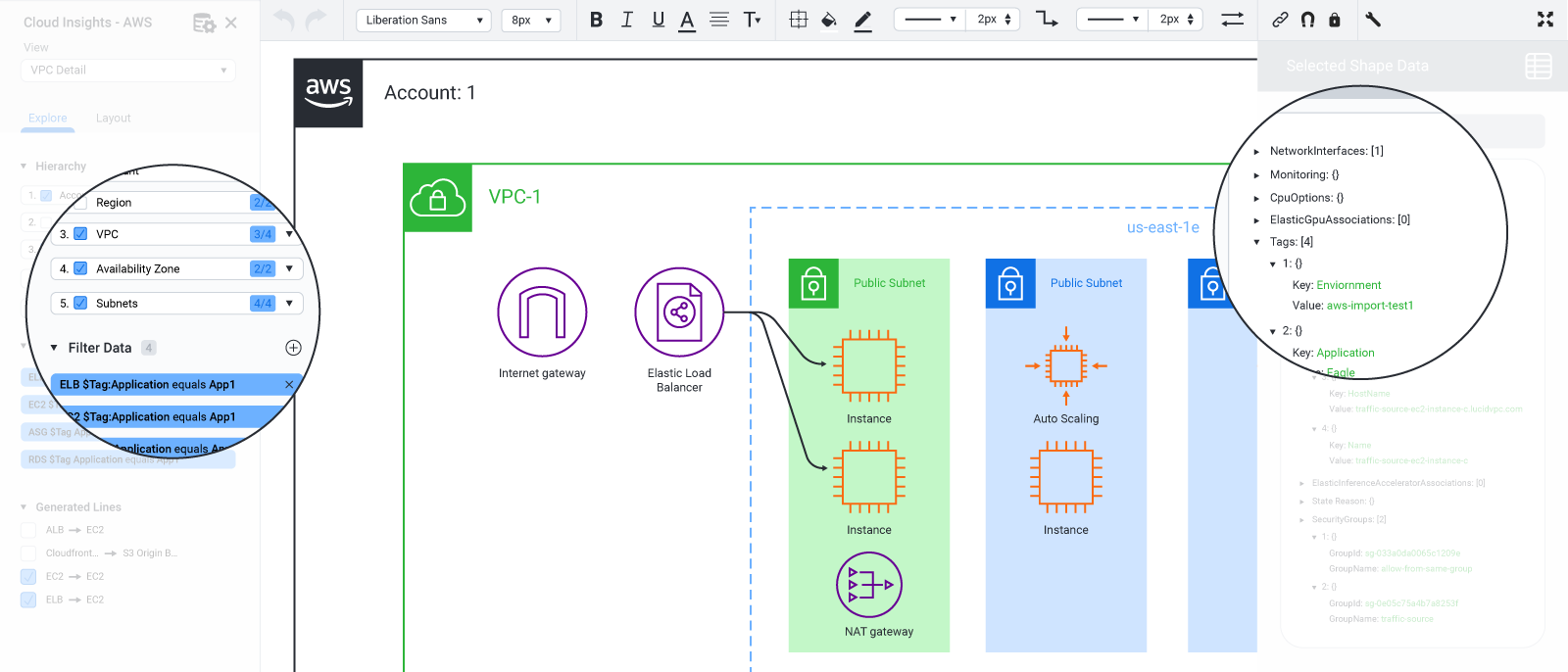
    Lucidchart today added a visualization tool that generates interactive diagrams of an IT organization’s Amazon Web Services (AWS) environment.

    Dan Lawyer, senior vice president of product at Lucidchart, said Lucidchart Cloud Insights makes it possible to automatically visualize all the services an organization is consuming from the cloud service provider, with support for other cloud platforms planned.

    One of the biggest challenges organizations regularly encounter today is the only way they have of understanding what services are being consumed is to analyze the monthly bill made available by a cloud service provider, he said.

    Lucidchart Cloud Insights is designed to make it easy to determine what services are being consumed in real-time, Lawyer said, noting IT teams can also visualize cloud governance data along and apply filters and save views.

    Armed with that information, IT organizations can then better control spending across cloud services that, in terms of costs, are often widely divergent. Developers, for example, don’t always pay close attention to which tiers of service provide the optimal level of cost of a certain class of workloads. A high-fidelity approach to visualizing how services are consumed provides an effective means to have that conversation, noted Lawyer.

    Once an issue arises it can be resolved faster because everyone involved is capable of visually inspecting the same set of interactions occurring at the same time, he added.

    Lucidchart already provides visual workspaces in the cloud that combine diagramming, data visualization and collaboration tools to make it easier for teams to collaborate. Lucidchart Cloud Insight now extends that capability into IT operations, Lawyer said, noting IT teams traditionally have relied on tools such as Microsoft Powerpoint to try and visualize consumption patterns.

    The launch of Lucidchart Cloud Insight comes at a time when more workloads are moving on to public clouds in the wake of the COVID-19 pandemic. Given the uncertainties surrounding when IT staff might be able to access an on-premises IT environment, many organizations are accelerating the rate at which application workloads are being deployed in the cloud.

    The challenge IT organizations face is that moving applications into the cloud doesn’t always yield consistent cost savings. IT teams constantly need to monitor how IT infrastructure resources are being consumed to keep IT budgets under control. The issue is that developers frequently spin up cloud services without telling anyone in IT about it until a bill shows up. Worse yet, many developers often forget to de-provision virtual machines and other cloud resources they’re no longer using.

    Of course, as more cloud platforms are invoked, the management issue only becomes that much more complex. Going forward IT teams will want to visually compare and contrast how services are being consumed across multiple clouds. Whatever the motivation, it’s a lot easier to overlook the implications of a cloud service that is presented as part of a static bill than it is one that visually presents itself as part of an interactive diagram that is always up to date.

  • Chef Adds Support for Arm Graviton 2 Processors on AWS Cloud

    Chef Adds Support for Arm Graviton 2 Processors on AWS Cloud

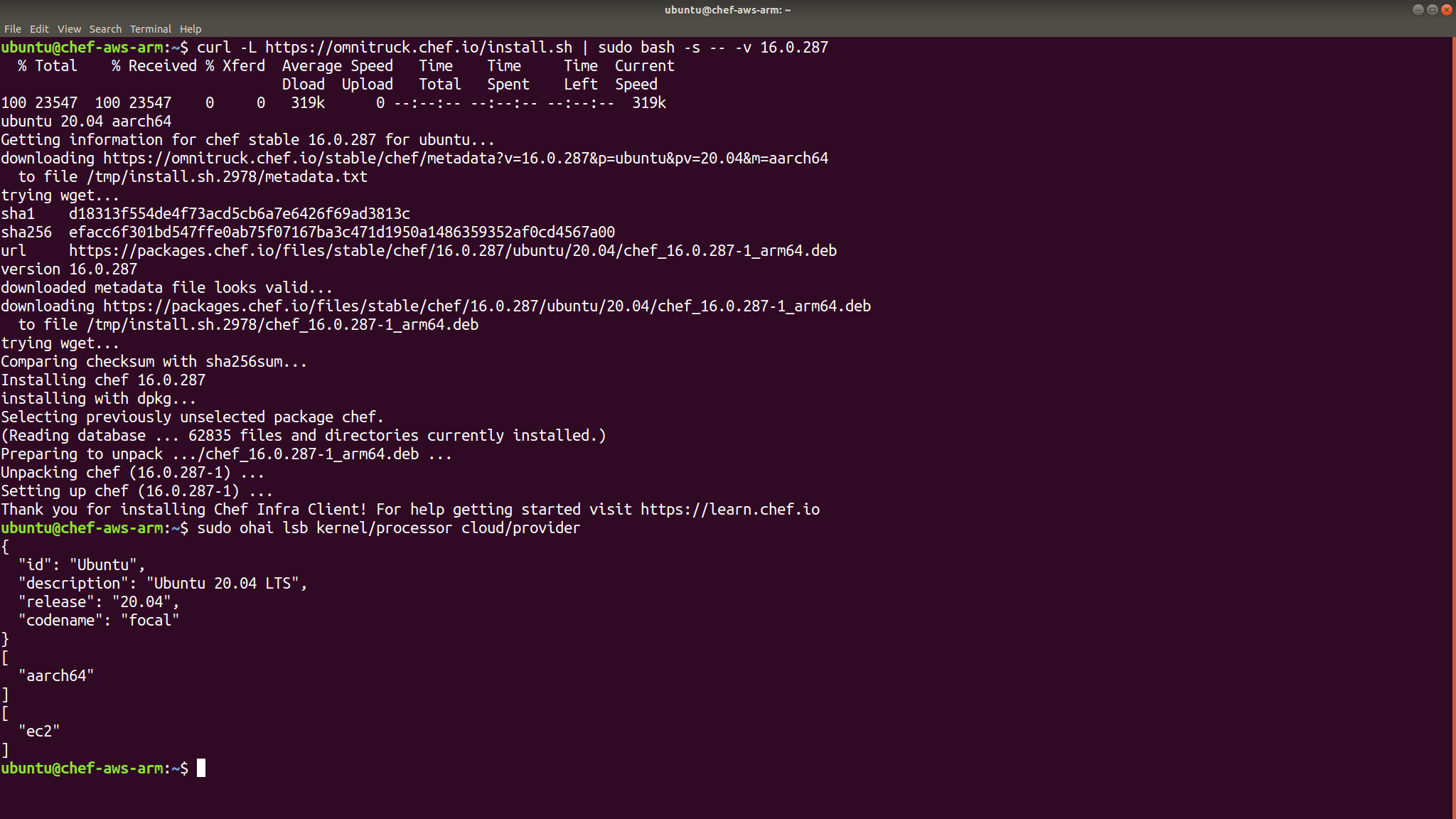
    Chef announced this week that its offerings for managing and testing infrastructure as code now support Graviton 2 processors from Arm on the Amazon Web Services (AWS) cloud.

    AWS this week announced the availability of an M6g instance of processors on its public cloud. Based on a 64-bit Arm Neoverse N1 architecture, the M6g processors were jointly designed by Arm and Annapurna Labs, a unit of Amazon.

    According to AWS, during a preview program platforms such as Honeycomb consumed 30% fewer instances on M6g than the widely employed AWS C5 instances. Treasure Data, a provider of data analytics software, reported a 30% performance increase while seeing a 20% cost reduction compared to similarly sized M5 instances. The Amazon ElastiCache service team found that M6g instances deliver up to 50% throughput improvement over M5 instances on Redis.

    In addition, AWS this week revealed it also plans to add compute-optimized C6g instances and memory-optimized R6g instances based on 64-bit Arm processors.

    The Arm processors in the cloud are expected to provide a foundation for building hybrid internet of things (IoT) applications spanning AWS cloud services and instances of Arm processors that are widely employed in embedded systems. Previously, AWS launched an AWS Greengrass initiative through which it encourages developers to build and deploy cloud-enabled IoT applications on edge computing platforms.

    Vikram Ghosh, vice president of business development for Chef, said DevOps teams can now automate the provisioning of Arm processors using the same Chef tools they employ to provision instances on other types of processors running on the AWS cloud.

    It won’t be long before 64-bit instances of Arm processors start showing up on other cloud computing platforms, noted Ghosh. In fact, between the rise of Arm processors alongside graphical processor units (GPUs) the types of processors readily available in the cloud have never been more diverse, which Ghosh said is driving increased demand for tools to manage infrastructure as code.

    It’s still early days as far as adoption of best DevOps practices to build and deploy IoT applications is concerned. However, the highly distributed nature of IoT applications—which in many cases will need to be updated frequently—lend themselves to being managed more efficiently using DevOps processes. In most cases, these IoT applications represent “greenfield” applications where there is no legacy process in place that potentially would create a culture clash.

    Forecasting demand for edge computing applications in the wake of the COVID-19 pandemic is difficult. However, the general expectation remains that more application code will be moving closer to the point where it is being consumed, especially when 5G wireless networking services become more available. In fact, many of those applications are being built now in anticipation of those networking services being able to connect edge computing applications with backend cloud resources.

    Once those applications are built, the next big challenge will be finding a way to secure and continuously update them. In the meantime, however, the number of edge computing applications being built today in the cloud for edge computing platforms based on Arm processors is about to increase substantially.

  • AWS Adds GUI to Snow Edge Computing Family

    AWS Adds GUI to Snow Edge Computing Family

    Amazon Web Services (AWS) this week announced it has added a graphical user interface (GUI) tool dubbed AWS OpsHub for Snow Family to provide an alternative to the command-line interface (CLI) tool it makes available to manage its family of Snow appliances deployed in on-premises environments.

    At the same time, AWS announced it is making available additional Snowball storage appliances that are 25% faster than previous generations thanks to additional memory, support for more virtual CPUs and 100GB networking.

    Finally, AWS is also making it possible to control access to Snow appliance via AWS Identity and Access Management (IAM) and the ability to automate tasks using AWS Systems Manager.

    Bill Vass, vice president of technology for AWS, said organizations can now build storage clusters that are now as large as 1.4PB using Snow appliances.

    AWS originally rolled out Snow appliances to provide an easier way to upload massive amounts of the data to a public cloud. Once an organization loads data on to an appliance, it is physically shipped to AWS. Once there, AWS personnel transfer that data on to the AWS cloud.

    However, with the rise of edge computing, AWS is now also employing Snowball appliances to drive hybrid applications in internet of things (IoT) and other environments. AWS now makes available a Greengrass framework for building hybrid cloud applications. The Snow appliance family provides a more efficient and secure alternative to the rival edge computing platform from Dell Technologies, said Vass.

    The GUI from AWS is intended to make it easier for the average IT administrator to provision Snow appliances, which previously would have been accessible only to IT professionals who had mastered the Snow CLI. AWS is even going so far as to include cartoons that demonstrate how to provision its appliances.

    While AWS clearly dominates the public cloud, it is not clear to what degree it will be able to extend that dominance to edge computing. AWS is counting on the fact that large numbers of edge computing applications will need to be tightly integrated with application workloads running on its public cloud. Providers of traditional data center platforms are also vying to become the providers of those same platforms, all of which now can be centrally managed via the cloud.

    Edge computing platforms will, of course, vary widely in size depending on the use case. However, there may come a day soon when the total number of workloads deployed at the edge exceeds the number of workloads in the cloud. The amount of compute and storage horsepower at the edge will be crucial as organizations look to deliver next-generation applications that process and analyze data real-time, especially as 5G wireless computing networks simultaneously make more network bandwidth available.

    AWS may not be the first IT vendor that comes to mind when it comes to edge computing platforms, but it is signaling its intention to be a lot more than just a provider of cloud computing services.

  • Tips on Rightsizing to Reduce AWS Costs Now

    Tips on Rightsizing to Reduce AWS Costs Now

    In this business climate, everyone is looking to reduce costs. CFOs are reevaluating their software and infrastructure spend, and naturally, companies are looking for ways to optimize their AWS costs. In fact, we are now leveraging a major reason cloud is so compelling in the first place: you have more flexibility to control costs based on business needs. 

    How Do You Reduce Costs While Maintaining Performance? 

    A good starting point is to determine where most of the AWS spend is coming from. Once you know that, you can focus on factors that are causing the most charges and determine those services that can be scaled down and those that need the most resources. Depending on the service, there are many options, such as Amazon EC2 Reserved Instances (RI), Amazon EC2 Spot instances and resource rightsizing. In this blog post, I’ll cover rightsizing.

    There are some great AWS and third-party tools (I’m partial to nOps) to help you learn and analyze current usage patterns and make recommendations for rightsizing RI and Spot instances. In my experience, Amazon Elastic Compute Cloud (Amazon EC2), Amazon Relational Database Service (Amazon RDS) and Amazon Simple Storage Service (Amazon S3) show up consistently in the top five items on the AWS bill. So, in this article, I’ll focus on rightsizing strategies with these three services.

    Rightsizing doesn’t just mean migrating from the old instance to the new generation instance. You’re probably not going to save lots of money with that approach. Rightsizing can help to identify resources that are clearly over-provisioned. Furthermore, many of the resources are provisioned using HashiCorp Terraform, AWS CloudFormation or an Auto Scaling group on AWS, so finding the rightsizing opportunities for ephemeral resources, and updating the automation not only reduces cost now but can also lower your future cost on AWS. 

    Optimizing Amazon EC2 and Amazon RDS Instances

    Hands down, Amazon EC2 spend is most-often the most expensive item on your AWS bill. Amazon EC2 comes with a robust set of options for CPU, memory and network I/O, ranging from 0.5GB of memory to 1TB. Having so many options can be a double-edged sword—how do you choose?

    You can choose the appropriate instance type based on your use case: Compute Optimized (for CPU-intensive workloads), Memory Optimized (for memory-intensive workloads) or Network Optimized (for enhanced network throughput).

    Some parameters need to be considered when choosing the optimal instances for your workload. Whether it is an HPC workload, or a simple Python Flask application or a Data Pipeline project, there is an Amazon EC2 instance type best suited for each of those workloads. 

    To select instances wisely, apply the most cost-effective Amazon EC2 instance type based on the network I/O and CPU utilization of the currently running instance. For example, if a t3.xlarge is configured for a Python Flask application and less than half of the memory is in use, the instance type has been over-provisioned for that workload. In such a case, a smaller instance size, such as a t3.small, is probably more appropriate.

    It’s also worth noting that, while most EC2 instances are provisioned with performance in mind, over time the utilization of the program can decrease, resulting in instances that are over-provisioned based on the current CPU/memory usage. I normally look at Amazon CloudWatch for instances that are not consuming all the resources that are currently available to each instance and, based on the historical usage, provide a recommendation to rightsize them. And, I can see the cost savings associated with the suggested changes.

    This approach can also be applied to Amazon RDS. The underlying architecture of Amazon RDS instances is very similar to that of Amazon EC2 instances. Both require an Amazon Virtual Private Cloud (Amazon VPC), security groups and a disk to run the managed database instance. 

    Optimizing Amazon S3 Storage Classes

    Amazon S3 offers a range of storage classes designed for different use cases:

    • S3 Standard for general-purpose storage of frequently accessed data.
    • S3 Intelligent-Tiering for data with unknown or changing access patterns.
    • S3 Standard-Infrequent Access (S3 Standard-IA) and S3 One Zone-Infrequent Access (S3 One Zone-IA) for long-lived, but less frequently accessed data.
    • Amazon S3 Glacier (S3 Glacier) and Amazon S3 Glacier Deep Archive (S3 Glacier Deep Archive) for long-term archive and digital preservation.

    You can determine the most appropriate storage class based on the usage of the objects in that bucket. As a result, you can cut the cost of storage of objects in the bucket and the cost of GET requests needed to download or transfer files from Amazon S3 to any other location.

    Getting Results Fast

    Uber, like many rapid-growth companies, was looking for ways to optimize AWS costs without slowing its high-velocity teams. They were able to save 15% of AWS costs in just 30 days using some of the strategies described above, as well as others. One of the keys for Uber is they are monitoring and optimizing costs continuously–not a one-and-done approach–because they have such high velocity with continuous changes to their AWS environment. They use nOps cloud management for this.

    Nick Cobb, senior engineering manager, Infrastructure Platform, Advanced Technologies Group at Uber, reports he’s able to “operationalize costs and get them in front of the engineers directly, saving 15% in the first month of implementation. In addition to providing reports for leadership and budget processes, our efficiency team can enact behavioral changes for R&D engineers typically used to throwing money at challenging problems.”

    If you’re interested in more details on the strategies that Uber has used, plus other cost-optimization strategies your organization can use right now, Nick will be joining me and AWS for a devopsy.kinsta.cloud webinar on continuous cost optimization on April 21. It’s a hot topic for so many organizations right now, so please join us.

  • 2nd Watch Allies With GitLab for Managed DevOps Service

    2nd Watch Allies With GitLab for Managed DevOps Service

    2nd Watch today launched a managed DevOps service based on the continuous integration/continuous deployment (CI/CD) platform from GitLab that it will operate on behalf of customers in addition to coaching them on how to adopt best DevOps practices.

    Stefana Muller, a senior product manager, said the 2nd Watch Managed DevOps service combines the managed and professional services capabilities of 2nd Watch into a single offering. That approach is required because when it comes to DevOps most organizations need as much help transitioning their culture as they will operating their CI/CD environment, she said.

    One of the major challenges organizations face when trying to embrace DevOps is they typically spend a lot of money upfront only to see those efforts flounder when changing the internal culture of the organization becomes too difficult, Muller said. As part of an effort to smooth that transition, 2nd Watch DevOps experts will assess an organization’s readiness to adopt DevOps tools and processes and then train internal teams on DevOps fundamentals such as managing infrastructure as code and Git principles. The assessment is based on a Culture, Automation, Lean Practices, Measurement and Sharing (CALMS) methodology.

    The 2nd Watch service is built around an on-premises edition of the GitLab CI/CD platform that it will host and upgrade on behalf of a customer on either an Amazon Web Services (AWS) or Microsoft public cloud platform. The DevOps service will focus on enabling organizations to build both monolithic and microservices-based applications faster because no organization today has fully transitioned to microservices. The company already provides a managed Kubernetes service for building and deploying applications based on a microservices architecture.

    2nd Watch chose to partner with GitLab because of the completeness of that CI/CD platform, which among other things includes integrated security modules that can be employed to advance DevSecOps practices as well, Muller said, noting that longer-term, 2nd Watch is planning to layer a more robust set of managed DevSecOps services on top of the GitLab platform.

    Managed DevOps offerings are starting to proliferate as the number of services providers that have attained certifications from multiple IT vendors has increased. It’s not clear to what degree organizations will prefer to rely on these services just yet. However, it’s is apparent many organizations are trying to shift as much of their limited resources to building application code versus managing IT infrastructure. It’s also possible that as the COVID-19 coronavirus pandemic becomes more widespread many organizations will need to rely on external service providers to manage their DevOps environments.

    Regardless of the motivation, organizations that are at the beginning of their DevOps journey clearly will need more help than those that are further along the DevOps maturity curve. The decision most organizations will need to make is to what degree will they rely on a managed DevOps service to accelerate their transition versus opting to rely permanently on an external IT service provider to manage one of their most critical IT environments.

    — Mike Vizard