Tag: automation

  • Testing Will Never Be Automated

    Testing Will Never Be Automated

    “Come to think of it, no one speaks of automated programming or manual programming. There is programming, and there is lots of other stuff done by tools. Once a tool is created to do that stuff, it is never called programming again.”

    – James Bach and Michael Bolton, “Testing and Checking Refined

    That’s one of those points that tends to silence a room, as there’s really no way to successfully argue against it, but since similar positions of frustration came up time and time again at the 2015 STAREAST conference, it obviously deserves some further discussion.

    The issue lies in the surprisingly stark differences between the phrases “automated testing” and “test (or testing) automation.” And if you don’t know the difference:

    1. You’re not alone.
    2. You’re likely not a software tester.
    3. You’re discrediting and undervaluing the testing craft.

    The good news is that learning the difference is easy—and testers will forgive you for not knowing it until now! They’re very nice people.

    Here’s what today’s brightest and hardest working testers want you to know. “Test automation applies tools to testing.” They do not automate testing, and they certainly won’t ever replace it. There’s simply no such thing as automated testing.

    And I’m part of the problem. I wrote a column just last year, titled, “Automated testing’s ROI is right under your nose.” I’m somewhat embarrassed that I told the world something that doesn’t even exist provides an immediate ROI—though at least no one went out and bought a completely fictitious tool off of my suggestion.

    Judging by the boisterous cheers as numerous speakers at STAREAST pointed out the absurdity of believing that testing can be automated, this belief is something that I predict testers will likely soon make a concerted effort to erase.

    As companies focus more on collaborative, cross-functional, and quality-minded efforts like agile, test-driven development, and DevOps, testers have an incredible opportunity to clear up any misconceptions about their immense importance to their business.

    Respected tester, author, and public speaker Dorothy Graham recently pointed out a number of these misconceptions in her session, “Blunders in Test Automation” and the very first one on the list was “thinking that testing tools actually do testing.” Sounding almost exasperated at having to point this out, she chuckled, threw her hands up, and said, “They just run stuff, whatever they’ve been programmed to execute, including bad tests.” She almost got a standing ovation.

    When you get that kind of reaction from a room of a thousand software testers from around the world—we’re beyond semantics, and are in a real problem. This is a talented, valuable, and understandably fed-up group of people who are being unfairly cost and productivity-measured against software that provides a completely different service.

    So how did it get this bad, when entire conferences are dotted with calls to action for testers to clearly differentiate themselves from tools, especially when the differentiation is so easy to see?

    One group you may be surprised I’m largely letting off the hook is the tool manufacturers and their marketers. Sure, there are companies that make some claims that testers may wince at, but it’s really hard to find anyone claiming their tool beats, is smarter than, or should replace any human. There’s no reason for them to make these claims; they’re not true, and they certainly won’t help sell the product.

    What about journalists and writers like me who cover the software development and testing industries? After witnessing the frustrations of testers when they feel like they’re being replaced by non-human, non-equivalents—you make a mental note to scratch that phrase from your style guide. I hope other writers do the same.

    How about product owners and others closer to the business side of an organization? Are they contributing to an under-appreciation of the human aspect of software testing? That’s…a little tricky.

    Scott Barber has spent more than fifteen years as a performance tester, but recently experienced (and left) the role of a product owner. While I’m more than familiar with, and a real fan of Scott’s “the truth hurts” speaking style, when he revealed some truths he recently learned, the room grew incredibly uneasy. Many got their first introduction to Scott when he started his session with:

    “It’s not all about testing, you know. Testing is not a product. You are not a product…. Products are the source of profit. And as a product owner, I paid very little attention to testers and testing.”

    It may sting, but it’s the truth. Scott went on to point out that “there’s no need for certain job titles to know or care how things are built or tested. Nobody will ever ask them that.” However, by testers working to gain a much better understanding of the product and the risks that each release candidate poses, there is a massive opportunity to make the value of their work blindingly obvious and positively revenue-impactful.

    Scott’s pro-tip of testers asking a product owner, “Can I do some work with dev and prod so we can get some early observation going on to catch some of these bugs early and head off some of the damage that could come?” drew both a hushed “Wowwww” and “Yeah, I’m using that” from behind me.

    This is where the differentiation between testers and their tools should become clear to everyone. The human levels of empathy, ingenuity, and proactive approach cannot be scripted, automated or baked into any tool, and the best testers care enough about their product and its customers to prove it.

    About the Author/Noel Wurst

    noel wurstNoel Wurst, managing editor at Skytap, Noel is responsible for setting and executing Skytap’s content marketing strategy. That includes overseeing the creation and distribution of high-quality, targeted content, and managing the team and external resources associated with those efforts. By leveraging deep online marketing, project management, and editorial experience, Noel plays a crucial role in helping generate and nurture leads with compelling content.

     Follow Noel on Twitter, @NoelWurst, along with Skytap, @Skytap.

  • Imperative or Declarative? The question of DevOps in the network.

    Imperative or Declarative? The question of DevOps in the network.

    A significant amount of bandwidth is spent discussing automation and praising the value of APIs within the broader DevOps umbrella. These concepts are particularly important in the context of CI/CD and the evolution of application architectures toward decoupled, service-oriented systems. Automation is used for build and test, to drive the workflow that moves an app from disconnected sets of services to a working release candidate ready to breach the wall of production and be put into the hands of adoring fans impatient consumers.

    But in between the consumers and your app stands the production pipeline; a process-filled wasteland through which an app must travel so that the appropriate services required to deliver it can be provisioned, configured and put into place. It is this pipeline that will meet DevOps head on next, whether we call it DevOps or SDN or SDDC. It stands in the way of an increasingly critical “time to market” metric by which all of IT is being measured. Research shows that the production pipeline is a major pain point for IT; taking weeks or even months to traverse. The network is still in the way, and that must be addressed if C-level concerns about meeting increasing pressure to get apps to market are to be met.

    Applying DevOps principles to the infrastructure and network makes sense as it’s as much about optimizing processes (workflow) as it is writing scripts and it is the production pipeline process that would benefit. Automation and orchestration, of course, will help drive a more consistent, efficient, and repeatable production pipeline traversal. Identifying where inefficiencies (latency) lies in the process and eliminating it by establishing more efficient (and perhaps automated) handoffs using automation and orchestration systems can go a long way toward shortening the amount of time between hand off to production and delivery to consumers.

    APIs are our “go to” technology today for driving automation, orchestration, and integration with the frameworks and systems we rely on to scale operations. Most every infrastructure and network device today has an API and can be controlled via frameworks like Puppet and Chef as well as directly using .

    But most are imperative methods of control. It requires processes to be strictly defined through a sequence of API calls. Unlike simpler resources like virtual machines, one does not simply need “start, stop, or pause.” Configuration that was once (and still is, let’s be honest) accomplished via CLI (command line interfaces) using SSH is simply migrating to an API using HTTP instead.

    But otherwise, not much has changed. The same commands used on the CLI are now sent via an API. We’re still in an imperative mode and if we need to tweak or adjust the configuration, we need to tweak and adjust the script that drives the configuration.

    Compare that now with a different approach: a declarative approach. Using templates to describe what needs to be configured or accomplished (data) as opposed to how it needs to be accomplished (commands) makes a significant difference in not only the process but in the long-term technical debt acquired (or not acquired, as the case may be). APIs change; methods deprecate, versions matter. Treating application services (load balancing, caching, optimization and acceleration, security) as “code” (templates) instead of a series of API calls can dramatically change the velocity with which such services can be provisioned and configured. This has the added effect of reducing the amount of churn in the automation code which should reduce technical debt as well. Such methods are also more portable, enabling easier migration into cloud environments for applications that might be (or will be) moved into or around different environments.

    Ultimately, the question is whether or not you want to tie your processes – and the interfaces between workflow steps in that process – to many API calls or a standardized set of API calls that leverage declarative policies (templates) to provision and configure the services that make up the production pipeline.

  • On beginning software delivery acceleration

    On beginning software delivery acceleration

    Time and time again, we hear of companies achieving rapid acceleration with DevOps. Companies are touting success with the metric of deploys/day, sharing new baselines of 10, 50 or even 100 deploys/day. In more mature organizations the likes of LinkedIn, Netflix, Etsy, Facebook and others, this number is a startling 1,000+ number. But, what does this even mean?

    Unpacking this number is often one IT leaders stumble on, and is the greatest source of pushback when talking about rapid acceleration. How stable is the software being delivered? How many of these deployments are successful? What constitutes a deployment?

    These questions and more often end up creating analysis paralysis, and nothing changes. In fact, the most common response starts with, “There is no way we could implement something like that at my company because…” We know this to be false. Companies who have traditionally delivered in a waterfall fashion with a single, bloated deploy per month or quarter are successfully transitioning to rapid deployment posting similar baseline numbers as other teams.

    How then can you be successful in beginning software delivery? There is no single silver bullet or magic wand, but there is a fairly prescriptive methodology for achieving our goal of rapid delivery. Let’s dive in and take a look on how to get started.

    Ground Rules

    Let’s set the stage with some key principles that will light the path ahead. They are:

    • Embrace failure
    • Blamelessly analyze failures1
    • Quickly repair failures when understood
    • Always be iterating

    In a nutshell, the goal should be to Deploy Fast, Fail Fast, Learn Fast, and Improve Fast. This is a never-ending task, and it is important to consider it as such. Too many times, a project is spun up to start working on these tasks, and inevitably that project ends. Unless continual improvement becomes a core tenant of delivery, any efforts risk falling apart at the seams over time.

    With these rules in mind, let’s continue.

    How is software developed?

    The first stop is incidentally not within the delivery organization, but rather the development organization. This is where the empathy that is so often discussed alongside DevOps will come in; we first need to ensure the developers who are delivering features are equipped for success.

    How is software developed? What does it really mean to get into the flow of production? Ask yourself questions like: how is code introduced into the source tree? What does acceptance of that code look like? (For example: are there code formatting guidelines, are tests needed, etc).

    Once this is understood, the key is the gate that exists to advance code to the next stage of delivery. This is where bottlenecks often exist, and often have valid historic cases for existing. Usually, this is to try and improve quality by introducing checkpoints, but these checkpoints are often human driven, and will invariably contain defects of their own.

    It is important to make the distinction around delivery of code or delivery of features versus the delivery of the software itself. Both are important as illustrated in the next section, but two sides of the same coin that are often separated duties. In the context of the entire system, the need is the same: identify opportunities to reduce friction by either removing steps from process (non-value add unnecessary, vestiges of old days) or introducing automation to move things along.

    These conversations are always enlightening, as it will become pretty apparent where the slowdowns occur after some initial conversations. Keep those brain juices flowing, and let’s continue.

    Keep in mind:

    • Who can write software? Everyone?
    • What is the barrierto entry associated with learning how to write software?
    • How difficult is it to demonstrate working code to a colleague?
    • How difficult is it for a colleague to run your demonstration code?
    • Who can deploy the software?
    • What is the barrier to entry associated with learning how to ship the software?
    • Where is work being assigned?
    • Where are feature discussions happening?

    Kicking things into high gear

    By this point, it is possible that you have a laundry list of things you have already identified as areas to improve. But, where do you focus? The default tendency is to clean up shop first, and then go work with external teams to try and integrate better. However, that is actually the least ideal thing to do, because it ends up creating silos of isolation. Possibly against your better judgment, plan on integrating first.

    Your first steps should be focused on two objectives. The first of which is to embed yourself into the development work stream… get work items from development via their existing process and find yourself an advocate. This advocate will be your “first follower,” and will help you understand what changes are working and which are not, and will provide valuable and honest feedback that may not come from other members not because they don’t care, but as their energy is focused on other things. It is almost a necessity to start small.

    The point of empathy that comes up most times DevOps is mentioned will come into major play here. No matter what efforts that you make to try to improve things, any friction introduced into the life of a developer will dramatically affect your success in any real change. For example: It may be advantageous for you to change the underlying ticketing platform for you all to communicate better, but if you disrupt the existing delivery pipeline, the odds of making new friends may go down a bit.

    Work with your advocate to firm up how development reports issue to your team and vice versa, and run it through the gauntlet. Do not forget to apply ground rules… Deploy Fast, Fail Fast, Learn Fast, and Improve Fast. Fix easy process holes quickly. Do be mindful of the amount of change that is being introduced at any given time, don’t be afraid to make changes, but also be consistent and measured with this change. This will set the appropriate tone for sustained and long-term process improvement.

    Likewise, do a real project via this first process. One early victory can be to ensure that developers have the ability to run any version of code (git checkout, major version, doesn’t matter) with minimal effort.

    This allows me to run other colleagues’ code to test out fixes, confirm bugs, or whatnot. By having the ability to run arbitrary code, collaboration speeds up closest to the code, and the number of problems that bubble up to later phases of deployment are cleaned up much earlier. This may mean staging environments; this may mean local development environments. But, solving the smaller task of how developers can run code becomes a test bed for how a production delivery pipeline may behave.

    When you find failures in both process and tooling, it is essential to be blameless while analyzing and working through failures. Early on, there will be many, and it is essential to set tone early on. John Allspaw talks about this in his article when he discusses incentives.

    Because an engineer who thinks they’re going to be reprimanded are disincentivized to give the details necessary to get an understanding of the mechanism, pathology, and operation of the failure. This lack of understanding of how the accident occurred all but guarantees that it will repeat. If not with the original engineer, another one in the future. – Allspaw

    Another often-overlooked concern is how these solutions are implemented. Repair of these processes cannot be driven by a single person or in a top-down fashion. Rather, all members of the team must be a part of owning the solution. Time and encouragement will go a tremendous length.

    Finally, deploy. The entire point of this project is to deploy code. The work done up to this point largely will focus on the interaction between Development and Operations, but assuredly there is work to be done on both sides. Until you are able to deploy daily without any breakage, that should be your target. Every day, attempt a code deploy regardless if you know the outcome already. Pick one of two things to fix daily: a failure in the process, or a manual step. Repeat this until you can deploy each day with a minimal number of commands (best case: single command).

    The Path Ahead is Dangerous, Take These!

    As you go along this path, there will be two themes that appear to come up time and time again. The first has to do with communication. Processes to deploy may get faster or more streamlined over time, but there are always ways that communication roadblocks cause challenges for the best of teams.

    The second always has to do with tool disparity. Once engineers get wind that tools need to be implemented, all people and process concerns become secondary. This typically becomes a quagmire, as these tools need to actually participate in the communication streams within the organization to facilitate software delivery.

    To this end, there are two tools that are very beneficial to keep in mind as you go down this path: ChatOps2 and Workflow3,4. Both of these topics deserve entire sections dedicated to their own right, but in a nutshell, here are the two things that should whet your palette.

    ChatOps brings the context of the work you are already doing into the conversations you are already having. – James Fryman

    Human readable, machine scriptable language for declaring workflow is not just convenience. It’s a necessity for dynamic creation, uploading and updating workflows on a live system, and for treating “infrastructure-as-code.” – Dmitri Zimine

    Just remember: it’s not about one tool. These tools are a means to an end. The people and process have to be part of this conversation. ChatOps enables the communication and collaboration that creates and drives the development. Workflow enables collaboration around infrastructure process. Both of these will become essential.

    Closing

    To succeed, we as technologists need to know what’s going on in our organization, how technology efforts are helping delivery, and how the technology being deployed is being consumed and by whom. Without this understanding, we’re just throwing tools at a problem and often wind up complicating matters. These tools can jam things up or become shelf ware because nobody is ready to implement them. And in the rapidly moving, lean businesses of today, there is no time for breakdowns.

    Do you know how your teams deliver and collaborate around software? Do you have a tight feedback loop established between your teams and those you provide services to? Are you moving fast, and fixing even faster?

    How teams deliver software today is quickly being recognized as a market differentiator. This journey is neither easy nor quick, but will enable your organization to be prepared for the next phase of rapid growth in the industry.

    ###

    1https://codeascraft.com/2012/05/22/blameless-postmortems/

    2https://speakerdeck.com/jfryman/chatops-technology-and-philosophy

    3http://stackstorm.com/2015/04/10/the-return-of-workflows

    4https://www.slideshare.net/slideshow/embed_code/key/cHCIlAlU4Xb1Lw

    About the Author/James Fryman

    ph-james-2015-05-12James Fryman is an Information Technologist who builds, designs, curates, and evangelizes automation in all layers of the IT stack. Over the last decade, he has held roles in Information Technology that include the domains of Information Security, Service Delivery, IT Operations, Development, and IT Management. He has learned through these experiences the importance of automation in all facets of Information Technology to accelerate delivery, reduce human errors throughout an application lifecycle.

    James most recently worked at GitHub assisting in the development and curation of systems scaling within the Operations group. He is also a frequent speaker on the topic of automation at conferences throughout the world.

    James holds a BS in Information Technology from the University of Phoenix.   Twitter: http://www.twitter.com/jfryman

  • API Discovery and Search with APIs.JSON

    API Discovery and Search with APIs.JSON

    If that sounds vaguely like UDDI (which dealt with discovery and search of WSDL then you’re on the right track.

    Glue is this week, and preceding the conference was the 2015 API Strategy and Practice Tech Un-Workshops. One of the lightning talks (and they were lightning fast, let me tell you) was all about APIs.JSON – a relatively new collaborative effort between Kin Lane, API Evangelist, and Steven Willmott and Nicolas Grenie of 3scale networks,

    The effort – which you can dig into at apisjson.org – is an attempt to provide a more formal and standardized definition of APIs designed for “public deployment and consumption by automated software agents (robots)”.  In a nutshell, automated agents (and people, too, if you like reading machine-consumable metadata) can access a meta description of the APIs available for an organization at a known (standardized) URI such as http://company.com/apis.json.

    It’s not quite a WSDL for JSON, as the metadata is not describing the actual interfaces, but more like UDDI entry that might have once (and maybe still is) hosted in a registry (repository). The current incarnation provides basic information about the APIs and includes basic properties like a name and descriptions and URLs and can also contain more (some might say usable) information such as links to documentation or an actual, real-life readable API definition such as Swagger or API Blueprint formats as well as WADL and WSDL.

    The effort is showcased in an open API search engine (http://apis.io) that allows individuals to seek out APIs (over 900 are listed today) based on a variety of criteria, all of which of course is derived from the metadata within an APIs.JSON file.

    What does this all have to do with DevOps? Well, as Steve Willmott astutely pointed out in his lightning talk, APIs.JSON is not just about describing APIs in a consumable format, but it’s about being able to have machines discover and bootstrap APIs. That means potentially being able to trigger and signal changes about an API to kickstart a new build and deployment process.

    This is a great example of the possibilities for collaboration between Dev and Ops when everything is treated like code and automation moves from simple tasks to workflows – to orchestration.

    And I probably don’t have to mention (but I will, because , me) that the same trigger and signaling process could (and probably will) hook into broader network infrastructure (the components that exhibit high application affinity like load balancing and caching and app security) to drive more automated change management.

    APIs.JSON is not the first (and won’t be the last) effort of this kind because the mobile and app economy of the future is being built on APIs and thus , as Steve Willmott stated in his talk, “the Web of APIs is the future of the web.”

  • The Great Legacy Code Crisis Of 2016

    The Great Legacy Code Crisis Of 2016

    Over the next few years, I believe that legacy software is going to become a key factor which will start impacting organisations in fundamental ways, having a sudden and significant impact on their profitability.

    Those constrained by legacy platforms will be operating with a ball and chain, holding back their ability to get new features to market, to iterate, and to innovate with software.

    Those unconstrained will be able to fly by taking advantage of modern tooling and approaches, and quickly grab market share from an increasingly fickle consumer base.

    These modern approaches to software delivery such as DevOps, Continuous Delivery, cloud, containers, infrastructure automation and polyglot MicroServices are exponentially better approaches than last generation technology. Those who are working on these modern platforms can move so quickly in comparison to more traditional enterprise environments that people working on older platforms don’t stand a chance. It’s at least a 5-10x uplift in speed of delivery.

    What is scary is that by legacy I am not even talking about mainframes or Visual Basic desktop applications. I’m talking about last generation .NET and J2EE platforms which are too heavyweight, slow and bulky to change. Change, iteration and experimentation is what’s important in the new world and these platforms are just not optimised for that.

    Many enterprises who I speak with through Contino are seriously feeling this pain now, even though they don’t consider their technology legacy or outdated.

    Why Now?

    Of course, people have wanted better, faster, cheaper since the dawn of time. Disruption is a mature concept and legacy technology has also been an issue for enterprises for a long while.

    What is different this time is that there is now a burning platform. Every business is competing on the strength of their technology, and nimble startups can come along with lower barriers to entry and eat their lunch. Likewise, more established players who are much better at software delivery can branch out into new markets and beat incumbents on their own turf. For instance, what would happen if Amazon launched a bank? Their technology capability would allow them to leapfrog established players in a very short space of time. Established businesses are seriously exposed.

    Decoupling, modernising and re-platforming legacy code takes a long while. Some of these projects are going to need significant amounts of work and significant budgets to re-platform, but the cost of not doing is huge if the organisation doesn’t survive in the new software centric world. I suggest starting those conversations now in order to swerve what future generations could deem as the great legacy code crisis of 2016!

  • George Jetson Automation: Chasing the Dream

    George Jetson Automation: Chasing the Dream

    “His job was one simple thing—press a button. That’s all he had to do; press one button and sit back.” – Joe Barbera

    I wanted to be George Jetson when I grew up. Back in the days when watching Saturday morning cartoons in footed pajamas was the high point of my week, George’s life looked as sweet as a bowl of Super Sugar Crisp cereal. Flying cars, robots, and a two-hour-a-day, three-day work week lightened even further by 100% push-button automation.

    jetson_button1

    Contrariwise, my first tech job out of high school was a classic study in manual labor. From 9pm to 5am, I was solitary “Night Backup Operator” for a small data storage company, lone man responsible for continuously swapping reel-to-reel tapes on and off a literal wall of old magnetic drives.

    reels

    It was repetitive, monotonous and boring, and the tapes were prone to jamming and tearing. A lot.

    tapes

    One night I was thumbing through a tech catalog and came across a listing for a new cassette backup system. I mentioned to my boss the following day that our reel drives could potentially be replaced by a unit the size of a large book. He took it to heart, made a purchase, and one evening shortly afterwards I came to work, popped in a blank cassette, hit a button, and kicked back for the next eight hours as 100% of my work was done for me. It was a George Jetson moment. The future had finally arrived. I was blissfully complete.

    They fired me, of course. It actually took them a few weeks to realize that I’d been automated completely out of a job. To their credit, they were appreciative and regretful in parting, but there was hardly any point in paying me to sit on my can reading pulp SF for eight hours every night.

    Regardless, I’ve been chasing that George Jetson moment ever since.

    The magic behind the button

    In the decades since, with a number of (slightly more professional) IT automation projects behind me, I’ve discovered that the “automate-everything” button is usually a lot tougher to achieve, and near-impossible to buy off the shelf. To even get close, you often end up building a significant amount of infrastructure up from scratch.

    But say you could buy a “George Jetson” button; a self-contained, perfect automation solution off the shelf; what do you look for? Setting aside the nuts and bolts of a specific IT problem or project, what does an “automate-everything” button need to do, in essence?

    1.   “Do No Harm”

    At the first sign of an incident, Mr. Spacely (voiced by Mel Blanc, “Man of a Thousand Voices”) pops up and begins motivating with the bellow “JETSONNNNN!”. (I once worked outage calls with an IT director who had the same management style, I kid you not). We don’t want this to happen. So our “automate-everything” button needs, first and foremost, to mitigate risk.

    Security should be the first consideration in risk management, yet it’s an area where (oddly enough) a number of automation solutions fall flat out of the gate. Managed user accounts (ideally, integration with established account management systems), role-based permissions (for pushing the button in various situations, IT environments, and scheduled times), and sensitive information handling should all be covered.

    The ideal automation solution’s back-end infrastructure should be robust, flexible, and professionally engineered. If any pieces are open-source or community-designed, what they do and don’t do should be well-documented, including an understanding of potential situations likely to result in unintended consequences.

    We also want the automation button, once pushed, to never perform the action again if there’s no need to do so. This is idempotence, a valuable concept that’s been around for a long time but has risen to prominence over the last year. Idempotence is particularly important once you start to consider auto-remediation (why push the button manually if it can run automatically?), and efficiency (why spend effort building an automation action that can only be run once?).

    2.   “CYA”

    “Cover Your Automation.” George isn’t particularly smart for a computer operator. But maybe he doesn’t need to be. Let’s say he’s supported by a lower floor full of smart engineering robots. The robots set up the automation actions and push them into an approval queue with just enough information to make a decision on whether an action is needed or not.

    George evaluates each situation and pushes the button if everything looks good to him. Now, the “automate-everything” button becomes more of an “approval” button in a formal change management system. There might be more approvers besides George, each laying eyes on the proposed automation action and passing it along to the next approver as appropriate.

    Most operators aren’t as dumb as George, but everybody has “dumb moments”. Change management needs to be a core part of any automation system.

    Accountability supported by thorough logging is also a key “CYA” aspect of the ideal automation system. “What” happened, “when” did it happen, “who” did it, and so on… if your automation system doesn’t track all essential information, you might not be able to return to your job after Spacely mistakenly fires you.

    3.    “KISS”

    “Keep It Simple, Stupid.” Dealing with complex automation workflows is tricky if they involve a lot of step-by-step actions, as they traditionally have in the past. When complexity clashes with modern, large-scale IT environments, situations arise that are literally impossible to manage manually. “Scale x Complexity > Effort” is the equation desperately slashed across whiteboards in planning meetings these days. Modern automation systems often attempt to reduce complexity and equalize scale through a form of orchestrated states.

    The idea depends on two parts. A desired state is a recent Microsoft-championed concept where the steps required to reach an end result are black boxed in favor of defining a system’s state itself. The usual example: rather than considering a step-by-step recipe for a birthday cake, you describe “a white cake with pink frosting” as your desired outcome and pop your request into an automated system to make it happen. Recent configuration management solutions have made excellent headway in this area.

    But desired states aren’t enough in and of themselves. They almost always need to be orchestrated to reach the final goal. An orchestrated states effort runs more along the lines of: “I need a white cake with pink frosting at the same time as a bowl of orange punch, before the time of the birthday party, but after the house cleaning. Also, yellow balloons.” Real-life IT infrastructure requires at least this level of complexity and timing.

    For a complete “automate-everything” solution, our ubiquitous button needs to orchestrate the states of all necessary systems and services in a way that’s easy for George, our hapless operator, to process, and considers both transitory states and final states as well as the interactions between them.

    jetson_button2

    When evaluating whether an IT automation solution is right for you, you may not be able to find the ideal “automate-everything” button, but make sure you consider it from these three perspectives. The perfect solution may, in the end, just be a dream to be chased by the laziest as we move from one IT automation project to the next. But it sure is fun seeing how close we can come to that blissful, futuristic George Jetson moment.

  • Enterprise DevOps: Standardize for Security

    Enterprise DevOps: Standardize for Security

    Etsy is a shining example of the success that can be achieved with continuous delivery (CD). By 2014 Etsy had doubled its deployment rate, deploying more than 50 times a day. Today the site deploys API changes in 18 seconds and launches a new website every 150 seconds.

    That’s speed, to be sure. Speed that very few enterprises need or want to achieve. But that doesn’t mean that Etsy and CD don’t have valuable lessons for the enterprise, because one of the reasons CD and Etsy succeeds is because of the underlying principle of standardization.  

    Whether it’s standardization of tools or of processes – or both – it is standardization that eventually drives such speed. The use of the same tools and the same processes over and over hones them until they’re an optimized, lean delivery machine. That standardization has other, benefits, too that are as beneficial – maybe moreso – to the enterprise than the speed it eventually brings.

    Standardization of delivery processes in the enterprise, especially when extended to such concerns as security and the network, result in direct and indirect benefits. Directly, standardization allows security and even network infrastructure to ensure that corporate policies are implemented. If all infrastructure – application and network alike – should only be hosting certain services (like HTTP and SSH) and not others, standardization can help enforce that. Template-based (or policy-based, if you prefer) automation along with an “infrastructure as code” approach can assist in ensuring that basic security and network policies are put into place for every application deployed. Customization can (and should) be allowed and encouraged as extensions to the core templates (or policies) deployed during the app deployment process.

    Indirectly, standardization on a common toolset and processes will reduce the stress on network and security operations that comes from trying to implement common policies across a conga line of solutions. There’s no getting around the reality that many enterprises employ sometimes twenty or more “middle boxes” that provide everything from security to monitoring to performance and scalability services. Each one must be provisioned and configured during the app deployment process. This is not a trivial problem. 26% of organizations cited “security policies that are too complex and can’t be enforced with the current network security processes and controls” as a significant challenge in a 2014 ESG survey.  Establishing a standardized template that encapsulates common (required) policy implementations can go along way toward addressing the challenges network security professionals face when trying to secure applications across a growing portfolio of both applications and network services.

    app-cprThis level of standardization is not easily achieved. There is no easy button, and that’s one of the reasons DevOps can be a desirable approach in the enterprise to addressing these kinds of problems. It isn’t just about achieving phenomenal speed, but rather achieving consistency through the standardization of processes and methods used to deploy security policies and controls that can improve the stability and the security of the entire application and network environment.

    DevOps is, in relation to network and security operations, more about CPR for infrastructure services than it is speed. Consistency through standardization. Predictability through automation. Repeatability through templates and by treating infrastructure as code.

    DevOps is an approach to operations and inter-operations that can have just as many benefits in the enterprise as it does for web-scale and startups born in the cloud. The same standardization that benefits Etsy by giving it extreme speed can benefit enterprises by endowing it with extreme security.

  • Automation, Provisioning and Configuration Management with PUPPET

    Automation, Provisioning and Configuration Management with PUPPET

    This is 3rd part of the multi-part series covering Automation, provisioning and Configuration Management. In this follow up article best practices for Puppet shall be covered.

    Why Puppet?

    While every system administrator comes up with more progressive systems to be managed, the automation of every mundane task is increasingly significant.

    Instead of achieving in-house developed scripts, it is necessary to share a system that can be used by everyone, irrespective of one’s employer. But undoubtedly, this is not possible manually.

    So, Puppet has been developed to benefit the sysadmin community in building up and sharing of all mature tools, which prevent the replication of a problem which is being resolved by many.

    Following are the key methods followed by Puppet:

    1). It supports a powerful framework, and is responsible for simplifying most of the technical tasks required to be done by the sysadmin.

    2). The sysadmin’s work is written in form of code, easily sharable as the other pieces of code, in the puppet’s custom language.

    The Puppet usage accelerates your work as a sysadmin, as it supervises and handles all the details. You can download the code from other sysadmins to help you get your work done even faster. Most of the Puppet implementations make use of one or more modules already developed by others. One can find hundreds of modules developed and shared by the community.

    What is Puppet?

    Puppet is an open-source IT automation tool developed by Puppet Labs. Its written in Ruby; composed of a declarative language for expressing system configuration; a client and a server for distributing it; and a library for realizing the configuration. Puppet helps in automation, deployment and scaling of applications in the cloud or on site.

    The basic design objective of Puppet is to come up with a powerful and expressive language backed by an influential library that makes you write your own server automation applications in just a few lines of code. Its intense adaptability and open source license lets you add up the required functionality. And, you can also share your innovations with others.

    System Components:

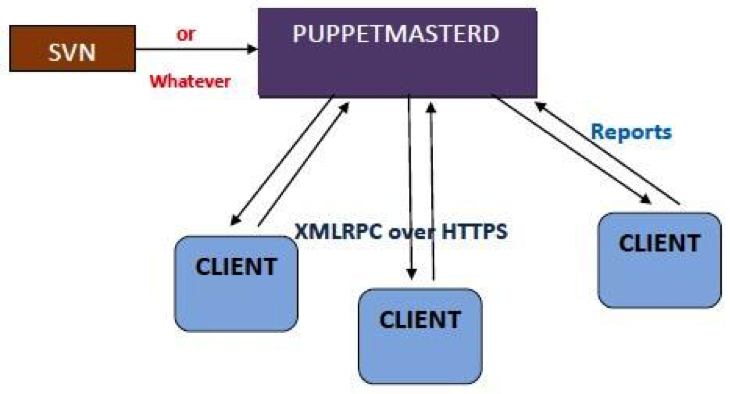
    Puppet in general is used in a client/server formation, with all your clients talking to one or more central servers. Every single client contacts the server at regular intervals i.e. every half hour, by default. It even downloads the latest configuration and makes it sure that it is in sync with the configuration. The moment it’s complete, the client is able to send a report back to the server and can also refer to the changes required.

    Following diagram displays the data flow in a usual puppet operation:

    Puppet1

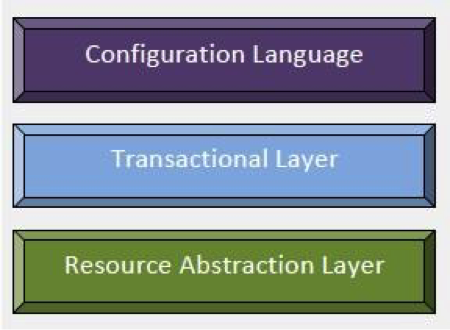
    Puppet’s functionality is framed as a heap of individual layers. Each layer is duty-bound to a fixed aspect of the system with a tight control on how information transfers between these layers.

    puppet2


    Fig2

    How Does Puppet Work?

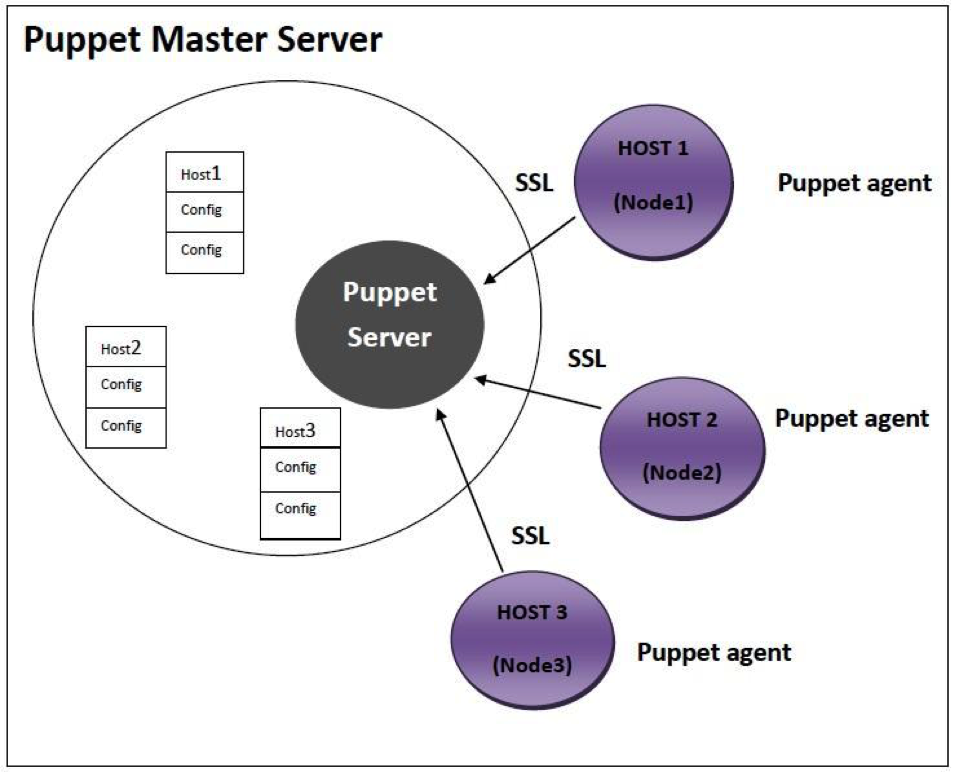
    The Puppet agent acts as a daemon that runs on all the client servers where configurations are required, and the servers to be managed by Puppet in the future. Now all the clients to be controlled will have puppet agent installed in their systems. This puppet agent also known as a node in Puppet will have a server designated as the Puppet master.

    Puppet Master: This machine restrains the entire configuration for different hosts, and runs as a daemon on this master server.

    Puppet Agent: This is the daemon that will run on the entire server that is to be managed with the help of Puppet. At a specific time interval, the Puppet agent will go and inquire the configuration from the puppet master server.

    Now the connection network between the puppet agent and master is built in a secure encrypted channel with the support of SSL. For example, if the Puppet agent has already applied for a necessary configuration and there are no new changes, it will do nothing. By default, the puppet agent will go and fetch the required config data from the puppet master in every 30 minutes.

    From the above diagram it is clear that puppet master server has all the configuration options available for Host 1 or Node1, Host 2 or Node 2 and Host 3 or Node 3.

     puppet3

    Following are the steps that are always followed whenever a puppet agent of any node makes up a connection between a node and a puppet master server to fetch the data.

    Step 1: Every time a client node makes a connection to the master, the master server examines the configuration to be applied to the node.

    Step 2: The Puppet master server takes and assembles all resources and configurations be applied on the node, and brings it together to make a catalog. Now, this puppet is given to the puppet agent of the node.

    Step 3: According to the catalog, the Puppet agent will apply configuration on the node and then reply. It will also submit the report of the configuration applied to the puppet master server.

    Who would find Puppet useful?

    An organization that would like to decrease the cost of maintaining its computers could benefits from using Puppet. Since the return on investment is related to several factors such as the current administrative overhead, diversity among existing computers, and cost of downtime. It might be complex for an organization to determine if it should invest in any configuration management tools, much less Puppet.

    In general, any organization should make use of server automation if any of the following are true:

    1. It comes up with a higher server administration costs
    2. Either because of contracts or opportunity cost, it pays a high price for downtime.
    3. It contains loads of servers that are fundamentally identical or nearly identical.
    4. Flexibility as well as agility is required in server configuration.

    Conclusion:

    Puppet refers to the two different things

    • The language in which code is written
    • The platform that manages infrastructure.

    Puppet is both a simple and a complex system. It is composed of several moving sections wired all together quite loosely. It is a structure that can be used for all configuration problems. Our future success rests on the structure becoming more powerful and simple, for it should be   approachable while gaining capability.

  • Automated Security Testing in a Continuous Delivery Pipeline

    Automated Security Testing in a Continuous Delivery Pipeline

    Automated unit, integration and acceptance tests are essential quality controls in running a reliable continuous integration or continuous delivery pipeline. Too often, security tests are left out of this process because of the erroneous belief that security testing is solely the domain of leather-jacket-wearing security experts.

    Security testing does not need special treatment

    We’ve made great strides automating many repetitive quality testing tasks and we can use the same approach to automating security tests. There will always be a need for intelligent human testing both for security and quality, but that doesn’t mean that all security testing must be manually driven. A large proportion of security tests are essentially checks that known weaknesses have not been introduced and these lend themselves superbly to automation. In fact, using a human to perform these types of checks is a terrible waste of resources.

    From an automation point of view, security tests can be categorised as follows:

    1. Functional Security Tests.
      These are essentially the same as automated acceptance tests, but targeted at verifying that security features such as
      authentication and logout, work as expected. They can mostly be automated using existing acceptance testing browser automation tools like Selenium/WebDriver.
    2. Specific non-functional tests against known weaknesses.
      Includes testing known weaknesses and mis-configurations such as lack of the HttpOnly flag on session cookies, or use of known weak SSL suites and ciphers. These are particularly well suited for automation because the weaknesses are known up front (if not by the development team, then by the security team). What’s more is that these tests lend themselves to a TDD approach in that they can serve as the security specification before building the application and environment.
      Some work has already been done in extracting these types of tests into security test automation frameworks, see: BDD-Security (I’m the author), Mittn by F-Secure and Gauntlt.
      Because these test non-functional aspects of the application, they need access to the HTTP layer which browser automation tools do not provide. So testing these requires a hybrid approach: Browser automation together with a proxy server to inspect and inject requests. My preferred combination here is WebDriver with OWASP ZAP.
    3. Security scanning of the application and infrastructure.
      Even manually driven penetration tests usually kick off with an automated scan using vulnerability scanning tools like Nessus, Burp and OWASP ZAP. It’s worthwhile understanding the difference between these tools and how they’re used. Nessus if primarily an infrastructure scanner in that it’ll test an IP address and all exposed ports for known weaknesses. It also includes a “web” scanning component that will test HTTP services for similar known weaknesses, but the scanning at the web tier is extremely superficial. For example, Nessus would not be able to scan any content or functionality behind the login form, nor navigate through a web wizard.
      Burp Intruder (Commercial) and OWASP ZAP (Open Source) are focussed on the web tier and are true application scanners in that they inspect and test at the HTTP layer by injecting attack data into parameters and evaluating the application’s response. They can provide in-depth security scanning if they’re used correctly. But if they’re simply used to spider the application and run an automated test then there’s a good chance that they won’t find or test all the available content.
      To successfully automate application scanning, one should ensure that all of the content to be scanned is navigated and populated in the scanning tool, before starting to spider and scan the application. If you already have acceptance tests that drive a browser, then these can be re-used to populate the Burp or ZAP content before kicking off a scan.
    4. Security testing application logic.
      Automated tools can only go so far in detecting security flaws. Toidentify flaws in the logic of the application requires a human brain (at time of writing). From an automated scanner’s point of view an online auction site and an online bank are the same type of application, i.e. a series of HTTP requests. But from a human attacker’s point of view, they are vastly different beasts offering very different functions. A human security tester might try tests such as:

      • Can I manipulate the HTTP Request to bid on an item that has already ended?
      • Can I manipulate the HTTP Request to bid with a high amount, and then modify that amount to a lower amount just before the auction ends?
      • Can I transfer funds to someone else’s account using a negative number as the value?

      These require ingenuity and experience to find, but once the attack is defined they too can be recorded as automated tests and become a part of the security regression tests.

    Screen-Shot-2015-03-18-at-21.21.253

    Walk before running

    If you’re just embarking on the journey to automate security tests, the above steps may seem daunting. But it’s not necessary to implement all of them to reap the benefits of automated security testing. Points 2 and 3 probably represent the greatest value in terms of time invested vs. security value extracted since they help identify a lot of common security flaws that slip through the cracks in a normal development process.

    Any testing framework can be used to orchestrate and run these tests but in the true spirit of SecDevOps, it would be good to choose one that the development, operational and security teams are comfortable using- and that easily integrates with your CI/CD server. I’m partial to the BDD frameworks because their use of a natural language to define the testing steps means that they’re instantly understandable by a wide audience and makes them very attractive for use as security-tests-as-specifications. But some teams that are well versed in programming language X may find this additional, natural language layer, superfluous.

    Point 3 above requires an additional step if we want to integrate those tests into a CI/CD environment. The other tests all have clearly defined passing and failing criteria, but running an automated scanning tool typically results in a number of false positive results: security issues reported by the tool which aren’t actually risks. Manual security tests that use automated tools include a process of investigating and removing these false positives. Automated tests would have to do the same thing and also specify a success criteria. This can be done by wrapping the scanning operation in a test and specifying the known false positives given a particular scanning tool and target.

    For example, the BDD-Security framework performs an automated scan for SQL injection vulnerabilities using the following test:

    SQL injection scanning example

    and the additional text file: tables/false_positives.table to define the known false positives to ignore:

    false positives example

    The final step in the test defines the success criteria and would need to be selected based on the security requirements of the application and the scanning tool used.

    When to run the tests

    Since they’re automated, the cost of running the tests is very low, so naturally we’d want to fail fast and run them as early as possible. But security issues are typically found at the component level and are difficult to test at the unit/class level. So testing at the application tier should be done on a running application. In other words, at the same time as automated acceptance tests.

    Testing the security of the infrastructure should be performed on an as-near-to-live as possible environment. This will typically be a pre-production environment. And of course, since running the tests doesn’t cost anything, there’s a good argument for performing the same tests in production as well- continuously.

    Blocking tests or in parallel?

    As a security practitioner, I would love to see security tests as part of the CD process and blocking delivery if tests fail. But in reality this may not be practical for all teams; and it’s ultimately a cultural question of how deeply security is integrated into the dev and ops teams.

    For those who’ve not achieved SecDevOps Nirvana, the tests can be run in parallel to the build with supervision by the security team. It’s then the security team’s responsibility to manually block delivery if test failures indicate the presence of unacceptable risk.

    CI Server Integration

    How well the security tests integrate with the CI server depends on the testing framework and CI choice. Java, Python and Ruby testing frameworks are likely to be supported by all the major CI servers. Using Jenkins and JBehave, which produces both JUnit and HTML reports, the tests output would be:
    xunit-test-results

    bdd-report-ssl-snippet

  • What IT expects from SDN is DevOps

    What IT expects from SDN is DevOps

    There was much excitement in the air when the announcement that Docker had acquired SocketPlane. Not the least of which was emanating from my corner of the world, where DevOps for network (the whole network) is something you’ve noticed I pretty much live and breathe.

    The announcement was couched as an SDN (Software-Defined Networking) play by containerization-leading Docker. Which might be confusing at first because, well, Docker (and to be more general, containers) are generally associated with DevOps, not SDN.

    Ah, but therein lies the rub, doesn’t it? While the original precepts of SDN were most definitely not DevOpsy in nature, it (like every other trendy term in tech) has evolved to focus as much (if not more) on what are certainly DevOps-like principles and goals than on technical specifications and standards.

    Consider, for example, this recent Avaya sponsored, Dynamic Markets report (gated) on “SDN Expectations.”

    The first data point to examine is the ranking of “problems” experienced by respondents. The number one issue (38%) was downtime caused by human error. The second (tying with a network-failover issue at 37%) was complexity of configuring services and applications across the network.

    If these aren’t typically problems that are said to be resolved by DevOps – particularly with attention paid to collaboration and automation – I’ll eat my hat. And yes, I often wear hats, it’s a quirk I have.

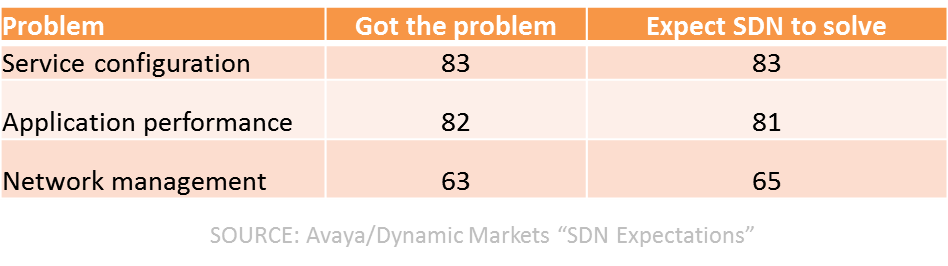
    And just as interesting was this table illustrating not just problem areas, but how many respondents had the problem and how many expected SDN to solve them:

    sdn problem solving

    If you ignore the network management tuple, the top two problems are definitely often associated with DevOps as issues that can be resolved with collaboration and automation and some measurement thrown in to boot.

    SDN has evolved, at this point, to focusing more on network automation than it does on automated networks. The difference is actually profound as it relates to DevOps, as the former is really about key it pain point 3management, about configuration and provisioning and automation of processes designed to extend CD across the entire application deployment lifecycle into the production environment. It’s about codifying and encapsulating configurations in templates and centralizing state of the network in order to engender better agility in both moving forward and falling back when things go awry.

    SDN today really is (or should be) a subset of DevOps, focusing on network infrastructure operations rather than app infrastructure operations. But the same principles and goals are very much aligned between DevOps and SDN, between the network and the application infrastructure. That’s a critical convergence starting to appear that’s necessary, as when you dig into IT and its problems delivering apps on time these days, it’s mostly the network that’s still in the way.

    The network is identified often as a key IT pain point and usually the pain is related to the provisioning of services and applications across the network.  High costs of networking is also cited, and that is largely due to the complexity of the network and the amount of operational sweat and blood that goes into manually provisioning, configuring and testing the various pieces of network infrastructure required to deploy the services business needs to deliver applications.

    SDN may continue to be referred to as SDN, if only to emphasis its focus on network infrastructure, but the reality is that it’s DevOps. DevOps for Networks.

    Which brings us right back to why a DevOps-related, containerization company like Docker would swallow up an “SDN”-focused start-up like SocketPlane.

    Because what IT expects from SDN is really DevOps. And if DevOps is ultimately about culturally change and breaking down silos, the folks who focus on the network can’t be (and shouldn’t be) isolated from the folks managing the application infrastructure.

    Docker’s move brings software-defined networks together with software-defined operations  under (what should be) an IT encompassing concept: DevOps.