Tag: automation

  • BMC Pushes Automation to the DevOps Left

    BMC Pushes Automation to the DevOps Left

    Much of the inherent conflict that exists between developers and IT operations teams often comes down to how IT automation processes are implemented. IT operations teams generally have their own preferred tools for automating operations while developers have another. To resolve that issue, BMC Software unveiled Control-M Workbench, a set of development tools that extends an application programming interface (API) to allow developers to embed instructions for automating infrastructure using BMC Control-M automation platform.

    Gur Steif, president for digital automation at BMC Software, says Control-M Workbench moves the responsibility for automating the IT infrastructure resources that their application consumes, including the ability to code, debug and test workflows. The IT operations team can then more easily deploy that application in a production environment, he says.

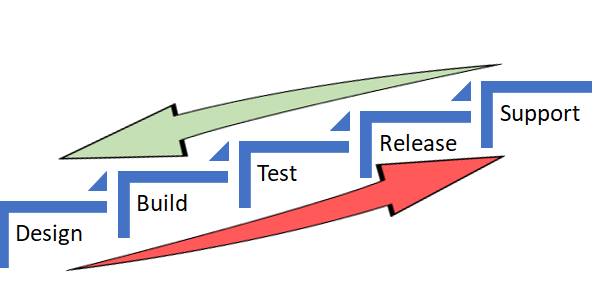
    In effect, BMC Software is enabling IT organizations to put the control of how jobs are executed in a production environment in the hands of developers by moving that function further to the left of the DevOps life cycle. Control-M Workbench represents the first time BMC is venturing beyond its traditional IT operations base to create a tool that will primarily be employed by developers.

    Steif says the goal is to enable IT operations teams to manage much higher volumes of application rollouts. In return for spending a few minutes on installing Control-M Workbench, IT organizations can deliver application 20 percent faster, while running jobs using 50 percent fewer full-time employees. In addition, Stief says production incidents can be reduced by up to 25 percent and batch processing failure rate can drop by as much as 80 percent.

    Control-M Workbench is clearly part of a trend to give developers more control over and responsibility for IT operations. A recent survey of 650 IT decision makers conducted by BMC finds 94 percent of IT decision makers expect automation to spread into all other areas of business by 2020.

    In addition, the survey notes that 73 percent of IT decision makers believe businesses that do not embrace IT automation to achieve the larger digital business strategy within the next five years will cease to exist in 10 years. The top three areas of investment priority in the next 24 months to achieve those goals are containerization, workload automation/scheduling and DevOps. Almost 9 in 10 (89 percent) respondents concur that IT automation needs to achieve their desired digital business objectives.

    However, there are considerable obstacles that need to be overcome, including lack of budget (67 percent), skills (44 percent) and time (51 perent). In fact, 42 percent of the respondents concede that when it comes to digital business initiatives there are conflicting objectives between business units and CIOs that can get in the way of crafting a comprehensive IT strategy.

    DevOps, of course, is more about people and processes than it is technology. Then again, DevOps isn’t going to be willed into existence without providing the tools needed to change the processes. Given the chicken-and-egg relationship between processes and tools, it becomes incumbent on the IT leadership to serve as the catalyst for bringing it all together.

    — Mike Vizard

  • Embedding Ownership: A DevOps Best Practice

    Embedding Ownership: A DevOps Best Practice

    From where I sit in the DevOps community, there is often more focus on dev than on ops. Damon Edwards (@damonedwards) of SimplifyOps sought to change that with his talk, “Ops Happens: DevOps Beyond Deployment,” at the All Day DevOps conference.

    Damon dove right into the primary, systemic force behind most DevOps problems: silos. The product development process goes like this: Planning—>Dev—>Release—>Operate. The problem lies in the tendency of many enterprises to place similar functions together. Everyone ends up in a silo. Then walls build up between the silos. Eventually, people only know life in their silo, making handoffs even harder.

    We often find application knowledge and business intent are heavily emphasized on development side but light on the operations side. Likewise, operational knowledge is heavy on the ops side, but light on the development side. Furthermore, development has ownership but limited accountability, while operations has accountability but no ownership.

    While many enterprises are striving toward building cross-functional teams, the reality is that the transformations often stop short of truly integrating operations. The result?  Silos remain.

    So, one has to ask, why is this so hard?

    The reality is that enterprise operations are under tremendous pressure. One side is telling them to go faster and open it up, and the other side is telling them to be more secure and be more reliable. These are often seen as competing priorities.

    To solve this, enterprises need to “shift left” in the product development cycle operations activity as much as possible. They need to do as much as possible during development. For the deploy function, enterprises should be:

    1. Writing/running automated tests
    2. Writing/exercising deploy automation
    3. Running security scanning tools

    For the operate function, enterprises should be:

    1. Writing/exercising automated runbooks
    2. Writing/exercising monitoring/metrics
    3. Operational control (safely!)

    However, shifting operations to the left is much more difficult. How do you do it? Embed ownership.

    Let me repeat: embed ownership.

    First, those who build something define the procedures to fix it, and those who build something fix it when it breaks.

    That sounds simple, but raise questions:

    1. How do you safely and securely give out access?
    2. How do you enable the experts to contribute remediations?
    3. How do you give the experts visibility into operations?
    4. How do you do postmortems days/weeks/months later?

    Damon recommended four steps.

    Step 1: Establish a secure ops portal


    Step 2: Establish a software development life cycle (SDLC) for ops procedures

    Step 3: Connect with enterprise management systems

    Step 4: Make Compliance really happy

    Ticketmaster is a real-life of example of this working at a large, prominent scale. Ticketmaster calls its system, “Support at the Edge” and it involves:

    • Automated Ops procedures written/vetted by the delivery teams
    • Ops remained in full control of what can run and security policy
    • Empowered support teams with self-service ops tasks
    • Empowered developers with limited self-service operations
    • Combined with new incident response model

    Ticketmaster has seen transformative results. Before Support at the Edge, the average mean time to respond was 47 minutes. Now, support at the Edge has reduced that to just 3.8 minutes in addition to decreasing escalations 50 percent and overall support costs 55 percent. Ticketmaster has seen real results.

    Damon has more details in his talk, which you can watch online here. If you missed any of the other 30-minute long presentations from All Day DevOps, they are easy to find and available free of charge here.

    Finally, be sure to register you and the rest of your team for the 2017 All Day DevOps conference here. This year’s event will offer 96 practitioner-led sessions (no vendor pitches allowed).  It’s all free, online on Oct. 24.

    — Derek E. Weeks

  • Survey: DevOps Divide Grows a Little Wider

    Survey: DevOps Divide Grows a Little Wider

    The gap between the number of organizations that have invested in DevOps is starting to narrow, and IT organizations that made the transition to DevOps earlier are starting to see accelerated returns on that investment, according to the latest survey by Puppet.

    The annual “State of DevOps Report” finds that out of 3,200 IT professionals surveyed, only 11 percent were part of organizations that could be considered high DevOps performers. High performers are deemed to have higher deployment frequencies, lower lead times for changes, better mean time to recovery (MTTR) and better change failure rates. The higher performers in this year’s survey are deploying applications 46 times faster than the same designated group of higher performers were last year.

    The survey also finds that higher-performing organizations have automated 72 percent of all configuration management processes. Those same high performers spend much less time (28 percent) employing manual configuration processes. Lower performers are spending almost half of their time (46 percent) on manual configuration.

    Just over a quarter (27 percent) of the respondents self-identified themselves as being part of a DevOps team, according to the survey. In contrast, only 16 percent said the same last year. Puppet CTO Nigel Kersten says those results suggest that understanding of the power of DevOps is increasing. It’s also apparent the early implementers of DevOps processes are enjoying a level of IT agility that is much greater than the average IT organization.

    In general, Kersten says that while much DevOps progress has been made, most IT organizations have automated only various pockets of silos. Developers, for example, may have automated some processes on their own, while IT operations specialists may have developed a custom script to automate the configuration of a handful of servers. Kersten notes IT leaders should be cognizant of the technical debt their organizations are incurring every time different elements of the IT organization employ different tools to automate the same basic processes time and again.

    Very few have automated their operations within the context of a continuous integration/continuous deployment (CI/CD) pipeline, says Kersten. That becomes more challenging to accomplish as new computing models based on containers, for example, are added to the enterprise mix. On a more positive note, Kersten says more processes are being well-defined, as they are bounded by an application programming interface (APIs). Those APIs then become the core technology over which IT automation frameworks are then laid.

    The issue many IT organizations have yet to confront is the degree to which they want to stumble toward DevOps versus implementing a concerted plan of action. Much of the DevOps progress to date has been driven from the bottom up inside many organizations. The time is now approaching for IT leaders to imbue DevOps as a part of the IT culture that permeates the entire organization.

    To one degree or another it’s a safe bet every organization will implement some form of DevOps going forward. The challenge  will be figuring out how to transform all those isolated instances into something more akin to an actual IT strategy.

    — Mike Vizard

  • VMware Moves to Automate Management of Hybrid Clouds

    VMware Moves to Automate Management of Hybrid Clouds

    Moving to expand the reach of its portfolio of IT management software well beyond virtual machines, VMware today announced that the vRealize suite of IT automation tools can be employed across containers and virtual machines running on-premises or in a public cloud.

    In addition to providing support for VMware’s Admiral container management portal, version 7.3 of vRealize Automation adds much tighter integration with both Amazon Web Services (AWS) and Microsoft Azure public clouds. For Microsoft Azure, vRealize now can deploy and manage middleware and application services. For AWS, vRealize Network Insight now can microsegment networks in an AWS Virtual Private Cloud as well as troubleshoot network traffic issues in AWS.

    From a DevOps perspective, however, the most significant new capability is being added via an update to the vRealize Operations module: the ability to automatically deploy workloads across multiple clusters and datastores based on business policies defined by the IT organization, says Mahesh Kumar, senior director of product marketing for VMware. This update also adds a predictive Distributed Resource Scheduler (pDRS) that leverages analytics provided via vRealize Operations to predict anomalies and identify potential I/O contention issues before they occur.

    At the same time, the latest update to VRealize Operations will incorporate a tab for vRealize Business for Cloud 7.3, which has been extended to provide cost and capacity utilization metrics for AWS and Microsoft Azure alongside VMware-based private cloud costs.

    Other additions to the VMware portfolio include tighter integration between VRealize Operations and VMware vSAN storage software, NSX network virtualization software, enhanced blueprints for sizing deployments and integration with configuration management tools from Puppet. Kumar says that latter capability will be extended to include support for Chef and Ansible configuration management tools as well.

    With these additions to the IT automation portfolio, VMware is clearly signaling its ambitions lie beyond its own hypervisor. Within enterprise IT environments VMware is dominant. That position has enabled it to gain significant traction in terms of driving adoption of its management tools. Now, VMware is moving to extend the reach of those tools into public clouds and containers. At the recent Dell EMC World 2017 conference last month, VMware debuted instances of its portfolio of software running on AWS. Most containers today are deployed either on top of a virtual machine or in a platform-as-a-service environment. But VMware is also aware of the fact that over time more containers will be deployed on bare-metal servers that are not running any type of virtual machine software at all.

    Of course, just about every other provider of an IT management framework knows this as well. In addition, there’s no shortage of management tools designed specifically for containers. But as DevOps continues to evolve, most IT organizations are naturally expected to favor approaches that enable them to manage the broadest number of platforms possible.

    — Mike Vizard

  • Achieving True Automation is a Marathon, Not a Sprint

    Achieving True Automation is a Marathon, Not a Sprint

    But It Starts in the Cloud

    Arguably, the most important goals for companies seeking to get into cloud today are agility and flexibility to innovate at speed and scale. Adding cost savings to the mix makes the possibilities all the more attractive. And these three pillars can only be achieved with automation.

    But while many companies may believe they’re automating (and thus attaining these three goals), they’re really not. In the rush to cloud adoption, they fail to see that this type of investment takes time and work—a lot of work. Think of it as a marathon, not a sprint.

    While it’s a significant step toward achieving scale and speed, simply moving an application to cloud is not enough to attain true automation. Adding genuine automation to your server means enabling it to spin up or down as needed, react to scaling requests and shut down when not in use. Only when these processes are in place can you then start seeing the cost savings and agility promised by cloud.

    While there is no simple road map to achieving true, seamless automation (near-Nirvana), there are clear and well-worn steps that organizations seeking these goals can take. Looking at it from a broad perspective, automation in the cloud depends on two major initiatives.

    Long-Term Value is in App Automation

    The first step is to figure out where automation will provide the most value (from an application perspective). In most cases, at least as far as what we’re seeing across the marketplace, the answer to this will likely revolve around infrastructure.

    The second step gets a bit trickier. You essentially want to connect automation to the applications themselves (replacing the manual task of writing a script). The challenge then becomes pulling the application back into the larger architectural context so that it can respond to an event without human intervention. This phase involves making the application cloud-ready—that is, furnishing it with the ability to trigger automation without someone sitting at the controls.

    This second phase bears closer scrutiny—it’s here that the people on the ground start to lose faith, because with some applications automation may seem all but impossible. Let’s face it: A fair majority of applications were not designed with automation in mind. Legacy applications in particular (which typically constitute the bulk of most companies’ IT estate) are fairly fussy when it comes to automation. This is when organizations start debating the value of opening code and making changes—whether the investment of time and capital is really worth it.

    Which brings us to the two biggest barriers to automation—costs and culture. Yes, it can be expensive to implement the processes and skills to achieve game-changing automation in the short-term. It requires moving application development specialists to new roles, a massive shift in culture and skill sets within IT. This is particularly true for code development, which has been manually focused for so long. Many companies fail because they don’t see automation as an ongoing true software development program (which, of course, it is).

    Attaining DevOps

    The Holy Grail of automation is achieving a seamless Development-Operations environment (DevOps), one in which software developers and the IT folks are continuously collaborating and communicating to automate software delivery and infrastructure changes. One of the chief goals of DevOps is to create a culture and environment where building, testing and releasing software happen frequently, rapidly and reliably.

    Achieving a true DevOps environment means that you are a functioning automated shop. Automation does not end with the first deployment. In fact, it is only the beginning. You will continually face new upgrades and changes in service, requiring near-constant tweaking. But automation smoothes the process, loosening the friction of life cycle management. Automation becomes embedded into the very fabric of your entire IT estate.

    For some companies (mostly startups), automation is not a luxury but a necessity. Look at Netflix (which, in some respects is less of a startup and more of an established player). The only way the company could scale and stabilize to meet customer demand with the success it has over the past few years was to automate. It would be physically impossible for Netflix to serve its customers any other way.

    Same with Amazon. Jeff Bezos figured out early on the value of automation in the cloud and built the flexibility into Amazon’s infrastructure to grow and scale according to exponential customer expansion.

    We’re seeing this happen increasingly across industries—from the financial sector to the healthcare industry.

    One large global financial institution is changing its very culture by putting automation at the very core of everything it does, from loan applications to payroll. It has taken the bold step of only adopting applications that can be automated. The simple rule of thumb here is, “If we can’t automate it, we’re not going to do it.” This has resulted in the financial institution being able to provide an improved customer experience, providing features for customization of services via their mobile banking app.

    Another is Avalon Healthcare Solutions, a laboratory benefit management company. The organization wanted to accelerate service delivery with a 100 percent cloud-based claims editor. So it developed a portal for providers, patients and health plans to offer appropriate access to data, claims and prior authorization. Avalon can now edit from 28,000 to 38,500 per hour in a single environment with 99.99 percent uptime and 99.95 percent accuracy,

    The lessons here are clear. By pacing their race with an eye for the long-term goal, Avalon, Amazon and Netflix—among others—trailblazers across industries, are reaping the benefits cloud-automation offers. Namely, they are scaling, becoming more agile, innovating and delighting their customers all at the same time.

    About the Author / Chris Wegmann

    Chris Wegmann is Managing director for Amazon Web Services Practice & Relationship lead, responsible for helping Accenture cross-industry enterprise clients leverage the power of Amazon Web Services including through the Accenture Cloud Platform. He has 20 years of experience in technology consulting and specialization in technical architecture, infrastructure design and engineering, legacy system migrations, cloud application architectures and systems operation. Connect with him on LinkedIn and Twitter.

  • 7 Highly Effective Continuous Delivery Principles

    7 Highly Effective Continuous Delivery Principles

    If you’re in the IT space and you weren’t born yesterday, then you understand the need for speed. Development and release cycles are now faster than ever as companies implement continuous integration and continuous delivery (CD). Browsers and social media sites, for example, are doing multiple releases a day, and organizations that want to keep up in the information age are implementing continuous delivery. But to ensure successful continuous delivery, there are continuous delivery principles every organization should know.

    Here are seven continuous delivery principles that make highly effective and efficient development and release cycles:

    1. Automate, Automate, Automate. While more and more organizations are recognizing the need to automate their end-to-end release processes and delivery, it can still be a burden if not done correctly. For example, some still refrain from automating unit tests, but this actually slows them down in the long run, especially when human error inevitably comes into play.
    2. Always Be Testing. Obviously, if you want faster and better release cycles, then you need to test constantly. As mentioned, automated testing is a key to continuous delivery, and you don’t want a bottleneck between QA and development clogging up your process.
    3. Small Releases. One of the core continuous delivery principles is that smaller and multiple releases are usually better than one large one. It’s more efficient—and even safe—to keep releasing a few changes then waiting to add a large batch of features and bug fixes before you deliver. Then, if any revisions need to made, it will be easier to make them without affecting the other features.
    4. Use Benchmarks. Adding an automated benchmark suite to your builds will help you optimize your performance by preventing any regressions, which is important if you want a successful continuous delivery.
    5. Use Source Control. Integral to continuous delivery is making sure you can keep adding versions without affecting existing components and features. This not only backs up your SQL code, but also allows for continuous integration and, thus, continuous delivery.
    6. Code Reviews. Many organizations use a hierarchal system for their reviews, which means more and more senior developers have to review the code before it’s approved. A peer-based system in which developers review each other leads to a faster and more efficient process.
    7. Pull Requests. Using a pull request can speed the process significantly. When others can review the author’s code simultaneously as well as suggest modifications before it’s integrated into the master, there will be better communication and fewer bottlenecks.

    Continuous delivery is a not just a great idea, but quickly becoming a must-have, as anyone who uses the agile method will tell you. It’s important, however, that whether you’re introducing this into your organization or looking to optimize your continuous delivery methods, you use the right continuous delivery principles to keep your organization fast and efficient.

    About the Author / Yaniv Yehuda

    Yaniv Yehuda is the co-founder and CTO of DBmaestro, an enterprise software development company focusing on database development and deployment technologies. Yaniv is a DevOps expert who spent the last couple of years raising awareness about the challenges surrounding database development and deployment, and how to support database continuous delivery.

  • The Time Is Now for an IT Operations Revolution

    The Time Is Now for an IT Operations Revolution

    There’s a level of frustration starting to build inside IT operations teams that’s about to boil over. Lucas Carlson, vice president of strategy for Automic, a unit of CA Technologies that provides an IT automation platform, says developers are bullying IT operations teams by programmatically invoking application programming interfaces (APIs) exposed by public cloud service providers. As the number of application workloads running in those clouds increases, IT operations professionals are losing control.

    To ensure their continued relevance, IT operations teams need to leverage automation to inject levels of agility into local data center environments, he says. That would make it much less likely developers would feel the need to programmatically invoke IT infrastructure resources.

    Carlson says achieving that level of agility will require IT operations teams to rely more on machine- and deep-learning algorithms to automate low-level tasks. Instead of thinking in terms of managing silos of compute, storage and networking resources, Carlson contends IT operations professionals need to reinvent themselves.

    The artificial intelligence (AI) models based on advanced algorithms must be trained continuously. IT operation professionals could become the trainers of those AI models. In fact, Carlson says IT operations teams are approaching a critical moment in history: They can either wait for AI models to eventually replace them or they can leverage them to take back control of IT infrastructure.

    However, developers tend to make decisions based on what they prefer versus what’s best for the organization. Before too long, multiple duplicate operations management frameworks are in place. Rather than incur all those management headaches and associated technical debt, Carlson says organizations need a single framework that can more adroitly accommodate the multiple roles within the DevOps team. It’s already long past the time when IT teams should have modernized their operations, he says.

    The relationship between developers and IT operations teams has always been contentious. The more belligerent members of the developer community are even making a case for “NoOps.” In that context, all the IT dollars spent on operations are moved into developing applications because the management of IT infrastructure is completely automated. Given the amount of legacy infrastructure that isn’t likely changing anytime soon, achieving that level of automation inside the enterprise won’t happen for a while. But there’s no doubt that IT operations needs to get more agile. Because of that issue, investment in software-defined data center (SDDC) technologies is growing rapidly.

    Instead of resisting that trend, Carlson says teams need to demand that internal IT operations be brought into the 21st century. It’s true that SDDCs infused with AI models will automate most of the lower-level tasks associated with DevOps. But those members of that IT operations teams who become the masters of building and training those AI models will be among the most highly sought-after individuals in IT.

    — Mike Vizard

  • Automation: A Few Decades of Pain? Or, What Does Jack Ma Know That I Don’t?

    Automation: A Few Decades of Pain? Or, What Does Jack Ma Know That I Don’t?

    Recently I came across three articles that gave me pause. Each article was a bit disconcerting on its own merit, but when I considered them together, the result caused more than a momentary worry. One article was report in Bloomberg Technology quoting Jack Ma, head of Alibaba, the second richest man in China and a major player in the e-commerce space. He said:

    “In the next 30 years, the world will see much more pain than happiness.”

    Ma was referring the impending effects of automation and e-commerce on the economies and societies of the world .

    The second was from a piece written by Martin Neil Baily and published by the Brookings Institution in 2015. The article is titled, “U.S. manufacturing may depend on automation to survive and prosper.” Here is the quote, referring to U.S. manufacturing:

    “The manufacturing sector is still very much alive and reports of its demise are not just premature but wrong. … The sector will be revived not by blocking new technologies with restrictive labor practices or over-regulation but by installing them—even if that means putting robots in place instead of workers.”

    The last piece is by Joe McKendrick over at ZDNet. The subtitle to his article titled, “Containers, DevOps, IT automation seen as antidotes to complexity,” says it all:

    “Seven in 10 IT professionals agree: if we don’t automate, we die.”

    When I put the ideas in the articles together, I get a thought that goes like this: In the coming decades more automation will be put in place, a good many workers are going to be displaced by robots, and it’s going to be a world of pain.

    Do these notions seem far-fetched? Maybe not. The need is there, the will is there and the money has been allocated. The result is going to be great for the bottom line. For humans and workers, not so much.

    But, a thought is not reality. There are many people out there saying that automation is a blessing and in the short and long term, most of us will do well. Automation will create more jobs than it destroys.

    Predicating the Future is a Risky Business

    Predicating the future is a risky business. Could anybody have predicted that the underlying technology that powered Netscape back in the 1990s would produce today’s internet of things? Who would have thought that the first cell phones, selling for around $4,000 in 1984, would lead to mobile devices becoming the dominant computing device today? Not many. To quote Yogi Berra:

    “It’s tough to make predictions, especially about the future.”

    Yet, the three predictions I describe above bothered me. I wondered, Do these guys know something I don’t?

    So I decided to do take a look at some data.

    What the Data Says

    One of the metrics that I have found particularly interesting when considering automation is the relationship between the number of employees a company has and its revenue. This number is sometimes referred to as Revenue Per Employee (RPE). The simple assumption is that companies that have high revenue per employee are more productive because that productivity is realized via tools and machines; in other words, automation.

    Using data in both the NYSE and NASDAQ stock exchanges, I determined the Top 100 companies with the highest RPE in a given year. I excluded from consideration companies that had fewer than 1,000 employees. (A publicly listed trading company that deals in precious metals, with 30 employees generating revenue of $120 million will create a distortion that is atypical to the norm.) I looked at each year between 2007 and 2017. The result is shown in Figure 1, below.
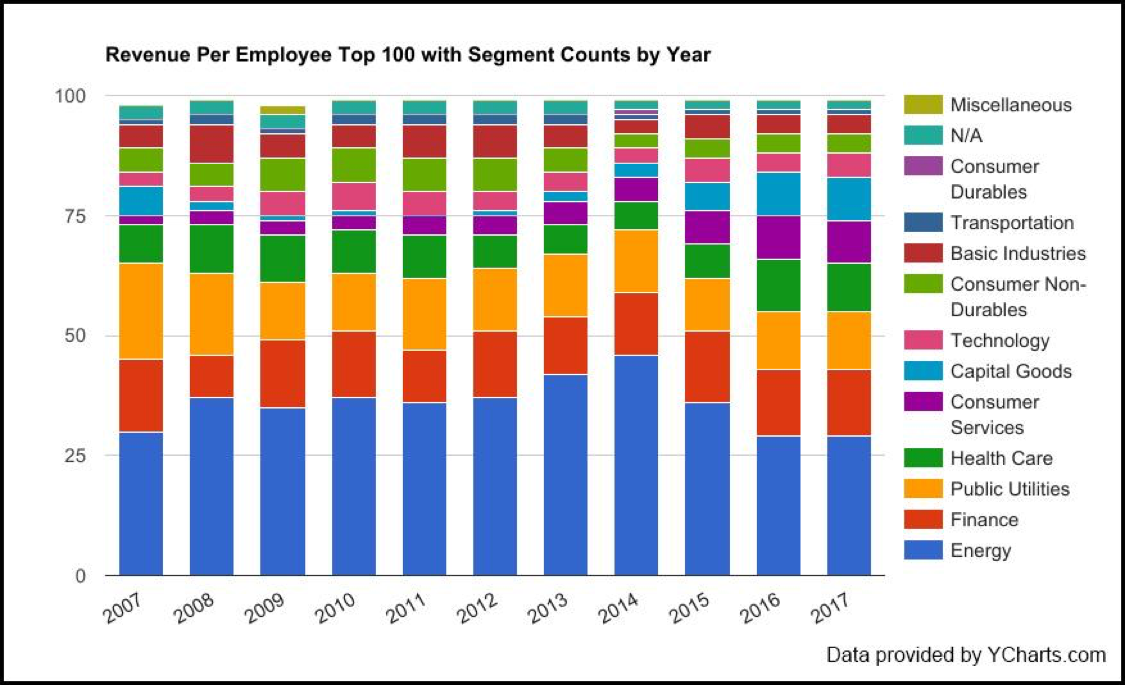
    Figure 1: Top 100 Companies by Revenue Per Employee excluding companies with less than 1.000 employers

    Given the large representation of the Energy sector in RPE, I decided to look at the Top 10 companies in terms of revenue from 2007 to 2016 to see if there was any correlation. I grouped the Top 10 revenue earners into sectors. The result is shown below in Figure 2:
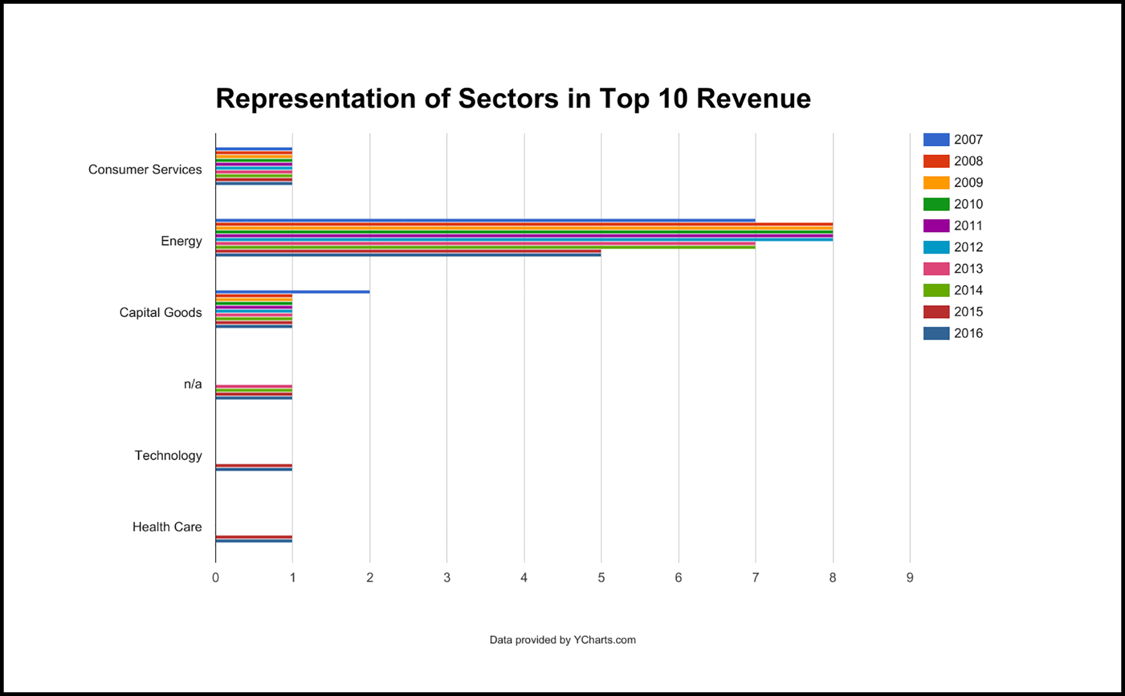
    Figure 2: Grouping of Top 10 Revenue Earners according to sector 2007 – 2016

    Notice that companies in the Energy sector have the largest representation in the Top 10 revenue earners throughout the years. This pattern is somewhat similar to that of representation of Energy shown Figure 1, in that Energy has the largest representation. There is a correlation.

    An Assumption Proved False

    My initial thinking was that there is something going on in the Energy sector that might be relevant to my simple assumption about RPE: The greater the RPE, the more automation in force. I looked that the individual RPE performance of Royal Dutch Shell (RDS.A), ExxonMobil (XOM) and Chevron (CHV), three companies in the Energy sector that always appeared in the Top 10 Revenue Earners from 2007-2017. I compared each company RPE to its Total Employees. Figure 3 below shows my findings:
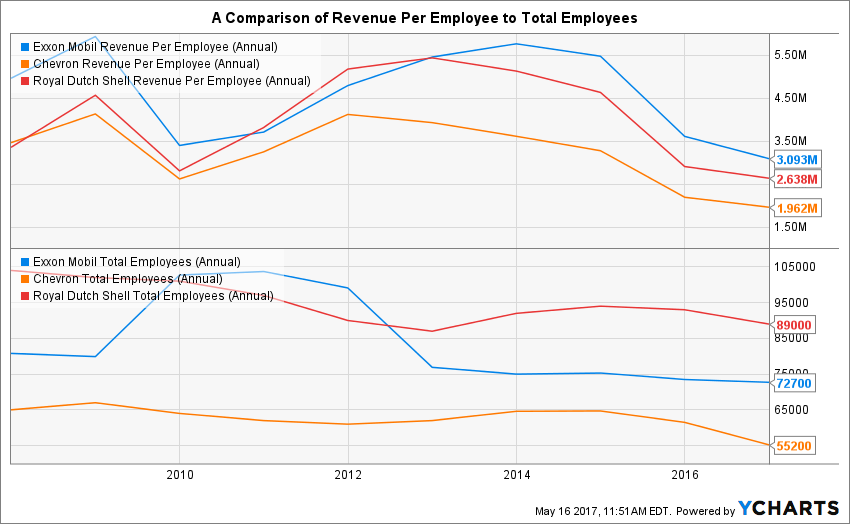
    Figure 3: Revenue Per Employee and Total Employees for  ExxonMobil (XOM), Royal Dutch Shell (RDS.A) and Chevron (CHV)

    As mentioned above, my initial assumption is that as automation increases, RPE should increase, while employee count remains steady or decreases. Figure 4 below illustrates the assumption.
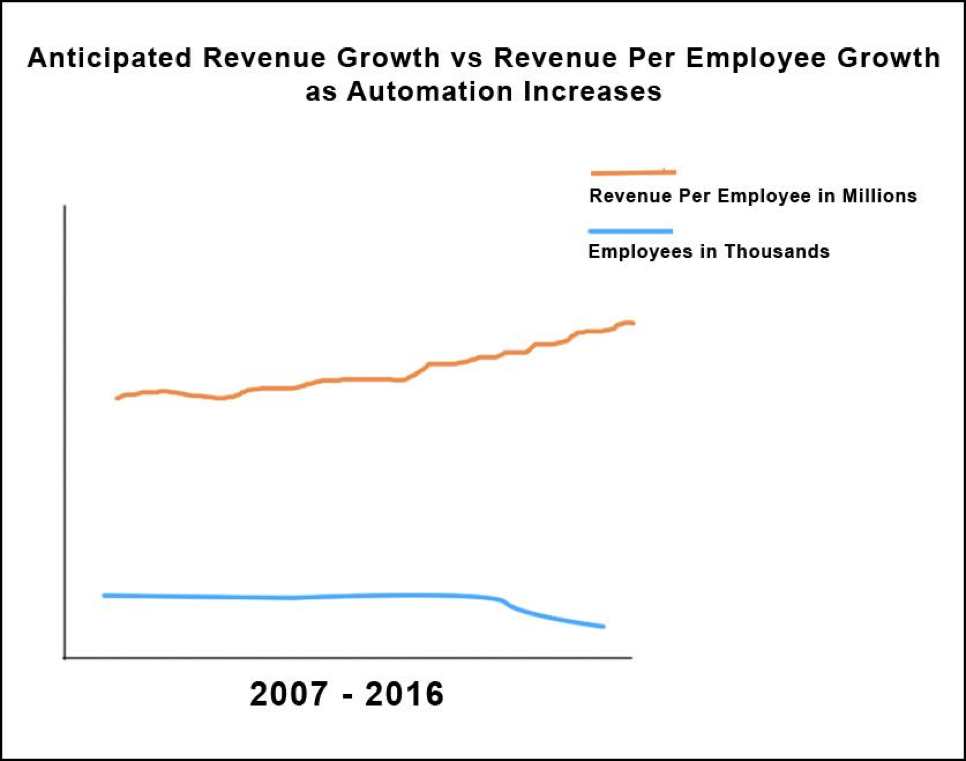
    Figure 4: One might assume that as automation becomes more prevalent, fewer employees should produce more revenue per employee

    Yet, as you can see in Figure 3, the numbers did not confirm my assumption. We see a significant dip in RPE from all three companies around 2010, while ExxonMobil acquired more than 20,000 employees. Also, we see that Royal Dutch Shell and Chevron have a decline in the number of employees over the number of years. If the efficiency that automation might be attributed to RPE were in force, revenue numbers would at the least mirror employee numbers, or hopefully increase due to more productivity achieved through automation. But revenue does not continue to map to increased revenue versus the number of employees. Revenue is all over the place.

    I was stumped until I considered the impact of price of oil. When I compare revenue to the historical price of oil according to Brent Crude Spot Price to oil company revenue during the years in question, a similarity occurs, as shown in Figure 5, below.
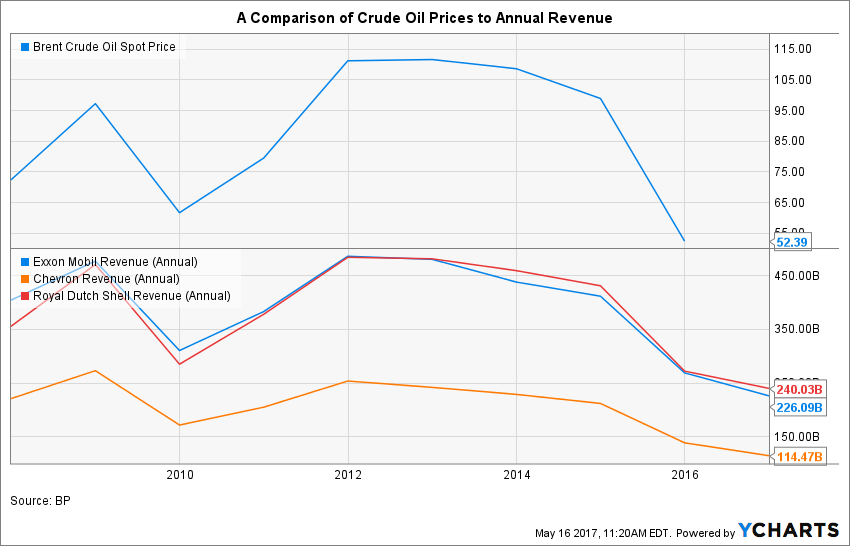
    Figure 5: Oil Company Revenue compared to Price of Oil, 2007-2015

    The shape of the lines in the lower chart in Figure 5, Revenue in Billions and the shape of the line for oil price, in the top chart look similar.

    A reasonable inference can be made that the while oil companies enjoy a sizeable return per employee due to capital investments in tools, technology and automation (ExxonMobil returned more than $3 million per employee in 2016, for example), market price conditions have a more significant effect on revenue.

    So it seems that in terms of the Energy sector, for this admittedly small sample size, automation does allow for significant revenue, but does not increase revenue by way of increased efficiency in terms of operational production. I went back to being stumped. When Jack Ma was talking about decades of pain, was he talking about continuing slump in revenue from the Energy sector? Or was he talking about something else? I decided to look at some data about the world’s largest commercial employer, Wal-Mart.

    All Roads Lead to Wal-Mart

    Wal-Mart employs more than 2 million people and is the leading revenue earner for the years 2014-2017. Yet, when we look at its RPE compared to other companies, Wal-Mart is at the bottom of the stack, as shown in Figure 6, below. As mentioned above, in 2016 Exxon earned more than $3 million per employee. Amazon had an RPE of ~$475,000. JPMorgan Chase came in at ~$401,000. Wal-Mart? $211,000. To put it in perspective, ExxonMobil did more than ten times as much in terms of RPE.
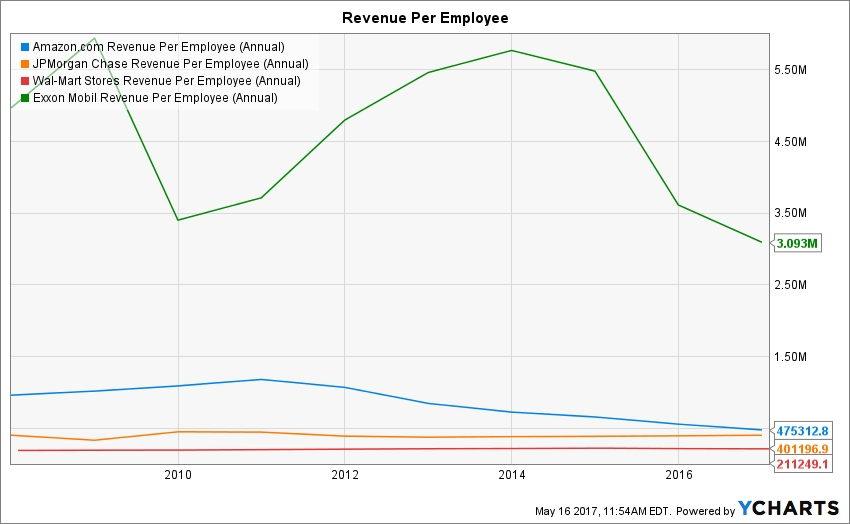
    Figure 6: Wal-Mart’s Revenue Per Employee of $211,000 in 201y puts it well below others

    I could not help but wonder, why does ExxonMobil have a higher RPE than Wal-Mart? Or, for that matter, why so to for JPMorgan Chase and Amazon? I have a theory to propose to answer the question.

    Energy, Finance and Amazon have historically been heavily automated industries. The size of a land-based crew drilling oil is between four to six employees per eight-hour shift. These people are not out there with picks and shovels. They are operating big machines with each machine having some amount of automation built in.

    Once the well is drilled, there is some maintenance labor, but revenue is derived from what comes out of the ground. A lot of machinery is used to get the oil out of the ground, processed and delivered for end use. Hence, a large automation factor. Human labor is secondary.

    Same with Finance. Computers have been at the heart of Finance industry—banking, investments and insurance—since the first mainframes were put into action. Is the revenue of some companies in the Finance sector subject to the whims of the market? Most likely, yes, particularly as one considers the events of 2008. But again, one trader with a single Bloomberg terminal can do a lot of work.

    And Amazon? The company has been the poster child for automation since Jeff Bezos sold the first book online.

    Still, as noteworthy as the facts were, there seemed to be no historical precedent to justify Jack Ma’s prediction doom. But, the dreadfully low RPE of Amazon might give us a clue. So went back to the drawing board and spent another afternoon making charts using data from NYSE and NASDAQ.I came up with the two charts you see in Figure 7 below. Then, the plausible became possible.

    The Plausible Becomes Possible

    The chart on on the top of Figure 7 below shows the annual revenue for Amazon, ExxonMobil and Wal-Mart. The chart on the bottom of the illustration shows the total employees for each company. The time span of each chart is 10 years. Wal-Mart shows a steady rise in revenue until 2016 when things start to go flat. ExxonMobile starts to lose revenue in 2012, while its total employee count remains relatively even. Amazon, on the other hand, shows a steady rise in revenue, as well as a rise in employee count. Both Amazon’s total employee count and revenue grows at a steeper growth trajectory than Wal-Mart.
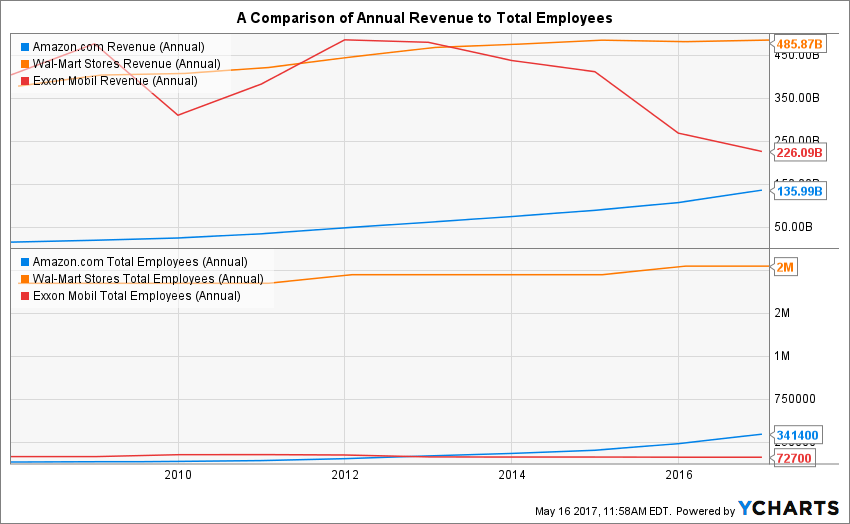
    Figure 7: Total Employees and Revenue: As Wal-Mart hires more employees revenue begin to flatten; Amazon revenue increases

    Is there something going on?

    Well, when we look at net income, there very well might be. Figure 8, below shows the net income of ExxonMobil, Wal-Mart and Amazon. This is where the rubber hits the road. Net income is the money that’s left over after all expenses and taxes have been paid. It all comes out in the wash when you look at net income. You can be a company doing $1 billion in revenue, but if your expenses are $999 million, your company is doing no better than one doing $10 million in revenue with $9 million in expenses. In terms of Amazon, Wal-Mart and ExxonMobil, as we move to the later years, 2016-2017, the numbers come into the same ballpark. And, in that ballpark Wal-Mart is showing some decline, ExxonMobil is showing a continuing big decline. Amazon is on the rise.
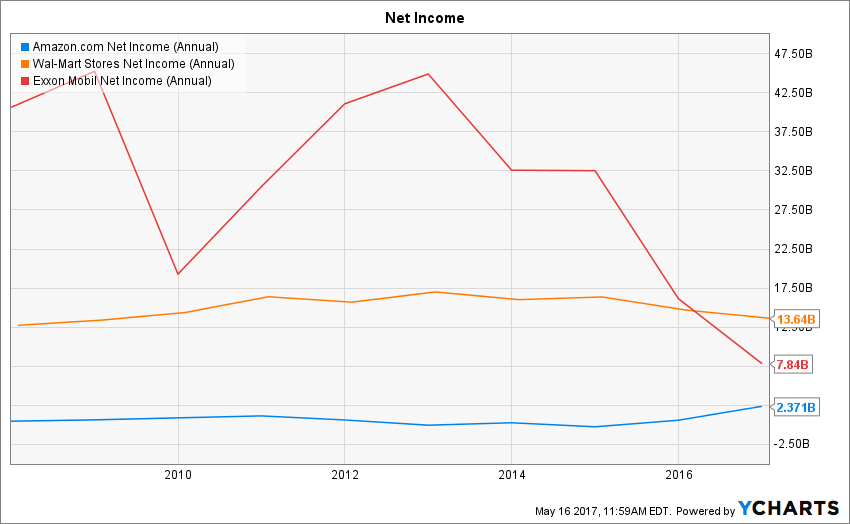
    Figure 8: Net Income: Wal-Mart and ExxonMobil show declining net income while Amazon is on on the rise

    So now is a good time to go back and review the assertions made at the beginning of the piece:

    • Jack Ma: “In the next 30 years, the world will see much more pain than happiness.”
    • Brookings Institution: “even if that means putting robots in place instead of workers.”
    • Joe McKendrick: “Seven in 10 IT professionals agree: if we don’t automate, we die.”

    Given that data presented, we see that industries that have a good deal of automation, Energy and Finance for example, have a high degree of employee efficiency as reflected in RPE. Also, we see that Energy is subject to the whims of market pricing. And lastly, we can see the country’s largest employer, Walmart, has poor RPE numbers, while Amazon, in many ways analogous to Wal-Mart in that Amazon has a significant presence in the retail space, albeit the online retail space, has very good RPE and increasing net income.

    Will Amazon continue to hire? A reasonable assumption is yes. Will Exxon continue to hire? If you go back to Figure 7, you will see that ExxonMobil employee count has been declining since 2010. Couple this fact with a continuing decline in revenue, we’re not going to get fired if we say that ExxonMobil is probably not going to increase employee count unless some sort of miraculous business pivot happens. But what about Wal-Mart?

    Wal-Mart has 2 million employees, a dreadful RPE number and declining net income. What will happen should Wal-Mart’s CxOs decide to more fully embrace automation? After all, hiring more people does not seem to help. It hired more and revenue declined. It’s a pretty good bet that Wal-Mart will go more toward the full automation end of things. How else will the company survive? So let’s play out this scenario.

    A Closing Hypothetical Scenario

    Let’s close with a hypothetical scenario. Let’s say that somehow Wal-Mart magically figures out a way to increase its RPE from the current $241,000 to $475,000 within the next five years.  ($475,000 is the current RPE of Amazon.) And, let’s say that Wal-Mart’s revenues continue to stay level at the current $482 billion a year. Thus, to calculate the number of employees required to achieve the desired RPE, we use the formula:

    $475K (RPE) = $482 bln/Number of Employees

    When we do the math, the number of employees that Wal-Mart needs to achieve $482 billion in revenue with an RPE of $475,000 is 101,4736,842—about half the size of its current workforce. Think about this. The implications are dramatic.

    Most likely, Wal-Mart will continue to automate. It must to survive. The question becomes, given its current dismal RPE, does the company somehow double its revenue to maintain the size of its current workforce. Or does, it accept current revenue trends and let 1 million people go.

    It seems that Jack Ma is predicting the latter. This might very well be but one of many examples in decades of pain he predicts, an outcome that is the result analysis offered by the Brookings Institution and 7 out of 10 IT professionals. Or, who knows? Maybe the future is one in which the Wal-Marts of the world double revenue and manage to keep the human workforce intact.

    As we have learned on the terrain, it’s easy to predict the future when it involves describing the outcome of writing a check for $100 when you have only $10 in the checking account. Predicting the impact of automation on future human employment is a more complicated terrain to travel. But no matter what, there will be a future and most likely, it will be more automated. What will happen to the employees at Wal-Mart? I’ll let you be the judge.

    A Special Thanks to YCharts.com

    Please allow me to extend a special thanks for the folks at YCharts.com for providing access to the data and charting tools used in this article. They were extremely helpful throughout the development of the ideas expressed herein which, by the way, are my own. — Bob Reselman

    — Bob Reselman

  • ShiftLeft & DevOps: A Narrative Within a Narrative?

    ShiftLeft & DevOps: A Narrative Within a Narrative?

    I procrastinated watching the season finale of “Westworld” just because I ended up reading a day later how Dolores ended the episode! I don’t know who to blame: my inquisitiveness or that guy who couldn’t hold himself. It kind of feels stale when you know the ending.

    Finally, I finished weeding through the multiple narratives across the episodes, and the flashback narrative merged seamlessly with the current one. That got me thinking about using that as an analogy and maybe understand whether the concept of ShiftLeft is really actually a “narrative within a narrative” of #DevOps.

    Ok, so what is ShiftLeft?

    I came across the term at my fav go-to source, @devopsy.kinsta.cloud, where Alan wrote on how much to Shift Left and its diminishing returns, and another very old article on the continuous testing approach, which primarily seeks to test early and often, to catch defects, yeah, early!

    Then it was thrown at me in the context of identifying repeatable activities, often manual with consistent results, performed by the Support & Operations team, and moving that work left from Level-3 all the way to L-0. Empowering the help desk, I would say!

    In both the scenarios, the underlying objective was to catch defects and or reduce life support activities early in the cycle (below) which costs more and more as we move up the food chain, which in turn makes a release and subsequent maintenance cheaper.


    As Alan also referred in the same article to the IBM Study, it’s almost 100 times more expensive to fix an eventual production defect which cost about six times more if caught at Implementation stage or about 15 times more if found during testing. Thus, “Early identification and prevention can improve reliable software delivery” would be the mantra.

    Now, to the crux of this article, Is ShiftLeft not what we aim to achieve via DevOps?

    DevOps basically creates a collaborative, non-siloed cultural change to bring both Development and Operations together early in the game.

    Throw in a bunch of tools to facilitate CI/CD, pull in the security guys early, expand automated testing coverage, include change and release—who are the catalysts, as I call these functions in my earlier article here—squeeze in a few monitoring tools and dashboards and voila! You have a complete and mostly successful DevOps team to dish out the most appetizing feast of quality software repeatedly.

    A table for two (Dev & Ops) has become a party of six! Yaaay!!

    So, from DevOps standpoint, ain’t we doing the same as ShiftLefting (If I may coin the word) with the resulting cost effectiveness, more efficiently?

    We do when we as a team make shorter and frequent sprints; gain insight, not just on how to code better or leaner but also by learning from the masters in Operations who run that software on the infrastructure they monitor and support daily. Or perform the VA scan early, or push a scenario as unit test instead of regression, and/or raise flags on potential capacity challenges.

    So again, isn’t DevOps team already doing that ShiftLefting as part of its charter?

    There is a limit to moving things left, but then, if your organization is still doing wireframes under a waterfall or is in the process of setting up a DevOps team, then this approach could be a stop-gap arrangement, an eventual merging of a narrative within a new narrative.

    But then my argument would be, Why stop-gap and why not a full frontal? Why not embrace the DevOps model, which comes preinstalled with all the ShiftLeft possibilities?

    Even if we are aware how an episode ends, procrastinating raises the risk of being left behind in the race to deliver quality, cost-effective product quickly.

    Technology is redefining businesses: Transportation is an app and soon probably will be driverless; banks are rebranding as tech companies in FinServ business; a fridge can reorder milk; trash cans can be Wi-Fi-enabled! Ah, the internet of things. Is Alexa listening?

    My other relevant posts are here and here.

    Thank you for the time.

    — Abdul Salaam Khurram

  • Avoid Crashes: 5 Best Practices for Load Testing

    Avoid Crashes: 5 Best Practices for Load Testing

    Demanding customer expectations and the rapid distribution of information across social media have made website and applications crashes an off-limits path for today’s companies and organizations.

    Crashes resulting from traffic spikes cause immediate and long-term loss of sales, as well as tarnishing the brand name. When servers or websites go down during highly anticipated events such as Black Friday, the Big Game or before a major concert, the repercussions can be permanent.

    Yet, avoiding the “website temporarily unavailable” screen is also easier than ever before. By performance testing your website continuously and proactively you can easily detect errors, bottlenecks and bugs, and then fix them to ensure your website handles any amount of traffic.

    Here are five best practices for load testing your website or app:

    Define Your Load Goals

    Before starting your tests, you need to figure out what it is that you need to test.

    This includes the number of concurrent users, traffic patterns and areas that users can visit on your site. For example, if your site has 10,000 users concurrent at its peak, but  3,000 arrive in the morning and that total slowly climbs up to 10,000 in the afternoon—and these visitors mostly just browse your homepage—you’ll need to run a different test than if you have 10,000 concurrent users on your website all day long, constantly browsing multiple pages.

    To determine your load goals, you need to engage directly with your business colleagues. For instance, get your product manager to set the system’s expected abilities, ask the marketing team to inform you about any special campaigns that might increase website traffic, and then look at server logs and tools such as Google Analytics to determine previous customer patterns.

    Choose Your Load Testing Tools

    There are multiple open-source load-testing tools that you can use to run your tests.

    JMeter is the most popular tool, but you can also use Gatling, Locust, Tsung, The Grinder or Selenium. See here to learn more about the differences between these toolsets.

    Does this seem complicated? Taurus is an open-source automation test framework that simplifies running these tools, by using a simple YAML script. If you need to run your tests from the cloud, utilizing rich analytics or requiring user collaboration, you might consider using BlazeMeter.

    Take Your System to the Limit

    To make sure you stand up to your load goals, you need a buffer; specifically, you need to make sure that your system can handle heavier loads.

    This ensures that the CPU stays low and you don’t experience memory leaks. However, we also recommend you take your system to the limit and see when and how it fails. This ensures that you know exactly what your system’s weaknesses are, giving you a better ability to fix any errors that might occur.

    This is especially important if you come across an unexpected traffic spike—say, if your competitor’s website crashes and all their customers come running to you. Wouldn’t you rather be prepared for that?

    Monitor Test Results

    Set aside resources for looking at test results.

    Examine KPIs including Response Time and Hits/s, as well as the correlations between them, to learn what your system’s abilities and bottlenecks are. This information will help you see what needs fixing.

    As you continue testing over time, you will be able to identify KPI trends, which will help you monitor system health. We also recommend you monitor backend KPIs like DB Queries, with APM tools.

    Test Again

    So, you’ve tested, you’ve analyzed, and you’ve fixed.

    Now you have one last thing to do: Run your tests again to make sure everything is working smoothly after the committed changes. That ensures nothing gets overlooked. It would be a shame if all your hard work went down the drain due to a minor oversight.

    Now, let’s get testing!

    To get more load testing tips, check out this free whitepaper, “How to Ensure Your Website or App Won’t Fail at Peak Times.” To learn more about BlazeMeter, request a demo.

    — Noga Cohen