Tag: Atlassian

  • Atlassian Acquires Halp to Gain Help Desk Based on Slack

    Atlassian Acquires Halp to Gain Help Desk Based on Slack

    Atlassian this week announced it has acquired Halp, a provider of a help desk platform that employs Slack as its user interface.

    Steve Goldsmith, head of product integrations at Atlassian, said Halp will provide organizations with a way to manage lightweight processes via an interface that is already commonly used within many organizations. The goal is to provide a level of integration between Halp and the JIRA Service Desk platform from Atlassian to handle more complex requests, he said.

    The Halp platform has already been integrated with Confluence, a knowledge base platform from Atlassian that enables help desk staff to share best practices for resolving known issues. Deeper integrations with JIRA and Confluence will be forthcoming, added Goldsmith.

    At the same time, Atlassian is working on tighter integration between its service desk platform and Microsoft Teams, which has emerged as a popular alternative to Slack, he noted.

    Halp CEO Fletcher Richman said that approach has gained traction because the biggest challenge when it comes to help desks is making it as easy as possible for an employee to generate a help ticket. Halp addresses that issue by enabling end users to simply drag and drop on an emoji to generate a help desk ticket.
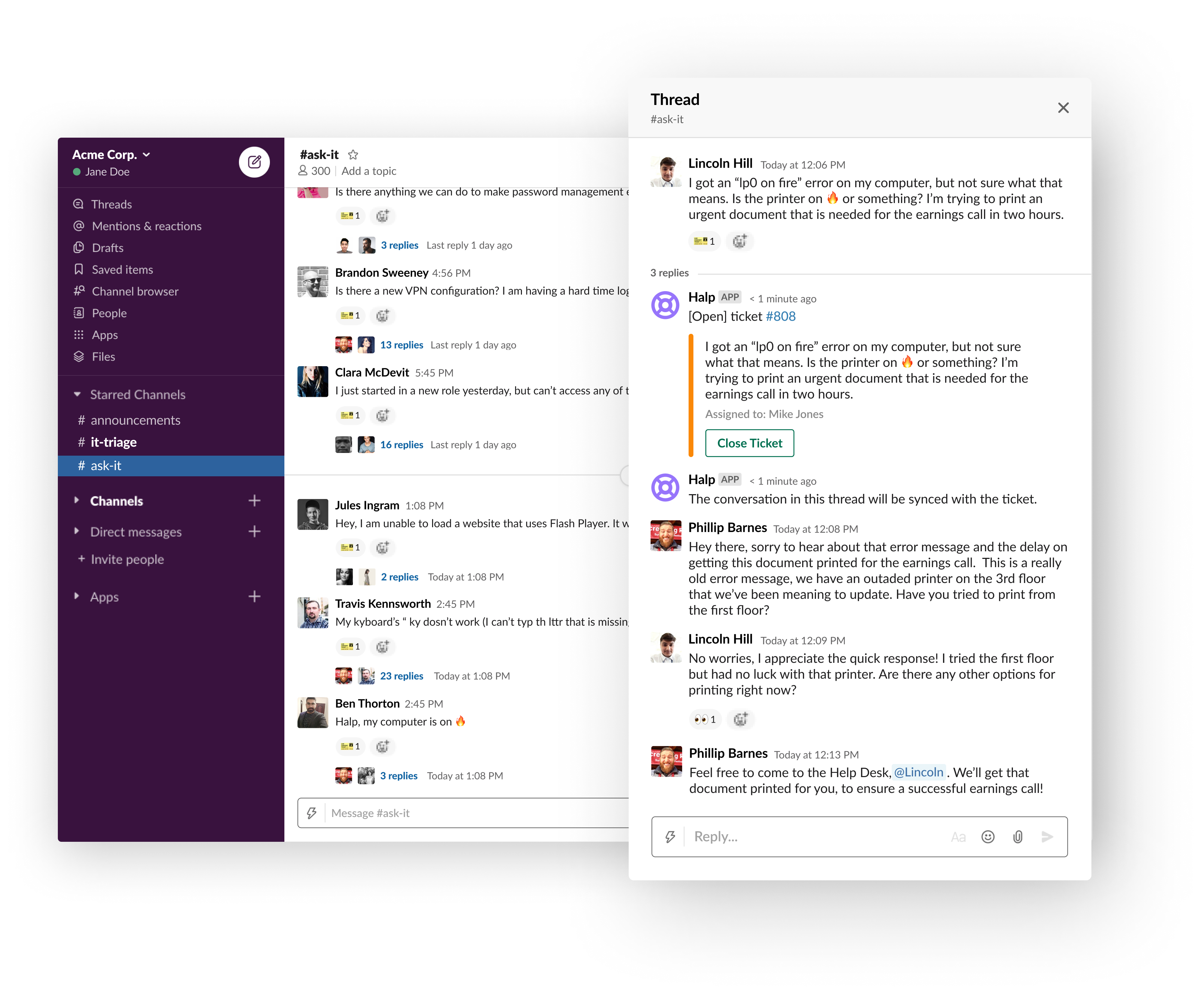
    The help desk staff is then provided a web interface through which they can remotely manage tickets and respond to requests via Slack. That approach eliminates the need for the help desk staff to be physically located in an office or employ a virtual private network (VPN) to access a help desk platform running on a local area network, he said.

    Richman noted too often employees wind up supporting each other because the process of generating a ticket is too complex. At a time when many employees are working from home to help combat the COVID-19 pandemic, it’s not really possible for employees to currently provide that mutual support.

    It’s not really clear to how many employees might ever be heading back into an office at this point, so Halp also provides a way for remote employees to more easily remain productive, he added.

    Slack and JIRA, of course, are already de facto standards among many DevOps teams. Halp should provide developers with a means to instantly resolve a wide range of low-level issues in near real-time by generating a help desk ticket via Slack.

    Richman noted that for any IT service management (ITSM) platform to be successful, it needs to meet users where they are. If the platform is too complex or intimidating, users will look to their fellow employees for help first. Before long, however, all the mutual support saps productivity. By making help just a simple Slack message away, many more issues will be resolved by help desk personnel who already know the right answer, he said.

    It’s too early to say how many more help desk tickets might be generated because of Slack. However, in the wake of the rush to remotely enable the entire enterprise, the need for an easier way to provide support is now more apparent than ever.

  • Coronavirus Response: Atlassian Expands Free Software

    Coronavirus Response: Atlassian Expands Free Software

    Atlassian announced today it will make cloud-based versions of Jira Software, Confluence, Jira Service Desk and Jira Core available for free as part of an effort to assist organizations whose employees are working remotely to help combat the COVID-19 coronavirus pandemic.

    Robert Chatwani, chief marketing officer for Atlassian, said given the current unprecedented situation the company has decided to increase the number of free versions of its software, including Jira project management software, which is widely employed by software development teams.

    The company already makes available free versions of its Trello, Bitbucket and Opsgenie software. Atlassian is hoping that once the current COVID-19 coronavirus crisis subsides, a much broader base of end users including ones from business units will have gained some firsthand experience employing its project management applications and collaboration tools, said Chatwani. Previously, Atlassian revealed it has a goal of having 100 million active users of its software.

    Chatwani said many organizations are finding that having employees working from home is the new normal for the foreseeable future. While regions in Asia appear to be recovering from the initial COVID-19 coronavirus outbreak, that does not appear to be the case in other regions anytime soon. Once organizations re-engineer their workflows, they may discover some knowledge workers are more productive working remotely, he noted.

    Less clear right now is whether having most or all employees working remotely is a temporary measure in the furtherance of a business continuity strategy or simply an inevitable future of work that, because of the current crisis, is arriving much earlier than expected.

    Of course, not every employee is psychologically tempered to work from home. Software developers, for example, may be more accustomed to working in isolation than project managers. Chatwani said it will be important for organizations to establish new routines to maintain organizational cohesion, including determining when development teams should launch sprints to build elements of an application. Managers also may want to designate “office hours” during which anyone can contact them online to make sure employees feel they are accessible, he added.

    Organizations should also get used to the idea that children may be both seen and heard while online meetings are occurring, given the fact that millions of children are now being schooled at home, Chatwani noted.

    Many organizations to one degree or another have been relying more on remote workers. There are even some companies that don’t have physical headquarters—all the employees already work remotely. Some of those organizations have even gone so far as to define a time zone around which the organization will standardize on regardless of where employees are physically located.

    Whatever the strategy employed, organizations that hope to succeed in this new climate need to go well beyond ensuring remote network connections are available and secure—they need to find a way to either maintain their existing processes and culture to make sure that whatever product or service they provide continues to be built or delivered in a way that allows the organization to survive and hopefully continue to thrive.

    — Mike Vizard

  • Atlassian Adds No-Code Automation Tool to Jira Cloud

    Atlassian Adds No-Code Automation Tool to Jira Cloud

    Atlassian announced today it has added a no-code tool to enable DevOps teams to make it easier to customize Jira project management software without having to learn how to code.

    Sean Regan, head of growth for software teams at Atlassian, said Automation for Jira will now become a core part of Jira Cloud that will be made available to all 65,000 customers using Jira software. Originally developed by Code Barrell, the tool was acquired by Atlassian last year. Previously, it had been available as an add-on adopted by about 6,500 customers, he said.

    The goal is to enable administrators that track projects to reduce the amount of time they spend on manually entering data. On average, organizations are spending 51 hours a month on administrative tasks involving the management of projects, Regan noted. Organizations should take inventory of those tasks and use Automation for Jira to start automating the tasks that are the most repetitive, he said.

    Automation for Jira, Regan said, is part of a larger ambitious effort to make Jira software accessible to more than 100 million active end users. By employing a visual tool to automate tasks it should become easier for a broader number of organizations to customize processes by defining rules that trigger events. Organizations will not be forced to depend on developers to write code to create those workflows, he noted.

    Automation for Jira

    Automation for Jira is also part of a concerted effort to modernize a venerable Jira project management application that has been widely employed by software development teams for decades. The ultimate goal is to enable software development teams to spend more time building applications versus trying to ascertain the status of any given development project, said Regan.

    The no-code Automation for Jira tool is also designed to integrate with collaboration tools Slack and Microsoft Teams within the context of a set of best DevOps practices. In fact, Regan noted any time there is an issue on a software development project it almost always comes down to a lack of collaboration between all the stakeholders involved.

    There is, of course, a lot more appreciation for project management software among DevOps teams that typically are trying to organize around multiple projects at the same time. A delay on one project might present an opportunity to reallocate resources to accelerate another. That can’t happen, however, if no one is aware of what bottlenecks exist in the first place.

    Not everyone appreciates all the nuances of project management. The less obtrusive project management becomes the more effective it tends to be. Developers are especially notorious for not always updating project management applications, which usually results in project managers having to nag them to share information that other teams are counting on before they can move forward. Hopefully, there may come a day when all project management applications are updated automatically. In the meantime, the less time spent on manual tasks the happier all the members of the software development team are likely to be.

    — Mike Vizard

  • Enterprise Service Management with Jira Service Desk and Confluence

    Enterprise Service Management with Jira Service Desk and Confluence

    Companies are looking to reduce cost, create efficiency and improve productivity of all internal and external customer services. In many organizations, different departments are using individual tools to provide their customers with the services they need. They can work in silos, can provide inadequate quality of service and not to mention that the portfolio of different tools can be quite costly.

    Enterprise Services Management (ESM) is a popular approach to implementing services within the organization. Departments such as human resources (HR), operations and marketing are seeing the value of Information Technology Service Management (ITSM) processes, and companies are looking to repeat that same value across the business. ESM allows all departments in the organization the opportunity to standardize tools and processes across all of their services departments. This standardization of tools and processes can create transparency, can improve the customer experience and in the end can reduce overall cost.

    There are quite few tools that can be used to support the implementation of ESM. Two components of an effective ESM implementation include a shared service desk and a knowledge base. 

    The shared service desk encourages the standardization of tools, and even paves the way for the alignment of processes. Departments should find tools that can be scaled up from just ITSM to support requirements across different service departments. There are quite a few applications available to companies for a shared service desk.

    In order to promote adoption, organizations must consider the ease of usability for both customers and customer service providers. Atlassian has two applications, Jira Service Desk (JSD) and Confluence, that together provide companies their shared service desk and knowledge base components of their ESM solution.

    JSD can be used as the foundation of an organization’s ESM implementation. Having JSD as the standardized service desk provides customers with a single customizable portal for all requests across the business. Unlike Jira Software and Jira Core, JSD licensed users are called agents. Companies only pay for agent licenses and do not pay for their customers.

    Below are just some of the features that are available with JSD:

    • A portal that can organize request types for customers. This provides them one place to submit all of their requests across the business.
    • Customizable workflows that include features such as custom statuses, conditions and post-functions.
    • Queues that provide the ability for agents to monitor and manage requests.
    • Service Level Agreements (SLAs) that help set time frames for agents to complete a certain step such as responding to the customer and even resolving the request.
    • The ability to automate certain workflow steps.
    • A plethora of built-in reports, to include one that shows overall customer feedback satisfaction.

    The next component is a knowledge-base. Why is a knowledge base valuable to both customers and agents? Confluence is a wiki that helps teams organize and share information. A well configured knowledge base can empower the customer to answer the questions they have without submitting a request. This can reduce the time agents spend on common requests. 

    Confluence has the ability to create a knowledge base, and seamlessly integrate it with JSD. Confluence is organized by pages, which are structured in a series of parent-child relationships—in the end form it’s called a page tree. To add/edit articles in the knowledge base, the person will require a Confluence user license. However, any customer can read the articles in a knowledge base without a license.

    Below are just a few of the available features with a Confluence knowledge base:

    • Built-in templates for how-to and troubleshooting articles.
    • Page labels that help serve as keywords for customers and service desk agents when searching for knowledge base articles.

    Below is a process flow for customers submitting a request in a typical ESM implementation using JSD and Confluence:

    1. User launches portal in web browser.
    2. In the portal, if a knowledge base is configured, the user can start typing keywords to search for articles that answer their question.
    3. If the user does not find the answer to their question in the knowledge base, they can navigate within the portal to the request type they wish to submit. The request types can be grouped by department.
    4. User completes the request form. Fields can be custom or out of the box. They can also be required or optional.
    5. Form is submitted and it creates an issue in JSD. 
    6. The issue is added to one or more agent queues. Agents can also receive notifications in email, and third party applications such as Slack, Opsgenie or PagerDuty.
    7. Agent communicates with the customer via comments in the Jira issue, and the customer communicates with agents via the customer request interface.
    8. Agent works on request in until its resolution.

    In summary, ESM is continuing to improve value in organizations for many reasons. One part of a successful implementation of ESM is which tools are selected for customers and customer service providers.

    — Evan Golden

  • Atlassian Extends Road Mapping in Jira

    Atlassian Extends Road Mapping in Jira

    Atlassian has updated its Jira project management software for managing software development initiatives to add more capabilities to road mapping tools that teams use to share plans and update progress.

    Matt Ryall, head of product for Jira Software at Atlassian, said the road mapping tools first provided in Jira a year ago are now being employed by 45% of customers, making it the most rapidly adopted feature in 18 years the project management application has been around. Thus far, Atlassian reports end users have created more than 2 million road map items within Jira.

    Additional capabilities added to the road mapping tools provided in the latest edition of Jira include a drag-and-drop dependency mapping feature, support for filters to track projects more easily, a progress bar that indicates macro-level progress of each road map item, an ability to set up hierarchy levels on the road map, and the ability to set up road maps inline with a single click.

    road mapping

    In addition, a live Jira road map can now be integrated with Confluence, a complementary tool from Atlassian for managing projects spanning multiple teams.

    Atlassian currently offers several road-mapping solutions, including a team-level option in Jira, a program-level road map known as Portfolio for Jira and an enterprise organization-level version dubbed Jira Align. Atlassian has committed to making all three of these offerings work better together in 2020.

    In addition, Atlassian is committing to bringing together the various road-mapping capabilities is provides across its portfolio. The company plans to enable organizations to aggregate multiple road maps into a single consumable artifact and is exploring ways to make road-mapping functionality accessible beyond Jira users. As more organizations in the age of digital business realize how much their future success depends on timely delivery of software, the number of end users who want to be able to monitor the pace of application development projects continues to expand.

    In general, Ryall said Atlassian is focused on modernizing the end user experience for a project management application that is employed by more than 65,000 customers to manage software development projects. Much of that effort is focused on adding a visualization layer that will make it easier to navigate software development projects that continue to become more complex as organizations embrace, for example, microservices-based architectures.

    Competition across the project management category is intensifying as startups look to drive alternative approaches that they claim are designed to support, for example, a mobile-first user experience that makes it easy to visualize data. It’s not clear to what degree any of those offerings are gaining traction, but a significant amount of venture capital is starting to pour into the sector.

    In the meantime, visualization tools that promise to make it easier to appreciate what project events will have the most impact on the business are always going to be welcome. The real challenge, of course, remains getting developers to share accurate assessments of their progress with project team leaders. The good news is, it’s becoming much easier to automatically gather that data from the various repositories developers now rely on to check code in and out of various systems without having to ask anyone for an actual update.

    — Mike Vizard

  • Crossing the Ecosystem Boundaries: How ServiceNow, Salesforce and Atlassian Work Together

    Crossing the Ecosystem Boundaries: How ServiceNow, Salesforce and Atlassian Work Together

    Although these platforms were originally designed to serve different functional roles—Atlassian’s help desk, ServiceNow’s IT service management and Salesforces’ sales and CRM—from the outset, they all addressed the evolving mega-management and leadership issue: collaboration across teams and business units.

    Independent action, siloed organizations and disconnected thinking was increasingly giving way to more agile, interdependent, collaborative problem-solving practices and methodologies. Whether the differences were political, cultural, intellectual or institutional, survival became progressively dependent on living, working and communicating more effectively across all boarders. It was in our individual and collective, both internally and externally, best interest to do so.

    Effective companies and the platforms that served them needed to promote a culture that collaborated with less friction across five boundary types (“CCL’s” Center for Creative Leadership’s Boundary-Spanning Leadership)

    • Horizontal: Expertise, function, peers.
    • Vertical: Rank, class, seniority, authority, power.
    • Stakeholder: Partners, constituencies, value chain, communities.
    • Demographic: Gender, generation, nationality, culture, personality, ideology.
    • Geographic: Location, region, markets, distance.

    Collaboration initiatives generally begin by focusing on existing boundaries within a specific business unit or team. Then they expand to forge common ground on specific projects across teams, and finally, moved across all five boundary types with multiple teams and interdependent projects which some refer to as complex adaptive systems. These platforms were launched, quickly developed and continue to evolve to meet this collaboration challenge head on.

    Making Sense of the Blurring Boundaries Across Convergent Platform Roadmaps

    Boundaries are difficult to identify when they are continuously moving and being redefined. Instead of taking a more traditional route of seizing mind and market share by differentiating and establishing/defending clear boundaries, these platforms are doing the opposite, they are converging. The ecosystems that support each platform are also beginning to look increasingly similar—but more on this in a future post.

    The convergence of frameworks such as ITSM and Agile represents a tangential and interconnected set of moving boundaries intersecting somewhere along the spectrum at ITIL—ITIL4 if you’re counting. As all three platforms seek broader market penetration reflecting this full spectrum of frameworks, consider using the ITIL4 Edition’s 17 service management practices as a cheat-sheet for their boundary spanning enterprise roadmaps:

    • Business analysis.
    • Service catalog management.
    • Service design.
    • Service level management.
    • Availability management.
    • Capacity and performance management.
    • Service continuity management.
    • Monitoring and event management.
    • Service desk.
    • Incident management.
    • Service request management–includes both request fulfillment and access management of ITIL V3.
    • Problem management.
    • Release management–includes an explanation about releases in waterfall driven environments and DevOps driven organizations.
    • Change control–formerly known as change management.
    • Service validation and testing.
    • Service configuration management.
    • IT asset management.

    As organizations prioritize and re-prioritize the list reflecting their Agile/ITSM journey, the boundaries between platforms will move, and in many cases, simply disappear. As this journey plays out in your company, the platforms and ecosystems that support each will need be rationalized. Said differently, you may be asked or told to choose one, but as our experience suggests, you won’t need to do that today.

    Instead of diving into the technical features and benefits of each platform and ecosystem, take some time to reflect the benefits of expanding your boundaries to address the business challenges you are facing now and expect over the next 18 months.

    Where does this leave you and your team today?

    While everything else gets worked out….

    • Review the ITIL4 Edition’s 17 service management practices and rank prioritize for your team and company.
    • Do a self-assessment on your personal commitment to, and comfort with, the benefits of expanding your boundaries.
    • Meet with your team and have each of the individuals do the same.
    • Encourage conversations about where the platforms appear to be focusing (e.g., Atlassian focusing more on ITSM and ServiceNow paying more lip service to Agile).
    • When the time comes to make recommendations on app consolidation or choosing one platform over another, your team will be well prepared to do so with open, informed and agile minds.

    One last note on the benefits of expanding boundaries: Leaders who effectively reach beyond their present boundaries have the advantage when faced with solving problems, creating innovative solutions and evolving to thrive in today’s interdependent, complex world. The benefits of boundary spanning leadership include:

    • Increased organizational agility to respond to a dynamic marketplace.
    • Advanced cross-organizational innovation processes.
    • Achievement of mission-critical, bottom-line results:
      • An engaged and empowered workplace at all levels.
      • Flexible, cross-functional learning capabilities to solve problems and adapt to change.
      • Better-managed risks and rewards through enduring cross-sector partnerships.
      • Higher-performing virtual teams.
      • Global mindsets and cross-regional collaboration.

    Use these bullets to get your team spanning conversation started.

    — Joshua Platt

  • Atlassian Looks to the Cloud

    Atlassian Looks to the Cloud

    As part of an effort to accelerate migrations to the cloud, Atlassian is making instances of Jira Software, Confluence, Jira Service Desk and Jira Core running in the cloud available for free, as well as premium options that provide access to the same software with access to additional features and support.

    Harsh Jawharkar, head of go-to-market for Cloud Platform at Atlassian, said it’s apparent most organizations want to shift from on-premises to cloud versions of Atlassian platforms. However, they need control and more transparency into how much that shift will cost, said Jawharkar.

    At the same time, Atlassian views the cloud as an opportunity to expose more end users to its offerings by making them available for free. These editions of Jira Software, Confluence, Jira Service Desk and Jira Core will be available in the coming months alongside existing free editions of Trello, Bitbucket and Opsgenie.

    In addition, Atlassian is now extending its Cloud Premium service to now include Jira Software and Confluence, with a premium edition of the Jira Service Desk coming soon. Atlassian is also making 50% to 75% discounts available to eligible academic organizations and non-profit organizations.

    Atlassian is also moving to provide organizations with more control over where data gets stored. Customers now can choose where data in the Atlassian cloud will be stored to address regulatory compliance concerns. Atlassian also recently added a data encryption at rest and in-transit capability to ensure no data stored in its cloud is compromised by unauthorized access.

    In addition, Atlassian is updating Atlassian Access, a console for managing access to its various platforms, to include support for Google Cloud Identity and Microsoft Active Directory Federation Services (ADFS). Atlassian also committed to providing support for multiple cloud access brokers (CASBs) starting with an early access program involving McAfee and Bitglass before the end of this year.

    Atlassian is also promising enhancements to its audit log and early access to tools, which will help organizations better understand how Atlassian software is being consumed and their associated billing costs. The whole process of onboarding and offboarding users is becoming critical as organizations become more concerned about controlling their cloud application costs, noted Jawharkar.

    Finally, Atlassian is enabling customers to customize the URLs associated with Atlassian cloud service to reflect their own brands.

    Atlassian today has more than 150,000 customers consuming its software, including Costco, Delta Airlines, Office Depot and Visa. The most widely employed Atlassian application in DevOps environments is Jira, a project management application optimized for tracking software development projects. Atlassian is now trying to extend that base of customers to increase usage of OpsGenie, a set of tools for managing alerts.

    Obviously, each IT organization is going to transition to the cloud at its own pace. The issue most of them are wrestling with now is determining whether it makes more economic sense to move to the cloud or stick with the on-premises IT environment they already have in place.

    — Mike Vizard

  • CircleCI Adds Integration With Atlassian Jira

    CircleCI Adds Integration With Atlassian Jira

    One of the trickier issues IT vendors in the age of DevOps are dealing with is that very few organizations have standardized on a platform from a single vendor. Not only do organizations mix and match tools as they see fit, but different departments within the same organization also embrace different tools to automate the same tasks. That DevOps reality requires collaboration between IT vendors that normally would prefer to not work together, whether they like it or not.

    Case in point is a move by CircleCI, a provider of a continuous integration/continuous delivery (CI/CD) platform, to provide integration with the Jira project management software developed by Atlassian. While Atlassian makes its own CI/CD platform, customers and business partners alike have made it clear they needed CircleCI to support Jira, says Tom Trahan, head of business development for CircleCI. In some cases, those organizations have adopted Jira without having Atlassian’s CI/CD platform in their environment, while in other cases, a department within one part of an organization has opted for CircleCI while others are employing a CI/CD platform from Atlassian.

    At the same time, Trahan notes that many DevOps projects now span multiple organizations that have standardized on different DevOps platforms. Jira provides a way for teams in differentorganizations to manage those projects collaboratively, he says.

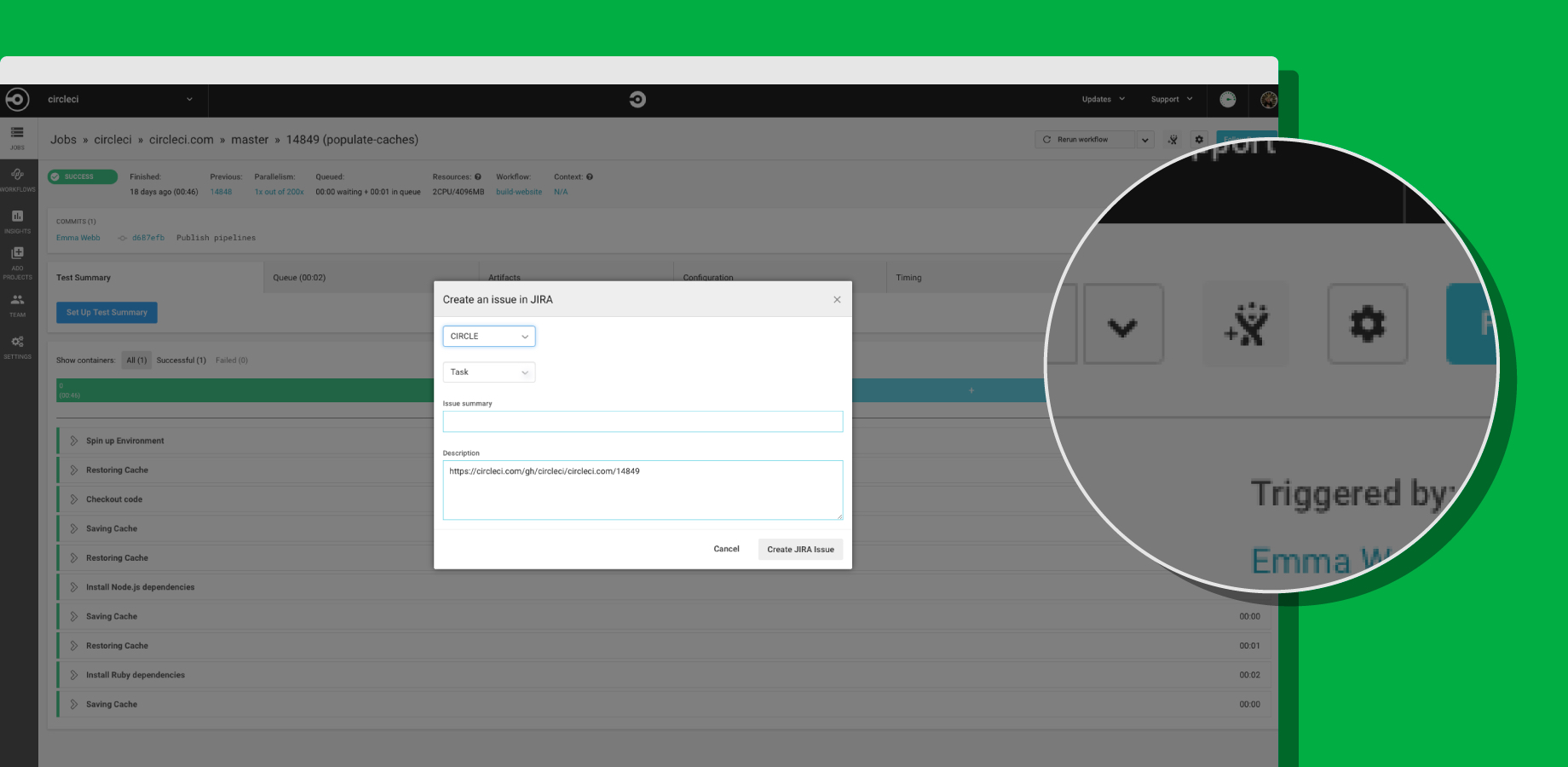
    To achieve integration with Jira, CircleCI now offers its CircleCI for Jira module, through which teams can assign new tasks and fixes based on job status with CircleCI orbs, a set of reusable configuration packages that allow CircleCI customers to integrate external tools into their workflow. That capability also makes it possible to launch new Jira issues directly from the job page within the CircleCI user interface.

    CircleCI Integrates with Jira

    Trahan says that in the polyglot world of DevOps, it is apparent vendors are being required to expose open application programming interfaces (APIs) that enable organizations to build and integrate various DevOps platforms anyway they want. Organizations won’t consider IT vendors that are too rigid in terms of what level of integration they enable, he says.

    As DevOps continues to evolve, it’s clear that a wave of merger and acquisition activity is makeing the IT vendor landscape somewhat volatile. Providers of DevOps tools that organizations have standardized on are being acquired at a rapid rate. IT organizations can’t be certain that any given tool or platform they are using won’t be scooped up by a vendor they might not want to engage. In that kind of environment, it’s critical for IT organizations to leverage open APIs that not only make it easier to collaborate, but also replace elements of their DevOps stack whenever they deem necessary.

    The challenge, of course, is that IT vendors are always trying to lock customers in as much as they can. Those efforts are not as heavy-handed as they once might have been. But almost inevitably, the extension being offered to access functionality will disappear if the underlying platform that enables it suddenly disappears. IT organizations, therefore, need to determine whether those extensions are worth any potential trouble they might cause somewhere down the DevOps road.

    — Mike Vizard

  • SmartBear Integrates Test Tools with Atlassian DevOps Platforms

    SmartBear Integrates Test Tools with Atlassian DevOps Platforms

    At the Atlassian Summit 2019 conference this week, SmartBear announced it has integrated the Zephyr test automation tools it acquired last year with the Jira portfolio of tools from Atlassian.

    In addition, SmartBear announced it has integrated Zephyr with the rest of the company’s SoapUI Pro, TestComplete, CrossBrowserTesting and LoadNinja testing tools.

    SmartBear committed to integrating its entire portfolio of tools with other Atlassian offerings as well, including the Bitbucket continuous integration/continuous development platform and Confluence content management software.

    In general, SmartBear views efforts to modernize applications using DevOps practices as a primary driver of increased demand for tools to test application programming interfaces (APIs). A recent global survey of 3,000 API developers, architects, testers and product leaders conducted by SmartBear finds nearly three-quarters of respondents believe that adoption of microservice architectures will drive the biggest growth in API adoption in the next two years.

    The biggest challenge faced by well over half the respondents (58%) is finding a way to standardize API development. In pursuit of that goal, the survey finds 69% of survey respondents are now developing APIs that comply with the OpenAPI Specification (OAS). That specification defines a language-agnostic interface to RESTful APIs that enables both humans and computers to discover and understand the capabilities of the service without access to source code or documentation, or having to inspect network traffic.

    The SmartBear survey also finds 76% of respondents say they already have a formal API monitoring process in place and that 76% of organizations are developing both internal and public-facing APIs.

    Daniel Giordano, associate director of product marketing for SmartBear, said these days there’s a lot more focus on trying to make it easier to discover APIs whenever possible by setting up API catalogs. Those catalogs are also now making it easier for organizations to reuse APIs rather than develop new ones for each microservice that gets developed, he added.

    In fact, Giordano noted that many organizations now define the APIs they are going to depend on to integrate their applications long before they begin to write application code. Those APIs are then reviewed by an architecture team to make sure they meet performance requirements while still being flexible enough to evolve consistently with the other APIs the organization needs to maintain, he said.

    Today, organizations make use of many more private APIs than they do public ones. APIs first came into their own as a means to expose applications to enable external applications to consume data from another application as part of the so-called API Economy. Since then, the number of private APIs that organizations rely on to integrate internal applications has exploded. In fact, building and deploying those APIs has become an integral part of any DevOps process.

    Naturally, the relationship between API management and DevOps processes is still evolving. But as DevOps processes within IT organizations continue to mature it’s only a matter of time before they are applied equally to both the applications being developed and the APIs relied on to integrate them.

    — Mike Vizard

  • Atlassian Integrates DevOps Portfolio

    Atlassian Integrates DevOps Portfolio

    At its Atlassian Summit 2019 conference, Atlassian announced updates to all the DevOps tools that make up Atlassian Data Center as well as upgrades to its Opsgenie incident management software to provide deeper integration with the rest of the company’s portfolio.

    At the same time, Atlassian revealed it has rebranded the AgileCraft business planning application it acquired earlier this year to Jira Agile.

    New capabilities added to Atlassian Data Center include the ability to set up smart mirror farms for Bitbucket Data Center; content delivery network (CDN) support for Jira Software, Confluence, Bitbucket and Jira Service Desk Data Center; rate limiting for Bitbucket, Jira Software and Jira Service Desk Data Center; issue archiving for Jira Software and Jira Service Desk Data Center; templates for deploying on Microsoft Azure and Amazon Web Services public cloud; and a mobile application for Jira Server and Data Center.

    Atlassian Data Center now incorporates Jira Software 8.0, Confluence 7.0, Bitbucket 6.0, Jira Service Desk 4.0 and Portfolio 3.0. The latest version of Jira Software 8.0 now executes advanced searches using Jira Query Language (JQL) 31% faster on average, while agile boards load two times faster and re-indexing times are now 71% faster. The latest version of Confluence adds support for multimedia files and additional analytics tools to the content management platform.

    The Atlassian Cloud service has also been expanded to increase the user limit to 5,000, with an early access program signaling an intention to bring that up to 10,000 users soon.

    Meanwhile, specific capabilities being added to OpsGenie include support for incident timelines to track response activities and key events; postmortems to help discover root causes and track remediation activities, a user interface that aligns with the rest of the Atlassian portfolio that fosters bi-directional workflow, the ability to automatically trigger events, integration with Slack collaboration software, the ability to encrypt data and Statuspage services integration to make it possible to share alerts with third-party services. Atlassian has also rebranded its Automation Actions to Opsgenie Actions; the company acquired Opsgenie last fall.

    Berkay Mollamustafaoglu, co-founder and head of product for Opsgenie, said now that Opsgenie is part of the larger Atlassian product family there’s clearly more focus on helping organizations integrate best DevOps practices with more structured processes based on the ITIL format. The latest version of the ITIL format provides makes those processes more flexible, but there’s still plenty of room for Atlassian to improve the tenor of the conversation across what has become a bi-modal IT operations environment. As the level of synchronization across those processes increases, the amount of fatigue IT operations teams experience lessens as the number of alerts that need to be correlated across multiple platforms decreases, Mollamustafaoglu noted. In fact, rather than convening in a physical “war room” to resolve a issue, most incidents will increasingly be resolved via online chats, he said.

    It may take a while before a period of détente emerges between advocates of DevOps and ITIL processes inevitably emerges. In the meantime, the more IT services management (ITSM) platforms become integrated with one another, the easier it becomes to achieve that goal. In fact, the major obstacle that needs to be overcome are much more likely to cultural rather than the level of integration that can be achieved using any specific ITSM platform.

    — Mike Vizard