Tag: application development

  • DevOps Adoption in Salesforce Environments is Advancing

    DevOps Adoption in Salesforce Environments is Advancing

    A global survey of DevOps professionals building apps in Salesforce environments found 44% of respondents reported their organization has a continuous integration/continuous delivery (CI/CD) platform in place, with another 39% planning to adopt one.

    The survey, conducted by Gearset, a provider of a DevOps platform for building custom applications in Salesforce environments, polled 1,254 DevOps professionals that are building and deploying custom applications on top of the Salesforce software-as-a-service (SaaS) platform. The survey also found nearly half (49%) implemented change monitoring, with another 33% planning to follow suit. More than half (52%) implemented source-drive workflows, with another 33% similarly planning to follow suit. A total of 41% of respondents noted that, over the last 12 months, they have more custom code to manage.

    Overall, the survey found 54% of respondents reported increased productivity, followed by improved quality and faster releases at 41% each. Nearly three-quarters (72%) reported they are able to deploy changes from one environment to another within four hours. Well over a third (39%) of this group are able to complete a deployment in less than an hour. Just under a quarter (23%) are also able to release code multiple times a week.

    However, only 18% can release a new feature to production in less than a day. Nearly half can complete the release within one day to a week. A total of 43% claimed that less than 10% of releases include a bug or error, with 46% reporting they can roll back a release in a day or less, if needed. Just over a third can restore a process in a day or less.

    The biggest obstacle to DevOps adoption is lack of experience (41%), followed by a third (29%) of respondents that reported difficulties with collaboration and another 29% that experienced limited buy-in from the rest of the application development team. Only 30% received DevOps training once a month, with 50% citing additional CI/CD and automation training as their biggest need.

    Despite these issues, a full 98% are generating a return on their DevOps investments, with 59% of teams reporting returns of over $10,000 per month and 40% reporting returns in excess of $50,000 per month. The top two priorities for the next 12 months are to consolidate systems and processes and improve flexibility, tied at 47% each, followed closely by 43% that noted that digital business transformation is a top priority.

    David Runciman, technical content manager for Gearset, said that while Salesforce applications are based on unique object architecture, it’s apparent that organizations are extending those applications using, for example, low-code tools more quickly. The issue that creates is, as organizations move to deploy these applications, they are encountering bottlenecks that conspire to slow the pace of innovation, he noted.

    The maturity level of DevOps teams building these applications will naturally vary. However, as the number of applications being built—especially by professional developers—increases, it’s only a matter of time before more organizations embrace DevOps best practices to bring order to the chaos, noted Runciman. While there may be some citizen developers building applications in Salesforce environments, the bulk of enterprise-class applications are built by professional developers that typically appreciate DevOps best practices, he added.

    The issue remaining is just how quickly those DevOps teams will be able to implement DevOps best practices as demand for additional applications grows.

  • Understanding Cloud APIs

    Understanding Cloud APIs

    Six out of every 10 businesses had moved their workloads to the cloud as of last year. More steady traffic in the cloud and more direct cloud instances mean more to juggle–and the need for greater customization and integration. That’s where APIs come in. APIs are doing for the cloud what they did for on-premises resources: Segregating, simplifying, specializing and integrating services across a network–only this time, it’s future-proofing the architecture by building it in the cloud. As one cybersecurity researcher quipped, “Everyone wants to use APIs to build innovative solutions, but no one wants to invest in building them.” Cloud APIs will soon spell the difference between companies that can keep up with digitization and those that can’t.

    Ultimately, it will come down to which organizations take the time to understand them and use them to their best benefit.

    What is a Cloud API?

    Simply put, “a cloud API is a software interface that allows developers to link cloud computing services together.” APIs allow services to share functionality and information for other programs to use, and nowhere is this more important than in the interconnected ecosystem of the cloud.

    Because APIs act as a waiter in a restaurant, the better the waiter, the simpler ordering will be for you and for your customers. The best cloud API connects backend cloud components, services and platforms and does all the busy work so all your users see on the front end is a seamless customer experience. Since most of the work of tomorrow will be in the cloud (and is moving there in ever-increasing numbers), to not build up this functionality now is to take a deliberate risk.

    Types of Cloud APIs

    There are several types of cloud APIs based on the four major areas where cloud computing will require integration–either with another platform or another cloud provider.

    ● PaaS APIs (Service level): These platform-as-a-service APIs are designed to integrate with databases, portals, storage components and messaging systems, providing access and functionality in the cloud.
    ● SaaS APIs (Service level): Referred to as software-as-a-service APIs, these connect application layer resources with the cloud and underlying IT infrastructure. A CRM is a good example of where these types of APIs can be used to create a “cloud application extension” for your ecosystem.
    ● IaaS APIs (Service level): Infrastructure-as-a-service APIs control the distribution and deployment of specific cloud resources, performing such tasks as rapid provisioning and de-provisioning, network configurations and workload (VM) management in the cloud.
    ● Cross-platform APIs: Because many environments use multiple cloud providers and platforms, cross-platform compatibility is required. Cross-platform APIs streamline data management by allowing tenants to access their cloud-based resources and workloads from any of their cloud providers, not just their primary one. They provide a higher level of abstraction by translating a specific provider’s API calls into a more generic form, making accessibility, manageability and interoperability in the cloud easier.

    Cloud API Security

    In many respects, the security threats faced by cloud APIs are the same that any cloud-based resource would encounter and present the same challenges. That being said, malicious API traffic surged over 117% last year, from an average of 12 million to over 26 million calls, according to one industry report. The same study revealed that over a third of respondents experienced authentication and data exposure-related incidents with their APIs, and 54% delayed rolling out a new application because of API security concerns.

    Unguarded, a cloud API could present the keys to the kingdom and allow an attacker to access the hub of not just one but several cloud providers and their workloads, resources and assets. Protecting cloud-based APIs with standard authentication and authorization practices such as OAuth2.0 and OpenID Connect can reduce the chance of a lateral attack.

    Why Cloud APIs

    Cloud usage is not set to slow down and will soon become ubiquitous. Companies that aren’t on it are migrating their workloads in greater numbers and entrepreneurial ventures are spinning up as cloud-native. Cloud APIs are simply the logical response to the complexities that come with the terrain. Without cloud APIs, the user experience will be negatively impacted and will only become more apparent when compared with companies that do use cloud APIs.

    For companies looking to innovate in 2023 and release new applications, APIs are the way to cut-and-paste the process safely. Similarly, as more cloud-based services become API-reliant, application reusability is another factor requiring cloud APIs. And lastly, the complexity of cloud products, platforms and ecosystems (even within one organization) makes cloud APIs a necessity for smooth interoperability. And they help with scalability–multiple components of a cloud-based service can be parsed out, updated and patched individually and refined separately so that one area can develop without being dragged down by the whole. Cloud APIs allow for that granular level of customization that can help an organization refine its edge.

    Simply put, organizations will need these APIs to not only compete but stay relevant as businesses continue to take their fight to the cloud.

  • NETSCOUT Taps F5 to Optimize Custom App Performance

    NETSCOUT Taps F5 to Optimize Custom App Performance

    Through its alliance with F5, NETSCOUT Systems has extended the reach of its nGeniusOne enterprise performance management platform to support custom applications.

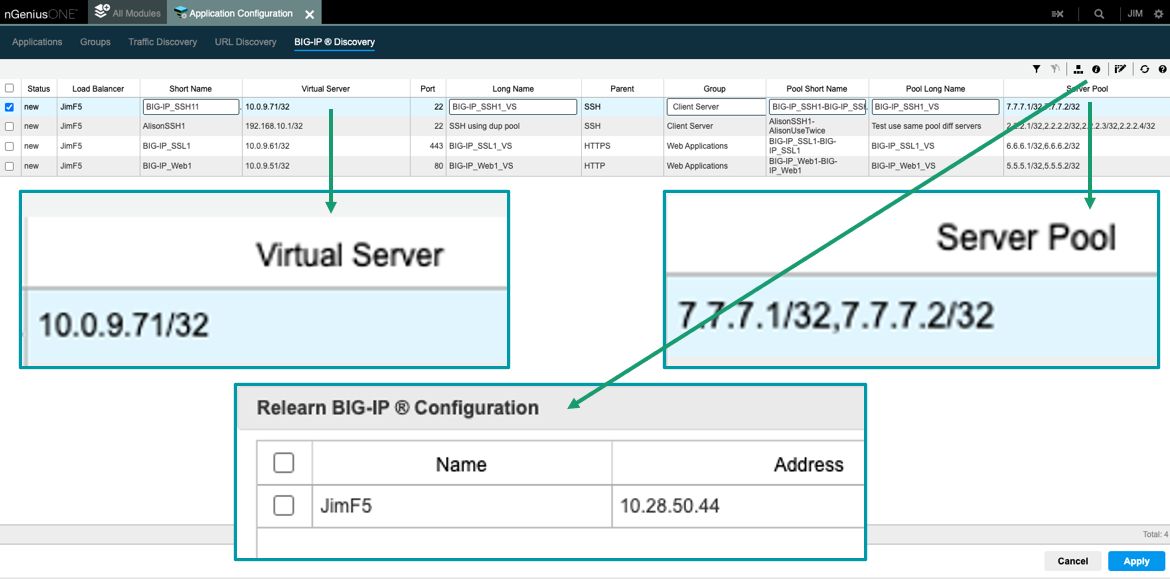
    The nGeniusONE platform supports more than 1,000 voice, video and business data applications using NETSCOUT InfiniStreamNG appliances in combination with nGeniusONE to provide visibility into any infrastructure environment, including data centers, private and public cloud and co-location facilities. The integration with F5 extends those capabilities to add support for custom applications via integration with F5 BIG-IP server pool definitions that can now be directly imported into nGeniusOne.

    Eileen Haggerty, area vice president for enterprise product and solutions marketing for NETSCOUT, said that approach enables nGeniusOne to access clear, unencrypted traffic from the BIG-IP Local Traffic Manager.

    As more cloud-native applications built using microservices are deployed across distributed computing environments, network latency is becoming a bigger DevOps challenge. A wide range of networking issues can adversely impact application performance, but without any visibility into network traffic, it can be challenging to determine the root cause of an issue. NETSCOUT has deployed a global network of appliances to surface those issues.

    A recent report published by Cloud Security Alliance (CSA) found the average enterprise uses 464 custom applications and expects to deploy 37 new applications in the next 12 months. At that rate, the number of organizations likely to encounter networking issues is only going to increase, noted Haggerty.

    It’s not clear to what degree network operations (NetOps) teams are becoming integrated with DevOps teams that build and deploy custom applications. The need for both teams to collaborate more effectively is becoming more apparent as more application code is deployed at the network edge. In some cases, developers are now programmatically invoking network resources directly, while other organizations provide developers access to a portal to self-service their requirements within the context of a set of pre-defined guardrails. Regardless of approach, the need for greater visibility into the underlying networks that custom applications depend on has become critical.

    Exactly how much that need will drive organizations to embrace one networking vendor over another remains to be seen. DevOps teams are starting to exercise more influence as organizations realize how much they depend on custom software to drive digital business processes. DevOps teams need to be able to understand whether an issue is the result of a networking problem or an inherent problem with the code written or the way an application has been deployed.

    Of course, DevOps and NetOps teams don’t share a common nomenclature so the cultural divide between these teams can be wide. The simpler it becomes for NetOps teams to share visibility into networking services the easier it becomes to bridge that divide. Developers should be able to see for themselves how changes to application code might potentially improve network performance. In the absence of any proof to the contrary, most DevOps teams will simply assume there is a fundamental flaw in the networking services being provided.

  • Tips For Standardizing API Life Cycle Management

    Tips For Standardizing API Life Cycle Management

    Software life cycle management is becoming more critical for today’s technology-fueled organizations—because you can’t just release software into the world and expect it to work perfectly for years to come. More often than not, development teams must constantly adapt their software, progressively add features and cater to new use cases as they arise. This is nothing new for web APIs, which are prone to continual evolution and whose integrations require regular upkeep to avoid breaking changes.

    As such, the discipline of API life cycle management has gathered steam. This concept focuses not only on the design and development of APIs, but on the entire life cycle, including testing, monitoring, documentation, maintenance, versioning, CI/CD and even deprecation. Localizing a strategy for API life cycle management from the get-go can increase the longevity and usability of a platform. It also helps software providers treat their APIs as an iterable product rather than a one-and-done offshoot of a digital platform.

    I recently met with Rakshith Rao, co-founder and CEO of APIwiz, to gather insights on standardizing API management across an organization. According to Rao, there are many ways to implement governance to make these interfaces more consistent. For example, automated security analysis, contract-driven development and implementing style guides are just a few ways to wrangle an increasingly extensive API portfolio. Below, we’ll review these tips and others to consider how to best manage API life cycles, hopefully, before sprawl sets in.

    Four Tips to Increase API Governance

    Medium-to-large organizations might be handling thousands of APIs, said Rao. This new paradigm brings many opportunities for digital transformation, but it can also be a nightmare to manage. Too often, APIs aren’t built with tangible business requirements taking center stage.

    Many of these initiatives didn’t begin with consistent policies from the get-go. For example, it’s also easy to skip out on documenting internal services. But, fractured practices harm discovery and reusability. To rectify this issue, Rao shared many ways in which technical leads can promote better API hygiene.

    Enable Visibility of API Usage With API Monitoring

    The API life cycle spans stages of design, deployment, deprecation and eventual retirement. And throughout this life cycle, developers will likely release new versions of the same service. But although you want consumers to adopt the latest version, some large organizations must support legacy versions for years to come, explained Rao. As a result, different API versions are often developed and run simultaneously by various internal or partner teams. Sometimes, “no one turned the tap off and the water’s still running,” he said.

    To enhance visibility for all active (and non-active) sessions, it’s important to conduct ongoing monitoring. This will help discover individual client usage patterns and help avoid shadow or zombie APIs from forming. These forgotten endpoints could pose security vulnerabilities, said Rao, as you might not enforce best practices on older versions if you don’t know they exist.

    Automate Security Analysis to Capture Vulnerabilities at the Design Level

    Not having consistency between APIs could pose data compliance issues. One method to avoid errors is to conduct design reviews on an ongoing basis, and to automate this security analysis at the design level, said Rao. Perhaps authentication tokens need to be encoded, logging requests aren’t coming in, or payloads are structured incorrectly. Whatever the case, having a complete checklist to scan and performing ongoing security analysis early on to catch these inconsistencies can be a big boon to overall governance and long-term cybersecurity.

    Adopt Style Guides but Allow for Flexibility

    Very simple data modeling errors could severely impact a system, said Rao. Thus, it’s in an organization’s best interest to use standard taxonomies and ensure data governance is an overall aspect of life cycle management. One way to ensure consistency is by using specification-driven development—OpenAPI is a common standard for this need.

    Rao also suggested developing API design style guidelines but admitted that these guides become challenging to enforce and limit as an organization scales. This is because various teams in different departments will have different API needs and often design their interfaces for various front-end requirements. His takeaway is to centralize practices but take a GUI approach to configuring and sharing them. This way, API style can be “minimally intrusive but uniformly enforced.”

    Use an Abstraction Layer for Multi-Cloud

    A full 98% percent of enterprises are using at least two cloud infrastructure providers, according to a recent Oracle report. Nearly everyone is adopting a multi-cloud strategy, but this new reality brings novel pressures for DevOps, especially when overseeing the deployment of APIs across different cloud platforms. An API life cycle management platform decoupled from these CSPs could help wrangle polyglot deployments.

    Sticky Notes Aren’t Enough for API Management

    API life cycle management goes well beyond the development and runtime phase. And as more API-first development occurs within organizations, maintaining standard interfaces will naturally require more effort. Rao also advocates for increased infrastructure automation and low-code solutions to meet these new challenges. Automating various parts of the API life cycle so there is less manual work “helps to bring down the guesswork of ensuring reliability when you release an API,” said Rao.

    We’re seeing some enterprises move from supporting hundreds to thousands of APIs. In this new paradigm, “API sprawl is imminent,” said Rao. As such, it will become virtually impossible to manually keep these interfaces in line, understating the need for more automation. Especially during times of economic uncertainty and leanness in the tech market, the democratization of such API management automation will be vital in helping organizations move faster.

    Having broken pieces of information and scattered API contracts will lead to a messy and potentially insecure adoption. As such, API management can no longer be done using sticky notes on the edge of a computer screen, said Rao. Taking the guesswork out, centralizing common policies and shifting more legwork behind the scenes will be required to avoid a splintered portfolio of services.

  • More Java Apps Are Migrating to the Cloud

    More Java Apps Are Migrating to the Cloud

    A survey of 879 enterprise developers and architects from Vaadin, a provider of framework for building Java applications, found that, as part of modernization efforts, the pace at which Java applications are moving to the cloud is now accelerating.

    The survey found more than one-third (36%) of Java applications are already deployed in the public cloud. More than half of respondents (56%) are also already deploying some of their Java applications into Kubernetes or serverless environments. Nearly two-thirds (63%) said they planned to move more Java applications to the cloud over the next 24 months, the survey also found.

    Kim Weins, vice president of product and marketing at Vaadin, said the survey makes it clear that enterprise IT organizations are still highly committed to Java. Still, there is a clear shift underway in terms of where those applications are being deployed. More than a third of respondents (35%) said they have Java applications deployed on Amazon Web Services (AWS), while 22% have deployed them on the Microsoft Azure Cloud. Another 11% are running them on the Google cloud platform.

    This shift, however, will take time. Almost half (47%) of Java applications still need modernization. As a result, 63% of respondents planned to increase their investments in modernizing existing Java applications.

    Maintainability is the top-ranked motivation for modernizing Java applications (32%), followed by security (20%) and ongoing maintenance costs (10%), the survey found.

    The top three challenges in developing Java applications are building an intuitive and simple user interface (81%), upgrading the tech stack (81%) and ensuring app security (78%).

    There is also a shift underway in terms of the frameworks used to build and modernize applications using a more cloud-native approach. A full 70% of respondents use Spring today, but 50% also noted they are planning to increase their use of Spring Boot. Other Java frameworks used include Vaadin Flow, Quarkus, Hilla and React. While derivatives of Spring are the dominant framework, it appeared more organizations are at least evaluating other options, noted Weins.

    Most organizations are also integrating Java applications with modern tools for logging (72%), observability (61%) and single sign-on (53%), the survey found.

    The shift to Java 17 is also well underway, with nearly three-quarters of respondents (73%) using or planning to use it over the next year. More than a quarter (26%) are already on Java 17 or a later release. Another 21% are currently upgrading, while 26% plan to update in the next 12 months.

    Overall, the survey found Java is being widely used for both internal (64%) and customer-facing (62%) applications. Java is most often used to build full-stack Java apps (70%) and backends (69%), the survey found

    Finally, the survey found more than a third of respondents (38%) expected that finding and retaining developers would be a significant challenge in 2023.

    There are, of course, no shortage of options when it comes to deploying Java applications. Most organizations will deploy Java applications everywhere from the network edge to the cloud. The one thing all these applications will have in common is they will be written in a venerable programming language that itself has been modernized.

  • Automation Challenges Holding DevOps Back

    Automation Challenges Holding DevOps Back

    A survey of 500 IT and engineering leaders in the U.S. published today finds organizations build an average of 6.7 internal applications per year themselves in addition to investing in 7.7 separate platforms to build applications.

    Commissioned by Internal, a provider of platforms for building application development environments, the survey also found organizations are spending 40% of their time building and maintaining these internal tools and workflows. While more than three-quarters (76%) of respondents said that this work is necessary, it distracts from building applications that drive business revenue. A total of 82% said a lack of true flexibility and customization is the top reason so much time is spent on building and managing internal tools and workflows.

    A full 94% of respondents said they want a more collaborative platform that enables technical and non-technical users to build internal tools/workflows faster together. The survey also found 91% of respondents believe a platform that encompasses application development and workflow automation would save development time.

    Internal CEO Arisa Amano said one thing that holds IT teams back is that managing the platforms used to build applications requires too much programming expertise. Internal is making a case for a graphical approach to building application development environments so IT administrators can easily construct them using a drag-and-drop interface on behalf of an application development team. That approach makes it possible to allocate more programming resources to building applications, she said.

    More organizations than ever are revisiting how applications are built as the number of projects increases despite an uncertain global economy, noted Amano. Organizations of all sizes are reluctant to hire additional full-time engineers even as digital transformation initiatives demand a growing number of custom applications, she added. The only way to effectively address those conflicting goals is to adopt a platform that automates much of the workflow associated with building an application development environment, said Amano.

    It’s not clear how willing DevOps teams are to replace the platforms they use today to build those environments, but many organizations are still relying on bespoke platforms they built and continue to maintain. Many of those platforms are made up of a collection of tools that DevOps teams cobbled together over the years. However, many of the software engineers that initially built those integrations may have since moved on and the documentation left behind is likely to be scant, noted Amano.

    Most DevOps teams in 2023 will continue investing in higher automation levels to accelerate application development. The quandary they all face is whether to continue to invest in the platforms they have already or migrate to a platform that makes it simpler to build and maintain an application environment using automated workflows built and maintained by a vendor. Regardless of what they choose, it’s certain the days when organizations could afford to throw engineers at every integration challenge have come to an end.

  • A DevSecOps Process for Node.js Projects

    A DevSecOps Process for Node.js Projects

    Node.js is an open source development platform for running JavaScript code on the server side. Node is useful for developing applications that require a persistent browser-server connection and is often used for real-time applications such as chat, social applications, or news feeds. 

    DevSecOps is a way for development, security, and operations teams to work together throughout the project life cycle. It is often implemented by adding security to existing DevOps teams and agile processes.

    The idea behind this collaboration is to incorporate security early in the development process. This is called shifting security left. As security moves to the “left” of the development process, application vulnerabilities and bugs are discovered and addressed faster. This leads to more secure product releases with a reduced need to apply patches and troubleshoot in production. Applying DevSecOps to Node.js development can improve both the efficiency and security of Node.js projects.

    Common Node.js Attack Vectors

    Here are a few cyber threats that affect many Node.js applications.

    Cross-Site Scripting (XSS)

    XSS attacks inject manipulated client-side JavaScript code. Web apps are vulnerable to XSS if they don’t validate inputted hostnames from the DNS. Attackers can use forms to enter malicious scripts and hack into the system. In some cases, entering code into the filename can trigger cross-site scripting in the target browser. 

    A hacker can use your file upload form to hack into your system. There are many ways for this vulnerability to lead to a system compromise. Though usually mitigated by modern front-end frameworks, in some cases it may happen that putting javascript into the filename will trigger XSS in a user’s browser, allowing the theft of session IDs. In other cases, an attacker might get sensitive server information by uploading a file to the Node.js server and running it by exploiting a path traversal vulnerability.

    Code Injection

    Developers are responsible for writing secure application code, but it’s impossible to fully guarantee the code’s security when using open source components. A code injection attack involves injecting malicious code into the target system and forcing the application to execute it, allowing attackers to access the codebase. Inadequate data validation often results in code injection vulnerabilities.

    Default Cookie Names

    Cookies help web apps identify specific users by storing user actions in the underlying infrastructure (e.g., an eCommerce shopping cart that remembers the items a customer selects). 

    Developers should use custom names for cookies (rather than defaults) to prevent attackers from identifying and targeting cookies and extracting data. 

    Brute Force Attacks

    Brute force attacks often affect Node.js applications. An attacker randomly generates millions of passwords to find one that works, logging in to the application. You can prevent brute force attacks by strengthening the authentication mechanisms, limiting the number of permitted login attempts from a single IP, and encrypting stored passwords (using bcrypt.js).

    Cross-Site Resource Forgery (CSRF)

    This type of session hijacking forces an authenticated user to execute malicious actions on the target web application. The attacker hijacks a legitimate user’s session to bypass security controls and change the application’s state. CSRF can force users to transfer funds or change their account details, potentially compromising the web application’s security. 

    Node.js Security Best Practices

    Implement Strong Authentication

    A compromised, weak, or incomplete authentication mechanism is a common vulnerability. Many developers think of authentication as something that “just works”. However, authentication can easily be bypassed by attackers if not implemented correctly.

    In Node.js, you have the option of using the default Node.js authentication solution. There are a few things to keep in mind: 

    • Do not use Node.js’s built-in password library when generating passwords, use Bcrypt. 
    • Limit failed login attempts and do not notify users if their username or password is incorrect. Instead, return a generic “Invalid Credentials” error. 
    • Have a robust session management strategy. 
    • Implement two factor authentication (2FA). This can be done using modules like node-2fa.

    Alternatively, use one of many third-party solutions available for application authentication, which may be superior to built-in Node.js functionality. 

    Avoid Errors That Reveal Too Much

    There are many things to consider when building error handling functionality: 

    • Don’t give the user any details they don’t really need. Never return the entire error object to the client. It may contain information that you do not want to disclose, such as paths, other libraries you are using, or secrets. 
    • Wrap the path in a catch clause so that Node.js doesn’t crash if the request triggers an error. This prevents the app from crashing continuously, allowing attackers to send malicious requests that cause the app to crash.
    • Don’t expose your Node.js app directly to the internet. Use a component like a load balancer, cloud firewall or gateway. This means DoS attacks will be one step removed from your Node.js application.

    Using Security Linters to Capture Vulnerabilities in Code

    Code linters help identify various issues in code before compiling. They let you detect the most common issues and ensure you follow best practices.

    Code linters have their own rules, which you can customize according to your requirements. Before using a linter, make sure you enable rules related to security vulnerability detection in the linter configuration.

    Server-side Logging and Monitoring

    A good logging library provides developers with powerful troubleshooting and monitoring capabilities. On the other hand, unnecessary or excessive logging affects application performance and consumes more resources. Therefore, you should only use reasonable log levels when deploying applications to production environments.

    When constructing log messages, they must be in a format that can be read and understood by humans and machines. Logging ambiguous messages can lead to misunderstandings among developers. An error message must not only describe the problem but also advise what the user can or should do to fix it.

    It is also important to ensure that your logging mechanism captures all relevant information such as IP addresses, usernames, and actions taken. 

    Never retrieve or store sensitive information in application logs. This violates compliance standards such as PCI and GDPR. However, there are times when you need to record this information for troubleshooting – in this case, it is recommended to mask or anonymize sensitive information before writing it to the log.

    Implementing Node.js Security in a DevSecOps Organization

    Node.js security best practices are well known and security awareness is growing among Node.js developers. However, many organizations don’t have a clear organizational structure for implementing development best practices. Here are a few steps your organization can take to transition a Node.js development team to a full DevOps model:

    1. Adding mandatory guard rails for developers

    For example, adding static application security testing (SAST) within the IDE and on every commit. Linters should be deployed centrally with a consistent configuration for all developers in the team.

    1. Automated security testing in staging environments

    During the CI/CD process, when a Node.js application is deployed to a staging environment, there should be automated tests that can identify security misconfigurations and integration-related vulnerabilities. Dynamic application security testing (DAST) tools are ideal for this purpose.

    1. Runtime protection

    No DevSecOps process is complete without a safety net to identify security issues in production. This requires the use of tools like web application firewalls (WAFs), which can detect and block malicious traffic, and runtime application self-protection (RASP), which can proactively respond to attacks. Both these tools provide feedback to DevOps teams to help them identify and remediate vulnerabilities in the underlying application.

    By implementing these three stages, you can be sure that Node.js security is not just an ad-hoc practice but a formalized, coordinated process involving developers, operations teams and security experts. 

    Conclusion

    In this article, I explained the basics of DevSecOps and how to secure Node.js:

    • Implement strong authentication—In Node.js, you have the option of using the default Node.js authentication solution.
    • Avoid errors that reveal too much—Don’t give users more details than they actually need when displaying errors.
    • Using security linters to capture vulnerabilities in code—Code linters help identify various issues in code before compiling.
    • Server-side logging and monitoring—A good logging library provides developers with powerful troubleshooting and monitoring capabilities.

    I hope this will be useful as you implement Node.js security in your DevSecOps organization.

  • Index Tracks Impressive Growth of API-First Startups

    Index Tracks Impressive Growth of API-First Startups

    APIs are the building blocks of modern software, and their use continues to grow around the globe. A full 89% of investment into APIs will increase or stay the same over the next 12 months, Postman’s 2022 State of the API report found. And the evolving API-first approach is ushering in many innovations and startups into the field. This trend is epitomized by the latest research from GGV Capital, which maintains an API-First Index of leading developer-first software companies.

    The API-First Index tracks API-first companies that have raised $50 million in funding or more. And as of Q3 2022, the number of businesses that met this threshold increased to over 60. Just in Q3 alone, $350 million in funding was raised by companies on the index, and, in total, the index represents over $14 billion in funding. Undoubtedly, interest and investment in this space are expanding and will continue to increase in the year ahead. It’s a good area to keep tabs on, as the emphasis on modularity impacts how software is pieced together.

    I recently met with Tiffany Luck, partner at GGV Capitol, who oversees the API-First Index. Below, we’ll explore the index a bit more and get Luck’s viewpoint on why these findings represent a unique moment for API-first technology and business models as a whole.

    The API-First Index

    The API-First Index focuses on companies that serve niche functionally through APIs; also known as API-as-a-product. The list includes an assortment of API-based tools from FinTech, communications, health care, commerce and other sectors.

    For example, Stripe is likely the most well-known API-as-a-product, as it is commonly integrated as a way for businesses to accept payments. There’s also MessageBird, an API for sending notifications across any channel. Other examples include Mapbox, an API for geolocation data, Mux, an API for creating live and on-demand video experiences, Nylas, which offers a popular email API and Alpaca, an API for stock and cryptocurrency trading and many others.

    Currently, the index doesn’t include the entire API platform landscape of tools, which ranges from areas like API management to testing, documentation, monitoring, design, security and observability. There are also middleware integration platforms to consider as well. With these included, the list of well-funded API-related toolsets would surely be even longer.

    Why the Excitement About API-First?

    The number of people deciding to build API-first companies is rapidly increasing. These API-based web components are interchangeable and represent the future of software development. “The world is going toward web and cloud components,” said Luck. The trend represents a global movement with much effort reflected in Europe, Asia and the U.S. Furthermore, API models seemed resilient throughout ongoing economic uncertainty and the patchy VC funding of 2022. “APIs are holding up very well compared to the broader VC landscape,” said Luck.

    So, why is there so much excitement around APIs? Well, people are looking for best-in-class structural blocks that can be used to build common features like geolocation, AI, weather, payments or specific CRM functions. Niche APIs can swiftly deliver particular features without the bulk of a large platform. Another reason is that they’re relatively sticky—API-based delivery models are efficient at building a self-service platform that expands over time, which is a very keen prospect to investors, said Luck.

    Unicorn APIs Solve Hard Problems

    In evaluating API-first companies, Luck looks for those offering B2B solutions to super-hard, shared problems. This equates to reusable functionality that is difficult to build, maintain and scale individually. Furthermore, the solution must solve a need that’s common across companies but that is not core to their products.

    For example, Luck has her eye on a few impressive API-first use cases. Stream, for example, powers in-app user-facing features. Knock offers solutions for handling notifications. But many of the top most-challenging areas include financial services, as this functionality is difficult to build from a regulatory and connectivity perspective. Examples include Pinwheel, which aggregates real-time income and employment data. Method API does something similar but for aggregating consumer debts.

    Luck described APIs as a “modern way of accessing what would otherwise be technically inaccessible.” We’re seeing this action unfold in open banking, as new standards around the globe now mandate that consumer financial data be programmatically accessible, often in the form of an API connection.

    Developer Experience: The New Competitive Advantage

    In a competitive market surging with powerful developer-facing tools, non-functional aspects such as developer experience (DX), security, performance and reliability are becoming more of a focus. According to Luck, developer experience is probably at the top of the pyramid as it represents a catch-all for many of the aforementioned traits. Specifically, developer tools with high-quality DX have excellent documentation and must maintain backward compatibility to avoid breaking changes on the consumer side. “Ultimately, what you’re implementing impacts that customer’s end customer. Customers want zero negative impact and zero disruption,” she said.

    The API-First Index is good for the industry as it helps educate the public on private investing rounds. And as discussion around it increases, it brings awareness and visibility to the benefits of building API-first.

  • Introduction to Flutter

    Introduction to Flutter

    Flutter is a development tool for creating cross-platform applications. Flutter was created by Google to help developers create frontends that run on almost any operating system, including Android, iOS, Mac, Linux, Windows desktop and the web.

    Ready to check it out? You’ll first need to install the Flutter software development kit (SDK).

    Installing Flutter

    To use the Flutter SDK, you need to have git installed on your computer; here are some tips for installing it based on your OS:

    • Windows: Download it here.
    • Mac: Although you can install Git manually, your best bet is to simply install Xcode, which includes Git; you’ll need XCode later.
    • Linux: In addition to Git, you’ll need several other tools listed here. If you’re using Ubuntu or Debian, you can get them all with this single command: sudo apt install git zip unzip curl xz-utils libglu1-mesa
    • ChromeOS: This option requires you to enable Linux on ChromeOS. Then you’ll want to install the same packages that I just listed for Linux.

    After the above prerequisites are met, you can download Flutter by going to this link.

    You can either download the SDK for your operating system or you can obtain it from GitHub. Only attempt the GitHub option if you’re familiar with cloning Git repositories.

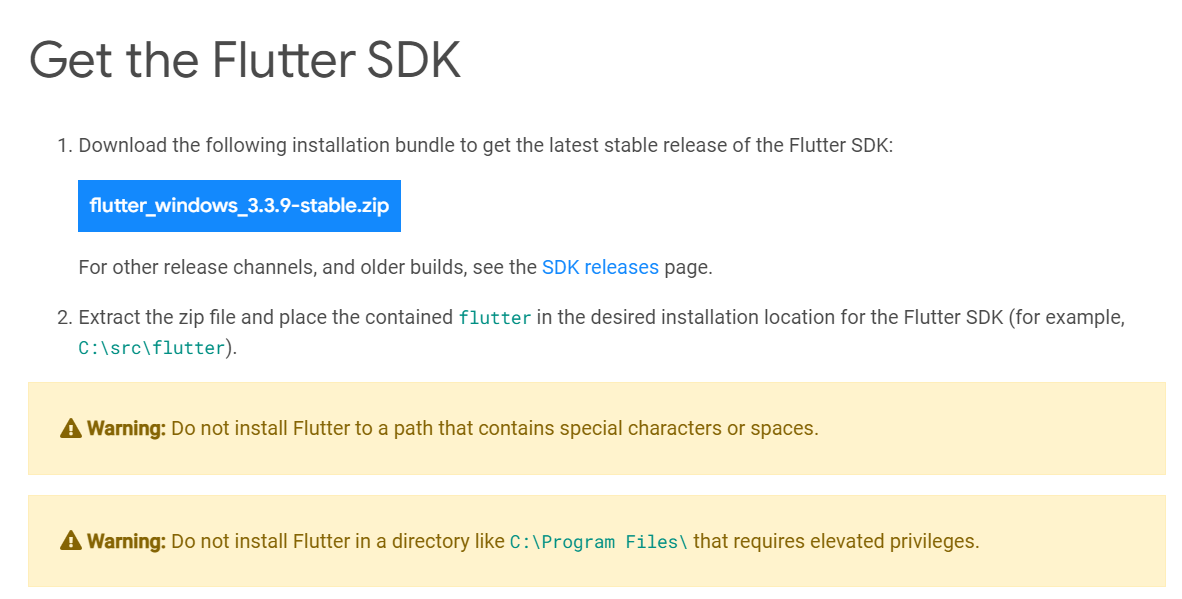
    In this example, I’m going to download the Windows version by clicking the Windows link, which brings up the screen shown below. For Windows in particular, pay close attention to the warnings about where to install the SDK. (I like to have a folder called c:\dev where I put all my dev work, and under that a folder called c:\dev\tools. So the latter is the folder where I’ll put the SDK.)
    After the file is downloaded, extract it to a location such as c:\dev\tools.

    For Windows, Linux and ChromeOS, the next step is to update your path so that the system can find the tools found in the Flutter folder’s bin folder. (Mac users don’t need to do this step.) The Flutter installation docs are helpful here:

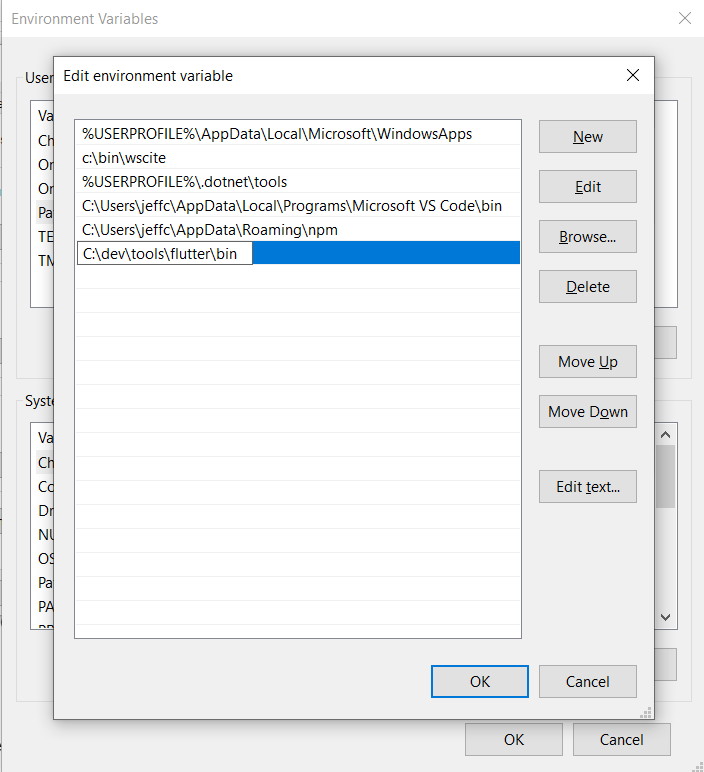
    • Windows: Make sure you use the full path, starting with the name of the folder you extracted the zip file into. For example, on my machine, that would be C:\dev\tools\flutter\bin, as shown in the image below. Then after you update the path, you’ll need to close and reopen your command-line shell (either Windows CMD or Powershell). For detailed instructions, go here.
    • Linux: Follow the instructions here.
    • ChromeOS: Follow the instructions here.
    Now test out the Flutter command to make sure it works by going to a folder outside of the Flutter’s bin folder and typing:

    flutter --version

    You should see a message such as this:

    Flutter 3.3.9 • channel stable • https://github.com/flutter/flutter.git
    Framework • revision b8f7f1f986 (2 weeks ago) • 2022-11-23 06:43:51 +0900
    Engine • revision 8f2221fbef
    Tools • Dart 2.18.5 • DevTools 2.15.0

    This will tell you if the installation is possibly ready. If instead, you see a message that the command is not found, double-check that you have your path correct; that’s typically the most likely cause for that error.

    Now, why did I say ‘possibly’? Because Flutter itself can tell you if there are any other tools you’ll need by running this command:

    flutter doctor

    Here’s an example of what I saw when I ran it:
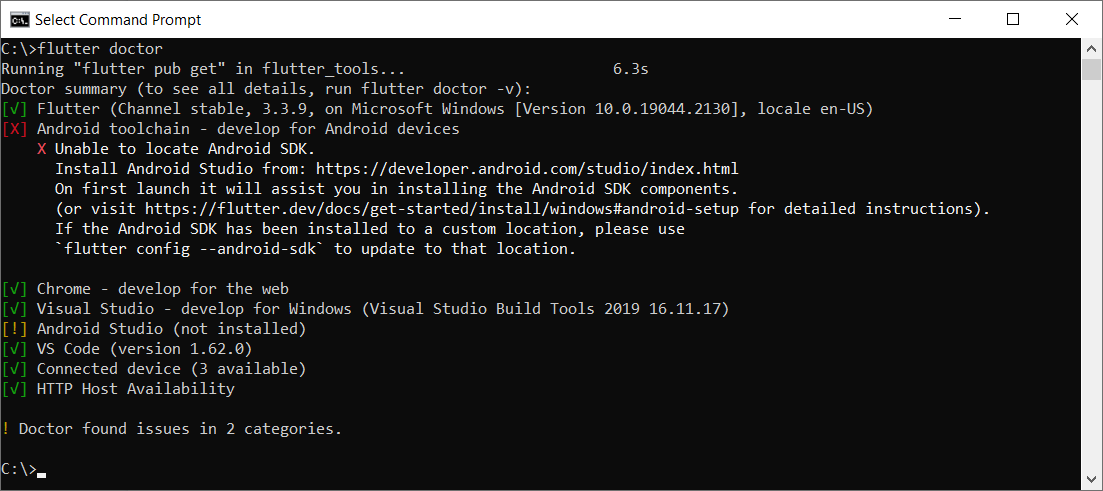
    This tells me I have some of the necessary tools installed, but not all:

    • Flutter itself, as well as all the tools that came with it
    • Android toolchain: I don’t have this one.
    • Chrome browser: You’ll need this for debugging web versions of your app.
    • Visual Studio: This is the full IDE from Microsoft; you’ll need it if you want to develop your app for Windows Desktop. You can use the free Community version. For that, go here and choose the free Community version.
    • Android Studio: I don’t have this one.
    • VS Code: This refers to Visual Studio Code, the free editor/IDE from Microsoft, which is not the same as Visual Studio. It’s a separate tool and neither is dependent on the other. Before you install it, read my notes below.

    Before installing anything else, you’ll want to decide what platforms you’ll be targeting. If you’re going to include Android in that list, you’ll need to download and install both the Android toolchain and Android Studio. In that case, you’ll be developing from within Android Studio.

    But if you’re not targeting Android, you do not need to install the Android toolchain or Android Studio. The official installation docs are a little vague on this point, so I tested it out myself. I was able to target Windows desktop and a browser without needing to install any of the Android tools.

    If you’re not targeting Android, then you’ll want to install VS Code to do your development from within. You can find it here.

    Building an App

    For this example, I’ll continue with Windows, and I’ll build a quick Windows desktop app.

    In a command shell, I’ll first create a folder in my c:\dev to hold my projects by typing these commands:

    cd c:\dev
    md projects
    cd projects

    I’m going to make a Flutter app called flutter_demo by typing the following. (Make sure you’re in the projects folder before typing this):

    flutter create flutter_demo

    Note that the name for your project must be in all lowercase letters, and it can contain underscores. So, for example, using uppercase letters results in an error:

    If I type this:

    flutter create FlutterDemo

    I see this:

    "FlutterDemo" is not a valid Dart package name.
    See https://dart.dev/tools/pub/pubspec#name for more information.

    When done correctly, you’ll see output such as this:

    Creating project flutter_demo...
    Running "flutter pub get" in flutter_demo... 1,186ms
    Wrote 127 files.
    All done!
    In order to run your application, type:
    $ cd flutter_demo
    $ flutter run
    Your application code is in flutter_demo\lib\main.dart.

    Before we open the code, let’s run it! First, go into the new folder flutter created:

    cd flutter_demo

    Then run it by typing:

    flutter run

    This command runs whatever Flutter application is in the current folder. In this case, that’s the app you just created.

    When you start it, it will ask for some choices. Because I don’t have Android or an emulator installed, I only see options for Windows Desktop and Chrome and Edge. (Edge is based on Chrome, so it works, as well.) Here’s what I see:

    Multiple devices found:
    Windows (desktop) • windows • windows-x64 • Microsoft Windows [Version 10.0.19044.2130]
    Chrome (web) • chrome • web-javascript • Google Chrome 107.0.5304.107
    Edge (web) • edge • web-javascript • Microsoft Edge 106.0.1370.37
    [1]: Windows (windows)
    [2]: Chrome (chrome)
    [3]: Edge (edge)
    Please choose one (To quit, press "q/Q"):

    Press the option for Windows. This will build the Windows desktop version (which might take a minute or so) and launch it, resulting in a window that looks like this:

    This isn’t much, but there’s a sample in it where you can click the plus sign and see the number in the middle increment. That’s all.

    Now let’s try running the same app in Chrome. First, close the app window and press Arrow-Up or re-type:

    flutter run

    This time, choose the option for Chrome.

    Now Flutter builds a web-ready version that runs on Chrome, starts a local web server to host the app, launches Chrome and pushes a URL to Chrome to load the app from the local web server. Here’s the browser window:

    Notice that it looks virtually identical to the desktop version but is inside a browser this time.

    If you’re a web developer, I encourage you to right-click inside the browser app and select View Page Source. Notice there’s a line that loads a file called flutter.js, and there’s some JavaScript code that responds to the window’s Load event that calls into Flutter. You won’t be writing JavaScript code, but it’s always good to have at least some understanding of what your front end is doing!

    Adding to the Code

    Now let’s add just a bit to the sample code. For this, I’ll use VS Code. From within the app’s main folder (in my case, c:\dev\projects\flutter_demo) type

    code .

    (Make sure to include the dot after the word code; otherwise, VS Code will open in whatever folder it last ran.)

    Before delving into the code, you’ll want to install a special Flutter extension for VS Code. Click the gear in the lower left and click Extensions. In the box labeled Search Extensions in Marketplace, type flutter. (Don’t click Enter; just pause a moment and the search will begin.) Find the one called Flutter that has over five million downloads, as shown here:
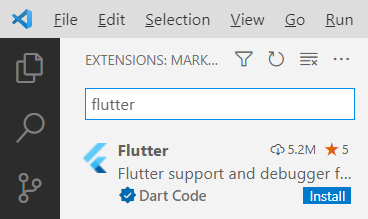
    Click the Install button. The button will show “installing” while the extension is being downloaded and installed.

    After the extension is installed, VS Code will ask whether you want to use it with your current project. You might also see a message regarding updating the Dart extension, which came alongside Flutter. Click Yes for the Flutter one; click Get packages for the Dart one. (You can ignore the message about opening the settings file.)

    Now you have all several flutter tools available VS Code’s Extensions Palette. Press Ctrl+Shift+P to open the palette. Type flutter and you’ll see the full list.

    For now, however, let’s first just run the app. Click the Run menu, and then click Run Without Debugging. You’ll see the Windows app open again.

    Now go back to VS Code. Even if you’re not familiar with Dart, if you know other “curly bracket” languages such as C++, C#, Java, JavaScript and so on, you’ll probably be able to read the code. There’s a function called main() that starts the app, providing a class called MyApp. That class is farther down in the code. Look closely at all the comments. Read them carefully and learn from them. The MyApp class contains a build function that returns an object with a “home” member; that member is an instance of MyHomePage, which is also a class in this file. Continue studying that code, and you’ll see mentions of widgets and layouts. Look closely at the function called _incrementCounter and how it’s triggered later on through an onPressed event.

    Conclusion

    Play around with the code; try changing some of the string literals, for example, until you’re quite familiar with it. Then dive into the first demo provided by the Flutter folks at Google, which you can find here. Soon you’ll be up and running with your own Flutter app that you can run on any device!

  • CircleCI Will Use AI to Increase Collective DevOps Intelligence

    CircleCI Will Use AI to Increase Collective DevOps Intelligence

    CircleCI has committed to adding additional collective intelligence capabilities to its continuous integration/continuous delivery (CI/CD) platform that will leverage machine learning and other forms of artificial intelligence (AI) to optimize application development and delivery.

    CircleCI CEO Jim Rose said that as the company’s namesake CI/CD platform continues to collect more telemetry data from multiple customers, it becomes feasible to create AI models that will optimize everything from application testing to reliability and performance.

    As part of that strategy, CircleCI has also added capabilities such as test splitting recommendations that employ machine learning algorithms to estimate the expected time savings of enabling parallelism on test jobs.

    In addition, CircleCI is creating a team of analysts and data scientists to develop additional AI capabilities based on the data collected via the cloud version of the company’s platform.

    The decision to invest more in developing AI capabilities follows the acquisition of Ponicode, a provider of a unit testing platform, earlier this year. That platform uses AI to augment application testers by providing capabilities such as syntax validation, on-hover hints and autocompletion capabilities to improve the accuracy of software developed using Visual Studio Code. The goal is to integrate that AI testing technology within the CircleCI platform to make it possible to apply algorithms to individual developers’ code as well as to code aggregated from multiple developers within a build as it is continuously updated across a DevOps workflow.

    The workflows make up a software supply chain that, in many regards, functions like any other type of supply chain, noted Rose. As such, there is plenty of opportunity to apply AI models to optimize those workflows in the same way AI is being applied to optimize other types of supply chains, he added.

    It’s still early days as far as applying AI to DevOps processes is concerned, but it’s clear there is a need to further automate a wide range of manual processes. It’s not likely that AI is going to replace the need for DevOps engineers any time soon, but it will reduce a lot of the toil that currently hinders productivity. The challenge, of course, is that it takes a lot of telemetry data to train an AI model, which typically can only be efficiently gathered and stored with a cloud platform. Less clear is whether AI capabilities might drive more organizations to shift away from legacy CI/CD platforms deployed in an on-premises IT environment where there might not be enough telemetry data available to effectively train an AI model.

    The one thing that is certain is there is now a race to apply AI to DevOps workflows. Organizations that have adopted DevOps typically are highly committed to automation, but the amount of AI applied to those workflows has been limited thus far. In the coming year, however, chances are good the amount of AI being applied to DevOps workflows will steadily increase, especially as many DevOps teams struggle to keep pace with complex application environments.