Tag: application architecture

  • When Should You Go for Microservice Architecture?

    When Should You Go for Microservice Architecture?

    There is steady increase in the adoption of microservice architecture style since 2014 (Figure 1). Microservice architectural style structures an application as a collection of loosely coupled services that implement business capabilities.

    An architecture style is a family of architectures that share certain characteristics. For example, N-tier is a common architecture style. Architecture styles generally don’t dictate the use of particular technologies, but some technologies are well-suited for certain architectures. For example, containers are well suited for microservice since they go hand-in-hand for the deployment.

    In this article, you will learn about the typical considerations, challenges and benefits of the microservice architecture style.

    Figure 1: Microservice Google Trends.

    While microservice applications are built as a set of modular components, they are easier to understand, simpler to test and effortless to maintain over the life of the application. It enables organizations to achieve agility and be able to improve the time it takes to get working enhancements to production.

    It also enables the continuous delivery/deployment of large, complex applications and the evolution of its technology stack. Having detailed out on the benefits side there are quite a bit of challenges as well, which we will discuss in the next section.

    Constraints Imposed by Microservice Style

    By adhering to the following constraints imposed by microservice architecture style, what we get is a system where services can be deployed independently, faults are isolated, frequent updates are possible and it’s easy to introduce new technologies into the application.

    • Each service represents a single responsibility.
    • Every service is independent of the others.
    • Each service needs its own JVM (or equivalent) so instances are isolated.
    • Data is private to the service that owns it.
    • Services do not share data and need to implement queries that need to retrieve data owned by multiple services.
    • Well defined mechanism to implement service-to-service communication and scheme to deal with partial failure.
    • Requests that span multiple services and require careful coordination between the teams.
    • Testing to cover the interactions between services.
    • Deploying and managing a system comprised of many different services.

    Consider Challenges Versus Benefits

    Each architectural constraint has its own associated challenges/benefits, so it’s important to understand and balance both. Before adopting any style of architecture, you have to ask yourself if the benefits outweigh the challenges for the application you are considering.

    In the table below, we take a look at the benefits versus challenges of microservice style applications.

    Benefits Challenges
    Enables the continuous delivery and deployment of large, complex applications. There is an additional complexity of creating a distributed system.
    Improved maintainability: Each service is relatively small so it’s easier to understand and change. Implementing requests that span multiple services is more difficult.

    Maintaining data consistency between service(s) is a challenge.

    Better Testability: services are smaller and faster to test. Testing the interactions between services is more difficult.
    Better deployability: services can be deployed independently. Increased operational and deployment complexity of deploying and managing a system comprised of many different services.
    Each team can develop, test, deploy and scale their services independently of all of the other teams. Implementing requests that span multiple services requires careful coordination between the teams.
    Improved fault isolation. Inter-service communication and dealing with partial failure implementation is challenging.
    Eliminates long-term commitment to a technology stack. Overhead of multiple JVM runtimes (or equivalent) and increase in memory consumption needs to be taken care of.

    Scenarios Where You Can Consider Going for Microservice

    Consider an scenario where you are developing an enterprise application that must support the following characteristics:

    • Support for different variety of clients that includes desktop browsers, mobile browsers and native mobile applications.
    • Expose an API for third parties to consume.
    • Integration with other applications via web services or a message broker.
    • Run multiple instances of the application on multiple machines to fulfill scalability and availability NFR requirements.
    • Adopt emerging technology stack.
    • Planning to go for continuous deployment pipeline setup for the application.

    From the requirements above, you can very well say the application is 100% fit for a microservices architecture.

    You have to define an architecture that structures the application as a set of loosely coupled, collaborating services. Services can communicate using either synchronous or asynchronous protocols. Services can be developed and deployed independently of one another. Each service has its own database in order to be decoupled from other services.

    Let’s look at some of the typical scenarios where you can consider going for microservice style of architecture:

    1. Monolithic application migration due to improvements needed in scalability, manageability, agility or speed of delivery.
    2. Re-platform a legacy application by transforming functions/modules to microservices.
    3. Rewriting legacy application to modern languages, technology stack to meet the demands of modern business.
    4. Individual cross-cutting services that are independent in nature. For example: encryption services, authentication services, etc.
    5. Independent business applications or services reused across multiple channels. For example, payment services, login services, flight search services, customer profile services, notification services, etc.
    6. Commonly used enterprise applications. For example, time tracking application.
    7. Scenarios where a service provider makes computing resources and infrastructure management available to the customer as needed. For example, forecasting services, price calculation services, prediction services, etc.
    8. Back-end services for responsive client-side web application where data could be coming from multiple channels or different data sources.
    9. Highly agile applications or applications demanding speed of delivery or time to market or innovation pilots, etc.
    10. Applications that got polyglot, multi-language, cloud application development.

    Make the Choice

    Before going for microservice architecture, make sure you know the challenges and benefits. Otherwise, your application design could end up with a design that fits the style but does not achieve its full potential. Adopt microservices only if you see enough value for your applications. Also note sometimes relaxing a constraint is better than insisting on architectural purity.

    — Karthikeyan Shanmugam

  • One Team’s Microservices Journey and CD Growth

    One Team’s Microservices Journey and CD Growth

    Dev Manager Vadim Madison published a chronicle of his team’s move from a monolithic application to a microservices model. In the process, the tools and methodologies they used for continuous integration/continuous delivery (CI/CD) had to be expanded and even changed out in several stages. It’s a long read, but with the time, as there are not a lot of people documenting the case of full-on conversion.

    One of the more interesting pieces of his work is the software infrastructure they have to build up to cover CI/CD/monitoring of the application. This is a lot more complex than the original application was, and it all must be managed. One of the benefits of DevOps is to make management of these tools easier, and he does talk a bit about scripting it out and implementing APIs to take problem instances out of the pool and determine what went wrong so they can go through the Dev/CI/CD cycle again.

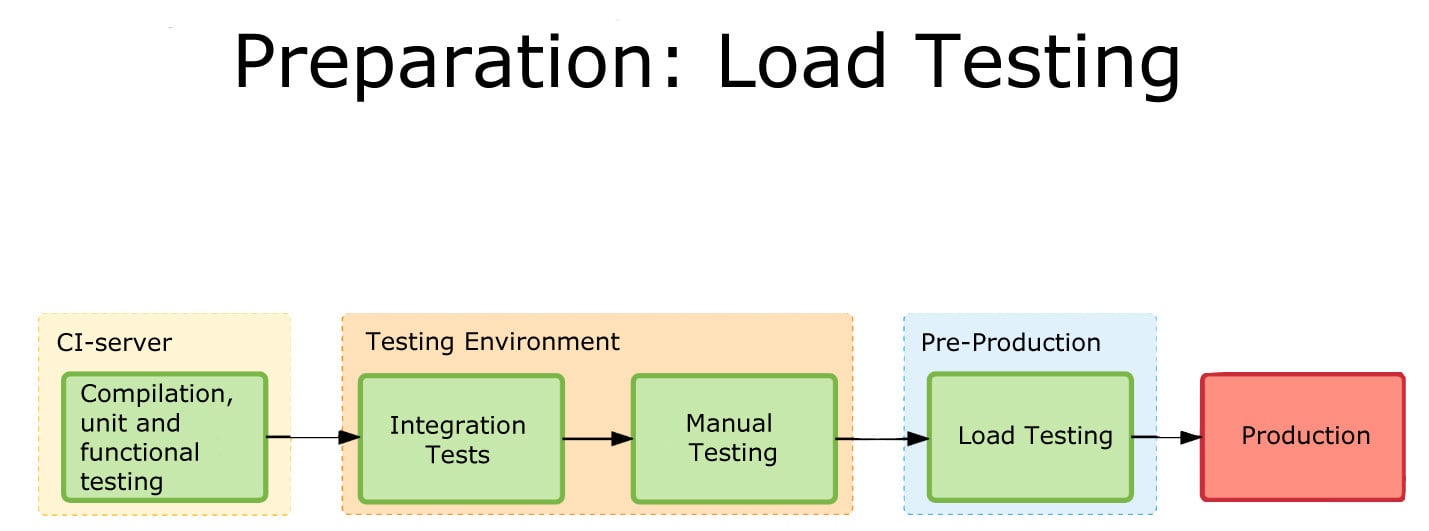
    Load Testing
    One of the graphics showing integration.

    What makes it interesting is where the team found limitations and switched tools midstream. This being a process, Madison at the end alluded to the fact that they have started eliminating TeamCity (or at least limiting what they’re using it for). I think that when most people begin to go high-rate DevOps, or even constant monitored low-rate DevOps, some of the items his team ran into escape their notice until they find an issue. The architectural growth will occur—you are automating more, building more, monitoring more and releasing more. The question is, how far ahead do you look? Until recently, the answer was pretty much, “Not far,” because we didn’t have cases like Madison’s to draw on and see parallels with what we were doing. But that is starting to change.

    CI/CD/ARA vendors can help, of course. Collectively they have a lot of knowledge about the lay of the land, and how people are using the tools to tackle the needs of new architectures. But more public documentation such as Madison’s would be great, too.

    Even though you’re moving at a much faster pace, looking ahead and increasing the steps taken in the CI/CD/ARA space can provide that added bit of resiliency, and monitoring at a level appropriate to your project’s maturity can add that extra bit of “we know, we can recover.” There have been some spectacular failures that were indicated by monitoring, but the volume of data flowing through monitoring was enough to mask it. Today, the best solution is to monitor at the appropriate level and then feed that monitoring back into the system.

    But you’ll be supporting more software infrastructure. The growth of tools is pretty inevitable: As you spread the functionality across machines/instances/containers, you will need to stretch CI/CD/ARA tools to multiple interrelated targets and monitor the overall system and its performance bottlenecks. And for now, the tools chosen will not always be widely known, so a process to bring new Dev/DevOps team members quickly up to speed on the more obscure tools should be on your list of to-dos.

    — Don Macvittie

  • 7 Strategies for Continuous Delivery and Deployment Success

    7 Strategies for Continuous Delivery and Deployment Success

    One of the key advantages of cloud-native applications is the ability to quickly push updates into production for specific microservices—giving developers the ability to respond rapidly to changing business requirements without having to upgrade the entire application. Successfully doing this requires far more than just leveraging a continuous delivery platform. Everything from the culture of the development group to the type of testing required to the underlying platform it will run on is critical.

    Based on applying DevOps principles across several projects to date, I have found that development teams can benefit from following these seven key strategies before launching continuous delivery and deployment initiatives. By doing so, you’ll increase your opportunity for success.

    Culture

    Just having the right tools and technology isn’t enough in today’s enterprises. Successfully adopting an agile, continuous delivery and deployment process will require a culture shift within most development shops. Developers are no longer responsible only for their code; they must take full ownership of the development, testing, automation tools and, most importantly, building operational capabilities into the pipeline so the move to production is easier. Getting developers and the operations team on board with this may take some time and training, but the effort is critical, and your projects won’t succeed without this.

    Automation Platform

    Carefully consider the tool you’ll use for your continuous delivery pipeline because the current tools on the market have different optimal use cases. For example, if you need to do A/B testing you’ll want a tool that has capabilities for phasing the rollout based on the test results. If your application requires multiple updates in a short time span, you’ll need a tool that has advanced release management capabilities including good pipeline visualization and support for the management of cloud environments.

    App Architecture

    Design your applications so they are cloud-native. This is typically associated with microservices and containers and will enable you to independently and frequently update each service independently. The typical stages of a deployment pipeline are build, unit testing, integration testing (including functional testing), API testing, performance and staging, then, finally, on to production. However, with microservice architectures and advanced deployment techniques, more and more customers are bypassing certain stages and testing in production, albeit very contained production environments.

    Each stage also can include the creation of dynamic environments in the cloud, enabling the stage itself to be provisioned, executed and decommissioned as a part of the pipeline. If you choose to do this, look for a tool that has a number of built-in cloud plugins, so creating and destroying environments in AWS, Google Cloud and other clouds can be done easily.

    The application and infrastructure stack for each microservice also should be specified. This could include the application Jar file, a Docker file, or server image such as an AMI; any related services such as AWS Lambda functions; and all configurations and policies. These specifications all should be managed in an infrastructure-as-code manifest, which ensures versioning, consistency, change auditing and testing. It also ensures that the build resources, such as baked images, JARs and AWS Lambda functions, are consistently passed to each stage of the pipeline, from testing to production, eliminating the risk of imposing inconsistent environments and configurations. An AWS CloudFormation template is an example of an infrastructure-as-code manifest.

    Security

    Security is a necessity in the world of increasing threats that we live in; however, the common approach of waiting to test security right before the push to production is the wrong approach. Security should be built in to the pipeline itself and automated as part of the DevOps CI/CD process. It’s essential to validate the building blocks without slowing down the process. For example, leading companies are automating code scanning, template checking and other security tests in within the phases of the pipeline itself.

    Insight

    Visualizing and tracking pipelines, environment variables, test results, versions, issues and other artifacts allows developers and the operations team to share a common view throughout the project life cycle. This improves collaboration and traceability.

    Delivery Strategies

    Automating tests is critical to pipeline design and delivery. Without comprehensive, high-quality, fully automated tests of the deployment pipeline, production failures will occur. Code coverage no longer is a good representation of code quality. In the cloud-native world, test cases and test suites need to be mapped to functionality and business outcomes desired to ensure that the test team gives the green light and then everything goes red in production. In situations where time limitations prevent a comprehensive approach, first automate the critical capabilities and flows, then assess the cost-benefit of automating additional tests.

    Be sure that the data and environment for testing and automating purposes mirrors the production data and environment as closely as possible. Most pipelines have a “pre-production” stage before pushing software into production. You may consider building multiple stages across multiple AWS regions before pushing the software to production.

    If your goal is to update software in production very frequently and without any downtime, make sure your pipeline tool can easily manage multi-region deployments, such as blue/green and canary deployments for server groups and clusters across AWS and other public infrastructure-as-a-service (IaaS) clouds.

    Monitoring and Feedback

    Finally, it is essential to get continuous feedback on the user experience, response times, performance of key business services, and the technical metrics from all stages of the life cycle—development, QA and production. Only through this continuous feedback can you ensure that no degradation occurs as you push out releases with increasing frequency. This too needs to be built into each phase of the pipeline to understand performance and improve things earlier in the process, where it costs much less.

    There’s no doubt that a successful continuous development and deployment process can deliver significant benefits to users, who constantly require new and enhanced capabilities and can’t wait the weeks or months that a traditional development cycle requires By carefully considering these seven strategies, your projects will benefit from reduced application errors, less downtime and much happier users.

    About the Author / David Cramer

    david-cramerDavid Cramer is vice president of Product Management for the Cloud/DCA business unit at BMC. Prior to BMC, David was head of product management for CA Technologies. During his tenure at CA, David was responsible for application delivery, cloud management, virtualization and Infrastructure automation solutions. Before joining CA, David held executive positions at AlterPoint, Motive, NetSolve and Nortel Networks. David’s focus is on continuous delivery, cloud management and web-scale IT. David received his MBA from Southern Methodist University and a BS in Finance from Georgia State University. Connect with him on LinkedIn and Twitter.