Tag: app development

  • Building Amazing Apps, Part 2: Optimizing the Back End

    Building Amazing Apps, Part 2: Optimizing the Back End

    This is part two of a series of three articles on building and delivering amazing apps at the edge. To read part one, click here.

    There are millions of apps available today, and it’s incredibly easy for any user to download and install any of them with just a few taps on a screen or click of a mouse. If you want to build and deliver an app that will amaze users, you need to be able to differentiate from the rest of the pack.

    Over the past 14 years, I’ve been working closely with the top companies delivering the most popular apps, helping them optimize their apps for speed and scale so users get a great experience. In this three-part series, we’ll explore the fundamental steps you must take to build and deliver your own amazing app at scale that will keep users coming back for more.

    We’ll break these steps down into three key areas:

    • Front end: Covers the parts of the app that end users interact with.
    • Back end: Looks at the required origin infrastructure to support the app, including databases, application, web servers and more.
    • Middle-mile: Explores the internet, where all the information needs to traverse back and forth between the front end and back end.

    In this article, we are going to explore five things you can do on the back end.

    Distributed Architecture

    In a nutshell, distributed architecture means having origin (back end) infrastructure that is geographically dispersed to maximize availability and performance.

    There are three main types of back end configurations:

    • On-premises: This is where the hardware and software are owned and managed by your organization. This type of back-end architecture is often more expensive and resource-intensive to maintain but offers a higher degree of security and flexibility because you have full control of the hardware and software.
    • Cloud-hosted: This is where the hardware and software are hosted on a third-party cloud provider. This type of architecture runs on dedicated or multi-tenant servers, and is usually more cost-effective to create and manage because some of the cloud providers include efficient infrastructure configuration/orchestration tools.
    • Hybrid: This is where your architecture is a mix of on-premises and cloud-hosted. This is the most flexible and common solution, since most companies that traditionally have relied upon all on-premises architecture are slowly migrating some of their back end to the cloud. For this type of solution, it’s best to use open source, multi-cloud tool solutions.

    The goal for your configuration should be having a back-end system that is geographically dispersed enough (with most locations close to your users) to ensure low network latency, while at the same time avoiding a single-point-of-failure to ensure the service runs, despite any localized outage.

    Regardless of your configuration, the general idea of distributed architecture remains the same: Using data centers where the load is distributed via a global load balancer, and where critical information is replicated across the data centers via fast, fiber-optic private links.

    Here are some concepts you can research that will help you to choose the most optimal, distributed architecture for your needs: virtual machines, containers, microservices, data replication, stateless apps, serverless, distributed processing, etc. devopsy.kinsta.cloud is an excellent resource to learn more about them.

    Generally speaking, you can simplify your origin infrastructure and maximize end-user performance by putting a content delivery network (CDN) between your end users and your back end. A CDN is a super-distributed network of reverse proxies that allows you to put your content very close to end users, minimizing network latency to achieve rapid app interactions, especially when the CDN caches your content on its edge servers.

    Auto-Scaling

    You can optimize costs and performance by choosing an architecture that auto-scales (up and down) depending on current traffic demands. To implement this effectively, you need to monitor global traffic and set triggers that launch infrastructure on-demand so it is ready when needed. Most of the largest cloud services companies support auto-scaling services, and some of them even allow you to tune your settings to favor either costs or performance. One of the easiest ways to implement effective auto-scaling is with CDNs, which can automatically scale traffic with minimal effort just by configuring a set of rules that define what content should be handled completely by the CDN (either dynamically generated at the edge or cached) and what content should be pulled from your origin infrastructure.

    Continuous Monitoring

    Continuous monitoring helps maintain the quality of service. There are many open source tools for continuous monitoring that fall mostly into the following four categories:

    • Infrastructure monitoring: This allows you to keep track of compute resources, storage, network usage, etc.
    • Cloud providers: Most of the largest cloud providers have integrated tools for monitoring your back end in each respective cloud platform.
    • Application performance monitoring (APM): To monitor your application’s framework.
    • Aggregators: Tools that allow you to aggregate and analyze data across several monitoring tools.

    In addition, it’s a good idea to complement server-side monitoring with real user monitoring (RUM) tools to identify whether a specific code deployment impacts performance.

    Performance

    A faster back end makes for a faster front end, and, as we know from part one of this series, performance is a major contributor to user experience. In addition to focusing on improving metrics including latency, throughput and errors (all of which are directly correlated with back-end performance), it’s critical to have a “culture of performance” in your company. José Pérez provides an overview of that concept in his article, “Fostering a Web Performance Culture.” This is a perfect example of how you could implement a culture of performance in your organization, by having performance tools integrated into your IDEs—this can provide instant feedback to developers on how new code performs against a defined performance baseline so that any code that might degrade performance is identified before it is deployed.

    For content that is not personalized, such as a product catalog, news or media assets, you can easily improve performance by putting a CDN in front of your back end (and caching that content on the CDN’s edge servers). Those edge servers are distributed around the world, located much closer to end users than your back-end infrastructure, to minimize network latency and maximize throughput.

    DevOps Automation

    Finally, a big part of setting up monitoring that works (and in responding to failures quickly) is DevOps automation. Building automated DevOps tooling allows you to react to changing conditions automatically, in real time.

    For example, you can use DevOps automation to alert your team via a chat system such as Slack when a deployment impacts the service, with an option to roll back easily the deployment within the chat app. Another great example of DevOps automation is Pinterest’s implementation of a “performance detective” that runs a binary search (similar to git bisect) to determine the offending commit that is degrading app performance after a release. If you combine these two automations, you could detect a performance degradation caused by a release; let the DevOps team know that it has been rolled back and track the offending code in the version control repository. That’s just one specific example among the many ways that DevOps automation can further optimize your back end.

    Coming up next in this three-part series: Everything you need to know about optimizing the middle-mile.

    — Javier Garza

  • Building Amazing Apps, Part 1: Optimizing the Front End

    Building Amazing Apps, Part 1: Optimizing the Front End

    There are millions of apps available today, and it’s incredibly easy for any user to download and install any of them with just a few taps on a screen or click of a mouse. If you want to build and deliver an app that will amaze users, you need to be able to differentiate from the rest of the pack.

    Over the past 14 years, I’ve been working closely with the top companies delivering the most popular apps, helping them optimize their apps for speed and scale so users get a great experience. In this three-part series, we’ll explore the fundamental steps you must take to build and deliver your own amazing app at scale that will keep users coming back for more.

    We’ll break these steps down into three key areas:

    • Front end: Covers the parts of the app that end users interact with.
    • Back end: Looks at the required origin infrastructure to support the app, including databases, application, web servers and more.
    • Middle-mile: Explores the internet, where all the information needs to traverse back and forth between the front end and back end.

    Let’s explore the front end, and the five things you need to take into consideration to build and deliver a world-class front end for an amazing app.

    Beautiful User Interface

    People love beautiful things. That’s why they enjoy looking at the orange colors of a sunset or why they pay exorbitant amounts of money for a work of art. Building an aesthetically pleasing interface must be a top priority during the design phase. The first sign of a good user experience is an attractive design, and users are more likely to spend more time with the app if it is appealing to the eye.

    So where do you start when designing your app? Begin by reviewing the most popular apps on the app stores or the ones you use and enjoy the most and write down what design characteristics you like from each one. You should also follow industry best practices for app design such as:

    • Pay attention to graphic design.
    • Ensure you use curated images that look great.
    • Pick beautiful fonts with curved edges, e.g., Open Sans.
    • Manage white space effectively to display as much information as possible without having crowded text.
    • Ensure your UI is intuitive and simple to reduce the learning curve.
    • Avoid information overload through short and clear wording.
    • Maintain consistency within all the screens in the UI.
    • Select a distraction-free UI that avoids blinking text and excessive use of colors.
    • Follow standards (follow UI designs already in place).

    Accessibility

    At a fundamental level, it is a social responsibility to ensure your application can be used by people with impaired mobility, vision, hearing, cognition or language understanding. In some context, it is also a legal requirement.

    An excellent accessibility reference for developers is the Web Content Accessibility Guidelines (WCAG), which is sponsored by the World Wide Web Consortium (W3C). This reference includes accommodations for blindness and low vision, deafness and hearing loss, limited movement, speech disabilities, photosensitivity and more. For example, you should provide text alternatives for non-text content such as an image or a graph using the alt text HTML tag that accessibility software can use to describe what the image or the graph is. This is as simple as <img src=”smiley.jpg” alt=”Smiley face“>.

    Accessibility is too often forgotten or left to the later stages of app design. However, it is much more difficult to implement accessibility functions later on than if you plan for it upfront.

    Speed and Responsiveness

    User patience is shrinking and first impressions matter, so your app needs to start as quickly as possible. But it’s often easier said than done to get everything ready for user interaction within 1 second flat as certain operations, such as sending data to a server over a slow mobile network, can take a long time.

    So, given the challenges, how can you overcome them to provide a fast experience in your app?

    Start with performance-oriented design in mind, building the app logic in a way your users will perceive it as being fast at all times. You can, for example, implement caching and store the information presented to the user in the local cache. You can then use the cache to restore the last status almost instantaneously during startup while the app opens the network connection to the server and requests the data. Another characteristic of performance-oriented design is performance budget and code optimization. Performance budget means you set a performance baseline for a specific piece of code or functionality and put tools in place to ensure that baseline is not exceeded when releasing new code. Code optimization means trying new approaches to make the code run faster.

    Do this in the following cycle: optimize -> deploy -> measure.

    Repeat this cycle several times until your performance gains start to flatline. After this point, you can apply two concepts from the psychology world to make your app “feel faster” (aka “perceived performance” and “active waiting”).

    Perceived performance refers to how users perceive whether something is slow or fast, while active waiting refers to the fact that users perceive time as passing more quickly when they are engaged while they wait. So, when there is an operation where the user has to wait, you can incorporate some movement on the screen to draw the user’s attention—or, better yet, get them to interact with the app by providing a suggestion for optimizing their usage of the app or a curated quote. The chat app Slack does this pretty well.

    Network Awareness 

    Your app should keep track of network status, monitoring the available bandwidth and identifying when the network is not available at all. With this information, the app should adapt its behavior to improve the overall user experience. For example, let’s say the user is trying to send some data to the server while the network is not available. One solution is to switch the user to an offline mode, and let the user know they are offline and that the operation they are trying to do will be processed as soon as they are back online. At the same time, you could offer a cached version of the information, so the user can partially interact with the app.

    Network monitoring in your app should be planned carefully to avoid consuming too much power, which may impact the device’s battery life. For example, when the network is already active, you could send a few bytes to measure the latency to the server. You should avoid a constant network keep-alive, as actively maintaining the network even when there is no data to send or receive may impact the device’s energy resources.

    There are also intelligent edge solutions you can apply to your app that automatically adapt the compression of images depending on the network conditions. This means that the edge server can deliver a smaller version of the image for devices that have a slow network connection, without having to implement any logic on the app.

    Security

    Security is not an option, but a requirement that you should keep top of mind while building your application. The last thing you want is a security breach that compromises your users’ data or the integrity of your servers.

    For starters, ensure all your network connections are encrypted end to end and use secure protocols such as TLS v1.2 at the minimum or v1.3, which offer better security and a faster connection establishment. Ensure that your certificate offers strong ciphers that implement “perfect forward secrecy” (which makes it more difficult to be caught by man-in-the-middle attacks) and implement login techniques within the app that verify the user through secure techniques such as two-factor-authentication.

    You can also enhance your application security by implementing security measures at the edge such as automated bot protection. In this instance, machine learning technology in your edge servers can use device sensors such as the accelerometer to differentiate a real user from a bot that has stolen credentials and is trying to perform a malicious action.

    Coming up next in this three-part series: Everything you need to know about optimizing the back end.

    — Javier Garza

  • Speed Rules in Chef’s DevOps Survey

    Speed Rules in Chef’s DevOps Survey

    DevOps is all about streamlining and accelerating. Organizations that embrace DevOps are driven by a focus on maximizing the combination of efficiency and effectiveness—which explains why speed is the central theme of Chef’s “The State of Enterprise Applications” survey.

    Chef surveyed nearly 350 application and operations professionals in an effort to understand trends in DevOps, identify how the industry is shifting and get an idea of what the future of DevOps looks like. What it found is that speed is one of the primary driving factors for organizations that function at the cutting edge of technology. Chef also found that organizations are eager to adopt new platforms that promise to help them move faster.

    The Need for Speed

    There are a variety of ways to measure success for application development and deployment. You can look at the features and capabilities of the app and whether it delivers the expected functionality, or you can determine success based on user feedback and how satisfied users are with the app experience. According to the Chef survey, 72 percent of organizations are focused on speed as the primary measure of a successful app deployment.

    That said, it generally takes weeks—or even months—to get an app developed and deployed. More than 60 percent of survey respondents shared that it takes days or more to complete an application build, and 55 percent indicated that it takes four or more builds before an app is ready to be deployed. Almost 60 percent said it takes days or more to actually deploy the app once the final build is approved.

    Platforms and Tools to Accelerate App Deployment

    In the quest for speed, organizations are moving to platforms and tools that can help accelerate development and decrease the time it takes to make an app available. According to data from “The State of Enterprise Applications” survey:

    • Only 9 percent of organizations are using public cloud for more than 50 percent of app deployments today, but that is expected to increase to 32 percent by 2020.
    • There is a 144 percent increase expected in the next two years in the number of organizations using container technology for more than 50 percent of app deployments—to 22 percent from 9 percent today.
    • The number of organizations using microservices for more than 50 percent of app deployments is expected to double—to 24 percent from 12 percent—in the next two years.
    • More than 80 percent of survey respondents are adopting a multi-cloud strategy.

    Putting App Deployment in High Gear

    Chef is in the business of automating and streamlining app development and deployment, so it should come as no surprise that the survey included questions related to that as well. The report states, “The most successful software-centric organizations use one consistent way of building, deploying, and managing applications.”

    More than 9 out of 10 (93 percent) of survey participants agreed that an application packaging solution that allows deployment to any environment would be valuable. This is especially true when developers have to deal with hybrid or multi-cloud environments.

    If speed is your primary measure of success for app deployment, you need to make sure you have the tools and processes necessary to develop and deploy applications as quickly as possible. Chef’s report shows organizations are well on their way.

    — Tony Bradley

  • DevOps’ Role in Developing a Robust and Secure IoT Framework

    DevOps’ Role in Developing a Robust and Secure IoT Framework

    Creating a secure IoT infrastructure is a challenge for developers, requiring a holistic approach. It requires a dynamic framework that is capable of collecting data from a cloud back end as well as directly from the embedded hardware.

    Supporting this secure environment is another challenge, requiring the development of complex systems capable of deployment in a timely and cost-effective manner. This is where the relationship between DevOps and IoT proves invaluable.

    In this article, we will take a close look at how DevOps adds value to the development of a robust IoT framework. We also will examine ways in which DevOps can help in creating a secure and efficient framework for IoT app development.

    DevOps and IoT Framework

    DevOps, with its focus on reducing delivery cycle times, can increase the speed at which IoT systems can be integrated and function in a seamless and secure manner. Seamless integration can be achieved through a combination of secure app development and operational quality assurance checks.

    The DevOps methodology is rooted in the agile philosophy, which attempts to bridge the gap between different technical roles that traditionally worked in silos within the same department in IoT app development.

    Using the right tools and practices, DevOps can help in creating a framework for IoT that can overcome challenges relating to the large-scale app deployment. It can help in infrastructure positioning and monitoring. Companies that have adopted DevOps methodology have reported a 38 percent increase in growth due to additional revenue sources.

    Let’s take a look at some of the ways the DevOps framework can create a secure and robust environment for IoT app development resulting in increased productivity and revenues.

    Application Reliability and Efficiency

    One of the main functions for DevOps is to improve application reliability and efficiency—there is less need for coding and increased focus on rule-based automated configuration of key connected components. With DevOps, the app development team can identify red flags and improve operational excellence. With monitoring tools such as Log-entries, Nagios and Icinga, the team can use DevOps processes to remove latency and develop an efficient and robust IoT infrastructure.

    DevOps comes with source code control of the software applications that execute in the data center. This means developers have access to the source code, which makes their job easier. The source code reduces the complexity caused by cloud connectivity, automation and virtualization.

    Applications deployed through DevOps recover 96 times faster from failures and reported to have 440 times faster lead time for changes. Deeper collaboration between operations, quality assurance and development teams result in an ongoing feedback that helps increase IoT application reliability.

    Security by Design

    An important component of DevOps is security by design, which helps improve the security of connected systems in a DevOps environment. In security by design, the system allows continuous security testing in real time, which helps improve the security of devices connected in a network.

    The security-by design approach also formalizes security controls and implements them at each stage of the IT operations. As a result, software developers can spend time efficiently developing security controls in a consistent way instead of manually building and patching individual scripts.

    The DevOps approach to IoT application development can also help in gaining insights into the usage and performance, which can help in further refinement of the design delivery pipelines. This will lead to improved security and quality architecture of IoT environment.

    Faster Release Cycles

    Around 21 percent of respondents in a survey of 300 senior managers had stated that DevOps integration increasingly lead to meeting application delivery deadlines. The DevOps metrics lead time is used to measure how quickly the app is deployed after starting work.

    DevOps integration with IoT will result in the following benefits:

    • Developers can work on different components of an application simultaneously, which allows faster completion of activities.
    • Quick release cycles allow IoT apps to be pushed live without much delay.
    • Fast release cycles enable the app development team to build IoT applications using separately deployable services that lead to quality app deployment.

    Continuous Integration and Continuous Delivery (CI/CD)

    DevOps framework helps overcome interoperability problem related to IoT app deployment and operations. Most systems required for IoT app integration are already running in the framework that helps in quick deployment. Businesses can choose the process to automate from staging to production using tools such as Jenkins, GitLab and TeamCity. CI/CD allows developers to respond more quickly to market demands by proactively monitoring the processes.

    The approach results in faster resolution time and release of quality IoT application. Research by CA Technologies found that organizations that adopt DevOps find 21 percent increase in software delivery and 18 percent reduction in time to market due to an efficient CI/CD pipeline.

    Infrastructure Automation

    Infrastructure automation save systems administrators and IT resources time on manual tasks and remove the possibilities for human error during IT configuration, patch management and performance tracking. By scripting almost every command, developers can significantly reduce input requirement of administrators. Increased automation also provides stability as the system is no longer prone to human error on input. Repetitive tasks are a prime candidate for automation, as these are the most likely areas where people make mistakes.

    DevOps methodology makes it possible to automate the infrastructure in multiple cloud platforms. For this purpose, developers can use tools such as Spinnaker and Terraform. Terraform is useful for defining and managing the DevOps infrastructure, while Spinnaker is more useful for managing the infrastructure after code release and deployment workflows.

    DevOps framework also helps automates allocation, de-allocation and monitoring of both cellular and cloud resources, which ensures quality of service (QoS) for applications that control connected devices.

    Effective Validation

    Using endpoint validation can help in evaluating how data flows between different components. Testing of the components in the DevOps environment is done using scripts written in Python, Go or Groovy. The infrastructure testing involves stimulating the environment to test security and other components of the IoT app.

    The app development team also can make use of infrastructure as code to test configuration and environment automation. The configuration is tested using tools such as Chef, Ansible and Puppet. In addition, virtualization tools such as Vagrant or container technology can be used to test the environment automation.

    A Comparison of IoT with and without DevOps

    IoT with DevOps

    IoT without DevOps

    1. Implementing DevOps framework to IoT app development results in 21 % reduced security risk.

    2. DevOps can lead to faster deployment of IoT apps. The updates to IoT apps can be deployed every few days, and even many times in a day.

    3. IoT apps with DevOps practices can result in shorter lead time due to the reduced complexity of the development systems.

    4. With DevOps, the IoT application development team has reported a 51% increase in productivity.

    1. 71 % of respondents have said that security breach is a large challenge for IoT development outside of DevOps framework.

    2. Lack of DevOps can prevent fast feedback mechanism.

    3. Without DevOps, lead times can be longer. This will result in time and cost inefficiencies.

    4. IoT app development without DevOps presents productivity issues. There are few standards for app development and deployment that results in decreased productivity of the team.

    Conclusion

    DevOps tools and practices help businesses achieve efficiency when it comes to IoT app development. DevOps improve the validation of automated processes across multiple cloud vendors in a secure environment.

    Looking forward, DevOps integration with IoT will become increasingly popular as it can reduce costs and improve revenues significantly for app developers.

    — Subramonian

  • What Google’s ‘Digital Wellbeing’ Means for Every App Developer

    What Google’s ‘Digital Wellbeing’ Means for Every App Developer

    One of the big themes to emerge from Google’s recent I/O conference was Digital Wellbeing—the notion that technology should be a positive force in our lives, and that we need ways to disconnect from apps when they suck up too much time or distract us in other ways.

    Google is taking the idea seriously, and developers should, too. The fact that the company is encouraging people to spend less time with its services should be a wake-up call that every developer needs to think carefully about how they design, build and test their applications.

    To understand why Google’s digital wellbeing initiative is significant for all developers—not just those building for Google platforms—it’s helpful to look at some of the features announced in support of digital wellbeing, many of which are coming in the next version of Android.

    The first is the app dashboard, which will allow users to see at a glance how much time they spend on their phone, how frequently they use different apps and how many notifications they get. Android also will provide new options for silencing notifications, and easier ways to turn on do not disturb mode.

    Another new feature is an “app timer,” which allows Android users to set limits on how much time they spend in an app. When you reach your daily limit, the app icon is greyed out to remind you not to use it again. Google’s YouTube app is getting a similar timer that reminds you to take a break after an hour’s continuous viewing, or however long you choose to set it for.

    It was unthinkable a year ago that Google would encourage people to take a break from their smartphones, since mobile ads are one of the primary ways it makes money. But times have changed, and Google’s digital wellbeing initiative reflects a wider public awareness that technology is not an unbridled force for good.

    “We’ve reached an important inflection point in computing,” CEO Sundar Pichai said at Google I/O, “and it’s made us even more reflective about our responsibilities.”

    Microsoft CEO Satya Nadella expressed a similar sentiment at Microsoft Build, calling for greater responsibility in the technology industry. “None of us want to see the future that Huxley and Orwell imagined,” Nadella said, referring to dystopian authors Aldous Huxley and George Orwell.

    So what does this mean for developers? It means we need to have a greater awareness of the impact the technologies we build will have on users, and to provide the best possible experience with everything we do.

    That means we can’t bombard people with alerts and notifications just to make them spend more time in our apps. People are tired of the constant nagging, and those tricks now work against you. We also need to maximize ease of use, so users can accomplish what they need to do quickly and move onto the next task. Don’t be the app that makes people think, “I waste too much time in this software; I’m setting the timer.”

    Most of all, developers need to provide the very best user experience they can. There were 3.5 million apps in the Google Play store at the end of last year, so there’s no shortage of choice about which to use. If your software is buggy or unintuitive or triggers too many alerts, your app will be among the first to be silenced or uninstalled.

    Google’s focus on digital wellbeing has raised the bar for all of us, and that’s a great thing. But it means developers need to redouble their focus on the user experience. People don’t unquestioningly love their phones anymore; there’s greater awareness of the downsides that constant app usage can bring, and developers need to think about this changing environment as they design, build and test their software.

    — Fred Stevens-Smith

  • 5 Reasons AWS Service Catalog is Sexy for DevOps and Cloud

    5 Reasons AWS Service Catalog is Sexy for DevOps and Cloud

    Ok, so you’re probably more excited about topics such as microservices and containers right now, but bear with me. AWS Service Catalog is becoming increasingly necessary as cloud infrastructure evolves, allowing IT and developers to share pre-approved services, which helps tear down silos and encourage DevOps-related practices.

    If you’re not familiar with Service Catalog, it allows organizations to create, manage and share catalogs of IT products and services that are approved for use on AWS. You can share simple services, such as an Amazon S3 bucket, or more complex services, such as a multi-tier application containing an auto-scaling group and Amazon RDS with Amazon DynamoDB tables. Amazingly, the end user can provision these services without knowing the complexity behind the AWS services, and if you wanted, without needing write permissions to AWS (more on this later).

    Further, Service Catalog is built on top of AWS CloudFormation, which means that when you design services and follow security best practices and run time, you can add constraints such as controlling instance sizes (I know, everyone loves to launch the biggest instances).

    In this blog post, I’ll share five reasons why you should consider making Service Catalog part of your DevOps and cloud strategy right now.

    Improved Security

    As a sysadmin 10 years ago, I remember our department had full control of bringing all new resources to the infrastructure. We’re fortunate that’s no longer the case and its typical for developers to provision resources.

    Provisioning resources on AWS has never been easier, but many developers who can provision resources have limited understanding of the AWS shared security model. For example, a recent Uber hack was due to someone checking the keys to GitHub. What’s more, the steady and impressive flow of new services from AWS makes it even more difficult to know and follow security best practices for provisioning resources for various services.

    Service Catalog can help improve security. Here’s how:

    • Have developers provision resources without having access to AWS. Yes, you read that right: You can add constraints regarding which IAM role should be used to provision resources.
    • Build your service catalog on top of CloudFormation, which means you can follow the security best practices once, such as enabling data encryption at rest encryption for S3. So, when your users provision resources, all these best practices are applied.

    Cost Savings

    In Service Catalog, you can add constraints on the size resource allowed for provisioning (love the extra-large instances). Your developers can still provision resources, but they’re not going to break the bank. And your CFO will love you for that.

    Using constraints you can control instance type to be either t1.micro or m1.small

    Centralized Management of Service Catalog Across Accounts for Better Compliance

    Although Service Catalog is built on top of CloudFormation, unlike CloudFormation it’s designed for sharing commonly deployed applications to promote collaboration. This means you can share the service catalog across multiple accounts and have the same constraints copy over. Here’s a great article on how to do that.

    Productivity Gains

    Most often I work with companies on Service Catalog to increase productivity. One of the common objections I get is, “We’re not ready for this level of standardization because our infrastructure is changing so fast—we’re in rapid change mode.” Fair enough! However, even during this rapid development phase, your developers are most likely, individually rather than collectively, working on standardization to increase productivity. As an example, let’s say I normally launch a test server that updates the security group with access to VPN. Chances are there are other developers taking similar actions by writing their version of scripts. This is precisely where Service Catalog helps, by providing the platform to share these types of services (such as launching a server with VPN access only) to other employees, which, in return, improves team productivity.

    Facilitating DevOps Culture

    A principal objective of DevOps is to break down silos and align team members around delivering customer value. Service Catalog encourages a culture of sharing and collaboration by instantiating it into practice.

    What’s Next?

    I’m excited about the capabilities of Service Catalog and its promise for DevOps teams. At nClouds, we’re taking our use of Service Catalog to the next level by integrating an approval process to govern provisioned services, and automating the workflow as part of the change management process. Automation and just-enough lightweight process provide the control needed, but without sacrificing DevOps speed. You can read more in this new white paper, “Modern Change Management for AWS.”

    Also, for more information about Service Catalog and DevOps in practice there are some great presentations from AWS re:Invent available for replay: financial services FSV308, Fannie Mae MSC201, and John Wiley & Sons DEV321.

    — JT Giri

  • Legacy On-Premises Apps Got You Down? Cloud DevOps to the Rescue!

    Legacy On-Premises Apps Got You Down? Cloud DevOps to the Rescue!

    With all the buzz around DevOps we tend to assume that everyone is doing it. But the reality is that most companies are not. That’s because organizations using legacy, on-premises applications think that it can’t work for them, and, according to IDC, the vast majority of enterprise apps still reside on-premises. Even in 2018, less than 28 percent of the worldwide enterprise applications market is expected to be software-as-a-service (SaaS)-based. But even if your organization is weighed down by legacy apps in your data center, that doesn’t mean you can’t do DevOps in the cloud.

    DevOps Requires Cattle

    A good reference point for DevOps is the “cattle versus pets” analogy. That is to say, you should treat your servers as cattle, not pets: They all should get fed and treated equally so that all your test labs will be the same. The problem is, when it comes to test labs for on-premises apps, it seems as though everyone has pets, while only the new breed of SaaS apps are treated like cattle. This is because the labs are very complex and have a way of accumulating their own unique settings, prompting conversations such as:

    “What is this 5000-line XML?!?”

    “Oh, that was configured by Adam in 1999 and we copy it verbatim ever since.”

    “Who’s Adam?”

    “Oh, he hasn’t worked here for five years.”

    Good DevOps practices require an organization to have multiple identical labs, available on-demand. You don’t get that with pet labs. Therein lies the problem.

    The Dreaded Configuration Drift

    Pet labs also lead to some other bad phenomena, such as configuration drift. Configuration drift results from the fact that it’s really hard to maintain even one lab correctly, so deploying and managing two or three or 20 labs becomes a daunting and very error-prone task. Since it’s easier, people often will simply copy images of other labs. But over time, those labs keep getting manually configured to account for various version needs and bug fixes. Hence, the “drift.”

    One cure for drift is starting from scratch every time. But for those “pet” labs (like the one Adam, who no longer works here, configured himself and was the last person alive who knew how and why), starting from scratch every time is intimidating and impractical, so they just keep drifting along. That means even though your test labs are supposed to be exact duplicates, they aren’t.

    ‘It Works for Me’  and ‘Cannot Reproduce’ Syndromes

    Inconsistencies between labs also lead to some common syndromes in bug tracking systems known as “works for me” and “cannot reproduce.”

    Here’s how these play out: The QA team has its own set of labs (hopefully they aren’t individual snowflakes), as does each dev team, and there are customer environments—another type of beast. Now all hell breaks loose—some bugs appear only in QA and not in the customer or dev environments, while others are only at the customer level. Miraculously, everything always works in the developer lab because those labs haven’t been reinstalled since the era of vacuum tubes and they contain every registry hack, debug symbol and kernel patch known to mankind.

    The “cannot reproduce” syndrome creates a lot of wasted time. When the QA person finds a bug, they talk to a developer, but developers are not in a bug-fixing sprint, and say they will get to it in a couple of weeks. So the labs move on. Meanwhile, two weeks later, a developer finally puts in a few hours but doesn’t find it and closes out the bug with “doesn’t reproduce.” Then the QA puts in another three hours trying to find it again.

    The Serious Issue of Lab Scarcity

    Last, but not least, physical in-house labs cause lab scarcity. Many companies find it too expensive and not cost-effective to build and maintain the number of labs they would need to enable all teams to work in parallel. With a limited number of labs, developers have to wait for others to finish their tasks before they can claim the lab for their own work. From my own experience, we had developers that wouldn’t leave the lab to take lunch breaks because they didn’t want to risk losing their place in the queue; they actually lost weight from not eating lunch all week (maybe a good thing for some?).

    Lab scarcity is literally a DevOps killer, not to mention the consequence of wasted developer time. (One can argue that wait time for lab spent on Reddit isn’t truly wasted, but that’s another story.) The point is, you want a lab for every developer, for every tester and for every CI run. Disney World-level wait lines are not a DevOps enabler.

    DevOps in the Cloud

    The ultimate goal is to create identical, reproducible test environments for every test, tester and run that are elastic, burstable and present short feedback loop times. This is what brings you to cloud.

    Using the cloud to replicate and share identical labs that can easily be started over and saved at a specific state is the way to avoid these problems. But not all public cloud providers are created equal, especially when it comes to re-creating complex, on-premises environments in the cloud.

    Commodity cloud providers AWS, Google and Azure present one option. However, they have little to no support for uploading your images, no complex L2/L3 networking support, little to no nested virtualization and no promiscuous mode adapter. After all, they are built for “cloud-native” apps.

    Another option is to build your own data center. But this is costly in terms of hardware (which repeats every two to four years) and fairly complicated to do properly, and involves lots of overhead for creating and maintaining them. Eventually, you’ll probably realize you’re not an infrastructure-as-a-service (IaaS) company and that you prefer to focus on your core business.

    The best option is to look for something as convenient and agile as commodity cloud, but which is specialized for your on-premises challenges.

    For many cases, you’ll find that specialized virtual IT lab providers let you replicate production server images in the cloud without modification, and also save templates of production labs regardless of complexity or number of nodes. These providers should enable you to quickly spin up as many identical environments as needed and then easily connect tools and scripts to automate processes across systems.

    When it comes to debugging, make sure you can easily capture snapshots of issues to get back to the same spot later. Then look for automation capabilities that save time and control costs, such as environment policies, auto-suspend, Zapier integration, organizational structure modelling and more.

    A Sample Use Case

    Smaller startups often run into challenges because they want to run fast with very big systems. Take, for example, the case of a financial trading company that started out by investing in production instances and tweaking them manually. The system comprised more than a half-dozen subsystems, each with its own programming languages, technology stacks and deployment methodologies. Developers working on one subsystem had virtually no knowledge about the others, except for how the interfaces behaved. The setup worked in production (most of the time …), but then quality issues mounted.

    The company first invested in a waterfall-like methodology with long QA cycles. But much of the QA happened in production because there was no complete staging system. And when you are a financial trading organization dealing with people’s money, doing QA on your production environment becomes costly in multiple ways.

    The lack of a safety net in the form of a complete staging environment also slowed the deployment of new features. Even if a change was working nicely internally within the subsystem where it was made, it still would have to be orchestrated with the larger system—sort of like a composer who changes a note for one instrument then has to call all the players to hear it with the entire symphony.

    The company eventually solved its issues by uploading complete images of its existing production machines to the cloud, then divided them into subsystems with different blueprints. Once the company established a “golden blueprint” of each subsystem, it became very easy to test by mixing and matching servers from different blueprints. To continue the composer analogy, the company could now change the notes in one subsystem and see how it sounds together by playing them together with recordings of all the other players.

    The company ended up achieving a dramatic decline in the number of production issues, and significantly increased the speed at which it could develop new features (no doubt one runs faster on the high wire when a safety net exists).

    Special Bonus for Docker Users

    Snapshots also come in particularly handy when using Docker. In a Docker-based environment, current practice is to run CI tests on the actual Jenkins slaves in an ephemeral way, which disappears between consecutive runs. This means you only have logs of the end results. But what happens when there is a failure and you want to debug? The bug may appear to be non-deterministic when it is actually deterministic because something has changed between tests. And even if the bug is deterministic, you still have to re-create it. Imagine if instead of running tests on ephemeral Jenkins slaves, you spin up an ephemeral cloud-based Docker machine and, in case of test failure, you set your CI to take a snapshot. You can then go back to your snapshot later and employ traditional debugging techniques, saving precious developer time.

    DevOps for All

    Doing DevOps in the cloud can make all of this possible. No matter how old and complicated your architecture may have become, you can still get into the game. Just remember that cattle are easier to herd than cats.

    — Muly Gottlieb

  • Feature Branching vs. Feature Flags: What’s the Right Tool for the Job?

    Feature Branching vs. Feature Flags: What’s the Right Tool for the Job?

    A dev team’s branch management strategy can have a significant impact on the rate at which it can release high-quality software. In this article we’ll explore the pros and cons of several different approaches for enabling multiple concurrent streams of dev work in the same codebase. We’ll see that two major factors—the cost of merge conflicts and the ability to release streams of work independently—are often in tension, but that Feature Flags provide a way to resolve that tension.

    Merge Conflicts

    New products start off as a small codebase, usually only being worked on by a handful of developers. This situation doesn’t call for much formal process. However, even when a team consists of just two devs, it’s still preferable to avoid working on the same files at the same time to avoid merge conflicts.

    Unfortunately, even when we’re trying to avoid stepping on each other’s toes, it’s still pretty common for work streams that seem unrelated to end up touching the same files. Sometimes it’s these unexpected merge conflicts that can cause the most pain—any iOS developer who’s been around the block a few times probably has acquired some scar tissue from an epic three-way XIB merge in their past. In this article we’ll explore some different ways to deal with the challenge of merge conflicts when multiple developers are working on the same codebase.

    Some people might argue that merge conflicts aren’t that big a deal these days and mostly are solved if you just use modern tools such as Git. This is unfortunately not true. Git certainly makes creating branches trivial, but it does not always make merging parallel changes within those branches trivial. It has some powerful features to automatically merge changes when possible. These automatic merge heuristics can feel almost magical at times, but they are not actually magical. If you make parallel changes that affect a large XML file—for example, a XIB or an IDE project file—Git likely will not be able to merge those without human assistance.

    Most importantly, Git cannot automatically resolve semantic conflicts. For example, imagine that in one branch Alice renames a method and in another branch Bob adds a new usage of that method. When those two branches are merged, Git will do nothing to help resolve the fact that Bob’s branch is calling a method using the old name. Bob’s code is calling a method that no longer exists. In fact, Git will not give Alice or Bob any clue that there is a conflict, since these semantic conflicts aren’t detectable by our current set of tools.

    We’ll only find semantic conflicts when we try to compile our merged codebase, and even then only a subset of them. If the codebase is in a dynamically typed language such as javascript, we might not find out until our users start reporting app crashes in production.

    Beyond the productivity hit of having to manually resolve these inevitable merge conflicts, the spectre of introducing a conflict can have a more pernicious, long-term effect on a codebase. A developer who sees an opportunity to incrementally improve the quality of the codebase is slightly disincentivized to do so if they sense that it could lead to a merge conflict.

    The calculus for whether the effort of making a small improvement is worth the investment gets shifted as the cost of that change becomes higher. This introduces a subtle drag working against the internal quality of a codebase over time. What’s more, the type of small but broad refactorings that can gradually improve a codebase—or stop it gradually degrading—are exactly the type of changes that often lead to a merge conflict. In my opinion, this is the true hidden cost of branch-based development—it disincentivizes the sort of “boy scout rule” improvements that can prevent areas of a codebase from gradually degrading into no-go zones.

    So, having established that merge conflicts are a Bad Thing, let’s look at how we might avoid them.

    Working Directly on Master

    A small team starting out on a new app might initially try to mitigate the risk of a big unexpected merge conflict by having all devs push frequently to a shared master branch—one of the central tenets of continuous integration. When everyone is frequently synchronizing their changes in a shared master branch, an unexpected merge conflict is revealed earlier and is easier to deal with.

    Unfortunately, having multiple streams of work landing on a shared master branch comes with a big drawback: If any of the streams of work are not ready for release, then nothing on the shared branch can be released. Let’s see why using a hypothetical example.
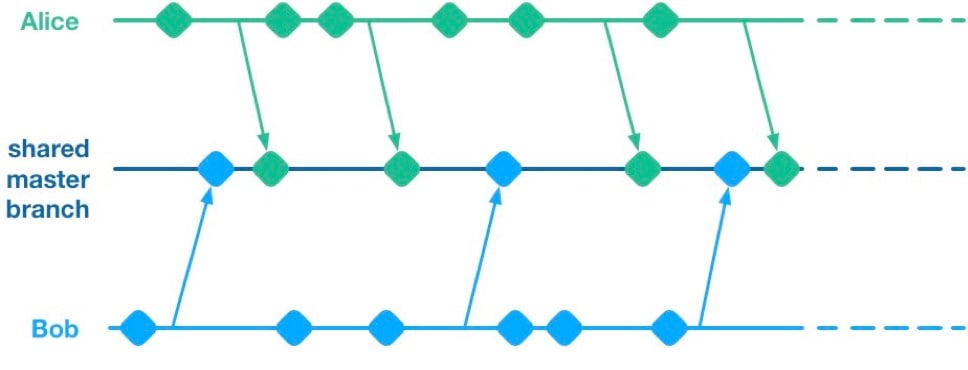
    Alice and Bob are a two-dev team working on a mobile app. They have two streams of work in progress. Bob is working on a big overhaul of how user preferences work, while Alice is finishing off a critical new feature for the app which the big bosses have decreed must be pushed to the app store by the end of the week. This team is trying to avoid big merge conflicts by frequently pushing their code changes to a shared master branch as they go.

    On Thursday, Alice is wrapping up her changes and doing some testing. While giving the app a general run-through she notices that the user preferences section is crashing. She asks Bob if he knows why. Bob explains that he’s in the middle of overhauling that area of the code. It’s taken a little longer than he expected and it might be buggy for a while. Alice gives Bob a look. She explains to him that her feature has to get to the app store this week. Bob gulps. Over the course of two long days Bob and Alice are able to roll back Bob’s changes, some of which had gotten tangled up with changes that Alice had been making as part of her new feature. They manage to ship to the app store by Saturday, and a crisis is averted.

    We see here that because Alice and Bob were both committing to a shared branch, their independent streams of work became entangled. Alice could not release her changes without Bob’s and vice versa. This is the huge drawback of working on a shared branch—although we will discover later on that there are ways to mitigate this.

    Feature Branches

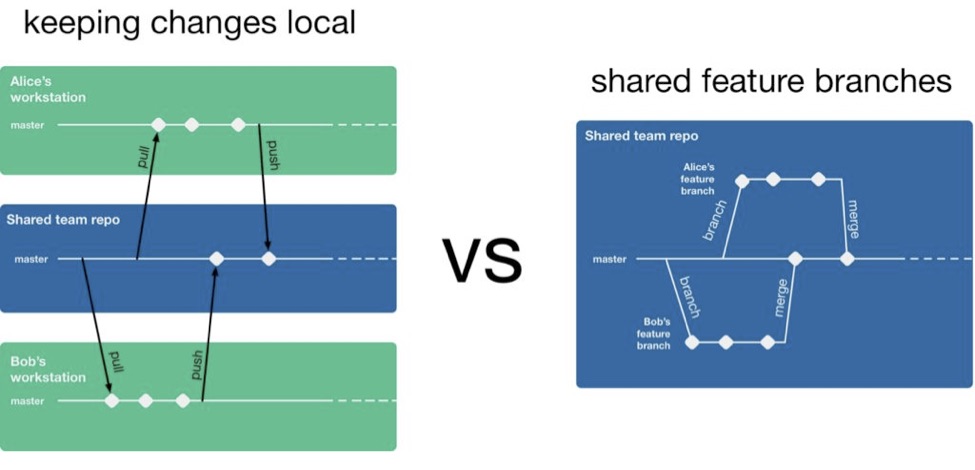
    To avoid this issue of coupled work streams, dev teams very often will move away from pushing in-progress code onto a shared branch. Some teams will opt to continue working on master on their local machines but only push to the team’s shared repo once the work is complete. Other teams will opt to use Feature Branches, maintaining separate streams of work on isolated branches and only merging them into master once they’re complete.

    As an aside, it’s interesting to note that when using a distributed source control system like Git, these two approaches are essentially equivalent; the only difference is whether the unmerged in-progress changes are visible in a remote feature branch or hidden on a dev’s local master. As such, I’ll talk about both variants as Feature Branching.

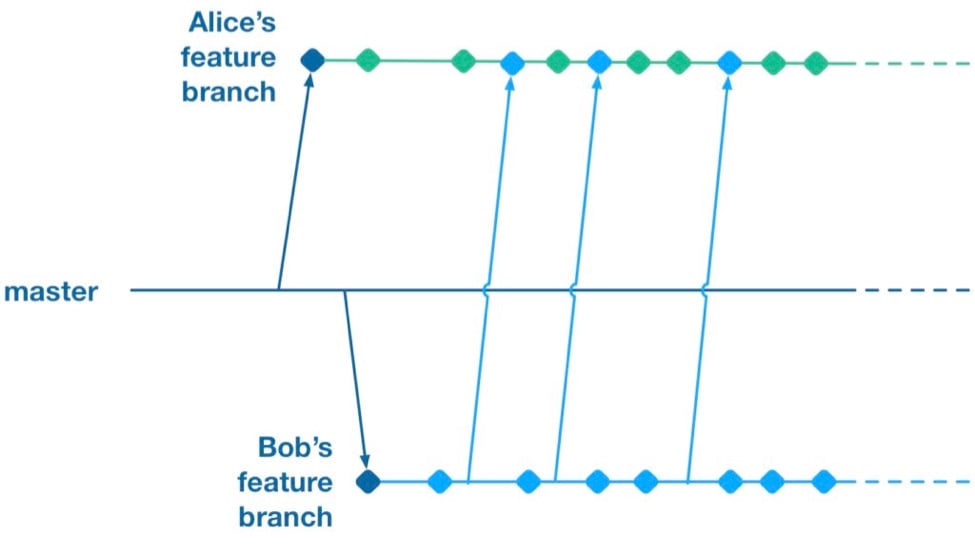
    So, if a team is using feature branching, then all their problems are solved, right? Unfortunately not. We’ve now re-introduced the risk of painful merges. Work that is being done on a feature branch is not integrated with other changes until it is merged to a shared master branch. Whenever two streams of work both touch the same files, either inadvertently or intentionally, there is a latent merge conflict which continues to grow in size until one of those stream’s branch lands on master. Some teams will try to mitigate this issue by frequently merging changes from master back into in-flight feature branches.
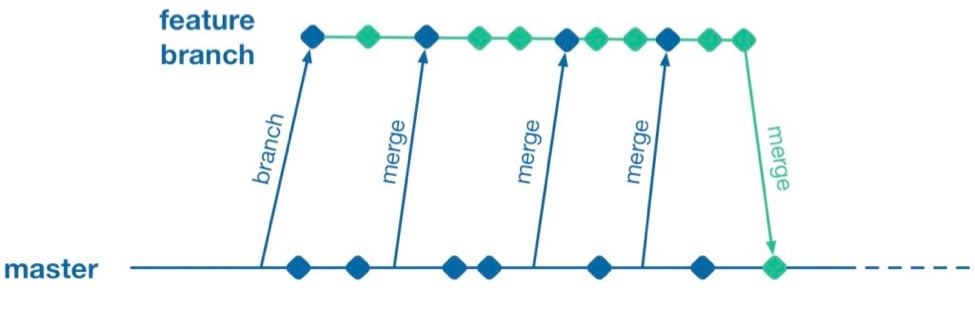
    However, this does not help when parallel changes are occurring on isolated branches. Alice’s branch will only see Bob’s changes when his feature branch lands on master. The latent merge conflict between these parallel changes is now waiting for Alice the next time she merges from master.
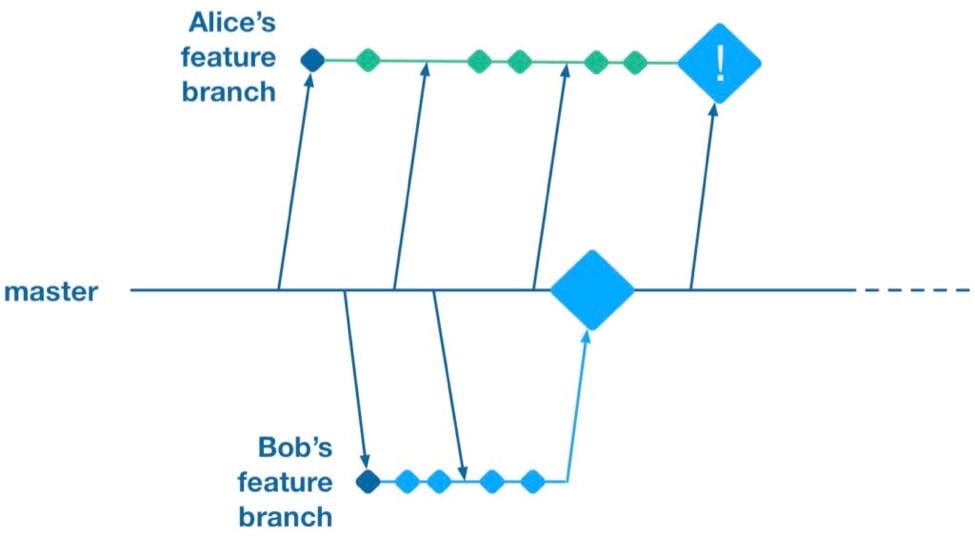
    (Thanks to Martin Fowler’s feature branch writeup for inspiring the above illustration)

    Some teams attempt to solve this problem by “cross-merging”—pulling work on one feature branch across into another feature branch to break down the size of latent merge conflicts between those branches.

    However, as soon as you merge two feature branches together you’ve essentially created a shared branch of in-progress work, and are back to the same problem as teams who are pushing in-progress changes to a shared master: Code changes from both work streams are now intermingled. Your features are now coupled together and cannot be released independently.

    To summarize, feature branches allow teams to decouple streams of work such that they can be released independently. However, they introduce a risk of large merge conflicts when parallel feature branches contain large sets of changes. Remerging from master into feature branches only helps once parallel work has already landed, and cross-merging between branches couples features together in the same way as working on a shared master.

    Feature Flags

    What alternative does a team have if they want to avoid the merge conflict risks Feature Branches introduce? They could go back to frequently integrating changes on trunk, but we established that this has the major drawback that formerly independent streams of work are now coupled together and cannot be released independently. This is where a technique called feature flags (aka feature toggle, bits or flippers) can help.

    A feature flag is a way to isolate work-in-progress code by placing it behind a “flag” or “toggle.” The work-in-progress code will only be exercised if the flag is flipped on. Otherwise, it will sit within the codebase as “latent code.” Here’s a sketch of how a basic feature flag might be used:

    if( featureFlags.isOn(“my-new-feature”) ){
    showNewFeatureInUI();
    }

    Unless the my-new-feature flag has been configured as “on,” the new feature will not be exposed within the app’s UI. This means the app can be released even if the code implementing new feature is totally bug-ridden, as long as that feature’s flag is flipped off.

    By using feature flags, in-progress changes can be pushed into a shared branch without blocking release from that branch. If Bob is halfway through his feature and Alice wants to push a release of her feature, the team can do that by creating a release where Alice’s completed feature is flipped on while Bob’s half-finished feature is flipped off. We get the benefit of continuous integration of developer work streams (reduced risk from merge conflicts) while still keeping release of those work streams decoupled.

    This technique is not particularly new. It is part of a family of techniques sometimes referred to as trunk-based development (you can tell the technique is not new because the name uses trunk rather than the mastermoniker, which is more common today due to git’s predominance). Flickr, Etsy, Github and Facebook are some better-known proponents of the technique. Facebook’s use of feature flags is one of the key enablers for its famous ability to deploy facebook.com from a shared branch twice daily.

    Drawbacks of Feature Flags

    As with the other approaches discussed so far, feature flags have their share of drawbacks. They introduce a fair amount of noise into a codebase as we now need to explicitly implement some sort of branching logic for any incomplete feature. This noise can lead to some messy code over time unless care is taken to retire old feature flags once they are no longer necessary. Testers can take a while to get comfortable with feature-flagged apps—the idea of shipping unfinished, untested code to the app store takes a while to get used to. If the flags can be controlled remotely at run time, then teams need to understand that the new configuration of flags must be tested before being applied to apps deployed to end users.

    Finally, certain types of changes are particularly hard to protect via feature flags—broad but shallow changes that touch a lot of files can be a challenge. Happily, feature flagging is not an all-or-nothing approach; feature branches can still be used for a change that would be particularly fiddly to implement behind a flag.

    Succeeding with Feature Flags

    When a team starts to adopt feature flagging they will usually run afoul of some of the challenges discussed above, and eventually figure out ways to mitigate them. Here are some of those techniques for working successfully in a feature-flagged codebase.

    Expire Your Flags

    A lot of teams get a bit flag-happy when they first start using the approach. They tend to introduce a lot of flags, but not take the time to retire the flags once they not longer need to control whether a feature is on or off. Make sure to take the time to retire old flags—they introduce design drag in your codebase and confusion when managing flags. Some teams take quite aggressive approaches ensure old flags are expired, such as setting “timebombs” when they create a flag, or having it throw an exception if it’s still in use after a certain period of time. Other techniques include adding a flag removal task to the team’s backlog at the time the flag is created as a reminder.

    Flags Aren’t a Silver Bullet

    It doesn’t always make sense to use a feature flag for a new stream of work. Flags lend themselves best to a new feature or alternative feature where access to the feature can be controlled from a single point in the code—often by showing or hiding a button or changing what happens when you tap some part of the UI. Other types of work, such as internal refactoring, is hard to protect behind a flag. For that type of work, consider using a feature branch, ideally breaking the work down into smaller chunks that can be implemented incrementally in a series of branches rather than one long-lived branch. This will reduce the risk of a large merge conflict growing over time.

    Summary

    Feature flagging and feature branches are both ways to decouple parallel code changes and allow teams to release changes with less coordination overhead. Feature branches are easy to get started with, but can lead to painful merge conflicts. This risk of merge conflicts tends to disincentivize making incremental improvements to a codebase, and can lead to areas of the codebase becoming “no go” zones. Feature flags allow teams to practice true continuous integration and totally decouple code changes from feature release, at the cost of some complexity in implementing each flag.

    Feature flags are not a silver bullet and aren’t always the right choice, but it’s easy for a team to experiment with the approach. You can get started simply with a single hard-coded if/else statement, see how it goes and take it from there.

    About the Author / Pete Hodgson

    Pete Hodgson is a consultant to Rollout.io, a software engineer and an architect. His clients range from early-stage San Francisco startups to Fortune 50 enterprises, focused on enabling continuous delivery of software at a sustainable pace via practices like test automation, feature flags, trunk-based development and DevOps. Pete is a frequent podcast panelist, regular conference speaker in the US and Europe, and a contributing author.

  • Understanding the App Development Life Cycle

    Understanding the App Development Life Cycle

    More and more businesses nowadays are shifting to mobile. And that’s absolutely reasonable choice:

    • More than 50 percent of digital media consumption accounts for mobile apps;
    • Ninety percent of the time smartphone users spend on their mobiles goes to mobile apps;
    • A typical user has about 30 apps installed on his mobile and spends more than 35 hours a month using them;
    • Forty-two percent of the mobile purchases were completed from mobile apps;
    • Eighty-five percent of consumers prefer native mobile apps over a mobile website.

    When deciding on developing a mobile app, it’s important to picture the entire range of stages and procedures to go through.

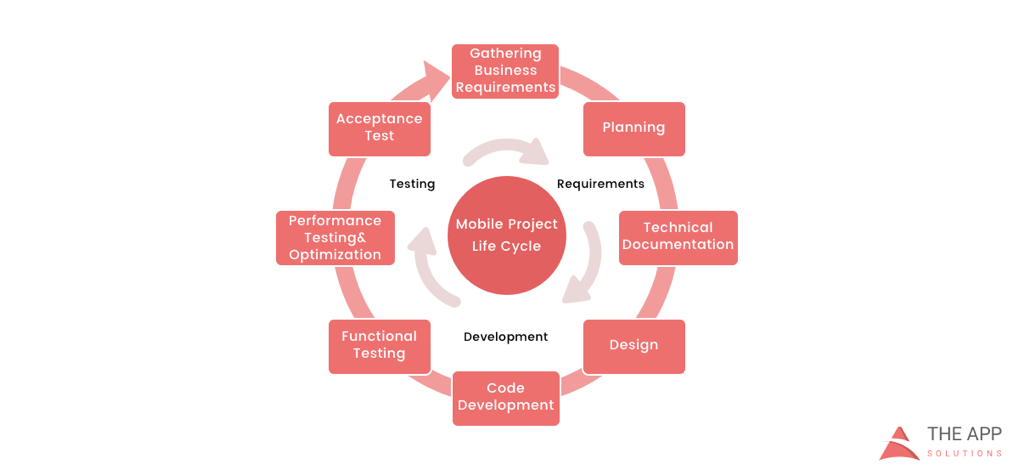
    According to the mobile app projects approach by The App Solutions, here is the life cycle of a typical development project, no matter the complexity:

    1. Planning stage (project manager, marketer, and business analyst are involved) – carrying out the business analysis and crafting mobile strategy.
    2. Technical documentation (covered by the technical writer) – describing all tech requirements and details.
    3. Prototyping (usually made by a UX/UI designer) – creating the sketch, wireframes, prototype and final app skins upon approval.
    4. Development (performed by the developers) – front-end and back-end segments of coding.
    5. Quality Assurance (usually performed continuously after each agile sprint is completed; followed by bug fixing) – testing tech requirements, device compatibility, interface, security aspects, etc.
    6. Publishing & Maintenance (covered by DevOps) – publishing to the app store, updates releases, infrastructure, and entire app maintenance.

    Planning stage

    When creating a mobile app, it is crucial to take time to go through the necessary research and planning steps.

    Business analysis:

    • Idea evaluation – a preliminary stage, when experts investigate the idea, correct it, give their advice and create a rough logics for it.
    • Competition analysis – study of activities of other players in the market.
    • SWOT-analysis – evaluation of strengths and weaknesses of the product, insights into opportunities and other aspects.
    • ROI calculation – assessment of the future app market performance help realize the real value and adjust budget accordingly.
    • Requirements scope – summing up requirements for the future product at all levels.

    Mobile strategy:

    • Market research – this study shows the overall situation on the market to help adjust the concept of the product to current demand.
    • Defining user personas – understanding who is your target audience is crucial in crafting advertising approach.
    • Technologies & tools assessment – study of specific tools required for the industry and select a set of technologies to meet the objectives of the project.
    • Complex promotion strategy – a step-by-step action plan for acquisition and retaining users.

    Technical documentation:

    Also known as a technical specification or a software documentation, this paper is a complex manual of your product, outlining requirements, business logic and leading your specialists through all stages of the project:

    • Makes your software universally understandable.
    • Provides flexibility for future changes.
    • Adds value to your app by providing a clear manual.
    • Helps to keep control of your own product.
    • Allows reusing existing parts of the developed application.

    Prototyping:

    Prototyping is a process of defining a concept in visual terms and evaluating how the app might develop to correct a misconception.

    • Creating a sketch – the draft version of your app on paper that sets up the main logic, number of screens and the way they interact with each other.
    • Creating wireframes – provides the visualization of the draft structure.
    • Creating a clickable prototype – helps to find out and analyze all possible use cases, discover logical breaks and technical inconsistencies in the original idea.
    • Designing app skins – collecting all wireframes and put them together to get the final design.

    Code Development:

    This segment usually consists of two main parts:

    • Front-end development – client-side development, creating a presentation layer of the software for a direct user interaction with it.
    • Back-end development – a server/database part of development, connecting a front-end part of the mobile app with the data access layer.

    Quality Assurance:

    In the agile development, it’s usually a continuous process following every sprint of development:

    • Compatibility testing – running the app on different devices and screen sizes.
    • Interface testing – checking the navigation, menu and buttons performance.
    • Device compatibility testing – checking how the app looks and performs on various screen sizes.
    • Low-level resources testing – examination of the app in conditions of low battery, slow internet connection, etc.
    • Security testing – provides quality assurance of users data safety.
    • Beta testing – giving users access to the app to get feedback.

    Publishing & Maintenance:

    • Publishing of the app and following updated versions to a chosen app store.
    • Infrastructure support – either you have admin panel to post on or cloud service attached, you’ll need to make sure it functions fully.
    • App store optimization – helping your app move onto the tops of search lists and this way gain more users.

    Making the Most of Your App Development Project

    Here are a few tips for getting the most out of your own app development project:

    • Mind what’s trendy + study the market and your target audience. It is a crucial preliminary stage that will impact literally every side of the project and every decision to make.
    • Specify as particularly as possible the product you expect to see at the end of the project. Defining the smallest features and functions of the software at the planning and prototyping points of the project will help find areas to save money on the actual development.
    • Negotiate your idea with various development teams (study the profile of the app development company and find evidence for their credibility, debate the best price). Make sure they hear you and understand what you mean—simply put, that you’re on the same page.

    About the Author / Charlie Shabe

    Charlie Shabe is a professional Digital Marketing Strategist. He has over 20 years Digital Marketing experience in helping global organizations use the Internet to drive their online visibility and generate leads. In addition to his PR and online marketing experience, Charlie is an expert in writing. Connect with him on Facebook and Twitter.

  • From Architect to Operator: The Rise of Developers

    From Architect to Operator: The Rise of Developers

     Over the past five years, DevOps has transformed from a model for agile software development practices to the aspirational standard for functions across the IT spectrum. Previously, developers and IT Ops teams were distinct and siloed—developers built the application and IT Ops managed production environments—but now many in the industry have shifted to create a net-new liaison between the two, allowing applications to exist simultaneously in the worlds of development and production.

    While everyone is focusing on the convergence and collaboration of the developer and the IT Ops person, however, the storyline is changing again. The focus is now shifting back to the developer (and his/her specific skill sets), as there’s an increased demand for a single team to manage the entire application life cycle. Now more than ever, the people who actually develop the systems are poised to take ownership of traditional IT operations functions, such as maintenance, performance and availability.

    As IT continues to evolve, three trends point to the expanding and evolving role of the developer.

    1. The decoupling of infrastructure from services. With the rise of public and private clouds, more of the technology stack is becoming abstracted away from infrastructure, and often offloaded to a provider. This has created challenges for how developers manage and deliver applications in this new environment. In the past, IT operations was responsible for ensuring things such as availability and performance, but now, developers can build those capabilities into the applications themselves.
    2. The elimination of infrastructure setup. IT Ops roles have traditionally been the gatekeepers, and new technologies didn’t make their way into the data center if it didn’t pass their standards. Getting into the data center was just the first step, though, as lengthy deployment of physical infrastructure and provisioning of virtualized instances for applications would require substantial expertise and time. Now, developers can spin up services instantaneously, and infrastructure setup has been reduced to a simple configuration file. It is the developer who understands which resources the application will need, and with infrastructure reduced to a couple lines of code, the speed at which it can be applied is impossible to ignore.
    3. Microservices create fault tolerance. How we’re building applications also greatly impact how they will run in the future. Historically, you would build a single monolithic service that would respond to every request from the users of that application. This approach meant that when a part of the service failed, everything would go down. However, when you abstract away the infrastructure, you gain the ability to decentralize the application or service into many loosely coupled microservices. This makes the application much more fault-tolerant and reduces the impact of an outage or shortage of resources. As such, developers can help ensure system continuity and performance by building resilience and monitoring capabilities into the software.

    End-to-End Visibility and the Need for IT Ops Persists

    While developers are certainly on the rise, the role of IT Ops remains uniquely necessary in today’s IT environment. IT Ops will always have the best end-to-end IT system perspective, encompassing the application environment as well as shared services and infrastructure (think backup, endpoint protection, single sign-on, DNS, etc).

    Developers build visibility from the inside out. But because it’s happening in the app itself, there’s no outside-in look, and thus pieces of the stack go unmonitored. As a result, you can’t understand the holistic end-user experience—which, when it comes to application health, is both the start of the conversation and the end of the argument. IT Ops brings incredible value, offering end-to-end visibility with better monitoring and a focus on ensuring every transaction—both internal and external—goes smoothly. While it has become common for developers to instrument their applications, they don’t have nearly as much expertise in end-to-end service management and measuring performance across each component. Additionally, IT Ops workers tend to possess a great level of operational rigor; they’re better versed in dealing with third-party vendors; and they understand the entire system (the weakest link, what works, what fails, etc.), including back-end functions, in a way that developers simply don’t.

    What Comes Next for Developers?

    We’re already seeing how developers are taking greater control over traditional IT operations functions, but what comes next? Looking forward a few years, I believe the next frontier to monitor is the role developers will play in SecOps. Security attacks are about finding the path of least resistance, and as SecOps matures into active threat-hunting and breach detection, attackers will evolve their methods. If SecOps can solve current attack vectors—phishing, especially—tricking software into following unexpected code paths will once again be a reasonable route to a breach.

    But there are ways to mitigate that during the development process, by building security into the code itself. As SecOps teams increasingly treat the environment as an ecosystem, they’ll see the application itself as a vulnerable piece of the attack surface; they may begin requiring secure development practices with a level of governance over development teams. As security increasingly becomes everyone’s job, everyone in IT must shift their mindset, and while development teams may be late to the party, SecOps will eventually extend a mandatory invitation.

    About the Author / Eric Thomas

    Eric Thomas serves as Director of Solutions Architecture for IT analytics company ExtraHop. Eric leads the Professional Services team, and draws on over 20 years of experience in IT operations. Before joining ExtraHop, Eric performed a variety of operational roles, most recently as Director of Advanced Engineering for Thomson Reuters, where he led a team of performance and availability specialists, supporting over 200 applications representing $2B in annual revenue. His prior experience includes Enterprise IT management, SaaS production operations and next-generation technology advocacy.