Category: Features

  • Only 30% of Orgs Fully Implement DevSecOps

    Only 30% of Orgs Fully Implement DevSecOps

    With the pressure to release more rapidly, security is shifting left within the continuous development pipeline at most organizations. This imperative is increasing with the rise of cyberattacks. Yet both a lack of training and poor visibility are stalling many DevSecOps rollouts, a recent CSA study found.

    DevSecOps is still a relatively new practice and has yet to reach maturity throughout most organizations. Though nearly all companies are on their way, only 30% of security professionals say they fully implement DevSecOps in practice today. That leaves most organizations in some state of DevSecOps ideation and planning.

    CSA recently released its Secure DevOps and Misconfigurations 2021 report which was commissioned by Trend Micro. The report found that misconfigurations commonly arise from default security settings. A lack of internal guidance and accessibility of security resources commonly hinder DevSecOps maturity, too.

    Below, I’ll review the other major takeaways from the report to see how they can inform organizations as they move to implement DevSecOps.

    State of DevSecOps Adoption

    DevSecOps is all about increasing the security around rapid deployment. It literally puts the security into DevOps by shifting security automation left and de-siloing the boundary between DevOps and IT security teams.

    While most engineers realize the benefits of DevSecOps, the state of each organization’s DevSecOps journey is very different. While an impressive 90% of organizations are in some phase of the journey toward DevSecOps, only 30% are implementing DevSecOps while 24% are in the planning phase, 18% are designing and 18% are still refining their DevSecOps strategy. Just over one in ten security professionals say their team has no plans to invest in DevSecOps at all.

    Looking to the future, 42% say they will implement full DevSecOps within the next 12 months. But due to its current nascent state, misconfigurations are still getting through. The primary reason cited for these misconfigurations was flawed or lacking internal guidance (33%).

    Many professionals say there is simply not enough training, support or internal knowledge around vulnerabilities and misconfigurations. Other top reasons for misconfigurations include insecure default settings (18%) and negligence (16%).

    Outside of misconfigurations, groups also report challenges with identity, authorization and access. Ensuring the correct privileges is vital to avoid escalation attacks, which are a prevalent issue. Between 2019 and 2020, 80% of companies experienced a data breach of some kind, many of which were due to misconfigured access controls. OWASP also reported that broken authorization is a top vulnerability for high-traffic web API endpoints.

    Common Threat Mitigation Practices

    To mitigate these threats, development and security teams must maintain best practices, yet certain issues prevent DevSecOps from emerging. For one, 60% of security professionals say their top challenge is insufficient visibility into security or compliance gaps—this is by far the most common challenge—and 11% also cite inconsistent cloud account onboarding. Finally, 10% say time-consuming, slow and/or insufficient architecture holds them back.

    One way to mitigate threats is to introduce routine security reviews more frequently. Yet it’s hard to set a definite benchmark here, as the frequency at which organizations review their cloud infrastructure for vulnerabilities or misconfigurations varies widely. Currently, 22% perform such security reviews daily, 22% monthly, 18% weekly and 23% quarterly, according to the survey. This rate will likely increase as DevSecOps becomes more commonplace and automated within the development life cycle.

    Staying up-to-date with modern security frameworks is another facet impacting DevSecOps adoption; and organizations tend to follow multiple frameworks to inform their security strategy. More than three-quarters (78%) follow the National Institute of Standards and Technology (NIST) guidelines, 67% follow the Center for Internet Security (CIS) benchmarks, 66% follow Cloud Security Alliance (CSA), 54% follow International Organization for Standardization (ISO) and 44% say they follow security recommendations from Amazon Web Services (AWS).

    For example, NIST, the government-operated standards-setting body, recently set cybersecurity guidelines that recommended the use of zero-trust and service mesh across departments. These security guidelines can be thought of as architectural benchmarks, especially for large, highly-regulated industries.

    DevSecOps Training Types

    Finally, investing in community resources and training is another way to increase DevSecOps awareness. Only half of survey respondents reported their DevSecOps best practices resources were moderately accessible—thus, the onus is on leaders to democratize such knowledge within their organization.

    The majority (81%) of respondents cited online articles and training as their primary form of learning about cloud security tools and vendors. Workshops, conferences and webinars follow closely. Organizations also adopt many internal knowledge-sharing methods in response to incidents. A full 85% said they conduct awareness training followed by table-top exercises (52%), attack simulations (45%) and protocol or response framework training (37%).

    Future DevSecOps In The Cloud

    It appears that most teams are still formulating their DevSecOps strategy. But looking to the future, 42% say they will implement full DevSecOps within the next 12 months. Simultaneously, more cloud traction is projected throughout the industry.

    Right now, 40% of organizations have between 41% to 99% of their workloads in the public cloud. And 55% of organizations will have between 41% to 99% of their workloads in the public cloud in the coming year. The type of workloads will also likely evolve in the coming year, as more organizations move to container platforms, Function-as-a-service and other serverless capabilities. To fully reap the benefits these new technologies promise, organizations must undoubtedly respond to a new class of cloud-native vulnerabilities.

    About The Report

    The Cloud Security Alliance (CSA) is a not-for-profit organization with a mission to widely promote best practices for ensuring cybersecurity in cloud computing and IT technologies. The Secure DevOps and Misconfigurations survey was conducted from July 2021 through September 2021 and collected over 900 responses from a global pool of IT security professionals working in various sectors and organizational sizes. For a full copy of the report, you can swap some personal information for a PDF download here.


  • Best of 2021 – Seven Reasons You Shouldn’t Hire a DevOps Engineer

    Best of 2021 – Seven Reasons You Shouldn’t Hire a DevOps Engineer

    As we close out 2021, we at DevOps.com wanted to highlight the most popular articles of the year. Following is the fifth in our series of the Best of 2021.

    DevOps is a culture, not a title. Therefore, companies should follow DevOps principles, rather than hiring one savant to fix an entire organization’s delivery model.

    I recently spoke with Uri Zaidenwerg, DevOps lead at Replix, to understand the current state of DevOps. As more robust DevOps tools emerge and practices proliferate across organizations, developers are now better equipped to own their applications end to end, including deployment, security and even cloud costs.

    Extracting DevOps from the development cycle could defeat the purpose of de-siloing development and operations. Below, we’ll outline some reasons why you should focus on building a holistic culture instead of filling a DevOps engineer role.

    1. DevOps Is a Culture, Not a Role

    The first reason is also the most encompassing — DevOps is not a title; it is a culture. DevOps functions best as a mindset adopted across IT. Instead of hiring a dedicated role, all “developers should be doing operations,” said Zaidenwerg.

    This means giving developers better visibility into DevOps KPIs, such as deployment frequency, deployment time, change failure rate, time to detection and availability, which we’ll explain in detail below.

    2. Developers Know Their Application Code Best

    Developers know their code better than anyone else. Diagnosing errors in an unfamiliar environment is tricky, and only programmers truly comprehend the ins and outs of their own code. If armed with DevOps skills, they could address problems much more efficiently than external eyes.

    Zaidenwerg worked as a DevOps systems administrator, and described “what it’s like to have to monitor availability of an application that you did not code or build.” It’s difficult; simultaneously diagnosing multiple applications that you don’t know intimately is also quite challenging, he explained.

    If you are unable to link errors to application processes quickly, it could hurt availability and SLAs. Instead, encouraging developers to diagnose issues could reduce time to remediation because they have more context, noted Zaidenwerg.

    3. Developers See the Surrounding Environment

    In addition to understanding how individual applications function, developers also have unique perspective into the surrounding environment — they realize the intricate network of dependencies and interconnections that make up a microservices system.

    To see what’s going on, you really need to know how to code. “DevOps engineers need to be software developers,” said Zaidenwerg. Handing off DevOps tasks to an administrator who doesn’t have coding knowledge can severely limit their ability. They will not be able to dig into the code to address real issues or make pull requests confidently.

    4. Separating Roles Keeps Ops in a Silo

    Relegating DevOps responsibilities to a centralized team goes against a fundamental principle: de-siloing departments. “DevOps was invented to make that gap smaller,” said Zaidenwerg. Having a separate role would thus appear to contradict one of the fundamental tenets of the methodology.

    “The point of a DevOps practice is that developer teams are empowered to control their own operations, not that you have specialists who know how to script operations,” said Tom Marsh, principal developer at Novartis, on Quora.

    5. One DevOps Engineer Can’t Fight a Flood

    As it stands, there are aren’t enough DevOps engineers to go around. According to answers on Quora, the ratio of DevOps engineers to developers tends to stand between 1:10 to 1:12. Zaidenwerg said he’s seen worse — from 5:50 to 6:120. Instead, he said, “Zero to zero is the optimal number.”

    One DevOps engineer against a tidal wave of requests and application deployment pipelines is just not sustainable. “Can you imagine the amount of features and code that has been written?” asked Zaidenwerg. “The amount of fires they need to put out is huge.” And what happens when that single DevOps engineer goes on vacation? To avoid delays, he encourages developers to own their CI/CD process from end to end.

    6. What Happens When DevOps Engineers Automate Their Job Away?

    Another creed of DevOps and SRE practices is to introduce automation – with the ultimate goal being to automate their job away. But, if this were actually to occur, what happens to the DevOps engineer? Do they sit back and rake in the dividends of some upfront work for years afterward? It would make more sense to have programmers introduce automation into their workflows.

    7. K8s + Other DevOps Tooling Empowers Developers

    Powerful DevOps tools like Kubernetes, ELK stack and cloud infrastructure solutions now make it far more realistic to delegate more responsibility to the programmer themself. Democratizing “as-a-service” solutions for monitoring, load balancing or storage enables everyone to “share the burden of the DevOps work,” said Zaidenwerg.

    Many organizations have begun to treat Kubernetes as a source of truth. Zaidenwerg wholeheartedly encourages this practice. “Everything should be managed on K8s, from K8s,” he said. “Try and think of K8s as your lowest layer.” Standardizing microservices around K8s helps retain platform-agnosticism for multi-cloud, he added.

    How to Get There? Track DevOps KPIs

    So, if we aren’t delegating DevOps tasks to a DevOps engineer, how can we encourage developers to embrace DevOps principles? To Zaidenwerg, the answer boils down to how we define success. Instead of gauging success using traditional development output metrics such as productivity, scrum or number of tasks completed, we need a culture that measures developer work using DevOps key performance indicators (KPIs).

    There are many DevOps KPIs to consider. Some could be:

    • Deployment frequency: How often do you commit?
    • Deployment time: How long does it take from committing to the live environment?
    • Automation: How automated is the build process?
    • Availability: Is the program globally available and highly performant? What is the latency and uptime?
    • Monitoring: Are you proactively monitoring and fixing issues in live environments?
    • Optimizations: Is the application cost-effective? Can it be more efficient? Are there idle resources running?
    • Policy as code: Are security policies automated as code? “Security needs to be written in code … if it’s done manually, you’re f**ked,” Zaidenberg said, bluntly.
    • DRP: Is the application resilient? What is the disaster recovery plan (DRP)?

    Of the above KPIs, optimization stands out, as rising cloud costs are an ever-present hurdle these days. Zaidenwerg encouraged developers to track cloud environment expenses. When you have a daily graph of spending, you can use this visibility to “create supporting systems to automatically take idle resources down,” he said. Others have described this as BizDevSecOps.

    Encouraging DevOps Culture

    Our cheeky headline is not meant to devalue those with DevOps in their title — on the contrary — hiring someone with this rare experience could greatly assist organizations in introducing DevOps principles. They could act as a model to help cultivate this culture.

    In addition to tracking KPIs, Zaidenwerg recommended a top-down approach to spread DevOps principles. The methodology must be sanctioned and led by the CTO, architect or tech lead, depending on the company’s size. A DevOps culture is especially paramount for SaaS or IaaS companies, whose architecture must be more than error-proof —  “It must succeed every single time,” Zaidenwerg stated.

    Disseminating modern cloud best practices is also critical for building a DevOps culture. When you transition from hardware to the cloud, you often encounter similar tech (load balancers, firewalls, availability zones, etc.), yet with different names and implementation processes for each function, complicated by nuances between cloud service providers (CSPs). All this will require “translating on-premises best practices to cloud best practices,” described Zaidenwerg.

    Another significant issue arises from the fact that DevOps isn’t really taught in college-level computer science courses. Looking to the future, Zaidenwerg (and myself) hope to see more emphasis within the education system. Instilling a DevOps mindset early on would better prepare developers for more real-world settings encompassing deployment, availability and security-as-code.

    Whose House Is It?

    Zaidenwerg likens a software application to someone’s house. The homeowner knows every detail — where the utensils are, how to work the shower nozzle, what day trash is picked up, etc. Invite a stranger into a new house, and they will be at a loss.

    Similarly, inviting external Ops to manage a foreign infrastructure will put them at a loss. “If you let someone else deal with infrastructure, then you have two parties and no one is fully aware,” Zaidenwerg said.

    To summarize — DevOps is a culture, not a role. Treating DevOps as a role, instead of as a practice, could defeat the purpose and cause siloed, slower-moving teams. Instead, tracking KPIs and empowering developers with DevOps tools could help them keep their house in order.

    Of course, this is an evolving practice, and each organization will have its own understanding of what it means to implement DevOps. Now, do you still think it warrants the title? Please let us know in the comments below!

  • Best of 2021 – 7 Popular Open Source CI/CD Tools

    Best of 2021 – 7 Popular Open Source CI/CD Tools

    As we close out 2021, we at DevOps.com wanted to highlight the most popular articles of the year. Following is the fourth in our series of the Best of 2021.

    DevOps is a software development strategy that incorporates agile practices for fast, efficient product creation and release. It focuses on integration of development and operations teams, continuous integration/continuous delivery (CI/CD) and automation of tasks and processes.

    Typically, DevOps teams use pipelines to streamline and standardize processes. DevOps pipelines are toolchains that teams can use to automate tasks and provide visibility into the software development life cycle. In this article, we’ll cover seven popular open source CI/CD tools.

    How DevOps Will Change in the Near Future

    Although DevOps has been around for just over a decade, it has continued to evolve. New DevOps technologies and changing infrastructure have caused teams to adapt and technology advancements that will continue to drive change. Below are a few of the ways you can expect DevOps to evolve in 2021 and beyond.

    AI and Data Science

    Artificial intelligence (AI) and machine learning have significant potential to improve current DevOps processes. Teams can use AI to identify inefficiencies in pipelines, optimize testing or evaluate user needs. Increasing amounts of data about environments, customers, markets and individual habits can all be applied to increase productivity and, ultimately, revenues.

    Serverless Architectures

    Serverless platforms, such as the AWS serverless ecosystem, including AWS Lambda and Fargate and the Azure serverless platform, including Azure Functions and Azure App Service, are becoming increasingly popular. These platforms enable DevOps teams to focus on just their code and eliminate many other variables, such as concern for host operating systems. These architectures provide scalability, deployment speeds, and user experiences that are difficult to match. This value will further secure FaaS in the coming years.

    Cloud-Native

    The growth of cloud-native applications has both driven and been driven by widespread adoption of cloud services. The containers and microservices that make up many cloud applications are used in many pipeline deployments and environments. Efficiently developing cloud-native applications require agility and automation that are difficult to meet without DevOps strategies.

    For the above reasons, DevOps has become almost synonymous with cloud-native. As cloud-native technologies change, tooling and processes adapt, as well. Additionally, since cloud growth isn’t slowing down, you can expect that DevOps will continue to focus on and refine cloud-native development.

    DevSecOps

    When developing applications in an automated CI/CD pipeline, security cannot be an afterthought. Especially in complex microservices architectures, security must be built in from the planning and development stages. Everyone must be aware of security requirements – developers, DevOps engineers and infrastructure teams.

    Transitioning to a DevSecOps paradigm requires a culture change, but also a new technology stack. Shifting security left requires tight integration of application security tooling into the development life cycle, and implementation of cloud security solutions that can help gain visibility, and apply automated security controls, to complex cloud environments.

    Which CI/CD Tools will You Use in 2021 and Beyond?

    As technologies change, so does tooling. While you can continue to use the same tools you started with, you should at least consider if other tools can increase your efficiency. Below are a few popular, open source tools you might want to integrate.

    Argo CD

    Argo CD is a CI/CD tool for Kubernetes development. It is an open source project which is currently in the incubation status at the Cloud Native Computing Foundation (CNCF). It uses Git repositories to store the state of Kubernetes applications, monitors applications and can resync clusters to the desired state, as represented in the git configuration.

    This innovative approach also allows you to store multiple desired states of a Kubernetes application, using branches, tags, or by pinning manifest versions using a Git commit. This provides a flexible environment for managing Kubernetes configurations during the development process.

    CircleCI

    CircleCI is an open source CI/CD tool. It includes features for job orchestration, resource configuration, caching, debugging, security and dashboard reports. CircleCI integrates with a variety of tools, including GitHub, Heroku, Slack and Docker.

    CircleCI is available in three tiers, one of which is free. You can use it in the cloud or on-premises with Linux, Mac or Windows machines.

    GitHub Actions

    GitHub Actions are a recently released open source tooling feature you can use to automate workflows. It enables you to build, test and deploy code directly from GitHub. You can base your automation on any GitHub events, including push or issue creation.

    GitHub actions include features for matrix workflows, hosted runners for all major operating systems, built-in secrets storage and live log reviews. It supports all common programming languages.

    GitHub actions includes hosted runtime environments that are free to use for the first 2000 minutes of use per month. If you need more time for testing, you can purchase time by the minute or in bulk. You can use GitHub actions by including them in your YAML files.

    GoCD

    GoCD is an open source build tool that lets you build CI/CD development pipelines. At its core, it is a continuous integration (CI) server, which lets you work with complex release workflows. It goes beyond classic CI to let you construct a full continuous delivery (CD) pipeline, all the way from automated and secure deployment to production.

    GoCD defines pipelines using code checked into source control – this infrastructure-as-code (IaC) approach lets you test, manage and reuse pipelines across multiple projects. Pipelines can be represented by JSON or YAML templates.

    Another feature of GoCD is the ability to run pipelines both sequentially and in parallel, with configurable dependencies. You can view entire workflows from development to production and track a feature from initial commit to production deployment, using value stream mapping.

    GoCD is extremely flexible, providing an ecosystem of plugins and the tool also allows you to develop and contribute your own.

    Gradle

    Gradle is an open source build automation tool that has been around for about a decade. It continues to be well-adopted and supported. Although it is not a new tool, it can be a good alternative if you’re looking to replace Maven as your build management solution. Gradle is more extensible and faster than Maven, and can be used for native development of C/C++ applications.

    Gradle includes features for incremental builds, build caching and parallel execution. It supports a variety of languages and platforms, including Java, Scala, Android and C/C++. You can integrate Gradle with a range of tools, including Eclipse, IntelliJ and Jenkins.

    You can use Gradle on-premises or with a virtual machine in the cloud. Gradle is free to use; however, if you want enterprise support or training, you need to pay an additional fee.

    Helm

    Helm is an open source Kubernetes package manager. You can use it to define, install and upgrade Kubernetes-orchestrated applications. Helm includes a wide range of pre-built charts (sets of distributable Kubernetes resources) that you can use to deploy services faster and more easily. You can use Helm on Linux, Mac and Windows devices.

    Jenkins X

    Jenkins X is an updated version of the well-known Jenkins. It builds on the existing features of Jenkins with capabilities tailored to Kubernetes and Docker workflows. It includes features for pre-built pipelines, integrated GitOps support, automatically generated preview environments and feedback integration.

    Jenkins X integrates with Tekton, Prow, Helm, Knative and Skaffold. You can use it on Linux, Mac or Windows machines.

    CI/CD and Automation Go Hand-in-Hand

    Agile teams need automation tooling, especially when creating and working with CI/CD pipelines. DevOps environments are dynamic, built for fluid workflows and constant change. Automation helps DevOps teams maintain a high level of visibility and reduce time spent on repetitive tasks. When adding AI and data science into the mix, DevOps teams gain the ability to make data-driven decisions, in addition to automated alerts and response.

  • Quali Adds Free Tier to DevOps Automation Platform

    Quali Adds Free Tier to DevOps Automation Platform

    Quali has added a free tier of service to its Torque platform for automating infrastructure provisioning and application workload deployments.

    In addition, the company has updated the software-as-a-service (SaaS) platform to provide blueprints through which it provides tighter integration with Terraform, an open source infrastructure-as-code (IaC) tool, along with support for custom tags to make it easier to generate reports and dashboards that provide greater visibility into infrastructure costs.

    Quali CEO Lior Koriat said the free tier is intended to make the Torque platform more accessible to both small teams of DevOps professionals and individual users. It includes the ability to build environments on Amazon Web Services (AWS) or the Microsoft Azure cloud in addition to providing integration with a variety of DevOps tools and platforms and access to a sample blueprint library. Support for the free tier is provided via an existing community edition of the platform.

    Koriat said Torque takes IaC a step further by also making it possible to automatically deploy complete application environments on top of infrastructure provisioned as code using blueprints rather than low-level Terraform scripts. The goal is to increase developer productivity by extending Terraform so that developers can spin up environments across multiple cloud computing platforms via self-service, he added.

    That approach also sharply reduces the chances a cloud platform will be misconfigured, which Koriat noted is the bane of cloud security professionals’ existence. Most developers lack the cybersecurity expertise required to ensure cloud computing environments are configured properly. Simplifying the provisioning of infrastructure is especially critical when developers employ complex platforms such as Kubernetes, added Koriat.

    At the same time, Quali’s Koriat said IT leaders want more visibility into how cloud resources are being consumed as the number of workloads deployed in these environments steadily increases. Developers tend not to remember to de-provision cloud resources when no longer needed, which Koriat noted conspires to increase cloud costs unnecessarily.

    It’s not clear just yet how quickly DevOps teams might be moving away from relying on lower-level tools toward automation frameworks accessed via a SaaS platform. However, as application environments become more complex, it becomes even more challenging to provision and manage IT environments—especially since many DevOps teams are still working from home to help limit the spread of the COVID-19 pandemic.

    One way or another, the amount of time and effort spent managing IT infrastructure needs to be reduced. After all, while application environments are increasing in both size and complexity the number of individuals that make up a DevOps team remains largely the same. The need to rely more on automation frameworks has reached a tipping point that is becoming increasingly obvious to all concerned.

    As more organizations start to operate as software companies in the age of digital business transformation, it’s clear the way IT has been managed in the past is about to fundamentally change. The issue now is determining which automation framework lends itself best to enabling DevOps teams to achieve that goal.

  • How Log4j Becomes a Serious DevOps Problem

    How Log4j Becomes a Serious DevOps Problem

    The recent discovery of the Apache Log4j vulnerability has wide-ranging implications for anyone who develops software, especially for those in the DevOps realm. What’s most troubling about the vulnerability (CVE-2021-44228) is how prevalent the use of Log4j is. The vulnerability is reported in a vast array of applications and directly impacts numerous Apache projects, including Druid, Dubbo, Flink, Flume, Hadoop, Kafka, Solr, Spark and Struts. There are also numerous Cisco programs impacted by the vulnerability. The list of impacted applications and libraries seems to be almost infinite, extending to Elastic LogStash, GrayLog2, Neo4J, Steam, Twitter and even the VMware Tanzu family of programs. 

    Simply put, any application that uses Log4J for logging and tracing is subject to the identified family of attacks known as Log4Shell. Those attacks prove easy to exploit and can be used to take control of vulnerable servers.

    Why DevOps Practitioners Should be Concerned

    The world of DevOps is all about reiteration, where features and improvements to applications are slipstreamed into production environments. To accelerate development, the QA process is usually limited to the most recent changes.

    In other words, developers, via their pipelines, can often establish a baseline of quality and then speed up their CI/CD pipelines by testing only what has changed since the last iteration of the application. This process ensures an acceptable level of quality without introducing what are perceived to be unnecessary steps.

    However, those processes do not take into account newly discovered flaws in older APIs and libraries, meaning that those flaws could telegraph into deployed applications and leave DevOps teams completely unaware of the impact and possible disruption. Detecting flaws after an application is deployed is like putting the cart in front of the horse.

    Further complicating the situation is that many developers lack a well-defined and well-maintained software bill of materials (SBOM), which means developers may be unaware of the components and/or libraries being used in a deployed application.

    Without an SBOM, it becomes increasingly difficult to remediate an issue with an application—especially if developers are unaware of the issue to begin with.

    Where Should Responsibility Lie?

    More often than not, vulnerabilities introduced into applications become a game of finger-pointing, where developers blame library suppliers or infosec staffers, and infosec blames developers for not performing due diligence on the components they are selecting to incorporate into their applications.

    Of course, finger-pointing only adds to the angst and delays the process of remediation and does nothing to determine where the responsibility for detecting and remediating vulnerabilities lies. DevOps teams need to put these squabbles aside and establish a process that deals with unintentionally introduced vulnerabilities. What’s more, DevOps teams need to invest in DevSecOps to make sure that vulnerabilities are detected and remediated as quickly as possible.

    To avoid the potentially massive disruption that a vulnerability like Log4Shell can cause, those running DevOps should consider:

    • Creating and maintaining an SBOM 
    • Deploying automated tools that scan for discovered vulnerabilities
    • Automatically comparing the SBOM against vulnerabilities
    • Including DevSecOps processes within their CI/CD pipelines
    • Frequently testing applications for flaws
    • Coordinating with cybersecurity personnel when a flaw is discovered
    • Patching frequently

    With more and more vulnerabilities discovered on an almost daily basis, DevOps teams must be ever vigilant about what components are incorporated into their applications. What’s more, with the increased use of low-code/no-code tools and integrated development environments (IDEs), DevOps will also need to consider if those tools use other libraries that can become compromised.


  • Best of 2021 – Programming Languages: Choose Wisely?

    Best of 2021 – Programming Languages: Choose Wisely?

    As we close out 2021, we at DevOps.com wanted to highlight the most popular articles of the year. Following is the first in our series of the Best of 2021.

    We’ve got decades of experience in programming and language adoption under our belt at this point, and there are a few things we can say definitively that developers in general (and DevOps engineers specifically) should be aware of.

    First, it doesn’t matter as much as you think. It really doesn’t. Most developers don’t choose programming languages based on important things like optimization or general applicability. They choose a language based on ease of use, availability of third-party libraries and simplification of things like UI. Open source version availability helps, but only insofar as it spawns more third-party libraries. So, use the language that works best for the project, and don’t get too hung up on whether or not it’s the newest shiny one.

    Second, the changes in use and adoption that matter–the top five to 10 languages that make up the vast majority of all professional programming activity–don’t happen overnight. Both JavaScript and Python are considered “rapid ascent” in terms of uptake when they took off … but both were around for years before that spike in adoption occurred. So, learning any of the top few languages is a far better long-term investment than learning the hottest new language.

    Third, those top languages actually don’t change much. They were written to fulfill a need, and that doesn’t change much over time. Indeed, the only language I can think of that has fundamentally changed in its lifetime is C++, which seems to want to keep up with the times rather than keep serving its original niche. Python? Java? Still pretty much the same as when they became popular back in the day. And that’s a good thing. But that means if you want to try something new and engaging, you need to look to up-and-coming languages. At the time of this writing, specialist languages like R and Kafka are having their day, and that’s a good thing. After all, we know that different applications have different needs and different platforms have different needs–and have been trying to address that second one forever, currently with languages like Flutter. All of these will offer new ways of doing things, which is good exposure.

    Fourth, (though we briefly toyed with eliminating this one) organizations do determine the pool of available languages. Frankly, allowing each team to build a separate architecture was never a good idea from a long-term maintenance point of view … but a fairly large number of organizations played with the idea and learned the lessons about technical debt all over again. Now we’re back to “We use these languages, pick one,” which is better than “We’re an X shop,” and offers maintainability over time without burning a ton of man-hours.

    And finally, you can do anything with those languages your organization makes available. I’ve seen object-oriented assembler, I’ve seen entire websites served in C; the list goes on. The language you choose makes certain things easier or harder, but if you need to get it done, you’ll either get an exception to the language list, or you’ll figure out how to get it done with what’s available. But you can … But as my father used to love to say, “Just because you can, doesn’t mean you should.” He had nothing to do with programming and as little as possible to do with computers, but his logic still applies perfectly.

    So, grab an approved language, and crank out solutions. Just keep driving it home; you’re rocking it. Don’t stop, and don’t worry too much about which language you’re using, just focus on the language and do what needs doing–like you’ve done all along.  And spin us up even more cool apps.


  • Red Hat Adds Service to Customize RHEL Images

    Red Hat Adds Service to Customize RHEL Images

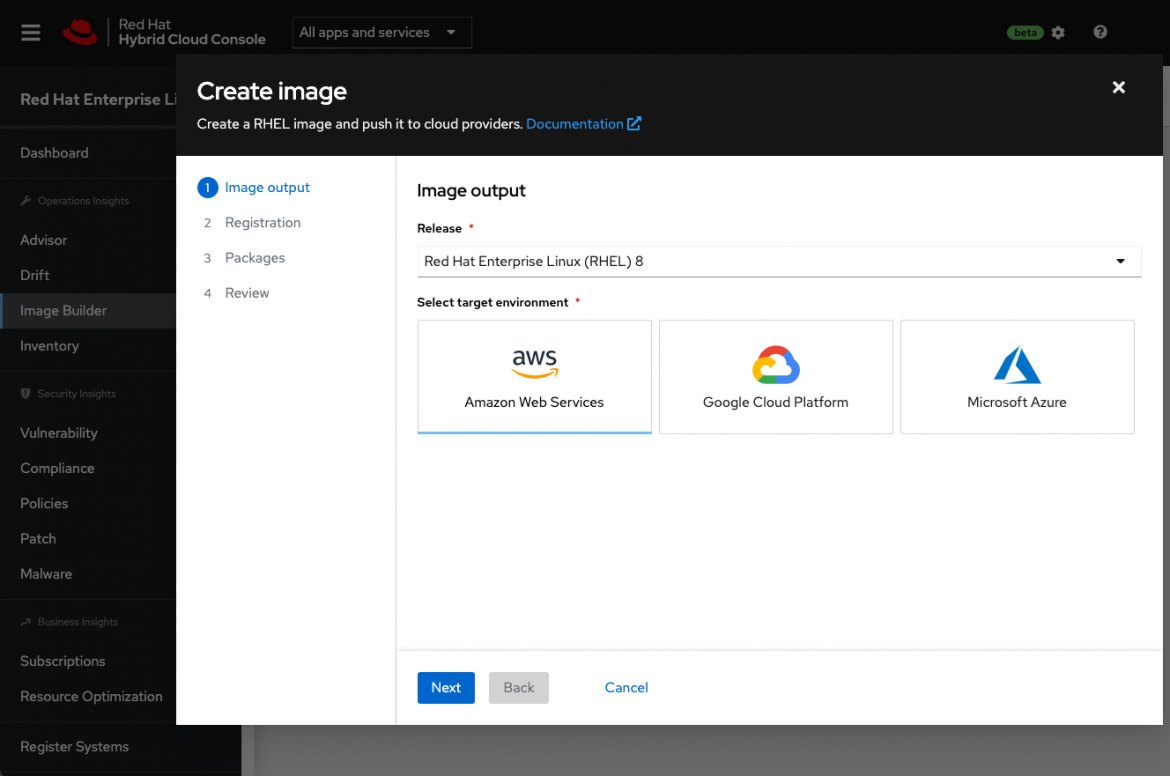
    Red Hat this week announced a public beta of an Image Builder service that streamlines the process of building customized instances of the Red Hat Enterprise Linux (RHEL) operating system.

    Scott Herold, director of product management for RHEL at Red Hat, said the Image Builder service enables an IT team to define a “gold” template for each target deployment environment that only contains the RHEL code required. Initially, Image Builder is configured to default to build a minimal, recommended RHEL server image for Amazon EC2, Microsoft Azure and Google Cloud Platform (GCP) cloud services.

    Future updates to the service will add support for VMware vSphere platforms as well as downloadable images and installation media for physical servers, customized filesystem layouts and versions 9.0, 8.5, 8.4 and 7.9 of RHEL. The service itself is accessed via the Red Hat Hybrid Cloud Console that is currently being made available in beta.

    Herold said building or installing operating systems is often a slow, tedious and error-prone process that needs to be manually performed in a slightly different way for each platform. Each physical server or edge computing platform requires different configurations and workflows. As a result, the chances mistakes will be made is high; Image Builder can greatly reduce the possibility of mistakes because there is no guesswork required, noted Herold.

    IT teams can also opt to include additional content from Red Hat in those builds to further streamline deployment processes, noted Herold. Those images can then be automatically registered with Red Hat to ensure future updates are received.

    The ability to customize those images also serves to reduce the overall size of the codebase that needs to be secured, added Herold. At a time when there is increased focus on software supply chains in the wake of a series of high-profile security breaches, many IT teams are revisiting their software deployment processes, he noted.

    Ultimately, Herold said Red Hat is moving toward providing IT teams with a more cloud-like experience regardless of where they deploy Red Hat’s curated open source software. The goal is to reduce as much friction as possible so that IT teams can more easily manage infrastructure at scale, he added.

    One way or another, the entiree software deployment process is becoming more automated. Much of the drudgery that has historically made it challenging to deploy and manage IT platforms at scale can be traced back to manual processes created when organizations ran a much smaller number of applications in on-premises IT environments. As IT teams increasingly deploy more applications in the cloud and at the network edge, it’s become more apparent that manual legacy processes won’t scale—especially when it’s already challenging to hire and retain IT personnel.

    It’s not clear how quickly IT teams will modernize software deployment processes using automated DevOps processes. Simple inertia is often a powerful force to overcome; however, most IT professionals can easily find something more compelling to do with their time that doesn’t involve using manually customizing operating system images.

  • Hasura Adds Engine to Transform REST APIs to GraphQL

    Hasura Adds Engine to Transform REST APIs to GraphQL

    Hasura today unveiled a Data Hub repository for integrating application programming interfaces (APIs). The repository includes a connector that makes it easier for IT organizations to convert REST APIs into ones based on the GraphQL specification.

    Tanmai Gopal, Hasura CEO, said the connector eliminates the need to write custom code to connect existing REST endpoints to a GraphQL API using an update to the transformation engine developed by Hasura. Instead, the model for the GraphQL API is automatically overlayed on top of the REST API endpoint, explained Gopal.

    Originally developed by Facebook, GraphQL has emerged as a popular alternative to REST APIs because it enables developers to retrieve data at a more granular level, which results in improved performance. Hasura provides an instance of a GraphQL engine the company has developed around a project that is now hosted by the GraphQL Foundation, an arm of the Linux Foundation. GraphQL provides a complete description of the data made available via an API and is organized in terms of types and fields rather than traditional endpoints. In addition to clarifying what data is available via that API, developers can employ types to avoid writing manual parsing code.

    Hasura claims its engine has been downloaded more than 400 million times since its introduction in 2018. It automates the repetitive work involved in mapping models to APIs by providing common access patterns for pagination, filtering, joining, setting up authorization rules and optimizing performance. Hasura also provides APIs that are able to connect to multiple services and data sources, embed domain-specific authorization logic and provide additional layers of security.

    Hasura is now also adding a way to create identity-specific authorization policies for any GraphQL service or data source, enforcing security by limiting the models and fields of the GraphQL APIs in a way that eliminates the need for IT teams to cobble together disparate libraries and frameworks, said Gopal.

    In addition, Hasura is adding support for Google Cloud to Hasura Cloud in beta, a managed API integration service the company already provides via the Amazon Web Services (AWS) cloud. Support for the Microsoft Azure cloud will be forthcoming in 2022, added Gopal.

    It’s not clear the degree to which organizations are looking to replace existing REST APIs with ones based on GraphQL. However, Gopal noted there are plenty of instances where organizations need to overlay a GraphQL API on top of a REST API that they may not own. For example, a software-as-a-service (SaaS) platform that currently exposes a REST API may not have any plans to support GraphQL, he said.

    There’s no doubt the number of GraphQL APIs being employed in the enterprise is about to dramatically increase. The challenge now is finding a way to manage them alongside the previous generations of APIs that remain. The trouble is that many of those APIs were created by developers that may not have documented the APIs they created or, in some cases, never informed DevOps teams that they existed in the first place.

  • Log4j: It’s All About the Supply Chain, Baby!

    Log4j: It’s All About the Supply Chain, Baby!

    In 2021, the security story in DevOps and DevSecOps has been the supply chain. So, it’s only fitting that we are currently experiencing the mother of all supply chain issues with the Log4j Log4Shell RCE vulnerability to close out the year.

    I won’t waste your time rehashing what Log4j is, why it’s so dangerous and warning you to test all of your own and third-party apps to make sure you’re insulated against this. I will say, though, that I don’t think Log4j is a bug—I think it is a defect in design. Worse, as we are seeing, there are multiple defects in design. All of you Java haters out there—back in the box. Java is no worse or better than any other language that we regularly use to build applications.

    So, what exactly is so special about supply chain security? Why do DevSecOps teams, developers and our security incident management teams have to interpret this as a warning and stay at the top of their game from now on? It’s simple. In the age of SaaSOps; in a world where we Frankenstein applications by cobbling and stitching together numerous third-party components (some open source, some not), we are increasingly reliant on code, even in our own applications, that we did not write. We probably didn’t test it, either. We rely more than ever on the “community” and on unknown third-party suppliers. It has always been a leap of faith with these apps and components, and this year some of those chickens have come home to roost.

    The White House executive order on improving the nation’s cybersecurity calls for a software bill of materials (SBOM) for applications; that is, as they say at the tables in Las Vegas, a fine start, but we need more. If we really had a BOM included with the apps we use (and that includes SaaS apps), how many of you are actually going to read it and act on that information? And besides including all these components in a BOM, what further obligations do suppliers have to ensure that they are replacing and updating vulnerable code?

    This issue becomes increasingly acute with open source. My partner and colleague Mitchell Ashley recently asked if too much open source was a bad thing. I don’t know if I would go that far; the more the better, as far as I am concerned. But we do need better monitoring and management of the open source code that’s out there. More testing before it goes GA, maybe? Yeah, the Cadillac open source projects might have the money and time to do that, maybe, but take Log4j as a perfect example: It’s two guys maintaining it in their free time and trying to do right by the community. How can they possibly keep up?

    I used to think that the answer was in the repos. My friends at Sonatype had a component firewall that would not let you download an old or vulnerable version of code without warning. That was fine if you were downloading it for the first time. But if it was already embedded—then what? Can we scan for older components in an app? My friends at JFrog can do something similar and more with Xray. And Sonatype’s Nexus platform also allows current and prospective users to scan older apps for vulnerabilities—including scanning for Log4j, absolutely free. But is that enough?

    All of these questions involve open source components. What about third-party SaaS apps? Often, we don’t even know what components or code are in those SaaS apps. Again, it is a leap of faith we are making when using them. 

    These supply chain security issues are a problem that we are just beginning to grasp. And while 2021 has been the year the stuff hit the fan and Log4j may be remembered as the biggest of the first, I, for one, am afraid to think about what else is coming. 

    I do know that the only way to tackle this and any future supply chain issues is if developers, DevSecOps, DevOps, SREs and our security incident response teams all work together. Just like most security issues, supply chain security is all of our responsibility.  I hope Log4j hasn’t bitten you too hard, and that you are on top of your exposure. But let’s start thinking about the next one and how we can better prepare for it.

  • Speedscale Makes Free API Observability Tool Available

    Speedscale Makes Free API Observability Tool Available

    Speedscale today announced it is making a free edition of its observability tool for application programming interfaces (APIs) available to developers.

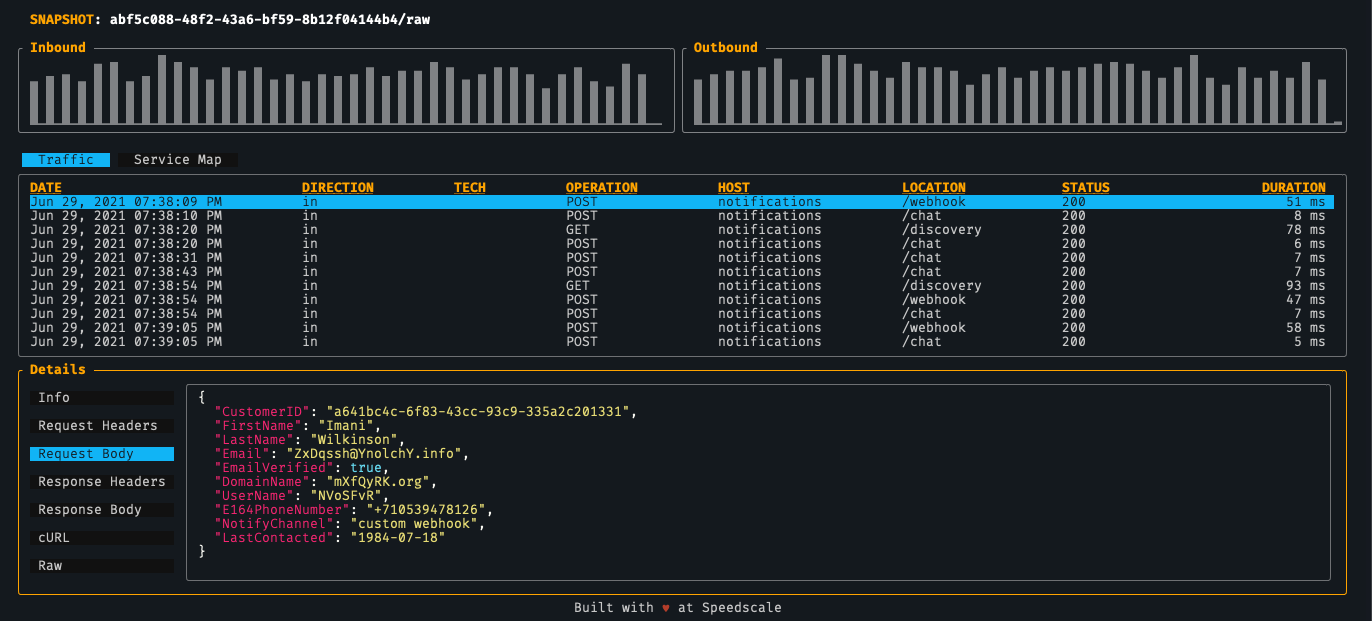
    Ken Ahrens, Speedscale CEO, said the goal is to expose more developers to the company’s API testing tool that can be accessed on their local machine via a command line interface (CLI). Dubbed Speedscale CLI, it is designed to enable individual developers to inspect, detect and map API calls on local applications or containers rather than having to subscribe to the company’s current API testing platform via a software-as-a-service (SaaS) model.

    That approach should reduce the number of disruptions DevOps teams are likely to encounter after an application is deployed in a production environment, noted Ahrens.

    Speedscale CLI features include service mapping, which enables developers to auto-detect and map external dependencies that could break, a traffic viewer for logging and tracing API calls and latency detection tools that show how code changes are impacting performance. In a forthcoming update, Speedscale also plans to include load generation capability to enable developers to run tests locally. The overall goal is to enable IT organizations to shift more responsibility for the management of APIs further left toward the developers that create them, said Ahrens.

    Naturally, Speedscale is also hoping that, as more developers are exposed to its observability platform for APIs, there will be increased demand for its SaaS platform among DevOps teams that need to manage and maintain APIs in production environments within their existing workflows. Speedscale exposes a set of APIs of its own to enable that integration, noted Ahrens.

    At its core, the Speedscale SaaS platform is designed to enable DevOps teams to replay how calls are made between APIs and external mock services to make it easier to diagnose issues.

    In general, there’s a lot more focus these days on APIs, thanks to digital business transformation initiatives that are dependent on APIs to integrate processes. The challenge organizations face is many of those APIs are built by separate development teams. In some instances, organizations can find themselves deploying redundant APIs. Other organizations will create APIs that, over time, are simply forgotten about or that go dormant when the developers that created them leave the organization. These “zombie APIs” often represent a security risk because cybercriminals now routinely scan IT environments for unattended APIs through which they can exfiltrate data without anyone noticing.

    One way or another, the management of APIs is becoming a distinct discipline within many organizations as they come to appreciate the level of IT flexibility they enable. Replacing backend services is a lot simpler when the APIs calls that invoke them both internally and externally remain relatively simple. The challenge is that building and maintaining microservices-based applications based on APIs is a more complex endeavor than building a monolithic application. The first step toward reducing that complexity is, of course, to provide more visibility into the application environment for all concerned.