Category: Features

  • Where Has All the Testing Gone?

    Where Has All the Testing Gone?

    Testing has long been a problem child of IT in general, AppDev in particular, and now it is DevOps’ problem. There are things that DevOps can do to improve the chances of tests actually occurring for your application(s). Interestingly, there are some that think we no longer need testing; the argument is that because new releases can be cranked out so quickly if something needs to be fixed that it is irrelevant. Combining feature flags with the ability to roll out a new version and, well, there may be some truth to that—at least for a limited subset of testing.

    If an organization implemented feature flags for user acceptance and new feature testing and then standardized on test-driven development for DevOps development teams, that would leave systems and security testing. Systems testing could, theoretically, be replaced by the ability to roll out a new version. Although systemic issues can be complex and difficult to fix, this is a riskier proposition than extending test-driven development to the systems level. For the sprint, assign a person responsible for the overall integrated system and have the rest of the team support them through the process of making certain all works as expected.

    Testing—particularly systems testing—slows releases. I get that. The rate at which most of us can iterate once DevOps systems and processes are in place is fast enough that you can afford a bit of slowdown. This leaves security testing as the last standalone bit. But some security validation can happen during the development process if DevSecOps tools are being utilized. That still leaves some security issues to test for but does remove a large chunk.

    The key to these last bits is to get them integrated into the process/toolchain. DevOps runs straight through, over and over. Any bit worked into the “runs straight through” will be executed. If today’s iteration falls for the “We ran over, we’ll make the deadline with less testing” mentality; not an issue—it’s one iteration. Just don’t let that become the default answer to someone not completing an iteration’s work on time. Development can have unexpected speed bumps that delay delivery and acknowledging that and documenting what it was for future reference is important. Covering it up by reducing testing time risks a less stable product and does not help overcome the issue in the future.

    So start thinking in terms of DevOpsTest. Make sure the product you are delivering represents the massive time investments you’ve made producing and maintaining it. You’re rocking it—and something like integrated testing ensures that users see how great you are rocking it and not an error page.

  • Multi-Cloud Computing is a Major IT Headache

    Multi-Cloud Computing is a Major IT Headache

    A CloudBolt Software survey of 500 senior IT, DevOps, security and finance leaders found 79% are struggling under the weight of managing multiple cloud computing environments.

    The survey from CloudBolt Software, a provider of a cloud management platform, found specifically that more than three-quarters of respondents (78%) said they have too many cloud tools throughout their enterprise, and 80% struggled to achieve comprehensive visibility into cloud usage and spending. A total of 80% also noted that their current approach to cloud computing created new security vulnerabilities.

    A full 88% said they need a “manager of managers” that would enable them to unify the various silos that have multiplied across their IT environment.

    Nevertheless, 78% of respondents said that moving to the cloud enabled them to achieve cost savings compared to running applications in an on-premises IT environment.

    CloudBolt Software CEO Jeff Kukowski said the issue is not so much that IT organizations regret shifting workloads to the cloud; instead, the issue is finding a way to manage multiple clouds, each with their own set of tools and frameworks that need to be mastered.

    It’s not clear whether organizations are deliberately employing multiple clouds or if, because of simple inertia, they have found themselves managing multiple cloud platforms because of decisions made by various development teams. Some IT organizations, for example, employ multiple clouds because they are concerned about either becoming locked into a specific cloud computing service or whether an outage might take all their applications offline at the same time. Others are simply trying to take advantage of services that are better provided by one vendor than another.

    Regardless of how IT organizations found themselves managing multiple clouds, the total cost of IT rises as each new platform is added to an IT environment. CloudBolt Software is making a case for an IT framework that provides a layer of abstraction through which the management of multiple clouds and on-premises IT environments can be unified. It is more a question of time and degree to which IT organizations will eventually consolidate the management of disparate IT environments under a single control plane that provides the foundation for true hybrid cloud computing, said Kukowski.

    There are, of course, a few organizations that have standardized on a single cloud computing platform. The degree to which those organizations can maintain that standard will naturally vary as, for example, new workloads that may be optimized for a specific cloud environment are built or as companies acquire other organizations that are running workloads on other cloud platforms. In many of those cases, organizations discover that the cloud services invoked expose a range of proprietary application programming interfaces (APIs) and disparate virtual machines that make migrating workloads a major challenge.

    Like it or not, most organizations will be managing multiple IT environments for the foreseeable future. The only thing that is uncertain is the volume of workloads that might be running on any one of those platforms at any given time.

  • What to Expect When Transitioning to DevSecOps

    What to Expect When Transitioning to DevSecOps

    How do you ensure your DevOps pipeline is secure? Does DevSecOps protect you against serious breaches or is it just a way to allay the concerns of stakeholders about security in DevOps?

    A data breach can cost an average of $3.92 million USD, as per IBM’s study Cost of a Data Breach. In this report, health care was found to be the most expensive industry, with breach fines averaging $6.45 million USD.

    While DevOps delivers on the promise to increase the rate of delivery, the traditional CI/CD framework does not emphasize security. For the sake of speed, misconfigurations and known vulnerabilities may be allowed to pass through the development pipeline to production. 

    Security and testing are generally a low-priority activity, which means these vulnerabilities are fixed retroactively. This takes more time, effort and money. With rampant, unverified integration of open source tools, you open up the software to attackersthat could compromise the security of your apps, systems and users’ data.

    DevSecOps is an upgrade to DevOps, allowing you to deliver security and compliance testing continuously. These checks get integrated within the CI/CD pipeline to enable the delivery of more secure code faster.

    From DevOps to DecSecOps: What to Expect

    The automated nature of DevOps delivers several benefits that enable teams to realize the true power of DevOps as silos break and delivery rates skyrocket.

    As DevOps practices span the entire delivery pipeline, it provides the necessary mechanism to deliver audit, compliance and security requirements along with speed and efficiency. 

    There are many benefits of upgrading from DevOps to a dedicated DevSecOps practice, and they are important to understand before you embark on that journey.

    1. No Restrictive Access Control Policies for Developers

    Access to infrastructure assets must be strictly controlled and monitored to enforce requisite security measures. This means approval gates, secure configuration parameters and other security measures.

    With DevSecOps built into the pipeline, these access controls can be automatically applied. This enables on demand access to infrastructure resources for the team and reduces their dependence on factors outside the team. 

    For example, many organizations have started deploying internal DevOps teams that enable automated access to a shared pool of deployment processes, tools, repositories, workflows, etc. 

    This team is usually separate from the IT team but enforces security mechanisms with the same rigor. It ensures that access to all the infrastructure instances required by development, QA or production is automatically tracked, monitored and controlled as per the guidelines. Additionally, inconsistent processes or misconfigurations are also controlled.

    Often called the shadow IT team, the idea of this team is not to circumvent the IT department but to create an additional team that matches the agility of the DevOps team. 

    2. Seamless Security and Compliance Testing

    Traditionally, security and compliance testing happened all at once at the end of the release cycle close to the release date. This typically meant that a large spreadsheet of issues is sent to the development team to be fixed immediately, since maintaining a consistent release velocity is the key to DevOps success. 

    This requires the development team have at least one dedicated resource to work on those issues. When metrics are tracked, to no one’s surprise, this method resulted in negative impacts on the velocity of the next release cycle.

    DevSecOps applies all the security and compliance checks in batches. So, testing for security and compliance is shifted left and spread out across the pipeline.

    This makes the security feedback loops shorter and more frequent, thus aligning security and compliance testing with the DevOps philosophy. As more secure code is committed every time, the possibility of security and compliance errors reported by the QA team is minimized.

    A second, more personalized approach is using the integrated development environment (IDE) itself to take security and compliance checks to the developers. With regular and automated security and compliance baked right into the development process, this process is sped up considerably and the development team becomes self-reliant.

    3. Overcoming the Risks Associated With Open Source Software

    The 2019 State of The Software Supply Chain report from Sonatype showed that, on average, 85% of the codebase among modern applications uses open source components. While open source components enable innovation, they also come with considerable security risks. As more of these open source tools are added to the software supply chain, it increases the risks on the cybersecurity front.

    The same report showed evidence to back up the need for greater open source software security checks and processes. Companies that managed their open source components released 55% less vulnerable components than those who had no verifiable open source management process.

    While many of these open source components released frequent patches, it is also important for the DevSecOps team to step in and regulate the open source components. Some of the ways DevSecOps teams can do this are:

    • Create a formal component management plan which makes sure that when employees leave, the practice doesn’t go away with them. Having a documented plan lets you look at the bigger picture of your pipeline and find vulnerable components that may be skipped without a formalized process. Incremental improvements to this plan are also possible if it’s well-documented.
    • Use scanning tools like Gemnasium and Snyk that help regularly check for vulnerabilities.
    • If vulnerabilities are detected or reported in a component, look at either updating or replacing the component.
    • Enable quick approval for new open source software. Alternatively, prepare developers to test new components using security and compliance checklists.

    4. Overall Cost Reduction and Acceleration of the Delivery Rate

    An integrated security and compliance framework in DevOps prevents breaches and guarantees faster recovery when breaches do happen. As developers don’t have to set aside a large chunk of time to work on security and compliance violations, this shortens release cycles and ensures more secure code at the same time. 

    The fewer breaches you identify and fix, the more money you save on overcoming security disasters. 

    5. Automated Compliance Reporting

    DevSecOps automates your security and compliance tests and it also logs and documents all the tests. DevOps automation platforms collect large amounts of information for the build, test, integration and deployment phases. This data can be used to create an end-to-end audit trail without any manual intervention or extra time spent scouring through various tools to prepare compliance reports. 

    A fantastic advantage of DevSecOps is the complete traceability from day one and automated compliance reporting. DevSecOps also focuses on the automation of testing, allowing you to deliver a secure development framework on a continuous basis.  

    DevSecOps is the Future of DevOps

    The rapid release velocity DevOps enables is not without its disadvantages. In particular, the unchecked use of open source tools in the pipeline can expose your applications and systems to many known vulnerabilities, increasing the probability of a breach. Combined with a general lack of focus on security, this is a recipe for an expensive security incident. 

    To counter this, DevSecOps radically transforms the pipeline by shifting security and compliance testing left. Developers check the code before every commit. With fast feedback loops, they fix any reported vulnerabilities along with other errors in the app. 

    With DevSecOps, compliance and security checks are not done all at once; instead, developers chip away at vulnerabilities and security flaws with every release.

  • Tricentis Expands Scope of Cloud-Based Testing Tools

    Tricentis Expands Scope of Cloud-Based Testing Tools

    Tricentis this week extended a suite of cloud-based testing tools that promise to make it simpler to both develop cloud-native and mobile applications and migrate existing applications to the cloud.

    New capabilities added to the portfolio include integrations for cloud-based planning tools and a wider range of testing capabilities for mobile applications. DevOps teams can now, for example, deploy Tricentis qTest platform for managing the testing process within a Kubernetes cluster. Tricentis has also made it simpler to configure and update its Tosca suite of application testing tools.

    In addition, Tricentis added additional capabilities for testing SAP applications running in the cloud that previously were deployed in an on-premises IT environment.

    Martin Klaus, vice president of product marketing for Tricentis, said the goal is to make it simpler for DevOps teams to integrate continuous testing for various types of applications within their DevOps workflows. DevOps teams have the option of invoking the Tricentis suite of testing tools via a software-as-a-service (SaaS) platform or deploying them on a cloud platform themselves using templates provided by Tricentis.

    While developers are clearly getting more involved in testing, Klaus said it’s critical for testing capabilities to be integrated within a DevOps pipeline. Each developer is typically only working on a component of a larger application. Unless testing is conducted on an end-to-end basis, an organization won’t be able to determine the real quality of the application experience before deploying software in a production environment, he noted.

    As a result, the decision about what tools to use as part of a continuous testing process is now being made by DevOps team leaders rather than individual developers, added Klaus.

    Ultimately, the goal is to automate as much of the continuous testing process as possible. Achieving that goal will require increased reliance on artificial intelligence (AI) technologies, though to varying degrees, said Klaus. Those capabilities, however, are not likely to eliminate the need for dedicated testing professionals; instead, AI will enable those teams to more efficiently test increasingly complex application environments, he added.

    In fact, it’s becoming practically impossible for testers to manually inspect every element of an application without the help of, for example, algorithms that apply computer vision to analyze a user interface, noted Klaus. There will always be higher-level tasks that require a human, but AI technologies will play a significant role in enabling testing at scale as organizations start to build more applications, he added.

    In the meantime, it’s clear that there’s a lot more riding on testing as organizations continue to launch digital business transformation initiatives. In many cases, organizations only get one chance to convince end users that a new application being rolled out is better than the processes they previously employed. As such, the need to streamline testing within the context of a DevOps workflow has become critical—there is little tolerance for bottlenecks that slow down the rate at which applications now need to be built and deployed.

  • Akamai: Buying Linode | Firefox: Not OK | Gone: Google Vaccine Mandate

    Akamai: Buying Linode | Firefox: Not OK | Gone: Google Vaccine Mandate

    Welcome to The Long View—where we peruse the news of the week and strip it to the essentials. Let’s work out what really matters.

    This week: Linode gets bought by Akamai, Firefox market share is “measly,” and Google brings staff back to the office.

    1. Akamai + Aker = ‘Synergy’

    First up this week: Why is Akamai buying Linode? Whatever the reason, it’s a big payday for its solitary shareholder: Not far off a billion dollars.

    Analysis: There goes the neighborhood?

    The 100 lb gorilla of edge computing and CDNs is promising not to mess with Linode’s winning open source cloud formula: No change, steady as she goes, etcetera. But how many times have we heard that before?

    Here’s local scribbler Paige Gross: Linode’s $900M acquisition by Akamai is a ‘game changer’

    A household name in the Philly tech scene … CEO Christopher Aker founded the company in 2003, and it’s been bootstrapped ever since, growing to about 250 employees. … Aker has owned 100% of Linode since he founded it.
    …
    Aker said the deal brings the company closer to solving evolving challenges “as cloud services become all-encompassing, including compute, storage, security and delivery from core to edge. … We’ve been talking about ‘alternative cloud’ — alternative to the big guy — and now we’ve sort of validated ourself in this market.”
    …
    The Old City company maintains “well over a million accounts” but has anywhere around 150,000 active users of its platform at any particular time. Linode’s HQ, the bank building at Third and Arch Streets, remains. … For clients and Linode employees, there won’t be too much noticeable change [Linode] says.


    Why does Akamai want Linode? Jonathan Greig asked the CEO:

    Akamai CEO Tom Leighton [explained] that Linode has great customer support and is already in 11 locations, which Akamai is going to “dramatically” expand. … Leighton also noted the September 2021 acquisition of Israel-based Guardicore, a cybersecurity company that offers a micro-segmentation solution to reduce the potential attack surface of corporate networks, secure applications, and meet compliance standards.
    …
    According to Leighton, the company is expecting the cloud compute category — which includes edge applications, its net storage business, and Linode — to reach “well over half a billion dollars in 2023. … We were pioneers in edge computing and now we’re taking a big step forward in cloud computing with Linode.”


    But here’s a worried-sounding zoid.com:

    Well good for them but I hope [Akamai] don’t screw it up. Linode is a great hosting company.


    2. Firefox isn’t OK

    Last week, a journalist innocently asked, “Is Firefox OK?” And people lost their minds.

    Analysis: No, not OK—it’s a big problem for DevOps and the web.

    We need Firefox and Gecko. A Chromium monoculture is bad for the web and bad for DevOps. (Before you ask: No, the existence of WebKit doesn’t change things, thanks to Apple’s ridiculous policies). Much as I tried to say something nice about Firefox last month, its market share is, frankly, pathetic.

    Matt Burgess: Is Firefox OK?

    In the two decades since Firefox launched from the shadows of Netscape … the browser has slid to less than 4 percent of the market—on mobile it’s a measly half a percent. … Its fate also has larger implications for the web as a whole.
    …
    Each year Google pays Mozilla hundreds of millions of dollars in royalties. … In its 2020 financial results … Mozilla listed its total revenue as $496 million. … The Google-Mozilla deal was last renewed in 2020 and is expected to expire in 2023. … Mozilla and Firefox acknowledge that for its long-term future it needs to diversify the ways it makes money.
    …
    Firefox still matters: … The browser market is dominated by Google’s Chromium codebase and its underlying browser engine, Blink. … Microsoft’s Edge Browser, Brave, Vivaldi, and Opera all use adapted versions of Chromium. Apple [has] its WebKit browser engine [but] other than that, Firefox’s Gecko browser engine is the only alternative.


    Firefox, how do we love thee? Let not_count_zero count the ways:

    I still use Firefox because:
    a) I remember Internet Explorer and the standards wars. …
    b) I don’t trust Google. …
    c) Most sites work well.
    …
    I do have questions though. … They’re currently getting around a half a billion‽ What are they doing with it? … This seems really off—really, really off.


    But heed a deeply worried Thom Holwerda:

    The decline and potential demise of Firefox is a massive problem that everybody seems to be kind of tiptoeing around—too afraid to acknowledge that if Firefox were indeed to disappear, we’d be royally screwed. We’d end up right back where we started 20 years ago, with Chrome being the new IE6.
    …
    The situation is especially dire for … Linux users, developers, and distribution makers. … Gnome Browser or KDE’s Falkon can barely be taken seriously, and … are based on Apple’s WebKit, which isn’t a great position to be in.


    3. Google’s Return to Work Plan Drops Vaccine Mandate

    Google is planning “celebrations” to welcome back employees after being fully remote. And in practice—unlike at IBM—this doesn’t mean a vaccine mandate.

    Analysis: Vocal minority wins—or do they?

    It was just three months ago that Google said it “firmly stands behind our vaccination policy.” What changed? It’s unlikely to have been due to a tiny minority of staff publishing a manifesto.

    Jennifer Elias: Google relaxes mandates

    The company will no longer require vaccination as a condition of employment … as it prepares to bring workers back to the office … at least three days a week for a “hybrid” work model. … The company [had previously] told employees that they must comply with vaccine policies or they’d face loss of pay and eventually loss of employment.
    …
    According to Google spokesperson Lora Lee Erickson … the company dropped the requirement … after removing the Jan. 18 deadline it had set for employees to either get vaccinated or get exemption approval. She declined to provide further details on the policy or the reasons for the reversal.
    …
    Google Real Estate and Workplace Services VP David Radcliffe [said Google] is preparing to begin its 30-day transition period to the hybrid work week if conditions continue to improve. He said his team is planning “celebrations” to welcome back employees. … Unvaccinated employees who are approved to enter offices will still need to follow additional protocols, including testing and wearing a mask.


    It’s too simplistic to say the anti-mandate brigade are also anti-vaxxers. For example, raxxorrax:

    I am vaccinated and HR knows this. … But if they officially demanded a certificate, I think I would have called it quits. Many people don’t have that option [but] there are consequences for such unreasonable demands.
    …
    I understand a mandate for vaccinations in certain occupations relating to health. It is something you have to personally accept if you want to work in the field.


    Although a few others are way over at the end of the bell curve. Greg Jinkerson:

    Don’t get excited, [Google is] still evil and stupid. … Now they’re backing down for some reason, [but] this is barely anything notable as far as a rollback of restrictions. [It] is not any kind of encouraging news.


    The Moral of the Story: Failure is the foundation of success—and the means by which it is achieved.


    You have been reading The Long View by Richi Jennings. You can contact him at @RiCHi or tlv@richi.uk.

    Image: Aleksey Kuprikov (via Unsplash; leveled and cropped)

  • How to Seamlessly Transition to DevSecOps

    How to Seamlessly Transition to DevSecOps

    In the last few months, the cybersecurity world has been taken by storm following the discovery of the Log4Shell vulnerability. The zero-day had the potential to put much of the connected world at risk and left security teams scrambling to quickly apply security patches to software just before Christmas 2021.

    As a result of the chaos caused by Log4Shell, many organizations kicked off the new year by carrying out security assessments to identify ways to improve detection and mitigation of future vulnerabilities. One approach that is gaining a lot of attention is DevSecOps.

    DevSecOps introduces and automates security in the earlier phases of the software development life cycle rather than bolting it on at the end. The approach saves money, saves time on tedious manual tasks, helps organizations meet regulatory compliance requirements and significantly reduces the risk of critical security bugs being found after an application’s final build.

    However, when it comes to kicking off DevSecOps projects, there are a few challenges application security teams need to overcome first to ensure their programs fit seamlessly into CI/CD pipelines.

    DevSecOps Isn’t Simple

    While moving to DevSecOps delivers organizations clear benefits in the way of security, one of the key concerns for business leaders is that it slows down the delivery pipeline of software and applications. Today, being an agile software delivery machine is essential and a critical part of an organization’s survival, so no business leader wants to put development velocity at risk because of security testing.

    Application security teams are tasked with ensuring DevSecOps fits seamlessly into software and application delivery, without causing delays or adding more pressure onto already over-stretched DevOps teams. As a result, they need to identify which tools are needed for security testing and integrate them into development stages seamlessly as well as which ones can be automated and which can scale to meet the demands of CI/CD pipelines.

    The great news for application security teams is there are hundreds of security tools available; the bad news is choosing which to use and learning how to use them is a minefield, even for those with the right training and know-how.

    A DevSecOps automation program needs lots of technical aspects to come together to make it work. Security teams need static analysis tools to check the code, third-party library analysis to check the dependencies, separate analysis to check the infrastructure-as-code configuration, scanners to check the containers for issues, tools to test the running system, cloud security checks and infrastructure testing for patches and ports. They also need to match these tools up to the right technology each team is using and keep up with the constant changes.

    So, what are the most important features that application security teams should look for in DevSecOps security testing tools?

    Tips for Approaching DevSecOps

    Security teams need a way to manage their security tools so that tedious tasks are removed but collaboration with development teams is streamlined. They need a platform that handles the automation process, flags only the issues they want to flag and presents them in a way that is accessible to everyone, from execs to board members to developers.

    You’re Going to Need a lot of Security Tools

    We commonly see teams using 10+ tools to cover the needed checks, so be prepared to chain together multiple security tools. Some to check each source code language the development teams are using, more to check your containers, cloud setup and dynamic testing against the staging system, etc. 

    Tip: Be prepared to do some up-front analysis to establish which security tools are going to make up your DevSecOps initiative.

    Think of the Day-to-Day ‘Security-as-a-Service’

    How are you, or your teams, going to work with the security tools? Is someone going to check the output of 10 tools in every build? Are they going to compare each set of issues against the last to see what’s new? How will they handle the open source tools that don’t track false positives? This is a major part of the DevSecOps process, and a very common place where we see processes fail—if the automation of the tools leads to awkward handling of vulnerabilities, it’s doomed.

    Tip: Have tools send their vulnerabilities to a centralized store for ease of use.  

    Tip: Track the difference between runs so it’s easy to see new and high-risk issues.  

    Tip: Think of how developers and security teams can more easily collaborate on issues.  

    Tip: Think of how false positives, duplicates or non-issues can be handled and tracked so developers are not flooded with the same issues over and over again.

    Be Flexible With Your Security Tools

    No matter how you intend to integrate security tools, know that different teams are going to need different tools. Some will use Docker, for example, others won’t. Often, different development teams end up working in different coding languages, which means there will also be different security tools required to scan. Some teams will be up and running with DevOps, others won’t be there. Keeping security testing consistent and repeatable is difficult.

    Tip: Whatever DevSecOps platform you use or build, make sure you can slot in the right tools for the right job. If you’re too rigid, you’ll waste time running tools and dealing with nonsense issues and no one will want to play with you.

    Work With the Existing SDLC Environment

    If your teams use Jira to track development tickets, for example, work with that and have new issues entered and tracked there. If they use five different DevOps pipeline platforms, be prepared to integrate and work with each of them. If you have metrics for security, know how you’re going to track changes per repo, project, team, division, etc. for each pipeline run and all the various categories of tools.

    Tip: Run your DevSecOps implementations where your development teams are, work with their systems and make security an easy extension of their existing workflows.  

    Tip: Be able to track historical metrics across categories of issues and tools, so you can show what good progress you’ve made, and where your security investments are (and are not) working.

  • Netlify Leverages GraphQL to Simplify Access to Backend Services

    Netlify Leverages GraphQL to Simplify Access to Backend Services

    Netlify this week added a Netlify Graph tool to its portfolio that makes backend services available to developers via a single click. The tool aims to simplify DevOps teams’ access to those services when building their applications.

    Netlify Graph is based on the GraphQL query language for application programming interfaces (APIs) and enables developers to integrate services such as GitHub, Salesforce and Stripe within frontend and web application development tools without any direct intervention required from a DevOps team.

    Netlify provides an application development framework based on JavaScript, application programming interfaces (APIs) and markup languages, otherwise known as a JAMstack, to isolate frontend and backend components of an application.

    Netlify CEO Matt Biilmann said Netlify Graph is based on the GraphQL technology the company gained when it acquired OneGraph. The overall goal is to make it simple for frontend developers to invoke backend services accessed via either GraphQL or REST APIs, he said. Services based on GraphQL can be especially complex for developers to invoke as they navigate the management of tokens and application secrets, Biilmann added.

    It’s not clear to what degree GraphQL APIs will supplant REST APIs. However, developers tend to prefer GraphQL APIs because they provide more granular control over what data is accessed. The challenge is the number of backend services that expose GraphQL APIs is still comparatively limited. As GraphQL becomes more widely adopted, the level of effort DevOps teams now need to expend to expose backend services should decline as tools such as Netlify Graph are employed by frontend developers.

    As a result, at least theoretically, the rate at which new applications are built and deployed to drive digital business transformation initiatives should increase. Most IT teams will not be replacing REST APIs with GraphQL-based APIs overnight, but the percentage of new applications that rely on GraphQL APIs will steadily increase. DevOps teams looking for easier ways to provide developers with simpler access to backend services now have an incentive to embrace GraphQL.

    Ultimately, Biilmann said, the goal is to enable developers to build applications without having to directly engage anyone on the IT team. Each backend service can be managed in isolation from the frontend of any application. It’s not clear how long it might take to achieve that goal, but as responsibility for the end-to-end management of the application experience continues to shift left toward developers, the need to surface backend systems-as-a-service becomes more pronounced. In fact, given the current focus on improving developer productivity, IT organizations might soon face a mandate to embrace GraphQL more broadly. After all, every minute that a developer spends on plumbing is time they’re not spending writing actual business logic.

    Naturally, it may take time for enterprise IT to be truly transformed into a set of services that developers can easily consume. But as progress continues to be made, that dream may finally be realized.

  • Snyk Acquires Fugue to Secure Cloud Infrastructure

    Snyk Acquires Fugue to Secure Cloud Infrastructure

    Snyk today announced it has acquired Fugue as part of an effort to embed security within an infrastructure-as-code (IaC) provisioning tool.

    The Fugue platform combines a unified policy engine with an implementation of the open source Open Policy Agent (OPA) software, dubbed Regula, to ensure security and compliance policies are consistently enforced. OPA provides IT teams with a tool for declaratively applying policies and is being advanced under the auspices of the Cloud Native Computing Foundation (CNCF).

    The Fugue IaC tool also provides pre-deployment security checks for Terraform, AWS CloudFormation, Kubernetes manifests and Dockerfiles. It enables IT teams to create and test custom policies using Rego, the programming language created for OPA. In addition, there are interactive visual maps of IaC templates and the ability to export IaC diagrams that IT teams can use for planning and approval processes.

    Josh Stella, the former CEO of Fugue who is now a chief architect for Snyk, said Regula is designed to make it possible to apply those policies to both cloud-native and legacy monolithic applications. Tighter integration with the cloud security posture management (CSPM) tools that Snyk provides will make it possible to provide developers with an instant feedback loop as they provision infrastructure, he added. Armed with that intelligence, it becomes less likely that mistakes will be made and that cybercriminals can take advantage of those, noted Stella.

    DevOps teams should also expect to see Fugue integrated with the artificial intelligence capabilities Snyk gained with the acquisition of DeepCode, a provider of an interpretable machine learning semantic code analysis tool that scans code anywhere from 10 to 50 times faster than existing approaches. In total, Snyk has acquired five companies in the last 18 months, including CloudSkiff, FossID, Manifold and DeepCode.

    Misconfigurations of IT infrastructure have emerged as a major issue in the cloud era. Developers often have little to no cybersecurity expertise, and using application programming interfaces (APIs) to provision IT infrastructure themselves increases the chance that mistakes will be made. The acquisition of Fugue creates an opportunity to address that issue at a time when the management of infrastructure and applications is converging, said Stella.

    The amount of focus on cloud security also is increasing as part of a larger discussion involving software supply chains that increasingly becoming targets of attack. Cybercriminals are becoming more adept at scanning for vulnerabilities created when developers, for example, inadvertently leave open a port on a cloud service through which data can be exfiltrated.

    It’s not clear just how far responsibility for cybersecurity will shift left toward developers in the months and years ahead. However, as more intelligence is incorporated into the tools that developers use, the easier it will become to automate DevSecOps best practices. In fact, the goal should be to make it easier to build more secure applications faster rather than forcing organizations to slow down to deal with security issues that should never happened in the first place.

  • IBM ‘is Ageist and Sexist’ | IBM Mainframe-aaS | IBM Vaccine Mandate

    IBM ‘is Ageist and Sexist’ | IBM Mainframe-aaS | IBM Vaccine Mandate

    Think! Welcome to Big Blue Week here at The Long View—where we peruse the news of the week and strip it to the essentials. Let’s work out what really matters.

    This week: IBM’s employment practices scrutinized, IBM z/OSaaS breaks cover, and IBM encourages staff back to the office.

    1. ‘Dinobabies’ and ‘Dated Maternal’ Workforce Woes

    First up this week: IBM’s defense in an employment age discrimination lawsuit looks to be shredded. Internal emails “appear to show high-level discussion about paring the ranks of older employees.”

    Analysis: Not a good look

    According to one of the plaintiff’s lawyers, unnamed “top IBM executives were explicitly plotting with one another to oust older workers … to make room for millennial employees.” On the face of it, they seemed to be doing the polar opposite of the Age Discrimination in Employment Act.

    Noam Scheiber: Making ‘Dinobabies’ Extinct: IBM’s Push for a Younger Work Force

    Top IBM executives were directly involved in discussions about the need to reduce the portion of older employees … sometimes disparaging them with terms of art like “dinobabies.” … Documents made public by a Federal District Court … show executives discussing plans to phase out older employees.
    …
    The newly unsealed documents, which quote from internal company emails … show top IBM executives specifically emphasizing the need to thin the ranks of older workers and hire more younger ones. [One] email refers to IBM’s “dated maternal workforce,” an apparent allusion to older women, and says: “This is what must change. They really don’t understand social or engagement.”
    …
    Adam Pratt, an IBM spokesman, [claimed,] “IBM never engaged in systemic age discrimination.” [He] said that some of the language in the emails “is not consistent with the respect IBM has for its employees” and “does not reflect company practices or policies.”


    Yikes, ageism and sexism? Experienced staff are valuable, says MrBanana:

    I did some time at IBM [and] remember being invited to a meeting with a new group, headed by a new “thinker,” who had something to present to myself and a colleague. We walked past the foosball table to the meeting room. Naturally the room had no chairs, and was covered in multi-coloured Post-it Notes. Once they had gone through their mood boards and the non-linear presentation of this new idea, I turned to the other old geezer in the room. “Didn’t we look at something like this 8 years ago?”

    “Yeah, we worked out that compute power just to run the UI for one session wouldn’t be available for a couple of decades.” The children were somewhat disappointed, and (fortunately) we were never asked back to their romper room.


    But experience can be both a blessing and a curse, learned aahortwwy:

    I experienced both sides of this in five years at a company in hypergrowth. … I learned so much at that job: … In year 1, I was determined to accomplish X and ignored the skeptical comments of some colleagues who’d been at the company longer than me. I failed and wasted some time. In years 4 and 5, new colleagues were determined to accomplish X and ignored my skeptical comments.


    2. IBM Wazi as-a-Service Confusion

    “Mainframe” is not a dirty word. It’s secure, vertically scalable, and it put the VM in VMware. Now, what IBM Wazi did for on-prem LPARs, Wazi aaS promises to extend to hosting z/OS instances.

    Analysis: Mainframe-as-a-service reinvented

    Mainframes and cloud-native DevOps need not be incompatible. To modernize legacy apps using hybrid cloud instances for dev/test—and even prod—can be a big productivity boost. But isn’t it weird that IBM spun out its mainframe-as-a-service zCloud offering only a few months ago?

    Mike Vizard: IBM Shifts Mainframe App Testing to the Cloud

    While many workloads over the years have been migrated off mainframes or simply retired, the applications that run on z/OS today are still among the most mission-critical that organizations run. … IBM this week revealed it has added the ability to set up testing environments on the IBM Cloud for z/OS mainframe applications.
    …
    IBM plans to make IBM Wazi as-a-Service (Wazi aaS) for z/OS generally available in the second half of this year, [which] will enable DevOps teams to self-provision an instance of a z/OS virtual server on a secure private space running on IBM Cloud. … At the same time, it will become easier to modernize mainframe applications by making them more accessible to other applications via a set of secure APIs … using a cloud-native set of DevOps tools that run in a Kubernetes environment.
    …
    Modernizing mainframe applications is a less complicated endeavor than migrating them. The challenge is that building, deploying, maintaining and securing all the APIs required to do so represents a significant amount of effort.


    OK, boomer, why are we talking about 1960s mainframes on DevOps.com? Here’s ArchieBunker:

    Mainframes are different beasts altogether, almost alien when you compare them to PC hardware. You have binaries written for the S/360 system in the 1960s? Good news you can still run them natively without a recompile.

    You think virtualization and containers are a hot topic? IBM was running multiple OS instances inside a VM in the 1970s. … The engineering is incredible.


    But z/OSaaS? It’s déjà vu time for Beleagured Greybeard:

    “Cloud Managed Services for z” AKA “zCloud” has been around for over 10 years. … IBM offloaded it with the Kyndryl spin, so its odd that they now want to re-invent it.
    …
    If it’s a strategic platform, why didn’t they hold onto it instead of spinning it off to Kyndryl? Sounds like yet more daft leadership decisions.


    3. IBM’s Return to Work Plan has Vaccine Mandate

    IBM wants to “keep employees safe” as they return to office work after being fully remote. In practice, this means a vaccine mandate.

    Analysis: IBM Digital Health Pass is divisive to vocal minority

    Although there are exemptions on medical or religious grounds, IBM has promised to place dissenters on unpaid leave. As you might expect, the policy has a few employees up in arms.

    Cassie Werber: How Salesforce, IBM, and HSBC are approaching return to work

    When the pandemic hit, and IBM moved 95% of its workforce to fully remote, it was pleasantly surprised to discover no drop in productivity. … Still, they planned to return to offices.
    …
    The company saw this as a way to keep employees safe. … One example … is its development of the IBM Digital Health Pass as an alternative to vaccine cards or paper vaccine certificates, which they use to make sure all the staff that come into their offices are vaccinated.
    …
    Arvind Krishna, IBM’s CEO, meanwhile came up with what he called the IBM Work From Home Pledge. [It] included commitments to flexibility, kindness, sensitivity to family, setting boundaries, and acknowledged video fatigue. It concluded with a commitment to “be connected.”


    Tricky to “be connected” if you’re not allowed back in the building. Anne D’Innocenzio, Heather Hollingsworth, Tali Arbel, Mae Anderson, Ken Sweet, Matt O’Brien and Dee-Ann Durbin:

    IBM software engineer Justin Albano said his company recently notified employees that it would be revoking badge access to workers who aren’t vaccinated or haven’t proved that they are. “We’re not able to enter an IBM office at this time,” said Albano.
    …
    He said some workers have successfully sought religious exemptions but “my thought process was I shouldn’t have to explain to my company my faith” to get out of a policy that’s “immoral in its foundation.”


    What’s the alternative? With a perspective, it’s Chris Haney:

    Or, get the vaccine. Protect yourself and the people around you. You people really are detached from reality.


    The Moral of the Story: Those who know do not speak; those who speak do not know.


    You have been reading The Long View by Richi Jennings. You can contact him at @RiCHi or tlv@richi.uk.

    Image: Marcin Wichary—cc:by; leveled and cropped (ask your parents)

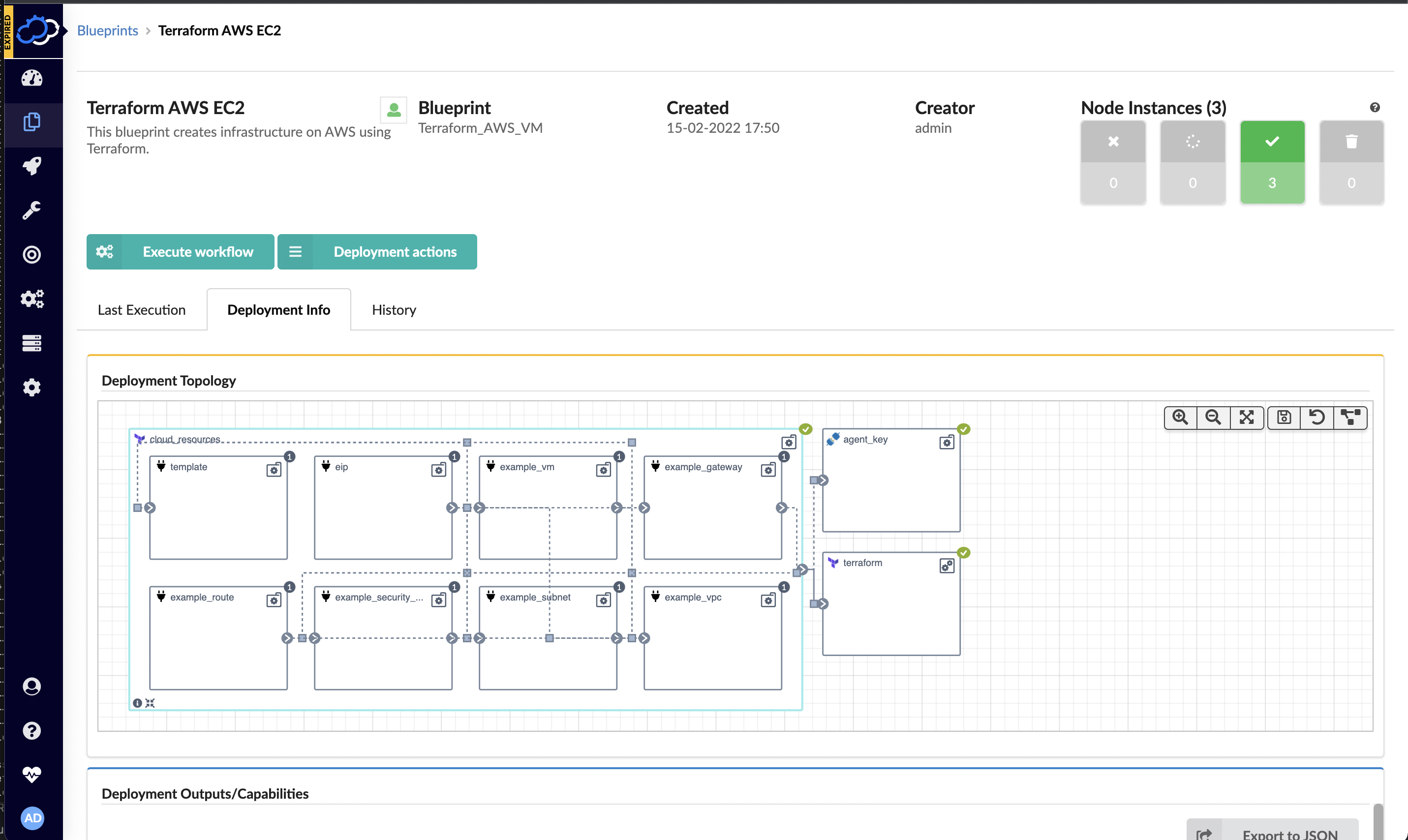
  • Cloudify Integrates DevOps Automation Platform With Terraform

    Cloudify Integrates DevOps Automation Platform With Terraform

    Cloudify this week announced a free user interface (UI) module that extends its infrastructure provisioning platform and enables DevOps professionals to integrate unlimited Terraform modules.

    Nati Shalom, Cloudify CTO, said Terraform UI provides a familiar construct for DevOps teams using the open source DevOps automation platform to provision infrastructure-as-code (IaC). The module enables DevOps professionals to seamlessly import Terraform modules to Cloudify without writing blueprints or any additional glue code, he said.

    Cloudify now automatically generates the wrapper required for each Terraform template to enable DevOps teams to collaboratively manage secrets, execute concurrent deployments, store states remotely and monitor deployments, users and versions via any Git repository. Those Terraform modules can then be integrated with application programming interfaces (APIs) and continuous integration/continuous delivery (CI/CD) platforms as DevOps teams require.

    DevOps teams can also import existing automation modules and scripts into Cloudify. Those modules and scripts can be automatically converted to environments that can be centrally managed via the Cloudify console or via export to ServiceNow’s IT service management (ITSM) platform as a software-as-a-service (SaaS) application.

    That approach provides the added benefit of enabling DevOps teams to centrally manage all Terraform modules and versions via a single console as part of an effort to reduce misconfigurations that lead to security breaches, he added.

    Cloudify enables DevOps teams to create a self-service catalog and portal through which infrastructure can be managed. Many DevOps teams have built their own portals to manage this process. However, Shalom noted those DevOps teams then need to devote resources to maintaining that portal when those resources could be allocated to other critical tasks.

    DevOps teams can not only use Cloudify to apply patches, change topologies, add security features, make configuration changes or make additional resources available, Shalom added, they can also now integrate Terraform tooling with platforms such as Kubernetes or other automation frameworks such as Ansible. Cloudify also makes available an enterprise-grade version of the platform with these integrations.

    It’s not clear how much time and effort IT organizations are investing in building and maintaining DevOps environments. In many cases, however, organizations should probably revisit decisions about building capabilities that, at the time, didn’t exist. That doesn’t necessarily mean that replacing custom DevOps tools makes sense across the board, but it is likely that, in the intervening years, the range of tooling made available via DevOps platforms has greatly expanded. Relative newcomers to DevOps, meanwhile, are enjoying the benefit of platforms they did not have to construct themselves.

    In fact, Shalom noted that, in terms of DevOps adoption, an inflection point has been reached as more organizations launch digital business transformation initiatives that require applications to be both built and deployed faster than ever. The challenge, of course, is enabling that to occur both safely and at a reasonable cost.