Category: Features

  • ActiveState Makes All Tiers of Curated Artifact Repository Service Free

    ActiveState Makes All Tiers of Curated Artifact Repository Service Free

    ActiveState today announced it is making all tiers of its ActiveState Artifact Repository service available for free for a limited time. The move aims to enable organizations to better secure open source software components incorporated within applications.

    Loreli Cadapan, vice president of product for ActiveState, said the ActiveState Artifact Repository exposes a set of curated instances of open source software for creating binaries that are validated to be secure. That capability reduces the likelihood vulnerabilities will be inadvertently introduced into application environments by developers that have downloaded open source modules from repositories that may contain compromised code, she added.

    In addition, the ActiveState Artifact Repository also makes it possible to automatically generate software bills of materials (SBOMs) that identify which software components were used to build an application after all the code used to construct an application is stored in the repository, Cadapan noted.

    ActiveState’s repository is delivered as a cloud service to organizations that would otherwise have to build their own. Cadapan noted that the goal is to make managing and securing software supply chains simpler when more attacks are being launched against them.

    Most organizations have limited visibility into how they are consuming open source software. It’s become apparent many organizations have no idea what software components have been incorporated across their software supply chain. As a result, when a vulnerability is discovered, there’s no easy way for them to know whether they are impacted.

    However, awareness of this issue has risen, thanks to an executive order issued by the Biden administration which requires federal agencies to have an SBOM for every application they employ by next summer. The executive order was issued in the wake of a zero-day vulnerability in the Log4j tool discovered late last year that is widely used to create logs within Java applications. Many organizations are still looking for all the vulnerable instances of Log4j in their application environments. SBOMs must provide a list of the “ingredients” used to create an application to make it easier to find any component that might one day be similarly affected by a zero-day vulnerability.

    Organizations that want to implement a similar SBOM policy will spend massive amounts of time cataloging software on an ongoing basis. Every time an application is updated, there will be a need to once again verify what components are being employed within the context of larger DevSecOps workflows.

    SBOMs will undoubtedly play a critical role in improving overall application security. However, having an SBOM is not the same thing as operationalizing it. Organizations are ultimately hoping to be able to use an SBOM to decide whether to green-light the deployment of an application, so DevOps teams should expect to be required to not only provide an SBOM but also continuously update it. The challenge, of course, will be determining how many internal resources to devote to that effort versus relying on external platforms to manage that process.

  • CloudBees Survey Sees VSM Driving Digital Transformation

    CloudBees Survey Sees VSM Driving Digital Transformation

    A global survey of 600 senior executives conducted by CloudBees suggested a high correlation between investments made in value stream management (VSM) and digital business transformation success.

    The survey found 90% of respondents agreed that organizations that committed to VSM are likely to be further ahead in terms of achieving their digital business transformation goals, with 92% noting VSM also creates more time to focus on innovation.

    Hope Lynch, senior director for platform at CloudBees, said the challenge is that too many executives equate VSM with legacy Six Sigma processes rather than application development and deployment processes that advance digital business transformation initiatives. The survey found that while 90% of senior executives claimed they were familiar with the VSM concept, only half could select the correct answer when asked. In fact, two in five respondents confused the concepts of value stream management and value stream mapping. Nearly two-thirds (72%) of respondents admitted there is still confusion about what VSM is.

    VSM traces its lineage back to lean manufacturing methods, which called for each step of a manufacturing process to be continuously measured. As software development has evolved and organizations realize how dependent they are on software, there is a growing appreciation for the value of monitoring things such as the impact of missed software development deadlines on the business. At their core, VSM platforms aggregate DevOps metrics and then match them to a set of key performance indicators (KPIs) defined by business leaders. Once those metrics are gathered and correlated, organizations can apply advanced analytics.

    Eventually, the goal is to apply algorithms and other forms of predictive analytics that will enable organizations to more easily identify the precise impact software development processes have on the business, noted Lynch.

    In the meantime, the CloudBees survey identified manager commitment as the main roadblock to VSM adoption, with 35% of respondents saying getting mid-level employees committed and 31% saying getting senior leadership committed are the biggest roadblocks. That’s a significant issue because more than half of respondents (56%) said C-level executives make VSM investment decisions.

    Survey respondents also reported that scaling VSM efforts throughout the organization is a significant issue for a third (33%) of respondents.

    In general, many VSM initiatives were sidetracked by the COVID-19 pandemic, noted Lynch. However, organizations will now be looking to evaluate the results of those efforts, she added. Digital transformation plans are in place and going well, according to 96% of survey respondents, with only 18% reporting that they are moving, but not fast enough.

    However, all software development processes could be improved by surfacing real-time insights, added Lynch. Most senior executives today don’t have a lot of visibility into the software development processes that are driving multiple digital transformation initiatives, she added.

    In theory, VSM platforms should one day help narrow the divide that has long existed between IT and the rest of the business, as dashboards make it simpler for everyone involved to appreciate the cascading impact a software development decision has across the entire business.

  • Index Tracks Impressive Growth of API-First Startups

    Index Tracks Impressive Growth of API-First Startups

    APIs are the building blocks of modern software, and their use continues to grow around the globe. A full 89% of investment into APIs will increase or stay the same over the next 12 months, Postman’s 2022 State of the API report found. And the evolving API-first approach is ushering in many innovations and startups into the field. This trend is epitomized by the latest research from GGV Capital, which maintains an API-First Index of leading developer-first software companies.

    The API-First Index tracks API-first companies that have raised $50 million in funding or more. And as of Q3 2022, the number of businesses that met this threshold increased to over 60. Just in Q3 alone, $350 million in funding was raised by companies on the index, and, in total, the index represents over $14 billion in funding. Undoubtedly, interest and investment in this space are expanding and will continue to increase in the year ahead. It’s a good area to keep tabs on, as the emphasis on modularity impacts how software is pieced together.

    I recently met with Tiffany Luck, partner at GGV Capitol, who oversees the API-First Index. Below, we’ll explore the index a bit more and get Luck’s viewpoint on why these findings represent a unique moment for API-first technology and business models as a whole.

    The API-First Index

    The API-First Index focuses on companies that serve niche functionally through APIs; also known as API-as-a-product. The list includes an assortment of API-based tools from FinTech, communications, health care, commerce and other sectors.

    For example, Stripe is likely the most well-known API-as-a-product, as it is commonly integrated as a way for businesses to accept payments. There’s also MessageBird, an API for sending notifications across any channel. Other examples include Mapbox, an API for geolocation data, Mux, an API for creating live and on-demand video experiences, Nylas, which offers a popular email API and Alpaca, an API for stock and cryptocurrency trading and many others.

    Currently, the index doesn’t include the entire API platform landscape of tools, which ranges from areas like API management to testing, documentation, monitoring, design, security and observability. There are also middleware integration platforms to consider as well. With these included, the list of well-funded API-related toolsets would surely be even longer.

    Why the Excitement About API-First?

    The number of people deciding to build API-first companies is rapidly increasing. These API-based web components are interchangeable and represent the future of software development. “The world is going toward web and cloud components,” said Luck. The trend represents a global movement with much effort reflected in Europe, Asia and the U.S. Furthermore, API models seemed resilient throughout ongoing economic uncertainty and the patchy VC funding of 2022. “APIs are holding up very well compared to the broader VC landscape,” said Luck.

    So, why is there so much excitement around APIs? Well, people are looking for best-in-class structural blocks that can be used to build common features like geolocation, AI, weather, payments or specific CRM functions. Niche APIs can swiftly deliver particular features without the bulk of a large platform. Another reason is that they’re relatively sticky—API-based delivery models are efficient at building a self-service platform that expands over time, which is a very keen prospect to investors, said Luck.

    Unicorn APIs Solve Hard Problems

    In evaluating API-first companies, Luck looks for those offering B2B solutions to super-hard, shared problems. This equates to reusable functionality that is difficult to build, maintain and scale individually. Furthermore, the solution must solve a need that’s common across companies but that is not core to their products.

    For example, Luck has her eye on a few impressive API-first use cases. Stream, for example, powers in-app user-facing features. Knock offers solutions for handling notifications. But many of the top most-challenging areas include financial services, as this functionality is difficult to build from a regulatory and connectivity perspective. Examples include Pinwheel, which aggregates real-time income and employment data. Method API does something similar but for aggregating consumer debts.

    Luck described APIs as a “modern way of accessing what would otherwise be technically inaccessible.” We’re seeing this action unfold in open banking, as new standards around the globe now mandate that consumer financial data be programmatically accessible, often in the form of an API connection.

    Developer Experience: The New Competitive Advantage

    In a competitive market surging with powerful developer-facing tools, non-functional aspects such as developer experience (DX), security, performance and reliability are becoming more of a focus. According to Luck, developer experience is probably at the top of the pyramid as it represents a catch-all for many of the aforementioned traits. Specifically, developer tools with high-quality DX have excellent documentation and must maintain backward compatibility to avoid breaking changes on the consumer side. “Ultimately, what you’re implementing impacts that customer’s end customer. Customers want zero negative impact and zero disruption,” she said.

    The API-First Index is good for the industry as it helps educate the public on private investing rounds. And as discussion around it increases, it brings awareness and visibility to the benefits of building API-first.

  • Massive Number of Transitive Dependencies Traced to Open Source Code

    Massive Number of Transitive Dependencies Traced to Open Source Code

    An analysis of nearly 2,000 software packages published by Endor Labs found 95% of all application vulnerabilities can be traced back to a transitive dependency created when a developer used an open source component.

    The study, conducted by the Station 9 research arm of Endor Labs, a provider of a platform for identifying software dependencies, concluded there’s still a 32% chance those software packages would have known vulnerabilities even after components are upgraded to the latest version.

    Endor Labs CEO Varun Badhwar said vulnerabilities often remain because the last update made to one of those software components may have been made several years ago even though there are existing known vulnerabilities that affect it. Development teams can’t assume the latest version of a software component is secure, he added.

    In general, functional dependencies are created whenever developers download a third-party component, he noted. The most important thing for any software development team to determine when assessing actual risk levels created by those dependences is determining how accessible any given vulnerability is to an attacker regardless of its severity score, noted Badhwar.

    In the wake of a series of high-profile breaches, there has been an increased focus on software supply chains. The challenge is most developers don’t have a lot of cybersecurity expertise. They often create patches for applications based on a list of potential vulnerabilities surfaced by cybersecurity teams. The issue, of course, is that just because there is a vulnerability it does not immediately follow that the affected software component can be externally accessed.

    Endor Labs is making a case for a graph-based platform that identifies dependencies between the software components that make up an application environment. That approach makes it simpler to prioritize remediation efforts based on the impact a vulnerability might actually have and narrows the current divide between cybersecurity teams and application developers. By the time cybersecurity teams alert developers to a vulnerability they often have moved on to other projects. As a result, developers often lack context because it may have been months since they last looked at the impacted code.

    Of course, the inclusion of DevSecOps best practices should improve the overall state of application security as more responsibility for it shifts left toward developers. However, achieving that goal will require more than just giving developers access to software composition analysis (SCA) tools that only surface vulnerabilities in source code as it is being developed, noted Badhwar.

    In the meantime, the efforts to remediate all existing application vulnerabilities will be measured in years, so organizations need to determine where to focus their efforts. After all, every minute spent developing and deploying patches is less time that can be allocated to building and deploying new code. The trouble is that as more new code is written, the number of vulnerabilities that could be exploited increases and makes a bad situation worse.

  • 5 Tips to Consider When Introducing Infrastructure Automation

    5 Tips to Consider When Introducing Infrastructure Automation

    Although we discuss infrastructure automation often, the fact is that a lot of manual processes still exist throughout DevOps. Whether it’s rewriting scripts to spin up new servers, updating cloud-native policies or configuring computing environments, manual toil is an all-too-common reality. To make matters worse, engineers commonly create lengthy scripts that work in isolation but are too bulky to be reusable by other developers working with slightly different constraints.

    More infrastructure automation is the key to increasing deployment agility, but setting aside time to automate your daily workflow can easily take a back burner, especially when developers are already behind on their long list of to-dos. So, for the time-pressed, where should they start? What exactly should be automated? And how can we effectively reuse and share automation to help other areas of the business?

    I recently connected with John Laffey, technical product marketing director, Puppet. Laffey has thirty years’ worth of tech support and engineering operations knowledge under his belt and was “doing DevOps before it was called DevOps.” He shared with me five helpful tips to think about when introducing more infrastructure automation into your workflows. Below, we’ll expand on each of those points and consider other best practices around automation as the industry moves toward platform engineering.

    1. Automate Things That Interrupt Your Day

    First, Laffey recommended starting with the things that are easy to fix. These are the tedious actions that interrupt your day. Perhaps a disk runs out of space and troubleshooting takes 15 or 20 minutes. Minor interruptions like this might seem like part of the job, but they definitely add up over time.

    2. Automate Things You Can Reuse

    Secondly, try not to automate things for an ultra-specific purpose, said Laffey. Instead, focus on building automation that is more generic and can have more value to others. This follows the DevOps mantra of teamwork and collaboration. One-off automation that is too verbose or specific to a certain condition won’t apply well across groups.

    3. Automate Stuff That Doesn’t Change Much

    Next, automate the infrastructure that isn’t prone to change. These are fairly reliable things that you’re sure will be part of your systems for the foreseeable future. Because if a component does end up having to be updated often, supporting the automation could be more hassle than it’s worth. “Don’t trade fixing problems for fixing automation,” said Laffey.

    4. Start Small

    Here’s some sage advice applicable to most new projects with a big scope—start small. Laffey recommended starting by automating the easy stuff that has proven immediate value. These tasks should be modular and do one specific thing, like rebooting a machine or draining a log file. “Automate things in chunks that you can put into a toolchain.”

    Too often, teams try to automate everything all at once. But by taking big bites, you can quickly get off track and potentially add to technical debt. If you keep things modular, you’ll find it easier to change and reuse this automation.

    5. Share and Be Open

    This last tidbit is more of a cultural change—don’t code so that you’re the only one who knows about it! Sometimes, engineers don’t necessarily want the world to know about the automation they create. They might worry about automating their job away. Yet, Laffey said, these worries are misplaced. There will always be more work to do, and automating toil away can free up time to help you focus on more exciting projects.

    So, Laffey encouraged DevOps and SREs to be open about the automation they create. Ensure they’re well documented and stored in a centralized repository to allow other departments to reuse your code. This can avoid the duplication of having five different versions of the same script written in different languages within the same organization!

    Next Step: Move From Scripts to Industry-Standard Tooling

    It can be challenging to argue for investing time and energy into infrastructure automation, especially when engineers are hard-pressed to keep the lights on. Yet, small gains in automation can make huge waves in the long term.

    Eventually, said Laffey, you’ll want to move away from using scripts within your toolchain, which he describes as a low-end DevOps maturity. But as you update your process, you’ll want to replace these scripts with more modern industry-standard tools like Terraform or Puppet’s DSL. He recommended slowly revamping scripts in a toolchain as you update them one by one. “Start where you are and avoid a monolithic approach.”

    In essence, platform engineering, Laffey explained, is wrapping DevOps principles at a higher level to make them more efficient. And we will likely see an increased emphasis on infrastructure automation as platform engineering gains more mindshare. “It’s going to become a necessity.”

  • Five Great DevOps Job Opportunities

    Five Great DevOps Job Opportunities

    DevOps.com is now providing a weekly DevOps jobs report through which opportunities for DevOps professionals will be highlighted as part of an effort to serve our audience better.

    Our goal in these challenging economic times is to make it easier for DevOps professionals to advance their careers.
    Of course, the pool of available DevOps talent is still relatively constrained, so when one DevOps professional takes on a new role it tends to create an opportunity for others.

    The five job postings shared this week are selected based on the company looking to hire, the vertical industry segment and naturally, the pay scale being offered.

    We’re also committed to providing additional insights into the state of the DevOps job market. In the meantime, for your consideration:

    Dice.com

    APN Software Services
    San Jose, California
    Principle Engineering DevOps
    $190,000 to $200,000

    ZipRecruiter

    Craft Machine
    San Francisco, California
    Senior DevOps Engineer
    $160,000

    Monster.com

    Citibank North America
    Tampa, Florida
    App Dev Tech Lead Analyst
    $156,000 to $177,000

    Indeed.com

    Brighthouse Financial
    Remote
    Principal DevOps Engineer
    $133,000 to $168,000

    SimplyHired

    Hellebore Consulting Group
    Fairborn, Ohio
    Senior DevOps Engineer
    $125,000 to $185,000

  • Codenotary Extends Dynamic SBOM Reach to Serverless Computing Platforms

    Codenotary Extends Dynamic SBOM Reach to Serverless Computing Platforms

    Codenotary has extended the reach of its platform for automatically generating software bills of materials (SBOMs) to serverless computing platforms running software constructed using functions.

    Codenotary CTO Dennis Zimmer said because serverless apps are dynamically created, it’s not possible to generate SBOMs using traditional approaches. The TrueSBOM platform makes it possible to create an SBOM in real-time by adding one line to the source code of any application. The TrueSBOM for Serverless edition of the platform now extends that capability to the serverless computing frameworks made available in the cloud by Amazon Web Services (AWS), Microsoft and Google.

    That approach makes the SBOM a part of the application itself rather than a text file that is stored separately, he noted. Each time an application is updated or a scanner discovers a new vulnerability, a new SBOM is automatically generated, added Zimmer.

    Awareness of the need for SBOMs has skyrocketed since an executive order issued by the Biden administration made it clear that federal agencies would require them from software providers starting next year. Many enterprise IT organizations are likely to follow suit as part of a larger effort to better secure software supply chains in the wake of a series of high-profile cybersecurity breaches.

    Most internal DevOps teams already have a good handle on what software components are used within the applications they deploy. The issue is that the organizations that use that software can’t easily verify what components are being used, noted Zimmer. That’s problematic because an organization may prohibit deployment of a specific software component because of a known vulnerability. TrueSBOM allows organizations that use an application to maintain control over their software environment regardless of what software artifacts are used to build closed or open source components, Zimmer added.

    It’s unclear how most organizations will operationalize SBOMs now that more of them are being created. Ideally, organizations should be able to approve only software with components that have been verified as secure.

    As SBOM mandates become more stringent, the number of application providers that are anxious to comply with rules for securing software supply chains should increase. The issue now is finding a way for both the developer and consumer of that software to streamline a verification process that, in its current form, is too cumbersome to manage effectively. As a result, many organizations are now putting together dedicated teams made up of cybersecurity professionals and software developers to manage SBOM processes, said Zimmer.

    Of course, there is a massive amount of code that has already been deployed that today doesn’t show up in an SBOM. While many emerging applications—created using artifacts such as functions and containers—are likely to be increasingly instrumented to dynamically generate an SBOM, the number of legacy applications that might need to be similarly instrumented is several orders of magnitude greater. As a consequence, the amount of effort required to generate SBOMs for every application in use might be greater than teams first anticipated.

  • Survey Surfaces Agile Development Challenges

    Survey Surfaces Agile Development Challenges

    A survey of 3,220 software development professionals published this week found that among the 80% of respondents that embraced Agile practices for building software, just under half are tracking on-time delivery (47%) and business objectives achieved (44%).

    The survey, conducted by Regina Corso Consulting on behalf of Digital.ai, a provider of a value stream management (VSM) platform. The survey also found a total of 19% of respondents were not sure what metrics were used to track software development progress.

    At the same time, 40% of respondents noted they are dissatisfied with Agile at their organization; a clash with company culture was listed as the leading cause (41%) of unsuccessful delivery. Half of respondents use a combination of Agile, waterfall and/or iterative processes, but 27% noted this combination of frameworks was a struggle for them.

    The survey also noted that just over a third of product and application owners (36%) that participated in the survey have adopted Agile.

    Derek Holt, general manager of Agile and DevOps at Digital.ai, said that percentage suggests that Agile principles are now being adopted beyond the engineering teams that construct software. As that appreciation for Agile principles continues to grow, the organizations these individuals work for also tend to start tracking value stream metrics, he added. That transition typically begins with a few pragmatic metrics before the organization matures enough to justify the adoption of a VSM platform, Holt noted.

    In time, however, that VSM platform not only helps organizations identify bottlenecks but also identifies potential quality issues and risks to the business, Holt added.

    Overall, the top three top Agile development priorities identified by respondents are to accelerate time-to-market (52%), delivery predictability (44%) and lower risk (31%). However, from a business perspective, the top three priorities are company goals (54%) and end customer satisfaction (43%) followed by time-to-deliver (35%).

    More than half (51%) of respondents, however, also noted that DevOps teams are not incorporating business feedback regularly. Well over half (58%) said the most valuable improvements to DevOps teams would be end-to-end visibility and traceability from business initiative through development, test and deployment to end users, while 55% said the ability to measure cycle time, wait time and bottlenecks would be an important improvement.

    Regarding Agile tools used, Scrum led the pack at 87%, followed by Kanban at 56% and Scrumban at 27%. The Scaled Agile Framework (SAFe) framework has been adopted by more than half of respondents (53%), while Scrum@Scale/Scrum of Scrums was adopted by 28% of respondents followed by Lean Management at 8%, according to survey respondents.

    The top benefit of Agile is increased collaboration (69%) followed by better alignment with the business (54%) and better work environment and increased visibility in the application development life cycle at 39% each.

    The debate over the merits of Agile frameworks, of course, remains fierce and no two organizations may ever have the same level of adoption. However, as the pressure to deliver quality software faster in the age of digital business transformation continues to mount, the more crucial it will become to align Agile and DevOps best practices.

  • Introduction to Flutter

    Introduction to Flutter

    Flutter is a development tool for creating cross-platform applications. Flutter was created by Google to help developers create frontends that run on almost any operating system, including Android, iOS, Mac, Linux, Windows desktop and the web.

    Ready to check it out? You’ll first need to install the Flutter software development kit (SDK).

    Installing Flutter

    To use the Flutter SDK, you need to have git installed on your computer; here are some tips for installing it based on your OS:

    • Windows: Download it here.
    • Mac: Although you can install Git manually, your best bet is to simply install Xcode, which includes Git; you’ll need XCode later.
    • Linux: In addition to Git, you’ll need several other tools listed here. If you’re using Ubuntu or Debian, you can get them all with this single command: sudo apt install git zip unzip curl xz-utils libglu1-mesa
    • ChromeOS: This option requires you to enable Linux on ChromeOS. Then you’ll want to install the same packages that I just listed for Linux.

    After the above prerequisites are met, you can download Flutter by going to this link.

    You can either download the SDK for your operating system or you can obtain it from GitHub. Only attempt the GitHub option if you’re familiar with cloning Git repositories.

    In this example, I’m going to download the Windows version by clicking the Windows link, which brings up the screen shown below. For Windows in particular, pay close attention to the warnings about where to install the SDK. (I like to have a folder called c:\dev where I put all my dev work, and under that a folder called c:\dev\tools. So the latter is the folder where I’ll put the SDK.)
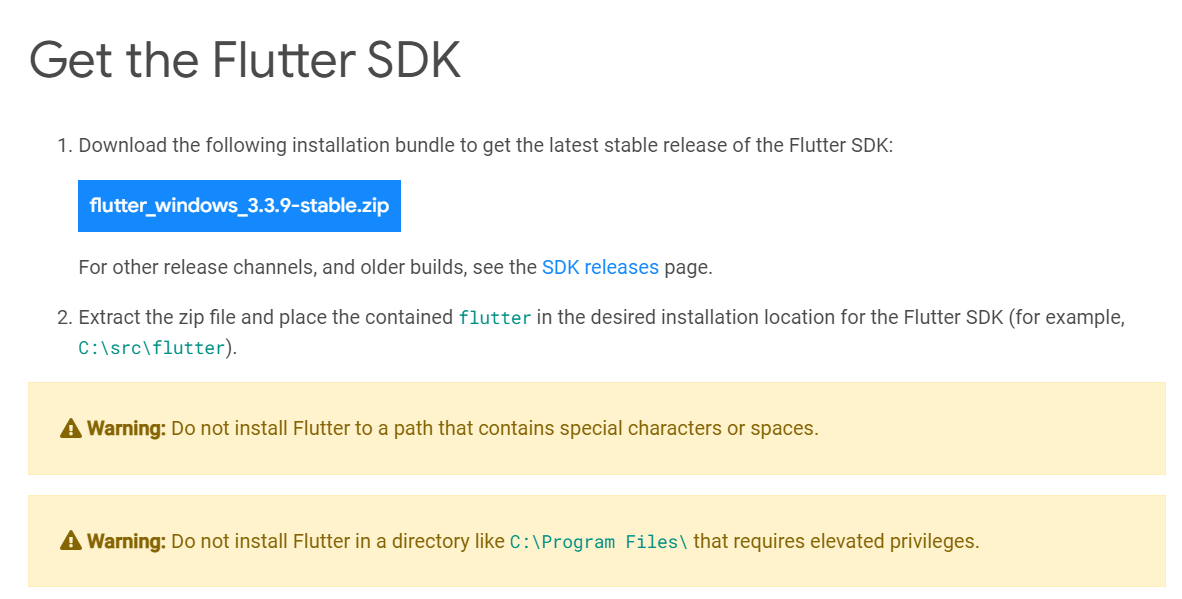
    After the file is downloaded, extract it to a location such as c:\dev\tools.

    For Windows, Linux and ChromeOS, the next step is to update your path so that the system can find the tools found in the Flutter folder’s bin folder. (Mac users don’t need to do this step.) The Flutter installation docs are helpful here:

    • Windows: Make sure you use the full path, starting with the name of the folder you extracted the zip file into. For example, on my machine, that would be C:\dev\tools\flutter\bin, as shown in the image below. Then after you update the path, you’ll need to close and reopen your command-line shell (either Windows CMD or Powershell). For detailed instructions, go here.
    • Linux: Follow the instructions here.
    • ChromeOS: Follow the instructions here.
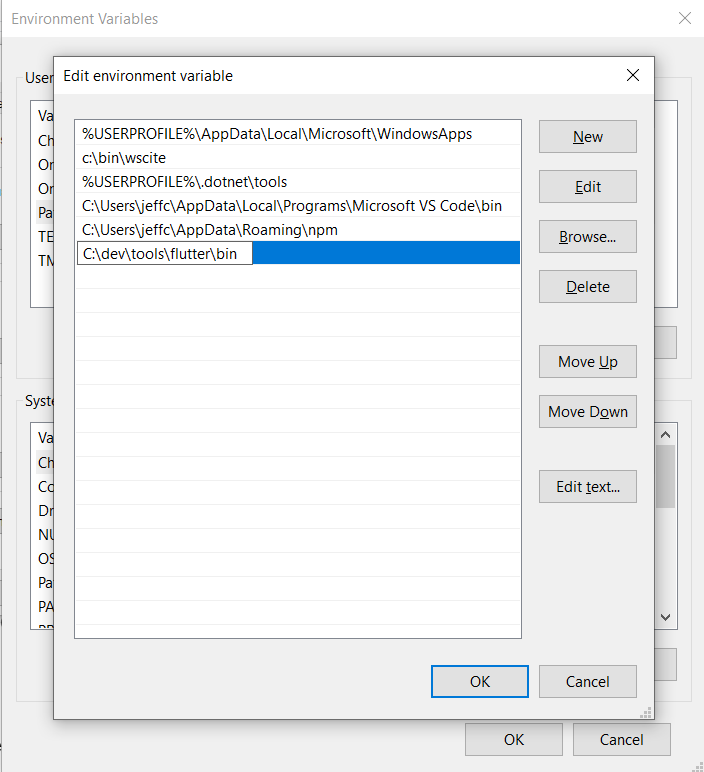
    Now test out the Flutter command to make sure it works by going to a folder outside of the Flutter’s bin folder and typing:

    flutter --version

    You should see a message such as this:

    Flutter 3.3.9 • channel stable • https://github.com/flutter/flutter.git
    Framework • revision b8f7f1f986 (2 weeks ago) • 2022-11-23 06:43:51 +0900
    Engine • revision 8f2221fbef
    Tools • Dart 2.18.5 • DevTools 2.15.0

    This will tell you if the installation is possibly ready. If instead, you see a message that the command is not found, double-check that you have your path correct; that’s typically the most likely cause for that error.

    Now, why did I say ‘possibly’? Because Flutter itself can tell you if there are any other tools you’ll need by running this command:

    flutter doctor

    Here’s an example of what I saw when I ran it:
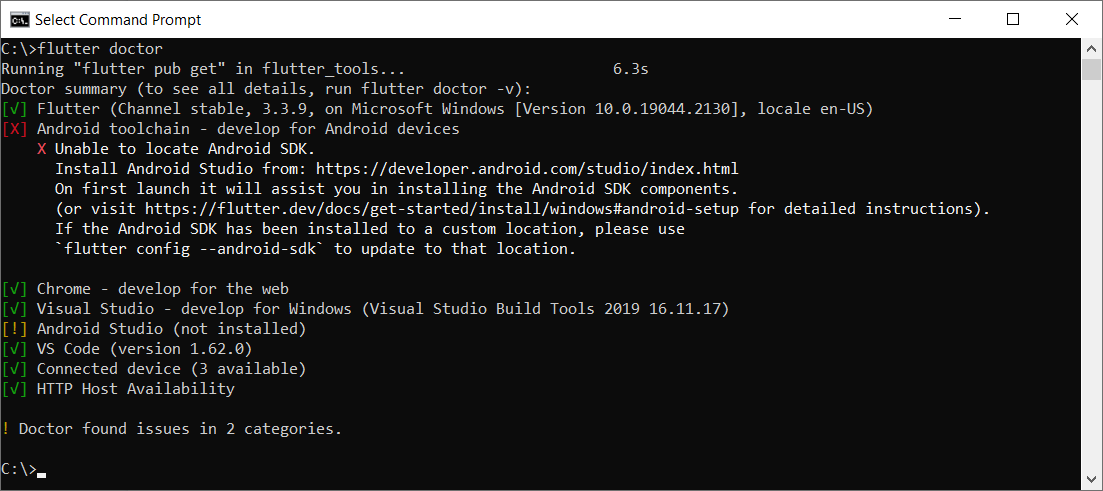
    This tells me I have some of the necessary tools installed, but not all:

    • Flutter itself, as well as all the tools that came with it
    • Android toolchain: I don’t have this one.
    • Chrome browser: You’ll need this for debugging web versions of your app.
    • Visual Studio: This is the full IDE from Microsoft; you’ll need it if you want to develop your app for Windows Desktop. You can use the free Community version. For that, go here and choose the free Community version.
    • Android Studio: I don’t have this one.
    • VS Code: This refers to Visual Studio Code, the free editor/IDE from Microsoft, which is not the same as Visual Studio. It’s a separate tool and neither is dependent on the other. Before you install it, read my notes below.

    Before installing anything else, you’ll want to decide what platforms you’ll be targeting. If you’re going to include Android in that list, you’ll need to download and install both the Android toolchain and Android Studio. In that case, you’ll be developing from within Android Studio.

    But if you’re not targeting Android, you do not need to install the Android toolchain or Android Studio. The official installation docs are a little vague on this point, so I tested it out myself. I was able to target Windows desktop and a browser without needing to install any of the Android tools.

    If you’re not targeting Android, then you’ll want to install VS Code to do your development from within. You can find it here.

    Building an App

    For this example, I’ll continue with Windows, and I’ll build a quick Windows desktop app.

    In a command shell, I’ll first create a folder in my c:\dev to hold my projects by typing these commands:

    cd c:\dev
    md projects
    cd projects

    I’m going to make a Flutter app called flutter_demo by typing the following. (Make sure you’re in the projects folder before typing this):

    flutter create flutter_demo

    Note that the name for your project must be in all lowercase letters, and it can contain underscores. So, for example, using uppercase letters results in an error:

    If I type this:

    flutter create FlutterDemo

    I see this:

    "FlutterDemo" is not a valid Dart package name.
    See https://dart.dev/tools/pub/pubspec#name for more information.

    When done correctly, you’ll see output such as this:

    Creating project flutter_demo...
    Running "flutter pub get" in flutter_demo... 1,186ms
    Wrote 127 files.
    All done!
    In order to run your application, type:
    $ cd flutter_demo
    $ flutter run
    Your application code is in flutter_demo\lib\main.dart.

    Before we open the code, let’s run it! First, go into the new folder flutter created:

    cd flutter_demo

    Then run it by typing:

    flutter run

    This command runs whatever Flutter application is in the current folder. In this case, that’s the app you just created.

    When you start it, it will ask for some choices. Because I don’t have Android or an emulator installed, I only see options for Windows Desktop and Chrome and Edge. (Edge is based on Chrome, so it works, as well.) Here’s what I see:

    Multiple devices found:
    Windows (desktop) • windows • windows-x64 • Microsoft Windows [Version 10.0.19044.2130]
    Chrome (web) • chrome • web-javascript • Google Chrome 107.0.5304.107
    Edge (web) • edge • web-javascript • Microsoft Edge 106.0.1370.37
    [1]: Windows (windows)
    [2]: Chrome (chrome)
    [3]: Edge (edge)
    Please choose one (To quit, press "q/Q"):

    Press the option for Windows. This will build the Windows desktop version (which might take a minute or so) and launch it, resulting in a window that looks like this:
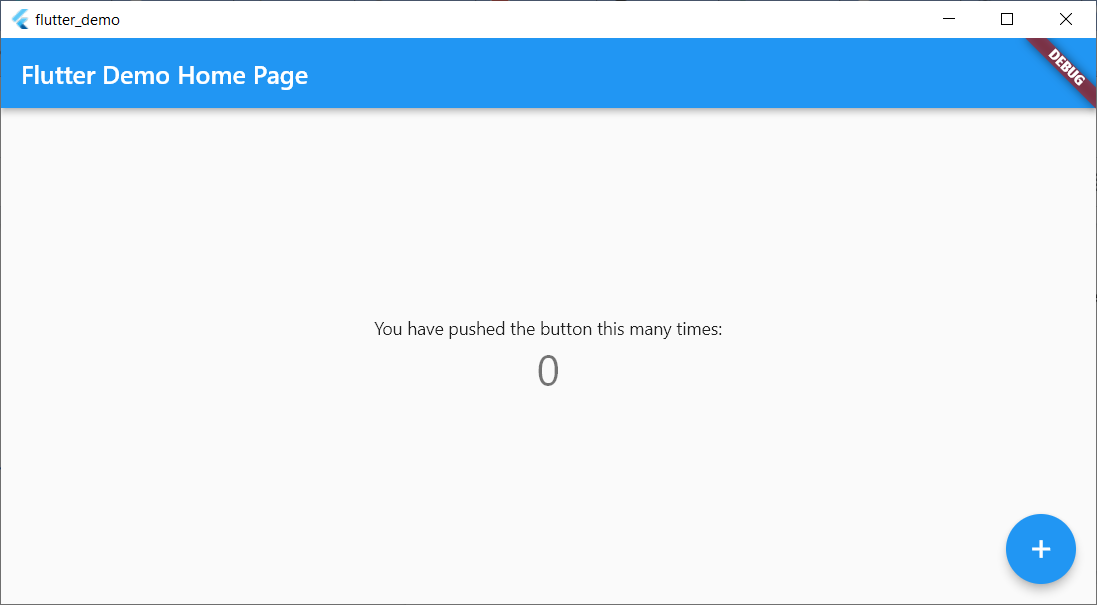
    This isn’t much, but there’s a sample in it where you can click the plus sign and see the number in the middle increment. That’s all.

    Now let’s try running the same app in Chrome. First, close the app window and press Arrow-Up or re-type:

    flutter run

    This time, choose the option for Chrome.

    Now Flutter builds a web-ready version that runs on Chrome, starts a local web server to host the app, launches Chrome and pushes a URL to Chrome to load the app from the local web server. Here’s the browser window:
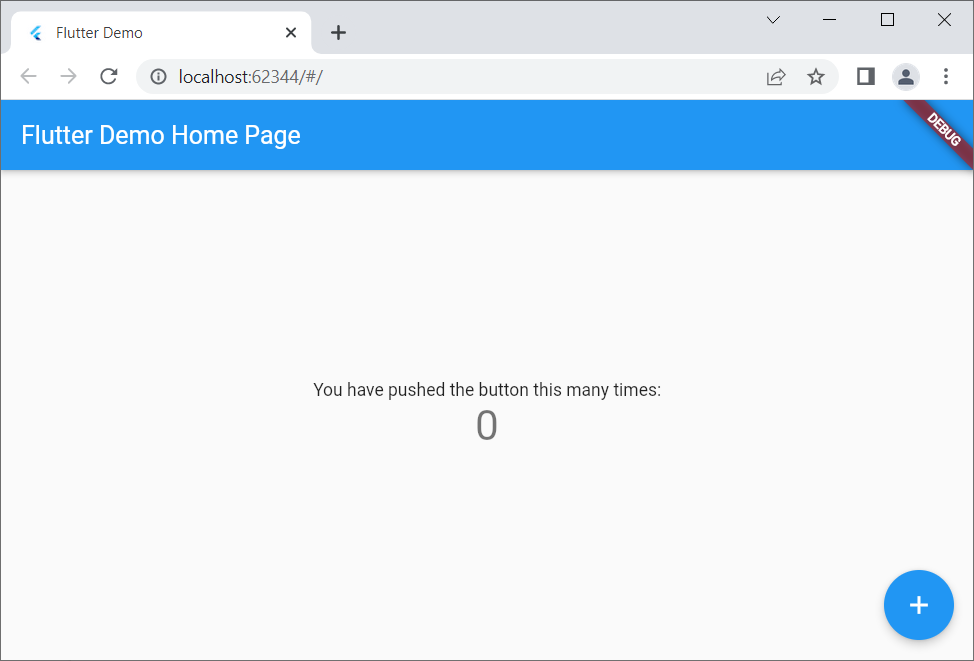
    Notice that it looks virtually identical to the desktop version but is inside a browser this time.

    If you’re a web developer, I encourage you to right-click inside the browser app and select View Page Source. Notice there’s a line that loads a file called flutter.js, and there’s some JavaScript code that responds to the window’s Load event that calls into Flutter. You won’t be writing JavaScript code, but it’s always good to have at least some understanding of what your front end is doing!

    Adding to the Code

    Now let’s add just a bit to the sample code. For this, I’ll use VS Code. From within the app’s main folder (in my case, c:\dev\projects\flutter_demo) type

    code .

    (Make sure to include the dot after the word code; otherwise, VS Code will open in whatever folder it last ran.)

    Before delving into the code, you’ll want to install a special Flutter extension for VS Code. Click the gear in the lower left and click Extensions. In the box labeled Search Extensions in Marketplace, type flutter. (Don’t click Enter; just pause a moment and the search will begin.) Find the one called Flutter that has over five million downloads, as shown here:
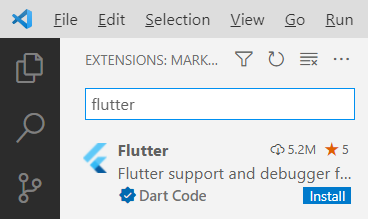
    Click the Install button. The button will show “installing” while the extension is being downloaded and installed.

    After the extension is installed, VS Code will ask whether you want to use it with your current project. You might also see a message regarding updating the Dart extension, which came alongside Flutter. Click Yes for the Flutter one; click Get packages for the Dart one. (You can ignore the message about opening the settings file.)

    Now you have all several flutter tools available VS Code’s Extensions Palette. Press Ctrl+Shift+P to open the palette. Type flutter and you’ll see the full list.

    For now, however, let’s first just run the app. Click the Run menu, and then click Run Without Debugging. You’ll see the Windows app open again.

    Now go back to VS Code. Even if you’re not familiar with Dart, if you know other “curly bracket” languages such as C++, C#, Java, JavaScript and so on, you’ll probably be able to read the code. There’s a function called main() that starts the app, providing a class called MyApp. That class is farther down in the code. Look closely at all the comments. Read them carefully and learn from them. The MyApp class contains a build function that returns an object with a “home” member; that member is an instance of MyHomePage, which is also a class in this file. Continue studying that code, and you’ll see mentions of widgets and layouts. Look closely at the function called _incrementCounter and how it’s triggered later on through an onPressed event.

    Conclusion

    Play around with the code; try changing some of the string literals, for example, until you’re quite familiar with it. Then dive into the first demo provided by the Flutter folks at Google, which you can find here. Soon you’ll be up and running with your own Flutter app that you can run on any device!


  • Introduction to MACH Architecture

    Introduction to MACH Architecture

    In recent years, the need to construct end-to-end digital experiences has become increasingly important. But to deliver new features and services promptly, organizations must double down on agility and reusability. As part of this trend, applications have become increasingly modular, often constructed using pre-built microservices and integrating common SaaS to avoid reinventing the wheel.

    MACH is an architectural style that fits into these trends quite well. It stands for Microservices-based, API-first, Cloud-native, and Headless. The locus of the movement is The Mach Alliance, a group of API-first companies abiding by these principles. At the time of writing, MACH is gaining mindshare as more API-first companies enter the market and the appetite for cloud-native technology grows.

    I recently chatted with Gary Ballabio, VP of technology partnerships, Cloudinary, about the ongoing MACH trend. According to Ballabio, MACH delivers “best of breed” technologies that avoid the bloat of larger platforms. Yet, for software consumers, building in a MACH style will require stitching together individual components and orchestrating them effectively. Below, we’ll explore MACH and consider the benefits and drawbacks of utilizing tools that conform to this approach.

    What Is MACH?

    MACH is an emerging software architecture style adopted by a number of commerce and digital experience tools. To understand MACH a bit deeper, it’s necessary to understand the underlying concepts of microservices, API-first, cloud-native and headless. So, let’s first break apart these familiar terms:

    • Microservices: Unlike monolithic development, a microservices architecture organizes functionality into self-contained, specialized components. This improves reusability and allows for more frequent, targeted software updates.
    • API-first: API-first takes design-first one step further. It means putting the consumption model, the API, ahead of other concerns, like the application or UI. Web APIs have become ubiquitous for connecting a microservices ecosystem and exposing data and functionality to partners and public consumers.
    • Cloud-native: An umbrella term for projects purpose-built for the elasticity and scalability of the cloud.
    • Headless: Headless means separating the front end, or “head,” from the back end. By decoupling development this way, websites and apps are better equipped to cater to multiple platforms and devices.

    According to Ballabio, companies can leverage cloud-ready best-of-breed functionality by integrating tools that adopt MACH principles. Incorporating one single SaaS to fit a specialized need can also be considered an alternative to using large, comprehensive enterprise commerce suites like Salesforce, Adobe or SAP, said Ballabio.

    There are many examples of specialized SaaS services built in the MACH style. Some include Algolia for search and recommendations, Cloudinary for media management, Builder.io for mobile experiences, or Contentstack as a headless CMS. All these tools are members of The MACH Alliance, a group of over 70 vendors, partners, startups, systems integrators and other ambassadors dedicated to fostering the MACH approach. And although the emphasis has been on commerce and digital experiences, MACH is expanding beyond that scope to other areas.

    MACH technologies support a composable enterprise in which every component is pluggable, scalable, replaceable.

    Some readers may wonder, “How is this different than Jamstack (JavaScript, APIs and markdown)? In a way, MACH is similar to Jamstack, as both approaches aim for headless frontend experiences and a modular backend powered by APIs. But a key difference, said Ballabio, is that MACH doesn’t dictate the use of specific programming languages.

    Benefits and Drawbacks of MACH

    MACH combines many development trends we’re seeing in the software landscape. Digital applications are becoming more composable, cloud-first is rising, and headless models can deliver customization benefits. Yet, there are some potential drawbacks to introducing this style too. So, let’s weigh some of the positives and negatives of adopting MACH architecture.

    Benefits

    • Flexibility: The most significant benefit of MACH is the flexibility it offers, said Ballabio. “There’s value in being able to choose the services you want to use based on your own unique requirements.” Looping in a specific API-first tool for something like e-commerce, payments, CMS or email can enable a lot of customization.
    • Reduced waste: This can create less waste, too, as you create a leaner footprint by acquiring only what you need for each project, and freemium models enable consumers to pay for only what they use. This is helpful when you want a single component but don’t require the bells and whistles of a more holistic platform.
    • Best-of-breed: Niche API-first products are focused on doing one thing really well, and this particular focus can improve quality and agility. It also releases engineers from being at the whim of an extensive product’s development life cycle.
    • Developer-first: Lastly, most digital experiences share common functionalities that developers shouldn’t have to reinvent. MACH supports being developer-first, says Ballabio, which is an asset to companies investing in developer experience.

    Drawbacks

    • Increased maintenance: Consuming many third-party cloud services will inevitably bring new maintenance hurdles. These include tracking, monitoring and securing all integration points. It also requires responding to new version updates.
    • Stitching together: Naturally, when you add a cloud-based abstraction layer to the services you consume, the onus is on the consumer to then to stitch them together to make components talk to one another.
    • Startup costs: Due to the coordination between services, initial costs and engineering time could be more than implementing a holistic suite, admitted Ballabio. “But you get more long-term benefits,” he said.
    • Assistance may be required: Those unaccustomed to microservices development and API integration may need help. This may require the support of systems integrators or middleware to orchestrate connections.
    • Lack of standards: MACH is more of a general architecture rather than a standard specification. Thus, the precise technologies under the hood and the specific behaviors may differ from service to service.

    Future of MACH

    A recent MACH Alliance study found 79% of tech leaders plan to invest more in MACH technologies in the next year. Although the style has been primarily trending in Europe, Ballabio predicts the U.S. will soon pick it up. The MACH Alliance presents and advocates for an open and best-of-breed enterprise technology ecosystem.

    Along with the rise of composable architecture, the MACH approach is gaining interest among cloud-native leaders who see the advantage of assembling applications using pre-fabricated building blocks. MACH is especially a good fit for greenfield development, where the slate is clean to integrate new technology.

    MACH represents a new category of companies that are growing together. Ballabio remarks that he feels part of a movement, part of an industry—and, arguably, this movement can potentially disrupt larger commerce ecosystems.

    But although MACH gives a name to a face, most techies still aren’t aware of the acronym. While the concept may, for now, live in the domain of vendor-speak, Ballabio foresees it becoming a more common parlance for consumers and end developers.