This new book explains how our industry has reached the cloud native era, which impacts how software applications are developed, tested, deployed and managed. Inside, you’ll read about how the future of modern application development can benefit from the powerful combination of Jenkins X and Kubernetes, providing developers a seamless way to automate their continuous integration (CI) and continuous delivery (CD) process.
Written by well-known DevOps leaders including Robert Davies, Brian Dawson, James Rawlings and James Strachan, this definitive guide will help you understand:
The technical and business benefits of Jenkins X.
How developers can use Jenkins X to build cloud native apps.
Teams often spend days manually setting up Jenkins, pipelines and implementing continuous integration/continuous delivery (CI/CD) effectively. Jenkins X comes with all the automation you need to be able to focus on your application code and tests.
In this whitepaper, explore the business value Jenkins X brings to organizations who undertake the journey of continuous everything.
Automatic software releases with semantic versions, the creation of artifacts, Docker images and Helm charts
Automatic promotion of versioned artifacts across your environments via GitOps
As a software developer, you might have attended some conferences in the past where the tough topics get breezed over, and there’s not enough technical information to answer your really detailed questions. Well, DevOps World | JenkinsWorld is not that kind of event! Our sessions get into the tough technical questions and get very specific, digging into what works and what doesn’t, how to configure systems for maximum success and how to pull together the best cutting-edge technologies into your DevOps pipeline. Below is just a sample of these interesting and engaging sessions from CloudBees’ staff, partners and customers. If you consider yourself a highly-technical member of the DevOps universe, these are the kind of sessions you’ll want to add to your agenda! If you aren’t registered yet, get started here.
There is no doubt that Jenkins has become the engine of DevOps for web apps, but what about for mobile? The mobile DevOps process can be a headache; learn how Jenkins can help.
One of the biggest problems with UI-based test automation is maintenance. Many tools, frameworks, and approaches already exist to try to solve this issue, but they have had limited success. AI may be the answer to this problem. In this session, learn how AI and AI-based dynamic location strategies can help with UI-based test automation,
Want to know how Jenkins builds Jenkins? Catch this session to see the real-life implementation of Jenkins’ development and delivery infrastructure in the cloud as it has evolved from a mix of platforms to multi-platform VMs, containers, and Kubernetes on Microsoft Azure.
Brian Benz – Microsoft – Cloud Advocate
Faster Git
This session will review and prioritize techniques to manage large git repositories, including reference repositories, narrow refspecs, and more.
According to a recent IDC study, the worldwide DevOps software market reached $2.9 billion in 2017 and is forecasted to reach $6.6 billion in 2022. With over 50% of organizations embracing DevOps last year, continuous integration (CI) and continuous delivery (CD) have become an integral part of the software development process.
Your business is likely embarking on a DevOps transformation of its own. In this blog post, we will discuss CI/CD best practices that can help accelerate adoption no matter where you are in your DevOps journey.
But first, let’s take a step back and set the stage for why we practice DevOps in the first place.
Shifting left with CI/CD and the promise of continuous everything
Continuous integration and continuous delivery refers to the process of developing and delivering software in short cycles of build-configure-deploy-test-release underpinned by automation. In short, we do CI/CD to deliver higher-quality software frequently and predictably.
CI has become practically ubiquitous to software development. Therefore it is not surprise that as the bread and butter of development, CI is a key practice in DevOps organizations.
CD is not as widely adopted as CI, but is key to shifting left. CD starts with development, building, unit testing, static code analysis (SCA) and static analysis security testing (SAST) on CI. Eventually, the pipeline extends the automation to functional, integration, performance and security testing, along with configuration management and deployment. These are critical areas for automation — and in a DevOps context they are essential.
I would even make the jump and say that if you aren’t doing CD, you aren’t doing DevOps well. Why? Because traditional IT operations don’t get involved until AFTER deployment into production – when real users begin hitting the application. How can you expect IT operations to shift left and embrace a culture of DevOps if there is a giant, unautomated chasm in your software delivery pipeline? Asking them to shift left in this context is paramount to asking them to jump of a cliff. If you are doing CI alone, you are likely sole inhabitants of ‘Developer Island’. It might be sunny there, but you are decidedly alone and separate from the rest of the business.
I know what you’re thinking. This all makes great sense, so why isn’t the CD pipeline automation the norm? The answer is simple… this stuff can be hard and transformation doesn’t happen overnight. It usually begins on the left with CI and as the DevOps initiative matures, CD is the next logical step. It’s certainly not serial out of necessity, but this is the adoption pattern we often see.
In fact, I have news. Not only does your DevOps transformation not happen overnight, it’s never over. This is all about continuous improvement, which means nothing sits still. There isn’t a DevOps train that terminates at the end of the line. The minute you’ve mastered these best practices, new ones will emerge because every day we as a community get better at delivering software.
Which brings me to the topic of shift left and continuous everything! When you have both CI and CD pipeline automation in place, you are in a fantastic position from a tools perspective to shift left. This is a perspective shift from problem detection to prevention which means testing earlier, and earlier – effectively shortening test cycle times while preserving code quality. The result? Better software, delivered more quickly that shortens the feedback loop between end users and developers.
But shifting left isn’t just about tools. It’s also about people and practices – the proverbial DevOps trinity. It means everybody has a stake in the reliable, repeatable delivery of high value software. It means that the documentation team joins the engineering team when stories are being picked for a release. It means that product marketing comes to that same meeting with research on the market opportunity for such a feature. It means that product managers sit on analyst inquiry calls with the analyst relations team. It means that passionate customers beta test features and give meaningful feedback that can be immediately acted upon. It means that before a feature is even released, sales is trained, primed and ready to do pipeline generation. It means DevOps is at the very heart of the business and every function from marketing, to sales to support and services is totally informed and invested from ideation onward. No more chucking features over the wall. No more islands. No more excuses. That’s continuous everything.
Effective and comprehensive measurement and monitoring
So you’ve got a CI/CD strategy. You’re shifting left. Now what? A critical – and often overlooked step in DevOps transformation is measurement. It’s time to take credit for how increasingly amazing you are doing! (or understand where you are falling short, DevOps is about honestly accepting and addressing failure or in efficiencies…together). You need visibility in order to know which lever to pull next in your path to continuous improvement. You’re delivering code faster than ever! But how’s the quality? Is it failing tests? Is it unstable in production? How much rework is required? You won’t know if you don’t track it. Implementing and measuring the success of the best practices in DevOps is crucial if you wish to make your automation cycle faster over time. If, like many, you jumped headlong into your DevOps journey without putting monitoring in place – it’s not too late. Consider keeping track of the deployment frequency, change lead time, change success/failure rate, mean time to recovery (MTTR), and the rate of security tests passes in your organization to stay on top of your DevOps transformation.
8 CI/CD Best Practices to get you started in DevOps
1. Take a ‘security first approach’
It’s not possible to overemphasize the need for security in a world where breaches and vulnerabilities continue to cause massive reputation and financial losses to businesses of all sizes and capabilities. Since the CI/CD system offers access to your codebase and credentials to deploy in various environments, it is often the prime target. Recall the infamous Uber breach where hackers gained access to AWS credentials that were embedded in the GitHub software repository – stealing the personal information of 57 million users and 600,000 drivers. Uber then paid to cover it up, but that’s a different story. It’s certainly not uncommon for credentials to be stored in private repositories for automation purposes. Therefore, you should consider isolating your CI/CD systems, placing them in secure internal networks. VPNs, strong two-factor authentication and identity and access management systems will help you enforce ‘the principle of least privilege’ and restrict exposure to threats. For example, containerize your agents and place them on secure networks. In addition, you should also ensure that security is baked into the development process from start to finish. This is commonly known as DevSecOps.
2. Assess your organization’s readiness to utilize a microservices architecture
For effective implementation of DevOps, a microservices architecture is the best way forward. However, re-architecting your existing applications can be a daunting task, and you may consider an incremental approach where you maintain your mission-critical systems and weave the new architecture around it. This will help you gradually replace the old system with the new architecture.
3. Implement tracking and version control tools
Tools like Jira and Bugzilla can help you achieve better visibility into the progress of your software and collaborate easily with distributed teams. You will also need a version control system like Git, which creates a ‘single source of truth’ for your team, allows tracking of changes in the code-base, and is a life-saver whenever a rollback is required. By enabling the teams to collaborate and integrate changes into the shared repository, GitOps can significantly improve your MTTR.
4. Commit daily, reduce branching
The goal of reducing (or even gasp… eliminating) branching is to spend more time on development and less time on version control. However, to make the most of GitOps, developers are expected to commit directly to the main branch or merge changes from their local branches in at least once a day. This will force developers to deal with smaller, bite-size bits of integration pain instead of the massive integration pain (and associated rework) that happens when attempting to merge many branches into the trunk just before release.
5. Build only once
Eliminate any practices where source code is built multiple times. Even if the software has to be built, packaged, or bundled, you should execute that step only once and promote your binaries. Most successful CI implementations include the build process as the first step in the CI/CD cycle to package the software in a clean environment. This eliminates oversights and reduces the chance for errors to be introduced and/or missed anytime later. Further, the resulting artifact should be versioned and uploaded to Git each time so that whenever it is pulled the build does not change.
6. Decide which processes and tests to automate first
While an incremental approach to automation sounds good, organizations transitioning from manual to automated processes often find it difficult to decide which processes to automate first. For example, it is beneficial to automate the process for compiling the code first. As developers need to commit code on a daily basis, it makes sense to do automated smoke tests. Unit tests are usually automated first to reduce the workload on developers.
Consequently, you can automate functional testing, followed by UI testing. Functional tests do not usually require frequent updates in the automation script, unlike UI tests which have more frequent changes. The main idea is to think about all possible dependencies and evaluate their impact to prioritize automation sensibly.
7. Release often
Frequent releases are only possible if the software is in a release-ready state and you have tested it in a production-like environment. That’s why the best practice is to add a deployment stage which closely resembles the production environment before the release. Some release best practices include:
Canary deployment. Releasing to a subset of users, testing with that base and rolling it out to the wider population if successful (or rolling it back for iteration if it’s not).
Blue green deployment. You begin with two identical production environments. One is live in production. The other is idle. When a new release is rolled out the changes are pushed to the idle environment. Then they switch – the environment containing the new release becomes the live environment. If something goes wrong, you can immediately roll back to the other environment (the one that does not contain the new release). If all is well – the environments are brought to parity once more.
A/B Testing. A/B testing is similar in flavor to – but not to be confused with- blue green deployments. A/B testing is a way of testing features within the application for things like usability. The better performing variant of the feature wins. This is not a release methodology.
8. Use on-demand testing environments
You should consider running tests in containers as this approach allows the quality assurance team to reduce the number of environment variables and changes present between the development and production environments. The primary advantage of using such ephemeral testing environments is that they add agility to your CI/CD cycle. The QA team does not have to pull a build from a CI server and install it in a separate testing environment; instead, it can run tests against a container image. It is much easier to spin up containers (they have no separate installation or configuration requirement) and also destroy them when not needed.
Where to begin?
The primary goal of DevOps or CI/CD best practices is to automate the process of building, testing and releasing software. This means you will need access to DevOps tools that help you simplify automation as well as get better visibility into the progress of your software. Further, there should be a mechanism to track DevOps performance metrics throughout the software delivery lifecycle and raise alerts for quick recovery when something goes wrong in release or deployment.
Deciding which DevOps tools to implement and where to invest first can cause “analysis paralysis” – even in organizations that have been working through their DevOps transformation for some time. You can avoid getting stuck in a similar position and jumpstart your DevOps transformation with the CloudBees Starter Kit. Learn more about this starter kit here.
In this post I’ll show you how to receive webhooks in real time from GitHub.com, even if your CloudBees Core stuff is behind a firewall. You can generalize this to other services too – such as BitBucket or DockerHub, or anything really that emits webhooks, but the instructions will be for GitHub projects hosted on github.com. The benefit, of course, is that you can use these public hosted services if you like, but your Core instances do not necessarily have to be directly open to the internet.
What are webhooks
Just a very quick refresher on what webhooks are: Messages (often JSON, but not always) typically posted by HTTP(S) from a server to a client that is listening for events.
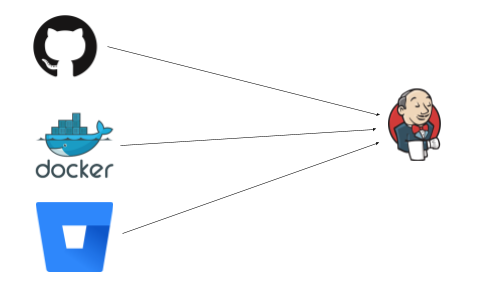
The events flow left to right, Jenkins sits there happily listing on paths like /github-webhook/ or /dockerhub-webhook/ etc for some HTTP request to tell it to wake up and do some work.
GitHub/BitBucket may be reporting a new commit or PR, or DockerHub reporting an upstream image has changed. What all these things have in common is that they push to Jenkins, and expect to be able to push to it (ie that Jenkins is visible to them). This works great when the network is open – say GitHub Enterprise, or Jenkins is listening on the web.
Not on the web
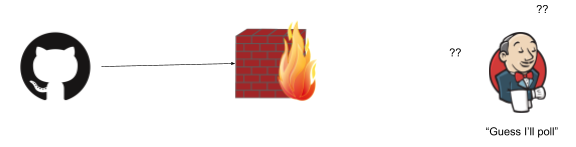
The trick is when something gets in the middle, say a firewall:
(As is industry standard, all firewalls have to be a wall on fire. Please don’t somehow set bricks on fire in your organization).
This is just the same when you fire up Jenkins on your laptop, and want to receive webhooks from github.com (a legitimate thing, perhaps to test out your setup, perhaps to run builds for iOS on a mac, or some corner of a network that is not exposed to the web). Unless your laptop is addressable to the whole web that is (not likely), or your network is configured just right, the webhooks won’t be able to flow.
This is fine – we can fall back to polling for changes. Except this is terrible. You burn through API quotas, and you don’t get changes in real time, and really no one is happy.
Some problems are opportunities
We can both solve this problem, but also, view this is an opportunity. Having things not addressable on the web, or locked down in some default way is a feature, not a bug. You massively reduce your attack surface, and can have defense in depth:
A webhook forwarding service
Enter the memorably named Smee. This is an OSS project provided by GitHub and also helpfully hosted as a service by GitHub. This can capture and forward webhooks for you. I’ll try to explain it with a diagram:
GitHub pushes an event (via HTTPS/json in this case) to Smee.io (the funny thing with circles, which is on the public web and accessible from GitHub.com) – and Jenkins in turn subscribes to Smee with an outgoing connection from a client. Note the direction of the arrows: Jenkins only makes an outbound connection.
This is an important point: this will work as long as the firewall is one way (like a NAT typically is, and many networks). If the Jenkins side can’t connect to anything on the outside world – well, this won’t help with that of course (but that is not often the case).
Setting it up
Step 1: Firstly – go to https://smee.io/ and click “Start a new channel”:
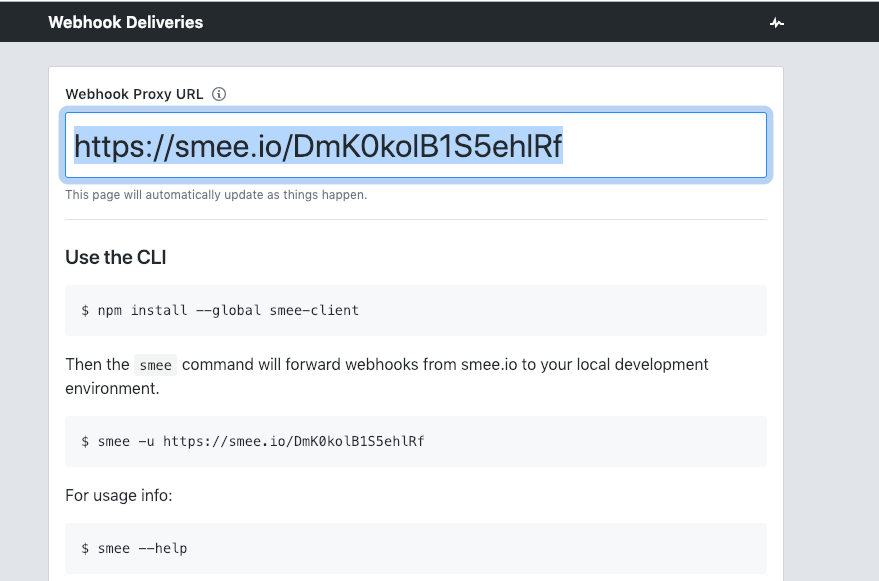
This will give you a unique URL (which you should copy for later use):
Next you should install the smee client next to where you have the Jenkins server running:
npm install —global smee-client
(This will make the smee client/command available to receive and forward webhooks).
Now start the smee client and point it to your Jenkins server. In this case I have it running on port 8080 (the default if you fire it up on your laptop, change both the port and the smee URL as needed):
This says to connect to the smee service, and forward webhooks to /github-webhook/ (that trailing slash is important, don’t miss it). Once this is running, you will see it log that it is connected and forwarding webhooks. Leave this command running for as long as you want to receive webhooks.
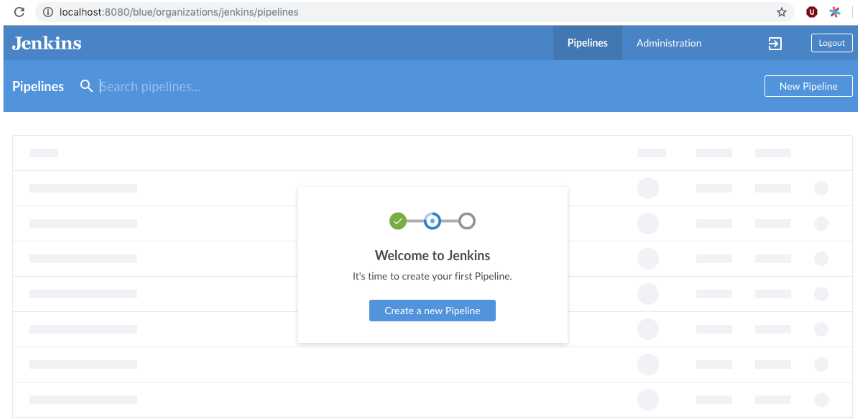
Next, you need to configure a pipeline that makes use of GitHub. In this case I set up one from scratch. You can skip this if you already have a pipeline setup:
I then chose “GitHub” as the where the code is:
Then choose your repository. This will set things up ready to receive webhooks from GitHub. (If you have an existing pipeline setup, and it is using GitHub as the SCM source, that is also fine).
The final step is to tell GitHub to post webhook events for that repository (or organization, you can do that too) to Smee (which ultimately means Jenkins will receive them).
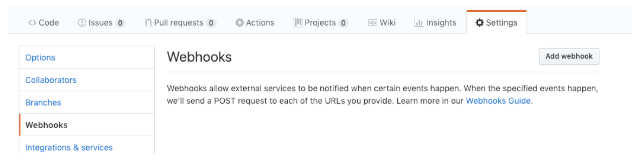
Go to the settings tab for your GitHub repository, and then click “add webhook”:
Next, configure the webhook:
Paste in the “smee” URL you copied from the step above.
Choose application/json as the content type.
Tell it to send everything (you can pick and choose what events, but I just did that as simpler).
Press Add Webhook (or update).
It should look something like this:
Webhooks should be flowing now. You can make a change to your repository, and check that a build starts soon after:
The Jenkins Pipeline plugin is a game changer for Jenkins users. Based on a Domain Specific Language (DSL) in Groovy, the Pipeline plugin makes pipelines scriptable and it is an incredibly powerful way to develop complex, multi-step DevOps pipelines. This document captures some definite Do’s and Don’ts of writing Jenkins Pipelines – with code examples and explanations.
Why? The Pipeline plugin is a step change improvement in the underlying job itself. Unlike freestyle jobs, Pipeline is resilient to Jenkins master restarts and also has` built-in features that supersede many older plugins previously used to build multi-step, complex delivery pipelines.
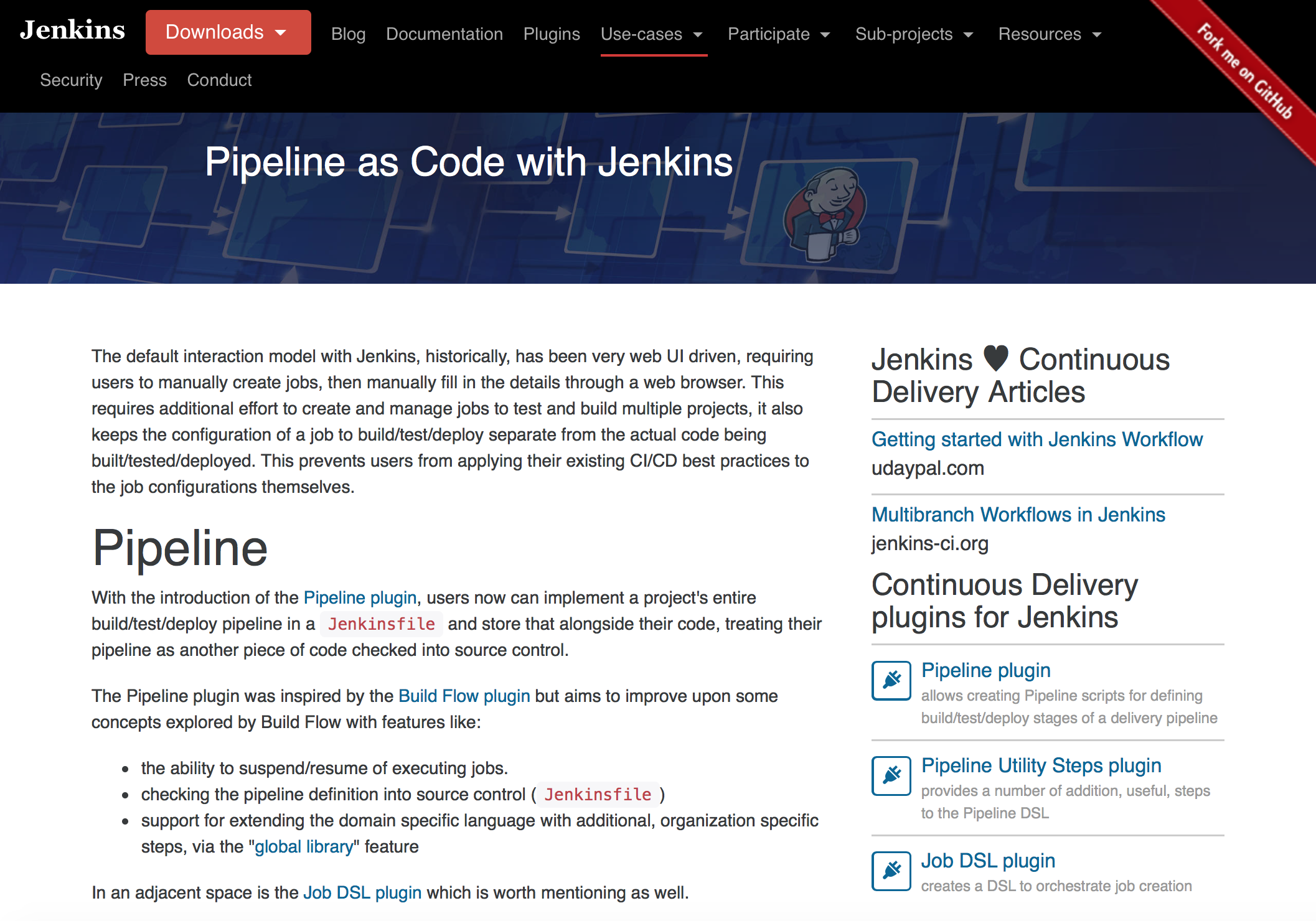
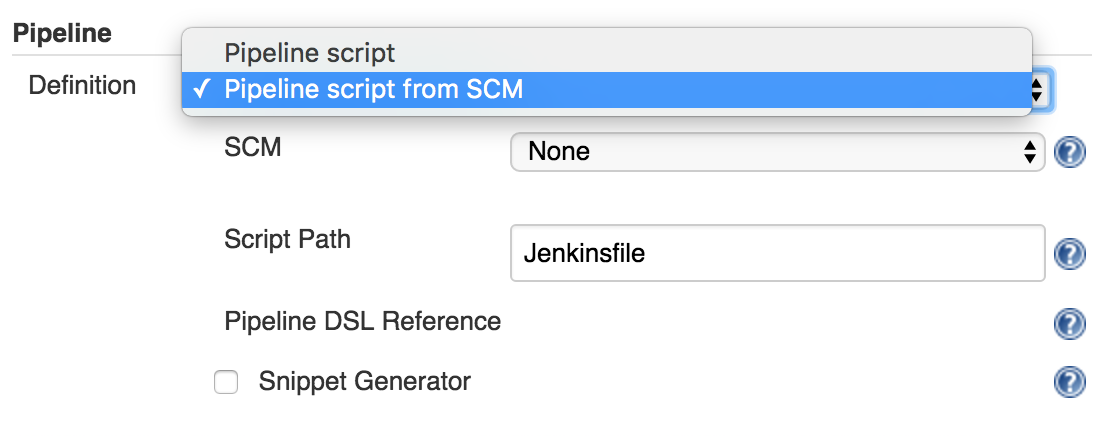
Use the feature to store your Jenkinsfile in SCM then version and test it like you do other software.
Why? Treating your pipeline as code enforces good discipline and also opens up a new world of features and capabilities like multi-branch, pull request detection and organization scanning for GitHub and BitBucket.
You should also call your Pipeline script the default name: Jenkinsfile and start the following script header, so your IDE, GitHub and other tooling recognize it as Groovy and enable code highlighting:
#!groovy
3. Do: All work within a stage
Any non-setup work within your pipeline should occur within a stage block.
Why? Stages are the logical segmentation of a pipeline. Separating work into stages allows separating your pipeline into distinct segments of work.
Example:
stage 'build'
//build
stage 'test'
//test
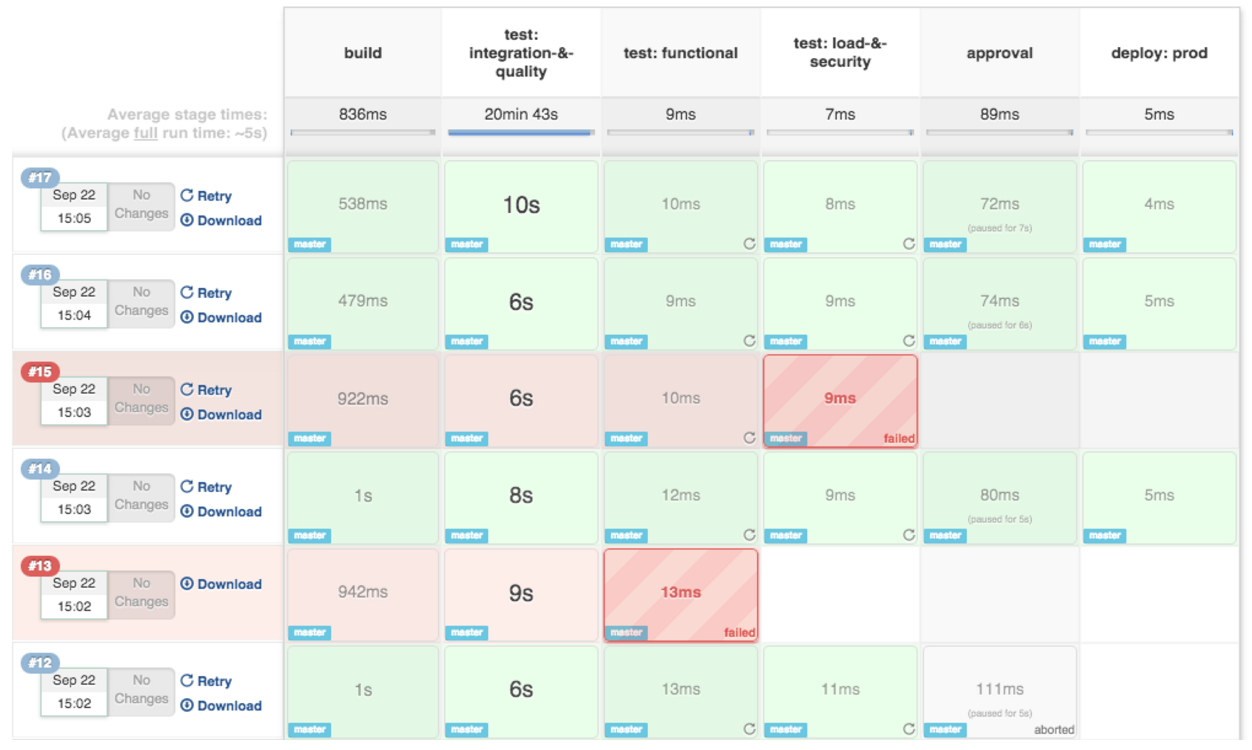
And better still: the Pipeline Stage View plugin visualizes stages as unique segments of the pipeline:
4. Do: All material work within a node
Any material work within a pipeline should occur within a node block.
Why? By default, the Jenkinsfile script itself runs on the Jenkins master, using a lightweight executor expected to use very few resources. Any material work, like cloning code from a Git server or compiling a Java application, should leverage Jenkins distributed builds capability and run an agent node.
Example:
stage 'build'
node{
    checkout scm
    sh 'mvn clean install'
}
5. Do: Work you can within a parallel step
Pipeline offers a straight-forward syntax for branching your pipeline into parallel steps. Use it!
Why? Branching work in parallel will allow your pipeline to run faster, shifting your pipeline steps to the left, and getting feedback to developers and the rest of your team faster.
Example:
parallel 'shifting':{
    //everything
}, 'left':{
    //I can
}
Why? One of the main benefits of parallelism in a pipeline is: to do more material work (see Best Practice #4)! You should generally aim to acquire a node within the parallel branches of your pipeline.
While you can put an input statement within a node block, you definitely shouldn’t.
Why? The input element pauses pipeline execution to wait for an approval – either automated or manual. Naturally these approvals could take some time. The node element, on the other hand, acquires and holds a lock on a workspace and heavy weight Jenkins executor – an expensive resource to hold onto while pausing for input.
So, create your inputs outside your nodes.
Example:
stage 'deployment'
input 'Do you approve deployment?'
node{
    //deploy the things
}
8. Do: Wrap your inputs in a timeout
Pipeline has an easy mechanism for timing out any given step of your pipeline. As a best practice, you should always plan for timeouts around your inputs.
Why? For healthy cleanup of the pipeline, that’s why. Wrapping your inputs in a timeout will allow them to be cleaned-up (i.e., aborted) if approvals don’t occur within a given window.
9. Don’t: Set environment variables with env global variable
While you can edit some settings in the env global variable, you should use the withEnv syntax instead.
Why? because the env variable is global, changing it directly is discouraged as it changes the environment globally, so the withEnv syntax is recommended.
Example:
withEnv(["PATH+MAVEN=${tool 'm3'}/bin"]) {
    sh "mvn clean verify"
}
10. Do: Prefer stashing files to archiving
Before the stash capability was added to Pipeline DSL, archives were the best way to share files between nodes or stages in a pipeline. If you just need to share files between stages and nodes of your pipeline, you should use stash/unstash instead of archive.
Why? Stash and unstash are designed for sharing files, for example your application’s source code, between stages and nodes. Archives, on the other hand, are designed for longer term file storage (e.g., intermediate binaries from your builds).
Thanks for reading! The new Jenkins Pipeline plugin is gaining more and more traction, especially with the launch of Jenkins 2.0. I’m sure there will be more and more best practices to come as developers across the world develop their DevOps pipelines with Jenkins. We will post follow-up blogs and more examples soon!
Learn More
Jenkins is one of the preeminent automation tools. Jenkins is extensible by design, using plugins. Plugins are what give Jenkins its great flexibility for automating a wide range of processes on diverse platforms. Jenkins Pipeline builds on that flexibility and rich plugin ecosystem while enabling Jenkins users to write their Jenkins automation as code. This technical guide will show a number of common use cases for plugins with Jenkins Pipeline.
The digital economy has pushed organizations to produce better products faster, leading them to adopt DevOps and continuous integration/continuous delivery (CI/CD) for efficient software delivery. This industry shift impacts all groups within an organization to evaluate and adopt new business practices to meet this growing need and stay competitive in the market.
Indeed, IT leaders implemented DevOps practices and tools to achieve modern software development, but it’s unclear to them whether there is any return on investment (ROI). Product and engineering leaders struggle with determining how to measure and manage their software delivery capability. The complexity of multiple teams, tools and applications means the whole process can be disconnected and difficult to track. Adding to this challenging scenario, today CIOs are measured on delivering quality software products, with zero defects that engage customers and generate revenue.
What is value stream management?
A value stream consists of a series of steps used by an organization to continuously deliver value to customers. Value stream management is a practice that enables the organization to track and manage the flow of value from the ideation stage all the way to customer delivery. Proper value stream management ensures the facets related to end-to-end software development are connected and measured to properly and efficiently move the flow of value related to a product or service to the customer.
But when we start talking about value stream management, you need to think about value stream mapping as well. Value stream mapping is the exercise of visualizing the process of events that takes a product from idea, to creation, testing, production and finally release to the customer. Mapping the value stream of a product helps you understand how the artifacts and workflow, the dependencies at each stage and identifying the blockages or bottlenecks that result in waste and delay delivering value.
Why track value streams?
Managing your value streams lets you focus on delivering value to the customer. To do this, you need to connect multiple teams, tools and applications to gain clear visibility and insight into how the value is flowing through the software delivery process. This means having a platform that scales easily and enables collaboration, while reducing risk, along with accessing real-time metrics on DevOps performance across the teams, and tracking throughput and stability related to product releases. The goal is to deliver quality software at speed that your customers want in order to drive value back to the organization.
In short, value stream management can help you solve these challenges:
Poor visibility across the software delivery process makes it difficult to measure and manage DevOps performance – to identify improvements, leverage best practices and support collaboration across teams.
No connection between applications, teams and tools means intensive, error-prone methods of collecting static data for measuring and managing the organization’s continuous delivery capabilities.
Difficulty in end-to-end value stream management resulting in lack of information to track flow of value from idea to production, and guesswork on identifying bottlenecks and wait times, leading to increased waste and delays in delivering value.
Lack of real-time performance metrics to benchmark and track DevOps performance based on industry standard indicators related to Throughput (Deployment Frequency, Mean Lead Time) and Stability (Mean Time To Recover, Change Failure Rate).
What does a good value stream management platform look like?
As your software delivery processes become more complex, you’ll need a value stream management solution that provides one view across the infrastructure, with data and metrics that can be trusted, in order to truly report on how the organization’s DevOps performance is progressing. You should look for the following:
A scalable and flexible CI/CD solution that enforces an organization’s governance needs.
A solution that easily maps, actively measures and manages your value streams, acting as a single source of truth to analyze and continually improve the flow of value.
Real-time performance metrics related to Throughput (Deployment Frequency, Mean Lead Time) and Stability. (Mean Time To Recover, Change Failure Rate).
CloudBees solution
The CloudBees suite of CloudBees Core and CloudBees DevOptics makes value stream management easy. The solution provides a CI/CD automation engine with the flexibility to support diverse software portfolios and the unified governance required by growing organizations. Based on Jenkins, CloudBees Core extends Jenkins with functionality that embeds best practices, rapid onboarding, security and compliance. It provides a shared, centrally-managed CI/CD service but delivers a self-service experience for engineering teams.
By connecting data from across the DevOps toolchain to surface metrics, analytics and actionable insights, CloudBees DevOptics helps you optimize your software delivery process by breaking down silos, detect patterns and identify bottlenecks. It visualizes the software delivery process using key DevOps performance metrics including: Deployment Frequency (DF), Mean Lead Time (MLT), Mean Time To Recover (MTTR) and Change Failure Rate (CFR), to truly understand the velocity and quality of the software being deployed, and where your teams can improve.
I recently wrote about how all the cloud platforms are all in Kubernetes and so are developers. It is an exciting time, but the problem for many is that this is a huge blank sheet of paper for how to build and deploy applications. A white space, a void, a limitless canvas of possibilities. Insert metaphors here.
The problem as you may guess is that few people really like or are able to start with a blank canvas. I know I prefer to start with something working and iterate towards a solution, or be given some rails to stay on (again with the metaphors).
Introducing the Jenkins X project – a Kubernetes-native continuous integration and continuous delivery platform for developing cloud native applications that was just introduced as a Jenkins Enhancement Proposal, sponsored by James Strachan.
There is a lot to take in but at it’s heart, this is an open source opinionated way to do continuous delivery with Kubernetes, natively, without necessarily having to learn all the things I talked about in my last blog post. I shall attempt to explain what this is all about and why it matters to developers. As someone said on the jenkins-dev mailing list “We have the two glued together with baling wire and twine” – Jenkins X aims to simplify how to work with continuous delivery and Kubernetes.
First and most importantly, a sneak peek at the logo:
You can see the nautical theme leaking through (and Kubernetes). Whilst it is called Jenkins X, it is about quite a lot more than Jenkins.
Jenkins X makes decisions for you
Jenkins X presents itself to you initially as a handy sleek command line (a native binary you can install called jx – the debate is on as to how pronounce it). Let’s take a tour (sail?):
> jx import my-app
If you have an existing project, this will detect what type of project it is, build a pipeline for you (and a bunch of Kubernetes things, like Helm Charts), add it to your project and set it up in GitHub, WebHooks and all, build the project (run the pipeline) and deploy a version to a “staging” environment.
If it looks ok, you can promote it to production:
> jx promote —env production —version 1.0.1 my-app
If something went wrong in production, you can roll back an app to any version (the version numbers are made for you):
> jx promote —env production —version 1.0.0 my-app
> jx get apps # list versions
An environment is a well-established concept for web developers using continuous delivery: out of the box Jenkins X makes three of them for you (dev, staging and production), but you can make as many as you like. Environments have rules around how things are promoted into them (and they also have their own extensible pipelines, but you can just use them as-is to start).
You can also create a Spring Boot microservice app:
> jx create spring
Answer a few questions and it will set everything up for you.
Any changes you make to your app automatically are built, and if the build looks good, they go through to the staging environment. WebHooks are setup for you (if you are using GitHub) to smooth this over.
For those looking at starting from pre-made apps, there are “quickstarts”:
> jx create quickstart
They are based on a growing set of starter apps, in a variety of languages and tech stacks.
Review apps for your changes: Each pull request is built/tested, and a “review app” is made available in a temporary environment. That means each proposed change, before it goes to the default branch (master), has an environment made (temporary) that it can be tried out in. In GitHub, this shows up as a comment in the pull request:
Project type detection
As you can see, so far there is no editing or manual creation of pipelines, or scripting or setup, just importing or creating your app and go. This is powered by Draft “packs” (a handy project that came out of Azure). What you end up with is a Jenkinsfile in your project repository. You may want to edit it one day, or you may be happy with it as is! Jenkins is famous for being un-opinionated in what you do, but Jenkins X has strong opinions (but you can extend and customise).
Deploying or promoting to environments
Deploying happens via pipelines behind the scenes – when a change is pushed, or a version promoted. You don’t need to directly interact with Kubernetes if you don’t need to. A tool called Helm does the heavy lifting: Helm is used to package and perform installations and upgrade for your apps.
Nautical theme intensifies
There is a little more magic going on here with environments, which you don’t see at first. Each environment, for a team, is represented by a Git repository behind the scenes. Configuration as code is a well-established best practice these days, so why not use it to track deployments and initiate deployments. I also mentioned in my previous post how declarative Kubernetes is: it is perfect for keeping all config in a repository, of the desired system state.
Each promotion is actually a pull request to a per-environment repository. This repository is made and managed for you (and kept outside of the main application code repository), you don’t have to look at it, but you can extend things there should you need to. Specific environment repositories may have different access rules, or be controlled by a different team (perhaps even deploy to a different cluster). Some have coined the term for this as “GitOps.” I first came across this concept on a WeaveWorks blog.
I’ll try and explain this one with a diagram:
The pipeline is actually split in the middle. On the left is the more familiar continuous integration pipeline. This works on pull requests, pre-release version of things and is all about testing (automated and manual review). The source of truth for this is the configuration in the applications repository: branches, pull requests and so on.
The right-hand side is the continuous delivery pipeline. This kicks in when the application is ready to be updated with a new release. This is the “GitOps” repo behind the scenes that controls the state of things in Kubernetes. A promotion on this side is a pull request, and then a merge, from the staging repository to the production repository.
Installing Jenkins X
The jx command line has a jx install command that installs it into a Kubernetes cluster.
The best experience initially is using Google’s excellent GKE service:
> jx create cluster gke
This will ask a few questions, and go and set it all up for you in a cluster set aside for Jenkins X (recommended). Jenkins X runs entirely as services on top of a Kubernetes cluster.
> jx install
Is designed to work with a Kubernetes cluster (if it already exists, recommendation is to have a cluster put aside for Jenkins X if possible). Amazon EKS support is coming (mostly it is around testing), that service is in beta/early access so it is still a work in progress, as is Microsoft Azures excellent AKS service.
So where is Jenkins?
Good question, thanks for asking. Well, it is behind the scenes. As you have seen, there was no direct interaction with Jenkins, but it is there, running the pipelines for continuous integration and continuous delivery of the respective repositories, and orchestrating things with Kubernetes.
If you run jx get pipelines you can see URLs to the various pipelines that have been setup for you are part of interacting with Jenkins X.
By the way, James Strachan has written an extensive blog on jenkins.io that really explores the Jenkins X project in-depth. Once you finish reading this blog, take a stroll on over there and read James’. He also provides several ways you can get involved in the project.
What else can I do with the command line?
Lots, the jx command line has built in help:
jx open
– open apps, services or pipelines in your browser
jx activity
– explains how things got to where they are, a history
jx help
jx get environments
– list environments
jx get apps
– show the state of applications, what versions are in what environments.
What’s next with Jenkins X
There is a whole lot more to this, and lots more moving parts and services that are set up for you that are very useful, but it is best to head over to jenkins-x.io and have a look.
This project is obviously in early stages (it is a JEP after all) and there is lots happening. Check out the Jenkins X community if you want to chat on slack, IRC, issues or email. Read the Jenkins Enhancement Proposal doc.
CloudBees recently joined the Cloud Native Computing Foundation, which includes a lot of important cloud native tech, including (but not only) Kubernetes. It will be interesting to see communities grow around continuous integration, continuous delivery and Kubernetes.
Michael Neale is a development manager at CloudBees. Michael is an open source polyglot developer. For his sins, he spent time at JBoss, working on the Drools project and then Red Hat, where he continually caused trouble on various projects. Post-Red Hat, Michael was one of the co-founders of CloudBees, seeing great opportunity in cloud technologies. His interest in the cloud is natural, as he is attracted to disruptive technologies. Michael lives and works in the Blue Mountains, just outside Sydney, Australia. He has no hobbies, as his hobbies tend to turn into work anyway. Mic’s motto: “Find something you love doing, and then you will never work a day in your life again.” Follow Michael on Twitter.
Jenkins X is an open source project that offers automated CI/CD for cloud native applications on Kubernetes. Now over a year old and under the auspices of the Continuous Delivery Foundation, the emerging interest and growing implementations of Jenkins X has developers learning more about this technology and what it can do for them.
Using Jenkins X provides developers with a number of benefits including faster software delivery releases, simplicity of installation and configuration and enhances the business sustainability over time.
In this blog post, I’ll answer some of the most common questions about Jenkins X and why it’s important to you.
What is Jenkins X?
So what is Jenkins X? James Strachan, distinguished engineer at CloudBees and chief architect of Jenkins X, defines Jenkins X as an “open source opinionated way to do continuous delivery with Kubernetes, natively,” without worrying too much about the underlying infrastructure. Jenkins X supports all major cloud platforms including Amazon, Azure, Google, IBM Cloud, OpenShift and Pivotal. It is a sub-project of Jenkins and uses automation, tooling and DevOps best practices to increase development speed and improve CI/CD.
With Jenkins X, Kubernetes can be leveraged without spending too much time and effort configuring the complex ecosystem. It reduces the complexities and provides a guided approach with the right selection of tools, all within a system that is easy to use and learn. Jenkins X ensures that when a project is started, it’s not necessary to spend a lot of time creating the structure and gathering the required files. If you need a Kubernetes cluster, all the tools can automatically be in working condition without worrying about installation and configuration. In fact, a single jx command in Jenkins X can create CD pipelines, Git repositories and set webhooks. The list of what Jenkins X does is vast, and grows daily.
What is the difference between Jenkins and Jenkins X?
Unlike Jenkins, Jenkins X is opinionated and built to work better with technologies like Docker or Kubernetes. Having said that, Jenkins and Jenkins X are deeply related as everything that is done with Jenkins X can be done with Jenkins, using several plugins and integrations. However, Jenkins X simplifies everything, letting you harness the power of Jenkins 2.0 and using open source tools like Helm, Draft, Monocular, ChartMuseum, Nexus and Docker Registry to easily build cloud native applications.
In fact, it’s this selection of tools and processes that make Jenkins X special and different from Jenkins and any other CI/CD solution. For instance, Jenkins X defines the process, while Jenkins adapts to whichever process are wanted or needed. Jenkins X adopts a CLI/API first approach, relies on configuration as code and embraces external tools (e.g., Helm, Monocular, etc). On the other hand, Jenkins has a UI first approach with configuration via UI, and everything heavily driven by internal plugins. Additionally, the Jenkins X Preview environments enable developers to collaboratively validate changes integrated into the codebase by creating a running system per Pull Request.
Why was Jenkins X started?
Software development processes have completely transformed over the last few years and continue to evolve. With DevOps, developers’ responsibility for application and configuration management has significantly increased. While DevOps aims to improve the speed of development and reduce the risk of downtime, the transition from developer to the operational role hasn’t been very smooth for developers. Nonetheless, DevOps is gaining higher acceptance and adoption. At the same time, significant changes have taken the industry by storm.
Microservices architecture: While the cloud with its several deployment models (public, private and hybrid) gained adoption across all industries, the challenge of deploying, managing and updating applications remained unresolved. This enabled a way forward for a microservices architecture. Unlike the monolithic apps, apps built on microservices can be deployed on smaller, independently deployable and scalable hosts. After taking a cue from the likes of Amazon, eBay, PayPal and Netflix, today most organizations are moving applications from the monolithic to the microservices architecture.
Container ecosystem: Containers, which offer OS virtualization, gained popularity as they solve some of the problems associated with microservices. Today, different containers on the same host can deploy microservices built on different technologies and frameworks. This allows developers to use whatever language they are comfortable with and package the dependencies within the container itself. Containers are also more efficient than virtual machines (VMs), which virtualize only the hardware. Docker, which helped lead the container movement, has a huge repository of preconfigured Docker images in its Dockerhub public repository, which open-source communities use in abundance. These and many other advantages have made containers a default choice for deployment of code on the cloud.
The rise of Kubernetes: While containers make things simpler, they are not free from challenges. In fact, they are similar to VMs when it comes to managing or orchestrating them. It is challenging for any organization to make sure that machines are not under or over provisioned and every dollar spent for memory, CPU, or storage is well accounted for. There was a need for a solution which allowed efficient and optimal operations with an ability to move containers around, automatically if possible. Google found this exact solution a long time ago and later introduced it in the form of Kubernetes. The open source solution simplifies installation, upgrades and orchestration of containers. Though other cloud vendors also offer their own solutions to orchestrate containers, Kubernetes is vendor-agnostic and offers a common platform for handling containers across all types of clouds and even an in-house infrastructure.
Nonetheless, with all these changes, today developers have a lot of options within a fragmented open source ecosystem with numerous tools for CI/CD. Every tool is purpose-built to solve a part of the problem, but it’s not easy to choose the right ones. It can take years for an organization to gain a good enough understanding of CI/CD and develop an efficient setup. Developers often have to spend more time fine-tuning their CI/CD setup than work on real development. There’s also not a straightforward way to manage Kubernetes clusters and people are wary of the lack of effective monitoring for Kubernetes in production environments.
Though Jenkins can help developers make the most of their CI/CD setup with Kubernetes, it is not easy to select the right combination of plugins and configuration which can all work in tandem with the code. Very few teams agree on what’s the best way to do CD on Kubernetes and many haven’t ever set up a Jenkins Pipeline.
These challenges led the community to think about a solution which can leverage Jenkins to automate CI/CD in the cloud for those who haven’t used Kubernetes before or even those who are using Kubernetes but are struggling with CI/CD. The thought eventually took the form of the Jenkins X project.
What are the main features of Jenkins X?
Jenkins X is built for developers and is designed to help ship code faster, following the best practices in DevOps. That’s why it offers preview environments, simplifies cluster creation with DevEx and can run on different cloud providers’ clusters. One of the biggest advantages of using Jenkins X is that knowledge of Kubernetes internals isn’t necessary and developers can start leveraging the ecosystem right away. However, if it’s necessary to change the setup to fit specific environments or workflows tweaks can be made to the underlying Dockerfile, Jenkins X pipeline, Jenkinsfile or Helm charts as everything is versioned in Git. Let’s examine some of the most talked about features of Jenkins X:
Automated CI and CD: Jenkins X offers a sleek jx command line tool, which allows Jenkins X to be installed inside an existing or new Kubernetes cluster, import projects and bootstrap new applications. Also, Jenkins X creates pipelines for the project automatically.
Environment Promotion via GitOps: Jenkins X allows for the creation of different virtual environments for development, staging, and production, etc. using the Kubernetes Namespaces. Every environment gets its specific configuration, list of versioned applications and configurations stored in the Git repository. The promotion of new versions of applications between these environments is done automatically following GitOps practices. Moreover, code can be promoted from one environment to another manually and change or configure new environments as needed.
Preview Environments: Though the preview environment can be created manually, Jenkins X automatically creates Preview Environments for each pull request. This provides a chance to see the effect of changes before merging them. Further, Jenkins X adds a comment to the Pull Request with a link for the preview for team members.
Easier setup: Jenkins X offers build packs for different kinds of projects, automates the installation, configuration and upgrades of external tools (Helm, Skaffold, Monocular etc.), and helps developers get started quickly with a single line jx command. Moreover, developers have freedom to explore the internal plumbing of Jenkins X whenever deemed fit.
Isolation: Every team gets to run its own instance of Jenkins X; either in a shared cluster or in their own separate clusters. Within a shared cluster, each team can have its own namespace and can effectively share resources while being able to have different pipelines, flows, and configuration as that used by other teams. With separate clusters, the teams get its own set of resources, and won’t be impacted by other teams’ workloads.
Higher velocity: Jenkins X allows unhindered development without shipping logistics slowing things down. Powerful commands expedite most tasks and provide seamless integration with cloud or SCM. For example, a simple ”jx create cluster gke” command installs Jenkins X on Google cloud. AWS (EKS), Azure (AKS), Oracle (OKE) and more can also be used. Furthermore, the application code along with all necessary files for containers, packaging, and pipelines are stored in a common repository and are available out of the box.
Faster recovery: GitOps creates a single source of truth with everything versioned and comments available for every pull request. The configuration as code, of both Jenkins X and your environments, allows developers to get the right context and traceable information to resolve outages faster.
Predictable releases: Jenkins X helps create development/test environments using the “jx create devpod” command to provide each developer their own sandbox inside the Jenkins X cluster. As the devbuild pods are the same as those used in the pipeline used in production, it ensures code will perform in a predictable manner. Further, Jenkins X helps spin up Preview Environments before code is promoted to production. All these features help roll out stable code.
How CloudBees can help developers get started with Jenkins X?
Start off by subscribing to CloudBees Jenkins X Support for initial setup and keeping Jenkins X up-to-date, stable and compliant. CloudBees offers 24×7 technical support for both Jenkins and Jenkins X and is home to the largest group of Jenkins-certified engineers anywhere. You can also watch this video by James Rawling to learn more about Jenkins X.
Ask your industry colleagues what Jenkins X might be and you may get different answers. Is it a plane, train or automobile? Is it Jenkins++? Is it the beloved Jenkins Butler on steroids?
If you’re a developer, you know Jenkins and now Jenkins X is perhaps one of the most important emerging technologies for building cloud native applications on Kubernetes. Developers who’ve tested and deployed Jenkins X find the benefits of using the technology for their continuous integration (CI) and continuous delivery (CD) infrastructure invaluable.
Matthew Lebrasseur, vice president, information technology for Simplified Telephony Solutions Inc. in Toronto says his experience using Jenkins to build an agile software delivery pipeline will lead to the full deployment of Jenkins X.
Like many leaders who’ve burned their fingers trying different tools for CI/CD, Lebrasseur had struggles with the software development process using a variety of tools such as Spinnaker, Drone and Terraform. Although some of these CI/CD tools were easy to implement and use, they lacked many basic features.
These tools might have worked for a single project, but Lebrasseur said his team had to work on multiple projects, languages and pipelines. The projects weren’t getting anywhere with the barebones functionality these tools offered. All this changed when Lebrasseur decided to bring Jenkins into the picture.
Jenkins was highly impactful in automating the entire software delivery process and expediting deliveries for his organization. Lebrasseur has never been averse to taking risks and choosing the right CI/CD tools for his business is no exception. In fact, it’s part of the company DNA.
“In the technology world, you have to be nimble to adapt quickly to the changing realities and make the most of what technology has to offer. Taking risks is a big part of this exercise,” he said. Lebrasseur’s team grew quickly from just three to 16 engineers and with that staff came the expectation to move and innovate faster and take risks that translate into competitive advantage.
Simplified Telephony Solutions spent just two-days converting all of its pipelines from Jenkins to Jenkins X.
As an example, Lebrasseur said his team took only two weeks to transition from Nomad to Kubernetes and had used the same for three years when Jenkins X became an attractive option.
While Jenkins gives tremendous flexibility to developers in configuring their CI/CD environment with plugins of their choice, the abundance of plugins can overwhelm small teams working under strict deadlines. Jenkins X makes it easier for such teams to leverage the power of Jenkins with several powerful single line commands and a higher degree of automation.
Lebrasseur noted that he’s followed the Jenkins X project from the very beginning, but could only opt for it when it started offering support for BitBucket. As a result, Simplified Telephony Solutions spent just two-days converting all of its pipelines from Jenkins to Jenkins X.
“We converted clusters…just abandoned ship on everything else and just streamlined our pipelines for every project,” Lebrasseur said. “Everything’s the same.”
While the most significant advantage with Jenkins X had been the ease of usage and its ability to automatically create CI/CD pipelines for all kinds of languages and projects, one can’t forget GitOps. Labrasseur pointed out GitOps and the “ability to recover an entire cluster” within seconds with full history and traceability using a simple rollback.

 This new book explains how our industry has reached the cloud native era, which impacts how software applications are developed, tested, deployed and managed. Inside, you’ll read about how the future of modern application development can benefit from the powerful combination of Jenkins X and Kubernetes, providing developers a seamless way to automate their continuous integration (CI) and continuous delivery (CD) process.
















 Michael Neale is a development manager at CloudBees. Michael is an open source polyglot developer. For his sins, he spent time at JBoss, working on the Drools project and then Red Hat, where he continually caused trouble on various projects. Post-Red Hat, Michael was one of the co-founders of CloudBees, seeing great opportunity in cloud technologies. His interest in the cloud is natural, as he is attracted to disruptive technologies. Michael lives and works in the Blue Mountains, just outside Sydney, Australia. He has no hobbies, as his hobbies tend to turn into work anyway. Mic’s motto: “Find something you love doing, and then you will never work a day in your life again.”

 Jenkins X is built for developers and is designed to help ship code faster, following the best practices in DevOps. That’s why it offers preview environments, simplifies cluster creation with DevEx and can run on different cloud providers’ clusters. One of the biggest advantages of using Jenkins X is that knowledge of Kubernetes internals isn’t necessary and developers can start leveraging the ecosystem right away. However, if it’s necessary to change the setup to fit specific environments or workflows tweaks can be made to the underlying Dockerfile, Jenkins X pipeline, Jenkinsfile or Helm charts as everything is versioned in Git. Let’s examine some of the most talked about features of Jenkins X:
 Matthew Lebrasseur, vice president, information technology for Simplified Telephony Solutions Inc. in Toronto says his experience using Jenkins to build an agile software delivery pipeline will lead to the full deployment of