Category: Blogs

  • Financial Sector Leading the Way with CD for the database

    Financial Sector Leading the Way with CD for the database

    The financial industry, especially banks, are still using a programming language that is over 50 years old. However, this doesn’t necessarily mean they are out of date, rather these giant institutions have found in some cases that their ancient systems just work. They are stable and secure software programs. But databases are not like static source code; they are always moving and changing. With the most important client information sitting in the database, it’s no surprise that banks and other financial institutions lead all other industries in adoption of Continuous Delivery methodologies for the database.

    A recent survey we conducted revealed that the banking and finance industry DBAs far outpace non-financial companies in terms of database Continuous Delivery adoption. Of the 55% of respondents not in the finance space practicing Continuous Delivery, only 49% said they practiced CD on their databases. When we asked banking and finance DBAs and managers, we found that over 70% utilize database automation for software and 64% of those also practiced CD for the database.

    These institutions are required to be agile in their database methodologies due to having such a large number of applications to deal with on a daily basis. Moreover, database errors that cause downtime are incredibly costly and financial institutions cannot afford to have any. Aside from the peace of mind that your database can run itself and adapt on the fly, proper database automation and version control can save financial institutions 80%-95% of time it would normally take to manually process changes and there is clear ROI when implementing Continuous Delivery.

    The economic effects of unplanned outages are prohibitive. According to a report by Gartner research, unplanned outages, on average, cost $42K per hour. When it comes to financial services companies, research shows the cost are much higher at about $110K per hour, the bigger the footprint that a company has, the more money it will lose when it fails.

    These statistics are one of the main reasons that we’re starting to see mainstream adoption of Agile and DevOps practices in finance companies. DevOps favors automating as many processes as possible and automation removes the potential for human error. By automating our processes, we allow machines to handle the redundant tasks freeing up the time and resources of skilled database professionals for more valuable and cost effective responsibilities.

    DevOps for Database, automation, control and enforced change management, provide confidence in the integrity and quality of the database code and virtually eliminates the potential that harmful database changes will find their way into production.

    About the Author/ Yaniv Yehuda

    Yaniv Yehuda, CTO, DBmaestro (http://www.dbmaestro.com/)

    Yaniv is the Co-Founder and CTO of DBmaestro, the leading provider of DevOps for Database solutions which enable control of database development and deployment. Yaniv is also the Co-Founder and the head of development for the Extreme group, a leading IT services solutions provider group.


  • Beyond the Darkness of Shadow IT

    Beyond the Darkness of Shadow IT

    The concept of consumerization of IT, Bring Your Own Everything (BYOx) and self-service technologies has amplified the amount of ‘Shadow IT’ in development shops. Developers can procure, setup, and start using new components, and developer tools in hours. This is a trend that lurks in the dark. C-suite executives can either ban the trend altogether to stay on the safe side, or venture into new waters and embrace innovations that open doors to unforeseen opportunities, efficiencies and productivity standards.

    (more…)

  • Rugged DevOps Breakfast @RSAC

    Rugged DevOps Breakfast @RSAC

    In April devopsy.kinsta.cloud will highlight the intersection of DevOps and Security. We will be hosting DevOps Connect: SecDevOps @ RSA Conference on Monday, April 20 with Gene Kim, Josh Corman, Jez Humble and others scheduled to speak.

    We are also releasing the devopsy.kinsta.cloud authored EBook, Rugged DevOps. The EBook will look at what role security can play in DevOps. It features interviews with several leaders of the community.  Copies of the EBook will be given to all attendees of the DevOps Connect: SecDevOps event and be available for download on our site.

    Rugged DevOps Breakfast @RSAC

    Today we are announcing an additional RSAC week event in conjunction with the release of our Rugged DevOps EBook.  The first Rugged DevOps Breakfast. The breakfast is free to anyone who pre-registers here. All attendees will receive a copy of the Rugged DevOps EBook as well.

    A great way to kick off the first day of RSA Conference and to celebrate the release of our EBook.  Hope to see you in San Francisco!

    The Rugged DevOps Ebook and breakfast is sponsored by:

    evident.io

    incapsula

    Details:

    Date and Time: Tuesday August 21, 8am- 10am

    Place: Jillians  @the Metreon, 175 4th St, San Francisco, CA

    Menu: Full breakfast buffet

    Eventbrite - devopsy.kinsta.cloud Presents Rugged DevOps Breakfast @ RSA Conference

    or register right here:

    (if the button doesn’t work, here is the link: Registration link: https://www.eventbrite.com/e/devopscom-presents-rugged-devops-breakfast-rsa-conference-registration-16228701483)

  • A Look into Open Networking Standards

    A Look into Open Networking Standards

    Open source standards hold a lot of potential for networking. Already, initiatives such as OpenStack and OpenDaylight have gained a fair amount of momentum due to the contributions of major vendors such as Intel that recently joining OpenDaylight as a platinum member. That momentum is even spurring telecoms like AT&T to start their own open source efforts like the Open Networking Lab.

    Beginning with this entry, I’ll examine various open networking standards and how they are impacting telecom businesses, IT strategy, and network engineering. At a meta level, it’s fair to say that due to the influence of open source development, networking teams are becoming more concerned with APIs, DevOps automation and the need to move away from manual towards automated ways of engineering and operating networks. Of course, each standard brings something different to the table. Let’s look at OpenDaylight.

    OpenDaylight: The Open SDN Control Plane Project

    The Linux Foundation manages OpenDaylight, the goal of which is to accelerate the development of software-defined networking and network functions virtualization. Though only about two years old, OpenDaylight is already one of the largest open source projects in the world, with 266 developers contributing in the past year or so, and the project already blowing past 1 million lines of code in early 2014.

    What does OpenDaylight specifically address? It is perhaps best understood as offering an open control plane solution to enable multiple layers of SDN technologies:

    • The data plane layer consists of the physical and virtual devices in the network that speak various protocols northbound to the control layer. This includes but isn’t restricted to OpenFlow.
    • Above that is the OpenDaylight controller platform with northbound API’s to the application/orchestration layer, plus a multitude of southbound protocols and APIs exposed to the underlying data plane layer hardware
    • At the top is orchestration and application layer. This layer could look like a plug-in for OpenStack Neutron, for example.

    OpenDaylight is trying to function as a sort of “Switzerland” of controllers, allowing compatibility with any type of switching hardware via many different protocols and interfaces such as OpenFlow, Path Computation Element Protocol (PCEP), NetConf, etc. The OpenDaylight controller runs on its own Java Virtual Machine and supports the Open Service Gateway Initiative.

    Vendors and the future of OpenDaylight

    A ton of networking vendors have piled onto OpenDaylight, to such an extent that detractors are arguing that the project, despite its open source moniker, may end up actually preserving the position of networking incumbents. Cisco and IBM founded OpenDaylight and were followed as members by Brocade, Juniper, Microsoft, Intel and others. A huge portion of OpenDaylight’s code contributions are made by large networking vendors.

    With OpenDaylight in particular, the contributions of Cisco have often been scrutinized due to Cisco’s unique take on SDN and what type of controller should be used. Network World’s Jim Duffy has previously referred to Cisco OpFlex as an “OpenFlow killer”, which may be an exaggeration, but it’s clear that Cisco has something other than OpenFlow in mind for the future of OpenDaylight’s core. OpFlex could be a key part of the Lithium release that will succeed OpenDaylight Helium. However, Guru Parulkar, director of the Open Networking Lab, cited OpFlex’s exposure of device specifics to applications as a needless complication and one of the reasons for creating an alternative to OpenDaylight.

    Of course, it’s a difficult balance for vendors to achieve between innovating in their own product and service lines and participating in the open source community. Projects like OpenDaylight demonstrate the promise of open source software in enabling SDN orchestration, the “wild west” nature of openness and the risks of having incumbent vendors become the de facto new sheriffs in that wild west landscape due to sheer muscle. A middle path is clearly needed.

    “The vendor’s role in open-source networking projects should be a symbiotic one with other members of the community,” wrote Mike Cohen for TechCrunch. “This includes contributing to open-source efforts for the good of the community while continuing to innovate and build differentiated products that better meet user needs. Vendors should also contribute some of those innovations back to the community to help promote new standards that will help the market continue to grow.”

    The upshot: OpenDaylight, initiated by Cisco and IBM in 2013 and now hosted by the Linux Foundation, is not only a significant open networking standard but one of the most prominent open source software movements period. It defines an open controller with a wide set of southbound protocols APIs for different types of infrastructure and northbound integrations. The shape that vendor contributions to and relationships with OpenDaylight take will be critical both to its rapid progress in delivering features, but also to its future as an inclusive effort at improving SDN and NFV orchestration and network DevOps.


    About the Author/Alex Henthorn-Iwane

    Alex Henthorn-Iwane joined QualiSystems in February 2013 and is responsible for worldwide marketing and public relations. Prior to joining QualiSystems, Alex was vice president of marketing and product management at Packet Design, Inc., a provider of network management software, and has 20+ years of experience in senior management, marketing, and technical roles at networking and security startups.

    Through his roles at QualiSystems, Packet Design, CoSine Communications, Corona Networks and Lucent Technologies he has acquired expertise in cloud computing, software defined networking and network function virtualization, DevOps, ITaaS, and IT automation and orchestration. He has written for Embedded Computing, Virtual Strategy Magazine, Datamation, SDN Central, Datacenter Knowledge and InformationWeek.

    These days, Alex focuses a lot of his writing around the intersection of new, programmable infrastructure technologies (cloud, SDx, NFV), DevOps and the orchestration and automation enablement needed to make all of them a reality, in both the enterprise and service provider/carrier space.

    Connect with him on LinkedIn | Twitter | SlideShare

  • DevOps Connect: SecDevOps, how to register if you already registered for RSA Conference

    DevOps Connect: SecDevOps, how to register if you already registered for RSA Conference

    Several people have written asking us how to pre-register for the DevOps Connect: SecDevOps conference on the Monday of RSA Week at the Moscone Center.  All registrations are handled by RSA.  The event is free to anyone who has any RSA badge.  So you can go register for an RSA expo pass and still attend Monday’s event.  If you are already registered for RSA, here is how to add DevOps Connect: SecDevOps to your registration.


    Steps to register for additional course:


    1. Log into your registration record
    2. You’ll be on a landing page with several options.  In the Purchased Items section near the bottom, click “Purchase Registration Items” rsa 1
    3. On the next page, scroll to the bottom and click Continue: rsa2
    4. The next page will have the Monday activities.  The Seminars are at the bottom, check off selection and click continue again.rsa3Obviously pick DevOps Connect: SecDevOps as your activity.  Hope that helps. Any more questions about DevOps Connect: SecDevOps or other RSA activities please email us at rsac@devops.com.


  • Shift Left: Can you be left out?

    Shift Left: Can you be left out?

    One of the most popular terms bandied about in DevOps is “shift left”.  I was at a workshop last month at IBM InterConnect conducted by Sanjeev Sharma and Mustafa Kapadia. They put on a great workshop which was a preview of an exercise they perform in the field for clients.  A central theme of their talk was the idea of shifting left to address issues earlier in the development process.

    iBM, Sanjeev and Mustafa (both of whom write here on devopsy.kinsta.cloud) are not the first or only people who speak about shifting left in DevOps.  Derek Weeks of Sonatype wrote a blog post about it back in September of 2013. Almost a year to the day later, Dibbie Edwards of IBM (and the focus of a good article by George Hulme) wrote a good article about shifting left with continuous testing. Andrew Storms wrote a post here on devopsy.kinsta.cloud some months back about shifting security left in DevOps.  Indeed shift left is generally regarded as a basic foundation of DevOps.

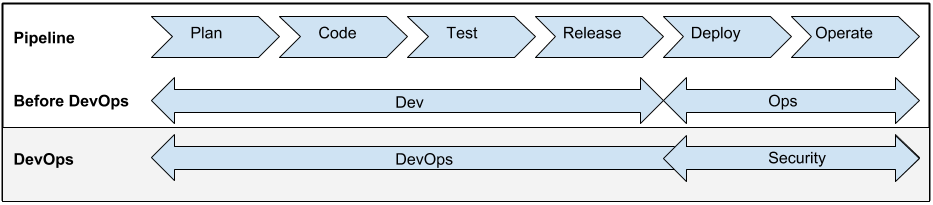
    Before we dive into what this means to you, we should make sure that we all understand what shift left really means.  For me looking at a standard flow of the development/deployment process is the best illustration of this. I think Andrew Storms used a good one in his article, so let’s repurpose it here:

    left 1

    Pay no attention for now to the before DevOps or DevOps rays for now.  Take a look at the top line which is the pipeline.  You can see the flow of an app from plan to code and all the way to operate.  The flow runs from left to right.  At its simplest shift left moves tasks further left.  Security, continuous testing, continuous integration, continuous delivery are all shifted left.

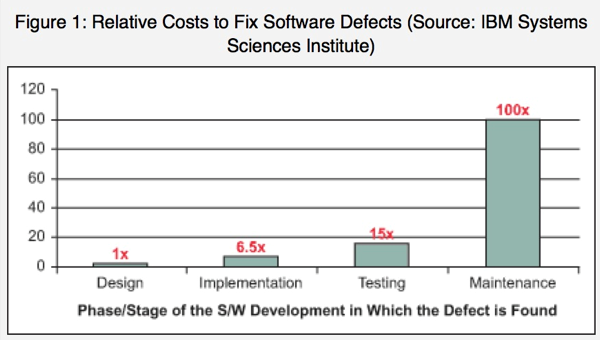
    In doing so potential issues are addressed earlier in the lifecycle. What is this a good thing?  A chart from Dibbie Edwards article gives us the obvious answer:

    left2

    As can be seen the earlier you can get to issues, the cheaper it is too fix them.  That alone is a reason to shift left.  But also concepts such as addressing security issues before it effects your customers is appealing. The same can be said for many other functions you can shift left.

    For me though the question is by shifting everything left, do we just wind up with a big pile at the very left?  How do we prioritize all of these left shifted functions?  You can only shift left so far before you come to the beginning of the time line. This is not the birth of the Universe where you had a big bang which defies the laws of physics.

    At some point can you shift too much left? This is a question I am going to pose to Sanjeev and Mustafa. I also pose it to you the reading audience.

    I recognize that the concept of shifting left is not so efficient that everything that can be shifted is in fact shifted left.  But as we get more efficient, more and more tasks are left shifted in the process. At what point do we reach the point of diminishing returns?

    How do you feel about this? Can we shift too much left? I am interested in some of the different views on this. I am a big proponent of shifting security left, but are there other priorities?

    Let us know your feedback.

  • In DevOps, On-Prem Is Dead

    In DevOps, On-Prem Is Dead

    What you need to know about SaaS management tools

    The SaaS vs. on-premise debate has spanned the years since new age consumption models for technology were born.

    The accepted reasons to adopt SaaS are no-brainers for DevOps organizations. SaaS lets you start up fast, is asset-free, and has a lower commitment subscription model. You expect time to production in hours or days, rather than the months or years that an on-premise software installation can take to fully deploy the solution. Here’s why SaaS IT Ops tools are a better choice for your DevOps implementations:

    Agility and Time to Market. It makes no sense to invest up-front in a solution that commits you to a technology when you’re moving at light speed. Long feature release cycles from traditional software vendors and the regular maintenance required slow down your DevOps teams. On-premise upgrades will likely require central IT support, not to mention the risk inherent in upgrading the software.

    Evergreen Platform. As you grow your environment and add new technologies, your management solution needs the requisite features and plugins to work. A SaaS platform continually updates the technology, behind the scenes at the vendor, so your engineer’s time isn’t wasted on managing the maintenance and upgrades.

    Microservices. With application workloads migrating to the cloud, monolithic app architectures are falling out of favor. Microservices allow you to build applications as suites of services where each unit of software can be independently upgraded. Enterprises can quickly adopt hybrid cloud architectures thanks to microservices, where some services live in a public cloud while others in owned data centers. SaaS tools offer an integrated approach to monitor dynamic architectures by tracking the performance of your application as a logical entity before and after each update.

    Infrastructure as Code. With Infrastructure as code, sysadmins use automation frameworks for standing up or turning off production environments. IT teams can orchestrate complex deployments without manual intervention in an error-free manner. SaaS tools help you manage automated infrastructure that’s written as code and monitor different production instances across hybrid clouds.

    Enterprise applications are clearly going the SaaS way. By 2018, IDC estimates that 28% of enterprise software will be SaaS based with on-premise software attaining negative growth rates. Embrace the age of agile operations by leveraging SaaS tools to improve build quality, increase release velocity, and manage complex infrastructures across your enterprise.

    About the Author / Varma Kunaparaju

    YaCNNVuUVarma Kunaparaju is CTO at Vistara and a seasoned technologist with over 20 years of experience leading engineering teams to deliver enterprise software. Reach him on twitter at: @varma1


  • Can your DevOps and APM Initiatives Increase Customer Loyalty?

    Can your DevOps and APM Initiatives Increase Customer Loyalty?

    I’ve reached a point where I can rate most services based on the quality of my digital interactions. So much so in fact, that any human interjection into my daily digital consciousness has become, well, almost quirky.

    It was with some surprise that after a prolonged period of digital engagement with my bank, I received a call from a customer service representative. After the initial shock, I was brought back to earth by a pretty standard question:

    Based on the service you’ve received recently, how likely is it that you would recommend our company to a friend or colleague? Please rate on a scale of 0 to 10.

    Now with a background in marketing, I understand what’s in play here. It’s an attempt to build what’s called a Net Promoter Score (NPS); a simple management tool to gauge the loyalty of consumers. If I respond with a 9 or 10 I’m considered enthusiastic – a promoter. On the other hand if I think the service sucks and score 0 to 6, then I’m a detractor. The metric is calculated by subtracting the percentage of detractors from the percentage of promoters. Yep, management theory doesn’t have to be complex.

    NPS as an indicator of business performance is important because most leaders understand they’re competing primarily on the basis of the customer experience. And, since this experience is predominantly based on a journey of linked digital engagement, maintaining the quality of these interactions is vital.

    So what has all this to do with Application Performance Management (APM) and DevOps? Well, lots – let me explain.

    If we think about digital engagement, there’ll be many points across a customer journey (from app on-boarding to service renewal) that’ll help determine the overall experience and whether or not customers become promoters. I call these “magic moments”; points of interaction where businesses have an opportunity to deliver an experience that transcends beyond the purely transactional into a more powerful emotional connection. It’s vital therefore that these moments become the focal points for our APM strategies – only this requires some new thinking. Here’s my take:

    Monitor the Magic – IT teams must identify all the key magic moments (especially those that have the highest correlation to customer loyalty) and implement automated performance collection and measurement. Some of these may form part of a linked value chain (e.g. an airline flight experience = seat selection + mobile boarding pass + baggage collection + loyalty rewards), or be services designed to drive a recurring revenue model (e.g. free shipping / discount options), or even be delivered by partners through API’s. Whatever the model, APM must be capable of providing a unified end-user view into every contextual, situational or transactional interaction – mobile app and web-based – because it’s here that loyalty is determined and promoters are formed.

    Make Metrics Matter – when a prospect navigates to your application (perhaps via some promotional web-advertising) that’s great, but it’s not yet magic – that is until the visit converts into a sale. It’s at these points that we should be connecting our “listening” strategy (via APM) to the customer and determining effectiveness in a business context. This can be tricky because traditional (but still important) metrics like MTTR are introspective, whereas what’s really required are external customer-centric indicators. To address this, DevOps practitioners should consider applying newer APM analytical methods and instrumentation in order to learn the relationships between service elements (e.g. web site sign-on / authentication time, response times) and customer experience – using the intelligence gained to drive improvements where they’re most effective – yep, you guessed it – at those “magic moments”.

    Share the “Profits” – an advanced experience-based APM strategy must also include working with groups who can profit from rich information insights. From a DevOps perspective, this will involve development leveraging the data as the operational feedback needed to steer both functional and non-functional improvements – for example, mobile app usage and behavior analytics are critical early indicators of functional usability. But given the businesses reliance on digital services, many groups beyond IT will also profit. For example, if it’s reliably determined (and presented) that application performance is a key driver of Net Promoter (or any other business metric), which in turn is linked to improved financial outcomes, then this could serve as the basis upon which to prioritize future investment.

    Instrument Culture – aligning with metrics like NPS is valuable because it helps shape collaborative, customer-centric behaviors. However, this requires tools that can embed these behaviors into everyday operational practices. Improving customer experience is a shared goal, so APM processes must facilitate the feedback of intelligence between Dev and Ops, while also meeting the needs of every function (Developers, Application admins, Level 1 and 2 support etc.) within each group – especially in context of the role each plays in improving customer experience.

    As companies increasingly engage customers via digital channels it’s a given that IT will be measured on how it increases customer loyalty. While business metrics sounding like NPS may at first seem foreign, they present us with a unique opportunity to demonstrate what DevOps and APM is really all about – winning more customers and getting them to stick with you.


  • Automation, Provisioning & Configuration Management (CHEF)

    Automation, Provisioning & Configuration Management (CHEF)

    Introduction

    Chef is an influential configuration management and automation platform that transmutes the complex infrastructure and helps you in describing your infrastructure with code, by bringing your servers and services to life. Since your infrastructure is controlled and managed with code, it can be automated, tested and reproduced with efficiency and ease.

    Chef automates the applications configuration, deployment and management throughout your network regardless of its size, even if you’re operating in the cloud, on-premises or on hybrid.

    Chef is constructed around easy concepts: achieving the desired state, centralized modeling of IT infrastructure and resources primitives that serve as the building blocks. Chef’s biggest asset is that it saves the time in setting up virtual servers and other tasks. Through a multi part series I will be covering best practices in Automation, Provisioning & Configuration Management with CHEF.

    Why Chef?

    Being a system administrator is alternately inspiring as well as tedious, on the other hand is the thought to bring the best to your organization goes hand-in-hand with the idea that you require help to keep it all running. It is exceptional that a single individual is familiar about each and every complex problem and its essential solutions. Same goes with the tools also. Chef provides you with a framework which helps in evading these worn-tools problems. It even improves infrastructure management that can help you to solve every complicated problem.

    There are numerous reasons to use Chef:

    1). Chef immensely decreases the amount of documentation you ought to write.

    2). Chef doesn’t change the scalability of the Bash.

    3). Chef comes up with terrific technical approaches.

    4). Chef is a tool that grows with you.

    5). Chef can help you in holding back and stop you from reinventing the wheel.

    What are the fundamental principles?

    The main principle of Chef is to make users know best about their environment, what should be done and how it should be maintained. Chef-client does not come up with any assumptions. Only the individuals i.e. you and your team members on the ground is capable of understanding the technical as well the human problems which includes audit trails, skill levels and other internal issues that are unique to your organization and what are the required solutions to solve these problem plus whether any single technical solution is feasible.

    Main components of Chef

    Chef environment is typically made up of three components:

    1. Chef Server
    2. Workstation
    3. Chef Nodes

    Chef Server:

    The Chef server is the brains of the operation which acts as a hub to store configuration data that is available to every node and also administer access rights. It preserves all the information regarding your infrastructure. All the client nodes are registered within the server.

    The Chef Server stores and holds all the cookbooks, recipes and metadata that illustrates each and every registered node which is being managed by the chef-client and the policies that are applied to nodes. Clients communicates with the server in order to get the correct configuration details from the server such as recipes, templates, file distributions and apply it to the nodes. This type of flexible and scalable approach distributes the configuration effort throughout the organization.

    Workstation:

    Workstation is the development machine from where users run all configuration related tasks which includes creation of cookbooks and recipes, updating chef-repo, interacting with the single Chef server and many more. Workstation is the place where user will spend most of their time with Chef and will do most of their work that includes:

    • Development of the cookbooks and the recipes
    • Retaining the chef-repo synchronization with version source control
    • Making the use of knife to upload items from the chef-repo to the Chef server
    • Configuring organizational policies i.e. defining roles as well as environments and ensuring that critical data is stored in data bags
    • Communicating with the nodes whenever needed, such as carrying out a bootstrap operation

    Chef Nodes:

    A node can be a physical, virtual or cloud machine that contain the chef-client which performs all the infrastructure automation. Nodes are the computers that we manage using chef and it act as server in our infrastructure.

    chef-fig1 Fig:1

    How Chef Works?

    As already mentioned above, Chef converts infrastructure into code and make your infrastructure easily versionable, testable and repeatable as the application code.

    Chef is totally dependent and certain about the reusable definitions named recipes to automate infrastructure tasks. Recipes make use of the building blocks called resources. These resources explain a certain pieces of infrastructure like a file, a template or a package to be installed. You can make use of these resources whenever required or even built up your own so as to manage and accomplish unique configurations and legacy systems. Together, Recipes are fully responsible for describing what your infrastructure comprises of and how each portion of your infrastructure should be deployed, configured and managed.

    The Chef server holds up all the recipes as well as other configuration data. Now the Chef client is installed on all the nodes in your network. As explained before these nodes can be a physical server, a virtual server or a container instance. The Chef client at regular intervals polls the Chef server for the most recent recipes and examines whether the nodes is in compliance with the policy defined by these recipes. If a situation arises where a node is outdated then the Chef client runs them on the node so as to bring it up to date.

    chef-fig2

    Fig 2

    Conclusion:

    Through Chef you will be able to:

    • Manage servers by writing recipes.
    • Integrate tightly with applications, databases and more.
    • Configure applications that require knowledge about your entire infrastructure
    • Create perfect clones of QA environments, pre-production environments, partner preview environments and more.

    Chef is evolving fast and taking your first steps with Chef can be a little bit daunting. Chef comes up with new concepts to learn and best practices to understand. Chef provides you help with the infrastructure management and solves complicated problems.

  • Dev and Ops Coming Together To Combat the Weakest Security Link – BYOD

    Dev and Ops Coming Together To Combat the Weakest Security Link – BYOD

    Traditionally, security threats have taken the form of intentional acts by remote attackers: somebody on the outside working covertly to get to the inside. This is the classic scenario that most people associate with IT security, and it’s what most network operators are best prepared for. But these classic threats are eroding rapidly in the era of ubiquitous mobile devices and users who’ve become accustomed to always-on network access. BYOD is the weakest security link today.

    The surge in mobile wireless devices has blurred the line between what is inside and outside the network. Mobile devices such as smartphones and tablets are legitimate, and increasingly indispensable, business tools. Immersed in social media and digital technology, many Millennials treat their mobile devices as extensions of themselves, making it very difficult to separate one from the other. The obvious cost of a policy that prevents users from bringing personal devices to work is impacting the recruitment of new staff, and sometimes depriving existing staff of the tools they need to stay competitive, but the risks are also substantial.

    The Technical User

    While many fear the untrained user, the worst threats may come from the technically literate user, such as a developer or engineer, who feels he or she simply cannot work without their mobile device and unfettered access to the network. Such a user may not take no for an answer when it comes to bringing in their mobile device, and may even go so far as to employ their own personal hotspot hardware or software to bridge the gap between the protected work network and their unauthorized devices.

    No ill will is intended by this act; the user simply thinks s/he knows better. S/he wants to be able to use the devices that make work life easier and knows how to set up an access point to do just that. They don’t realize or just ignore the fact that an access point outside the purview of IT security or ops poses a significant risk to the network as a whole. Without being able to verify the integrity of the hotspot or its configuration, ops can’t be sure if it’s being held to the same security standards as the rest of the network.

    While these technical users know how to bypass the system, they may not know how they are leaving their network open and vulnerable. A developer with access to sensitive information, perhaps even branches of source code, may be restricted by the security team from accessing certain portions of the Internet while on the developer network. A technically adept but perhaps not security-conscious developer could attempt to bypass these restrictions by setting up an access point of his or her own – though this may give him or her access, it also gives attackers access to his or her machine. Developers have sensitive information on their laptops that needs to be protected, and connecting to unsecure networks can put this IP at risk. A developer bridging the network using a 4G adapter or access point not only exposes the information on his or her laptop; it also creates a hole that could expose the entire network to infection. Being alerted to these access points is an important step in validating your security controls.

    Best Practices: Finding a Balance

    The most important steps for creating and implementing a security policy that works both from a security and an efficiency perspective are elaborated below: assess your developers’ needs, set reasonable controls, and validate those controls. Together, they represent a balanced approach to addressing the often conflicting needs of an organization.

    1. Assess Your Developers’ Needs 

    Preventing developers and technical users from connecting devices to the network, or placing overly restrictive limits on their devices, can inadvertently lead to more security issues than otherwise. With overly restrictive policies, users are more likely to take matters into their own hands and bypass security controls. The best course of action is to engage these users to determine what their work motivations are, and meet them as closely as the overall security and operation of the network will allow. Ideally make the users allies to ops, not adversaries. These developers are knowledge workers, often well compensated, with some degree of entitlement, and cultivating an environment of trust and cooperation is in the best interests of all involved.

    1. Set Robust – But Reasonable – Security Controls

    This may be stating the obvious, but the most important part of empowering your developers is to mutually set expectations. Properly established security controls are really just agreed-to expectations, laid out in a manner that allows developers to understand what is expected of them and how to appropriately bring up concerns or exceptions. These expectations should be both reasonable and attainable. The most important part of adopting a “bring your own device” (BYOD) policy is to adopt one that meets the needs of the developers while maintaining security and validation. An inappropriately onerous process will encourage users to bypass the process, leading back to an insecure environment with gaping holes in network security. There is a range of tools to consider that can support controls. For example deciding if managed device management (MDM) tools are to be used or not is a major consideration that will drive controls and network access.

    1. Validate Controls with Visibility

    Security controls are frequently talked about, but less often mentioned is the validation side of the process. You can establish as many controls as you feel necessary, but without visibility into the network, controls are more words than reality. While seeing access points is important to evaluating the risk at your offices, it is only half the battle. The most important thing is finding devices operating on the access point and understanding what access they have to the internal network. With a list of which devices have been attached to the access point in question, it’s a simple process to identify where an offending device is located, and who is responsible for its existence.

    Once you’ve found the rogue access point and its operator, it’s time to perform triage. Was the access point connected directly to the business network, or did it get Internet connectivity over the cellular network? If it was on the business network, what kind of access did it have? Was it behind a firewall, or did it expose critical network components such as servers to the outside?

    These types of questions will help steer the subsequent investigation and save valuable time. It may end up that the access point posed no direct threat to the business network itself; such as the case of a personal hotspot tied to a cellular modem. In that sort of best-case scenario, the network operations team may simply need to reinforce the rules and regulations of the network, and explain the importance of keeping the network isolated from the outside world.

    What Does a Rogue Access Point Make Vulnerable?

    While these rising risks have grown with the erosion of classic IT boundaries, your information is still both valuable and vulnerable. Data and Intellectual Property are two of an organization’s most valuable assets; without good security processes, quick development cycles are futile.

    About the Author/Paul Paget 

    Paul-Paget-web-300x253-180x180Paul Paget is the Chief Executive Officer of Pwnie Express, provider of end-to-end security assessment solutions. He brings more than 30 years of of leadership experience in technology companies and information security to the company. Follow Paul on Twitter: @pgp2