As a Lean Coach working in IT I often hear development teams refer proudly to their scrumboards as an example of Kanban. To which I say, ‘that’s a great start… but it’s really only just the start’.
Let’s start with what a scrumboard is, and does. A scrumboard is a visual display of work, showing the progression of user stories in development. As you see some stories moving through the phases of development, and others getting stuck, you huddle to figure out how to get them unstuck. Now you’re using your visual display for visual management, which is a great Lean solution.
Change management boards, like the one used in The Pheonix Project, are another good example of visual management. The physical display of changes, shown by release date and system, is a great way to get a handle on the amount of change and risk you’re throwing into live production. When you start moving them around to limit the risk, again, you’re using visual management.
The word ‘kanban’ roughly translates as ‘signboard’, and a scrumboard really is a good start. But it’s only half the story. Until you limit the number of stickies on your change management plan, or the number of story cards on your scrumboard, you’re really only half way to kanban nirvana.
True kanban requires you to limit the amount of work in progress and to establish the pull of work. In a manufacturing plant, a kanban card is attached to each unit in production. When a completed unit is, say, taken off the shelf by a customer, the card is sent back into the production line to signal that there is now an empty slot on that shelf which needs replenishing. Limiting the kanban cards sets a constraint around the amount of work in progress – and this limit should reflect the capacity of the process. In the same way, you can limit the number of story cards, boxes on your scrumboard or spaces in your change management plan. When a scrumteam complete a story that frees up a slot for them to pull the next story into their workload: the visual display should reflect this by showing each team’s capacity. In addition to visual management, you can create rules around work in progress, requiring each scrumteam to limit their intake so they have no more than, say, two workpackages in progress at a time.
This is all well and good, but what do you do when demand from the business requires a greater capacity? Historically you’d have thrown that extra demand into the mix, asking your teams to do more with the the same amount of resource, maybe pushing back a release date to accommodate the extra work.
Kanban requires you to create additional capacity in the system to allow for the additional demand either by:
rebalancing the load, for example switching some resources from a work package that is ahead of schedule
removing or deprioritizing other work and putting work on hold
increasing resources by bringing in new team members
All of these actions will generate some churn, so it’s going to be worth a tough conversation with your customer first. ‘Are you sure you want me to disrupt the current sprint, or the next release, to squeeze this in? How about we pick it up next week, when we’ll have some new capacity?’ By limiting your work in progress, you’ll be speeding up the flow of development into production, so you can make that ‘next week’ promise with increasing confidence.
So the next time you walk over to that scrumboard, why not take the next step, and limit the work in progress to truly establish kanban.
“DevOps” is the latest rage. Leading edge companies like Netflix, Etsy, and Intuit (the “Unicorns”) have transformed their I.T. Development and Operations organizations into a new culture known as DevOps: Development and Operations working collaboratively together to accelerate the pace of software and application delivery. But they didn’t implement DevOps. A DevOps transformation to their culture was the outcome of their implementation of continuous delivery of software. Continuous delivery is a process that applies automation and orchestration technologies to the application lifecycle. In this webinar you will learn how your organization can implement continuous delivery as a step toward your own DevOps transformation. With continuous delivery, you can accelerate application delivery which will allow I.T. to better meet the needs of the organization. With continuous delivery, I.T. becomes a business enabler.
Alan Shimel, Editor-in-Chief of devopsy.kinsta.cloud. An often-cited personality in the security and technology community and a sought-after speaker at industry and government events. Alan has helped build several successful technology companies by combining a strong business background with a deep knowledge of technology.
Panelists:
As CloudBees’ Sr. Director of Product Marketing, Dan Juengst leads the product marketing efforts for the CloudBees Continuous Delivery Platform powered by Jenkins. Dan brings 20+ years of high tech experience to CloudBees with expertise in grid computing, high performance computing, and application performance. Dan has worked as both customer and vendor at both startups and enterprises. Dan’s resume includes Red Hat, Sun Microsystems, SGI, Wily Technology, Terracotta, and Lockheed Martin where he started his career computing hypersonic reacting airflows around Mach 30 flight vehicles.
Some of you may be aware that we have published a full blown media kit including an editorial calendar for the rest of 2015. For the month of April our focus is Rugged DevOps. It started yesterday with a great post by David Geer, Rugged DevOps: From Idea to Automation to Impact. It will continue all month with stories around infosecurity and DevOps. At the end of the month we will pull these all together into a Rugged DevOps special edition available to all of our newsletter subscribers.
But that is not all we are doing with Rugged DevOps. We are also publishing an Ebook that will be available RSA Conference week, April 19th. The EBook written by our own Ericka Chickowski will take a deep dive on the intersection of security and DevOps. We will also be printing 1000 copies of the book which will be distributed at our various activities at RSA Conference. In case you are not already aware, here is what we have planned for RSA Conference week:
DevOps Connect: SecDevOps Edition– Monday, April 20th – 9am to 5pm, Moscone Center – Featuring keynotes by Gene Kim, Josh Corman, Jez Humble and over a dozen other top names in DevOps and Security, this events pre-registration is already filled up. However, seating is on a first come, first serve basis and open to all RSA badge holders. So come early or try later in the day if there are any open seats. If you are interested in DevOps and infosec, this promises to be a don’t miss event.
DevOps Wine-ing Event – The after party for the DevOps Connect conference, the DevOps Wine-ng event is a tradition started by Josh Corman and the Sonatype team. This year’s event is sponsored by Sonatype, Puppet Labs and devopsy.kinsta.cloud. In order to gain admission to the event you need an invite or pre-registration from one of the sponsors. devopsy.kinsta.cloud will be offering invites in the next week. Most of the speakers as well as DevOps community and InfoSec community members will mingle in a relaxed atmosphere.
In addition to these DevOps related events, I of course will be helping to produce (along with a great team of Jennifer Leggio, Mike Rothman and Rich Mogull) the 9th annual Security Bloggers Meet up and Blogger Awards. This event is open only to those who write or podcast about infosecurity. It is usually a highlight of RSA Conference week. If you do write about security and have not been invited, write me at editor@devops.com with where you write and we can try to get you an invite.
Beyond that I along with my good friend Jody Brazil, CEO of Firemon will be hosting a peer-to-peer session on Thursday at 10:20am, Continuous Network Compliance: Finding Flaws and Betting Futures. It should be a good discussion looking at the idea of Continuous Security. P2P sessions only sit 25 to 35 people so come early to make sure you have a seat for that one.
On top of all of this I will be live blogging RSA Conference here on devopsy.kinsta.cloud, so stay tuned for that.
BTW, last month’s topic was “Containerization”. We are in the process of gathering up all of the great articles we had around this topic last month. We will package this content into a PDF document that again will be available to our newsletter subscribers. You can subscribe to our newsletter in the right hand sidebar of this page.
The tally of smartphone usage worldwide is mind-numbing: Even as far back as 2012, more people on earth had access to a mobile phone than had access to a toothbrush. Even more mind-numbing must be the stats on the untold millions of those mobile device users in various states of rage at any moment while waiting for their content to finish downloading. Mary Meeker’s 2014 “State of the Web” report states 30% of all mobile phones are smartphones. The usage of the smartphones is growing in a compounded manner.
I’m confident that my own frustration resonates with those millions of users. And it’s only getting worse. I think about the plight of the next N billion mobile users who will depend on constantly overburdened mobile networks in all parts of the world.
I was fortunate in being able to turn that frustration into a mission, when I founded PacketZoom. I had developed the blueprint of an idea for a remedy while working at Google, and then spent two years to productize and trial the technology in the heavy R&D phase of PacketZoom starting in 2013. But we weren’t content to tweak the existing protocols to save a few milliseconds here and there – and neither were countless app developers around the world, who faced the same conundrum. Why not? Stats have proven that mobile downloads taking more than six seconds cause about half the users to defect from the app they are using – unaware that the network, and not the app, is to blame. And it’s well past time for incremental approaches to fixing the problem. [citation: https://blog.kissmetrics.com/loading-time/]
The turning point for me was my first-hand experience on a trip to India while trying to load the first screen of an application while on a moving subway. Only an exercise in extreme restraint prevented me from bludgeoning my phone – which, of course, was not the culprit. Clearly, the problem was unsolvable using the prevailing technology that had been jury-rigged over 40 years to serve every new use-case that came along. Maybe that time-honored, but worn-out technology had to be replaced!
The last few years we have seen an explosion of apps on mobile phones. The next few years promise to bring an order of magnitude larger number of devices in response to the “Internet of Things” phenomenon. If we continue using the same old protocols, the interminable waits for mobile content will become intolerable.
Time to Lose Four Decades of Losses
So what exactly is the problem with the legacy protocols? After all, they’ve been made to work for today’s use cases. Well, allow me to explain.
Let’s start with IP (Internet Protocol). IP addresses were intended to be solidly and reliably attached to a computer forever, in the same way a street address is solidly and reliably attached to each house. (And note that a smart phone is just another computer.) A packet sent to that address could go to only one place (the one house – or, in our analogy, the one computer). But now, in the year 2015, the IP address is but an ephemeral property of a mobile device. It’s as if everyone lives in a van now and your address depends on where you parked your van at the end of any day.
Today, the IP address of your mobile device might change while you walk from your office to the parking lot. As you move from your office WiFi to the LTE connection outside your office, and as you move through myriad disconnections and reconnections while travelling in personal or public transportation, you can be “taking” and “releasing” dozens of IP addresses during the course of your commute.
The upshot is, that when an app on your mobile device starts communicating with the cloud, every change of IP address causes the app to initiate the communication from the beginning – a so-called “cold start”), rather than from the point where the previous communication paused at the point of disconnection. That’s one very big problem, resulting in time lost through duplication of transmissions.
What’s more, each new reconnection to the network requires establishing a new TCP session, a session that utilizes the 40-year-old technology, TCP (or Transport Communications Protocol). But guess what? Each new TCP session starts cold and, according to the TCP algorithm, has to gently ramp up to full speed every single time. And the lost time due to those delays adds to the lost time created by continuous disconnections and reconnections that occur in all mobile environments.
TCP has been honed over the years to work “tolerably well” for general use over all possible kinds of networks. It was originally designed to connect huge computers, administered by professional sysadmins, and housed in meticulously maintained facilities with triple redundant power. It does the job that its least-common-denominator design is expected to do – that is, to get a stream of data from one computer to another (i.e., from one IP address to another) reliably.
Those are the guarantees of the TCP protocol. What it doesn’t guarantee however, and doesn’t even address, is speed. It uses the most conservative method possible to get your data packets from one place to another. As a result, user-level protocols (e.g., HTTP) get cluttered with hacks atop other hacks to try to work around TCP’s lack of concern for speed.
Consign TCP and HTTP to Their Rightful Place
Now imagine this conversation from sometime in the early 2000’s among boffin from companies making web browsers:
Boffin A: “TCP doesn’t allow us to use the full available bandwidth of the available channel (DSL, dial-up, or those new-fangled cable modems.”
Boffin B: “No problem! How about we open six TCP connections at the same time. Let them fight it out among each other.”
Boffin A: “Done.”
Boffin B: “We’re geniuses!”
Well, in fact, web browsers have been built around this approach ever since that ill-fated day. But the web runs on Hypertext Transport Protocol, aka HTTP, version 1.1 for the last decade and a half! HTTP, as an application-level protocol, knows nothing about speed either. And so browser vendors, over the years, have come up with a mish-mash of folklore-based tips, tricks and hacks to somehow keep this train running.
Fast-forward a bit, and a lot of these tips and hacks have been refined and codified into the latest revision of HTTP, version 2. The old protocol, the hacks to keep it alive, and now the new version of the protocol, are focused on making the web faster. The problem? Accessing the web accounts for only 14% of the uses of smartphones.
And therein lies the disconnect. For almost two decades the web was the dominant application platform. Gigantic hardware and software platforms (and companies) have been built to service the web. (Note how the biggest cloud platform in the world is called “Amazon Web Services”). TCP/HTTP sufficed for web access, but the constraints of what can be done in a web browser have held us back from evolving to the protocols designed for the predominant application of the Internet today: native mobile apps.
Quite simply, for any application running in a web browser, there’s nothing that you, the app developer, can do to fix the underlying network transport. But a new dawn is upon us. The dominant platform for applications is not the web anymore. It’s the native apps on mobile devices. And just like that, we’re free of the shackles of HTTP and even TCP. We, as app developers and our supporters, are free to invent protocols that make sense for this spottily connected, packet-lossy, high-latency mobile world. Evolution, by nature, works at a glacial pace. It’s now time for invention — and maybe even a few quantum leaps. Packetzoom has taken the first step towards fixing these problems by designing a more modern protocol purely for mobile use case. Learn more about it at https://packetzoom.com/learn.html. Here is a short video showing the PacketZoom difference:
About the Author/Chetan Ahuja
Chetan Ahuja is the Founder/CEO/CTO of mobile networking startup Packetzoom Inc. Prior to starting Packetzoom in 2013, Chetan worked on software and networking performance in companies such as Google, Admob and Riverbed where he gained a deep appreciation of the key role of network speed on application performance and thus on user happiness. He holds a Masters degree in computer science from Michigan State University and a Masters degree in computational chemistry from Indian Institute of Technology, Mumbai. He likes to spend the entirety of his free time watching old episodes of Monty Python and Start Trek (TNG) with his family or playing ping-pong with co-workers.
The headline made her yelp for joy. A year into the future of D-Chip, on a crisp August morning, Phoebe opened the newspaper and swiped to the technology section on her iPad. What she saw was riveting: D-Chip reborn as a star in wearable computing.
She immediately thought of the article Marc Andreessen wrote on how software transformed the enterprise. It’s true of our company’s story, she mused. The credit for making the headline a reality was due to the stressful events of the last months. Who said stress couldn’t be a game changer? As she picked absently on a plate of fruit and relished the article for the second time, she recalled the events of the past year.
Flashback a year ago at D-Chip
Remember how Rachel pitched her enthusiastic idea to Chandler? She wanted to engage six engineers in six months to build an in-house solution. A solution that would integrate D-Chip and Enogo’s systems by letting them deploy in both OpenStack and AWS and manage wearable chip code from a single deployment platform.
Chandler agreed in theory with the need for a single management platform but didn’t see the sense of doing it in-house. Why side-track from your business goals and spend months building a solution yourself when there are specialists solving this exact problem for many companies facing the same issues? After much debate, they came to a consensus. They decided to evaluate solutions from the best-of-breed products out there and transform their software development lifecycle to reflect the best agile practices. Thus was born the iTransform project.
The iTransform project
The name itself was a reminder that transforming was as much a matter of people internalizing and accepting a new way of doing things as much as it was about aligning and unifying D-Chip and Enogo systems. The first order of priority was to understand the pain-points that assailed the company. After a lot of meetings and detailed analysis, they identified key use cases from internal stakeholders, namely the engineering and IT operation teams:
Engineering personas, developers, QA, architects, all said the same things. They didn’t have access to the latest tech because it took weeks or months for approval processes to travel up the chain. Then they waited on builds and environments from IT operation teams. Most of the time, the environments in the private datacenter OpenStack cloud didn’t work properly, and deployments never succeeded the first time. It’s no wonder they took weeks or months to release anything decent.
Self-service and continuous delivery were, therefore, the most important criteria for developers, QA, and architects. Without waiting for IT admins or operations teams, they wanted to spin up build environments in test, staging, even production on their choice of pre-configured infrastructure. They wanted to consume in an on-demand fashion the latest technologies on multiple clouds. Today they were using AWS cloud and OpenStack, but tomorrow they wanted any cloud that matched their workload configuration needs best.
IT operations and system admins brought up their set of challenges. Their primary goal was to configure environments for repeatability; safeguard builds from failures and structure stable workflows. Not an easy job come to think of it. On top of this demands from the engineering teams dictated that they learn and implement new technologies in a very short time. Technologies ranged from configuration management tools, cloud platforms, storage, networking, load balancing services, monitoring services, and more. Besides when engineers wrote configuration templates as Enogo did for AWS, it was hard to figure out who owned the deployment stack. In the case of problems, it resulted in pointless blame games. So they desired a clear level of separation between code, deployment automation, and infrastructure. Technologies and cloud platforms could come and go, but IT operations remained responsible to maintain smooth workflows, stable builds, and error-free deployments.
A service catalog also met the needs of the IT operations teams. They wanted to build and manage specific platforms, runtimes and version configuration changes. Collaboration was a key factor. Many IT operations team members and engineers were experts in some but not all technologies and tools. But together in a collaborative platform, experts could contribute at their skill level and share knowledge with others. Automating configuration changes in bulk saved a ton of time. Therefore, API support for automation was high on their wish-list.
The IT managers were important though indirect stakeholders. They often approved and handled audits, compliance, and budgetary aspects. Policies and cost management were paramount to them. IT managers needed control and oversight to implement compliant deployment policies that gave the right level of access to the right set of infrastructure on pre-approved cloud providers. They needed to set and monitor quotas and track IT spend on cloud deployments against approved budget.
Transformed enterprise
After three months of evaluating proof-of-concept solutions with vendors, they zeroed in on a solution that met all of their uses cases and helped set up their current builds. Because of this, the teams were able to ship code ten times faster. It was only a matter of time before D-Chip stood out as a market leader. It was clear to the company executives what was driving this transformation.
They retired the semiconductor business and switched their business focus entirely to SDK builds of software for wearable computing. The software services for wearable chips was now way more valuable than any piece of hardware. Their customers in wearable computing now consumed D-Chip technology as a service in the cloud. A faster and efficient software development lifecycle enabled them to carve a new market niche and become the de facto leader.
The transforming story of D-Chip is a reminder for us all. When there are problems in software development, by aligning goals and helping people in different roles work together and participate in the development lifecycle, you increase the pace of innovation dramatically. It can be so powerful that it can transform the company’s core products or services.
Disruptive change doesn’t happen one step at a time. It happens with mavericks and innovators like Rachel and Chandler leading radical changes in a focused group effort. You want innovation to transform your business? Get a dedicated group of mavericks together and make it happen.
Just like mankind advanced their understanding through each cycle of civilization from the stone age up to the Renaissance and the Industrial Revolution, the future is heralded by the IT age of our times.
Automated unit, integration and acceptance tests are essential quality controls in running a reliable continuous integration or continuous delivery pipeline. Too often, security tests are left out of this process because of the erroneous belief that security testing is solely the domain of leather-jacket-wearing security experts.
Security testing does not need special treatment
We’ve made great strides automating many repetitive quality testing tasks and we can use the same approach to automating security tests. There will always be a need for intelligent human testing both for security and quality, but that doesn’t mean that all security testing must be manually driven. A large proportion of security tests are essentially checks that known weaknesses have not been introduced and these lend themselves superbly to automation. In fact, using a human to perform these types of checks is a terrible waste of resources.
From an automation point of view, security tests can be categorised as follows:
Functional Security Tests.
These are essentially the same as automated acceptance tests, but targeted at verifying that security features such as
authentication and logout, work as expected. They can mostly be automated using existing acceptance testing browser automation tools like Selenium/WebDriver.
Specific non-functional tests against known weaknesses.
Includes testing known weaknesses and mis-configurations such as lack of the HttpOnly flag on session cookies, or use of known weak SSL suites and ciphers. These are particularly well suited for automation because the weaknesses are known up front (if not by the development team, then by the security team). What’s more is that these tests lend themselves to a TDD approach in that they can serve as the security specification before building the application and environment.
Some work has already been done in extracting these types of tests into security test automation frameworks, see: BDD-Security (I’m the author), Mittn by F-Secure and Gauntlt.
Because these test non-functional aspects of the application, they need access to the HTTP layer which browser automation tools do not provide. So testing these requires a hybrid approach: Browser automation together with a proxy server to inspect and inject requests. My preferred combination here is WebDriver with OWASP ZAP.
Security scanning of the application and infrastructure.
Even manually driven penetration tests usually kick off with an automated scan using vulnerability scanning tools like Nessus, Burp and OWASP ZAP. It’s worthwhile understanding the difference between these tools and how they’re used. Nessus if primarily an infrastructure scanner in that it’ll test an IP address and all exposed ports for known weaknesses. It also includes a “web” scanning component that will test HTTP services for similar known weaknesses, but the scanning at the web tier is extremely superficial. For example, Nessus would not be able to scan any content or functionality behind the login form, nor navigate through a web wizard. Burp Intruder (Commercial) and OWASP ZAP (Open Source) are focussed on the web tier and are true application scanners in that they inspect and test at the HTTP layer by injecting attack data into parameters and evaluating the application’s response. They can provide in-depth security scanning if they’re used correctly. But if they’re simply used to spider the application and run an automated test then there’s a good chance that they won’t find or test all the available content.
To successfully automate application scanning, one should ensure that all of the content to be scanned is navigated and populated in the scanning tool, before starting to spider and scan the application. If you already have acceptance tests that drive a browser, then these can be re-used to populate the Burp or ZAP content before kicking off a scan.
Security testing application logic.
Automated tools can only go so far in detecting security flaws. Toidentify flaws in the logic of the application requires a human brain (at time of writing). From an automated scanner’s point of view an online auction site and an online bank are the same type of application, i.e. a series of HTTP requests. But from a human attacker’s point of view, they are vastly different beasts offering very different functions. A human security tester might try tests such as:
Can I manipulate the HTTP Request to bid on an item that has already ended?
Can I manipulate the HTTP Request to bid with a high amount, and then modify that amount to a lower amount just before the auction ends?
Can I transfer funds to someone else’s account using a negative number as the value?
These require ingenuity and experience to find, but once the attack is defined they too can be recorded as automated tests and become a part of the security regression tests.
Walk before running
If you’re just embarking on the journey to automate security tests, the above steps may seem daunting. But it’s not necessary to implement all of them to reap the benefits of automated security testing. Points 2 and 3 probably represent the greatest value in terms of time invested vs. security value extracted since they help identify a lot of common security flaws that slip through the cracks in a normal development process.
Any testing framework can be used to orchestrate and run these tests but in the true spirit of SecDevOps, it would be good to choose one that the development, operational and security teams are comfortable using- and that easily integrates with your CI/CD server. I’m partial to the BDD frameworks because their use of a natural language to define the testing steps means that they’re instantly understandable by a wide audience and makes them very attractive for use as security-tests-as-specifications. But some teams that are well versed in programming language X may find this additional, natural language layer, superfluous.
Point 3 above requires an additional step if we want to integrate those tests into a CI/CD environment. The other tests all have clearly defined passing and failing criteria, but running an automated scanning tool typically results in a number of false positive results: security issues reported by the tool which aren’t actually risks. Manual security tests that use automated tools include a process of investigating and removing these false positives. Automated tests would have to do the same thing and also specify a success criteria. This can be done by wrapping the scanning operation in a test and specifying the known false positives given a particular scanning tool and target.
For example, the BDD-Security framework performs an automated scan for SQL injection vulnerabilities using the following test:
and the additional text file: tables/false_positives.table to define the known false positives to ignore:
The final step in the test defines the success criteria and would need to be selected based on the security requirements of the application and the scanning tool used.
When to run the tests
Since they’re automated, the cost of running the tests is very low, so naturally we’d want to fail fast and run them as early as possible. But security issues are typically found at the component level and are difficult to test at the unit/class level. So testing at the application tier should be done on a running application. In other words, at the same time as automated acceptance tests.
Testing the security of the infrastructure should be performed on an as-near-to-live as possible environment. This will typically be a pre-production environment. And of course, since running the tests doesn’t cost anything, there’s a good argument for performing the same tests in production as well- continuously.
Blocking tests or in parallel?
As a security practitioner, I would love to see security tests as part of the CD process and blocking delivery if tests fail. But in reality this may not be practical for all teams; and it’s ultimately a cultural question of how deeply security is integrated into the dev and ops teams.
For those who’ve not achieved SecDevOps Nirvana, the tests can be run in parallel to the build with supervision by the security team. It’s then the security team’s responsibility to manually block delivery if test failures indicate the presence of unacceptable risk.
CI Server Integration
How well the security tests integrate with the CI server depends on the testing framework and CI choice. Java, Python and Ruby testing frameworks are likely to be supported by all the major CI servers. Using Jenkins and JBehave, which produces both JUnit and HTML reports, the tests output would be:
Container Summit (https://www.joyent.com/containersummit) is a half-day technology conference in NYC on April 8th, focused on the future of containers in production. The event features container and microservices experts from Gartner, Walmart, Lucera, and Shopify as well as container ecosystem players like Docker, Tutum, InfoSiftr and Joyent. The goal of the event is to share best practices and user stories in an interactive forum.
The event ends with a cocktail hour at the venue, the W Hotel in midtown, which is a great opportunity to network with members of the broader technical community. I am planning to be there and have extended the invitation to the members of DevOps and Automation meetup group in NJ. Please join me and fellow DevOps enthusiasts at this event.
Today’s organizations are achieving many benefits from using virtual computing resources, including increased flexibility, scalability, and accessibility. The adoption of the cloud as an addition to legacy systems has changed the way many companies use IT resources, allowing them to scale quickly and efficiently to meet fast-changing business needs. These hybrid solutions, where companies retain some on-premise functions while moving much of their data and processes to the cloud, are more common than ever. Along with the benefits of using the cloud, however, come significant challenges for the IT organization in terms of managing and monitoring systems.
When pairing legacy infrastructures with cloud computing environments, data center operators and IT organizations run into difficulties when the hardware-based environment (employing older technologies) takes a “bottom up” approach to policies and the cloud environment takes a “top down,” application-centric approach. In this scenario, delivery of services can be interrupted, quality of service can suffer, and utilization rates can drop significantly.
Another challenge comes into play when the same management principles are applied to both physical hardware and virtual machines (VMs), resulting in inefficient sprawl. The phenomenon of “virtual machine sprawl” is a costly but hidden problem; the actual limits of VMs can’t readily be seen, unlike an on-premise site that obviously runs out of physical space. When idle and unused VM sprawl occurs, storage and network resource consumption can easily grow to an excessive level well before it is noticed, at a time when costs are unfortunately too late to rein in.
While virtualization can help shrink costs by the increased density of servers that it provides, a virtual environment can often be pricey too. Cloud resources are indeed finite, and if not managed properly, they can require unexpected increased spending. Users often forget that if they don’t “turn off” or spin down the virtual machine after they are done using it, the machine is still running and resources are needlessly being consumed.
Moving into the cloud environment requires a revised cloud infrastructure plan, one that puts smart management of IT resources squarely at the center of the business strategy. How can you keep business processes moving smoothly, reacting efficiently, and evolving cost effectively in a hybrid cloud environment? Here are three tips:
Limit access. Limit the number of people that have access to and the ability to create VMs to reduce the risk of Shadow IT. This simple step channels formal requests regarding VMs to select people with approval powers. With this procedure in place, IT staff must carefully consider if the request is truly needed, rather than hastily completing it with just a few clicks.
Allocate wisely. Allocate a designated amount of virtual resources to different departments using resource pools. VM creation is better controlled if you actively limit the resources available per host.
Monitor usage. It is vital to closely monitor VM lifecycles to spin usage up and down quickly, which saves money and better utilizes computing resources.
Granted, the manual management of computing resources to accomplish the above tips takes a considerable amount of time. But today there are a variety of sophisticated solutions, such as workload automation, that help create guidelines for both virtual and physical machines. Workload automation allows organizations to take an architectural approach to cloud resource management by building a comprehensive framework that provides greater governance of and control over all of an organization’s virtual and cloud assets. As a result, organizations can better meet SLAs, reduce costs associated with manual management, and greatly increase IT agility.
About the Author/Jim Manias
Jim Manias is Vice President at Advanced Systems Concepts, Inc. and is responsible for the overall market strategy and planning for a range of products including ActiveBatch® Workload Automation and Job Scheduling. Jim has been with Advanced Systems Concepts since 1991 and has held multiple senior management positions in the enterprise software and hardware market. Jim can be reached at JManias@advsyscon.com.
There was much excitement in the air when the announcement that Docker had acquired SocketPlane. Not the least of which was emanating from my corner of the world, where DevOps for network (the whole network) is something you’ve noticed I pretty much live and breathe.
The announcement was couched as an SDN (Software-Defined Networking) play by containerization-leading Docker. Which might be confusing at first because, well, Docker (and to be more general, containers) are generally associated with DevOps, not SDN.
Ah, but therein lies the rub, doesn’t it? While the original precepts of SDN were most definitely not DevOpsy in nature, it (like every other trendy term in tech) has evolved to focus as much (if not more) on what are certainly DevOps-like principles and goals than on technical specifications and standards.
Consider, for example, this recent Avaya sponsored, Dynamic Markets report (gated) on “SDN Expectations.”
The first data point to examine is the ranking of “problems” experienced by respondents. The number one issue (38%) was downtime caused by human error. The second (tying with a network-failover issue at 37%) was complexity of configuring services and applications across the network.
If these aren’t typically problems that are said to be resolved by DevOps – particularly with attention paid to collaboration and automation – I’ll eat my hat. And yes, I often wear hats, it’s a quirk I have.
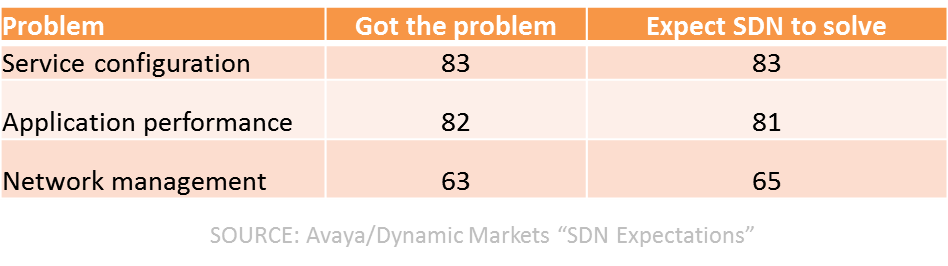
And just as interesting was this table illustrating not just problem areas, but how many respondents had the problem and how many expected SDN to solve them:
If you ignore the network management tuple, the top two problems are definitely often associated with DevOps as issues that can be resolved with collaboration and automation and some measurement thrown in to boot.
SDN has evolved, at this point, to focusing more on network automation than it does on automated networks. The difference is actually profound as it relates to DevOps, as the former is really about management, about configuration and provisioning and automation of processes designed to extend CD across the entire application deployment lifecycle into the production environment. It’s about codifying and encapsulating configurations in templates and centralizing state of the network in order to engender better agility in both moving forward and falling back when things go awry.
SDN today really is (or should be) a subset of DevOps, focusing on network infrastructure operations rather than app infrastructure operations. But the same principles and goals are very much aligned between DevOps and SDN, between the network and the application infrastructure. That’s a critical convergence starting to appear that’s necessary, as when you dig into IT and its problems delivering apps on time these days, it’s mostly the network that’s still in the way.
The network is identified often as a key IT pain point and usually the pain is related to the provisioning of services and applications across the network. High costs of networking is also cited, and that is largely due to the complexity of the network and the amount of operational sweat and blood that goes into manually provisioning, configuring and testing the various pieces of network infrastructure required to deploy the services business needs to deliver applications.
SDN may continue to be referred to as SDN, if only to emphasis its focus on network infrastructure, but the reality is that it’s DevOps. DevOps for Networks.
Which brings us right back to why a DevOps-related, containerization company like Docker would swallow up an “SDN”-focused start-up like SocketPlane.
Because what IT expects from SDN is really DevOps. And if DevOps is ultimately about culturally change and breaking down silos, the folks who focus on the network can’t be (and shouldn’t be) isolated from the folks managing the application infrastructure.
Docker’s move brings software-defined networks together with software-defined operations under (what should be) an IT encompassing concept: DevOps.
Containers are here. And it doesn’t mater whether or not containers are a transitional technology (they are, as our JP Morgenthal covered in Containers are designed for an antiquate application architecture) until all applications are designed for cloud and web-scale, containers will be part of the cloud and virtualization scene. Right now, containers are white hot. And as you’ve seen here in the past month, containerization was an editorial focus for us throughout March.
To give you an idea of how popular containers are right now, consider…


 As
As