Category: Blogs

  • How ADLM Gobbles Up DevOps

    How ADLM Gobbles Up DevOps

    The Next Evolution of Software Delivery Automation

    In the 1980’s and 90’s, the business software landscape was dominated by a diverse list of cutting-edge companies such as Best Software, i2, Brock Control Systems, Mapics, Ross Systems, Infinium, FBO Systems, Manugistics and MSA (of course I could go on and on). Now long gone, these and hundreds more really great companies have been gobbled up or rendered obsolete by the rising class of ERP giants. In this article I’ll explain why history will repeat itself leading to the extinction of most DevOps tools as leading ADLM platforms continue to assert their dominance across the diverse software development and delivery automation ecosystem.

    History Informs Our Future and The Evolution of ERP

    You already know that for the past twenty years, most companies have leveraged some form of ERP system to manage virtually every core business processes. One benefit of this tightly integrated solution is a powerful inter-functional data flow that enables corporate agility and provides the highest level of visibility. This super-integrated architectural model has become the standard adopted by virtually every enterprise around the globe. What you may not know is today’s “ERP model” is the result of four distinct evolutionary generations that I believe help predict the next major evolution of automated software delivery.

    Phase 1 – Automation
    Enterprise Information Systems (EIS) – In the 1960’s, early automation systems were developed to support important individual business functions such as general ledger, inventory management, billing, payroll, etc. These systems were architected completely independently of each other and added little value to the enterprise beyond their narrow scope.

    Phase 2 – Core Data Model
    Manufacturing Resource Planning (MRP) – Then in the 1970’s, the idea of a master production schedule was devised so that a few of these isolated systems could gain greater visibility into future inventory and product requirements of the organization. The big idea behind the master production schedule was the creation of an open data model that could be leveraged by other systems impacted by the manufacturing production schedule.

    Phase 3 – Expansion
    Manufacturing Resource Planning II (MRP II) – In the 1980’s, software vendors began to build and sell off-the-shelf packages that promised “best of breed” process design. These solutions provided tightly integrated versions of the key manufacturing processes required to produce products.

    Phase 4 – Business Process Domination
    Enterprise Resource Planning (ERP) – Finally, in the 1990’s, business software vendors expanded well beyond the manufacturing scope by creating highly-integrated solutions that now cover just about every standard business function imaginable. These systems leverage a unified data model to dramatically improve visibility, consistency, accuracy and planning capabilities enterprise-wide.

    What Does ERP Have To Do With Automated Software Delivery?

    The evolution of ERP has taught us how natural pressures forced the creation of a unified and comprehensive “business data model” spanning the entire enterprise. Those software vendors with enough influence to dictate that data model were the ultimate winners in the ERP space.

    In the very first generation of ERP (EIS), software was leveraged to deliver a high degree of automation to many business processes that were previously manual. Over time, it became clear that these newly automated processes were interconnected and the evolution towards a tightly integrated and unified data model was underway. The business objective that fueled each successive generation outlined above was the need to design more efficient business processes that increased organizational visibility and agility.

    As Marc Andreessen famously said in 2011, “…more and more major businesses and industries are being run on software and delivered as online services—from movies to agriculture to national defense.” (Why Software Is Eating The World). That statement resonates even stronger four years later. Today, virtually every corporate organization is seeing the familiar pressure to deliver software more efficiently and reliably. If history is indeed our guide, any highly fragmented and/or isolated process required to deliver incremental software change will face mounting pressure to be merged into an integrated end-to-end enterprise-grade platform that can deliver improved cross-functional visibility with even greater efficiency.

    Why Application Delivery Lifecycle Management Will Win

    In my view, there are really only two broad solution categories in the realm of automated software design and delivery – Application Development Lifecycle Management (ADLM) and the catch-all term DevOps (which I’ve hijacked here to describe any other type of process automation that assists the software delivery process).

    DevOps tools are often narrow point solutions that have sprouted from open source projects, in-house development or commercial vendors. Organizations rely heavily upon a diverse collection of these DevOps tools to help document, validate and automate a steady flow of software change along its path to end-users.

    Here’s the problem DevOps tools are beginning to face: Like the EIS systems of the 60’s, fragmented DevOps tools have little or no visibility into the overall end-to-end process; however, they do generate lots of important data that is often locked away and isolated. This isolation creates a clear barrier to efficiency, visibility and agility across the software delivery process. Because of the limited function each individual DevOps tool performs, none have the gravitational pull required to define the larger data model. As comprehensive enterprise software delivery platforms emerge elsewhere, standard DevOps tools will face ever-increasing pressure to fold inside them.

    Currently, Application Development Lifecycle Management solutions provide a platform to manage development projects, team resources and all manner of development activities. ADLM platforms also contain the “master production schedule” for every development initiative – past, present and future. The data contained within ADLM is now at the core of a quickly emerging software delivery data model and leading ADLM vendors are expanding their footprint pwell beyond traditional use cases. When it comes to ownership of this software delivery data model, I see no other solution category across the entire ecosystem with enough enterprise clout to pose a serious challenge to leading ADLM vendors.

    Unified Software Delivery Platforms Are Already Emerging

    Each of the five current ADLM leaders (according to Gartner’s most recent Magic Quadrant) are now racing to bring to market an enterprise software delivery platform that integrates many key DevOps capabilities.

    Here’s my two cents on each…

    The Giants in the space – IBM and Microsoft both have plenty of muscle and IP today. Clearly both are moving down the path toward a comprehensive software delivery platform. IBM acquired DevOps vender urban{code} several years ago and is hard at work building their developerWorks platform. Seemingly everyday, Microsoft is adding some kind of DevOps capability into its Visual Studio product suite. Still, I don’t see either vendor gaining much traction outside of their traditional (albeit very large) customer base. Perhaps more importantly, neither seem to have bonafide credentials within the super-influential agile development community and I believe this kind of street-cred (at least for now) is a must-have to dominate this space.

    Atlassian does enjoy wide support among the agile community and no doubt has the broadest adoption footprint of any of the current ADLM leaders. Atlassian is in a strong position to mount a serious threat. However, Atlassian’s core product (JIRA), is widely believed to lack heavy-weight depth in the ADLM feature spectrum and it is often implemented as a departmental or “team tool”. They’ll have to develop deeper strategic planning and multi-team project capabilities to beat the rivals.

    This May, software giant Computer Associates announced a definitive agreement to purchase ADLM heavyweight Rally and its agile development platform. In its announcement, CA said it intends to leverage Rally’s capabilities to “complement and expand CA’s strengths in the areas of DevOps and cloud management”. With the crucial addition of Rally, CA is now in a strong position to assemble its diverse capabilities into a single unified and enterprise-caliber software delivery platform. Now… can they seamlessly integrate all of the pieces-parts into a cohesive solution with a unified data model? If so, how long will it take?

    Finally, I believe VersionOne may have a slight edge over the other ADLM vendors in the race toward a unified software delivery platform. I may be a bit biased because of my direct involvement in a joint project currently underway – none the less, here are four reasons why they will absolutely be a dominant force to recon with:

    Vision: Robert Holler, VersionOne CEO, is clearly buying into the “enterprise software delivery platform” vision. He and his team have a well thought out strategy and they are actively executing against that strategy.
    DevOps Automation: VersionOne has partnered with ClearCode Labs and both teams have been hard at work integrating ClearCode’s Continuous Delivery Automation framework into the VersionOne core product. This integration provides VersionOne the ability to orchestrate virtually any DevOps tool or platform and (just as importantly) incorporate all related data across VersionOne’s product suite to fee its quickly expanding data model.
    JIRA Integration: VersionOne has just announced a tight integration into the JIRA platform. This integration will give them the ability to fold fragmented JIRA installations across the enterprise into the unified VersionOne platform providing a more strategic and enterprise-grade solution.
    Availability: VersionOne’s automated delivery platform is available now and they are demonstrating their comprehensive solution to the eager agile community this week at the sold-out Agile2015 conference in Washington, DC.

    Summary
    The top 5 ADLM vendors are already well on their way toward developing enterprise-grade software delivery platforms that will consume many of the current “DevOps” automation solutions. Soon, development organizations will benefit from a comprehensive platform that can deliver increased efficiency, visibility and agility when compared to the heterogeneous solutions that have been cobbled together today.

    About the Author/Dennis Ehle

    dennis-150x150Dennis Ehle, is a pioneer and thought leader in continuous delivery automation and agile delivery methodologies.  Dennis is passionate about helping agile teams dramatically reduce the transaction cost associated with delivering incremental change. His company, ClearCode Labs, does just that by helping organizations continuously deliver high-quality software releases more frequently merging proven methodologies with empowering tools and technology. Twitter: @DennisEhle
     

  • Essential Ingredients for Continuous Deployment

    Essential Ingredients for Continuous Deployment

    To build the system to automate the build and deployment (continuous deployment) process there are few main areas which need to be covered. Following are our prerequisites.

    – Source code
    – Builds System
    – Deployments
    – QA Automation

    To describe above here are the main ingredients
    – Configuration Management
    – continuous integration/ Automated Build
    – Automated Deployment
    –  Automated testing

    Configuration management
    Very fist step to align your development practice is to select the right source control tool. Once you have the tool then you need to think of branching policy to make sure the starting point of the workflow is well defined and accepted by developers during their development phase.
    There could be lot of process around merging, branching code review etc which needs to be address and policy driven. Some key points could be
    – Developments and release branch should be separate.
    – Each change goes qualifies for next stage only if reviewed.
    – Code quality should not go down.

    Following are a few options
     Source control tool
    – SVN (Free)
    – CVS (Free)
    – Git (Free)
    -Perforce (Paid)
    -Clearcase (Paid)

    Build system
    Team needs to have robust and automated build system which can take care of all our needs (build, analysis, deployment etc).
    – Need to have automated build system which can keep building the source code from various branches to make sure we catch the broken piece fast.
    – Build can run the unit test and provide report
    – Build can check the health of the code by running findbugs and checkstyle (if any).

    Above checks can verify the heath and quality of the code (static analysis).
    Nothing should go beyond this point if any of the above is not matching with our criteria.

    Till this point we have reached to qualify the minimum criteria for continuous Integration.
    Here are few tools which comes under Build system
    Build Tools
    – Ant
    – Maven
    – Gradle
    – Make
    CI tool
    – Jenkins
    – Cruise control
    – Luntbuild
    -Bamboo
    Repository management
    – Nexus
    – Artifactory
    (Above are not open source but they are free to use with limited features).
    Code quality check
    – Findbugs
    – jacoco
    – cobertura

    **Deployments **

    Deployments are the next big bottleneck for continuous deployment.
    We need to have a deployment tool to move ahead,
    – configuration management tool like puppet or chef
    – Private cloud management (Openstack)
    – Third party tool like xl deploy, Udeploy, Opsworks etc..

    Deployment strategy can be chosen on the basis of our need and the tool we are using, most of the plugins are available in jenkins (or bamboo) to make tight integration of build and deployment.

    (At this stage I am not considering the dynamic provisioning of hardware in this section).

    Automated testing

    Once deployment phase is over QA regression suite can be triggered via jenkins (or any other tool) and entire reports can be published to central QA metrics board.
    This this point we can even use jacoco/cobertura to provide functional code coverage(for Java code) to demonstrate how much % of code QA regression/automation is covering and what is the level of automation.
    Similar way job can be setup to raise jira/bug ticket to file issues found during any of the above step.

    Finally we can have last step which can perform the final release build and push to staging /production in similar fashion.

     Resource Provisioning

    Developers/QA can just get the hardware either from infra team or if auto provisioning is enabled they can setup the environment and use the jenkins to perform build+deployment+QA
    If we talk about automatic scaling of environment, we can use AWS for same.
    Jenkins has AWS plugin to launch instance, This can be setup to launch instance dynamically and run the application and perform the QA Automation. Once need is over aws instance can be terminated automatically.

    Reference-1

    Reference-2

  • DevOps in a Hybrid Model

    DevOps in a Hybrid Model

    As enterprises have begun to demystify the value proposition around cloud adoption, several best practices, optimization techniques and delivery models have been described in the technical community around cloud enablement and large scale adoption. While the debate between choosing private cloud vs. public cloud model has been longstanding, enterprises have been looking to mitigate the level of software disruption caused by such large transformation. A Hybrid model is thus a very appealing prospect since enterprises can still technically control the security policies and governance models, while also taking advantage of capacity bursting and other benefits of the cloud.

    As with most technologies, adopting a hybrid cloud solution doesn’t buy you a free lunch either. There are several complications that are being discovered as enterprises mature into this model. One of the biggest challenges is to keep the software development lifecycle in sync across multiple target environments that are the basic backbone of a hybrid cloud model. Thus, having a robust DevOps solution is one of the key necessities for making a hybrid model work.

    The Business Case for a Hybrid Cloud Model

    In today’s complex business world, enterprises either by choice, or by circumstances, are choosing a hybrid model of IT solution. Enterprises are best served by implementing a “best of breed” solution, which means a combination of several domain specific SaaS (Software as a Service) and PaaS (Platform as a Service) solutions. This also eliminates any risks of a “vendor-lock in”.

    So by design, a hybrid model will have a combination of the following characteristics:

    • Multiple platforms within an enterprise architecture
    • Both traditional as well as virtual platforms
    • Domain specific SaaS/PaaS solutions, typically in a multi-vendor scenario
    • Lack of standardization across cloud platforms (hypervisors, hardware types supported, so on and so forth)

    Now, the challenge is to make IT delivery work seamlessly around these characteristics. This is only possible by a high degree of automation in the delivery process, operations process as well as the business planning processes. Those are the very elements a DevOps platform attempts to solve.

    The Challenges of Cloud Adoption

    Let’s take a quick look at some of the core existing IT capabilities built into a large enterprise.

    •  Security model

    One of the biggest challenges towards cloud adoption is the notion of extended or revamping existing enterprise security model for cloud (and as a consequence, into DevOps solutions). How can one make sure the same security policies for data classifications and user management are applied especially on a public cloud model? Will existing audit processes suffice in a cloud model? Can existing security policies be leveraged as-is or with minor modifications and still be able to take advantage of a cloud model? These challenges will drive enterprises into a hybrid solution.

    •  Support and Governance models

    Many enterprises have built up a history and matured best practices around IT governance and support structure (think ITIL). The cloud model in many ways disrupts those practices. One of the ways to mitigate the disruption is to adopt some form of a hybrid model so some best practices and core support capabilities can still be leveraged while taking advantage of the cloud.

    One of the emerging business models for enterprises is to avail a more “managed services” model so they can focus more on their core business capabilities rather than on IT. In a managed services model, one or more service providers will be responsible for portions of the overall cloud solution while the enterprise would retain responsibilities over centralized capabilities like security. So the “hybrid” nature is not just limited to physical environments, but also around support models.

    Implementing a DevOps strategy could help mitigate a lot of these issues.

    Hybrid DevOps Scenario

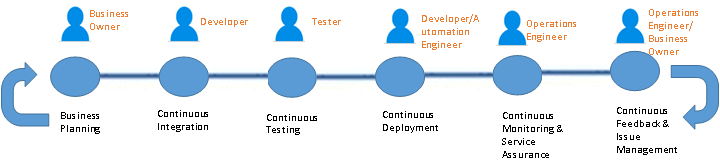
    A typical SDLC (Software Development Life cycle) DevOps looks like the following.

    Sunil's Blog 1

    Figure 1 – A Typical DevOps Pipeline

    The aforementioned actors in figure 1 may or may not actually be “people” since in a true DevOps world, those actors are replaced with some degree of automation. But it sets the context on what types of roles & responsibilities are expected in a typical pipeline.

    Now, imagine this pipeline that is multi-folds, across several application or components. This is the real nightmare of deployment and release management issues that one has to account for since in a hybrid model. Each of these applications/components may technically reside in a totally different environment developed and managed by totally separate groups with different service level agreements.

    A centralized DevOps platform, standardized across these application environment boundaries (for the most part) to provide a single pane of control over code, release and deployment management is what is required for a successful adoption of hybrid solutions.

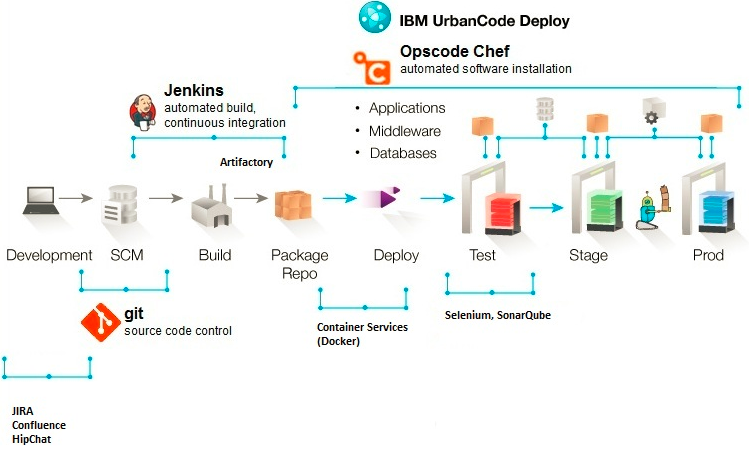
    Here is an indicative centralized architecture to solve the deployment and release management issue described above:

    Sunil's Blog 3

    Figure 2 – DevOps Platform Architecture Example

    The components listed in figure 2 is purely indicative and shouldn’t be misconstrued as any product marketing or messaging. The main challenge will be to standardize components to the extent possible (this is easier said than done) and stitch together a meaningful platform that works within an enterprise (based on existing tooling & processes, skills, funding etc.). Bear in mind I’m merely touching the surface in this article with regards to a DevOps platform, and limiting this to a tooling discussion. Bigger challenges do exist in the form of process and organizational transformation, which are also necessary to make a DevOps implementation successful. I’ll pen those topics in a separate article 🙂

    Summary

    DevOps for Hybrid cloud implementations will soon become the de facto model for process transformation in large enterprises. There is simply no other way to go about such large transformation in a purist way. There is a wide verity of use cases for a hybrid model, and most enterprise situations would fall under one or more of those categories. A robust DevOps platform is absolutely critical to making a Hybrid cloud adoption successful.


    About the Author/ Sunil Joshi

    Sunil JoshiSunil is an Executive Architect with IBM. He is currently the Application Development & Innovation (AD&I) DevOps offering owner for Global Business Services. He is IBM Senior Certified and Open group certified Distinguished Architect. His specialization are in the areas of hybrid cloud solutions, platform as a service and DevOps strategy. He’s created complex hybrid solutions on cloud and DevOps for large enterprises. Sunil has authored several IBM Redbooks, blogs and also a co-author of the IBM Cloud Computing Reference Architecture (CCRA).

    Sunil is passionate about international music, multi-cultural cuisine, active sports and mentoring school & college students on career path and technology.

    Contact Sunil on  linkedin twitter

  • DevOpsQA NJ Meetup –  Containers with Joyent

    DevOpsQA NJ Meetup – Containers with Joyent

    DeIMG_2381vOpsQA NJ just held our July Meetup on Containers with Casey Bisson from Joyent and Jeremy Rampon from Syncsort as speakers.   The meetup was held at a new ROKITT location,  a state-of-the-art office space with breathtaking views of NYC.   This session marked 1 year since our Meetup was formed in July of 2014 and it was great to celebrate it with a great group of fellow DevOps and Automation enthusiasts.

    Jeremy RIMG_2387ampon gave a great introduction to Docker and container technology.  He spoke about how Docker allows to build, ship and run any app, anywhere with almost no overhead.  We also discussed how Container technology is different from VM and future plans of Docker on Windows.

    Casey Bisson gave a bIMG_2386rief overview of the Joyent technology which offers container native infrastructure that runs in public and private cloud.  We all want to run Docker on bare metal, but don’t want to lose security and elasticity.  Joyent provides a way to do this without the overhead attributed to VMs.  The Triton Elastic Container Infrastructure is build on top of SmartOS  and provides its implementation of the Docker API, with full support for the Docker client and related orchestration tools.  The advantages are the ease of management and improved performance from running on bare metal.    We also got a live demo of the software that runs SmartDataCenter (software that runs the Joyent public sloud and powers private clouds) all the way from install to provisioning customer containers.

    At the end of the session we did a raffle for 3 awesome books sponsored by Pearson and then toasted to 1 year Anniversary of DevOpsQA NJ.

    IMG_2390IMG_7272

  • The Three “S’s” To A Successful App, Pt. 1

    The Three “S’s” To A Successful App, Pt. 1

    Developing your first app can be a daunting task. Many first-time developers may overlook, or over think, certain aspects of building their first app. Through scores of conversations and interactions with developers, I established common pain points and gathered advice that they themselves wish they had known before building their first app. With all of the collective feedback, I was able to identify the three “S’s” to building a successful app:

    • Scalability – knowing how to grow the app as user engagement increases
    • Simplicity – understanding which features are most critical to users
    • Streetsmart – analyzing the marketplace and differentiating the app

    This series of articles will discuss each “S” in detail, share developer stories and offer practical advice for first-time app developers.

    In conversations with developers about building their first app, several of them mentioned how the app turned out to be much more successful than they had originally anticipated, which in turn, lead to support issues due to the influx of traffic. These stories are what lead to the first “S”: scalability.

    What does it mean to scale an app?

    Scaling an app means architecting the app to accommodate the size of the audience that your organization predicts. While the future success of an app and brand it’s associated with is ultimately unknown, projected audience size is a key factor used to help guide developers to make the best decisions with regards to scalability. When projecting audience size, it’s important to make a bold prediction that’s an order of magnitude greater than the best case scenario. Why? Because it’s better to be over prepared than under. However, resources should not be exhausted and the app should not be over engineered.

    Finding the sweet spot

    Finding the sweet spot between scaling for a current audience size and a magnitude greater than the best case scenario can be tricky. The greatest factor in deciding this is the size and stage of the company. In the case of Uber for example, the app will need to be extremely robust right off the bat because the app is central to the operation of the organization. But with an organization such as Yo, the app does one thing and has a clearly defined scope, so the focus should be placed on getting the product out in the market and and scaling from there. Once an organization has found its market fit, scale should be at the forefront of the agenda. Because if scale is not top of mind, that’s when challenges will occur.

    Overcoming Challenges

    Developers are often faced with hurdles when their distributed systems do not allow for components to communicate together. Applications can’t achieve scalability if the different system components do not work seamlessly as the load increases.

    For example, if there is one server with one database that handles all of the read/write connections, it is rather easy to maintain; there is only one pipe to be concerned with. But when that database crashes due to traffic increase and lack of scalability, the app will stop functioning. So to add scalability to support the increased user-base, the database server needs to be replicated with load balancers that understand when the database server is overloaded and can transfer traffic over to a new one and so forth.

    To achieve this, it takes a combination of network expertise, smart app architecture and building smart connection points between the different services.

    Final Thoughts

    Scalability is just one factor that contributes to the success of an app. When developing your first app, whether it be for robust use or for a clearly defined scope, it is paramount to keep your database servers and the connections between them in mind because those smart connections are the key to building a successful platform for future users.

  • Avoid the DevOps Tool Trap

    Avoid the DevOps Tool Trap

    Software development, at its most complex and dynamic is a full-court press of effort, knowledge, patience, and hard work. Anything that can reliably and cost-effectively reduce the huge number of tasks, redundancies, reports, and delays associated with the application release process is something to be embraced.

    In particular, many organizations today are turning to the agile development methodology, DevOps, in order to rapidly produce software and improve operations performance. According to research by Gartner, by 2016 DevOps will become a mainstream strategy that will be employed by 25% of Global 2000 organizations. Moreover, by 2019, Gartner predicts 50% of enterprises will implement automated configuration and release management as a result of DevOps initiatives.

    What many in the development community don’t realize is that solutions exist, using current technologies, to automate many of the routine—and even not so routine—elements of the application release process needed for DevOps. Instead of adding multiple application-specific automation tools, resulting in a confusing and expensive array of various silos of automation, organizations can take advantage of their existing automation suite to automate their application release processes. What we’re talking about is not simply scheduling workflows, but the actual execution of tasks, from administrative duties to build deployments, release management, and more.

    Using modern IT workload automation solutions, it’s possible to offload the manual execution of a number of processes to improve overall DevOps agility. Many actions necessary to go from code to production, not to mention maintenance and cleanup tasks, can be taken off the backs of developers and operations, thus freeing them for higher level projects.

    With a modern workload automation solution, organizations can automate routine and time-consuming build kickoffs and installations. For example, using pre-built job steps for Microsoft Team Foundation Server (TFS), organizations can create an automated workflow that deploys builds onto machines, installs the kits onto production environments, verifies installation files are correct, and then sends an alert to the proper users that the build is ready. After QA performs testing of the individual stories, the automation solution can then close the stories and merge them in time for a daily or weekly review meeting. Teams can also integrate TFS with a QA/test system, in order to automatically create a new work item with TFS every time a bug is logged.

    On the Operations side, one of the biggest challenges in application release management is making sure machines are correctly architected. Excessive instances and regression tests can cause machine slowdowns that create havoc with development schedules. Again, workload automation comes to the rescue via workflows that purge databases, increase CPU, or anything else necessary to ensure a properly-provisioned testing environment.

    Adding to this, many popular tools used in software development lack even basic scheduling capabilities. If you wish to create a work item or trigger a build, for example, you probably have to do so using a Web service or the TFS Task Scheduler Service. Even then, all you likely have at your disposal is date/time scheduling. This is where advanced workload automation really shines, since it can trigger tasks according to a pre-defined event, or even a complex combination of events. As a result, DevOps teams can avoid unnecessary project delays or lag time due that would otherwise occur with manual handoffs between teams or individuals.

    While workload automation has been around for many years, today’s IT departments are increasingly using workload automation as a foundation for their wider IT systems. As new methodologies and strategies like DevOps and Big Data emerge, automation provides a foundational piece upon which to automate essential processes needed to support these new initiatives. In the area of DevOps, workload automation is helping both developers and operations build and automate release processes more effectively, with capabilities that can make the difference between headaches and headway. Don’t fall into the DevOps tool trap.

    About the Author/ Jim Manias

    Jim ManiasJim Manias is Vice President at Advanced Systems Concepts, Inc. and is responsible for the overall market strategy and planning for a range of products including ActiveBatch® Workload Automation and Job Scheduling.  Jim has been with Advanced Systems Concepts since 1991 and has held multiple senior management positions in the enterprise software and hardware market.  Jim can be reached at JManias@advsyscon.com

  • Jut Operations Data Hub for DevOps

    Jut Operations Data Hub for DevOps

    “You have to be able to ask questions of your data in real-time and then respond to the answers,” says Apurva Dave, VP of Marketing, Jut. Jut leverages live streaming, batch analytics, and visualization to enable enterprises to ask important queries of their operational data using the Jut operations data hub, which Jut created with DevOps goals (such as Continuous Deployment with Quality) in mind.

    Jut supports real-time and historical data queries across all log, event, and metrics data. “Our platform is built on dataflow, dealing with large scale streaming data,” says Dave. Jut is an option for organizations that don’t want to go out and build their own operations data hub software.

    Core Data Types

    Jut intends to join data such as user activity (on websites and software), event data (triggered operationally such as support ticket filings, customer transactions, and software upgrades or migrations), and unstructured data (application and system logs) together for analysis, says Dave. Jut works with structured data such as metrics data (such as application level data like the user numbers and key action numbers or system level data like CPU utilization, memory utilization, and network I/O data), explains Dave.

    Jut attempts to analyze the whole of your data to answer questions you may have like: “What resulted when I deployed a new version of my application into production?” Jut might answer based on an analysis correlating system resource utilization (“Was the app too resource intensive this time? More so than we expected?”).

    Or you may ask Jut this question: “How did my code respond to user activity / user demand? How did it perform?” Jut could ask this question based on its assimilation of both unstructured and structured data. “It’s common for enterprises to A/B test two separate versions of a site or software feature. Using Jut, you can ingest those test results and analyze them in real-time to determine what version produces the desired effect,” says Dave.

    Big Data Analytics & a Huddle about Juttle

    “We have users ingesting tens of billions of data points per month. That number is growing fast,” says Dave. Jut targets big data management for easier analysis using data infrastructure techniques that simplify / streamline, integrate, and manage big data backend infrastructure. “We also use our own dataflow language to quickly iterate and visualize lots of data,” says Dave. All this is designed to ease DevOps teams’ work in accessing and assessing operational data to discern how the software and the business that it serves are performing.

    Jut designed its Juttle dataflow programming language for data analysis and data visualization. And Juttle is dedicated to those tasks alone. “While you could try to cobble together the right packages and libraries in a general language like Python or Java to do these analytics, it would be relatively messy, time-consuming, and error prone,” says Dave.

    Juttle is an extensible language enabling analytics and visualization. “Jut’s data scientist built an anomaly detection algorithm entirely in Juttle and then published it on GitHub for anyone to use inside Jut,” says Dave.

    Juttle uses a structured approach to querying your data. “The approach looks like a series of piped UNIX commands, so anyone familiar with scripting languages such as JavaScript or query languages such as SQL should feel at home with Juttle,” says Dave. Jut responds to questions in seconds to tens of seconds (for larger data sets) based on iterative, interactive analysis.

    Investigate, Question, Consider (Try?)

    Outsourcing to Jut puts the enterprise in a position to focus on existing coding duties while proving whether Jut is the better operational analytics move for analytics performance and cost-savings (Jut offers a free trial). But as with the analytics themselves, ask a lot of questions of Jut. Do your homework before committing even to trial software (Jut has a demo and an online “playground” as well).

    Tip: Jut made sparkling comments from its Beta-development-phase customers such as NPM and Mylio available. Rather than include those for your consideration, I suggest you reach out through your connections to these and other enterprises that are experimenting with this data hub software.

  • The Calculus of DevOps

    The Calculus of DevOps

    This is the second in a series of blogs, partnering with Lee Reid, who wrote the first installment “The Simple Math of DevOps” and Sanjeev Sharma both of who are outstanding DevOps Thought Leaders from IBM.

    I am picking up on Lee’s mathematical DevOps model to apply a calculus perspective, a “calculus of DevOps” if you will, (OK, not quite core Big Bang Theory Calculus but rather approaching it from the aspects of engineering queuing theory).

    One of the cultural challenges that DevOps poses is, that some aspects of it run counter to engineering principles that many of us learned with respect to capacity and response time.   When I worked at Bell Labs, we would apply queuing theory to determine how to best package information to be sent across the network. A basic premise revolved around a tradeoff between throughput and response time. On one hand, the more messages that were packed into the packet, the more the payload would improve capacity because the overhead of processing the packet of information would be spread across the messages.   However, waiting to accumulate enough call processing information meant that the packets would be transmitted less frequently, increasing the response time.

    A simple example of this would be making trips to the grocery store. If one wanted to spend the least amount of resources (time, gas, car wear, etc.) on shopping, then one would make less frequent trips and then buy a larger amount of food. So if the Smith family made one trip a month and spent 2 hours, then their average time per week spent on shopping would be 30 minutes.   If the Jones family went every week and spent an hour, then they would be spending twice the time and four times the gas on grocery shopping. However if the Smith family run out of an item (say cereal), they would have to wait, on average 2 weeks before this was replenished. The Jones family average on any item that they ran out of would be 3.5 days in comparison.

    So when the 2014 DevOps report was published[1] which states that areas that deploy more frequently get customer feedback more quickly, that is to be expected. But what’s not expected is that these organizations also have higher productivity.   So exactly what is happening here that seems to be in a basic conflict to the principles of throughput and response time?

    Keeping up with the JONESES

    If we think of a pre- DevOps state for a medium to large enterprise, it may be typical for applications to only be released (deployed into production) a few times a year to provide business functionality. (I assume there are more frequent releases for “unplanned work” like defects and other changes or operational work). For the sake of this discussion, let’s call this the Smith Application. So from a business perspective, the business wants to pack as much work into the Smith releases as possible given they only have a few cracks a year at getting new business functionality into production.

    SMITH APPLICATION CHARACTERISTICS:

    • Deliver Business Value 3 times a year (every 4 months)
    • Cost is C1
    • Business Value (BV) delivered is V1
    • Average time from concept (e.g. Story) being ready to be pulled from the backlog to the time it is delivered to the customer is 2 months plus any additional wait times (e.g. prioritization)
    • BV delivered per year is 3*V1
    • Cost per year is 3*C1

    Now let’s transport over to the Jones Planet where the application is released into production with new business capabilities at the end of every 2 week iteration.   In this case the business is more concerned with providing a constant demand flow into IT than they are with debating over whether a given feature/story is going to be included in this particular release.   Instead there is a constant prioritization (or continuous planning) process that ensures the highest value work is being fed into the IT pipeline.

    JONES APPLICATION CHARACTERISTICS:

    • Deliver Business Value 26 times a year (every 2 weeks)
    • Cost is C2
    • BV delivered is V2
    • Average time from concept (e.g. Story) being ready to be pulled from the backlog to the time it is delivered to the customer is 1 week plus any additional wait times
    • BV delivered per year is 26*V2
    • Cost per year is 26*C2

    Based on the previous engineering analysis, we would expect the following:

    1. SMITH annual cost (3C1) < JONES Annual Cost (26C2)
    2. SMITH annual BV (3V1) > JONES annual BV (26V2)

    So the tradeoff (we would believe) JONES is making by delivering more frequently is that they are spending more money and are delivering less business value on an annual basis.

    However the data from the previously referenced DevOps report is just the opposite. In fact the findings are that enterprises that deploy smaller units of work more frequently have much higher quality and much higher productivity (Capacity). So what’s going on here?

    A NEW PARADIGM

    If you go up to any IT team (even an agile one) and ask them why they don’t deploy business value more frequently, they will generally refer to the following types of wait states of waste that they encounter:

    • Waiting for work (lack of consistent flow)
    • Waiting for somebody else to do something (dependencies from other teams)
    • Waiting for environments (contention)

    One major root cause of this is the dependencies that arise from large enterprises packing a lot of work into infrequent releases. From a planning perspective, the process is elongated due to prioritization discussions because being on the wrong side of the line can mean delay amounting to months, in delivering a product to a customer.   Ask a business portfolio leader what their highest priority is for IT and I am guessing they can tell you in a matter of seconds. However, most large organizations can spend several months a year planning their annual portfolio of work for IT. Some organizations spend more than 50% of their new project build time prior to a single story entering an agile development team’s backlog!

    From a development perspective, packing a lot of work into releases means many more dependencies that have to be managed across initiatives and impacted applications. From a testing perspective, downstream environments (ST, UAT) have to manage much more information in terms of application versions and especially test data that complicate and slow down the process. The complexity of test data increase is proportional to the number of pairwise relationships that exist within the datasets required for testing.   As such, the testing complexity will increase non-linearly (perhaps proportional to the square of the dependent systems) and from a release and change perspective; there is a lot of coordination necessary given how much is being changed at one time.

    All of this work to manage all of the dependencies found in medium to large enterprises completely eliminates any potential savings one might get from batching work into a single delivery. In addition, the possibility of having to pull some work out of a release (due to quality or business readiness or some other reason) sometimes leads to complicated source code management (feature branches in some cases) that further complicate the process of merging frequently into the trunk. These types of practices also serve to drive up technical debt. So looking at the problem from this angle shows why results we are seeing make perfect sense.

    Productivity is inversely proportional to the number of dependencies in a release

    As Lee related to in the initial blog, a lot of an organization’s success depends on trust. And one factor of trust is clarity which speaks to understanding the changes that each release is bringing to the IT and customer environments. So a factor that is working against trust is the notion of delivering more things less frequently and better controlling change somehow, is a good notion.

    Trust is inversely proportional to the number of dependencies in a release

    There is another hidden component of waste associated with “big bang” initiatives. Go back to our grocery example for a moment. Chances are that the Smith monthly excursion results in buying some stuff they end up not using. Perishable items are not spread out very well when they aren’t purchased more frequently. Likewise in IT planning, we tend to put a bunch of stuff in our IT Delivery basket that we don’t know for sure that we will need and we end up with a lot of wasted effort for features that are hardly used or not needed at all. Some enterprise estimates are that 50-65% of what they put into large releases does not actually result in true value to the business. Doing more frequent releases allows a constant discovery process to better guide the usage of IT resources on what is truly of value.

    Waste is proportional to the size of a release.  

    In other words:

    Yield (Value per IT investment) is proportional to the frequency of releases.

    REVISTING THE MATH OF DELIVERY TIME

    So if we revisit Lee’s model

    Lee Reid Blog equationand apply the “Calculus of Release” as we stated above, there are increased costs associated with having larger and less frequent releases in medium/large enterprises.

    • Planning cost TPLAN
    • Development complexity TDESIGN + TDEVELOP + TBUILD
    • Testing Complexity TTEST
    • Release and Change Management Complexity TRELEASE + TDEPLOY + TEVALUATE

    TRUST % – Even if everything was proportional between the JONES and SMITH models, the component of trust that impacts clarity, consistency and collaboration, is much lower for large (SMITH) releases.  Given that TRUST has a multiplicative impact, this alone can account for the results found in the studies.

    CULTURAL CHALLENGE

    While clearly one needs to be sensitive to the changes being introduced into the business, having the ability for the business stakeholders to pull capability when they want it and having it available more frequently is not only good for customers but also has extreme benefits from an IT perspective in terms of increased productivity and reduction of technical debt. The challenge is to convince leaders in both the business and IT areas on the merits of doing more continuous planning and frequent deliveries.   Unicorns may have led the way in this type of thinking but it is actually the horses that will benefit most from this type of culture shift because it is the horses[2] that have the most to gain in mitigating the dependency factor which can undermine quality, productivity and cycle times.

    Read more about the topic in the next blog of this series The Art of DevOps by Sanjeev Sharma.

    [1] “2014 State of DevOps Reports”, Puppet Labs, IT Revolution, https://puppetlabs.com/sites/default/files/2014-state-of-devops-report.pdf

    [2] “The Phoenix Project”, Gene Kim, Kevin Behr, George Spafford, http://www.amazon.com/The-Phoenix-Project-Helping-Business/dp/0988262592


    About the Author

    CarmenCarmen DeArdo is the Director of Application Development Tools and Technologies at Nationwide Insurance. Carmen is responsible for driving continuous delivery utilizing DevOps, Lean and Agile techniques across Mobile, Distributed and Mainframe and other technologies. This includes recommendations and implementation of technologies used across the development life cycle (e.g. IBM Rational tool suite, open source technologies).

  • Why DevOps for the database must include three way analysis

    Why DevOps for the database must include three way analysis

    Deployment automation is critical to practicing effective DevOps. Without deployment automation, releases still require a lot of manual steps and processes. Processes and steps that aren’t reliably repeatable, are prone to human errors, and can’t be handled consistently with high frequency.

    However, the software best practices can’t simply be grafted onto database deployments. Unlike software code, a database isn’t just a collection of files. You can’t simply copy a database among your different development, testing, and production environments. Deploying a database also presents a greater business risk since it holds your most valued asset – your data.

    In order to capitalize on DevOp automation advantages for databases and to promote database changes safely and quickly, all the particular components of a database; its tables, functions, and content, need to be protected.

    Any successful DevOps database automation solution must be capable of intelligently dealing with conflicts and merges of code and cross updates from other teams. The solution must be able to ignore wrong code overrides and give the user ultimate control over which changes and merges are pushed out.

    unnamed (5)

    In order to achieve these goals a DevOps for the database solution must be able to conduct a three-way analysis on the source (that is, the object after the development work is done), the original (or “baseline”) state, and the target (or “Production”) environment, identifying the differences among these three states. Team members, gaining full knowledge of the complete scope of the project from the analysis, can review the results and options the solution presents to resolve any discrepancies. The user selects what action, if any, should be taken on the database. The solution then automatically generates the scripts to execute the chosen actions.

    In this way, the solution uses automated three-way analysis and automatic script generation to eliminate both the potential for human error in manual script writing, and the potential for technological error in automated object overrides.

    Reaping the Rewards
    Implementing a solution that encompasses all these automation features to meet the particular challenges of database deployments, would enable a company to practice a DevOps approach to effective database automation and realize the following benefits:

    · Reduced deployment costs through streamlining of development process management

    · Minimizing deployment risks by enforcing change policy and best practices, and configuration management and consistency

    · Improving responsiveness to customers and market needs with speedier roll-outs of task-based development updates

    · Enhancing cross-team communication with clear audit trails and transparency regarding work done on objects and the state of different environments

    Can you afford to be without it?

    About The Author ⁄ Yaniv Yehuda, CTO, DBmaestro
    unnamed (4)

    Yaniv is the Co-Founder and CTO of DBmaestro, the leading provider of DevOps for Database solutions which enable control of database development and deployment. Yaniv is also the Co-Founder and the head of development for the Extreme group, a leading IT services solutions provider group.

  • Proactive Monitoring

    Proactive Monitoring

    I think, most of the DevOps discussions are centered around testing the code change, packaging and deploying it in production in an automated fashion. However, stinging site-down issues would eventually force any nascent production engineering team to make monitoring a high priority down the road.

    If functional, integration and acceptance tests are run to verify a code change before that was deployed in production, in my opinion, similar checks should be part of monitoring to make sure that the application works fine in production also, as designed. In production, code change is not only the factor that could impact the application. Updates of OS, network configuration changes, automatic upgrades of third-party tools, availability of system resources etc. can also impact application in production. But, I am yet to come across any framework that integrates testing and monitoring efforts.

    In a traditional sysadmin centric environment, the scope of monitoring doesn’t go beyond infrastructure layer. The operations team that owns monitoring might not have visibility into what needs to be monitored beyond infrastructure. For the latter, out-of-the-box solutions are readily available on popular monitoring platforms like Nagios.

    Here is an attempt to classify the monitoring requirements in production. The requirements are generic and are applicable for any system hosted in-house, in a data center or in the cloud. A systematic and proactive plan for testing code changes and monitoring production would help to prevent incidents in production. Classification of tests and tools to implement them have been around for a while and that hardly require any additional attention. This article is an attempt to classify the monitoring types and to document their implementation methods.

    Monitoring Infrastructure

    The infrastructure that hosts an application environment would be made up of multiple components: servers, storage devices, load balancer etc. Checking the health of these devices is the most basic requirement of monitoring. The popular monitoring platforms support this feature out-of-the-box. Very little customization is required except for setting up right thresholds on those metrics for alerting.

    Monitoring Platform

    An application would typically be built using multiple third-party tools such as databases, both RDBMS (MySQL, Postgres) and NoSQL (MongoDB, Couchbase, Cassandra) data repositories; full-text search engines (ElasticSearch) ; BigData platforms (Hadoop, Spark); messaging systems (RabbitMQ); memory object caching systems (Memcache,Redis); and BI and reporting tools (Microstrategy, Tableau). Checking the health of these application components is important too. Most of these tools provide some interface, mainly via REST API, that can be leveraged to implement plugins on the main monitoring platform.

    Monitoring Application

    Having a healthy infrastructure and platform is not good enough for an application to function correctly. Buggy code from a recent deployment or third-party component issues or incompatible changes with external systems can cause application failures. Application level checks can be implemented to detect such issues. As mentioned before, a functional or integration test would unearth such issues in a testing/staging environment, and, an equivalent of that should be implemented in the production environment also.

    The implementation of application level monitoring could be simplified by building hooks or API endpoints in the application. Monitoring is usually an after-thought and the requirement of such instrumentation is overlooked during the design phase of an application. The participation of DevOps team in the design reviews improves operability of a system. Planning for application level monitoring in production is one area where DevOps can provide inputs.

    Monitoring Business

    The applications run in production to meet certain business goals. You can have an application that runs flawlessly on a healthy infrastructure but still the business might not be meeting its goals. It is important to provide that feedback to the business at the earliest to take corrective actions which might trigger enhancements of the application features and/or require the way business is run using the application. These efforts should only complement the more complex BI based data analysis methods that could provide deeper insights into the state of the business. The business level monitoring can be based on transactional data readily available in the data repositories and the data aggregates generated by the BI systems.

    Both application and business level monitoring are company specific, and, plugins have to be developed for such monitoring requirements. Implementing some framework to access standard sources of information such as databases and REST APIs from the monitoring platform could minimize the requirement of building plugins from scratch every time.

    Last-Mile Monitoring

    A monitoring platform deployed in the same cloud or data center environment where the applications also run cannot check on the end-user experience. To address that gap, there are several SaaS products are in the market, such as Catchpoint and Apica. These services are backed up by actual infrastructure to monitor the applications in specific geographical locations. For example, if you are keen on knowing how your mobile app performs on iPhones in Chicago, that could be tracked using the service provider’s testing infrastructure in Chicago.

    Alerts are setup on these tools to notify the site reliability team if the application is not accessible externally or if there are performance issues with the application.

    Log Aggregation

    In a production environment, huge amount of information is logged in various log files, by operating system, platform components and application. They will get some attention when issues happen and normally are ignored otherwise. The traditional monitoring tools like Nagios couldn’t handle the constantly changing log files except for alerting on some patterns.

    The advent of log aggregation tools like Logstash, Loggly and Splunk changed that scenario. Using the aggregated and indexed logs, it is possible to detect issues that would have gone unnoticed earlier. Alerts can be setup based the info available in the indexed log data. For example, Splunk provides a custom query language to search index for operational insights. Using APIs provided by these tools, the alerting could actually be integrated with the main monitoring platform.

    To leverage the aggregation and indexing capabilities of these tools, structured data outputs can be generated by the application or scripts that will be indexed by the log aggregation tool later. Such data aggregation can be used for generating data for reporting applications. For example, if storage usage on a set of computing nodes has to be tracked, a daily storage usage report can be generated on related nodes which the aggregation tool can track. Weekly and monthly aggregates could also be computed once the daily aggregates would be available.

    Monitoring the Monitoring

    It is important to make sure that the monitoring infrastructure itself is up and running. Disabling alerting during a deployment and forgetting about enabling it later is one of the common oversights I have seen in operations. Such missteps are hard to monitor and only improvement in deployment process could address such issues.

    Pinging hosts

    If there are multiple instances of the monitoring application running, or if there is a stand-by node, then cross checks can be implemented to verify the availability of hosts used for monitoring.

    In AWS, CloudWatch can be used to monitor the availability of an EC2 node.

    Health-check for monitoring

    Checking on the availability of monitoring UI and activity in monitoring application’s log files would ensure that monitoring system itself is fully functional and it continues to watch for issues in production environment. If a log aggregation tool is used, tracking monitoring application’s log files would be the most effective method to check if there is activity in the log file. The same index can be queried for any potential issues also by using standard keywords like “Error”, and “Exception”.

    Conclusion

    Monitoring efforts are normally in response to issues happen in production. A systematic approach to rolling out monitoring can minimize the reactive ways it is normally associated with. Proactive monitoring adds to better user experience, and, it avoids costly data reprocessing and rollback in production.