Category: Blogs

  • Rolling Updates with Rundeck

    Rolling Updates with Rundeck

    CAUTION: If you haven’t used Rundeck yet, clear your calendar for next Valentine’s Day because you’re about to fall in love… How many times have you written a shell script that runs via cron, or a PowerShell script that lives in the Windows Task Scheduler? How many times have you struggled to remember which server you built that script on? Let’s take it one step further: when was the last time that job ran successfully? Using rundeck makes you click-your-heels happy!
    I’ve used multiple solutions to address this problem in the past: jump boxes, dedicated scripting boxes, puppet manifests, the list goes on- but each left me feeling like I could have done something better. Recently, I discovered Rundeck and have been jump-in-the-air-click-my-heels-happy with it.
    What is Rundeck?
    Rundeck is a web application server that allows you to define jobs and tasks. It’s that simple. Where it excels is in its ability to automate those jobs, hand those jobs off to other people to run (without giving them access to the servers), call those jobs via API, monitor the progress and status of those jobs, and log all of the above for auditing purposes.
    Some common use cases I’ve personally used Rundeck for include:
    • deploying EC2 instances in AWS
    • creating scheduled jobs to run on remote servers
    • implementing blue/green deployments from a centralized location
    • rolling updates to ensure only one server is being updated at a time
    I’m sure that gets your mind going with all kinds of ideas, so let’s not waste any more time and get right to
    Setting up Rundeck
    Rundeck is a java web application and as such, requires your host system to have java installed. Java 1.7 is the minimum, and either Open JDK or Sun/Oracle Java will work just fine. If you have a system that supports RPM or Debian packages, installation can’t get any easier as both package formats are available and not only handle the installation process, but shell tools and init.d scripts for startup and shutdown as well. Users of other Operating Systems can use the Launcher for running the app, but installation details are left up to you. Finally, Rundeck can also install as a war file for use in an external container like Tomcat. With the server up and running, it’s time to:
    Build our first project:
    Rundeck_create_projectWhen getting started with Rundeck, I was expecting a lot more configuration prior to building a project. I actually struggled a bit when I couldn’t find out where to plug-in my AWS details at a system level. Turns out, you can’t because it’s configured on a project-by-project basis. This actually works out well, allowing you to isolate which jobs can be run against which servers, preventing mishaps such as running a script intended for your public-facing web servers on your finance servers!
    Creating a new project is done by clicking the big, green “New Project” button on the main screen. On the “Create New Project” screen, filling out the Project Name and Description details are pretty straight forward. The Resource Model Source is where things really start happening. In Rundeck, the Resource Model Source is how you specify the list of servers for the project. In its simplest form, Rundeck receives the list of nodes in XML or YAML format and can receive this data from a variety of sources ranging from hand-crafted files, CMDB, hosted virtual machine service, or a number of available plugins. More information about the Resource Model Source can be found in the Rundeck documentation here. If you are using AWS, the Rundeck EC2 Nodes Plugin allows you to specify nodes (a.k.a. ec2 instance) by tags. Installation is as easy as installing the plugin from the github repo into the $RDECK_BASE/libext directory (/var/lib/rundeck/ if you installed from rpm on RedHat based systems).
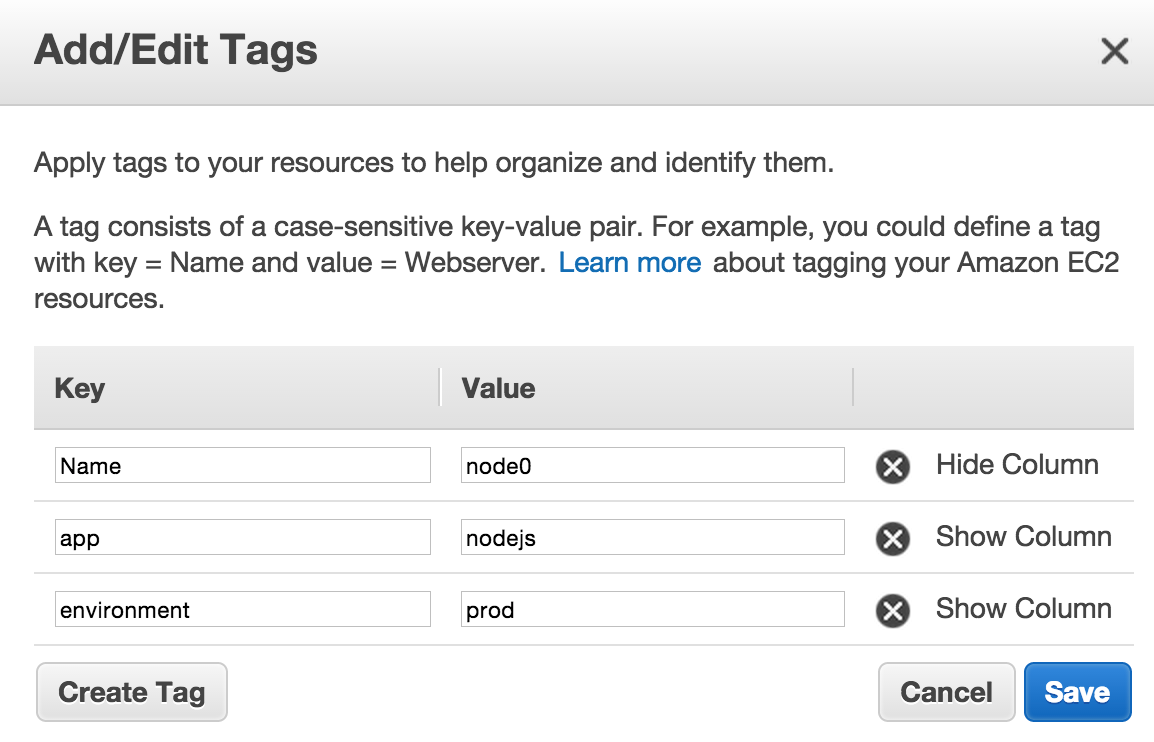
    You will want to create a new set of access keys for Rundeck. This will allow you to control what permissions Rundeck has in AWS via IAM policies, and make it easier to rotate keys as the keys will only be used in one place. Using the “Filter Params” textbox allows you to filter the AWS nodes to match your criteria. For example, I have all of my node.js servers tagged in AWS with a tag named “app” and the value set to “nodejs”.
    EC2_tagging
    Mapping Params is another area worth noting. Use this field to adjust the mapping of the values returned by AWS to the fields used in Rundeck. For example, this is a mapping I use:
    hostname.selector=privateIpAddress,privateDnsName;environment.selector=tags/environment;username.default=ec2-user
    First I have the hostname.selector field set to “privateIpAddress,privateDnsName”. This allows me to use either the IP address or DNS name of the instance when selecting nodes. It also uses the same data for displaying which nodes a given project will run on (much more insightful than seeing a list of instance IDs!).
    Next I have an “environment.selector” set to “tags/environment”. As you can see in the screenshot above, I use a tag named “environment” and set values to “prod”, “staging”, and “dev”. This allows me to further filter jobs by selecting the environment from a selector at runtime to determine which environment the job will run on.
    Finally, the username is set to “ec2-user”. This tells Rundeck who it should log in as when opening an ssh session to the node.
    If you are using ssh as the default node executor and file copier, you’ll need to upload keys with appropriate permissions as well. With all of that done (it seems like a lot- but it packs a lot of power in those steps, and it only needs to be done once for the project), it is finally time to:
    Create A Job:
    Creating a job is much simpler than configuring the project. Most of the options on this screen are pretty straightforward. I’ve had so much success with the “Script” step, I find it is my go-to favorite. It allows you to define a script and run it directly on the host. For example, I need to restart node.js on all my servers but don’t want to take them all down at the same time. To accomplish this, I would use a Bash script similar to the following:
    (A couple of notes here:
    – I’m using pm2 to manage the node process, so that is the application the script targets
    – My node.js servers have a /ping endpoint that returns OK when the server is up and running)
    # Shutdown the local node
    echo “Shutting down node.js on $(hostname)”
    /usr/bin/pm2 kill
    sleep 15
    # Start node.js
    echo “Starting node.js on $(hostname)”
    /usr/bin/pm2 start /etc/pm2/ecosystem.json
    sleep 30
    # Wait for the server to come online
    echo “Waiting for a positive response”
    while true; do
        STATUS=$(curl -s http://localhost:3000/ping)
        echo “$(date): $STATUS”
        if [ “$STATUS” = “OK” ]; then
            break
        fi
        sleep 10
    done
    echo “Done with $(hostname)”
    Boom. This script will now sequentially roll through all of my servers tagged “nodejs” in AWS, terminate the node process (via pm2), and wait for the server to come back online before moving to the next server. If the node doesn’t come back online, the Rundeck script for that node will not continue, preventing an unidentified error from taking all of my node.js servers offline! The key to this is ensuring that the Workflow Strategy is “Node-oriented”. This tells Rundeck to perform all steps on a given node before moving on, fully allowing the job to fail if something goes wrong. It’s also noteworthy to point out that Rundeck can email the results to you as well as logging all job executions. With our job in place and ready for action, it’s time to do what all DevOps people do best:
    Sit back and troll hacker news:
    hacker_news_logoSeriously. Rundeck can be an integral part of your DevOps toolkit. Using it for rolling updates, patching, and deployments are just the start. Imagine taking it a step further so that it integrates into your monitoring system and executes jobs as a result of alert conditions, or use it as a stand-in replacement for a complete DIY provisioning system for AWS OpsWorks. With a little work upfront, you may never have to minimize hacker news again!

  • DevOps Empathicus – Where is your organization on the evolutionary scale?

    DevOps Empathicus – Where is your organization on the evolutionary scale?

    Ok, I admit it – I sometimes cry when watching sad movies or as real-life events play out in the news. I put myself in the position of other people, sharing their joy and pain. This got me thinking about change-based initiatives like DevOps and what benefits organizations can realize when IT staff have the support to do what should come naturally. That is, considering what it’s like to be on the ‘other side’ – whether the other side means Dev, Ops and Security or as a customer, and then collaborating to drive improvements.

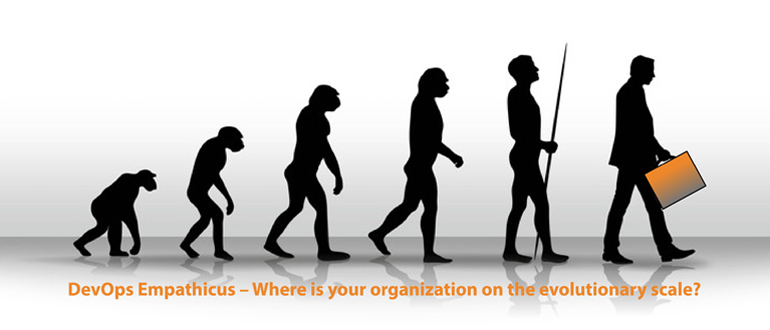
    Below is a “scale” that can be used to assess the empathetic maturity of your organization. Failing to acknowledge (however painful) your organization’s maturity will compromise any hope of success with DevOps – no matter what tools or would be process improvements you put into place.

    1. Hunter Gatherers – at the lowest point on the evolutionary scale, these organizations have a preponderance of what can be considered IT foragers and scavengers. Singularly focused, their survival depends on technical dexterity in the harsh environments they operate. Using specialized tools and with little management oversight, their sustenance is every technical issue and problem. They trust no-one, thriving instead on the ‘hero status’ they’ve acquired over many years of keeping the technical lights on. To them, DevOps is like every other change initiative – a painful and unnecessary distraction they’ll attempt to discredit – by doing what every good hunter gather does — beating it to death.

    To ferret out hunter gatherers, I’d suggest a simple test. Ask everyone how they dealt with the last Severity 1 outage. If they start by blaming other folks (even on their own team), or claiming that recovery was down to them alone, then they probably should be kept away from a DevOps style initiative. If however, the quiet introspective Ops guy fesses up that he calls for help from his pals in security to tackle problems, or that he’s even sharing monitoring tools with Dev to improve code quality, there’s hope that teams can hang up the spears.

    1. Tribes and Clans – moving up the empathetic scale, these organizations are characterized by teams of technology domain-based specialists – like the NOC clan or the service center tribe. True, these groups share each other’s pain, but this is almost always (in their minds) brought about by the habits of competing tribes. Here, every release delay, lengthy compliance check, outage and problem, is caused by another team – like the hipster, tofu loving developers or those hard-nosed security and compliance specialists.

    With IT teams being traditionally organized by technology function, it’s not surprising that tribalism persists. Many organizations attempt to resolve the issue by for example co-locating teams. But without putting some shared skin into the mix that’s going to be as successful as a TV celebrity sharing some deep thoughts on Twitter. Therefore, start by finding some common ground to help unite teams. A shared area might help for sure — but better still are shared outcome-driven business metrics with linked incentives.

    1. Religious Cults – best practices and methodologies like agile development, ITIL, Cobit and Lean are great for bringing similar like-minded tribes together. Unfortunately, pragmatic application often gives way to dogmatic enforcement; with crusade-like implementations promising much, but never delivering much in the way of business value.

    DevOps itself can still fail miserably if organizations succumb to all the hype and hyperbole; readily accepting rants that whatever preceded it has to be bad. More mature IT teams look beyond industry spin – accepting that many existing practices can have a place in supporting the goal of rapidly delivering high quality software. For example, incorporating existing integrated ITIL incident and problem management processes during pre-production to build and circulate knowledge, or even automating compliance procedures during testing to both harden security and prevent delays.

    1. DevOps Empathicus – it’s no surprise that the most successful organizations display high degrees of empathy. They care about their colleagues and customers. They collectively swarm issues, treating problems as the enemy. For these organizations the ‘smartest guy in the room’ syndrome is a thing of the past – with acceptance that people innovating solutions don’t have to be MBA grads or domain experts.

    But while we can hope that organizations naturally evolve to this nirvana state, it just doesn’t happen that way. It takes subtle intervention from management to get people from a state of just caring about the technology to being deeply connected with the business problems they are trying to solve. Sure, that sounds fanciful, but the first time you see a high-five because the business just exceeded its Net Promoter goal or they’re measuring downtime in terms revenue lost not milliseconds, you’ll appreciate the power and value of empathy — Then perhaps like me you can get out the tissues and have a darned good cry.

    So where does your organization fall in this scale?

  • Alert Logic Cloud Insight brings cloud-based security to your cloud infrastructure

    Alert Logic Cloud Insight brings cloud-based security to your cloud infrastructure

    One of the primary driving forces behind DevOps is its fluidity. There is a domino-effect that cascades from the developers who create the apps to the IT admins who deploy and administer the apps to the individuals who download and use the apps and back again. Traditional security can’t keep pace so Alert Logic created Cloud Insight—a cloud-native vulnerability and configuration management solution for cloud infrastructures running on Amazon Web Services (AWS).

    I’ve written previously about the continuous continuousness of DevOps. Anything and everything that used to be manual tasks on a static infrastructure is now automated to the Nth degree. “Continuous development and continuous testing lead to continuous deployment and continuous delivery, which requires continuous support. Continuous monitoring produces continuous integration and continuous change.”

    All of that also means that it’s virtually impossible to keep up with the current configuration or accurately assess vulnerabilities in a constantly-changing environment. If your entire cloud infrastructure can change at the push of a button you also need to have security controls in place that are just as automated and capable of flowing with the changes and providing continuous, real-time security. Traditional security solutions simply won’t work.

    Alert Logic agrees, which is why it developed Cloud Insight. Gray Hall, CEO of Alert Logic, explained in a press release announcing Cloud Insight, “Managing security while maintaining the agility of the cloud is fundamentally different than in any other environment. With Alert Logic Cloud Insight we are delivering an innovative solution that gives businesses an added layer of visibility for workloads running on AWS—actionable intelligence to identify and eliminate risk across instances and applications while not slowing the business down.”

    Cloud Insight automatically tracks changes—additions, moves, deletions—within the AWS platform. It continuously identifies threats and vulnerabilities and potential exposure to risk within the dynamic environment. Alert Logic uses AWS APIs to integrate with the cloud infrastructure to detect any changes and inspect the new, change, or modified resources for vulnerabilities or configuration issues.

    Cloud Insight generates a prioritized list of remediation actions so the organization knows in real-time what’s broken and what the exposure to risk is and it can focus on addressing the issues and maintaining a strong security posture rather than spinning its wheels just trying to keep up with vulnerability assessments in a fluid environment.

    Terry Wise, VP of Worldwide Partner Ecosystem for AWS, said “Security-as-a-Service solutions built on AWS and designed to complement AWS-native security features enable customers to maintain the highest levels of protection while achieving the agility, elasticity, and cost savings of the AWS Cloud.”

    Alert Logic Cloud Insight is pre-approved to run on AWS. You can use Cloud Insight to conduct vulnerability scans and penetration testing within AWS without any additional permission. Cloud Insight also includes customer-facing APIs that can be used to integrate with other DevOps tools, and it can be integrated into your existing DevOps pipeline.

    Pricing for Alert Logic Cloud Insight is similar to the AWS pricing model. It functions on a pay-as-you-go basis based on the number of hosts or protected instances for a given day. Customers are billed $1 (USD) per instance per day. You can request a free trial of Alert Logic Cloud Insight to determine if it’s a good solution for your organization before taking the plunge.

  • The Pros and Cons of Remote Work in Ops

    The Pros and Cons of Remote Work in Ops

    Remote work in Ops is divisive. The perks of working from home, your local coffee shop or wherever can be quite obvious to engineers and contributors. But some team leaders and company execs aren’t buying into it. One faction sees it as a way to do better quality work. Another has watched deadlines and motivation fall by the wayside because of unresponsive remote workers.

    What are the advantages and disadvantages of remote work? What should you consider before you take the plunge into flexible hours and asynchronous communication?

    Why Do Companies Go Remote?
    Company leaders worry that remote work erodes culture. Workers fret that colleagues and reports don’t get enough done outside the office. And team leaders lose sleep chasing down time-sensitive updates and deliverables.

    Remote work can definitely present some challenges. So, why do companies go remote? Several find it can provide serious benefits when implemented properly.

    By considering remote workers, businesses are able to attract high- quality talent from a larger pool of candidates – that’s especially important in the technology and software world where recruiting top-notch engineers is often a company-level initiative. If your company is based in a geographically competitive market, this opens doors and extends your reach to premier candidates outside of that area. It also goes the other way around – engineers who don’t live in tech-focused cities are given opportunities to be a part of those companies and cultures and aren’t penalized simply for where they live.

    Some contend remote policies produce better work. GitHub argues that code doesn’t follow a 9-to-5 schedule. Remote work can enable engineers to write great code during their peak hours of energy, focus and productivity, rather than on a set schedule that doesn’t play to their strengths. Because all employees – and engineers – are different, remote work provides the option to hone that creativity and focus outside of normal working hours.

    Since we’re so used to operating online, both in our work and personal lives, remote work embraces that to make employees more efficient. Remote workers communicate asynchronously.In other words, they respond to messages and transcripts when it makes logical sense, without interrupting serious tasks or disrupting intense focus. Another plus taking communication online is that it naturally leads itself to fewer meetings, and more doing. You’d be surprised how much you can cover in a three-minute chat via Skype, Slack, Campfire or another communication tool.

    That’s to say nothing of fostering a more enjoyable work environment. Plenty of people believe remote work improves morale. Who doesn’t want to work flexible hours and code when they’re in the zone?

    Finally, remote work supports inclusivity and diverse teams. What are the chances that every single person who can meaningfully contribute to your company just happens to live within a short commute? Not only do distributed teams open up opportunities for skilled workers who live outside of tech hubs, they also make it easier for people to work around family and other obligations.

    For some close-knit teams, there’s no difference between chatting in Google Hangouts and meeting on-site in a conference room. Going remote helps everyone get more done, more efficiently and on their terms.

    How Do You Get Started?
    Remote work may not be for every company. Your business needs or culture might not work best in a distributed environment. But if you do want to give it a try, there are some basic ways to start.

    Using the right tools is key. 37signals, the company behind Basecamp, literally wrote the book on remote work, and most of their team works remotely, using the company’s Campfire chat client to aggregate company communications and keep everyone on the same page. Email works for some conversations, but project management tools like Asana, Trello, Basecamp and JIRA let you add state, metadata, and delicious permalinks to everything that needs to get done.

    Be judicious about which tools you pick, though. Text, video and voice all have pros and cons. You’ll need to use communication channels that make sense for your company’s work style. For instance, when teams that are used to face-to-face stand-ups switch to typed messages, there can be miscommunication and misinterpretation. You’ll get more value out of the tools that enhance your in-office interaction methods. You might have to adopt several tools for your needs: The developer team at Hanno, a user experience company, uses nine different tools to work remotely, including Basecamp, Slack and Google Hangouts.

    While tools are important, they’ll only take you so far. You need to develop strong foundational relationships among teams, colleagues and management before implementing remote work policies. In-person relationships set the tone for remote ones. Try to grab a beer or lunch with your colleagues – it will help form healthy relationships and ensure remote work is truly effective. If your team is completely distributed, try to get together once every quarter or two to reconnect, put faces to Slack handles, and build culture. The plane tickets and hotels may seem a little pricey, but they’ll pay off in productivity and morale.

    And as with many other tests, start small first. Maybe you have a smaller engineering team that’s used to working this way already – let them test drive with a couple days per week so one piece of the company has a chance to hash things out before rolling out more widely. As GitHub points out in this post on how the company works remote, if something doesn’t work, just ditch it in favor of something that does.

    What Should You Consider When You Go Remote?
    Just because everyone’s excited to go remote doesn’t mean you have a bright out-of-office future ahead. Remote work comes with its fair share of challenges and considerations.

    If remote work isn’t ingrained into company culture, problems won’t be far behind. Projects can be delayed because dispersed teams aren’t used to communicating in a timely fashion with out-of-office colleagues. Discontent might simmer if in-office workers view remote teams as slackers. Subcultures can also easily form among remote and non-remote employees.

    Communication presents another daunting obstacle. Teams outside the office might over-communicate, while on-site workers bristle at a deluge of messages. Conversely, remote workers might fail to communicate enough, furthering the perception they’re not getting much done. As mentioned at the USENIX LISA 14 conference remote work panel, refrains of “your team’s never in the office” might become all too common.

    In the end, interpretation matters. For remote policies to work, employees in-office and outside need to understand that they’re both working hard toward a common goal, even if their methods differ. But that doesn’t happen on its own: you need to implement the tools, processes and culture to make it a reality.

    The bottom line is that remote policies work for some organizations and not others. What matters is finding a sustainable organizational culture that leads to business success, whether you do it from behind a desk or at home in your pajamas.

  • Q & A: AppDynamics on commercial monitoring applications

    Q & A: AppDynamics on commercial monitoring applications

    AppDynamics hired Enterprise Management Associates (EMA) to produce a study about why the enterprise is plagued with numerous commercial monitoring applications that are not in use. According to AppDynamics, the enterprise is encumbered with disparate applications, resulting in vast challenges for IT teams including underperformance, monitoring gaps, and siloed tools—not to mention that many IT managers do not have time to address these application-based issues.

    AppDynamics emphasizes what it identifies as a finding that almost two-thirds of respondents report that it takes at least three hours to determine the root cause of an application performance issue. AppDynamics concludes that very few IT organizations have an accurate, comprehensive view of today’s complex applications environment, business transactions, and dependencies.

    DevOps.com spoke with AppDynamics’ VP of Product Marketing, Kalyan Ramanathan about this study.

    DevOps.com: How did you select and reach study participants?

    Kalyan Ramanathan: We worked with the analysts from Enterprise Management Associates (EMA) to do this survey and study. They have a standard database of people who they always work with, who they interact with. EMA did the heavy lifting, surveying the audience for the study. We did, however, put criteria in place in order to make sure that the survey is relevant.

    We made sure that the survey targeted enterprises of all sizes. So as you may have read, 80-percent of the surveyed respondents had more than a thousand employees, which is about the size where companies start to have some mission-critical applications that might affect a substantial number of either internal employees or consumers when they don’t work well.

    We also wanted a smattering of fairly large customers, or I should say enterprises, only because the challenges that people at that spectrum have are very different from let’s say an enterprise with a thousand employees. So 25-percent of the surveyed respondents had more than 10K employees.

    The other thing that we did as a part of the survey was to focus on the personas that we are talking to, so that again we get good representation across the board. So we had everybody from practitioners to managers to IT execs in this survey because the interesting thing that we found out is that there are some questions where we see a fairly wide discrepancy between these personas.

    DevOps: You say that the survey shows that respondents need flexible deployment options. Did respondents say why in particular they needed flexible deployment options?

    Kalyan Ramanathan: Absolutely, and I think you’re specifically referring to the fact that the solution can be available on premise or in the cloud, and just about every enterprise that we talked to believes that this is a key requirement and it has become a key differentiator for AppDynamics in the market. Many of the companies that we talked to are, I would say, Fortune 1,000 to Fortune 2,000 companies, and in these companies not all their assets are in the cloud today, not all their applications are in the cloud today, and they also deal with a lot of sensitive data.

    So today many of them may choose to work with our on-premise solution, but at the same time I think the writing’s on the wall. I think none of us can question the fact that the cloud is indeed gaining acceptance and that some or many of these applications will indeed go to the cloud at some point. So having that option, having the flexibility that one day my applications will go to the cloud and therefore I could use a cloud-based monitoring solution, without doing a forklift upgrade or replacement of everything that I have, is indeed a good flexibility to have and that’s essentially what our customers see in the AppDynamics product.

    Final Thoughts

    Consider this exchange, dear reader, as enlightenment into what went into this study or as a backdrop for your examination of the published survey results from AppDynamics if you care to read them. You can get the full study here.

  • Steer SAFely – Driving collaboration across multi-disciplinary teams

    Steer SAFely – Driving collaboration across multi-disciplinary teams

    This is the second blog in the DevOps – Scaled Agile series. In the first blog, Scaling Lean and Agile for the enterprise: All hands on keyboard!!!, we discussed the characteristics of a successful enterprise agile transformation and described why engagement and commitment across all disciplines in the organization is not just optional, but required, to ensure you deliver differentiated value. Business and IT must be in sync because, as we have learned through experience, successful agile team-based development does not by itself guarantee organizational success.

    What does it mean to “be in sync”? How do we do it? Well, you Steer SAFely, of course. I know, a cute play on words, but just think about it for a moment. Consider a typical “day in your life”. From the time you wake up, you navigate through your day crossing paths with others along the way and continually adjusting in response. Your husband beats you to the shower, so you go get another cup of coffee. A guy crosses three lanes of freeway traffic (in front of you!) to get off at an exit he’s nearly missed, so you slow down a bit. You get a last-minute request to do something by the end of the day, so you engage with a colleague to get it done. Some of this is more reaction than collaboration, but nonetheless it is a siAmy blog 1mple analogy for Steer SAFely: Steer, which implies a series of continual adjustments to enable you to maintain course, and SAFely, which applies guidance and best practices as you Steer. The notion mirrors some of the basic concepts embraced by the IBM DevOps framework:

    • Being aware of your surroundings (understanding dependencies)
    • Recognizing and avoiding risks and roadblocks (monitoring and adjusting based on feedback)
    • Working with others (collaborating)

    Clear as mud? In a nutshell, to Steer SAFely means, as an enterprise, you are applying lean and agile principles to accelerate value delivery. To be successful requires collaboration of multiple disciplines across business and IT, continuously, from planning to development to deployment to delivery and then back to planning in response to feedback.

    Let’s explore how you do this.

    Step 1: Shift how you act and make decisions:

    1. Focus on delighting the customer instead of making money. Making money is the result, it should not be the goal. This notion is specifically enforced in the SAFe Portfolio layer, which requires the organization to take an economic view to help guide business priorities based on an understanding of the value of something versus its cost.
    2. Reconsider the role of bosses. Management’s role is to enable those doing the real work to be as efficient as possible by recognizing and removing impediments quickly, end-to-end. Agile used to mean “no management”, but enterprise agile is not the same. You need managers but their role is different. The SAFe tiered approach clearly describes the responsibilities and activities of managers at each level so that there is no confusion.
    3. Avoid steering top-down or bottom-up. Neither of these methods leads to success. Instead, drive collaboration horizontally across the organization and involve all disciplines early and often in the decision-making process. SAFe explicitly addresses this notion through a set of well-defined events and activities that are designed to engage the entire multi-disciplinary team.

    Amy 2


    Step 2: Ensure the transformation completely addresses all aspects of the environment:

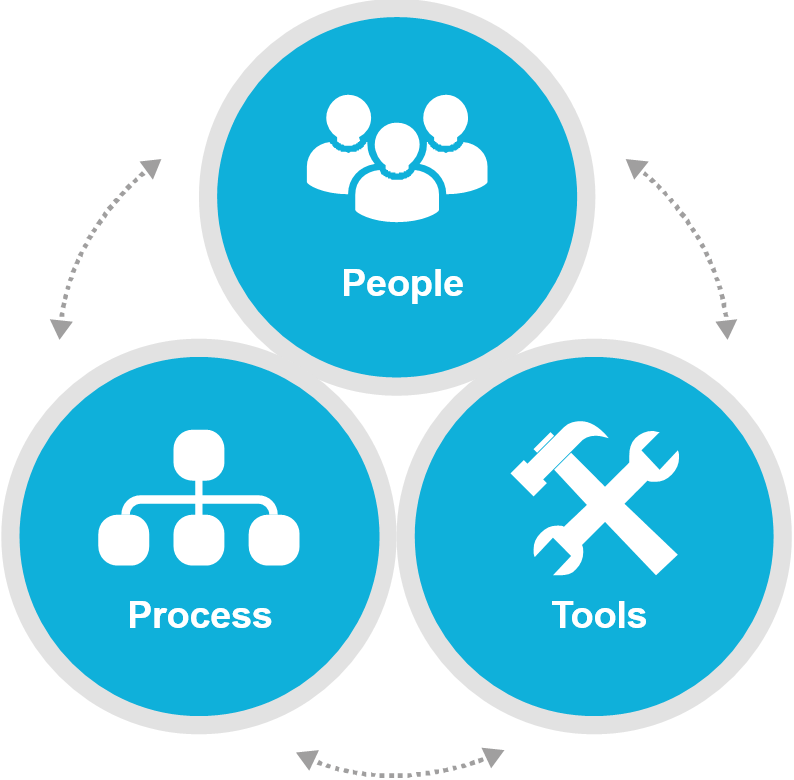
    1. People: Establish an organization-wide culture with the right set of skills to embrace lean and agile values – everywhere, across all teams, every day
    2. Process: Apply lean and agile principles in the planning, development, deployment and delivery of value and then monitoring feedback to improve – continuously
    3.  Tools: Provide a framework that enables the implementation of lean and agile practices – easily


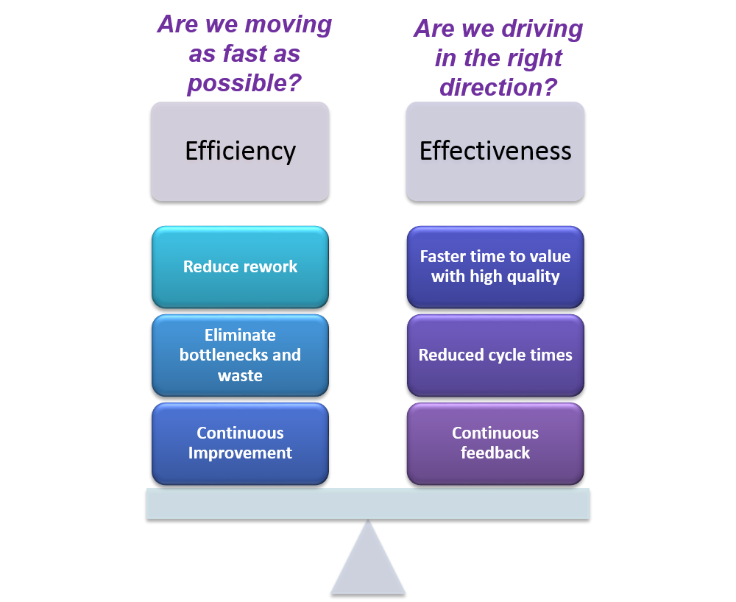
    The trick is to balance efficiency and effectiveness so that you can answer these questions in a positive way:Amy 3

    • Are we moving as fast as possible? Efficiency in execution is achieved through lean practices to minimize waste and maximize time in value added work.
    • Are we driving in the right direction? Effectiveness in execution is the result of smarter steering by quantifying value and cost tradeoffs through continuous feedback and better delivery analytics.

    Step 3: Adopt (at least) these three SAFe concepts:

    Kanban System: Kanban embraces lean principles to ensure that you invest just enough at the appropriate phase of your lifecycle within your capacity to do so. SAFe describes a phased analysis approach bounded by Work in Progress (WIP) limits and grounded in economic thinking to quickly rank work based on not only value but also cost.

    WSJF: Weighted-Shortest-Job-First is a value assigned to each of the key SAFe artifacts: Portfolio Epic, Program Epic and Feature. This value essentially defines an estimated return on investment and enables your team to consistently and relatively rank work across the Portfolio to drive priorities down to the Teams. Use of WSJF enforces the economic view in planning because it ensures that both value and cost are considered as you prioritize work.

    PI Objective: SAFe describes a Program Increment (PI) Objective artifact at both the Program and Team levels as a way to document expected and realized value in a relative way. Here, as with WSJF, consistency and relativity are most important, not precision. PI Objectives are also a way to capture the notion of acceptance criteria, which could guide solution-level validation.

    To learn more about our thoughts on SAFe and DevOps, try this: SAFe® with the Power of IBM DevOps.

    And please join IBM at AgileDC, October 26, 2015, Washington D.C. Submit a proposal through August 15, 2015. URL: http://agiledc.org/2015-call-for-proposals/


    About the Author/ Amy Silberbauer

    Amy SilberbauerAmy is a Solution Architect charged with the definition and delivery of the Enterprise Scaled Agile and IBM DevOps Plan solutions and strategy for the IBM Systems – Application Platform line of business. She is a recognized subject matter expert on scaled agile and software development lifecycle solutions, including enterprise modernization, SOA and collaborative DevOps. She has been with IBM for 28 years and has two decades of software development experience as an engineer, architect and manager. She is a certified SAFe® Program Consultant experienced in leading and consulting on multiple internal and external SAFe (Scaled Agile Framework®) transformations.

    Connect with Amy on linkedin

  • Librato Seeks to Unlock DevOps Application Monitoring

    Librato Seeks to Unlock DevOps Application Monitoring

    As wider adoption of DevOps methodologies continues to foster demand for new tooling to help streamline evolving workflows, at least one vendor is attempting to address the growing need for related monitoring capabilities.

    Librato, a San Francisco-based provider of Amazon AWS applications performance monitoring (APM) services, claims that it is finding favor among the rapidly expanding DevOps community driven by its ability to inject critical visibility into the engineering lifecycle.

    Acquired by Austin, Texas-based SolarWinds in January for a lofty $40 million and renamed Librato SolarWinds Cloud, the company is touting its recent adoption by well-known providers such as Slack for monitoring of DevOps-centric applications performance and health metrics.

    “At its core, DevOps is destroying conventional wisdom around ritualized processes and the need to perform them, mostly in the domain of scale,” said Dave Josephsen, Developer Evangelist at Librato. “By attempting to include monitoring as a key element of the development lifecycle, this has created a whole new range of challenges, and opportunities.”

    By providing a centralized Web interface and open API to help create visibility into critical applications engineering requirements, Librato maintains that it is creating the tooling necessary to empower integrated development and deployment processes, such as continuous change control.

    “There are a lot of disparate tools for monitoring individual engineering tasks, but there hasn’t been any practical way to bubble up that data for efficient monitoring,” Josephsen said. “Within the context of DevOps, change control is a ritual that we’ve abandoned as we’ve embraced test driven development and automated away the human element, so there’s a distinct need for monitoring of feedback and metrics.”

    For example, cloud-based productivity messaging specialists Slack are using the Librato “StatsD” lightweight daemon process to stream business and app-health metrics regarding PHP applications into the monitoring platform. Slack also leverages Librato to chart data regarding connect, query and fetch latencies for its server clusters, and to monitor internal metrics about overall system health.

    “Having those graphs side-by-side lets us clearly see and compare the effects of network latency on one of our new services, and that’s very cool,” Richard Crowley, director of operations at Slack, wrote in a recent testimonial posted to the Librato Solarwinds blog.

    Industry experts agree that broader adoption of DevOps strategies will continue to drive demand for relevant monitoring tools, with solutions such as Librato seeking to deliver “modern stack architecture for looking at the modern stack.”

    “I think that APM is always interesting because it’s always new,” said James Governor, industry analyst with RedMonk. “The pace with which we’re building new architectures to deliver services to end users is increasing all the time, and with every new wave of technology, we tend to get new and associated models of APM tooling.”

    Librato is taking advantage of the need for a system that brings together the elements necessary for cloud native monitoring, and in an agentless manner different from other competing tools such as New Relic, the analyst noted.

    However, whether or not the platform is able to break down traditional engineering siloes to enable more efficient DevOps management, as Librato officials claim, remains to be seen, he said.

    “Each wave of technology has promised to do this, to remove the inherent finger pointing, and each has always made the same claim to break down organizational firewalls,” Governor said. “DevOps hasn’t boiled the ocean in this manner yet, but there are some unique opportunities; unlike previous waves, where automation was intended to replace humans, this is now about augmenting people, and we are seeing that teams are choosing new tools from which developers can truly derive value.”

  • 28 DevOps and Continuous Delivery Reference Architectures (Vol. 2)

    28 DevOps and Continuous Delivery Reference Architectures (Vol. 2)

    People want to get going with DevOps or Continuous Delivery, but need a place to start.  Others are already on their way, but need some validation of their choices.  In April, I published the first volume of DevOps and Continuous Delivery reference architectures which has now been viewed over 37,000 times on SlideShare (it’s free to download…no registration required).  Three things helped people in the deck: (1) the reference architectures, (2) links to the sources for each architecture attached to each slide, and (3) no marketing fluff.

    [slideshare id=45996806&doc=nexusandcontinuousdelivery-150318110625-conversion-gate01]

    I am honored to have helped so many people on their DevOps and Continuous Delivery journeys.  So this month, I compiled Volume 2 of the reference architectures.  You can now view the deck on SlideShare, download it (again…no registration required), and share it with others.  Have a look and let me know what you think.

    As I did with Volume 1, if you have a reference architecture that you would like to share, I would be happy to add it into Volume 2 with full attribution to you.  Just ping me in the comments section or reach out to me @weekstweets.

    Here is Volume 2:

    [slideshare id=50972100&doc=devopscontinuousdeliveryreferencearchitecturespart2-150727141843-lva1-app6891]

  • Starting with DevOps from Day 1

    Starting with DevOps from Day 1

    The Not So Minimal MVP

    In the ever evolving startup space, developers often skip crucial steps in their haste to get to market. Even more so, in the dynamic app development market, the common notion of an MVP (minimally viable product) allows developers to iterate versions of their product based on issues and feedback. Seen in the context of horizontal technologies like Facebook and Twitter, the iteration period is where the real magic happens. Historically, the first versions at the “MVP” stage were bare-bones. That was then, this is now.

    As apps get better, people’s expectations are getting higher. This puts more pressure on startups to have an impactful product from the get-go. Features that used to be new and fascinating are now the expectation, so startups must adapt to have a strong 1.0 as a foundation for iteration. I recently saw an ad for a company calledCircleci whom I know little about, but the tag line was brilliant; “Launches are dead, long live iteration.” Apple and Microsoft may still have ‘launches’. Startups iterate.

    One way Zipline achieved a high-standard first version was by adopting DevOps via Rackspace DevOps Automation Service from our inception. Instead of migrating our app over to a more mature platform after many iterations, we decided to make the investment early. Here are just a few reasons how adopting DevOps from day one can help position a startup on the cone of a rocket ship:

    1. Understanding Scalability

    There’s a line of thinking that goes like this: First comes product, later comes scalability. We strongly disagree. When people hear the word scalable, they think upwardly increasing capacity and size. So it can wait, right? For startups, downward scalability is just as crucial. While most startups view DevOps as an option for the future, we found success by leveraging DevOps from our inception. Instead of waiting to implement a mature infrastructure like DevOps, we looked for partners that could give us access to managed services typically only available for big companies. We found success with large scale systems that were downwardly scaled to match our business need. DevOps gave us an opportunity to work with systems that were ahead of us in terms of technology and culture. Startups who view their product as agile, dynamic and iterative, but DevOps as only a static-run environment are making a huge mistake.

    2.Understanding Culture

    Hiring and retaining top tech talent is difficult –even more so for startups. But we noticed something profound as we grew our development team from one to seven: Talented engineers who interviewed with us expected our infrastructure to be novice. When they realized that our DevOps infrastructure rivaled that of the big company where they previously worked, their minds were put at ease. I’m not saying it always closed the deal, but it signals to a growing team that they are part of a winning culture. Building a winning culture starts from day one.

    3.Understanding the Cost of DIY

    Most developers capable of writing quality code are also capable of creating an environment to run the code. The cost seems so innocent at first. For a bootstrapping startup, common sense says “do it yourself”. Again – wrong.

    Nothing is more costly for a startup than distraction. Every minute should focus on your unique competitive advantage. I’ve never heard anyone say, “I use this technology because of their awesome DevOps.” What makes your company great? Strong DevOps for startups should eliminate distractions, sharpen focus and accelerate code commits.

    4. Understanding Collaboration

    Walk into most mature tech companies and you’ll notice something: The development team and operations team are separated into different spaces. Startups should exploit this vulnerability to gain a competitive advantage. Collaboration in small startups should be instant and in real-time. At Zipline, deploying DevOps from day one promoted a culture of open communication across all people involved in delivering our application. According to the Rackspace DevOps Automation Survey, 41% of organizations have seen better collaboration amongst project teams and 35% have seen more accountability across developers and operations for getting apps to market after deploying DevOps. Running a collaborative system allows us to focus on elevating our product in innovative and creative ways.

    5. Understanding Iteration

    Every system at a startup should iterate constantly. Take something mundane, like bookkeeping. If your system of keeping books isn’t better on Friday than it was when the week began, then you failed. The death of a startup can occur quickly. Iterate or die. So ask these simple questions every Friday, “Is our DevOps better than it was on Monday? If so, how? If not, what can we do to change it next week?”

    About The Author/Kirk Bowman, JD

    Kirk Headshot Bowman is the founder of Zipline Labs, Inc. A life-long entrepreneur, Kirk loves applying the mental rigor he honed as an attorney to creating innovative businesses that shift perspectives and evolve behavior. His endless curiosity and capacity for complexity unearths opportunities in the least likely of places. Now, he’s focusing his thought leadership in the financial sector. As founder of Zipline, Kirk is exploring how people relate to money and how technology can support an evolution to financial systems that are more social, more connected and more human. A master storyteller, Kirk is a compelling voice when evangelizing for his belief that if we can shift the way we feel and behave around money in both our personal lives and our work, we can create a better human experience.

    Connect with Kirk on Twitter: @kirk_bowman Connect with Kirk on LinkedIn: LinkedIn

  • 9 Open Source DevOps Tools We Love

    9 Open Source DevOps Tools We Love

    While we have been building our SaaS company, we have been investing much time in researching and deciding which tools to include in our DevOps toolkit. We’ve based these decisions on our years of experience in the IT industry, dealing with infrastructure for the most part. From building a petabyte-scale, data analytics infrastructure, our architecture, tools, and processes have become key components of our technology and operations. We’ve taken great care in selecting, benchmarking and constantly improving our tool selection.

    As a company that is building a solution on top of an open-source stack (ELK), our team is heavily involved in the open source community, contributing to multiple projects such as Camel and Kafka while customizing tools to fit our needs. The vast majority of tools we use internally are open-source ones. By sharing the toolset that we’ve collected and honed over time, we hope to foster a discussion within the DevOps community on what further improvements can be made.

    With that, we welcome you to enjoy browsing through the following list that we’ve created. Some tools you may have known about for years, while others may be new. Of course, we invite any and all feedback, especially from those of you who are using alternatives!

    Must-Have DevOps Tools

    1. Nagios (& Icinga) 

    nagiosInfrastructure monitoring is a field that has so many solutions… from Zabbix to Nagios to dozens of other open-source tools. Despite the fact that there are now much newer kids on the block, Nagios is a veteran monitoring solution that is highly effective because of the large community of contributors who create plugins for the tool. Nagios does not include all the abilities that we had wanted around the automatic discovery of new instances and services, so we had to work around these issues with the community’s plugins. Fortunately, it wasn’t too hard, and Nagios works great.

    We also looked into Icinga, which was originally created as a fork of Nagios. Its creators aim to take Nagois to the next level with new features and a modern user experience. There is a debate within the open source community about the merits of Nagios and its stepchild, but for now we are continuing to use Nagios and are satisfied with its scale and performance. The switch to newer technology, such as Icinga, may be appropriate in the future as we progress.

    2. Monit

    monitSometimes the simplest tools are the most useful, as proven by the simple watchdog Monit. Its role is to ensure that any given process on a machine is up and running appropriately. For example, a failure occurs in Apache, Monit will help to restart the Apache process. It is very easy to setup and configure and is especially useful for multi-service architecture with hundreds of micro-services. If you are using Monit, make sure to monitor the restarts that it executes in order to surface problems and implement solutions (rather than just restarting and ignoring the failure). You can do this by monitoring Monit’s log files and ensuring that you are alerted to every restart.

    3. ELK – Elasticsearch, Logstash, Kibana – via Logz.io

    logz.ioThe ELK Stack is the most common log analytics solution in the modern IT world. It collects logs from all services, applications, networks, tools, servers, and more in an environment into a single, centralized location for processing and analysis. We use it for analytical purposes (e.g., to troubleshoot problems, monitor services, and reduce the time it takes to solve operational issues). Another use for this tool is for security and auditing (e.g., to monitor changes in security groups and changes in permissions). After receiving alerts on these issues, it is easy to act on unauthorized users and activities. We also use ELK for business intelligence, such as monitoring our users and their behavior. You can set up your own ELK or buy it as-a-service. We’ve written a guide for the community on using ELK to monitor your application performance.

    Disclaimer: Logz.io is our ELK-as-a-service that we use in our own environment. You can say that we eat our own dog food.

    4. Consul.io

    consulConsul is a great fit for service discovery and configuration in modern, elastic applications that are built from microservices. The open-source tool makes use of the latest technology in providing internal DNS names for services. It acts as a kind of broker to help you sign and register names, enabling you to access service names instead of specific machines. If, for example, you have a cluster of multiple machines, you can simply register them as a single entity under Consul and access the cluster easily. We praise this tool for its efficiency, although we still feel there is more that can be done with it. If you also use it, it would be great to hear about your own use case.

    5. Jenkins

    jenkinsEveryone knows Jenkins, right? It’s not the fastest or the fanciest, but it’s really easy to start to use and it has a great ecosystem of plugins and add-ons. It is also optimized for easy customization. We have configured Jenkins to build code, create Docker containers (see the next item), run tons of tests, and push to staging/production. It’s a great tool, but there are some issues regarding scaling and performance (which isn’t so unusual). We’ve explored other cool solutions such as Travis and CircleCI, which are both hosted solutions that don’t require any maintenance on our side. For now, however, since we’ve already invested in Jenkins, we’ll continue with it.

    6. Docker

    dockerEverything that can be said about how Docker is transforming IT environments has already been said. It’s great…life changing, even — (although we’re still experiencing some challenges with it). We use Docker in production for most services. It eases configuration management, control issues, and scaling by allowing containers to be moved from one place to another.

    We have developed our SaaS solution with a twelve-layer pipeline of data processing. Together with Jenkins and Docker, we have been able to run a full pipeline across all layers on a single Mac. It would be wrong to say that there aren’t any complications with Docker, as even small containers can take a significant amount of time to build. However, we want to ensure that our developers are as satisfied as possible and enable them to work rapidly. With all of the management involved in storage, security, networking — and everything surrounding containers — this can be a challenge.

    We see Docker progressing and look forward to welcoming the company’s new management and orchestration solutions. For those who might be having issues with Docker, we’ve also compiled a list of challenges and solutions when migrating to Docker.

    7. Ansible

    ansibleAgain, simplicity is key. Ansible is a configuration management tool that is similar to Puppet and Chef.  Personally, we found those two to have more overhead and complexity to our use case– so we decided to go with Ansible instead. We know that Puppet and Chef probably have a richer feature set, but simplicity was our desired KPI here. We see some tradeoffs between configuration management using Ansible and the option to simply kill and spin new application instances using a Docker container. With Docker, we almost never upgrade machines but opt to spin new machines instead, which reduces the need to upgrade our EC2 cloud instances. Ansible is used mostly for deployment configuration mostly. We use it to push changes and re-configure newly-deployed machines. In addition, its ecosystem is great, with an easy option to write custom applications.

    8. Collectd/Collectl

    Collectd/l are nifty little tools that gather and store statistics about the system on which they run and are much more flexible than other tools. They allow users to measure the values of multiple system metrics and unlike other log collection tools that are designed to measure specific system parameters, Collectd/l can monitor different parameters in parallel. We use these two tools to measure customer performance parameters and ship them to our ELK-as-a-Service platform. We’ve specifically wrapped a Collectl agent in a Docker container and push it with Ansible to all of our servers. It collects information every couple of seconds and then ships it to ELK to allow us to run reports and send alerts. If you’d like to see a specific example of how we do this process in our environment and how others can do the same, we’ve created a guide for everyone.

    9. Git (GitHub)

    githubGit was created 10 years ago following the Linux community’s need for SCM (Source Control Management) software that could support distributed systems. Git is probably the most common source management tool available today. After running Git internally for a short period of time, we realized that we were better suited with GitHub. In addition to its great forking and pull request features, GitHub also has plugins that can connect with Jenkins to facilitate integration and deployment. I assume that mentioning Git to modern IT teams is not breaking news, but I decided to add to it to the list due to its great value to us.

    Other picks?

    The modern DevOps world is full of outstanding and unique open source tools—it’s a jungle out there. We found the tools listed here to be the best in breed and think they should be included in every DevOps engineer’s shortlist.

    Or am I wrong? What open source DevOps tools are in your toolkit? I’d love to hear your own recommendations and experiences in the comments below.