Category: Blogs

  • PTC: Using DevOps to Transform Applications

    PTC: Using DevOps to Transform Applications

    Large companies and monolithic applications are not usually associated with DevOps. But I recently discovered that some of the best DevOps operations have come from the largest organizations and most complex applications, and PTC is the latest example.

    If you are not familiar with PTC, the company has a wide range of offerings for enterprises looking to improve their operations. Its solutions range from enterprise resource planning (ERP) to product lifecycle management (PLM) and Internet of Things (IoT) platforms as a service (PaaS). Its existing products started as on-premises solutions, and have expanded to modern solutions including IoT. But now there is a large demand to convert them to cloud-based offerings. And as PTC goes down this path, it needs to have a modern delivery chain to support it.

    Enter Cloud Services

    So PTC created its Cloud Services group to deliver cloud-based versions of its existing platforms to customers. Its cloud-based offerings are subject to all the same demands of any other modern software-as-a-service (SaaS) and PaaS offering—faster releases, more frequent updates and higher quality. After a few years of building the Cloud Services group, the company has proven it can automate and improve delivery of its traditionally on-prem platforms in the same fashion as poster-child DevOps environments.

    The journey was not easy, and it did not start with DevOps as a goal. The goal was simply to deliver solutions to its customers. DevOps was the natural outcome following the challenges it faced. Some of the challenges were common for all development operations, but others were very unique:

    1. Lots of variables: PTC has to support a wide range of customers across a wide range of deployments. PTC works with its customers on their varying needs of platform versions and also understands their varying requirements around software updates. And each potential variation has a unique snowflake configuration, which, unlike most cloud platforms that offer one production version to all users, its entire ecosystem of releases is actually a wide range of configurations and versions.
    2. Data integrity: Data is important no matter what. But PTC works with customers that have had data in their on-premises solution for a long time, and that same data needs to make it to the cloud, securely, without a single flaw. That data is part of business-critical applications and ongoing business processes.
    3. Educating users: As customers continue on their journey to the cloud, PTC is there to support the changes and enable them through customer success, continuous knowledge transfers and an endless online platform of PTC educational services.

    So not only does it face technical challenges, it also is facing huge change control and people challenges. Before any software delivery can begin, there is a specific part of the Cloud Services group that is responsible for the necessary development to SaaS-ify the existing applications and build a gold master for each release.

    The initial delivery chain was hand-to-hand combat: one solution, one customer, one release at a time. This required a lot of warm bodies to manage manual release processes and customers.

    “We could not keep on throwing people at the problem,” notes Tameem Hourani, senior director of Cloud Services. Even though PTC had established workflows via ServiceNow, each step was manual and simply not scalable. But the customers and releases were increasing at an ever-climbing rate. It simply would not be feasible to on-board new team members to handle the load.

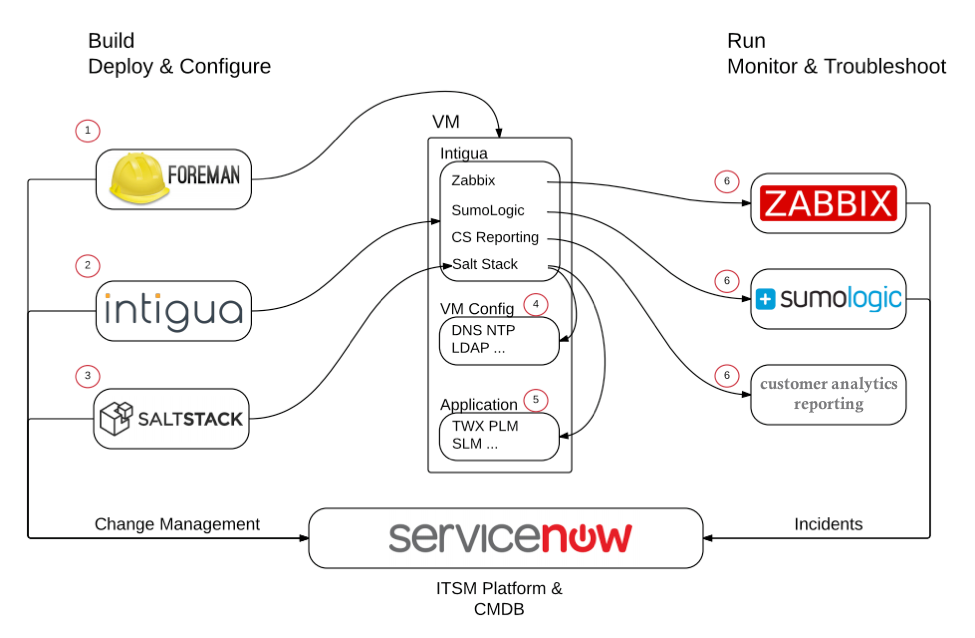
    So it turned to good practices and tools to build a delivery chain that can take care of a brand-new deployment in less than two hours, instead of days, and upgrades in less than 10 minutes. Here is what the resulting setup looks like:
    ptc_flow

    PTC was not new to automation. The company had been leveraging ITIL practices for some time. But what ITIL lacked was exposure to the customer. So with the ITIL backbone and ServiceNow in place, PTC added pipeline-level orchestration called Foreman.

    In this configuration, both ServiceNow and Foreman essentially act as a system of record for the entire environment. ServiceNow is the system of record for all states and workflows. It also is the base entry point for any new update or deployment. And Foreman is the system of record for infrastructure and configurations across all customers and all deployments. But it also serves as the “checklist” of all the aspects of orchestration.

    To manage the infrastructure orchestration and create the templates for configurations, PTC turned to Saltstack. It originally used another tool, but the benefit of Salt is that it allows for more sequential orchestration, as opposed to another tool with a stateful-only option.

    PTC uses another unique tool called Intigua. Intigua peaked my interest because I have previously talked about the overhead in both resources and management of server agents. And because so much of what is done for headless monitoring and control of servers these days is done by agents, this actually becomes a serious management problem.

    “The only way to grow a modern delivery chain is tools. And most new tooling is driven by agents,” Hourani notes. “It is easy to forget that the new tooling and processes also come at a cost. Usually the cost is less than the benefit they provide, but it is there nonetheless. Management of agents seems simple enough, but [when] actually doing this at scale, things can easily get out of hand.”

    PTC had four-plus unique agents across a wide range of configurations. One of Intigua’s value points is the ability to “self-heal” and make sure the agents are always running correctly.

    Once it is handed an IP, Intigua installs and configures agents based on tags, policies and AWS regions. When Intigua is running, it will make sure agents are up to date, and that self-heal agents go to work should something go wrong. The ability to use Intigua as a single pane of glass in a highly variable grid of configurations is a huge benefit.

    Triggered by ServiceNow, configured by Foreman, Salt and Intigua, the infrastructure and code are deployed. But to learn and maintain all environments for the customer, PTC needed some strong production monitoring tools. It uses SumoLogic, deployed as an agent via Intigua, for log analysis. For most applications, using a single instance of Sumo is fine. But PTC has to segregate an instance per customer, and the process must be fully automated. There is some overlap with another monitoring tool, Zabbix, which has been set up to attempt self-healing upon a triggered alert.

    And then there’s Jenkins. While not used for the entire deployment process, it is used to drive testing and manage states during the testing process. Upgrades to production releases are done incrementally, and complete deployments are done full-stack.

    Services Layers Are All the Rage

    Cloud services and shared services are not necessarily new. I recently did a write-up on Wix, which has a similar approach. But the complexities associated with SaaS-ifying on-premises solutions, along with the number of variables, adds not only another layer of complexity, but also another layer of value to a repeatable delivery chain.

    I am humbled by case studies like these, because it proves that those who say their environments are too complex for DevOps have yet to see what’s possible.

  • Managing Application Performance in Hybrid Clouds

    Managing Application Performance in Hybrid Clouds

    Keeping pace with changes to your networks, systems and applications can feel like a full-time job. As applications support more data types in more distributed environments—often in real time—it becomes imperative to have a clear picture of your end-to-end computing environment.

    Just as important is making sure your apps take advantage of the adaptability and efficiency of microservices, document data models and other cloud-focused technologies.

    All those much-touted benefits of cloud computing—efficiency, agility, scalability—come to nothing if your applications don’t perform as expected. The growing prevalence of hybrid cloud infrastructures makes managing app performance trickier than ever. According to a recent survey conducted by Riverbed and reported in a Jan. 29 article in Data Center Journal by Riverbed Marketing Director Steve Brar, 89 percent of IT pros claim poor application performance hinders their operations, with 58 percent report application performance glitches each week and 36 percent experience application performance problems each day.

    Even worse, 71 percent of the IT managers surveyed are “in the dark” about why the apps are running so poorly, and 37 percent have turned to unsupported apps to fill the breach when such problems occur, which exacerbates the growing problem of shadow IT. On the plus side, the managers believe that making application performance more visible improves productivity (58 percent), customer service (54 percent), product quality (49 percent), employee engagement (46 percent) and revenue generation (43 percent).

    Brar identifies five requirements to ensure end-to-end application performance visibility:

    1. Network- and app-aware path selection directs traffic to one of three branches: one MPLS-based, one IPSec-protected Internet link and one that exits directly to the Internet.
    2. Dynamic tunneling via a central control plane allows backhauling of branch data to the data center over an IPSec link.
    3. Use secure web gateways in conjunction with advanced threat detection.
    4. Use a QoS function that manages traffic from the source (inbound) rather than from the destination (outbound) to avoid slowing business-critical inbound data flows unnecessarily.
    5. Implement a unified management plane that has an intuitive interface and is based on such high-level abstractions as applications, sites, uplinks or networks, depending on the unique characteristics of your IT infrastructure.

    Cloud Application Management: The IT Basics Still Apply

    It isn’t unusual for IT departments to feel they’re losing control of their network infrastructure when they migrate applications to the cloud. Cahit Akin writes in an April 22, 2015, article on Network Computing that capacity management, change control and other IT fundamentals are just as important for managing your cloud infrastructure—if not more so, considering the likely increase in network traffic that results.

    The key is to consider the cloud part of your internal network architecture. Three WAN-optimization techniques transfer easily to cloud infrastructure management:

    1. Caching images and other common elements on the local device helps ensure network bandwidth is reserved for the most important data.
    2. Deduplication minimizes your backups and other secondary network traffic by ensuring only changed data is updated.
    3. Compression removes unnecessary data from files to make them smaller and reduce overall bandwidth use.

    The same features of a typical WAN optimization tool apply to improving the performance of cloud-based applications, notes TechTarget.

    The challenge for IT is to keep pace with the tremendous changes in the nature of applications themselves. Data is collected, aggregated and analyzed from diverse sources, including IoT sensors, clickstreams, logs and social media data, as Ravi Dharnikota writes in a Feb. 5 article on DataInformed. Dharnikota states that IT has to support “anything, anytime, anywhere.”

    Rather than a point-to-point approach to integration, you have to rearchitect your systems based on microservices that communicate via lightweight REST APIs. This way you distribute execution of integrations, which lowers costs and increases efficiency. If you aren’t already, you need to break out of the row-and-column rut and adopt document data models that support semi-structured and unstructured data.

    Design Apps to Leverage Batch and Real-Time Processing

    The only way to deliver an infrastructure that meets the anytime, anywhere nature of modern apps is to be adaptable enough to support both batch processing and real-time processing. Along with this comes the ability to determine which apps require real-time attention, and which can be shifted into batch-processing mode. Dharnikota cites the Lambda architecture as an example of one that accommodates batch and real-time processing by balancing latency and throughput.

    However, the Lambda architecture’s shortcomings are explained by LinkedIn’s Jay Kreps in a July 2, 2014, article on O’Reilly Radar. Ultimately, you have to maintain code that produces the same result in two complex, distributed systems. According to Kreps, it’s much simpler and efficient to improve the stream processing system to support both batch and real-time modes. Doing so would entail increasing the system’s inherent parallelism by “replaying history very, very fast.”

    MorpheusData-Kreps-parallelism

    An alternative to the dual-processing-mode Lambda architecture enhances the stream processing of a single-mode system to reprocess the full data log to mimic both batch and real-time modes.

    In this model, reprocessing is required only when the code changes. Rather than two full duplicates of your code, you simply update the single set. The recomputation is done by a job that is merely an improved version of the same code: it runs on the same framework and takes the same input data, although the parallelism needs to be increased to ensure fast performance.

    To optimize performance further, you could combine two output tables. However, having two separate tables, at least for a brief period, lets you revert to the old logic in an instant via a button that redirects the application to the older output table. To prevent the new version of the code from degrading performance in comparison to the old version, add an automatic A/B test or bandit algorithm that lets you control the cutover.

  • Five Harsh Truths About DevOps

    Five Harsh Truths About DevOps

    DevOps can provide tremendous productivity improvements, but it’s not a panacea. As much as we’d want it to be the solution for all of our software development problems, here are five truths you should consider.

    1. DevOps may lead to juggling job roles and coming out of your comfort zone

    Five Harsh Truths on DevOps_pic 1With DevOps, the development team is responsible for writing the automated scripts that deploy the application. That used to be manual work done by someone in operations. Just as in manufacturing, automation will eliminate jobs. Typically, that system administrator can be retrained to work in development writing those deployment scripts, but programming is a different skill from restoring databases. If you can’t adapt, it’s time to update that resume.

    2. Not everything should be automated

    Yes, DevOps can be made to work on any platform, including the mainframe. No, it’s not confined to projects using agile. You don’t have to use Ruby or PHP; it’ll work for Fortran applications too. But be realistic. Transforming an application to use DevOps is expensive. You should not invest in something that is slated for sunset, or only has one release per year to fix some minor bugs. Legacy systems are considered legacy for a reason. Focus on the top 20 percent of your portfolio instead.

    3. Developers will need to get their hands dirty

    Five Harsh Truths on DevOps_pic 2Some developers like to do one thing, and one thing only: write code. Grudgingly, they’ll test; they’ll attend team meetings if they have to; and, if tortured, they’ll write documentation. But forget about getting them to create the installation scripts.

    That mindset is not going to fly in a DevOps world. Developers need to think about how the application will run as a nonfunctional requirement, and treat it with the same level of importance as security, performance and data privacy. Unless they feel ownership of the installation process, monitoring the environment and collecting end-user feedback, you have not really implemented DevOps.

    4. Operations no longer can be ticket-driven

    Usually, the operations team doesn’t get involved until someone from the development side opens a ticket for deployment. That’s too late for any kind of meaningful integration. The answer is not opening a ticket three months earlier; tickets are meant to be assigned, worked and closed within a short period of time. The type of collaboration needed between development and operations is far more complicated, and should be treated like it’s a project. That’s really difficult for most operations organizations. It’s not part of their culture, and they’re not staffed for that.

    5. Your process is really, really bad

    Five Harsh Truths on DevOps_pic 3As soon as you start automating your software delivery process, you’ll find out exactly how inefficient it really is: duplicate reviews, inconsistent forms, competing standards … When you take away the people layer, you can’t hide the crazy anymore. You don’t want to take what you have today and force it into an automation tool. You will need to standardize before you optimize, and optimize before you automate. That means a lot of different towers will need to cooperate—something that won’t happen unless there is an outside party driving the cooperation with a big stick.

    To learn more, check out the hangout with industry experts: What will DevOps look like in three to five years?

    What aspect of DevOps do you think people are uncomfortable to talk about? Leave a comment below or contact me @baspluim

    About the author / Jan S (Bas) Pluim

    Bas Pluim

    Bas Pluim is a Cloud/ DevOps solution architect in IBM’s innovation practice. He works with clients on infrastructure solutions, process re-engineering, automation tools and transforming the overall software delivery process. Bas is also a member of the IT Specialist certification board, a gaming enthusiast and an advocate of social media tools

  • Enterprise Cassandra Deployments

    Enterprise Cassandra Deployments

    Successful Cassandra deployment in the cloud takes a certain amount of skill and knowledge. In this blog I will share best practices for a successful Cassandra deployment in the cloud such as Amazon Web Services (AWS) and Google Cloud Platform (GCP). I will also discuss how you can protect and recover the data in your Cassandra cluster when deployed in the public cloud.

    Cassandra Deployments in the Public Cloud

    There are two main ways to have successful enterprise Cassandra deployments in AWS:

    • Use a ‘managed’ Cassandra deployment. This is a reasonable approach; the only downside is the inability to customize data placement beyond what is typically provided by the vendor.
    • Manage the cluster yourself, if you want to have full control over your Cassandra deployment and customize it to scale and perform according your business needs.

    Please refer documentation from Datastax or Apache Cassandra for detailed best practices for Cassandra deployments. The following best practices are reiterated here to simplify deployment of a scalable Cassandra cluster in AWS.

    Storage

    Both AWS and GCP offer two types of local storage options for their compute instances. For AWS, the options are Elastic Block Storage (EBS) and Ephemeral Storage. In GCP, the options are Persistent Disks and Local SSD. Both options have their own trade-offs. Pick the one that best suits your deployment.

    Persistent Storage

    EBS volumes have performance characteristics similar to network storage such as a NAS or SAN. Because storage from EBS volumes is multitenant in nature, it is not suitable for distributed, log structured databases such as Cassandra. If you want to ensure reliable performance through EBS volumes, use “EBS optimized instances” with “provisioned IOPS.” Since the IO traffic to EBS volumes goes over the instance network, EBS optimized will provide reliable performance, but does not guarantee any increased performance. To get the most performance out of EBS volumes, use instances with multiple disks and separate the volumes used for “Data” and “Commitlog.”

    If you have to use EBS Volumes, go with “EBS Optimized Instances,” with “Provisioned IOPS” and split data and Commit Log on different volumes.

    Ephemeral Storage

    Ephemeral storage is a great option to use for downstream Cassandra environments such as test/dev and staging. Since ephemeral volumes are typically SSDs, there is no need to separate the data and commitlog into separate drives. To optimize performance, choose EC2 instances with multiple ephemeral storage drives and stripe them together into one logical volume. Send data and commitlog to the logical volume. Remember that when you stop the EC2 instance, the data in Ephemeral storage will be deleted.

    Stripe all Ephemeral drives into a single volume to get maximum performance.

    Data Distribution

    Cassandra uses Snitch to determine the topology of the cluster. The Snitch is also used to determine the data center and rack for each node in the cluster. Replication strategy is used to determine the placement of data across the different nodes in the cluster.

    AWS

    1. EC2Snitch works well for single region deployments.
    1. Ec2MultiRegionSnitch works well for cluster distributed across multiple AWS regions. Please note, Multi-DC, Active-Active configuration makes your cluster resilient to region failures and for multi-dc cluster, use “local quorum” to improve performance.

    Google Cloud Platform (GCP)

    1. Use GoogleCloudSnitch for Cassandra deployments in GCP.
    1. GoogleCloudSnitch treats regions as Cassandra data centers and availability zones as racks.

    Other Features

    Both AWS and GCP offer a series of operational capabilities that seem to make it easier to maintain high uptime on Apache Cassandra cluster. These capabilities have to be chosen carefully depending your deployment needs.

    1. Load Balancing: Network-level load balancing service is offered by both AWS (Elastic Load Balancer) and GCP. It is not recommended to put a load balancer in front of Cassandra. It is better to use a client connector that can handle this, consider open source utilities such Presto and Astyanax
    1. Autoscaling: Both AWS and GCP offer Autoscaling facility for compute instances. However, although this functionality looks very enticing, putting all C* nodes in an autoscaling group will not produce the desired result. Instead, create a separate autoscaling group of ‘1 node’ for every node in your cluster. This will ensure that anytime a node goes down, it is automatically brought back up. This will ensure the cluster data placement is not disturbed when nodes go down and nodes coming up do not cause excessive data movement.

    Scalable Backups and Reliable Point-in-Time Recovery

    Backing up your data is a must-have for enterprise organizations. The impact of data loss is so high that no enterprise wants to risk relying alone on replication. Protecting data in a public cloud environment may seem daunting, but there are several options available that can make this easier compared to an on-premise deployment. A simple option may look like one of the native snapshots:

    Storage Snapshots

    I have seen few customers use snapshots of EBS volumes as a way to protect the data in their cluster against logical and/or operational errors. This solution will work but with some severe limitations. On top of the overhead of maintaining the scripts to take snapshots, there is a large overhead in storage costs. Taking a snapshot of volumes does not allow for incremental backups of your data. This causes an exponential bloat in the amount of data stored in snapshots, leading to high cost of the backup solution.

    Amazon S3 or Google Cloud Storage

    Using an S3 bucket as the secondary storage enables enterprises to use low-cost, highthroughput storage, while reducing overall operating costs for storing backup data. Here are a few recommendations when using S3:

    1. S3 Region: Amazon S3 buckets are region-specific. A bucket created in one region will provide better performance characteristics to other infrastructure in the same region. Subsequently, it is important to ensure the S3 bucket used as the secondary storage is in the same region as the production database being protected and the Datos IO cluster.
    1. Storage Class and Lifecycle Policy: Amazon S3 allows users to create lifecycle policies on buckets. These policies dictate the performance and response time characteristics of objects in the bucket. STANDARD_1A is more suitable for longer lived and less frequently access data, and is not suitable as secondary storage. Additionally, do not turn on any lifecycle policies on the buckets used for the secondary storage. All buckets should be in the standard storage class.

    Conclusion

    As enterprises leverage the agility provided by public cloud environments, it’s important to understand the various facets of Cassandra deployments to ensure the efficient use of your money and time.

  • Continuous Delivery and Deployment: A Tale of Two Models

    Continuous Delivery and Deployment: A Tale of Two Models

    EnerNOC (Energy Network Operations Center) is an energy intelligence software provider with more than 1,300 employees in its Boston headquarters and international locations. The public firm helps global customers to efficiently consume energy. “Our mission is to change how the world uses energy, helping customers to improve profitability and visibility for better decision-making and sustainability by focusing on how they buy energy and when and how they use it,” says James Nichols, principal engineer and cloud architect at EnerNOC.

    A regular user of Splunk (the company uses other DevOps tools and platforms as well, including AWS and Oracle), EnerNOC has fully automated monitoring in its perpetual drive to move past continuous delivery and on to continuous deployment.

    Embedded in EnerNOC’s story of why it uses continuous development and continuous deployment models is a chapter on its move to fully automated monitoring.

    EnerNOC DevOps Models

    EnerNOC’s DevOps model is in constant transition toward full automation. Currently, it has fully automated deployment, fully automated monitoring and semi-automated quality assurance (QA), which pull the company’s continuous development approaches.

    A change to “builds on commit” of smaller applications within the legacy software monolith at EnerNOC came hand in hand with further automation, targeting what the company calls “trustworthy continuous deployment,” Nichols says. That was the crux of EnerNOC extending itself into deployment automation.

    Wherever the model is not fully automated and continuous in deployment, it remains continuous delivery. “Most of the variance between the approaches is due to aspects of the delivery pipeline that still have manual processes; these parts are usually comprised of the remaining manual testing procedures,” says Nichols.

    Change Control Necessitates Two Models

    EnerNOC develops and maintains mission-critical software that must pass through a change management approval process. This process includes communications within and across the company and customers, as well as user acceptance testing. This is where the manual testing comes in. Only at the end of this approval pipeline can EnerNOC pass the software baton into the hands of production.

    Due to EnerNOC’s tightly yoked systems and the manual testing, change control remains, along with a mix of continuous development and semi-automation with fully automated continuous deployment. “DevOps is a cultural movement as well as a technical one, and so the existing model could evolve with the organization’s quality and maturity evolutions,” says Nichols. If the manual testing and the relationships between systems give way to more fully automated testing and more amenable relationships, QA could more closely embrace full automation.

    Monitoring Challenges/Achievements

    EnerNOC’s application diversity includes hybrid software with a foothold in the Amazon cloud, in EnerNOC’s data centers and on-premises. “We use three tiers on top of Oracle in the data center. In AWS, we use a combination of big data, cloud-friendly and serverless technologies,” says Nichols. Business transaction data traverses many machines that belong to service groups’ stakeholders. “The distributed, decentralized architecture makes troubleshooting, performance management, security operations and production operations challenging,” notes Nichols. Better monitoring was the answer.

    EnerNOC wanted to offer nontechnical users easy access to systems-level monitoring data with transparency into the many systems through a single pane-of-glass dashboard with readily available system notices and troubleshooting abilities. “We would use Splunk to do this and then feedback everything we learned from using Splunk into driving our DevOps and engineering processes into the future,” he says.

    The EnerNOC DevOps performance team built the dashboard that accompanied the Splunk service, ensuring it would register the performance metrics that are of value to the organization. The performance, product management and development teams maintain an awareness of the metrics and receive the related alerts. “The development team incorporates the ongoing metrics early in the development life cycle to improve application performance,” says Nichols.

    EnerNOC first applied Splunk to web logs for operational capacity planning, then used Splunk to give the Ops team transparency into the function of its new real-time data product that was working in production. As new products came on board, the organization added them to Splunk to provide Ops teams with dashboards, at the urgent request of Ops team members.

    Current Status: All Systems Good

    EnerNOC applies Splunk to test and production systems for views into consistency and acceleration. “Splunk is our primary alerting infrastructure for low-level system metrics like CPU utilization as well as for complex business transactions that span multiple systems,” says Nichols. Splunk has eyes on application health, cluster state across machines, expected systems tasks and suspect or known-bad system behavior, as well as the presence or lack of any significant event.

  • The War with Human Nature

    The War with Human Nature

    What is the difference between “leading” edge and “bleeding” edge? Being the first human being to advocate change.

    It is a virtual war with human nature to accept change. For all the innovation introduced into our society, most of it is a product of invention over evolution. Don’t get me wrong: Once we find something that works, we inherently work tirelessly to make it better, thus evolving it over time. But the genesis of the “new” is easier to accept as creation—a new idea, a new innovation of our own—than a change in direction, a forced acceptance of the ideas or creations that were “not invented here.”

    In the workplace, most employees are looking for personal security, for a feeling derived from consistency and predictability in the day-to-day work activities. Anything that threatens an employee’s ability to continue to secure compensation becomes something that inherently meets our resistance. The No. 1 culprit: you guessed it … “change.” As long as what I do remains the same, over time I will get better and better at it. Practice makes perfect. But when something “new” is introduced in the actions I am supposed to perform, there is a risk that my value, my expertise, will be reset to zero and perhaps I will not be valued as I once was. This threat to my compensation is real; therefore, my resistance to it is equally real.

    Programmers Found Guilty

    You would think that engineers and those working in the software industry would be exempt from this phenomenon. But most are not. Finding an ex-Cobol, ex-Clipper, ex-Windows, current mobile Apple iOS programmer is like finding a unicorn in Central Park. Most successful Cobol programmers are still Cobol programmers, looking for jobs in mainframe shops, content to see the new generation of programmers not competing for their declining job markets. The early generation of programmers minted after the adoption of the PC computer tend to know less about Cobol and RPG-3 and more about PC-based programming languages such as GW-Basic and Pascal (at least the older ones). Programmers minted after the Windows graphical adoption know more about that generation of coding languages, and so on, and so on.

    The basics of coding have remained the same since the advent of this discipline. We create a list of instructions, in sequential order, that the computer must execute to produce a desired result. There are nuances to this, and an explosion of capability in this, but the basic principles remain much the same. Yet, programmers well-versed in a particular language are shy about learning a new one, unless the platform is similar, the features are similar (albeit improved) and the belief is high that they will be successful in the new language quickly. There is no reason why a Cobol programmer could not be successful creating mobile apps. Or, for that matter, a mobile app developer could try his hand at Cobol. But it seems neither do, at least not very often.

    What happens instead is that each programmer begins to establish his/her own ecosystem of support: simulation models that imitate the platform responses, highly evolved text entry tools that auto-format code and check for omissions such as missing parenthesis and scripted tools that perform the mundane tasks we need to build (or construct) new versions of code or deploy a build into a new environment. This same ecosystem of support will exist for database, network and middleware engineers as well. The tools will be decidedly different, but the reasoning for them tends to be identical: to make things easier to do.

    Looking for a Magic Bullet

    There is no cure for breaking down the resistance to change, except constant exposure to it. However, forcing employees to face perceived threats to their value—and their compensation—will, at a minimum, produce exorbitant stress at work—or, worse, an employee turnover rate that would rival donuts next to a police station. The goal is to introduce change that will ultimately increase the value of an employee, as well as potentially increase the compensation they worry about. This is where the DevOps value proposition must be created for each impacted audience. A generic value statement is not enough, nor is a mandate by top company executives. You cannot “force” people to adopt something new, anything new.

    Creating the right value proposition must be specific to the audience you seek to adopt the “new” system, tooling or process. DevOps is a continuum of all three (people, process, technology). So for the database team, for example, changing out the ecosystem it has evolved into a new set of tools and processes, may seem like a hard sell at first. The advocate of DevOps (whether the exec teams or the service teams delivering it) must be able to articulate the value proposition clearly to the database teams.

    “Why” should they move to a newer ecosystem? A stubborn engineer can always point out the holes in your tool and the beauty of his own. He/she will likely have evolved his/her own support ecosystem to a state of near utopia … but only for himself. Usually the processes and tooling engineers use to make their own lives better do not scale to others in the department. And God forbid some other engineer updates “their” scripts or makes changes to “their” process. While this is wonderful for the engineer who creates it, it is miserable for anyone else attempting to use it.

    Constructing a Value Proposition

    The value statement must trade prima donna utopia for scale. Using common DevOps tooling, it is possible to support many more task requests than most individually constructed ecosystems can handle in a given day. And believe me, those task request increases in volume are coming. For example, an Ops engineer may be able to handle provisioning five systems a day with his own tooling, but when requests come in to provision 50 or 100, he is dead in the water. Having the Ops engineer help manage the deployment template or framework allows users to self-serve on provisioning requests and keeps him from having to do everything for everybody. His job is different but every bit as important.

    The value statement must trade current skills proficiency for next-generation, market-valued skills. In effect, a database guy is valuable, but a DevOps database guy is considerably more valuable, or a “big data” database guy, or a IoT database guy … pick your poison. Whatever you are today, whatever skill set you have, the jobs that pay more money are the jobs that fewer people know how to do. At some point, a lack of DevOps proficiency will relegate an engineer to the pages of history. On the other hand, adopting and embracing DevOps will allow engineers to get the training they so desperately need to keep their career “fresh.”

    Finally, the value statement must trade today’s earnings for tomorrow’s increase in earnings. Companies that embrace DevOps are going to either save extreme amounts of overhead by staff reduction remaining at the same level of innovation productivity. Or, they are going to increase innovation productivity levels radically, making them leaders in their respective space by meeting customer demand much faster with higher quality (the path most taken). Either option should translate into higher compensation for employees who embrace DevOps. If companies do nothing to increase employee comp, choosing only to increase profits, competing firms will be happy to poach them and pay them more instead. This forces more costs in recruiting, training and employee turnover when it happens again.

    A Human Strategy that Works

    Your strategy for training employees to embrace change should be particular to the kind of work they do, and reflect the things that will matter to them. If you need help crafting a strategy let me know, I am looking at the moment 🙂 . Not every team will be as critical to the overall success of DevOps as perhaps your engineers are, but the value proposition should adjust for this fact. Keep in mind, if the change is less, then the resistance will be less as well. Your accounting, HR and legal teams, for example, may not feel the impact of DevOps as rapidly or as severely (in terms of change); thus, their resistance may be less, but it is likely more than zero.

    DevOps is about people, process and technology. It is in that order, with a heavy emphasis on people and a relatively light impact from tooling. And it will succeed or fail based on the embrace of people, process and technology. Process and technology do not care about change. People do. Since people are the largest priority or component of DevOps, it is their fears that must be addressed and their value that must be enumerated to succeed.

    To continue the conversation, feel free to contact me.

  • Best Practices for Cloud Deployment

    Best Practices for Cloud Deployment

    When it comes to deploying apps in the cloud, the conventional wisdom is that DevOps is not required if you’re a small or midsized company. The cloud is designed to enable virtually anyone to set up the infrastructure they need, quickly and easily, without a lot of experience in the intricacies of managing data center operations or hardware. But then, by the time the company realizes it needs DevOps, it’s almost too late—the cloud infrastructure has become complex, costs have exceeded expectations and precious time is being wasted.

    To ensure you’re able to optimize cloud, or hybrid cloud, deployments—and avoid many of the problems that other companies have experienced—there are a number of best practices you must employ within your company.

    Best Practice No. 1: Realize You Need DevOps from the Start

    When you manage your own hardware, you know exactly what the deployment costs are and what resources are available, and have a clear understanding of how they are interrelated. The abstraction of the cloud makes the initial setup a snap. But typically there is no formal structure involved: Individual developers can initiate new instances whenever they need them, without considering the bigger picture of the resources already in use, how they’re used or what is being planned by the organization.

    Spinning up unnecessary cloud resources not only costs a company more in the long run, it also leads to a cloud sprawl that requires time-consuming, manual processes to maintain. Think about the challenges your company would face if it had thousands of machines created by different processes but you didn’t know who created them, what they were being used for or  even if they were still needed.

    By employing DevOps from the start, you will be able to balance the needs of developers with the availability of resources in the cloud to ensure expenses do not run out of control and you understand exactly how the cloud infrastructure is being used now and into the future.

    Best Practice No. 2: Have a Process and Purpose

    As you create your cloud infrastructure, you need to have a clearly defined purpose, as well as a process in place for deployment and ongoing management. You will need to keep track of what resources are being used and their designated purposes. Some cloud vendors, such as AWS, offer tagging capabilities that help you keep track of what services each machine was created for and whether they are being used for production, backup, load balancing or testing.

    Regardless of whether you use tagging capabilities or maintain a separate database of cloud resources, knowing what you have purchased and how it’s being used will provide needed visibility, ease of management and greater control of costs.

    Best Practice No. 3: Leverage Automation

    Automation is important—both in the cloud and on premises—to streamline routine practices, make sure they’re applied consistently and eliminate potential errors that are common with manual processes.

    When deploying on multiple clouds or in a hybrid environment, it is important to understand that tags used for one cloud provider won’t work on another. The process is typically broken into three steps: inventory creation, system preparation and automatic deployment. Many cloud systems allow you to create a dynamic inventory directly from the servers, eliminating the need to create or maintain it manually. However, deployment over multiple clouds require an abstraction of this inventory; it is common to create a static inventory in a unified format from the various dynamic inventories.

    Best Practice No. 4: Design the Network with Security in Mind

    Poorly designed networks are almost impossible to secure. Problems often arise when companies allow their networks to grow organically rather than being planned out in advance. A number of companies have employed the best practice of segregating the services network and the management network. The services network includes all the components required to provide services to your customers and users, while the management network is comprised of what you need internally to manage the network. Separating these networks provides greater assurance that unauthorized users cannot gain access to your systems via the Internet.

    Another part of security is key management. Depending on the cloud provider, keys can be widely available or have a root password that is open to the world. In fact, many hackers routinely scan Github for keys developers accidentally check in. With having to manage so many keys, you may struggle to ensure that they’re not exposed. DevOps plays an important role in keeping the keys locked away, then providing them to a select group of individuals who can use them only in production.

    Best Practice No. 5: Be Strategic About Monitoring

    When you’re deploying hardware on-premises, it’s a common practice to define in advance what to monitor. But monitoring in the cloud is quite different, with basic defaults that produce vast quantities of data—much of which may not be relevant to your organization.

    Taking a cue from how you handle monitoring on-prem, you’ll want to design cloud monitoring to fit your company’s unique needs and filter out the information that isn’t pertinent to your network or operations.

    Best Practices Go a Long Way

    Keeping in mind these best practices and employing a DevOps model from the start will enable your company to get the most benefits from its cloud deployment regardless of its size, and avoid the costly and time-consuming challenges that arise without proper advanced planning and a strong focus on network design and processes.

    About the Author/Roger Fulton

    roger-headshot

    Roger Fulton is Iron.io’s director of Infrastructure and Operations. His background includes broad experience in software architecture and operational planning. He manages international teams to deliver highly available products for end users and highly performing in-house infrastructure. Prior to joining Iron.io, Roger served as head of application and infrastructure engineering at Kaybus. He has also held technical leadership roles at JRV Consulting Group, Cybrata, Invisible IT and Clarus Systems. Roger holds a Masters from the Queens University of Belfast, having graduated with highest honors.