Category: Blogs

  • 10 Top Tips for DevOps Cultural Change

    10 Top Tips for DevOps Cultural Change

    DevOps is commonly recognised to be primarily about creating a culture of effective and seamless collaboration but this is often the hardest piece to enact when it involves changing an existing culture (as opposed to creating a culture from scratch in a startup type environment and having the luxury of hiring individuals with certain mindsets and defining working practices from day one). So how can you change culture? Here are our top ten tips:

    1. Learn to Trust

    It sounds a little cheesy I know, but at the core of what DevOps is trying to fix is the conflict that has come about from years, decades even, of development and operations teams being segregated from one another and not being enabled to communicate, let alone collaborate, effectively. This situation has been exarcebated by the pressures to innovate and push rapid change battling with the need to stabilise fragile systems – and created what James Turnbull described as a ‘toxic’ working environment.

    So the very first thing that needs to happen is a unified agreement and understanding that we are all on the same team.

    DevOpstastic Tip ~=>
    Take some time to review your individual and team goals and ensure none are in conflict. Then create a single goal that brings everyone together. Get everyone to agree it. Fire anyone that can’t. Kind of joking – but kind of not.

    A change in culture will demand changes in the way that you do your daily work – habits will need to be broken.

    DevOpstastic Tip ~=>
    Shift left – arrange your teams around projects not linear tasks and involve operations staff who will be responsible for your application in production much earlier in the process. Being involved sooner will help them plan for when the code is ready and feel they also have some skin in the game.

    2. Understand Motivations

    Conflict often occurs when people don’t understand each other – I’m sure we’ve heard the phrase: “They have a personality clash” countless times over the years. Humans and our brains, personalities, backgrounds and characters come in a whole heap of flavours and this is a good thing since, as my mother always says: “It would be boring if we were all the same.” However, sometimes at work, under pressure, it’s difficult to take the time to understand why someone is reacting or thinking differently to you and the immediate response is to fight or denounce it; not just unpleasant but downright unhealthy.

    So if we accept we are all on the same team, how can we all get to know each other better and grease the wheels of collaboration? I know I’ve been subjected to countless team-bonding exercises that I’ve found quite excruciating over the years so I am applauding the new wave of neuroscience that allows us to be a little more exact about what’s going on in our heads than just try and decide whether I am a green or red personality type.

    Our particular favourite at the moment is SCARF from The Brain at Work – the premise is that the same reward circuit in our brains that we use for survival and defence is also used for our motivations at work. So if I am motivated by Autonomy (the ‘A’ in SCARF) and someone at work attacks my sense of autonomy in the workplace (by, for example, micro-managing me) I will have the same neuro-response as if they made a direct attack on my life – including the release of the related neurochemicals, in this case, cortisol, the stress hormone. Similarly, if something happens to reinforce my sense of autonomy (for instance, an event I created has an excellent turn out and feedback) I feel great and get a nice rush of dopamine.

    DevOpstastic Tip ~=>
    Have a SCARF workshop with your team(s) and ask everyone to complete this self-assessment first, share the results and discuss. We don’t always agree with the results of this assessment tool but finds that only adds fuel to the fire of debate.

    My key takeaway here is that we should try to understand ourselves first, and then those around us (a bit more ‘fluffy’, but this is about mindfulness). Having this level of insight into ourselves and our colleagues means that when conflict occurs we have a better chance of taking a breath and understanding what’s really going on, remembering we share that common goal and working closer together, collaborating to reach it.

    We’ve more recently also starting working with unconscious bias – we’d love to hear from you if you have any experiences in this area.

    DevOpstastic Tip ~=>
    If you want to know if you have unconscious bias you can test yourself using Harvard’s online Project Implicit testing tool.

    3. Eliminate Blame

    Let’s start by watching one of my favourite DevOps videos – here you are:

    [youtube http://www.youtube.com/watch?v=2PjVuTzA2lk?wmode=transparent]

    If we’ve taken on board tips one and two and are now in a ‘circle of trust’ we should be able to avoid this kind of finger-pointing blame game. There is no place for blame in a DevOps culture – it is a pointless waste of emotion. We need to understand what went wrong in a retrospective but the most important thing is how to make sure it doesn’t happen again.

    DevOpstastic Tip ~=>
    Try running a blame free post mortem/retrospective next time you have an outage. Here are some retrospective plans you might want to road-test.

    4. Embrace Smart Failure

    In order for businesses to thrive, survive, even, in today’s uber-competitive markets, innovating at speed is an imperative. When we are assessing organisations’ DevOps cultural maturity, one of the features we measure is the organisations’ capability to ‘dance around the edge of failure’. Innovating at hitherto unseen velocity introduces a whole host of risk that must be mitigated. Systems need to be created that can warn and pre-empt failure and capabilities need to be implemented to do things like instantly redeploy a last known good state or working version of an application in the event of a failure. In no way are we suggesting that failure should be celebrated.

    In addition to creating an safe environment, where failures are quickly and easily fixed, you can also prepare for failure by spending some time prioritising features and architecting applications in a composable manner – for example, your business transactions are probably more important than your social feeds. At a recent workshop we were told a story of how the French railways online ticketing application was down for three days due to a problem with its analytics – if the components weren’t so tightly coupled, the users wouldn’t have suffered as the reservations system could have been operating standalone.

    DevOpstastic Tip ~=>
    Study Netflix’s Chaos Monkey approach and identify a way to test failures safely in your infrastructure.

    5. Focus on Bottlenecks and Flow

    If you’ve read The Phoenix Project you’ll know all about The Theory of Constraints – our favourite summary of the concept is that “Any improvement not made at the constraint is an illusion”. Work hard as a team to identify the real constraints – and watch out for that common pitfall as described via the Brent character in the book that those people who often look like heroes are, in fact, your bottleneck. Try to understand the real value to your business of each improvement and prioritise them accordingly.

    DevOpstastic Tip ~=>
    Try playing ‘Featureban’ – exercise #7 in our DevOps LiftOff Workshop

    Don’t be afraid to rethink your process or find a new pair of eyes to see the things you can’t because you are too close. Check out this video to see the improvements motor racing have made to their process over the last fifty odd years – check out the resource utilization, perfect process and automation in 2013:

    [youtube http://www.youtube.com/watch?v=RRy_73ivcms?wmode=transparent]

    6. Eliminate Unplanned Work

    Another major topic from The Phoenix Project and a universal complaint we hear from organisations when we start working with them: “How do I find the time to save time?”. People know their processes can be improved and there’s a good chance automation could exploit advantages even further but if the culture is to keep doing things that are breaking and broken it’s tough to put aside the hours outside of the firefighting to make DevOps happen.

    It’s nigh on impossible to tell a business they can have innovation or support but not both but it’s sensible to get a handle on the projects running and the resources available and the volume of unplanned work coming through the pipe. Some lower priority projects may need to go on hold while the DevOps project has higher priority – this will probably need to be mandated from management and have a solid case behind it that all subsequent projects will be accelerated as a result once the foundation has been laid.

    DevOpstastic Tip ~=>
    Read The Phoenix Project – what on earth are you waiting for?!

    7. Be Continuous

    There a lot of these out there – we’ve seen continuously:

    • integrate code
    • test
    • integrate
    • deploy
    • deliver
    • fund

    The idea is to always have software in a shippable state and have a DevOps toolchain capable of deploying on demand – have your software development lifecycle like a manufacturing pipeline.

    Our favourite here though is ‘continuously fund’ – as Forrester say:

    “Organizations that deliver at rapid release cycles create a stable basis for funding a continuous stream of innovation. They use customer feedback and business priorities to continuously prioritize the capabilities that will result in the greatest business value.”

    DevOpstastic Tip ~=>
    Try setting a pre-approved innovation budget and short, iterative approval cycles rather than annual, large project driven budgets.

    8. Form Dedicated, Cross-Functional Teams

    Lots of people ask us about creating DevOps teams, something we think it mostly counterproductive as it has a tendency to create another silo. However, there are challenges here as it’s impossible to make everyone a master of everything, particularly in the case of more complex technologies. Simpler technologies can have the advantage of bringing people closer to business.

    We recently held a workshop with Jonny Wooldridge, the CTO at The Cambridge Satchel Company where we discussed the DevOps team he built and managed during his time at Marks and Spencer. Jonny’s team acted more like a ‘tiger’ team, where key resources could be drafted into project teams as needed to evangelise the DevOps way and help cross-skill through the project lifecycle.

    DevOpstastic Tip ~=>
    When you are considering bringing on a new technology, consider the time to mastery – the shorter this is, the better chance your team has for cross skilling for it.

    The key is to get everyone thinking in a DevOps manner and cross-skilling and obtaining mastery as time and resources allow – but arrange your resources around projects, rather than their core skillset.

    9. Love Transparency

    The adage says that knowledge is power – but this isn’t always the case. Sometimes you are better off sharing your knowledge – not only may you gain respect and credibility, you may find that the team around you are able to then work faster to achieve your shared goal – and encourage others to share their knowledge with you too. We can’t possibly all know everything but if we keep things to ourselves, we are often stymying the performance of our team and therefore ultimately ourselves.

    DevOpstastic Tip ~=>
    Write a blog post about an area of your work you are passionate and enthusiastic about. Share it with your team. Share it with the world. Repeat.

    Knowledge hoggers can often be bottlenecks – for instance, we often see cases where an individual has had responsibility for a deployment process, become bored of repeating it manually and written scripts to speed it up – and more scripts and more until they have a ‘script-monster’. Now they are the only person that can possibly understand this part of the process and when anything goes wrong they’re the only one that can fix it – what a hero! If a person is motivated by Certainty (back to SCARF) they’ll certainly enjoy the sense of security and indispensability it will give them – but it’s not so helpful for the rest of the organisation as now they are a serious bottleneck.

    Transparency and visibility are features of DevOps cultures and, going back to tip 2, Understanding Motivations, those of us motivated by fairness will feel happier in a culture of openess and equality. Secrets can be very counterproductive and alienating.

    10. Build Autonomy, Mastery and Purpose

    Changing your culture will probably mean you need to revisit the way you target and reward the people in your business and review the goals you have set, ensuring they are not in conflict and there is a clear, single goal everyone can focus on. The psychology of rewards may surprise you – have a look at this Ted Talk from Dan Pink.

    You need to be able to create a working environment where people feel they have autonomy, mastery and purpose – these are the ultimate rewards. Take a look at this blog for an exploration of DevOps goal setting and rewards in more detail.

    DevOpstastic Tip ~=>Have you heard of The Illusion of Control? If not, spend a little time researching it and imagining how it could affect your outputs at work.

    What’s your top tip for making DevOps cultural change happen?
  • AWS Best Practices – Enterprise Perspective

    AWS Best Practices – Enterprise Perspective

    Amazon AWS has changed the IaaS game for startups and growth companies. There are several practices we must acknowledge the importance of during the adoption and implementation of AWS services. Readers are more than welcome to comment, suggest modifications and even add their own little practices they follow during roll outs and implementations. As clients start piloting cloud initiatives it is best to avoid common pitfalls. The below best practices are a good first step in that effort. Below we have compiled a top ten list to be expanded in the future of best practices we have learned during our aws deployments. We look forward to expanding this list in the future.

    1.   Choose your VPC infrastructure carefully

    a. As you move into the AWS environment often the first thing firms want to do is create a VPC, the question is what type of architecture is appropriate for you?  The answer to this question is driven by the intended use case.  Often internet based organizations will opt to go with a VPC containing Public and Private Subnets. Opting for this type of VPC ensures the services that don’t require direct access to the internet are in a segregated subnet while locating public services access to the public subnet.

    b.   Existing enterprise firms intending to burst into the cloud often don’t intend to utilize public facing services and may opt instead for private only subnet and create a secure tunnel between their enterprise and the public cloud.

    c.   The architecture with the greatest flexibility tends to be a public/private subnet ensuring the public subnet is available if necessary and can remain unpopulated if not needed.

    2.   CIDR Block Selection is driven by two realities: VPC address space is fixed and can’t be changed after it is created.

    a.Ensure your VPC address space doesn’t overlap with your corporate space, for internet based firms this is less of an issue, however for enterprise firms this can prevent the need to rebuild the environment after a significant investment in time and resources

    b. While AWS allows CIDR blocks to be as large as /16 don’t waste space, having several very large subnets reduces one flexibility as needs arise to support multi-AZ services, or other eventual requirements.  On the other hand don’t overly constrain your environment.

    3.   Environment Isolation is an important consideration, the same isolation that’s present in the physical environment should be present in the cloud environment.  The cloud give firms more flexibility in implementation of this isolation, in an effort to control cost, development, integration/test and production environments can be registered under separate accounts ensuring accurate billing and cost controls.

    4.   Security: Use security groups to isolate services and management rules

    a. Separate public traffic from private using subnets

    b. Create a SSH gateway as an entry point for SSH communication

    c. Create a VPN tunnel for management access

    5.   VPC/Enterprise Integration

    When integrating AWS into an existing enterprise environment planning will ensure minimal rework.  Often the key consideration is assigning IP ranges to AWS that do not overlap with the corporate space.  In this way routing between the corporate LAN and AWS will be seamless.

    6. IAM: The primary AWS account should be treated like the traditional root user in Linux systems.

    a. Create a separate account specifically for administration, with the minimum permissions necessary to perform the task at hand.

    b. Create separate accounts for each user, or service to ensure audit traceablity

    c. Permissions should be assigned to groups and users to the group, this will minimize duplication of effort

    d. All users should utilize strong passwords, in this case refer to your corporate password policy.  Cloud passwords should be as secure as the corporate infrastructure.

    e. Don’t share credentials this will wreck audit traceability, and corporate policy, use roles to assign permissions.

    f.  Rotate credentials on a regular basis, the same way corporate credentials are rotated.

    7.   Disaster Recovery :Remember Disaster Recovery is designed to get backup after a failure.  Traditional enterprise environments are often limited by the question do we need to building a duplicate system for recovery or can we through vendor SLAs perform a data recovery.  In terms of the cloud enterprise customers are able to (at a lower cost) duplicate their environments across availability zones, regions and vendors to create an exceptionally resilient service offering.

    a. Do create multiple availability zones.

    b. Do use an automated CM tool to maintain your configurations

    c. Do create snapshot of your volumes.

    d. Do run drills to ensure everything operates as it was architected.

    e. Do run drill more than once.

    f. Do ensure everyone relevant is aware of the procedure

    g. Do architect you environment with sufficient redundancy, to minimize the need recovery efforts.

    8.   Security Groups: Security Groups like traditional firewalls should be set with the least permission necessary to accomplish the mission.

    a. Decide on a security group methodology; by creating groups to manage access to services ie allow access to ports 80 and 443 for nodes that will be a web server.

    b. Create a ssh gateway/ Bastion node and group:

    i. Only allow external SSH access to the SSH Gateway

    ii.Only allow local SSH access from within a security group, or from the gateway node, this minimized an attackers ability to traverse the networks between zones.

    c. Define an enterprise naming convention and stick to it.

    d.Utilize the ability to assign multiple security groups to a single asset (up to 5 groups per asset).

    9.   Naming Conventions: AWS assets should be named in such a way they can be readily identified, a suggested standardization around the purpose of the Instance, its environment, its region, and its sequence number.  An example of this might be haddop_dn_prod_usw1_001, this represents a production Hadoop data node, in the US-West 1 region.

    a. When naming an AMI its a good practice to include the creation date as part of its name, and a complete description. This will minimize confusion when selecting ami for new instances.

    b. When naming security groups and key pairs, continue to use the convention purpose, environment, region, function.  For example db_prod_usw1_key or ws_prod_usw1_sg

    10. Elastic Load Balancing: Use multiple availability zones to balance traffic in the event of an environment failure (this can still happen within the cloud)

    a. Use Route53 to balance traffic between regions, this is not supported by ELB

    b. Use ELBs for more than just web traffic, most any protocol can be supported by the ELB, ensure your service can support it

    c. ELB timeout after 40 seconds, ensure your application touches the socket before then to prevent the session from timing out.

    These are my top 10.  Let me know what you think I missed.

  • Waterfall to Agile to DevOps: The State of Stagnant Evolution

    Waterfall to Agile to DevOps: The State of Stagnant Evolution

    DevOps is all the rage. The hot IT buzzword intended to heal the expanding divide between development and IT operations is being used to sell a range of services and solutions to struggling development shops and enterprises, even though DevOps can’t be sold – it’s a cultural shift that nurtures under a strong leadership.

    Prior to DevOps, Agile methodology generated a similar hype that forced businesses to spend millions of dollars in revamping organizational hierarchy, deploying new solutions and hiring self-proclaimed expert consultants. The original values and principles of Agile development to deliver working solutions in small and iterative chunks were quickly forgotten. The methodology was only implemented during development phase and created backlogs for operation teams that failed to push product releases fast enough.

    (more…)

  • The DevOps Scorecard

    The DevOps Scorecard

    Mid-last year our team switched from doing Agile to doing DevOps. As we forayed into the journey trying to learn about DevOps and practice it at the same time,  a lot of questions arose in the team.  How was this different from agile and most importantly How were we going to be successful?

    That’s when we wrote down what would be the success criteria for our team: “Ship code frequently without causing a customer outage“.

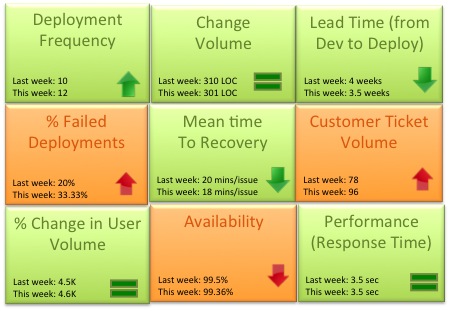
    As the team matured we started evaluating a more granular way to track success.  Could the team mantra be broken down into quantifiable success metrics that could be represented in a scorecard? Based on our experience the DevOps scorecard should contain these 9 metrics to track DevOps team success:

    DevOps Scorecrd

    1. Deployment frequency: How often were we deploying code and getting new code in the hands of our customers? This metric should trend up or remain stable from week to week. Example: Twice a week, 50 times a day
    2. Change volume: For each deployment how many user stories and new lines of code were we shipping?  Example: 3 new features per day, Average 500 lines of new code per week. Another parameter to consider in addition to volume is complexity of change.
    3. Lead Time (from Dev to Deploy): How long does it take on an average to get the code from development complete through a cycle of A/B testing to 100% deploy and upgrade on production? Lead time should reduce as the team gets a better hold of the lifecycle.
    4. Percentage of failed deployments: What percentage of deployments failed causing an outage or a negative user reaction? This metric should decrease over time. Example: 9% deployments failed this month as opposed to 15% last month. This metric should be reviewed in combination with the change volume. If the change volume is low or remained the same but the percent of failed deployments increased, then there maybe a disfunction somewhere.
    5. Mean time to recovery: When we did fail, how long did it take us to recover? This is a true indicator of how good we are getting with handling change and this should ideally reduce over time.  You can expect some spikes in this number due to complex issues not encountered before. Example: On an average it took the team 15 minutes to resolve each last week, 14 minutes this week.
    6. Customer Ticket Volume: Number of alerts generated by customers to indicate issues in the service. This is a basic indicator of customer satisfaction. Example: 54 tickets were generated this week as opposed to 38 while the user volume remained steady is not a good thing
    7. % Change in User Volume: Number of new users signing up, interacting with my service and generating traffic. As new users sign up is my infrastructure able to handle the demand? Example: This week the number of customers spiked by 30% due to an external event causing volume of requests to go up
    8. Availability: What is the overall uptime for my service and did I violate any SLAs? Example: 99.9% uptime consistently for the last 3 months even with change in user volume
    9. Performance (Response Time): Is my service performing within my predetermined thresholds? This metric should remain stable irrespective of % change in user volume or any new deployment. Example: Sub 5 second response time from all geographies and devices

    Would love to hear thoughts on what other critical metrics DevOps teams are using

  • Eight critical DevOps practices:  innovate, deliver, repeat

    Eight critical DevOps practices: innovate, deliver, repeat

    DevOps has been garnering a lot of interest for some time. Discussions and debates on forums like DevOps.com are improving our collective understanding of the right approach and now we are seeing concrete proof points of fast-movers applying DevOps practices to disrupt entire industries with rapid-fire, digital-innovation based on Cloud, Big Data and Mobile technologies. I have personally been part of this transformation at IBM for several years and would like to reflect on what we have learned, and also share with you results of a recent study from Forrester Research.

    DevOps helps organizations address a critical business challenge – that of continuously capturing and responding to feedback (both internal and external) so we can rapidly and repeatedly turn innovative ideas into highly relevant, and desirable, products and services.  This involves not only development and operations, but all aspects of the organization, as it entails the collaboration across the entire organization including business and supply chain. Compared to single-direction,  traditional models, DevOps is bi-directional and is based on not just pushing something out to the customer but also on getting their feedback to make improvements.

    In a recent webcast, I discussed eight DevOps practices that speed up software delivery with Kurt Bittner, Principal Analyst at Forrester and a leading expert on agile and iterative software development. This webcast highlighted a recent Forrester survey on DevOps practices, cycle times and where enterprises are in terms of the maturity of DevOps practices adoption. 
    You can watch the webcast replay here to know more –
    ibm.biz/Forrester-talk

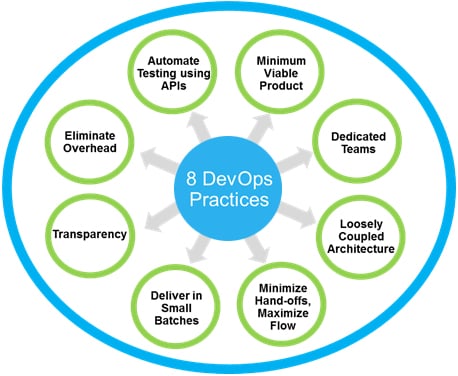
    Their survey of 600 IT professionals with application development responsibilities found that about a third of teams consistently deliver at cadences of one to three weeks and that the fastest teams generated higher business satisfaction than slower teams, an indication they don’t sacrifice quality to deliver fast. The study reveals how these teams did it: by adopting the following eight DevOps practices:

    8_DevOps_practices


    1. Minimum Viable Product – Deliver the smallest viable product or application and then improve it in subsequent rapid releases, based on feedback, and delivering value incrementally.
    2. Dedicated Teams – Form dedicated, cross-functional teams, avoid over-specialization and ensure they are not interrupted by side projects.
    3. Loosely Coupled Architecture – Use loose architectural coupling within and between applications to reduce complexity and enable delivery in small increments.
    4. Minimize Hand-offs, Maximize Flow – Eliminate unnecessary steps, delays and friction between steps to increase the flow of work.
    5. Deliver in Small Batches – Deliver in smaller batches helps to expose the most uncertain issues first and enables feedback on the most valuable usage models earlier.
    6. Transparency – Transparency into progress helps everybody to see where you are at any point in time and also visibility into risk without decreasing productivity.
    7. Eliminate Overhead –Eliminate the overhead of periodic and manual status reports and status meetings which absorbs valuable time and distracts focus from delivering value.
    8. Automate Testing using APIs – Shift away from heavy manual testing to improve delivery speed, quality, and testing accuracy, and dramatically reduce cost.


    The study refutes the myth that releasing fast requires you to sacrifice quality and accept higher risk. Adopting these eight DevOps practices, especially automated testing and delivering in small batches, does exactly the opposite:  small incremental releases are more thoroughly tested, more stable and lower risk.

    The best part about DevOps adoption is the flexibility to choose which practices to adopt first, based on each organization’s priorities, and then to incrementally adopt the rest of the practices as needed to optimize the software delivery lifecycle and accelerate innovation.

    To learn more about the survey and the eight DevOps practices, download the Forrester study along with the approach that you can follow to adopt these as per your organization’s current state of delivery cycles.

    About the Author

    ashokAshok Reddy is responsible for Product Management & Strategy, product Design/user experience and Business Development for Rational Software Division of IBM Software Group and for the IBM DevOps portfolio.  He is based in Raleigh, NC, USA.  Ashok’s role involves all aspects of global product delivery including setting product strategy and for product line management, establishing product roadmaps and partnerships for IBM DevOps portfolio.

  • DevOps + IoT

    DevOps + IoT

    The Internet of Things (IoT) is part marketing hype and partly a real movement. After low power WiFi chips have allowed small devices to connect to the web for a long time. Remember Eye-Fi founded in 2005?

    But there is no denying it is BIG. Service revenues rooted in micro-controller-based IoT are expected to reach a whopping $7.3 trillion by the year 2017 according to a recent IDC report, with the radical new paradigm shift of DevOps leading to the perfect storm of IoT adoption.

    IoT is set to be a disruption those building and connecting things. It forces a transformation that is largely driven by the integration of development, IT operations and quality assurance practices delivered for IoT under a single automated umbrella in the DevOps-oriented world.

    (more…)

  • The Dark Side of Infrastructure as Code

    The Dark Side of Infrastructure as Code

    We spend a lot of time extolling the virtues of infrastructure as code. All of it is true. Treating infrastructure as code can add great value in terms of its ability to promote consistent, predictable and repeatable results during the application deployment process. One of the ways in which infrastructure is treated as code is through the use of programmability.

    Programmability is an integral component in software defined architectures and a part of the DevOps approach is automation through integration with traditionally development lifecycle focused tools and technologies. APIs, app templates and the ability to programmatically interact with the data path are enabling rapid provisioning of services in the network. That’s important to the business. Improving service velocity in the network is critical to achieving faster time to market and enabling the operational scale necessary to meet growing pressure on networks arising from the growth of applications driven by cloud, mobile and the Internet of Things.

    Speeds and feeds of processes are now as important to gain a competitive advantage as speeds and feeds of packets.

    Those who see DevOps and SDN as having a strategic impact on their organization view programmability as having even greater importance.

    But that does not mean that treating infrastructure as code doesn’t have its dark side. Because adopting a programmatic approach to anything means you get both the benefits and the risks.

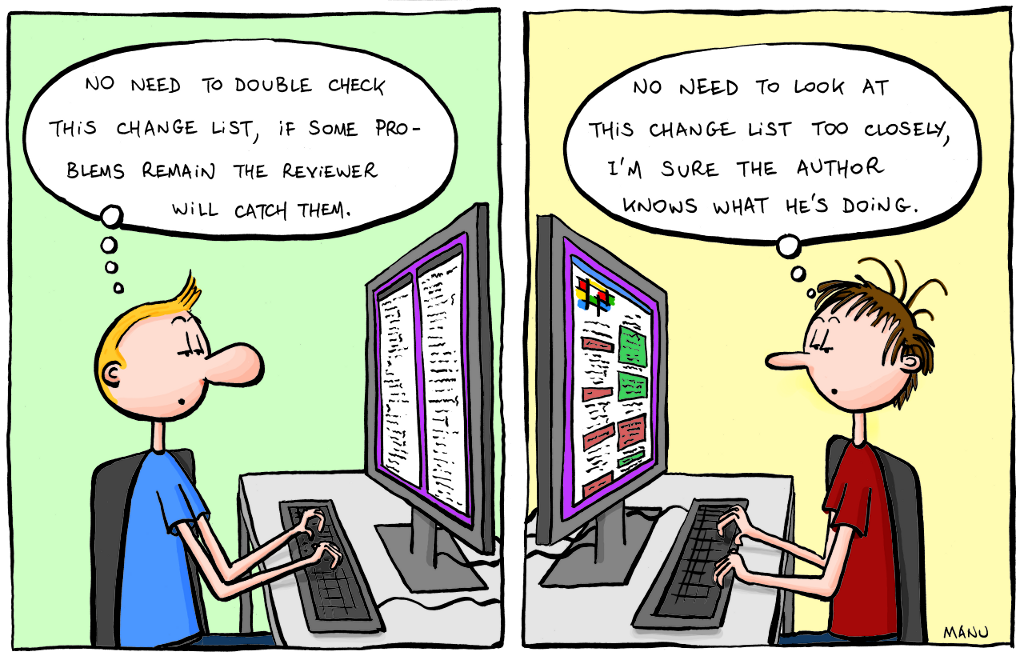
    I happened to be cogitating on this topic when I stumbled across a post reminding us of the importance of code reviews. The content was so-so, but the premise was spot on: code reviews are a must for those embracing the notion of treating their infrastructure as code.

    Why is that (or should it be) an imperative?

    Consider some stats from InitialState, “a technology startup helping engineers capture and understand product data. Our cloud-based log visualization-as-a-service platform helps engineers make sense of the exploding number of logs being produced by “smart”, complex products and applications.”

    According to their data, developers have to find and fix 100 bugs per 1000 lines of code. And it takes 30 times longer to fix one of those bugs than to write one line of code. Overall, developers end up spending 75% of their time (about 1500 hours per year) debugging code.

    Now spend a moment thinking about what that means when you start treating infrastructure as code, writing scripts to automate provisioning and integrating with other systems to orchestrate deployment processes.

    2011.09.18_code_reviews

    I won’t lie, code reviews can be tedious. But the first time someone points out an error, particularly one that could have resulted in a security breach or an undesirable service outage, the pain is more than made up for. In the long run, code reviews are beneficial to eliminating disruptive errors. A SmartBear survey in 2012 found that “70% of organizations indicated that code reviews are very important” and “Those that do code reviews clearly have a greater level of satisfaction in the overall quality of their software – they were twice as likely to indicate that they were very satisfied with their software quality.”

    In other words, code reviews are an important part of the software development lifecycle (SDLC). Which means it should be a part of the software deployment lifecycle when it leverages programmability to treat infrastructure as code.

    Therefore it is important in the early stages of DevOps (or SDN if you’re going that way) adoption that you put into place processes to check (and perhaps double check) the scripts, templates and integrations you’re using to automate application and service deployment along the entire operational chain – from the app to the network.

  • Four key vectors for closing the DevOps feedback loop

    Four key vectors for closing the DevOps feedback loop

    A question I am asked frequently about DevOps – and a perennial challenge to all DevOps slide artists – is what exactly we mean by the idea of ‘closing the feedback loop’

    Q. What do you mean when you mention ‘closing the feedback loop’? Ops monitor our systems today, and alert devs when they are needed (next step, devs carrying pagers!). Is this the same Ac?

    Yes, this is definitely part of the equation. Feedback from operations (and more) to development (and more) – through alerts, monitoring, log entries, service tickets, or verbally – is essential. Good fast feedback helps, for example, to:

    • connect dev and ops more closely to user experiences
    • establish shared insight to replace fragile tribal knowledge
    • foster ownership from both teams in the entire service
    • provide rapid response to problems or new requirements
    • encourage faster experimentation and a tolerance for failure

    Feedback loops in smaller organizations tend to be relatively simple – just lean over the cubicle and tell your counterpart what is going on, or program the monitoring system to send you an alert. However for larger organizations the multiplicity of teams, volume of events, separation of duties, and variety of feedback can make this harder to handle.

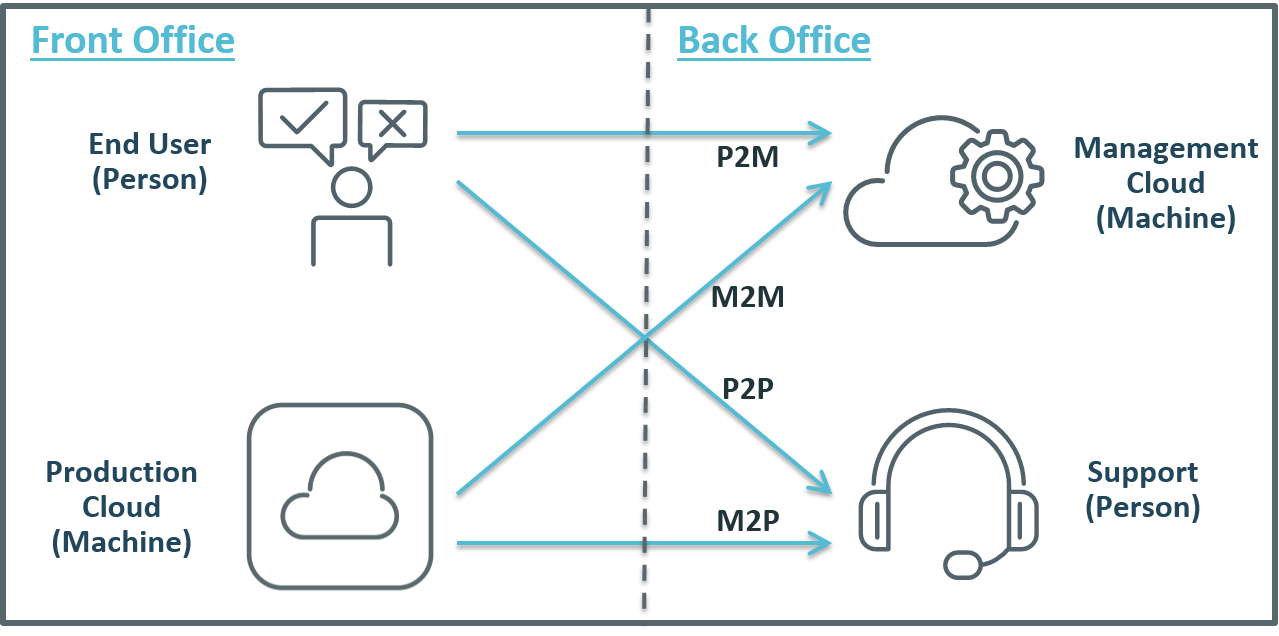
    In larger organizations then, I see four key vectors used in closing the DevOps feedback loop:

    • Machine to Person (M2P)
    • Person to Person (P2P)
    • Machine to Machine (M2M)
    • Person to Machine (P2M)

    I have tried to illustrate these 4 vectors below (and not being any kind of graphic artist, I would love any feedback on this image):

    FeedbackLoops

    Machine to Person (M2P)

    This is more or less the alert cycle the original question posed – a machine process (performance monitoring, for example) picks up an error situation that it cannot identify it as a ‘known resolvable’ issue, so forwards it to a person to take charge. Machines can resolve many problems automatically with intelligent orchestration – rollback a release, increase capacity, modify a configuration, migrate a workload, restart a service – but sometimes a person needs to fix hard and/or infrequent problems.

    Person to Person (P2P)

    This is just the classic ‘hot line’ feedback, where application users (internal or external) talk directly to someone in IT (e.g. help desk staff). This can be the most powerful feedback of all. Not only can it help identify defects, but it can also identify opportunities for improvement – from new features to entirely new services. However, to be useful this personal feedback must be transferred into development or operations process – e.g. to update configuration scripts, or as input to future release planning.

    Machine to Machine (M2M)

    This includes automated problem resolution (e.g. monitoring detects a performance bottleneck, triggers a provisioning engine to add additional capacity), but also includes data mining that feeds back ‘real-world’ production data to build more realistic test and QA environments, or to inform more accurate capacity plans. This feedback makes prod more stable, makes QA and test more realistic, reduces human and process errors, and helps to build scalability into applications from the start of the SDLC.

    Person to Machine (P2M)

    This can take many forms, such as end-users logging problems into a self-service portal or Service Desk, or rating a mobile app, or complaining online. Automation can trigger resolution for known problems, so end users can address problems automatically; or feedback can reach product owners to resolve common user complaints. However, P2M feedback may waste resources and increase technical debt, as solvable problems are fixed repeatedly rather than permanently; or user complaints are ignored.

    Final Tips

    These four vectors of active feedback are just a starting point, but describe a framework that enterprises can work to when looking to close and accelerate your feedback loops. Remember too that in a DevOps mode, feedback needs to be faster, it needs to be more accurate, and especially in a large organization it needs to connect not just with dev and ops, but with other stakeholders too – business owners, test and QA teams, security teams, and of course end users.

    What are your feedback loops? Do you cover all four vectors? Do you have more that I am missing? Please let me know in the comments below – as always, I would love to hear from you.

  • Why Continuous Integration Doesn’t Work

    Why Continuous Integration Doesn’t Work

    Continuous integration is easy. Download Jenkins, install, create a job, click the button, and get a nice email saying that your build is broken (I assume your build is automated). Then, fix broken tests (I assume you have tests), and get a much better looking email saying that your build is clean. Then, tweet about it, claiming that your team is using continuous integration.

    I’ve seen it multiple times in multiple projects. The start is always bright and smooth. Problems start later when the build gets broken again and we simply don’t have time to fix it. We’re simply busy doing something else and a few broken unit tests shouldn’t be a distraction for us. After all, we all know that unit testing is not for a team working with deadlines, right?

    Wrong. Continuous integration can and must work. The latest build should always be clean. Always.

    What is Continuous Integration?

    Nowadays, software development is done in teams. We develop in feature branches and isolate changes while they are in development. Then, we merge branches into master (Git usage is assumed). After every merge, we test the entire product, executing all available unit and integration tests. This is what is called continuous integration, abbreviated as CI.

    Sometimes, some tests fail. When this happens, we say that our “build is broken”. Such a failure is a positive side effect of quality control because it raises a red flag immediately after an error gets into master. It is a well-known practice, when fixing that error becomes a top priority for its author and the entire team. The error should be fixed right after a red flag is raised by the continuous integration server.

    # Why Continuous Integration Doesn’t Work?

    CI is great, but the bigger the team (and the code base), the more often builds get broken. And, the longer it takes to fix them. I’ve seen many examples where a hard working team starts to ignore red flags, raised by Jenkins, after a few weeks or trying to keep up.

    The team simply becomes incapable of fixing all errors in time. Mostly because the business has other priorities. Product owners do not understand the importance of a “clean build” and technical leaders can’t buy time for fixing unit tests. Moreover, the code that broke them was already in master and, in most cases, has been already deployed to production and delivered to end-users. What’s the urgency of fixing some tests if business value was already delivered?

    In the end, most development teams don’t take continuous integration alerts seriously. Jenkins or Travis are just fancy tools for them that play no role in the entire development and delivery pipeline. No matter what continuous integration server says, we still deliver new features to our end-users. We’ll fix our build later. And it’s only logical.

    # What Is a Solution?

    The solution I propose is simple — prohibit anyone from merging anything into master and create scripts that anyone can call. The script will merge, test, and commit. The script will not make any exceptions. If any branch is breaking at even one unit test, the entire branch will be rejected.

    In other words, we should raise that red flag before the code gets into master. We should put the blame for broken tests on the shoulders of its author.

    Say, I’m developing a feature in my own branch. I finished the development and broke a few tests, accidentally. It happens, we all make mistakes. I can’t merge my changes into master. Git simply rejects my push, because I don’t have the appropriate permissions. All I can do is call a magic script, asking it to merge my branch. The script will try to merge, but before pushing into master, it will run all tests. And if any of them break, my branch will be rejected. My changes won’t be merged. Now it’s my responsibility — to fix them and call the script again.

    In the beginning, this approach slows down the development, because everybody has to start writing cleaner code. At the end, though, this method pays off big time.

    In my projects I automate this merging operation using www.rultor.com, a free hosted DevOps service. Its usage is explained in this article: Rultor.com, a Merging Bot. I would be glad to answer your questions, just shoot me an email.

  • Walgreens reminds us to keep our database healthy

    Walgreens reminds us to keep our database healthy

    It’s clear that the super app you developed with your team, is really something, and it has high chance to be the “Bread and butter 3.0”, but are you prepared for the worst? There is a good chance that some combination of data, events and circumstances out of your control will eventually collude against you, to cause a failure or a software defect. You can try to anticipate and reason about all of the things that can go wrong with your application to prepare, but in a complex system it’s impossible to predict everything.

    (more…)