Category: Blogs

  • DevOps 2.0: A New Evolution of Serverless Cloud Architecture

    DevOps 2.0: A New Evolution of Serverless Cloud Architecture

    Science teaches us to formulate hypotheses and test them experimentally to advance systematically. While this sounds logical, DevOps—and software architecture in particular—does not follow this approach because current tools make this too cumbersome. So, architecture choices are frequently made by HiPPO (highest paid person’s opinion).

    However, the rate of development, especially in the serverless or function-as-a-service (FaaS) space, makes it difficult to gather all necessary information for HiPPO to work effectively. For example, according to AWS, it publishes on average two new cloud services per day, with similar development rates at other public cloud providers. With so many very nuanced choices, picking the optimal architecture without experimentally testing them is impossible.

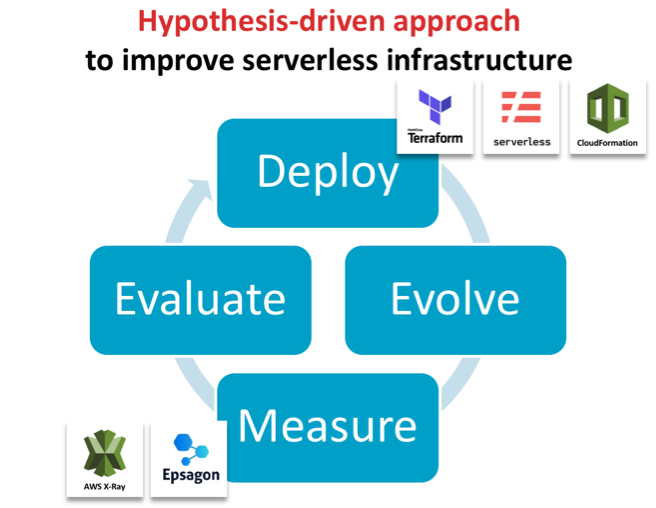
    We propose a fundamentally different approach for developing efficient and robust serverless architectures: hypothesis-driven architecture evolution, which consists of the steps deploy, evolve, measure, evaluate and iterate. In this blog post, we will go through each component and demonstrate how this can be done in an automated fashion to bring out the inner scientists in all of us.

    Deploy with Code as Text

    To deploy easily and consistently, the serverless architecture stack needs to be fully defined through code/text. This is widely known as infrastructure as code (IaC) and comprises the full infrastructure, from the computational core in the serverless functions all the way to permissions, databases and connecting services.  Frameworks such as Serverless Framework and Terraform or vendor-specific tools such as AWS CloudFormation enable this by allowing a single file to define the infrastructure used and to automatically deploy these services. This ensures that multiple versions can be deployed in isolation even though they are hosted to the same availability zone for reducing confounding factors when comparing performance.

    Evolve the IaC for Hypothesis-Driven Advancements

    This infrastructure file can then be modified and re-deployed to systematically test hypotheses, such as whether an algorithm is faster or a particular autoscaling group is more efficient. This idea was proposed first by James Lewis from ThoughtWorks in the context of general software architecture development, but is particularly applicable for the serverless space.

    Measure Performance of the Newly Evolved Architecture

    The second key element to this novel way of evolving architecture is the automatic evaluation of any newly deployed architecture without manually recording runtime or specifying interactions between services. Here, tools such as Epsagon can help in automatically detecting the workflows in architectures and analyzing their performance.

    Evaluate and Iterate

    In this approach, evaluation needs to keep pace with the overall process. To be effective, it is imperative to be able to identify errors and bottlenecks across the entire architecture in a timely fashion. In serverless architectures, most tools focus on the individual function rather than a full transaction from end to end. You may be made aware of a long-running function but you have to scrape logs and go through your code to perform root cause analysis. Tools such as Honycomb or Epsagon help to collide errors across multiple layers or the entire data flow.

    Case Study: Improve Runtime Performance of a Bioinformatics Tool

    We now describe the two key aspects (deploy and evaluate) on a practical example showcasing how it has helped improve the runtime of a serverless application. We chose the bioinformatics software framework GT-Scan, which is used by Australia’s premier research organization to conduct medical research, to improve its runtime by 85 percent.

    GT-Scan was one of the first serverless architectures (Jeff Barr Blog) with a focus on burstable web services that conducts data- and compute-intensive tasks. As such, it relies heavily on all of its components to be as time- and resource-efficient as possible.

    We contrast the automated approach against a previous approach in which the performance was evaluated using AWS X-Ray (AWS Public Sector Blog) and summarize our three learning outcomes:

    Visualizing the Current Architecture Automatically is Important

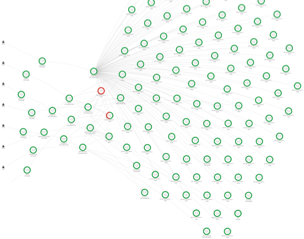
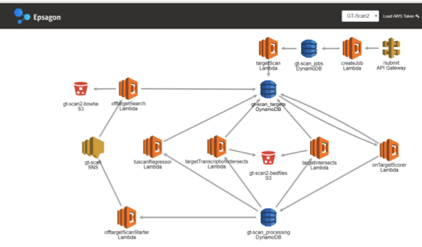
    Key to rapid architecture evolution visual feedback, especially so if only small changes to the architecture are evaluated. Hence having a visual representation of the architecture helps differentiate deployments and focuses in on differences.

    Figure 1: X-Ray view of the functional architecture vs the view of Epsagon’s automatically detected architecture


    Use Invocation Count and Runtime to Identify Which Function is the Bottleneck

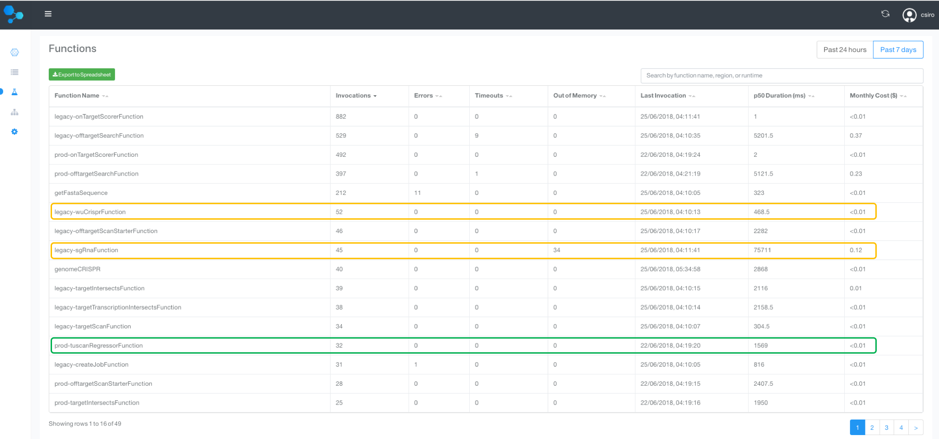
    To identify the bottlenecks in the system, a tabular view over the runtimes of all functions is essential. This also allows us to weed out obsolete or unused functions. A similar analysis can be done for memory use.

    We therefore sort by invocation count, which allows us to focus in on the most frequently used methods to target optimization efforts. We can now compare the old and new deployment side by side, by labeling one as “legacy.”

    Figure 2: A tabular view of all Lambda functions and their invocation count and runtime

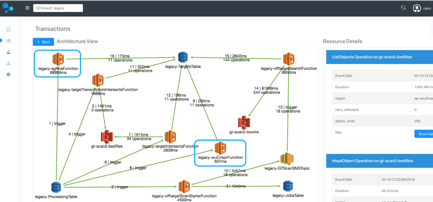
    As seen in the functions table, the longest running  function and its precursor is from the legacy deployment with its median (p50) duration :

    • legacy-sgRnaFunction: 75.7 seconds
    • legacy-wuCrisperFunction: 468 ms
    • Total: 76 seconds

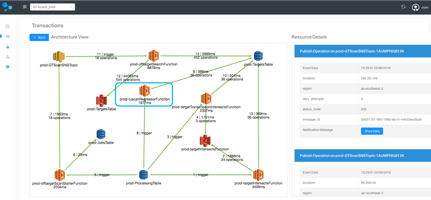
    In contrast, the new tuscanRegressorFunction, which replaces the two legacy-functions, runs in just 1.6 seconds! This is a 97.8 percent reduced running time, which is 47x faster!

    Assess Entire Data Flows to Target Top-Down Improvement Efforts

    Complex production applications typically contain many managed services and asynchronous events, whose interplay determines the overall performance. In addition to spotting individually slow functions, it is worthwhile to evaluate entire workflows to prioritize optimization efforts to the main data flows.

    For each of the GT-scan deployments, the solution identifies two flows: one comprising services watching DynamoDB and the other the API-gateway.

    Comparing the two deployments at this level reveals that the main flow in GT-Scan2_legacy takes on average 97.7 seconds before the optimization, while the average runtime for the corresponding data flow in GT-Scan2_prod is 14.1 seconds—a reduction of 85.5 percent—and an overall runtime improvement of 7x!


    Figure 3: Comparison between the automatically detected data flows between the prod and legacy deployment.

    Visualizing the data flow of the two architectures highlights that our optimization efforts were indeed targeted at the root problem: The legacy deployment uses the two inefficient Lamdba functions, while the production deployment contains only a single more efficient function.

    Figure 4: Architecture comparison of the transaction containing the difference between the prod and legacy deployment.

    Bringing It All Together

    Improving serverless architecture can be done systematically and efficiently by deploying the entire cloud infrastructure stack through code and using an evaluation system to automatically interrogate runtime. Specialized tools such as Epsagon can offer substantial improvements over AWS X-Ray for the evaluation step, by providing a tabular view to easily identify underperforming Lambda functions and offer an interpretable view of the architecture. Detecting data flows in the system helps prioritize optimization efforts to the main transactions of the architecture. Specialized tools help developers save time when documenting performance improvements; using hypothesis-driven evolution principles, we were able to improve the efficiency of GT-scan’s serverless system by 85 percent.

    This article was co-authored by the following:

    Aidan O’Brien is the main developer on the GT-Scan2 project. He is a Doctoral research student with joint appointment at CSIRO and one of the most impactful CRISPR research facilities in Australia.


    Nitzan Shapira is co-founder and the CEO of Epsagon. He is a software engineer, highly experienced in infrastructure technologies and cyber-security.


    Shannon Brown is the Senior Director of Growth of Epsagon. She is a software engineer with over 20 years of experience in software development, management, and sales.

    — Denis Bauer

  • 7 Signs You’re Mastering Continuous Integration

    7 Signs You’re Mastering Continuous Integration

    A majority of organizations think they are doing continuous integration (CI), yet when asked if they are following key practices of CI such as running tests to validate every build, many of them aren’t. Ask yourself the following: “Are we building our application with every change, or at least multiple times a day? Do we avoid long running feature branches? Do we prioritize fixing broken builds over committing new changes?” If your answer to any of these questions is “No,” then guess what? You are not truly doing CI—and you’re not alone.

    Continuous delivery (CD), a foundation of DevOps, is built on the practices of continuous integration. Accordingly, you have to implement CI properly before you can truly achieve success with CD and DevOps. In other words, you have to crawl before you walk.

    Steps to Mastering Continuous Integration

    To reach business goals, here are the seven practices organizations must do to master CI:

    Automate the Build—the Entire Build—on a Central Server

    This seems like an obvious one—and it is. Sure, prior to implementing continuous integration, organizations either build locally on a developer’s desktop, have a build engineer manually integrate code or have to work through a series of fragile, manual steps that are prone to error. But, surprisingly, many organizations that claim to practice CI still get this one wrong.

    Simply put, your continuous integration build should run a central shared server, be able to run completely unattended and be automated such that the same input will produce the same, same output every time.

    Build as Frequently as Possible

    Teams practicing CI build multiple times per day, ideally triggering the build per change on a pull request, merge or commit. Building per commit enables errors to be found as soon as they are introduced and are more easily fixed.

    The word “continuous” in continuous integration should be taken as literally as possible. Often times when I ask organizations how frequently they build, the answer is one of the following:

    1. We do “push-button” builds, X times per-week
    2. We build both every night, and once per week
    3. We build once per-day at X time

    As you have likely deduced, these are not “continuous” builds. They may be central builds, automated builds or scheduled builds. But those don’t provide the benefit of continuous integration. If a build breaks and you have two days of 30 commits by 10 different developers, you may have to sort through all of that work to figure out and correct the cause of the build. Productivity killed.

    Commit or Merge to Mainline Frequently

    Teams doing CI are likely committing/merging to trunk or main with every change or at least once a day.  If you are maintaining long-running feature branches, for instance, you are not getting the benefit of validating integrated changes frequently. If you branch for a long period, when it is merged, the integration has been delayed and you may be left with conflicts or bugs to fix.

    Build Quickly

    If you are practicing continuous integration, your build likely completes within 5-10 minutes.  If builds take longer (some organizations have five-hour-plus CI builds), not only are you delaying integration and, therefore, valuable feedback, but developers are less likely to commit changes because of the cost to their productivity—or, even worse, they continue to commit against broken code.

    Take time to optimize your build and validation time. This may require you to decompose your CI build process to align with components or teams and then validate the entire integrated application as a separate step in the overall development process.

    Validate the Build

    CI includes validating the changes and resulting built. This kind of testing should be a part of the overall build process. If your only validation is based solely on confirming the software compiles and links, then you are not truly practicing CI. Most teams practicing CI include code scans and unit tests in the CI build.

    Validate in a Production-like Environment

    Mature CI practitioners ensure consistency between the dev, test and pre-production environments. The most mature are using VMs or containers, service virtualization and other techniques to ensure they are performing validation in a production-like environment and reducing the risk of discovering errors downstream in pre-production or production, well after changes were integrated.

    Fix Broken Builds Immediately

    As mentioned, it’s critical that teams find and fix issues quickly so that they don’t move downstream. With CI, processes are set up where builds are validated and committed continuously, so if something is problematic, it’s easier to fix. If broken builds are ignored, the issue will be more difficult to find and fix, but worse is the culture it encourages. CI is based on a quality-first approach. If the build breaks,“Stop the line” and fix the build. Everybody will be better for it in the long run.

    Don’t Forget About Culture

    If an organization can look at these seven signs and say it does all of these things, then it is really doing CI. These may seem simple, but when these principles are combined, the outcome is remarkable.

    Organizations that can’t say they follow each of these principles likely will have problems delivering functional builds regularly. The initiative will fail and team members will become frustrated and revert back to their old ways. Not only will there be a process issue, but also a cultural issue—and this is where many organizations get stuck.

    Teams must change how they work together and they must also make sure they are aligned in their mindset. CI has many benefits for organizations, but don’t forget that it’s actually designed to embrace failure, not eliminate it. Continuous integration creates a system where developers can fail fast, so they can find and fix errors early and quickly.

    Continuous integration is one of the foundational elements to a real DevOps transformation, which everyone knows is a top priority for many businesses today. Getting it right—truly getting it right—is essential to keeping up with modern business needs.

    — Brian Dawson

  • DevOps: Build a Continuous Improvement Culture

    DevOps: Build a Continuous Improvement Culture

    DevOps was built around the concept of continuous everything. We even use it in many of the names—continuous delivery (CD), continuous testing, continuous integration (CI)—and it is a worthy goal to want to improve the places that form bottlenecks in your software delivery systems and processes.

    But what about the bottlenecks in the DevOps systems and processes?

    Like any other system, DevOps involves tools. We choose those tools, invest in learning those tools and use them to do great things. But then we have investment in the tool. If our knowledge and systems for deployment are all based around CD tool X or ARA tool Y, we are just as unlikely to want to move from it as we were unlikely to want to move away from the previous toolset.

    Even if you discount the number of shops that have done pilot or small-team DevOps but kept the core of their business waterfalling, there are still a large number of organizations that stepped into DevOps and stopped improving. Granted, it is a huge job to move a significantly sized application portfolio into the DevOps mold and toolchain, but it is contrary to the process/goals to stop just because you did.

    The market is nowhere near finished evolving: New tools are coming available and massive improvements to existing tools are being released. Keep taking advantage of those facts.

    The more projects/portfolios you have moved into DevOps, the more weight there is to resist change. That is the simple reality, just as the larger a rock, the harder it is to move (assuming the same type of rock, of course). The answer: Watch for those improvements that will make moving the rock worth the force required to do so.

    Working containers into the overall DevOps process, for example, can benefit every step in the toolchain. But if they’re not already in the process, it is a lot of work to get them folded in. I chose this example because for most shops, a little research will show it is well worth the effort. From preconfigured Dev/Test/Prod servers to run-and-done compile instances, containers can make the process more manageable and more agile. The benefits outweigh the costs for most shops.

    So keep an eye out. Don’t implement and spend all of your time on the tools you’ve chosen. Stay aware of what is out there, and what is coming. Understand how it would impact the DevOps process and try to pull in those items that fit the environment.

    And, as always, keep rocking it. The end goal is to keep the systems up, running and usable. And most of you are doing a great job.

    (This, and all blogs, brought to you as much by the geeks behind the scenes as the author and editor.)

    — Don Macvittie

  • Leveraging Automation for Your Business

    Leveraging Automation for Your Business

    Artificial intelligence (AI) has the capability to change the way we work, the way we manage, and the way we conduct research. As automation processes improve, businesses increasingly are looking for ways to leverage the new technology to help with their own goals.

    There are certain risks posed by the advancement of artificial intelligence, and the automated applications AI creates are in contrast to the many benefits using automation may bring about. The rewards of automation, when managed properly, are the relief of burdensome activities such as mundane tasks and other minutiae, improved productivity and increased participation.

    Consequences of adopting automation for your purposes must be thoroughly thought out to leverage it to the best of your ability.

    Automation, once used for only a few specialized tasks, now can be used for data mining, marketing, medical research and building financial models. These are just a few of the applications the technology can be used for, and it’s far from a comprehensive list. The details of automation are specific to the industry that employs it, the organization that manages it and the managers who oversee its implementation.

    Why should you consider using automation to help achieve your business goals? Quite simply because utilizing it properly could result in a more efficient, more effective workforce and could even create job opportunities. By freeing up mental resources and enhancing the capabilities of your workforce, your organization will be able to operate at its peak efficiency and efficacy.

    “Machines can attend to vastly more information and more complex processes than human beings, and try out more drugs or vaccines than we can in the lab,” Pedro Domingos, a professor of computer science at the University of Washington told National Geographic. “Machine learning is used to discover drugs by simulating the process on a computer, which takes a fraction of the time and cost.”

    After you begin analyzing where your organization needs help, you can start the process of using automation that makes sense for you. Your business may need help with routine marketing tasks, creating models for the data metrics you bring in. Or, perhaps you need help organizing large amounts of information related to research and development of a product you’re about to roll out. Whatever the application, there are automated applications made to benefit your business.

    “Faced with a constant onslaught of data, we needed a new type of system that learns and adapts, and we now have that with AI,” Arvind Krishna, head of research at IBM, said in a recent blog post. “What was deemed impossible a few years ago is not only becoming possible, it’s very quickly becoming necessary and expected.”

    With automation, you can achieve things you may not have thought possible before. As Krishna makes clear in the quote above, the capabilities of leveraging automation are untested and virtually limitless.

    To truly leverage automation, you’ll need to manage the results of its implementation and have your team perform synthesize and arrive at conclusions through critical thinking and social cooperation—skills yet unmastered by even the most powerful artificial intelligence. Pairing automation with skilled social thinking will result in a highly productive and effective organization. This can result in some ancillary benefits such as increased cooperativeness between team members.

    For companies interested in rapid growth, automation can help propel your processes. From manufacturing to marketing, automation can help boost your efforts in research, analysis and production. Automating repetitive tasks can help free up workers allowing them to work on more complex and pressing problems within the company. In addition, workers learn new skills through the adoption of automation and managers can more effectively understand how to manage complexity within your organization.

    However you decide to use automation, it’s important to do a thorough and objective analysis of your organization. Where can you improve? Where do you need help? How can we empower workers to better perform? How do we measure performance? These are key questions that can help guide your analysis of your organization and well as your adoption of domain-specific automation applications.

    — Anthony Coggine

  • Integrating Blockchain and DevOps

    Integrating Blockchain and DevOps

    Blockchain is one of today’s hottest technology buzzwords. And at the same time, the concept of DevOps has achieved acceptance and is gaining momentum. Blockchain and DevOps already offer a number of benefits individually. Together, they can provide significant tactical and strategic advantages. However, some challenges must be overcome simply to adopt blockchain, as well as to successfully merge blockchain and DevOps.

    What is Blockchain?

    Let’s start with an overview of blockchain. Many people mistakenly conflate cryptocurrency and blockchain, because many of the key features of cryptocurrency are a function of blockchain. But blockchain is a separate and unique concept that has applications and benefits far beyond cryptocurrency.

    Blockchain is a distributed account ledger, the use of which enables data to be processed and stored securely. Blockchain relies on three core concepts—peer-to-peer networks, public-key cryptography and distributed consensus that is based on the resolution of a random mathematical challenge. Reliance on these three concepts allows blockchain transactions to be secure and relatively anonymous. Every transaction is recorded in the ledger as a data block that is appended to the end of the chain of previous transactions. No group or individual owns or controls the ledger, and all parties can view the chain of transactions, ensuring transparency and integrity.

    A number of key features make blockchain attractive. Data is validated across all participating nodes, which eliminates the need to reconcile transactions. The use of distributed consensus provides a high degree of confidence, but transactions in the chain also can be verified easily. Blockchains are immutable—new data can be appended, but blocks of data already in the chain cannot be modified or removed. Finally, blockchain reduces costs and improves the efficiency of processing transactions and storing data due to its decentralized architecture.

    The challenge facing organizations wanting to adopt blockchain, however, is how to incorporate it seamlessly with DevOps development processes and culture.

    DevOps for Blockchain Development

    Organizations need to address challenges in three major areas to take advantage of blockchain: culture, process and tools.

    On the culture front, the success of blockchain depends on support at the executive level as well as adequate budget and resources for proper implementation. If you can’t find champions within the organization to drive the blockchain cause, your project is doomed before it starts.

    Whether you’re building a blockchain within a single company or a blockchain network that includes nodes outside your organization, obtaining widespread agreement on the technology and blockchain processes can be an issue. The absence of widespread industry adoption or any sort of standardized tools or processes adds complexity.

    Finding the right talent can also be a problem—and once you find it, you may have to pay a premium to obtain it. According to a recent article in TechCrunch, “Blockchain-related jobs are the second-fastest growing in today’s labor market; there are now 14 job openings for every one blockchain developer.”

    From a process perspective, blockchain is an emerging concept that lacks mature management principles or design standards. The process framework, and the different roles involved, are still unclear. Most organizations lack expertise concerning the blockchain application stack and environment; in addition, the metrics that should be monitored to measure efficiency and performance are not yet well-defined.

    The absence of development tools is another major hurdle for blockchain. The developer tools currently available for the blockchain ecosystem are unreliable. The blockchain ecosystem still needs an integrated development environment with good linters and plug-ins, a build tool and compiler, a deployment tool, documentation, testing frameworks, debugging tools, logging tools, security auditing and analytics. While some versions of these tools exist, they are not yet adequate to meet the needs of blockchain developers.

    It is also important to understand that, although many blockchain implementations are based on open source technology, blockchain isn’t free. Keeping track of transactions requires hardware, networking bandwidth, electricity and processing power. Because a blockchain ledger is distributed, transactions aren’t just processed once—they are processed on every node in the blockchain network. As a trusted network grows, the associated costs skyrocket. These expenses can be a barrier that prevents smaller organizations from experimenting with the technology.

    Integrating Security into DevOps

    If you are thinking about implementing blockchain, some of the core principles of DevOps—specifically DevSecOps—come in handy. DevOps is built on the concept of breaking down silos within an organization and enabling each team and individual to take responsibility for the project as a whole, rather than separating tasks by role.

    To implement blockchain successfully, you need a system that rewards innovation and supports teams of individuals who work together to address any issues. Integrating DevOps and security fosters stronger application security throughout the software development life cycle and helps with blockchain development efforts as well.

    The shift-left philosophy and the push for automation are DevOps principles that also will serve you well with blockchain. Integrating security earlier in the life cycle—shifting left—and incorporating automated security testing and security bug tracking are essential. The blockchain network needs to be tested for performance and latency, which will vary depending on the size of the network, the expected transaction size, the consensus protocol used and the associated required latencies. It is also important to determine whether the integrity of the network and the shared blockchain ledger is maintained while testing throughput.

    To maximize efficiency and productivity, put processes in place that allow you to consistently monitor and adjust, based on feedback. Track individual and overall security vulnerabilities, the amount of time it takes to detect them, the amount of time it takes to remediate them, and other factors relevant to application security. These metrics should be visible to every individual so that each can understand and take ownership of the appropriate elements.

    Blockchain and DevOps

    Blockchain technology is poised to change the way business is conducted today due to its promises such as of secure, immutable, peer-to-peer decentralized trust networks with distributed consensus, shared account ledgers and smart contracts.

    These same advantages, however, introduce a host of additional considerations to blockchain-based applications and make for greater testing challenges. Not only is the change in technology significant, significant changes are also necessary from a business process standpoint. While blockchain applications will have to go through standard testing and validation, including functional testing, integration testing, security testing and performance testing, they also will require additional specialized testing for smart contracts and peer/node testing.

    DevOps practices can provide great value to organizations under pressure to become more customer-centric and innovation-focused. The efficiency, quality and consistency that adopting DevOps provides is exactly what is required for traditional organizations looking to embrace the leading-edge technology known as blockchain.

    — Tej Aulakh

  • Serverless Computing: Moving from DevOps to NoOps

    Serverless Computing: Moving from DevOps to NoOps

    Developers rejoice as serverless computing ushers in a new era of ‘NoOps’ to replace the ill-fitted DevOps model.

    While some organizations do better than others when it comes to implementing DevOps, almost everyone agrees it’s a concept easier penned to paper than pinned to reality. The idea of integrating development and operations is smart, but the implementation proves troublesome. A replacement option is thus largely welcomed by developers everywhere.

    Enter the new concept of NoOps, which means dropping operations from any consideration during the development cycle. It’s not that operations are being ignored; that would be a foolhardy step backward. Rather, NoOps means never having to worry about where the code runs and, thus, developers are freed from giving operations another thought.

    “Serverless computing allows users to run code without provisioning or managing any underlying system or application infrastructure, and they automatically scale to support increasing or decreasing loads,” explained Gartner serverless analyst, Arun Chandrasekaran, in a blog post.

    Amazon sparked interest in serverless computing when it announced AWS Lambda at its re:Invent conference in 2014.

    “I’d argue that the precursor to serverless computing is cloud IaaS, where the complexity of underlying resources—servers, storage and network—was hidden from the users, and with IaaS providing flexibility to provision unlimited compute, storage and network resources on-demand, Chandrasekaran said.

    Serverless: To Use a Server or Not? ‘Tis Not the Question

    Serverless computing is a developer’s dream not only because there is no longer a need to worry about where the code is going to run, but also because there is no need for direct access to the operating system to manage that code. The result: Developers can focus solely on coding—the very thing they do best!

    That statement would be easier for some to understand if it were not for the utterly confounding term “serverless.” Obviously, anything requiring computing involves servers, so saying this process is serverless is simply nonsensical. While the term is unfortunate and bordering on meaningless, the concept is solidly real and more than a little familiar.

    For all practical purposes, serverless is just another word for cloud but with a bit of a twist—pricing is based on the actual amount of resources consumed by an application, rather than on pre-purchased units of capacity.

    Deploying Code with NoOps in a Serverless Environment

    Additionally, the term “serverless code” can be used either in conjunction with code deployed in traditional styles such as microservices, e.g. loosely coupled/SOA. Or, code can be deployed in the form of full applications that can be written to require no provisioned servers.

    In serverless environments, jobs are scheduled on-demand, meaning as data comes in and is available. It can be automated so that a job runs once data is received. This means that jobs run only when data exists and otherwise sit idle, where they can’t burn resources.

    Economies of scale also completely change in serverless computing. That’s because serverless delivers the ability to put some intelligence behind when and where jobs run, so that they can be spun up and spun down as quickly and economically as possible.

    Bottom Line

    Opting for NoOps, meaning working in a serverless environment, is really a choice to be more intelligent about how resources—hardware, software and people—are being utilized. It is about cutting resource waste and associated costs, while enabling talent to focus on writing innovative code.

    No job will sit there burning resources and waiting for the data to come in. Rather, the job runs on demand, as you need it, in milliseconds and without distracting you from other tasks.

    “NoOps still requires connectivity so beef up your connectivity to your cloud providers, if you haven’t already. And you’ll eventually have to troubleshoot slow serverless functions as a ‘network problem,’” said Andrew Lerner, an analyst at Gartner in his post.

    To gain even more advantages in serverless computing, and perhaps to make up for time lost in network troubleshooting, no matter how small, look for and use reusable code everywhere you can. Drag-and-drop interfaces that enable fast use of reusable code frees developers further, so they can shorten both the development and testing cycles. Time economy is important in modern day continuous release cycles. A NoOps and reusable code strategy can dramatically improve your time and resource economies of scale.

    — Laurent Bride

  • How to Cultivate a Loyal Developer Community

    How to Cultivate a Loyal Developer Community

    With the number of developer focused companies and products growing, building communities among engineers has become a key strategy to stay competitive. Augmenting and often surpassing traditional marketing techniques, this approach—although challenging—can be an incredibly effective way to engage users and get engineers excited about a product.

    Since our inception over six years ago, DigitalOcean has worked to establish a robust developer community around our product through a variety of channels. This includes our public open-source focused Community, which attracts more than 3 million monthly visitors.

    It Takes a Village to Make a Community

    Beyond creating a product developers love (that always comes first), here are some best practices and lessons we’ve learned for cultivating a great developer community.

    Develop Personal Relationships

    A community implies connection, so first, look for ways to form connections directly and show people you care. In its early days, Twilio did a great job at getting out of the office and doing meetups to speak to devs directly, and I would argue this was essential to it becoming as successful as it is today.

    This also involves finding ways to shine light on individuals in your community. When we found out one of our community members recently had a baby, we sent them a onesie for their newborn. Chances are, you also have community members who are doing amazing things, and would love the recognition for it—either on social media or your blog.

    Taking the time to meet users where they are and working to establish closer relationships with them creates a virtuous cycle: these users help the community grow with their contributions, suggestions and feedback, and therefore feel more empowered to continue to invest in the community. Everyone benefits in this scenario and, equally important, your communication out to the community is genuine because you gain a deeper understanding of exactly who you are talking to and building for.

    To that end, it’s important to have someone or a team (for example: developer advocates or community managers) ready to engage directly with your community and bring the lessons back to the company. You’ll want individuals who are capable of responding, both offline and online, in an authentic way.

    Create Avenues for Them to do Meaningful Work

    While many developers enjoy their work, they often have far-reaching interests beyond code. Companies that find ways to help their communities meld code with what’s important to them personally will see much more stickiness and retention.

    For example, developer analyst firm RedMonk has done a good job of creating conferences (MonkiGras and Monktoberfest) that go beyond technical presentations and instead create discussions around issues such as the intersection of society, culture and technology. This provides a forum for the developer community to connect over shared interests and experiences—not just code or languages.

    We created a program called Write for DOnations that not only pays contributors for  writing technical articles, but also matches this payout with a contribution from us to the author’s choice of tech-focused nonprofits. This not only incentivizes our community to remain active, but makes them feel they’re making a difference. Because we take time to build a relationship with each of our authors, they know that they can help make a regular investment in those organizations.

    Make Product Development Decisions a Two-Way Street

    If you’re creating products for developers, their needs should be top of mind. Using a product feedback forum allows developers to ask questions and make product requests while giving them a faster feedback loop for their product development. We launched our object storage solution “Spaces” last fall in large part because of the flood of requests we received via our User Voice voting system. We’re not alone by any means in creating two-way streets: GitHub has an extensive forum forum for users to talk about different elements on GitHub and get advice. Stripe allows its community to chat directly with its own devs on Freenode as a way of further fostering their own community.

    Providing visibility into your own product road map is also critical — by sharing in advance what you’re planning with your users, you can help them make much smarter long-term decisions.

    Meet Them Where They’re At

    Connecting with developers in person is incredibly powerful, and meetups are a great avenue for this. However, if geographic barriers arise, broadcasting these meetups live is a nice way to engage people dispersed across multiple locations and ensure they too get value from your meetup programming.

    On the more tactical side, sharing swag helps keep your product visible even after the meetup or event has completed. A nice shirt or cute sticker allows your community to feel connected and effectively act as brand ambassadors. We’ve seen this to great effect with our Hacktoberfest effort: After sending t-shirts to individuals helping out with open source projects, we often meet people later at conferences still sporting their well-earned tee.

    Building a community takes effort. When beginning to forge one, it is invaluable to consider how your specific audience enjoys connecting and how the company can serve them best. There is no one formula for creating a vibrant, engaged community, but with some experimentation and a lot of listening, you can create something truly special around your product.

    — Etel Sverdlov

  • Tricentis, QASymphony Merge: The Age of Continuous Testing Is Upon Us

    Tricentis, QASymphony Merge: The Age of Continuous Testing Is Upon Us

    Big news in the world of continuous testing today as continuous testing market leader Tricentis announced it is merging with QASymphony. Tricentis, a leader of continuous testing, is adding QASymphony’s leading testing automation platform to the mix. The full text of the press release is below.

    With the worldwide testing market pegged at more than $34 billion, this is a big move in a very big market. Tricentis raised $165 million last year from Insight Venture Partners and has put this money to good use: The QASymphony merger is Tricentis’ latest move. Previously, it acquired Q-Up, in June, and last year acquired Flood IO.

    Tricentis’ merger with QASymphony is happening at a time when continuous testing is becoming one of the hottest areas in DevOps. The demand for automated, continuous testing is driving a revolution in the QA market as companies recognize that quality is as important as speed when it comes to deploying new apps. It is a key cog in the modern software factory.

    I had a chance to sit down and speak with Tricentis CEO,  Sandeep Johri, about today’s announcement, the testing market and what the future may hold. Sandeep, who has previous experience at HP and other large providers, has a great vision of the market and where it is heading as well as the details that escape many “professional manager” CEOs. His hand is firmly on the wheel as he drives Tricentis forward in this space.

    Have a listen to our conversation below, and stay tuned—we will update and continue this breaking story as more details emerge.


    Tricentis and QASymphony Merge to Drive Innovation in Continuous Testing for Enterprise DevOps

    Next Gen platform disrupts the $34B testing services spend and transforms software testing for DevOps

    Mountain View, CA— June 20, 2018 — Tricentis and QASymphony announced their agreement to merge under the name of Tricentis. Tricentis’ market-leading Continuous Testing platform has earned the company unanimous “leader” recognition among the top industry analysts. QASymphony is recognized as the industry’s leading test management solution. The combined solution represents the most modern platform for transforming software testing to keep pace with digital transformation.

    “Tricentis and QASymphony are both recognized for their innovative testing solutions,” explained Sandeep Johri, CEO of Tricentis. “Tricentis is known for helping enterprises transform testing from a burdensome manual process that delays software delivery into an automated, continuous process that drives ‘quality at speed.’ The addition of QASymphony’s test management solution strengthens our leadership position and builds on our momentum replacing legacy testing tools.”

    “Today’s CIOs are responsible for ramping up innovation through accelerated software delivery,” explained Barry Libenson, Global Chief Information Officer at Experian. “Amid this demand for rapid innovation, CIOs are recognizing that software testing often delays their digital transformation goals. In fact, testing is now commonly cited as the #1 bottleneck to delivery speed. When testing lags behind development, the organization is forced to delay their innovation and that’s no longer an option. It’s inevitable that software testing must be transformed to keep pace with Agile development and DevOps.”

    “Global 2000 organizations remain locked into legacy testing platforms that were designed decades ago to enable manual testing processes,” explained Dave Keil, CEO of QASymphony. “Scaled agile and enterprise DevOps initiatives have changed the game. Yet, legacy testing technologies such as those by HPE (now Micro Focus) and CA are throttling speed and innovation. QASymphony has experienced triple-digit growth over the past year—allowing us to aggressively invest in our technology, infrastructure and people to meet the emerging needs of our customers.”

    QASymphony’s 100+ employees will be joining Tricentis’ 450+ employees. Sandeep Johri will lead the organization as CEO and Dave Keil will assume the role of COO. The combined company will have a global presence with offices in the US, EMEA and Asia. The transaction is expected to close within 90 days. EMBARGO UNTIL WEDNESDAY, JUNE 20, 2018 @ 8:00 AM ET USA

    The integration will reflect the commitment to innovation and customer success that both companies share—to learn more, register for the upcoming webinar. Additionally, the company will be showcasing the roadmap and solution at Accelerate 2018 in Vienna.

    DevOps Impact

    The market for software testing (recently estimated at $34 billion)1 has reached an inflection point. DevOps adoption is rising rapidly, and both Gartner and Forrester report that transforming testing is a primary factor for DevOps success.2 Yet, software testing remains a predominantly manual activity that delays releases and consumes 30-40 percent of an organization’s application budget3,4 Tricentis Continuous Testing solutions accelerate delivery and free up significant budget that can be reallocated to underfunded innovation initiatives.

    Gartner’s Joachim Herschmann and Thomas Murphy report: “As DevOps principles gain significant traction in enterprises, testing and QA is no longer a stage in delivery but an integral DevOps activity that exists in various forms through all areas. Automation has become an indispensable element in these efforts, and there has been renewed focus on software test automation tools as part of a larger toolchain that enables DevOps.”5

    About Tricentis

    With the industry’s No. 1 Continuous Testing platform, Tricentis is recognized for reinventing software testing for DevOps. Through risk-based testing, scriptless end-to-end test automation, and the industry’s most extensive technology support, Tricentis breaks through the barriers experienced with conventional software testing methods. Our innovative technologies simplify testing for even the most complex enterprise applications—transforming testing from a roadblock to a catalyst for innovation. The result is accelerated software delivery speed, improved cost efficiency, and reduced business risk.

    Tricentis is the only vendor to achieve “leader” status in all three top analyst reports (i.e., the “Triple Crown.”) This honor is based on our technical leadership, innovation, and a Global 2000 customer base of 800+ companies, including global enterprises such as Allianz, ANZ Bank, Experian, First Data, HSBC, Lexmark, Merck, Sentry Insurance, Starbucks, Telstra, UBS, Vantiv (now WorldPay), Vodafone, and Whole Foods. These customers rely on Tricentis to achieve and sustain test automation rates of over 90 percent—increasing risk coverage while accelerating testing to keep pace with Agile and DevOps. EMBARGO UNTIL WEDNESDAY, JUNE 20, 2018 @ 8:00 AM ET USA

    Tricentis has a global presence in Austria, Australia, Belgium, Denmark, Germany, India, Netherlands, Singapore, Switzerland, Poland, United States and the UK. To learn more, visit https://www.tricentis.com or follow us on LinkedIn, Twitter, and Facebook.

    About QASymphony

    QASymphony accelerates digital transformation with software testing solutions that help enterprises prioritize quality, develop reliable software and increase speed to market. The qTest platform streamlines software testing in agile and DevOps environments and centralizes testing efforts across the enterprise. By taking a strategic approach to quality, QASymphony enables enterprises to develop higher-quality software, faster, to better support new business models and customer experiences.

    The qTest platform streamlines development workflows by seamlessly integrating testing with leading automation, development and delivery tools including Atlassian’s Jira, CA Agile Central, Github, Selenium, Cucumber, Jenkins and many more. QASymphony is trusted by leading enterprises including Forcepoint, PFSweb, Cisco, Samsung, Verizon and Office Depot.

    1 Nelson Hall, https://research.nelson-hall.com/sourcing-expertise/it-services/software-testing/

    2 Gartner, Build Continuous Quality Into Your DevOps Toolchains: https://www.gartner.com/doc/3868367/build-continuous-quality-devops-toolchains

    3 Capgemini, HPE, Sogeti, World Quality Report: https://www.capgemini.com/service/world-quality-report-2017-18/

    4 Capgemini, HPE, Sogeti, World Quality Report: https://www.capgemini.com/service/world-quality-report-2017-18/

    5 Gartner, Magic Quadrant for Software Test Automation: https://www.gartner.com/doc/3830082/magic-quadrant-software-test-automation

    Media Contact

    Victoria Brown, Revere

    +1 (650) 850-2009

    Victoria.brown@revereagency.co

    QASymphony Contact Information Kira Mondrus

    QASymphony +1 (844) 798-4386 Kiramondrus@qasymphony.com

    Tricentis Contact Information

    Noel Wurst, Tricentis +1 (904) 673-4427 n.wurst@tricentis.com

    — Alan Shimel

  • Making the Database Key to DevOps

    Making the Database Key to DevOps

    Here are three best practices for doing DevOps with the database

    The speed of business today demands that the development and deployment of applications is fast-moving, with frequent yet error-free releases. That’s why the adoption of DevOps is trickling down from Amazon, Facebook, Google and the other usual suspects to every company that relies on technology to drive its communications or sales with users.

    The database is now entering the picture, too, because when front-end applications are changed, there often needs to be a change at the back end to accommodate it. Redgate’s 2018 “State of Database DevOps Survey” found that more than one-third (35 percent) of organizations are deploying database changes either daily or more than once a week.

    Some are working even faster, with companies such as online travel provider Skyscanner moving from releasing database changes once every six weeks to 95 times a day when it first introduced database DevOps—and increasing the frequency since.

    This accelerated speed of delivery is a key benefit of database DevOps, with 28 percent of respondents to the DevOps survey quoting it as the biggest advantage. But as releases become more frequent, so, too, does the chance of something going wrong, along with the difficulty of pinpointing the exact cause in a large, complex, fast-changing environment.

    Database DevOps Best Practices

    Even with the most comprehensive testing, issues can occur. And as more and more developers now work across both the application and database, and with larger, more disparate teams, companies need the ability for everyone to drill down quickly to identify and fix issues.

    Achieving this means bridging the database and application worlds by focusing on three key areas.

    Deployment Choice

    Different developers and database administrators will use specific tools to deploy database changes. This can depend on their experience, skills or simply that they have a preference for a particular way of working.

    You need to be able to allow this choice, but without affecting the ability to track down issues. Therefore, ensure that you have a monitoring tool in place that can pinpoint not just when and where changes were made, but which tool was used. This will help quickly find the root causes of any issues, by providing the full context around the problem.

    A Single View

    Data is the lifeblood of many businesses—companies now have more and more databases within their organization, often spread across different locations. However, no matter how complex your IT environment or the size of your estate, you need to be able to monitor database performance from a single place. That way, you can easily identify issues and pinpoint precisely which database is being affected.

    Wherever a database is, and whatever the distance it is being monitored from, the monitoring also needs to be in real time, with updates in seconds, not minutes, providing the reassurance that you always have the latest picture of what is occurring. This enables you to become more proactive, spotting developing trends and issues such as deadlocks or blocking processes, before they affect your users or overall performance. Having a single, up-to-date view is therefore essential when integrating the database into DevOps processes.

    Fast, Customizable Alerts

    The ability to make frequent, reliable, repeatable changes to the database as well as the application is integral to DevOps flows, and monitoring them means evaluating dozens of different parameters constantly.

    Clearly, it’s impossible to keep an eye on everything that is happening, even when events are condensed to a single monitoring screen. Therefore, ensure you’re able to easily create and customize alerts for specific parameters that are important to your business, so that they don’t get missed. This enables you to better understand DevOps processes and ensure that you have early warnings of potential complications, no matter where they occur.

    For the database to be an integral part of DevOps, organizations need a complete, interoperable view of their entire estate so  they can track down problems, monitor processes and spot issues before they affect users. That view should be equally available to the whole DevOps team, including developers, so they can see immediately what effect their latest change is having and take the appropriate action to fix any breaking change while it is still fresh in their mind.

    Only then can databases take their key place in DevOps flows, eliminating bottlenecks and speeding up development to meet fast-changing business needs.

    — Matt Hilbert

  • Transforming with the Cloud: If Not Now, When?

    Transforming with the Cloud: If Not Now, When?

    The question of whether to move to the cloud is no longer relevant for most organizations. Migrating workloads to the cloud has already become an inevitable requirement for a vast majority of companies regardless of their sizes, and if your organization isn’t doing that already, then it is simply the question of when and how you’ll consider doing so.

    The agility, redundancy and elasticity with regards to scaling compute resources present a compelling need to move to the cloud sooner than later, let alone other factors such as reduced overall capital expenses associated with managing a robust on-premises infrastructure. The finance sector is usually a little behind in embracing major changes in IT operations because of their strict regulatory compliance requirements and the complexity in their application portfolio as a result of several mergers and acquisitions. These restrictions are quite common, especially with insurance companies, but surprisingly there are several major insurance companies that have made significant investments to modernize their traditional applications and migrate them to the cloud for efficiency, agility and cost reasons.

    To effectively support the business that constantly strives to be highly competitive and to reduce the time-to-market, most applications development efforts are planned in an Agile fashion with short sprints that produce usable deliverables within a few weeks. When development teams go Agile, it is important that all other associated services operate in a similar manner.  Without agility in infrastructure provisioning and other support services, it is simply impossible for the development teams to be successful in producing deliverables at high velocity. A commonly heard complaint from most of the application development teams is about the delays from infrastructure teams on provisioning servers. Provisioning a virtual machine (VM) takes more than three weeks in many companies, even today. This is due to a variety of factors such as work backlog, complexity in approval processes, compliance requirements, lack of automation and several others that are organization-specific. IaaS and PaaS offerings from cloud leaders such as Microsoft Azure and AWS address these issues to a great extent. Even if companies are not ready to migrate their existing applications to the cloud, they should seriously consider IaaS and PaaS from well-established cloud providers for new applications being developed.

    There are several factors that could influence IT leaders’ decisions on their strategy regarding cloud and some of the areas that certainly cannot be overlooked are discussed here. The purpose of this article is to provide a general high-level overview, especially for companies that have been hesitating to migrate their workloads to the cloud. It should be noted that we are barely scratching the tip of the iceberg in this discussion.

    Complexities in the Application Stack and Infrastructure

    It is not uncommon for organizations to be overwhelmed by complexities and issues with their current infrastructure setup and get bogged down dealing with their day-to-day operational challenges. Due to these ongoing issues, one might develop a false notion on the actual effort involved in migrating to the cloud and may even wonder whether it is an achievable target state. It is important to map out the current infrastructure that supports the business applications and have a clear view of the complexities, dependencies and licenses that are in play. The application servers, database servers, storage arrays, enterprise messaging bus, document management systems and several other key components that work together to power your key business applications need to be taken into consideration. This will not only help decide the right applications that are suitable for the cloud, but will also help pick the right cloud provider to suit your needs. You can notice the convergence of IaaS and PaaS as it is becoming difficult to separate one from the other. Most leading providers are offering these services as a package.

    It is better to categorize your applications based on their level of complexity and shape up your cloud strategy accordingly. Standalone applications that simply require a web server, application server and database server are ideal candidates for your first phase of migration efforts. You can ensure that with the right architecture on the cloud, there will be better availability, load balancing and performance and less maintenance overhead for your standalone applications.

    Amazon Elastic Compute Cloud (EC2) provides availability of 99.99 percent and its auto-scaling feature allows automatic scaling of the fleet up or down depending on the needs to maximize performance and minimize cost. Similarly, Microsoft Azure offers VM Scale Sets that can be configured for your applications to scale automatically. If the requirement is to develop brand new applications for the cloud, the options are endless. As an example, .net based web applications to be hosted on Azure can be developed to be run as Docker containers.

    Containers and the management of a cluster of container nodes have come a long way since their inception. Docker Swarm and Kubernetes have drastically simplified the management, load balancing and scaling of containerized applications. Containers are not only for your new applications; they also come in as a great solution for modernizing your legacy/traditional applications and migrating them to the cloud.

    Storage

    Identity and access control used to be prevalent challenges in the past, but cloud providers have greatly simplified identity management services such as application authentication, user management and single sign-on by providing rich features to support the information security and compliance requirements of organizations. Microsoft Azure offers Azure Active Directory and provides a few different protocols such as WS-Federation, SAML-P and OpenID Connect to authenticate the user. It also supports multi-factor authentication. For brand new applications that are developed using Visual Studio 2017, it is extremely simple to integrate the application for authentication and authorization workflows on Azure AD using the above protocols.

    Databases play a vital role in the decision-making process when it comes to migrating to the cloud. Senior IT managers are usually highly concerned about the security of data while technical personnel are worried about ensuring storage, performance, recoverability and availability. Application developers and DBAs end up spending a great deal of time fixing code or other application configuration parameters even when databases are simply migrated from one server to another within the same data center. Cloud solutions address such concerns. Microsoft Azure, for instance lets you migrate your native on-premises SQL databases to Azure SQL Database Managed Instance by providing the native virtual network (VNET) support. You don’t have to change your applications as a result of this migration. The Managed Instance offered by Azure is quite promising and it is certainly a great solution for migrating large numbers of on-premises SQL Server databases to Azure. Similarly, managed database services are offered by AWS for both relational (RDS) and NoSQL (DynamoDB) databases. Amazon EC2 service is integrated with Amazon RDS and Amazon VPC to provide a complete, secure solution for computing, query processing and cloud storage including, but not limited to, a wide range high-performance web applications, DB servers and batch processing needs.

    Disaster Recovery

    Cloud providers offer data centers in several regions around the world. It requires a major investment for any organization, both financially and operationally, to match the redundancy and recoverability provided by major cloud providers. Even organizations that have a highly virtualized infrastructure setup have physical infrastructure for some of their mission-critical applications. The reasons for having such a setup could be argued, but the costs associated with setting up a disaster recovery environment for such infrastructure would be significant. To ensure comparable performance and capacity, the disaster recovery environment is typically a replica of the production environment that is underutilized most of the time, consuming significant investment.

    Planning for setting up a disaster recovery site involves considering several factors such as, ensuring compute capacity and scalability (servers and storage), networking (bandwidth, load balancers, switches, routers), identity management (directory services, authentication, authorization), facility to host the DR site (location, floor space, power, air conditioning) and operational aspects (personnel, monitoring, alerting, break-fixing, hot-hands support). Cloud providers give you the option to choose the location of your DR site anywhere in the world. Depending on the contract you have with your cloud provider, you could either quickly deploy compute resources on your DR site on the cloud or utilize the necessary automated processes to switch over to an already running replica of your application environment on the cloud DR site.

    There are numerous features that AWS offers to address each of the above-mentioned aspects that need to be considered for setting up a disaster recovery site. Amazon Machine Images (AMIs), for example, lets you preconfigure images with the operating system and your application stacks. It is also possible to configure your own AMIs to allow the recovery process to launch these images automatically in the event of a disaster, saving a significant amount of time.

    Microsoft also provides highly dependable DR alternatives on Azure. You can use Azure as your secondary site for DR purposes or completely eliminate the need for data centers by picking different Azure regions as primary and secondary sites. Azure offers the Active-Passive and Active-Active topologies. In case of the active-passive topology, all user traffic flows to the primary region while preparing the secondary region to take over at any point since the database runs in both regions with a synchronization mechanism implemented between the regions. Active-active topology ensures running of cloud services and databases on both the primary and secondary regions and user traffic goes to both the regions. In the event of a failure at primary, all the user traffic will be directed to the secondary by simply disabling the DNS at the primary region. Auto-scaling features of Azure will allow the scaling up of compute resources in the secondary region as needed.

    DevOps Maturity

    Any discussion on migrating to the cloud would be incomplete without highlighting the significance of a solid DevOps practice to complement the cloud strategy. From a technical standpoint, companies that settled on Linux environments used to have a slight edge over those that went the Microsoft route, especially with regards to implementing open source solutions and technologies that support DevOps and cloud initiatives. This is highly arguable now as Microsoft has not only opened its gates wide for several major open source tools but also allowed for better integration of several leading open source products such as Docker, Jenkins and Puppet with ALM tools such as Microsoft TFS 2017.

    Depending on the goals of an organization with regards to its cloud strategy, the level of maturity required from a DevOps perspective needs to be analyzed. DevOps can be looked at from infrastructure as well as applications development perspectives. If your goal is to use cloud services only for IaaS, it will be extremely valuable to develop strong, infrastructure-focused DevOps capability, practices, processes, tools and automation. Through proper scripting and integration with IT services management (ITSM) tools such as Service Now, the entire process—from requesting infrastructure through having them provisioned with all the patches, hardening, etc.—can be fully automated by leveraging tools such as Chef or scripting via PowerShell. Features such as metered billing and quotas that are already offered by cloud providers can be leveraged and integrated with organization units’ budgets, approvals and other processes to establish a well-managed, fully automated infrastructure provisioning process.

    Organizations considering leveraging the cloud for applications development are definitely at an advantage compared to those considering development on-premise. Microsoft, for example, offers IaaS at a highly competitive price and provides Visual Studio Team Services (VSTS), a cloud version of Team Foundation Services (TFS), on Azure. The PaaS services offered by Azure are also quite extensive, along with integration with a variety of open source tools. With this combination, developers have a complete, end-to-end solution to address all their requirements without losing time in waiting for environments to be set up. DevOps can play a significant role here. With a fully integrated continuous integration (CI) framework, the developers could commit code to a managed Git repository on the cloud, and automated continuous integration can be kicked off via VSTS, which handles the build, automated testing, code quality control, building container images, automated spinning up of infrastructure needed for an environment and deploying code or containers on the environment following a fully integrated change control process and quality gates. Developers can focus fully on developing code and enjoy the freedom of being able to deploy code on a transient environment on the fly to test their code before it goes through other phases of testing. In highly competitive business environments, this provides the ability to perform multiple production deployments in a single day if need be.

    Organizations with a high level of maturity in DevOps are the ones most likely to leverage cloud to its fullest potential. Similarly, those that are striving to attain this level of maturity are likely to get there sooner by moving to the cloud. Developing the expertise, building the process framework, and implementing the right DevOps tools will make it easier to solidify your cloud strategy.

    Compliance & Security

    Several organizations have refrained from migrating to the cloud mainly due to the strict compliance and security requirements that are mandated by the industry. Companies that are still hesitating to embrace the cloud are those that are skeptical about the security of their data on the cloud. Irrespective of the cloud provider or the strict SLAs and contractual terms that you may have with them, you are still accountable for the data that you own. So, it is extremely important to understand more about the security setup and the features offered by your cloud provider to secure your valuable data on the cloud.

    As the owner of your organization’s data, you have to know where your data is going to physically reside, what kind of encryption will be applied to your data at rest and in transit, who will physically have access to your data, how your data will be segregated from other tenants’ in a multi-tenanted environment, what recovery processes exist, what the regulatory compliance certifications that the provider has obtained are and answers to many more questions. Security experts highly recommend classifying your data based on risk levels and devising a strategy accordingly. You may decide to host your most critical data on-premises and use the cloud for other types of data.

    Microsoft offers a very comprehensive checklist and reports to help you assess the risk to your organization in moving to the cloud. Both AWS and Microsoft are certified by almost all major regulatory bodies with regards to data security and compliance. However, as outlined earlier, while your provider can take the responsibility to host your data in the most secure manner, you as the owner of the data will still be accountable for its integrity and security. So, this is an area that requires thorough analysis before you decide on your workloads that need to migrate to the cloud.

    To Make the Long Story Short …

    While savings on capital expenses is a given, this is not the prime motivator for most organizations to migrate to the cloud. As stated in the Gartner report, “Cloud Computing Primer for 2018,” the role played by cloud in this decade is way beyond simply setting expectations and providing a platform for better economic models. Digital initiatives such as artificial intelligence (AI), internet of things (IoT) and several other technological innovations and disruptions are fueled by digital platforms that cloud offers. Agility, scalability and flexibility, on the other hand, are certainly some of the key drivers that would encourage companies to migrate to the cloud. Furthermore, reducing your time to market can be better accomplished by moving your development workloads to the cloud. The combination of IaaS, PaaS and a solid DevOps practice to automate deployment of infrastructure and application stack makes cloud far more superior to running applications development on-premises. Companies that haven’t invested much in DevOps should seriously consider doing so before it is too late.

    Containers, the tools and practices to orchestrate, load balance and scale microservices add a completely different dimension to how cloud services could be further leveraged. They help ensure seamless, defect-free, repeatable deployments, and with the necessary automation to spin up transient environments, it is difficult to match the benefits of using containers on a fully automated IaaS in an on-premises setup.

    The auto-scaling features offered by cloud providers make cloud a far more superior alternative compared to hosting internally. The elasticity provided by cloud helps with scaling compute power, storage, load balancing and several other infrastructure services as needed, without having to make massive hardware investments.

    Cloud providers offer solid disaster recovery options and support. Implementing an active-passive or active-active primary and secondary sites is a lot more straightforward and easier to set up on AWS or Azure than doing it on-premises.

    Compliance and security are also important factors that could drive the cloud strategy. It is important for decision makers to evaluate the risk factors and then decide on the type of data that could reside on the cloud as opposed to staying internally.

    NetworkComputing provides interesting statistics on public, private, and hybrid IaaS adoption in their article, “IaaS Cloud Adoption Trends.” The article further refers to research from Interop ITX and InformationWeek on how organizations are moving and managing workloads to the cloud. Per their findings, several companies are expected to deliver over half (67 percent) of their IT and business services through the cloud in the next year. Of all the companies they surveyed, 31 percent plan to allocate over 50 percent of their budget to cloud initiatives.

    With a clear strategy, budgets, categorization of applications, prioritization and staff with the right expertise, you can be sure that your journey in moving your workloads to the cloud will be a pleasant one.

    — Sridhar Asvathanarayanan