Category: Blogs

  • On-Premises Software Delivery Tool: Build or Buy?

    On-Premises Software Delivery Tool: Build or Buy?

    The on-premises software market is four times larger than the SaaS market, but harder to reach. Every software vendor who wants to pursue it has to decide how they are going to package and deliver applications inside customers’ firewalls, automating away the complexity of keeping applications deployed and running. Should they build or buy a deployment tool (and how should they think about the features they’ll need beyond just deployment)? Both have their pros and cons, but as demand to reach the larger enterprise market grows, more software vendors are choosing to buy.

    Deploying apps on-premises used to be very different. Fifteen years ago, sysadmins and database administrators (DBAs) would manually configure servers and the applications that ran on them. When something broke in production, admins would often troubleshoot and fix by SSHing in to tweak a config file or setting. But now, particularly within agile development organizations, everything is done via automation (i.e., the evolution of DevOps and SRE). As a result, customers have lost patience with 150-page installation manuals and bespoke, hand-written scripts.

    Today, any ISV looking to modernize an existing on-premises app (or SaaS-only company considering creating their first on-premises offering) is, most likely, going to default to using Kubernetes because it abstracts away the technical overhead of keeping production-grade applications operating.

    With that in mind, software vendors should consider seven areas when deciding whether to build or buy a delivery and management solution. These include:

    Maintenance

    There are free or low cost resources if a software vendor wants to go it alone. Kubernetes and cloud-native technologies let capable engineers stand up a solution in months. But software vendors often overlook the long-term cost of keeping the tool up and running. There is a lot of tooling “around Kubernetes” the vendor has to build to successfully operationalize this. Sure, if you’re going to deploy to up to five customers, you don’t need formal tooling and processes that make it easy to engage whole teams of people (favoring a small build and manual effort), but when you want to go from five to 50, or 50 to 500 customers, you need advanced tooling (favoring buy).

    Cost

    Purchasing a ready-made solution comes with up-front costs, but building and maintaining a bespoke solution can be much more expensive. The obvious costs of building a deployment tool are design, engineering, support and operational costs. There are larger, long-term costs to consider, most notably pulling away one of your greatest assets, software engineers, to spend months (or years) on ongoing support needs. Redeploying your engineers results in opportunity and productivity costs, such as neglecting your core application(s) and stalling your business growth.

    Internal Resources

    You also need to evaluate your internal resources. Building a bespoke deployment tool is a commitment because the tool becomes a product in and of itself. Do you have a team with the available time and the technical skills? If your team isn’t large enough, you may incur costs for expanded headcount or contractors. If you don’t have added FTE costs, you may have a skills gap. When developing a custom deployment tool, most teams focus on the features that enable software distribution and installation, but they don’t consider management and troubleshooting features. In these situations, the FTE and skillset costs may be higher than paying for a comprehensive solution.

    Business Continuity

    Most homegrown solutions are created by an engineer or two who become experts in the systems they’re developing. This makes tons of sense for core business logic, apps that are constantly going to be improved and onto which new members will be onboarded. However, for ancillary systems that support the core business, these applications end up becoming a silo of knowledge. The question isn’t, “How much time will this take me to maintain after I build it?” but rather, “Who will maintain this after me, and who after them?” followed by, “How will they learn the intricacies of this system?” If the answer(s) to this question isn’t clear, this approach should be reconsidered.

    Beyond The First Team

    If you expect that your team will be the first, or one of the first, teams within your company to face the problem you are solving for (but you are certain others are sure to follow), then this decision is even more complex. A common customer delivery and management platform can increase cross-sell by simplifying the marginal effort for your customers to deploy a second, third, fourth, etc. application from your company. Buying will likely require a long-term relationship with a vendor dedicated to solving the problem. Similarly, building a solution will require extra investments. Beyond the initial technical/product requirements of abstracting a home grown solution to meet the needs of additional teams/architectures/products, there are also the other implications. The winning solution will win because it will evolve to meet the needs of multiple teams and have strong internal advocacy. Depending on the size and complexity of the company, this internal advocacy can be quite time consuming and require more than just engineering talents (generally, this is what customer success and account managers do 100% of the time).

    Target Environments

    Your application may need to be deployed in varied on-premises environments and may not have the time to adequately address all of them. If your team has not previously built an installer, they may not have the skillset to build out richer features in AWS, Azure, VMware and others, to solidify the customer experience and day 2 operations, beyond just bringing the application up. An AWS Cloud Formation template might get you out the door, but when the next customer says, “I need GCP,” you’d have to start over.

    It’s rinse-and-repeat for each of the target environments, which slows your time-to-market, potentially losing high-value sales. Conversely, if you look at ready-made solutions, you can select the best out-of-the-box experience for your customers.

    Control and Compatibility

    There are situations where your team must build the on-premises deployment tool themselves. For example, when the app requires so much last-mile configuration for each customer deployment that there just isn’t a way to standardize it. Or if you don’t have enough customers to justify paying for a commercial product, it might make more sense to do a quick sprint and hack something out.

    An off-the-shelf solution can significantly accelerate your time to market, but you have to order off the menu. Also, if you have access to your customer’s infrastructure, then building your own tool may make more sense. On the other hand, requirements such as faster time-to-market, an off-the-shelf comprehensive solution and lower costs over time may outweigh customization. If speed, lower costs and quality are important, a solution from a focused vendor who has thought through all of the technical and operational challenges, with no surprises or last-minute fixes, is the way to go.

    Competitive Advantage

    Your software engineering team may be your company’s greatest resource. But it’s far better to keep your engineers focused on innovation, adding value to your application and winning more customers through improved software. Coding a deployment tool is undifferentiated overhead. It does not make your business more successful. Installers and support tooling are table stakes to deliver a good customer experience, but the reality is that no customer is going to pay you more money for that capability.

    The Bottom Line

    Simplified access to the on-premises software market is one of the greatest opportunities for software vendors today. Kubernetes and cloud-native technologies make it easier to develop tools to package, deploy, manage and troubleshoot apps. But the job isn’t for everyone. The costs, both up-front and long-term, favor ready-made commercial applications for most software vendors. Consider your resources and customer needs to decide if it makes more sense to build or buy your solution.

  • DevOps Jobs Remain in High Demand, Survey Shows

    DevOps Jobs Remain in High Demand, Survey Shows

    There’s good news for those interested in a career in DevOps or development — there are plenty of opportunities. And there’s even room for those with unconventional backgrounds, according to a newly released report from CodinGame.

    The CodinGame Developer Survey 2021, which is based on responses from 15,000 international developers and HR professionals, found that 64% of companies hope to hire up to 50 developers this year, while 14% of organizations hope to hire between 50 and 100 developers and nearly another 14% hope to hire more than 100 developers. Five percent of respondents plan to hire more than 500 developers.

    Developers know that opportunity abounds, and their confidence was reflected in the survey. When asked the question, “On a scale of 0 to 10, with 0 being extremely difficult and 10 being extremely easy, how easy do you think it is to change jobs as a developer?” developers surveyed gave an average answer of 7. “Despite the difficulties 2020 has thrown at the world, developers are just as confident this year as they were last year (in our 2020 survey, developers also gave an average score of 7 out of 10),” the report said.

    Where HR Anticipates Hiring Challenges

    When asked, HR professionals believe that they will have the biggest challenge filling DevOps, back-end developer and full-stack developer positions this year. Roughly 43% of respondents said they will struggle to hire DevOps professionals. When it came to front-end and full-stack developers, 41% said they will have challenges hiring both classes of developers. A full one-third of respondents said it would be a struggle to hire architects.

    According to the survey, tester, CTO, data or business analyst, applications developer, mobile developer and systems engineer are among the easiest positions to fill, with 15% or fewer respondents citing those positions as challenging to fill.

    Still, whether they are relatively easy to fill or not, almost all of these positions are heavily sought after. In order of demand, according to respondents:

    1. DevOps
    2. Back-end developers
    3. Full-stack developers
    4. Architect
    5. Software developer
    6. Data scientist/Machine learning specialist
    7. Front-end developer
    8. Tester
    9. CTO
    10. Data or business analyst
    11. Applications developer
    12. Mobile developer
    13. Systems engineer

    “These rankings confirm changes many of us have been experiencing,” said Aude Barral, co-founder and chief communications officer at CodinGame. “For instance, the shift away from on-site operations is reflected in the ranking of systems engineers and the prioritization of DevOps and other roles that support the virtualization of the enterprise. Also interesting is the status of C-level engineering talent. To me, it shows that hiring organizations are retaining current senior personnel and not making strategic changes until the market stabilizes,” Barral said.

    Not surprisingly, HR professionals plan to focus heavily on candidate experience, talent retention and employer branding. According to the survey, HR professionals will be working on new areas of team building, events aimed at recruiting and on developing new recruitment processes. These include 80% of HR professionals planning to recruit developers with non-academic backgrounds and 48% of companies offering developers the possibility to work 100% remotely.

    Average salaries for developers varied widely, according to the survey. While front-end developers, at $34,946, were paid the least, software architects, at $74,585, were paid the highest salaries.

    CodinGame Jobs

    “We’ve also seen more tech recruiters hiring developers who haven’t followed the traditional academic route,” Barral said. “A computer science degree is no longer a must-have if you want a career as a programmer. With the wealth of online and offline resources available to everyone, coders of all levels of technical competence can improve their programming skills, opening up job opportunities in the booming tech sector,” Barral said.

    That’s good news for developers without a traditional academic background trying to break into development. Those developers who are self-taught or who attended a bootcamp or other short-term training are welcome to apply at many organizations. The survey found that while 55% do recruit developers with non-academic backgrounds (though rarely), 24% said they do so regularly. Only 20% of organizations said that they don’t even consider recruiting developers with non-academic backgrounds.

  • Open Source Vs. Proprietary DataOps

    Open Source Vs. Proprietary DataOps

    Core DataOps concepts are making their way into data engineering teams and, from there, into the broader enterprise. Data engineers are retooling how they create data products, and much of this work revolves around creating data pipelines.

    DataOps pipelines offer the kind of observability that traditional data integration and ETL processes don’t or can’t. They allow you to continuously integrate and test new data sources and deliver data in streaming or batch contexts with higher levels of quality and reliability than traditional, siloed approaches. They can also support machine learning efforts by preparing data for training, testing and deployment.

    DataOps pipelines shorten the cycle time between a data consumer’s request and how quickly and reliably the data producer can fulfill it, all while observing service quality throughout its life cycle. The challenge teams face when building pipelines is how to construct them. The two approaches, as I see it, are do-it-yourself using open source, or through commercial product acquisition.

    Open source certainly has its vocal adherents and some visible successes, but there are trade-offs to taking the open source route.

    Building Or Buying Your Pipeline

    One advantage of open source is in its flexibility and availability. Open source licenses, excluding the SSPL, gives users incredible freedom over what they can do with the software. If you have the skill, you can compose a DataOps pipeline that can take any data, enrich it and route it to the right place. That flexibility, though, is also a downside. While you can do anything you want, you also have to do it. Open source projects like Kafka, Pulsar, Spark, Airflow and Flink don’t know anything about the data they’re handling. That’s up to the developer.

    This may not sound like a problem, but today’s data engineers are handling dozens of data types in hundreds – or even thousands – of different formats. If you add in operational data, you’re also looking at data flooding in from firewalls, containers, SNMP traps and HTTP sources. And that’s just what’s coming at you. You also need to fetch data from object stores, multiple activity hubs and other messaging sources. No open source project natively supports the variety and volumes of data required in a modern DataOps pipeline. Every new data source you add means starting from primordial components rather than higher-level abstractions, adding time and undifferentiated effort to your work.

    You’ll also need essential features like per-source backpressure, support for a range of protocols and data stores, role and permission management and so on. That’s a lot for overworked data engineering teams to build and maintain over the life of a pipeline.

    There’s no ‘easy button’ for proprietary products, either. Many commercial products only support a handful of sources and destinations and may have excessive licensing costs related to data ingest rates or per-connector licensing fees. Also, they can be challenging to scale, from an operations perspective. Seeing a cool drag-and-drop interface may look great during the demo, but it quickly becomes a cluttered mess when you’re looking at thousands of similar data processing pipelines.

    The advantages to commercial products center around the features enterprises need, like governance, management and security. They may also integrate with other components more readily than open source. Finally, having someone to call when you need support is also essential when running in production, although open source core companies also offer support.

    Take a Higher-Level View

    As you’re evaluating DataOps pipeline options, keep two things in mind. First, regardless of which path you choose, ensure your chosen technology offers observability and monitoring features. DataOps is about reacting to change faster, and you can’t react if you don’t know what’s going on. Building observable DataOps pipelines ensures you are delivering a valuable data product to the range of data consumers in your enterprise.

    Next, get past the technology. DataOps is more a people discipline than a technology practice. A key component of a successful DataOps implementation is aligning metrics and incentives across teams. If the staff running the DataOps pipeline are disconnected from the business outcomes their data products inform and influence, they’re not incentivized to run the pipeline as a mission-critical infrastructure component. It’s key to align all of your teams with shared metrics and incentives.

    DataOps Determination

    Before you decide on your DataOps pipeline implementation, there are some things you should do.

    • Determine who your customers are and what their expectations are around data delivery, enrichment, user experience and observability requirements. Are you only serving data scientists, or are you also serving infrastructure and operations, business intelligence and marketing? Knowing your customer allows you to make better decisions.
    • Test the software in a real-world environment. Everyone dislikes being told to perform a proof of concept before you buy/build, because POCs are time consuming. Remember – they’re less time-consuming than picking the wrong tool and looking foolish later.

    Engineering teams sometimes choose technologies that are in fashion rather than selecting the right tool for the job. Taking a pragmatic view of performance, manageability and engineering effort, as well as involving a wide array of stakeholders, will give you a higher chance of success with DataOps.

  • App Testing Must Evolve Within the DevOps Pipeline

    App Testing Must Evolve Within the DevOps Pipeline

    As the practice of DevOps evolves, so do the supporting tasks; hopefully in such a way that they introduce increased efficiency and automation to accelerate development and deployment pipelines. However, one specific process still remains a speed bump on the road to DevOps acceleration: the process—or, more specifically, the chore—of testing.

    Naturally, testing is an undeniably important component of quality assurance. However, introducing efficiency into a process that dictates quality assurance can accelerate development and improve outcomes, especially when it comes to application testing. 

    “Application testing should never be done in a vacuum, or, worse, a silo,” said Sara Faatz director, developer relations at Progress Software. “The DevOps process can benefit from accelerating the testing process, introducing automation and embracing teamwork.” 

    Faatz makes some valid points; historically, application testing was treated as either a standalone or separate process, and often was performed by non-programmers following some type of script. “We discovered early on that creating synergy between testers and developers was an important concept for accelerating development, while fostering teamwork,” said Ramiro Millan, director, product development, Test Studio. “Addressing the trifecta of acceleration, automation and teamwork challenges actually requires adopting a different mindset when it comes to testing, especially when it comes to automation and communication.”

    However, solving those problems requires adopting different procedures, as well as deploying tools to streamline processes and introduce automation. That said, there are ancillary challenges that also have to be addressed. For example, there is often a disconnect between the cultures of QA teams and development teams. Here, QA teams need to overhaul their processes and introduce more agile practices. In other words, the time is now to identify new practices and methods that allow QA teams to be creative and innovative while helping to test the software created by DevOps.

    “Automation is becoming hyper-critical for testing. However, it is not just automation alone, but also the ability to run tests in the background and not hijack control of the console or the machine,” Millan said. “Automation should also bring with it the ability to concurrently run multiple tests in the background, which, in turn, accelerates the testing processes.”  

    That makes a great deal of sense. In many DevOps shops, QA has become a speed bump in the CI/CD pipeline, meaning that developers often have to wait for testing processes to complete before they can deploy anything. What’s more, developers are often disconnected from the status of testing.

    “Communication between developers and testers is taking on renewed importance. Using tools that can hand off statuses between teams, while also enabling different members to participate in the processes, proves to accelerate execution times,” Faatz said. “The ultimate goal here is to bring forth faster delivery, less maintenance and more stability. I think stability is a big part of the equation. If we can automate those day-to-day, repetitive tasks, we garner that additional stability.”

    Although testing is a broad subject, many of the lessons offered can have a beneficial impact on the overall process. Currently, many vendors are focused on subsets of the testing process, such as headless browser testing, PDF validation, UI/UX testing, backend integration and so on. This can be an indicator of just how complex the QA process can become if unified tools and automation are not introduced into the process.

    “The trick, here, is to pick a tool that does not replace peoples’ processes, but transforms manual QA processes into something that can leverage automation,” Millan said. “Automation brings about consistency, and consistency brings forth improved results.”

    The lessons learned indicate that testing must evolve to keep up with the DevOps model, and also suggest that DevOps is pushing QA teams to adopt new methods of testing and interaction. The only remaining question is how quickly QA can better integrate into DevOps, and eliminate the deployment speed bumps.  

  • Harness Revamps User Interface for CI Platform

    Harness Revamps User Interface for CI Platform

    Harness today announced it has updated the community edition of its continuous integration (CI) platform with, among other updates, a revamped user interface.

    Formerly known as Drone.io, the latest release also adds pipeline execution visualizations, governance and security controls and live CI pipeline debugging capabilities. Harness last year acquired Drone.io, an open source CI project, to extend its existing continuous delivery (CD) platform into the realm of CI. Harness claims there are now more than 50,000 active monthly users of the community edition of Harness CI.

    Brad Rydzewski, co-founder of Drone.io, said the user interface for Harness CI will soon be applied across the entire portfolio.

    The update to the community edition of Harness CI comes at a time when the debate over how tightly integrated CI and CD platforms need to be is heating up. Harness launched a namesake CD platform before it acquired Drone.io to add a CI capability. While most DevOps teams are proficient with CI, the CD side of the DevOps equation has proven more elusive. There are now GitOps advocates that contend the rise of Kubernetes makes it more advantageous to enable a separate CD platform to pull updates from a Git repository, rather than having them pushed out by a CI/CD platform. The challenge with CD has always been that each platform on which code is deployed is unique. Kubernetes, however, now provides a de facto standard layer of abstraction that runs atop multiple platforms.

    Rydzewski said the integrated CI/CD approach will ultimately prevail, because it enables DevOps teams to more easily integrate a range of processes, including testing, that are required to consistently build and deploy applications at scale. Harness is, essentially, making a case for solving the CD challenge using a platform that encourages – but doesn’t require – a DevOps team to replace their existing CI platform.

    Regardless of how DevOps evolves, the CD issue needs to be addressed. As the enterprise becomes more extended with the rise of both cloud and edge computing, the number of platforms a DevOps team needs to support continuously expands.

    Despite the fact that DevOps teams employ CI/CD platforms, it is clear most of those organizations are not overly committed to the way they currently manage CD. It may be years before most organizations finally implement a consistent set of processes for automating application deployment.

    In the meantime, the number of organizations just starting out on their DevOps journey continues to increase. There are still plenty of instances where organizations have yet to deploy any type of CI/CD platform. It’s also worth noting that, in many cases, different DevOps teams within the same enterprise have decided to deploy different CI/CD platforms.

    Regardless of how DevOps evolves the pressure to automate is rising. The challenge many DevOps teams face today is the current platform they are relying on to automate the building and deployment of applications requires a small army of specialists relying on all too often manual processes to maintain.

  • Languages and DevOps: API-First

    Languages and DevOps: API-First

    One of the places development has made significant changes is in the land of APIs. These days, a program almost isn’t considered a proper application unless it offers APIs to do most of what can be done via UI (and even command line). This is a big deal for several reasons; first and foremost, the ability to subdivide the work and then test each subdivision. A proper API does one thing and does it well. Testing can validate that this statement is true for any given API. It also allows for distribution of processing. It is far easier to use a load balancer to scale APIs than it is to scale a monolithic application. And finally, it helps with portability, because with API-first, developer users don’t care what platform it’s running on, just that it can be reached via URL and responds as expected.

    Everything is a trade-off, and there are several places that API-first has issues. Integration testing is objectively harder. Loosely coupled applications, in general, are harder to test, and requiring multiple portions of an application be available to run testing becomes onerous, particularly as the layers of APIs start to build up. Second, security is another issue – particularly if you’re offering a public-facing API, but also for internal usage. Once an attacker has access to the network, internal-only APIs are no different to them than external. Smart IT departments design internal APIs with the same controls that external requires. Third is DevOps in general. API-first grew up in the agile/DevOps world, but because there are cascading dependencies, is actually harder to manage DevOps for than most monolithic applications. Finally, documentation – the bane of API-first’s existence. The number of poorly documented APIs vastly outnumbers the astoundingly well-documented ones. Even well-documented APIs, like Google Places, require some thought and testing to use well. Poorly documented ones – my favorite is, “It’s mysite.com/users – everyone knows what’s in there!” – are next to useless without a learning curve.

    With all of that said, what about languages? That greatly depends on what you’re doing. Users don’t care what language it is implemented in – as noted above, they care that the API can be reached via URI, and that it behaves as expected. So you do have options. Indeed, at this point in the evolution of APIs, the language options are so open that you’ll probably be choosing an API definition language instead of a programming language, and just instruct your definition tool to spit out the language of choice.

    Wait, what?

    For those who haven’t followed API development closely over the last few years, it goes something like this. APIs became standardized, then APIs became a big deal, then smart people started to think in terms of code generation á la ancient 4GLs. What if you could use a specification language to describe what you want to do, then pick your language and tell the tool to generate the API? What if you could do this for the entire API hierarchy? That’s where we are. I’m most familiar with OpenAPI and RAML, but there are a large number of specifications out there, and a larger number of tools to develop in them. Before my API friends freak out, of course this is an over-simplification of what happened. I only have 1000 words, max, and my editor would like less. Relax a bit.

    And then you generate.

    I’ll rely on my own experience here, but there are literally dozens of tools available to get you from idea to API interface (doing the work behind the interface is where you come in). With Swagger CodeGen, the tool I’m most familiar with, you specify the API, then generate server interfaces (they call them stubs), and generate client libraries. Finally, you develop what goes on behind the interface on the server side, and (you or others) use the API on the client side. When I say “generate,” I mean “Tell it your favorite language, and click generate.” It spits out the code you can then use to flesh out your API. It does not spit out the info to get the API into your DevOps toolchain, so you’ll have to do the work for that. Which means the more APIs you can generate in a batch, the less DevOps lifting you’ll have to do (more on that if/when we cover microservices). Since most languages can easily be placed into DevOps via their build tools, I don’t want to make this sound too onerous – security and testing will be a bigger problem, by far.

    API security is slowly getting automated and placed right into generated code, but all the usual bits, like certificate management, still have to be handled. The interesting thing, that hasn’t (yet) gotten a ton of attention, is security of clients. It is far harder to verify that the client library is secure when the purpose of that library is to grant access to your API. I expect we’ll eventually have to get there for some applications, but today, it appears to be largely individual orgs figuring out how best to lock down client libraries, and most of the limiting factors end up server-side.

    I’ve generated Python, Java and Ruby APIs via various toolsets, and considering the problem domain is still relatively small, they work fine. And it saves one piece of the puzzle … but does introduce another piece – coordinating client and server updates via DevOps.

    Keep making the apps that run the world, and use API generators to further standardization, spitting out whatever language you need on the backend, and a portable interface for clients.

    You. Rock.

    Whatever your language of choice, in the end, it will likely be your build tool that links it to DevOps. Your biggest concern for DevOps will probably be portability, at least in the near future. Meanwhile, keep rocking it. You’re doing the work that needs doing, even if it isn’t the part of DevOps everyone is currently buzzing about.

  • Copado Acquires New Context to Drive DevSecOps Adoption

    Copado Acquires New Context to Drive DevSecOps Adoption

    Copado, a provider of a DevOps platform for building applications deployed on the Salesforce cloud platform, announced today it has acquired New Context as part of an effort to expand the scope of its portfolio into the realm of DevSecOps best practices.

    Andrew Leigh, chief marketing officer for Copado, said the acquisition brings Copado tools and professional services expertise that will be applied to help organizations build and deploy secure, custom applications on top of the same cloud platform they already use to access a range of software-as-a-service (SaaS) applications.

    The New Context Lean Security Intelligence Platform enables developers to achieve that goal by analyzing code and then surfacing recommendations for when developers should apply specific security controls, Leigh explained. Existing New Context customers include Blue Shield of California, GE, Kaiser Permanente and Royal Dutch Shell.

    Like most organizations that have embraced DevOps best practices, it’s still early days as far as adoption of DevSecOps are concerned. However, it’s already apparent that Copado is well-positioned to advance adoption of a complementary Lean Security Intelligence Platform, said Leigh. Copado, which claims to have more than 1,000 customers, recently raised an additional $96 million in funding to help fuel those efforts. The company also claims it recorded 120% growth in annual recurring revenue (ARR).

    In the wake of the COVID-19 pandemic, more organizations are employing SaaS applications to drive digital business transformation initiatives. Rather than building every application from the ground up, it is often simpler to extend, for example, a Salesforce customer relationship management (CRM) application.

    Once organizations reach a certain level of scale, they then start to apply DevOps best practices to those builds. These efforts, however, are often uneven. A recent survey, conducted on behalf of Copado, found that while 82% have increased or maintained the size of their Salesforce development teams, the change fail rate jumped from 23% last year to 33% in 2020 when compared to a similar survey conducted a year ago. The survey also notes time to recover increased from 110 hours in 2019 to nearly 196 hours in 2020.

    The next major challenge facing organizations that have embraced DevOps is, of course, DevSecOps. The challenge is that, since Salesforce environments are unique, applications are constructed using a set of objects and tables that are specific to that platform. As such, Salesforce environments generally require a DevOps platform designed from the ground up to work with objects and tables.

    Salesforce, in its most recent fourth quarter, reported revenue of $5.82 billion, up 20% year-over-year despite the lingering economic impact of the COVID-19 pandemic. As such, the number of custom applications being developed on top of Salesforce should steadily increase, especially as low-code tools become more widely adopted. It’s now only a matter of time before more organizations reach application development initiative critical mass that warrants investing in a DevOps platform to manage them.

  • Teleport Adds Database Support to Security Gateway

    Teleport Adds Database Support to Security Gateway

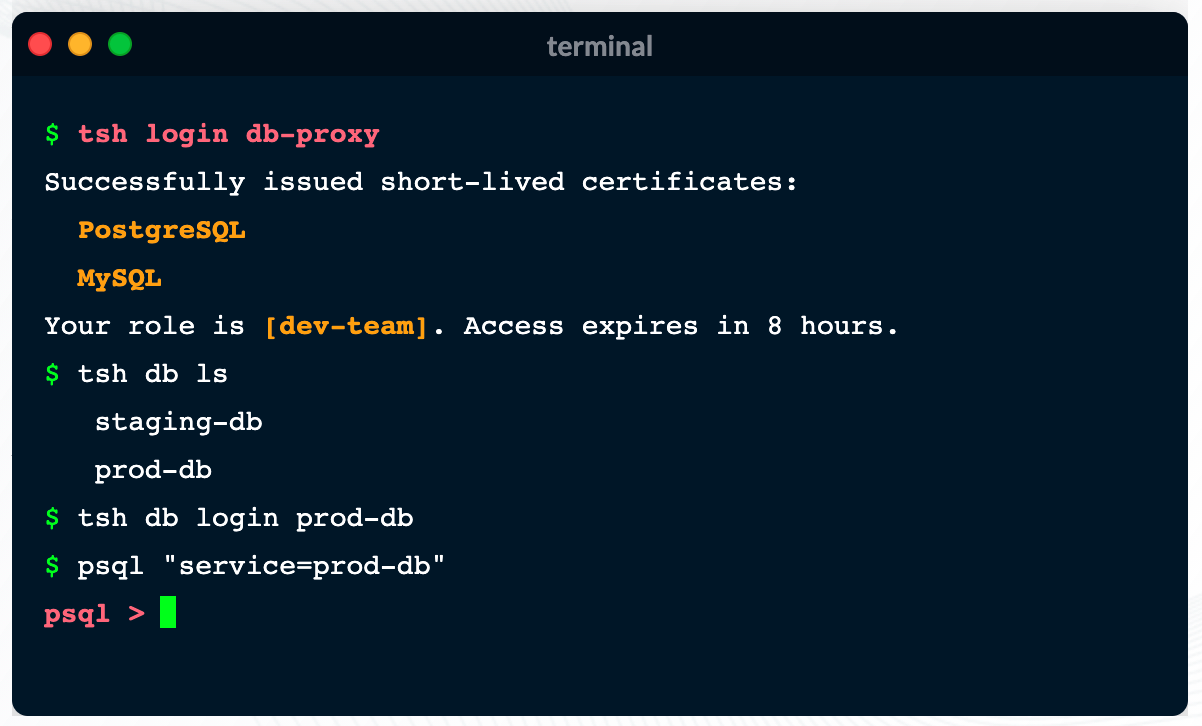
    Teleport announced today it has added support for databases to a security gateway, delivered as a cloud service, that is currently used to secure Linux servers and Kubernetes clusters.

    Ev Kontsevoy, CEO, said Teleport intends to extend the reach of the security gateway up the entire stack of IT infrastructure that developers routinely use to remotely access databases. Initially, Teleport 6.0 adds support for open source PostgreSQL and MySQL databases.

    Teleport has gained traction as an access management tool because it provides a single binary that can be easily deployed by developers to encrypt IT platforms and enforce session controls. It automatically discovers all the resources in an IT environment, along with the protocols needed to access them. Teleport also provides a unified audit log, in a JSON format, that enables IT teams to track what resources are being accessed, when and by whom.

    Other features include the ability to authenticate identities via built-in single sign-on (SSO) and multi-factor capabilities, discover and see all database instances, integrate with command line interfaces (CLIs) and a set of workflows for managing privilege escalation.

    Access control is becoming a bigger issue due to a number of factors. The overall IT environment is becoming more complex as the infrastructure stack required to run applications continues to grow; most IT teams continue to work from home to help combat the COVID-19 pandemic. Teleport provides a fine-grained approach to streamlining access management across servers, clusters and databases in a way that eliminates the need to rely on virtual private networks (VPNs). In effect, Teleport enables IT teams to move toward a more identity-centric approach to unifying the management of access, Kontsevoy said.

    That’s critical at a time when the rise of DevSecOps is pushing responsibility for security further left toward developers, Kontsevoy added. While the rate at which that transition occurs will vary widely, Kontsevoy said it’s clear developers are taking more control over access control as part of a broader effort to roll out secure applications, faster.

    It may be a while before DevOps teams are able to aggregate all the access control protocols they currently employ under a single proxy. However, Kontsevoy said, the massive amount of time and effort spent managing access control today will drive DevOps teams to look for ways to automate what is currently a very manual process.

    Less clear is what role cybersecurity teams might play in supervising access management. The days when a separate overlay was needed to manage access may be coming to a close.

    In the meantime, it’s clear VPNs were not designed to address access management, in an era where the bulk of IT teams – and the employees they support – are working from home. More employees may be soon be heading back to the office more frequently, but it’s likely that remote work will remain prevalent. That means legacy approaches to managing remote access that were never designed to scale will becoming increasingly obsolete.