Category: Blogs

  • How to Build a People-First Engineering Team

    How to Build a People-First Engineering Team

    When we think about successful technology teams, there is a tendency to primarily focus on the technology being created rather than the people who are creating it. While both approaches can lead to successful products, a technology-first approach is often the default when software engineers become managers without necessarily having the right tools to manage effectively. Becoming an engineering manager requires an entirely new skill set that involves different communication styles, time management, organization, tools and software, scoping work, learning how to effectively delegate and identifying the right people to complete the team.

    As a CTO, and having gone through this transition, I have noticed that the more a manager is able to be in sync with the people on their team, the less burnout they experience, the higher the employee retention rates and the better work their employees will do.

    While most people won’t be entirely people- or technology-focused, here is a quick overview of the differences:

    • A team-oriented manager knows the personal and professional struggles their people are experiencing, and there’s a sense that the team they run is all working together on a mission toward the same goal. When you talk to this type of manager, they will naturally gravitate towards giving status updates on the wellbeing of individuals.
    • Managers who tend to see the team through a more technical lens will instead identify parts of the project or technological or strategic roadblocks that are impacting the team.

    The same issues will be dealt with very differently by these different types of managers. It can be beneficial to record yourself when you are talking about your team to identify where your focus is, and evaluate if that feels right for you.

    Building Effective 1:1 Communication with Team Members

    An individual contributor is normally accustomed to arriving at weekly 1:1s and working with their manager to solve any problems they may have. When they become a manager, it becomes their role to coach team members to solve their own problems, in addition to building trust. This role change takes preparation, and, if you are unsure how to do it well, you may find it helpful to draft out an agenda that you can follow if needed. You can also gain knowledge about this process by talking to more experienced managers.

    What do you talk about in your 1:1 meetings? Even if you are more a technology-oriented person, 1:1 meetings with your team should be less about the status of projects and more about how the person you are speaking to is doing and how you, as a manager, can help. Having started as a software engineer myself, and now as a CTO, I have found the below questions to be helpful as I navigate how best to help my team thrive in their roles.

    1. “How are you doing?” If you are speaking with a team manager, another great question is, “How is your team doing?” You want to genuinely understand the status of the individual outside of the technical aspects of the job.
    2. “Do you have any feedback for me?”
      I always ask for feedback. For a while, they may not have any; but I often find they start with a small one like “Better options for snacks.” This is an excellent opportunity to build trust by improving the work experience. The next time, they will probably share more until you receive really important feedback, while also improving the relationship. The important thing to remember, here, is to respond to the feedback.
    3. “On a scale of zero to 10, how much fun are you having at work?”
      I really want people to have fun at work. You can ask them to give you a number between zero and ten. When they respond with a number, say, six, a great follow-up question can be to ask what is needed to change the situation so that number becomes a seven. How can you help get them there? I have heard a wide spectrum of answers to this question, ranging from easy to complex; from things like permission to be unresponsive for an hour a day to the desire to learn the skills needed to do a different type of job.
    4. “Where do you see yourself in the next two years and 10 years?”
      Helping your team define both long and short term goals is a really important part of being a manager. Specifically for engineers, it is a great idea to think about if you want to continue moving up in an engineering role, or if making the switch to a managerial role is a better fit.
    5. “How can I help you get to the next level in your career?”
      It is common to get sidetracked when balancing your day-to-day work with your personal life. You can also use 1:1 meetings to help your team members identify what they can do to hit their short- and long-term goals, and how to maintain a better work-life balance.

    Supporting Colleagues

    This last year has been tough for most people, to varying degrees, which has solidified the idea that we need to be there for team members during difficult times; this goes beyond the pandemic. That can mean sending their favorite meal via delivery, sending a care package or simply making it very clear that when someone on your team needs to step out or take time off, that is fine – no questions asked. To be able to be offline and not need to do a long handoff is so important when you are going through a hard time.

    During this move to remote work, as in many leadership teams, my company has gone against the cultural norm of keeping life and work separate. We have acknowledged that it is too difficult to do that right now, and very publicly recognized that everyone is going through something. It has felt like mental bandwidth is filled up with things going on outside of work, so as team members, it is good to make sure work doesn’t add to that pressure.

    In a way, this pandemic period has broken down barriers between work and “life” that has made it almost obligatory to focus on people first. From my perspective, this has been a breakthrough in how we can do business moving forward. By thinking about each individual on your team, everyone can be uplifted and heard, which can be the impetus to more innovation. If you are operating at your max with no slack in your system and little support from managers and teammates, you lose creativity. As innovative teams, this experience has been a reminder to build people-first principles into our cultures to promote a healthy work-life balance that lends itself to innovative solutions and better results.

  • Learning ‘The First Way’ of DevOps – Continuous Flow

    Learning ‘The First Way’ of DevOps – Continuous Flow

    Many organizations are struggling to realize well-engineered DevOps, even ‘the first way’ of DevOps – continuous flow.

    DevOps is an evolving body of knowledge. There is no one-stop shop that covers all roles and the complete range of skills required for DevOps. A DevOps-competent workforce requires an ongoing commitment to DevOps skills development and mastery. Enterprises must approach DevOps training strategically to leverage training resources to their best advantage.

    Learning Continuous Flow

    The first way of DevOps, continuous flow, is the foundation for DevOps.

    Why Is Learning Continuous Flow Important to Engineering DevOps?

    A knowledgeable, skilled workforce is needed to meet strategic objectives. Without a solid understanding of DevOps concepts and terminology, communication between people and teams is inefficient and a source of bottlenecks and misunderstandings. Developing hands-on skills for the tools and workflows is needed to understand and implement DevOps pipelines. There is an industry-wide shortage of skilled DevOps candidates. New skills foster innovation. Knowledge workers reduce production costs and reduce mistakes. Having skilled coworkers makes for a satisfying working environment. Employee retention is better. Competitive advantages are derived from knowledge.

    How Is Learning Continuous Flow Accomplished?

    The following are recommended engineering practices for learning continuous flow.

    People are encouraged to be continuous learners with an ongoing commitment to DevOps skills development. DevOps training is approached strategically to ensure DevOps training is well aligned to business goals. DevOps skills gap assessments are conducted and used to define and refine the training strategy. Leaders and cross-functional teams are encouraged to take DevOps fundamentals training. Leaders define a training strategy that best fits the needs and priorities of the organization to meet critical skills gaps.

    The training strategy considers which skills and roles can be covered by inexpensive self-study resources. Determine which skills and roles warrant more costly training. DevOps training has a distinct budget. Compliance to DevOps training programs are tracked. DevOps leadership training is offered to management and staff that have a role relevant to DevOps. DevOps tools training includes the recommended engineering practices for using each DevOps tool in the Service Catalog. Staff are encouraged and supported to take DevOps certifications that are relevant to their assigned roles.

    A DevOps training program is defined and includes a recommended curriculum for each role including leaders, developers, QA, Ops, and infrastructure and security staff that are operating in a DevOps environment. Recommended DevOps training resources are cataloged, and the catalog is visible for all stakeholders. Merit and recognition programs encourage employees to master DevOps skills.

    All staff is allocated time for DevOps training. DevOps mentoring programs supplement formal training. Job swapping and immersive training is encouraged and planned. People are encouraged to attend external conferences and meetups and share what they learn with other team members.

    What Is Needed to Implement Learning for Continuous Flow?

    The following are recommended engineering practices for implementing a learning program for continuous flow.
    Assign roles and responsibilities for DevOps training leadership (e.g., DevOps Sensei, Training PM, evangelist). Conduct a DevOps skills gap assessment. Define a training strategy that best addresses the gaps and fits the needs and priorities of the organization. Define a training budget that includes expenses and time allocations per role and skill.

    Determine which skills and roles can be covered by inexpensive self-study resources. Determine which skills and roles warrant more costly commercial training. Identify training goals for each role. Ensure job recruiting profiles match skill requirements for DevOps skills that are most relevant to the organization strategic goals. Put in place the means to make training resources visible and available. Set training goals for teams and individuals. Put in place incentives and recognition programs for completion of training.

    Some of the best sources of DevOps training resources are listed below:

    1. The DevOps Institute
    2. Partners of The DevOps Institute, such as Learning Tree International and Xellentro
    3. Udemy
    4. Recorded talks and publications available through IT Revolution
    5. Books such as my own Engineering DevOps, by Marc Hornbeek.

    What this Means

    Organizations need a trained workforce to succeed with DevOps—even ‘The First Way’ of DevOps—continuous flow. Organizations need to approach DevOps training strategically to leverage DevOps training resources to their best advantage. To learn more about my blueprint for learning all things DevOps, refer to my book Engineering DevOps.

  • Then and Now: The Evolution of DevOps Culture

    Then and Now: The Evolution of DevOps Culture

    There are many available resources dedicated to delivering better business value faster. Based on this advice, many organizations and teams are adopting common software delivery practices — even outside the usual use case of providing software (take, for example, SpaceX teams using agile, or leadership teams that use scrum practices and have daily stand-up calls). This progression into faster, better, cheaper and easier – no matter what you’re delivering – is what makes incorporating DevOps into business practices critical to delivering unmatched value for end users.

    Then and Now

    A great perspective to consider when approaching the subject of DevOps is how technology has changed just about everything – how we build, connect, share and educate. Up until the 2000s, for example, the standard turnaround time for taking and sharing pictures was one to three weeks, if not longer. This process used to involve film cameras, darkrooms to process the photographs, photo finishing labs and hard copy, physical prints. Today, our mobile devices allow us to snap hundreds of professional-quality images and share them immediately online.

    culture evolution

    These earth-shattering changes don’t apply to photography alone, but to many other industries including financial services, banking and IT. Consistently, technology is finding new ways to disrupt industries, priming them to be more efficient to fit into our fast-moving lifestyles.

    The DevOps Life Cycle

    Now, let’s look at software delivery. In the past, the process of traditional software delivery was linear and sequential; waterfall methodologies offered little flexibility and did not succumb to the nature of change and demand for technology services we see today. What we’ve experienced with software delivery now uses DevOps to leverage new insights through people, processes and technology, giving organizations the ability to deliver continuous business value. Yes, that means businesses are adding value to our lives all the time, whether you see it or not. For technology organizations, this process for delivering business value is modeled through what we call the DevOps life cycle — understood through the graphic below.

    DevOps culture evolution

    Getting to a DevOps Culture

    Often, an organization’s challenges with DevOps do not lie in the technology or processes themselves, but in the people part of the equation – how we work together to deliver value via cross-functional teams. To understand what building a DevOps culture means, we need to look at what culture encompasses and how our people, process and technology work together to enable a successful DevOps life cycle.

    culture evolution layers

    This layered graphic features all the various components related to culture. Each layer encompasses the next.

    ·      Mindset

    ·      Values

    ·      Principles

    ·      Practices

    ·      Tooling

    Getting to a DevOps culture involves articulating change both from the bottom up and top down in our organizations and is, therefore, no easy feat. Before we can introduce or discuss tooling, we need to understand how our practices and principles help us achieve our outcomes. Each inner layer requires the outer layer to be successful before we can truly get to defining and strengthening a DevOps culture.

    Here are my tips for getting to a DevOps culture:

    ·      Learn from and develop skills from mistakes

    ·      Focus on the important priorities

    ·      Capture collaboration

    ·      Perfect your tooling

    The DevOps Principles

    DevOps is the collection and collaboration of people, processes and technology to deliver software value continuously. Here are some core DevOps principles you can use to guide you on your DevOps journey.

    Create With the End in Mind

    High-performing teams work best when leaders and individuals understand their role in the team. Therefore, creating with the end in mind involves reassessing and often asking big picture questions, like “Who is this delivery for?” and “Why are we doing it this way?” Keep the vision in mind and make adjustments along the way.

    Even the most famous photographs in history involved many adjustments and numerous attempts to get it right. Creating with the end in mind means knowing we may not have everything right the first time around. That’s okay! Similarly, life isn’t without its own distractions, conflicts and changes. Keeping the target outcomes in mind helps us align to initiatives and actions, and to question when they don’t align.

    Cross-Functional Teams

    Many products and deliveries involve multiple people. For example, some of the best Marvel cinematic universe (MCU) movies were made thanks to the help of multiple production teams and partner companies coming together to build the powerhouse we know today. Not to mention, in my opinion, some of the best superhero movies of our time. We succeed with software delivery in the same way: by having fully responsible cross-functional delivery teams.

    The best engineering teams I’ve been on are made up of independent and autonomous individuals who know how they can contribute to the work in progress. They’re also willing and unafraid to collaborate with others to get this work done.

    Commitment to the Journey

    “I am not here to be right. I am here to get it right.” – Brené Brown, from the book Dare to Lead.

    Even with cross-functional delivery teams and creating with the end in mind, our teams still may not get everything right the first time around. Committing to DevOps is about accepting any failures that come during the journey. Committing to the journey doesn’t mean you can’t define what it involves, even if it’s out of the ordinary. Experimentation is also a part of how we, as developers, adapt to change and adopt novel approaches to delivering faster, cheaper and better software.

    The DevOps Principles as Guides

    Use these principles as the foundation for how to work together, but also use the right tools, and define and improve processes along the way. In photography, there are three components that serve as building blocks to the final images we capture: aperture, shutter speed and ISO. In DevOps, it’s our people, processes and technologies. Achieving high performance with DevOps involves all of these components working together and adjusting to our environment, situation or team.

    The key to getting to the results you desire? Not getting blindsided by any single component of getting to that result.

    The DevOps Practices and Tools

    I like to consider this section the call to action; the one says to our teams and individuals, “Gear up!” No reasonable photographer would leave for a photoshoot without their camera and camera gear, right? Similarly, DevOps practitioners and teams need the right tools to get the desired results.

    Source Code Management

    Source code management is about allowing teams to collaborate, have version control, correct and revert software code. This is fundamental for many teams to increase not only visibility and collaboration, but also start automation workflows.

    If you are an individual just starting out with writing code, I recommend learning the basics of Git, such as how to add, commit, push, merge, branch and clone code. If you’re a team, I recommend discussing the practices and standards you want to use for collaborating. Always fit your Git structure and workflow to your codebase and team dynamics.

    Continuous Integration

    What continuous integration (CI) does is take code away from local machines to package it into a deployable artifact in a CI server. What this is designed to do is automate the integration of newly committed code changes. This process is often triggered by code changes pushed into your Git repository. Using checks and other tools, teams can version and release artifacts that have already been vetted for quality and security.

    Continuous Delivery

    Continuous delivery, on the other hand, takes artifact code to production environments. CD aims to deliver code changes of all kinds to users in a fast, repeatable and safe manner. CI/CD consists of both CI and CD pipelines working together to deliver code to users.

    Infrastructure-as-Code (IaC)

    Infrastructure-as-code allows users to define hardware through code. We can improve how we provision, configure and maintain hardware systems. Infrastructure provisioning tools like HashiCorp’s Terraform and AWS Cloud Formation, configuration automation tools like Ansible, Puppet and Chef and package managers like Helm allow teams to accomplish much more when software scales and demand increases.

    Secrets and Identity Management

    Security is everyone’s responsibility. Secrets management and identity management tools make accomplishing DevSecOps easier by securing and managing sensitive information. Teams should consider how they are handling secrets and users within their architecture. HashiCorp Vault, KeyCloak, KMS and other similar tools can help you achieve your goals around security.

    There are many other practices and tools DevOps teams and organizations can use to achieve their desired outcomes. What works for one team may not work for another — hence the need to innovate and experiment in a controlled and well-led manner. Other practices that can increase your team’s ability to deliver value include value stream mapping, progressive delivery, GitOps and chaos engineering.

    People, processes, and technology belong together in a DevOps culture. While practice makes perfect, what’s more important than perfection is gathering the right answers along the way. Everything doesn’t need to be right the first time around. Just remember that no leader, individual or team in DevOps is alone. We started by defining what it means to build a DevOps culture, change mindsets and set principles and practices, so now I ask you: What does DevOps mean to you?

  • How IT Can Use AI To Prepare For Uncertainty

    How IT Can Use AI To Prepare For Uncertainty

    The past year has been unpredictable for businesses – from migrating to remote work to planning for a return to offices to keeping pace with shifting government guidelines. With so much in flux, it was and is a good reminder that organizations must be prepared for the unexpected and have contingency plans in place.

    From an IT standpoint, this means ensuring that employees are well equipped to work efficiently and safely, no matter what work may look like in the year ahead. Fortunately, artificial intelligence (AI) technologies are evolving quickly, enabling enterprises to better manage an ever-changing hybrid workforce.

    The following are three AI-enabled strategies that organizations should implement to help prepare for times of uncertainty:

    Invest in Self-Driving Networks

    When companies quickly and unexpectedly moved their employees to remote work last year, networks experienced increased pressure on multiple fronts: usage, quality and issue remediation. These factors compounded on top of the fact that networks have continued to become more complex in the past few years as workloads become more distributed across public and private clouds. Even under the best circumstances, building and maintaining a traditional network requires a team of dedicated experts and can be time consuming. Due to their complexity and the increasing amount of data, networks are becoming more difficult to manage via command-line interface (CLI) and are required to adapt to changing workloads and employee connectivity – this is where AI comes into play.

    A self-driving network eases complexity by using AI and automation to run the network’s end-to-end user experience with minimal human intervention. This includes monitoring for issues such as bad cables and capacity hotspots within the network and solving them before they impact the end user. By ensuring networks are running smoothly on the foundational level, self-driving networks allow IT teams to spend their valuable time tackling more complex problems and driving innovation.

    Empower IT With AI Assistants

    Another way to free up the IT team’s time is to make a new hire – not a traditional employee, but rather an AI assistant. More specifically, an AI assistant that can answer questions and manage networks on par with a network domain expert – one that learns and improves as you work with it. As AI truly delivers on completing functions on par with humans, this is where AI and machine learning are disrupting industries.

    Today’s AI assistants, through conversational interfaces, are delivering more than simple “yes” and “no” answers to IT questions – they are able to answer complex open-ended questions such as, “Why is Bob having a poor Zoom experience?” They’re even learning to solve more complex problems, helping IT teams minimize the number of support tickets issued by frustrated remote workers. As businesses recognize the value AI assistants bring to their team, they now see them as members of the IT team that help them simplify the ever-growing complexity of IT networks.

    Educate Employees on the Benefits of AI

    In 2021, we expect the adoption of AI in networking to accelerate. Ensuring the right AI technologies are property executed starts with trust. Therefore, getting teams to perceive AI assistants as more of a teammate and less as a job-threatening technology is an important step toward successful AI implementation. The end-user experience is more important than ever, and AI is becoming more crucial for enterprises to manage this experience.

    To many employees, the concept of AI can be scary. A common misunderstanding is that AI will take over humans’ jobs. However, people are starting to understand the importance of AI by seeing it solve real problems. As companies implement AI technologies into their solutions, they should first prioritize open conversations about the business benefits of AI. By ensuring everyone is on the same page, teams can work toward building a better process together. After all, the goal is for AI to ultimately make their jobs easier.

    The last year has been difficult to navigate, but it serves as a reminder of the importance of planning for the unexpected – this is necessary to continue running a business efficiently and supporting employees remotely. Though there are sure to be more uncertain times ahead, we have the tools to prepare the best we can today.

    By taking steps toward building a self-driving network, investing in AI assistants and educating employees on AI, organizations can have peace of mind that they’re on the path to building themselves, their employees and their stakeholders a stable future that’s prepared for whatever uncertainties come their way.

  • 10 Actions IT Can Take to Curb Climate Impact

    10 Actions IT Can Take to Curb Climate Impact

    Digital technology is responsible for 3.7% of total CO emissions, according to estimates from The Shift Project. This could increase, as cryptocurrency mining is leaving a massive carbon footprint. With the world’s climate at stake, every percentage point matters.

    Thankfully, many tech companies have announced significant climate pledges to reduce emissions or offset their carbon footprint. For example, Microsoft states they will be carbon neutral by 2030. Amazon has committed to a deadline of 2040, and other companies such as Infosys have co-signed. Netflix’s climate commitment states they will reach net-zero greenhouse gas emissions by the end of 2022.

    Sustainability goals are vital long-term benchmarks, but on-the-ground technologists must make immediate optimizations to realize them. So, what exact steps can enterprise IT take to reduce their energy consumption and thereby reduce greenhouse gas emissions?

    I recently met with Anant Adya, Infosys, to explore the overall energy footprint of enterprise technology. Below, I’ll cover 10 ways IT can reduce its impact on the environment, including actions like auditing legacy infrastructure, optimizing cloud operations and moving toward renewable energy sources. Many of these energy optimizations bring the added benefits of cost savings and code consolidation.

    1. Reduce Resource-Heavy Legacy Infrastructure

    One potential cause of unnecessary energy consumption is legacy infrastructure. To reduce power consumption, Adya recommends going straight to a network compute storage setup. You may find energy consumption savings by porting resource-heavy legacy systems to the cloud. This will be especially effective if you’re running older end-of-life machines with less efficient processing.

    2. Reduce the Number of Clouds

    Next, look at the number of clouds your organization has adopted, Adya recommended. In recent years, companies have moved to multi-cloud setups for reasons like performance, cost or features. However, these movements could cause unnecessary duplication. For a large enterprise, refactoring your multi-cloud usage could mean reducing from five or six clouds to two or three, said Adya. With the right combination, you could very likely reach equivalent benefits with less reliance on multiple clouds.

    3. Reduce the Number of Core Data Centers

    Look at the number of sites in your core data centers and reduce the footprint, if possible. In his digital transformation work, Adya described working with a client to consolidate six large data centers into three essential locations — one for disaster recovery and two others to support American and European zones.

    4. Move Edge Locations to the Cloud

    Large organizations may be supporting a lot of edge infrastructure. Yet some locations, such as offices, don’t require that kind of infrastructure, Adya suggested. He recommended reducing local servers and embracing more cloud-based computing solutions, overall. He described one case in which an organization consolidated 600 edge sites to 350, thus reducing power consumption by 40%. Adya credited the cloud for delivering lower costs and greater scalability and resiliency.

    5. Embrace Cloud-Native Administrative Operations

    Cloud computing is arguably more energy efficient than traditional on-premises arrangements with its pay-per-use model and multi-tenant approach. To get the most out of the cloud, Adya recommended moving to the cloud, along with adopting cloud-native software. Most operational and administrative work can be processed in the cloud, he noted.

    6. Consolidate and Rationalize Resource Utilization

    Another way to stem energy consumption is to check for underused or forgotten assets. While the cloud can help optimize software, there is a good deal of unnecessary cloud spending on underused resources. In 2020, companies wasted $17.6 billion paying for idle resources and overprovisioned computing instances, reported ParkMyCloud. Adya thus recommended looking at the entire server and storage estate to calculate the server utilization and slimming down wherever possible.

    7. Increase Power Usage Effectiveness (PUE)

    Hardware is much more efficient these days — sometimes by as much as 10X more powerful with 10X less energy consumed. As storage technologies also are always improving, it could make sense to upgrade to new hardware to reduce overall power usage. It’s important to monitor power usage effectiveness (PUE) and check power ratings before and after migrations. Adapting your information life cycle management tiering practices for storage could also help optimize to reduce wasted power, Adya added.

    8. Meet Sustainability Goals on Campus

    Have you ever driven by an office park at night and seen thousands of empty rooms with all the lights on? This has got to change. Another way to reduce power is to limit a campus’s energy consumption, described Adya. Smart automation and remote monitoring could be used to manage power efficiency by turning off lights and heating and cooling to meeting rooms when empty, for example.

    9. Power the Business With Renewable Energy

    Run your campus with solar power. Adya described how Infosys is doing this by mounting 40MW solar panels at their corporate centers, in effect sourcing 43% of its energy from renewable sources. Another more passive way to invest in renewables is to choose a data center provider that commits, under contract, to using a high percentage of renewable energy.

    10. Purchase Carbon Offsets

    The previous goals are all active steps to reduce energy requirements. However, once an organization has attempted these optimizations, another option is carbon offsetting. This indirect method effectively cancels out a company’s emissions by funding green activities, such as tree planting.

    However, there is debate over the effectiveness of carbon offsetting, as trees take decades to become effective carbon consumers, and the practice doesn’t advocate for immediate change to harmful practices. “To be serious about tackling climate change, [organizations] need to stop carbon emissions from getting into the atmosphere in the first place,” wrote Alia al Ghussan for Greenpeace.

    IT’s Role In Curbing Climate Change

    Dire climate circumstances require quick action from all business units. In the process, organizations will likely consider many initiatives simultaneously to address their climate impact. However, as more companies become digital-first businesses, the onus falls on IT to support these changes.

    In addition to the above actions, there are undoubtedly other ways enterprise software architects can stimulate sustainability initiatives within their organization. This could include refactoring code into more lean iterations or eliminating unnecessary records storage. Tech leaders could also vocalize their support for global pledges, such as the Paris Climate Agreement, RE100 or Global Optimism.

    It would take a solar power plant covering 115,625 square miles, roughly the size of New Mexico, to power the world with solar energy! As you can see, it will take a lot of work to reverse our reliance on fossil fuels. But with scalable cloud computing and more intelligent infrastructure optimizations, IT can do its part to contribute to curbing climate change.

  • Automating Security with Palo Alto

    Automating Security with Palo Alto

    Today, automation is more important than ever before. Integrating security and automation early into the SDLC decreases the risk of potential cyberattacks, provides early and relevant feedback, reduces time to market and improves product quality.

    In this TechStrong TV episode, Taylor Smith, senior product marketing manager with Prisma Cloud, Palo Alto Networks, discussed the need to take a software-centric and cloud-focused approach to security. He explained the importance of automating security to keep pace with rapidly changing applications and software infrastructure.

    The video is immediately below, followed by the transcript of the conversation. Enjoy!

    Transcript

    Mitch Ashley: Well, I’m very privileged to be joined by Taylor Smith. Taylor is Senior Product Marketing Manager with Prisma Cloud, of course, of Palo Alto Networks. Welcome, Taylor.

    Taylor Smith: Thanks so much.

    Ashley: Good to be joined by you today. Tell us a little bit about yourself. I know you fairly recently joined Palo Alto Networks and you have an interesting background in the industry, and of course, tell us a little bit about Prisma Cloud.

    Smith: Yeah, absolutely. So, I’m coming up on my six month mark and I’m really enjoying it. I came from both big and small companies, so previously at infrastructure companies and then I did a little stint in the DevOps space working on some DevOps tooling and chaos engineering. Really enjoyed that, but glad to be back into cyber security, which is really my passion, and covering cloud security and shift left security for Palo Alto Networks.

    Ashley: Excellent. Tell us a little bit about Prisma Cloud. I know it’s pretty comprehensive, a lot of things there, but how would you give a kind of brief overview of what it is?

    Smith: Yeah, absolutely. So, Prisma Cloud, we have the benefit of being best in class in multiple different categories in cloud security. So, we really cover the full life cycle of cloud security, from the infrastructure all the way up to the code level, the code that’s the applications that are running on top of it, and we do that across the full life cycle of your cloud application. So, we’re securing your infrastructure as code all the way to your container images, and we do that at the build time and the run time.

    Ashley: Excellent. Well, as a—I’ve used Palo Alto Network products myself. As a networking company, if you wanna think of it that way, maybe that’s an outdated way of thinking of Palo Alto Networks, which is the point of my kind of thought here is, we’re talking about application security and applications and really, everything is becoming software now. So, the network itself, of course, has been turned into software and now is in cloud and on prem. But the whole stack, the entire stack, you know, infrastructure as code.

    So, that brings some obvious benefits, maybe some challenges with it. What are your thoughts on that?

    Smith: Yeah, absolutely. So, it’s an interesting time to be in the application space right now. Before, you had to go in and physically provision servers, you had to connect cords to routers and network switches, and all of that and then maybe get into the CLI to make some changes.

    All of that’s moved to code, all the way from the infrastructure as code all the way up to the containers that you’re defining how they’re gonna operate, the operating systems are all contained in code. Which is great for developers, they’re able to move a lot faster, they can provision things on the fly, they can use things as they need them or scale them down if they don’t. It saves us costs and makes things move a lot faster.

    The double-edged sword to that is, now it’s out of the security and infrastructure, the IT team’s hands. Developers are just deploying things, it’s kinda the Wild West. And so, to kinda bring that in, rein that whole world in and make sure they’re secure and doing all the right things, it’s good to embed that security in their process. So, making sure you’re scanning in infrastructure as code templates, scanning container images before it gets to the repository and before it gets deployed into production. And that really gives us a chance to actually patch more often, because now developers are getting the direct feedback, and frankly, they’re more qualified to make those fixes than the security team. So, they can actually go into the code that they wrote and make the changes if they’re given that right feedback.

    Ashley: Yeah, I think that’s one of the things, as a security engineer when you think about software, it’s not—I can think of this now as, instead of a solid, it’s almost a fluid.

    Smith: Yeah. [Laughter]

    Ashley: It’s constantly changing, right? And that makes it really difficult to secure, it also sometimes can be difficult from a quality standpoint. But, really, it is almost that kind of a form of matter and the things are constantly changing. So, you can’t expect manual processes were stopping the line to be what’s going to bring security back into the fold. You’ve got to equip people, you’ve got to equip the toolchain, the pipeline that’s creating code and delivering it out to production, and then guiding that process through what you want secured, how you want it secured, what you deal with, those issues as they come up.

    Smith: Yeah, absolutely. Microservices has really revolutionized this where we have a couple customers who, the application that they have, one at the beginning of the week looks nothing like what it looks like at the end of the week. They’ve completely redeployed the full stack, and that’s great for innovation, it really opens up the world, but it does—and you don’t want, as a security engineer, to be going in there and slowing things down. You wanna be a part of that development and actually be a supporter, be someone who actually enables that speed to happen, but still make sure it’s done secure and you don’t get bitten by the misconfigurations, the vulnerabilities in your applications.

    Ashley: Mm-hmm. What is it about the cloud, too—I mean, we talked about microservices containers, those don’t have to be run on the cloud, but of course, we think of them as cloud native architecture. Is it from infrastructure management all the way through to the application itself? How do we have to rethink things than maybe what we did when everything was running in our own private data center? What’s fundamentally different that we might try to do it the old way in the cloud, but really, we’ve got to fundamentally change how you think about it?

    Smith: Yeah, I think a lot of it comes down to that everything is accessible. I mean, there are private links and there are VPNs to make sure that it’s locked down, but at the end of the day, you don’t have physical access to these data centers. So, a lot of it comes down to, there is somehow public access, and we lock that down as much as possible.

    But if you have an EC2 instance in AWS or a VM instance in Azure or GCP, it can be exposed to the world. And making sure that the security groups or the firewall rules are set so that they’re blocking, there’s no catch—I had a customer who explained it to me very well. Where you kinda get these layers of checks in the on prem world where, even if somebody goes in and provisions a virtual machine that is exposed and has all these misconfigurations, most likely, it’s not gonna be touching the world. No one’s gonna be able to access it, so it’s not a big deal. But cloud security, those misconfigurations can really bite you, because they are exposed. And so, getting that right is more critical, and making sure the misconfigurations are found and fixed, it’s much more important than it was in the on prem world.

    Ashley: That’s interesting. I’m wondering how you approach a platform like Prisma. Obviously, people who are already Palo Alto customers may come to it kinda naturally through their relationship with you. But how is it, is it a network engineering team that says, “I need to figure out how to secure the cloud?” Is it a software Dev team saying, “I need better tools to make sure I’m configuring and writing secure code?” Who is it that usually is engaging you for Prisma and then how do they bring it into the organization and kind of spread the love, if you will? [Laughter]

    Smith: Yeah, yeah. No, it’s fun. Part of what I really enjoy about being at Prisma versus some of my previous jobs is, I’m not working with a single person or archetype, I’m working with some cloud engineers, who they, it’s this new—frankly, new to me engineering type where they’re covering everything cloud. They’re doing full stack up to the application for everything provisioning infrastructure in the cloud. Where before, you might have a network specialist and a compute specialist, now you have a single engineer that covers the full cloud. And then we also have developers and DevOps teams that work with us, and so it’s not necessarily the security teams. And then, we also still work with the security teams, so the SOC, the security engineers and the cloud security specialist.

    And all of them have different us cases that they come into Prisma Cloud with, but all of them in the end are trying to use Prisma Cloud to make their lives a lot easier to automate that security and make sure the checks are happening. So, the developers are much more worried about the pre-deploy time where they can secure their applications, their infrastructure as code when they’re container images before they’re actually running containers.

    And then, the security teams are actually going into our system to see what’s the posture in the cloud, getting that view, the complete, comprehensive view of all the things that are running in their cloud environments, and then securing their containers, their Kubernetes environments, their serverless environments, all the things that are actually running. And running incident management through Prisma Cloud, running through the incidents and all the trace data that we give them if there’s an incident that happens.

    Ashley: It’s really fascinating how the security engineer/network engineer job has changed, that role and the skills that are involved. I wonder, I’m just curious what your experience is being more, dealing with software and configuration of software, maybe automating, scripting, things like that as a network engineer/security engineer. It seems like that would make that job more relatable to what a software developer might be doing. They’re not the same thing, but much different than someone who is rack and stacking and, as you mentioned, plugging things in and thinking of networks and physical devices like we used to, not that long ago.

    Smith: Yeah. Yeah, it’s funny, I agree. The role of the infrastructure engineer is becoming much more like a software developer. So, they’re actually learning Python or HCL so they can write Terraform scripts or they can write Ansible scripts and deploy infrastructure using code. And that can now go through pipelines. So, now, I’m hearing infrastructure people start talking about CI/CD, which you would never expect in the on prem world. They’re using a lot of the same language, like unit testing static analysis of their infrastructure as code.

    So, they’re kind of learning to be a developer, but specifically for infrastructure.

    Ashley: I remember the day, it was actually about, I guess, 11 years ago when I took over an IT organization and a network engineer asked me, “What should I be learning? What’s the next thing I should be thinking about?” and I said, “Learn Python,” and he looked at me cross-eyed.

    Smith: [Laughter]

    Ashley: Ended up going to a conference, maybe it was yours, came back and said, “Now I know why you said that, now that we see what’s happening in”—yeah, that’s a huge transformation that’s happened in, really, less than a decade. Think about how massively the network stack has changed and really folded into infrastructure as code as its part of it.

    How has your job changed through your career, and have you progressed with how this has happened in our industry?

    Smith: Yeah, so, like I said, I came from a big infrastructure company and I covered traditional network security back then, and I moved to a DevOps company. And so, I kinda saw this complete transformation where things were automated, people were moving fast. Reliability is kind of—it’s a whole new definition in the cloud. And so, now, you can, even small companies can have redundancy where they didn’t before.

    That makes things very different for the security person. And so, if I’m—now that I’m covering security, again, but now from a more developer focus, I’m seeing how that automation is much more important than ever before, and how that network perimeter is no longer the only place where you can apply security. And it’s becoming less and less important, but it’s still critical to have that perimeter, but all the things happening inside, too. So, that zero trust networking inside your infrastructure, inside your applications, securing your Kubernetes deployments, making sure your containers aren’t over privileged or you’re not pulling in images from open source that are vulnerable.

    All that is now just as important or more important than the traditional security that I kinda started my career with.

    Ashley: Mm-hmm. Yeah, it’s a fascinating journey we’ve been on.

    Smith: Absolutely.

    Ashley: Well, we’re kinda running out of time, here. Where can folks find out more about Prisma Cloud and offerings from Palo Alto Networks?

    Smith: Yeah, absolutely, you can check out our website. So, you can go to PaloAltoNetworks.com/Prisma and you can find out a lot more there, or we have a lot of useful resources like blogs or white papers, and so, if you want to find out more about container security or cloud security, go there, and there’s a lot more information for you.

    Ashley: I was just gonna suggest, right, developers as well as security and network folks, if we wanna say whatever your role or title might be. Well, it’s been fascinating talking with you, Taylor, and good to be on this journey with you through the evolution of the technology that we use and innovation that’s happening.

    So, hope you are doing well and you’ll come back and talk to us again.

    Smith: Thanks so much, Mitch. It was a pleasure.

    Ashley: You bet.

  • Turbocharge Enterprise Apps With Contextual Analytics

    Turbocharge Enterprise Apps With Contextual Analytics

    Software product managers and developers typically treat analytics as a standalone capability—something to be integrated into their application’s dashboard or reporting module. As a product feature, analytics is undoubtedly a valuable tool. But offering it merely as a tacked-on function is an approach that lags behind where your users are today.

    When data analytics is limited to dashboards, users must switch away from their transactional environment whenever they need to interrogate data or derive insight. This disrupts workflows and interrupts trains of thought, creating friction for the user. Moreover, a standalone analytics capability doesn’t provide context or guided analysis. Users must look for anomalies or trends manually. As a result they’re less likely to dive into analytics to support good business decision making.

    Contextual analytics, on the other hand, gives users a powerful tool right at the point of their daily work. Contextual analytics is defined as any analytics solution that is integrated directly into an application’s core workflows. This approach delivers the benefits of analytics in the situational framework where decisions must be made.

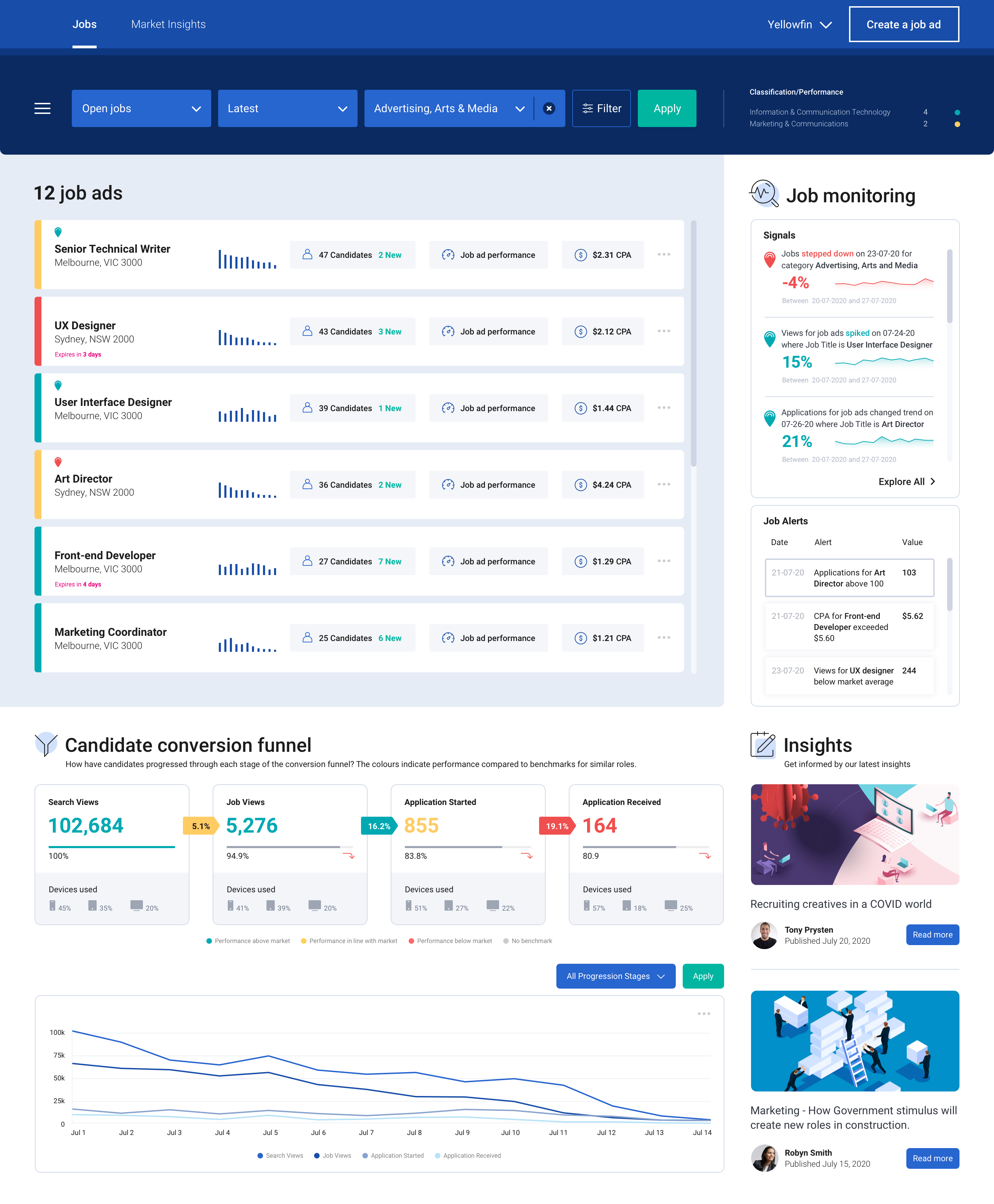
    Embedding analytics in this fashion creates significant value for the user. Charts, tables and metrics sit side-by-side on the screen, alongside the application’s central functions. With one click, the user gains instant, guided and dynamic insight.

    Such an improvement is helpful for all kinds of business activity. Retail store managers can instantly access demand forecasts while creating weekly work schedules. Inventory managers can view trends and analyze stock without leaving their ordering screen. Supply chain, finance, logistics, sales and marketing, manufacturing—any process involving routine data processing can profit from contextual analytics.

    A Rich Workflow Asset

    When embedded into transactional workflows, contextual analytics can deliver two forms of understanding. The first comes from predefined visualizations, ranging from simple KPI numbers to line and bar charts and even contextual dashboards. These visualizations are presented based on user action; a customer’s purchase history, for example, can pop up in chart format while viewing the account record, enabling the user to make decisions about sales incentives or priorities for service.

    Second are dynamic analyses and alerts. These indicate that either thresholds have been crossed or anomalies in a record have been discovered, prompting the user to explore and take further action. Pop-up alerts can be invaluable in sales, production, finance or many other disciplines.

    For both predefined and dynamic contextual analytics, outcomes can be based on simple aggregations of transactional data or as the result of sophisticated data science modeling (e.g., propensity to purchase). Specific outcomes can be set by either the product manager or the user to maximize utility.

    Contextual analysis is ideal for supporting or triggering actions according to any business need. The capability enhances transactional workflows by providing metrics pertaining to a particular transaction; it will also trigger a new workflow via an alert or suggestion for action, based on the output of a data science model.

    contextual analytics

    Of course, none of this means that dashboard-based analytics aren’t still important. Users will always need to conduct broad data analysis. Dashboards and/or report analytics allow users to monitor overall business performance, drilling down when necessary into the details behind the numbers.

    With the secondary addition of contextual analytics, however, users can be continually guided in their decision making as they work. They receive a constant flow of deeper insight, supporting management tasks intuitively at a granular level.

    Deployment Framework for Developers

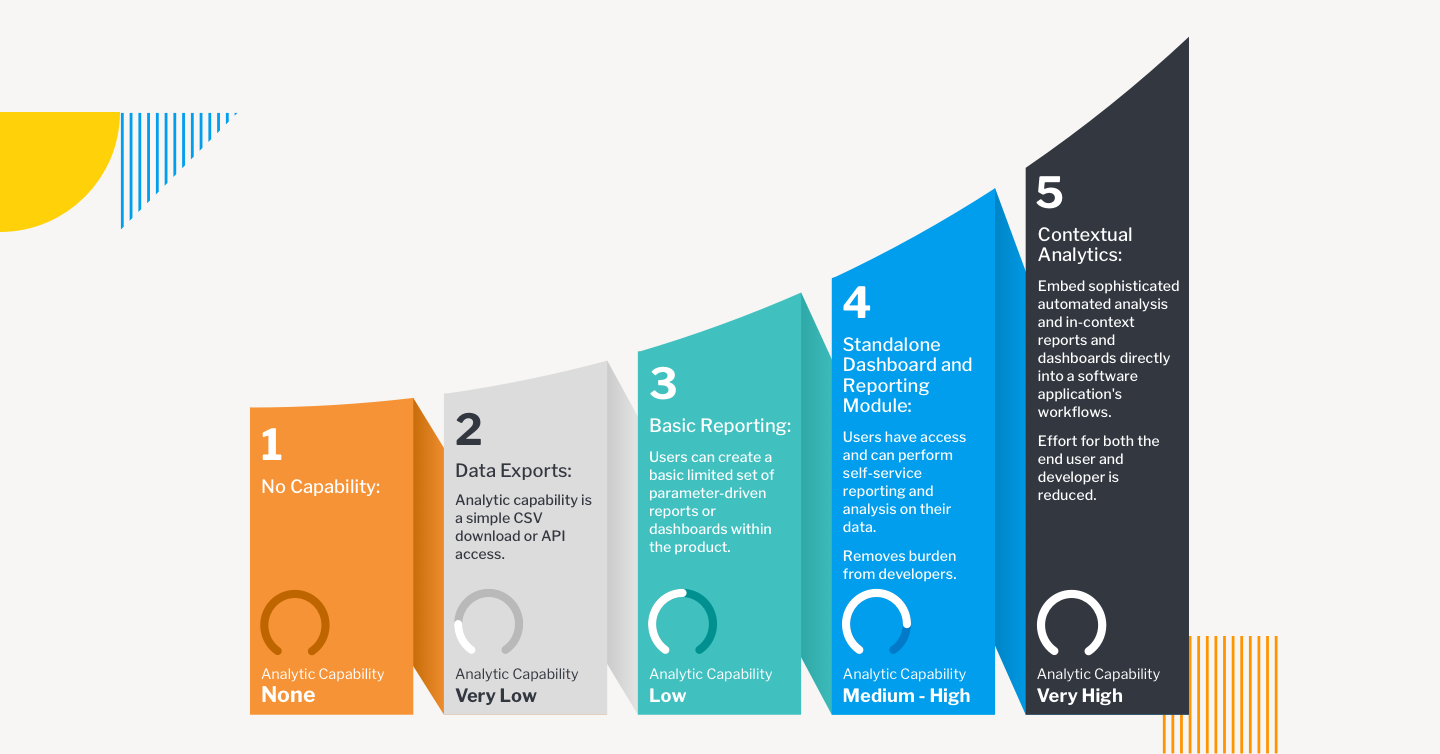
    Embedding transactional analytics into enterprise applications can be directed according to a maturity model. There are five possible stages of product development:

    • Stage One: No Capability. The main engineering focus is on bringing a new application to market. Minimal Viable Product (MVP) attributes lead development, and reporting capabilities are rarely included.
    • Stage Two: Data Exports. Analytics are provided based on customer feedback, but only through a CSV download or API access that allows the end user to analyze data in their preferred tool. The burden of building analyses rests with the customer.
    • Stage Three: Basic Reporting. A limited set of reports are supported by analytics, and in-house developers are tasked with creating the capability, often to the detriment of new features for the core product.
    • Stage Four: Standalone Dashboard and Reporting Module. This is often the end journey for most enterprise applications. Self-service reporting and analysis are available via out-of-the-box dashboards and reports.
    • Stage Five: Contextual Analytics. Sophisticated, automated analysis is available as part of the application’s core workflows, as well as at the dashboard. Users are guided to optimal decision-making at both the transactional and reporting level.

    These stages are not mutually exclusive. Especially for stages four and five they can be additive, so that end users will have a variety of mechanisms to access the data they need, at the time they need it.

    contextual analytics

    Accelerating Implementation

    Elevating the end user analytics experience is easier to achieve than it once was, thanks to BI vendors that specialize in embedded and contextual analytics built on an open platform. The best vendors are able to adapt quickly and easily to product development roadmaps, aligning features to meet specific needs and following up with administrative tools and automation processed to support the lowest possible cost of ownership.

    Working with an analytics vendor means development teams will have maximum support from prototype and design to integration, deployment and subsequent iteration. Options for Windows and Linux, on-premises or cloud will ensure the versatility, security and scalability required for highly marketable offerings.

    How Customers View Analytics

    As a product feature, analytics can often be dismissed as an afterthought—but your users don’t see it that way. BI analytics is increasingly seen as critical to business governance. Users want to glean as much insight as possible from the data they’re collecting—and on multiple levels. This means your users want to get more from your product, even in ways they haven’t yet imagined. Contextual analytics can provide that enhanced appeal for your application, putting your product out in front at a time when enterprise applications are more essential—and more competitive—than ever before.

  • 7 Step Transformation Blueprint for SecDevOps

    7 Step Transformation Blueprint for SecDevOps

    The struggle for continuous software security is obvious, but the solutions are not.

    As I indicated in my prior blog, SecDevOps is the Solution to Cybersecurity, a security-first mindset, coupled with SecDevOps-specific practices, provides an opportunity to achieve true continuous security. But, in reality, how can an organization accomplish SecDevOps?

    This blog explains how to apply my 7 Step Transformation Blueprint to SecDevOps.

    Leadership and engineering solutions require the persistent, methodical application of skills and practices toward leading and designing solutions that achieve business and team goals, including continuous security. While driven by visionary ideals, engineering requires practical, disciplined, progressively refined implementations using carefully chosen dimensions of people, process and technology solutions. At any point in the engineering life cycle, the goal is to achieve a balanced solution while evolving practices towards maturity.

    The seven step transformation engineering blueprint prescribes seven steps for achieving and continuously refining digital transformation methodically, no matter what the goals or current level of maturity are. The seven steps are visioning, alignment, assessment, solution, realize, operationalize and expansion. Each step considers the people, process and technology aspects of the transformation.

    Step One – Visioning

    Top leaders define a strategic vision for the digital transformation for the organization including a motivating vision statement, measurable goals, team values, and major implementation tactics. Identify senior sponsors that will own the transformation at the strategic level. Include key partner organizations that need to be strategically aligned to the transformation. In a SecDevOps transformation, a vision for a security-first mindset and associated SecDevOps practices are called out as the highest priority for implementation tactics supporting the vision.

    Step Two – Alignment

    Leaders and key team members who are most important to the implementation of the transformation align specific measurable goals and tactics for selected “model” applications. Specific measurable goals around continuous security are set in this step.

    Step Three – Assessment

    For the current state of selected applications, capabilities are discovered and assessed, deep-dive assessments are conducted for specific topics, and a current state value stream map is created relative to the organization’s goals. My earlier blog, DevSecOps Practices Gap Assessment, explains my recommended approach for conducting an assessment for security.

    Step Four – Solution

    An expert team performs analysis of assessment data and formulates a future state value stream roadmap including themes, epics and user stories and obtains alignment with key stakeholders. My earlier blog, 9 Pillars of Continuous Security Best Practices, outlines a comprehensive set of practices to consider when building a roadmap for any continuous security solution.

    Step Five – Realize

    Proof of concept (POC) trials are conducted to validate solution choices. Trials of security tools and integrations of those tools into the SecDevOps platforms also would be conducted during this step. The solution is validated with selected applications and use cases. Training is conducted as the solution is deployed to production. Governance practices for the new solution are activated.

    Step Six – Operationalize

    Deployed improvements are monitored and controlled with metrics. Retrospectives are conducted to create actionable prioritized lessons learned for continuous improvement. Chris Tozzi’s article 6 DevSecOps Metrics for DevOps and Security Teams to Share suggested metrics that can be developed and leveraged, both for this step and to drive ongoing improvements as the use of SecDevOps practices expand.

    Step Seven – Expansion

    Once continuous flow (the first way of DevOps) is realized for a select set of applications, the organization can safely expand the solution(s) to other applications across the organization. Further transformation cycles will lead to realization of continuous feedback (the second way of DevOps) and continuous improvement (the third way of DevOps) and apply it to SecDevOps.

    What This Means

    SecDevOps strategies and solutions are complex. The seven step transformation blueprint described in this blog can help organizations build a strategy and implement SecDevOps as an important part of their digital transformation. To learn more about how to apply the blueprint to continuous security (and other key elements of digital transformation) refer to my book Engineering DevOps.

  • Atlassian Delivers on Forge App Dev Platform Promise

    Atlassian Delivers on Forge App Dev Platform Promise

    Atlassian this week made available a Forge platform for building applications that complements its existing portfolio.

    Mike Tria, head of platform engineering for Atlassian, said Forge is intended to provide an application development environment to both IT organizations and third-party partners. It provides developers with access to an integrated Atlassian DevOps toolchain to accelerate testing, deployment, debugging and to capture log data, added Tria. Forge also presents developers with a command line interface through which they can be onboarded to the Atlassian cloud where Forge runs to access documentation and application samples. It uses OAuth 2.0 to ensure applications deployed on the Atlassian cloud only access data they have permission to access.

    The overall goal is to provide developers with a more modern application development environment as an alternative to the application development platform the company previously made available.

    Once an application is built, developers can then publish their applications on the Atlassian Marketplace as free or commercial offerings. There are already more than 3,500 Forge apps that were created during a beta process that began late last year. Forge will soon be extended to the rest of the Atlassian portfolio, noted Tria.

    Forge is intended to complement an Open DevOps initiative launched earlier this month that tightens integration between the Jira project tracking and management tools provided by Atlassian and a wide range of other tools commonly employed by DevOps teams. The goal is to not only make it easier to correlate issues that are listed in Jira with artifacts found in various software platforms, but also to collect data from DevOps tools to automatically update Jira.

    That data will then be employed to inform key performance indicators (KPIs), based on graphs that Atlassian provides within Jira, to keep track of value streams. Rather than having to acquire a separate value stream management (VSM) platform to track software development progress, the insights needed to understand the impact of, for example, a delay to one project becomes a dividend of using Jira.

    Like most providers of software-as-a-service (SaaS) applications, Atlassian has been making available a platform for building applications on top of the same platform it employs to build its own applications. Atlassian claims there are more than 1,200 partners building applications in addition to internal IT that teams that have built custom extensions to its applications. Atlassian has already shown a proclivity for acquiring independent software vendors (ISVs) that build applications on its platform. As part of the overall Forge initiative, Tria said Atlassian will be working more closely to identify the white space that won’t be addressed by the Atlassian product roadmap at some future date.

    In the meantime, independent software vendors and internal IT teams will need to determine to what degree they will prefer to stand up their own application development environment versus opting to be dependent on Atlassian. In theory at least, applications built on Forge should be more tightly integrated with the rest of the Atlassian portfolio. The only potential downside is, of course, any potential conflict that might emerge with a provider of an application development platform that also happens to sell application software.