Category: Blogs

  • GitHub Updates CLI to Make Creating Extensions Easier

    GitHub Updates CLI to Make Creating Extensions Easier

    GitHub this week made available an update to its command-line interface (CLI) that enables DevOps teams to add extensions to workflows.

    Billy Griffin, director of engineering for GitHub, said the company’s initial focus was providing DevOps teams with a set of workflows that could be invoked easily via a CLI. Now GitHub is encouraging developers to extend those workflows using version 2.0 of its CLI that hopefully will be shared with the larger community, he added.

    For example, extensions have already been created that order branches by how recently they were created and then display all associated pull requests.

    At the other end of the spectrum, developers are creating simple screensaver extensions for their own amusement.

    The level of interest in extensions varies widely across DevOps teams. Many of them simply want to employ an opinionated workflow that has been created on their behalf. Other DevOps teams want to be able to make modest modifications. Others prefer to customize workflows as much as possible to fit their specific purposes. Version 2.0 of the CLI provided by GitHub enables each DevOps team to decide how much to modify their workflows. However, as a DevOps team gains more experience, increasingly they tend to want to customize workflows.

    The number of workflows being created around the GitHub repository continues to increase steadily as more organizations embrace best GitOps practices. GitHub is the most widely employed repository for managing software artifacts, and the level of sophistication of workflows built using either scripts or GitHub actions is increasing steadily. Much of that effort is focused on streamlining processes that otherwise would get in the way of enabling developers to spend more time writing code.

    Of course, the pressure on developers to write more code faster has never been greater. As organizations embrace digital business transformation, they are discovering how dependent they are on software to create customer experiences that drive revenue. The challenge comes at a time when many developers are working from home to help combat the spread of the COVID-19 pandemic and many existing workflows need to be re-engineered. At the same time, development teams are becoming more distributed as organizations become more comfortable with hiring developers anywhere in the world.

    It’s not clear to what degree the changing application development landscape might drive organizations to re-evaluate what platforms they are employing to drive DevOps processes. Many on-premises development platforms have been replaced by cloud-based alternatives in the past year. However, because necessity is the mother of invention, the workflows relied on prior to the pandemic are not only now forever changed, but they will also likely be altered again as development teams work more intermittently in-office and from home once the pandemic subsides.

    Regardless of how those workflows evolve, the single-valued DevOps attribute is going to be flexibility. The challenge now is determining which platform does the most to enable that flexibility at a time when uncertainty continues to prevail.

  • Site Reliability Engineers to the DevOps Fore

    Site Reliability Engineers to the DevOps Fore

    [pdf-embedder url=”https://devopsy.kinsta.cloud/wp-content/uploads/2022/02/site-reliability-engineers-to-the-devops-fore.pdf”]

  • Building DevSecOps With Value Stream Management

    Building DevSecOps With Value Stream Management

    As teams develop software, testing for potential security risks and flaws is mission-critical, just as it has always been. Yet, cyberattackers continue to exploit code vulnerabilities as open source code remains the foundation for the majority of commercial applications across all industries. Security firms are churning out solutions at an aggressive rate, and both project managers and their teams hope they can purchase some bolt-on tool or license a service to take care of security, painlessly. In the end, vulnerabilities still occur.

    The most effective pathway to secure software code has always been to eliminate vulnerabilities. The question today is, “What is the best way to achieve that goal given such an accelerated, threat-laden landscape?” Before we dig into that answer, let’s take a closer look at the problem.

    Software Security Is Everyone’s Issue

    Even the largest organizations, from Adobe to Microsoft, have been humbled by the number and scope of code vulnerabilities that have been overlooked—and therefore escaped into public release—due to the frenzied pace of software updates. Here’s just one example:

    On May 11, 2021, Adobe issued a security update for Adobe InDesign that addressed multiple critical vulnerabilities. “Successful exploitation could lead to arbitrary code execution in the context of the current user,” the security bulletin read. “Arbitrary code execution in the context of the current user” is cybersecurity speak for “an attacker can execute arbitrary commands or code on a target machine or process.” Arbitrary code execution vulnerabilities are known to be one of the top attack vectors that lead to system penetration resulting in data breaches.

    Given the enormous effort companies and their software teams are exerting today, and the importance of avoiding software flaws in the current threat landscape, how is this happening? It doesn’t help to have publicly available lists of software vulnerabilities posted on the dark web and CVE (ironically, a database of vulnerabilities launched to help companies improve their cybersecurity). Hackers — from solopreneurs to nation-state teams — are having a field day with this information.

    Rearranging the Puzzle Pieces Doesn’t Guarantee Security

    In an attempt to resolve this challenge, industry professionals are coining new terms and calling for new approaches. One I have seen promoted recently is “SecDevOps” rather than “DevSecOps.” With SecDevOps, they assert, security is first—conducted at the start of the project and maintained all the way through.

    This approach isn’t new—it’s essentially a variant of shifting left, which for more than a decade has been an established mechanism in software testing for finding flaws and “failing faster.” In my experience, while failing earlier and faster with any software endeavor has considerable value, it is not automatically going to highlight all security challenges and enable their resolution.

    It is just as important for DevSecOps teams to collaborate and work together, not only to support development and operations, but also to ensure security, compliance and governance are built into every piece of code.

    Insight Is Preferable to Blind Interpretation

    Unfortunately, achieving that collaboration productively comes with challenges. DevSecOps teams need rich, real-time visibility into code vulnerabilities, early, so they can act on that information and update code as it moves through the pipeline. To do that, they need actionable insight—not a motley assortment of data that’s open to interpretation.

    In value stream management, we have seen firsthand while working with our clients that several techniques can be applied to eliminate vulnerabilities more quickly and effectively. All of these approaches hold value, whether a firm is seeking to deliver a new product to market or secure its current software pipeline.

    • Amplify feedback loops. Continuous feedback loops—from DevSecOps tools, for example—give developers more detailed insight into their code’s vulnerability.
    • Run security scans. Give testers the ability to run security scans on their code even before it is committed to identify security vulnerabilities as early as possible.
    • Leverage reporting and analytics. Gaining early access to as much insight as possible makes teams and management more confident regarding swift action to resolve code deficiencies.

    These approaches also support governance and compliance initiatives. As a bonus, they boost software quality, as well.

    The Business Case for Built-In Security, Governance and Compliance

    As mentioned earlier, these activities are integrally connected with the effort to eliminate code vulnerabilities. In case you are thinking, “This is obvious,” take a moment to reflect on this statistic: 60% of data breaches involved vulnerabilities for which a patch was available but not applied.

    The sheer scope of the problem also underscores the lack of attention to security and governance—and any compliance requirements that accompany it.

    Half of websites in production have high-risk vulnerabilities, and 82% of these are located in application code.

    The high percentage of errors in source code suggests it was not checked for vulnerabilities during development, signaling that developers focused on app functionality and gave short thrift to security. This often means they don’t have a program for governance and compliance, either.

    In my experience, a primary reason for these failures is that teams don’t have actionable information from the activities mentioned above, such as real-time feedback from DevSecOps tools. Developers need this insight when they are resolving sprint backlogs. Information relating to high-level security issues must be available so it can be addressed, with issues prioritized and resolved, and not left sitting in siloed DevSecOps tools.

    In many ways, DevSecOps is in the same stage of transformation as DevOps was a decade ago. Teams are frustrated by needs they do not know how to meet, and they hope for fast resolution in the form of tools and solutions. As with virtually every other software challenge over time, there is no replacement for getting in the trenches and fixing the problem rather than placing strategic band-aids.

    If you are not subject to compliance mandates and therefore dismiss the value of software governance, consider this: If your team misses a software vulnerability that results in a major data breach because you didn’t have the insight to identify it—or the governance to ensure it was addressed—your firm may not recover. The imperative for software security—and the governance that helps ensure it stays that way—should be sufficient for organizations to take vulnerabilities seriously.

    Effectively applying the insight gleaned from software code reporting and analytics is the surest way to eliminate vulnerabilities. As an added benefit, the reporting and analytics that informs the software effort can also make the case to upper management for the value of launching future improvement initiatives.


  • GitLab Updates Improve Developer Productivity

    GitLab Updates Improve Developer Productivity

    GitLab this week released an update to its namesake continuous integration/continuous delivery (CI/CD) platform that primarily addresses the need to improve developer productivity.

    Parker Ennis, senior product marketing manager for GitLab, said the GitLab 14.2 release adds, for example, a real-time Markdown preview capability that makes it possible to have a live preview of Markdown files used to create rich web content that can be accessed either via the web integrated development environment (IDE) or a single file editor. The goal is to eliminate the need to switch from raw code to a separate preview mode tab, said Ennis.

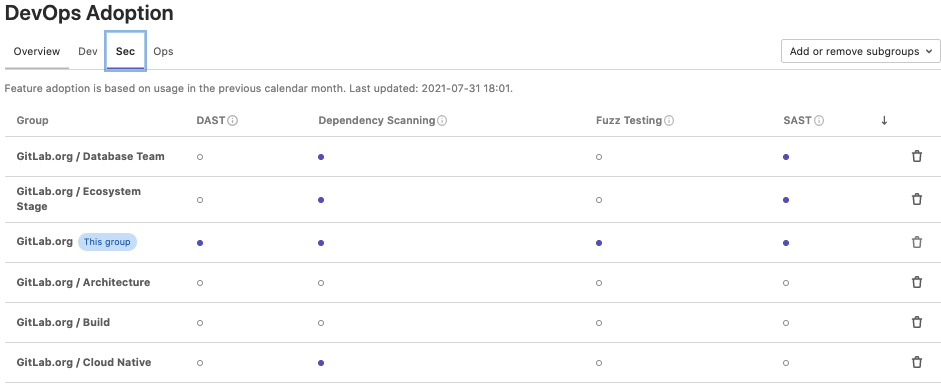
    At the same time, GitLab has made it possible to now launch GitPod, a tool for automatically launching development environments in the cloud, directly within a merge request page, while adding the ability to more easily track which groups within organizations have enabled dependency scanning and fuzz testing. Previously, DevOps teams could only track adoption of these GitLab features via an application programming interface (API).

    GitLab

    Finally, GitLab is adding a beta release of Build Cloud for macOS that makes it easier for developers to build applications on the software-as-a-service (SaaS) edition of GitLab.

    Ennis said in the wake of the COVID-19 pandemic, adoption of the SaaS edition of GitLab has naturally increased because so many developers are still working from home. Most DevOps teams are now focused on trying to improve the productivity of developers; they are not expected to return to the office any time soon as new variants of the COVID-19 virus continue to emerge, he noted.

    The challenge organizations face is that, in the wake of the pandemic, there’s more pressure than ever to build applications faster as organizations race to digitally transform business processes. As a result, the productivity of developers working in physical isolation from one another has become a major concern, added Ennis.

    The developer experience is also critical because it’s never been easier for developers to jump ship. Not only are developers being heavily recruited, Ennis noted that most DevOps leaders have little visibility into how they are spending their time. It’s relatively easy for developers to scan job sites for new opportunities while they are supposed to be writing code, he added.

    It’s not clear how much of an impact the CI/CD platform is likely to have on overall developer satisfaction. However, Ennis noted that the more disjointed DevOps processes become, the less favorably developers will regard their employers. Most developers want to be able to spend more time writing code rather than managing pipelines and workflows. GitLab is making a case for a more integrated set of DevOps workflows based on a CI/CD platform that tightly integrates all the modules that a DevOps team might decide to use. That approach is designed to appeal to enterprise IT organizations that typically don’t have a lot of time and energy to devote to integrating the modules that make up a DevOps workflow, noted Ennis.

    Of course, it’s still early days as far as the pervasive enterprise adoption of DevOps platforms is concerned. However, as the pressure to deliver software faster continues to rise, the need to revisit application development processes becomes that much more pressing.

  • How to Optimize Data in Software Development

    How to Optimize Data in Software Development

    Data can drive significant business value for every company. Globally, we are collecting more of it than ever before, and it keeps growing—from 45 zettabytes in 2019 to a projected 175 zettabytes by 2025, according to IDC. However, companies are struggling to monetize all the personal, behavioral, engagement and transactional data from customers and operations and turn it into actionable intelligence to drive their digital strategies. Leveraging insights from your data is critical for success and the development of new digital solutions to better serve customers, grow sales, improve operations and more.

    Data helps organizations develop the right software for the right customer at the right time. Data-driven organizations are 23 times more likely to acquire and retain customers than their peers, and are growing at an average of more than 30% annually, according to Forrester.

    Organizations with a deep and dedicated focus on data and analytics tend to follow three common paths to successfully drive their software development initiatives.

    Discovery Matters

    It is nearly impossible to draw value, understanding, and insights from the massive amount of data businesses collect without a proper discovery system in place. Having a comprehensive process of collecting data from various databases and silos and consolidating it into a single source that can be easily and instantly evaluated is critical for any software development project.

    During client engagements, data scientists perform deep-dive research into clients’ data pools and workflows to support client roadmaps. We recently partnered with a global e-commerce company to create a recommendation system for their customers. The discovery process allowed us to verify the feasibility of recommended products using their existing data before moving ahead with the project. Using machine learning, the team was able to clean and analyze information from multiple angles. With that knowledge and confidence, the rest of the development project proceeded quickly knowing the data was in place and the project was viable.

    Align KPIs

    Software development metrics help organizations and their partners track and measure how an application is performing and how effective the development team is in its work. IT organizations rely on a range of KPIs to fully understand software engineers’ progress, as well as gauge software quality including performance, engagement and user satisfaction. While each engagement is different and requires a different set of KPIs, ensuring that the organization and development team are on the same page is crucial.

    During the e-commerce project, success was measured through conversion and user retention rates. Other KPIs that are regularly used include developer productivity and performance metrics like cycle time and team velocity, and software developer metrics like response time, usability and UX data, among others.

    Deploy Agile

    By using agile methodologies at all stages of development, developers are able to focus on business results, not just architecture and new technologies. A similar agile approach can also be applied to data management. When it comes to data science, it’s all about extracting useful information from raw, structured and unstructured data and implementing machine learning models to analyze vast amounts of information. This process requires more creativity and is a key driver for understanding potential risks and failures over the course of any given project.

    With agile, data models and analyses are broken down into manageable bite-sized chunks that can be built and tested quickly—the same way software is developed. If the analytics do not yield the expected results, data scientists see the failures immediately and can correct their course. They could ask the team to analyze different data sets, adjust the models, tweak algorithms or make an educated decision about the project’s viability.

    A multinational credit company took this approach to the next level when it used agile to develop a new, big data hybrid cloud platform. After anonymizing, aggregating and storing information in a data lake, the team quickly realized the database it was planning to use was limited to a certain number of partitions and entities. By running agile sprints and developing and testing the minimum viable product (MVP) continuously, the team was able to seamlessly switch to a new database that had more scale and functionality.

    The value of data is only going to increase with time. Data-driven organizations embrace the use of data and analytics to gain unique business insights to support their software development projects and overall business. By focusing on the data in each and every development project, companies have a tremendous opportunity to gain a competitive advantage and grow their businesses.

  • How DevOps Can Address CX Challenges

    How DevOps Can Address CX Challenges

    Delivering a seamless customer experience (CX) has become a top priority for companies undergoing digital transformation initiatives, as 85% of buyers are willing to pay more for a great customer experience. However, customers aren’t only willing to pay more for a positive experience–they’ll go elsewhere if their experience isn’t positive. In fact, 33% of customers will leave a brand they previously loved after just one bad experience, and 92% of customers will completely abandon a company after just two or three negative experiences. So, delivering a positive CX has become a major priority for companies that want to retain their current customers while winning over new prospects from competitors.

    To assure CX quality for customer-serving technology products and services, established DevOps processes and strategies should be applied to the unique aspects of customer experience software. DevOps for CX enables the delivery of software where the customer’s experience is paramount and quality is imperative. However, there are six major pitfalls in deploying DevOps for CX that customer-serving organizations must overcome.

    What is DevOps for CX?

    To understand the challenges, we must first understand the purpose of DevOps for CX.

    DevOps for CX refocuses the DevOps software methodology on the unique aspects of CX software to enable greater efficiency and quality. The constant delivery of expanded CX capabilities through new software developments and features has become a priority in organizations undergoing digital transformation. But when it comes to software products for CX and customer services, quality cannot be sacrificed for speedy development. At the same time, companies must still meet the demand for rapid innovations and tight deadlines on software delivery.

    Customers have higher expectations than ever before. These days, there aren’t any second chances when it comes to a customer’s experience. Social media has empowered customers to broadcast CX failures for the whole world to see. Due to the visibility of CX mishaps and negative customer interactions, a brand’s CX reputation depends on flawless execution from the customer’s first impression.

    The customer is always right; so, the customer’s perspective must be the primary consideration in software development and testing. This puts significant demand on the DevOps solutions and processes specific to user experience (UX) design, as well as CX testing and monitoring. Software must be designed, developed and continuously tested and monitored in real-time. Companies need to know all the different ways a customer might use the software to accomplish their goals and quickly identify and fix any potential issues before the customer experiences them.

    6 Potential Pitfalls of DevOps for CX

    Underinvestment in Executive Sponsorship and Cultural Evolution

    For CX transformation initiatives to succeed, they must be empowered by an executive leader who can champion the need to drive cultural change and strategic investments. An executive leader is necessary because CX initiatives typically span multiple departments: Operations, development, marketing, sales and services, for example.

    Whether the leader taking on this responsibility is an existing executive or a brand new position will depend on the company’s organizational structure. Some companies assign this duty to the COO, CIO or CMO, while others create an entirely new chief CX officer role so that the leader can give their full attention to the CX transformation initiatives at hand. Regardless of the DevOps for CX champion’s title, they must have a broad authority over budget, people and processes to make their role effective.

    Competing and Misaligned Incentives

    DevOps is a multi-team effort. Ensuring that the teams’ objectives and incentives are aligned is key to ensuring that DevOps for CX projects are executed harmoniously. Each team should have objectives that fit their team function but do not oppose other teams’ objectives, such as speed or a low defect rate on the development side and high reliability for the operations side. These functional team objectives should be centered around respective business objectives for customer satisfaction.

    Unclear Key Performance Indicators (KPIs)

    Adopting DevOps forces organizations to take on a more collaborative mindset. Due to the multi-team, collaborative nature of DevOps for CX initiatives, it’s critical that KPIs are clearly communicated, widely understood, and monitored across teams. KPIs should also be widely distributed so CX can be viewed at an operational level.

    Lack of DevSecOps Prioritization

    Many organizations fail to recognize the importance of DevSecOps from different aspects of DevOps. Not only must customer data be protected, but larger organizations that operate globally must also ensure they are complying with regional data privacy regulations. Organizations that don’t comply with regulatory requirements risk fines and other punitive setbacks.

    You must be able to test security features in production to protect both customers and your organization itself. Unfortunately, security is too often one of the last DevOps aspects to be discussed.

    Different Configurations Across CX Delivery Environments

    Shifting between development, quality assurance, staging and production is a major source of frustration for DevOps teams, as the environments are often configured differently. As code moves through the software life cycle and different environments, having a consistent approach to the solutions and environments via deployment automation will prevent wasted time fixing bugs that suddenly pop up when the code is moved.

    Errors Introduced by Manual or Outdated Processes

    Manual processes introduce opportunities for human error, causing delays and defects that result in unplanned work. Performing software testing manually is a sluggish process that not only causes quality issues and delivery delays but also reduces the amount of time developers have to execute any unplanned work or rework that must be done post-testing. Automating the CX systems’ testing results in higher quality and reliability at faster speeds, providing more time post-testing for developers to ensure the product meets quality requirements.

    DevOps for CX enables companies to innovate CX rapidly by delivering high-quality software and maintaining exceptional customer interactions. As CX leaders innovate new products and services through software, DevOps for CX practices will continue to be honed over the coming years. In the meantime, following the best practices outlined here to avoid the six major pitfalls of DevOps for CX will ensure customer experiences are maintained at an elevated level.

  • CloudBolt Survey Shows DevOps Frustration in the Enterprise

    CloudBolt Survey Shows DevOps Frustration in the Enterprise

    A survey of more than 200 senior IT leaders at organizations with more than 1,000 employees published today finds only 4% consider their organizations to be experts when it comes to continuous integration/continuous delivery (CI/CD).

    Conducted by CloudBolt Software, a provider of a platform for many IT environments, the survey also found only 11% consider their CI/CD infrastructure to be reliable. Another 69% said their CI/CD infrastructure was somewhat reliable, while 21% said their platforms were somewhat unreliable or not reliable at all. A full 85% also report they regularly test the infrastructure they rely on to drive DevOps processes.

    Overall, the CloudBolt survey finds only 5% of respondents report their organization is deploying code multiple times a day. Most respondents (85%) said their organization only deploys code on a weekly or monthly basis.

    A full 70% said that, on average, it also takes multiple days or even weeks to set up a pipeline. Nearly two-thirds (63%) said there are too many manual processes involved when setting up pipeline infrastructure. More than half (56%) also noted they have no automated processes for post-deployment tasks.

    More than half (53%) said it is also challenging to proactively detect infrastructure issues, while 55% said it is difficult to create a consistent CI/CD pipeline environment across multiple development teams. Improving those pipeline environments requires speeding up the process of provisioning infrastructure through automated processes (70%); continuously detecting infrastructure issues to reduce testing challenges and failures (62%) and simplifying remediation of infrastructure issues proactively (56%), according to survey respondents.

    The CloudBolt Software survey specifically identifies issues organizations encounter when employing Terraform to manage infrastructure-as-code (IaC). Only 5% of respondents said they were “very satisfied” with using Terraform and another 75% reported they are somewhat satisfied. Top challenges include difficulty using it in on-premises infrastructure deployments (62%), lack of Day 2 management for deployed resources (53%) and governance (42%). Only 2% of respondents said they were employing Terraform to deploy 75% or more of their infrastructure. A full 90% noted that Terraform requires more custom-coded integrations with other critical tools and systems to work properly.

    Finally, 29% said their organization lacks specific Terraform expertise. The most sought-after Terraform capabilities are enabling non-Terraform experts to easily deploy infrastructure using Terraform; ensuring that only Terraform plans with IT “guardrails” are executed and the ability to visualize and cost-optimize infrastructure deployed by Terraform. More than a third (35%) want to simplify deployment of on-premises infrastructure when using Terraform.

    Jeff Kulkowski, CloudBolt CEO, said the survey makes it clear there simply isn’t enough expertise available to implement DevOps  best practices at scale without enabling IT administrators—that often lack programming expertise—to manage infrastructure and DevOps platforms. That requirement creates the need for an IT management platform based on a set of visual tools that enables DevOps professionals and traditional IT managers to work more collaboratively, he added. DevOps teams can manage IaC whenever they desire, but it’s also crucial to enable IT operations staff to manage IT infrastructure alongside those teams.

    Obviously, DevOps as an IT discipline still has a long way to go before it is pervasively adopted across enterprise IT organizations. The challenge now is to remove many of the low-level barriers that conspire to block IT modernization initiatives.

  • Cosmonic Contributes WebAssembly Runtime to CNCF

    Cosmonic Contributes WebAssembly Runtime to CNCF

    Cosmonic today revealed it has donated its universal application runtime for building cloud-native applications using the WebAssembly (Wasm) development framework to the Cloud Native Computing Foundation (CNCF).

    The Cosmonic wasmCloud runtime makes it possible to run applications built using WebAssembly on any platform. In comparison, applications built using containers are not as portable because IT teams can’t take a container application developed for Linux and run it on Windows. The container technologies for each operating system are implemented differently.

    The CNCF will make wasmCloud available as a sandbox project and will invite other organizations to start making contributions as part of an effort to eventually put wasmCloud on par with other projects such as Kubernetes. There are already nearly 80 contributors to a wasmCloud runtime that was launched last November.

    Cosmonic

    The CNCF is trying to advance other WebAssembly technologies including Krustlet, a tool for Kubernetes environments that listens for event streams from new pods so that the scheduler can then assign workloads.

    However, the CNCF is now not the only organization looking to promote adoption of WebAssembly technologies. The Bytecode Alliance has launched WebAssembly (Wasm) and WebAssembly System Interface (WASI) initiatives as part of an effort to promote standards that would make it easier to run Wasm applications anywhere. Originally founded by Fastly, Intel, Mozilla and Microsoft, the Bytecode Alliance now also includes Arm, DFINITY Foundation, Embark Studios, Google, Shopify and University of California at San Diego.

    At its core, Wasm is a portable binary instruction format for building software that describes a memory-safe, sandboxed execution environment. That approach might one day replace the current predominant method for building software that relies on the aggregation of software components that tend to lack distinct security boundaries between them. As a result, it becomes relatively simple for malware to infect all the components of an application.

    Liam Randall, CEO of Cosmonic, said even though Wasm, in effect, provides another type of virtualization for applications, IT teams should not view it as a set of technologies that will one day obviate the need for containers. Applications developed using Wasm will be layered on top of various container platforms, he said.

    There is, for example, already a Wasm project that creates a server-side Wasm runtime that enables applications to be deployed on a secure container architecture that is more efficient than Docker containers.

    The World Wide Web Consortium (W3C) drove the development of Wasm as part of an effort to create a common format for browsers executing JavaScript code. Wasm is now being extended beyond browsers and JavaScript to enable developers to ultimately create a set of universal binaries that could work on any platform without modification.

    It may be a while before the fruits of those labors are realized. However, it’s apparent the walls that have separated one IT platform from another are starting to crumble. Once applications become much more portable, the reasons why one organization may choose one platform over another will have a lot less to do with what developers prefer.