Category: IT as Code

  • SaltStack Updates Enterprise IT Automation Framework

    SaltStack Updates Enterprise IT Automation Framework

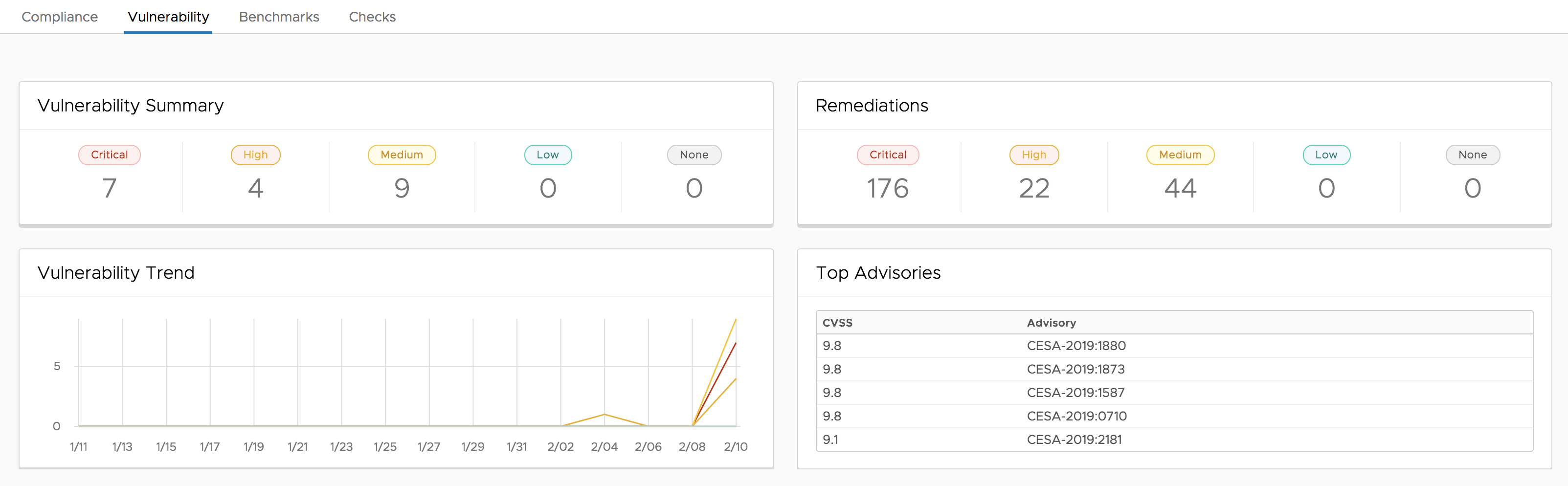
    SaltStack has partnered with Tenable.io to make it possible to pull vulnerability data into the enterprise edition of its namesake IT automation framework.

    In addition, version 6.2 of SaltStack Enterprise now integrates with the IT operations analytics platform from Splunk to make it possible to configure the Splunk Universal Forwarder to index and analyze events generated by the SaltStack framework.

    The SaltStack Comply compliance management module has also been updated to include content for Windows Server 2012 and Windows Server 2019 platforms that has been certified by the Center for Internet Security (CIS).

    Finally, SaltStack Enterprise 6.2 optimizes communications between the Salt Master and the SaltStack Enterprise Operations Framework by adding an intermediate SQLite database layer to queue events. SaltStack says IT organizations should see 20 times-plus improvement in event processing throughput. SaltStack has also added the ability to forward SaltStack events to any Salt Returner, such as a SQL database or local file, to improve performance and maintain high availability.

    Mehul Revankar, a senior product manager for SaltStack, said with this update to the enterprise edition of its open source framework the company is leveraging partnerships to enable IT systems to create closed-looped systems. For example, vulnerabilities identified by Tenable.io now can be automatically remediated using SaltStack Enterprise.

    Revankar said the goal is to make it easier for IT teams to create an IT process that can be automated at the push of a button. As IT environments become larger and more challenging to manage, IT organizations will need to automate more processes at scale, he said. To achieve that goal, SaltStack is simplifying the process to connect to a wider range of third-party platforms that house the type of data required to automate a closed-loop process.

    Naturally, organizations that have embraced DevOps principles are at the forefront of IT automation. Revankar said that as teams of IT professionals converge to drive DevOps and DevSecOps processes, the greater the willingness to employ IT automation frameworks becomes. The goal is to automate as many processes to inject a level of agility that serves to accelerate the rate at which applications are deployed and updated. The challenge organizations have always faced in IT automation is the time it takes to integrate an IT automation framework with relevant data sources.

    Revankar also noted resistance to IT automation among rank-and-file members of the IT operations team is declining as the number of applications that need to be managed increases. Most organizations can’t find or afford to retain enough IT personnel to manage IT operations at the level of scale now required. As such, the need to automate as many rote IT processes as possible has become apparent to all. That’s especially critical in the case of vulnerability management, where the amount of time it takes to patch an application directly correlates to a specific level of risk.
    There is, of course, no shortage of options these days when it comes to IT automation frameworks. In fact, the decision concerning which IT automation framework to employ now has as much to do with the number of sources that framework can pull relevant data from as much as it does the reliability of the automated processes that framework enables.

    — Mike Vizard

  • Server Security: Minimizing Risk in 3 Steps

    Server Security: Minimizing Risk in 3 Steps

    Servers located directly on the internet run one of the highest risks of being compromised. It’s just too easy for hackers to find an open “door” or “window” into those servers and then tap into confidential data, systems and information. Companies can’t afford to put their private information at risk, but an increasing move to cloud-based business solutions inherently increases the risk associated with data.

    The good news is, if your organization leverages cloud infrastructure, there are ways to mitigate the risk.

    It takes vigilance—and constant upkeep—but cloud-based data on internet-based servers can be just as safe and protected as on-premises servers.

    In this post, we highlight three steps you can take to significantly protect your infrastructure from being compromised and ensure that you are properly securing your servers.

    Step 1: Shut Down Access

    As admins install appropriate software packages and applications onto servers, invariably ports are opened and services are enabled. This makes a security breach for a hacker easier and easier. Essentially, the more ports and services you tamper with, the more surface area there is available for hackers.

    Depending upon your architecture, see if you can keep ports open “behind” the firewall in a VPC environment. This helps ensure that the fewest possible ports are opened to the public-facing internet, but you’re still able to accomplish your job. You can also specify which servers or services communicate with your AWS machines if you happen to use them (or with your IaaS provider of choice).

    Step 2: Patch Your Servers

    If you have ports or services that are open publicly, it is imperative that they are patched to ensure you are securing your servers. Admins should be updating patches on their servers as often as new data or systems allow them to, for the most attainable risk-mitigated servers. To make effective patches, there are four main steps you can take:

    1. Stay informed about the most crucial updates to cloud computing (Microsoft releases updates monthly).
    2. Automate your patch process.
    3. Test your patches thoroughly and frequently to maintain the highest level patch and to anticipate any errors in your system that hackers could get around.
    4. Verify that all your patches are functioning as designed (this last step could include periodic scans with Microsoft Baseline Security Analyzer, or another vulnerability assessment tool, to make sure all servers are patched and up to date and/or spot-checking individual machines for proper patches).

    Step 3: Tightly Control User Access

    Finally, consider tightly controlling user access to all of your servers. Ideally, admins have complete control in administering access privileges, both individual and group, so that employees have the access they need to do their jobs and nothing more. This tight control limits the amount of access a hacker would have if one user’s identity was compromised. Limited access acts as an obstacle a hacker has to work around to get to his goal: your data.

    The more granular an IT admin’s user control, the better the overall security for the organization.

    To do this, apply standards of access permissions, authentication and authorization for your IT admins to implement. Double-check that permissions are accurate by checking individual devices and ensuring their permissions are correct. Additionally, implement IT technologies that automatically sync changes in user accounts. The technology you need should work seamlessly with Windows, Macs, Linux and other devices to prevent any terminated user ad hoc access to accounts due to their aberrational device.

    Please note that this is a quick-hitter list. These should be the minimum things that you should be doing. Are all of your ports shut down? All servers patched? Are you sure you have control over everybody accessing your servers?

    There are any number of additional tools, technologies and processes that you could use to help protect your cloud server infrastructure. IaaS is incredibly powerful. Take the steps that you need to take to protect you and your organization from being the next victim.

    — Greg Keller

  • Teradici Brings Virtual Desktops to Azure Stack

    Teradici Brings Virtual Desktops to Azure Stack

    Teradici announced today it has made its Cloud Access Software (CAS) available on Microsoft Azure Stack, the version of the cloud operating system that Microsoft makes available for on-premises servers.

    Ziad Lammam, vice president of product management for Teradici, said the availability of CAS on Azure Stack makes it possible to employ the PC-over-IP (PCoIP) remote display protocol developed by Teradici to access virtual desktops running in the Microsoft Azure cloud from Azure Stack platforms.

    Virtual desktops have been around in one form or another for a couple of decades, but adoption has always been limited because of primarily the complexity associated with configuring virtual desktops on local servers. With the rise of public clouds, however, it has become easier to take advantage of virtual desktops that are made available as a cloud service.

    The PCoIP protocol created by Teradici transfers pixels between the cloud and the desktop, which makes it feasible to deliver even high-performance 3D graphics applications running on graphical processor units (GPUs) via the cloud. While there are other protocols that can be employed to access remote desktops, Lammam said PCoIP has gained traction because of its ability to support such high-definition applications.

    Microsoft, however, has thrown most of its weight behind its proprietary Remote Desktop Protocol (RDP).

    It remains to be seen just how many virtual desktops might move to the cloud. Many organizations have resisted virtual desktops for a variety of technical concerns and cultural issues. Virtual desktops are difficult to set up on local servers, while connectivity to the cloud can be intermittent. At the same time, many internal IT teams responsible for managing local desktops have been reluctant to given up control of their fiefdom. In fact, it’s only been since the rise of Azure that Microsoft has been aggressively encouraging those IT teams to embrace virtual desktops.

    However, now that connectivity to the cloud has become more reliable and more organizations are lifting and shifting workloads to the cloud, both technical concerns and cultural issues are becoming much less of a hurdle, said Lammam.

    Less clear is to what degree IT organizations will embrace Azure Stack as a platform from which to access virtual desktops running in the Azure cloud. In general, Azure Stack requires organizations to acquire and deploy a modern server to run it. Many organizations are going to prefer to access virtual desktops running in the cloud without having to acquire a new local server running a new type of operating system. Teradici already provides access to virtual desktops running on public clouds without requiring organizations to have Azure Stack installed. However, there is a subset of Microsoft customers who will employ Azure Stack to build and deploy hybrid IT environments and will need to access virtual desktops running on a public cloud.

    Whatever the path chosen, it’s clear more virtual desktops will be accessed via the cloud. Many organizations want to reduce the cost of labor associated with managing local instances of desktops that are usually deployed across multiple remote office locations. The challenge now is figuring out the best path to achieving that goal based on the characteristics of the workloads being accessed.

    — Mike Vizard

  • 3 Lessons in Network Visibility from the A-List

    3 Lessons in Network Visibility from the A-List

    The network can be host to multiple performance killers. Here are three worth noting

    Like Ed Sheeran as a secret stormtrooper in “Star Wars: The Rise of Skywalker,” some cameos are hard to spot. They can appear out of nowhere halfway through the film or remain a complete mystery until behind-the-scenes footage reveals the masked actor.

    The same can be said for guest appearances on your network. It’s tough to spot the hidden malware, application interactions, network delays and other “cameos” popping up, especially when organizations today are grappling with the complexities of public, private and hybrid cloud infrastructure and multi-tier applications. To adequately support a robust and secure digital infrastructure, you need network and application-layer visibility.

    With movie awards season upon us, I invite you to sit back, relax—pop some champagne, if you’d like—and I’ll tell you about three cameos that can be easy to miss in the network environment, and what you should do about them.

    Hidden Malware

    At a pivotal moment in the Oscar-nominated “Joker,” the evil protagonist studies a tape to prepare for his appearance on a popular TV show. On the tape, he sees a comedian appear on the same show—played by Justin Theroux. It’s a blink-and-you’ll-miss-it cameo from Theroux, very much like hidden malware traversing the network without detection.

    Whether they’re sophisticated or non-targeted, high-volume criminally motivated attacks can move throughout the network without your knowledge and cause enterprises significant damage and cost, to the tune of $6 billion by 2021. Emotet, described by the Department of Homeland Security as one of the most costly and destructive instances of malware, likely comes to mind as one of the most pertinent examples. It has the ability to move laterally through the organization, spread other damaging malware and constantly evolve.

    Spotting hidden malware requires network visibility that spans the entire distributed digital infrastructure, as well as having access to network data to ensure visibility for all security and performance tools. Specifically, organizations need reliable access to data in motion to tap into traffic across cloud and on-premise infrastructure and traffic flowing across 5G and 100GB networks. This type of pervasive visibility allows enterprises to keep up with the speed at which networks and businesses run, as well as with security demands.

    Interactions Between Applications or Microservices

    When Brad Pitt’s character in “Once Upon a Time in Hollywood” unknowingly ends up at the Manson Family compound, he comes across Dakota Fanning, who plays a key member of the infamous cult. Their meeting is short but meaningful, and sets the stage for additional character development and exchanges down the line. Interactions between applications or microservices are just as meaningful, with 80% of network traffic consisting of such communication on average.

    Understanding these interactions is critical for guiding digital transformation (DX) efforts, which are a top priority for 87% of business leaders. Among the goals of DX are streamlining business processes, cutting costs, improving productivity and introducing new business models that redefine industries—or build new ones. These are ambitious goals, and they’re ultimately realized through new digital applications built on intricate microservices-based architectures that need to be managed and secured.

    Only with a clear view, and the right kind of data, can you understand the applications’ interactions, performance and security characteristics to accelerate DX. And the only way to get to this view is to look at the data in motion on the network. The ability to isolate specific applications or microservices communication streams for deeper inspection allows infosec teams to easily understand access patterns and put in place effective micro-segmentation strategies. Application developers, too, can benefit from this by better understanding communication bottlenecks between applications and microservices, as well as troubleshoot them.

    Traffic Bottlenecks

    The latest rendition of “Little Women” follows a non-linear storytelling structure, constantly jumping between two timelines. It can be jarring to viewers when the girls’ father returns from war, revealing himself as the actor Bob Odenkirk. While this moment is meant to be an intimate glimpse into a family coming together after a long separation, it brings the movie-watching experience to a standstill, since the audience associates Bob Odenkirk less with a serious scene and more with his previous comedic roles.

    Networks today are similarly prone to experiencing abrupt slowdowns or bottlenecks that limit network performance and waste bandwidth. Managing the network to ensure constant availability is a major challenge when data volumes are growing exponentially. It’s estimated that about 1.7MB of new information will be created every second for every human being on the planet this year. This data explosion paired with digital transformation technology investments and lightning-fast 5G and 100GB networks has led to a very complex enterprise infrastructure setup—and network blind spots across physical, virtual and cloud environments.

    The solution lies in having the right kind of data to help you understand network and application performance. By analyzing the network traffic, you get immediate actionable data points that can be used to address trouble spots.

    Whether we’re talking big screen or enterprise network, surprise cameos are common and they are easy to miss—and this is particularly problematic when things like malware and bottlenecks pose a threat to network security and speed. For the NetOps and infosec pros tasked with complex infrastructure development, implementation, maintenance and security, you need a clear line of sight into what’s happening within the network. Armed with insights on traffic patterns (both cloud and on-premises), delays in data flow and insecure areas, you can use this intel to write the screenplay (or plan) to support a robust and secure digital infrastructure.

    — Shane Buckley

  • Stellus Launches Next Generation NAS Platform

    Stellus Launches Next Generation NAS Platform

    Stellus Technologies launched a network-attached storage (NAS) system capable of processing unstructured data at 10 times the speed of existing systems.

    Based on a software-defined file system written on top of a key-value store, the Stellus Data Platform can be acquired either as an appliance or in the form of a virtual image that IT teams can deploy themselves on-premises, in the cloud or at the network edge.

    Ken Grohe, senior vice president and chief revenue officer for Stellus, said the operating system created for the Stellus Data Platform has been under development for the past five years thanks mainly to $70 million in funding from Samsung. As a provider of memory technologies widely used in storage systems, Samsung has a vested interest in advancing the adoption of next-generation storage systems capable of supporting a wide array of emerging applications, he said.

    NASThe appliance Stellus provides is built around 8TB hot-swappable, non-volatile memory express (NVMe) solid-state drives (SSDs). The base configuration is delivered in a 5RU2 rack that comes with 184TB of storage. The largest configuration comes in a 17RU rack to provide access to 1.475PB of storage capacity. The Stellus Data Platform can deliver throughput rates of 20 to 80+ GB/s reads and 19-70+ GB/s write throughput, according to the company.

    The Stellus Data Platform is designed specifically to address the needs of emerging applications in, for example, the medical and life sciences sector accessing massive amounts of data that existing NAS systems are either too slow or costly to address. The adoption of most of those applications are now being driven by DevOps teams rather than traditional storage administrators, Grohe said.

    Just as significantly, he said, the Stellus Data Platform is designed from the ground up to allow IT organizations to scale-up performance and capacity independently. That “Scale Through” architecture means IT teams don’t have to add additional “dead wood” to scale performance in the form of additional storage units that end up having only a small amount of data loaded on to them, said Grohe.

    In addition, the key-value store at the core of the platform enables searching and identifying unstructured data using metadata to eliminate the need for data caches and global data maps.

    Most big data analytics and artificial intelligence (AI) applications are deployed in the cloud today in part because legacy storage systems in on-premises environments can’t support them economically. The limiting factor, however, has not necessarily been the underlying technology, but rather the need to be backward-compatible with existing storage systems. As a startup, Grohe said Stellus enjoys the luxury of not being encumbered by a classic case of the innovator’s dilemma.

    It’s too early to say to what degree Stellus might supplant rivals such as Dell Technologies, NetApp and Hewlett-Packard Enterprise. Grohe said Stellus has signed up more than 500 customers to participate in its beta program. The challenge going forward will be determining to what degree Stellus will be employed to support a growing niche of emerging applications versus becoming a new foundation on which a next-generation NAS platform will be used to also support mainstream applications.

    — Mike Vizard

  • Sparkhound Unveils Pop-Up Service Desk

    Sparkhound Unveils Pop-Up Service Desk

    Sparkhound, a provider of managed IT services, has launched a Pop-Up Service Desk designed to augment the existing capabilities of internal IT teams during a major transition.

    Chris Kimmel, managing director for managed services at Sparkhound, said the new service was created to help organizations cope with transitions such as migrating to Windows 10 or deploying a major upgrade to an electronic medical record system.

    In both cases, Kimmel said it’s not uncommon for internal IT service desk personnel to be overwhelmed by requests for support. In some instances, organizations have decided to rely on Sparkhound, a provider of IT services that are available 24/7, to handle all the calls specifically relating to Windows 10 until such time the volume of support calls declines to a point where they can be handled by the internal IT team. In other cases, he said, Sparkhound has acted as a concierge that triages support calls before passing them on to a professional services team that has been contracted to implement an EMR system.

    IT teams can also “white-label” the Pop-Up Service Desk service in a way that makes the Sparkhound team appear to be an extension of the company’s internal IT service desk.

    Tensions between internal IT teams and managed service providers (MSPs) such as Sparkhound are long-standing. Many internal IT teams fear they will be replaced by an MSP. However, while Sparkhound continues to offer a wide range of managed IT services, Kimmel said none of the customers who have trialed Pop-Up Service Desk have opted to replace their internal IT staff.

    While most MSPs have an advantage in terms of technical expertise because of their ability to invest more in IT automation frameworks, many organizations still prefer to hire full-time employees to manage IT because they typically develop a closer relationship with end users. Less clear is to what degree managed services are less expensive to employ as an operational expense versus the fully loaded cost of hiring an internal IT team. The Pop-Up Service Desk allows organizations to strike a middle ground between those two extremes at times of stress.

    Kimmel said the services provided by Sparkhound are based on the ITIL framework. More organizations served by Sparkhound have yet to adopt best DevOps practices for building and deploying applications. However, Kimmel said the MSP will be prepared to make that transition if and when it comes.

    In the meantime, a chronic shortage of all types of IT skills is pushing more organizations to at the very least consider managed IT services as an alternative to hiring an internal IT team. The global managed services market is forecasted to be valued at $376 billion by 2025, representing an 11.7% compound annual growth rate.

    IT professionals who would prefer to see the management of IT remain in-house are under constant pressure to show more value. Alternatively, many IT professionals can simply opt to go to work for an MSP.

    Regardless of the route chosen, however, it’s apparent most internal IT teams can’t keep pace with the rate of change now occurring across the IT landscape. Whether it’s maintaining security or simply upgrading applications, few internal IT teams are going to have all the skills required to succeed, so like it or not, managed services are now a permanent part of the IT ecosystem.

    — Mike Vizard

  • Tips for Modern IT Admins’ Career to the Cloud

    Tips for Modern IT Admins’ Career to the Cloud

    Fifteen years ago IT professionals experienced a drastically different day-to-day on the job. While the main mission has always remained constant—to take charge of all internal infrastructure—the infrastructure itself has moved off-premises over time.

    The complexity rested in networking for IT professionals. Routers, switches, firewalls and other gear needed to be managed so the network would function. Employee devices also required attention from IT admins, but these devices were typically all Microsoft Windows machines. This allowed IT to standardize its tools and platform.

    What Has Changed for IT Admins?

    Time has drastically altered the lives of IT admins and, after 15 years of evolution, organizations have moved away from large, ungainly on-premises networks and data centers. However, the list of endpoints for infrastructure has grown rather complex, specifically as a result of the implementation of different platforms and operating systems.

    The challenges faced daily and the knowledge needed to be successful has exponentially grown. Below we will take a deeper look at three of the larger changes that IT professionals must ponder as they elevate their careers in the burgeoning cloud environment.

    Rethinking Networking

    The time when it was important to know how to configure a router or switch is slipping away. In the modern IT world, this task has been adopted by cloud infrastructure providers such as AWS and GCP, as well as the telecom companies that deliver your internet.

    The job for IT admins has leveled up, as now it is vital to know how to manage and configure the higher levels of infrastructure. The ability to route traffic through security groups and automate the configuration of systems is a necessity. Writing code to automate these tools is now the norm for an IT admin.

    Regulating Employee Wants

    In the past, IT could dictate the tools that employees had to use, but that ship has sailed. Employees have begun to adopt their own tools to further maximize their efficiency, which forces IT to adapt and get ahead of the game.

    It is crucial to show employees both flexibility and confidence when leveraging new technologies. As a result, employees will work with you and not go out and create shadow IT projects.

    Seeking out and securing cross-platform tools that allow you to manage the various endpoints and services your team is leveraging is of the utmost importance. These tools do exist; however, they typically are not offered by traditional vendors such as Microsoft, HP and Oracle.

    Security is the No. 1 Concern

    Not long ago, security for IT admins was simply firewalls and anti-virus solutions. Fifteen years later the world of IT security is far more intricate.

    To be successful in the IT world, an admin needs to be an expert at infosec so they can understand and defend against the massive world of cybercriminals. Identity theft is rampant and hackers are always trying to locate vulnerable systems that have not been patched. It is because of this that IT admins need to be constantly on their toes and protecting their organization.

    IT is the Core of an Organization

    Without IT, business simply wouldn’t get done. Sales would not be able to email contracts, products would go undelivered, customers would go unbilled and other core activities would fail.

    The IT admin is a vital part of every organization, which is why they are in high demand today. Mastering new technologies and understanding the constantly evolving approaches to IT can be the difference between an organization falling flat on its face or leading an industry.

    — Rajat Bhargava

  • SSH Key Management and Your Organization

    SSH Key Management and Your Organization

    It always starts out the same way: a few machines, a few users and a few SSH keys to manage. You manually copy their keys (and your own) to the appropriate machines. You might even say, “Screw it,” and share one key for root access. Admit it. It’s OK. Well, no, it’s not OK, but we all do it at some point, even though we know better. Like pouring grease down the drain: We know we shouldn’t do it, but sometimes it’s just so much more expedient.

    Anyway, you’re lucky enough that your company starts to scale and things start to get more complicated. More users, more servers, tons more keys. Like having too many kids at a birthday party: You start spending all your time making sure they have ice cream, they don’t fall off the trampoline, they don’t get into fights. You’re spending way too much time managing your users and their keys, so you realize you need some sort of system to keep everything coordinated. Often this starts off as an Excel spreadsheet tracking who has what key on what machine (another thing we all do but don’t like to admit to our friends). That’s a start, but that’s just one of many things that you need for SSH key management, and the less manual the process, the better.

    Centralized Store of Identities

    First, let’s admit that Excel spreadsheets really aren’t sufficient to track who can access what on your servers. Without centralized key management, you’re likely to have temporary accounts that are forgotten and hang around forever. You’ve also got the problem of rogue users: One of the users you authorized users goes around you to add someone else and you as the administrator have no idea. You want to have one source of identity for these machines—one place to add, one place to delete, one place to audit.

    Provisioning New Users

    If I’m adding a user a month, sure, I can go and add peoples’ keys to each machine manually. Of course, this presupposes that you’ve got the public key from the user and have it to move around. Which presupposes they’re savvy enough to manage making keys themselves. A key management system should make this process simpler for you, reading from your identity store and putting them onto the appropriate machines.

    Deprovision Departing Users

    If you have someone leaving on good terms, it’s just good practice to remove their keys from your servers. It keeps things clean and secure. If they’re leaving on not-so-good terms, though, you better know where the keys are on every machine and be able to remove them quickly. This also reiterates the need for keeping separate keys for all of your users: If they have the private key for root, you’re going to have to not only get that key off the machines but also hand out the new key to everyone that is supposed to have access to the shared account.

    SSH Key Rotation

    Keeping the same key around makes you more vulnerable to attack if an old key is compromised. The PCI DSS standard says that keys must be rotated at least annually. Making this as easy as possible for the user is important, and you must have someplace to record when each key was last rotated. For a lot of organizations, this is probably that Excel spreadsheet somewhere that’s dusted off right before an audit. Doing this right—rotating all your keys across all your machines on a regular schedule—calls out for an automated process.

    SSH Key Robustness

    Let’s say everyone in your organization is using 1024-bit keys and suddenly word comes down that you need 2048-bit keys instead. Having a key management system is going to help coordinate the update. Otherwise, you’re going to be looking at every key on every server (notice a pattern here?) to see which need updating.

    Getting Rid of Defunct SSH Keys

    This isn’t a one-time thing; keys (and users) have a tendency to be provisioned “temporarily” and then forgotten and left on a machine. A good key management system will find and remove these keys—or at least notify you of their existence.

    Allow Users to Self-Service

    Although we don’t want to allow users to willy-nilly add accounts for themselves and each other, we also don’t want to have to create and handle their private/public key pairs and go into every machine and make changes whenever they lose a key or want to update their keys. Ideally, our key management system would allow for (secure) user control of their keys, allowing resets and updates.

    While most of these things are possible to do by hand, it’s just not easy and it will end up taking way too much time. Maybe you can script it—and in fact, many companies do. But many companies used to write their own string libraries, too, and run their own mail servers and manage their own payroll. It’s not the best use of your time.

    — Rajat Bhargava

  • Setting Up Google Authenticator on Multiple Servers

    Setting Up Google Authenticator on Multiple Servers

    Google Authenticator is pretty great. It allows me as an administrator to set up and configure multi-factor authentication into my UNIX boxes without having to spend money on a tool like YubiKey or RSA tokens. It’s easy to set up on any type of phone—no specialized hardware or dongles needed. It’s also pretty cool in that you don’t have to have network access from the server to the outside world. Since Google Authenticator is time-based, it doesn’t need to send an SMS or do a callout to a centralized server to get the current valid token.

    What is a bit painful, though, is needing to have a different Google Authenticator token for every one of my servers. The standard setup would have you run the google-authenticator command on each and have as many tokens as you have servers. Obviously, this quickly becomes unwieldy and untenable.

    Instead, I want to have one token for multiple servers. Here’s how I installed and configured Google Authenticator on each system.

    First Machine

    On my first machine I’m going to install Google Authenticator and create a secret key—the exact flow I’d use normally.

    1: Install Google Authenticator. This is pretty well-documented; examples can be seen at untrusted connection and How-To Geek. I won’t walk through each step since this part varies from OS to OS; the rest of the steps are identical, however.

    2: Restart the ssh service

    $ sudo restart ssh

    3: Run the google-authenticator command to generate a secret key for your account, which you’ll store in your phone. This information will be stored in a configuration file that we’re going to get into later. I don’t need to comment that you actually have to enter the secret key into your phone, do I?

    4: Give it a spin. From another shell go ahead and try it out.

    5: Let’s take a look at the configuration file. We’re going to copy these contents to our other machines that we want to have the same secret key.

    Installing Google Authenticator on Additional Machines

    For all other machines I’m going to install Google Authenticator as normal, but I’m going to use the secret key from the first machine. This will let me log in to each of them using that same secret key that I stored from the first machine.

    1: Install Google Authenticator. Again, other places describe this in detail. We’re going to install the program but not do the creation of any secret keys

    2: Create the configuration file and add the content that we got from the other machine.

    3: Set permissions for the configuration file.

    4: Restart the ssh service.

    5: Test the login.

    Voila! A shared secret key across my servers! Happy day.

    — Rajat Bhargava

  • SIOS Technology Automates Rebooting of AWS EC2 VM Instances

    SIOS Technology Automates Rebooting of AWS EC2 VM Instances

    SIOS Technology Corp. this week launched SIOS AppKeeper, a tool that automatically reboots instances of EC2 virtual machines anytime they fail.

    Michael Bilancieri, senior vice president of products and marketing for SIOS, said SIOS AppKeeper is an extension of the work SIOS has historically done to enable servers and clusters to failover. However, many organizations don’t require that level of availability, so SIOS developed AppKeeper to provide a way to automate the process of restarting virtual machines in the cloud, said Bilancieri.

    SIOS AppKeeper also provides a dashboard through which DevOps teams can centrally manage the stream of alerts that are generated when there is an EC2 issue, he said. SIOS AppKeeper is a software-as-a-service (SaaS) application so there is no software to be installed. Instead, organizations log into their AWS account and select which instances and services to monitor and the level of protection they want SIOS AppKeeper to provide.

    Pricing for SIOS AppKeeper starts at $40 per EC2 instance. Monitoring and alert capabilities are provided by default. Restart services, reboot instances and reboot instances only if a restart of services fails are all options. Organizations can opt to access SIOS AppKeeper either via the graphical user interface provided or via an application programming interface (API), Bilanieri said.

    Previously, SIOS AppKeeper was only available in Japan. Based on data from those customers, the average customer with only three AWS EC2 instances experienced downtime at least once a month. With SIOS AppKeeper, customers were able to reduce downtime by 90%, Bilancieri noted.

    SIOS will consider adding support for other public clouds based on customer demand, he said.

    Cloud service providers, in keeping with the “pets versus cattle” ethos, tend to view virtual machines as being disposable. However, whenever there is an issue someone on the IT team still needs to take the time to restart a virtual machine, Bilancieri said.

    Despite the drive to ruthlessly automate in the management of IT in the age of DevOps, there are still many tasks being performed manually. As the number of workloads in cloud computing environments continue to increase, those tasks conspire to slow IT operations. There are, of course, many ways to automate IT processes in the cloud. SIOS is making a case for a simpler approach to managing EC2 instances that doesn’t require IT teams to set up an entire IT automation framework.

    Many IT teams will opt to create their own scripts to manage EC2 instances. However, it’s all too often the case that those scripts are poorly documented and don’t scale especially well over time. In addition, each time the IT professional who wrote a script that the organization depends on leaves the organization, there is no one left to update and maintain the script and new members of the IT team wind up writing yet another script to perform the same function.

    There will always be some type of script floating around the IT environment. However, in the age of DevOps, the time to start reducing the number of those scripts that need to be supported might be at hand.

    — Mike Vizard