Category: IT as Code

  • Newly Independent VMware to Focus on Multi-Cloud

    Newly Independent VMware to Focus on Multi-Cloud

    As an independent company once again, VMware will focus its efforts on providing management planes that span multiple cloud computing environments after officially spinning out of Dell Technologies.

    Ray O’Farrell, executive vice president for the cloud-native apps business unit at VMware, said the company now has a unique opportunity to work closely with providers of cloud services, builders of on-premises IT infrastructure and providers of telecommunications services.

    The terms of the spin-off included an $11.5 billion special cash dividend that resulted in a $27.40 per share dividend payment to all VMware stockholders. VMware claims the simplified financial structure that arises from the deal will provide it with additional operational and financial flexibility.

    Going forward, much of the development work will focus on providing management planes that not only span multiple clouds but also address specific cross-platform requirements such as security. It’s not likely there will ever be one single uber control plane for all of IT, noted O’Farrell. Rather, IT teams should expect VMware to deliver a series of well-integrated control planes to automate specific tasks in a way that breaks down IT silos, he said.

    VMware, however, under terms of its existing alliance, will also continue to work closely with Dell to create server environments that are optimized for VMware hypervisor platforms, O’Farrell said.

    Key to the strategy is a portfolio of observability tools that VMware plans to continue to expand, noted O’Farrell. VMware will also address the requirements of both traditional monolithic applications running on virtual machines as well as cloud-native applications running on distributions of Kubernetes, such as VMware Tanzu, that may be deployed on top of a hypervisor or on a bare-metal server, he added.

    Given the complex state of IT environments today, it’s all but inevitable something will go wrong, said O’Farrell. The challenge and the opportunity for VMware is to provide IT teams with the observability tools required to discover as many issues as possible before they adversely impact the business, he added. Once those issues are discovered, IT teams should be able to automate the remediation process using the rest of the portfolio of VMware management frameworks, he noted.

    Those management frameworks will also provide the foundation for unifying traditional approaches to IT service management (ITSM) with DevOps best practices that are now being used more widely, especially to manage cloud-native applications, said O’Farrell.

    When it comes to on-premises IT environments, VMware continues to dominate. Its hypervisor is, by far, the most widely used on servers in local data centers. VMware has spent much of the last two years expanding its reach into multiple clouds to enable IT organizations to standardize on a series of management frameworks. The goal is to reduce the total cost of IT by reducing reliance on what would otherwise be a hodgepodge of isolated management frameworks. The challenge VMware regularly encounters is the IT teams that manage cloud computing environments are not always the same ones that are managing on-premises IT environments. As such, many IT teams that have deployed cloud applications tend to embrace the management frameworks provided by their cloud services provider.

    VMware, however, is betting that as more organizations look to reduce the total cost of IT, the economic pressure to converge IT management using its frameworks will be simply too great to ignore.

  • FinOps 101: Demystifying Cloud Financial Operations for DevOps

    FinOps 101: Demystifying Cloud Financial Operations for DevOps

    In an ideal world, all organizations would have a dedicated FinOps team—or at least a single specialist who could work to ensure that the cloud was operating in a financially savvy way. Of course, in reality, most organizations are strapped for skills and are operating lean teams where responsibilities are spread thickly across employees. In that case, DevOps professionals are likely to get left holding the FinOps bag and tasked with implementing FinOps best practices into their everyday cloud operations. If that sounds familiar—here’s your guide to getting started.

    The Cultural Shift of Considering FinOps

    In many ways, it’s not that great a leap for DevOps to start thinking about FinOps. After all, the underlying goals of both strategies are to optimize, improve and streamline operations. The difference is that DevOps is focused on software development and technical skills, while FinOps looks at the financial costs of operating on the cloud.

    The biggest challenge is that sometimes these goals may be at odds with each other. If DevOps teams are tasked with getting new software releases and fixes out of the gate as quickly as possible, that can often come at the expense of the most cost-effective solution. Think, for example, about AWS on-demand instances in the cloud. It’s arguably more FinOps-friendly to look for reserved instances, savings plans and committed use discounts and to put into place right-sizing opportunities where possible. However, with the pressure on DevOps teams to keep up an agile release cycle and offer quick fixes, anything that stands in the way of their flexibility and freedom can feel worth the price tag.

    As a result, it can be a true paradigm shift for engineers and DevOps teams to start thinking about FinOps first, especially if they already feel that their plate is full. Here are some best practices that can help to smooth over any bumps in the road.

    Make Engineers Accountable

    Don’t simply add new stakeholders who are responsible for cost management and FinOps, as they will quickly become adversaries of your engineers. Instead, ensure that your technical teams and developers realize that they are responsible for their cloud costs. They need to know what they are using and they need to codify and document how they are looking to use their budget more effectively.

    Of course, the business has a role in this too, showing engineers best practices for FinOps, such as shutting down idle resources, right-sizing instances or making smart architecture decisions. 

    Explain That FinOps Isn’t a Cost-Cutting Initiative

    If DevOps teams have been given the equivalent of a blank check thus far, it can be a tough sell to start tightening the purse strings. Explain to DevOps teams that you aren’t looking to cut their budget. In fact, you might even be increasing it!

    FinOps is all about smarter financial operations, so if engineers can show that they can save money in one direction, they can channel that to new features, technologies and tools that make them happy. Giving DevOps teams control over FinOps decisions offers more autonomy and control—and that’s a great thing.

    Ease the Mental Load With Low-Hanging Fruit

    Once DevOps teams get much-needed visibility over their cloud usage and realize that they are gaining responsibility and autonomy over their behavior, you want to guide them to recognize where they can make changes. Challenge all your DevOps stakeholders with the same KPIs, and see who can come up with innovative ways to incorporate cost savings into business-as-usual. Some KPIs that could be a great start include:

    • Coverage: Use of reserved instances, savings plans, spot instances or committed use discounts.
    • Right-sizing: The opportunity value of downsizing or terminating instances that are idle or underutilized.
    • Orphan/idle status: Tracking the percentage of orphaned EBS volumes or snapshots; you can drill down into a specific time period, such as over one month.
    • Forecast metrics: Consider using the variance between a forecasted bill and the actual costs and aim to reduce this as much as possible.
    • Incorrect assignation: This would highlight oversized or incorrect instance types, S3 or EBS storage on the wrong tier, unattached elastic IPs or poorly tagged/ untagged resources.
    • Peak hours: What percentage of development resources are running during peak hours or running when they could be shut down; for example, on weekends?

    Automation Incorporates FinOps Best Practices in a Hands-Off Way

    If this all sounds like a full-time job in and of itself—you’re not wrong. You’d be forgiven for wondering when DevOps teams are meant to actually develop and build! To keep engineers and technical teams productive, make sure that you’re offering the right tools and technology to lighten the load where possible, especially where automation and AI can do a better job than a room full of DevOps or FinOps experts.

    One example is automating the purchasing and selling of reserved instances in real-time, so that you’re never left buying on demand. Another is automating the removal or rightsizing of idle or underutilized resources, respectively. When your DevOps teams see that you’re offering the technology to make FinOps simple, they are much more likely to do their part elsewhere.

    DevOps and FinOps

    In recent years, security teams have championed the idea of DevOps ‘shifting left’ on security best practices to get security included in the process of agile software development during the build stages.

    Well, you heard it here first: It’s time for a similar shift for finance and cost optimization.

    Just as engineers can no longer get away with ignoring security in the way that they work, financial optimization needs to be front and center of DevOps teams’ day jobs. For this to work and for DevOps to incorporate FinOps goals seamlessly, businesses need to champion visibility for cloud usage, a culture of cost-optimization and a strong foundation of automation that bakes best practices into everyday work.

  • Securing Your Software Development Pipelines

    Securing Your Software Development Pipelines

    Earlier this year, it was announced that the attack on IT management software provider SolarWinds had been used to compromise other organizations, including parts of the United States government. There were several reasons for alarm because of this news, but one of the biggest was the revelation that attackers breached SolarWinds’ software development process and pipeline. The level of concern was such that it led to a first-of-its-kind executive order on cybersecurity.

    The security of the software development process has been a concern for development teams for decades, beginning with Ken Thompson’s thought experiment around hacking compilers to inject vulnerable code (PDF). As the software development process becomes increasingly automated, this means there is more to secure. Indeed, the biggest difference between Thompson’s “Reflections on Trusting Trust” and today is that much of our concern stems from just how much we, as development teams, must trust code that was not written by us.

    The issue of code ‘not written here’ is bigger than just open source libraries – though those are a big part of the issue since a typical Java application is 97% third-party code by weight, according to the Veracode State of Software Security, 2020. Moreover, modern cloud-native applications are also comprised of additional types of code written by others, including container images, serverless code and other cloud-native artifacts.

    As a result, an attacker could compromise a development pipeline by one of a variety of means:

    • Poisoning an upstream open source repository by taking over an open source project, or by typosquatting
    • Compromising a container image repository
    • Gaining access to the continuous integration server and making changes in the pipeline to incorporate malicious code
    • Gaining access to the source repository, identifying an existing vulnerability (zero-day) in an application, and exploiting it in production

    So, what must be done to mitigate these threats? A lot of the answer comes down to testing, managing the chain of custody and monitoring access to internal resources.

    • Managing access—Systems that touch your software development process provide a door that, if not properly secured, may allow an attacker to walk in and compromise the software you ship to your customers. Things to be aware of here include the source control system, the continuous integration server and other tools (including quality and security tools) that have access to the source repository. Similarly, any activity that touches the source code, especially commits to the source code repository, must be properly authenticated with a developer GPG key. This prevents spoofing a user’s identity by setting git configuration parameters (this blog post from Alessandro Segala describes the problem nicely) or by stealing credentials.
    • Manage the chain of custody for software dependencies—Most modern software dependency managers allow connections to multiple software registries, including public registries that can be easily attacked or compromised. Configuring dependency managers to only allow connections to an authorized list of registries can help keep compromised packages from entering the build pipeline. This can also help to ensure that only dependencies that are free of critical and high vulnerabilities can be used in the application. This topic also relates to the next one on testing for vulnerabilities. Part of managing code coming from other parts of the software supply chain is looking for security vulnerabilities in the code. Consider a security scanning tool that can look for vulnerable open source libraries or container images with vulnerabilities and security misconfigurations.
    • Testing for vulnerabilities —Code introduced by an attacker may introduce new vulnerabilities. Using static application security testing (SAST) can help to identify serious security issues, including poor cryptographic practices, hard-coded credentials, and injection vulnerabilities. Performing SAST in the pipeline allows for the identification of critical and high severity defects early, enabling you to fail a pipeline upon their discovery and preventing insecure code from being deployed into production. Likewise, as noted above, testing for vulnerable containers and open source libraries can prevent vulnerabilities from being introduced via the software supply chain. Finally, using dynamic application security testing (DAST) to perform an end-to-end runtime test for a web application in a pre-production environment can help identify other exploitable issues in the end-to-end application. It can also find problems with application configuration that are only observable in the deployed environment. Both SAST and SCA might identify weaknesses in software that, while indicative of poor coding processes, may not be vulnerabilities. So, selecting tools that allow you to set a baseline of acceptable findings can help to ensure this control is adopted successfully.

    Solving all these problems requires thinking about different parts of the application development process as a complete system. To that end, Veracode collaborated with Venafi, Sophos and CloudBees earlier this year to put together a proposed blueprint for secure software development pipelines. The proposal is maintained on GitHub and is available for users to raise issues or propose pull requests on the blueprint—all input is welcome.

    The importance of getting this right cannot be underestimated. Hacks and breaches continue to hit the headlines, and putting in place the right tools, technologies and processes to minimize security risk in the software development pipeline is more critical than ever. 

  • Sustainability No Longer Just a Buzzword for Cloud IT

    Sustainability No Longer Just a Buzzword for Cloud IT

    A recent CloudBolt survey on IT sustainability finds that sustainability is no longer just a buzzword — the market is demanding real change, and it appears that environmental concerns finally are influencing large IT investments. For example, 67% say that a cloud provider’s sustainability initiatives are important in deciding whether to do business with them. A significant portion of organizations are even willing to pay a premium to support green initiatives!

    Below, I’ll review the report to find its major takeaways. We’ll see how sustainability is directing real action in cloud IT and briefly compare how the market perceives current green initiatives among three top cloud providers: AWS, GCP and Azure.

    Sustainability Gains Real-World Traction

    In June and July 2021, CloudBolt polled 256 global CxOs and tech leaders on its Pulse platform, and found that 76% of respondents now consider climate change an existential threat. Not only are IT purchasers factoring compute and cost, but a sustainability conscience is now influencing executives to direct sweeping change. In fact, 79% of respondents indicate their IT departments are expected to help their companies achieve specific sustainability initiatives driven by the board of directors of the C-suite.

    Interestingly, other studies found that a sustainability commitment results in tangible business outcomes. For instance, 88% of the research conducted by Oxford University and Arabesque showed that solid environmental, social and governance (ESG) practices result in better operational performance of firms and higher profits. This study also noted that 80% of the time, a company’s stock price is positively influenced by sustainability practices.

    Climate Conscience Guides Cloud Choices

    Most organizations now consider a cloud vendor’s sustainability initiatives when choosing whether to do business with that provider. A full 78% of respondents agree that the public/private cloud choices they make can materially affect the environment for better or worse. New environmental cloud commitments not only attempt to minimize carbon emissions from their data centers but factor in ecological ramifications and aim to erase companies’ historical carbon footprints, as well.

    Cloud consumers also want to contribute to addressing these green initiatives. An impressive 79% of respondents indicate that they will pay a premium to work with vendors who incorporate sustainability into their business. And 41% of companies are willing to pay a premium of 11 % to 15% of their current bills. This shows that sustainability is now a vital factor within the marketplace, and companies are willing to pay the price to increase their own environmental standing.

    Though this commitment is undoubtedly growing, the report did find that operational requirements such as security, cost and agility, still rank significantly higher than sustainability when comparing cloud providers. Though IT professionals recognize climate change as an existential threat, they still have day jobs and must keep operations moving.

    AWS: King of Green Clouds

    Slightly more than half (51%) of respondents agree that the industry-wide green energy commitment is real and growing among all cloud providers. However, when comparing the top three—Amazon Web Services (AWS), Azure and Google, AWS appears to be emerging as an IT sustainability leader; 41% of respondents perceived AWS as doing the most to address green initiatives.

    AWS is on track to power its entire operations with 100% renewable energy by 2025. With their solar plant investment in April 2021, Amazon became the largest corporate buyer of renewable energy in Europe. Around the globe, AWS has invested in a combination of on-site solar, solar farms and wind farms to power their data centers and Whole Foods divisions.

    To their credit, both Microsoft and Google also committed to climate pledges that affect their cloud footprint. Azure supports a similar initiative to reach 100% renewable energy by 2025, in addition to further investments to improve water, waste disposal and surrounding local ecosystems. Google Cloud’s commitment is to operate on carbon-free energy 24 hours a day by 2030, and the company has already achieved 100% renewable every year since 2017.

    Not only does AWS appear to be doing the most to address its environmental impact, it also retains the most market traction as a cloud leader. The majority of respondents (62%) said that AWS is winning the cloud wars while only 31% said Azure and just 7% said GCP.

    Final Thoughts

    It is heartening to see that ESG standards are having a measurable impact on a company’s cloud allegiances. The market now demands real change and is willing to pay the price for more ethical and sustainable cloud hosting.

    But choosing a cloud provider is only one aspect of reducing IT’s impact. As I’ve covered before, there are many ways IT can curb its climate impact. Such actions include optimizing overall infrastructure, shuttering zombie VMs, avoiding over-provisioning resources, increasing performance visibility, refactoring code and other measures. What’s great is that most of these initiatives have the added benefit of reducing cost to the business.

    The CloudBolt Industry Insights Report, The Truth About IT Sustainability: Paying More Green to Get More Green, surveyed 256 IT leaders on their perception of cloud sustainability. For additional insights, you can pick up a copy here.

  • How to Avoid the Most Common Online Service Costs 

    How to Avoid the Most Common Online Service Costs 

    Throughout the last year and a half, most organizations were forced to either create or develop their online service offerings at a rapid pace. Companies had to find alternate solutions to continue day-to-day operations in the transition to remote-first. Low development costs and the wide range of use cases have been primary factors in the continued rise of online services even as enterprises look to move back to the office. 

    Although the initial development costs are affordable to most global organizations, maintaining those workloads—such as internal self-service or software-as-a-service (SaaS) platforms—is a different story. Many enterprises fall victim to paying unnecessary expenses to keep their online services operating. When calculating the costs of these services, organizations often leave the costs of managing hardware out. In the event they are included, the cost breakdown is not typically accurate. 

    When transitioning to or enhancing online services, calculating the correct costs can be overwhelming. To avoid overpaying, companies need to properly assess the operational costs of their online services. Here’s how.

    Evaluate the Infrastructure

    First, determine what type of infrastructure fits best for the online offering or service. A popular trend is the “always-on” model, and with good reason. The success of online streaming services and high-availability digital workspaces encouraged enterprises to adopt this method. 

    However, it is important to note that these companies are successful with this type of business model because it fits best with their overall product and services offerings. Many organizations cannot thrive in an always-on style because they simply do not need to be always-on. After all, not every service needs to be available 24 hours a day. 

    If the online service is only needed during typical ‘office hours’ but can remain on standby after closing, the organization still needs to pay for those idle hours. These costs add up and can make for an unpleasant surprise when they show up on the monthly bill. Determine what the cost of using an always-on service will be for the organization before committing to it and weigh if it is necessary. Many times, an always-on service is not needed, and an alternate approach will do just fine. 

    Pay for What you Need

    The more users on a particular platform, the more data is used. Estimating the accurate amount of data use is a vital step in being cost-efficient. In many cases, organizations pay more than the necessary amount because of inaccurate calculations about how much data will be used. It is vital to assess data use regularly to make sure that customers have what they need without the business breaking the bank. 

    Saving money does not have to equal a poor quality of service. When paying for online services with an infrastructure-as-a-service (IaaS) provider, a business is paying for more than just a place to host its platform. IaaS providers also provide varying levels of support, allowing for organizations to take advantage of additional services at no extra cost. By partnering with an IaaS provider, an organization can experience speed, reliability and security without blowing the budget. 

    Assess if the Cloud is the Best Fit

    A common misconception is that online services are fully maintained in the cloud; however, that is not always the case. Building and testing services may require some operations take place in an on-premises location. An organization needs to evaluate whether on-premises is more cost-effective than developing its service in the cloud. Along with the potential for cost-effectiveness, on-premises solutions can sometimes prove to be more secure. Choosing on-premises or even a hybrid model for highly sensitive data may provide tighter security control. 

    Maintaining a service in the cloud can potentially transform an online business by offering flexible, scalable and cost-effective solutions. A scalable infrastructure becomes an imperative for a growing business, and with the cloud, services and consumption can grow as the business does. However, organizations need to consider their business requirements and see if their deployment decisions match the requirements for cloud or on-premises. 

    Evaluate your Total Cost

    Providers often give a basic estimate of total expenses, but it is always helpful to ask for your total cost of ownership. Looking at the total cost of ownership ensures clarity between the organization and the service provider. Overall, the most crucial best practice for avoiding unnecessary costs is to be aware of how your organization is spending money. 

    By assessing the above factors, organizations can cut unnecessary online service costs by only paying for what they need. An organization that is well-informed about its needs and use of resources is in a better position to succeed and scale their offerings—without breaking the bank. 

  • Intel Woos DevOps Teams with API and Processor Advances

    Intel Woos DevOps Teams with API and Processor Advances

    During the online Intel Innovation 2021 event, Intel announced today a unified Developer Zone for accessing application programming interfaces (APIs) that it makes available via a oneAPI toolkit to IT teams that want to more easily invoke a wide range of processor types and classes.

    At the same time, the company also revealed it is creating a set of oneAPI centers of excellence that will make it easier for DevOps teams to consume those APIs. Partners participating in that initiative include Oak Ridge National Laboratory, University of California Berkeley, University of Durham and University of Tennessee. Intel will also make the Intel Graphics Visualization Institutes of Xellence part of this program.

    Next year, Intel is also promising to deliver oneAPI 2022 toolkits that will add 900 additional capabilities including an ability to develop applications for CPUs and graphical processor units using what Intel described as the first unified C++/SYCL/Fortran compiler.

    The company is also planning on making available Data Parallel Python tools in addition to expanding its Advisor accelerator performance modeling tools to include support for VTune Flame Graph to visualize performance hot spots.

    There will also be additional oneAPI integrations to add support for Microsoft Visual Studio Code and the Microsoft Windows Subsystem for Linux 2 platform. Intel also created an Intel oneAPI AI Analytics toolkit to enable out-of-the-box AI development that is supported by workstations running Linux from Dell Technologies, HP and Lenovo. Additionally, Microsoft and Intel have agreed to create a complete data science toolchain to Windows 11 that will become part of the Surface Laptop Studio framework for building applications.

    Greg Lavender, chief technology officer, senior vice president and general manager of the software and advanced technology group at Intel, said it’s critical to make sure that DevOps teams add support for the acceleration engine and extensions that Intel makes available within its processors to the runtime environments they deploy. Otherwise, developers will never be able to routinely invoke those capabilities to build next-generation applications.

    The company also revealed that next-generation Intel Xeon Scalable Processors, code-named Sapphire Rapids, will have additional acceleration engines to both simplify deployments at scale and optimize processors’ core utilization in a way that reduces power consumption. Overall, Intel is promising up to a 30x total performance gain for artificial intelligence (AI) applications running on these processors.

    Other hardware advances announced today include a 12th generation Intel Core family based on 7-nanometer processors and a Mount Evans project through which Intel is collaborating with Google Cloud to build processors based on application-specific integrated circuit (ASIC) chips.

    The company also unveiled an Intel ArcTM Alchemist family of graphics systems on chips (SoCs) that take advantage of machine learning algorithms to optimize performance and touted an Intel Tofino fabric processor (IFP) that adds intelligence to network switching via support for P4 programming tools.

    Finally, the company noted that an Aurora supercomputer, due out in 2022, will exceed two exaflops of peak double-precision compute performance.

    As Intel seeks to regain the processor high ground from rivals such as NVIDIA, ARM and AMD, it’s clear that the future of IT will be defined by a broad range of processor classes that all have unique capabilities. The challenge now is deciding which of those capabilities to actually make available to developers that are largely dependent on the runtime environment that DevOps teams decide to make available.

  • BMC Looks to Advance ServiceOps Approach to Managing IT

    BMC Looks to Advance ServiceOps Approach to Managing IT

    During an online BMC Exchange event, BMC announced it expanded its portfolio of IT management offerings as part of an ongoing effort to unify traditional IT service management and DevOps processes under an integrated ServiceOps framework.

    The latest additions to the BMC portfolio includes an update to its Control-M workload automation platform that adds observability tools for monitoring application and data workflows along with additional integrations for cloud services such as AWS Glue, Google Cloud Dataflow and Function and Microsoft Azure Data Factory and platforms such the data lake from Databricks.

    BMC is also making available a preview of a Control M Python client that will extend the reach of the workload automation platform to the code data science teams employ to build artificial intelligence (AI) models.

    In addition, BMC is adding a BMC Helix Digital Workplace studio to make it easier for IT teams to customize the software-as-a-service (SaaS) platform it provides for IT service management (ITSM). Finally, BMC is also making available a version of BMC Helix that is optimized for communications service providers.

    BMC CEO Ayman Sayed said overall the current emphasis on digital business transformation is driving a need to converge the management of multiple IT platforms as organizations reinvent how core processes work across their organization. It’s not possible to drive that level of reengineering across multiple IT platforms without centralizing the management of those platforms using a ServiceOps framework that unifies DevOps and existing ITSM platforms, he noted.

    At the same time, Sayed said organizations need to invest more in artificial intelligence to automate IT operations, also known as AIOps, to augment IT staff that is hard-pressed by the need to manage both emerging and legacy IT platforms. The latest investment BMC has made in AIOps came earlier this month with the acquisition of StreamWeaver, a provider of a set of tools that make it easier to collect massive amounts of data that can be used to more easily train AI models.

    It’s too early to say to what degree IT management processes might become unified. In addition to centralized IT teams, most organizations have business units that often drive their own IT initiatives. However, as organizations realize how many platforms a digital process needs to access the need to centralize the management of IT becomes more apparent. The issue each organization will need to determine is the degree to which that centralization needs to occur.

    It’s clear in the wake of the COVID-19 pandemic that many IT organizations have never been more agile. In some cases, those IT teams are now able to drive a rate of change that is too fast for many businesses to even absorb. In fact, it’s arguable that entire businesses will need to adopt DevOps principles to manage that rate of change.

    In the meantime, IT teams will need to take a harder look at how much time is being spent on manual tasks that could be automated in a way that enables them to be lot more productive than they are today.

  • Codenotary Uses Immutable Database to Verify Software Artifacts

    Codenotary Uses Immutable Database to Verify Software Artifacts

    Codenotary today unfurled a free notarization and verification service for open source artifacts and containers to enable IT organizations to track the provenance of the components that make up their applications.

    Dennis Zimmer, Codenotary CTO, said the Community Attestation Service is based on an immutable open source immudb database that cryptographically attaches an identity to each software artifact. Additionally, the Community Attestation Service can be integrated with the continuous integration/continuous delivery (CI/CD) platform that DevOps teams employ to build and deploy applications using those artifacts, added Zimmer.

    The identities created by the Community Attestation Service can then be used to verify a software bill of materials (SBOM) that will soon be required by not only every U.S. federal agency but also organizations that are trying to better secure their software supply chains in the wake of a series of high-profile breaches, said Zimmer. The Community Attestation Service will also encourage developers to reuse source code, builds, repositories and Docker container images that they know they can reliably employ within a zero-trust IT environment, noted Zimmer.

    Some developers have, of course, been signing their code for years, while others simply didn’t see the need. With its free service, Codenotary is trying to expand the pool of developers that will not only sign their code but do so in a way that can’t be tampered with later, noted Zimmer.

    Unlike blockchain databases that are employed to provide immutable records of transactions, Zimmer said the immudb platform was created to provide an immutable database capable of processing millions of transactions per second. That database is also being used to build a wide range of applications that go beyond the scope of the Community Attestation Service so DevOps teams can have confidence in the viability of the underlying platform, noted Zimmer.

    In the wake of some troubling security breaches, it’s now only a matter of time before security teams start to ask more difficult questions about how applications are built. Developers could wait for those cybersecurity teams to eventually create policies that DevOps teams would be required to enforce, or they can more proactively embrace a service that tracks the provenance of code that hopefully, has been scanned for all known vulnerabilities. In fact, it may not be too long before organizations decide not to employ code that has not been verified. There may even be a backlash against using code that is unsigned that could result in many existing applications either being updated or outright replaced.

    On the plus side, Zimmer noted there’s a lot more awareness of the need to sign code. The challenge is most organizations don’t have the processes in place. Fortunately, there’s a lot more interest in DevSecOps best practices to ensure the integrity of code. However, awareness of the need for something doesn’t always result in concrete actions being taken unless DevOps teams can simply make it easy for developers to do the right thing. After all, it’s not as though developers want to employ insecure code, it’s just that they are often simply too busy to make sure every last artifact employed is verified as secure.

  • Defining Availability, Maintainability and Reliability in SRE

    Defining Availability, Maintainability and Reliability in SRE

    In the world of reliability engineering, you’ll frequently encounter the three “-ability” words: Availability, maintainability and reliability. They sound similar and have similar meanings. In fact, these words may seem so similar that it can be tempting to use them interchangeably.

    That would be a mistake. Availability, maintainability and reliability all have distinct—if related—meanings, and they each play different roles in reliability operations.

    Definitions of Availability, Maintainability and Reliability

    Let’s start by succinctly defining each of the terms.

    Availability, Defined

    Availability is the extent to which an IT resource is ready to perform a task when requested.

    Thus, an application or server that is responding to requests is available (even if it takes longer to respond than desired or otherwise operates suboptimally, in which case it may have a reliability issue but not an availability issue).

    Availability is usually measured as a percentage. A resource that has 99% availability, for example, is one that is up and responding 99% of the time.

    Maintainability, Defined

    Maintainability is a measure of how quickly and easily a resource can be fixed when something goes wrong.

    If a buggy application release can be quickly fixed by rolling back to a stable version, the application would have a high degree of maintainability. On the other hand, if you have a server that needs to be rebuilt manually after it fails, it’s not very maintainable.

    Reliability, Defined

    Reliability is the extent to which a resource functions as required upon request (as opposed to simply being available).

    For example, if your users require an application to process each transaction within one second, and it does this 99%of the time while also maintaining a 99% availability level, that would be a relatively reliable application. In contrast, an application that responds to almost all requests but that suffers from high latency or error rates would not be very reliable, although it might be highly available.

    Differences Between Availability, Maintainability and Reliability

    The simplest way to spell out the differences between availability, maintainability and reliability is to highlight what’s unique about each concept.

    Availability

    Unlike maintainability and reliability, availability is an essentially binary metric, in the sense that a system is either available or it’s not. Although availability status can change over time, there is no such thing as varying degrees of availability.

    Availability also stands out because it is often the most important metric in defining SLAs and SLOs. Contracts typically specify that resources will achieve a certain level of availability, defined in percentage terms. They may sometimes also specify metrics like response times, which are a reflection of reliability, but availability is more likely to be the most important metric within service agreements.

    Maintainability

    Maintainability is unique in that it’s a pretty subjective concept. A system that one SRE considers easy to maintain could seem difficult to maintain to another SRE. The methodologies that engineers leverage to optimize maintainability could vary, too; for instance, someone from a DevOps background may be more likely to focus on optimizing maintainability within the software delivery chain than someone trained in classic site reliability engineering, which focuses on automating IT operations through code more than on the software delivery process.

    That said, automation tools help virtually every team maximize maintainability, no matter their preferences or background.

    Reliability

    Reliability stands out because it reflects how well a system performs. Here again, this is a somewhat subjective metric, because performance requirements may vary from one user to another. Nonetheless, reliability is the most effective means of measuring whether a system meets the performance levels it needs to, even if those requirements change over time.

    Why do availability, maintainability and reliability matter?

    Because availability, maintainability and reliability each measure different aspects of a system’s status, putting them together is a useful means of gaining insight into the overall reliability of a system.

    In order to be reliable, a system requires both availability and maintainability. A system can’t be reliable if it’s not available. It’s also unlikely to be highly reliable if it takes a long time to fix issues due to low maintainability.

    At the same time, by focusing on availability, maintainability and reliability individually, you can drill down into specific issues within the IT resources you manage. For instance, you might have systems that are high-performing when they’re available, but that have low reliability rates because of availability issues. In that case, you’ll know that an investment in increased availability is likely to yield the greatest reward for increasing overall reliability.

    The Bottom Line

    The bottom line: While availability, maintainability and reliability are all reflections of the quality of an IT resource, they measure quality in different ways. Tracking each category separately is important for ensuring that you know where your weakest links exist within overall system performance and health.

    At the same time, however, it’s important to compare and correlate availability, maintainability and reliability data so that you can achieve continuous insight into a resource’s status. When you can track each item separately but also combine them together to gain a complete picture of your system, you are in the best position to optimize reliability operations.

  • Authentication in Serverless Apps—What Are the Options?

    Authentication in Serverless Apps—What Are the Options?

    Serverless applications are growing in popularity among DevOps engineers. They provide a convenient, predictable way to run simple processes like CI/CD builds or automation scripts with no need to stand up infrastructure. They are also commonly used to deploy microservices. However, serverless applications present unique security challenges, one of them being authentication. 

    How can you ensure services communicate with other services or with the outside world only if authorized to do so? How can you ensure users can conveniently and securely access multiple instances of a serverless function?

    In serverless applications, there are many components interacting—not only end users and applications but also cloud vendors and applications. This is why common authentication methods, such as single factor, two-factor and multifactor authentication offer only a bare minimum foundation. Serverless authentication requires a zero-trust mentality—no connection should be trusted, even communication between internal components of an application should be authenticated and validated.

    To properly secure serverless authentication, you also need to use authentication and authorization protocols, configure secure intraservice permissions and monitor and control incoming and outgoing access. In this article, I’ll cover all these briefly and demonstrate a practical example—setting up authentication in the AWS serverless ecosystem.

    What Are the Most Common Authentication Methods?

    Here is an outline of the standard authentication methods used by most applications.

    Single-Factor Authentication

    Also called primary authentication, this is the most prevalent and straightforward type of authentication. Single-factor authentication asks for only one authentication method; for example, a security PIN, password or PIV card, to gain access to a service or system.

    These methods are solid in relation to familiarity and usability; however, they are generally linked to poor security and credentials can readily be stolen or guessed through phishing, data breaches or by using keyloggers.

    Two-Factor Authentication

    Two-factor authentication (2FA) adds another layer of intricacy, as it needs an additional factor to authenticate a user’s identity. Common verification methods include one-time passwords, tokens created by a registered device or PIN numbers. The presence of two verification methods significantly improves your level of security. 

    Multifactor Authentication

    This is the most complex process of authentication. It makes use of two or more independent factors to verify a user’s identity and authorize access to the system. In common scenarios, multifactor authentication (MFA) makes use of at least two of the following factors:

    • A PIN or password (something known)
    • Security token or mobile phone (something owned)
    • FaceID or fingerprint (something you are)
    • Location information, typing speed or the like (something you can do) 

    Authentication and Authorization Protocols

    An authentication protocol is a communication protocol that protects authentication data as it transfers between two entities. It enables a receiving entity to authenticate a connecting entity as well as authenticate itself to a connecting entity. This is achieved by declaring the type of information required for authentication and syntax.

    There are several types of authentication and authorization protocols, including:

    • Lightweight Directory Access Protocol (LDAP)—a software protocol that enables anyone to find data about individuals, organizations, and resources like files and devices within a network. LDAP allows this whether a user uses the public internet or a corporate intranet.
    • The Security Assertion Markup Language (SAML)—an open standard that allows sharing security information about authentication, authorization and identity across several different systems. 
    • Open Authorization (OAuth)—an open standard authorization framework designed for token-based authorization established over the internet. OAuth enables third-party services to use end-user account information without exposing user account credentials to the third party. This blog post can help you understand the differences between SAML and OAuth.
    • OpenID—enables authentication services and websites to exchange security information in a standardized manner. OpenID Connect—the newest version of the protocol—provides improved identity management, support for mobile application development, and interoperability. Learn more in the official OIDC FAQ.

    Secure Authentication on Serverless

    In serverless systems, there are four forms of access—four forms of communication that should be secured. An individual service won’t have to include all four, but the categories that it does feature should be well-protected. 

    Intraservice Access

    Creating a system by uniting serverless services has many advantages. However, you should consider the security of every additional service. 

    A service with excess permissions is a liability. Unnecessary permissions provide excessive access to data, actions or services, and a bug might let malicious users exploit that service and use its permissions to endanger your system. Hence, you should give careful consideration to the permissions required by each service.

    Effectively overseeing intraservice access permissions is often an overwhelming job. Luckily, all of the top-tier cloud providers have native access management services to make this task simpler. AWS has AWS IAM, Azure has Azure Active Directory and Google Cloud Platform (GCP) provides Cloud IAM. 

    Incoming Access

    A network is made accessible through a SaaS offering to external users. Access will be restricted, and every user will require the official credentials to achieve that access. 

    However, this brings up the same problems raised above—the secrets must be stored somewhere. You cannot manage how your users access and store the credentials that you provide them with; therefore, you should assume that their credentials are not being kept securely and that they may be compromised at any point.

    This would appear to be an unmanageable issue, but there is a solution—to provide temporary credentials. This means that even if the secrets were revealed, they would expire shortly afterwards. 

    The cloud providers have services for this. Google Cloud IAM offers short-lived credentials, AWS IAM lets you create temporary credentials and Azure Active Directory lets you configure expiration dates for its signatures that have shared access.

    Outgoing Access

    When your organization’s serverless function has access to an external third-party service, it typically needs some sort of access credentials. These credentials need to be kept somewhere, but this storage is sometimes not as secure as it should be. Today, certain web applications continue to store secrets in databases, text files or hardcoded within the function code. 

    Cloud providers have services for securely retaining credentials and secrets. AWS has AWS Secrets Manager, Azure offers Azure Key Vault and GCP offers Google Cloud Secret Manager.

    End User and Customer Access

    The issues with this access type are akin to those for incoming access, though the solution is different. Whether in B2B or (particularly) B2C environments, not many users would put up with a requirement to continuously regenerate or refresh their credentials. Thus, another approach is needed. 

    The top-tier cloud providers all have a user authentication service—Azure Active Directory B2C, AWS Cognito and Google Identity Platform. You should also consider using third-party end-user verification, as this will help you avoid vendor lock-in. Third-party offerings also tend to offer a better developer experience. The most common third-party authentication providers are Okta and Auth0.

    AWS Lambda Authentication Solution Example

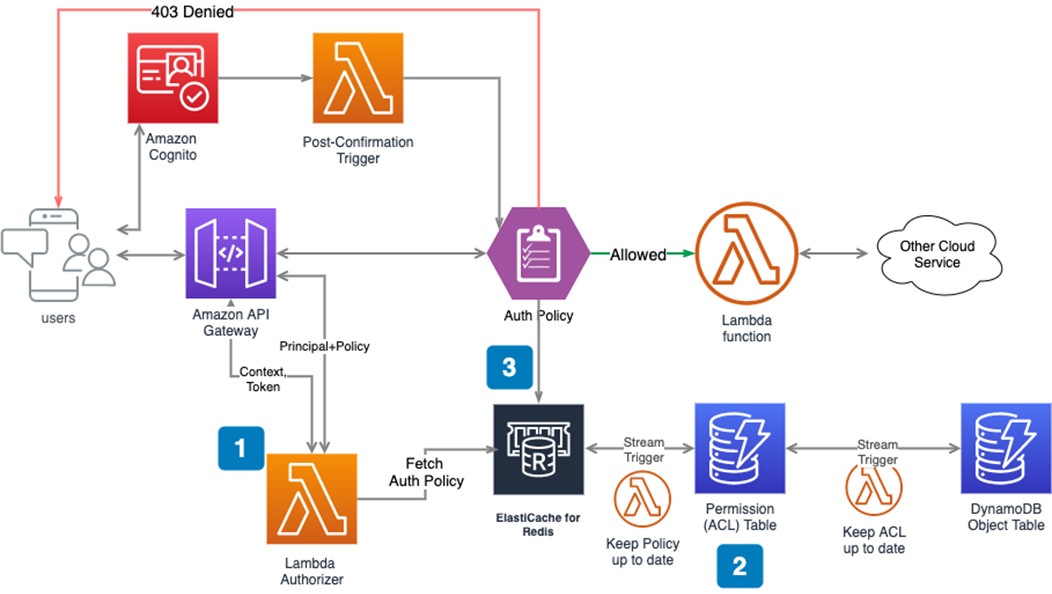
    Amazon Cognito offers managed authentication and authorization that can help you build secure web services in a serverless architecture. It is typically used in combination with Amazon API Gateway when building complex serverless applications that require permission control.

    For example, a payroll system may have a manager and two additional employees. The three employees can use their unique usernames and passwords to log into the payroll system—this process is called authentication.

    To retrieve paystubs, the three employees undergo role-based authentication:

    REST API GET /api/employee/{employee_id}/paystubs

    However, the permissions they get through this process should be unique to their needs. This may involve setting up the following conditions:

    • The manager can access the paystubs of all employees.
    • Employees cannot access the paystubs of other employees, only their own. 

    You can use AWS managed services to fulfill the above requirements and also meet future scaling needs.

    Image Source: AWS

    Step One: Setting Up AWS Lambda Authorizer

    The Lambda authorizer is the brain that centrally determines whether the requester has the relevant permissions for the requested API resources.

    Here’s how you can set it up:

    • Navigate to the Amazon API Gateway and create an authorizer.
    • Select the API resources you want to secure and assign the AWS Lambda function to them.
    • Configure your new AWS Lambda authorizer.

    Step Two: Building User Access Control List (ACL)

    It is crucial to establish user permissions and keep them up-to-date. The approach might differ according to your identity provider. Here is an example of the process if you use Amazon Cognito as your IDP. 

    1. Initialize the ACL

    Every user has a unique ID, so you can describe each user’s permissions by inserting items in the permission table in Amazon DynamoDB when you register with Cognito. The DynamoDB permission table stores the access control list for all users, although the implementation may differ based on the use case. 

    For this example, let’s use a single integer ID for each employee (the UUID strings in real applications tend to be much longer). 

    Manager:

    uuid: xxxx-xxx-xxx-xxxx-xxxxxxxx

    employee: {“allow”: [“/5”,”/5/*”]}

    paystubs: {“allow”:[1,2]}

    Employee 1: 

    uuid: xxxx-xxx-xxx-xxxx-xxxxxxxx

    employee: {“allow”: [“/6”,”/6/*”]}

    paystubs: {“allow”:[3,4]}

    Employee 2: 

    uuid: xxxx-xxx-xxx-xxxx-xxxxxxxx

    employee: {“allow”: [“*”],”deny”:[“/7”,”/7/*”]} // employee_id=7 is the manager of employee 2

    paystubs: {“allow”:[1,2,3,4]}

    2. Manage the Access Control List (ACL)

    The user permissions in a complex project are constantly changing. Employees can be promoted, demoted or terminated, with different access requirements depending on their changing roles. A new manager, for example, needs access to all pay stubs, which means you have to create a new pay stub object for every employee. 

    You can manage user permissions using the Amazon DynamoDB stream:

    Lambda functions can easily be integrated when you insert or modify items in the permissions table. A Lambda function might include code that modifies permissions according to changes to the role of a user.

    3. Build an ACL policy

    Once you’ve established an ACL with user permissions for every object, you should create an authorization policy document. The Lambda function authorizer uses this policy to evaluate whether user API requests should be allowed or denied.

    Amazon API Gateway offers a mechanism for evaluating policies internally. internal policy evaluation mechanism. The Gateway will automatically evaluate any policy JSON returned by the authorizer. For details about Lambda authorizer’s output standard, see this document.

    In this article, I covered the basics of authentication in serverless applications:

    • Single-factor authentication
    • Two-factor authentication
    • Multifactor authentication
    • Intraservice access
    • Outgoing access
    • Incoming access
    • A real-life example with Amazon Cognito

    I hope this will be of help as you gain a better understanding of authentication and authorization techniques that help secure serverless applications.