Category: IT as Code

  • Codenotary Extends Dynamic SBOM Reach to Serverless Computing Platforms

    Codenotary Extends Dynamic SBOM Reach to Serverless Computing Platforms

    Codenotary has extended the reach of its platform for automatically generating software bills of materials (SBOMs) to serverless computing platforms running software constructed using functions.

    Codenotary CTO Dennis Zimmer said because serverless apps are dynamically created, it’s not possible to generate SBOMs using traditional approaches. The TrueSBOM platform makes it possible to create an SBOM in real-time by adding one line to the source code of any application. The TrueSBOM for Serverless edition of the platform now extends that capability to the serverless computing frameworks made available in the cloud by Amazon Web Services (AWS), Microsoft and Google.

    That approach makes the SBOM a part of the application itself rather than a text file that is stored separately, he noted. Each time an application is updated or a scanner discovers a new vulnerability, a new SBOM is automatically generated, added Zimmer.

    Awareness of the need for SBOMs has skyrocketed since an executive order issued by the Biden administration made it clear that federal agencies would require them from software providers starting next year. Many enterprise IT organizations are likely to follow suit as part of a larger effort to better secure software supply chains in the wake of a series of high-profile cybersecurity breaches.

    Most internal DevOps teams already have a good handle on what software components are used within the applications they deploy. The issue is that the organizations that use that software can’t easily verify what components are being used, noted Zimmer. That’s problematic because an organization may prohibit deployment of a specific software component because of a known vulnerability. TrueSBOM allows organizations that use an application to maintain control over their software environment regardless of what software artifacts are used to build closed or open source components, Zimmer added.

    It’s unclear how most organizations will operationalize SBOMs now that more of them are being created. Ideally, organizations should be able to approve only software with components that have been verified as secure.

    As SBOM mandates become more stringent, the number of application providers that are anxious to comply with rules for securing software supply chains should increase. The issue now is finding a way for both the developer and consumer of that software to streamline a verification process that, in its current form, is too cumbersome to manage effectively. As a result, many organizations are now putting together dedicated teams made up of cybersecurity professionals and software developers to manage SBOM processes, said Zimmer.

    Of course, there is a massive amount of code that has already been deployed that today doesn’t show up in an SBOM. While many emerging applications—created using artifacts such as functions and containers—are likely to be increasingly instrumented to dynamically generate an SBOM, the number of legacy applications that might need to be similarly instrumented is several orders of magnitude greater. As a consequence, the amount of effort required to generate SBOMs for every application in use might be greater than teams first anticipated.

  • Migration to AWS Cloud: Do’s and Don’ts

    Migration to AWS Cloud: Do’s and Don’ts

    What if one day, you were told to migrate to AWS/GCP/Azure/any other cloud provider? It would likely introduce some stress, to understate the case, right?

    I’ve seen quite a few migrations in my career and, in this article, I would like to share some thoughts to help DevOps engineers, architects, managers or anyone else who might be involved in such a migration. I’m focusing on migration to AWS mostly because I have a specialization in this subject and because it’s fairly common, but I think these experiences are applicable to any other cloud provider. For this case, I’ll cover migration from on-premises to a cloud because these types of migrations are much more difficult (in my opinion) than cloud-to-cloud migrations. I’ll also share my own perspective on do’s and don’ts of migrations. But please filter them through critical thinking and remember that everybody has their own background and experience. What’s good for one might be bad for another.

    What is a Cloud Migration?

    Let’s start by defining what migration is. How do you know if it’s a migration? I like the following definition: 

    Cloud migration is the process of moving a data center’s capabilities to IaaS providers.

    “Capabilities” is the keyword. A business does not migrate servers/virtual machines/hardware/data or anything else. A business migrates its capabilities.

    There are seven migration strategies (or seven Rs): Relocate, rehost (lift and shift), replatform, repurchase, rearchitect/refactor, retain and retire.

    For example, I’ve seen situations when a company was creating a new product that would replace an existing one hosted on-premises. The product would be designed to be well-architected and cloud-native from the very beginning and would be hosted in a cloud. Is that migration or greenfield project type? From the definition above, we can say that this is a migration. This is a rearchitecture strategy for migration.

    What if we buy a new SaaS subscription instead of some software we host on-premises? This is also a migration: A repurchase strategy.

    Let’s dig deeper into these seven migration strategies:

    Relocate. We host some workloads on-premises and move them as-is into the cloud. This is possible in limited cases; when we migrate cloud-agnostic workloads or when a platform might be cloud-native. Examples: Relocate a Kubernetes cluster from on-premises to the cloud or relocate VMware machines with VMware Cloud.

    Rehost. This is also known as lift and shift. We convert virtual machines/servers on-premises to virtual machines in the cloud. Examples: Migrate on-premises virtual machines to EC2 instances with CloudEndure, or create EC2 instances, install the software and apply the same configuration as on-premises.

    Replatform. We migrate a workload to a cloud-native platform without rearchitecting systems. Examples: Migrating PostgreSQL to AWS RDS or Docker containers to ECS.

    Repurchase. We replace some custom/legacy system with SaaS. Example: Replace custom on-premises email system with SendGrid or replace CRM with Salesforce.

    Rearchitect. We change your application’s architecture to be cloud-native and use managed cloud services. That also includes rebuilding from scratch. Examples: Change the code of your apps to upload files to S3 instead of local storage or containerize an app and migrate to ECS.

    Retire. We decide that a piece of the workload will be eliminated if not needed. Example: Log servers are no longer needed as migrated applications use CloudWatch.

    Retain. We leave it on-premises. Usually, it’s temporary. Example: A huge Oracle database with a lot of functions and customization is not moved to AWS because of the massive costs. It’s decided to keep it on-premises until it’s replaced with another solution in the modernization phase.

    I like the following picture that shows the high-level stages of each migration type. It may be a helpful cheat sheet to approach migrations.

    Picture Source: https://aws.amazon.com/blogs/enterprise-strategy/new-possibilities-seven-strategies-to-accelerate-your-application-migration-to-aws/

    Migration Don’ts

    I don’t recommend the following when performing a migration:

    Migrating too quickly. A business might think, “We have to migrate to the cloud quickly. Let’s do lift and shift right now!” It’s better not to start right away. Are you sure that rehosting strategy will really be faster than some other strategy? In one instance, we tried to migrate on-premises VMs, but it didn’t work because the OS on the machines was quite old. Some OS-level dependencies didn’t work on AWS’ hardware. This required a lot of configuration work, custom code and testing and the initial estimates were completely wrong. It eventually turned out to be a replatform. 

    Assess what you have, analyze it, analyze the business case and think. During this engineering work, we should stop and think before we act.

    Migration without clear goals. Why are you migrating? If you can’t answer the question, you probably need to find an answer or not migrate at all. I’ve seen situations in which businesses wanted to migrate to the cloud to reduce costs. They performed a lift and shift migration without doing a total cost analysis. Only after the fact did they realize that it cost even more than when it was in a colocation center. This migration may be considered unsuccessful.

    To avoid this, define clear goals and define the target state that achieves these goals. If costs are the driver, make the proper calculations and plan accordingly. Cost optimization will be the main thing to focus on when you plan your target state. If availability is the reason, measure it, define SLOs and focus on availability in a target state.

    Black box migration. Don’t treat workloads you migrate as a black box. It is almost critically important to know what exactly you migrate, what technical requirements it has, what dependencies it has and how it works. That information will allow you to choose the correct strategy for workload migration. If this is not done, there’s an excellent chance that you will choose the wrong path and the result will be lost. Capturing information about your systems is the most important task when planning.

    Don’t forget well-architected. Migration is stressful. That’s why people tend to try to get through it quickly on as short of a timeline as possible, focusing on the only thing: Making everything work in the cloud ASAP. They set aside well-architected framework pillars. This is a mistake; it may lead to a different set of negative consequences of different severity. Don’t ignore well-architected framework pillars, or you won’t know about potential issues or risks until they have already materialized.

    Use one strategy for everything. It’s always easy to make a single overarching plan for all workloads. For example, deciding to do lift and shift and then rehost everything in the cloud. But what if some things could be retired? What if some components could be replatformed with little effort? You will save significant resources by analyzing all of the components of the workload and deciding on a unique strategy for every component. Collect data and plan properly.

    Cloud Migration Do’s

    Do perform a cloud readiness assessment. If a person migrates to a new location, they should consider:

    • That the climate will be different
    • The language spoken in that location may be different
    • The cost of living will be different and perhaps more expensive

     When a company migrates to the cloud, they should ask questions including: 

    • Have we considered all the risks?
    • What must be changed for the workload to actually work?
    • Do we have the human resources required for all of the work?
    • Do I have the budget to accomplish everything? 

    The Cloud Readiness Assessment is a long-form interview about varying processes in the company that identifies whether a company is ready to live in the cloud. It’s based on the Cloud Adoption Framework (CAF) and allows us to understand what should be changed so that a migration can happen successfully. AWS has a Cloud Readiness Assessment tool which covers all of that. I urge you to use this process for all workloads being considered for migration.

    Create a business case. Describe the business case. What are the drivers for migration? What problems are resolved with the migration? What goals should be achieved by migration? Be specific: If you intend to reduce costs, then calculate the sum. If you intend to improve availability, then define a clear SLO. That will be the number-one driving force for your migration. All other artifacts should be based on it.

    Automate discovery and data collection. Use automated data collection and analysis to create a portfolio for migration. Don’t base your analysis on manually created spreadsheets or verbal communication. Let machines collect data about inventory and usage statistics. The more precise data you collect, the better. AWS Migration Evaluator service will help you to do this in most cases.

    Portfolio management. Create a portfolio of workloads to migrate, analyze them, choose a migration strategy for each, choose some for the pilot/first wave migration, estimate timelines and prepare a plan. Execute the migration after that. Repeat until the migration portfolio is empty. Share the data. Have subject matter experts review it.

    Found CCoE. This is part of the CAF mentioned above. Before executing the migration, create a team of people responsible for creating a strategy and defining a good standard of living in the cloud: A Cloud Center of Excellence. It should include people with a variety of subject matter expertise including management, operations, platform, people, finance and every other department consuming or providing services in the cloud. These people will prepare a landing zone for the migration, hard policies and softer policies for the landing zone; preparing the company for life in the cloud. Don’t fear revisiting any policy.  Make changes as new factors come to light.

    Well-architected framework reviews (WAFR). Do well-architected framework reviews (WAFRs) during migration waves and after them. That will allow you to avoid foolish mistakes and to get a high-level overview of what you have done from a technical perspective.

    Modernization plan. Prepare a modernization plan along with the migration plan. Migration isn’t the end of the story. To be effective in the cloud, you will have to do well-architected reviews and modernization. The first modernization is likely to be huge; that’s why it’s important to plan and to schedule budgets and resources in advance. Failure to do this will lead to increased operational costs, not decreased costs.

    Summary

    If we want to reduce the risk associated with a migration and to make it less stressful, we do not rush. You may believe that rushing will save you time and other problems will be managed later, but experience tells us that this is wrong. The most likely outcome is that you will end up resolving all the issues encountered in the most stressful situation possible: When you cut over to your new cloud-based production environment. Instead of resolving issues in a well-considered way and in advance, the choices will be made under duress. Proper engineering principles must be applied here. Picking up a bridge and moving it from one river and plunking it down on another never works. The key to migration success is to measure, analyze, design and plan. Migrating a workload to the cloud is hard, but I hope these do’s and don’ts will make it easier.

  • Introduction to MACH Architecture

    Introduction to MACH Architecture

    In recent years, the need to construct end-to-end digital experiences has become increasingly important. But to deliver new features and services promptly, organizations must double down on agility and reusability. As part of this trend, applications have become increasingly modular, often constructed using pre-built microservices and integrating common SaaS to avoid reinventing the wheel.

    MACH is an architectural style that fits into these trends quite well. It stands for Microservices-based, API-first, Cloud-native, and Headless. The locus of the movement is The Mach Alliance, a group of API-first companies abiding by these principles. At the time of writing, MACH is gaining mindshare as more API-first companies enter the market and the appetite for cloud-native technology grows.

    I recently chatted with Gary Ballabio, VP of technology partnerships, Cloudinary, about the ongoing MACH trend. According to Ballabio, MACH delivers “best of breed” technologies that avoid the bloat of larger platforms. Yet, for software consumers, building in a MACH style will require stitching together individual components and orchestrating them effectively. Below, we’ll explore MACH and consider the benefits and drawbacks of utilizing tools that conform to this approach.

    What Is MACH?

    MACH is an emerging software architecture style adopted by a number of commerce and digital experience tools. To understand MACH a bit deeper, it’s necessary to understand the underlying concepts of microservices, API-first, cloud-native and headless. So, let’s first break apart these familiar terms:

    • Microservices: Unlike monolithic development, a microservices architecture organizes functionality into self-contained, specialized components. This improves reusability and allows for more frequent, targeted software updates.
    • API-first: API-first takes design-first one step further. It means putting the consumption model, the API, ahead of other concerns, like the application or UI. Web APIs have become ubiquitous for connecting a microservices ecosystem and exposing data and functionality to partners and public consumers.
    • Cloud-native: An umbrella term for projects purpose-built for the elasticity and scalability of the cloud.
    • Headless: Headless means separating the front end, or “head,” from the back end. By decoupling development this way, websites and apps are better equipped to cater to multiple platforms and devices.

    According to Ballabio, companies can leverage cloud-ready best-of-breed functionality by integrating tools that adopt MACH principles. Incorporating one single SaaS to fit a specialized need can also be considered an alternative to using large, comprehensive enterprise commerce suites like Salesforce, Adobe or SAP, said Ballabio.

    There are many examples of specialized SaaS services built in the MACH style. Some include Algolia for search and recommendations, Cloudinary for media management, Builder.io for mobile experiences, or Contentstack as a headless CMS. All these tools are members of The MACH Alliance, a group of over 70 vendors, partners, startups, systems integrators and other ambassadors dedicated to fostering the MACH approach. And although the emphasis has been on commerce and digital experiences, MACH is expanding beyond that scope to other areas.

    MACH technologies support a composable enterprise in which every component is pluggable, scalable, replaceable.

    Some readers may wonder, “How is this different than Jamstack (JavaScript, APIs and markdown)? In a way, MACH is similar to Jamstack, as both approaches aim for headless frontend experiences and a modular backend powered by APIs. But a key difference, said Ballabio, is that MACH doesn’t dictate the use of specific programming languages.

    Benefits and Drawbacks of MACH

    MACH combines many development trends we’re seeing in the software landscape. Digital applications are becoming more composable, cloud-first is rising, and headless models can deliver customization benefits. Yet, there are some potential drawbacks to introducing this style too. So, let’s weigh some of the positives and negatives of adopting MACH architecture.

    Benefits

    • Flexibility: The most significant benefit of MACH is the flexibility it offers, said Ballabio. “There’s value in being able to choose the services you want to use based on your own unique requirements.” Looping in a specific API-first tool for something like e-commerce, payments, CMS or email can enable a lot of customization.
    • Reduced waste: This can create less waste, too, as you create a leaner footprint by acquiring only what you need for each project, and freemium models enable consumers to pay for only what they use. This is helpful when you want a single component but don’t require the bells and whistles of a more holistic platform.
    • Best-of-breed: Niche API-first products are focused on doing one thing really well, and this particular focus can improve quality and agility. It also releases engineers from being at the whim of an extensive product’s development life cycle.
    • Developer-first: Lastly, most digital experiences share common functionalities that developers shouldn’t have to reinvent. MACH supports being developer-first, says Ballabio, which is an asset to companies investing in developer experience.

    Drawbacks

    • Increased maintenance: Consuming many third-party cloud services will inevitably bring new maintenance hurdles. These include tracking, monitoring and securing all integration points. It also requires responding to new version updates.
    • Stitching together: Naturally, when you add a cloud-based abstraction layer to the services you consume, the onus is on the consumer to then to stitch them together to make components talk to one another.
    • Startup costs: Due to the coordination between services, initial costs and engineering time could be more than implementing a holistic suite, admitted Ballabio. “But you get more long-term benefits,” he said.
    • Assistance may be required: Those unaccustomed to microservices development and API integration may need help. This may require the support of systems integrators or middleware to orchestrate connections.
    • Lack of standards: MACH is more of a general architecture rather than a standard specification. Thus, the precise technologies under the hood and the specific behaviors may differ from service to service.

    Future of MACH

    A recent MACH Alliance study found 79% of tech leaders plan to invest more in MACH technologies in the next year. Although the style has been primarily trending in Europe, Ballabio predicts the U.S. will soon pick it up. The MACH Alliance presents and advocates for an open and best-of-breed enterprise technology ecosystem.

    Along with the rise of composable architecture, the MACH approach is gaining interest among cloud-native leaders who see the advantage of assembling applications using pre-fabricated building blocks. MACH is especially a good fit for greenfield development, where the slate is clean to integrate new technology.

    MACH represents a new category of companies that are growing together. Ballabio remarks that he feels part of a movement, part of an industry—and, arguably, this movement can potentially disrupt larger commerce ecosystems.

    But although MACH gives a name to a face, most techies still aren’t aware of the acronym. While the concept may, for now, live in the domain of vendor-speak, Ballabio foresees it becoming a more common parlance for consumers and end developers.

  • Dead Downtown: It’s YOUR Fault | Pentagon’s FOUR Cloud Vendors | Apple Adds MORE Price Flexibility

    Dead Downtown: It’s YOUR Fault | Pentagon’s FOUR Cloud Vendors | Apple Adds MORE Price Flexibility

    Welcome to The Long View—where we peruse the news of the week and strip it to the essentials. Let’s work out what really matters.

    This week: Home working is ripping the heart out of cities, the DoD’s bizarre cloud strategy, and Apple adds a $10,000 app price option. (more…)

  • Chainguard Adds Private Edition of Code Signing Platform

    Chainguard Adds Private Edition of Code Signing Platform

    Chainguard today added a private preview of a Chainguard Enforce Signing service, enabled by the open source Sigstore project, that allows developers to generate digital signatures for software artifacts using identities and one-time-use keys they create themselves.

    Kim Lewandowski, head of product for Chainguard, said Chainguard Enforce Signing provides an alternative to relying on a public service to generate those digital signatures. It also allows organizations to bring their own key and certificate so that key usage can be monitored and audited per compliance and privacy requirements.

    In addition, Chainguard added a library of policies that administrators can deploy directly from the Chainguard Enforce web console to their environments.

    The Chainguard Enforce Signing feature is based on Sigstore, an open source project that provides a protocol to simplify cryptographic certificate generation by removing the need to manage keys. At its core, Sigstore creates a set of short-lived ephemeral keys with a trust root based on an auditable public log. Because it creates an immutable log, everyone participating in the software development process, including auditors, can now transparently track the chain of custody for any software artifact.

    Key management, key compromise/revocation and the distribution of public keys and artifact digests are challenging to manage. Developers are also required to determine which keys to trust in addition to learning how to sign them when different platforms are employed.

    Chainguard’s alternative is enabling organizations to host their own immutable log rather than relying on a public service to eliminate the need to manage keys, noted Lewandowski.

    Historically, code signing platforms have been problematic because they were susceptible to tampering. Cybercriminals can, for example, swap out digests to gain access to compromised credentials. Digests and public keys are also often distributed across vulnerable websites susceptible to hacks or inadvertently stored on a public Git repository.

    Code signing—along with software bills of materials (SBOMs)—is one of two technological advances that will improve the security of software supply chains. SBOMs, of course, are going to be considered more reliable when the software components they describe are signed by the developers that created them.

    Less clear is whether the signing of code will improve its overall quality. Most developers take pride in their code, but the overall quality of the software deployed in production environments could always be improved. Developers may decide to review the code they contribute to a build more intently if they know they will be required to sign it.

    In the meantime, it’s only a matter of time before organizations require that developers sign code before it is deployed in a production environment. In addition to increasing confidence in the quality of the code employed, those signatures make it simpler to track down the development team that created code whenever there is an issue that needs to be resolved. After all, the most challenging issue organizations encounter when trying to update software is not so much the creation of a patch as much as it is identifying who should create that patch based on their knowledge of the software components used.

  • How Devs Can Improve Open Source Security in the Enterprise

    How Devs Can Improve Open Source Security in the Enterprise

    Modern applications are dynamic. They’re distributed and they’re often born in the cloud. These applications can be developed on the fly, spun up and scaled quickly to meet evolving user and market demands—enabling a level of business agility that allows users to make quick, informed decisions in real-time and take advantage of opportunities as they arise.

    Enabling this development velocity are tens of thousands of open source libraries–pieces of code that developers can include in their applications to perform a specific function without having to code it from scratch. Open source libraries prevent developers from having to reinvent the wheel and allow them to focus on their differentiated business logic. While efficient and a major time saver, open source software may be the biggest single threat to software supply chains today. Developers simply have too much faith in the integrity of free, open source code that they casually include and distribute with their applications.

    Despite the operational benefits, the pressure to develop quickly shouldn’t expose the organization to increased security risks. Development teams need to rethink how they use open source software and take steps to ensure they meet the same security standards as other enterprise applications.

    The Open Source Security Issue

    The problem is that most open source projects are maintained by a small number of developers that contribute their time and expertise to build software components that can be reused by the community at large. However, these developers are volunteers who aren’t being paid for their time and effort, nor are they under the same pressure as enterprise developers to ensure there are no vulnerabilities in their code. They may also lack the level of enterprise security expertise necessary to protect applications from increasingly sophisticated attacks. Some may even be hostile to efforts to better secure their code if it means slowing performance or changing the user experience.

    The result is that insecure code is increasingly making its way into enterprise applications that use these open source libraries. In fact, the Log4j vulnerability last year was due to a vulnerability in an open source Java logging library. Recognizing the national security importance of open source software, the Biden administration recently issued an executive order and met with cybersecurity professionals to better safeguard the federal government’s computer systems. The resulting recommendations included policies that would help prevent security vulnerabilities in open source packages, improve the process for identifying and fixing defects and reduce time to remediation for distributing and implementing fixes. 

    It’s imperative that the private sector take notice and make more of an industry-wide effort to secure open source software that makes up businesses’ most critical applications today.

    Three Steps for Better Open Source Security in the Enterprise

    The bottom line is that enterprises themselves need to take more responsibility for securing enterprise applications—especially as these applications rely more on open source libraries. They need to take a more proactive approach that spans the entire software life cycle, embeds security tools directly into development platforms and provides complete transparency into what makes up their most critical applications.

    Here are three things organizations can do to make sure their open source software is secure:

    1. Continuously conduct end-to-end application testing

    Modern applications are constantly evolving—making it more imperative than ever to continually test for vulnerabilities throughout the entire software life cycle. Starting with the planning stage, security should be embedded throughout the process—providing developers with a solid framework for building secure code before it goes through testing. Once pushed, application security testing should continue as an automatic, built-in step when pushing code to production. DevOps and security teams should work together to ensure security is no longer an afterthought to feature development.

    2. Embed enterprise security capabilities directly in development platforms

    Forcing developers to take an extra step to ensure secure code when they’re already under pressure to push code quickly is a recipe for failure. Security teams must make it as easy as possible by integrating security controls directly into existing development processes. Standardizing security testing and controls during development makes it more likely policies are recognized, understood and followed.

    3. Ensure transparency in every snippet of code you use

    Complexity is the enemy of good application security. DevOps teams need to know exactly what makes up their applications—including open source libraries and their dependencies. The federal government is pushing the open source community to standardize a software bill of materials (SBOM). Similar to regulations that require hardware manufacturers to know where every part is sourced, this would force both open source developers and enterprise developers to take more responsibility for the code they include from other sources. That way, if a vulnerability is discovered in a library, enterprises could easily determine if they are at risk and take appropriate action to fully mitigate the issue as quickly as possible.

    It’s Time to Take Greater Responsibility

    Open source software enables the kind of development agility that makes businesses thrive, but open source also greatly expands enterprise threat surfaces—leaving many organizations at risk of a breach. Organizations need to take greater responsibility for the security posture of the open source libraries they use to speed application development. This requires end-to-end application testing throughout the entire software development life cycle; embedded security tools and controls in development platforms and processes and complete transparency into the open source software that makes up critical enterprise applications. This proactive approach will ensure that vulnerabilities such as Log4j are identified and patched quickly before threat actors are able to exploit them and compromise applications.

  • AWS Makes Economic Case for Graviton Processors

    AWS Makes Economic Case for Graviton Processors

    Amazon Web Services (AWS) is making available in preview a C7gn instance on the Amazon Elastic Compute Cloud (Amazon EC2) based on AWS Graviton processors. The C7gn instances provide up to 200 Gbps network bandwidth and as much as 50% higher packet-processing performance compared to previous-generation C6gn instances.

    Announced at the AWS re:Invent 2022 conference, these instances are based on Arm processor architecture that AWS provides as an alternative to x86 processors.

    Rahul Kulkarni, director of product management for Amazon EC2, said interest in more efficient AWS Graviton processors has spiked sharply as the overall economic outlook softened. More IT teams than ever are being tasked with finding ways to reduce costs as the overall number of applications being deployed in the cloud continues to grow, he added.

    While it’s not clear how many applications are being developed to run natively on Arm processors, Kulkarni noted that the process of refactoring existing applications to run on Arm processors is not as intensive for most applications as it was when previously moving applications from one class of processors to another.

    Overall, AWS now offers more than 600 types virtual machine instances on its cloud platform, including a set of Inf2 instances, available in preview, based on custom AWS processors that are optimized for processing workloads that include machine learning algorithms that drive artificial intelligence (AI) models.

    Every AWS instance takes advantage of a set of AWS Nitro Cards that offload the overhead virtualization creates so IT organizations can take full advantage of compute resources without having to allocate any resources to run virtualization software, noted Kulkarni. That virtualization tax is instead absorbed by AWS to reduce total cloud costs for the customer, he added.

    In addition, more customers are taking advantage of tools such as AWS Cost Optimizer and AWS Karpenter for Kubernetes clusters that employ machine learning algorithms to identify opportunities to reduce the cost of cloud infrastructure by, for example, shifting workloads to different classes of services.

    There are, of course, multiple strategies for containing cloud costs that range from committing to consuming a specified amount of compute resources annually at discounted rates to relying more on spot instances that are available for limited amounts of time. Less effective is moving workloads from one cloud provider to another simply because the total cost migrating workloads can be substantial depending on the number of proprietary application programming interfaces (APIs) that have been invoked.

    Regardless of approach, the days when developers were allowed to invoke cloud resources at will appear to have come to an end. Enterprise IT organizations are a lot more conscious of the total cost of IT in the cloud era. As a result, many of them are adopting financial operations (FinOps) best practices to maximize utilization of cloud infrastructure resources.

    It’s not clear how readily IT organizations will embrace AWS Graviton alongside other classes of Arm processors to achieve that goal, but as the economic outlook continues to remain uncertain, there is no doubt all options are now on the table.

  • AWS Previews Amazon CodeCatalyst to Automatically Create Dev Environments

    AWS Previews Amazon CodeCatalyst to Automatically Create Dev Environments

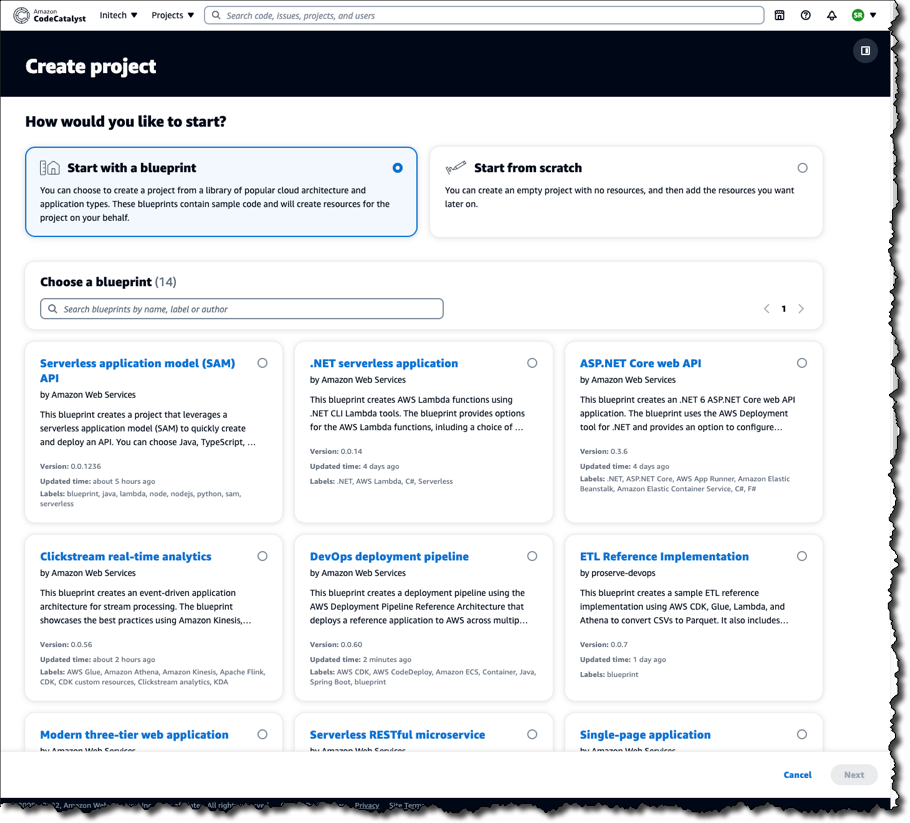
    Amazon Web Services (AWS) this week launched a preview release of the Amazon CodeCatalyst framework that leverages blueprints to automatically provision and configure developer environments in its cloud.

    Announced at the AWS re:Invent 2022 conference, Amazon CodeCatalyst takes advantage of a Project Blueprints tool to launch a source code repository and a project management tracker that are then used to create build and release pipelines. DevOps teams can use either the tools provided by AWS or substitute an instance of, for example, GitHub or the Jira project management software.

    Amazon CTO Werner Vogels told conference attendees the goal is to reduce the friction that developers currently encounter whenever they need to launch a new development project. As part of that effort, Amazon CodeCatalyst promises to make it simpler to consistently replicate development environments using scaffolds in addition to providing dashboards and search capabilities for tracking changes across commits, pull requests and deployments.

    Amazon CodeCatalyst uses a devfile to define the configuration of an environment that comes in four resizable instance options made up of two, four, eight or 16 virtual CPUs. The devfile defines and configures all the resources needed to code, test and debug a project. Devfiles, which are added to the source code repository by the selected blueprint, can also be modified.

    Collectively, those capabilities make it possible to deploy sample TypeScript, Python, Java, .NET, JavaScript, React, Angular and Vue code running in a few minutes. Developers can work with the AWS Cloud9 integrated development environment (IDE) or use tools such as JetBrains IntelliJ IDEA Ultimate, PyCharm Pro, GoLand and Visual Studio Code on their local machine. Developers, as a result, can simply switch between multiple codebases or collaborate with other developers as needed.

    The pipelines can be run on pre-provisioned builds in the cloud or organizations can opt to deploy their own container environments. Developers can incorporate build actions that are built in or provided by AWS partners in addition to incorporating GitHub Actions to compose fully automated pipelines that can be configured using either a visual editor or YAML files. Build and release pipelines enable deployment on Amazon Elastic Container Service (Amazon ECS), AWS Lambda and Amazon Elastic Compute Cloud (Amazon EC2) services.

    In general, Vogels advocated that IT teams should build event-driven applications that are loosely coupled to make it simpler to add new capabilities to existing applications running at scale without impacting the entire codebase. To make it simpler to build those types of applications, AWS added an Amazon EventBridge Pipes tool that creates point-to-point integrations between event producers and consumers in a way that eliminates the need to write that code. AWS also made available in preview a graphical AWS Application Composer tool that makes it simpler to design, configure and build serverless applications using infrastructure-as-code (IaC) definitions.

    It’s not clear to what degree developers will be embracing event-driven applications. As a programming model, event-driven architectures have been around for decades. The issue has been those applications also have tended to be among the most challenging to build and maintain. AWS is now clearly signaling its intent to make building those applications a lot easier.

  • Nobl9 Adds Free Tier to SaaS Platform for Managing SLOs

    Nobl9 Adds Free Tier to SaaS Platform for Managing SLOs

    Nobl9 this week announced it is making available a perpetual free tier of its software-as-a-service (SaaS) platform for managing service level objectives (SLOs).

    The free tier was announced at the AWS re:Invent 2022 conference and the company also revamped its pricing. Nobl9 Teams Edition (formerly Nobl9 Hydrogen) now includes 50 SLOs, up from 25, for $850/month. Nobl9 Enterprise Edition also has doubled the included SLOs from 75 to 150.

    Finally, Nobl9 also launched SLOcademy to help educate IT teams on how best to create and manage SLOs.

    The Nobl9 platform simplifies the creation and tracking of SLOs using metrics and observability data collected from more than 24 widely used DevOps tools including Prometheus as well as services provided by Datadog, New Relic, Dynatrace, Google, Amazon Web Services (AWS) and Splunk.

    Kit Merker, chief growth officer for Nobl9, said the company’s platform collects signals from logs, metrics and traces to define what normal should look like for any given service. The free tier of the platform has some limitations, but it does provide access to the full-featured platform to enable IT teams to get started managing SLOs.

    SLOs, of course, are not a new idea. They have been used as a metric to track the performance of IT services for decades. It’s not clear whether reliance on SLOs has waned over the years or if application environments simply became too complex to track meaningful metrics. However, as applications are increasingly viewed as services, it’s now only a matter of time before SLOs become more widely adopted across a modern application environment. The challenge, of course, is that defining an SLO is a lot easier than maintaining it—especially within today’s highly dynamic cloud-native application environments where services with lots of dependencies tend to come, change and go unexpectedly.

    Nobl9 is making a case for an SLO-as-code approach that makes it simpler to track service levels. A recent survey of more than 300 IT managers and executives conducted by Dimensional Research on behalf of Nobl9 found only 29% of respondents had no plans to implement SLOs. A full 94% of respondents that have or plan to implement SLOs intend to map them directly to business operations, with 91% reporting that they expect that effort to improve decision-making. More than 80% also said their organizations are planning to increase the use of SLOs, with 87% indicating SLOs should improve overall microservices performance.

    The challenge is that most organizations have limited visibility into their IT environments. The survey, for example, found less than half of respondents (46%) had visibility into all their IT environments. Only 45% and 35% claim to have visibility into containers and microservices, respectively. More than three-quarters (78%) said hybrid clouds make observability more difficult. Ironically, 45% of companies reported they already employed 11 or more observability and monitoring tools. On the plus side, 31% have hired site reliability engineers (SREs) while nearly half (46%) planned to create that role.

    It may be a while before most IT teams are organized around the concept of applications as services but as the management of IT continues to evolve it’s now just a matter of time before that approach becomes more the rule than the exception.

  • GitLab Unfurls Dedicated SaaS Edition in the Cloud

    GitLab Unfurls Dedicated SaaS Edition in the Cloud

    GitLab today made available to a limited number of customers a single-tenant version of the software-as-a-service (SaaS) edition of its continuous integration/continuous delivery (CI/CD) platform.

    David DeSanto, vice president of product at GitLab, said the GitLab Dedicated option provides all the benefits of a cloud platform without running afoul of any potential compliance issues.

    Designed to be deployed on a cloud platform selected by the customer, DeSanto said the single-tenant edition of the platform makes sure that all the data stored in the cloud is isolated. In addition, the access to GitLab Dedicated is provided via a private network connection, he added.

    Initially, GitLab Dedicated is being made available on the Amazon Web Services (AWS) cloud with support for other cloud platforms planned for 2023 once it becomes generally available.

    GitLab is, in effect, trying to strike a balance between a lower-cost multitenant edition of the platform or, alternatively, requiring organizations to deploy an on-premises edition of the platform themselves, DeSanto said.

    In general, GitLab expects this latest version of the platform to appeal most to organizations that operate in highly regulated industries. However, the number of organizations looking to isolate their data in a private cloud to better protect their software supply chains is expanding, he noted.

    In the wake of a series of high-profile breaches and vulnerability disclosures, the number of organizations that are reviewing their software supply chains has increased. Less clear is the degree to which organizations will look to lock down their existing CI/CD platform versus replacing it with a more secure modern alternative that can be more easily accessed via the cloud.

    The challenge, of course, is replacing a CI/CD environment is not trivial, so organizations will need to consider the time and effort made over the years to customize their CI/CD environment. In some instances, that customization provides a meaningful competitive advantage. In other cases, however, the weight of maintaining all those customizations has become more troublesome than it’s worth.

    Each individual organization will need to decide to what degree they will want to manage the DevOps platforms used to construct applications. More organizations are deciding they prefer to devote as much of their resources as possible to writing code instead of managing the underlying CI/CD platform used to create their applications, said DeSanto.

    Regardless of approach, the number of organizations adopting DevOps best practices to build and deploy applications faster continues to increase. A CI/CD platform accessed via the cloud lowers the barrier to entry for smaller organizations that typically don’t have the skills and resources required to manage DevOps platforms.

    In the meantime, SaaS-based approaches should significantly increase the number of applications being constructed using DevOps workflows. The level of DevOps adoption will naturally vary by organization. However, the total number of custom applications being used to drive, for example, digital business transformation initiatives should considerably expand in the months and years ahead as more applications are built and deployed at incredible speed.