Category: IT Security

  • Styra Makes Source Code Available for Enterprise Edition of OPA

    Styra Makes Source Code Available for Enterprise Edition of OPA

    Styra is now making the enterprise edition of the Open Policy Agent (OPA) available under a source license that enables IT teams to modify or change the underlying code as they see fit when integrating it with other applications.

    Enterprise OPA is a drop-in replacement for OPA, agent software for implementing policy-as-code that is already available under an open source license. Styra’s enterprise edition provides access to a version that provides better performance, native integrations for a suite of data sources and additional capabilities such as policy decision analysis.

    Previously, Enterprise OPA was only available in either a binary or container format. While these formats enable Enterprise OPA to be widely used, they limited it from being built directly into applications for performance optimization because no access was provided to source code.

    Chris Hendrix, director of product management for Styra, said the source license also provides organizations with an assurance that they will be able to continue to modify Enterprise OPA in much the same way as they modify the open source edition.

    It’s not clear how many DevOps teams are managing policy-as-code within their pipelines, but as application security regulations become more stringent, it’s only a matter of time before most of them do so in one way or another. Styra’s approach relies on a Rego programming language that some DevOps teams have found challenging, however. To make it simpler, the company is working on a low-code approach that would help make Enterprise OPA more accessible, said Hendrix.

    In addition to encouraging more DevOps teams to use Enterprise OPA under a source license, Syra is clearly moving to make it more attractive to replace existing instances of OPA with a more robust implementation licensed from the company. No one knows how many instances of the open source edition of OPA advanced under the auspices of the Cloud Native Computing Foundation (CNCF) are running in production environments. But as those applications become more complex, the need for deeper levels of integration enabled by a faster version of OPA becomes more apparent.

    OPA enables developers to programmatically embed compliance controls without waiting for a compliance team to make them available. That ultimately makes it simpler to ensure that the proper controls have been implemented before an application is deployed in an on-premises IT environment. That capability also makes it easier to document which controls have been applied to make any audit less time-consuming.

    Shifting responsibility for compliance controls to the left also enables DevOps teams to better understand which controls address specific regulatory mandates incorporated into most applications versus which controls might be specific to a specific regulation. Armed with those insights, it then becomes simpler to incorporate policy-as-code within a DevSecOps workflow.

    Hopefully, more applications running in production environments will soon be secure by default. Naturally, one of the first places to start is by making sure the compliance controls needed to achieve a baseline level of security have been pervasively implemented.

  • Snyk Survey: AI Generating More Vulnerabilities in Code

    Snyk Survey: AI Generating More Vulnerabilities in Code

    A survey of 404 IT professionals conducted by Snyk found the use of artificial intelligence (AI) to write code is creating a security paradox. On one hand, just over three-quarters of respondents (77%) said AI tools improve code security. At the same time, however, 59% are concerned that AI tools trained using general-purpose large language models (LLMs) will introduce security vulnerabilities that first appeared in the code used to train them.

    The challenge with general-purpose LLMs is that they are trained using a combination of excellent, mediocre and flawed code. As a result, any recommendation surfaced has the potential to be a suboptimal security result.

    Randall Degges, head of developer relations for Snyk, said that as AI tools increase the velocity at which applications can be constructed, it’s probable that DevOps teams will discover more vulnerabilities in their code.

    In general, 61% of respondents also noted that automation has increased the number of false positives, with 62% of respondents reporting that at least one out of every four vulnerability alerts they received from automation tools were false positives. Well over a third (35%) said false positives represented over half of the vulnerability alerts.

    On the plus side, however, more organizations are paying closer attention to application security issues in the wake of several high-profile breaches of software supply chains and disclosures of vulnerabilities. A full 96% reported their organizations are addressing supply chain security problems on an ad hoc basis, yet only half have a formalized supply chain security strategy in place.

    The survey also finds 87% of respondents work for organizations impacted by a software supply chain security issue in the last year, with 61% having implemented new tools and processes as a result.

    A total of 62% of respondents work for organizations that have a software life cycle assurance process in place, but only 42% of organizations are using software bills of materials (SBOMs). In addition, only 40% have formal security ratings for the open source packages that developers employ, and 31% ignore risks that arise from indirect dependencies.

    However, only 40% of organizations have embedded security testing tools into their integrated development environments (IDEs), with 40% not using software composition analysis (SCA) or static application security testing (SAST) tools at all. In fact, even though 80% of respondents reported working for organizations that ship code daily, only 27% claim to continuously audit their code.

    As a result, many vulnerabilities remain unpatched, with Java (42%) and JavaScript (31%) topping the list in terms of code with the most ignored vulnerabilities.

    Finally, the survey also noted that vulnerabilities involving open source code are now being remediated faster than proprietary code. Maintainers of open source software are now paying more attention to cybersecurity issues thanks in part to the tools and best practices provided by the Open Source Security Foundation (OpenSSF), said Degges.

    There will, of course, come a day when AI is more widely used to analyze vulnerabilities in code. In effect, AI will be used to solve some of the security issues general-purpose LLMs create. In the meantime, however, DevSecOps teams would be well-advised to proceed with caution.

  • Extending the GitOps Pipeline: DevSecOps and Trusted Application Delivery

    Extending the GitOps Pipeline: DevSecOps and Trusted Application Delivery

    We live in a fast-paced world of rapid changes and uncertainty where every aspect of our daily lives changes often, including the way we work and communicate. Organizations must deliver value to their customers at a much faster pace than ever before to thrive in such an environment. However, the decentralized nature of cloud infrastructure expands the threat landscape and poses several security risks that enterprises should address in light of recent data breaches.

    Organizations must combat security threats and address challenges arising from cloud misconfigurations. Several recent tools, strategies, practices and technologies have emerged that can help you handle such security threats. This article discusses how the fusion of DevSecOps and trusted application delivery can extend the GitOps pipeline and add business value.

    What is GitOps?

    Coined by Weaveworks in 2017, GitOps thrives on a source code management system built on Git and adheres to the belief that Git is the single and definitive source of truth. Since all changes are stored in Git, anyone can see the audit trail if necessary. This enables you to use Git-based version control to manage your application’s code, environment and processes.

    Figure 1: CI/CD with Git-based Version Control

    GitOps leverages Git repositories as the one and only source of truth and embraces DevOps and infrastructure-as-code (IaC) best practices. Using GitOps, your developers can spend more time developing applications than configuring or maintaining Kubernetes clusters.

    GitOps strategies are gaining traction with enterprises for various reasons, including improved productivity, increased deployment frequency and improved security. While it’s true that GitOps continues to be a transformative trend, the increased speed and automation can also lead to misconfigurations that compromise application stability and security.

    Figure 2: CI/CD using GitOps

    Often, these security vulnerabilities delay development as developers spend significant time and effort investigating them. Since this poses a hindrance to progress, the question that arises is how enterprises can maintain the frequency and speed of deployment while remaining secure and reliable. This is where trusted delivery comes in.

    An Extension of DevOps

    DevOps is a software engineering practice and culture that blends development and operations to provide a shared and collaborative approach to developing and maintaining software. This can boost productivity, lower costs and increase customer value through increased collaboration.

    GitOps extends DevOps to bring the deployment workflow closer to developers. GitOps integrates code and configuration management for cloud-native application deployment and administration, while DevOps fosters shared ownership, transparency, and rapid feedback.

    GitOps uses DevOps-proven practices like version control, code review and CI/CD pipelines with any Git-based repository, including GitHub, GitLab or BitBucket. It builds on DevOps and applies DevOps best practices for infrastructure automation.

    What is Policy-as-Code?

    When deploying and managing cloud-native infrastructures, adhering to security best practices and regulatory standards is critical without hindering development. Policy-as-code is an approach to infrastructure security in which rules are codified and enforced, thereby reducing or eliminating human errors. You can use it to write applications using a high-level language to control, manage and automate policies. With policy-as-code in place, developers may create applications to manage security, compliance and other regulations seamlessly.

    Here are the types of policies that you can codify:

    • Security Policies: By adhering to these policies, you can protect your software from data breaches caused by misconfigurations.
    • Resilience Policies: The use of these policies in your Kubernetes clusters will help you create highly available, fault-tolerant systems as well as maintain business continuity.
    • Coding Standards Policies: These policies can enforce coding consistency, i.e., any code that violates these policies will be rejected automatically by the system.

    What is Trusted Application Delivery?

    Trusted delivery entails codifying security policies within your software delivery pipeline for security and compliance and introducing guardrails at every stage. By ensuring the security, integrity and reliability of your applications deployed in production environments, unauthorized access, tampering or malware introduction is minimized. It establishes and maintains trust in application source code, artifacts and deployment pipelines throughout the SDLC process.

    The key objectives of trusted application delivery are:

    • Security: It protects the application from security threats and vulnerabilities
    • Integrity: It verifies the authenticity and integrity of the source code of your application, together with the dependencies, and any artifacts
    • Reliability: It ensures that the applications deployed to the production are stable and are devoid of any security loopholes so that they can perform as desired

    Trusted application delivery helps development teams release applications early and secures them with automated protections or guardrails. It extends the GitOps pipeline by integrating security, governance and verification with policy-as-code. These security measures are implemented with policy-as-code. The policy-as-code approach encompasses the entire SDLC, including the design, development, testing and deployment stages.

    According to your organization’s security and compliance policies, compliance and security rules are codified and integrated into the system. Throughout the life cycle of your application, you can manage its security, compliance and other regulations using policy-as-code. These code-defined policies prohibit the provisioning of non-compliant resources. You should implement trusted application delivery practices to secure your organization’s application delivery process and reduce the likelihood of unauthorized access.

    Here are the key benefits of trusted delivery:

    • Faster and more frequent releases
    • Enhanced security
    • Protect against misconfigurations
    • Avoid compliance violations
    • Improved collaboration

    What is DevSecOps?

    DevSecOps is a software development methodology that blends development (Dev), security (Sec) and operations (Ops) at all phases of the SDLC by incorporating mandatory security checks. An organization of any size can benefit by creating a culture of shared responsibility and collaboration by bridging the gap between development, security and operations teams.

    A DevSecOps pipeline adds practices such as scanning, policy enforcement, static code analysis, threat intelligence and compliance validation to the SDLC process. Contrary to traditional software development processes that treat security as an afterthought leading to security vulnerabilities and breaches, DevSecOps is a paradigm shift that fosters a culture of proactive and continuous security approach to help address security concerns and vulnerabilities.

    DevSecOps and GitOps help organizations adapt quickly to changing emerging trends and requirements. DevSecOps is an offshoot of DevOps that focuses primarily on security throughout the development process. It helps detect and resolve security issues and vulnerabilities easily and quickly while fostering a culture of continuous improvement.

    Here are the benefits of DevSecOps at a glance:

    • At the outset, determine which points in the SDLC process are susceptible to security flaws and vulnerabilities in the SDLC process
    • Streamlined compliance
    • Secure supply chain
    • Reduced risk of the attack surface
    • Complete visibility of potential threats

    Why DevSecOps?

    DevSecOps is a proven way to secure your CI/CD pipelines, deliver secure, trusted, high-quality software and foster an environment where security is the responsibility of everyone in the organization. By shifting security left—i.e., introducing security into the CI/CD pipeline earlier—organizations can be much more productive and the teams can be more cooperative and collaborative.

    Given the threats to the security of the software supply chain, DevOps practices have given way to DevSecOps practices, where safety is paramount and a fundamental and ongoing component of software development. At the outset of the SDLC, you should ensure that software components and dependencies are secure to avoid potential software supply chain hazards.

    Additionally, it would help if you had built-in security gates in each step of the SDLC to ensure consistent, repeatable and automated processes from the software build phase to deployment. Remember, DevSecOps isn’t an option; instead, it is a necessity.

    Trusted Delivery With GitOps

    Automated software delivery pipelines are based on Git as the only source of truth. Policy-as-code is a great way to ensure that misconfigurations and errors are detected, alerted, and deployments halted automatically. Next, we’ll cover how a typical GitOps workflow determines where multiple checkpoints can be implemented for trusted delivery.

    In a typical workflow based on GitOps, a developer commits the source code to a Git repository. The CI tool then builds the container images. These container images are then tested and then uploaded to an image repository. At the end of this process, these container images will be deployed to a Kubernetes cluster. GitOps agents compare the current cluster state with the desired state on a continuous basis.

    Hence, you should implement security guardrails at the following points:

    • Git repository
    • CI stage
    • Configuration repository
    • Kubernetes cluster

    Creating a Trusted Software Supply Chain With DevSecOps

    You can build a trusted software supply chain by incorporating security practices throughout the SDLC to ensure the integrity and security of the software delivered by DevSecOps. Here is a step-by-step guide to building a trusted software supply chain by leveraging DevSecOps principles:

    • Security by Design: You should integrate security right from the outset of the SDLC and identify the key threats to the security of the pipeline.
    • Application Dependency Scanning: When building applications, we often use third-party dependencies to accelerate the development process. You should monitor security vulnerabilities and patches as they become available for these dependencies. You can leverage OWASP Dependency Check, Firewall from Sonatype, etc.
    • Secure Coding Practices: You should adhere to and enforce these practices among your development teams. You can integrate static code analysis tools into your DevSecOps pipeline, conduct regular code reviews and identify and fix security issues.
    • Container Security: You should scan container images regularly for security vulnerabilities, implement strategies to secure your containers and use container registries with access controls.
    • Continuous Compliance: You should ensure the software supply chain adheres to the relevant standards and guidelines for compliance requirements. In this regard, you should conduct audits regularly to check if compliance requirements have been satisfied.
    • Collaboration and Communication: You should be able to foster a culture in your organization that facilitates collaboration and communication across the development, operations and security teams.

    DevOps, DevSecOps and GitOps: The Future

    As organizations strive to optimize the efficiency of their software supply chain, DevOps, DevSecOps and GitOps are approaches that can improve collaboration, efficiency and security, to help software developers and IT operations succeed. These practices would become more critical and widely used in the future. GitOps provides teams with better tools for managing configurations so they can focus on more strategic activities.

    While GitOps is an approach that advocates Git-based version control systems as the single source of truth, DevOps is concerned about a cross-functional team that can work together. DevSecOps goes a step further by blending security into all stages of the SDLC process.

    The future of DevOps, DevSecOps and GitOps will see increased automation, tighter security integration and a sustained emphasis on efficiency and collaboration. Your organization should adopt these approaches to provide reliable software and services to its customers.

    Conclusion

    Trusted application delivery is essential for securing applications, protecting user data, meeting compliance requirements and preserving market credibility and trust. It helps enterprises and end consumers by ensuring that software is distributed securely and reliably. Organizations can ship high-quality applications with guaranteed security and performance by adopting trusted delivery practices.

  • Palo Alto Networks Extends CNAPP to CI/CD Platforms

    Palo Alto Networks Extends CNAPP to CI/CD Platforms

    Palo Alto Networks has extended the reach of its cloud-native application protection platform (CNAPP) to include the ability to secure continuous integration/continuous delivery (CI/CD) platforms.

    Daniel Krivelevich, CTO for application security for Prisma Cloud at Palo Alto Networks, said this extension of the Prisma Cloud platform would make it easier to better secure software supply chains as software builds are continuously updated by application development teams.

    Previously, Palo Alto Networks provided the ability to secure runtimes and secrets and scan code for vulnerabilities as it is being developed. This latest extension now adds the ability to secure the CI/CD platforms that drive DevOps workflows, he noted.

    While more organizations than ever are shifting application security responsibility further left toward developers, many of them overlook the need to secure the CI/CD platform itself. Most developers are not cybersecurity experts, so the chances they will miss something that can find its way into a software build are still high. Extending the reach of Prisma Cloud to the CI/CD platform will ensure the build that forms the foundation of the code is free of vulnerabilities when it finds its way into a production environment.

    That’s critical, because cybercriminals are becoming more adept at injecting malware into software supply chains in the hopes of being able to eventually compromise multiple downstream applications. In fact, this issue has prompted governments around the world to hold more organizations legally responsible for the security of the applications they build and deploy.

    There are, of course, multiple approaches to securing software supply chains, but Palo Alto Networks is making a case for an integrated platform that provides a comprehensive approach to securing the entire IT environment. Rather than integrating multiple point products, a CNAPP ultimately reduces the total cost of cybersecurity on an end-to-end basis, noted Krivelevich.

    It’s not clear how quickly organizations are transitioning to CNAPPs, but as that transition occurs, the overall state of application security should improve. One of the issues that has historically plagued application security is no one in an organization has been specifically tasked with ensuring it. Application development teams assumed cybersecurity professionals were allocating funds to it. Cybersecurity teams, however, tended to focus on areas they directly controlled, such as network firewalls. A CNAPP makes it simpler to deploy a cybersecurity framework in a more extensible way.

    Of course, there’s still much work to be done when it comes to prioritizing vulnerability remediation efforts. The truth is developers only have so much time to allocate to developing patches, so the focus needs to be on identifying the vulnerabilities that are the most severe in terms of the amount of damage that might be inflicted. At the very least, however, a CNAPP should provide the means by which the context required to identify those vulnerabilities could be more easily shared.

    One way or another, however, the number of vulnerabilities finding their way into production environments should steadily decline as more focus is put on securing software supply chains.

  • New Relic Adds App Security Testing Tool to Observability Platform

    New Relic Adds App Security Testing Tool to Observability Platform

    New Relic today made available a public preview of an application security testing tool that will be integrated into its observability platform.

    Esteban Gutierrez, CISO and vice president of information security for New Relic, said the New Relic Interactive Application Security Testing (IAST) will provide DevSecOps teams with the context needed to identify the root cause of a cybersecurity issue down to specific lines of code.

    DevSecOps teams will be able to take advantage of IAST to identify vulnerabilities both in code as it is written and after it has been deployed in a production environment without any false positives, he noted.

    New Relic achieves that goal using deterministic testing techniques that surface an actual proof-of-exploit using observability data collected from both applications and the underlying infrastructure upon which they depend, said Gutierrez. DevSecOps teams are then provided with guided remediation suggestions, guardrails and tracking tools to both remediate the issue at hand and prevent it from reoccurring, he noted.

    New Relic IAST takes advantage of the agent software New Relic provides to collect observability data, which reduces the total cost of DevSecOps by providing IT teams that have adopted the New Relic platform with an integrated set of application security testing tools that doesn’t require them to acquire and manage a separate additional platform, added Gutierrez.

    That approach also ensures that application security testing is integrated with the continuous integration/continuous delivery (CI/CD) platforms that New Relic already observes, he added.

    The reason most vulnerabilities are not remediated in a timely fashion is the DevOps teams responsible for creating and deploying the required patches lack any context. They often don’t know, for example, how many instances of a vulnerability there might be or the actual level of severity. Without those insights, it becomes exceedingly difficult to prioritize remediation efforts, noted Guttierrez.

    As application security requirements become more stringent in the wake of forthcoming legislation, it’s now more of a question of when than if organizations will be required to better secure their software supply chains. The issue DevOps teams face now is finding a way to integrate application security testing tools into existing DevOps workflows without slowing down the pace at which applications are being developed.

    Of course, not every vulnerability discovered requires the same level of attention. Depending on its severity and likelihood of being exploited, DevOps teams need to prioritize which vulnerabilities need to be remediated first. There simply are not enough resources available today to fix every vulnerability an application might have. For the foreseeable future, there will remain technical debt involving vulnerabilities that will need to be addressed after an application is deployed in a production environment.

    The issue, of course, is that cybercriminals are getting more adept at exploiting those vulnerabilities. The amount of time any DevOps team has to resolve issues before they result in a breach continues to dwindle.

  • Postman Acquires Akita Software to Gain API Observability

    Postman Acquires Akita Software to Gain API Observability

    Postman today announced it has acquired Akita Software to gain access to a platform for monitoring and observing application programming interfaces (APIs).

    The first integration of the respective products offered by both companies will arrive in beta this fall.

    Postman CEO Abhinav Asthana said the acquisition of Akita Software will make it much simpler for organizations to discover what APIs are being employed across an enterprise. A recent Postman survey found that 28% of developers are now deploying APIs at least once per week.

    The Akita Software platform will make it simpler for organizations to discover both rogue APIs that have been created by a shadow IT project and zombie APIs that have been inadvertently left exposed long after they are needed.

    Akita Software’s CEO Jean Yang said the integration with Postman’s API management platform will provide a rich source of data that can be used to add artificial intelligence (AI) capabilities to Akita’s API observability platform. For example, generative AI capabilities should make it simpler to create summaries in natural language that explain the calls an API is making to specific data sources.

    In addition, the combined company will be in a better position to enable organizations to better secure their APIs after deployment by surfacing anomalous behavior indicative of an API that is being used to exfiltrate data, she added.

    The merger with Postman will, in effect, enable the combined entity to provide a complete ecosystem for managing APIs, noted Yang.

    Most APIs are used primarily to interconnect internal-facing applications and systems, with a subset used to integrate partners. Only a relatively small percentage of APIs are externally facing in the sense that they expose data to the internet. Many organizations, however, fail to appreciate how quickly an internally facing API can become externally facing over the course of its life cycle. As such, IT teams need tools and platforms that can manage and secure APIs as they evolve.

    As APIs continue to play a crucial role in advancing business goals, there is a clear need for increased visibility as the types of APIs employed also continue to expand. Most APIs in use today are based on the REST format, but there are also APIs based on GraphQL, event-driven architecture and various messaging platforms. None of these newer APIs will supplant REST APIs any time soon. Rather, they are being applied to drive additional processes alongside REST APIs.

    In the longer term, it’s not clear how many APIs will be managed by the developers that created them versus a centralized DevOps team. However, the more APIs that are deployed in a production environment, the less feasible it becomes for developers to manage their life cycle. The challenge is making sure there is some type of structured workflow in place that, at the very least, makes everyone involved in the process aware that a new API has been created and deployed.

  • Shift Left With DAST: Dynamic Testing in the CI/CD Pipeline

    Shift Left With DAST: Dynamic Testing in the CI/CD Pipeline

    Dynamic application security testing, or DAST, is a process used to evaluate an application’s security while it’s running rather than while it’s in a static state. This method involves simulating attacks on an application, identifying vulnerabilities and analyzing the responses. DAST focuses on the exposed HTTP and HTML interfaces of web-enabled applications, making it an excellent tool for spotting security vulnerabilities that may occur during an application’s active runtime.

    DAST is a ‘black-box’ testing method, meaning it tests the application from the outside in—much like a potential attacker might. It doesn’t have access to the source code and instead focuses on the application as a whole rather than its individual components. This external perspective enables DAST to discover potential security threats that static testing methods might miss.

    While DAST is an effective security testing tool, it becomes even more potent when paired with a shift left approach.

    Understanding the Concept of ‘Shift Left’ in Software Testing

    Shift left is a practice in software development where testing is conducted earlier in the life cycle—that is, it’s ‘shifted left’ on the project timeline. Traditionally, testing was seen as the last phase before the release of a software product. However, with the shift left approach, testing becomes an integral part of every stage of the development process from planning to deployment.

    This approach has several advantages. It allows for the identification and resolution of issues earlier in the development process, reducing the cost and effort required to fix them later. It also encourages collaboration between developers and testers, fostering a more cohesive, efficient development environment.

    Shift left is not just a testing strategy but a philosophy that promotes preventive measures over reactive solutions. It’s about building quality and security into software from the get-go, rather than tacking it on at the end.

    DAST in the Context of Shift Left

    Importance of DAST in Early Stages of Development

    The integration of DAST in the early stages of development is crucial for several reasons. First, by conducting dynamic security testing from the onset, teams can identify vulnerabilities earlier, making them easier and less costly to fix. This proactive approach helps to prevent security issues from becoming ingrained in the code, which can lead to significant problems down the line.

    Second, early integration of DAST encourages a security-focused mindset from the beginning of the project, promoting a culture of security within the team. This cultural shift is crucial in today’s cybersecurity climate, where threats are increasingly sophisticated, and the stakes are higher than ever.

    How DAST Complements Other Testing Methods

    DAST doesn’t replace other testing methods; rather, it complements them. While DAST focuses on external vulnerabilities, other testing methods like static application security testing (SAST) can target internal issues. By combining these methods, teams can achieve a more comprehensive view of their application’s security.

    In a shift left approach, this combination of testing methods can be very powerful. By conducting these tests early and often, teams can ensure that both the external and internal aspects of their application are secure. This layered approach to security testing can help to catch any vulnerabilities that might otherwise slip through the cracks.

    Incorporating DAST Into the CI/CD Pipeline

    1. Understanding the Application Structure

    Before we can integrate DAST into the CI/CD pipeline, it’s crucial to understand the structure of the application we’re working with. This involves understanding the layers of the application, the technologies used and the data flows. By analyzing the application’s architecture, you can identify the critical components that need more attention during the security testing phase.

    Understanding the application structure is not just about knowing the technology stack. It’s also crucial to understand the business logic and the functionality of the application. This will allow you to create better test cases during the DAST process. Additionally, understanding the application structure will enable you to make better decisions when configuring the DAST tool, leading to more efficient and effective security testing.

    Finally, understanding the application structure will help you prioritize the vulnerabilities found during the DAST process. Not all vulnerabilities are created equal; some might be more critical due to the data they expose or the potential damage they could cause to the application. 

    2. Configure the DAST Tool

    The next step is to configure the DAST tool. This involves setting up the scanning parameters, defining the test cases, and tuning the tool to reduce false positives.

    When configuring the DAST tool, it’s important to strike a balance between thoroughness and speed. You want the tool to be able to identify all potential vulnerabilities, but you also want the scanning process to be fast enough not to slow down the development process. This balance can be achieved by carefully selecting the scanning parameters and continuously tuning the tool based on the results of the scans.

    Additionally, when configuring the DAST tool, you should consider the unique characteristics of your application. For example, if your application uses a specific technology or framework that is known to have certain vulnerabilities, you should ensure that the DAST tool is configured to test for these vulnerabilities. Similarly, if your application handles sensitive data, you should prioritize testing the components that process and store this data.

    3. Integrating DAST Into the CI Pipeline

    The next step is to integrate DAST into the CI pipeline. The CI pipeline is a sequence of steps that developers follow to merge their changes into the main codebase. By integrating DAST into this pipeline, we can ensure that every code change is automatically tested for security vulnerabilities.

    Integrating DAST into the CI pipeline can be achieved using various tools and plugins. Most DAST tools provide APIs that allow you to automate the testing process. By using these APIs, you can trigger a DAST scan every time a new code change is pushed to the repository. This allows you to catch vulnerabilities early in the development process, reducing the cost and time needed to fix them.

    However, integrating DAST into the CI pipeline is not a one-time task. It requires continuous monitoring and tuning to ensure that the testing process remains effective. You will need to update your DAST configurations as the application evolves, add new test cases as new features are developed, and fine-tune the testing process to reduce false positives. 

    4. Scan for Vulnerabilities

    After integrating the DAST tool, you can start scanning for vulnerabilities. The scanning process involves executing the test cases defined during the configuration phase and identifying potential security issues in the application. Depending on the size and complexity of your application, this process can take from a few minutes to several hours.

    During the scanning process, the DAST tool will interact with the application just like a real user would. It will send inputs to the application, observe the responses and analyze them for signs of security vulnerabilities. This dynamic approach allows the tool to identify vulnerabilities that static analysis tools might miss, such as runtime vulnerabilities and issues related to the application’s business logic.

    5. Analyze and Prioritize Findings

    Once the scanning process is complete, the next step is to analyze and prioritize the findings. The DAST tool will provide a report of the identified vulnerabilities, including their type, location and potential impact. This information should be used to prioritize the vulnerabilities based on their risk to the application and the business.

    Analyzing and prioritizing the findings is not an easy task. It requires a deep understanding of the application, the business, and the threat landscape. You need to consider various factors, such as the potential impact of the vulnerability, the likelihood of exploitation, the sensitivity of the affected data, and the complexity of the remediation process. By considering these factors, you can prioritize the vulnerabilities and focus your efforts on those that pose the highest risk.

    In addition, analyzing and prioritizing the findings should involve all relevant stakeholders. Developers, security teams, and business leaders should all participate in this process, as they each bring unique perspectives and insights that can help make better prioritization decisions.

    6. Remediate and Retest

    After analyzing and prioritizing the findings, the next step is to remediate the vulnerabilities and retest the application. Remediation involves modifying the application’s code or configuration to eliminate the identified vulnerabilities. Depending on the complexity of the vulnerabilities, this process can involve simple code changes or significant architectural modifications.

    After remediation, it’s crucial to retest the application to ensure that the vulnerabilities have been effectively addressed. This involves running the DAST tool again and verifying that the previously identified vulnerabilities are no longer present. Additionally, retesting allows you to check for new vulnerabilities that might have been introduced during the remediation process.

    Remediation and retesting is a continuous process. As new vulnerabilities are discovered and new features are developed, you will need to repeat this process to ensure the ongoing security of your application. This continuous effort is a critical component of the shift left with DAST strategy.

    7. Continuous Monitoring and Updates

    The final step in incorporating DAST into the CI/CD pipeline is continuous monitoring and updates. This involves regularly checking the effectiveness of the DAST tool, updating its configurations as the application evolves, and tuning it to reduce false positives.

    Continuous monitoring and updates are crucial to maintaining the effectiveness of your shift left with DAST strategy. As the application evolves and the threat landscape changes, the DAST tool needs to be updated to remain effective.

    Conclusion

    In conclusion, incorporating DAST into the CI/CD pipeline is a powerful strategy to enhance the security of your software. By understanding the application structure, integrating DAST into the CI pipeline, configuring the DAST tool, scanning for vulnerabilities, analyzing and prioritizing findings, remediating and re-testing, and continuously monitoring and updating, you can unleash the power of shift left with DAST. This comprehensive approach will allow you to identify and address security vulnerabilities early in the development process, leading to more secure and reliable software.

  • JFrog Adds Curation Capability for Open Source Software Components

    JFrog Adds Curation Capability for Open Source Software Components

    JFrog today announced it is adding a curation capability for open source software to its portfolio that will use metadata generated by binaries to identify malicious packages and software components that have licensing issues.

    Sharan Hiremath, senior product manager for JFrog, said JFrog Curation is an extension of the JFrog Artifactory binary repository that the company provides to enable organizations to manage their software supply chains.

    JFrog Curation also validates software packages against JFrog’s Security Research library of recorded Critical Vulnerabilities and Exposures (CVEs) and publicly available information to help establish a trusted repository of pre-approved, third-party software components.

    That approach automatically employs the JFrog Xray scanning tool to eliminate the need to individually scan each package before developers employ them, said Hiremath.

    Making sure open source software components are secure is often problematic because developers download them from public repositories that are frequently targeted by cybercriminals. There have now been more than 100,000 instances of malicious software packages discovered in repositories in the last year alone, noted Hiremath.

    In addition, cybercriminals have become adept at creating fake repositories that mimic legitimate repositories; that can result in developers downloading software components infected with malware.

    JFrog Curation takes the shift left concept of application security to the next level by automatically blocking the use of risky open source software packages, noted Hiremath. The JFrog platform will also surface advice on how to remediate any vulnerability discovered, in addition to creating an audit trail to enable organizations to comply with various regulatory mandates.

    While open source software components reduce the cost of application development, from a cybersecurity perspective, it’s the wild, wild West, noted Hiremath. Organizations are trying to bring more discipline to the way software is constructed by adopting DevSecOps best practices, but they need an approach that doesn’t introduce any additional friction into the application development process, he added.

    JFrog Curation addresses that issue by addressing cybersecurity and compliance issues before any open source component becomes part of the build, said Hiremath.

    As regulations to hold organizations more accountable for the security of the software they deploy are being proposed around the world, it’s only a matter of time before organizations must revisit the security of their software supply chains. Cybercriminals have already proven how adept they are at injecting malware into software components that could be used in thousands of downstream applications. In the eyes of regulators, organizations that don’t scan open source software for malware and vulnerabilities are engaging in reckless behavior that will warrant stiff penalties.

    The challenge is that, after giving developers free rein to develop software any way they see fit, organizations are now faced with a challenge that is as much cultural as it is technical. Automated processes will naturally play a key role in curbing aberrant behavior in application development, but there is, as always, no substitute for some good old-fashioned common sense.

  • Bionic Extends Application Security Posture Management Platform

    Bionic Extends Application Security Posture Management Platform

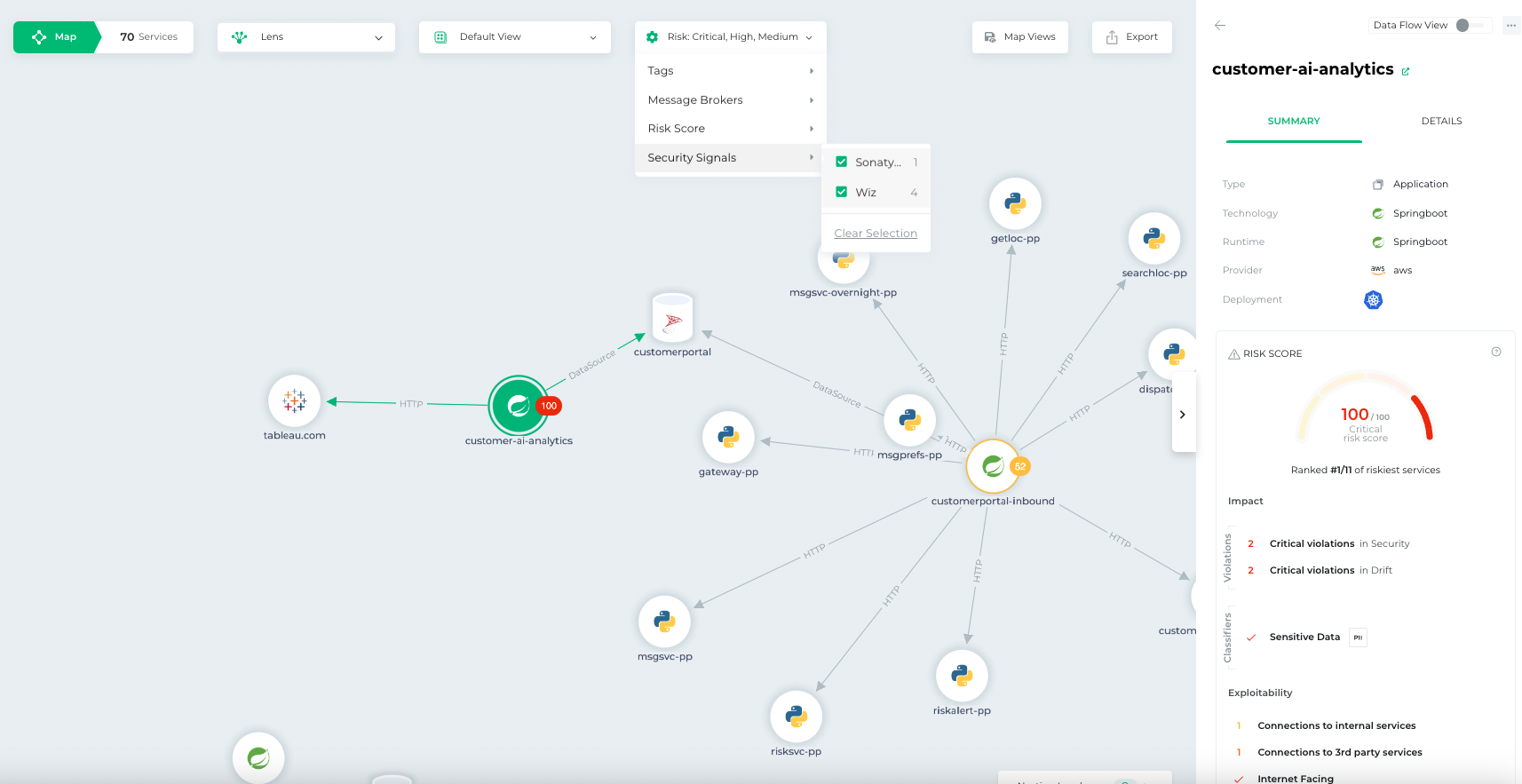
    Bionic this week added a pair of tools to its application security posture management (ASPM) platform that make it simpler to triage threats based on severity and attach a risk score.

    Josh Cho, senior director of global systems engineering at Bionic, said the Bionic Signals and Business Risk Scoring tools ingest data from third-party security tools to provide analytics capabilities. The first two vendors with which Bionic has integrated its ASPM platform are Wiz and Sonatype.

    The goal is to partner with additional vendors that provide unique cybersecurity capabilities that don’t compete with one another, said Cho.

    The agentless Bionic ASPM platform enables organizations to manage application risks by continuously collecting data from services and their dependencies, application programming interfaces (APIs) and DevOps data flows both in pre-production environments and after applications are deployed. Bionic then assesses any changes made to those environments based on a set of cybersecurity policies it provides. If an issue is discovered, the platform will create an alert informing the appropriate development team of best practices that eliminate the issue.

    While there is a lot of effort being made to shift more responsibility left toward application developers, there is often not enough cybersecurity context provided, said Cho. Bionic’s ASPM platform aggregates data from multiple tools to enable DevSecOps teams to better prioritize their remediation efforts, he added.

    It’s not clear how much organizations have embraced DevSecOps best practices, but one of the issues that needs to be addressed is the often-conflicting alerts generated by the various tools being used. Bionic is making a case for an ASPM platform that synthesizes data from multiple sources to streamline DevSecOps workflows.

    One way or another, more organizations will be embracing DevSecOps to better secure their software supply chains as more regulations are mandated. The challenge they face today is that most application developers—and the DevOps teams that support them—don’t have a lot of cybersecurity expertise. As a result, it becomes difficult to discern which vulnerabilities require immediate attention and which can be addressed in a regular update. In some instances, an alert generated by a cybersecurity team may not even been relevant—because the application in question is not internet-facing or the impacted module has not been loaded.

    In fact, it’s that very lack of context that often results in application developers disregarding the alerts generated by cybersecurity teams. Whenever there is a breach, however, cybersecurity teams always demand to know why their alert was ignored.

    No developer, of course, deliberately sets out to build and deploy vulnerable applications. In the race to meet delivery deadlines, there are always going to be tradeoffs. The issue then becomes keeping track of the cybersecurity technical debt that accumulates over time. An ASPM solution provides a means to keep track of that debt to enable DevSecOps teams to keep the risk in perspective.

  • How to Avoid Risk When Using Multiple Low-Code Platforms

    How to Avoid Risk When Using Multiple Low-Code Platforms

    Organizations are still increasing their use of low-code/no-code (LCNC). But this adoption isn’t always consolidated around one tool—frequently, multiple low-code/no-code platforms are used under the same roof. In fact, Gartner predicts that by 2024, 75% of large enterprises will be using at least four low-code development tools for both IT application development and citizen development initiatives.

    Utilizing multiple low-code/no-code platforms simultaneously introduces some security concerns. This is partially due to a lack of standard policies to govern different platforms in the same way. Low-code platforms are often incompatible with traditional IT security processes, like vulnerability scanning, manual code reviews and runtime security monitoring. Organizations going all-in on citizen development need safe ways to use low-code/no-code platforms. So, how can they safely enable this innovation without hindering productivity?

    I recently met with Michael Bargury, CTO and co-founder, Zenity, about securing LCNC systems. Bargury, who oversees the OWASP Low-Code Top Ten list, has significant insight into both the benefits and drawbacks of low-code/no-code platforms. Below, we’ll review the potential risks of using multiple low-code platforms and consider ways to mitigate these concerns.

    Why Companies Have Multiple Low-Code Platforms

    Interest in low-code has been rising, and low-code/no-code adoption continues to accelerate across enterprises. According to Bargury, large enterprises often don’t get a choice in the matter—low-code tools are arising organically, and it’s challenging to keep a lid on their proliferation.

    One way this occurs is that low-code becomes embedded into the SaaS platforms everyone already uses. Software platforms integral to business operations, like Salesforce, Microsoft Office and ServiceNow, have arguably mutated into low-code platforms, making them more like cloud providers than SaaS vendors, said Bargury.

    The other way low-code platforms emerge is through bottom-up transitions, says Bargury. This could be a specific knowledge worker working in a subset of the business to automate a domain-specific operation or integrate various tools. Then, there are the platforms, like OutSystems, Mendix or Mulesoft that specifically target professional developers.

    Organizations going all-in on citizen development may build a center of excellence and focus efforts on a single platform. And low-code platforms targeting developers will sometimes encourage more consolidation. Yet, “different platforms solve different use cases better,” explained Bargury. As a result, you will usually have a few converging in the same enterprises.

    Potential Security Concerns of Multiple Low-Code Platforms

    The emergence of low-code is similar to the bring your own device (BYOD) movement. IT and security leaders fought to avoid it at one point, but nowadays, everyone does it. So, what are the security implications if low-code becomes similarly ubiquitous? Well, no matter how it’s generated, low-code-bred programs are still applications susceptible to the same logical problems. And unfortunately, compared to your typical traditional code development life cycle, low-code development is fraught with discrepancies, says Bargury.

    Immature CI/CD Pipelines

    Some platforms do not offer the kind of mature CI/CD process one would expect from a software development platform. For example, there may be no way to create tests or separate your environments. Since there’s no coherent and consistent way to push code from development into production, you lack a way to apply secure development across platforms. “You don’t have a way to ensure every piece of software is up to your standards,” said Bargury.

    Opaque Underyling Codebases

    In traditional software development, you apply your own security reviews to ensure applications don’t contain risks. This includes shift-left scanning, security gates, manual reviews to catch mistakes early on and runtime scanning to catch unknown vulnerabilities in production. But there aren’t always parallels in low-code development. Low-code solutions typically have their own way of doing things with fewer standards, and they avoid exposing the underlying code and Git, said Bargury.

    Lack of Visibility

    As such, with low-code obfuscation, you lose a degree of visibility into how an application runs. Logs may be insufficient or wholly inaccessible. It’s also tricky—or at times impossible—to set up runtime monitoring, let alone scan various platforms. This means that low-code users can’t leverage powerful observability tools to identify errors and remediate security holes.

    Lack of Unified Policies

    Finally, establishing common authorization and permissions across multiple low-code development platforms is another hurdle. Since low-code vendors have their proprietary building blocks, you’re unable to leverage something like OPA or Kyverno to create and unify policies. Lacking shared policies across tools makes it challenging to verify that best practices have been implemented, says Bargury.

    How to Secure Multi-LCNC

    Low-code can grant much creative potential. But, knowing the above risks, what should IT be doing to reduce risks around low-code—especially when using multiple platforms? Well, Bargury shared several steps to help cybersecurity leaders start safely addressing the emergence of increasingly low-code capabilities.

    1. Take low-code development under the application security umbrella. First, low-code must be brought under the security umbrella, if it isn’t already. “It should be part of their mandate,” said Bargury. Shift the responsibility to professionals well-trained in resolving threats.
    2. Understand your surface area. As a basic security tenant, you can’t secure what you don’t know. Thus, Bargury recommends increasing your visibility into each low-code platform by collecting logs when possible and centralizing your analysis.
    3. Create automated guardrails. Next, it’s critical to identify your risks and set guardrails for your low-code users—especially when citizen development is involved. The OWASP framework provides a good overview of common risks and mitigation advice across robotic process automation (RPA), integration and low-code. In general, it’s important to design permissions with the rule of least privilege in mind. This can help reduce the chance of vulnerabilities like LCNC-SEC-03: Data Leakage and Unexpected Consequences and LCNC-SEC-01: Account Impersonation.
    4. Address gaps within the development life cycle (SDLC). Lastly, low-code platforms often provide the building blocks to secure applications, but it’s still up to you to ensure they are safely used. Cybersecurity teams should continually audit the low-code SDLC to ensure holes don’t persist.

    You’re Responsible for Securing Low-Code Development

    Low-code development platforms aren’t 100% safe from harm. It’s not out of the question for hackers to abuse low-code platforms and turn them against their owners. For example, Microsoft’s Detection and Response Team (DART) reported how a hacker group used entry to a low-code tool to remain hidden within an organization for six months, using credential stuffing to access an administrative account. By creating automations, they were able to use internal discovery tools and exfiltrate secrets and data that could have been used for privilege escalation.

    As you can see, there are legitimate concerns for low-code, especially at scale. However, security responsibility is not always that transparent. To date, there isn’t an equivalent of a shared cloud responsibility model in the realm of low-code development. As such, at the end of the day, you need to take the reins to own the applications that you build and ensure everything is secure.