Category: IT Security

  • Tips for a Successful DevSecOps Life Cycle

    Tips for a Successful DevSecOps Life Cycle

    A DevOps implementation, if done correctly, can do wonders for any organization that’s on the hunt for efficiency, productivity and speed. As per the 2020 survey conducted by Atlassian, 99% of survey respondents said that DevOps has had a positive impact on their organization.

    However, it won’t do any good if security isn’t prioritized while adopting the DevOps best practices. That’s where DevSecOps comes into play.

    Enterprises need to understand that leveraging the alignment of development and operations for workflow enhancement while ignoring underlying security issues is like trying to generate electricity from a broken solar cell on a cloudy night. Undoubtedly, the success of any DevOps initiative predominantly relies on general security practices and a robust security mechanism to mitigate risks—this is where DevSecOps plays a vital role.

    There are several essential components of a successful DevSecOps implementation. Here’s how you can leverage them in your organization.

    The Emerging Need for DevSecOps

    DevOps can be simply defined as the next evolution of an agile development environment that bridges the gap between operations and development teams. Enterprises increasingly are turning to DevOps to boost their application development speeds and operational efficiency. Often, though, prioritizing development velocity means security concerns are left behind.

    That’s why there’s an equally growing need for a secure, efficient yet still agile development environment. DevSecOps puts security at the forefront of the entire operational and development process, which safeguards good cybersecurity hygiene right from the beginning. Implementing DevSecOps directly benefits developers and operations teams working hard to deliver a flawless application in a short period of time. Moreover, this approach encourages enterprises to develop secure code and thus, secure applications. To do so, there are several resources and strategies to help implement DevSecOps into an organization’s software development life cycle (SDLC).

    Secure Coding Practices

    Secure coding is perhaps the most crucial aspect of ensuring stringent security right from the beginning of the SDLC. Developers who aren’t following secure coding best practices, security guidelines and maintaining compliance while coding the application are inviting many security risks, including breaches of sensitive data and exploitation of an individual’s identity.

    Hence, an organization must focus on enhancing the skills of developers and ensuring that they are following security best practices while their application is in the initial stages of development. Moreover, establishing and adherence to coding standards are also crucial, as they help application developers to write clean code.

    Leveraging Automation

    As we know, automation is a driving force and a key aspect in DevOps; the same goes for DevSecOps. Automating security is vital to keep up with the pace of application code delivery, especially for more prominent organizations working on various code versions. Choosing the right automation testing tools can be beneficial for organizations that wish to speed up their operations and enhance the reliability of code when it comes to security. Organizations should strongly consider using at least static application security testing (SAST) tools that help developers identify potential vulnerabilities in code in the early stages of the development life cycle.

    Early Stage Testing

    The biggest mistake for any organization leveraging DevSecOps is testing the application only when it’s finally completed. Beginning early with automated testing offers numerous advantages, including identifying and resolving vulnerabilities in early development stages, a quick and inexpensive way to fix issues and saving valuable time during deployment.

    However, testing during the early stages of the SDLC may also halt the overall DevOps development pipeline, so take that into consideration from a security perspective.

    Implementing DevSecOps

    Implementing DevSecOps isn’t a quick process and requires specific steps to get it right.

    Planning and Development

    A solid planning strategy for successful implementation must include test criteria, design, vulnerability models and analysis. Once the planning is complete, the next step is development. Development teams should initially evaluate the overall complexity and challenges of their current practices. Adding a code review system in the development process can help to encourage safe and reliable coding practices in a DevSecOps environment.

    Build and Test

    Now it’s time to build! You can use automated tools to help combine source code with machine code; many of those build automation tools offer security features like automatic vulnerability detection. Once the build is complete, rigorous testing is carried out through various automated testing frameworks that ensure the highest level of performance and security.

    Monitoring

    Monitoring is another crucial aspect of DevSecOps implementation to ensure your security mechanisms are performing up to snuff.

    Undoubtedly, DevSecOps has revolutionized the way enterprises handle security, especially in challenging DevOps environments. Businesses that want to get to the next level of agility without sacrificing robust security should be implementing DevSecOps.

  • Relyance AI Shifts Compliance Left Using ML Algorithms

    Relyance AI Shifts Compliance Left Using ML Algorithms

    Relyance AI emerged from stealth this week to unveil a namesake platform for managing privacy and data governance in real-time within the context of a larger DevOps workflow.

    Fresh off raising $30 million in seed capital, Relyance AI co-CEO Leila Golchehreh said organizations can now quickly and accurately answer essential privacy questions and ensure compliance and governance by mapping requirements directly to their codebase. The platform provides transparency and visibility all the way down to the source code in real-time using machine learning algorithms, she added.

    Relyance AI co-CEO Abhi Sharma also noted most legal and data protection teams today have limited visibility into digital operations. Developers and data scientists are constantly creating and updating applications. By the time compliance teams gather the data required, it’s obsolete, said Sharma.

    The Relyance AI platform analyzes contractual requirements against the operational reality as determined by data processing in real-time. Compliance teams can then address privacy issues as they arise, added Sharma.

    At the core of the Relyance AI platform are five integrated components that first inventory assets by connecting to application programming interfaces (APIs); generate universal records of processing activities (ROPAs) by scanning code and understanding how data is being processed; share alerts when issues are detected; provide views into data life cycles to highlight data subject access request (DSAR) exceptions and extensions and address vendor life cycle management to ensure third-parties are complying with policies.

    Relyance AI

    Sharma said compliance, much like security, is shifting further left toward application development as organizations look to eliminate issues before they arise in a production environment. The Relyance AI platform is designed to be integrated with continuous integration/continuous delivery (CI/CD) platforms that are the core of modern software development life cycle processes, he added.

    Undoubtedly, as the worlds of compliance and application development collide, there will be cultural challenges similar to what is now occurring with the rest of DevSecOps best practices that require more collaboration between developers and security teams. The challenge is compliance officers tend to be even further removed from application development than their IT security counterparts.

    However, it’s now only a matter of time before compliance becomes code. Modern applications already make use of the Open Policy Agent, for example, to embed compliance rules in applications. AI platforms should make it simpler to identify compliance issues as they arise so that they can be addressed before any infraction ever occurs.

    DevOps teams, of course, have a vested interest in managing compliance as code. It’s not uncommon for DevOps teams to race to build and deploy an application only to encounter a wave of compliance issues that need to be addressed by recoding elements of the application. Not surprisingly, those compliance issues often result in application delivery deadlines being missed. Machine learning algorithms provide an alternative to the current raft of documents that compliance officers create, but not enough other members of the IT team read those, much less understand them.

  • Avoid Security Apathy with DevSecOps

    Avoid Security Apathy with DevSecOps

    Against the backdrop of rapid digital transformation accelerated by the pandemic, every industry has seen an increase in high-level cybersecurity breaches. As organizations continue to support distributed and remote work, organizations must address the risk of incomplete security policies and procedures resulting in exposure to IT risk of all kinds. SolarWinds recently revealed findings of its SolarWinds IT Trends Report 2021: Building a Secure Future, which analyzes the degree to which organizations are prepared to manage, mitigate and prevent risk in the future.

    Measuring Risk

    The survey found 46% of tech pro respondents admitted to having medium exposure to enterprise IT risk over the past 12 months. The level of perceived risk differs by size of the organization, where a sense of high or extremely high-risk exposure is perceived at enterprise organizations (19%) compared to their small business (11%) and mid-sized business (7%) counterparts. With the rise of high-level cybersecurity breaches this past year, this is a concerning reality for security within enterprises.

    However, the findings highlight a possible disconnect—although enterprise IT risk exists within their organizations, tech pro respondents are confident in their risk management and mitigation preparedness strategies. In fact, 73% of tech pro respondents “agree” or “strongly agree” their IT organization is prepared to manage, mitigate and resolve risk factor-related issues due to the policies and/or procedures they already have in place.

    How to Avoid Security Apathy

    As a tech pro, it’s easy to think of security as an afterthought or to expect ownership to fall solely on the shoulders of a dedicated security team. This is especially true for tech pros who have been with a company for a long time and are resistant to change.

    As we emerge from the pandemic, those continued perceptions reflect apathy and complacency when it comes to security and will only increase their business’ level of risk. They’ll be more apt to limit exposure to new technologies, ignore better ways of working, or worse continue to be oblivious to other areas of less obvious risk within an organization. Something needs to change.

    Tech pros must shift their mindset and accept security as one of their responsibilities. To start this process, IT teams must examine current processes from the outside in and apply rigor when evaluating solutions. Since it’s common to be bombarded with marketing messages, this means spending time verifying a tool or solution’s functions and capabilities to help separate fact from fiction.

    Next, tech pros must focus on providing complete visibility into all systems to identify areas of risk and opportunity. Even small adjustments, like speedier upgrades and patches, the adoption of password managers and multi-factor authentication (MFA) solutions can help improve an organization’s overall security posture.

    Most important of all, tech pros should be continuously assessing their risk management, mitigation, and protocols to avoid complacency and becoming “blind” to risk.

    After a year of “crisis mode” induced by the pandemic, it’s easy to be complacent and sidestep the responsibility of risk assessment and aversion. As the security landscape continues to evolve, tech pros must remain vigilant and deploy solutions that provide better visibility into systems to identify risk and opportunity. This year’s study reveals the opportunity ahead for tech pros and IT leadership to align on priorities and policies that can best position not only individual organizations but the industry at large to succeed in managing, mitigating and preventing risk in the future.

  • Popular iOS Apps Request Excessive User Data Permissions

    Popular iOS Apps Request Excessive User Data Permissions

    Most apps require some sort of user data to function properly. Google Maps needs location data to offer routing services. Twitter needs photo library access to upload a photo, and so on. Many users are quick to allow access to personal information without hesitation. However, in recent years, it’s become apparent that many apps are collecting (and leaking) an excessive amount of personal data, resulting in serious privacy issues. This has led Apple to give user privacy a heightened focus in recent iOS updates and marketing campaigns.

    Often, user data is being collected in the background for legitimate use cases, such as tailoring personalized user experiences and refining app performance. But, many apps are also monetizing user data by reselling it to third-party advertising data brokers without explicit user consent. More seriously, recent studies show that commercially available “anonymous” data can be de-anonymized. If location data is exposed, it could put at-risk people in actual danger. These are nuanced privacy violations that U.S. regulators have yet to respond to and address.

    To shed light on the data that apps are collecting, a recent study conducted by Jamf analyzed the iOS permissions requested by nearly 100,000 popular apps on the App Store. The study found the four most-requested mobile app permissions to be photo roll, camera, location data and microphone. The findings also revealed that popular apps are consistently requesting access to data that does not serve the application’s core purpose.

    Users should consciously be aware of the data they allow apps to access. Yet, the onus is also on business leaders and app developers to limit unnecessary data collection and reduce the potential for data overexposure. In the wrong hands, access to device hardware, such as a microphone or camera, could be used to steal sensitive material. And, if leaked, personally identifiable information (PII) exploits could be disastrous to the business.

    Below, I’ll review the key takeaways from the Jamf study and consider if the constant barrage of permissions requests is exacerbating privacy issues during the application development process.

    Four Most-Requested App Permissions

    The Jamf research found the top four types of app permissions were photo library access, camera access, location data and microphone access. In addition, other popular areas included calendar information, contacts and Bluetooth. Less-requested app permissions included voice processing, health data and local network access. The study arranged apps by their App Store categories, such as business, education, entertainment, news, shopping, travel and other areas.

    user data permissions

    1. Photos

    By far, the most requested data access type is photos. At least half of apps across all categories request access to user photo libraries. Naturally, this request is most common among photo and video apps such as YouTube, FaceApp or Splice; 96% of such apps request access to photos. This is followed by 87% of shopping apps (Amazon, Shop, eBay, etc.), and 84% of social networking apps (Facebook, Instagram, Twitter, etc.).

    At issue here is that the level of intended photo library access can be highly variable. For example, granting access to an entire camera roll along with decades of old personal photos just to upload one picture grants a rather invasive privilege. This has led Apple to enhance privacy controls—users can now choose to allow access to select images only or their entire roll.

    With these new constraints in mind, app developers should take steps to respect user privacy. Be aware of potential photo limitations and design apps to only collect necessary photos for the task at hand.

    2. Camera

    The next-most requested permission is for camera access. This is most common among photo and video apps, among which 90% request camera access. This is also common among shopping and social networking apps (83% each) and business apps (75%) like Zoom, Slack or WebEx. Similar to findings about photo library access, enabling camera access is ubiquitous. However, it is also one of the most dangerous permissions to grant indefinitely. If a bad actor obtained account access, this vulnerability could enable them to spy on users.

    Again, developers should consider introducing camera functions only when it’s essential for the task at hand. Obviously, it’s unethical to invoke camera access when users are unaware. Even camera-related bugs can have extreme repercussions. For example, a 2020 lawsuit against Instagram argued the app was spying on users. Due to its threat potential, high-security facilities have disabled camera hardware entirely.

    3. Location

    Location tracking is another permission that can be very useful but is, at times, overprescribed in modern app development. Location data includes cellular, Wi-Fi, GPS and Bluetooth data used to determine a user’s approximate location. The categories that collect location data most often include shopping and food and drink, both at 81%. Social networking and photo and video app categories follow at 72% and 68%, respectively.

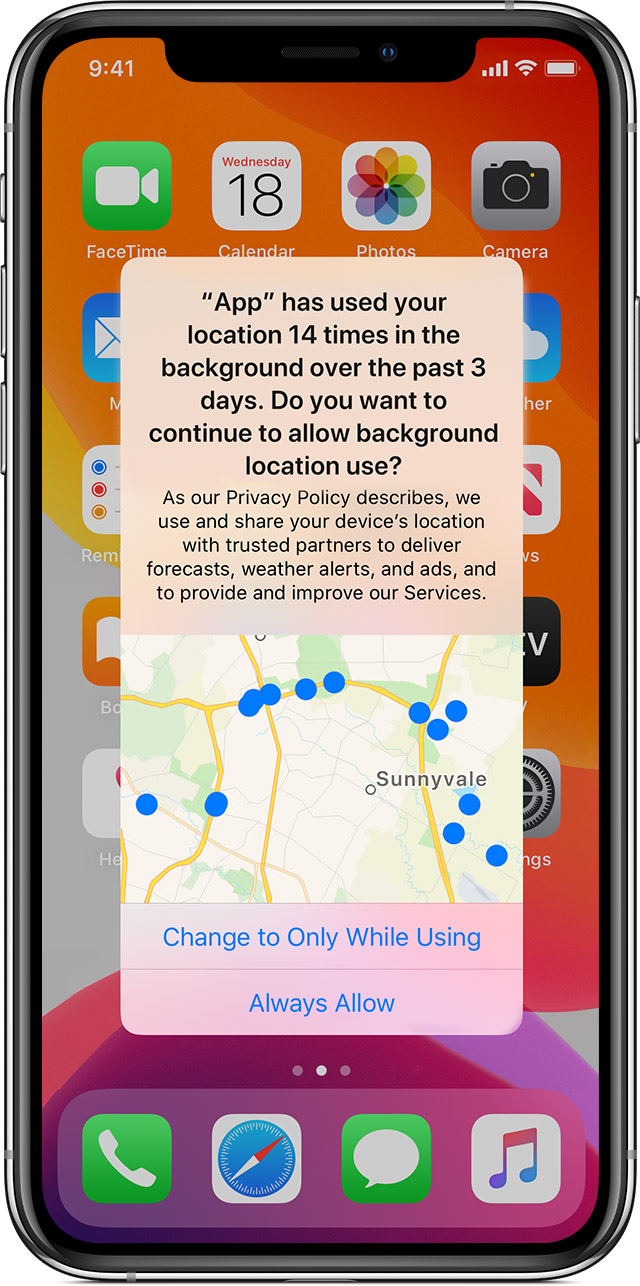
    Nowadays, iOS privacy settings offer a check against tracking location data in the background. iOS users can now choose between: ‘Allow While Using App’, ‘Allow Once’ or ‘Don’t Allow’.

    user data

    When an app tracks data in the background, a blue indicator now displays in the status bar to increase user awareness. iOS also reminds users when apps use significant amounts of location data and offers ways to turn location services completely off. Android has followed suit with an ‘Allow only when the app is in use’ function, too.

    user data

    Location tracking feels a bit creepy. In the wrong hands, it could easily be leveraged for nefarious purposes. Out of all the permission-granting options, location data presents much more of a physical safety concern for the end user. From the user’s standpoint, they should only enable access to location tracking while using an app. From a developer’s standpoint, they should be extremely careful when collecting and storing such PII to ensure regulations aren’t broken.

    4. Microphone

    Lastly, access to the user’s microphone is the fourth most commonly requested permission. The survey found 69% of social networking apps, 64% of photo and video apps and 41% of both business and productivity apps (Asana, Google Calendar, TimeTree, etc.) all want to be handed the mic.

    Here, potential privacy concerns are similar to those involving camera access. Bad actors could potentially activate the mic to listen to private conversations, record ambient noise and sell findings to advertising brokers. To increase user awareness, iOS 14 now requires an orange dot to display, indicating when the mic is in use.

    Other User Privacy Concerns

    User behavior tracking and app-to-app information exchange is another ongoing area of privacy concern. Companies often resell such information to data brokers, which is then used to refine highly targeted ad campaigns on third-party sites. This is how your search on Google results in product advertisements popping up in your Instagram feed. Apple is just starting to counter this practice with their App Tracking Transparency feature. In iOS 14.5, app devs must ask whether they can track your activity.

    Recent analysis has confirmed that commercially available consumer data, though labeled as “anonymized,” can successfully be used to piece together an accurate picture of a user by corroborating behavior on other apps. For example, users were able to track and pinpoint behavior that resulted in the outing of a catholic priest on Grindr. Smartphone app data could similarly be used by predators to spy on celebrities or politicians, posing a tangible security threat.

    Another cause for concern is metadata associated with photos. People often enable GPS-embedding into images to help organize their photo memories. If this is inexorably linked to photos, it essentially permits location data sharing to parties with photo library access who might not otherwise have location tracking permissions.

    From Big Data to Big Problem

    Perhaps the most curious finding of this report is that all apps are requesting permissions that seem irrelevant to their core value proposition. For example, why do 87% of shopping apps need access to a user’s entire photo library? Do 46% of food and drink apps really need access to a user’s personal contacts to place a food delivery order? Do navigation apps really need your personal calendar information to calculate a route downtown?

    The answer is not a pretty one. There has been a business imperative, for years, to track and collect large amounts of user data. There is undoubtedly an argument to be made for enhancing the user experience with innovative features and the role of big data in AI. However, this ongoing practice continues to creep into ethical gray areas. The fact is, the more personal data an app collects, the more potential privacy issues and security threat vectors are created in the process.

    Requesting permissions to on-device hardware and data collection is not always necessary. Thus, to stay safe and limit data overexposure, don’t overprescribe data collection. If it’s not fundamental to your app’s core function, don’t collect it, and don’t store it. Think twice before requiring many device permissions, and regularly audit app permissions requests to keep them to a minimum. As iOS and Android introduce new platform guidelines to elevate user privacy, developers should be prepared for users to grant fewer and fewer data collecting permissions. This is their right.

    It would be great if tech companies invested in honest, ethical business models that didn’t rely on harvesting and reselling user data to shady advertisers. And for those that mine user data but say it’s anonymous, I would point to reports that show anonymous data is nothing but pure myth.

  • Establishing Trust in Multi-Cloud Environments

    Establishing Trust in Multi-Cloud Environments

    Modern applications are transforming enterprises into digital innovation factories. However, the distributed nature and complexity of modern apps have made it extremely difficult for organizations to maintain trust and compliance across multi-platform, multi-cloud environments. 

    Although Kubernetes is the standard for application platforms today, each cloud service provider (CSP) has a different offering for infrastructure-as-a-service (IaaS) or their own platform-as-a-service (PaaS) with varying capabilities and APIs. Not only are these APIs incompatible (with the exception of Kubernetes if no vendor extensions are used), each infrastructure and platform are treated and managed in silos. These silos act as an isolated and non-overlapping administrative boundary,  preventing cross-boundary visibility and trust between microservices.  This makes it much harder for enterprises to know and consistently remediate their security posture across clouds and platforms, opening them up to attacks.

    To solve this problem, organizations are extending enterprise security controls to cloud environments. The problem is that application teams and security teams have traditionally had competing goals—agility versus risk and control—and security operations have not evolved at the same pace as application operations. This creates friction between the teams and forces application operation teams to make a choice: 

    1) Slow down application delivery and operations to reduce risk and miss out on the transformative benefits of multi-cloud or 

    2) Continue to develop and ship applications as quickly as possible without considering security and compliance. 

    Neither is a good option. To unlock the power of modern applications running in multi-platform and multi-cloud environments, organizations need to find a way to integrate security seamlessly throughout the software delivery life cycle at the speed users expect.

    Integrating Zero-Trust into the Application Delivery Cycle

    The key to securing applications in a multi-cloud world is zero-trust. Building zero-trust principles directly into modern applications allows organizations to identify threats early, reduce attack surfaces and ship security functions alongside the rest of the application stack—regardless of the underlying application platforms and cloud stacks underneath.

    In this use case, one of the key components of zero-trust is application segmentation; in other words, how to make access decisions between different applications or components of applications. Zero-trust must provide identity-aware, adaptative and on-demand access to any app from any user or app in a way that improves the flexibility and the agility of application access through a scalable model.

    Application segmentation must be provided to application operation teams so that they can embed it into their application quality processes as another gate. Application operation teams can do this by implementing application segmentation policies that identify workloads as they are created through rich, dynamic attributes. The more intrinsic/static attributes (IPs, digital certificates, namespaces, labels, etc.) and extrinsic/dynamic attributes (user behavior, workload behavior, network behavior, etc.) that are identified, the more fine-grained your access decisions can be. 

    Incredibly, application segmentation today continues to be done manually. But with millions of transactions happening across multiple cloud environments, there’s no way a person—or even a team of people—can manually assign policies to each workload. Organizations need a way to deliver zero-trust application segmentation in a scalable, transparent and automatic fashion. 

    A Connectivity and Security Platform 

    The way to do this is through the use of a modern application connectivity and security platform. Through a service mesh, an attribute-based access control (ABAC) model consolidates multiple third-party tools that provide visibility and security across application platforms and multi-cloud environments. This single view operational model gives application teams the ability to seamlessly and simply orchestrate security services across multi-cloud environments, automatically and at scale. 

    Unfortunately, granular policy management through microsegmentation increases complexity, which is the enemy of security. Suddenly, an organization may find itself with thousands of policies that dictate how different workloads access and interact with entities inside the network. These policies need to be continually updated and maintained, creating massive headaches for both application and security teams.

    When a workload is deployed, the associated policies are created along with it and move through the environment with the workload until the workload reaches the end of its life and is decommissioned. As applications run over time, they are being characterized by their unique behavior. This runtime security characterization allows policies to be automatically selected and applied directly to the workload.

     However, for a service mesh to work and enable secure applications in a multi-cloud environment, it needs to follow zero-trust principles without adding complexity and without slowing down the agile delivery cycle. Here’s how you do that:

    1. Baselining trust: A modern app connectivity and security platform should have native observability and self-discovery capabilities, such as being able to automatically discover APIs, catalog APIs and generate API documentation based on the OpenAPI standard. The modern app connectivity and security platform should be able to continuously baseline application behavior and detect anomalous application behaviors. This needs to alert on unknown and zero-day attacks, especially exfiltration of sensitive data.
    2. Establishing trust: It is critical to define the interconnectivity needs of different pieces of the application right off the bat. This explicit declaration of intent is typically done manually by application teams during the deployment of the application as part of a CI/CD pipeline. Another option is to automatically discover the connectivity intent during the testing phase of the application and allowing the service mesh to identify and record the resulting communication flows between microservices’ APIs. These are the basis of the application’s segmentation policies.
    3. Enforcing trust: There also must be a mechanism to automatically apply the appropriate application segmentation policies to enable the necessary communication for the application to run as intended. In the microservices model, different pieces of the application are spun up and down dynamically to enable the application to run as intended. It’s critical that the application segmentation policies that govern accessibility also adapt to these changes. This is done through the service mesh control plane that interacts with the application platform to gather the inventory of workloads.
    4. Dynamically adjust trust: As the applications run over time and clients interact with them, they are being characterized by a behavior. In this case, a security behavior. Observing this behavior can be accomplished through various runtime analysis tools that organizations already have in place that detect process, container, network and user behavior to provide security context. However, to maintain trust, there needs to be a way to integrate these tools through the service mesh to create a single source of truth. 
    5. Extending the trust model to the edge: Applications also interact with software-as-a-service (SaaS) platforms such as Salesforce or SAP, and other apps outside the data center. Ideally, the service mesh/zero-trust application segmentation model can integrate with other security solutions in the cloud such as secure access service edge (SASE), secure web gateway (SWG), cloud access security broker (CASB) and other zero-trust security components. This standardizes the processes for establishing trust across the data center, multiple cloud service providers, SaaS platforms and web apps—ensuring consistent security and compliance posture across the entire organization.

    Modern applications are transforming how business works by enabling agility and real-time decision making, but they will never reach their full potential unless application teams work with security teams to protect users, data and applications in multi-cloud environments. It’s clear that organizations need an evolved security model that application teams can use to seamlessly establish trust and orchestrate application segmentation across multi-cloud, multi-platform environments. Service meshes can provide the visibility and control needed to establish and continually evaluate trust.

  • Improving Security with Mapping, Automation and DevOps

    Improving Security with Mapping, Automation and DevOps

    Strong cybersecurity is paramount for every organization. But all too often, security teams are disconnected from ongoing development processes and viewed either as an impediment to bringing products to market or as an afterthought. This leads to increased costs and possible gaps in the attack surfaces of new platforms.

    While many organizations are turning to security automation to help them manage and mitigate their expanding threat landscape, quick fixes rarely work. Planning is required to help organizations determine their pain points, add security early in the software development process, and determine where automation can deliver the best ROI.

    What Should Be Automated?

    Security automation can programmatically test, institute guardrails, provide feedback and remediate cyberthreats by executing tasks as part of the continuous improvement pipeline. This, in turn, can help understaffed security teams by streamlining complicated and time-consuming testing processes, enabling teams to maximize their time, be more productive and focus on risk priorities. Once the manual process is removed, the automated workflows can then carry out a variety of more minute actions using intelligence and logical decision-making.

    Security-focused areas that may benefit from automation technology include but are not limited to:

    • Static and dynamic code analysis used to discover security vulnerabilities
    • Test harnesses for software configured to run a program unit under varying conditions to discover and monitor its behavior and outputs
    • Upstream code analysis that examines code such as complete code blocks or patches
    • Vulnerability testing, management and remediation to discover and fix weaknesses that may be susceptible to attacks
    • Penetration testing used to simulate cyberattacks on an organization’s computer systems and evaluate security posture
    • Automated enforcement based on data classification and tagging strategy
    • Deployment and management of infrastructure components

    Focus on ROI

    Despite the benefits, many organizations face substantial hurdles in developing, implementing, testing and optimizing the comprehensive, integrative, long-term approach needed to use security automation to cope with the evolving threat landscape. It’s all too common for organizations to begin projects that start with automation as the outcome rather than rigorously mapping the processes and determining where value from automation can be gained.

    Consider an organization that decides to automate the process of deploying a firewall to an AWS cloud. A team spends several weeks developing and testing an automation playbook that can spin up virtual firewalls, license them, connect them to a central manager, deploy configurations and apply them and send logs to the appropriate places. Testing proves the automation works.

    But when asked how many firewalls they expect to spin up this year, the answer is two–maybe. How many next year? None. The team, therefore, spent more time automating this function than it would have taken to just deploy the systems and the organization won’t likely realize any direct return on this work for at least two years.

    Value Stream Mapping

    The first step in achieving real value is to understand that automation is a second-order operation that relies on a thorough assessment and plan of all the steps required to achieve real technical and business outcomes. That means conducting value stream mapping to analyze, design and manage workflows that best suit your environment.

    Mapping will help you analyze and define security processes. Without analyzing your processes, you’ll have no idea of where the bottlenecks are or how they can be removed. Better understanding the processes will also allow you to refine them as needed. Without doing all this, you’ll have no way to prove the value of the automation you’re implementing, and no compelling business justification for it.

    The Role of DevOps

    Few organizations are able to effectively realize the benefits of automation right out of the gate. Value stream mapping enables organizations to determine their pain points, pinpoint exactly where they want to use automation and identify processes that cannot or should not be automated. Clear-eyed planning and assessment will help teams define a process and determine the value of return on automating certain processes.

    In addition, for security to be effective, we have to shift security left in the software development life cycle (SDLC). Security practitioners should be engaged in the development pipeline, including collaborating on automation initiatives and building harness and test cases as the work progresses. This will save time, improve quality and ultimately add value, ensuring the success of security automation projects.

  • 12 Ways to Bake Security Into a DevOps Transformation

    12 Ways to Bake Security Into a DevOps Transformation

    Security has become an integral part of any DevOps transformation. According to the Upskilling 2021: Enterprise DevOps Skills Report, DevSecOps achieved a must-have percentage vote of 56% in the automation tool category. Security not only protects the business and its customers, but it enables companies to enforce internal and external policies. 

    While considering how to bake security practices into a DevOps transformation, I asked several speakers and sponsors for the upcoming SKILup Day as well as several DevOps Institute Ambassadors to weigh in with their thoughts. Here’s what they shared: 

    Sponsor, Kendall Miller, president, Fairwinds

    “A DevOps transformation is about building great tooling so that developers can own their services all the way into production. The addition of security is the same thing; it’s building great tooling so that developers can also own the security posture of their services all the way through to production. This transformation is about enabling developers to understand security concerns at the application level. Service ownership is still service ownership—ownership of the operational and security pieces.”

    Sponsor, Guy Eisenkot, VP of product, Bridgecrew by Prisma Cloud

    “The key to a strong DevOps transformation that keeps security at the forefront is selecting and leveraging tools and processes that lend themselves to automation for your specific stack. For AppSec and cloud security alike, automation is the name of the game. But automation is only as strong as the processes it can fit into and the feedback it provides. 

    Security feedback will be futile if it’s not actionable and not given at the right time or in the right place. When undergoing a DevOps transformation, it’s important to keep that in mind when implementing tools and processes. It’s also important that the feedback surfaced is actionable and useful so that engineers can actually learn from and implement secure coding practices.”

    Sponsor, Rob Cuddy, global application security evangelist, HCL Software DevOps

    “The best place to start is with design and make sure that your epics, stories, hill statements and use cases all have security elements as part of them.  A great idea here is making ‘misuse cases’ or adversarial use cases and then testing against them.  For example–a misuse case might read, ‘As a bad actor, I can use a malformed URL to gain unauthorized access to a web server,’ or ‘As a bad actor, I can impersonate an endpoint in a transaction and both send and receive data while impersonating without the other parties’ knowledge.’

    It is also vital to have great SCA–software composition analysis. You cannot secure what you don’t know you have, and this includes open source and third-party tools. In a lot of cases, simple code sharing can inadvertently cause dozens of new dependencies to be added in, and those dependencies can add new vulnerabilities.

    It is important to have security aspects tested and validated throughout a pipeline, but particularly at any points in the pipeline where other checks are also being made. A great place to combine this is in QA and wherever functional testing is being done.  Leveraging interactive security testing (IAST) in an environment like this allows for monitoring to occur and for vulnerabilities to be found while application capabilities are being tested.  This greatly reduces the appearance of false positives and provides real-time information about the security posture of applications.”

    Sponsor, Yasser Fuentes, cloud workload security technical product manager, Bitdefender

    “In short, security should not just be considered at the CI, dev and test phases or limited to vulnerability assessments, since most of the vulnerability scanners and assessment tools DevOps teams use today to go over their CI/CD pipelines rely on either known vulnerabilities, signatures and known attack techniques. As a recommendation, we should emphasize the importance of incorporating tools or solutions which allow developers to identify potential threats and security flaws at the runtime level and which provide visibility beyond the typical anti-malware alerts to suspicious and potentially anomalous process-related behavior.” 

    Sponsor, Joni Klippert, co-founder and CEO, StackHawk 

    “To bake security practices into a DevOps transformation, teams need to reimagine how security plays in the software development life cycle. For many organizations today, security testing blocks applications from being shipped into production or tries to play catch-up once software is released. But it doesn’t have to be that way. 

    Security can (and should) live throughout the pre-production phases of software development. Modern security tools automate security testing in the IDE or CI/CD pipeline, alerting engineers if they have introduced a vulnerability or a vulnerable dependency.

    Making security just another type of test that is run in pre-production means teams can find vulnerabilities faster, remediate on the fly and, most importantly, get back to feature development. Baking security into the DevOps pipeline is what all teams should aim for!”

    Stephen Walters, sales engineer, Everbridge

    “The exact same way that any other practice has become baked in as part of DevOps—by following the CALMS principles. Implementing a culture of inclusion and acceptance; integrating automation into security testing, monitoring, builds and repository management; ensuring the flow and feedback of security into delivery and support is performed in a lean way, adding value and not waste; measuring security as a business value through the use of scorecards and as a success criterion for the business; sharing concerns, lessons learned, new practices and techniques.”

    Dheeraj Nayal, global community ambassador & region head – Asia Pacific, Middle East and Africa region, DevOps Institute

    “A proactive approach is the best method for building in the essentials of DevSecOps. This can be achieved by following some best practices.

    1. Teams should be aligned and in-sync
      The first and foremost step in implementing a DevSecOps culture is to train your teams that security is a shared duty of teams from all three systems. Once development and operations units take on the distributed responsibility of guarding code and infrastructure, DevSecOps becomes a routine part of the development cycle.  
    2. Keep the code simple
      Complicated code can carry more security vulnerabilities. And simple code is more comfortable to collaborate on. All your developers should be capable of looking at each other’s code and know what is happening.
    3. Testing
       SAST (static application security testing) is a key security tool that checks security issues regularly and earlier in the development process which enables it to address the issues more efficiently.
    4. Deployment
      To expedite product delivery and add flexibility to the development process, automated deployments are great. One can review properties across the IT infrastructure and implement secure configurations in a system employing an infrastructure-as-code tool.   
    5. Operations
      Operations teams must collude with security practitioners. They are accountable for controlling infrastructure and network arrangements. Operations and security teams unite to set up manual and automated security tests to warrant compliance with network configurations.”

    Peter Maddison, founder, Xodiac Inc.

    “Two main places: within platform engineering to enable the collection of the data you will need for creating visibility, feedback and learning. Next, it is important to engage the security and compliance teams to determine where you can integrate into existing standards or where modifications might be required.”

    Mark Peters, technical lead, Novetta

    “Security practices can be baked in through the standard DevOps approach, through people, processes or technology. Baking in practices with people means getting folks on the ground with your team who can advocate for security. This can happen through having your security experts spend time with the teams, assigning security to be responsible for teams, or even by selecting champions within those teams who regularly interact with security. The first agile principle, after all, is ‘people over process.’

    That component does not allow one to ignore the process.  Building the correct process implies using test-driven development at the start. Every delivery should be tested and those tests should include security testing. Some common security testing, such as code quality, now occurs so frequently many no longer consider it a separate security practice; merely a routine part of development.

    Finally, one can bake processes in through technology. Many security tools allow shortcutting through metrics, logs and traces relayed on the dashboard. These tools evaluate and highlight where security challenges occur. Tools allow integration through infrastructure and maintaining awareness of what functions occur and when. One of the old military strategies uses the OODA loop by John Boyd: observe, orient, decide and act. Just as with intelligence systems in the military, better awareness of your system through dashboards allows one to observe functions within the network, orient against possible problems, decide on a solution and act before those problems ever reach critical mass.”

    Supratip Banerjee, solutions architect, Principal Global Services

    “There are a few ways we can bake security into DevOps:

    1. Security as a mindset: There is a thought process that security in the development process might slow it down. But we must educate teams that the time and effort it takes to fix a security flaw early in the process is lower than doing it later.
    2. Platforms/environment: Proper configuration/sanitation of deployment platforms/environments is extremely important. Infrastructure-as-code (IaC), configuration-as-code, compliance/policy-as-code, secrets management, etc. can help with the process. Increased use of containers and cloud platforms can keep it clean as underlying infrastructures are managed by the provider.
    3. Automation: Include a lot of automation testing in the CI/CD pipeline. Also add static code analysis, third-party testing, AVA testing, code vulnerability checking, container security, intrusion detection and prevention, APM, etc. as automated processes. Make change management, auditing, etc. regular and as self-operating as possible.
    4. Secure architecture: Make sure security is enabled at the time of the software architecture/design phase. An architecture risk assessment must be a mandatory process to catch any design vulnerabilities before development starts.
    5. Culture of curiosity: Create a culture that emphasizes the importance of security, so everyone is interested and ready to discover if anything goes wrong with security in their system.”

    Amiran Alavidze, director of security and risk management, Tasktop

    “DevSecOps is about culture and enablement and making software delivery teams autonomous and efficient. Training and awareness is a core component of that enablement. This also includes focusing on tools that are developer-friendly and automated so that critical security controls are an inseparable part of how things are done, and allows development teams to take on all the responsibility, without a cognitive overhead of expert-level understanding of the security domain.”

    Sharath Dodda, IT development manager, TD

    “By engaging security early in DevOps with as much automation as possible. All the scans that are possible and relevant should be done well in advance in the pipeline, so that the artifact is cleared of all the findings.”

    Learn more about DevSecOps and similar topics, by registering for an upcoming SKILup Day. Or, start your upskilling journey by learning more about the benefits of DevOps Institute membership. 

  • WhiteSource Tool Automatically Fixes Code Vulnerabilities

    WhiteSource Tool Automatically Fixes Code Vulnerabilities

    WhiteSource today announced that it has developed the first-ever tool that automatically remediates vulnerabilities discovered in custom code.

    Rami Sass, WhiteSource CEO, said WhiteSource Cure surfaces recommendations for fixing security vulnerabilities in code that developers can then apply with a click of a button. WhiteSource has a long history of providing tools that discover vulnerabilities in open source software that it tracks via a database it manages, but Sass said customers are making it clear they need a way to automatically remediate those issues in a way that doesn’t adversely impact developer productivity.

    The average developer spends, on average, half a day fixing a single vulnerability, so the impact security issues are having on the rate applications are being developed is significant, added Sass. WhiteSource Cure gives each developer the equivalent of their own personal security expert, noted Sass.

    Developers can either apply the remediation suggested by WhiteSource Cure—that manifests itself as a pull request in a DevOps pipeline—or they can fine-tune it as they see fit, said Sass.

    WhiteSource

    WhiteSource Cure arrived as friction and tensions between developers and cybersecurity teams rise in the wake of a series of high-profile attacks against software supply chains. As a result, organizations are instituting more thorough security reviews of application development projects. The concern is those reviews will dramatically reduce the rate at which applications are being delivered.

    Of course, many organizations are looking to shift responsibility for application security further left toward developers to minimize the number of vulnerabilities that might need to be remediated either just before an application is deployed in an on-premises IT environment or, worse yet, after it is deployed. Trying to achieve that goal within the context of DevSecOps best practices, however, is challenging. Organizations first have to acquire vulnerability scanning tools that developers will actually use, and then provide developers with the training required to identify various classes of vulnerabilities.

    The other big challenge is the time it takes to train developers to recognize vulnerabilities. WhiteSource Cure eliminates the need for developers to become security experts, said Sass. In addition to a commercial offering, WhiteSource is also making available a Community Edition of WhiteSource Cure for open source projects that will forever be available for free to developers working on those projects.

    Sass said that rather than relying on machine learning algorithms and other forms of artificial intelligence (AI) to build WhiteSource Cure, the team that developed the tool found that more traditional approaches to software composition analysis (SCA) provided more reliable results.

    It’s unclear whether the ability to automatically remediate known vulnerabilities in code will render much of the DevSecOps debate moot. However, it’s clear that the simplest path forward toward achieving DevSecOps is, as always, to automate as much of the remediation process as possible. The challenge will be waiting to see how much confidence developers and cybersecurity teams will have in the recommendations generated.

  • JFrog Acquires Vdoo to Advance DevSecOps

    JFrog Acquires Vdoo to Advance DevSecOps

    JFrog today announced it has agreed to acquire Vdoo for $300 million in cash to gain a set of analytics tools that discover vulnerabilities in application binaries.

    Vdoo’s scanning tools, infused with machine learning algorithms, will be fully integrated with the JFrog Xray vulnerability detection tools along with the rest of the JFrog continuous integration/continuous delivery (CI/CD) platform in 2022. In the meantime, the Vdoo scanning tool will continue to be made available via a software-as-a-service (SaaS) platform that Vdoo built.

    The Vdoo platform is already integrated with the JFrog Artifactory repository and JFrog Pipelines. Vdoo’s platform also is integrated with DockerHub, Jenkins, GitHub, GitLab and Azure Pipelines via REST application programming interfaces (APIs) that make the Vdoo scanning tools accessible via a command line interface (CLI).

    JFrog CTO Yoav Landman said acquiring Vdoo is critical because when it comes to implementing DevSecOps best practices, the only meaningful place to discover and remediate vulnerabilities is in the binaries deployed in production environments. As such, the Vdoo platform provides a superior alternative to both static application security testing (SAST) and dynamic application security testing (DAST) tools that scan for vulnerabilities in source code, added Landman.

    Developers require accurate intelligence that can be quickly acted upon to secure applications running in production. They can quickly take action once they know how a specific vulnerability impacts a binary, versus being told to update source code that could take days or weeks to complete, noted Landman. The Vdoo platform also makes it possible to leverage machine learning algorithms to detect zero-day vulnerabilities, malware, exploits, backdoors, supply chain risks and other threats before they become commonly known. Those vulnerabilities can be detected in everything from application binaries to firmware running on embedded devices. Vdoo is also recognized by the Mitre Corp. that oversees the Common Vulnerabilities and Exposures (CVE) database as a CVE Numbering Authority (CNA) for discovering vulnerabilities.

    JFrog Vdoo

    As responsibility for application security continues to shift left toward developers, many organizations are finding the tools that cybersecurity teams employed to discover threats don’t lend themselves to the workflows that developers have created to build applications. As a result, many of these tools are being replaced by developer-friendly alternatives that developers can invoke via a CLI as part of DevOps workflow. The goal, now, needs to be reducing the level of noise created by security tools to enable developers to focus on the vulnerabilities that specifically impact their code, noted Landman. Otherwise, developers are simply overwhelmed by a massive number of alerts generated by security tools that often don’t appear to be especially relevant, Landman added.

    It’s not clear how quickly responsibility for application security is shifting left. However, in the wake of a series of high-profile software supply chain breaches, the urgency surrounding adoption of DevSecOps best practices has increased considerably. The challenge, as always, is getting the right tools into the hands of developers at the right time.

  • SAST, DAST, SCA: What’s Best For AppSec Testing?

    SAST, DAST, SCA: What’s Best For AppSec Testing?

    According to the most recent Verizon Data Breach Investigations Report, almost 90% of data breaches are driven by financial gain, up from 71% in last year’s report. Most noteworthy, however, is that cloud platforms are particularly at risk, with web application attacks increasing by 43%. As more information is stored within cloud infrastructures, and as more enterprises rely on web applications to maintain business continuity, security teams should consider how security controls can be integrated to DevOps without impacting productivity. However, the security market is often shrouded by acronyms and buzzwords. With the increase in automated security testing tools, such as SAST, DAST and SCA, it’s important to understand the difference between each of these practices, and when to use them in the development cycle.

    DevOps is the convergence of software development and IT operations that aims to continuously build, test and release software. Understandably, DevOps is becoming an integral part of any business as it facilitates delivering new products to end users faster and driving increased revenue. However, failure to secure these digital assets can open organizations to cyberattacks resulting in operational downtime, loss of customer trust and even hefty fines from a regulatory body. The sharp rise of application layer attacks proves that enterprises must proactively address security issues earlier in the software development stage.

    The evolution of DevSecOps takes the concept of DevOps one step further, putting security where it should be: at the heart of the development life cycle, using automation. DevSecOps has helped security professionals understand how they can successfully integrate automated security processes without slowing down development while allowing DevOps to focus on what matters most – building and creating software.

    There are a host of automated application security testing tools out there, each with unique benefits, that are commonly used in the agile software development cycle. This raises the question: what tools should we use, and when, to ensure a secure software development life cycle (SDLC)?

    The Difference Between SAST, SCA and DAST

    The most popular application security testing tools businesses implement in their development cycles are static application security testing (SAST), software composition analysis (SCA) and dynamic application security testing (DAST). Knowing the differences between them and when to use them is crucial to enhance your DevSecOps strategy and secure your web applications.

    Static Application Security Testing (SAST)

    As the pressure to deliver high quality and secure code increases, and DevOps embraces new agile methodologies and technologies, integrated static analysis within the continuous software development pipeline can help detect vulnerabilities early in the software development process from the inside out (white box testing). The benefit of a SAST solution is it doesn’t require a running system to perform code security checks and won’t slow you down like a manual code review or penetration test.

    One aspect that makes SAST unique is that it automatically checks for vulnerabilities within the application source code, byte code or binaries, line by line. This ensures security weaknesses – such as those listed in the OWASP top 10 and the 2019 CWE top 25 – in the proprietary code are detected from the start and during development. As a result, developers can identify the risks and fix any vulnerabilities before they make it into production. They are empowered to shift left and recognize early code defects in the development cycle, a security best practice, which also reduces the cost of fixing security issues.

    However, SAST does have some disadvantages in that it requires access to source code and the underlying framework, making it unsuitable for testing commercial off-the-shelf software (COTS) or working with outsourced development. It is also unable to identify runtime and environment-related issues, which makes it difficult to determine the actual and contextual risks of security flaws and suggest meaningful remediation.

    Dynamic Application Security Testing (DAST)

    Unlike SAST, dynamic application security testing (DAST) is done from the outside in (black box testing), and identifies vulnerabilities when the application is running. DAST tools crawl web pages, locate web services endpoints, inputs and outputs; it requires a working version of a web application for the testing to work. Without looking into the source code, dynamic analysis works to simulate penetration testing to uncover exploitable vulnerabilities and business logic issues from a hacker’s point of view, with reliable results.

    Yet, because this scanning occurs towards the end of the SDLC (running applications), the findings can be substantial and often put additional pressure on DevOps teams to fix these runtime vulnerabilities on short notice, creating friction between the security and development teams. Further drawbacks of DAST include the risk that vulnerabilities can be found too late in the SDLC, resulting in rushed or delayed remediation.

    Software Composition Analysis (SCA)

    Releasing new features on a deadline means that developers often don’t write all their own code. The use of prepackaged open source code is commonplace in modern DevOps practices, and so is the need for security governance. Some SAST solutions now include software composition analysis (SCA) functionality to locate weaknesses in proprietary code and vulnerabilities in open source code.

    SCA tools are designed to analyze the open source components by detecting software licenses, deprecated dependencies and known vulnerabilities and potential exploits in a codebase. SCA enables DevOps teams to manage their security exposure and license compliance while still allowing the use of prepackaged code to speed up development processes. In addition, composition analysis can be run and expanded to newer architectures, including containerized environments, to automate detection for publicly disclosed vulnerabilities within your containers and prevent those disguised in public registries, such as Docker Hub, from being brought into the project.

    With open source components now present in 96% of commercial applications, the ability to spot software supply chain vulnerabilities in development, in and out of the cloud, are vital to reduce web application risks – all of which can be a potential entry point for malicious actors, as we’ve learned from the Equifax and SolarWinds breaches.

    Choosing the Best Application Security Testing Tool

    There is no shortage of application security testing tools. The real conundrum arises when decision makers are presented with a host of various options and pressured to choose. However, these tools are not mutually exclusive. Instead, they form a holistic, almost linear, approach to the entire DevOps pipeline from plan to implementation. What does vary, however, is the application development model. Which tool(s) should you choose for your specific use case? Here are some general guidelines:

    Outsourced Development and Commercial off-the-shelf (COTS) Applications: When it comes to critical business applications for prepackaged code, black box testing is advised for enhanced security peace of mind. Without access to the source code, DAST scanning and/or penetration testing are ideal to test the running application for any critical software vulnerabilities before deployment and to monitor security compliance in the long run.

    Internal Development and Software Customization: For businesses with the resources and infrastructure to create applications in-house, it’s important to build security testing into the SDLC from the beginning. Doing so can help protect against application vulnerabilities including cross-site scripting. For true DevSecOps, arm your development teams with SAST/SCA tools to ensure code security in the ‘code and build’ stage, and apply black box testing (DAST) for security assurance before deployment. Once deployed, regular penetration testing and continuous vulnerability assessment of the underlying infrastructure are also recommended to keep security issues in check with each new release.

    As cyberattacks targeting web applications increase, it is essential for organizations to have complete application security across the SDLC, providing maximum security coverage for development and ensuring they can keep up with business operations.