Category: IT Help Desk

  • Why You Should Embrace Incidents and Ditch MTTR

    Why You Should Embrace Incidents and Ditch MTTR

    The cliché is that everyone in IT hates incidents, and the natural reaction when assembling incident response metrics is to look for numbers that you can lower over time. Fewer incidents and shorter incident response times must be better, we think. You might already be familiar with the common metrics associated with these goals, including mean time-to-resolution (MTTR) and total incident count.

    As it turns out, however, these metrics actually work against your company’s resilience goals. To understand why, let’s look at the industry that birthed most of our modern incident management practices and has learned the most about how to properly apply them: the airline industry.

    What the Airlines Can Teach Us

    From the 1950s to the 1990s, the airline industry built and refined best practices for incident management that we have since simplified and that have been widely adopted across the tech industry. What’s often termed “modern incident management” simply means the predictable and repeatable approach to handling unexpected disasters and the learnings-driven remediation steps that are prized when building a DevOps or SRE practice.

    One of the most important findings to come out of this research is the somewhat surprising fact that incidents weren’t being declared often enough. Instead, incident reports were created and the carefully assembled response and cataloging process was only followed after catastrophic events, which meant earlier opportunities to catch the underlying problem during a less severe incident were being missed.

    So why did an industry with such incredibly high stakes take so long to realize that more incidents were actually a good thing? You guessed it: a misguided desire to decrease the incident count. In chasing this goal of “lowering the number,” pilots and mechanics were often reluctant to file incident reports for anything less than the most critical situations, which meant the powerful, learnings-focused response and remediation process was only triggered in response to relatively rare and critical situations.

    This is a textbook example of Goodhart’s Law in action. To paraphrase, Charles Goodhart posited that any metric created will ultimately become the goal. In other words, if the incentives are aligned to reduce incidents, no matter how good your response and learning process is, it will only be executed in the most dire and unavoidable circumstances. After discovering this, the industry rapidly moved their focus towards expanding the use of the incident process by working to expand the spectrum of situations that could be classified as incidents with the goal of triggering the formal incident response process more often, distributing learnings for more incidents of lower relative severity and, yes, ultimately resetting the goal to increase the number of incidents.

    This approach effectively turned Goodhart’s Law to the airlines’ advantage—any effort to game the metric(s) meant more learning, not less. Filing incidents became directly and heavily incentivized and these metrics were never used as a justification for punitive action. This resulted in the safest decade of commercial aviation on record, with over 12 billion passengers traveling and no fatal accidents.

    What IT Can Learn About Successful Incident Response

    As technology companies, there is much for us to learn from this exercise in achieving resilience versus chasing “lower numbers.” The primary learning is this: increasing your incident count by incentivizing the use of your incident management process for more non-critical incidents—likely your SEV2s and below—and focusing your metrics and incentives on that goal, is likely the best way to reduce your overall count of catastrophic failures.

    For most companies, this means putting MTTR on the back burner and instead focusing on making the incident process itself more accessible throughout your company and across your organizations. It means leaders should talk about impactful and recent postmortems publicly and that postmortem distribution should be a priority; it should also be something that’s measured. Most importantly, it means opening up the incident management process more widely. Ideally, everyone at your company should have access to systems that allow them to file incidents, read incidents in progress and review postmortems from previous incidents.

    I like to reference the “big red button” philosophy of factory floors, where the decision-making power to declare an incident is in the hands of every employee. An unsafe situation shouldn’t be up for discussion, debate or approval before being acted on, even if the situation is later determined to be less severe than originally thought. The context of why that incident was filed—why that big red button was pressed—may prevent larger, more catastrophic failures in the future.

    So if you’re just getting started building out an incident management practice at your company, or you’ve been chasing MTTR metrics and focusing on pushing your incident count down as a primary goal, consider taking these learnings to heart and creating a positive incident culture with positive metrics meant to encourage and reward incident responders and reporters. Your company’s future depends on it.

  • Fast Object Storage Key to Backup and DR Strategy

    Fast Object Storage Key to Backup and DR Strategy

    The massive shift to remote work necessitated by the COVID-19 pandemic kickstarted many companies’ digital transformation. While this transition had already begun for most organizations, the pandemic sped up the timeline. These events also had an impact on how storage and backup is done. Let’s look at why the right storage solution is key to your backup and disaster recovery strategy, especially when it comes to today’s work-from-home and hybrid scenarios.

    Hybrid Cloud and Storage

    While most companies have moved to the cloud in some form or another, many are relying on a hybrid approach. Enterprises may want to maintain their primary data storage on-premises for performance, security and compliance reasons. The public cloud, though, offers compelling services that can enhance this on-premises data.

    Using both the public cloud and on-premises storage allows for hybrid cloud use cases that are changing the way enterprise IT leaders think about data management and data protection. Enterprises are implementing hybrid cloud architectures to take advantage of cloud archive services, to maintain full copies of their on-premises data for disaster recovery, to protect against ransomware attacks, to take advantage of cloud service bursting and more.

    Businesses retain greater control over their private data by using hybrid cloud services. An organization can store sensitive data on a private cloud or local data center and, at the same time, make use of the robust computational resources of a managed public cloud. A hybrid cloud relies on a single plane of management, unlike a multi-cloud strategy that forces administrators to manage each cloud environment separately.

    Remote Work has Changed the Backup and Recovery Game

    Companies risk losing their most valuable assets – their data – if they lack strong backup and recovery infrastructure. Data loss affects businesses directly, when assets can no longer be leveraged, or indirectly, via loss of customer confidence and regulatory fines and penalties.

    The shift to remote work means that the way storage and backup is done has also changed. If the majority of a workforce is remote now, how do you back up laptops? How do you back up phones? Previously, employees would go to an office and their laptop and other devices would get backed up there – but now, that’s not the case. And with remote work in place for the long haul for many companies, backup methods have to change and adapt.

    Remote work opens up greater risks of information being stolen or lost. If an employee is at home, for instance, and they lose a file on their computer – and they’re used to having their computer backed up by the company – how do they restart that backup? If they have to go through IT, that seemingly simple act can take weeks.

    Self-Service Backup and Recovery

    Organizations need to have more flexibility – a way for individuals to perform backups in a self-service way without having to deal with centralized IT. In this way, people can protect their data themselves.

    With the right storage solution, authentication is built in; storage and backup are designed with security and data protection in mind. Unlike other storage solutions, object storage gives you your own keys and your own passwords, and you only see what you should. It’s very well protected. It’s also very siloed, so that employees can only do what the company wants them to be able to do, and they only have the minimum access they need. So, object storage can help organizations adopt a more fine-grained authentication and security posture; more so than with a typical file storage solution.

    In addition, having this kind of solution in place opens opportunities to provide your employees with the kind of self-service backup and recovery they need in a remote world where speed is of the essence and efficiency is front-and-center.

    Success in a Hybrid World

    The shift to the cloud is in full swing for many organizations, brought on by a variety of business factors and accelerated, in many instances, by the pandemic. It makes sense that the hybrid storage approach would become popular, as organizations naturally want to keep certain kinds of data close to the vest for security and/or compliance reasons. Performance is another consideration when it comes to where data should be stored.

    This gives organizations a lot to think and strategize about – including how to handle backup and recovery in a WFH world. Remote work increases security threats, so organizations need the option to empower employees to protect their own data. Object storage makes this possible with both speed and efficiency. There are many options available today for both cloud and storage configurations, so consider the above points when making decisions that will affect the security, compliance and performance needs of your organization.

  • Why Developers Should Care About Resilience

    Why Developers Should Care About Resilience

    Recently, a friend reminded me of a joke we used to have when we were both developers at a huge software corporation (we won’t mention names, but back when printers were a thing, you probably owned one of theirs). We didn’t develop printers. We developed performance testing and monitoring tools.

    We were the dev team, which was completely separate from the QA team and from the Ops team (yes, I’m that old – we didn’t even call it DevOps back then). Support was part of a completely different organization and “business” was something that happened in an altogether different galaxy. That is, until a customer had an issue.

    When an important customer had an issue, we definitely felt it at R&D. Managers called hourly to check on status, and we would have intense conversations with the support team who would then, in turn, have intense discussions with the customer. If we, the software engineers developing the product, ended up on the same call with both support and the customer, it was a sure sign that things were bad. You knew that millions of dollars were on the line, and, consequently, that pressure was high. But most of all: you knew that we would do anything we could to solve the problem, because we needed those millions of dollars to be paid, so that we could keep getting paid. And so, we kept the coffee flowing.

    This is where the joke part comes in. We used to have a system for managing support tickets, collecting information, tracking time and assigning it to the relevant software or support engineer, so everyone would know who was in charge. Today, you probably use Zendesk, ServiceNow or one of their alternatives. We used a home grown system, of course.

    Our joke was this: the purpose of the system was not to track and measure and propagate the handling of customer issues. The purpose of the system was to indicate someone else is now responsible for solving the problem. Or, if you would rather paraphrase one of my favorite Douglas Adams jokes, the issue is now under a Somebody Else’s Problem field.

    Because solving customer issues is difficult and frustrating, and being pressured by business could ruin a software engineer’s day. This is because when you’re a happy code monkey, and all you want to worry about is writing beautiful code and releasing cool features and drinking some coffee, solving a customer issue gets in your way.

    You end up spending too much time sifting through endless logs, crossing your fingers and trying to reproduce an issue that only happens at 2 a.m. on a Friday, usually when a blue zebra is passing by. Spending your time on a heated support call is less fun than, say, drinking coffee quietly with your friends.

    As R&D managers, we understand that our developers want nothing to do with solving customer issues. We want to make sure they are motivated and happy and efficient, and that they are free to challenge themselves by learning the latest buzz-worthy technologies and thinking up ways to introduce those into our product in a way that will make our customers happy.

    Additionally, as R&D managers, we are far more likely to understand the business impact of having too many support tickets or having support tickets that take too long to resolve. We know that the loss on such cases is twofold:

    1. The customer that faced an issue and is waiting for a solution may become frustrated, and the company may lose their business.
    2. Our engineers are busy solving that customer issue instead of delivering new value to the business.

    Therefore, as R&D managers, it is our responsibility to make sure that our engineers have the tools to handle these issues as efficiently as possible when they come up. It is our responsibility to make sure they are motivated, and that they understand the business impact of solving a customer issue as quickly as possible. And whenever possible, it is our job to make sure that they make our application as reliable and stable as possible to begin with.

    That ensures that we have test coverage, and the right knowledge, practices and tools to ensure that we have as few customer issues as possible to begin with.

    Happily, changes in dev culture usually means that “support” and “business” and even “customers” are not as far away as they used to be. When developing a SaaS platform, your developers often have an almost intimate, real-time ability to track what users are doing and how it impacts their experience. The culture of DevOps has done a lot for breaking the silos that used to separate the dev team from the support team, and to make sure that all members of the team engage and understand how the code they write and the issues they resolve help our customers.

    I hope you already found the way to motivate your team to solve such issues, and that they have enough time to drink coffee. If you and your team are still struggling, we suggest bringing in a live debugging tool that can help them solve customer issues even faster, by making sure they have all the data they need at their fingertips, and that they can instantly reproduce any issue in a live, remote environment. Live debugging tools give your engineers a developer-friendly experience, and also gives them the power to reduce issue resolution time, too. Now, all you need to worry about is that your engineers have enough coffee.

  • How to Eliminate Incident Inefficiencies

    How to Eliminate Incident Inefficiencies

    In today’s complex, dynamic IT environments, the proliferation of disparate IT Ops, NOC, DevOps and SRE teams and tools is a given – and usually considered a necessity. This leads to the inevitable truth that when an incident happens, often the biggest challenge is collaborating between these teams to understand what happened and resolve the issue. Inefficiencies suffered during this critical stage can have huge impacts on how much each incident costs the business.

    I recently sat down (virtually) with Sid Roy, VP of client services at Scicom, to get a deeper understanding of how IT leaders can more effectively size up these inefficiencies and eliminate them.

    The Costs of IT Incidents

    When asked what a minute of downtime costs, analysts and vendors may provide different answers – but they are more or less aligned around the same order of magnitude – several thousands of dollars per minute. And with an average of five major incidents a month and an average time of six hours for resolution, this easily amounts to millions of dollars a year.

    The three key drivers of these costs are:

    Staffing and team member costs: This includes full-time employees (FTEs), consultants, and overhead when other teams are pulled in to deal with the incident. For many organizations, this can include offshore incident response teams.

    The direct and indirect costs of an IT incident: This includes your infrastructure or capital expenditures like software licenses for monitoring, log and event management, notification, ticketing, collaboration, etc.

    The business impact of an IT incident: This is one of the most challenging and unpredictable variable costs to calculate or manage, and is often the highest of all three drivers. It includes revenue loss/delay or reduction due to a major incident, and the profit or loss due to brand or goodwill impact. It also includes inefficiencies suffered by other parts of the business when critical services they depend on are degraded or unavailable.

    Fragmented Teams Magnify the Challenge

    The incident volume, complexity and throughput obviously affect the number of people and amount of time needed to deal with them and often drive more indirect costs as needed resources pile up. To save on these millions of dollars of costs, you need to be able to collaborate and lower MTTR. As mentioned above, this becomes a challenge in agile IT environments. To help streamline operations, teams need to start asking and answering several key questions:

    • Do you have an up-to-date map of your critical services?
    • Are they prioritized by business criticality (revenue, number of customers, other supported services in the supply chain)?
    • What are the upstream and downstream dependencies of these applications?
    • Have you identified the major infrastructure and application elements in your environment?
    • Are you aligned with the owners of these systems?
    • Do you have real-time knowledge of changes being done to the infrastructure and applications?
    • Do you have monitoring gaps?
    • Which monitoring tools provide you with the best value?

    Answering these questions involves overcoming fragmentation across teams of people, processes and tools – essentially integrating ITSM and ITOM to enjoy the benefits of contextual full-stack visibility and streamlined processes within the organization.

    The Right Combination for Incident Response

    What is the right combination of people, processes and tools we just discussed? Here are the two main guidelines:

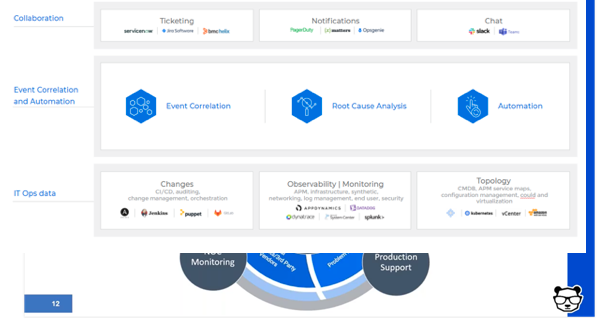
    • Set up a major incident management team – ideally, from your existing staff. This team includes three vital roles:
      • The incident manager/incident response commander. This is a designated role in charge of declaring a major incident and taking ownership of it. Their job is to, essentially, stop the bleeding of revenue and costs.
      • The NOC/monitoring team. This is your front line defense. When things go bump in the night or boom in the day, they’re the ones picking it up with their “eyes on the glass” – 24/7. And, they’re in charge of reporting and creating full situational awareness for the incident command through bidirectional communications.
      • The production support team. This team actually effects the required changes and executes the remediating action.
    • Deploy event correlation and automation tools to enable the incident management team. These tools are key, allowing your team to perform the required actions.
      • First, correlate the alerts created by your monitoring and observability tools into a drastically reduced number of high-level, insight-rich incidents by using machine learning and artificial intelligence (ML/AI). Add context to these incidents by ingesting and understanding topology sources, as well. This creates the necessary full-stack visibility and situational awareness.
      • Then, use ML and AI to determine the root cause of these incidents, including correlating them with data streams from your change tools: CI/CD, orchestration, change management and auditing to identify whether any changes in your environment caused these incidents.
      • Finally, automate as many processes as you can to free your IT Ops team from manual, time-consuming tasks. By integrating with collaboration tools, you can also enable the above-mentioned bidirectional communications.


  • Top 4 Challenges for Developer Teams in 2021

    Top 4 Challenges for Developer Teams in 2021

    As remote work continues into 2021, developer teams are still navigating the new landscape for working across distributed teams and how this new way of working affects product delivery. In particular, there are several key challenges that every developer must face this year, including adapting to new tools and workflows internally, balancing the prioritization of keep-the-lights-on initiatives with product initiatives, and understanding how to address emerging customer challenges.

    As developer teams are responsible for keeping both internal systems healthy and maintaining service uptime for customers, addressing these issues and implementing the strategies below will help ensure better delivery, easier deployment of application and software solutions and improved internal communication processes.

    #1 Get Better at Digital Experience Monitoring

    For businesses to survive in this current environment, neglecting to monitor a user’s digital experience across their life cycle can mean losing business to a competitor. At a bare minimum, developer teams must ensure that their application’s basic infrastructure is sound. This means monitoring key metrics like CPU load, memory load, memory used, disk space, queue lengths, API uptime or error codes returned.

    For a fuller user experience, developer teams should also monitor things like page or app load times, drop-off points in an app and crash logs. The third level of digital experience monitoring is keeping tabs on what your users are doing, such as skipping the onboarding flow, inviting friends to your app, posting content or how much total time they’re spending within the app. Robust digital experience monitoring will ensure that you are constantly measuring the quality of your users’ experience and making improvements along the way.

    #2 Expand Where and How You Gather User Feedback

    Beyond initial user monitoring, teams should continuously collect feedback to improve features and fix issues that might not have been discovered during testing. One natural way to do this is to aggregate user reviews and support questions to find common themes that may help product teams prioritize future releases. It is also critical to think outside of the box in terms of where and how feedback is collected. Teams can also collect feedback in other ways, such as conducting data analysis and user research sessions or having direct conversations with customers. Giving key beta users early access to a new release can also help developer teams understand whether their application is meeting users’ needs, and whether it is intuitive to use.

    Ultimately, by engaging with customers in extensive and real conversations, teams may learn where there are disconnects between users and the products, and what they can do to bridge this gap. Once the information is collected, teams should then prioritize what needs to be done first by ranking requests by frequency received, financial value of fixing the issue, strategic importance to the overall organization and engineering effort.

    #3 Prioritize Low-Code and Customer Self-Service Models

    Removing barriers to entry for customers is especially critical right now, as developers consider changing user needs, tighter budgets and fewer personnel to implement new code. Customers just don’t have time for entire enterprise sales and onboarding cycles to implement new solutions, so requiring less code is a great way to introduce a more self-service model. This model is also great for non-developers to implement and ensures that customers (whether fellow developers or even someone on a marketing operations or web team) can easily integrate new tools and software into their existing solutions. This is not only critical for those without a more technical background, but also valuable for time-strapped product teams who want to buy, versus build, a new feature.

    #4 Codify Hiring to Help Developer Teams Succeed

    During the pandemic, both large companies and small startups have pivoted significantly in the way they recruit and onboard engineering, DevOps and technical roles. Leaders of developer teams need to codify their hiring plans and put in place remote work strategies, especially with the hybrid working model that combines remote personnel with in-office staff.

    When hiring for remote teams, consider where individuals are located for both development and customer support purposes. Once you determine these core hubs, there should be guidelines in place to reduce the need for team members to work across major time zone differences. This can mean having a core software team in a centralized region that also overlaps with a major customer base, or having an engineering team located in a similar time zone to the design team for easier communication.

    Overall, the needs of each developer team will differ depending on the size of the company and the industry it serves. That’s why it’s critically important to adapt your systems and infrastructure accordingly. Furthermore, listening to and processing user feedback, building products that meet ever-changing customer demands and continuing to focus on team communications will help ensure long-term success in a post-pandemic world.

  • Survey Finds IT Teams Rising to COVID-19 Challenge

    Survey Finds IT Teams Rising to COVID-19 Challenge

    In many ways, the COVID-19 pandemic has been the ultimate test for IT teams. The bulk of many workforces overnight became remote workers. Many of those end users are now starting to return to the office, but no one knows for sure if they will be sent back home again because of another flare-up.

    A survey of 519 IT professionals conducted by ManageEngine, a provider of IT service management (ITSM) software, suggest most IT teams have risen to the COVID-19 challenge. According to the survey results, 85% of respondents said they were equipped with the right remote-support equipment or were able to procure it quickly to enable a productive remote work environment. In addition, 83% of respondents said they believe IT will be better appreciated in terms of budgets, salaries and recognition in the wake of the COVID-19 crisis.

    Overall, nearly three-quarters (72%) said the ITSM tools continue to be effective despite remote work conditions. For example, 40% cited knowledge management as their greatest challenge, while just over 50% noted that prior to the pandemic Bring Your Own Device (BYOD) policies were non-existent in their organizations.

    In terms of mobile computing devices, only 32% said they were already providing them. Nearly half (47%) are now planning to provide them.

    Self-service support options aren’t being used by 28% of the organizations, and of those who do use them only 40% found they truly helped. Among the respondents who use chatbots for their self-service, 50% found them beneficial for remote support. Only 7% of respondents felt that the service desk wasn’t up to meeting the remote IT support challenges that the pandemic presented.

    In addition, only 40% said they are equipped to tackle the increase in security and privacy concerns that result from more employees working outside the office.

    Cloud services were also critical, with more than half of respondents (53%) saying such services helped their organization’s business continuity. However, 20% of respondents said they did not have a business continuity or disaster recovery plan in place for emergency situations. Among those who had them, 50% were happy with those plans. Almost a third (29%) of respondents admitted they did not do enough prior testing of their action plan.

    A fifth of respondents also noted shadow IT is impacting services and applications, while nearly a third said they were unsure.

    Pradyut Roy, a product manager for ManageEngine, said it’s apparent many IT organizations will need to update IT policies and processes in the wake of the pandemic. It’s also probable the IT environment will become more heterogeneous in the wake of the pandemic as, for example, more desktops move into the cloud, said Roy.

    In general, IT teams will need to adjust to a much more fluid IT environment. Many more end users will be rotating in and out of the office to enable organizations to comply with social distancing mandates. Regardless of what the new normal becomes, however, it should be apparent to all by now that IT will play a more central role in most business decisions from here on out.

  • Intelligent Virtual Assistants and Their Role in Helping Brands Transform Customer Experiences

    Intelligent Virtual Assistants and Their Role in Helping Brands Transform Customer Experiences

    The relationship between computers and humans has undergone a significant paradigm shift over several decades. From the emergence of the web in 1995 to applications or apps in 2005, technology has grown by leaps and bounds as the years progressed. This growth has brought technology to the modern era, where artificial intelligence (AI) has ultimately begun to come of age.

    Engineers and scientists have invested a great deal of effort, in terms of both energy and time, over the past few decades, which has allowed AI to be adapted into nearly every technological innovation in recent years. One such innovation is the intelligent virtual assistant (IVA).

    An IVA is a conversational AI system that has the capability to emulate human interaction in order to carry out and optimize tasks—customer service, for example. Digital assistants are gaining widespread attention across the industrial landscape, owing to a plethora of technological advancements, including machine learning and deep neural networks, among others. What makes these virtual assistants intelligent is their ability to emulate three key elements that enable customer service agents to solve problems—learning, reasoning and understanding.

    How did these conversational AI technologies achieve these capabilities? To answer this question, it is essential to delve into the evolution of the IVA market.

    Evolution of IVAs

    Although the terms “chatbots” and “intelligent virtual assistant” are often used interchangeably, and despite the fact that these technologies share a core commonality—i.e., their ability to facilitate consumer-enterprise interaction—these conversational AI technologies have some distinct differences. These differences lie mainly in complexity, scope and abilities, which IVAs’ possess more of than chatbots.

    In simple words, IVAs are the result of a decade-long chatbot evolution.

    Chatbots were first introduced in the late 60s and early 70s. These technologies were programmed with rudimentary capabilities, including scripted responses based on user inputs in the form of specific phrases and keywords.

    However, with conversational flows becoming increasingly more complex over time, these chatbots began facing limitations in their scope, mainly owing to their lack of learning process and pre-programmed responses. With no memory or context retention capabilities, the bots were unable to comprehend relevant user information between sessions or even during the conversation.

    However, conversational AI evolution reached a turning point with the emergence of two novel technologies, machine learning (ML) and natural language understanding (NLU).

    NLU gives the digital assistant the ability to comprehend and interpret inputs from users in natural language, which can enable the bot to converse with a customer naturally, as a customer service agent would.

    Meanwhile, ML allows the bots to self-train based on data such as previous customer service interaction transcripts or by observing live customer-agent interactions. This helps the IVAs to cater to customer needs in a more efficient and seamless manner.

    The technological advantages provided by these technologies, therefore, facilitated the gradual evolution of simple chatbots into IVAs, which possess in-depth domain knowledge that they can leverage to understand customer preferences and intents, fulfill their needs and enhance performance over time by gaining new insights from each interaction.

    As a result of these advanced capabilities, automation and customer satisfaction are assured outcomes of IVA adoption. Thus, brands that make use of this technology can make sure that they refocus on their primary objective: ROI.

    The Gradual Shift of IVA Technology from a Personal to a Commercial Landscape

    Starting out as an ideal solution for virtual personal assistants, such as Apple’s Siri which allows users to use voice-technology to perform myriad tasks like texting, scheduling meetings or making phone calls, IVAs are now gaining prominence as crucial tools for brands to implement effective customer engagement.

    AI assistants are rapidly making their way out of personal applications and entering a more business-oriented landscape, for instance, Oracle’s Digital Assistant which is designed to be an ideal platform for sales, marketing and other industry verticals by interfacing with a vast software app portfolio.

    IVA technology is used across a range of industrial applications, for example, taking up the role of sales agents or customer service executives, which makes it a scalable and appealing option for enterprises. Businesses predominantly adopt digital assistants to drive efficiency, enhance ROI, optimize processes and help reduce workloads.

    As the industrial space grows increasingly more competitive, customer engagement has emerged as one of the most significant assets for a successful brand. In fact, studies have shown that almost 96% of customers across the globe believe that customer service is a significant factor contributing to their loyalty to a brand.

    IVAs help brands deliver positive customer experiences by covering a number of different aspects. For instance, AI assistants can quickly solve customer problems through customers’ preferred channels, ensuring speed and convenience. They can also integrate with various systems and databases of brands, thus offering a robust knowledge base to provide tailored solutions to customers. Additionally, they are able to adapt their tone and language to context, which helps them emulate human conversations. All these factors help digital assistants play the role of an efficient and helpful customer service representative.

    How Brands Are Leveraging Conversational AI Assistants to Drive Customer Engagement

    Given the strong capacity of conversational AI technology to engage actively with customers and optimize customer service, more and more companies are adopting the technology as an integral part of their customer experience activities.

    To illustrate, Volvo has plans to develop conversational assistance to guide drivers in the use of various in-car apps to deliver a more effortless connected car experience.

    Likewise, Spotify has also earned positive reviews for its AI-based technology to track user patterns and make accurate recommendations and predictions based on preferences of individual customers, in turn elevating the overall user experience.

    The IVA industry has witnessed several prolific advancements over the years. The future outlook for the technology seems positive, with even more exciting avenues as the years progress, and AI researchers investigating the prospect of enhancing the emotional intelligence of assistants. The ability to comprehend not just the user’s preferences but also their emotions would revolutionize the way customer service is delivered, thus positioning AI assistants as a pivotal component of the future customer experience landscape.

    — Saloni Walimbe

  • Splunk Adds Remote Workforce Metrics Dashboard

    Splunk Adds Remote Workforce Metrics Dashboard

    Splunk has made available a Remote Work Insights dashboard designed to help IT administrators track and identify the most relevant IT metrics for a workforce that is working from home to help combat the spread of the COVID-19 pandemic.

    Company CTO Tim Tully said the dashboard is initially configured to track virtual private network (VPN) traffic as well as access to cloud applications being made via an instance of an identity management platform from Okta.

    In addition, the dashboard tracks the level of usage of Zoom video conferencing services to help determine to what degree employees are continuing to collaborate during the pandemic.

    The level of productivity being achieved in most corporate environments is tied directly to the amount of network bandwidth being made available via a VPN, which can be deployed inconsistently on various client devices. Cloud application experiences, meanwhile, can vary widely based on the geographic region an end user is located.

    The dashboard helps IT teams to determine where there are issues they can address and where there are issues that may need to be addressed by a third-party service provider.

    Built on top of the Splunk Mobile applications, the dashboard provides a way for IT administrators to employ a tablet or smartphone to continuously monitor key remote connectivity metrics, Tully said, noting that capability means IT administrators don’t have to stay tethered to PC all day to monitor their environments.

    Over time, Splunk plans to add support for additional metrics to make it simpler for IT teams to monitor remote workforces, he added.

    Beyond simply monitoring metrics, the Remote Insights Dashboard also makes it possible to send rich notifications based on thresholds defined by the IT team. That approach allows Splunk Mobile to reduce the number of alerts being generated by the various IT platforms being monitored, said Tully. Those notifications then provide the relevant actionable intelligence IT administrators need to share with other IT professionals to remediate an issue.

    It’s not clear to what degree IT teams will work from home after the COVID-19 pandemic subsides. Many organizations may decide it’s less expensive to have IT teams work remotely at a time when many of them will be looking to, for example, reduce the amount of office space they require to reduce costs. Many organizations are about to discover that IT staffs, much like customer support personnel, don’t necessarily need to be in an office to be effective.

    Regardless of where they are located, many IT professionals are about to discover how productive they can be working remotely. That may create some boundary issues between the home and office. However, it should also go a long way toward eliminating the occasional need to go to the office at odd hours of the night, only to determine the source of a problem can only be fixed by a third-party service provider the IT professional could have contacted from home in the first place.

    — Mike Vizard

  • COVID-19 Response: Espressive Makes AI Help Desk Free for 90 Days

    COVID-19 Response: Espressive Makes AI Help Desk Free for 90 Days

    Espressive, a provider of a help desk software that makes extensive use of artificial intelligence (AI), announced this week it will provide free access to its software-as-a-service (SaaS) platform for the next 90 days.

    Company CEO Pat Calhoun said the COVID-19 Rapid Assistance Program is intended to provide a way to augment existing help desks that are now being overwhelmed by requests from end users working from home.

    With a massive spike in IT incidents being seen since the onslaught of the COVID-19 pandemic, many help desks are now simply overwhelmed. In some cases, Calhoun said some end users are finding themselves on hold for 2.5 hours or more.

    Espressive, via its Barista virtual agents, provides a means to automatically address most routine requests using chatbots and a natural language processing (NLP) engine that the company developed specifically to address help desk use cases.
    The Espressive platform has already been trained to recognize 750 million phrases, Calhoun said, noting each time a new phrase is added to the NLP engine, the entire customer base benefits from the addition.

    Organizations that are finding it difficult to handle the volume of support calls being made by often geographically distributed remote workers can employ chatbots via a SaaS platform in a few hours, Calhoun said. In many cases, IT staff are trying to respond to help desk requests using on-premises applications that they need to access remotely, often using cumbersome virtual private network (VPN) software. A SaaS platform provides an alternative approach that is designed from the ground up to be accessed remotely, he said.

    Chatbots are already being widely employed online by customer service organizations with mixed success. Most end users, however, are at the very least familiar with interacting with them. In the case of IT support calls, the volume of requests is within a narrow range of tasks that could be handled via a chatbot, such as requesting a new password.

    Many organizations have already been gradually infusing AI into their help desk operations. The COVID-19 pandemic is likely to accelerate that transition. AI isn’t likely to completely eliminate the need for help desk staff anytime soon. However, it does provide a way to scale help desk services at a time when IT staff are trying to manage a massive transition in how and when applications are accessed by the entire organization.

    Naturally, it remains to be seen how much organizations will rely on AI to resolve support issues once the current pandemic crisis has passed. Short of being replaced altogether, there are many rote tasks that many IT professionals would just as soon not have to manually perform multiple times a day. The challenge now is defining the line between where an interface between man and machine makes the most sense for the benefit of all. In the meantime, to one form or another, chatbots are now here to stay.

    — Mike Vizard

  • Sparkhound Unveils Pop-Up Service Desk

    Sparkhound Unveils Pop-Up Service Desk

    Sparkhound, a provider of managed IT services, has launched a Pop-Up Service Desk designed to augment the existing capabilities of internal IT teams during a major transition.

    Chris Kimmel, managing director for managed services at Sparkhound, said the new service was created to help organizations cope with transitions such as migrating to Windows 10 or deploying a major upgrade to an electronic medical record system.

    In both cases, Kimmel said it’s not uncommon for internal IT service desk personnel to be overwhelmed by requests for support. In some instances, organizations have decided to rely on Sparkhound, a provider of IT services that are available 24/7, to handle all the calls specifically relating to Windows 10 until such time the volume of support calls declines to a point where they can be handled by the internal IT team. In other cases, he said, Sparkhound has acted as a concierge that triages support calls before passing them on to a professional services team that has been contracted to implement an EMR system.

    IT teams can also “white-label” the Pop-Up Service Desk service in a way that makes the Sparkhound team appear to be an extension of the company’s internal IT service desk.

    Tensions between internal IT teams and managed service providers (MSPs) such as Sparkhound are long-standing. Many internal IT teams fear they will be replaced by an MSP. However, while Sparkhound continues to offer a wide range of managed IT services, Kimmel said none of the customers who have trialed Pop-Up Service Desk have opted to replace their internal IT staff.

    While most MSPs have an advantage in terms of technical expertise because of their ability to invest more in IT automation frameworks, many organizations still prefer to hire full-time employees to manage IT because they typically develop a closer relationship with end users. Less clear is to what degree managed services are less expensive to employ as an operational expense versus the fully loaded cost of hiring an internal IT team. The Pop-Up Service Desk allows organizations to strike a middle ground between those two extremes at times of stress.

    Kimmel said the services provided by Sparkhound are based on the ITIL framework. More organizations served by Sparkhound have yet to adopt best DevOps practices for building and deploying applications. However, Kimmel said the MSP will be prepared to make that transition if and when it comes.

    In the meantime, a chronic shortage of all types of IT skills is pushing more organizations to at the very least consider managed IT services as an alternative to hiring an internal IT team. The global managed services market is forecasted to be valued at $376 billion by 2025, representing an 11.7% compound annual growth rate.

    IT professionals who would prefer to see the management of IT remain in-house are under constant pressure to show more value. Alternatively, many IT professionals can simply opt to go to work for an MSP.

    Regardless of the route chosen, however, it’s apparent most internal IT teams can’t keep pace with the rate of change now occurring across the IT landscape. Whether it’s maintaining security or simply upgrading applications, few internal IT teams are going to have all the skills required to succeed, so like it or not, managed services are now a permanent part of the IT ecosystem.

    — Mike Vizard