Category: Infrastructure/Networking

  • Large Organizations Are Embracing AIOps

    Large Organizations Are Embracing AIOps

    A survey of 265 IT leaders found the primary reason organizations are applying artificial intelligence to IT operations (AIOps) is to improve service and application availability and performance (60%), followed closely by automation of operations (58%) and processes (54%).

    Conducted on behalf of OpsRamp, a provider of an AIOps platform, the survey polled 138 IT leaders working for enterprise IT organizations and 127 representing managed service providers (MSPs). The organizations surveyed generated at least $25 million in revenue and have more than 500 employees. The survey found monitoring/native instrumentation (55%) ranked as the most important feature of an AIOps platform.

    Bill Talbot, chief marketing officer for OpsRamp, said the survey suggested the initial reason organizations appear to be adopting AIOps is to improve monitoring and overall observability as IT teams continue to find simple tasks—such as discovering what is in their IT environments—challenging to achieve.

    Overall, the survey found the greatest IT operations challenge for enterprises in 2023 was automating as many operations as possible (66%), followed by driving greater efficiency and productivity of IT operations teams and processes (61%). Application-to-infrastructure dependency mapping is the top incident management challenge (64%), the survey found.

    The primary operational benefit cited was reducing open incident tickets (65%), followed by reducing mean-time-to-discovery (MTTD) and mean-time-to-remediation (MTTR) tied at 56% and automation of tedious tasks (52%).

    The survey also found 80% of respondents reported it took less than six months to implement an AIOps platform, with more than two-thirds (68%) noting it takes more than six months to hire engineers with the right skillsets for AIOps. Well over 90% of respondents said AIOps is delivering the level of value they expected.

    Despite advances in AIOps, however, two-thirds of respondents said they are concerned about the accuracy of the data being used to train AIOps platforms. A little more than a third (36%) are also concerned about AIOps deployment causing job loss.

    While there has been a lot of initial skepticism concerning AI applications in IT operations at scale, adoption has now crossed the proverbial chasm, said Talbot. IT teams are finding a wide range of static application environments that lend themselves to being automated using machine learning algorithms, he added.

    Less clear, of course, is the degree to which AIOps can be applied to highly dynamic IT environments where changes to code are frequently made. However, the more routine processes that are automated, the more time DevOps professionals will have to manage more challenging issues.

    At this juncture, it’s not so much a question of whether AIOps will be employed to manage DevOps processes as much as it is to what degree. It remains to be seen how generative AI platforms such as ChatGPT might be applied to IT operations, but it’s apparent that AI will automate a wide range of tasks. It’s not likely those capabilities will eliminate the need for humans any time soon, but it does mean that many of the rote tasks that make working in IT tedious may soon disappear.

  • What NetOps Teams Should Know Before Starting Automation Journeys

    What NetOps Teams Should Know Before Starting Automation Journeys

    Automation has captured the human imagination since the earliest days of recorded history. A fanciful example of this comes from Homer’s classic “The Iliad” in the form of a bronze robot called Talos, which was designed to automatically monitor and defend the island of Crete from marauding intruders. The appeal of automation for IT organizations, including network operations (NetOps) teams, may not be so life-and-death but it’s undeniable, nonetheless. More and more NetOps teams are turning to automation to achieve higher network uptime (by reducing manual errors), increase efficiency and reduce costs and help deliver a better and more consistent operational experience for all users.

    Due to the allure of these promised benefits, the temptation for NetOps teams to integrate automation as soon as possible may be strong. However, it is important for these teams to remind themselves that automation is a tool, not the destination itself. Indeed, simply overcoming the technical challenges of deploying automation may not result in the successful outcome teams want, without identifying and defining the intended outcome of what their automation journeys should be.

    This article will explore some practical steps and best practices that NetOps teams should use throughout their own automation journeys.

    Getting the Journey Started on the Right Step

    A well-known maxim in business is that you should visualize success and start with the end in mind when embarking on a major project or initiative. This is a good reminder for NetOps teams as they begin their automation journey. That is, these teams should be able to answer the question, “What is our desired end state when it comes to automation?” before they even evaluate what tools or technologies they may want to consider.

    Teams who have this mindset will have a clearer understanding of their overall mission as well as an enhanced view of the various projects, processes and products they can improve through automation. It is critical for NetOps teams to take the time to put in the work of defining the desired IT experience at the end of the automation journey, even if the task itself may be difficult. For example, this experience may help define how NetOps engineers will interact with an automation tool through its code, its dedicated user interface, or even its generic service portal. As the saying goes, “no pain, no gain.” The teams who invest in the time and effort to plan ahead will be far more likely to maximize the benefits of automation.

    What to Automate?

    In addition to visualizing what success looks like, it is important for NetOps teams to identify what tasks or processes they should be automating. This is important because there is a vast universe of NetOps tasks that can be automated. Taking the time to identify tasks to be automated will generate huge benefits for the NetOps team as it will help them select the correct automation strategy and toolset that will deliver them the results in an efficient way. And while specific projects may be unique to each NetOps team, in general, there are two broad categories of tasks that are ideal for automation:

    1. Highly repetitive tasks. These are manual or semi-automated tasks that are not necessarily hard but can be cumbersome for NetOps teams. Examples of repetitive tasks that can be automated include assigning an interface into a specific VLAN or perhaps updating network security policies or rules.

    2. Highly complex tasks. These can be more strategic and difficult tasks that can be prone to human error due to their scope, scale, and complexity. Automating these tasks may require additional planning and steps to ensure success. Examples of complex tasks that are ideal for automation include service redirection from one device to another or BGP peering with third parties.

    Think Big, Start Small With NetOps

    Like all people, NetOps professionals enjoy the results of a job well done. So, while the vision of their automation journey may be big, it’s important to start with a small, short-term project that can be completed quickly. There are a couple of benefits to this approach:

    1. Quick automation wins will give NetOps teams confidence for future projects.
    2. Projects like this can generate data and feedback that NetOps teams can convert into learnings and insights for the next project.

    This approach can also be applied to bigger, more complex automation projects. Instead of taking on the entire scale of the project at once, NetOps teams can break it down into smaller components. For example, infrastructure-as-code (IaC) is a broad category of automation entailing the managing and provisioning of systems through machine-readable definition files. There are many considerations to large-scale IaC projects such as identifying the use case, e.g., Day 0 or Day 2 operations. The advantages of this approach are the same as with the quick-win scenario: There is a better likeliness of success and more immediate feedback and data to guide the NetOps teams through this entire process.

    Finally, as talented as most NetOps teams are, they are not likely to have all of the automation expertise in-house at any given time. So, it is important that they address skills gaps (automation, programming) through strategic vendor partnerships, internal/external recruitment and additional training for their teams. Again, instead of recruiting or investing en masse, NetOps teams are well-advised to take the time to plan, execute, learn and modify as they go along.

    Summary

    The human fascination with automation is stronger than ever. The industry buzz around one particular form of automation—especially artificial intelligence and machine learning—is indicative of this. NetOps teams have much to gain from investing in the tools and skills required to do automation right.

    Automation of data center network pods, self-contained zones that represent a section of the overall data center, is a good example of a strategic project requiring forethought and planning to execute well. A logical first step in this process might be to anticipate how to manage future changes when automation is in place. Options for this may include code manipulation, Git (open source code management) or CI/CD pipelines, all elements of infrastructure-as-code automation. Or it may involve improving user experience through a specific UI interface or through a self-service portal. The next step then might be to decompose this large configuration into smaller bits starting with the registration of the new switches into the controller. Once this is done, we can now go into port configurations and then eventually move toward larger and more sophisticated elements such as the automation of VLAN assignments and L3 peering.

    For long-term and large-scale automation projects like this, it is especially important to follow the recommended key steps outlined in this article, which are:

    1. Start with the end in mind. It’s critical that the teams take the time and effort to define what success looks like, especially in the form of the IT experience they want to achieve.
    2. Know what you want to automate. There is an endless supply of tasks and processes that can or should be automated. Prioritizing automation projects that NetOps wants to take on is a major milestone in any automation journey.
    3. Think big, start small, learn as you go: Quick automation project wins are key to building confidence and “muscle memory” for future projects. For bigger projects, the best approach is to break them down into more manageable projects that can provide vital data and insights during the journey.

  • NETSCOUT Taps F5 to Optimize Custom App Performance

    NETSCOUT Taps F5 to Optimize Custom App Performance

    Through its alliance with F5, NETSCOUT Systems has extended the reach of its nGeniusOne enterprise performance management platform to support custom applications.

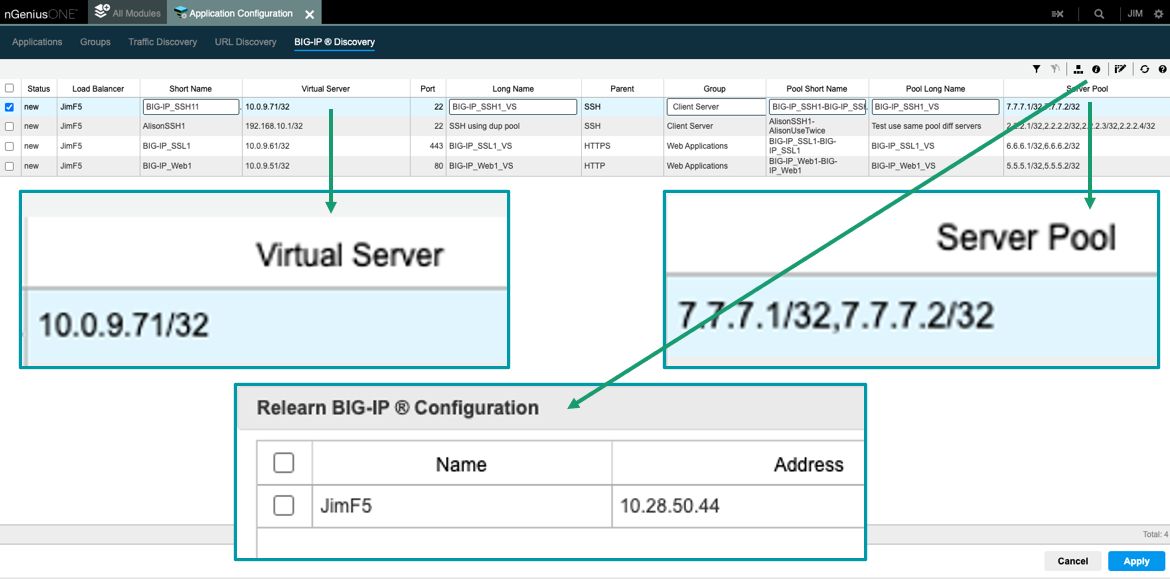
    The nGeniusONE platform supports more than 1,000 voice, video and business data applications using NETSCOUT InfiniStreamNG appliances in combination with nGeniusONE to provide visibility into any infrastructure environment, including data centers, private and public cloud and co-location facilities. The integration with F5 extends those capabilities to add support for custom applications via integration with F5 BIG-IP server pool definitions that can now be directly imported into nGeniusOne.

    Eileen Haggerty, area vice president for enterprise product and solutions marketing for NETSCOUT, said that approach enables nGeniusOne to access clear, unencrypted traffic from the BIG-IP Local Traffic Manager.

    As more cloud-native applications built using microservices are deployed across distributed computing environments, network latency is becoming a bigger DevOps challenge. A wide range of networking issues can adversely impact application performance, but without any visibility into network traffic, it can be challenging to determine the root cause of an issue. NETSCOUT has deployed a global network of appliances to surface those issues.

    A recent report published by Cloud Security Alliance (CSA) found the average enterprise uses 464 custom applications and expects to deploy 37 new applications in the next 12 months. At that rate, the number of organizations likely to encounter networking issues is only going to increase, noted Haggerty.

    It’s not clear to what degree network operations (NetOps) teams are becoming integrated with DevOps teams that build and deploy custom applications. The need for both teams to collaborate more effectively is becoming more apparent as more application code is deployed at the network edge. In some cases, developers are now programmatically invoking network resources directly, while other organizations provide developers access to a portal to self-service their requirements within the context of a set of pre-defined guardrails. Regardless of approach, the need for greater visibility into the underlying networks that custom applications depend on has become critical.

    Exactly how much that need will drive organizations to embrace one networking vendor over another remains to be seen. DevOps teams are starting to exercise more influence as organizations realize how much they depend on custom software to drive digital business processes. DevOps teams need to be able to understand whether an issue is the result of a networking problem or an inherent problem with the code written or the way an application has been deployed.

    Of course, DevOps and NetOps teams don’t share a common nomenclature so the cultural divide between these teams can be wide. The simpler it becomes for NetOps teams to share visibility into networking services the easier it becomes to bridge that divide. Developers should be able to see for themselves how changes to application code might potentially improve network performance. In the absence of any proof to the contrary, most DevOps teams will simply assume there is a fundamental flaw in the networking services being provided.

  • AWS Delivers on Latest Graviton3 Price/Performance Promise

    AWS Delivers on Latest Graviton3 Price/Performance Promise

    Amazon Web Services (AWS) has expanded the number of virtual machines based on the latest generation of its Graviton processors to include instances that support DDR-5 memory.

    The latest Amazon EC2 instance types, dubbed M7g and R7g, that are now generally available are based on the AWS Graviton3 processors developed using an architecture created by Arm. Previously, these instances were only available as part of a technology preview program.

    Rahul Kulkarni, director of product management at AWS, said these latest offerings take advantage of DDR-5 memory to provide 25% better performance than the previous sixth generation of Graviton instances. DDR5 memory increases the amount of bandwidth available by 50%, he noted.

    Graviton processors now provide the lowest-priced instance of virtual machines in addition to the best performance and overall price/performance across the AWS portfolio, Kulkarni added.

    AWS is making a case for employing its AWS Graviton processors for general-purpose workloads as more IT teams are being tasked with reducing costs as the overall number of applications being deployed in the cloud continues to increase. In fact, all of the top Fortune 50 companies have already deployed workloads on Graviton processors, noted Kulkarni.

    While it’s not clear how many applications are being developed to run natively on Arm processors, the process of refactoring existing applications to run on Arm processors is not as intensive for most applications as it was when previously moving applications from one class of processors to another.

    In addition, Kulkarni noted AWS has committed to providing a full range of DevOps services, including a continuous integration/continuous delivery (CI/CD) platform, to help facilitate any transition to Graviton processors.

    There are, of course, multiple strategies for containing cloud costs that range from committing to consuming a specified amount of compute resources annually at discounted rates to relying more on spot instances that are available for limited amounts of time. Regardless of approach, the days when developers were allowed to invoke cloud resources at will appear to have come to an end as enterprise IT organizations become more aware of the total cost of IT. As a result, many of them are adopting financial operations (FinOps) best practices to maximize the utilization of cloud infrastructure resources.

    AWS, like most cloud service providers, gives organizations a wide range of processor options. However, it’s apparent that AWS views Arm processors in the form of Graviton to be the most efficient from both a price and performance perspective. It’s not clear how quickly organizations are embracing Graviton in the cloud given the dominance of x86-based platforms, but it’s apparent there is now a clear alternative for general-purpose workloads. If fact, the more data-intensive those workloads become, the greater the interest in more efficient processor architectures.

    Of course, x86 platforms are not going away anytime soon. But as more Arm-based processors find their way into the enterprise, DevOps workflows will only become more challenging to manage.

  • Nobl9 Adds Service Level Analyzer to SLO Management Platform

    Nobl9 Adds Service Level Analyzer to SLO Management Platform

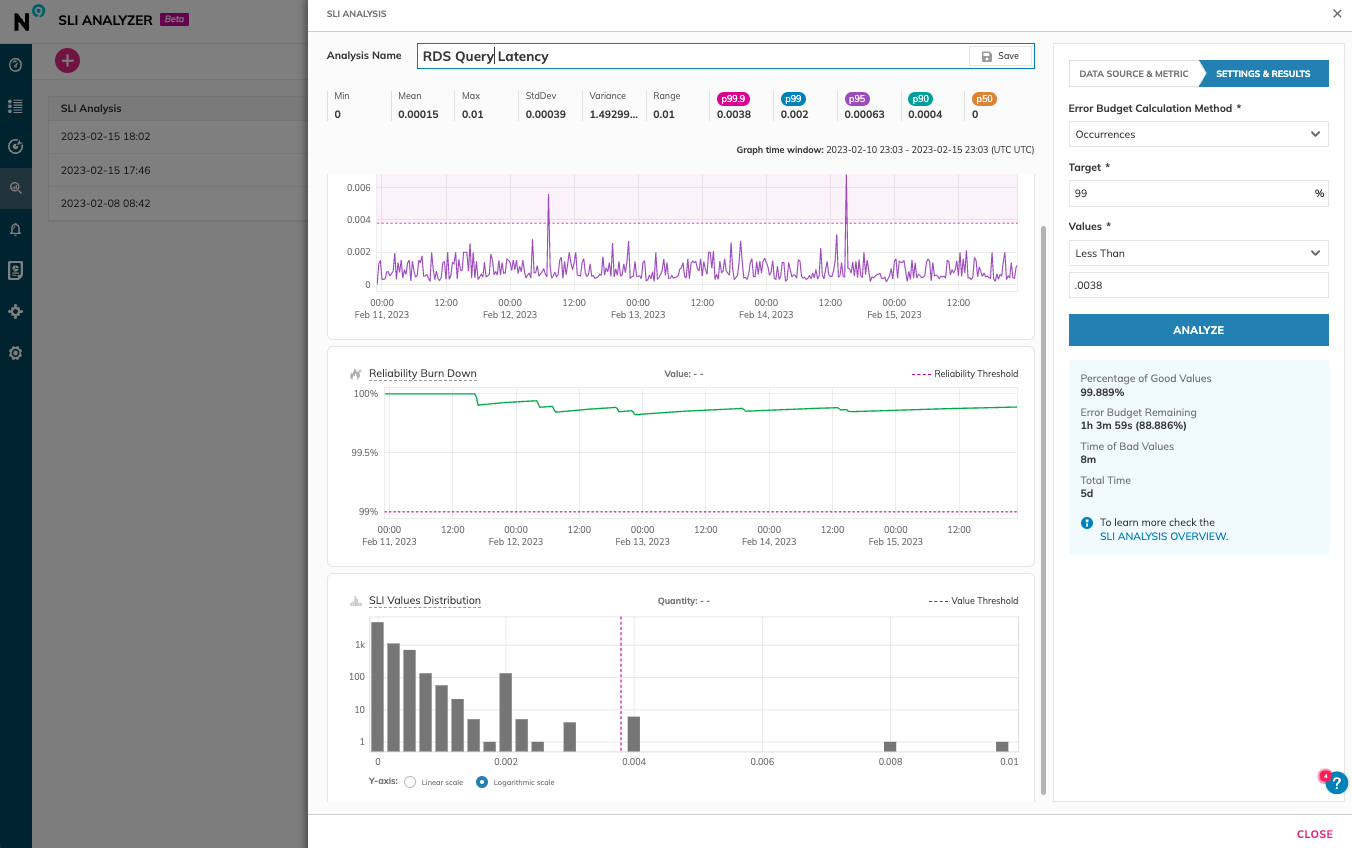
    Nobl9 today added a free tool for analyzing service level objectives (SLOs) to its platform to enable DevOps team to more accurately set reliability goals.

    Brian Singer, chief product officer for Nobl9, said Service Level Analyzer collects metrics and observability data from more than 24 DevOps tools and platforms that can then be used to create an SLO via a single click.

    Included as part of the free tier of the Nobl9 service, Service Level Analyzer also enables DevOps teams to more easily update SLOs as error budgets and error budget burn rates change over time based on actual incidents that have occurred, added Singer.

    DevOps teams can also perform “what-if” analysis to test out the impact of different targets and thresholds on error budgets, he added. That capability ultimately reduces costs because DevOps teams become less likely to overprovision resources to ensure application performance and resiliency, noted Singer. In effect, Service Level Analyzer is providing DevOps teams with an observability tool that spans the entire software development life cycle, said Singer.

    Nobl9 is trying to spur greater adoption of SLOs by making available an open source SLO specification that defines a common interface for constructing SLOs across a DevOps workflow. SLOs, of course, are not a new idea. They have been employed as a metric to track the performance of IT services for decades. However, as more microservices-based applications are built and deployed, it’s becoming more challenging to maintain SLOs across applications because they have many more dependencies than legacy monolithic applications.

    Ultimately, each DevOps team needs to provide some sort of objective benchmark that assesses their overall effectiveness at delivering application services. SLO-as-code is intended to make it simpler to gather the metrics that confirm whether service levels are being achieved. As organizations become more dependent on software to drive digital processes, those SLOs are then tracked across everything from financial services to supply chains.

    In general, DevOps teams are more comfortable with the SLO concept, said Singer. The biggest challenge is making them simpler to implement, he added. The Service Level Analyzer lowers the bar for implementing an SLO by making historical data stored in DevOps tools and platforms more accessible, noted Singer. Rather than having to manually collect that data and then normalize it in an external repository, Nobl9’s Service Level Analyzer automates that process on behalf of a DevOps team using actual data versus relying on less precise statistical analysis, said Singer.

    As IT environments become more distributed, the number of dependencies that exist across application environments only continues to expand. IT teams can spend weeks trying to discover the root cause of issues that are negatively impacting application performance, only to discover that, for example, calls to an application performance interface (API) are being rerouted in a way that significantly increases latency. Tools that enable DevOps teams to more easily understand the relationships between all the services that make up an application environment are more crucial than ever.

  • Quali Update Strengthens Infrastructure Security

    Quali Update Strengthens Infrastructure Security

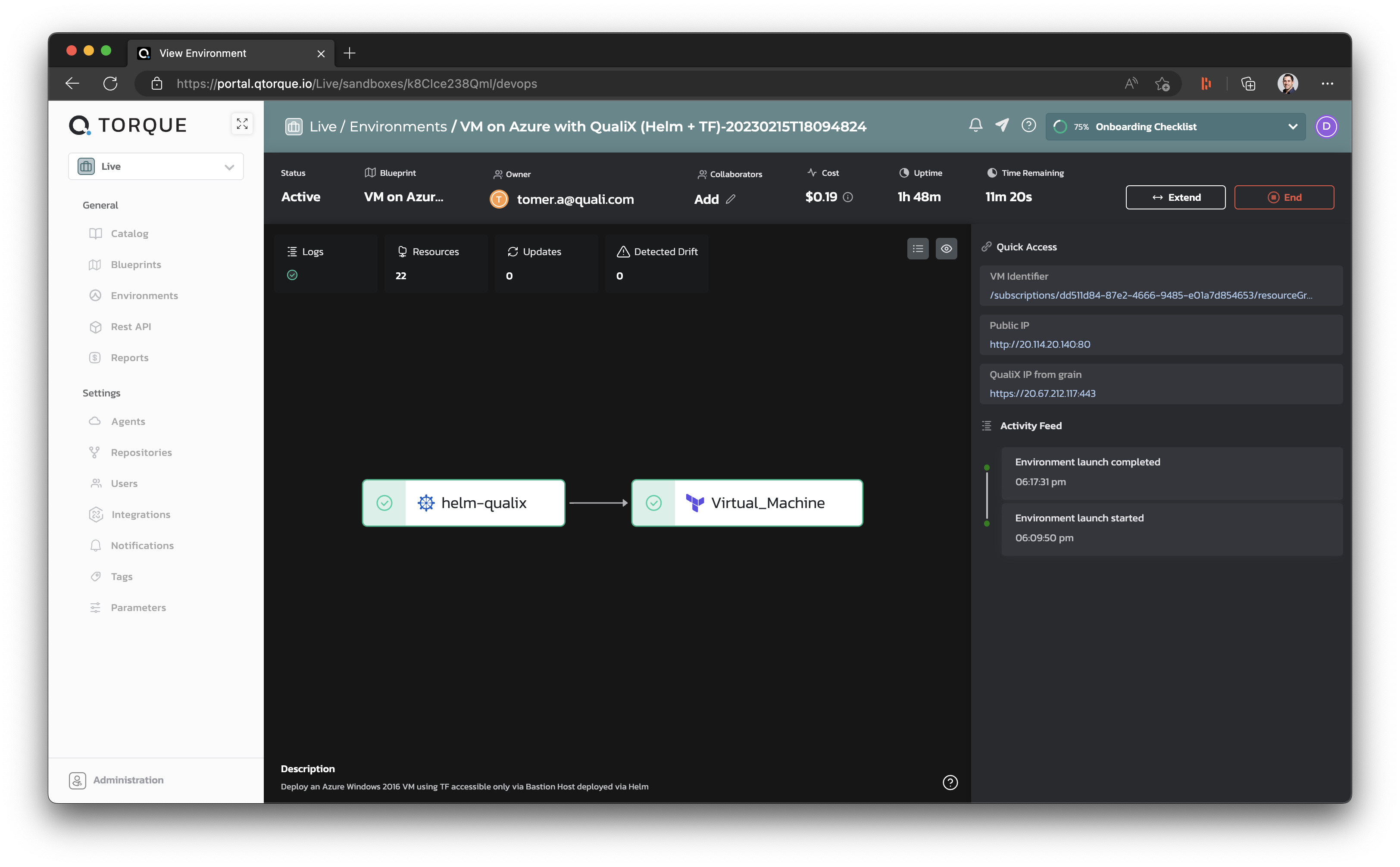
    Quali today announced enhancements to its Torque automated infrastructure platform to add support for security scans and Open Policy Agent (OPA) software being advanced under the auspices of the Cloud Native Computing Foundation (CNCF).

    OPA enables organizations to implement cybersecurity policies as code. The challenge many organizations have encountered is that not many developers have mastered the programming language required to implement OPA. Quali is embedding OPA in a platform that enables IT teams to implement it using a graphical tool that enables central management and application of those policies.

    David Ben Shabat, vice president of research and development at Quali, said the overall goal is to implement scans and policies in a way that reduces the number of misconfigurations that are made when organizations provision infrastructure-as-code (IaC).

    As part of that effort, Torque now flags any policies that fail validation. In addition, administrators can pick and choose which OPA policies to import, including both out-of-the-box and existing custom policies. Those policies then enable Torque to automate approvals or denials of deployments based on compliance with those policies after scans and other health checks have been run.

    Quali has been making a case for policy-based triggers for cost controls, automated start-up, shut down and pausing of IT environments to give IT teams more control over infrastructure using a software-as-a-service (SaaS) platform. That approach enables IT teams to provide a set of guardrails for provisioning infrastructure that prevent mistakes from being made, noted Ben Shabat. Those controls can be applied using the graphical tool Quali provides or programmatically via an application programming interface (API) that Quali exposes, noted Ben Shabat.

    It’s not uncommon for a port to be left open, for example, which cybercriminals later exploit to exfiltrate data. Quali is offering a DevOps platform that allows for central application of policies that act as guardrails to prevent developers from making these types of mistakes as an alternative to scripts created using tools such as Terraform. That approach also provides more visibility into how infrastructure resources are being consumed.

    Every minute a developer spends managing infrastructure is one less minute they could be spending writing code. As application environments become more complex, it is becoming more challenging for developers to manage infrastructure-as-code. The issue is that DevOps teams who could provision infrastructure for developers are overwhelmed by the number of projects they need to manage. As a result, DevOps teams are becoming bottlenecks. Naturally, that only encourages more developers to provision infrastructure on their own, leading to more mistakes.

    It’s not clear whether IT organizations will look for an alternative to provision infrastructure in a way that doesn’t require developers to have as much infrastructure expertise. However, as organizations look to lock down software supply chains, the way infrastructure is provisioned using code will, in many cases, need to be reconsidered within the context of a larger DevSecOps workflow.

  • Akamai Makes Case For Next Era of Cloud Computing

    Akamai Makes Case For Next Era of Cloud Computing

    Akamai Technologies today unveiled a cloud computing service that combines its ability to deploy applications at the edge with the cloud platform it gained via its acquisition of Linode.

    Shawn Michels, vice president of product management for compute and apps at Akamai, said Akamai Connected Cloud will provide the foundation for running a new generation of modern applications that require access to both core infrastructure resources in the cloud alongside highly distributed edge computing services.

    As part of the effort to deliver that combination of services, in the second quarter Akamai is adding three sites in the U.S. to the 11 it already provides. In addition, Akamai revealed it had identified 10 additional cloud sites and 50 distributed edge computing sites that it will add throughout the rest of this year.

    As a long-time provider of a content delivery network, Akamai manages a massive distributed computing environment that spans 4,100 locations across 135 countries. The acquisition of Linode added a set of cloud computing services that enable Akamai to offer the same set of services, including CDN services, as cloud service providers.

    Akamai is now signaling it will compete more aggressively by discounting the egress fees charged whenever data is moved off a cloud platform. One of the most expensive and unpredictable costs is the egress fees cloud service providers charge whenever data is moved off their platforms, noted Michels.

    Finally, Akamai also revealed it has achieved ISO, SOC2 and HIPAA standards compliance for its services.

    Akamai is making a case for an alternative approach to cloud computing that it said will be optimized for both existing monolithic applications running on virtual machines and cloud-native applications based on containers and serverless computing frameworks. A recent survey of 458 development professionals, managers and senior leaders conducted by Techstrong Research, a sister entity of devopsy.kinsta.cloud, found 43% of respondents are considering adding additional cloud service providers in the next 12 months. Nearly two-thirds said they are at least considering, evaluating or are ready to buy from a trusted alternative cloud vendor, with 20% reporting they have already contracted with one.

    It’s not clear whether IT organizations might actually migrate existing applications from one cloud service provider to another. At the very least, Akamai expects that as new applications are developed, the company will be able to gain a larger share of the overall market.

    There’s no doubt that a new era of cloud computing is dawning as organizations look to deploy distributed applications that process and analyze data closer to the point where it is created and consumed. These applications will then share the results of the data processed at the edge with, for example, centralized data lakes that make it possible to analyze data collected across a distributed computing environment.

    The one thing DevOps teams can count on is that as this next era of cloud computing evolves, the management of IT environments will become much more challenging for all concerned.

  • The Differences Between DevOps and GitOps

    The Differences Between DevOps and GitOps

    The transition to a DevOps model has been welcomed by many organizations that are looking to implement more efficient development processes. However, there are multiple models to choose from, with GitOps a popular choice for many. So what is the difference, and which one is better?

    In this article, we will discuss what each model entails and their key differences and establish if one is better than the other for your business.

    What is DevOps? – An Overview

    The DevOps model involves several tools and practices designed to make software development much more efficient. This increase in efficiency is achieved by implementing more automation, adopting continuous delivery practices and improving the communication channels between the developers and operations. 

    Ultimately, DevOps is designed to assist organizations in deploying new products and systems faster. By establishing more collaboration between development and operational teams, changes can be made quickly to best suit the business’s overall goals. 

    There is no single tool that is required for DevOps. In fact, your team can use any tool that effectively improves communication and automates key tasks. 

    How to Integrate a DevOps Strategy

    Adopting and integrating a DevOps strategy into your organization’s overall workflow is not a difficult process, and it can be achieved by following these steps: 

    1. Create a continuous integration/continuous delivery (CI/CD) pipeline.
    2. Configure this new pipeline to enable the automated deployment of changes to your development/production environment.
    3. Set up an alert and monitoring system for your development environment. 
    4. Create collaboration channels so operational teams can inform the developers of new opportunities to improve the business’s workflow. 

    An Overview of GitOps

    GitOps is a modern concept that was initially introduced by the Kubernetes management system Weaveworks. This model uses Git, an open source, distributed version control system, to track any changes to a system and who has made them. 

    The GitOps model uses a Git repository as the single source of truth (SSoT), improving collaboration between developers and operational team members. This, in turn, allows organizations to automate the deployment process. 

    By leveraging CI/CD pipelines like DevOps, changes are automatically applied to the codebase without any need for manual input. Thanks to Git, these changes can also be easily reversed if needed, reverting to a previous working version. 

    How to Integrate a GitOps Strategy

    GitOps can be integrated into a business’s workflow quite simply by following four key steps: 

    1. Set up a Git repository for your organization’s codebase. When integrating a GitOps strategy, an organization does not need to use GitHub exclusively, as any code repository that uses Git commands can do the job. 
    2. Connect this repository to a CI/CD tool.
    3. Configure your chosen tool to deploy automatic changes to your development environment. Popular tools include Jenkins and Circle CI. 
    4. Set up monitoring and alerts for your development environment. 

    It should be noted that the CI part of GitOps still needs to go through your DevOps tool, whether it’s GitHub Actions or AWS CodeBuild. 

    The Differences Between DevOps and GitOps

    The core difference between the two is that GitOps allows teams within an organization to manage and deploy changes to infrastructure using Git as the single source of truth. DevOps, on the other hand, focuses on effectively connecting development and operational teams using a tool of the organization’s choosing. 

    Either model can offer a number of benefits in terms of development and deployment, but there are notable differences between the two that should be considered. It should also be noted that DevOps and GitOps can work in unison as long as continuous integration (CI) is delivered using your chosen DevOps tool.

    DevOps – Key Elements

    • The DevOps model is considered a working culture.
    • DevOps can use a variety of CI/CD pipelines and is not restricted to any one tool.
    • This model increases automation and the regularity of deployment, reducing any human input. 
    • Cloud configuration can be used for coding, supply chain management and other key requirements.
    • The pipeline separates development and operations processes while improving collaboration between the two.

    GitOps – Key Elements

    • GitOps is a development and deployment technique that relies on the Git version control system.
    • Git is used as the single source of truth for all changes to the codebase.
    • GitOps can use Kubernetes and infrastructure-as-code (IaC) practices and various other CI/CD pipelines. 
    • The GitOps model is designed to increase development times and reduce reliance on lengthy scripts.
    • It also enables a smoother transition between a project’s development and operation stages.

    DevOps Vs. GitOps – Which Model Is Better?

    Both GitOps and DevOps are becoming increasingly popular when it comes to adopting new approaches to improve software development processes and making deployment quicker and more efficient. As outlined above, the difference between the two models largely comes down to the tools that are used, but the result is roughly the same in terms of the overall benefits. 

    Deciding which approach is the right one for your organization or determining which one is “better” will always come down to the needs and requirements of your organization. In fact, the ideal scenario would be to integrate GitOps so it works alongside your DevOps approach. 

    GitOps is not a replacement for DevOps, as the CI process still relies on DevOps tools. However, GitOps can improve the effectiveness of the DevOps team thanks to continuous delivery processes. Using Kubernetes-native mechanisms and commands and sticking to standard source code principles, GitOps does not require developers to change how they work, guaranteeing a seamless implementation process.

    Wrapping Up

    DevOps is a working culture that improves collaboration between development and operations teams and utilizes automation tools, resulting in rapid and more efficient software development. GitOps, on the other hand, uses Git as the single source of truth, making it easy to track changes and further increase development times thanks to continuous delivery processes. 

    Although each model can be used exclusively, they can also work alongside each other to deliver rapid software development and high levels of collaboration. Therefore, it is unfair to claim that one model is better than the other, as they can both play their part in an overall DevOps strategy. 

  • Running Serverless in Production: 7 Best Practices for DevOps

    Running Serverless in Production: 7 Best Practices for DevOps

    Serverless in production refers to the deployment and use of serverless architecture in a live, production environment. In this context, serverless refers to a cloud computing paradigm where the cloud provider manages the infrastructure and allocates resources as needed to run and scale applications and services.

    In a serverless production environment, applications and services are broken down into individual functions triggered by events, such as API requests or changes in data. These functions are executed in response to these events and the cloud provider is responsible for managing the underlying infrastructure, including servers, storage and network resources.

    In this article, I’ll describe some of the key use cases of serverless in production and provide important best practices DevOps teams can use to run serverless in production safely and effectively.

    Use Cases of Serverless in Production

    Serverless technology has emerged as a popular choice for delivering various applications and services in production. Here is a brief overview of serverless in production for four use cases.

    Microservices

    In a microservices architecture, an application is divided into small, independent services that can be developed, deployed and scaled separately. Serverless allows each microservice to be deployed as a separate function, triggering the function only when needed and scaling it automatically based on demand. This results in a cost-effective and flexible solution for microservices, as the user only pays for the exact amount of computing resources used by each function.

    IoT Devices

    Internet of things (IoT) devices generate large amounts of data, which need to be processed and analyzed in real-time. Serverless functions can process IoT data as it is generated, allowing for real-time analytics and decision-making. With serverless, the processing and analysis can be scaled dynamically, handling spikes in data volume without the need for infrastructure management.

    Multimedia Processing

    Multimedia processing tasks, such as image and video compression, often require significant computing resources. With serverless, these tasks can be performed as functions triggered by events such as the upload of a new image or video. The serverless functions can scale automatically to handle large amounts of data, reducing the costs associated with infrastructure management and increasing efficiency.

    This function-as-a-service (FaaS) is often used for storing and processing user inputs and other data types. For example, FaaS can be used to execute specific processes according to the category of media uploaded by the user. It’s easier to build these services because the developer can write one function that is applied to multiple processing tasks. 

    APIs for Mobile and Web Applications

    APIs are an essential component of many web and mobile applications, providing access to the underlying data and services. Serverless functions can build and deploy APIs, providing a cost-effective and scalable solution. The functions can be triggered by incoming API requests and automatically scaled based on demand, allowing for fast and reliable API access for users. 

    FaaS is especially useful for RESTful applications and event-driven architectures. Containers are also useful for performing processes like API calls, but serverless functions are best suited for highly fluctuating volumes of traffic.

    Best Practices for Running Serverless in Production

    1. Monitor the Serverless Environment

    Serverless monitoring refers to the process of monitoring serverless applications and infrastructure, including serverless functions and event-driven computing services, without the need for dedicated servers or virtual machines. In a serverless architecture, computing resources are dynamically allocated and managed by the cloud provider, so there is no need for organizations to manage and maintain their own servers.

    Serverless monitoring involves monitoring various aspects of serverless applications and infrastructure, including function execution, resource utilization and performance metrics. The goal of serverless monitoring is to identify and resolve issues that may impact the performance and reliability of serverless applications and to optimize resource utilization for cost efficiency.

    By implementing serverless monitoring, organizations can ensure that their serverless applications and infrastructure are performing optimally and that they can quickly identify and resolve any issues that may arise. This helps to improve the reliability and cost-effectiveness of serverless computing and enables organizations to take full advantage of the benefits of serverless architecture.

    2. Implement Authentication

    Serverless authentication refers to the process of authenticating users and applications in a serverless architecture, where computing resources are dynamically allocated and managed by the cloud provider. In a serverless authentication model, authentication is managed through cloud-based services and APIs without the need for dedicated servers or virtual machines.

    By implementing serverless authentication, organizations can ensure that their serverless applications and services are secure and that users are only able to access the resources that they are authorized to access. This helps to improve the security of serverless applications and services and reduce the risk of security breaches.

    3. Ensure Security with API Gateways

    API gateways provide a centralized point of control and security for incoming API traffic. API gateways allow for the implementation of authentication and authorization mechanisms, such as OAuth, to control access to serverless functions. This ensures that only authorized users and clients can access the functions, reducing the risk of unauthorized access.

    API gateways can also manage incoming API traffic, such as rate limiting and request filtering, to prevent overloading the serverless functions and protect against denial-of-service (DoS) attacks. They perform real-time threat detection, identifying and blocking malicious traffic before it reaches the serverless functions. This includes protection against other common attacks such as cross-site scripting (XSS) and SQL injection.

    Finally, an API gateway can enforce encryption for incoming and outgoing API traffic, ensuring that sensitive data is protected in transit. 

    4. Assign Appropriate Roles to Functions

    With serverless, there can be many resources that must be handled, making management potentially complex. Creating minimal suitable roles for each function makes management easier, enhances security and reduces the attack surface of the serverless architecture. This approach means that the least privilege principle is applied, where a function only has the minimum permissions required to perform its intended task. It reduces the risk of unauthorized access to other parts of the infrastructure, such as sensitive data or other functions.

    The right roles ensure that functions are isolated from each other and run in their own security context. This helps to prevent the spread of any security incidents, as well as ensure that the compromise of one function does not affect the security of the rest of the system.

    5. Ensure Dependencies are Secure

    It is common for serverless functions to have dependencies from various repositories like Maven and PyPI. These dependencies may contain known vulnerabilities which can be exploited by attackers. Securing application dependencies is important to prevent security incidents and ensure the reliability and availability of the serverless architecture.  

    This involves tracking and managing the dependencies used in the serverless applications. This helps to ensure that dependencies are used in a consistent and controlled manner, reducing the risk of conflicts or compatibility issues. By regularly monitoring and updating dependencies, organizations can ensure that their serverless architecture is secure and reliable.

    6. Sanitize Inputs to Prevent Injection Attacks

    Serverless applications often use data inputs from users or events. This data enables functions such as data streaming, but the user-supplied data can also pose security risks. Sanitizing event inputs helps to prevent injection attacks—these occur when an attacker injects malicious code or data into a serverless function through the event inputs. 

    By sanitizing inputs, organizations can remove or modify potentially malicious inputs, preventing the attacker from injecting malicious code into the function. One important form of sanitization is input validation—validating that the inputs conform to a specific format or type, such as checking that a string is a valid email address. This helps to prevent attackers from injecting malicious code into the function by ensuring that the inputs are in the expected format.

    Sanitizing data is only one aspect of a defense-in-depth security strategy, which involves implementing multiple security controls to protect against attacks. It is also important to enable data escaping for SQL and noSQL databases. Likewise, the data provided by events shouldn’t be used to evaluate code at runtime or spawn system processes. 

    7. Secure Data in Transit

    Securing and verifying data in transit helps to prevent data breaches and ensure the confidentiality, integrity, and privacy of data transmitted between different parts of the serverless architecture. Here are some guidelines for securing and verifying data in transit:

    • Use HTTPS: This is a secure protocol for transmitting data over the internet. By using HTTPS, organizations can ensure that data transmitted between different parts of their serverless architecture is encrypted, preventing unauthorized access to sensitive data.
    • Implement SSL certificate verification: Verify the identity of the certificate owner and the authenticity of the certificate. This helps to prevent man-in-the-middle attacks, where an attacker intercepts and alters data transmitted between the server and the client.
    • Enable signed requests: These involve adding a digital signature to a request, which is then verified by the recipient. This helps to prevent tampering with data in transit and ensures the integrity of the data.

    Conclusion

    In conclusion, running serverless in production requires careful planning and execution to ensure the security and reliability of the architecture. By following the best practices described here, DevOps teams can reduce the risk of security incidents and ensure the reliability and availability of their serverless architecture. These include:

    • Monitoring the serverless environment
    • Implementing authentication
    • Deploying API gateways
    • Creating minimal suitable roles for each function
    • Securing application dependencies
    • Sanitizing event inputs
    • Securing and verifying data in transit 

    Additionally, regularly monitoring and updating dependencies and implementing a defense-in-depth security strategy can help organizations ensure the security and reliability of their serverless architecture over time. 

  • 5 Technologies Powering Cloud Optimization

    5 Technologies Powering Cloud Optimization

    Cloud optimization is the process of improving the performance, cost-effectiveness, and reliability of cloud computing resources and services. It involves identifying and addressing inefficiencies in cloud architecture, application design and resource utilization, as well as implementing best practices for security, scalability and disaster recovery. 

    The goal of cloud optimization is to maximize the benefits of cloud computing while minimizing the risks and costs associated with it. It is a multi-disciplinary process that may involve several key elements, such as:

    • Capacity planning: Evaluating the current and future resource requirements of your cloud environment and ensuring that the right amount of resources are available to meet your needs.
    • Resource utilization: Monitoring and managing the utilization of cloud resources to ensure that they are used efficiently and effectively.
    • Cost optimization: Minimizing the cost of cloud resources and services by identifying and addressing areas of inefficiency and waste, such as over-provisioning or underutilized resources.
    • Performance optimization: Improving the performance of cloud applications and services by optimizing network bandwidth, storage performance and database performance.
    • Security optimization: Enhancing the security of cloud resources and data by implementing best practices for access control, encryption and threat mitigation.
    • Scalability optimization: Making sure that your cloud environment can scale up or down as needed to meet changing resource demands.
    • Disaster recovery: Establishing a disaster recovery plan to ensure that your cloud environment can quickly recover from failures or outages.

    Why is Cloud Optimization Important?

    Optimization is important for several reasons, including:

    • Cost savings: By optimizing the use of cloud resources, organizations can reduce their cloud computing costs and ensure that they are only paying for what they actually need.
    • Improved performance: By optimizing cloud applications and services, organizations can improve the performance and responsiveness of their systems, leading to a better user experience and increased productivity.
    • Increased reliability: Optimization helps organizations to improve the reliability and availability of their cloud environment, reducing the risk of downtime and ensuring that their systems are always available when they are needed.
    • Better security: By implementing best practices for security, organizations can better protect their cloud resources and data, reducing the risk of data breaches and other security incidents.
    • Scalability: Cloud optimization enables organizations to scale their environment up or down as needed, ensuring that they always have the resources they need to support their growing business.
    • Improved agility: Organizations can be more agile and responsive to changing business needs, enabling them to quickly and effectively respond to new opportunities and challenges.

    5 Technologies Powering Cloud Optimization

    Cloud Cost Management

    Cloud cost management is a critical component of optimization that helps organizations to monitor and manage their cloud spend. The goal is to ensure that organizations are only paying for the cloud resources they actually need and that they are using those resources efficiently.

    Cloud cost management solutions (such as Azure Cost Management or AWS Trusted Advisor) provide detailed cost reports, usage analytics and cost optimization recommendations to help organizations understand their cloud spend and identify areas of inefficiency. For example, these solutions can:

    • Monitor and report on cloud resource usage: By monitoring the usage of resources, cloud cost management solutions can provide detailed cost reports that show how much an organization is spending on each resource, such as compute instances, storage and network traffic.
    • Automate cost optimization: Many cloud cost management solutions can automate cost optimization tasks, such as turning off unused resources or right-sizing instances to reduce waste.
    • Provide cost analysis and forecasting: These solutions can provide detailed cost analysis and forecasting to help organizations understand the impact of changes to their cloud environment and plan for future spending.

    Autoscaling

    Autoscaling is a technology that enables organizations to automatically scale their cloud resources up or down as needed to meet changing demands. The goal of autoscaling is to ensure that organizations always have the right amount of resources to support their workloads while minimizing costs and ensuring that their systems are always available when they are needed.

    Autoscaling works by monitoring the performance and usage of cloud resources, such as compute instances, storage and network traffic, and automatically adjusting the size of those resources to meet changing demand. For example, autoscaling can:

    • Add or remove instances as needed: If demand for a resource increases, autoscaling can automatically add more instances to meet that demand. If demand decreases, autoscaling can automatically remove instances to reduce waste.
    • Optimize resource utilization: Autoscaling can optimize the utilization of cloud resources by right-sizing instances to meet demand, ensuring that resources are not over-provisioned or underutilized.
    • Improve system availability: By automatically adding or removing resources as needed, autoscaling can ensure that systems are always available and responsive, reducing the risk of downtime and improving the user experience.

    API Gateway

    An API gateway is a server that acts as an intermediary between an application and one or more microservices. The API gateway is responsible for request routing, composition and protocol translation, which enables microservices to communicate with each other securely and efficiently.

    An API gateway can help with cloud optimization in several ways:

    • Load balancing: The API gateway can distribute incoming API requests to multiple microservices, improving the overall performance and reliability of the system. It can also provide features such as automatic failover and load balancing, which helps to ensure that the system remains available and responsive even in the face of high traffic volumes or other performance challenges.
    • Resource optimization: By acting as a single entry point for API requests, the API gateway can help to reduce the overall resource usage of the system. For example, it can cache frequently used data and serve it directly to clients without having to go back to the microservices, reducing the load on the underlying system.
    • Monitoring and management: API gateways provide a centralized management interface for the microservices, making it easier to monitor and manage the system as a whole. This includes features such as logging, monitoring and alerting, which can help to identify and resolve performance issues quickly and effectively.

    GitOps Platforms

    GitOps is a paradigm that helps automate application deployment and infrastructure provisioning. It typically involves using Git, an open source version control system, as a single source of truth for declarative infrastructure and applications. 

    GitOps aims to improve the developer experience by letting teams use their familiar software development tools to manage application and infrastructure changes.

    With GitOps, cloud optimization can be achieved by:

    • Automating the deployment process: GitOps automates the deployment process, reducing the risk of human error and speeding up the deployment process. This helps to ensure that resources are deployed consistently and correctly, improving the reliability and performance of the environment.
    • Managing cloud infrastructure as code: With GitOps, cloud infrastructure can be defined and managed as code, making version control and collaborating on configurations easier. This helps to optimize the use of resources and improve the overall efficiency of the cloud environment.
    • Improving collaboration and communication: GitOps enables teams to collaborate and communicate more effectively, reducing the risk of conflicts and delays. With Git, changes can be easily tracked, discussed and approved, improving the speed and quality of deployments.
    • Enforcing governance and compliance: GitOps provides a centralized and auditable record of all changes to the environment, making it easier to enforce governance and compliance requirements. This helps to improve the security and reliability of the cloud environment, reducing the risk of breaches and other security incidents.

    APM

    Cloud application performance management (cloud APM) is the practice of monitoring, analyzing and optimizing the performance of cloud-based applications. The goal is to ensure that these applications are available, responsive and performing optimally to meet the needs of users.

    These solutions provide a range of tools and capabilities for monitoring and optimizing cloud-based applications, including:

    • Performance monitoring: Cloud APM solutions monitor application performance in real-time, providing visibility into performance metrics such as response time, resource utilization and error rates.
    • Root cause analysis: These solutions can help identify the root cause of performance issues by providing detailed performance data and tracing information.
    • Capacity planning: Cloud APM solutions can provide detailed performance data and analytics to help organizations plan and optimize their application deployments.
    • Performance optimization: These solutions can provide recommendations for performance optimization, such as right-sizing cloud resources, reducing resource utilization and improving application design.
    • Continuous performance monitoring: These solutions can continuously monitor application performance, providing real-time visibility and alerting to help organizations quickly identify and resolve performance issues.

    Conclusion

    In conclusion, cloud optimization is critical for organizations looking to maximize the value and minimize the costs of their cloud deployments. By using technologies such as cloud cost management, autoscaling, API gateways, GitOps platforms and APM, organizations can improve availability, performance and efficiency while reducing costs and ensuring that they are always prepared to meet changing business needs. 

    These technologies provide the tools and capabilities necessary to monitor, analyze and optimize cloud-based applications, helping organizations to ensure that their deployments are always delivering the best possible value. By embracing optimization, organizations can stay ahead of the curve and ensure that their cloud deployments are always aligned with their business goals and objectives.